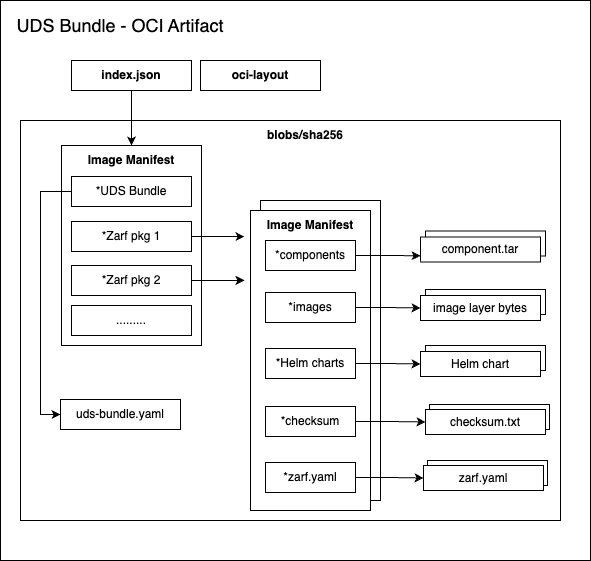
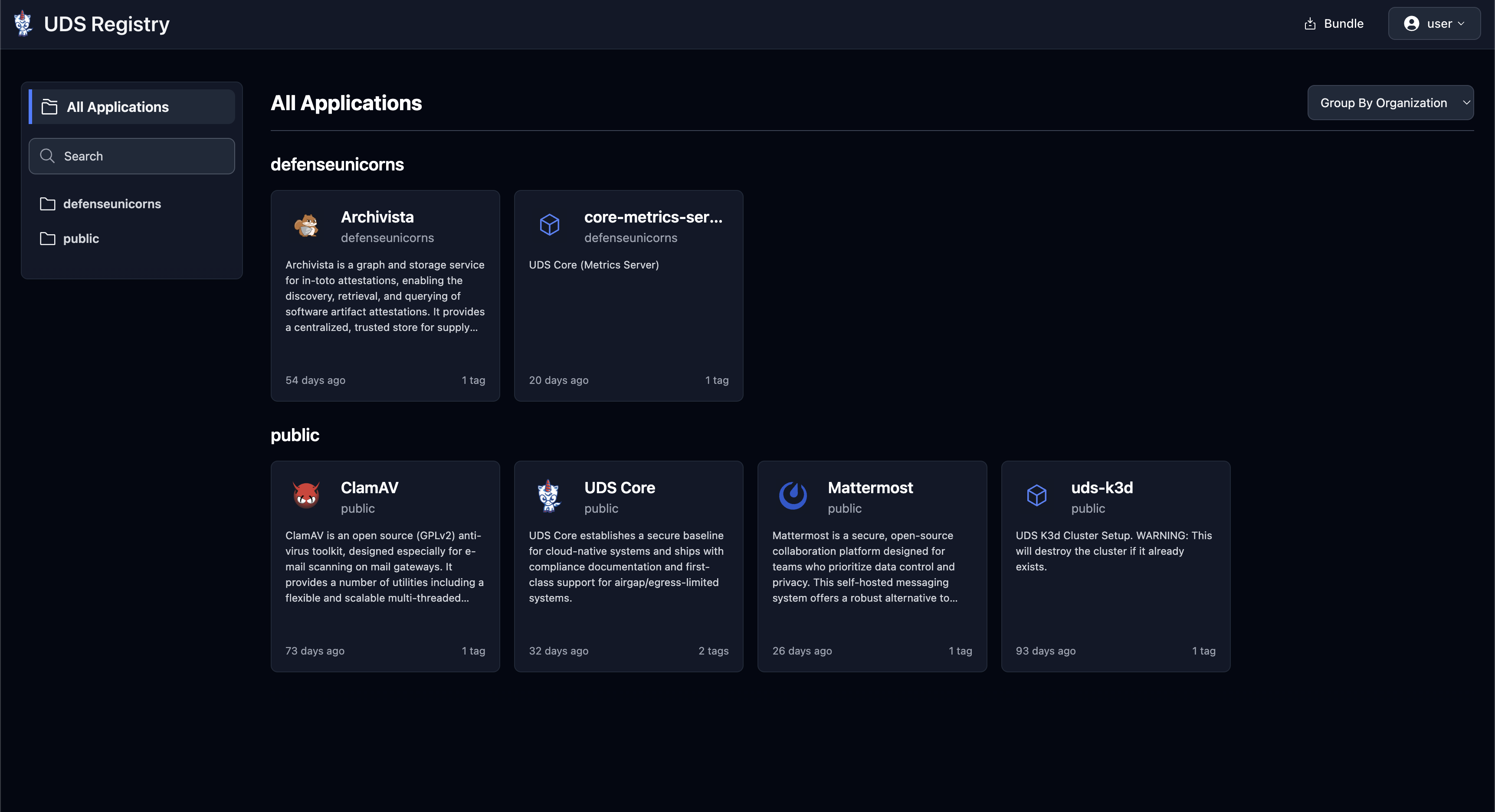
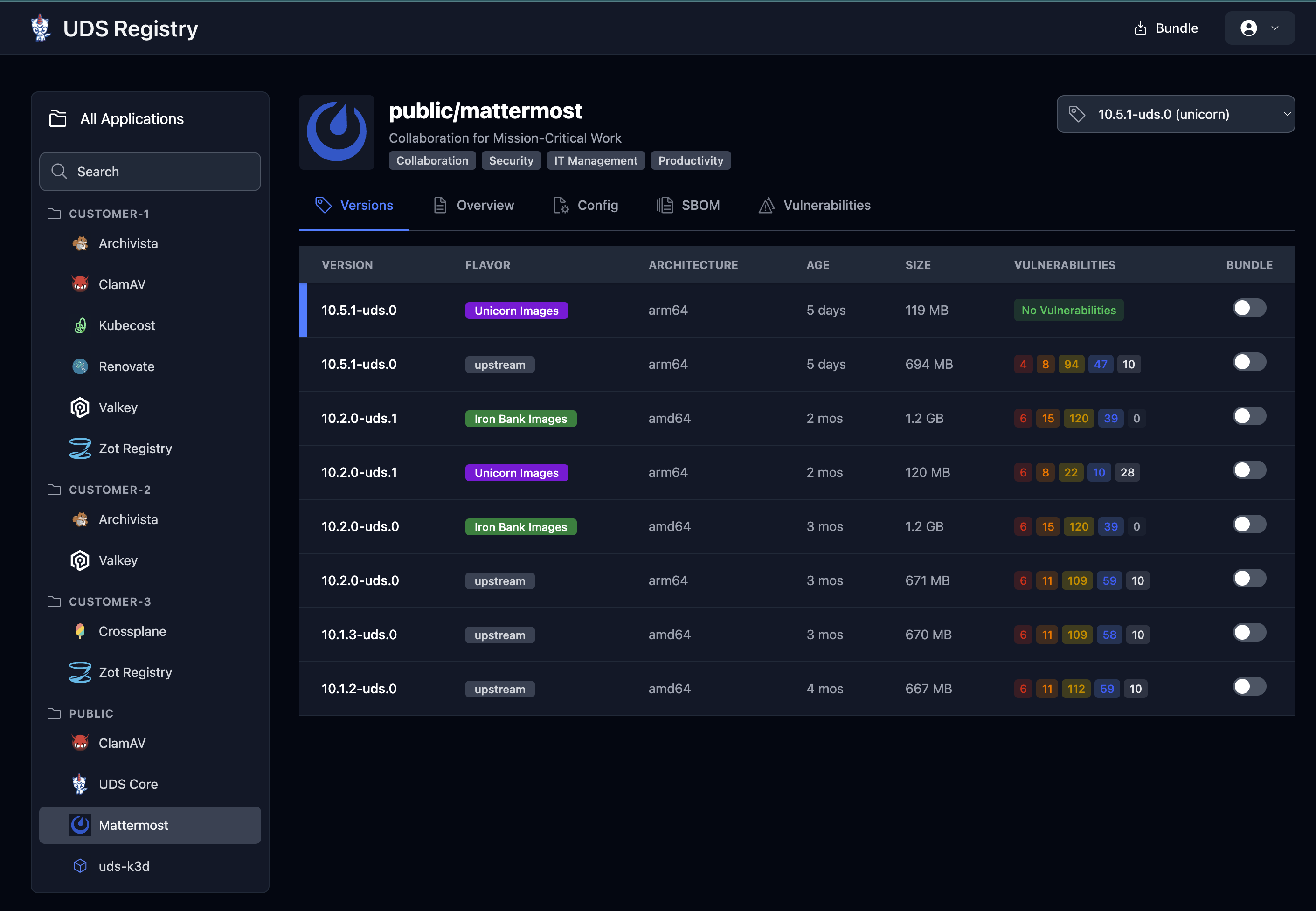
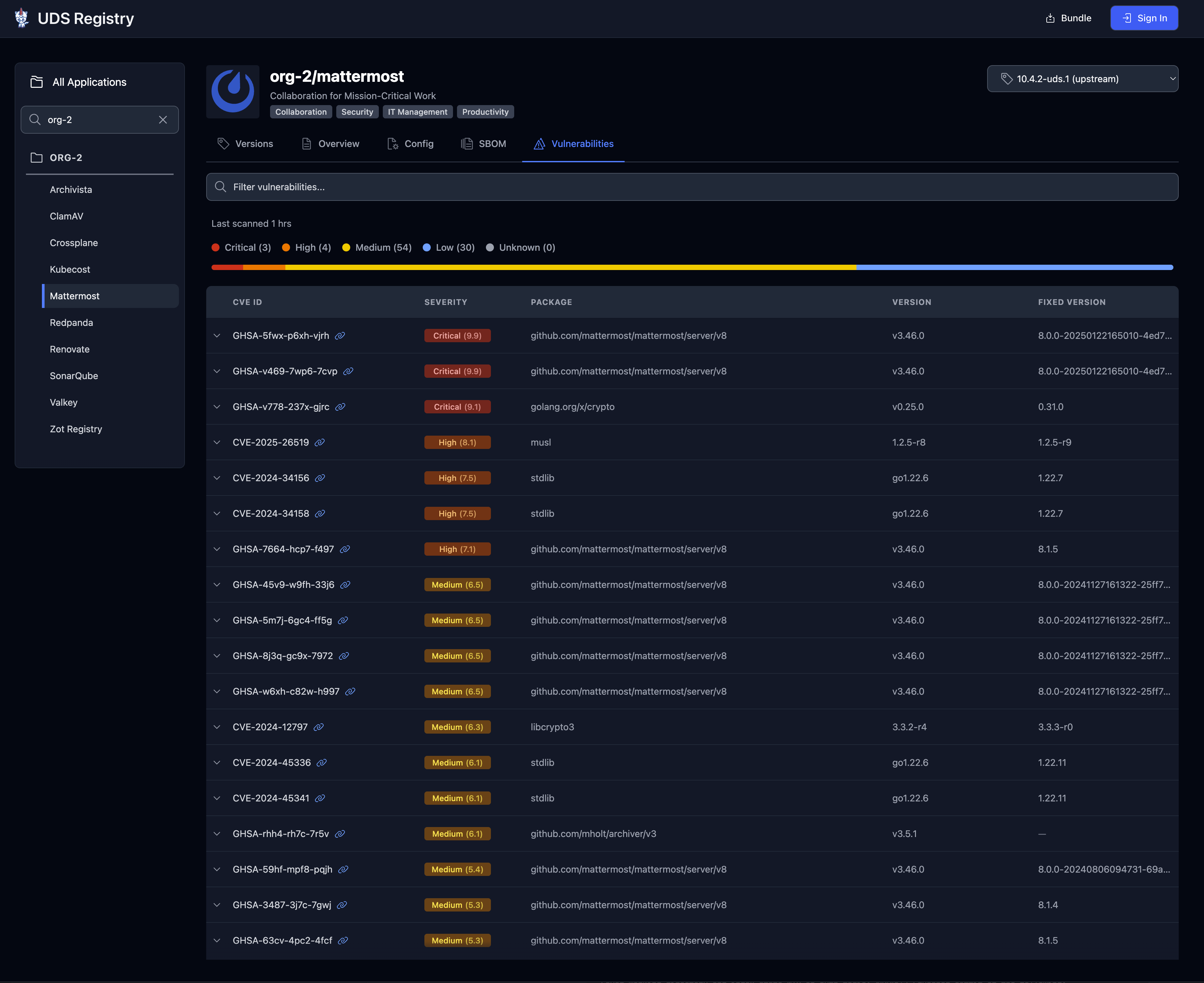
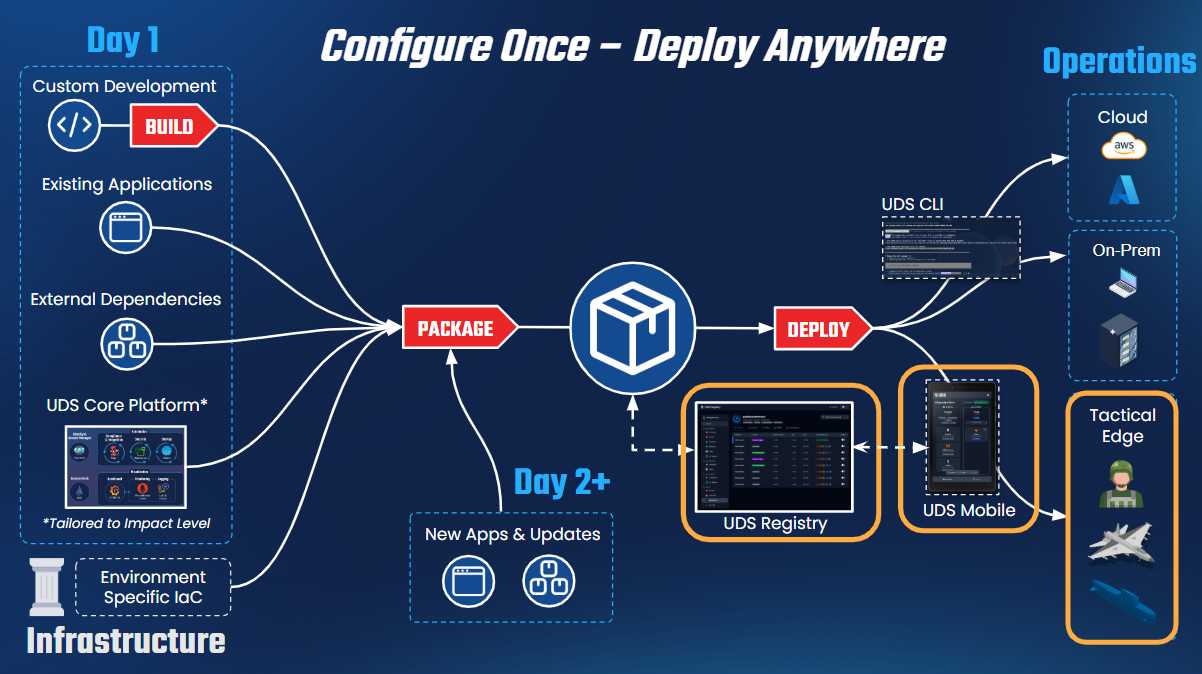
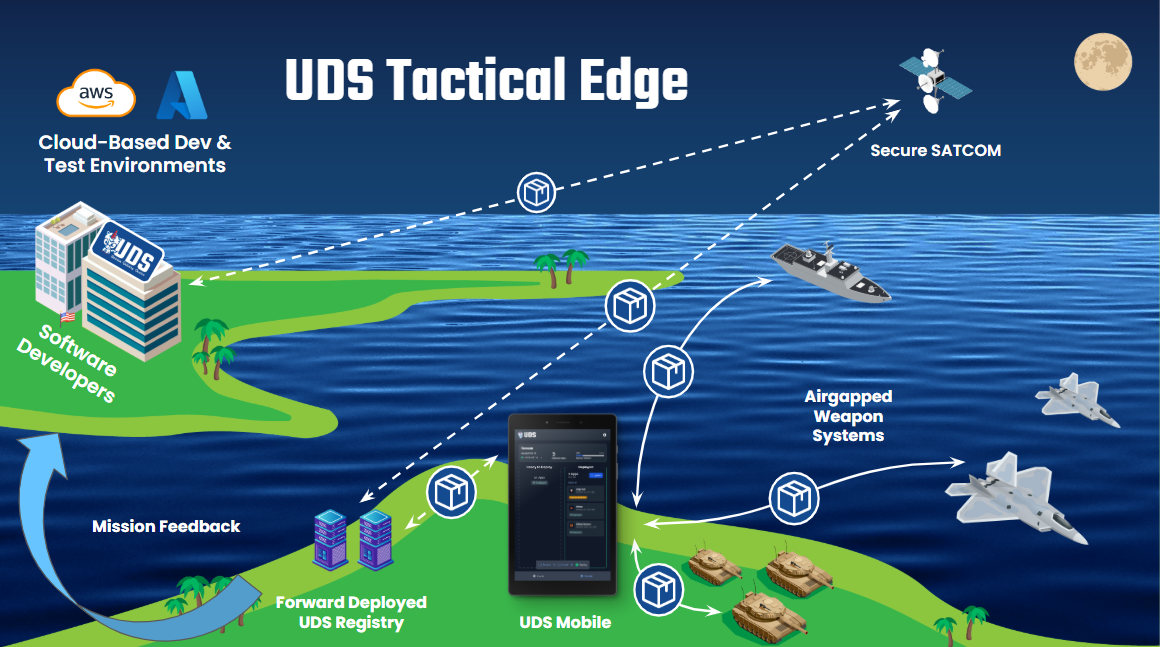
This is the full developer documentation for UDS Documentation ----- # Set Up Your Environment > Verify your local environment meets the CPU, RAM, and storage requirements before running the UDS Core local demo. import { Steps, Tabs, TabItem } from '@astrojs/starlight/components'; ## Requirements Your container runtime must have access to at least: | Resource | Minimum | |---|---| | CPU | 4 cores | | RAM | 10 GiB | | Storage | 40 GiB | > [!NOTE] > **Windows (WSL):** WSL only accesses 50% of host RAM by default. You'll need a machine with at least 8 CPU cores and 20 GiB RAM. Adjust limits with a [`.wslconfig` file](https://learn.microsoft.com/en-us/windows/wsl/wsl-config). ## Install required tools 1. **Install [Docker Desktop](https://www.docker.com/products/docker-desktop/)** Download and install Docker Desktop for Mac. Start it and confirm it's running before continuing. > [!NOTE] > Docker Desktop requires a paid subscription for companies with 250+ employees or $10M+ revenue. [Colima](https://github.com/abiosoft/colima) is a free alternative. 2. **Install [Homebrew](https://brew.sh/)** ```bash /bin/bash -c "$(curl -fsSL https://raw.githubusercontent.com/Homebrew/install/HEAD/install.sh)" ``` 3. **Install [k3d](https://k3d.io/)** k3d runs a lightweight Kubernetes cluster inside Docker. ```bash brew install k3d ``` 1. **Install Docker Engine** Install [Docker Engine](https://docs.docker.com/engine/install/) for your distribution, or [Docker Desktop for Linux](https://docs.docker.com/desktop/install/linux-install/). > [!NOTE] > Docker Desktop requires a paid subscription for companies with 250+ employees or $10M+ revenue. [Docker Engine](https://docs.docker.com/engine/install/) is a free alternative. 2. **Install [Homebrew](https://brew.sh/)** ```bash /bin/bash -c "$(curl -fsSL https://raw.githubusercontent.com/Homebrew/install/HEAD/install.sh)" ``` Add `brew` to your PATH (the installer prints the exact command for your shell): ```bash (echo; echo 'eval "$(/home/linuxbrew/.linuxbrew/bin/brew shellenv)"') >> ~/.bashrc ``` Install required dependencies: ```bash sudo apt-get install build-essential && brew install gcc ``` 3. **Install [k3d](https://k3d.io/)** ```bash brew install k3d ``` > [!CAUTION] > Requires Windows 10 version 2004 (Build 19041+) or Windows 11. For older builds, follow the [manual WSL installation guide](https://learn.microsoft.com/en-us/windows/wsl/install-manual). 1. **Install WSL** Open PowerShell as Administrator and run: ```powershell wsl --install ``` This installs WSL 2 with Ubuntu. Restart when prompted, then open Ubuntu and set a username and password. Update packages: ```bash sudo apt update && sudo apt upgrade ``` > [!CAUTION] > Istio requires Linux kernel 6.6.x or later on WSL. Update with: > ```powershell > wsl --update --pre-release > ``` 2. **Install a container runtime** **Option A: [Docker Desktop](https://www.docker.com/products/docker-desktop/) for Windows** integrates automatically with WSL 2. In Docker Desktop settings, enable **Use the WSL 2 based engine**. > [!NOTE] > Docker Desktop requires a paid subscription for companies with 250+ employees or $10M+ revenue. **Option B: [Docker Engine](https://docs.docker.com/engine/install/ubuntu/)** installs directly inside your WSL Ubuntu distribution as a free alternative. 3. **Install [Homebrew](https://brew.sh/) and [k3d](https://k3d.io/)** in your WSL terminal ```bash /bin/bash -c "$(curl -fsSL https://raw.githubusercontent.com/Homebrew/install/HEAD/install.sh)" brew install k3d ``` ### Troubleshooting WSL The following are common issues and solutions for WSL setups: - **Ubuntu won't start:** Enable virtualization in your BIOS. - **Missing Windows features:** Search "Turn Windows features on or off" → enable **Virtual Machine Platform** and **Windows Subsystem for Linux**. - **WSL running as version 1:** Check with `wsl -l -v`. Upgrade with `wsl --set-version 2`. - **Running Windows in a VM:** Enable nested virtualization in both the host BIOS and hypervisor. ## Verify Confirm your tools are installed and working: ```bash docker info # Docker is running k3d version # k3d is installed ``` Both commands should return version output without errors. > [!NOTE] > `kubectl` is not required at this stage. Once UDS CLI is installed in the next step, you can use `uds zarf tools kubectl` as a built-in alternative. ----- # Install and Deploy UDS > Install the UDS CLI and deploy the k3d-core-demo bundle to create a running local UDS Core cluster. import { Steps } from '@astrojs/starlight/components'; > [!CAUTION] > The `k3d-core-demo` bundle is for local development and evaluation only. It is **not intended for production use**. ## Install the UDS CLI 1. **Install via Homebrew** ```bash brew tap defenseunicorns/tap && brew install uds ``` 2. **Verify the installation** ```bash uds version ``` > [!TIP] > All releases are available on the [UDS CLI GitHub releases page](https://github.com/defenseunicorns/uds-cli/releases). ## Deploy UDS Core 1. **Deploy the [`k3d-core-demo`](https://github.com/defenseunicorns/uds-core/blob/main/bundles/k3d-standard/README.md) bundle** This creates a local k3d cluster and installs the full UDS Core stack on top of it. ```bash uds deploy k3d-core-demo:latest ``` Confirm with `y` when prompted. The first run takes approximately **10–15 minutes** while images are pulled. > [!NOTE] > To deploy a specific version, replace `latest` with a version tag. See all versions on the [package registry](https://github.com/defenseunicorns/uds-core/pkgs/container/packages%2Fuds%2Fbundles%2Fk3d-core-demo). > > To update UDS Core on an existing cluster without recreating it: > ```bash > uds deploy k3d-core-demo: --packages core > ``` 2. **Watch the rollout** *(optional)* In a second terminal, monitor the cluster state with k9s: ```bash uds zarf tools monitor ``` ## Verify Once deployment completes, confirm UDS Core is healthy: ```bash # All pods should be Running or Completed uds zarf tools kubectl get pods -A --no-headers | grep -Ev '(Running|Completed)' ``` No output means all pods are healthy. **Access the platform UIs:** | Service | URL | |---|---| | Keycloak | https://keycloak.admin.uds.dev | | Grafana | https://grafana.admin.uds.dev | > [!NOTE] > The `*.uds.dev` domain resolves to your local cluster automatically. No DNS configuration required. ## Clean up > [!CAUTION] > Skip this step if you plan to continue with the [Integrate Your Package](/getting-started/local-demo/integrate-your-package/) tutorial; you'll reuse this cluster. Delete the local k3d cluster: ```bash k3d cluster delete uds ``` ----- # Add Your Own Package (Optional) > Package a sample application and deploy it alongside UDS Core to see Istio ingress and Keycloak SSO wired up automatically by the UDS Operator. import { Steps } from '@astrojs/starlight/components'; This tutorial walks through packaging a sample application and deploying it alongside UDS Core. By the end you'll have an app exposed through [Istio](https://istio.io/) ingress and protected by [Keycloak](https://www.keycloak.org/) SSO, wired up automatically by the UDS Operator. The sample app is [podinfo](https://github.com/stefanprodan/podinfo), a lightweight Go service with a Helm chart. > [!NOTE] > Assumes you have completed [Install and Deploy UDS](/getting-started/local-demo/install-and-deploy-uds/) and have a running local cluster. ## Requirements - **UDS CLI**, installed in the previous step (includes Zarf via `uds zarf`) ## Create the Zarf package A [Zarf Package](https://docs.zarf.dev/) bundles your application's images and manifests for airgap-safe delivery. The UDS Operator watches for `Package` custom resources and automatically configures Istio ingress, Keycloak SSO, [Prometheus](https://prometheus.io/) monitoring, and network policies for your app. 1. **Create a working directory** ```bash mkdir podinfo-package && cd podinfo-package ``` 2. **Create the UDS `Package` CR** This manifest tells the UDS Operator what platform integrations your app needs: ```yaml title="podinfo-package.yaml" apiVersion: uds.dev/v1alpha1 kind: Package metadata: name: podinfo namespace: podinfo spec: network: expose: - service: podinfo selector: app.kubernetes.io/name: podinfo gateway: tenant host: podinfo port: 9898 sso: - name: Podinfo SSO clientId: uds-core-podinfo redirectUris: - "https://podinfo.uds.dev/login" enableAuthserviceSelector: app.kubernetes.io/name: podinfo groups: anyOf: - "/UDS Core/Admin" monitor: - selector: app.kubernetes.io/name: podinfo targetPort: 9898 portName: http description: "podinfo metrics" kind: PodMonitor ``` When the operator reconciles this CR, it will: - Create an Istio `VirtualService` exposing podinfo at `podinfo.uds.dev` - Register a Keycloak OIDC client and protect the app with [Authservice](https://github.com/istio-ecosystem/authservice) - Create a Prometheus `PodMonitor` for metrics scraping - Generate all required `NetworkPolicy` resources automatically 3. **Create `zarf.yaml`** The Zarf package definition bundles the Helm chart, the `Package` CR, and the container image together: ```yaml title="zarf.yaml" kind: ZarfPackageConfig metadata: name: podinfo version: 0.0.1 components: - name: podinfo required: true charts: - name: podinfo version: 6.10.1 namespace: podinfo url: https://github.com/stefanprodan/podinfo.git gitPath: charts/podinfo manifests: - name: podinfo-uds-config namespace: podinfo files: - podinfo-package.yaml images: - ghcr.io/stefanprodan/podinfo:6.10.1 ``` 4. **Build and deploy the package** ```bash uds zarf package create --confirm uds zarf package deploy zarf-package-podinfo-*.tar.zst --confirm ``` This builds `zarf-package-podinfo--0.0.1.tar.zst`, then deploys it onto your existing UDS Core cluster. The UDS Operator picks up the `Package` CR and configures ingress, SSO, monitoring, and network policies automatically. ## Verify Check that the UDS Operator processed the `Package` resource: ```bash uds zarf tools kubectl get package -n podinfo ``` Expected output: ```text title="Output" NAME STATUS SSO CLIENTS ENDPOINTS MONITORS NETWORK POLICIES AGE podinfo Ready ["uds-core-podinfo"] ["podinfo.uds.dev"] ["podinfo-..."] 9 2m ``` `Ready` confirms all platform integrations were provisioned. **Access the app:** Navigate to [https://podinfo.uds.dev](https://podinfo.uds.dev). You'll be redirected to Keycloak. Only members of `/UDS Core/Admin` can log in. Create a test user by setting up a `tasks.yaml` file that imports a helper from [uds-common](https://github.com/defenseunicorns/uds-common): ```yaml title="tasks.yaml" includes: - common-setup: https://raw.githubusercontent.com/defenseunicorns/uds-common/main/tasks/setup.yaml ``` Then run the task: ```bash uds run common-setup:keycloak-user --set KEYCLOAK_USER_GROUP="/UDS Core/Admin" ``` > [!CAUTION] > Default credentials: `username: doug` / `password: unicorn123!@#UN`. These are development-only credentials; never use them in production. **View metrics in Grafana:** Go to [https://grafana.admin.uds.dev](https://grafana.admin.uds.dev) and navigate to **Explore**, then **Prometheus**, and run: ```text title="PromQL" rate(process_cpu_seconds_total{namespace="podinfo"}[$__rate_interval]) ``` ## What happened By declaring your app's needs in the `Package` CR, the UDS Operator automatically provisioned: - Istio `VirtualService` and `AuthorizationPolicy` for ingress - Keycloak OIDC client with Authservice enforcement - `NetworkPolicy` resources scoped to only required traffic - Prometheus `PodMonitor` for metrics scraping For the full `Package` CR reference, see [Package CR](/reference/operator--crds/packages-v1alpha1-cr/). ----- # Local Demo > Deploy a full UDS Core environment locally on k3d, including Keycloak, Istio, Grafana, Loki, and Falco, in about 15 minutes. import { Steps } from '@astrojs/starlight/components'; ## What you'll accomplish By the end of this demo you'll have a full UDS Core deployment running locally on k3d, including: - [Keycloak](https://www.keycloak.org/) for identity and SSO - [Authservice](https://github.com/istio-ecosystem/authservice) for SSO flows in mission applications - [Istio](https://istio.io/) for service mesh networking - [Grafana](https://grafana.com/) and [Prometheus](https://prometheus.io/) for observability - [Loki](https://grafana.com/oss/loki/) for log storage and [Vector](https://vector.dev/) for log aggregation - [Falco](https://falco.org/) for runtime security - [Velero](https://velero.io/) for backup No production infrastructure or cloud account required. > [!NOTE] > The local demo is for evaluation and development only. It is not intended for production use. ## Requirements You need the following to run the local demo: - **A container runtime:** [Docker Desktop](https://www.docker.com/products/docker-desktop/) (macOS/Windows/Linux), [Docker Engine](https://docs.docker.com/engine/install/) (Linux), or [Lima](https://github.com/lima-vm/lima) (macOS/Linux) - **4 CPU cores** and **10 GiB RAM** available to your container runtime - ~15 minutes and a reliable internet connection ## Steps Work through these steps to get UDS Core running locally. 1. **[Set Up Your Environment](/getting-started/local-demo/basic-requirements/)** Install and verify the tools you need: Docker, k3d, and the UDS CLI. 2. **[Install and Deploy UDS](/getting-started/local-demo/install-and-deploy-uds/)** Deploy the `k3d-core-demo` bundle and watch UDS Core come up on a local cluster. 3. **[Add Your Own Package](/getting-started/local-demo/integrate-your-package/)** *(optional)* Build a UDS package, add it to the demo cluster, and see end-to-end platform integration. ----- # Getting Started with UDS Core > Guides for getting started with UDS Core, covering a local k3d demo and production Kubernetes deployment options. import { Card, LinkCard, CardGrid } from '@astrojs/starlight/components'; Choose your path based on your goal and environment. Spin up UDS Core on your laptop using k3d. Explore capabilities, test integrations, and learn the platform, no production infrastructure required. - **Time:** ~15 minutes - **Needs:** Docker/Colima, 4 CPU cores, 10 GiB RAM - **Result:** A fully running local UDS Core cluster Deploy UDS Core to a real Kubernetes cluster (cloud, on-premises, or airgapped). Covers prerequisites, bundle configuration, and deployment. - **Time:** 2–4 hours - **Needs:** Kubernetes cluster, DNS, load balancer, object storage - **Result:** A production-hardened UDS Core deployment ## Comparing the two paths | | Local Demo | Production | |---|---|---| | **Time** | ~15 min | 2–4 hours | | **Infrastructure** | k3d cluster created for you | Your Kubernetes cluster | | **DNS & Certs** | Auto-configured for `*.uds.dev` | Your domain, real certificates | | **Storage** | Ephemeral (in-cluster) | Persistent object storage | | **Identity** | Keycloak with embedded dev-mode database | Keycloak with external database | | **Use case** | Evaluation, development, learning | Mission deployments, production workloads | ----- # Build Your Bundle > Create the uds-bundle.yaml and uds-config.yaml that configure UDS Core for your environment, including flavor selection and bundle overrides. import { Steps } from '@astrojs/starlight/components'; A [UDS Bundle](/concepts/configuration--packaging/bundles/) is a single deployable artifact that captures your environment's configuration alongside all packages and images. You'll create two files: a `uds-bundle.yaml` that defines what to deploy and how to configure it, and a `uds-config.yaml` that supplies runtime values (credentials, certificates, domain names). > [!NOTE] > Building a bundle that includes packages from the [UDS Registry](https://registry.defenseunicorns.com) requires an account created and authenticated locally with a read token. ## Choose a Core flavor UDS Core is published in multiple flavors that differ in the source registry for container images: | Flavor | Image Source | Use Case | |---|---|---| | `upstream` | Public registries (Docker Hub, GHCR) | Default; utilizes common upstream container images | | `registry1` | [IronBank / Registry One](https://registry1.dso.mil/) | DoD environments requiring hardened, Iron Bank-sourced images | | `unicorn` | Defense Unicorns private registry | FIPS-compliant hardened images; reserved for Defense Unicorns customers | Choose the flavor that matches your environment's registry access and compliance requirements. The bundle `ref` encodes the flavor: ```text title="Bundle ref format" 0.X.Y-upstream # upstream flavor 0.X.Y-registry1 # registry1 flavor 0.X.Y-unicorn # unicorn flavor ``` ## Base bundle structure Start with a minimal `uds-bundle.yaml`. You'll add overrides to this in the sections below. ```yaml title="uds-bundle.yaml" kind: UDSBundle metadata: name: my-uds-core description: Production UDS Core deployment version: 0.1.0 packages: # Enables Zarf in your cluster - name: init repository: ghcr.io/zarf-dev/packages/init ref: v0.73.0 - name: core repository: registry.defenseunicorns.com/public/core ref: 0.62.0-upstream ``` > [!NOTE] > Check the [UDS Core releases](https://github.com/defenseunicorns/uds-core/releases) page for the latest version to use. Unlike the local demo bundle, the production bundle does **not** include a `uds-k3d` package; your cluster already exists and is managed separately. ## Configure object storage ### Loki The example below uses access keys, which work with AWS S3, MinIO, and any S3-compatible provider. For Azure and GCP, the override structure differs. See the [Loki cloud deployment guides](https://grafana.com/docs/loki/latest/setup/install/helm/deployment-guides/) for provider-specific examples. > [!NOTE] > For EKS deployments, IRSA (IAM Roles for Service Accounts) is preferred over access keys. See the [Loki AWS deployment guide](https://grafana.com/docs/loki/latest/setup/install/helm/deployment-guides/aws/) for the IRSA configuration. ```yaml title="uds-bundle.yaml" packages: - name: core overrides: loki: loki: variables: - name: LOKI_CHUNKS_BUCKET description: "Object storage bucket for Loki chunks" path: loki.storage.bucketNames.chunks - name: LOKI_ADMIN_BUCKET description: "Object storage bucket for Loki admin" path: loki.storage.bucketNames.admin - name: LOKI_S3_REGION description: "Object storage region" path: loki.storage.s3.region - name: LOKI_ACCESS_KEY_ID description: "Object storage access key ID" path: loki.storage.s3.accessKeyId sensitive: true - name: LOKI_SECRET_ACCESS_KEY description: "Object storage secret access key" path: loki.storage.s3.secretAccessKey sensitive: true values: - path: loki.storage.type value: "s3" - path: loki.storage.s3.endpoint value: "" # leave empty for AWS; set for MinIO or other S3-compatible providers ``` ```yaml title="uds-config.yaml" variables: core: loki_chunks_bucket: "your-loki-chunks-bucket" loki_admin_bucket: "your-loki-admin-bucket" loki_s3_region: "us-east-1" loki_access_key_id: "your-access-key-id" loki_secret_access_key: "your-secret-access-key" ``` ### Velero The example below uses AWS S3. For other providers (Azure, GCP), the override structure and credentials format differ. See [Velero's supported providers](https://velero.io/docs/main/supported-providers/#s3-compatible-object-store-providers) for provider-specific configuration. ```yaml title="uds-bundle.yaml" packages: - name: core overrides: velero: velero: variables: - name: VELERO_CLOUD_CREDENTIALS description: "Velero cloud credentials file content" path: credentials.secretContents.cloud sensitive: true values: - path: "configuration.backupStorageLocation" value: - name: default provider: aws bucket: "" config: region: "" s3ForcePathStyle: true s3Url: "" credential: name: "velero-bucket-credentials" key: "cloud" ``` ```yaml title="uds-config.yaml" variables: core: velero_cloud_credentials: | [default] aws_access_key_id=your-access-key-id aws_secret_access_key=your-secret-access-key ``` ## Configure TLS Expose the TLS certificate and key for each gateway as bundle variables so they can be supplied at deploy time without hardcoding them in the bundle. ```yaml title="uds-bundle.yaml" packages: - name: core overrides: istio-admin-gateway: uds-istio-config: variables: - name: ADMIN_TLS_CERT description: "Base64-encoded TLS cert chain for admin gateway" path: tls.cert - name: ADMIN_TLS_KEY description: "Base64-encoded TLS key for admin gateway" path: tls.key sensitive: true istio-tenant-gateway: uds-istio-config: variables: - name: TENANT_TLS_CERT description: "Base64-encoded TLS cert chain for tenant gateway" path: tls.cert - name: TENANT_TLS_KEY description: "Base64-encoded TLS key for tenant gateway" path: tls.key sensitive: true ``` ```yaml title="uds-config.yaml" variables: core: admin_tls_cert: "LS0t..." # base64-encoded full cert chain admin_tls_key: "LS0t..." # base64-encoded private key tenant_tls_cert: "LS0t..." tenant_tls_key: "LS0t..." ``` ## Configure Keycloak database Disable Keycloak's embedded dev-mode database and connect it to your external database. Pass the connection details as variables. ```yaml title="uds-bundle.yaml" packages: - name: core overrides: keycloak: keycloak: values: - path: devMode value: false variables: - name: KEYCLOAK_DB_HOST path: postgresql.host - name: KEYCLOAK_DB_USERNAME path: postgresql.username - name: KEYCLOAK_DB_DATABASE path: postgresql.database - name: KEYCLOAK_DB_PASSWORD path: postgresql.password sensitive: true ``` ```yaml title="uds-config.yaml" variables: core: keycloak_db_host: "your-db-host" # hostname or IP of your database server keycloak_db_username: "keycloak" # database user created in provision-services step keycloak_db_database: "keycloak" # database name created in provision-services step keycloak_db_password: "your-db-password" # password for the database user ``` ## Optional components Some UDS Core components are disabled by default and must be explicitly enabled: ### Metrics Server Enable if your distribution does not include a metrics server (e.g., a bare RKE2 cluster without built-in metrics): ```yaml title="uds-bundle.yaml" packages: - name: core optionalComponents: - metrics-server ``` > [!NOTE] > Do **not** enable `metrics-server` if your distribution already provides one. Running two metrics servers in the same cluster causes conflicts. ## Complete configuration With all overrides combined, here are the final files: ```yaml title="uds-bundle.yaml" kind: UDSBundle metadata: name: my-uds-core description: Production UDS Core deployment version: 0.1.0 packages: - name: init repository: ghcr.io/zarf-dev/packages/init ref: v0.73.0 - name: core repository: registry.defenseunicorns.com/public/core ref: 0.62.0-upstream overrides: loki: loki: variables: - name: LOKI_CHUNKS_BUCKET description: "Object storage bucket for Loki chunks" path: loki.storage.bucketNames.chunks - name: LOKI_ADMIN_BUCKET description: "Object storage bucket for Loki admin" path: loki.storage.bucketNames.admin - name: LOKI_S3_REGION description: "Object storage region" path: loki.storage.s3.region - name: LOKI_ACCESS_KEY_ID description: "Object storage access key ID" path: loki.storage.s3.accessKeyId sensitive: true - name: LOKI_SECRET_ACCESS_KEY description: "Object storage secret access key" path: loki.storage.s3.secretAccessKey sensitive: true values: - path: loki.storage.type value: "s3" - path: loki.storage.s3.endpoint value: "" velero: velero: variables: - name: VELERO_CLOUD_CREDENTIALS description: "Velero cloud credentials file content" path: credentials.secretContents.cloud sensitive: true values: - path: "configuration.backupStorageLocation" value: - name: default provider: aws bucket: "" config: region: "" s3ForcePathStyle: true s3Url: "" credential: name: "velero-bucket-credentials" key: "cloud" istio-admin-gateway: uds-istio-config: variables: - name: ADMIN_TLS_CERT description: "Base64-encoded TLS cert chain for admin gateway" path: tls.cert - name: ADMIN_TLS_KEY description: "Base64-encoded TLS key for admin gateway" path: tls.key sensitive: true istio-tenant-gateway: uds-istio-config: variables: - name: TENANT_TLS_CERT description: "Base64-encoded TLS cert chain for tenant gateway" path: tls.cert - name: TENANT_TLS_KEY description: "Base64-encoded TLS key for tenant gateway" path: tls.key sensitive: true keycloak: keycloak: values: - path: devMode value: false variables: - name: KEYCLOAK_DB_HOST path: postgresql.host - name: KEYCLOAK_DB_USERNAME path: postgresql.username - name: KEYCLOAK_DB_DATABASE path: postgresql.database - name: KEYCLOAK_DB_PASSWORD path: postgresql.password sensitive: true ``` ```yaml title="uds-config.yaml" shared: domain: "yourdomain.com" variables: core: # TLS (base64-encoded full cert chains) admin_tls_cert: "LS0t..." admin_tls_key: "LS0t..." tenant_tls_cert: "LS0t..." tenant_tls_key: "LS0t..." # Loki object storage loki_chunks_bucket: "your-loki-chunks-bucket" loki_admin_bucket: "your-loki-admin-bucket" loki_s3_region: "us-east-1" loki_access_key_id: "your-access-key-id" loki_secret_access_key: "your-secret-access-key" # Velero backup storage velero_cloud_credentials: | [default] aws_access_key_id=your-access-key-id aws_secret_access_key=your-secret-access-key # Keycloak database keycloak_db_host: "your-db-host" # hostname or IP of your database server keycloak_db_username: "keycloak" # database user created in provision-services step keycloak_db_database: "keycloak" # database name created in provision-services step keycloak_db_password: "your-db-password" # password for the database user ``` > [!NOTE] > The `shared` section values (`domain`) are automatically available to all packages in the bundle. No bundle YAML overrides are needed for domain configuration; they flow through automatically. ## Build the bundle Once your configuration files are ready, create the deployable bundle artifact. 1. **Create the bundle** ```bash uds create --confirm ``` This command pulls all referenced packages and their images, then packages them into a single archive. Depending on network speed and package sizes, this can take several minutes on first run. The output is a file named: ```text title="Output" uds-bundle---.tar.zst ``` 2. **Inspect the bundle** *(optional)* ```bash uds inspect uds-bundle-my-uds-core-*.tar.zst ``` This lists the packages included in the bundle and their versions, letting you confirm the contents before deploying. > [!NOTE] > The resulting bundle is self-contained (all images embedded, no internet needed at deploy time), versioned and reproducible, and transferable to airgapped environments or artifact registries. ----- # Deploy to Production > Deploy your configured UDS Core bundle to a production Kubernetes cluster and verify all components are healthy. import { Steps } from '@astrojs/starlight/components'; ## Deploy Deploy the bundle you built in the previous step and verify that all components come up healthy. 1. **Run the deploy command** ```bash uds deploy uds-bundle-my-uds-core-*.tar.zst --confirm ``` If you are using a `uds-config.yaml` for variables, UDS CLI picks it up automatically from the current directory. You can also specify it explicitly: ```bash UDS_CONFIG=uds-config.yaml uds deploy uds-bundle-my-uds-core-*.tar.zst --confirm ``` 2. **Watch the rollout** In a separate terminal, monitor the deployment as packages come up: ```bash watch kubectl get pods -A ``` Or use k9s: ```bash uds zarf tools monitor ``` Deployment order follows the package order in your bundle. The `init` package comes first (Zarf registry, agent), followed by `core`. Full deployment time varies based on cluster resources and image pull speed. Expect **10–30 minutes** for a first deployment to a fresh cluster. ## Verify Confirm that all UDS Core components deployed successfully. 1. **Check pod health** ```bash # All pods should be Running or Completed uds zarf tools kubectl get pods -A --no-headers | grep -Ev '(Running|Completed)' ``` Any pods stuck in `Pending`, `CrashLoopBackOff`, or `Error` state indicate a problem. See [Common Issues](#common-issues) below. 2. **Confirm namespaces** ```bash uds zarf tools kubectl get namespaces ``` Expected namespaces: | Namespace | Component | |---|---| | `istio-system` | [Istio](https://istio.io/) control plane | | `istio-tenant-gateway` | Tenant ingress gateway | | `istio-admin-gateway` | Admin ingress gateway | | `keycloak` | [Keycloak](https://www.keycloak.org/) identity provider | | `authservice` | [Authservice](https://github.com/istio-ecosystem/authservice) SSO for mission applications | | `monitoring` | [Prometheus](https://prometheus.io/), [Alertmanager](https://prometheus.io/docs/alerting/latest/alertmanager/), [Blackbox Exporter](https://github.com/prometheus/blackbox_exporter) | | `grafana` | [Grafana](https://grafana.com/) | | `logging` | [Loki](https://grafana.com/oss/loki/) log storage | | `vector` | [Vector](https://vector.dev/) log aggregation | | `velero` | [Velero](https://velero.io/) backup controller | | `falco` | [Falco](https://falco.org/) runtime security | | `pepr-system` | UDS Operator ([Pepr](https://docs.pepr.dev/)) | 3. **Verify Istio gateways** ```bash uds zarf tools kubectl get svc -n istio-tenant-gateway uds zarf tools kubectl get svc -n istio-admin-gateway ``` Both `LoadBalancer` services should have an `EXTERNAL-IP` assigned. If they show ``, your load balancer provisioner may not be configured correctly. 4. **Configure DNS records** Now that the gateways have external IPs, create (or update) your wildcard DNS records to point to them: | Record | Type | Value | |---|---|---| | `*.yourdomain.com` | A (or CNAME) | Tenant gateway `EXTERNAL-IP` | | `*.admin.yourdomain.com` | A (or CNAME) | Admin gateway `EXTERNAL-IP` | 5. **Access the admin UIs** Once DNS is resolving to your load balancer, access: | Service | URL | |---|---| | Keycloak | `https://keycloak.` | | Grafana | `https://grafana.` | The Keycloak admin console login verifies that identity and ingress are working end-to-end. ## Common issues ### Pods stuck in `Pending` This usually indicates insufficient cluster resources or a missing storage class. ```bash uds zarf tools kubectl describe pod -n ``` Look for `Insufficient cpu`, `Insufficient memory`, or `no persistent volumes available` in the events. ### Loki or Velero fails to start Incorrect object storage credentials or an unreachable storage endpoint often cause this. Check the pod logs: ```bash uds zarf tools kubectl logs -n logging -l app.kubernetes.io/name=loki --tail=50 uds zarf tools kubectl logs -n velero -l app.kubernetes.io/name=velero --tail=50 ``` ### Istio gateway `EXTERNAL-IP` stuck in `` Your load balancer provisioner is not assigning IPs. Verify the provisioner is installed and configured in your cluster. For on-premises deployments, ensure MetalLB or kube-vip is running and has an IP pool configured. ### Keycloak does not load Verify the following: 1. The Keycloak pod is `Running`: `uds zarf tools kubectl get pods -n keycloak` 2. DNS resolves to the load balancer IP 3. The TLS certificate is valid for your admin domain ### Keycloak fails to connect to database If Keycloak is running but crashing on startup, check the logs for database connection errors: ```bash uds zarf tools kubectl logs -n keycloak -l app.kubernetes.io/name=keycloak --tail=50 ``` Common causes: incorrect hostname, wrong credentials, database user lacks privileges, or the database server is not reachable from the cluster. Verify the values in your `uds-config.yaml` match what was provisioned in the [Provision External Services](/getting-started/production/provision-services/) step. ## You're done You've completed the UDS Core production deployment tutorial. You've provisioned the external services, built a production bundle, and deployed UDS Core to your cluster. Here's what you've stood up: - **Istio** service mesh with admin and tenant ingress gateways, TLS-terminated with your certificates - **Keycloak** identity provider backed by an external database - **Authservice** providing SSO flows for your mission applications - **Loki** log storage with **Vector** for log aggregation, backed by persistent object storage - **Velero** cluster backups configured to your storage backend - **Prometheus, Grafana, Alertmanager** for platform observability - **Falco** for runtime security From here, explore the [How-To Guides](/how-to-guides/overview/) for topics like configuring log retention, setting up SSO, and managing policy exemptions. To configure high availability for UDS Core components, see the [High Availability Overview](/how-to-guides/high-availability/overview/). ----- # Production > Deploy UDS Core to a real Kubernetes cluster for production use, bringing your own infrastructure and environment-specific configuration. import { Steps } from '@astrojs/starlight/components'; ## What you'll accomplish You'll deploy UDS Core to a real Kubernetes cluster (cloud, on-premises, or airgapped). Unlike the local demo, you bring your own infrastructure and configure UDS Core for your environment. This path is for the following audiences: - Platform engineers standing up UDS Core for the first time - Teams deploying to EKS, AKS, RKE2, K3s, or other on-prem environments - Anyone migrating from an existing platform to UDS ## What's different from the local demo Production deployments replace the local demo's ephemeral defaults with your own infrastructure. | | Local Demo | Production | |---|---|---| | **DNS** | `*.uds.dev` (automatic) | Wildcard records pointing to your load balancers | | **TLS** | TLS certs for `uds.dev` only | Real certificates for your domain | | **Log storage** | In-cluster | Object storage (Loki: chunks, admin buckets) | | **Backup storage** | In-cluster MinIO (dev only) | External object storage | | **Identity DB** | Embedded dev-mode database (not for prod) | External database | ## Requirements You need the following for a production deployment: - A running [CNCF-conformant](https://www.cncf.io/training/certification/software-conformance/) Kubernetes cluster - Wildcard DNS records for your admin and tenant domains - TLS certificates - Object storage for [Loki](https://grafana.com/oss/loki/) and [Velero](https://velero.io/) (S3, GCS, Azure Blob, or S3-compatible) - External database for Keycloak - Sufficient cluster capacity (12+ vCPUs, 32+ GiB RAM across worker nodes) - [UDS CLI](https://github.com/defenseunicorns/uds-cli/releases) installed ## Steps Work through these steps to deploy UDS Core to production. 1. **[Prerequisites](/getting-started/production/prerequisites/)** Validate your cluster, confirm node requirements, and verify networking and storage readiness. 2. **[Provision External Services](/getting-started/production/provision-services/)** Set up DNS, TLS certificates, object storage buckets, and the Keycloak PostgreSQL database. 3. **[Build Your Bundle](/getting-started/production/build-your-bundle/)** Create a `uds-bundle.yaml` for your environment: choose a Core flavor, configure storage, TLS, and Keycloak overrides. 4. **[Deploy](/getting-started/production/deploy/)** Deploy your bundle, monitor the rollout, and verify all components are healthy. > [!NOTE] > Production deployments involve coordinating multiple systems: Kubernetes, DNS, certificates, storage, and databases. Expect to spend more time in prerequisites and provisioning than in the deployment itself. ----- # Prerequisites > Verify Kubernetes distribution compatibility, resource requirements, and access prerequisites before deploying UDS Core to production. Work through each section and confirm your environment meets the requirements before building your bundle. ## Kubernetes distribution UDS Core runs on any [CNCF-conformant Kubernetes distribution](https://www.cncf.io/training/certification/software-conformance/) that has not reached [End-of-Life](https://kubernetes.io/releases/#release-history). Supported and tested distributions include: | Distribution | Notes | |---|---| | **RKE2** | Recommended for on-premises and classified deployments. See [RKE2 requirements](https://docs.rke2.io/install/requirements). | | **K3s** | Lightweight option for edge and resource-constrained environments. See [K3s requirements](https://docs.k3s.io/installation/requirements). | | **EKS** | AWS managed Kubernetes. See [EKS documentation](https://docs.aws.amazon.com/eks/latest/userguide/create-cluster.html). | | **AKS** | Azure managed Kubernetes. See [AKS documentation](https://learn.microsoft.com/en-us/azure/well-architected/service-guides/azure-kubernetes-service). | > [!NOTE] > If your distribution has distribution-specific hardening guides (e.g., RKE2 CIS profile), review the component-specific notes below for required configuration changes. ## Cluster capacity UDS Core deploys multiple platform services. Plan your cluster sizing to accommodate them. As a baseline for a production deployment: - **CPU:** 12+ vCPUs across worker nodes - **Memory:** 32+ GiB RAM across worker nodes - **Storage:** 100+ GiB persistent storage available through the default storage class These are conservative minimums. Size up based on the workloads you plan to run on top of UDS Core. ## Default storage class Several UDS Core components require persistent volumes. Verify your cluster has a default storage class configured: ```bash uds zarf tools kubectl get storageclass ``` The output should include `(default)` next to one of the listed storage classes: ```text title="Output" NAME PROVISIONER RECLAIMPOLICY VOLUMEBINDINGMODE ALLOWVOLUMEEXPANSION AGE gp2 (default) kubernetes.io/aws-ebs Delete WaitForFirstConsumer true 10d ``` ## Networking requirements ### Load balancer Istio's ingress gateways require a load balancer. When a `Service` of type `LoadBalancer` is created, your cluster must be able to provision an external IP automatically. The following options are available by environment: - **Cloud environments:** Use your cloud provider's load balancer controller (e.g., [AWS Load Balancer Controller](https://github.com/kubernetes-sigs/aws-load-balancer-controller)). - **On-premises:** Use a bare-metal load balancer such as [MetalLB](https://metallb.universe.tf/) or [kube-vip](https://kube-vip.io/). A [MetalLB UDS Package](https://github.com/uds-packages/metallb) is available. - **Conflicting ingress controllers:** Some distributions (e.g., RKE2) include `ingress-nginx` by default. Disable it before deploying UDS Core to avoid conflicts with Istio. ### RKE2 with CIS profile If running RKE2 with the CIS hardening profile, control plane components bind to `127.0.0.1` by default, which prevents Prometheus from scraping them. Add the following to your control plane node's `/etc/rancher/rke2/config.yaml`: ```yaml title="/etc/rancher/rke2/config.yaml" kube-controller-manager-arg: - bind-address=0.0.0.0 kube-scheduler-arg: - bind-address=0.0.0.0 etcd-arg: - listen-metrics-urls=http://0.0.0.0:2381 ``` Restart RKE2 after making these changes. ### DNS You must own a domain and be able to create wildcard DNS records pointing to your load balancer IP. See [Provision External Services](/getting-started/production/provision-services/) for details. ### TLS certificates You must have TLS certificates (or the ability to obtain them) for both your tenant and admin domains. See [Provision External Services](/getting-started/production/provision-services/) for options. ## Network policy support The UDS Operator dynamically provisions `NetworkPolicy` resources to secure traffic between components. Your CNI must enforce network policies. If you are using **[Cilium](https://cilium.io/)**, CIDR-based network policies require an additional [feature flag](https://docs.cilium.io/en/stable/security/policy/language/#selecting-nodes-with-cidr-ipblock) for node addressability. ## Istio requirements [Istio](https://istio.io/) requires certain kernel modules on each node. Load them as part of your node image build or cloud-init configuration: ```bash modules=("br_netfilter" "xt_REDIRECT" "xt_owner" "xt_statistic" "iptable_mangle" "iptable_nat" "xt_conntrack" "xt_tcpudp" "xt_connmark" "xt_mark" "ip_set") for module in "${modules[@]}"; do modprobe "$module" echo "$module" >> "/etc/modules-load.d/istio-modules.conf" done ``` See [Istio's platform requirements](https://istio.io/latest/docs/ops/deployment/platform-requirements/) for the full upstream list. ## Falco requirements UDS Core uses [Falco](https://falco.org/)'s [Modern eBPF Probe](https://falco.org/docs/concepts/event-sources/kernel/#modern-ebpf-probe), which has the following requirements: - Kernel version **>= 5.8** - [BPF ring buffer](https://www.kernel.org/doc/html/next/bpf/ringbuf.html) support - [BTF](https://docs.kernel.org/bpf/btf.html) (BPF Type Format) exposure Most modern OS distributions meet these requirements out of the box. ## Vector requirements [Vector](https://vector.dev/) scrapes logs from all cluster workloads and may require kernel parameter adjustments on your nodes: ```bash declare -A sysctl_settings sysctl_settings["fs.nr_open"]=13181250 sysctl_settings["fs.inotify.max_user_instances"]=1024 sysctl_settings["fs.inotify.max_user_watches"]=1048576 sysctl_settings["fs.file-max"]=13181250 for key in "${!sysctl_settings[@]}"; do value="${sysctl_settings[$key]}" sysctl -w "$key=$value" echo "$key=$value" > "/etc/sysctl.d/$key.conf" done sysctl --system ``` Apply this as part of your node image build or cloud-init process. ## UDS Registry access Defense Unicorns publishes UDS Core packages to the [UDS Registry](https://registry.defenseunicorns.com). You need an account and a read token to pull packages. 1. **Create an account** at [registry.defenseunicorns.com](https://registry.defenseunicorns.com) 2. **Create a read token** from your account settings in the registry web UI 3. **Authenticate locally** using the command provided in the registry web UI after creating your token ## Checklist Before moving on, confirm you have completed the following: - Kubernetes cluster is running - Default storage class is present - Load balancer provisioner is installed - You own a domain and can create wildcard DNS records - TLS certificates are available (or obtainable) for `*.yourdomain.com` and `*.admin.yourdomain.com` - Object storage buckets are created with credentials available - An external PostgreSQL database for Keycloak is available with credentials ready - UDS CLI is installed (`uds version`) - Authenticated to the [UDS Registry](https://registry.defenseunicorns.com) with a read token ----- # Provision External Services > Provision the external services UDS Core requires (DNS, TLS certificates, object storage, and a Keycloak database) before building your bundle. import { Steps } from '@astrojs/starlight/components'; Before building your bundle, provision the external services UDS Core requires: DNS, TLS certificates, object storage, and a database for Keycloak. Work through each section and note the values you'll need when configuring overrides in the next step. 1. **DNS** UDS Core uses two domains to route traffic: - **Tenant domain**: application traffic (e.g., `yourdomain.com`) - **Admin domain**: platform UIs such as Keycloak Admin Console and Grafana (e.g., `admin.yourdomain.com`) Create wildcard DNS records for both domains. You will point these to your load balancer IP or hostname after deployment. See [Deploy to Production](/getting-started/production/deploy/) for details on retrieving the gateway IPs. Set the domain in `uds-config.yaml` via the `shared` section: ```yaml title="uds-config.yaml" shared: domain: "yourdomain.com" ``` or via the `UDS_DOMAIN` environment variable. For more detailed guidance, see [Configure TLS Certificates](/how-to-guides/networking/configure-tls-certificates/). 2. **TLS Certificates** UDS Core requires TLS certificates for two Istio ingress gateways: admin and tenant. Provide certificates in PEM format, base64-encoded, including the **full certificate chain** (server certificate, intermediates, root CA). | Gateway | Purpose | |---|---| | Admin | Internal platform UIs (Keycloak Admin, Grafana) | | Tenant | Application traffic | > [!CAUTION] > The certificate value must be the **full chain**, not just the leaf certificate. Providing only the leaf cert will cause TLS handshake failures for clients that don't have your CA in their trust store. To base64-encode a full-chain PEM file: ```bash base64 -w0 < fullchain.pem # Linux base64 -i fullchain.pem | tr -d '\n' # macOS ``` The resulting values map to these variables in `uds-config.yaml`: ```yaml title="uds-config.yaml" variables: core: admin_tls_cert: "LS0t..." # base64-encoded full cert chain for admin gateway admin_tls_key: "LS0t..." # base64-encoded private key for admin gateway tenant_tls_cert: "LS0t..." # base64-encoded full cert chain for tenant gateway tenant_tls_key: "LS0t..." # base64-encoded private key for tenant gateway ``` For detailed guidance, see [Configure TLS Certificates](/how-to-guides/networking/configure-tls-certificates/). 3. **Object Storage** Loki (log storage) and Velero (backup storage) require object storage. Both support native cloud provider backends (S3, GCS, Azure Blob) as well as S3-compatible options like MinIO. Create the following buckets before deploying: | Component | Buckets needed | |---|---| | Loki | `chunks`, `admin` | | Velero | `velero-backups` (or your preferred name) | **Provider options** | Provider | Service | Notes | |---|---|---| | **AWS** | S3 | Use IAM role for service account or access keys | | **Azure** | Azure Blob Storage | Use Managed Identity or storage account credentials | | **GCP** | Google Cloud Storage | Use Workload Identity or service account key | | **On-premises** | MinIO | [MinIO Operator UDS Package](https://github.com/uds-packages/minio-operator) available | Note the following for each bucket: endpoint URL, region, and bucket name. For authentication, you can use static credentials (access key ID and secret access key) or cloud-native identity mechanisms such as [AWS IRSA](https://docs.aws.amazon.com/eks/latest/userguide/iam-roles-for-service-accounts.html), [Azure Workload Identity](https://learn.microsoft.com/en-us/azure/aks/workload-identity-overview), or [GCP Workload Identity](https://cloud.google.com/kubernetes-engine/docs/how-to/workload-identity). You will use these when configuring bundle overrides. For provider-specific Loki setup, see the [Loki cloud deployment guides](https://grafana.com/docs/loki/latest/setup/install/helm/deployment-guides/) (AWS, Azure, GCP). For Velero, see the [Velero supported providers](https://velero.io/docs/main/supported-providers/#s3-compatible-object-store-providers) documentation. 4. **Keycloak Database** The local demo uses an embedded dev-mode database, which is not suitable for production. Production deployments require an external PostgreSQL database. You will need a dedicated database and a dedicated user. **Provider options (PostgreSQL)** | Provider | Service | |---|---| | **AWS** | [RDS for PostgreSQL](https://docs.aws.amazon.com/AmazonRDS/latest/UserGuide/CHAP_PostgreSQL.html) | | **Azure** | [Azure Database for PostgreSQL](https://learn.microsoft.com/en-us/azure/postgresql/) | | **GCP** | [Cloud SQL for PostgreSQL](https://cloud.google.com/sql/docs/postgres) | | **On-premises / In-cluster** | [UDS Postgres Operator Package](https://github.com/uds-packages/postgres-operator) (Zalando operator) | Note the following: database host, database name, username, and password. You will use these when configuring bundle overrides. ## Checklist Before moving on, confirm you have completed the following: - Wildcard DNS records created for tenant domain (`*.yourdomain.com`) - Wildcard DNS records created for admin domain (`*.admin.yourdomain.com`) - TLS certificates obtained and base64-encoded for both admin and tenant gateways - Loki object storage buckets created (`chunks`, `admin`) and credentials available - Velero object storage bucket created and credentials available - Keycloak external database provisioned with dedicated user and credentials available ----- # Bundles > How UDS Bundles combine Zarf packages with environment configuration into a single versioned artifact defined in uds-bundle.yaml. import { Card, CardGrid } from '@astrojs/starlight/components'; A UDS Bundle combines [Zarf packages](https://docs.zarf.dev/ref/packages/) with environment-specific configuration into a single declarative artifact, defined in a `uds-bundle.yaml` manifest and managed through the [UDS CLI](https://github.com/defenseunicorns/uds-cli). It is the deployable unit, a versioned artifact that pairs what to deploy with how to configure it for a given environment. ## Why bundles are a platform concern Without bundles, teams would need to deploy Zarf packages individually, track compatible versions manually, and repeat environment-specific configuration for each cluster. Bundles solve this by treating the entire stack (platform and applications) as a single versioned artifact. Pins exact package versions so every environment gets the same stack. Add or remove packages without forking the platform. Inherits Zarf's ability to package everything for disconnected environments. Overrides and variables adapt a single bundle to dev, staging, and production. ## What a bundle contains A bundle manifest lists Zarf packages to deploy in order. A bundle for the core platform layers might look like this: ```yaml title="uds-bundle.yaml" kind: UDSBundle metadata: name: core-platform description: Cluster init and UDS Core platform version: "x.x.x" packages: - name: init repository: ghcr.io/zarf-dev/packages/init ref: x.x.x - name: core repository: registry.defenseunicorns.com/public/core ref: x.x.x ``` > [!NOTE] > Pulling packages from the UDS Registry requires a [UDS Registry](https://registry.defenseunicorns.com) account and local authentication with a read token. Each entry references a Zarf package by OCI repository and version tag. Deploy order matters: packages are deployed top to bottom, so the platform is ready before applications land. > [!NOTE] > Bundles work best when scoped to related functionality (for example, platform layers, a group of related mission apps, or shared dependencies). Avoid bundling an entire environment into a single artifact; smaller, focused bundles are easier to version, test, and update independently. ## Overrides and variables Bundles support two layers of configuration so that a single artifact can adapt to different environments: | Mechanism | Defined in | Set by | Purpose | |---|---|---|---| | **Overrides** | `uds-bundle.yaml` | Bundle author | Defaults and Helm value mappings the author pre-configures | | **Variables** | `uds-config.yaml` | Deployer | Secrets, endpoints, and values that differ per cluster | The bundle author defines *which* Helm values and Zarf variables are configurable and where they map. The deployer provides the *values* via `uds-config.yaml` at deploy time. This separation lets you build the bundle once and configure it specific to each cluster. > [!NOTE] > A bundle is an artifact, not a runtime concept. Once deployed, the cluster contains individual Zarf packages and their resources; the bundle itself is not tracked as a Kubernetes object. To understand what happens *after* deployment, see [Core CRDs](/concepts/configuration--packaging/crd-overviews/). > [!TIP] > Ready to build your own bundle? See the [Packaging Applications](/how-to-guides/packaging-applications/overview/) how-to guides for step-by-step guidance. ----- # Core CRDs > How the three UDS custom resources (Package, Exemption, and ClusterConfig) tell the UDS Operator what to configure at the application and cluster level. import { Card, CardGrid, LinkCard } from '@astrojs/starlight/components'; Once packages are deployed, the UDS Operator takes over. Think of CRDs as forms you fill out to tell the platform what you need; the operator reads them and does the work behind the scenes. Declares what an application needs from the platform: networking, SSO, and monitoring. Grants specific workloads permission to bypass named security policies. Holds cluster-wide settings like domains, CA certs, and networking CIDRs. ## Package Think of a `Package` CR as a **request form** for the platform. Instead of manually configuring Istio routes, writing NetworkPolicies, and setting up Keycloak clients, an application team fills out one declaration, and the operator provisions everything. A Package can declare things like: - **Networking**: which services to expose externally and what outbound traffic to allow - **SSO**: Keycloak client registration and authentication flows - **Monitoring**: metrics endpoints for Prometheus to scrape - **Service mesh**: ambient or sidecar mode > [!NOTE] > Only one `Package` CR can exist per namespace. This constraint enables workload isolation and simplifies policy generation. > [!TIP] > See [Networking & Service Mesh](/concepts/core-features/networking/) for how Package networking declarations work in practice. ## Exemption The platform enforces a strict security baseline out of the box: no privileged containers, no root execution, restricted volume types. But sometimes a workload genuinely needs to break a rule. A node-level metrics agent, for example, needs host access that would normally be blocked. An `Exemption` CR is a **permission slip**. It names exactly which policies to bypass and targets specific workloads by namespace and name. It also supports title and description fields, so the reason for the exemption can be documented right next to the exemption itself. > [!NOTE] > Exemptions are restricted to the `uds-policy-exemptions` namespace by default. Centralizing them in one place makes them easier to audit and control with RBAC. This can be relaxed via ClusterConfig if needed. ## ClusterConfig While `Package` and `Exemption` are scoped to individual applications, `ClusterConfig` holds **shared global information** about the cluster deployment itself: - **Domains**: tenant and admin domains for ingress gateways - **CA certificates**: custom trust bundles propagated to platform components - **Networking CIDRs**: Kubernetes API and node ranges for policy generation - **Policy settings**: such as whether exemptions can exist outside the default namespace - **Cluster identity**: name and tags for identification and reporting Unlike the other two CRDs, application teams don't touch ClusterConfig. Platform operators manage it. > [!NOTE] > ClusterConfig is a singleton; there is exactly one per cluster. > [!TIP] > To configure these CRDs for your environment, see the [How-to Guides](/how-to-guides/overview/). ----- # Configuration and Packaging > How UDS separates delivery (Zarf packages and bundles) from platform integration (UDS Operator CRDs) and how the two work together. import { Card, CardGrid, LinkCard } from '@astrojs/starlight/components'; There are two separate concerns to understand when working with UDS: **delivery** and **platform integration**. Knowing the distinction helps you find where to look when you need to change behavior. | | Delivery | Integration | |---|---|---| | **Tool** | [Zarf](https://docs.zarf.dev/) | UDS Operator | | **Artifact** | Zarf package (OCI artifact) | Custom resources (Kubernetes objects) | | **Solves** | Getting software into disconnected environments | Declaring what applications need from the platform | In practice, an application's Zarf package typically includes a `Package` CR in one of its Helm charts. When deployed, the CR lands in the cluster and the UDS Operator reconciles it, generating networking, SSO, and monitoring resources automatically. The two systems work together, but they are independent concerns. ## In this section How Zarf packages are grouped into a single deployable artifact using the UDS CLI, including bundle structure, overrides, and deploy-time variables. The three custom resources (**Package**, **Exemption**, and **ClusterConfig**) that declare platform intent at runtime. The operator reconciles them into Kubernetes, Istio, and Keycloak resources. The standards a UDS Package must meet to be secure, maintainable, and compatible with UDS Core, with RFC-2119 requirement levels for each. > [!TIP] > Ready to configure your deployment? See the [How-to Guides](/how-to-guides/overview/) or the [Packaging Applications](/how-to-guides/packaging-applications/overview/) section. ----- # UDS Package Requirements > How UDS Packages must integrate with the UDS Operator, meet security requirements, and follow Zarf packaging standards. UDS Packages must meet a set of standards to ensure they are secure, maintainable, and compatible with UDS Core. This page defines those standards using [RFC-2119](https://datatracker.ietf.org/doc/html/rfc2119) terminology: **MUST** indicates a mandatory requirement, **SHOULD** a strong recommendation, and **MAY** an optional practice. > [!NOTE] > Use this page as a pre-publish checklist. For step-by-step guidance on building a package that meets these requirements, see [Create a UDS Package](/how-to-guides/packaging-applications/create-uds-package/). > > These requirements are mandatory for Defense Unicorns engineers. For external maintainers, they are strongly recommended to promote consistency, quality, and security across the UDS ecosystem. ## UDS Operator integration - **MUST** be declaratively defined as a [Zarf package](https://docs.zarf.dev/ref/create/). - **MUST** integrate declaratively (i.e. no clickops) with the UDS Operator. - **MUST** be capable of operating within an airgap (internet-disconnected) environment. - **MUST** not use local commands outside of `coreutils` or `./zarf` self references within `zarf actions`. - **SHOULD** limit the use of Zarf variable templates and prioritize configuring packages via Helm value overrides. > This ensures that the package is configured the same way that the bundle would be and avoids any side effect issues of Zarf's `###` templating. ## Security, policy, and hardening - **MUST** minimize the scope and number of exemptions, to only what is absolutely required by the application. UDS Packages **MAY** make use of the [UDS `Exemption` custom resource](/how-to-guides/policy--compliance/create-policy-exemptions/) for exempting any Pepr policies, but in doing so they **MUST** document rationale for the exemptions. Exemptions should be documented in `docs/justifications.md` of the UDS Package repository. - **MUST** declaratively implement any available application hardening guidelines by default. - **SHOULD** consider security options during implementation to provide the most secure default possible (i.e. SAML w/SCIM vs OIDC). ## Packaging lifecycle and configuration - **MUST** (except if the application provides no application metrics) implement monitors for each application metrics endpoint using its built-in chart monitors, `monitor` key, or manual monitors in the config chart. [Monitor Resource](/how-to-guides/monitoring--observability/capture-application-metrics/) - **MUST** contain documentation under a `docs` folder at the root that describes how to configure the package and outlines package dependencies. - **MUST** include application [metadata for UDS Registry](https://github.com/defenseunicorns/uds-common/blob/main/docs/uds-packages/guidelines/metadata-guidelines.md) publishing. - **SHOULD** expose all configuration (`uds.dev` CRs, additional `Secrets`/`ConfigMaps`, etc) through a Helm chart (ideally in a `chart` or `charts` directory). > This allows UDS bundles to override configuration with Helm overrides and enables downstream teams to fully control their bundle configurations. - **SHOULD** implement or allow for multiple flavors (ideally with common definitions in a common directory). > This allows for different images or configurations to be delivered consistently to customers. ## Networking and service mesh - **MUST** define network policies under the `allow` key as required in the [UDS `Package` Custom Resource](/reference/operator--crds/packages-v1alpha1-cr/). These policies **MUST** adhere to the principle of least privilege, permitting only strictly necessary traffic. - **MUST** define any external interfaces under the `expose` key in the [UDS `Package` Custom Resource](/reference/operator--crds/packages-v1alpha1-cr/). - **MUST** not rely on exposed interfaces (e.g., `.uds.dev`) being accessible from the deployment environment (bastion or pipeline). - **MUST** deploy and operate successfully with Istio enabled. - **SHOULD** use Istio Ambient unless specific technical constraints require otherwise. - **MAY** use Istio Sidecars, when Istio Ambient is not technically feasible. Must document the specific technical constraints in `docs/justifications.md` if using Sidecars. - **SHOULD** avoid workarounds with Istio such as disabling strict mTLS peer authentication. - **MAY** template network policy keys to provide flexibility for delivery customers to configure. ## Identity and access management - **MUST** use and create a Keycloak client through the `sso` key for any UDS Package providing an end-user login. [SSO Resource](/how-to-guides/packaging-applications/create-uds-package/) - **SHOULD** name the Keycloak client ` Login` (i.e. `Mattermost Login`) to provide login UX consistency. - **SHOULD** clearly mark the Keycloak client id with the group and app name `uds--` (i.e. `uds-swf-mattermost`) to provide consistency in the Keycloak UI. - **MAY** end any generated Keycloak client secrets with `sso` to easily locate them when querying the cluster. - **MAY** template Keycloak fields to provide flexibility for delivery customers to configure. ## Testing - **MUST** implement Journey testing, covering the basic user flows and features of the application. (see [Testing Guidelines](/how-to-guides/packaging-applications/package-testing/)) - **MUST** implement Upgrade Testing to ensure that the current development package works when deployed over the previously released one. (see [Testing Guidelines](/how-to-guides/packaging-applications/package-testing/)) ## Package maintenance - **MUST** be actively maintained by the package maintainers identified in CODEOWNERS. - **MUST** have a dependency management bot (such as renovate) configured to open PRs to update the core package and support dependencies. - **MUST** publish the package to the standard package registry, using a namespace and name that clearly identifies the application (e.g., `ghcr.io/uds-packages/neuvector`). - **SHOULD** be created from the [UDS Package Template](https://github.com/uds-packages/template). - **SHOULD** lint their configurations with appropriate tooling, such as [`yamllint`](https://github.com/adrienverge/yamllint) and [`zarf dev lint`](https://docs.zarf.dev/commands/zarf_dev_lint/). ## Versioning - **MUST** use the versioning scheme described below. If the scheme does not apply (for example, a monorepo like [UDS Core](https://github.com/defenseunicorns/uds-core)), use [Semantic Versioning 2.0.0](https://semver.org/spec/v2.0.0.html) instead. - **MUST** version consistently across flavors. Flavors should differ in image bases or builds, not application versions. - **SHOULD** prepend `git` tags with a `v` to distinguish them from other tags, while leaving OCI tags as the raw version.
Example versioning scheme Versions follow the format `-uds.`. - `upstream-app-version` -- the version of the application itself. - `uds-sub-version` -- the UDS release number, it starts at `0` and increments with each release that doesn't change the app version. Example where App Version for Reference package is `0.1.0` and the App Version stays the same: • First UDS release `0.1.0-uds.0` • Second UDS release `0.1.0-uds.1` Example where App Version increments from `0.1.0` -> `0.2.0`: • First UDS release `0.2.0-uds.0`
> [!TIP] > Ready to create your own package? See the [Packaging Applications](/how-to-guides/packaging-applications/overview/) how-to guides for step-by-step guidance. ----- # Backup & Restore > How UDS Core uses Velero to provide cluster-level backup and restore for Kubernetes resources and persistent volumes. UDS Core provides cluster backup and restore capabilities through [Velero](https://velero.io/), an open-source tool for backing up Kubernetes resources and persistent volume data. The backup layer is what enables platform operators to recover from data loss, cluster corruption, or infrastructure failure without losing application state. ## Why backup is a platform concern Application teams should not need to design backup strategies for each service they deploy. Backup belongs at the platform layer because: - **Consistency**: a cluster-level backup captures all namespaces and volumes in a coordinated way, avoiding split-brain scenarios where application data and Kubernetes state diverge - **Recovery testing**: the platform defines and tests restore procedures; application teams rely on the guarantee rather than each maintaining their own - **Compliance**: regulated environments require documented, tested backup and recovery capabilities with defined RPO (recovery point objective: how much data you can afford to lose) and RTO (recovery time objective: how long you can afford to be down) targets ## What Velero backs up | Component | Role | |---|---| | Velero | Orchestrates scheduled backups of Kubernetes resources and coordinates volume snapshots | | Object storage (S3/MinIO) | Stores serialized resource manifests (Deployments, ConfigMaps, Secrets, UDS CRs, etc.) | | Cloud provider snapshot API | Captures persistent volume state via EBS, Azure Disk, vSphere, or CSI-compatible snapshots | **Kubernetes resource backup**: Velero captures the state of Kubernetes objects: Deployments, StatefulSets, ConfigMaps, Secrets, PersistentVolumeClaims, and custom resources (including UDS Package and `Exemption` CRs). These are stored as serialized object manifests in an object store. **Volume snapshot backup**: Velero integrates with cloud provider volume snapshot APIs (AWS EBS, Azure Disk, vSphere) to capture the on-disk state of persistent volumes at a point in time. Volume snapshots are coordinated with the resource backup so that application data and Kubernetes state are consistent. ## Backup schedule and retention Velero runs backups on a [configurable cron schedule](https://velero.io/docs/latest/backup-reference/), with retention controlled per-backup via a [`--ttl` flag](https://velero.io/docs/latest/how-velero-works/). > [!NOTE] > **UDS Core default:** a daily backup at 03:00 UTC with a 10-day retention window (`240h`). Teams can customize the schedule, retention, and scope to match their RTO/RPO requirements (for example, adding more frequent snapshots for critical namespaces or extending retention for compliance). ## Restore scenarios | Scenario | When to use | |---|---| | Namespace-level restore | Single application namespace was accidentally deleted or corrupted; other workloads are unaffected | | Cluster-level restore | Catastrophic infrastructure failure; provision new infrastructure and restore all namespaces from the most recent backup | | Point-in-time restore | Corruption or data loss discovered after the fact; restore to a snapshot from before the event occurred | ## What backup does not cover > [!CAUTION] > - **In-memory state**: application state that exists only in memory (caches, session state not backed by a persistent volume) is not captured > - **External services**: databases or object stores that exist outside the cluster and are accessed by applications are not backed up by Velero > - **Real-time replication**: Velero provides point-in-time snapshots, not continuous replication; there is always some data loss window between the last backup and a failure > > For applications with low RPO requirements (seconds rather than hours), additional application-level replication should be considered alongside Velero. ## Storage provider integration Velero requires a storage provider plugin and appropriate permissions to perform volume snapshots. UDS Core's backup layer is configured at bundle deploy time with the target storage provider and destination. Velero supports cloud-native snapshot APIs (AWS EBS, Azure Disk, vSphere) as well as CSI-compatible storage that supports the volume snapshot API for on-premises deployments. See the [Velero supported providers](https://velero.io/docs/latest/supported-providers/) documentation for the full list of available plugins. > [!TIP] > Ready to configure backup and restore for your environment? See the [Backup & Restore How-to Guides](/how-to-guides/backup--restore/overview/). ----- # Identity & Authorization > How UDS Core centralizes authentication using Keycloak and Authservice, and when to use native OIDC versus Authservice for apps without SSO support. import { Tabs, TabItem } from '@astrojs/starlight/components'; UDS Core centralizes authentication and authorization using [Keycloak](https://www.keycloak.org/) as the identity provider. When an application supports standard SSO flows ([OIDC](https://openid.net/developers/how-connect-works/), [OAuth2](https://oauth.net/2/), or [SAML](https://www.oasis-open.org/standard/saml/)), the UDS Operator automatically registers a Keycloak client for it and delivers credentials to the application namespace. The application handles its own token flow natively, which is the preferred approach. [Authservice](https://github.com/istio-ecosystem/authservice) is also available for applications that have no native SSO support. It intercepts requests and handles the OIDC flow on the application's behalf. This is a useful escape hatch, but not the recommended default. If an application can speak OIDC natively, it should. > [!TIP] > Prefer native SSO integration over Authservice where possible. Native integration is more observable, more maintainable, and keeps authentication logic inside the application where it belongs. Authservice is best reserved for legacy or off-the-shelf applications that cannot be modified to support OIDC. ## Why centralized identity? Applications deployed on regulated platforms cannot each maintain their own user stores or authentication logic. Centralizing identity provides: - **A single audit trail**: all authentication events flow through one system - **Consistent access control**: group membership and role assignments apply uniformly across services - **Reduced developer burden**: application teams declare SSO requirements in a `Package` CR; the platform handles client registration and token validation ## The SSO model **Keycloak** is the identity provider. It manages users, groups, and OAuth2/OIDC clients, and federates to external identity providers (Azure AD, Google, LDAP) when teams need to connect an existing directory service. **The UDS Operator** automates Keycloak client registration. When a `Package` CR declares an `sso` block, the operator: - Creates a Keycloak OIDC client with the correct redirect URIs - Stores the client credentials in a Kubernetes secret in the application namespace {/* The operator authenticates to Keycloak using Federated Signed JWTs backed by projected Kubernetes Service Account tokens. This reduces reliance on a shared client secret between the operator and Keycloak. The authentication method is configurable via the `KEYCLOAK_CLIENT_MODE` setting in the `uds-operator-config` Secret. */} From there, how SSO works depends on whether the application supports OIDC natively. Applications that implement OIDC natively use the credentials from the operator-managed secret to speak directly to Keycloak. The application handles login redirects, token validation, and session management itself. **Why this is preferred:** - The application has full visibility into user identity, roles, and claims - Authentication behavior is observable and testable within the application - No additional proxy layer to configure or troubleshoot For applications with no native OIDC support, the operator can additionally configure Authservice to intercept requests before they reach the application and handle the OIDC flow transparently. **Limitations to be aware of:** - Authservice handles authentication at the proxy layer; the token is passed through and applications *can* read claims from it (user identity, groups), but the application is not managing the OIDC flow itself, making the integration less observable and harder to troubleshoot - An additional proxy layer to configure and troubleshoot ## Platform groups UDS Core pre-configures two Keycloak groups that drive access to platform admin interfaces: | Group | Purpose | What it protects | |---|---|---| | `/UDS Core/Admin` | Platform administrators | Grafana admin, Keycloak admin console, Alertmanager | | `/UDS Core/Auditor` | Read-only platform access | Grafana viewer, log browsing | Application teams can define their own group-based restrictions in their `Package` CR using the `groups.anyOf` field. A service protected with `anyOf: ["/UDS Core/Admin"]` will reject tokens that do not carry membership in that group, even if the user is otherwise authenticated. ## Keycloak configuration layers UDS Core supports three layers of Keycloak customization, each suited to different use cases: | Approach | Use for | Requires image rebuild? | |---|---|---| | **Helm chart values** | Session policies, account settings, auth flow toggles | No | | **UDS Identity Config image** | Custom themes, plugins, CA truststore | Yes (themes and plugins apply when the Keycloak pod restarts; no realm re-import needed) | | **OpenTofu / IaC** | Managing groups, clients, IdPs post-deploy | No | Most operational configuration (session timeouts, lockout policies, authentication flows) is handled via Helm chart values without rebuilding anything. Custom themes, plugins, and truststore changes require building and deploying a custom UDS Identity Config image. Post-deploy management of Keycloak resources (groups, clients, IdPs) can be automated with OpenTofu. > [!TIP] > Ready to configure identity for your environment? See the [Identity & Authorization How-to Guides](/how-to-guides/identity--authorization/overview/). ----- # Logging > How UDS Core uses Vector and Loki to collect, aggregate, and make queryable all cluster logs for both platform and application workloads. UDS Core provides centralized log aggregation using [Vector](https://vector.dev/) and [Loki](https://grafana.com/oss/loki/). Every workload in the cluster, platform components and application workloads alike, has its logs collected, shipped to durable storage, and made queryable through Grafana. ## Why centralized logging matters In a containerized environment, pod logs are ephemeral. When a pod restarts, its logs disappear. When a node is replaced, everything on it is gone. Centralized logging solves this by capturing logs as they are produced and shipping them to separate storage that persists independently of workload lifecycle. Beyond persistence, centralized logging enables: - **Correlation**: connecting events across multiple services to reconstruct what happened during an incident - **Audit**: maintaining a tamper-resistant record of authentication events, policy violations, and system changes - **Alerting**: detecting error patterns and anomalies in log streams before they surface as user-visible failures ## The logging pipeline | Component | Role | |---|---| | Vector | DaemonSet log collector; enriches records with Kubernetes metadata (namespace, pod name, labels) and ships to Loki | | Loki | Indexes log metadata (not content), stores chunks in object storage; queried via LogQL | | Grafana | Query interface; same instance as metrics dashboards, enabling log/metric correlation | ## What gets collected By default, UDS Core collects: - All container stdout/stderr from every pod in the cluster - Node logs (`/var/log/*`) and Kubernetes audit logs (`/var/log/kubernetes/`) where available There is no opt-in required for workload logs. Any container that writes to stdout/stderr is automatically captured. ## Log-based alerting Loki includes a **Ruler** component that evaluates LogQL expressions on a schedule, similar to how Prometheus evaluates metric rules. This enables: - **Alerting rules**: trigger an Alertmanager notification when a specific log pattern appears (e.g., repeated authentication failures, application panics) - **Recording rules**: convert log queries into metrics that can be stored in Prometheus and used in dashboards or metric-based alerts Log-based alerting fills the gap between metrics (which measure *quantities*) and logs (which capture *events*). Some failure modes are only visible in log content and cannot be expressed as metric thresholds. ## Storage considerations Loki stores log chunks in object storage (S3-compatible) in production deployments. The logging layer depends on either an internal object store or an external S3-compatible store configured at bundle deploy time. Retention policies control how long logs are kept before being automatically deleted. ## Shipping logs to external systems Vector is configurable to forward logs to external destinations (Elasticsearch, Splunk, S3 buckets) in addition to or instead of Loki. This is common in environments with existing SIEM infrastructure where UDS Core's centralized logs need to flow into a broader security analytics platform. > [!TIP] > Ready to configure logging for your environment? See the [Logging How-to Guides](/how-to-guides/logging/overview/). ----- # Monitoring & Observability > How UDS Core's built-in Prometheus, Grafana, and Alertmanager stack provides automatic instrumentation, dashboards, and alerting for platform components. UDS Core ships a complete metrics-based monitoring stack built on [Prometheus](https://prometheus.io/), [Grafana](https://grafana.com/), [Alertmanager](https://prometheus.io/docs/alerting/latest/alertmanager/), and [Blackbox Exporter](https://github.com/prometheus/blackbox_exporter). From the moment UDS Core is deployed, platform components are automatically instrumented. Operators get visibility into cluster health without additional configuration. ## Why a built-in monitoring stack? Platform observability is not optional in regulated environments. Agencies and compliance frameworks require demonstrated ability to detect and respond to anomalies. A monitoring stack that is assembled ad-hoc from separate tools introduces integration gaps, inconsistent dashboards, and alerting dead zones. By including monitoring as a platform layer, UDS Core provides: - **Consistent instrumentation**: every platform component ships with metrics endpoints that Prometheus scrapes automatically - **Pre-built dashboards**: Grafana includes dashboards for Istio, Keycloak, Loki, and other platform components out of the box - **Integrated alerting**: Alertmanager routes alerts from both Prometheus (metrics-based) and Loki (log-based) through the same notification pipeline ## The observability stack | Component | Role | |---|---| | **Prometheus** | Scrapes metrics endpoints, stores time-series data, and evaluates alerting rules | | **Grafana** | Dashboards and log exploration across Prometheus and Loki; access gated by UDS Core groups | | **Alertmanager** | Routes fired alerts to [a wide range of integrations](https://prometheus.io/docs/alerting/latest/integrations/) with grouping, silencing, and deduplication | | **Blackbox Exporter** | Probes HTTPS endpoints for end-to-end availability monitoring independent of pod health | ## Uptime monitoring UDS Core monitors the availability of its own services through three built-in mechanisms: Prometheus recording rules that track workload health (pod and deployment status), Blackbox Exporter endpoint probes that verify HTTPS reachability from outside the service mesh, and default probe alert rules that notify you when endpoints go down or certificates approach expiry. Together, these feed two built-in Grafana dashboards (**Core Uptime** and **Probe Uptime**) and the default Alertmanager pipeline, giving operators a comprehensive view of platform health. For full details on available metrics, recording rules, default probe alerts, probe configuration, and dashboard behavior, see the [Monitoring & Observability reference](/reference/configuration/monitoring-and-observability/). ## How application teams add metrics Applications declare their monitoring needs in the `Package` CR's `monitor` block. The UDS Operator automatically creates the appropriate [`ServiceMonitor`](https://prometheus-operator.dev/docs/api-reference/api/#monitoring.coreos.com/v1.ServiceMonitor), [`PodMonitor`](https://prometheus-operator.dev/docs/api-reference/api/#monitoring.coreos.com/v1.PodMonitor), and [`Probe`](https://prometheus-operator.dev/docs/api-reference/api/#monitoring.coreos.com/v1.Probe) resources for Prometheus to scrape. UDS Core's built-in probe alert rules cover generic endpoint downtime and TLS certificate expiry. Additional application-specific alert needs are expressed as [`PrometheusRule`](https://prometheus-operator.dev/docs/api-reference/api/#monitoring.coreos.com/v1.PrometheusRule) CRDs deployed alongside the application, keeping alerting logic version-controlled with the application code. ## Alert routing principles UDS Core follows the principle that alerts should be evaluated at the source, not in Grafana. Prometheus-based rules belong in `PrometheusRule` CRDs; Loki-based rules belong in Loki Ruler ConfigMaps. Grafana-managed alerts should be reserved for advanced correlation scenarios where multiple data sources need to be combined in a single rule evaluation. This keeps alerting configuration declarative, version-controllable, and consistent across environments. The same `PrometheusRule` works whether it is deployed to a local development cluster or a production environment. > [!TIP] > For configuration details, defaults, and available metrics, see the [Monitoring & Observability reference](/reference/configuration/monitoring-and-observability/). To create custom alerts or tune the shipped defaults, see [Create metric alerting rules](/how-to-guides/monitoring--observability/create-metric-alerting-rules/). For additional task-oriented guides, see the [Monitoring How-to Guides](/how-to-guides/monitoring--observability/overview/). ----- # Networking & Service Mesh > How Istio provides mTLS, authorization policies, and ingress/egress control as the service mesh backbone of UDS Core. UDS Core uses [Istio](https://istio.io/) as its service mesh to provide secure, observable communication between all workloads. The mesh is not optional infrastructure; it is the security boundary that makes zero-trust networking practical without requiring application teams to manage TLS certificates or write network policies by hand. ## Why a service mesh? In a traditional Kubernetes deployment, network security relies on IP-based `NetworkPolicy` rules and perimeter controls. This approach breaks down at scale: services have dynamic IPs, policies are hard to audit, and there is no automatic encryption for east-west traffic. A service mesh solves this by inserting a proxy layer that handles TLS, identity, and traffic routing transparently. In UDS Core, Istio provides: - **Mutual TLS (mTLS) for all in-cluster traffic**: every connection between workloads is authenticated and encrypted, regardless of whether the application itself supports TLS. Workload identity is derived from Kubernetes service accounts via SPIFFE certificates. - **Authorization policies**: fine-grained rules that specify which workloads can talk to which other workloads, and on which ports. These default to *deny all* and are opened up only through explicit `Package` CR declarations. - **Ingress and egress control**: all traffic entering or leaving the cluster flows through Istio gateways, providing a consistent point for TLS termination, traffic inspection, and access control. ## Ambient vs. sidecar mode Istio supports two data plane modes in UDS Core: | | Ambient (default) | Sidecar | |---|---|---| | Proxy location | Node-level ztunnel + optional waypoints | Per-pod Envoy sidecar | | Resource overhead | Lower (shared per node) | Higher (per pod) | | Upgrade disruption | No pod restarts needed | Pod restarts required | | L7 policy enforcement | Requires waypoint proxy per workload | Always available | **Ambient mode** is the default and is the direction Istio is investing in as the more sustainable, long-term data plane model. It reduces resource overhead, simplifies upgrades (the data plane can be updated without restarting application pods), and removes the operational complexity of managing per-pod sidecar injection. > [!NOTE] > When Authservice is enabled for an application, the operator automatically provisions a waypoint proxy for L7 policy enforcement. **Sidecar mode** is available for deployments that require the more familiar per-pod isolation model or that have compatibility requirements. It can be enabled per namespace via the `Package` CR. ## Ingress gateways UDS Core deploys two required gateways and one optional gateway: | Gateway | Required | Purpose | |---|---|---| | **Tenant** | Yes | End-user application traffic; TLS termination for `*.yourdomain.com` | | **Admin** | Yes | Admin-facing interfaces (Grafana, Keycloak admin console, etc.); independently configurable security controls | | **Passthrough** | No | TLS passed through to the application for its own termination; must be enabled explicitly in your bundle | This separation matters: the Tenant and Admin gateways are independently configurable, so operators can apply stricter controls on the admin plane (IP allowlisting, mTLS client certificates, etc.) without affecting end-user access patterns. > [!TIP] > A common pattern is to expose the Tenant Gateway publicly (or broadly within a network) while keeping the Admin Gateway accessible only via private/internal networking, behind a VPN, bastion, or restricted subnet. This lets end users reach applications normally (including Keycloak for SSO, which is on the Tenant Gateway) while ensuring that admin interfaces like Grafana and the Keycloak admin console are never reachable from the public internet. By default, gateways only support HTTP/HTTPS traffic. Non-HTTP TCP ingress (e.g., SSH) requires additional configuration. See [Set up non-HTTP ingress](/how-to-guides/networking/configure-non-http-ingress/). ## How application traffic flows When a team deploys a UDS Package, they declare their networking intent in a `Package` CR. ### Ingress The `expose` block declares what the application wants to expose through an ingress gateway: ```yaml title="uds-package.yaml" spec: network: expose: # Expose my-app on the tenant gateway at my-app.yourdomain.com - service: my-app-service selector: app: my-app host: my-app gateway: tenant port: 8080 ``` The UDS Operator reads this declaration and generates the underlying Istio resources: - A `VirtualService` routing `my-app.yourdomain.com` to the service - An `AuthorizationPolicy` permitting ingress from the tenant gateway Application teams never write Istio YAML directly. The `Package` CR is the intent interface; the operator handles the mechanics. ### Egress By default, workloads cannot reach the internet or external services. Egress must be explicitly allowed using the `allow` block: ```yaml title="uds-package.yaml" spec: network: allow: - direction: Egress remoteHost: api.example.com port: 443 ``` The operator creates the networking resources needed for each declared egress rule. > [!TIP] > This explicit model is intentional: unknown outbound traffic is a common data exfiltration vector. Requiring teams to declare their egress dependencies makes the cluster's external dependencies auditable. ## Authorization policy model Istio in UDS Core defaults to **deny all** ingress. Traffic is permitted only when an explicit `ALLOW` authorization policy exists. The UDS Operator generates these policies automatically based on `Package` CR `expose` and `allow` declarations. This means: - A service that is not declared in any `Package` CR receives no traffic from the mesh - Cross-service communication must be declared explicitly in the `Package` CR - Platform components (Prometheus scraping, log collection) have pre-configured allow policies ## Trust and certificate management When using private PKI or self-signed certificates, UDS Core provides a trust bundle mechanism that propagates CA certificates to platform components (including Keycloak). This ensures that TLS-dependent flows (such as SSO and inter-service mTLS) do not break when operating in air-gapped environments with internally-issued certificates. See [Manage trust bundles](/how-to-guides/networking/manage-trust-bundles/) for configuration steps. > [!TIP] > Ready to configure networking for your environment? See the [Networking How-to Guides](/how-to-guides/networking/overview/). ----- # Core Features > Index of UDS Core capability concept pages covering networking, identity, observability, logging, policy, runtime security, and backup. import { Card, CardGrid, LinkCard } from '@astrojs/starlight/components'; UDS Core's capabilities are organized into functional areas, each addressing a distinct platform concern. Together, they form an integrated security and observability stack that application teams can rely on without needing to assemble and wire up individually. Each page explains *what* the feature does and *why* it is built the way it is. For configuration steps, see the corresponding [How-to Guides](/how-to-guides/overview/). See the [interactive architecture diagram](/concepts/overview/#how-uds-core-is-structured) for a visual overview of how these features fit together. mTLS, traffic management, ingress/egress control via Istio. The security boundary that makes zero-trust networking practical. SSO, OIDC, and group-based authorization via Keycloak and Authservice, without requiring each application to implement its own auth flow. Centralized log aggregation, durable storage, and log-based alerting via Vector and Loki. Metrics collection, pre-built dashboards, and integrated alerting via Prometheus, Grafana, Alertmanager, and Prometheus Blackbox Exporter. Runtime threat detection inside running containers via Falco, identifying malicious behavior that static configuration controls cannot catch. Scheduled backup and recovery of Kubernetes resources and persistent volume data via Velero. Admission control and pod security enforcement via Pepr, with explicit exemption management for auditable exceptions. ----- # Policy & Compliance > How UDS Core uses Pepr admission webhooks to enforce security policies through automatic mutation and validation of Kubernetes resources. UDS Core enforces secure and compliant workload behavior through [Pepr](https://docs.pepr.dev/), a Kubernetes controller that runs as admission webhooks. Every resource submitted to the cluster passes through Pepr before being persisted, giving the platform a consistent, centralized place to enforce policy. ## How policies work Pepr evaluates two types of policies against incoming resources: | Policy type | What it does | Example | |---|---|---| | Mutation | Automatically corrects a setting to a safe default | Drop all capabilities, set `runAsNonRoot: true` | | Validation | Blocks the resource if it does not meet the policy | Disallow privileged containers, reject NodePort services | Mutations run first and silently fix common misconfigurations; application teams often never notice them. Validations run after mutations and reject resources that cannot be automatically corrected, returning a clear error message describing what must be fixed. ## What policies enforce UDS Core's default policy set targets common misconfigurations that introduce risk in multi-tenant and regulated environments: - **No privileged containers**: containers must not run with `privileged: true` - **No root users**: containers must declare `runAsNonRoot: true` or an equivalent non-zero UID - **Capability drops**: containers must drop `ALL` capabilities; only specific allowed capabilities may be added back - **No host namespaces**: containers must not share the host's PID, IPC, or network namespaces - **No NodePort services**: services must use ClusterIP or be exposed through the service mesh gateway Mutations apply safe defaults where possible (capability drops, `runAsNonRoot`). Validations block configurations that cannot be safely corrected automatically. > [!NOTE] > The full list of enforced policies, including which are mutations vs. validations and any configuration options, is documented in the [Policy Engine](/reference/operator--crds/policy-engine/) reference. ## Exemptions Some workloads legitimately require behavior that policy would otherwise block, such as a privileged DaemonSet for node-level observability, or a legacy application that cannot yet run as non-root. UDS Core handles these cases through the `Exemption` custom resource. An exemption declares that a specific workload in a specific namespace is permitted to bypass a named policy. Exemptions are stored as Kubernetes objects, which means they appear in audit logs, require RBAC to create, and can be reviewed in code review like any other resource. > [!NOTE] > Exemptions should be used sparingly and with justification. An exemption is a deliberate exception to a security control, not a workaround. Prefer fixing the workload to requiring an exemption, and document the reason when an exemption is unavoidable. > [!TIP] > Ready to configure policies for your environment? See the [Policy & Compliance How-to Guides](/how-to-guides/policy--compliance/overview/). For a full list of enforced policies, see the [Policy Engine](/reference/operator--crds/policy-engine/) reference. ----- # Runtime Security > How UDS Core uses Falco to detect runtime threats by monitoring system calls, file access, and network connections inside running containers. UDS Core provides runtime threat detection using [Falco](https://falco.org/), a CNCF graduated project that monitors system-level behavior across containerized workloads. Runtime security is the layer of defense that watches what workloads are *doing*, not just what they are *configured* to do. ## Why runtime security? Admission control and network policy prevent *known bad configurations* from entering the cluster. They cannot detect compromise that happens at runtime: a malicious binary executed inside a permitted container, credential theft from a mounted secret, or a process spawning an unexpected shell. Runtime security addresses this gap by observing system-level behavior: - Which system calls are made - Which files are accessed or modified - Which network connections are opened - Which processes are spawned as children of container init processes When a pattern matches a known-bad signature, an alert is generated. Operators and security teams can then investigate and respond. ## How Falco works Falco monitors the Linux kernel using [eBPF](https://ebpf.io/) probes. These probes observe system calls made by all processes on a node, including those inside containers, without modifying the containers themselves or requiring any application changes. | Component | Role | |---|---| | eBPF probe | Observes all syscalls on the node at the kernel level; no container changes required | | Falco engine | Evaluates the event stream against rules; generates an alert on match, discards on no match | | Falco Sidekick | Fans out alerts to multiple destinations: Alertmanager, SIEM, Slack, Elasticsearch, and others | Falco rules define what constitutes suspicious behavior. UDS Core ships with a default rule set covering common attack patterns. Teams can add custom rules or tune existing ones to match their environment's expected behavior. ## Default detections The default Falco rule set covers a broad range of behaviors, including: - **Shell execution in containers**: unexpected shell spawns inside running containers are a common indicator of compromise - **Sensitive file access**: reads of `/etc/shadow`, `/proc/[pid]/mem`, credential files, and similar paths - **Privilege escalation attempts**: `setuid` execution, capability changes - **Network scanning and unexpected outbound connections**: unexpected connections to external IPs from workloads that should not be making them - **Cryptomining patterns**: process names and network connection patterns associated with mining software For the full list of rules, see the [Falco default rules reference](https://falco.org/docs/reference/rules/default-rules/). ## Integration with platform alerting Falco integrates with the UDS Core alerting pipeline through **Falco Sidekick**, a fan-out forwarder that sits alongside Falco and routes alerts to multiple destinations. By default, runtime alerts are sent as events to Loki, making them queryable alongside application logs in Grafana. Falco Sidekick can also route alerts to external destinations: Alertmanager, SIEM platforms (via HTTP webhooks), Slack/Mattermost/Teams channels, Elasticsearch, and others. This is important in environments where runtime security alerts must flow into a centralized security operations center. ## Defense in depth Runtime security is one layer of a broader defense model in UDS Core: | Layer | Role | |---|---| | Policy engine (Pepr) | Blocks misconfigured workloads from entering the cluster | | Service mesh (Istio) | Blocks unauthorized lateral movement between services | | Network policy | Blocks unauthorized traffic at the IP level | | Runtime security (Falco) | Detects malicious behavior inside permitted workloads | > [!NOTE] > No single layer catches everything. The value of runtime security is specifically in catching compromise that the other layers cannot prevent: a legitimate container that has been exploited, or a supply chain attack that introduced a malicious binary into an otherwise-permitted image. For a broader look at how these layers fit together, see the [Security overview](/concepts/platform/security/). > [!TIP] > Ready to configure runtime security for your environment? See the [Runtime Security How-to Guides](/how-to-guides/runtime-security/overview/). ----- # Concepts > Index of UDS Core concept pages covering platform architecture, functional layers, core features, configuration, and packaging. import { Card, CardGrid, LinkCard } from '@astrojs/starlight/components'; import LikeC4View from '@components/LikeC4View.astro'; ## What is UDS Core? UDS Core is a curated collection of platform capabilities packaged as a single deployable Zarf package. It establishes a secure, compliant baseline for cloud-native systems, particularly those operating in highly regulated or air-gapped environments. > At its heart, UDS Core answers a fundamental question for teams building on Kubernetes: *what secure platform layer do I need before I deploy my application?* UDS Core is that layer. ## How UDS Core is structured UDS Core is organized into **functional layers**, discrete Zarf packages grouped by capability. | Layer | What it provides | |---|---| | `core-crds` | Standalone UDS CRDs (Package, Exemption, ClusterConfig); no dependencies, deploy before base when pre-core components need policy exemptions | | `core-base` | **Required.** [Istio](https://istio.io/), UDS Operator, [Pepr](https://github.com/defenseunicorns/pepr) Policy Engine | | `core-identity-authorization` | [Keycloak](https://www.keycloak.org/) + [Authservice](https://github.com/istio-ecosystem/authservice) (SSO) | | `core-metrics-server` | [Kubernetes Metrics Server](https://github.com/kubernetes-sigs/metrics-server) | | `core-runtime-security` | [Falco](https://falco.org/) + [Falcosidekick](https://github.com/falcosecurity/falcosidekick) | | `core-logging` | [Vector](https://vector.dev/) + [Loki](https://grafana.com/oss/loki/) | | `core-monitoring` | [Prometheus](https://prometheus.io/) + [Grafana](https://grafana.com/oss/grafana/) + [Alertmanager](https://prometheus.io/docs/alerting/latest/alertmanager/) + [Blackbox Exporter](https://github.com/prometheus/blackbox_exporter) | | `core-backup-restore` | [Velero](https://velero.io/) | *Explore the interactive diagram below to see how UDS Core's components connect.* ## The UDS Operator The UDS Operator is the control plane for UDS Core. The key integration point is the **UDS `Package` custom resource (CR)**. Teams create a `Package` CR declaring networking intent, SSO requirements, and monitoring needs. The operator reconciles the CR and creates all necessary platform resources automatically. It watches for `Package`, `Exemption`, and `ClusterConfig` custom resources. When a `Package` CR is created or updated, the operator: - Generates Istio `VirtualService` and `AuthorizationPolicy` resources to control traffic - Creates Kubernetes `NetworkPolicy` resources to enforce network boundaries - Configures Keycloak clients for SSO-protected services - Sets up an Authservice SSO flow to protect mission applications that don't natively implement OIDC - Creates `ServiceMonitor`, `PodMonitor`, and blackbox probe resources for Prometheus to scrape application metrics This automation means platform teams don't need to write low-level Istio or Kubernetes networking configuration for each application, nor manually configure SSO for each app. The `Package` CR drives all of it from a single declaration. ## The Policy Engine The UDS Policy Engine (built on [Pepr](https://github.com/defenseunicorns/pepr)) runs as admission webhooks alongside the operator. It enforces a security baseline across all workloads: preventing privileged containers, enforcing non-root execution, restricting volume types, and more. Policies run as both mutations (automatically correcting safe defaults) and validations (blocking unsafe configurations). For the full list of enforced policies, see the [Policy Engine](/reference/operator--crds/policy-engine/) reference. When a workload legitimately needs an exemption, teams create an `Exemption` CR to declare the exemption explicitly, keeping the audit trail clear. Networking, identity, logging, monitoring, runtime security, backup, and policy: what each layer does and why. Environments, cluster flavors, and how UDS Core adapts to different deployment targets. Bundles, CRDs, and the packaging model that makes UDS Core composable. Step-by-step instructions for configuring and operating UDS Core in your environment. ----- # Environments > How UDS Core runs consistently from local dev to production using the same packages and policy baseline, with only cluster-level configuration differing. UDS Core runs consistently from a developer laptop to a classified production enclave. The same packages, policy baseline, and observability stack travel across every environment; only cluster-level configuration changes. ## Typical environment tiers | Environment | Typical Purpose | Typical Cluster | |-------------|----------------|-----------------| | **Local / Dev** | Inner-loop development and package testing | k3d | | **CI / Test** | Automated integration and end-to-end testing | k3d | | **Staging** | Pre-production validation, config parity with prod | EKS, AKS, RKE2, or any CNCF-conformant distro | | **Production** | Mission workloads, real users, compliance scope | EKS, AKS, RKE2, or any CNCF-conformant distro | > [!TIP] > For local development, Defense Unicorns publishes two pre-built bundles: **`k3d-core-slim-dev`** (Base + Identity & Authorization, lightweight, fast startup) and **`k3d-core-demo`** (Full Core, full-fidelity local environment). Both use the `upstream` flavor. ## What varies between environments Cluster-level configuration is the primary dimension that changes across environments: - **Cluster identity**: name and tags - **Domains & TLS**: tenant and admin domains, custom CA certificates - **External integrations**: database endpoints for Keycloak/Grafana HA, external object storage for Loki/Velero ## What stays the same Across every environment tier you deploy the **same packages at the same version**, the **same policy baseline** (UDS policies, Istio authorization), and the **same observability stack** (Prometheus, Loki, Grafana). This consistency closes the gap that other platforms leave between dev and production. If it works in dev, it will work in staging and production. The only variables are cluster-level config, not the platform itself. > [!CAUTION] > Don't skip staging. Configuration differences between environments are the most common source of production issues, and local dev won't surface them. A staging cluster with production-parity config catches problems before they reach real users. ----- # Flavors (Core Variants) > How the three UDS Core flavors (upstream, registry1, unicorn) differ in image source, hardening posture, and availability. UDS Core is published in multiple **flavors**. A flavor determines the container image source registry and hardening posture for every component in the platform. All flavors contain the same components and expose the same configuration surface; only the images differ. ## Available flavors | Flavor | Image Source | Hardening | Availability | Typical Use | |--------|-------------|-----------|-------------|-------------| | **`upstream`** | Default chart sources (Docker Hub, GHCR, Quay) | Community-maintained | Public | Local development, CI, demos | | **`registry1`** | [Iron Bank](https://p1.dso.mil/services/iron-bank) (DoD hardened images) | STIG-hardened, CVE-scanned | Public | Production deployments requiring DoD compliance | | **`unicorn`** | Defense Unicorns curated registry | FIPS-validated, near-zero CVE posture | Private | Production deployments with Defense Unicorns support agreement | > [!NOTE] > The `unicorn` flavor is only available in a private organization on the [UDS Registry](https://registry.defenseunicorns.com). It requires a Defense Unicorns support agreement. [Contact Defense Unicorns](https://www.defenseunicorns.com/contact) for access. > [!CAUTION] > The `upstream` flavor is not recommended for production. Upstream images are community-maintained and may not meet the hardening or CVE-scanning requirements of regulated environments. > [!TIP] > **Compare CVE counts:** You can view current CVE counts for the `upstream` and `registry1` flavors on the [UDS Registry Core Package](https://registry.defenseunicorns.com/repo/public/core/versions). The `unicorn` flavor undergoes additional patching and curation by Defense Unicorns, resulting in significantly fewer CVEs. [Contact Defense Unicorns](https://www.defenseunicorns.com/contact) to learn more. ## Flavors and bundles You select a flavor when building a UDS Bundle. All Core packages within a bundle should use the **same flavor** to ensure image consistency. - **Production users** create their own bundles, selecting `registry1` or `unicorn` packages. - **Demo bundles** (`k3d-core-demo`, `k3d-core-slim-dev`) are published from `upstream` only. Switching flavors requires no application-side changes. The same functional layers, CRDs, and configuration surface apply regardless of flavor. Only the bundle references change. ----- # Functional Layers > How UDS Core's functional layers let you deploy only the platform capabilities your environment needs instead of the full package. UDS Core is published as a single `core` package that includes everything, but it is also available as **functional layers**, smaller Zarf packages grouped by capability. Layers let you deploy only the platform features your environment needs, which is useful for resource-constrained clusters, edge deployments, or environments that already provide some of these capabilities. > [!CAUTION] > Removing layers from your deployment may affect your security and compliance posture and reduce platform functionality. Deploying individual layers should be the exception; only do so after carefully evaluating the trade-offs for your environment. ## Why layers exist UDS Core intentionally ships an opinionated, tested baseline. But not every environment needs every capability. An edge node may lack the resources for full monitoring, or a cluster may already provide its own metrics server. Functional layers give teams a supported way to tailor the platform without forking it. For the full rationale, see [ADR 0002](https://github.com/defenseunicorns/uds-core/blob/main/adrs/0002-uds-core-functional-layers.md). ## Available layers Every layer is published as an individual OCI Zarf package. All layers except `core-crds` require the `core-base` layer as a foundation. > [!NOTE] > Functional layers are available through the [UDS Registry](https://registry.defenseunicorns.com) under your organization's namespace (e.g., `registry.defenseunicorns.com//core-base`). A Defense Unicorns support agreement includes access to layer packages and registry credentials. [Contact Defense Unicorns](https://www.defenseunicorns.com/contact) to learn more. | Layer | What it provides | Dependencies | |---|---|---| | [core-crds](https://github.com/defenseunicorns/uds-core/tree/main/packages/crds) | Standalone UDS CRDs (Package, Exemption, ClusterConfig) | None | | [core-base](https://github.com/defenseunicorns/uds-core/tree/main/packages/base) | Istio, UDS Operator, Pepr Policy Engine | None (foundation for all other layers) | | [core-identity-authorization](https://github.com/defenseunicorns/uds-core/tree/main/packages/identity-authorization) | Keycloak + Authservice (SSO) | Base | | [core-metrics-server](https://github.com/defenseunicorns/uds-core/tree/main/packages/metrics-server) | Kubernetes Metrics Server | Base | | [core-runtime-security](https://github.com/defenseunicorns/uds-core/tree/main/packages/runtime-security) | Falco + Falcosidekick | Base | | [core-logging](https://github.com/defenseunicorns/uds-core/tree/main/packages/logging) | Vector + Loki | Base; optionally Monitoring for UI | | [core-monitoring](https://github.com/defenseunicorns/uds-core/tree/main/packages/monitoring) | Prometheus + Grafana + Alertmanager + Blackbox Exporter | Base, Identity & Authorization | | [core-backup-restore](https://github.com/defenseunicorns/uds-core/tree/main/packages/backup-restore) | Velero | Base | | [core](https://github.com/defenseunicorns/uds-core/tree/main/packages/standard) (standard) | All of the above combined | None (self-contained) | ## Layer selection criteria Default to the full `core` package unless you have an explicit reason to use individual layers. The table below provides guidance for when each layer applies. | Layer | When to include | |---|---| | **CRDs** | Deploy before Base if you have pre-existing cluster components (load balancers, storage controllers) that need UDS policy exemptions before the policy engine starts | | **Base** | Required for all UDS deployments and all other layers | | **Identity & Authorization** | Include if your deployment requires user authentication (direct login, SSO) | | **Metrics Server** | Include if your cluster does not already provide its own metrics server; skip it if one is already present (e.g., EKS, AKS, or GKE managed metrics) | | **Runtime Security** | Include for runtime threat detection via Falco | | **Logging** | Include if you need centralized log aggregation and shipping | | **Monitoring** | Include for metrics dashboards, alerting, and uptime monitoring | | **Backup & Restore** | Include if the deployment manages critical data or must maintain state across failures | > [!NOTE] > The Monitoring layer includes Grafana, which requires the Identity & Authorization layer for login. > [!CAUTION] > If your cluster already provides a metrics server, do **not** deploy the `core-metrics-server` layer. Running two metrics servers will cause conflicts. ## Dependency ordering Layers form a dependency graph, not a strict linear sequence. Many layers are independent peers that only require `core-base`. **Layer 0 (no dependencies):** - `core-crds`: optional, deploy first only if pre-core components need policy exemptions **Layer 1 (foundation):** - `core-base`: required before all other layers **Layer 2 (depend on Base only):** - `core-identity-authorization` - `core-metrics-server` (optional; skip if the cluster already provides a metrics server) - `core-runtime-security` - `core-logging` - `core-backup-restore` **Layer 3 (depend on Base + Identity & Authorization):** - `core-monitoring` Within the same dependency tier, layers can appear in any order. Layers in a higher tier must come after their dependencies. For example, `core-monitoring` must follow `core-identity-authorization`, but `core-logging` and `core-backup-restore` can appear in either order as long as both follow `core-base`. ## Pre-core infrastructure Some environments, particularly on-prem and edge, need infrastructure components deployed before UDS Core. Load balancer controllers (e.g., MetalLB) and storage operators (e.g., MinIO Operator) are common examples. Cloud environments typically provide managed equivalents. If pre-core components need UDS policy exemptions, deploy the **CRDs layer** first. This lets you create `Exemption` custom resources alongside those packages before the policy engine in Base becomes active. > [!TIP] > For details on provisioning pre-core infrastructure, see the [production getting-started guide](/getting-started/production/provision-services/). ## UDS add-ons Defense Unicorns offers add-on products that enhance and extend the UDS platform. These are not part of the open-source UDS Core but integrate with it. | Add-On | What it provides | |---|---| | **UDS UI** | A common operating picture for Kubernetes clusters and UDS deployments | | **UDS Registry** | Artifact storage for UDS components and mission applications | | **UDS Remote Agent** | Remote cluster management and deployment beyond UDS CLI | > [!NOTE] > UDS Add-Ons are not required to operate a UDS deployment. They are available through a Defense Unicorns agreement. [Contact Defense Unicorns](https://www.defenseunicorns.com/contact) for details. > [!TIP] > Ready to build a bundle with individual layers? See the [Build a functional layer bundle](/how-to-guides/platform-features/build-functional-layer-bundle/) how-to guide. ----- # Platform > How UDS Core provides shared platform services including networking, identity, observability, security, and backup on Kubernetes. import { Card, CardGrid, LinkCard } from '@astrojs/starlight/components'; UDS Core turns a Kubernetes cluster into a secure, observable platform. It provides shared services (networking, identity, observability, security, and backup) so application teams can focus on mission logic instead of infrastructure plumbing. ## In This Section How UDS Core is split into discrete capability packages: layer selection, dependency ordering, and when to use individual layers instead of the full package. Kubernetes distributions tested in CI and the current version target for the platform. How Core adapts its configuration across dev, staging, and production environments. The responsibility boundary between the shared platform and the mission workloads that run on it. Choosing between the upstream, registry1, and unicorn image variants and their CVE posture. Release cadence, semantic versioning strategy, version support window, and deprecation policy. ----- # Platform vs Application Layer > How UDS Core separates the platform layer (networking, identity, observability) from the application layer and where each ownership boundary falls. import { Card, CardGrid } from '@astrojs/starlight/components'; UDS Core provides a shared platform layer (networking, identity, observability, security, and backup) so application teams can focus on mission logic rather than infrastructure plumbing. This page clarifies the ownership boundary between the two layers. See the [interactive architecture diagram](/concepts/overview/#how-uds-core-is-structured) for a visual overview. ## Capability ownership - Networking & mTLS - Identity & SSO - Logging - Monitoring - Runtime Security - Backup & Restore - Policy & Compliance - Workload packaging - `Package` CR declarations - Application configuration - Data management & migrations - Scaling & resource requests ## How the two layers interact The **`Package` CR** is the contract between layers: - **App teams declare** *what* they need: ingress routes, SSO clients, monitoring endpoints, network policy exceptions - **The platform fulfills** *how*: Istio routing, Keycloak clients, UDS policies are all handled automatically When an app needs a policy exception, the team creates an **`Exemption` CR**, keeping exceptions explicit, auditable, and separate from the `Package` CR. See [Core CRDs](/concepts/configuration--packaging/crd-overviews/) for details on both CRs. ## Why this separation matters Same security, networking, and observability baseline for every application. Platform-wide controls enforced uniformly, simplifying authorization. Teams declare intent, not infrastructure details. Ship faster. Platform and app workloads upgrade independently. ----- # Security > How UDS Core implements defense-in-depth security across supply chain, airgap readiness, zero-trust networking, admission control, and compliance. UDS Core takes a layered approach to security, enforcing controls at every stage from software supply chain through runtime behavior. This page summarizes each security layer and how they work together. ## Defense-in-depth at a glance UDS Core maintains a defense-in-depth baseline, providing real security across the entire software delivery and runtime process: - **Secure supply chain** with CVE data and SBOMs for transparent software composition analysis and security audits. - **Airgap ready** with Zarf packages for predictable, offline deployments in disconnected environments. - **Zero-trust networking** with default-deny Kubernetes `NetworkPolicy`, Istio STRICT mTLS, and ALLOW-based `AuthorizationPolicy`. - **Identity & SSO** via Keycloak and Authservice so apps can be protected consistently, whether they natively support authentication or not. - **Admission control** enforced by UDS policies via [Pepr](https://docs.pepr.dev/) (non-root, drop capabilities, block privileged/host access, etc.). - **Runtime security** with real-time detection and alerting on malicious behavior. - **Observability & audit**: centralized log collection and shipping, plus metrics and dashboards. - **Compliance-ready**: controls are designed to address requirements in NIST 800-53, DISA STIG, and FedRAMP baselines to support ATO processes. > [!NOTE] > Security defaults are intentionally restrictive. Operators can loosen controls where needed, but any reduction in the default security posture should be made deliberately and documented. ## Secure supply chain UDS Core ships with transparency baked in: - **Per-release CVE scanning and SBOMs**: Every Core release includes full SBOMs and CVE scan results, available in the UDS Registry. You can verify exactly what ships with each release. - **Deterministic packaging**: Zarf packages include only what is needed for your environment, reducing drift and surprise dependencies. - **Open-source foundations**: All components are well-known, auditable open-source projects with active communities and security disclosure processes. > [!NOTE] > **Why it matters:** You have full visibility into what you are running. Transparent software composition analysis helps identify and mitigate security risks before deployment. ## Airgap ready UDS Core is built from the ground up for disconnected operation: - **No external runtime dependencies**: All components operate without internet access after deployment. - **Zarf-powered offline delivery**: Packages carry all images and manifests needed to install and upgrade in an airgapped cluster. - **Designed for constrained networks**: Unlike tools that require adaptation for airgapped environments, UDS assumes disconnected operation as the default. > [!NOTE] > **Why it matters:** You can deploy and operate securely in classified or offline environments without introducing network backdoors or hidden dependencies. ## Identity & single sign-on UDS Core provides centralized identity management through Keycloak and Authservice: - **Keycloak SSO** with opinionated defaults for realms, clients, and group-based access control. - **Authservice integration** protects applications that do not natively support OIDC, enforced at the mesh edge rather than relying on application-level controls. - **Consistent login, token handling, and group mapping** across all applications running on the platform. > [!NOTE] > **Why it matters:** Access control is centralized and auditable. Applications get authentication and authorization enforcement without having to implement it themselves. [Identity & Authorization concepts →](/concepts/core-features/identity-and-authorization/) ## Zero-trust networking & service mesh UDS Core implements a zero-trust networking model by default: - **Default-deny network posture**: Per-namespace `NetworkPolicy` isolates workloads. Connectivity is explicitly allowed based on what each package declares it needs. - **Istio STRICT mTLS**: All in-mesh traffic is encrypted and identity-authenticated. There is no plaintext service-to-service communication. - **ALLOW-based authorization**: `AuthorizationPolicy` enforces least privilege at the service layer. - **Explicit egress**: Outbound access to both in-cluster endpoints and remote hosts must be declared in the package definition. - **Admin vs. tenant ingress**: Administrative UIs are isolated behind a dedicated gateway, separate from application traffic. > [!NOTE] > **Why it matters:** Lateral movement is constrained by both the Kubernetes networking layer and Istio. What your application can talk to is explicit and reviewable. [Networking & Service Mesh concepts →](/concepts/core-features/networking/) ## Admission control Pepr enforces admission policies that prevent misconfigured or overly permissive workloads from reaching the cluster: - **Secure defaults** block workloads running as root, requesting excess capabilities, or enabling privileged or host access. - **Security mutations** automatically downgrade workloads to more secure configurations where possible. - **Controlled exemptions** allow edge cases to be handled explicitly, keeping changes auditable and reviewable. > [!NOTE] > **Why it matters:** Misconfigurations are caught at admission time, before they can affect the running cluster. Exemptions are an explicit audit trail, not silent bypasses. [Policy & Compliance concepts →](/concepts/core-features/policy-and-compliance/) ## Runtime security Falco provides real-time threat detection for running workloads: - **Behavioral detection**: Falco monitors process, network, and file activity against rule sets tailored for Kubernetes and container environments. - **Alerts integrated with observability**: Security events route to your existing logging and metrics stack, not a separate silo. - **Detection without blocking**: Falco identifies suspicious behavior and alerts operators without risking false-positive outages in production traffic. > [!NOTE] > **Why it matters:** Malicious or anomalous behavior is detected immediately, enabling fast triage and response. [Runtime Security concepts →](/concepts/core-features/runtime-security/) ## Observability & audit UDS Core's observability stack doubles as an audit and compliance tool: - **Centralized logging**: Vector collects and ships logs from all cluster workloads to Loki, providing a searchable audit trail of application and platform activity. - **Metrics & dashboards**: Prometheus scrapes cluster and application metrics; Grafana provides pre-wired dashboards for both operational visibility and compliance reporting. - **Unified troubleshooting**: Logs and metrics are surfaced together, reducing mean time to resolution for security incidents. > [!NOTE] > **Why it matters:** Unified observability across logs and metrics means faster diagnosis during both security incidents and routine troubleshooting. [Logging concepts →](/concepts/core-features/logging/) | [Monitoring & Observability concepts →](/concepts/core-features/monitoring-observability/) ## Compliance & authorization The security controls documented on this page are designed with regulated environments in mind. UDS Core helps address control families commonly evaluated across NIST 800-53, DISA STIG, and FedRAMP baselines. If your organization is pursuing an **Authority to Operate (ATO)** or needs compliance documentation for a regulated environment deployment, Defense Unicorns provides technical documentation and control mapping artifacts to support your authorization effort. [Contact Defense Unicorns →](https://www.defenseunicorns.com/contact) ----- # Supported Distributions > How UDS Core tests compatibility across supported Kubernetes distributions (K3s/k3d, EKS, AKS, RKE2) and what each CI coverage level means. UDS Core runs on any [CNCF-conformant Kubernetes distribution](https://www.cncf.io/training/certification/software-conformance/) that has not reached [End-of-Life](https://kubernetes.io/releases/#release-history). The following are actively tested in CI: > [!NOTE] > UDS Core currently tests against **Kubernetes 1.34** across all distributions. The target is typically **n-1** (one minor version behind the latest release, latest patch). This version may lag slightly behind new Kubernetes releases. | Distribution | K8s Version | Status | Testing Schedule | |-------------|-------------|--------|-----------------| | [K3s](https://k3s.io/) / [k3d](https://k3d.io/) | **1.34** | [![K3d HA Test](https://github.com/defenseunicorns/uds-core/actions/workflows/test-k3d-ha.yaml/badge.svg?branch=main&event=schedule)](https://github.com/defenseunicorns/uds-core/actions/workflows/test-k3d-ha.yaml?query=event%3Aschedule+branch%3Amain) | Nightly and before each release | | [Amazon EKS](https://aws.amazon.com/eks/) | **1.34** | [![EKS Test](https://github.com/defenseunicorns/uds-core/actions/workflows/test-eks.yaml/badge.svg?branch=main&event=schedule)](https://github.com/defenseunicorns/uds-core/actions/workflows/test-eks.yaml?query=event%3Aschedule+branch%3Amain) | Weekly and before each release | | [Azure AKS](https://azure.microsoft.com/en-us/products/kubernetes-service) | **1.34** | [![AKS Test](https://github.com/defenseunicorns/uds-core/actions/workflows/test-aks.yaml/badge.svg?branch=main&event=schedule)](https://github.com/defenseunicorns/uds-core/actions/workflows/test-aks.yaml?query=event%3Aschedule+branch%3Amain) | Weekly and before each release | | [RKE2](https://github.com/rancher/rke2) (on AWS) | **1.34** | [![RKE2 Test](https://github.com/defenseunicorns/uds-core/actions/workflows/test-rke2.yaml/badge.svg?branch=main&event=schedule)](https://github.com/defenseunicorns/uds-core/actions/workflows/test-rke2.yaml?query=event%3Aschedule+branch%3Amain) | Weekly and before each release | > [!NOTE] > Unlisted CNCF-conformant distributions are expected to work but are not validated in CI. Bug reports and contributions for compatibility issues are welcome. ----- # Versioning & Releases > How UDS Core applies semantic versioning with a two-week release cadence and defined criteria for patch, minor, and major releases. UDS Core follows [Semantic Versioning 2.0.0](https://semver.org/spec/v2.0.0.html) with a predictable two-week release cadence. ## Release cadence - **Minor/major releases** are published every two weeks (typically on Tuesdays). - **Patch releases** are cut outside the regular cycle for critical issues that cannot wait. Patches are reserved for: - Bugs preventing installation or upgrade (even for specific configurations) - Issues limiting access to core services (UIs/APIs) or ability to configure external dependencies - Significant regressions in functionality or behavior - Security vulnerabilities requiring immediate attention ## Semantic versioning UDS Core is not a traditional library; its public API is defined by the surfaces that users and automation interact with: | Surface | Examples | |---------|----------| | **CRDs** | Schema fields, types, validation rules, operator behavior | | **Configuration and packaging** | Config chart values, exposed Zarf variables, component organization and included components in published packages | | **Default security posture** | Network policies, service mesh config, runtime security, mutations and validations | Anything not listed above (internal Helm templates, test utilities, unexposed implementation details) is **not** part of the public API. See the full [versioning policy](/reference/policies/versioning/) for the complete definition and examples. > [!WARNING] > **Security exception:** As a security-first platform, UDS Core may release security-related breaking changes in minor versions when the security benefit outweighs the disruption of waiting for a major release. These changes are still clearly advertised as breaking in the changelog and release notes. ## Breaking vs non-breaking changes Breaking changes are documented in the [CHANGELOG](https://github.com/defenseunicorns/uds-core/blob/main/CHANGELOG.md) under the `⚠ BREAKING CHANGES` header and in [GitHub release notes](https://github.com/defenseunicorns/uds-core/releases). Each entry includes upgrade steps when applicable. In general: - **Major version bump**: removal, renaming, or behavioral change to any public API surface; changes to defaults that alter existing behavior - **Minor version bump**: new opt-in features, additive CRD fields, new CRD versions without removing the old - **Patch version bump**: bug fixes restoring intended behavior, performance improvements with no behavioral change > [!NOTE] > Upstream major helm chart or application version changes that don't affect UDS Core's API contract are not considered breaking changes. See the [versioning policy](/reference/policies/versioning/) for the full breakdown and examples of each category. ## Version support UDS Core provides patch support for the **latest three minor versions** (current plus two previous). Minor and major releases are cut from `main`, while patch releases are published from dedicated `release/X.Y` branches. Patch releases follow the [patch policy](#release-cadence) and are documented in GitHub releases, not the main repository changelog. ## Deprecation policy Deprecations signal upcoming breaking changes and give users a predictable migration window before removal. ### How deprecations are announced Deprecations use the `feat(deprecation)` conventional commit format and appear in GitHub release notes. Each deprecation includes: - What is being deprecated and why - The recommended replacement or migration path - The projected major version in which it will be removed All active deprecations are tracked in [DEPRECATIONS.md](/reference/policies/deprecations/). ### Support period Deprecated features remain supported for **at least three subsequent minor releases** and may only be removed in a major release. During the support period they continue to function without behavioral changes and may receive bug and security fixes. **Example:** A feature deprecated in `1.3.0` must remain supported through `1.4.0`, `1.5.0`, and `1.6.0`. It becomes eligible for removal starting in `2.0.0` (assuming `2.0.0` is released after `1.6.0`). ### CRD guarantees CRDs are a primary API boundary and follow [Kubernetes API deprecation conventions](https://github.com/defenseunicorns/uds-core/blob/main/adrs/0008-crd-versioning.md) with stability tiers: - **Alpha** CRDs (e.g., `v1alpha1`) may change or be removed without a deprecation period - **Beta** and **GA** CRD fields and versions remain accepted for at least three minor releases before removal - New CRD versions may be introduced without removing older versions - CRD version or field removal only occurs in major releases (for beta/GA) See [ADR 0008](https://github.com/defenseunicorns/uds-core/blob/main/adrs/0008-crd-versioning.md) for full CRD versioning and conversion details. > [!CAUTION] > Resolve all deprecation warnings before upgrading to the next major version to avoid encountering breaking changes. ## Development builds ### Nightly snapshots Automated builds from the latest `main` branch are created daily at 10:00 UTC: - Tagged as `snapshot-latest` on GitHub - Available as Zarf packages and UDS bundles in the [GitHub Packages repository](https://github.com/orgs/defenseunicorns/packages?tab=packages&q=uds%2Fsnapshots+repo%3Adefenseunicorns%2Fuds-core) - Each snapshot is tagged with a unique identifier combining date + commit hash + flavor (e.g., `2026-03-18-9496bfe-upstream`); the most recent snapshot for each flavor is also tagged `latest-` (e.g., `latest-upstream`, `latest-registry1`) ### Feature previews For significant new features or architectural changes, special snapshot builds may be created from feature branches or `main` for early feedback and validation. > [!WARNING] > Development builds are **not recommended for production use**. Use official releases for production deployments. > [!TIP] > **Ready to upgrade?** See the [upgrade guides](/operations/upgrades/overview/) for version-specific steps and breaking changes. ----- # Configure Velero storage backends > Configure Velero's backup storage destination using S3-compatible storage or Azure Blob Storage, with options for static credentials, existing Kubernetes Secrets, or IRSA on Amazon EKS. import { Steps, Tabs, TabItem } from '@astrojs/starlight/components'; ## What you'll accomplish You'll configure Velero's backup storage destination, provide credentials, and customize the backup schedule and retention to match your environment's requirements. ## Prerequisites - [UDS CLI](https://github.com/defenseunicorns/uds-cli/releases) installed - [UDS Registry](https://registry.defenseunicorns.com) account created and authenticated locally with a read token - Access to a Kubernetes cluster with UDS Core deployed - An S3-compatible or Azure Blob storage endpoint for backup data ## Before you begin UDS Core ships with these backup defaults: | Setting | Default | |---|---| | Schedule | Daily at 03:00 UTC (`0 3 * * *`) | | Retention | 10 days (`240h`) | | Excluded namespaces | `kube-system`, `velero` | | Cluster resources | Included | | Volume snapshots | Disabled | Velero's storage configuration uses **two Helm charts**: | Chart | Scope | |---|---| | `velero` (upstream) | Credentials, backup storage location, schedule, volume snapshot settings | | `uds-velero-config` (UDS) | Storage network egress policy | S3-compatible storage is configured through **Zarf variables** set in your `uds-config.yaml`. Azure Blob Storage is configured through **bundle overrides**. ## Steps 1. **Configure your storage destination** Choose the authentication method that matches your environment. Add the following variables to your `uds-config.yaml`: ```yaml title="uds-config.yaml" variables: core: VELERO_BUCKET_PROVIDER_URL: "https://s3.us-east-1.amazonaws.com" VELERO_BUCKET: "my-velero-backups" VELERO_BUCKET_REGION: "us-east-1" VELERO_BUCKET_KEY: "" VELERO_BUCKET_KEY_SECRET: "" ``` The full set of available variables: | Variable | Description | Default | |---|---|---| | `VELERO_BUCKET_PROVIDER_URL` | S3 endpoint URL | `http://minio.uds-dev-stack.svc.cluster.local:9000` | | `VELERO_BUCKET` | Bucket name | `uds` | | `VELERO_BUCKET_REGION` | Bucket region | `uds-dev-stack` | | `VELERO_BUCKET_KEY` | Access key ID | `uds` | | `VELERO_BUCKET_KEY_SECRET` | Secret access key | `uds-secret` | | `VELERO_BUCKET_CREDENTIAL_NAME` | Kubernetes Secret name for credentials | `velero-bucket-credentials` | | `VELERO_BUCKET_CREDENTIAL_KEY` | Key within the credentials Secret | `cloud` | > [!NOTE] > The defaults point to an in-cluster MinIO instance used for local development. For production, set all values to match your S3-compatible storage provider. If your environment pre-provisions Kubernetes Secrets (for example, via an external secrets operator), you can reference an existing Secret instead of having Zarf create one: ```yaml title="uds-bundle.yaml" packages: - name: core repository: registry.defenseunicorns.com/public/core ref: x.x.x-upstream overrides: velero: velero: values: - path: credentials.existingSecret value: "velero-bucket-credentials" ``` The Secret must follow this format: ```yaml apiVersion: v1 kind: Secret metadata: name: velero-bucket-credentials namespace: velero type: Opaque stringData: cloud: | [default] aws_access_key_id= aws_secret_access_key= ``` IRSA (IAM Roles for Service Accounts) lets Velero assume an IAM role without storing credentials in the cluster. The Amazon EKS OIDC webhook injects temporary credentials that the AWS SDK uses automatically. Before configuring your bundle, provision the required IAM resources. The examples below use [OpenTofu](https://opentofu.org/docs/intro/install/) and assume an `aws` provider is already configured in your workspace. Create the S3 access policy: ```hcl title="velero-s3-policy.tf" # Velero S3 backup storage policy # Reference: https://github.com/vmware-tanzu/velero-plugin-for-aws?tab=readme-ov-file#set-permissions-for-velero data "aws_iam_policy_document" "velero_s3" { statement { effect = "Allow" actions = [ "s3:GetObject", "s3:DeleteObject", "s3:PutObject", "s3:AbortMultipartUpload", "s3:ListMultipartUploadParts", ] resources = ["arn:aws:s3:::YOUR_VELERO_BUCKET/*"] } statement { effect = "Allow" actions = [ "s3:ListBucket", "s3:GetBucketLocation", "s3:ListBucketMultipartUploads", ] resources = ["arn:aws:s3:::YOUR_VELERO_BUCKET"] } } resource "aws_iam_policy" "velero_s3" { name = "velero-s3-policy" policy = data.aws_iam_policy_document.velero_s3.json } ``` > [!NOTE] > Replace `YOUR_VELERO_BUCKET` with your backup bucket name. If the bucket uses SSE-KMS encryption, also grant `kms:Decrypt`, `kms:GenerateDataKey`, and `kms:DescribeKey` on the KMS key ARN. Create a role that the `velero-server` service account in the `velero` namespace can assume: ```hcl title="velero-irsa-role.tf" # The OIDC provider URL for your EKS cluster, without the https:// prefix. # Example: oidc.eks.us-east-1.amazonaws.com/id/EXAMPLE1234567890 variable "oidc_provider" { description = "EKS cluster OIDC provider URL (without https://)" } # Look up the OIDC provider already registered in IAM for this cluster data "aws_iam_openid_connect_provider" "eks" { url = "https://${var.oidc_provider}" } data "aws_iam_policy_document" "velero_irsa_trust" { statement { effect = "Allow" principals { type = "Federated" identifiers = [data.aws_iam_openid_connect_provider.eks.arn] } actions = ["sts:AssumeRoleWithWebIdentity"] condition { test = "StringEquals" variable = "${var.oidc_provider}:sub" # Scopes the role to the velero-server service account in the velero namespace values = ["system:serviceaccount:velero:velero-server"] } condition { test = "StringEquals" variable = "${var.oidc_provider}:aud" values = ["sts.amazonaws.com"] } } } resource "aws_iam_role" "velero" { name = "velero-backup-role" assume_role_policy = data.aws_iam_policy_document.velero_irsa_trust.json } resource "aws_iam_role_policy_attachment" "velero_s3" { role = aws_iam_role.velero.name policy_arn = aws_iam_policy.velero_s3.arn } ``` Place both `.tf` files in the same directory. Supply `oidc_provider` via a `-var` flag or a `terraform.tfvars` file, then apply: ```bash tofu init tofu plan tofu apply ``` > [!NOTE] > If you use Terraform instead of OpenTofu, replace `tofu` with `terraform`: the commands are identical. Add the overrides below to your bundle. Setting `credentials.useSecret: false` tells Velero not to mount a credentials file, so the AWS SDK uses the web identity token the IRSA webhook injects. The `configuration.backupStorageLocation` override replaces the default UDS Core configuration, which includes a credential `Secret` reference incompatible with IRSA. ```yaml title="uds-bundle.yaml" packages: - name: core repository: registry.defenseunicorns.com/public/core ref: x.x.x-upstream overrides: velero: velero: variables: # IRSA role ARN annotated on the Velero service account - name: VELERO_IRSA_ROLE_ARN path: serviceAccount.server.annotations.eks\.amazonaws\.com/role-arn values: # Disable the credentials Secret; Velero uses the web identity token from the IRSA webhook - path: credentials.useSecret value: false # Override the backup storage location to remove the credential reference # used by the default static-key configuration - path: configuration.backupStorageLocation value: - name: default provider: aws bucket: "" config: region: "" s3ForcePathStyle: false ``` Supply the role ARN in your `uds-config.yaml`: ```yaml title="uds-config.yaml" variables: core: VELERO_IRSA_ROLE_ARN: "arn:aws:iam::123456789012:role/velero-backup-role" ``` > [!IMPORTANT] > Replace `` and `` with your actual values directly in the bundle YAML. Unlike the static-credential approach, these cannot be set in `uds-config.yaml` because the entire `configuration.backupStorageLocation` array must be overridden to remove the credential `Secret` reference incompatible with IRSA. Set `s3ForcePathStyle: false` for AWS S3; use `true` only for MinIO or other providers that require path-style access. Override the Velero credentials and backup storage location to use Azure Blob Storage: ```yaml title="uds-bundle.yaml" packages: - name: core repository: registry.defenseunicorns.com/public/core ref: x.x.x-upstream overrides: velero: velero: variables: - name: VELERO_AZURE_CLOUD_CREDENTIALS path: credentials.secretContents.cloud sensitive: true values: - path: configuration.backupStorageLocation value: - name: default provider: azure bucket: config: storageAccount: resourceGroup: storageAccountKeyEnvVar: AZURE_STORAGE_ACCOUNT_ACCESS_KEY subscriptionId: ``` ```yaml title="uds-config.yaml" variables: core: VELERO_AZURE_CLOUD_CREDENTIALS: | AZURE_STORAGE_ACCOUNT_ACCESS_KEY= AZURE_CLOUD_NAME= ``` > [!NOTE] > The `bucket` field corresponds to the Azure Blob container name. 2. **(Optional) Configure storage network egress** By default, Velero's network policy allows egress to **any** destination for storage connectivity. To restrict egress to a specific target, add the following overrides to your bundle using the `uds-velero-config` chart: **Internal storage** (in-cluster MinIO or similar): ```yaml title="uds-bundle.yaml" packages: - name: core repository: registry.defenseunicorns.com/public/core ref: x.x.x-upstream overrides: velero: uds-velero-config: values: - path: storage.internal.enabled value: true - path: storage.internal.remoteSelector value: app: minio - path: storage.internal.remoteNamespace value: "minio" ``` **CIDR-restricted** (known IP range): ```yaml title="uds-bundle.yaml" packages: - name: core repository: registry.defenseunicorns.com/public/core ref: x.x.x-upstream overrides: velero: uds-velero-config: values: - path: storage.egressCidr value: "10.0.0.0/8" ``` 3. **(Optional) Customize backup schedule and retention** The default backup schedule runs daily at 03:00 UTC with a 10-day retention window. To customize these settings, add the following overrides to your bundle: ```yaml title="uds-bundle.yaml" packages: - name: core repository: registry.defenseunicorns.com/public/core ref: x.x.x-upstream overrides: velero: velero: values: # Run backups every 6 hours - path: schedules.udsbackup.schedule value: "0 */6 * * *" # Retain backups for 30 days - path: schedules.udsbackup.template.ttl value: "720h" ``` > [!NOTE] > The default schedule excludes `kube-system` and `velero` namespaces and includes cluster-scoped resources. These defaults apply unless explicitly overridden. 4. **Create and deploy your bundle** Combine all overrides from the steps above into a single bundle configuration, then create and deploy: ```bash uds create uds deploy uds-bundle---.tar.zst ``` ## Verification Confirm Velero is running and storage is connected: ```bash # Velero pod is running uds zarf tools kubectl get pods -n velero # Backup storage location shows "Available" uds zarf tools kubectl get backupstoragelocation -n velero # Backup schedule exists with correct cron expression uds zarf tools kubectl get schedule -n velero ``` **Success criteria:** - Velero pod is `Running` - BackupStorageLocation phase is `Available` - Schedule `velero-udsbackup` exists with the expected cron expression To confirm storage is working end-to-end, trigger a manual backup and verify it completes. See [Perform a manual backup](/how-to-guides/backup--restore/perform-backup/). ## Troubleshooting ### Problem: BackupStorageLocation shows "Unavailable" **Symptoms:** The BSL phase is `Unavailable` and no backups are created. **Solution:** Check Velero logs for storage connectivity errors: ```bash uds zarf tools kubectl logs -n velero deploy/velero --tail=50 ``` Common causes include incorrect bucket name or region, invalid credentials, and network policies blocking egress to the storage endpoint. ### Problem: Velero pod crash-loops **Symptoms:** The Velero pod repeatedly restarts. **Solution:** Check pod logs for startup errors: ```bash uds zarf tools kubectl logs -n velero deploy/velero --previous --tail=50 ``` Common causes include malformed credential Secrets and missing required configuration values. ## Related documentation - [Velero: Supported Storage Providers](https://velero.io/docs/latest/supported-providers/) - full list of available storage plugins - [Velero: Backup Storage Locations](https://velero.io/docs/latest/api-types/backupstoragelocation/) - BSL configuration reference - [Velero Helm Chart](https://github.com/vmware-tanzu/helm-charts/tree/main/charts/velero) - full list of upstream Helm values - [Backup & restore concepts](/concepts/core-features/backup-restore/) - how Velero fits into UDS Core - [Configure Velero with IRSA on Amazon EKS](/how-to-guides/backup--restore/configure-velero-irsa/) - authenticate Velero to S3 using IAM Roles for Service Accounts instead of static access keys. - [Enable volume snapshots (AWS EBS)](/how-to-guides/backup--restore/enable-volume-snapshots-aws-ebs/) - capture persistent volume data using AWS EBS snapshots on EKS clusters. - [Enable volume snapshots (vSphere CSI)](/how-to-guides/backup--restore/enable-volume-snapshots-vsphere/) - capture persistent volume data using vSphere CSI snapshots on RKE2 clusters. - [Perform a manual backup](/how-to-guides/backup--restore/perform-backup/) - verify your scheduled backups are running and trigger a manual backup on demand. ----- # Configure Velero with IRSA on Amazon EKS > Configure Velero to authenticate to S3 using IAM Roles for Service Accounts (IRSA) on Amazon EKS, replacing static access keys with temporary credentials. import { Steps } from '@astrojs/starlight/components'; ## What you'll accomplish You'll configure Velero to authenticate to S3 using IAM Roles for Service Accounts (IRSA), replacing static access keys with temporary credentials the IRSA webhook injects automatically. Velero stores no long-lived keys in your cluster. ## Prerequisites - [UDS CLI](https://github.com/defenseunicorns/uds-cli/releases) installed - [UDS Registry](https://registry.defenseunicorns.com) account created and authenticated locally with a read token - Access to an EKS cluster with UDS Core deployed - An [OIDC (OpenID Connect) identity provider configured](https://docs.aws.amazon.com/eks/latest/userguide/enable-iam-roles-for-service-accounts.html) on the cluster - Permission to create IAM roles and policies in AWS - An S3 bucket for Velero backups - [OpenTofu](https://opentofu.org/docs/intro/install/) installed ## Before you begin > [!NOTE] > This guide is an alternative to the static-credential approach in [Configure Velero storage backends](/how-to-guides/backup--restore/configure-storage-backends/). Use that guide if your environment does not run on EKS or requires static credentials. IRSA works by annotating the Velero service account (`velero/velero-server`) with an IAM role ARN. The Amazon EKS OIDC webhook automatically injects temporary credentials into the Velero pod, which the AWS SDK uses in place of a credentials file. ## Steps 1. **Create an IAM policy for S3 access** The following examples use OpenTofu to provision the required IAM resources. They assume an `aws` provider is already configured in your workspace. Create the S3 access policy: ```hcl title="velero-s3-policy.tf" # Velero S3 backup storage policy # Reference: https://github.com/vmware-tanzu/velero-plugin-for-aws?tab=readme-ov-file#set-permissions-for-velero data "aws_iam_policy_document" "velero_s3" { statement { effect = "Allow" actions = [ "s3:GetObject", "s3:DeleteObject", "s3:PutObject", "s3:AbortMultipartUpload", "s3:ListMultipartUploadParts", ] resources = ["arn:aws:s3:::YOUR_VELERO_BUCKET/*"] } statement { effect = "Allow" actions = [ "s3:ListBucket", "s3:GetBucketLocation", "s3:ListBucketMultipartUploads", ] resources = ["arn:aws:s3:::YOUR_VELERO_BUCKET"] } } resource "aws_iam_policy" "velero_s3" { name = "velero-s3-policy" policy = data.aws_iam_policy_document.velero_s3.json } ``` > [!NOTE] > Replace `YOUR_VELERO_BUCKET` with your backup bucket name. Scope the resource ARNs to your specific bucket to enforce least privilege. > [!NOTE] > If your S3 bucket uses SSE-KMS encryption, also grant `kms:Decrypt`, `kms:GenerateDataKey`, and `kms:DescribeKey` on the KMS key ARN used for encryption. 2. **Create an IAM role with an IRSA trust policy** Create a role that the `velero-server` service account in the `velero` namespace can assume: ```hcl title="velero-irsa-role.tf" # The OIDC provider URL for your EKS cluster, without the https:// prefix. # Example: oidc.eks.us-east-1.amazonaws.com/id/EXAMPLE1234567890 variable "oidc_provider" { description = "EKS cluster OIDC provider URL (without https://)" } # Look up the OIDC provider already registered in IAM for this cluster data "aws_iam_openid_connect_provider" "eks" { url = "https://${var.oidc_provider}" } data "aws_iam_policy_document" "velero_irsa_trust" { statement { effect = "Allow" principals { type = "Federated" identifiers = [data.aws_iam_openid_connect_provider.eks.arn] } actions = ["sts:AssumeRoleWithWebIdentity"] condition { test = "StringEquals" variable = "${var.oidc_provider}:sub" values = ["system:serviceaccount:velero:velero-server"] } condition { test = "StringEquals" variable = "${var.oidc_provider}:aud" values = ["sts.amazonaws.com"] } } } resource "aws_iam_role" "velero" { name = "velero-backup-role" assume_role_policy = data.aws_iam_policy_document.velero_irsa_trust.json } resource "aws_iam_role_policy_attachment" "velero_s3" { role = aws_iam_role.velero.name policy_arn = aws_iam_policy.velero_s3.arn } ``` > [!NOTE] > The `sub` condition in the trust policy scopes the role to the `velero-server` service account in the `velero` namespace. This prevents any other service account in the cluster from assuming this role. Place both `.tf` files in the same directory. Supply `oidc_provider` via a `-var` flag or a `terraform.tfvars` file, then apply: ```bash tofu init tofu plan tofu apply ``` > [!NOTE] > If you use Terraform instead of OpenTofu, replace `tofu` with `terraform`: the commands are identical. 3. **Configure your bundle for IRSA** Add the overrides below to your bundle. Setting `credentials.useSecret: false` tells Velero not to mount a credentials file, so the AWS SDK uses the web identity token the IRSA webhook injects. The `configuration.backupStorageLocation` override replaces the default UDS Core configuration, which includes a credential `Secret` reference incompatible with IRSA. ```yaml title="uds-bundle.yaml" packages: - name: core repository: registry.defenseunicorns.com/public/core ref: x.x.x-upstream overrides: velero: velero: variables: # IRSA role ARN annotated on the Velero service account - name: VELERO_IRSA_ROLE_ARN path: serviceAccount.server.annotations.eks\.amazonaws\.com/role-arn values: # Disable the credentials Secret; Velero uses the web identity token from the IRSA webhook - path: credentials.useSecret value: false # Override the backup storage location to remove the credential reference # used by the default static-key configuration - path: configuration.backupStorageLocation value: - name: default provider: aws bucket: "" config: region: "" s3ForcePathStyle: false ``` Supply the role ARN in your `uds-config.yaml`: ```yaml title="uds-config.yaml" variables: core: VELERO_IRSA_ROLE_ARN: "arn:aws:iam::123456789012:role/velero-backup-role" ``` > [!IMPORTANT] > Replace `` and `` with your actual values directly in the bundle YAML. Unlike the static-credential approach, these cannot be set in `uds-config.yaml` because the entire `configuration.backupStorageLocation` array must be overridden to remove the credential `Secret` reference incompatible with IRSA. Set `s3ForcePathStyle: false` for AWS S3; use `true` only for MinIO or other providers that require path-style access. > [!TIP] > To also capture persistent volume data using EBS snapshots, see [Enable volume snapshots (AWS EBS)](/how-to-guides/backup--restore/enable-volume-snapshots-aws-ebs/) for the required IAM permissions and full configuration. You can add those permissions to this same IAM role. 4. **Create and deploy your bundle** Build the bundle artifact and deploy it to your cluster: ```bash uds create uds deploy uds-bundle---.tar.zst ``` ## Verification Confirm Velero is using IRSA and the backup storage location is reachable: ```bash # Verify the IRSA annotation is present on the Velero service account uds zarf tools kubectl get sa -n velero velero-server -o jsonpath='{.metadata.annotations}' | grep eks.amazonaws.com # Check Velero pod logs for credential or S3 connectivity errors uds zarf tools kubectl logs -n velero deploy/velero --tail=30 # Confirm the backup storage location shows Available uds zarf tools kubectl get backupstoragelocation -n velero ``` **Success criteria:** - The `velero-server` service account has an `eks.amazonaws.com/role-arn` annotation matching your role ARN - Velero logs contain no `AccessDenied` or `NoCredentialProviders` errors - `BackupStorageLocation` phase is `Available` To confirm S3 write access end-to-end, trigger a manual backup and verify it completes. See [Perform a manual backup](/how-to-guides/backup--restore/perform-backup/). ## Troubleshooting ### Problem: BackupStorageLocation shows "Unavailable" **Symptoms:** The `BackupStorageLocation` phase is `Unavailable` and Velero logs show `AccessDenied` or authentication errors. **Solution:** Verify the IRSA annotation is on the service account and matches the role ARN: ```bash uds zarf tools kubectl get sa -n velero velero-server -o yaml | grep eks.amazonaws.com ``` If the annotation is missing, confirm `VELERO_IRSA_ROLE_ARN` is set in `uds-config.yaml` and redeploy the bundle. Confirm the IAM role trust policy's `sub` condition is `system:serviceaccount:velero:velero-server` and the OIDC provider ARN matches your EKS cluster. A mismatch here produces `AccessDenied` errors even when the bucket policy is correct. ### Problem: Velero pod fails to start **Symptoms:** The Velero pod is in `CrashLoopBackOff` with errors referencing missing or invalid credentials. **Solution:** Check whether `credentials.useSecret` was applied. If the Velero pod is still mounting a credentials file, you may not have included the override in the deployed bundle: ```bash uds zarf tools kubectl describe pod -n velero -l app.kubernetes.io/name=velero | grep -A5 "Volumes:" ``` Confirm `credentials.useSecret: false` appears in your `uds-bundle.yaml` under the `velero.velero` chart overrides and redeploy. ### Problem: Backup fails with "NoSuchBucket" **Symptoms:** Backups fail immediately with a bucket not found error. **Solution:** Verify the `bucket` and `region` values in your `configuration.backupStorageLocation` override match the actual bucket name and AWS region. The bucket must exist in the specified region. ## Related documentation - [Velero Plugin for AWS: IAM Permissions](https://github.com/vmware-tanzu/velero-plugin-for-aws?tab=readme-ov-file#set-permissions-for-velero) - full list of S3 permissions required by Velero - [AWS: IAM Roles for Service Accounts](https://docs.aws.amazon.com/eks/latest/userguide/iam-roles-for-service-accounts.html) - IRSA setup and OIDC provider configuration - [Configure Velero storage backends](/how-to-guides/backup--restore/configure-storage-backends/) - static credential configuration and backup schedule customization. - [Enable volume snapshots (AWS EBS)](/how-to-guides/backup--restore/enable-volume-snapshots-aws-ebs/) - add EBS snapshot support after configuring IRSA. - [Backup & restore concepts](/concepts/core-features/backup-restore/) - how Velero fits into UDS Core. ----- # Enable volume snapshots (AWS EBS) > Enable Velero to capture persistent volume data using AWS EBS snapshots so backups include both Kubernetes resources and application disk state. import { Steps } from '@astrojs/starlight/components'; ## What you'll accomplish You'll enable Velero to capture persistent volume data using AWS EBS snapshots, so your backups include both Kubernetes resources and on-disk application state. ## Prerequisites - [UDS CLI](https://github.com/defenseunicorns/uds-cli/releases) installed - [UDS Registry](https://registry.defenseunicorns.com) account created and authenticated locally with a read token - Access to an EKS cluster with UDS Core deployed - Velero storage backend configured (see [Configure Velero storage backends](/how-to-guides/backup--restore/configure-storage-backends/)) - AWS EBS CSI driver installed and an EBS-backed StorageClass available in the cluster - Ability to attach IAM policies to the Velero service account's IRSA role - [OpenTofu](https://opentofu.org/docs/intro/install/) installed ## Before you begin By default, UDS Core backs up **Kubernetes resources only**. Volume snapshots are disabled: | Setting | Default | |---|---| | `snapshotsEnabled` | `false` | | `schedules.udsbackup.template.snapshotVolumes` | `false` | > [!NOTE] > If your applications use PersistentVolumes and you need to restore the actual on-disk data (not just the PVC resource definitions), you must enable volume snapshots. Without them, a restore will recreate the PVC but the underlying data will be lost. ## Steps 1. **Configure IAM permissions for EBS** The Velero service account must have an IAM role (via IRSA) with permissions to manage EBS snapshots. Add the following IAM policy statements to your Velero IRSA role: ```hcl title="velero-iam-policy.tf" # Velero AWS plugin policy # Reference: https://github.com/vmware-tanzu/velero-plugin-for-aws#set-permissions-for-velero data "aws_iam_policy_document" "velero_policy" { statement { effect = "Allow" actions = [ "kms:ReEncryptFrom", "kms:ReEncryptTo" ] # Replace with the ARN of your EBS volume encryption KMS key resources = [""] } statement { effect = "Allow" actions = ["ec2:DescribeVolumes", "ec2:DescribeSnapshots"] resources = ["*"] } # Replace with your EKS cluster name statement { effect = "Allow" actions = ["ec2:CreateVolume"] resources = ["*"] condition { test = "StringEquals" variable = "aws:RequestTag/kubernetes.io/cluster/" values = ["owned"] } } statement { effect = "Allow" actions = ["ec2:CreateSnapshot"] resources = ["*"] condition { test = "StringEquals" variable = "aws:RequestTag/kubernetes.io/cluster/" values = ["owned"] } } statement { effect = "Allow" actions = ["ec2:CreateSnapshot"] resources = ["*"] condition { test = "StringEquals" variable = "ec2:ResourceTag/kubernetes.io/cluster/" values = ["owned"] } } statement { effect = "Allow" actions = ["ec2:DeleteSnapshot"] resources = ["*"] condition { test = "StringEquals" variable = "ec2:ResourceTag/kubernetes.io/cluster/" values = ["owned"] } } statement { effect = "Allow" actions = ["ec2:CreateTags"] resources = ["*"] condition { test = "StringEquals" variable = "aws:RequestTag/kubernetes.io/cluster/" values = ["owned"] } condition { test = "StringEqualsIfExists" variable = "ec2:ResourceTag/kubernetes.io/cluster/" values = ["owned"] } } } ``` > [!CAUTION] > Replace `` with the ARN of your EBS volume encryption KMS key and `` with your EKS cluster name. This policy scopes snapshot permissions to volumes tagged by the EBS CSI driver, following AWS best practices. 2. **Enable snapshots in your bundle** Add the following overrides to enable volume snapshots in the default backup schedule: ```yaml title="uds-bundle.yaml" packages: - name: core repository: registry.defenseunicorns.com/public/core ref: x.x.x-upstream overrides: velero: velero: values: - path: snapshotsEnabled value: true - path: schedules.udsbackup.template.snapshotVolumes value: true ``` 3. **Create and deploy your bundle** ```bash uds create uds deploy uds-bundle---.tar.zst ``` ## Verification Confirm volume snapshots are enabled and working: ```bash # Verify snapshots are enabled on the schedule uds zarf tools kubectl get schedule -n velero velero-udsbackup -o jsonpath='{.spec.template.snapshotVolumes}' # After a backup completes, check that volume snapshots were taken uds zarf tools kubectl get backup -n velero -o jsonpath='{.status.volumeSnapshotsCompleted}' ``` **Success criteria:** - `snapshotVolumes` is `true` on the schedule - After a backup completes, `volumeSnapshotsCompleted` is greater than 0 and matches the number of PVCs in the backed-up namespaces - EBS snapshots are visible in the AWS Console under EC2 → Snapshots, tagged with your EKS cluster name To trigger a manual backup for testing, see [Perform a manual backup](/how-to-guides/backup--restore/perform-backup/). ## Troubleshooting ### Problem: EBS snapshots remain in AWS after backup deletion **Symptoms:** After deleting a Velero backup, the corresponding EBS snapshots are still visible in the AWS Console and are not removed. **Solution:** Velero's garbage collection runs hourly and removes expired backups based on TTL. Be cautious when deleting backups that have been used for restores; Velero may defer deletion of snapshots still referenced by restored volumes. If snapshots persist beyond the expected TTL, verify that the Velero IRSA role includes the `ec2:DeleteSnapshot` permission scoped to the cluster tag. ### Problem: IAM permission denied errors in Velero logs **Symptoms:** Backup fails with `AccessDenied` errors in Velero logs referencing `ec2:CreateSnapshot` or similar actions. **Solution:** Verify the IRSA role attached to the `velero` service account in the `velero` namespace includes all policy statements above. Confirm the role ARN annotation on the service account matches the role with the Velero policy attached. ## Related documentation - [Velero Plugin for AWS](https://github.com/vmware-tanzu/velero-plugin-for-aws) - AWS EBS plugin and IAM permissions reference - [Velero: Backup Reference](https://velero.io/docs/latest/backup-reference/) - backup configuration options and status fields - [Backup & restore concepts](/concepts/core-features/backup-restore/) - how Velero fits into UDS Core - [Configure Velero with IRSA on Amazon EKS](/how-to-guides/backup--restore/configure-velero-irsa/) - set up IRSA authentication on the Velero service account before enabling EBS snapshots. - [Perform a manual backup](/how-to-guides/backup--restore/perform-backup/) - Verify your scheduled backups are running and trigger a manual backup on demand. - [Configure Velero storage backends](/how-to-guides/backup--restore/configure-storage-backends/) - Set up S3 or Azure Blob storage, provide credentials, and customize the backup schedule. ----- # Enable volume snapshots (vSphere CSI) > Enable Velero to capture persistent volume data using vSphere CSI snapshots on an RKE2 cluster. import { Steps } from '@astrojs/starlight/components'; ## What you'll accomplish You'll enable Velero to capture persistent volume data using vSphere CSI snapshots on an RKE2 cluster, so your backups include both Kubernetes resources and on-disk application state. ## Prerequisites - [UDS CLI](https://github.com/defenseunicorns/uds-cli/releases) installed - [UDS Registry](https://registry.defenseunicorns.com) account created and authenticated locally with a read token - Access to an RKE2 cluster with UDS Core deployed - Velero storage backend configured (see [Configure Velero storage backends](/how-to-guides/backup--restore/configure-storage-backends/)) - vSphere environment with a user account that has the required CSI roles and privileges (see [Broadcom vSphere Roles and Privileges](https://techdocs.broadcom.com/us/en/vmware-cis/vsphere/container-storage-plugin/3-0/getting-started-with-vmware-vsphere-container-storage-plug-in-3-0/vsphere-container-storage-plug-in-deployment/preparing-for-installation-of-vsphere-container-storage-plug-in.html)) - Ability to apply `HelmChartConfig` overrides to RKE2 system charts ## Before you begin By default, UDS Core backs up **Kubernetes resources only**. Volume snapshots are disabled: | Setting | Default | |---|---| | `snapshotsEnabled` | `false` | | `schedules.udsbackup.template.snapshotVolumes` | `false` | > [!NOTE] > If your applications use PersistentVolumes and you need to restore the actual on-disk data (not just the PVC resource definitions), you must enable volume snapshots. Without them, a restore will recreate the PVC but the underlying data will be lost. > [!CAUTION] > The default vSphere limit of **3 snapshots per block volume** is insufficient for UDS Core's 10-day backup retention. Each daily backup creates approximately one snapshot per volume, so the default is exhausted after 3 days and further backups fail silently. You must set `global-max-snapshots-per-block-volume` to at least **10** (12 recommended for buffer) in the CSI driver configuration. This is configured in step 1. ## Steps 1. **Install and configure the vSphere CSI driver** On your RKE2 cluster, set the cloud provider in your RKE2 configuration: ```yaml title="config.yaml" cloud-provider-name: rancher-vsphere ``` > [!NOTE] > While RKE2 deploys the `rancher-vsphere-cpi` and `rancher-vsphere-csi` Helm charts automatically, they will not function correctly until configured with vSphere credentials and other settings. The HelmChartConfig overrides below are essential. Provide `HelmChartConfig` overrides for the CPI and CSI drivers. Three CSI overrides are critical: `blockVolumeSnapshot` must be enabled, `configTemplate` must be overridden to include the snapshot limit, and `global-max-snapshots-per-block-volume` must be set high enough for your retention policy. ```yaml title="helmchartconfig.yaml" --- apiVersion: helm.cattle.io/v1 kind: HelmChartConfig metadata: name: rancher-vsphere-cpi namespace: kube-system spec: valuesContent: |- vCenter: host: "" port: 443 insecureFlag: true datacenters: "" username: "" password: "" credentialsSecret: name: "vsphere-cpi-creds" generate: true --- apiVersion: helm.cattle.io/v1 kind: HelmChartConfig metadata: name: rancher-vsphere-csi namespace: kube-system spec: valuesContent: |- vCenter: datacenters: "" username: "" password: "" configSecret: configTemplate: | [Global] cluster-id = "" user = "" password = "" port = 443 insecure-flag = "1" [VirtualCenter ""] datacenters = "" [Snapshot] global-max-snapshots-per-block-volume = 12 csiNode: tolerations: - operator: "Exists" effect: "NoSchedule" blockVolumeSnapshot: enabled: true storageClass: reclaimPolicy: Retain ``` > [!NOTE] > Some pre-created roles in vSphere may be named differently than the Broadcom documentation suggests (for example, CNS-Datastore may appear as CNS-Supervisor-Datastore). 2. **Create a VolumeSnapshotClass** Define a `VolumeSnapshotClass` that tells Velero how to create snapshots using the vSphere CSI driver. Deploy this as a manifest in a Zarf package included in your bundle: ```yaml title="volumesnapshotclass.yaml" apiVersion: snapshot.storage.k8s.io/v1 kind: VolumeSnapshotClass metadata: name: vsphere-csi-snapshot-class labels: velero.io/csi-volumesnapshot-class: "true" driver: csi.vsphere.vmware.com deletionPolicy: Retain ``` > [!TIP] > The `velero.io/csi-volumesnapshot-class: "true"` label is required for Velero to discover and use this VolumeSnapshotClass. 3. **Enable CSI snapshots in Velero** Add the following overrides to enable CSI-based volume snapshots: ```yaml title="uds-bundle.yaml" packages: - name: core repository: registry.defenseunicorns.com/public/core ref: x.x.x-upstream overrides: velero: velero: values: - path: configuration.features value: EnableCSI - path: snapshotsEnabled value: true - path: configuration.volumeSnapshotLocation value: - name: default provider: velero.io/csi - path: schedules.udsbackup.template.snapshotVolumes value: true ``` 4. **Create and deploy your bundle** ```bash uds create uds deploy uds-bundle---.tar.zst ``` ## Verification Confirm volume snapshots are enabled and working: ```bash # Verify snapshots are enabled on the schedule uds zarf tools kubectl get schedule -n velero velero-udsbackup -o jsonpath='{.spec.template.snapshotVolumes}' # Verify the VolumeSnapshotLocation exists uds zarf tools kubectl get volumesnapshotlocation -n velero # After a backup completes, check for volume snapshots uds zarf tools kubectl get volumesnapshot -A ``` **Success criteria:** - `snapshotVolumes` is `true` on the schedule - A VolumeSnapshotLocation with provider `velero.io/csi` exists in the `velero` namespace - After a backup completes, VolumeSnapshot resources are created for each PVC - Snapshot count matches the number of PVCs in backed-up namespaces To trigger a manual backup for testing, see [Perform a manual backup](/how-to-guides/backup--restore/perform-backup/). ## Troubleshooting ### Problem: Snapshot limit reached **Symptoms:** Backups fail with a `FailedPrecondition` error in the Velero logs: ```text error executing custom action: rpc error: code = FailedPrecondition desc = the number of snapshots on the source volume reaches the configured maximum (3) ``` **Solution:** Increase `global-max-snapshots-per-block-volume` in the vSphere CSI HelmChartConfig. A value of at least 10 is required for the default 10-day retention, with 12 recommended for buffer. See the snapshot limit guidance in Before you begin and update the `[Snapshot]` section in the CSI `configTemplate` in step 1. ### Problem: VolumeSnapshotContents remain after backup deletion **Symptoms:** Deleting a backup does not clean up the associated VolumeSnapshotContents in Kubernetes or in vSphere. **Solution:** Be cautious when deleting backups that have been used for restores; Velero may attempt to delete VolumeSnapshotContents that are still in use by restored volumes. Velero's garbage collection runs hourly by default. > [!TIP] > The [pyvmomi-community-samples](https://github.com/vmware/pyvmomi-community-samples/tree/master) repository contains scripts for interacting with vSphere directly. The [fcd_list_vdisk_snapshots](https://github.com/vmware/pyvmomi-community-samples/blob/master/samples/fcd_list_vdisk_snapshots.py) script is useful for listing snapshots stored in vSphere that cannot be viewed in the vSphere UI, particularly when snapshots and VolumeSnapshotContents are deleted from the cluster but not cleaned up in vSphere. ## Related documentation - [Velero: CSI Snapshot Support](https://velero.io/docs/main/csi/) - CSI integration details and configuration - [Kubernetes: Volume Snapshots](https://kubernetes.io/docs/concepts/storage/volume-snapshots/) - CSI snapshot API reference - [Rancher vSphere Charts](https://github.com/rancher/vsphere-charts/tree/main) - CPI and CSI driver Helm charts - [vSphere CSI Snapshot Limits](https://techdocs.broadcom.com/us/en/vmware-cis/vsphere/container-storage-plugin/3-0/getting-started-with-vmware-vsphere-container-storage-plug-in-3-0/using-vsphere-container-storage-plug-in/volume-snapshot-and-restore/volume-snapshot-and-restor-0.html) - snapshot per volume configuration - [Backup & restore concepts](/concepts/core-features/backup-restore/) - how Velero fits into UDS Core - [Perform a manual backup](/how-to-guides/backup--restore/perform-backup/) - Verify your scheduled backups are running and trigger a manual backup on demand. - [Configure Velero storage backends](/how-to-guides/backup--restore/configure-storage-backends/) - Set up S3 or Azure Blob storage, provide credentials, and customize the backup schedule. ----- # Backup & restore > Guides for configuring Velero storage backends, enabling volume snapshots, and performing backup and restore operations in UDS Core. import { CardGrid, LinkCard } from '@astrojs/starlight/components'; UDS Core provides cluster backup and restore through [Velero](https://velero.io/). This section covers configuring storage backends, enabling volume snapshots, and performing backup and restore operations. For background on how Velero works and what it backs up, see [Backup & restore concepts](/concepts/core-features/backup-restore/). ## Guides ----- # Perform a manual backup > Verify scheduled Velero backups are running and trigger a manual backup on demand. import { Steps } from '@astrojs/starlight/components'; ## What you'll accomplish You'll verify your scheduled backups are running and trigger a manual backup on demand. ## Prerequisites - [UDS CLI](https://github.com/defenseunicorns/uds-cli/releases) installed - Access to a Kubernetes cluster with UDS Core deployed - Velero storage backend configured (see [Configure Velero storage backends](/how-to-guides/backup--restore/configure-storage-backends/)) ## Before you begin UDS Core runs a daily backup at 03:00 UTC by default (schedule name: `velero-udsbackup`). Backups exclude the `kube-system` and `velero` namespaces and include cluster-scoped resources. ## Steps 1. **Verify scheduled backups are running** List recent backups: ```bash uds zarf tools kubectl get backup -n velero --sort-by=.status.startTimestamp ``` Check the status of the most recent backup: ```bash uds zarf tools kubectl get backup -n velero -o jsonpath='{.status.phase}' ``` The expected status is `Completed`. If no backups exist yet, the schedule may not have triggered; proceed to step 2 to create a manual backup. 2. **Trigger a manual backup** Create a backup that mirrors the default schedule configuration: ```bash uds zarf tools kubectl apply -f - < [!TIP] > If you have volume snapshots enabled ([AWS EBS](/how-to-guides/backup--restore/enable-volume-snapshots-aws-ebs/) or [vSphere CSI](/how-to-guides/backup--restore/enable-volume-snapshots-vsphere/)), set `snapshotVolumes: true` to include persistent volume data in the backup. Alternatively, if you have the [Velero CLI](https://velero.io/docs/latest/basic-install/#install-the-cli) installed: ```bash velero backup create --from-schedule velero-udsbackup -n velero ``` 3. **Wait for the backup to complete** Monitor the backup status: ```bash uds zarf tools kubectl get backup -n velero -w ``` Once the phase shows `Completed`, the backup is ready for use. If volume snapshots are enabled, verify the snapshot count matches your PVC count. The check differs by provider: **CSI-based snapshots (vSphere):** ```bash uds zarf tools kubectl get volumesnapshot -A ``` **Native AWS EBS plugin:** ```bash uds zarf tools kubectl get backup -n velero -o jsonpath='{.status.volumeSnapshotsCompleted}' ``` ## Verification **Success criteria:** - Backup phase is `Completed` with no errors - If using the native AWS EBS plugin, `volumeSnapshotsCompleted` matches the number of PVCs in backed-up namespaces - If using CSI-based snapshots (vSphere), VolumeSnapshot resources exist for each PVC in backed-up namespaces To restore from a completed backup, see [Restore from a backup](/how-to-guides/backup--restore/perform-restore/). ## Troubleshooting ### Problem: Backup stuck in "InProgress" **Symptoms:** The backup phase remains `InProgress` indefinitely. **Solution:** Check Velero logs for errors: ```bash uds zarf tools kubectl logs -n velero deploy/velero --tail=50 ``` Common causes include storage connectivity issues and volume snapshot timeouts. If volume snapshots are timing out, check the CSI driver logs and snapshot limit configuration. ### Problem: Hitting snapshot limits after many backups **Symptoms:** Backups begin failing after running for several days, with errors about reaching the configured snapshot maximum. **Solution:** Velero's garbage collection runs hourly and removes expired backups based on TTL. Ensure your snapshot limit is high enough to accommodate the number of retained backups. For the default 10-day retention with daily backups, a minimum of 10 snapshots per volume is required (12 recommended). For vSphere environments, see [Enable volume snapshots (vSphere CSI)](/how-to-guides/backup--restore/enable-volume-snapshots-vsphere/) for snapshot limit configuration. ## Related documentation - [Velero: Backup Reference](https://velero.io/docs/latest/backup-reference/) - backup configuration options and API - [Velero: How Velero Works](https://velero.io/docs/main/how-velero-works/) - backup lifecycle and garbage collection - [Backup & restore concepts](/concepts/core-features/backup-restore/) - how Velero fits into UDS Core - [Restore from a backup](/how-to-guides/backup--restore/perform-restore/) - Restore specific namespaces from a completed backup and verify data integrity. - [Enable volume snapshots (AWS EBS)](/how-to-guides/backup--restore/enable-volume-snapshots-aws-ebs/) - Capture persistent volume data using AWS EBS snapshots on EKS clusters. - [Enable volume snapshots (vSphere CSI)](/how-to-guides/backup--restore/enable-volume-snapshots-vsphere/) - Capture persistent volume data using vSphere CSI snapshots on RKE2 clusters. ----- # Restore from a backup > Restore specific namespaces from a completed Velero backup and confirm the restored state. import { Steps } from '@astrojs/starlight/components'; ## What you'll accomplish You'll restore specific namespaces from a completed Velero backup and confirm the restored state matches expectations. ## Prerequisites - [UDS CLI](https://github.com/defenseunicorns/uds-cli/releases) installed - Access to a Kubernetes cluster with UDS Core deployed - A completed Velero backup to restore from (see [Perform a manual backup](/how-to-guides/backup--restore/perform-backup/)) ## Before you begin Before restoring, identify the backup you want to restore from: ```bash uds zarf tools kubectl get backup -n velero --sort-by=.status.startTimestamp ``` Only backups with a `Completed` phase can be used for a restore. ## Steps 1. **Restore a namespace** > [!CAUTION] > Velero will not overwrite existing resources. If restoring PersistentVolume data, delete the target PVC (and the PV, if the reclaim policy is `Retain`) before running the restore. Be cautious when deleting backups that have been used for restores, as this may attempt to delete VolumeSnapshotContents that are still in use by restored volumes. Create a restore for specific namespace(s) from a completed backup: ```bash uds zarf tools kubectl apply -f - < includedNamespaces: - EOF ``` Alternatively, if you have the [Velero CLI](https://velero.io/docs/latest/basic-install/#install-the-cli) installed: ```bash velero restore create uds-restore-$(date +%s) \ --from-backup \ --include-namespaces --wait ``` 2. **Verify the restore** Check the restore status: ```bash uds zarf tools kubectl get restore -n velero ``` Inspect the restored namespace to confirm resources are present: ```bash uds zarf tools kubectl get pods -n uds zarf tools kubectl get pvc -n ``` ## Verification To run a full end-to-end disaster recovery drill: 1. Create a test namespace with a deployment and ConfigMap. 2. Trigger a manual backup (see [Perform a manual backup](/how-to-guides/backup--restore/perform-backup/)). 3. Delete the test namespace. 4. Restore from the backup (step 1 above). 5. Verify the namespace, deployment, and ConfigMap are restored. **Success criteria:** - Restore phase is `Completed` - All expected resources exist in the restored namespace - If volume snapshots were included, PVC data matches the pre-backup state ## Troubleshooting ### Problem: Restore completed but resources are missing **Symptoms:** The restore phase shows `Completed` but expected resources are not present. **Solution:** Verify the `--include-namespaces` scope matches the namespace you want to restore. Check that the backup actually captured the target namespace by inspecting the backup details: ```bash uds zarf tools kubectl describe backup -n velero ``` Look at the `Included Namespaces` and `Excluded Namespaces` fields to confirm scope, and check `Items Backed Up` to verify the resource count. Also confirm the backup was taken after the resources were created. ### Problem: Volume restore fails **Symptoms:** PersistentVolumeClaims are recreated but contain no data. **Solution:** Ensure the original PVC was deleted before running the restore. Verify that VolumeSnapshotContent resources exist for the backup: ```bash uds zarf tools kubectl get volumesnapshotcontent ``` If VolumeSnapshotContents are missing, the backup may not have included volume snapshots. See [Enable volume snapshots (AWS EBS)](/how-to-guides/backup--restore/enable-volume-snapshots-aws-ebs/) or [Enable volume snapshots (vSphere CSI)](/how-to-guides/backup--restore/enable-volume-snapshots-vsphere/) to configure snapshot support. ## Related documentation - [Velero: Restore Reference](https://velero.io/docs/latest/restore-reference/) - restore configuration and behavior - [Velero: How Velero Works](https://velero.io/docs/main/how-velero-works/) - backup lifecycle and garbage collection - [Backup & restore concepts](/concepts/core-features/backup-restore/) - how Velero fits into UDS Core - [Perform a manual backup](/how-to-guides/backup--restore/perform-backup/) - Verify your scheduled backups are running and trigger a manual backup on demand. - [Configure Velero storage backends](/how-to-guides/backup--restore/configure-storage-backends/) - Set up S3 or Azure Blob storage, provide credentials, and customize the backup schedule. ----- # Authservice > Configure Authservice for production HA by connecting it to an external Redis or Valkey session store and scaling to multiple replicas. import { Steps } from '@astrojs/starlight/components'; ## What you'll accomplish You'll configure [Authservice](https://github.com/istio-ecosystem/authservice) for production high availability by connecting it to an external Redis or Valkey session store and scaling to multiple replicas. This ensures SSO sessions persist across pod restarts and failovers. ## Prerequisites - [UDS CLI](https://github.com/defenseunicorns/uds-cli/releases) installed - [UDS Registry](https://registry.defenseunicorns.com) account created and authenticated locally with a read token - Access to a Kubernetes cluster (**multi-node**, multi-AZ recommended) - A **Redis or Valkey** instance accessible from the cluster - Applications using Authservice for SSO (see [Identity & Authorization concepts](/concepts/core-features/identity-and-authorization/) for when Authservice is used vs. native SSO) ## Before you begin > [!CAUTION] > By default, Authservice runs as a **single replica** and stores user sessions **in memory**. Without a shared session store, scaling to multiple replicas causes session loss on failover, because each replica maintains its own session state independently. You must configure an external session store before scaling. ## Steps 1. **Configure an external Redis session store** Add the Redis URI to your `uds-config.yaml`: ```yaml title="uds-config.yaml" variables: core: AUTHSERVICE_REDIS_URI: redis://redis.redis.svc.cluster.local:6379 ``` > [!WARNING] > **Do not scale Authservice to multiple replicas without an external session store.** Without shared state, users will experience random session loss as requests are load-balanced across pods. > [!TIP] > Consider [Valkey](https://valkey.io/) as a Redis-compatible alternative. Following Redis's license change to [RSALv2/SSPLv1](https://redis.io/blog/redis-adopts-dual-source-available-licensing/) in 2024, Valkey was forked as a community-maintained project under the Linux Foundation with a permissive BSD license. > [!NOTE] > The Redis URI format follows the standard `redis://[user:password@]host:port[/db]` convention and works with both Redis and Valkey. For TLS-enabled connections, use `rediss://` (note the double `s`). 2. **Scale Authservice replicas** With a session store configured, scale Authservice using a bundle override: ```yaml title="uds-bundle.yaml" packages: - name: core repository: registry.defenseunicorns.com/public/core ref: x.x.x-upstream overrides: authservice: authservice: values: # Number of Authservice replicas - path: replicaCount value: 2 ``` Alternatively, enable the HPA for dynamic scaling based on CPU utilization: ```yaml title="uds-bundle.yaml" packages: - name: core repository: registry.defenseunicorns.com/public/core ref: x.x.x-upstream overrides: authservice: authservice: values: # Enable HorizontalPodAutoscaler - path: autoscaling.enabled value: true ``` | Setting | Default | |---|---| | Minimum replicas | 1 | | Maximum replicas | 3 | | CPU target utilization | 80% | 3. **Create and deploy your bundle** ```bash uds create uds deploy uds-bundle---.tar.zst ``` ## Verification Confirm Authservice HA is working: ```bash # Check replica count uds zarf tools kubectl get pods -n authservice -l app.kubernetes.io/name=authservice # Check HPA (if enabled) uds zarf tools kubectl get hpa -n authservice ``` **Session persistence test:** Log in to an Authservice-protected application, then delete one Authservice pod. Refresh the page; your session should survive: ```bash # Delete one pod to simulate failover (replace with an actual pod name) uds zarf tools kubectl delete pod -n authservice ``` **Success criteria:** - Multiple Authservice pods are `Running` and `Ready` - SSO login sessions survive pod deletion - No `503` errors during pod failover ## Troubleshooting ### Problem: Session loss after pod restart **Symptoms:** Users are logged out or see login prompts after a pod restart, even with multiple replicas running. **Solution:** Verify Redis connectivity from inside the cluster: ```bash uds zarf tools kubectl logs -n authservice -l app.kubernetes.io/name=authservice --tail=50 | grep -i redis ``` Check that `AUTHSERVICE_REDIS_URI` is set correctly and that the Redis instance is reachable. ### Problem: 503 errors during SSO login **Symptoms:** Users see `503 Service Unavailable` when attempting to log in through Authservice. **Solution:** Check Authservice pod logs for connection errors. Common causes: - Redis instance is down or unreachable - Incorrect Redis URI format - Network policy blocking Authservice → Redis traffic ```bash uds zarf tools kubectl logs -n authservice -l app.kubernetes.io/name=authservice --tail=100 ``` ## Related documentation - [Authservice: Configuration Reference](https://github.com/istio-ecosystem/authservice/blob/main/config/README.md) - session store and OIDC configuration options - [Redis: Documentation](https://redis.io/docs/latest/) - general Redis documentation for the backing session store - [Valkey: Documentation](https://valkey.io/docs/) - Redis-compatible alternative supported by Authservice - [Configure HA for Keycloak](/how-to-guides/high-availability/keycloak/) - Keycloak is the identity provider that Authservice relies on and also requires HA configuration. - [Identity & Authorization concepts](/concepts/core-features/identity-and-authorization/) - Background on how Authservice and Keycloak work together in UDS Core. ----- # Keycloak > Configure Keycloak for production HA with an external PostgreSQL database, horizontal pod autoscaling, and Istio waypoint proxy scaling. import { Steps, Tabs, TabItem } from '@astrojs/starlight/components'; ## What you'll accomplish You'll configure [Keycloak](https://www.keycloak.org/) for production high availability: connecting it to an external PostgreSQL database, enabling horizontal pod autoscaling, and scaling the Istio waypoint proxy. ## Prerequisites - [UDS CLI](https://github.com/defenseunicorns/uds-cli/releases) installed - [UDS Registry](https://registry.defenseunicorns.com) account created and authenticated locally with a read token - Access to a Kubernetes cluster (**multi-node**, multi-AZ recommended) - An **external PostgreSQL** instance accessible from the cluster - Familiarity with [UDS bundle overrides](/how-to-guides/packaging-applications/overview/) ## Before you begin Keycloak is the identity provider for the entire platform; if it becomes unavailable, users cannot authenticate and applications that depend on SSO will reject new sessions. > [!NOTE] > By default, Keycloak runs in **devMode** with a single replica and an embedded H2 database. For production HA, all replicas must share an external PostgreSQL database to maintain consistent realm configuration, user sessions, and client registrations. ## Steps 1. **Connect Keycloak to an external PostgreSQL database** Choose the credential approach that fits your environment: Set known values directly in the bundle and use variables for environment-specific settings (e.g., values from Terraform outputs): ```yaml title="uds-bundle.yaml" packages: - name: core repository: registry.defenseunicorns.com/public/core ref: x.x.x-upstream overrides: keycloak: keycloak: values: # Disable embedded dev database - path: devMode value: false variables: # PostgreSQL hostname - name: KEYCLOAK_DB_HOST path: postgresql.host # Database user - name: KEYCLOAK_DB_USERNAME path: postgresql.username # Database name - name: KEYCLOAK_DB_DATABASE path: postgresql.database # Database password - name: KEYCLOAK_DB_PASSWORD path: postgresql.password sensitive: true ``` ```yaml title="uds-config.yaml" variables: core: KEYCLOAK_DB_HOST: "postgres.example.com" KEYCLOAK_DB_USERNAME: "keycloak" KEYCLOAK_DB_DATABASE: "keycloak" KEYCLOAK_DB_PASSWORD: "your-password" ``` > [!TIP] > You can also set variables as environment variables prefixed with `UDS_` (e.g., `UDS_KEYCLOAK_DB_PASSWORD`) instead of using a config file. Reference pre-existing Kubernetes secrets, useful for external secret managers or shared credential stores. Set non-secret values directly in the bundle: ```yaml title="uds-bundle.yaml" packages: - name: core repository: registry.defenseunicorns.com/public/core ref: x.x.x-upstream overrides: keycloak: keycloak: values: - path: devMode value: false # Database name to connect to - path: postgresql.database value: "keycloak" # Name of the K8s Secret containing the DB host - path: postgresql.secretRef.host.name value: "keycloak-db-creds" # Key within that Secret holding the host value - path: postgresql.secretRef.host.key value: "host" # Name of the K8s Secret containing the DB username - path: postgresql.secretRef.username.name value: "keycloak-db-creds" # Key within that Secret holding the username value - path: postgresql.secretRef.username.key value: "username" # Name of the K8s Secret containing the DB password - path: postgresql.secretRef.password.name value: "keycloak-db-creds" # Key within that Secret holding the password value - path: postgresql.secretRef.password.key value: "password" ``` > [!NOTE] > You can mix secret references and direct values. The `database` and `port` fields are always set as direct values, while `host`, `username`, and `password` can use either approach. 2. **Enable HPA autoscaling** With an external database connected, enable the HorizontalPodAutoscaler to automatically scale Keycloak between 2 and 5 replicas based on CPU utilization: ```yaml title="uds-bundle.yaml" packages: - name: core repository: registry.defenseunicorns.com/public/core ref: x.x.x-upstream overrides: keycloak: keycloak: values: # Disable embedded dev database - path: devMode value: false # Enable HorizontalPodAutoscaler - path: autoscaling.enabled value: true ``` The default HPA configuration: | Setting | Default | Override Path | |---|---|---| | Minimum replicas | 2 | `autoscaling.minReplicas` | | Maximum replicas | 5 | `autoscaling.maxReplicas` | | CPU target utilization | 80% | `autoscaling.metrics[0].resource.target.averageUtilization` | | Scale-up stabilization | 600 seconds | `autoscaling.behavior.scaleUp.stabilizationWindowSeconds` | | Scale-down stabilization | 300 seconds | `autoscaling.behavior.scaleDown.stabilizationWindowSeconds` | | Scale-down rate | 1 pod per 300 seconds | `autoscaling.behavior.scaleDown.policies[0]` | > [!CAUTION] > **Do not scale Keycloak down rapidly** by modifying the replica count directly in the StatefulSet. This is a [known Keycloak limitation](https://github.com/keycloak/keycloak/issues/44620) that can result in data loss. Let the HPA manage scale-down gradually. 3. **Configure waypoint proxy autoscaling** Keycloak's Istio [waypoint proxy](https://istio.io/latest/docs/ambient/usage/waypoint/) has an HPA enabled by default. For HA deployments, ensure the minimum replica count prevents downtime during pod rescheduling: ```yaml title="uds-bundle.yaml" packages: - name: core repository: registry.defenseunicorns.com/public/core ref: x.x.x-upstream overrides: keycloak: keycloak: values: # Minimum waypoint replicas - path: waypoint.horizontalPodAutoscaler.minReplicas value: 2 # Maximum waypoint replicas - path: waypoint.horizontalPodAutoscaler.maxReplicas value: 5 # Scaling metric configuration - path: waypoint.horizontalPodAutoscaler.metrics value: - type: Resource resource: name: cpu target: type: Utilization averageUtilization: 90 # Waypoint proxy CPU request (adjust for your environment) - path: waypoint.deployment.requests.cpu value: 250m # Waypoint proxy memory request (adjust for your environment) - path: waypoint.deployment.requests.memory value: 256Mi ``` To distribute waypoint replicas across nodes, add pod anti-affinity: ```yaml title="uds-bundle.yaml" packages: - name: core repository: registry.defenseunicorns.com/public/core ref: x.x.x-upstream overrides: keycloak: keycloak: values: - path: waypoint.deployment.affinity value: podAntiAffinity: preferredDuringSchedulingIgnoredDuringExecution: - weight: 100 podAffinityTerm: labelSelector: matchLabels: gateway.networking.k8s.io/gateway-name: keycloak-waypoint topologyKey: kubernetes.io/hostname ``` > [!TIP] > For HA deployments running on multiple nodes, set `minReplicas` to at least **2** with the anti-affinity above to ensure waypoint pods are spread across nodes. This prevents downtime when pods are restarted or rescheduled. 4. **Create and deploy your bundle** ```bash uds create uds deploy uds-bundle---.tar.zst ``` ## Verification Confirm Keycloak HA is active: ```bash # Check HPA status uds zarf tools kubectl get hpa -n keycloak # Confirm multiple replicas are running uds zarf tools kubectl get pods -n keycloak -l app.kubernetes.io/name=keycloak # Check waypoint proxy HPA uds zarf tools kubectl get hpa -n keycloak -l gateway.networking.k8s.io/gateway-name ``` **Success criteria:** - HPA shows `MINPODS: 2` and current replicas >= 2 - All Keycloak pods are `Running` and `Ready` - Waypoint HPA shows desired replicas >= configured minimum ## Troubleshooting ### Problem: Keycloak pods crash-looping after disabling devMode **Symptoms:** Pods in `CrashLoopBackOff`, logs show database connection errors. **Solution:** Verify that the external PostgreSQL is reachable from the cluster and that credentials are correct. Check the pod logs: ```bash uds zarf tools kubectl logs -n keycloak -l app.kubernetes.io/name=keycloak --tail=50 ``` ### Problem: HPA not scaling up under load **Symptoms:** HPA shows `` for current metrics. **Solution:** Ensure `metrics-server` is deployed and healthy. UDS Core includes it as an optional component: ```bash uds zarf tools kubectl get deployment -n kube-system metrics-server ``` ## Related documentation - [Keycloak: Horizontal Scaling](https://www.keycloak.org/getting-started/getting-started-scaling-and-tuning#_horizontal_scaling) - upstream guidance on scaling Keycloak instances - [Keycloak: Configuring the Database](https://www.keycloak.org/server/db) - database connection options and tuning - [Keycloak: Caching and Cache Configuration](https://www.keycloak.org/server/caching) - distributed cache behavior across replicas - [PostgreSQL: High Availability](https://www.postgresql.org/docs/current/high-availability.html) - HA patterns for the backing database - [Configure HA for Authservice](/how-to-guides/high-availability/authservice/) - Authservice handles SSO for applications without native OIDC support and also requires HA configuration. - [Identity & Authorization concepts](/concepts/core-features/identity-and-authorization/) - Background on how Keycloak and Authservice work together in UDS Core. ----- # Logging > Configure UDS Core's logging pipeline for high availability by connecting Loki to external S3-compatible storage, tuning Loki tier replicas, and optimizing Vector resource allocation. import { Steps } from '@astrojs/starlight/components'; ## What you'll accomplish You'll configure UDS Core's logging pipeline for production high availability: connecting [Loki](https://grafana.com/oss/loki/) to external S3-compatible storage, tuning replica counts for each Loki tier, and optimizing [Vector](https://vector.dev/)'s resource allocation across your cluster nodes. ## Prerequisites - [UDS CLI](https://github.com/defenseunicorns/uds-cli/releases) installed - [UDS Registry](https://registry.defenseunicorns.com) account created and authenticated locally with a read token - Access to a Kubernetes cluster (**multi-node**, multi-AZ recommended) - An **S3-compatible object storage** endpoint for Loki (AWS S3, MinIO, or equivalent) - Storage credentials with read/write access to the target bucket ## Before you begin > [!TIP] > On EKS, consider using [Configure Loki with IRSA on Amazon EKS](/how-to-guides/logging/configure-loki-irsa/) instead of static credentials to connect Loki to S3. IRSA replaces long-lived access keys with temporary credentials injected by the EKS OIDC webhook. > [!NOTE] > Loki runs in **SimpleScalable** mode with **3 replicas per tier** (write, read, backend) by default, so it is already HA out of the box. This guide covers connecting it to external storage for production durability and adjusting replica counts if your workload requires it. Vector runs as a **DaemonSet** (one pod per node), so it automatically scales with your cluster. No replica configuration is needed for Vector. ## Steps 1. **Connect Loki to external object storage** Production Loki deployments require external object storage for log chunk and index data. The example below uses access keys, which work with AWS S3, MinIO, and any S3-compatible provider. For Azure and GCP, the override structure differs. See the [Loki cloud deployment guides](https://grafana.com/docs/loki/latest/setup/install/helm/deployment-guides/) for provider-specific examples. ```yaml title="uds-bundle.yaml" packages: - name: core repository: registry.defenseunicorns.com/public/core ref: x.x.x-upstream overrides: loki: loki: values: # Storage backend type - path: loki.storage.type value: "s3" # Only set for MinIO or other S3-compatible providers (omit for AWS) # - path: loki.storage.s3.endpoint # value: "https://minio.example.com" variables: # Object storage bucket for Loki chunks - name: LOKI_CHUNKS_BUCKET path: loki.storage.bucketNames.chunks # Object storage bucket for Loki admin - name: LOKI_ADMIN_BUCKET path: loki.storage.bucketNames.admin # Object storage region - name: LOKI_S3_REGION path: loki.storage.s3.region # Object storage access key ID - name: LOKI_ACCESS_KEY_ID path: loki.storage.s3.accessKeyId sensitive: true # Object storage secret access key - name: LOKI_SECRET_ACCESS_KEY path: loki.storage.s3.secretAccessKey sensitive: true ``` ```yaml title="uds-config.yaml" variables: core: LOKI_CHUNKS_BUCKET: "your-loki-chunks-bucket" LOKI_ADMIN_BUCKET: "your-loki-admin-bucket" LOKI_S3_REGION: "us-east-1" LOKI_ACCESS_KEY_ID: "your-access-key-id" LOKI_SECRET_ACCESS_KEY: "your-secret-access-key" ``` > [!TIP] > For the full list of supported storage backends and configuration options, see the [Grafana Loki storage documentation](https://grafana.com/docs/loki/latest/configure/storage/#chunk-storage). 2. **Tune Loki replicas and resources** Loki ships in **SimpleScalable** deployment mode with three tiers (write, read, and backend), each defaulting to 3 replicas. Adjust replica counts and resource allocations based on your log volume and query load. See the [Grafana Loki sizing guide](https://grafana.com/docs/loki/latest/setup/size/) for help choosing values. ```yaml title="uds-bundle.yaml" packages: - name: core repository: registry.defenseunicorns.com/public/core ref: x.x.x-upstream overrides: loki: loki: values: # Write tier: handles log ingestion from Vector - path: write.replicas value: 5 # Read tier: serves log queries from Grafana - path: read.replicas value: 5 # Backend tier: compaction and index management - path: backend.replicas value: 3 # Write tier resources (adjust for your environment) - path: write.resources value: requests: cpu: 100m memory: 256Mi limits: memory: 512Mi # Read tier resources (adjust for your environment) - path: read.resources value: requests: cpu: 100m memory: 256Mi limits: memory: 512Mi # Backend tier resources (adjust for your environment) - path: backend.resources value: requests: cpu: 100m memory: 256Mi limits: memory: 512Mi ``` | Tier | Role | Scaling guidance | |---|---|---| | **Write** | Ingests log streams from Vector | Scale up for high log ingestion rates | | **Read** | Serves log queries from Grafana | Scale up for heavy query workloads | | **Backend** | Handles compaction and index management | Typically stable at 3 replicas | > [!TIP] > For most deployments, the default of 3 replicas per tier is sufficient; focus on tuning resources rather than adding replicas. Only increase replica counts if your log volume or query load requires it. > [!IMPORTANT] > UDS Core only supports Loki in **SimpleScalable** mode. Other deployment modes (monolithic, microservices) are not tested or directly supported. 3. **Configure Vector resources for production** Vector runs as a **DaemonSet** (one pod per node), so it automatically scales as your cluster grows. No replica configuration is needed. For production workloads, increase the default resource allocation: ```yaml title="uds-bundle.yaml" packages: - name: core repository: registry.defenseunicorns.com/public/core ref: x.x.x-upstream overrides: vector: vector: values: # Adjust resource values for your environment - path: resources value: requests: memory: "64Mi" cpu: "500m" limits: memory: "1024Mi" cpu: "6000m" ``` > [!NOTE] > These are Vector's [recommended production values](https://vector.dev/docs/setup/going-to-prod/sizing/). The wide range between requests and limits allows Vector to burst during log spikes without being OOM-killed during normal operation. 4. **Create and deploy your bundle** ```bash uds create uds deploy uds-bundle---.tar.zst ``` ## Verification Confirm the logging pipeline is healthy: ```bash # Check Loki tier replica counts uds zarf tools kubectl get pods -n loki -l app.kubernetes.io/name=loki # Confirm Vector is running on every node uds zarf tools kubectl get pods -n vector -o wide # Confirm write path is working (via Grafana) # Navigate to Grafana → Explore → Loki data source → run: {namespace="vector"} ``` **Success criteria:** - Loki shows the expected number of write, read, and backend pods (all `Running`) - Vector has exactly one pod per cluster node - Grafana can query recent logs from the Loki data source ## Troubleshooting ### Problem: Loki pods in CrashLoopBackOff **Symptoms:** Loki write or backend pods restart repeatedly, logs show S3 connection or authentication errors. **Solution:** Verify S3 credentials and endpoint reachability from within the cluster: ```bash uds zarf tools kubectl logs -n loki -l app.kubernetes.io/component=write --tail=50 ``` ### Problem: Missing logs from specific nodes **Symptoms:** Logs from some workloads do not appear in Grafana queries. **Solution:** Check that Vector is running on the affected node: ```bash uds zarf tools kubectl get pods -n vector -o wide | grep ``` If the pod is not running, check for resource pressure or scheduling issues on that node. ## Related documentation - [Grafana Loki: Sizing](https://grafana.com/docs/loki/latest/setup/size/) - guidance on sizing Loki for your log volume - [Grafana Loki: Storage Configuration](https://grafana.com/docs/loki/latest/configure/storage/) - full list of supported storage backends - [Grafana Loki: Scalable Deployment](https://grafana.com/docs/loki/latest/get-started/deployment-modes/#simple-scalable) - SimpleScalable mode architecture - [Vector: Going to Production](https://vector.dev/docs/setup/going-to-prod/) - Vector production resource and tuning recommendations - [Configure Loki with IRSA on Amazon EKS](/how-to-guides/logging/configure-loki-irsa/) - authenticate Loki to S3 using IAM Roles for Service Accounts instead of static access keys. - [Configure HA for Monitoring](/how-to-guides/high-availability/monitoring/) - Grafana connects to Loki for log visualization and also requires HA configuration. - [Logging concepts](/concepts/core-features/logging/) - background on the Vector → Loki → Grafana pipeline in UDS Core. ----- # Monitoring > Configure the monitoring stack for production HA with multi-replica Grafana on external PostgreSQL, Prometheus resource allocation, and storage sizing. import { Steps } from '@astrojs/starlight/components'; ## What you'll accomplish You'll configure UDS Core's monitoring stack for production high availability: enabling multi-replica [Grafana](https://grafana.com/oss/grafana/) with an external PostgreSQL database, tuning [Prometheus](https://prometheus.io/) resource allocation, and configuring Prometheus storage sizing and data retention. ## Prerequisites - [UDS CLI](https://github.com/defenseunicorns/uds-cli/releases) installed - [UDS Registry](https://registry.defenseunicorns.com) account created and authenticated locally with a read token - Access to a Kubernetes cluster (**multi-node**, multi-AZ recommended) - An **external PostgreSQL** instance accessible from the cluster (for Grafana HA) ## Before you begin Grafana's default embedded SQLite database does not support multiple replicas and is lost on pod restart. Connecting an external PostgreSQL database enables multi-replica HA and persists dashboard configuration across restarts. > [!IMPORTANT] > Prometheus runs as a **single replica** in UDS Core. Multi-replica Prometheus requires an external TSDB backend (e.g., Thanos, Mimir) and is not tested with UDS Core at this time. ## Steps 1. **Enable HA Grafana with external PostgreSQL** Set the autoscaling toggle and non-secret database settings directly in the bundle, and use variables for credentials: ```yaml title="uds-bundle.yaml" packages: - name: core repository: registry.defenseunicorns.com/public/core ref: x.x.x-upstream overrides: grafana: grafana: values: # Enable HorizontalPodAutoscaler - path: autoscaling.enabled value: true uds-grafana-config: values: # PostgreSQL port - path: postgresql.port value: 5432 # Database name - path: postgresql.database value: "grafana" variables: # PostgreSQL hostname - name: GRAFANA_PG_HOST path: postgresql.host # Database user - name: GRAFANA_PG_USER path: postgresql.user # Database password - name: GRAFANA_PG_PASSWORD path: postgresql.password sensitive: true ``` ```yaml title="uds-config.yaml" variables: core: GRAFANA_PG_HOST: "postgres.example.com" GRAFANA_PG_USER: "grafana" GRAFANA_PG_PASSWORD: "your-password" ``` > [!TIP] > You can also set variables as environment variables prefixed with `UDS_` (e.g., `UDS_GRAFANA_PG_PASSWORD`) instead of using a config file. The default HPA configuration when HA is enabled: | Setting | Default | Override Path | |---|---|---| | Minimum replicas | 2 | `autoscaling.minReplicas` | | Maximum replicas | 5 | `autoscaling.maxReplicas` | | CPU target utilization | 70% | `autoscaling.metrics[0].resource.target.averageUtilization` | | Memory target utilization | 75% | `autoscaling.metrics[1].resource.target.averageUtilization` | | Scale-down stabilization | 300 seconds | `autoscaling.behavior.scaleDown.stabilizationWindowSeconds` | | Scale-down rate | 1 pod per 300 seconds | `autoscaling.behavior.scaleDown.policies[0]` | 2. **Tune Prometheus resources** Prometheus runs as a single replica in UDS Core. For clusters with many nodes or high cardinality workloads, increase resource allocation to prevent OOM kills and slow queries. See the [Prometheus storage documentation](https://prometheus.io/docs/prometheus/latest/storage/) for guidance on resource needs relative to ingestion volume. ```yaml title="uds-bundle.yaml" packages: - name: core repository: registry.defenseunicorns.com/public/core ref: x.x.x-upstream overrides: kube-prometheus-stack: kube-prometheus-stack: values: # Adjust resource values for your environment - path: prometheus.prometheusSpec.resources value: requests: cpu: 200m memory: 1Gi limits: cpu: 500m memory: 4Gi ``` > [!TIP] > Use Grafana's built-in Prometheus dashboards to observe actual CPU and memory usage before choosing resource values. Over-provisioning wastes cluster resources; under-provisioning causes OOM kills and metric gaps. > [!CAUTION] > **Multi-replica Prometheus is not tested or recommended at this time with UDS Core.** Scaling beyond a single replica requires an external TSDB backend (e.g., Thanos, Cortex, Mimir, VictoriaMetrics) to handle deduplication, because each replica independently scrapes all targets, producing duplicate data. You would also need to reconfigure Grafana's data source to query the external backend. See the [Prometheus remote storage integrations](https://prometheus.io/docs/operating/integrations/#remote-endpoints-and-storage) for details. 3. **Configure Prometheus storage and retention** UDS Core provisions a 50Gi PVC with 10-day retention by default. Adjust both settings based on the number of scrape targets, metrics cardinality, and how long you need to keep historical data.
| Setting | Default | Override Path | |---|---|---| | PVC size | 50Gi | `prometheus.prometheusSpec.storageSpec.volumeClaimTemplate.spec.resources.requests.storage` | | Time-based retention | 10d | `prometheus.prometheusSpec.retention` | | Size-based retention | Disabled | `prometheus.prometheusSpec.retentionSize` |
```yaml title="uds-bundle.yaml" packages: - name: core repository: registry.defenseunicorns.com/public/core ref: x.x.x-upstream overrides: kube-prometheus-stack: kube-prometheus-stack: values: # Increase PVC size for longer retention - path: prometheus.prometheusSpec.storageSpec.volumeClaimTemplate.spec.resources.requests.storage value: "100Gi" # Keep data for 30 days - path: prometheus.prometheusSpec.retention value: "30d" # Safety cap: drop oldest data if disk usage exceeds this limit - path: prometheus.prometheusSpec.retentionSize value: "90GB" ``` > [!NOTE] > If you are resizing storage on an existing deployment, follow the [Resize Prometheus PVCs](/operations/troubleshooting--runbooks/resize-prometheus-pvc/) runbook, because PVC resizing requires additional steps beyond updating your bundle. To estimate disk needs, use the upstream formula from the [Prometheus storage documentation](https://prometheus.io/docs/prometheus/latest/storage/): ```text needed_disk_space = retention_time_seconds × ingested_samples_per_second × bytes_per_sample ``` In practice, `bytes_per_sample` averages 1–2 bytes after compression. Start with the defaults, then query `prometheus_tsdb_storage_blocks_bytes` in Grafana to observe actual usage and project growth before resizing. > [!TIP] > Use the `prometheus_tsdb_storage_blocks_bytes` metric in Grafana to monitor actual disk usage over time. This is the most reliable way to right-size your PVC rather than guessing upfront. > [!CAUTION] > If stored data exceeds PVC capacity, Prometheus will crash-loop. Always provision PVC size with headroom above your expected retention volume. `retentionSize` acts as a safety cap: Prometheus drops the oldest blocks when this limit is reached. 4. **Create and deploy your bundle** ```bash uds create uds deploy uds-bundle---.tar.zst ```
## Verification Confirm the monitoring stack is healthy: ```bash # Check Grafana HPA status uds zarf tools kubectl get hpa -n grafana # Confirm multiple Grafana replicas are running uds zarf tools kubectl get pods -n grafana -l app.kubernetes.io/name=grafana # Check Prometheus resource allocation uds zarf tools kubectl get pods -n monitoring -l app.kubernetes.io/name=prometheus -o jsonpath='{.items[0].spec.containers[0].resources}' # Check Prometheus PVC size and capacity uds zarf tools kubectl get pvc -n monitoring -l "operator.prometheus.io/name=kube-prometheus-stack-prometheus" -o custom-columns=NAME:.metadata.name,REQ:.spec.resources.requests.storage,CAP:.status.capacity.storage ``` **Success criteria:** - Grafana HPA shows `MINPODS: 2` and current replicas >= 2 - All Grafana pods are `Running` and `Ready` - Grafana UI loads and dashboards display data - Prometheus pod resource limits match your configured values - Prometheus PVC request matches your configured storage size ## Troubleshooting ### Problem: Grafana pods not starting after enabling HA **Symptoms:** Pods in `CrashLoopBackOff` or `Error` state, logs show database connection errors. **Solution:** Verify PostgreSQL connectivity and credentials: ```bash uds zarf tools kubectl logs -n grafana -l app.kubernetes.io/name=grafana --tail=50 ``` Ensure the PostgreSQL instance allows connections from the cluster's CIDR range. ### Problem: Dashboards show "No data" after migrating to HA **Symptoms:** Grafana UI loads but dashboards display no data points. **Solution:** Dashboard definitions are stored in ConfigMaps and will load automatically. If data sources are missing, check that the Grafana PostgreSQL database was initialized correctly. The Grafana migration should run automatically on first startup with the new database. ### Problem: Prometheus pod crash-looping with storage errors **Symptoms:** Pod in `CrashLoopBackOff`, logs show `no space left on device` or TSDB compaction errors. **Solution:** Check Prometheus logs and PVC capacity: ```bash uds zarf tools kubectl logs -n monitoring -l app.kubernetes.io/name=prometheus --tail=50 uds zarf tools kubectl get pvc -n monitoring -l "operator.prometheus.io/name=kube-prometheus-stack-prometheus" -o custom-columns=NAME:.metadata.name,REQ:.spec.resources.requests.storage,CAP:.status.capacity.storage ``` Either lower the `retentionSize` limit to trigger faster data pruning, or expand the PVC using the [Resize Prometheus PVCs](/operations/troubleshooting--runbooks/resize-prometheus-pvc/) runbook. ## Related documentation - [Grafana: High Availability Setup](https://grafana.com/docs/grafana/latest/setup-grafana/set-up-for-high-availability/) - configuring Grafana for HA with an external database - [Grafana: Configure a PostgreSQL Database](https://grafana.com/docs/grafana/latest/setup-grafana/configure-grafana/#database) - database backend options for Grafana - [Prometheus: Storage](https://prometheus.io/docs/prometheus/latest/storage/) - TSDB storage architecture and operational guidance - [Prometheus: Remote Storage Integrations](https://prometheus.io/docs/operating/integrations/#remote-endpoints-and-storage) - Thanos, Cortex, VictoriaMetrics, and other remote storage options - [Resize Prometheus PVCs](/operations/troubleshooting--runbooks/resize-prometheus-pvc/) - runbook for expanding Prometheus storage on a running cluster - [Configure HA for Logging](/how-to-guides/high-availability/logging/) - Loki provides the log data that Grafana visualizes and also requires HA configuration. - [Monitoring & Observability concepts](/concepts/core-features/monitoring-observability/) - Background on the Prometheus, Grafana, and Alertmanager stack in UDS Core. ----- # High Availability > Guides for configuring high availability per component, covering redundancy, autoscaling, and fault tolerance across the UDS Core platform stack. import { CardGrid, LinkCard } from '@astrojs/starlight/components'; Production deployments of UDS Core need redundancy, autoscaling, and fault tolerance to meet uptime requirements. This section provides per-component guides for configuring high availability across the platform stack. These guides assume you already have UDS Core deployed and are familiar with [UDS bundle overrides](/how-to-guides/packaging-applications/overview/). Where relevant, guides also cover how to adjust resource allocations for production workloads. For background on each component, see the [Core Features concepts](/concepts/core-features/overview/). ## HA capabilities at a glance | Component | HA Mechanism | External Dependency | Default Behavior | |---|---|---|---| | **Keycloak** | HPA (2–5 replicas) | PostgreSQL | Single replica (devMode) | | **Grafana** | HPA (2–5 replicas) | PostgreSQL | Single replica | | **Loki** | Multi-replica (SimpleScalable) | S3-compatible storage | 3 replicas per tier | | **Vector** | DaemonSet | None | One pod per node | | **Prometheus** | Resource tuning | External TSDB (for multi-replica) | Single replica | | **Authservice** | HPA (1–3 replicas) | Redis / Valkey | Single replica | | **Falcosidekick** | Static replicas | None | 2 replicas | | **Istio (istiod)** | HPA + pod anti-affinity | None | HPA (1–5 replicas) | | **Istio (gateways)** | HPA | None | HPA (1–5 replicas) | ## Related documentation These external resources provide foundational Kubernetes and component-specific HA guidance that complements the UDS Core guides below: - [Kubernetes: Running in multiple zones](https://kubernetes.io/docs/setup/best-practices/multiple-zones/) - distributing workloads across failure domains - [Kubernetes: Disruptions and PodDisruptionBudgets](https://kubernetes.io/docs/concepts/workloads/pods/disruptions/) - protecting availability during voluntary disruptions - [Kubernetes: Horizontal Pod Autoscaling](https://kubernetes.io/docs/tasks/run-application/horizontal-pod-autoscale-walkthrough/) - scaling workloads based on resource utilization - [EKS Best Practices: Reliability](https://aws.github.io/aws-eks-best-practices/reliability/docs/application/) - AWS-specific resilience patterns - [AKS Best Practices: Reliability](https://learn.microsoft.com/en-us/azure/aks/best-practices-app-cluster-reliability) - Azure-specific resilience patterns - [GKE Best Practices: Scalability](https://cloud.google.com/kubernetes-engine/docs/best-practices/scalability) - GCP-specific scaling and HA guidance ## Component guides > [!TIP] > New to UDS Core? Start with the [Core Features concepts](/concepts/core-features/overview/) to understand what each component does before configuring it for high availability. ----- # Runtime Security > Verify and tune HA defaults for Falco and Falcosidekick so runtime threat detection and alert delivery remain available during node failures. import { Steps } from '@astrojs/starlight/components'; ## What you'll accomplish You'll verify and tune the HA defaults for [Falco](https://falco.org/) and [Falcosidekick](https://github.com/falcosecurity/falcosidekick), ensuring runtime threat detection and alert delivery remain available during node failures or pod rescheduling. Falco detects runtime threats like unexpected process execution, file access, and network connections. If Falcosidekick (the component responsible for delivering those detections to your SIEM, Alertmanager, or chat integrations) loses a replica, alerts may be delayed or dropped entirely. Ensuring redundancy in the alert delivery path means your security team never misses a detection. ## Prerequisites - [UDS CLI](https://github.com/defenseunicorns/uds-cli/releases) installed - [UDS Registry](https://registry.defenseunicorns.com) account created and authenticated locally with a read token - Access to a Kubernetes cluster (**multi-node**, multi-AZ recommended) ## Before you begin Falco runs as a **DaemonSet** (one pod per node), so it automatically scales with your cluster. No replica configuration is needed for Falco itself. Falcosidekick (the component that fans out alerts to your configured destinations) runs with **2 replicas by default** for HA. ## Steps 1. **Tune Falcosidekick replicas and resources** To adjust the replica count for environments with higher alert volume or stricter delivery requirements: ```yaml title="uds-bundle.yaml" packages: - name: core repository: registry.defenseunicorns.com/public/core ref: x.x.x-upstream overrides: falco: falco: values: # Number of Falcosidekick alert processing replicas - path: falcosidekick.replicaCount value: 3 # Falcosidekick resources (adjust for your environment) - path: falcosidekick.resources value: requests: cpu: 100m memory: 128Mi limits: cpu: 200m memory: 256Mi ``` > [!TIP] > For most production deployments, the default of 2 replicas is sufficient. Increase only if you are routing alerts to many external destinations simultaneously and observe delivery latency. For the full list of Falcosidekick helm values, see the [Falcosidekick chart documentation](https://github.com/falcosecurity/charts/tree/master/charts/falcosidekick). 2. **Tune Falco resources** Falco's resource needs depend on the number of syscall events being processed. For nodes with high workload density, increase the default allocation: ```yaml title="uds-bundle.yaml" packages: - name: core repository: registry.defenseunicorns.com/public/core ref: x.x.x-upstream overrides: falco: falco: values: # Falco DaemonSet resources (adjust for your environment) - path: resources value: requests: cpu: 100m memory: 512Mi limits: cpu: 1000m memory: 1Gi ``` > [!NOTE] > If you have multiple event sources enabled in Falco, consider increasing the CPU limits. See the [Falco chart documentation](https://github.com/falcosecurity/charts/tree/master/charts/falco) for the full list of helm values. 3. **Create and deploy your bundle** ```bash uds create uds deploy uds-bundle---.tar.zst ``` ## Verification Confirm Falco and Falcosidekick are running with the expected replica counts: ```bash # Check Falcosidekick replicas uds zarf tools kubectl get pods -n falco -l app.kubernetes.io/name=falcosidekick # Verify Falco DaemonSet coverage (one pod per node) uds zarf tools kubectl get pods -n falco -l app.kubernetes.io/name=falco -o wide ``` **Success criteria:** - Falcosidekick shows the expected number of replicas (default: 2), all `Running` - Falco DaemonSet has one pod per node ## Troubleshooting ### Problem: Falcosidekick alerts not reaching external destinations **Symptoms:** Alerts appear in Falco logs but do not arrive in Slack, SIEM, or other configured destinations. **Solution:** Check Falcosidekick logs for delivery errors: ```bash uds zarf tools kubectl logs -n falco -l app.kubernetes.io/name=falcosidekick --tail=50 ``` Common causes include network policies blocking outbound traffic and incorrect webhook URLs. ## Related documentation - [Falco Helm Chart](https://github.com/falcosecurity/charts/tree/master/charts/falco) - full list of Falco helm values - [Falcosidekick Helm Chart](https://github.com/falcosecurity/charts/tree/master/charts/falcosidekick) - full list of Falcosidekick helm values - [Falco: Default Rules Reference](https://falco.org/docs/reference/rules/default-rules/) - built-in detection rules - [Falco: Outputs and Alerting](https://falco.org/docs/concepts/outputs/) - how Falco delivers alerts to Falcosidekick and other destinations - [Falcosidekick: Configuration](https://github.com/falcosecurity/falcosidekick#configuration) - supported output destinations and tuning options - [Runtime Security concepts](/concepts/core-features/runtime-security/) - Background on how Falco and Falcosidekick work in UDS Core. ----- # Service Mesh > Configure Istio's control plane and ingress gateways for production HA with minimum replica counts, resource tuning, and pod anti-affinity. import { Steps } from '@astrojs/starlight/components'; ## What you'll accomplish You'll configure [Istio](https://istio.io/)'s control plane (`istiod`) and ingress gateways for production high availability by increasing minimum replica counts, tuning resource allocation, and verifying that pod anti-affinity is spreading replicas across nodes. Istio's control plane manages service discovery, certificate rotation, and configuration distribution for the entire mesh. If istiod becomes unavailable, new connections cannot be established and configuration changes stop propagating. The ingress gateways are the entry point for all external traffic; if a gateway goes down, traffic to the applications it serves is interrupted. ## Prerequisites - [UDS CLI](https://github.com/defenseunicorns/uds-cli/releases) installed - [UDS Registry](https://registry.defenseunicorns.com) account created and authenticated locally with a read token - Access to a Kubernetes cluster (**multi-node**, multi-AZ recommended) ## Before you begin UDS Core configures istiod with two HA mechanisms out of the box: - **Horizontal Pod Autoscaler (HPA):** enabled by default, scaling between 1 and 5 replicas based on CPU utilization - **Pod anti-affinity:** `preferredDuringSchedulingIgnoredDuringExecution` anti-affinity, which tells Kubernetes to *prefer* scheduling istiod replicas on different nodes > [!NOTE] > The anti-affinity is a **soft preference**, not a hard requirement. Kubernetes will try to spread istiod pods across nodes, but if insufficient nodes are available (e.g., on a 2-node cluster), it will co-locate replicas rather than leave them unscheduled. On clusters with 3+ nodes, you should see replicas distributed across different nodes. With the default `autoscaleMin: 1`, the HPA may scale istiod down to a single replica during low-traffic periods, creating a temporary single point of failure. ## Steps 1. **Increase the minimum replica count for HA** Set `autoscaleMin` to 2 (or higher) to ensure at least two istiod replicas are always running: ```yaml title="uds-bundle.yaml" packages: - name: core repository: registry.defenseunicorns.com/public/core ref: x.x.x-upstream overrides: istio-controlplane: istiod: values: # Minimum istiod replicas (default: 1) - path: autoscaleMin value: 2 # Maximum istiod replicas (default: 5) - path: autoscaleMax value: 5 ``` > [!TIP] > For most production deployments, `autoscaleMin: 2` is sufficient. The HPA will scale up to `autoscaleMax` during periods of high traffic or configuration churn. 2. **Tune istiod resources** The default istiod resource allocation (500m CPU, 2Gi memory) is sized for moderate clusters. For larger clusters with many services or high configuration complexity, increase the allocation: ```yaml title="uds-bundle.yaml" packages: - name: core repository: registry.defenseunicorns.com/public/core ref: x.x.x-upstream overrides: istio-controlplane: istiod: values: # istiod resources (adjust for your environment) - path: resources value: requests: cpu: 500m memory: 2Gi limits: cpu: 1000m memory: 4Gi ``` > [!NOTE] > istiod's resource needs scale with the number of services, endpoints, and configuration objects in the mesh, not directly with traffic volume. See the [Istio performance and scalability guide](https://istio.io/latest/docs/ops/deployment/performance-and-scalability/) for benchmarks. 3. **Scale the admin and tenant ingress gateways** UDS Core deploys separate ingress gateways for admin and tenant traffic. Both use the upstream [Istio gateway chart](https://github.com/istio/istio/tree/master/manifests/charts/gateway) with HPA enabled by default (min 1, max 5). For production, increase the minimum replicas and tune resources for both gateways: ```yaml title="uds-bundle.yaml" packages: - name: core repository: registry.defenseunicorns.com/public/core ref: x.x.x-upstream overrides: istio-admin-gateway: gateway: values: # Admin gateway minimum replicas (default: 1) - path: autoscaling.minReplicas value: 2 # Admin gateway maximum replicas (default: 5) - path: autoscaling.maxReplicas value: 8 # Admin gateway resources (adjust for your environment) - path: resources.requests.cpu value: 750m - path: resources.requests.memory value: 1024Mi - path: resources.limits.cpu value: 2000m - path: resources.limits.memory value: 4Gi # Scale based on CPU and memory request utilization - path: autoscaling.targetCPUUtilizationPercentage value: 100 - path: autoscaling.targetMemoryUtilizationPercentage value: 100 istio-tenant-gateway: gateway: values: # Tenant gateway minimum replicas (default: 1) - path: autoscaling.minReplicas value: 2 # Tenant gateway maximum replicas (default: 5) - path: autoscaling.maxReplicas value: 8 # Tenant gateway resources (adjust for your environment) - path: resources.requests.cpu value: 750m - path: resources.requests.memory value: 1024Mi - path: resources.limits.cpu value: 2000m - path: resources.limits.memory value: 4Gi # Scale based on CPU and memory request utilization - path: autoscaling.targetCPUUtilizationPercentage value: 100 - path: autoscaling.targetMemoryUtilizationPercentage value: 100 # Optional: customize scaling behavior - path: autoscaling.autoscaleBehavior value: scaleUp: stabilizationWindowSeconds: 30 policies: - type: Percent value: 50 periodSeconds: 15 scaleDown: stabilizationWindowSeconds: 300 policies: - type: Percent value: 20 periodSeconds: 60 ``` > [!TIP] > Setting `targetCPUUtilizationPercentage: 100` means the HPA targets 100% of CPU *requests* (not limits). Combined with a generous gap between requests and limits, this lets gateways burst during traffic spikes before triggering a scale-up. > [!NOTE] > The `autoscaleBehavior` example scales up aggressively (50% increase every 15s after a 30s stabilization window) and scales down conservatively (20% decrease every 60s after a 5-minute stabilization window). Adjust these values based on your traffic patterns. 4. **Create and deploy your bundle** ```bash uds create uds deploy uds-bundle---.tar.zst ``` ## Verification Confirm istiod and the gateways are scaled and distributed: ```bash # Confirm istiod pods are on different nodes uds zarf tools kubectl get pods -n istio-system -l app=istiod -o custom-columns=NAME:.metadata.name,NODE:.spec.nodeName,STATUS:.status.phase # Check istiod HPA status uds zarf tools kubectl get hpa -n istio-system # Check admin gateway HPA and pods uds zarf tools kubectl get hpa -n istio-admin-gateway uds zarf tools kubectl get pods -n istio-admin-gateway -o wide # Check tenant gateway HPA and pods uds zarf tools kubectl get hpa -n istio-tenant-gateway uds zarf tools kubectl get pods -n istio-tenant-gateway -o wide ``` **Success criteria:** - istiod has at least 2 replicas `Running`, distributed across different nodes (on 3+ node clusters) - Admin and tenant gateways each have at least 2 replicas `Running` - All HPAs show the expected min/max replica range ## Troubleshooting ### Problem: istiod pods scheduled on the same node **Symptoms:** All istiod replicas are on a single node, creating a single point of failure. **Solution:** The anti-affinity is a soft preference; Kubernetes will co-locate pods when it has no better option. Verify you have at least 3 schedulable nodes: ```bash uds zarf tools kubectl get nodes -o custom-columns=NAME:.metadata.name,TAINTS:.spec.taints ``` If nodes have taints preventing istiod scheduling, add appropriate tolerations via bundle overrides for the `istiod` chart under the `istio-controlplane` component. ### Problem: HPA not scaling istiod **Symptoms:** HPA shows `` for current metrics or replicas stay at minimum. **Solution:** Ensure the [metrics-server](https://github.com/kubernetes-sigs/metrics-server) is running and healthy: ```bash uds zarf tools kubectl get pods -n kube-system -l k8s-app=metrics-server ``` ## Related documentation - [Istio istiod Helm Chart](https://github.com/istio/istio/tree/master/manifests/charts/istio-control/istio-discovery) - full list of istiod helm values - [Istio Gateway Helm Chart](https://github.com/istio/istio/tree/master/manifests/charts/gateway) - full list of gateway helm values - [Istio: Deployment Best Practices](https://istio.io/latest/docs/ops/best-practices/deployment/) - control plane resilience and scaling guidance - [Istio: Performance and Scalability](https://istio.io/latest/docs/ops/deployment/performance-and-scalability/) - benchmarks and tuning for large clusters - [Kubernetes: Horizontal Pod Autoscaling](https://kubernetes.io/docs/tasks/run-application/horizontal-pod-autoscale/) - HPA configuration and scaling behavior - [Kubernetes: Assigning Pods to Nodes](https://kubernetes.io/docs/concepts/scheduling-eviction/assign-pod-node/) - affinity, anti-affinity, and topology spread constraints - [Networking & Service Mesh concepts](/concepts/core-features/networking/) - Background on Istio's role in UDS Core. ----- # Build a custom Keycloak configuration image > Build a custom uds-identity-config image with your Keycloak theme, plugin, or truststore changes and deploy it via the configImage Helm override. import { Steps } from '@astrojs/starlight/components'; ## What you'll accomplish You'll build a custom uds-identity-config image containing your theme, plugin, or truststore changes, publish it to a container registry, and deploy it to UDS Core using the `configImage` Helm override. This guide covers the full workflow for any customization that requires an image rebuild. ## Prerequisites - Docker installed and running - [UDS CLI](https://github.com/defenseunicorns/uds-cli/releases) installed - [UDS Registry](https://registry.defenseunicorns.com) account created and authenticated locally with a read token - A container registry accessible from your cluster ## Before you begin Most branding changes (logos, T&C content) do not require an image rebuild. They use `themeCustomizations` bundle overrides. See [Customize login page branding](/how-to-guides/identity--authorization/customize-branding/) for that approach. An image rebuild is required when you change: - CSS or FreeMarker templates in `src/theme/` - Custom Keycloak plugins in `src/plugin/` - The CA truststore (CA zip source in the Dockerfile) - Any file directly in the `src/` build context ## Steps 1. **Clone the uds-identity-config repository** ```bash git clone https://github.com/defenseunicorns/uds-identity-config.git cd uds-identity-config ``` 2. **Make your changes to the source** Apply your changes to the relevant files in the `src/` directory. Common change locations: | Change type | Location | |---|---| | Login page CSS | `src/theme/login/resources/css/` | | Login page templates | `src/theme/login/` (FreeMarker `.ftl` files) | | Account theme | `src/theme/account/` | | Custom plugin code | `src/plugin/src/main/java/` | | CA truststore source | `src/Dockerfile` (`CA_ZIP_URL` arg) and `src/authorized_certs.zip` | 3. **Build the custom image and Zarf package** Set `IMAGE_NAME` to your registry path and `VERSION` to your desired tag, then run: ```bash IMAGE_NAME=registry.example.com/uds/identity-config VERSION=1.0.0 uds run build-zarf-pkg ``` This builds the Docker image tagged as `registry.example.com/uds/identity-config:1.0.0` and creates `zarf-package-keycloak-identity-config--dev.zst` for airgap transport. > [!NOTE] > For local development and testing only, you can build the image without creating a Zarf package: > ```bash > uds run dev-build > ``` > This tags the image locally as `uds-core-config:keycloak` for use with a local k3d cluster (`uds run dev-update-image` imports it directly). 4. **Publish the image or Zarf package** > [!CAUTION] > `ttl.sh` is a public, ephemeral registry: images are accessible to anyone and expire after the specified duration. Only use it for local testing. For any shared or production environment, push to a private registry your cluster can access securely. **Push the image to your registry:** ```bash docker push registry.example.com/uds/identity-config:1.0.0 ``` **For airgapped environments**, publish the Zarf package to an OCI registry instead: ```bash uds zarf package publish zarf-package-keycloak-identity-config--dev.zst oci://registry.example.com ``` 5. **Set `configImage` in your bundle override** In your `uds-bundle.yaml`, override the default identity config image: ```yaml title="uds-bundle.yaml" packages: - name: core repository: registry.defenseunicorns.com/public/core ref: x.x.x-upstream overrides: keycloak: keycloak: values: - path: configImage value: registry.example.com/uds/identity-config:1.0.0 ``` 6. **Create and deploy your bundle** ```bash uds create uds deploy uds-bundle---.tar.zst ``` ## Verification Confirm the custom image was used: ```bash uds zarf tools kubectl get pod -n keycloak -l app.kubernetes.io/name=keycloak \ -o jsonpath='{.items[0].spec.initContainers[0].image}' ``` The output should match your custom image tag. **For theme changes**, navigate to `sso.` and confirm your CSS or template changes are visible on the login page. **For truststore changes**, verify the gateway is requesting client certificates: ```bash openssl s_client -connect sso.:443 # Look for your CA in "Acceptable client certificate CA names" ``` ## Troubleshooting ### Problem: Init container fails to pull image **Symptoms:** `ImagePullBackOff` or `ErrImagePull` on the Keycloak pod init container. **Solution:** Confirm the registry is reachable and the `configImage` value has no typos. For private registries, verify image pull secrets exist in the `keycloak` namespace: ```bash uds zarf tools kubectl describe pod -n keycloak -l app.kubernetes.io/name=keycloak ``` ### Problem: Theme, truststore, or plugin changes not reflected after deploy **Symptoms:** Login page shows old branding, certificate auth fails, or plugin behavior is unchanged despite deploying a new image. **Solution:** Themes, truststore, and plugins apply when the init container runs at pod start. Confirm the pod restarted after the image update: ```bash uds zarf tools kubectl rollout status statefulset/keycloak -n keycloak ``` If the pod did not restart, trigger a rollout: ```bash uds zarf tools kubectl rollout restart statefulset/keycloak -n keycloak ``` ### Problem: Plugin JAR missing from providers directory **Symptoms:** Custom plugin behavior is not visible after deploy. **Solution:** Check `uds run build-zarf-pkg` output for Maven build errors. Verify the JAR was copied into the image: ```bash uds zarf tools kubectl exec -n keycloak statefulset/keycloak -- ls /opt/keycloak/providers/ ``` ## Related documentation - [uds-identity-config repository](https://github.com/defenseunicorns/uds-identity-config) - source repository with task definitions and Dockerfile - [Identity & Authorization concepts](/concepts/core-features/identity-and-authorization/) - how the identity config image fits into the UDS Core identity layer - [Customize login page branding](/how-to-guides/identity--authorization/customize-branding/) - Replace logos and Terms & Conditions content via bundle overrides (no image rebuild needed). - [Configure the CA truststore](/how-to-guides/identity--authorization/configure-truststore/) - Build a custom image with your organization's CA certificates for X.509/CAC authentication. ----- # Configure automatic account inactivity disable > Configure Keycloak to automatically disable non-admin user accounts after a set number of days of inactivity. import { Steps } from '@astrojs/starlight/components'; ## What you'll accomplish You'll configure UDS Core's Keycloak to automatically disable non-admin user accounts that have not authenticated for a configurable number of days. Accounts belonging to realm administrators are excluded and are never automatically disabled. ## Prerequisites - UDS Core 1.2+ deployed - [UDS CLI](https://github.com/defenseunicorns/uds-cli/releases) installed - [UDS Registry](https://registry.defenseunicorns.com) account created and authenticated locally with a read token ## Before you begin UDS Core uses the Keycloak [Workflows](https://www.keycloak.org/docs/latest/server_admin/index.html#managing-workflows) preview feature to track `user-authenticated` events per user and trigger a `disable-user` action after the configured inactivity window. The workflow is seeded into the uds realm on initial deployment and is disabled by default (`ACCOUNT_INACTIVITY_DAYS` unset). **What counts as activity:** The workflow tracks `user-authenticated` events. Any successful login through UDS Core SSO, including logins via federated identity providers (Azure AD, Google SAML), resets the inactivity timer. **Newly provisioned accounts:** Accounts that have never logged in do not generate a `user-authenticated` event and therefore never start a workflow instance. Accounts provisioned before this feature was enabled are also not retroactively evaluated. Run a one-time audit of last-login timestamps after enabling via **Keycloak Admin Console** → **Users**. **Admin accounts excluded:** Users with the `realm-management/realm-admin` role are never disabled by this workflow. ## Steps 1. **Set `ACCOUNT_INACTIVITY_DAYS` in your bundle override** Add the override to your `uds-bundle.yaml`. Set the value to the number of days of inactivity after which you want non-admin accounts to be disabled. ```yaml title="uds-bundle.yaml" packages: - name: core repository: registry.defenseunicorns.com/public/core ref: x.x.x-upstream overrides: keycloak: keycloak: values: - path: realmInitEnv value: ACCOUNT_INACTIVITY_DAYS: "35" ``` Omitting `ACCOUNT_INACTIVITY_DAYS` (the default) leaves the workflow disabled. > [!IMPORTANT] > This setting is applied during initial realm import only. Changing `ACCOUNT_INACTIVITY_DAYS` in a bundle re-deploy updates the Kubernetes Secret but does **not** update the live workflow. Keycloak only reads the value during the first realm import. To update the inactivity window on a running instance, see step 3 below. 2. **Create and deploy your bundle** ```bash uds create uds deploy uds-bundle---.tar.zst ``` 3. **Optional: Update the inactivity window on a running instance** If you need to change the inactivity window after initial deployment, update the workflow directly in the Keycloak Admin Console: 1. Log in to the Keycloak Admin Console at `keycloak.` 2. Switch to the **uds** realm 3. In the left sidebar under **Configure**, click **Workflows** 4. Open the `disable-inactive-users` workflow 5. Click the `disable-user` step and update the **after** duration to your desired number of days 6. Toggle **Enabled** to **On** if not already enabled 7. Click **Save** > [!WARNING] > In the Admin Console, setting the **after** duration to `0` days will disable non-admin accounts immediately on their next login. Always confirm the duration is correct before enabling the workflow. ## Verification After deployment, confirm the workflow is active: 1. Log in to the Keycloak Admin Console at `keycloak.` 2. Switch to the **uds** realm 3. In the left sidebar under **Configure**, click **Workflows** 4. Confirm the `disable-inactive-users` workflow is listed and **Enabled** is toggled on 5. Log in as a non-admin test user through UDS Core SSO 6. Return to the Admin Console, open the workflow, and click **View active instances**. A new instance should appear for the test user with a `disable-user` step scheduled at the number of days you configured > [!NOTE] > No instance appears for accounts that have not logged in since the workflow was created. Those accounts must be audited manually. ## Troubleshooting ### Problem: Workflow shows as disabled after deployment **Symptom:** The `disable-inactive-users` workflow exists in the Admin Console but **Enabled** is off. **Solution:** `ACCOUNT_INACTIVITY_DAYS` was not set or was not applied. Verify the bundle override was included and the value is set to a positive integer. To enable on a running instance without redeploying, toggle **Enabled** directly in the Admin Console and verify the **after** duration on the `disable-user` step is set to your desired number of days. If the value reads `0`, update it before enabling. A `0d` duration will disable accounts immediately on their next login. ### Problem: No workflow instances appear after user login **Symptom:** A non-admin user logged in successfully but no active workflow instance appears. **Solution:** Confirm the login fired a `user-authenticated` event. In the Admin Console, navigate to **Manage** → **Events**, filter by event type `LOGIN`, and confirm the user's event is present. Federated logins via an IdP also fire this event as long as the user authenticated through Keycloak. ### Problem: A disabled account needs to be re-enabled **Symptom:** A user cannot log in and their account shows as disabled. **Solution:** An administrator must manually re-enable the account in the Keycloak Admin Console: 1. Navigate to **Users** and find the affected user 2. Click the user to open their profile 3. On the **Details** tab, toggle **Enabled** to **On** 4. Save ### Problem: Admin account was disabled **Symptom:** A user with admin privileges was automatically disabled. **Solution:** The workflow excludes users with the `realm-management/realm-admin` client role. If an admin account was disabled, it was not assigned that role. Re-enable the account manually and assign the role via **Users** → select user → **Role Mapping** → assign `realm-admin` under `realm-management`. ## Related documentation - [Keycloak: Managing workflows](https://www.keycloak.org/docs/latest/server_admin/index.html#managing-workflows) - upstream reference for the Workflows preview feature - [Configure Keycloak account lockout](/how-to-guides/identity--authorization/configure-account-lockout/) - configure brute-force lockout thresholds alongside inactivity disable - [Configure user accounts and security policies](/how-to-guides/identity--authorization/configure-user-account-settings/) - set password policy, email verification, and other account-level security settings ----- # Configure Keycloak account lockout > Configure Keycloak's brute-force protection to set temporary and permanent account lockout thresholds via bundle overrides. import { Steps } from '@astrojs/starlight/components'; ## What you'll accomplish You'll configure Keycloak's brute-force protection to control how accounts are locked after repeated failed login attempts. By default, UDS Core applies a permanent lockout after 3 failures within a 12-hour window. You can configure temporary lockouts that precede permanent lockout using a bundle override. ## Prerequisites - UDS Core deployed - [UDS CLI](https://github.com/defenseunicorns/uds-cli/releases) installed - [UDS Registry](https://registry.defenseunicorns.com) account created and authenticated locally with a read token ## Before you begin UDS Core exposes one configurable option for brute-force lockout behavior: `MAX_TEMPORARY_LOCKOUTS`. | Value | Behavior | |---|---| | `0` (default) | **Permanent lockout only**: 3 failed attempts within 12 hours locks the account permanently until an admin unlocks it | | `> 0` | **Temporary then permanent**: each group of 3 failures triggers a 15-minute temporary lockout; after `MAX_TEMPORARY_LOCKOUTS` temporary lockouts, the account is permanently locked | > [!CAUTION] > Modifying lockout behavior may have compliance implications. Check your organization's NIST controls or STIG requirements for brute-force protection before changing these settings. ## Steps 1. **Set `MAX_TEMPORARY_LOCKOUTS` in your bundle override** Add the override to your `uds-bundle.yaml`: ```yaml title="uds-bundle.yaml" packages: - name: core repository: registry.defenseunicorns.com/public/core ref: x.x.x-upstream overrides: keycloak: keycloak: values: - path: realmInitEnv value: MAX_TEMPORARY_LOCKOUTS: "3" ``` With `MAX_TEMPORARY_LOCKOUTS: "3"`, the lockout sequence for a user is: | Event | Result | |---|---| | 3 failed logins | Temporary lockout (15 minutes) | | 3 more failed logins | Second temporary lockout | | 3 more failed logins | Third temporary lockout | | 3 more failed logins | **Permanent lockout** | The number of temporary lockouts allowed before escalation to permanent: - `MAX_TEMPORARY_LOCKOUTS: "1"` → second lockout is permanent - `MAX_TEMPORARY_LOCKOUTS: "2"` → third lockout is permanent - `MAX_TEMPORARY_LOCKOUTS: "3"` → fourth lockout is permanent > [!NOTE] > `realmInitEnv` values are applied only during initial realm import. If Keycloak is already running, Keycloak must be fully torn down and redeployed for this setting to take effect. 2. **(Optional) Fine-tune brute-force settings in the Keycloak admin UI** For additional control over lockout timing and thresholds, configure them directly in the Keycloak Admin Console. Log in to `keycloak.`, switch to the **uds** realm, and navigate to **Realm Settings** → **Security Defenses** → **Brute Force Detection**. Key settings: | Setting | Recommended value | Description | |---|---|---| | Brute Force Mode | `Lockout permanently after temporary lockout` | Enables the temporary-then-permanent mode | | Failure Factor | `3` | Failed login attempts within the window before a lockout triggers | | Quick Login Check (ms) | `1000` | Treat rapid repeated failures as an attack | | Max Delta Time (s) | `43200` | 12-hour rolling window for counting failures | | Wait Increment (s) | `900` | Duration of a temporary lockout (15 minutes) | | Max Failure Wait (s) | `86400` | Maximum temporary lockout duration (24 hours) | | Failure Reset Time (s) | `43200` | When to reset failure counters | | Permanent Lockout | `ON` | Enable escalation to permanent lockout | | Max Temporary Lockouts | Match your `MAX_TEMPORARY_LOCKOUTS` value | | After configuring, save and test with a non-production account. 3. **Create and deploy your bundle** ```bash uds create uds deploy uds-bundle---.tar.zst ``` ## Verification Confirm brute-force lockout is working: 1. In a test browser session, attempt to log in with a valid username and incorrect password 3 times 2. Log in to the Keycloak Admin Console → **Users** → select the test user → **Details** tab and confirm the **Locked** status is shown 3. If using temporary lockouts, wait 15 minutes and confirm the **Locked** status clears automatically 4. Attempt to log in again after the temporary lockout period to confirm the account is accessible > [!NOTE] > UDS Core hides specific lockout error messages on the login page to prevent user enumeration. Use the Keycloak Admin Console to confirm lockout status rather than relying on the login page message. **Check the lockout configuration:** In the Keycloak Admin Console, navigate to **Realm Settings** → **Security Defenses** → **Brute Force Detection** and confirm the settings match your intended configuration. ## Troubleshooting ### Problem: Account does not lock after repeated failed login attempts **Symptoms:** A user can keep attempting login indefinitely without being locked out. **Solution:** Confirm brute-force detection is enabled. In the Keycloak Admin Console, go to **Realm Settings** → **Security Defenses** → **Brute Force Detection** and verify it is **Enabled**. Also confirm the `MAX_TEMPORARY_LOCKOUTS` bundle override was applied and that Keycloak was redeployed afterward. ### Problem: Permanently locked account needs to be unlocked **Symptoms:** A user is permanently locked and cannot regain access. **Solution:** An administrator must manually unlock the account in the Keycloak Admin Console: 1. Navigate to **Users** and find the affected user 2. Click the user to open their profile 3. On the **Details** tab, toggle **Enabled** to **On** 4. Save ### Problem: Lockout settings applied via bundle override are not reflected in the admin UI **Symptoms:** `MAX_TEMPORARY_LOCKOUTS` was set in the bundle but the Keycloak admin UI still shows default values. **Solution:** `realmInitEnv` settings are applied only during initial realm import. The bundle must be deployed on a fresh Keycloak instance (or the realm must be re-imported) for the override to take effect. For an already-running instance, configure the settings manually in the Keycloak Admin Console as described in Step 2. ## Related documentation - [Keycloak: Brute Force Detection](https://www.keycloak.org/docs/latest/server_admin/#_brute-force) - upstream reference for all brute-force protection settings - [Configure Keycloak authentication methods](/how-to-guides/identity--authorization/configure-authentication-flows/) - Enable or disable X.509/CAC, OTP, WebAuthn, and social login via bundle overrides. - [Configure Keycloak login policies](/how-to-guides/identity--authorization/configure-keycloak-login-policies/) - Set session limits and timeout settings that complement lockout configuration. ----- # Configure Keycloak authentication methods > Enable or disable Keycloak login methods (including X.509/CAC, WebAuthn, OTP, and social login) using bundle overrides. import { Steps } from '@astrojs/starlight/components'; ## What you'll accomplish You'll enable or disable the authentication methods available on the UDS Core login page (including username/password, X.509/CAC certificates, WebAuthn, OTP, and social login) using bundle overrides. No image rebuild is required. ## Prerequisites - UDS Core deployed - [UDS CLI](https://github.com/defenseunicorns/uds-cli/releases) installed - [UDS Registry](https://registry.defenseunicorns.com) account created and authenticated locally with a read token ## Before you begin UDS Core ships with all major authentication flows enabled by default. Use `realmAuthFlows` bundle overrides to selectively enable or disable them for your environment. | Setting | Default | Description | |---|---|---| | `USERNAME_PASSWORD_AUTH_ENABLED` | `true` | Username/password login, password reset, and registration | | `X509_AUTH_ENABLED` | `true` | X.509 certificate (CAC/PIV) authentication | | `SOCIAL_AUTH_ENABLED` | `true` | Social/SSO login (Google, Azure AD, etc.); requires an IdP to also be configured | | `OTP_ENABLED` | `true` | One-time password (TOTP) as a required MFA step for username/password login | | `WEBAUTHN_ENABLED` | `false` | WebAuthn/passkey as a required MFA step for username/password login | | `X509_MFA_ENABLED` | `false` | Require additional MFA (OTP or WebAuthn) after X.509 authentication | > [!CAUTION] > Disabling `USERNAME_PASSWORD_AUTH_ENABLED`, `X509_AUTH_ENABLED`, and `SOCIAL_AUTH_ENABLED` all at once will result in no authentication options on the login page. Users will not be able to log in or register. Also, disabling both `USERNAME_PASSWORD_AUTH_ENABLED` and `X509_AUTH_ENABLED` disables user self-registration. > [!NOTE] > `realmAuthFlows` values are applied only during initial realm import. Changes to a running Keycloak instance require a full teardown and redeploy to re-import the realm, or you can apply them manually in the admin UI (see the troubleshooting section below). Theme files, truststore certificates, and custom plugin JARs **do** apply automatically on pod restart without a realm redeploy. ## Steps 1. **Determine which flows to enable** Identify which authentication methods your environment requires. Common configurations: | Environment | Recommended configuration | |---|---| | CAC-only (no username/password) | Disable `USERNAME_PASSWORD_AUTH_ENABLED`, keep `X509_AUTH_ENABLED` | | Username/password + OTP only | Keep defaults, disable `X509_AUTH_ENABLED` and `SOCIAL_AUTH_ENABLED` | | Username/password + WebAuthn | Enable `WEBAUTHN_ENABLED`, disable `OTP_ENABLED` if desired | | CAC + MFA | Enable `X509_MFA_ENABLED` (also requires `OTP_ENABLED` or `WEBAUTHN_ENABLED`) | > [!NOTE] > UDS Core ships with DoD UNCLASSIFIED CA certificates by default, so X.509/CAC authentication works out of the box in DoD environments. If your environment uses a different CA chain, see [Configure the CA truststore](/how-to-guides/identity--authorization/configure-truststore/). 2. **Add `realmAuthFlows` to your bundle override** In your `uds-bundle.yaml`, set the desired authentication flow values: ```yaml title="uds-bundle.yaml" packages: - name: core repository: registry.defenseunicorns.com/public/core ref: x.x.x-upstream overrides: keycloak: keycloak: values: - path: realmAuthFlows value: USERNAME_PASSWORD_AUTH_ENABLED: true X509_AUTH_ENABLED: false SOCIAL_AUTH_ENABLED: false OTP_ENABLED: true WEBAUTHN_ENABLED: false X509_MFA_ENABLED: false ``` For clarity and auditability, specifying all settings explicitly is recommended, even settings you are leaving at their defaults. > [!NOTE] > If you are disabling `X509_AUTH_ENABLED`, also update your Istio gateway configuration to stop requesting client certificates from browsers. With X.509 auth disabled, the gateway should not present mutual TLS to users. Set the `tls.cacert` override on `istio-tenant-gateway` (and `istio-admin-gateway` if applicable) to an empty string or remove it. See [Configure the CA truststore](/how-to-guides/identity--authorization/configure-truststore/) for the gateway override structure. 3. **Create and deploy your bundle** ```bash uds create uds deploy uds-bundle---.tar.zst ``` ## Verification Confirm authentication flow changes are applied: 1. Navigate to `sso.` 2. Confirm only the expected login options appear on the login page 3. For X.509/CAC: confirm the browser prompts for a client certificate (requires truststore to be configured and a valid certificate installed) **Check Keycloak authentication flow configuration:** In the Keycloak admin UI, navigate to `keycloak.` → **uds** realm → **Authentication** → **Flows** and confirm the expected flow steps are enabled or disabled. ## Troubleshooting ### Problem: Login page still shows disabled authentication options after deploy **Symptoms:** The login page displays username/password or CAC fields even though they were disabled. **Solution:** `realmAuthFlows` values are applied during initial realm import only. If Keycloak was already running before the override was applied, Keycloak must be fully torn down and redeployed so the realm is re-imported: ```bash uds create uds deploy uds-bundle---.tar.zst ``` If redeploying is not possible, configure the flows manually in the Keycloak Admin Console at `keycloak.` → **uds** realm: | Flow setting | Admin UI path | |---|---| | Disable username/password | **Authentication** → **Flows** → **UDS Authentication** → disable the **Deny Access** step below **Username Password Form** | | Disable credential reset | **Authentication** → **Flows** → **UDS Reset Credentials** → disable the **Reset Password** step | | Disable user registration | **Authentication** → **Flows** → **UDS Registration** → disable the **UDS Registration form** step | | Enable/disable OTP | **Authentication** → **Required Actions** tab → toggle **Configure OTP** | | Enable WebAuthn | 1. **Authentication** → **Required Actions** → toggle on **Webauthn Register Passwordless** under the **Enabled** column
2. **Authentication** → **Flows** → **UDS Authentication** → set the **MFA** sub-flow to **Required**
3. Inside the **MFA** sub-flow, set **WebAuthn Passwordless Authenticator** to **Required** | ### Problem: X.509/CAC login fails with OCSP error in airgapped environment **Symptoms:** Certificate authentication fails with an OCSP revocation check error. Logs show the OCSP responder is unreachable. **Solution:** Configure OCSP fail-open behavior or disable OCSP checking via `realmInitEnv`. To allow authentication when the OCSP responder is unreachable (fail-open): ```yaml - path: realmInitEnv value: X509_OCSP_FAIL_OPEN: "true" ``` To disable OCSP checking entirely: ```yaml - path: realmInitEnv value: X509_OCSP_CHECKING_ENABLED: "false" ``` > [!CAUTION] > Disabling OCSP checking means revoked certificates will not be rejected. Understand your organization's compliance requirements before using this setting. If your environment uses CRL-based revocation instead of OCSP, configure the CRL path: ```yaml - path: realmInitEnv value: X509_CRL_CHECKING_ENABLED: "true" X509_CRL_RELATIVE_PATH: "crls/DODROOTCA3.crl##crls/DODIDCA_81.crl" # Relative to /opt/keycloak/conf; use ## between multiple paths X509_CRL_ABORT_IF_NON_UPDATED: "false" # Set true to fail authentication if CRL is expired ``` > [!NOTE] > CRL files must be present on the Keycloak pod at the path specified in `X509_CRL_RELATIVE_PATH`, relative to `/opt/keycloak/conf`. To include CRL files in a custom image, see the [uds-identity-config repository](https://github.com/defenseunicorns/uds-identity-config). ### Problem: MFA is not required after enabling WebAuthn or OTP **Symptoms:** Users can log in without completing an MFA step. **Solution:** Confirm that both the flow toggle and at least one MFA method are enabled. For WebAuthn to work as a required step, `WEBAUTHN_ENABLED: true` must be set; for OTP, `OTP_ENABLED: true`. Verify the realm was redeployed after the override was applied. ## Reference: X.509/CAC with additional MFA > [!NOTE] > CAC authentication (X.509 certificate + PIN) already satisfies multi-factor requirements in most security frameworks: the certificate is "something you have" and the PIN is "something you know." `X509_MFA_ENABLED` adds a second software factor on top of CAC, which is rarely needed and can be impractical in classified environments where personal devices aren't permitted. Confirm this is an explicit requirement before enabling it. If you do need to require an additional factor after CAC authentication, use this configuration in the `realmAuthFlows` block from step 2 in place of the values shown there, then recreate and deploy the bundle: ```yaml - path: realmAuthFlows value: X509_AUTH_ENABLED: true X509_MFA_ENABLED: true OTP_ENABLED: true # At least one MFA method must also be enabled WEBAUTHN_ENABLED: false ``` `X509_MFA_ENABLED: true` has no effect unless at least one of `OTP_ENABLED` or `WEBAUTHN_ENABLED` is also enabled. ## Related documentation - [Keycloak: Authentication](https://www.keycloak.org/docs/latest/server_admin/#configuring-authentication) - upstream reference for Keycloak authentication flow configuration - [Configure the CA truststore](/how-to-guides/identity--authorization/configure-truststore/) - Configure the CA certificate bundle required for X.509/CAC authentication. - [Configure user accounts and security policies](/how-to-guides/identity--authorization/configure-user-account-settings/) - Set password complexity and email verification alongside auth flow configuration. ----- # Configure OAuth 2.0 device flow > Configure a UDS Package to use OAuth 2.0 Device Authorization Grant for CLI tools and headless devices that cannot use browser-based redirects. import { Steps } from '@astrojs/starlight/components'; ## What you'll accomplish You'll configure a UDS Package to use the [OAuth 2.0 Device Authorization Grant](https://oauth.net/2/device-flow/) so that CLI tools, automation scripts, or headless devices can obtain tokens without a browser redirect. Once configured, the application can initiate a device code flow and present users with a short code to enter on a separate device. ## Prerequisites - UDS Core deployed - [UDS CLI](https://github.com/defenseunicorns/uds-cli/releases) installed - A UDS `Package` CR for the application that needs device flow ## Before you begin The Device Authorization Grant is designed for applications that either have no browser or cannot handle redirect-based authentication (for example, CLI tools, IoT devices, or CI/CD pipelines where a browser redirect is impractical). This flow creates a **public client** (a client with no secret). Two important constraints apply to public clients in UDS Core: - `standardFlowEnabled` must be explicitly set to `false`. The UDS operator will reject the `Package` CR if it is not. Public clients in UDS Core are restricted to device flow only. - `publicClient: true` is incompatible with `serviceAccountsEnabled: true` > [!NOTE] > If your application needs **both** device flow and a standard browser redirect flow, create two separate SSO clients in the same `Package` CR, one for each flow. They cannot be combined in a single client. ## Steps 1. **Configure the `Package` CR for device flow** Add an SSO client with `publicClient: true`, `standardFlowEnabled: false`, and the `oauth2.device.authorization.grant.enabled` attribute: ```yaml title="package.yaml" apiVersion: uds.dev/v1alpha1 kind: Package metadata: name: fulcio namespace: fulcio-system spec: sso: - name: Sigstore Login clientId: sigstore standardFlowEnabled: false publicClient: true attributes: oauth2.device.authorization.grant.enabled: "true" ``` > [!NOTE] > No Kubernetes secret is created for public clients because there is no client secret to store. Your application initiates device flow by calling the Keycloak device authorization endpoint directly. 2. **Apply the `Package` CR to the cluster** **(Recommended)** Include `package.yaml` as a manifest in your application's Zarf package. See [Packaging applications](/how-to-guides/packaging-applications/overview/) for general packaging guidance. ```bash uds zarf package create --confirm uds zarf package deploy zarf-package-*.tar.zst --confirm ``` **Or** apply the `Package` CR directly for quick testing: ```bash uds zarf tools kubectl apply -f package.yaml ``` The UDS Operator creates the Keycloak client in the UDS realm when the `Package` CR is applied. ## Verification Confirm the client was created with the correct configuration: 1. Log in to the Keycloak admin UI (uds realm) 2. Go to **Clients** and find your client ID 3. Verify: - **Standard flow** is **Off** - **OAuth 2.0 Device Authorization Grant** is **On** (under **Advanced** → **Advanced Settings**) **Test the device flow:** ```bash # Initiate device authorization (replace and with your values) curl -s -X POST \ "https://sso./realms/uds/protocol/openid-connect/auth/device" \ -d "client_id=" \ | jq . ``` A successful response includes a `device_code`, `user_code`, and `verification_uri` for the user to complete authentication on a separate browser. ## Troubleshooting ### Problem: Device code request returns 401 or "client not found" **Symptoms:** The device authorization endpoint returns an error when the application tries to initiate the flow. **Solution:** Verify the client was created in the UDS realm (not the master realm) and that `publicClient: true` is set. Public clients do not require a client secret, so the request should only include the `client_id`. ### Problem: Need device flow and browser login on the same application **Symptoms:** The application needs both flows but they cannot coexist on one client. **Solution:** Add two SSO clients to the `Package` CR, one for device flow (public, no standard flow) and one for the standard browser redirect flow (confidential, standard flow enabled): ```yaml spec: sso: # Browser redirect flow client - name: My App Browser clientId: my-app redirectUris: - "https://my-app.example.com/callback" # Device flow client (separate public client) - name: My App Device clientId: my-app-device standardFlowEnabled: false publicClient: true attributes: oauth2.device.authorization.grant.enabled: "true" ``` ### Problem: Users can complete device flow but cannot access SSO-protected resources **Symptoms:** Token obtained via device flow is rejected by SSO-protected applications. **Solution:** Authservice validates tokens against a specific client. A device flow token issued to a public client will not have the correct `aud` claim for an SSO-protected application unless you configure an audience mapper. See [Configure service account clients](/how-to-guides/identity--authorization/configure-service-accounts/) for an example of adding audience mappers; the same approach applies here. ## Related documentation - [OAuth 2.0 Device Authorization Grant (RFC 8628)](https://datatracker.ietf.org/doc/html/rfc8628) - specification for the device flow - [`Package` CR reference](/reference/operator--crds/packages-v1alpha1-cr/) - full SSO client field specification - [Identity & Authorization concepts](/concepts/core-features/identity-and-authorization/) - background on the UDS SSO model - [Configure service account clients](/how-to-guides/identity--authorization/configure-service-accounts/) - Set up machine-to-machine authentication using the OAuth 2.0 Client Credentials Grant. - [Identity & Authorization concepts](/concepts/core-features/identity-and-authorization/) - Background on how Keycloak and Authservice work together in UDS Core. ----- # Configure Google SAML as an identity provider > Connect Google SAML as an external identity provider in Keycloak using bundle overrides, with no Keycloak admin UI configuration required. import { Steps } from '@astrojs/starlight/components'; ## What you'll accomplish You'll connect an external social or enterprise identity provider to UDS Core's Keycloak realm so that users can authenticate using their organization's existing credentials instead of local Keycloak accounts. UDS Core includes a pre-built Google SAML integration configurable entirely via bundle overrides, with no Keycloak admin UI clickops required. ## Prerequisites - UDS Core deployed - [UDS CLI](https://github.com/defenseunicorns/uds-cli/releases) installed - [UDS Registry](https://registry.defenseunicorns.com) account created and authenticated locally with a read token - Access to your identity provider's admin console to collect the required SAML values ## Before you begin UDS Core supports two approaches for connecting identity providers: | Approach | When to use | |---|---| | **`realmInitEnv` bundle overrides** (this guide) | Google SAML: a pre-built integration is included in the UDS realm; all configuration is declarative | | **Keycloak admin UI or OpenTofu** | Other SAML providers (Azure Entra, Okta, etc.); requires manual configuration in the Keycloak admin console or via the OpenTofu client | Both approaches require `SOCIAL_AUTH_ENABLED: true` in your `realmAuthFlows` override so the social login option appears on the login page. This is the default; only include it explicitly if you have previously disabled it. > [!NOTE] > `realmInitEnv` values are applied only during initial realm import. If Keycloak is already running, Keycloak must be fully torn down and redeployed for these settings to take effect. ## Steps 1. **Create a Custom SAML App in Google Workspace Admin Console** Log in to the [Google Workspace Admin Console](https://admin.google.com) and navigate to **Apps** → **Web and mobile apps** → **Add app** → **Add custom SAML app**. In the app configuration: - Give the app a name (e.g., `UDS Core`) - On the **Google Identity Provider details** page, collect: - **SSO URL** (the SAML endpoint; this becomes part of your entity ID) - **Entity ID** (the Google IdP entity ID, format: `https://accounts.google.com/o/saml2?idpid=XXXXX`) - **Certificate**: download and base64-encode the signing certificate On the **Service Provider details** page, set: - **ACS URL**: `https://sso./realms/uds/broker/google-saml/endpoint` - **Entity ID**: `https://sso./realms/uds` (this is your `GOOGLE_IDP_CORE_ENTITY_ID`) - **Name ID format**: Email - **Name ID**: Basic Information → Primary email Under **Attribute mapping**, add: - `Primary email` → `email` - `First name` → `firstName` - `Last name` → `lastName` If you want group-based access control, also configure a Groups attribute mapping and note the group names you want to map to the UDS Core Admin and Auditor roles. 2. **Collect the required values** After saving the SAML app, gather the values needed for the bundle override: | Setting | Where to find it | |---|---| | `GOOGLE_IDP_ID` | Google IdP entity ID from the SAML app's Identity Provider details | | `GOOGLE_IDP_SIGNING_CERT` | Certificate from the SAML app's Identity Provider details, base64-encoded, with header/footer lines removed | | `GOOGLE_IDP_NAME_ID_FORMAT` | Set to `urn:oasis:names:tc:SAML:1.1:nameid-format:emailAddress` | | `GOOGLE_IDP_CORE_ENTITY_ID` | The ACS Entity ID you set in the Service Provider details | | `GOOGLE_IDP_ADMIN_GROUP` | Google group name or email that maps to the UDS Core Admin role (optional) | | `GOOGLE_IDP_AUDITOR_GROUP` | Google group name or email that maps to the UDS Core Auditor role (optional) | 3. **Add the Google IDP settings to your bundle override** In your `uds-bundle.yaml`, add the collected values to `realmInitEnv`: ```yaml title="uds-bundle.yaml" packages: - name: core repository: registry.defenseunicorns.com/public/core ref: x.x.x-upstream overrides: keycloak: keycloak: values: - path: realmInitEnv value: GOOGLE_IDP_ENABLED: "true" GOOGLE_IDP_ID: "https://accounts.google.com/o/saml2?idpid=XXXXX" GOOGLE_IDP_SIGNING_CERT: "" GOOGLE_IDP_NAME_ID_FORMAT: "urn:oasis:names:tc:SAML:1.1:nameid-format:emailAddress" GOOGLE_IDP_CORE_ENTITY_ID: "https://sso./realms/uds" GOOGLE_IDP_ADMIN_GROUP: "uds-admins@example.com" GOOGLE_IDP_AUDITOR_GROUP: "uds-auditors@example.com" - path: realmAuthFlows value: SOCIAL_AUTH_ENABLED: true ``` `GOOGLE_IDP_ADMIN_GROUP` and `GOOGLE_IDP_AUDITOR_GROUP` are optional. Omit them if you are not using group-based access control or managing group membership another way. 4. **Create and deploy your bundle** ```bash uds create uds deploy uds-bundle---.tar.zst ``` 5. **(Optional) Assign Google Workspace users to the SAML app** In the Google Workspace Admin Console, go to the SAML app you created and set **User access** to **On for everyone** (or for specific organizational units). Users who are not assigned to the app will receive an error when attempting to authenticate. ## Verification Confirm the Google IdP is configured and working: 1. Navigate to `sso.` 2. Confirm a **Google** or **Sign in with Google** option appears on the login page 3. Click it and complete the Google authentication flow 4. Confirm you are redirected back to the UDS Core application **Check the IdP configuration in Keycloak:** In the Keycloak Admin Console, go to the **uds** realm → **Identity Providers** → confirm `google-saml` is listed and enabled. **Check group membership (if configured):** After a user authenticates via Google, go to **Users** in the Keycloak Admin Console, find the user, and confirm they have the expected group membership under the **Groups** tab. ## Troubleshooting ### Problem: Google login option does not appear on the login page **Symptoms:** The UDS Core login page only shows username/password or X.509 options. **Solution:** Confirm `SOCIAL_AUTH_ENABLED: true` is set in `realmAuthFlows` and that Keycloak was redeployed after the override was applied. Also verify `GOOGLE_IDP_ENABLED: "true"` is set in `realmInitEnv`. ### Problem: Users receive a SAML error after authenticating with Google **Symptoms:** Google authentication completes but Keycloak returns an error page. **Solution:** The most common cause is a mismatch between the **Entity ID** values. Verify: - `GOOGLE_IDP_CORE_ENTITY_ID` in the bundle override matches the **Entity ID** set in the Google SAML app's Service Provider details - The **ACS URL** in the Google SAML app is set to `https://sso./realms/uds/broker/google-saml/endpoint` ### Problem: Certificate validation fails **Symptoms:** SAML assertion is rejected with a signature or certificate error in Keycloak logs. **Solution:** Confirm the certificate in `GOOGLE_IDP_SIGNING_CERT` is: - The current active certificate from the Google IdP details page (not an expired one) - Base64-encoded as a single string with the `-----BEGIN CERTIFICATE-----` and `-----END CERTIFICATE-----` header/footer lines removed ### Problem: Users authenticate but are missing expected group membership **Symptoms:** Users can log in via Google but do not have Admin or Auditor role access. **Solution:** Confirm the group names in `GOOGLE_IDP_ADMIN_GROUP` and `GOOGLE_IDP_AUDITOR_GROUP` exactly match the group names or emails in Google Workspace. Also confirm the user is a member of the correct Google Workspace group and that the SAML app includes the Groups attribute mapping. ## Related documentation - [Configure Keycloak authentication methods](/how-to-guides/identity--authorization/configure-authentication-flows/) - enable or disable the `SOCIAL_AUTH_ENABLED` toggle alongside IdP configuration - [Enforce group-based access controls](/how-to-guides/identity--authorization/enforce-group-based-access/) - restrict application access to users in specific Keycloak groups - [Connect Azure AD as an identity provider](/how-to-guides/identity--authorization/connect-azure-ad-idp/) - admin UI-based approach for Azure Entra ID - [Manage Keycloak with OpenTofu](/how-to-guides/identity--authorization/manage-keycloak-with-opentofu/) - configure other SAML providers programmatically post-deploy - [Enforce group-based access controls](/how-to-guides/identity--authorization/enforce-group-based-access/) - Restrict application access to users in specific Keycloak groups using the `Package` CR. - [Configure Keycloak authentication methods](/how-to-guides/identity--authorization/configure-authentication-flows/) - Enable or disable social login, X.509/CAC, OTP, and WebAuthn via bundle overrides. ----- # Configure Keycloak HTTP retries > Enable and tune Keycloak's outbound HTTP retry behavior for requests to external identity providers and services. import { Steps } from '@astrojs/starlight/components'; ## What you'll accomplish You'll enable and tune Keycloak's outbound HTTP retry behavior for requests to external services such as upstream identity providers. This configuration is applied via bundle overrides. No image rebuild is required. ## Prerequisites - UDS Core deployed - [UDS CLI](https://github.com/defenseunicorns/uds-cli/releases) installed - [UDS Registry](https://registry.defenseunicorns.com) account created and authenticated locally with a read token - Familiarity with [UDS bundle overrides](/how-to-guides/packaging-applications/overview/) ## Before you begin HTTP retries are disabled by default. To enable them, set `httpRetry.maxRetries` above `0`. Retries can improve resilience in environments with intermittent network issues, but they can also delay failure detection when an upstream service is down. ## Steps 1. **Configure HTTP retry behavior for outgoing requests** In your `uds-bundle.yaml`, set the retry options using Keycloak chart values: ```yaml title="uds-bundle.yaml" packages: - name: core repository: registry.defenseunicorns.com/public/core ref: x.x.x-upstream overrides: keycloak: keycloak: values: - path: httpRetry.maxRetries value: 2 - path: httpRetry.initialBackoffMillis value: 1000 - path: httpRetry.backoffMultiplier value: 2.0 - path: httpRetry.applyJitter value: true - path: httpRetry.jitterFactor value: 0.5 ``` | Option | Default | Description | |---|---|---| | `maxRetries` | `0` (disabled) | Maximum retry attempts (set > 0 to enable) | | `initialBackoffMillis` | `1000` | Initial backoff delay in milliseconds | | `backoffMultiplier` | `2.0` | Exponential backoff multiplier | | `applyJitter` | `true` | Adds randomness to prevent retry storms | | `jitterFactor` | `0.5` | Jitter factor (0–1) for backoff variation | 2. **Create and deploy your bundle** ```bash uds create uds deploy uds-bundle---.tar.zst ``` ## Verification Confirm the bundle override applied successfully: 1. Review your `uds deploy` output for the Keycloak release upgrade 2. Confirm Keycloak is healthy and login flows that depend on external services (such as external IdPs) behave as expected during transient network failures ## Related documentation - [Configure Keycloak outgoing HTTP requests](https://www.keycloak.org/server/outgoinghttp) - upstream Keycloak docs for outgoing HTTP requests - [Configure Keycloak login policies](/how-to-guides/identity--authorization/configure-keycloak-login-policies/) - Set session timeouts, concurrent session limits, and logout behavior via bundle overrides. ----- # Configure Keycloak login policies > Configure Keycloak session limits, idle timeouts, and logout confirmation behavior via bundle overrides. import { Steps } from '@astrojs/starlight/components'; ## What you'll accomplish You'll configure Keycloak login behavior for your UDS Core deployment: setting concurrent session limits, session idle timeouts, and logout confirmation behavior. All configuration in this guide is applied via bundle overrides. No image rebuild is required. ## Prerequisites - UDS Core deployed - [UDS CLI](https://github.com/defenseunicorns/uds-cli/releases) installed - [UDS Registry](https://registry.defenseunicorns.com) account created and authenticated locally with a read token - Familiarity with [UDS bundle overrides](/how-to-guides/packaging-applications/overview/) ## Before you begin This guide configures Keycloak via Helm chart values, the fastest path to operational changes with no image rebuild required. If you're unsure which approach fits your need, see [Keycloak configuration layers](/concepts/core-features/identity-and-authorization/#keycloak-configuration-layers). For custom themes or plugins, see [Build a custom Keycloak configuration image](/how-to-guides/identity--authorization/build-deploy-custom-image/). > [!NOTE] > Settings applied via `realmInitEnv` or `realmAuthFlows` bundle overrides (covered in this guide and related guides) are only imported during the initial Keycloak realm setup. On a running instance, these require a full Keycloak teardown and redeploy to take effect, or you can apply them manually in the admin UI. Each relevant step below notes which settings are affected. ## Steps 1. **Limit concurrent sessions per user** By default, Keycloak allows unlimited concurrent sessions per user. To restrict this (for example, to enforce single-session policies or limit login storms), set these values in your bundle: ```yaml title="uds-bundle.yaml" packages: - name: core repository: registry.defenseunicorns.com/public/core ref: x.x.x-upstream overrides: keycloak: keycloak: values: - path: realmInitEnv value: # Maximum concurrent active sessions per user (0 = unlimited) SSO_SESSION_MAX_PER_USER: "3" - path: realmConfig value: # Maximum in-flight (ongoing) login attempts per user maxInFlightLoginsPerUser: 1 ``` | Setting | Default | Description | |---|---|---| | `SSO_SESSION_MAX_PER_USER` | `0` (unlimited) | Max concurrent active sessions per user | | `maxInFlightLoginsPerUser` | `300` | Max concurrent login attempts in progress | 2. **Configure session idle timeouts** Keycloak has two session idle timeout layers that interact with each other: - **Realm session idle timeout**: Controls the overall user session. When it expires, the user is logged out from all applications. - **Client session idle timeout**: Controls the refresh token expiration for a specific application. Must be set equal to or shorter than the realm timeout. > [!CAUTION] > **The client session timeout must not exceed the realm session timeout.** Keycloak 26.5.0+ (UDS Core 0.59.0+) will reject this configuration. Earlier versions accepted it silently but the realm timeout took precedence anyway, so users would still be logged out at the realm timeout interval regardless of the client setting. **Configure realm session timeouts via bundle override:** The realm-level SSO session idle timeout and max lifespan are set during initial realm import and can be configured in your `uds-bundle.yaml`: ```yaml title="uds-bundle.yaml" packages: - name: core repository: registry.defenseunicorns.com/public/core ref: x.x.x-upstream overrides: keycloak: keycloak: values: - path: realmInitEnv value: # Session idle timeout in seconds (default: 600 = 10 minutes) SSO_SESSION_IDLE_TIMEOUT: "1800" # Session max lifespan in seconds (default: 36000 = 10 hours) SSO_SESSION_MAX_LIFESPAN: "28800" ``` > [!NOTE] > `realmInitEnv` values are applied only during initial realm import. If Keycloak is already running, a full Keycloak teardown and redeploy is required for these settings to take effect. To change timeouts on a live instance without redeploying, use the admin UI instead (see below). **Configure realm session timeouts in the Keycloak admin UI (for live instances):** 1. Log in to the Keycloak admin UI at `keycloak.` 2. Switch to the **uds** realm using the top-left dropdown 3. Go to **Realm Settings** → **Sessions** tab 4. Adjust **SSO Session Idle** and **SSO Session Max** as needed **Configure per-client session timeouts** (admin UI only, not available as a bundle override): 1. Go to **Clients** → select the client → **Advanced** tab → **Advanced Settings** 2. Set **Client Session Idle** to a value ≤ the realm's **SSO Session Idle** > [!NOTE] > When a client session expires, users are not necessarily forced to log in again immediately. If the realm session is still active, browser-based applications can silently obtain new tokens. However, applications using only bearer tokens (without browser session cookies) will require the user to reauthenticate once the refresh token expires. The realm session timeout is the outer bound: once it expires, all clients are logged out regardless of client session settings. 3. **Disable logout confirmation** By default, UDS Core shows a confirmation page when a user logs out. To skip this for specific applications, set the `logout.confirmation.enabled` attribute in the `Package` CR: ```yaml title="package.yaml" apiVersion: uds.dev/v1alpha1 kind: Package metadata: name: my-package namespace: my-namespace spec: sso: - name: My SSO Client clientId: my-client-id redirectUris: - "https://my-app.uds.dev/login" attributes: logout.confirmation.enabled: "false" ``` > [!NOTE] > This is a per-client setting in the `Package` CR, not a global Keycloak setting. To disable it globally, configure the default in Keycloak's realm settings instead. 4. **Create and deploy your bundle** ```bash uds create uds deploy uds-bundle---.tar.zst ``` > [!NOTE] > To learn about FIPS 140-2 mode (always enabled), see [Manage FIPS 140-2 mode](/how-to-guides/identity--authorization/upgrade-to-fips-mode/). ## Verification Confirm your session policy changes are applied: **Check concurrent session limits:** 1. Log in to the same application from two different browser sessions 2. If `SSO_SESSION_MAX_PER_USER` is set to `1`, the second login should invalidate the first session **Check logout confirmation:** 1. Log out from an application where you set `logout.confirmation.enabled: "false"` 2. The user should be logged out immediately without a confirmation page **Check session timeout configuration:** In the Keycloak admin UI, navigate to **Realm Settings** → **Sessions** and confirm the **SSO Session Idle** and **SSO Session Max** values match your intended configuration. ## Troubleshooting ### Problem: Session expires unexpectedly early **Symptoms:** Users are logged out before the configured timeout elapses, or sessions expire after only 10 minutes on a fresh deployment. **Solution:** The default `SSO_SESSION_IDLE_TIMEOUT` is 600 seconds (10 minutes). If this is too short for your environment, set a longer value in `realmInitEnv` before the first deploy, or update it in the Keycloak admin UI (**Realm Settings** → **Sessions**) on a live instance. Also verify that the client session idle timeout is ≤ the realm session idle timeout. In Keycloak 26.5+ this is enforced; in earlier versions, a misconfigured client setting would be silently overridden by the realm setting. ### Problem: Bundle deploy fails with a `realmConfig` error **Symptoms:** `uds deploy` fails with a validation error referencing `realmConfig` fields. **Solution:** Verify the path and value types match the chart values schema. Common mistakes: - Values expected as strings must be quoted: `"3"` not `3` for `SSO_SESSION_MAX_PER_USER` - Check the [Keycloak chart values](https://github.com/defenseunicorns/uds-core/blob/main/src/keycloak/chart/values.yaml) for the correct path syntax ### Problem: Logout confirmation change has no effect **Symptoms:** Users still see a logout confirmation page after setting `logout.confirmation.enabled: "false"`. **Solution:** Confirm the `Package` CR is applied and the UDS Operator has reconciled it. Check the operator logs: ```bash uds zarf tools kubectl logs -n pepr-system -l app=pepr-uds-core-watcher --tail=50 | grep logout ``` ## Related documentation - [Build a custom Keycloak configuration image](/how-to-guides/identity--authorization/build-deploy-custom-image/) - for theme and plugin customization beyond Helm values - [Manage FIPS 140-2 mode](/how-to-guides/identity--authorization/upgrade-to-fips-mode/) - verify FIPS status and understand constraints - [Keycloak: Session and Token Timeouts](https://www.keycloak.org/docs/latest/server_admin/#_timeouts) - upstream reference for session configuration options - [`Package` CR reference](/reference/operator--crds/packages-v1alpha1-cr/) - full spec for SSO client configuration - [Enforce group-based access controls](/how-to-guides/identity--authorization/enforce-group-based-access/) - Restrict application access to users in specific Keycloak groups using the `Package` CR. ----- # Configure Keycloak notifications and alerts > Enable Prometheus alerting rules for Keycloak realm and user account changes, routing notifications through Alertmanager. import { Steps } from '@astrojs/starlight/components'; ## What you'll accomplish You'll enable Prometheus alerting rules for Keycloak so that changes to realm configurations, user accounts, and system administrator memberships fire alerts through Alertmanager. UDS Core already collects Keycloak event logs and converts them into Prometheus metrics by default. This guide enables the alerting rules that act on those metrics. ## Prerequisites - [UDS CLI](https://github.com/defenseunicorns/uds-cli/releases) installed - [UDS Registry](https://registry.defenseunicorns.com) account created and authenticated locally with a read token - Access to a Kubernetes cluster with UDS Core deployed ## Before you begin UDS Core ships three layers of Keycloak observability, each controlled by a `detailedObservability` Helm value: | Helm value | Default | Description | |---|---|---| | `detailedObservability.logging.enabled` | `true` | Sets Keycloak's `JBossLoggingEventListenerProvider` to `info` level with sanitized, full-representation output | | `detailedObservability.dashboards.enabled` | `true` | Loki recording rules that convert event logs into Prometheus metrics, plus the **UDS Keycloak Notifications** Grafana dashboard | | `detailedObservability.alerts.enabled` | `false` | PrometheusRule alerts that fire when the recording-rule metrics detect changes | > [!NOTE] > The recording-rules ConfigMap is created when either `detailedObservability.dashboards.enabled` or `detailedObservability.alerts.enabled` is `true`. Enabling alerts (as this guide does) also activates the recording rules if they are not already present. Because logging and dashboards are enabled by default, you can already view Keycloak event metrics in Grafana without any configuration. This guide enables the third layer (alerting rules) so that changes trigger notifications through Alertmanager. ## Steps 1. **Enable Keycloak alerting rules** Add the following override to your UDS Bundle configuration: ```yaml title="uds-bundle.yaml" packages: - name: core repository: registry.defenseunicorns.com/public/core ref: x.x.x-upstream overrides: keycloak: keycloak: values: # Enable Prometheus alerting rules for Keycloak event modifications - path: detailedObservability.alerts.enabled value: true ``` The override creates a `PrometheusRule` with three alerts based on the recording-rule metrics that are already active by default: | Alert | Description | |---|---| | `KeycloakRealmModificationsDetected` | **warning:** Fires on realm configuration changes within a 5-minute window | | `KeycloakUserModificationsDetected` | **warning:** Fires on user or group membership changes within a 5-minute window | | `KeycloakSystemAdminModificationsDetected` | **critical:** Fires on system administrator membership changes within a 5-minute window | > [!NOTE] > `KeycloakSystemAdminModificationsDetected` uses two detection branches. When `JSONLogEventListenerProvider` is active, it filters specifically on `/UDS Core/Admin` group membership changes. When the standard `org.keycloak.events` logger is active, it matches all `USER|GROUP_MEMBERSHIP` resource changes; that logger does not expose group paths, so narrower filtering is not possible. > [!NOTE] > All three alerts have a 1-minute pending period (`for: 1m`). An alert stays in `PENDING` state for up to 60 seconds after the condition first evaluates true before transitioning to `FIRING` and notifying Alertmanager. Alertmanager receives all three alerts. To route them to Slack, PagerDuty, email, or other channels, see [Route alerts to notification channels](/how-to-guides/monitoring--observability/route-alerts-to-notification-channels/). 2. **Create and deploy your bundle** Build the bundle and deploy it to your cluster: ```bash uds create uds deploy uds-bundle---.tar.zst ``` ## Verification Confirm alerting rules are active: ```bash # Verify the PrometheusRule exists uds zarf tools kubectl get prometheusrule -n keycloak # Verify recording rules ConfigMap exists (should already be present by default) uds zarf tools kubectl get configmap -n keycloak -l loki_rule=1 ``` Verify through the Grafana UI: - **Alerts:** Open Grafana **Alerting > Alert rules** and filter for `Keycloak`. The three Keycloak alerts should appear in the list. - **Recording rules:** Open Grafana **Explore**, select the **Prometheus** datasource, and query `uds_keycloak:realm_modifications_count`. If the metric returns data, the recording rules are working. - **Dashboard:** Navigate to the **UDS Keycloak Notifications** dashboard in Grafana to view the metrics and associated log tables. The dashboard displays metric counts and associated Keycloak event log tables for each modification type. ![Grafana dashboard showing realm, user, and admin modification metric counts with associated Keycloak event log tables](../../.images/sso/keycloak-notifications-grafana.png) ## Troubleshooting ### Problem: Alerts not firing after enabling `detailedObservability.alerts.enabled` **Symptom:** You set `detailedObservability.alerts.enabled` to `true`, but no alerts appear in Grafana Alerting. **Solution:** Verify the `PrometheusRule` exists: ```bash uds zarf tools kubectl get prometheusrule -n keycloak ``` If the `PrometheusRule` exists but alerts are not firing, confirm that Keycloak is logging events. Open Grafana **Explore**, select the **Loki** datasource, and run one of the following queries depending on which event listener is active in the target realm: ```text {app="keycloak", namespace="keycloak"} | json | loggerName="uds.keycloak.plugin.eventListeners.JSONLogEventListenerProvider" ``` ```text {app="keycloak", namespace="keycloak"} | json | loggerName=~"org.keycloak.events" ``` If neither query returns results, Keycloak may not have an event listener configured for the target realm. Check **Realm Settings > Events > Event Listeners** in the Keycloak Admin Console to confirm at least one listener is present. ## Related documentation - [Route alerts to notification channels](/how-to-guides/monitoring--observability/route-alerts-to-notification-channels/) - Configure Alertmanager to deliver Keycloak alerts to Slack, PagerDuty, email, and more - [Create log-based alerting and recording rules](/how-to-guides/monitoring--observability/create-log-based-alerting-and-recording-rules/) - Write custom Loki alerting and recording rules - [Create metric alerting rules](/how-to-guides/monitoring--observability/create-metric-alerting-rules/) - Define additional Prometheus-based alerting conditions - [Prometheus: Alertmanager receiver integrations](https://prometheus.io/docs/alerting/latest/configuration/#receiver-integration-settings) - Full list of supported notification channels - [Identity & Authorization concepts](/concepts/core-features/identity-and-authorization/) - Background on how Keycloak and SSO work in UDS Core ----- # Configure service account clients > Configure a Keycloak client with OAuth 2.0 Client Credentials Grant so automated processes can obtain tokens without a user session. import { Steps } from '@astrojs/starlight/components'; ## What you'll accomplish You'll configure a Keycloak client using the [OAuth 2.0 Client Credentials Grant](https://oauth.net/2/grant-types/client-credentials/) so that automated processes (CI/CD pipelines, backend services, and scripts) can obtain tokens and access SSO-protected applications without a user session. ## Prerequisites - UDS Core deployed - [UDS CLI](https://github.com/defenseunicorns/uds-cli/releases) installed - A UDS `Package` CR for the workload that needs machine-to-machine access - The `clientId` of the target SSO-protected application (used as the token audience) ## Before you begin Service account tokens (Client Credentials Grant) are designed for machine-to-machine authentication where there is no interactive user. Key characteristics: - Tokens have a `service-account-` username prefix and include a `client_id` claim - The `aud` (audience) claim is **not** set by default. You must add an audience mapper to allow the token to access a specific SSO-protected application. - `serviceAccountsEnabled: true` requires `standardFlowEnabled: false` and is incompatible with `publicClient: true` ## Steps 1. **Add a service account client to the `Package` CR** Configure an SSO client with `serviceAccountsEnabled: true` and an audience mapper pointing to the target Authservice client: ```yaml title="package.yaml" apiVersion: uds.dev/v1alpha1 kind: Package metadata: name: my-automation namespace: argo spec: sso: - name: httpbin-api-client clientId: httpbin-api-client standardFlowEnabled: false serviceAccountsEnabled: true protocolMappers: - name: audience protocol: "openid-connect" protocolMapper: "oidc-audience-mapper" config: # Set to the clientId of the Authservice-protected application included.client.audience: "uds-core-httpbin" access.token.claim: "true" introspection.token.claim: "true" id.token.claim: "false" lightweight.claim: "false" userinfo.token.claim: "false" ``` > [!NOTE] > The `included.client.audience` value must match the `clientId` of the **target application's** Authservice client, not the `clientId` of this service account client. This is what allows the token to be accepted by Authservice when accessing the target application. 2. **Apply the `Package` CR** ```bash uds zarf tools kubectl apply -f package.yaml ``` The UDS Operator creates the Keycloak client and stores the client secret in a Kubernetes secret in the application namespace. 3. **Retrieve the client secret** The client secret is stored in a Kubernetes secret named `sso-client-`: ```bash # Linux uds zarf tools kubectl get secret -n sso-client- -o jsonpath='{.data.secret}' | base64 -d # macOS uds zarf tools kubectl get secret -n sso-client- -o jsonpath='{.data.secret}' | base64 -D ``` > [!TIP] > You can also reference the secret directly in your application's deployment using `secretKeyRef` to avoid storing the secret value in your configuration. 4. **(Optional) Configure multiple audiences** If a service account token needs access to multiple Authservice-protected applications, add separate audience mappers for each target. > [!NOTE] > This example uses `included.custom.audience` rather than `included.client.audience` from Step 1. Use `included.client.audience` when you want to reference an existing Keycloak client by its `clientId`; Keycloak validates that the client exists. Use `included.custom.audience` when you need to set an arbitrary audience string that may not match a Keycloak client ID exactly. For multiple audiences, `included.custom.audience` is generally more flexible. ```yaml title="package.yaml" spec: sso: - name: multi-target-client clientId: multi-target-client standardFlowEnabled: false serviceAccountsEnabled: true defaultClientScopes: - openid protocolMappers: - name: audience-app-1 protocol: "openid-connect" protocolMapper: "oidc-audience-mapper" config: included.custom.audience: "uds-core-app-1" access.token.claim: "true" introspection.token.claim: "true" id.token.claim: "true" lightweight.claim: "true" userinfo.token.claim: "true" - name: audience-app-2 protocol: "openid-connect" protocolMapper: "oidc-audience-mapper" config: included.custom.audience: "uds-core-app-2" access.token.claim: "true" introspection.token.claim: "true" id.token.claim: "true" lightweight.claim: "true" userinfo.token.claim: "true" ``` > [!CAUTION] > Adding multiple audiences extends the trust boundary for the token: a compromised token can now access multiple applications. Use multiple audiences only when the applications share the same trust requirements and are operated by the same team. > [!NOTE] > Multiple client types can coexist in the same `Package` CR. A single Package can define an Authservice client, a device flow client, and one or more service account clients as separate entries in the `sso` array. ## Verification Confirm the service account client is configured correctly: 1. Log in to the Keycloak admin UI (uds realm) 2. Go to **Clients** and find your client ID 3. Verify **Service accounts roles** is **On** and **Standard flow** is **Off** **Test token retrieval:** ```bash # Replace , , and with your values curl -s -X POST \ "https://sso./realms/uds/protocol/openid-connect/token" \ -d "grant_type=client_credentials" \ -d "client_id=" \ -d "client_secret=" \ | jq . ``` A successful response includes an `access_token`. Verify the `aud` claim includes the expected audience: ```bash # Extract and decode the access token payload # Linux echo "" | cut -d. -f2 | base64 -d 2>/dev/null | jq .aud # macOS echo "" | cut -d. -f2 | base64 -D 2>/dev/null | jq .aud ``` Alternatively, paste the token into [jwt.io](https://jwt.io) for a visual breakdown. ## Troubleshooting ### Problem: 401 when accessing an Authservice-protected application **Symptoms:** Token is obtained successfully but the application returns 401. **Solution:** Verify the audience mapper is pointing to the correct target. The `included.client.audience` value must match the `clientId` of the target application's Authservice SSO client, not this service account client's own `clientId`. Check the decoded token's `aud` claim, or paste it into [jwt.io](https://jwt.io) to inspect it visually: ```bash # Decode the access token payload (replace TOKEN with the actual token value) # Linux echo "TOKEN" | cut -d. -f2 | base64 -d 2>/dev/null | jq .aud # macOS echo "TOKEN" | cut -d. -f2 | base64 -D 2>/dev/null | jq .aud ``` ### Problem: `serviceAccountsEnabled: true` rejected by the operator **Symptoms:** `Package` CR fails to apply with a validation error. **Solution:** Ensure `standardFlowEnabled` is set to `false` and `publicClient` is not set to `true`. Both are incompatible with service accounts: ```yaml sso: - name: my-service-client clientId: my-service-client standardFlowEnabled: false # Required serviceAccountsEnabled: true # publicClient: true # Do not set; incompatible with service accounts ``` ### Problem: Client secret is not found in the namespace **Symptoms:** The expected Kubernetes secret does not exist after applying the `Package` CR. **Solution:** Check the UDS Operator logs for errors during client creation: ```bash uds zarf tools kubectl logs -n pepr-system -l app=pepr-uds-core-watcher --tail=50 | grep ``` ## Related documentation - [OAuth 2.0 Client Credentials Grant](https://oauth.net/2/grant-types/client-credentials/) - specification for the service account flow - [`Package` CR reference](/reference/operator--crds/packages-v1alpha1-cr/) - full SSO client and `protocolMappers` field specification - [Configure OAuth 2.0 device flow](/how-to-guides/identity--authorization/configure-device-flow/) - Enable device authorization for CLI tools and headless apps. - [Protect non-OIDC apps with SSO](/how-to-guides/identity--authorization/protect-apps-with-authservice/) - Add SSO protection to applications that have no native OIDC support. ----- # Configure the CA truststore > Replace the default DoD CA bundle in the uds-identity-config image with a custom CA bundle for X.509/CAC certificate validation. import { Steps } from '@astrojs/starlight/components'; ## What you'll accomplish You'll replace the default DoD CA certificate bundle in the uds-identity-config image with a custom CA bundle so that Keycloak can validate client certificates for X.509/CAC authentication in your environment. This requires building a custom uds-identity-config image. ## Prerequisites - UDS Core deployed - Docker installed - [UDS CLI](https://github.com/defenseunicorns/uds-cli/releases) installed - [UDS Registry](https://registry.defenseunicorns.com) account created and authenticated locally with a read token - Custom CA certificates available ## Before you begin The default uds-identity-config image includes DoD UNCLASS CA certificates, sourced at build time from a URL configured in the Dockerfile. To use your organization's own CA chain, you must build a custom image with your certificates bundled in. The truststore is a Java KeyStore (JKS) file generated by the `ca-to-jks.sh` script during the image build. The Istio gateway also needs to know your CA so it can request client certificates from browsers. ## Steps 1. **Clone the uds-identity-config repository** ```bash git clone https://github.com/defenseunicorns/uds-identity-config.git cd uds-identity-config ``` 2. **Prepare your CA certificate zip file** Assemble your organization's CA certificate chain into a zip file named `authorized_certs.zip` and place it in the `src/` directory of the uds-identity-config repository. 3. **Build the Docker image with your CA certificates** The Dockerfile's `CA_ZIP_URL` build argument controls which certificate zip is used. The default points to a remote DoD CA URL, so **you must always override this argument** to include your own certificates: ```bash docker build \ --build-arg CA_ZIP_URL=authorized_certs.zip \ -t registry.example.com/uds/identity-config:1.0.0 \ src/ ``` To exclude specific certificates from the generated truststore, also pass `CA_REGEX_EXCLUSION_FILTER`: ```bash docker build \ --build-arg CA_ZIP_URL=authorized_certs.zip \ --build-arg CA_REGEX_EXCLUSION_FILTER="" \ -t registry.example.com/uds/identity-config:1.0.0 \ src/ ``` > [!NOTE] > If the `ca-to-jks.sh` script errors during the build, verify that `authorized_certs.zip` is in the `src/` directory (not the repo root). 4. **Create the Zarf package for airgap transport** ```bash uds zarf package create src/ --confirm ``` 5. **Extract the `tls.cacert` value for the Istio gateway** The Istio gateway needs your CA certificate to request client certs from browsers. Extract it from the built image: ```bash uds run dev-cacert ``` This generates a `tls_cacert.yaml` file locally containing the base64-encoded CA certificate value. 6. **Publish the image and configure the bundle override** Push the image built in the previous step to a registry your cluster can access. > [!CAUTION] > `ttl.sh` is a public, ephemeral registry: images are accessible to anyone and expire after the specified duration. Only use it for local testing. For any shared or production environment, push to a private registry that your cluster can access securely. **For local testing only:** ```bash docker build \ --build-arg CA_ZIP_URL=authorized_certs.zip \ -t ttl.sh/:1h \ src/ docker push ttl.sh/:1h ``` In your `uds-bundle.yaml`, set `configImage` to the custom image and apply the `tls.cacert` value from the generated file: ```yaml title="uds-bundle.yaml" packages: - name: core repository: registry.defenseunicorns.com/public/core ref: x.x.x-upstream overrides: keycloak: keycloak: values: - path: configImage value: ttl.sh/:1h # or registry.example.com/uds/identity-config:1.0.0 for production istio-tenant-gateway: uds-istio-config: values: - path: tls.cacert value: "" ``` > [!NOTE] > If your environment also requires X.509/CAC authentication on the admin domain (e.g., for the Keycloak admin console at `keycloak.`), apply the same `tls.cacert` override to `istio-admin-gateway` as well: > ```yaml > istio-admin-gateway: > uds-istio-config: > values: > - path: tls.cacert > value: "" > ``` 7. **Create and deploy your bundle** ```bash uds create uds deploy uds-bundle---.tar.zst ``` ## Verification Confirm the CA truststore and Istio gateway are configured correctly: ```bash # Verify the gateway is advertising your CA as a trusted issuer # Look for "Acceptable client certificate CA names" in the output openssl s_client -connect sso.:443 ``` The `Acceptable client certificate CA names` section in the output should list your CA's subject name. **Check the Keycloak init container used your image:** ```bash uds zarf tools kubectl get pod -n keycloak -l app.kubernetes.io/name=keycloak \ -o jsonpath='{.items[0].spec.initContainers[0].image}' ``` The output should match your custom image reference. ## Troubleshooting ### Problem: `ca-to-jks.sh` script fails during image build **Symptoms:** The Docker build fails with an error from the `ca-to-jks.sh` script. **Solution:** Verify your `authorized_certs.zip` file is in the `src/` directory (the directory containing the Dockerfile), not the repository root. Check that the zip file is valid and not corrupted: ```bash unzip -t src/authorized_certs.zip ``` ### Problem: Browser is not prompted for a client certificate **Symptoms:** The login page loads but does not request a CAC/PIV certificate from the browser. **Solution:** Two checks: 1. Confirm the `tls.cacert` override was applied to `istio-tenant-gateway` and that the bundle was redeployed 2. Confirm `X509_AUTH_ENABLED: true` is set in `realmAuthFlows`. If X.509 auth is disabled, the gateway will not request client certs even if the truststore is configured. See [Configure authentication flows](/how-to-guides/identity--authorization/configure-authentication-flows/). ### Problem: Certificate authentication succeeds but OCSP errors appear in logs **Symptoms:** X.509 login works but Keycloak logs show OCSP revocation check failures. **Solution:** In airgapped or restricted environments, the OCSP responder may be unreachable. Configure fail-open behavior or disable OCSP: ```yaml - path: realmInitEnv value: X509_OCSP_FAIL_OPEN: "true" ``` > [!CAUTION] > Fail-open allows revoked certificates to authenticate if the OCSP responder is unreachable. Understand the compliance implications before enabling this. ## Related documentation - [Keycloak: X.509 client certificate user authentication](https://www.keycloak.org/docs/latest/server_admin/#_x509) - upstream reference for X.509/CAC authentication configuration in Keycloak - [uds-identity-config repository](https://github.com/defenseunicorns/uds-identity-config) - source repository with Dockerfile, `ca-to-jks.sh`, and task definitions - [Configure Keycloak authentication methods](/how-to-guides/identity--authorization/configure-authentication-flows/) - Enable X.509/CAC authentication after the truststore is configured. - [Build a custom Keycloak configuration image](/how-to-guides/identity--authorization/build-deploy-custom-image/) - End-to-end workflow for building, publishing, and deploying a custom image. ----- # Configure user accounts and security policies > Configure Keycloak user account behavior (password policy, email verification, username format, and security allow lists) via bundle overrides. import { Steps } from '@astrojs/starlight/components'; ## What you'll accomplish You'll configure user account behavior for your UDS Core Keycloak realm: setting password complexity policy, enabling email verification, using email as the username, and extending the UDS security hardening allow lists for protocol mappers and client scopes. All settings in this guide use `realmInitEnv` bundle overrides. No image rebuild is required. ## Prerequisites - UDS Core deployed - [UDS CLI](https://github.com/defenseunicorns/uds-cli/releases) installed - [UDS Registry](https://registry.defenseunicorns.com) account created and authenticated locally with a read token ## Before you begin All settings in this guide are applied via `realmInitEnv` in a bundle override. These values are applied only during initial realm import. If Keycloak is already running, Keycloak must be fully torn down and redeployed for changes to take effect. | Setting | Default | Description | |---|---|---| | `EMAIL_AS_USERNAME` | `false` | Use the user's email address as their Keycloak username | | `EMAIL_VERIFICATION_ENABLED` | `false` | Require users to verify their email before accessing the realm | | `PASSWORD_POLICY` | See [default](#default-password-policy) | Keycloak password policy string | | `SECURITY_HARDENING_ADDITIONAL_PROTOCOL_MAPPERS` | unset | Additional protocol mappers to allow beyond the UDS defaults | | `SECURITY_HARDENING_ADDITIONAL_CLIENT_SCOPES` | unset | Additional client scopes to allow beyond the UDS defaults | > [!NOTE] > Settings for session timeouts, concurrent session limits, and logout behavior are covered in [Configure Keycloak login policies](/how-to-guides/identity--authorization/configure-keycloak-login-policies/). Settings for authentication methods (password, CAC, WebAuthn) are covered in [Configure Keycloak authentication methods](/how-to-guides/identity--authorization/configure-authentication-flows/). Account lockout thresholds are covered in [Configure Keycloak account lockout](/how-to-guides/identity--authorization/configure-account-lockout/). ## Steps 1. **Configure email settings** By default, Keycloak uses a separate username field for login. Set `EMAIL_AS_USERNAME: "true"` if your users authenticate with their email address instead of a distinct username: ```yaml title="uds-bundle.yaml" packages: - name: core repository: registry.defenseunicorns.com/public/core ref: x.x.x-upstream overrides: keycloak: keycloak: values: - path: realmInitEnv value: EMAIL_AS_USERNAME: "true" EMAIL_VERIFICATION_ENABLED: "true" ``` | Setting | Effect when `true` | |---|---| | `EMAIL_AS_USERNAME` | The username field on the login and registration form is replaced by an email field; email becomes the unique identifier | | `EMAIL_VERIFICATION_ENABLED` | Users receive a verification email after registration and must click the link before they can log in | > [!NOTE] > `EMAIL_VERIFICATION_ENABLED` requires that Keycloak is configured with a valid SMTP server. Configure SMTP in the Keycloak Admin Console under **Realm Settings** → **Email**. 2. **Set a custom password policy** #### Default password policy UDS Core ships with a default password policy aligned with STIG requirements: ```text hashAlgorithm(pbkdf2-sha256) and forceExpiredPasswordChange(60) and specialChars(2) and digits(1) and lowerCase(1) and upperCase(1) and passwordHistory(5) and length(15) and notUsername(undefined) ``` This default enforces: - Password hashing with PBKDF2-SHA256 - Passwords expire every 60 days - At least 2 special characters, 1 digit, 1 lowercase, 1 uppercase - Last 5 passwords cannot be reused - Minimum length of 15 characters - Password cannot contain the username To override, set `PASSWORD_POLICY` to a Keycloak policy string: ```yaml title="uds-bundle.yaml" packages: - name: core repository: registry.defenseunicorns.com/public/core ref: x.x.x-upstream overrides: keycloak: keycloak: values: - path: realmInitEnv value: PASSWORD_POLICY: "hashAlgorithm(pbkdf2-sha256) and forceExpiredPasswordChange(90) and specialChars(1) and digits(1) and lowerCase(1) and upperCase(1) and length(12) and notUsername(undefined)" ``` See the [Keycloak password policy documentation](https://www.keycloak.org/docs/latest/server_admin/#_password-policies) for the full list of available policy types. > [!CAUTION] > Relaxing the default password policy may have compliance implications. Review your organization's NIST controls or STIG requirements before reducing password complexity or expiration requirements. 3. **(Optional) Extend security hardening allow lists** UDS Core enforces a default allow list of protocol mappers and client scopes for all packages managed by the UDS Operator. If your packages require additional mappers or scopes beyond the defaults, add them here: ```yaml title="uds-bundle.yaml" packages: - name: core repository: registry.defenseunicorns.com/public/core ref: x.x.x-upstream overrides: keycloak: keycloak: values: - path: realmInitEnv value: SECURITY_HARDENING_ADDITIONAL_PROTOCOL_MAPPERS: "oidc-hardcoded-claim-mapper, saml-hardcode-attribute-mapper" SECURITY_HARDENING_ADDITIONAL_CLIENT_SCOPES: "role_list" ``` Multiple values are comma-separated. These are appended to the UDS defaults; they do not replace them. > [!CAUTION] > Only add protocol mappers and client scopes that your applications explicitly require. Each addition expands the set of capabilities packages in the realm are permitted to use. 4. **Create and deploy your bundle** ```bash uds create uds deploy uds-bundle---.tar.zst ``` If Keycloak is already running with an existing realm, Keycloak must be fully torn down and redeployed for `realmInitEnv` settings to take effect. ## Verification **Verify password policy:** In the Keycloak Admin Console (`keycloak.`), switch to the **uds** realm and navigate to **Realm Settings** → **Security Defenses** → **Password Policy**. Confirm the policy entries match your configuration. **Verify email-as-username:** Navigate to `sso.` and confirm the login form shows an email field rather than a username field. **Verify email verification:** Register a new test user and confirm a verification email is dispatched before the account can be used to log in. **Verify security hardening allow lists:** In the Keycloak Admin Console, navigate to **Realm Settings** → **Client Policies** → **Profiles** → **UDS Client Profile** → **uds-operator-permissions** executor. Confirm your additional mappers and scopes appear in the configuration. ## Troubleshooting ### Problem: Password policy changes are not reflected in the admin UI **Symptoms:** The Keycloak admin UI shows the old password policy after redeploy. **Solution:** `realmInitEnv` settings are applied only during initial realm import. To update the policy on a live instance without redeploying, configure it manually in the Keycloak Admin Console under **Realm Settings** → **Security Defenses** → **Password Policy**. ### Problem: `EMAIL_VERIFICATION_ENABLED` has no effect (users are not receiving emails) **Symptoms:** Users register but do not receive a verification email. **Solution:** Confirm SMTP is configured in the Keycloak Admin Console under **Realm Settings** → **Email**. Without a valid SMTP server, Keycloak cannot send verification emails regardless of the `EMAIL_VERIFICATION_ENABLED` setting. ### Problem: Package deployment fails after adding security hardening entries **Symptoms:** The UDS Operator rejects a `Package` CR that includes a protocol mapper or client scope. **Solution:** Confirm the mapper or scope name is spelled correctly. Also confirm Keycloak was fully redeployed after the `realmInitEnv` change was applied, since these settings only take effect on initial realm import. ## Related documentation - [Keycloak password policies](https://www.keycloak.org/docs/latest/server_admin/#_password-policies) - full list of Keycloak password policy types - [Configure Keycloak authentication methods](/how-to-guides/identity--authorization/configure-authentication-flows/) - enable or disable authentication flows alongside password and account settings - [Identity and Authorization](/concepts/core-features/identity-and-authorization/) - how UDS Core configures and extends Keycloak, including custom plugins and themes - [Configure Keycloak login policies](/how-to-guides/identity--authorization/configure-keycloak-login-policies/) - Set session timeouts, concurrent session limits, and logout confirmation behavior. - [Manage Keycloak with OpenTofu](/how-to-guides/identity--authorization/manage-keycloak-with-opentofu/) - Use the built-in OpenTofu client to programmatically manage Keycloak resources. ----- # Configure Keycloak Airgap CRLs > Configure Keycloak to validate X.509/CAC certificates against locally loaded CRLs in an airgapped environment where OCSP is unreachable. import { Steps } from '@astrojs/starlight/components'; ## What you'll accomplish You'll configure Keycloak to validate X.509/CAC certificates against locally loaded Certificate Revocation Lists (CRLs) in an airgapped environment where OCSP responders are unreachable. This involves building an OCI data image containing the CRL files, wrapping it in a Zarf package, and configuring the bundle to mount those files into the Keycloak pod at deploy time. ## Prerequisites - [UDS CLI](https://github.com/defenseunicorns/uds-cli/releases) installed - [UDS Registry](https://registry.defenseunicorns.com) account created and authenticated locally with a read token - Docker installed (on the machine where you run the packaging script) - `bash`, `curl`, `unzip`, `find`, and `sort` available on the machine running the script - Access to a Kubernetes cluster running Kubernetes 1.31+ - X.509/CAC authentication enabled in UDS Core (see [Configure Keycloak authentication methods](/how-to-guides/identity--authorization/configure-authentication-flows/) and [Configure the CA truststore](/how-to-guides/identity--authorization/configure-truststore/)) ## Before you begin In connected environments, Keycloak uses OCSP to check whether a client certificate has been revoked. In a true airgap, OCSP responders are unreachable. The supported alternative is to load CRL files directly into the Keycloak pod so revocation checks can run locally. This guide uses a **Kubernetes ImageVolume** to mount an OCI image containing the CRL files into the Keycloak pod. No custom Keycloak image is required. **Kubernetes version requirements:** | Kubernetes version | ImageVolume support | |---|---| | 1.31–1.34 | Supported, but the `ImageVolume` feature gate must be explicitly enabled on the API server and kubelet | | 1.35+ | Enabled by default; no feature gate configuration needed | > [!NOTE] > If you are running UDS Core < 1.1.0, `image` volumes are blocked by the `RestrictVolumeTypes` policy. Add a `RestrictVolumeTypes` `Exemption` targeting Keycloak pods to allow them. See [Configure infrastructure exemptions](/how-to-guides/policy--compliance/configure-infrastructure-exemptions/) for the exemption format. > [!TIP] > If you are running on `uds-k3d` with Kubernetes < 1.35, you must enable the `ImageVolume` feature gate. Add the following to your `uds-config.yaml`: > ```yaml > variables: > uds-k3d-dev: > k3d_extra_args: >- > --k3s-arg --kube-apiserver-arg=feature-gates=ImageVolume=true@server:0 > --k3s-arg --kubelet-arg=feature-gates=ImageVolume=true@server:0 > ``` ## Steps 1. **Build the CRL Zarf package** Run the [packaging script](https://github.com/defenseunicorns/uds-core/tree/main/scripts/keycloak-crl-airgap) from the UDS Core repo root on a connected machine (or inside the enclave if you are supplying a pre-downloaded ZIP). The script fetches or accepts CRL files, builds an OCI data image from them, generates the Keycloak CRL path string, and creates a Zarf package. **Download CRLs from DISA and build the package (default):** ```bash bash scripts/keycloak-crl-airgap/create-keycloak-crl-oci-volume-package.sh ``` **Use a pre-downloaded ZIP:** ```bash bash scripts/keycloak-crl-airgap/create-keycloak-crl-oci-volume-package.sh \ --crl-zip /path/to/crls.zip ``` Use this option when you have already downloaded the CRL ZIP (e.g., on a connected machine before transferring into an airgap) or when you want to supply a custom set of CRLs instead of the default DISA ones. The script excludes DoD Email (`DODEMAIL*`) and Software (`DODSW*`) CRLs by default. To include them: ```bash # Include DoD Email CRLs bash scripts/keycloak-crl-airgap/create-keycloak-crl-oci-volume-package.sh --include-email # Include DoD Software CRLs bash scripts/keycloak-crl-airgap/create-keycloak-crl-oci-volume-package.sh --include-sw ``` When the script completes, you will have two outputs under `./keycloak-crls/`: - `keycloak-crl-paths.txt`: the `##`-delimited CRL path string to paste into your bundle config - `zarf-package-keycloak-crls--.tar.zst`: the Zarf package to add to your bundle 2. **Configure Keycloak overrides in your bundle** Add the following to your `uds-bundle.yaml` under the Keycloak package overrides. Paste the contents of `keycloak-crl-paths.txt` as the value for `X509_CRL_RELATIVE_PATH`. ```yaml title="uds-bundle.yaml" packages: - name: core repository: registry.defenseunicorns.com/public/core ref: x.x.x-upstream overrides: keycloak: keycloak: values: - path: realmInitEnv value: X509_OCSP_CHECKING_ENABLED: "false" X509_OCSP_FAIL_OPEN: "false" X509_CRL_CHECKING_ENABLED: "true" X509_CRL_ABORT_IF_NON_UPDATED: "false" X509_CRL_RELATIVE_PATH: "" - path: extraVolumes value: - name: ca-certs configMap: name: uds-trust-bundle optional: true - name: keycloak-crls image: reference: keycloak-crls:local pullPolicy: Always - path: extraVolumeMounts value: - name: ca-certs mountPath: /tmp/ca-certs readOnly: true - name: keycloak-crls mountPath: /tmp/keycloak-crls readOnly: true ``` > [!NOTE] > `realmInitEnv` values are applied only during initial realm import. If Keycloak is already running when you apply these overrides, you must fully tear down and redeploy Keycloak for them to take effect. > [!WARNING] > Setting `X509_CRL_ABORT_IF_NON_UPDATED: "false"` allows authentication to proceed if the CRL has passed its `nextUpdate` time. This is appropriate for airgapped environments where refreshing the CRL on a fixed schedule may not be possible, but means expired CRLs will not block authentication. Set to `"true"` if your environment requires strict CRL freshness enforcement. 3. **Add the CRL package to your bundle and set deployment order** The CRL Zarf package must deploy **before** the Keycloak package so the CRL image is available in the cluster registry when Keycloak starts. ```yaml title="uds-bundle.yaml" packages: - name: core-base ref: x.x.x - name: keycloak-crls path: ./keycloak-crls/zarf-package-keycloak-crls--.tar.zst ref: x.x.x - name: core-identity-authorization ref: x.x.x ``` 4. **Create and deploy your bundle** ```bash uds create uds deploy uds-bundle---.tar.zst ``` ## Verification **Confirm the CRL Zarf package was deployed:** ```bash uds zarf package list | grep keycloak-crls ``` **Confirm CRL files are mounted in the Keycloak pod:** ```bash uds zarf tools kubectl exec -n keycloak keycloak-0 -c keycloak -- ls -la /tmp/keycloak-crls ``` The listed files should match the CRL filenames from `keycloak-crl-paths.txt`. **Confirm the CRL path configuration:** In the Keycloak admin console at `keycloak.` → **uds** realm → **Authentication** → **Flows** → **UDS Authentication** → **X509/Validate Username Form settings**, verify the CRL Distribution Points value matches the contents of `keycloak-crl-paths.txt`. **Test X.509 authentication:** Use your normal mTLS or browser client certificate flow and confirm Keycloak validates the certificate without CRL-related errors in the logs. > [!NOTE] > CRLs expire based on their `nextUpdate` field. To refresh CRLs, re-run the packaging script on a connected machine to get updated CRL files, rebuild the Zarf package, redeploy it, and restart the Keycloak pod to clear any cached revocation state. ## Troubleshooting ### Problem: "Volume has a disallowed volume type of 'image'" **Symptom:** The Keycloak pod fails to start with a policy violation error referencing `image` volume type. **Solution:** `image` volumes are allowed by default in UDS Core 1.1.0 and later. If you are running an older version, add a `RestrictVolumeTypes` `Exemption` targeting Keycloak pods. See [Configure infrastructure exemptions](/how-to-guides/policy--compliance/configure-infrastructure-exemptions/) for the exemption format. ### Problem: "Failed to pull image … not found" **Symptom:** The Keycloak pod fails to start because the CRL image cannot be pulled. **Solution:** The CRL Zarf package is missing or the image reference is incorrect. Verify: - The `keycloak-crls` package is listed **before** `core-identity-authorization` in the bundle and was deployed successfully (`uds zarf package list | grep keycloak-crls`) - The `extraVolumes.image.reference` value (`keycloak-crls:local`) matches the image reference available in the cluster's Zarf registry ### Problem: Keycloak logs show "Unable to load CRL from …" **Symptom:** X.509 authentication fails and Keycloak logs contain CRL loading errors. **Solution:** Verify: - CRL files exist in the Keycloak container at `/tmp/keycloak-crls` (see verification step above) - The value of `X509_CRL_RELATIVE_PATH` exactly matches the contents of `keycloak-crl-paths.txt`, including the `##` delimiters between paths - The CRLs are not expired. Check each file's `nextUpdate` field with `openssl crl -inform DER -in -noout -nextupdate`. ## Related documentation - [Keycloak: X.509 client certificate user authentication](https://www.keycloak.org/docs/latest/server_admin/#_x509) - upstream Keycloak reference for X.509 authenticator configuration - [Kubernetes ImageVolume documentation](https://kubernetes.io/docs/concepts/storage/volumes/#image) - upstream reference for OCI image-backed volumes - [Configure Keycloak authentication methods](/how-to-guides/identity--authorization/configure-authentication-flows/) - Enable or disable X.509/CAC, OCSP, and CRL revocation checking via bundle overrides. - [Configure the CA truststore](/how-to-guides/identity--authorization/configure-truststore/) - Replace the default DoD CA bundle with a custom certificate authority for X.509/CAC authentication. ----- # Connect Azure AD as an identity provider > Configure Azure Entra ID as a SAML identity provider in Keycloak so users authenticate via Azure instead of local Keycloak accounts. import { Steps } from '@astrojs/starlight/components'; ## What you'll accomplish You'll configure Azure Entra ID as a SAML identity provider in Keycloak for both the master and UDS realms so that users authenticate via Azure instead of local Keycloak accounts. Once complete, users will be redirected to Azure when they log in to any UDS Core application. ## Prerequisites - UDS Core deployed - Azure Entra ID tenant with at least [Cloud Application Administrator](https://learn.microsoft.com/en-us/entra/identity/role-based-access-control/permissions-reference#cloud-application-administrator) privileges - Existing Entra ID groups designated for Admin and Auditor roles in UDS Core - All users in Entra must have an email address defined (Keycloak requires this to create the user account) ## Before you begin UDS Core deploys Keycloak with two preconfigured user groups: `/UDS Core/Admin` (platform administrators) and `/UDS Core/Auditor` (read-only access). This guide maps existing Azure groups to those groups using [Identity Provider Mappers](https://www.keycloak.org/docs/latest/server_admin/#_mappers). You will configure two App Registrations in Azure (one per Keycloak realm) and then set up SAML identity providers in both the master and UDS realms. > [!CAUTION] > **Do not disable the local admin user until you have verified Azure login works.** If Azure SSO is misconfigured and you have already removed the local admin user, you will be locked out of Keycloak. Complete the testing step before finalizing. ## Steps 1. **Create the master realm App Registration in Azure** > [!NOTE] > The master realm is Keycloak's built-in admin realm. Configuring Azure SSO here lets platform administrators log in to the Keycloak admin console at `keycloak.` using their enterprise Azure credentials, removing the need to maintain a separate local admin account. In Azure Entra ID, navigate to **App registrations** → **New registration** and create an application with these settings: - **Supported account types**: Accounts in this organizational directory only (Single tenant) - **Redirect URI**: `https://keycloak./realms/master/broker/azure-saml/endpoint` After creating the registration, configure token claims: 1. Go to **Manage** → **Token configuration** 2. Add the following optional claims: | Claim | Token type | |----------|------------| | `acct` | SAML | | `email` | SAML | | `ipaddr` | ID | | `upn` | SAML | When prompted, enable the Microsoft Graph email and profile permissions. 3. Add a **Groups claim**: select **All groups**, accept the default values, and save. > [!NOTE] > Selecting **All groups** means the SAML assertion will include the Object IDs of every Entra group the user belongs to. This is necessary for the group mapper in Keycloak to work, but only the specific group OIDs you configure in the mapper will actually trigger a group assignment. Other group OIDs in the claim are ignored. 4. Go to **Manage** → **Expose an API**, click **Add** next to "Application ID URI", and note the resulting URI (format: `api://`). You will need this value when configuring the SAML identity provider in Keycloak. 2. **Create the UDS realm App Registration in Azure** Repeat step 1 to create a second App Registration with these differences: - Provide a unique name - **Redirect URI**: `https://sso./realms/uds/broker/azure-saml/endpoint` 3. **Configure the master realm in Keycloak** Log in to the Keycloak admin UI at `keycloak.`. > [!NOTE] > If UDS Core was deployed with `INSECURE_ADMIN_PASSWORD_GENERATION`, the username is `admin` and the password is in the `keycloak-admin-password` Kubernetes secret. Otherwise, register an admin user via `zarf connect keycloak`. **Disable required actions** so Azure-federated users are not prompted to configure local credentials: 1. Go to **Authentication** → **Required actions** 2. Disable all required actions **Create an admin group with realm admin role:** 1. Go to **Groups** → **Create Group**, name it `admin-group` 2. Open the group → **Role mapping** → **Assign role** 3. Switch to "Filter by realm roles" and assign the `admin` role **Add the Azure SAML identity provider:** 1. Go to **Identity Providers** → select **SAML v2.0** 2. Set `Alias` to `azure-saml` and `Display name` to `Azure SSO` 3. For **Service provider entity ID**: copy the Application ID URI from the master realm App Registration 4. For **SAML entity descriptor**: paste the Federation metadata document URL from the App Registration's **Endpoints** tab; wait for the green checkmark 5. Toggle **Backchannel logout** to **On** 6. Toggle **Trust Email** to **On** (under Advanced settings) 7. Set **First login flow override** to `first broker login` 8. Save **Add attribute mappers** (go to the provider's **Mappers** tab → **Add mapper** for each): The attribute names below use the prefix `http://schemas.xmlsoap.org/ws/2005/05/identity/claims/`. The **Attribute name** column shows only the suffix. The groups claim uses a different Microsoft namespace and is shown in full. | Mapper name | Mapper type | Attribute name | User attribute | |-------------------|-----------------------------|-------------------------------------|----------------| | Username Mapper | Attribute Importer | `emailaddress` | `username` | | First Name Mapper | Attribute Importer | `givenname` | `firstName` | | Last Name Mapper | Attribute Importer | `surname` | `lastName` | | Email Mapper | Attribute Importer | `emailaddress` | `email` | | Group Mapper | Advanced Attribute to Group | `groups` (Entra admin group ID) | `admin-group` | Set **Sync mode override** to `Force` for all mappers. > [!NOTE] > The **Advanced Attribute to Group** mapper works by reading the `groups` claim from the SAML assertion and checking each value against the **Attribute value** you configure. When a match is found, Keycloak adds the user to the mapped Keycloak group. The **Attribute value** must be the Entra group's **Object ID** (a GUID like `a1b2c3d4-...`), not the group display name. Find it in Azure under **Groups** → select the group → **Object ID** field. **Create a browser redirect auth flow:** 1. Go to **Authentication** → **Create flow**, name it `browser-idp-redirect` 2. Add an execution → search for `Identity Provider Redirector` → Add 3. Set requirement to **REQUIRED** 4. Click the gear icon → set `Alias` to `Browser IDP` and `Default Identity Provider` to `azure-saml` 4. **Configure the UDS realm in Keycloak** Switch to the **uds** realm using the top-left dropdown. **Add the Azure SAML identity provider** (same process as step 3, using the UDS realm App Registration values). **Add attribute mappers**, including group mappers for both UDS Core groups: | Mapper name | Entra group | Keycloak group | |---------------------|--------------------------------------|-----------------------| | Admin Group Mapper | Your Entra admin group's Object ID | `/UDS Core/Admin` | | Auditor Group Mapper | Your Entra auditor group's Object ID | `/UDS Core/Auditor` | 5. **Test the configuration** > [!CAUTION] > **Test before disabling local login.** If you lock yourself out, you will need to restart this process. 1. In the master realm, sign out from the top-right user menu 2. On the login page, select **Azure SSO** 3. Complete the Entra login flow 4. Confirm you are redirected back to Keycloak admin UI with full admin permissions 6. **Finalize: bind the redirect flow and remove the initial admin user** Once Azure login is confirmed working: 1. Go to **Authentication** → find `browser-idp-redirect` → click the three-dot menu → **Bind flow** → select **Browser flow** → **Save** 2. Go to **Users** → find the initial admin user → click the three-dot menu → **Delete** > [!NOTE] > The initial admin user is a superuser created during first-time setup. Removing it prevents credential compromise. After binding the redirect flow, all logins route through Azure. ## Verification Confirm Azure identity provider setup is working end-to-end: 1. Navigate to `sso.` 2. Select **Azure SSO** 3. Complete the Entra login flow 4. Confirm you can access the Keycloak Account UI In the Keycloak admin UI, check the UDS realm: - **Identity Providers** shows `azure-saml` is configured - **Users** shows federated users appearing after first login ## Troubleshooting ### Problem: Login fails after Azure redirect **Symptoms:** Error page after completing Entra authentication, or user is not created in Keycloak. **Solution:** Confirm all users in Entra have an email address defined. Keycloak requires this field to create a user account. Logins for users without an email will fail silently at the federation step. ### Problem: Users log in successfully but have wrong group membership **Symptoms:** Users can authenticate but cannot access applications or have unexpected permissions. **Solution:** In the Keycloak admin UI, check the group mapper for the affected realm: 1. Go to **Identity Providers** → `azure-saml` → **Mappers** 2. Verify the **Attribute value** in each group mapper matches the exact Entra group Object ID 3. In Azure, confirm the user is in the expected Entra group > [!NOTE] > Group Object IDs are GUIDs (e.g., `a1b2c3d4-...`). They are found in Entra under **Groups** → select the group → the **Object ID** field. ### Problem: "Invalid redirect URI" error in Azure **Symptoms:** Error after selecting Azure SSO, before reaching the Entra login page. **Solution:** Verify the Redirect URI in the Azure App Registration exactly matches the Keycloak broker endpoint for that realm: - Master realm: `https://keycloak./realms/master/broker/azure-saml/endpoint` - UDS realm: `https://sso./realms/uds/broker/azure-saml/endpoint` ## Related documentation - [Identity & Authorization concepts](/concepts/core-features/identity-and-authorization/) - background on how Keycloak and identity federation work in UDS Core - [Keycloak: Identity Provider Mappers](https://www.keycloak.org/docs/latest/server_admin/#_mappers) - reference for SAML attribute mapper types - [Azure: Quickstart: Register an application](https://learn.microsoft.com/en-us/entra/identity-platform/quickstart-register-app?tabs=certificate) - [Enforce group-based access controls](/how-to-guides/identity--authorization/enforce-group-based-access/) - Restrict application access to users in specific Keycloak groups using the `Package` CR. - [Configure Keycloak login policies](/how-to-guides/identity--authorization/configure-keycloak-login-policies/) - Set session timeouts, concurrent session limits, and other login behavior via bundle overrides. ----- # Customize Keycloak login page branding > Replace the default Keycloak login page images and Terms & Conditions content with custom versions using bundle overrides and ConfigMaps. import { Steps } from '@astrojs/starlight/components'; ## What you'll accomplish You'll replace the default Keycloak login page images (logo, background, footer, favicon) and Terms & Conditions content with custom versions using bundle overrides and Kubernetes ConfigMaps. No image rebuild is required. ## Prerequisites - UDS Core deployed - [UDS CLI](https://github.com/defenseunicorns/uds-cli/releases) installed - [UDS Registry](https://registry.defenseunicorns.com) account created and authenticated locally with a read token - Custom image files (PNG format) for whichever assets you want to replace ## Before you begin UDS Core supports two layers of branding customization: | Approach | Use for | Requires image rebuild? | |---|---|---| | **Bundle overrides + ConfigMap** (this guide) | Logo, background, footer, favicon, Terms & Conditions text, show/hide registration form fields | No | | **Custom theme in uds-identity-config image** | CSS, layout changes, adding or restructuring registration form fields, new theme pages | Yes | This guide covers the bundle override approach. For CSS or structural theme changes, see [Build and deploy a custom identity config image](/how-to-guides/identity--authorization/build-deploy-custom-image/). > [!NOTE] > The Terms & Conditions screen is only displayed if `TERMS_AND_CONDITIONS_ENABLED: "true"` is set in your `realmInitEnv` bundle override. The T&C content itself is configured via `themeCustomizations` as shown in this guide. ## Steps 1. **Prepare your image files** Create or obtain PNG files for whichever assets you want to replace. Supported asset names: | Key | Description | |-----|-------------| | `background.png` | Login page background image | | `logo.png` | Organization logo displayed on the login form | | `footer.png` | Footer image | | `favicon.png` | Browser tab icon | You do not need to replace all four; include only the keys you are customizing. 2. **Create a ConfigMap with your image assets** Generate a ConfigMap manifest using `uds zarf tools kubectl`. Adjust the file paths and include only the images you want to override: ```bash uds zarf tools kubectl create configmap keycloak-theme-overrides \ --from-file=background.png=./background.png \ --from-file=logo.png=./logo.png \ --from-file=footer.png=./footer.png \ --from-file=favicon.png=./favicon.png \ -n keycloak --dry-run=client -o yaml > theme-image-cm.yaml ``` 3. **Deploy the ConfigMap before deploying UDS Core** The ConfigMap must exist in the `keycloak` namespace before UDS Core/Keycloak is deployed or upgraded. The simplest way to package and deploy it is with a small Zarf package: ```yaml title="zarf.yaml" kind: ZarfPackageConfig metadata: name: keycloak-theme-overrides version: 0.1.0 components: - name: keycloak-theme-overrides required: true manifests: - name: configmap namespace: keycloak files: - theme-image-cm.yaml ``` Build and deploy this package prior to deploying or upgrading UDS Core: ```bash uds zarf package create . uds zarf package deploy zarf-package-keycloak-theme-overrides-*.zst ``` 4. **Add `themeCustomizations` to your bundle override** In your `uds-bundle.yaml`, add the `themeCustomizations` override referencing your ConfigMap: ```yaml title="uds-bundle.yaml" packages: - name: core repository: registry.defenseunicorns.com/public/core ref: x.x.x-upstream overrides: keycloak: keycloak: values: - path: themeCustomizations value: resources: images: - name: background.png configmap: name: keycloak-theme-overrides - name: logo.png configmap: name: keycloak-theme-overrides - name: footer.png configmap: name: keycloak-theme-overrides - name: favicon.png configmap: name: keycloak-theme-overrides ``` > [!NOTE] > Each image entry references the ConfigMap by name. The `name` under `images` must exactly match a key in the ConfigMap. Different images can reference different ConfigMaps if needed. 5. **(Optional) Configure custom Terms & Conditions content** If you want to display a custom Terms & Conditions overlay, prepare your T&C content as a single-line HTML string. First, write your HTML: ```html title="terms.html"

By logging in you agree to the following:

  • Authorized use only
  • Activity may be monitored
``` Convert to a single line (newlines replaced with `\n`): ```bash cat terms.html | sed ':a;N;$!ba;s/\n/\\n/g' > single-line.html ``` Create a ConfigMap from the single-line file: ```bash uds zarf tools kubectl create configmap keycloak-tc-overrides \ --from-file=text=./single-line.html \ -n keycloak --dry-run=client -o yaml > terms-cm.yaml ``` **(Recommended)** Add `terms-cm.yaml` to the `manifests` list in the `zarf.yaml` from step 3 and rebuild the Zarf package: ```bash uds zarf package create --confirm uds zarf package deploy zarf-package-*.tar.zst --confirm ``` **Or** apply the ConfigMap directly for quick testing: ```bash uds zarf tools kubectl apply -f terms-cm.yaml ``` Add the `termsAndConditions` key to your `themeCustomizations` override and enable T&C in `realmInitEnv`: ```yaml title="uds-bundle.yaml" overrides: keycloak: keycloak: values: - path: realmInitEnv value: TERMS_AND_CONDITIONS_ENABLED: "true" - path: themeCustomizations value: termsAndConditions: text: configmap: key: text name: keycloak-tc-overrides ``` > [!NOTE] > The default T&C content is the standard DoD Notice and Consent Banner. You can find the source HTML in the [uds-identity-config repository](https://github.com/defenseunicorns/uds-identity-config/blob/main/src/theme/login/terms.ftl) as a reference starting point. 6. **(Optional) Disable registration form fields** By default, the user registration form includes fields for Affiliation, Pay Grade, and Unit/Organization. To minimize the steps required to register, disable these fields: ```yaml title="uds-bundle.yaml" overrides: keycloak: keycloak: values: - path: themeCustomizations.settings value: enableRegistrationFields: false ``` When `enableRegistrationFields` is `false`, the following fields are hidden from the registration form: - Affiliation - Pay Grade - Unit, Organization or Company Name > [!NOTE] > Unlike `realmInitEnv`, `themeCustomizations.settings` values are applied at runtime. Keycloak does not need to be redeployed for them to take effect. 7. **(Optional) Override the realm display name** By default, the login page uses the Keycloak realm's configured display name as the browser page title. To override it at the theme level without modifying the realm, set `realmDisplayName` under `themeCustomizations.settings`: ```yaml title="uds-bundle.yaml" overrides: keycloak: keycloak: values: - path: themeCustomizations.settings value: realmDisplayName: "Unicorn Delivery Service" ``` > [!NOTE] > If `realmDisplayName` is not set, the login page falls back to the realm's own display name, which may be set at initial realm import via `realmInitEnv.DISPLAY_NAME`. 8. **Create and deploy your bundle** ```bash uds create uds deploy uds-bundle---.tar.zst ```
## Verification Confirm branding changes are applied: 1. Navigate to `sso.` in a browser 2. Verify the login page shows your custom logo, background, and footer 3. Attempt to log in. If T&C is enabled, confirm the overlay appears before access is granted **Iterate quickly during development:** You can update the ConfigMap in-place and cycle the Keycloak pod to preview changes without a full redeploy: ```bash uds zarf tools kubectl apply -f theme-image-cm.yaml -n keycloak uds zarf tools kubectl rollout restart statefulset/keycloak -n keycloak ``` ## Troubleshooting ### Problem: Custom images do not appear after deploy **Symptoms:** Login page still shows default branding. **Solution:** Confirm the ConfigMap exists in the `keycloak` namespace before UDS Core is deployed or upgraded. Check that the ConfigMap keys exactly match the `name` values in the `themeCustomizations` override: ```bash uds zarf tools kubectl get configmap keycloak-theme-overrides -n keycloak -o yaml ``` Verify each expected key (`background.png`, `logo.png`, etc.) is present in the output. ### Problem: Terms & Conditions overlay does not appear **Symptoms:** Users are not prompted to accept T&C on login. **Solution:** Confirm two things: 1. `TERMS_AND_CONDITIONS_ENABLED: "true"` is set in `realmInitEnv` 2. The `termsAndConditions.text.configmap` entry is present in `themeCustomizations` > [!NOTE] > `realmInitEnv` values are applied only during initial realm import. If Keycloak is already running, Keycloak must be fully torn down and redeployed for these values to take effect. ### Problem: T&C content appears malformed **Symptoms:** HTML tags appear as raw text, or layout is broken. **Solution:** Verify the T&C file is properly converted to a single-line HTML string, with all newlines replaced with the literal `\n` sequence. Check the ConfigMap data key: ```bash uds zarf tools kubectl get configmap keycloak-tc-overrides -n keycloak \ -o jsonpath='{.data.text}' | head -c 200 ``` The output should be a single line with no literal newlines. ## Related documentation - [uds-identity-config repository](https://github.com/defenseunicorns/uds-identity-config) - source repository with theme assets and FreeMarker templates for deeper customization - [Configure Keycloak authentication methods](/how-to-guides/identity--authorization/configure-authentication-flows/) - Enable or disable X.509/CAC, OTP, WebAuthn, and social login via bundle overrides. - [Build a custom Keycloak configuration image](/how-to-guides/identity--authorization/build-deploy-custom-image/) - Build and deploy a custom image for CSS or structural theme changes. ----- # Enforce group-based access controls > Restrict a UDS application to only users in specific Keycloak groups, denying access to all others even with valid accounts. import { Steps } from '@astrojs/starlight/components'; ## What you'll accomplish You'll restrict access to a UDS application so that only users in specific Keycloak groups can authenticate. Users who are not in the required group will be denied, even if they have a valid Keycloak account. ## Prerequisites - UDS Core deployed - Application deployed as a UDS Package with SSO and Authservice configured (see [Protect non-OIDC apps with SSO](/how-to-guides/identity--authorization/protect-apps-with-authservice/)) - Relevant Keycloak groups exist (either the built-in platform groups or custom groups you have created) ## Before you begin UDS Core pre-configures two Keycloak groups: | Group | Purpose | |---|---| | `/UDS Core/Admin` | Platform administrators with full access to Grafana, Keycloak admin console, Alertmanager | | `/UDS Core/Auditor` | Read-only access to Grafana, log browsing | Application teams can define their own group paths. Group paths follow Keycloak's hierarchy notation: - `/ParentGroup/ChildGroup`: nested groups use `/` as separator - If a group name itself contains a `/`, escape it with `~` (e.g., a group named `a/b` becomes `a~/b`) ## Steps 1. **Identify the group path** In the Keycloak admin UI (uds realm), go to **Groups** and locate the group you want to require. Note the full hierarchical path including any parent groups. For the built-in platform groups, the paths are: - `/UDS Core/Admin` - `/UDS Core/Auditor` > [!NOTE] > Group paths are case-sensitive. `/UDS Core/Admin` and `/uds core/admin` are different paths. 2. **Add `groups.anyOf` to your `Package` CR** In your application's `Package` CR, add a `groups.anyOf` list under the relevant SSO client. Users must be a member of at least one of the listed groups to be granted access. ```yaml title="package.yaml" apiVersion: uds.dev/v1alpha1 kind: Package metadata: name: httpbin namespace: httpbin spec: sso: - name: Demo SSO clientId: uds-core-httpbin redirectUris: - "https://protected.uds.dev/login" enableAuthserviceSelector: app: httpbin groups: anyOf: - "/UDS Core/Admin" ``` To allow multiple groups (users in any one of the listed groups are granted access): ```yaml groups: anyOf: - "/UDS Core/Admin" - "/MyApp/Operators" ``` 3. **Apply the `Package` CR** ```bash uds zarf tools kubectl apply -f package.yaml ``` The UDS Operator reconciles the `Package` CR and updates the Authservice authorization policy to enforce group membership. ## Verification Confirm group-based access is enforced: **Test with an authorized user:** 1. Log in with a user who is a member of the required group 2. Access should be granted to the application **Test with an unauthorized user:** 1. Log in with a user who is NOT a member of the required group 2. Access should be denied with a `403 Forbidden` response **Check the Authservice chain configuration:** ```bash uds zarf tools kubectl get authorizationpolicy -n ``` ## Troubleshooting ### Problem: All users are denied access **Symptoms:** Even users who should have access receive a 403. **Solution:** Verify the group path in `groups.anyOf` is exactly correct: 1. Log in to the Keycloak admin UI (uds realm) 2. Go to **Groups** and navigate to the intended group 3. Copy the full path including parent groups and leading `/` 4. Compare it character-for-character with the value in your `Package` CR (paths are case-sensitive) ### Problem: Group membership does not match what's in Keycloak **Symptoms:** A user is in the group in Keycloak but is still denied access. **Solution:** Confirm the user's group membership is included in the token. This can fail if: - The user's group claim is not included in the SSO client's default scopes. In the Keycloak admin UI, go to **Clients** → your client → **Client Scopes** and confirm the `groups` scope is assigned. - The token was issued before the user was added to the group (the user needs to log out and log back in) To inspect the token claims, use the Keycloak Account console at `sso.` to view recent tokens, or use a tool like [jwt.io](https://jwt.io) to decode a token. ### Problem: Group name contains a slash **Symptoms:** Group path is not matching even though the group exists. **Solution:** If the group name itself contains a `/` character (not a hierarchy separator), escape it with `~`. For example, a group named `a/b` nested under `ParentGroup` would be written as `/ParentGroup/a~/b`. ## Related documentation - [Identity & Authorization concepts](/concepts/core-features/identity-and-authorization/) - background on platform groups and the SSO model - [`Package` CR reference](/reference/operator--crds/packages-v1alpha1-cr/) - full `groups` field specification - [Protect non-OIDC apps with SSO](/how-to-guides/identity--authorization/protect-apps-with-authservice/) - required prerequisite for group-based access on apps without native OIDC ----- # Manage Keycloak with OpenTofu > Use the uds-opentofu-client and OpenTofu Keycloak provider to programmatically manage Keycloak groups, clients, and identity providers. import { Steps } from '@astrojs/starlight/components'; ## What you'll accomplish You'll enable the built-in `uds-opentofu-client` in UDS Core's Keycloak realm and use it with the [OpenTofu Keycloak provider](https://registry.terraform.io/providers/keycloak/keycloak/latest/docs) to programmatically manage Keycloak resources: groups, clients, identity providers, and more. ## Prerequisites - UDS Core deployed - [UDS CLI](https://github.com/defenseunicorns/uds-cli/releases) installed - [UDS Registry](https://registry.defenseunicorns.com) account created and authenticated locally with a read token - [OpenTofu](https://opentofu.org/docs/intro/install/) installed ## Before you begin UDS Core ships with a `uds-opentofu-client` in the `uds` realm. This client is **disabled by default** because it carries `realm-admin` permissions and should only be enabled when you intend to actively use it. > [!CAUTION] > **Plan your authentication flows before deploying UDS Core with the OpenTofu client enabled.** `realmInitEnv` values (including `OPENTOFU_CLIENT_ENABLED`) are applied only during initial realm import. If you need to enable the client on an already-running deployment, use the [admin UI method](#enable-the-client-in-the-keycloak-admin-ui) instead of redeploying. > > Before enabling OpenTofu access, decide which authentication flows you want and set `realmAuthFlows` in the same deployment to avoid an extra redeploy. See [Configure Keycloak authentication methods](/how-to-guides/identity--authorization/configure-authentication-flows/) for details. ## Steps 1. **Enable the OpenTofu client via bundle override** Add `OPENTOFU_CLIENT_ENABLED: "true"` to your `realmInitEnv` in `uds-bundle.yaml`. Set your desired authentication flows in the same deployment: ```yaml title="uds-bundle.yaml" packages: - name: core repository: registry.defenseunicorns.com/public/core ref: x.x.x-upstream overrides: keycloak: keycloak: values: - path: realmInitEnv value: OPENTOFU_CLIENT_ENABLED: "true" - path: realmAuthFlows value: USERNAME_PASSWORD_AUTH_ENABLED: true X509_AUTH_ENABLED: false SOCIAL_AUTH_ENABLED: false OTP_ENABLED: true WEBAUTHN_ENABLED: false X509_MFA_ENABLED: false ``` Deploy the bundle: ```bash uds create uds deploy uds-bundle---.tar.zst ``` #### Enable the client in the Keycloak admin UI For already-running deployments where a full redeploy is not possible, enable the client directly in the Keycloak Admin Console: 1. Navigate to `keycloak.` and log in with admin credentials 2. Switch to the **uds** realm using the top-left dropdown 3. Go to **Clients** → select `uds-opentofu-client` 4. Toggle **Enabled** to **On** in the top-right of the settings page 5. Click **Save** 2. **Retrieve the client secret** After the client is enabled, retrieve its secret from the Keycloak Admin Console: 1. Go to **Clients** → `uds-opentofu-client` 2. Click the **Credentials** tab 3. Copy the **Client Secret** value > [!CAUTION] > Never commit the client secret to source control. Store it in a secrets manager, inject it as an environment variable, or use a `.tfvars` file excluded from version control. 3. **Configure the OpenTofu Keycloak provider** Create your OpenTofu configuration pointing at your UDS Core Keycloak instance: ```hcl title="main.tf" terraform { required_providers { keycloak = { source = "keycloak/keycloak" version = "5.5.0" } } required_version = ">= 1.0.0" } variable "keycloak_client_secret" { type = string description = "Client secret for the uds-opentofu-client" sensitive = true } provider "keycloak" { client_id = "uds-opentofu-client" client_secret = var.keycloak_client_secret url = "https://keycloak." realm = "uds" } ``` Store the client secret in a `.tfvars` file and add it to `.gitignore`: ```hcl title="secrets.auto.tfvars" keycloak_client_secret = "your-client-secret-here" ``` 4. **Manage Keycloak resources with OpenTofu** With the provider configured, manage resources in the `uds` realm declaratively. For example, to create a group hierarchy: ```hcl title="groups.tf" resource "keycloak_group" "example_group" { realm_id = "uds" name = "example-group" attributes = { description = "Example group created via OpenTofu" created_by = "opentofu" } } resource "keycloak_group" "nested_group" { realm_id = "uds" name = "nested-example-group" parent_id = keycloak_group.example_group.id attributes = { description = "Nested group under example-group" } } ``` Apply your configuration: ```bash tofu plan tofu apply -auto-approve ``` ## Verification Confirm the OpenTofu client is enabled and your provider connectivity works: 1. In the Keycloak Admin Console, go to **Clients** → `uds-opentofu-client` and confirm the **Enabled** toggle is **On** 2. Run `tofu plan`. If the provider authenticates successfully, the plan output shows your resources without any authentication error. After running `tofu apply`, confirm resources created by OpenTofu appear in the Keycloak Admin Console (for example, check **Groups** after creating groups). ## Troubleshooting ### Problem: `uds-opentofu-client` is disabled after deploying with `OPENTOFU_CLIENT_ENABLED: "true"` **Symptoms:** The client exists in Keycloak but shows as disabled, or OpenTofu authentication fails with a 401 error. **Solution:** `realmInitEnv` values apply only during initial realm import. If Keycloak was already running when the bundle was deployed, the setting had no effect. Enable the client manually in the admin UI: 1. Go to **Clients** → `uds-opentofu-client` 2. Toggle **Enabled** to **On** 3. Click **Save** ### Problem: OpenTofu provider returns "Malformed version" error **Symptoms:** `tofu plan` fails with a `Malformed version` error (see [Keycloak Terraform Provider #1342](https://github.com/keycloak/terraform-provider-keycloak/issues/1342)). **Solution:** This is a known issue with Keycloak 26.4.0+. Add the `view-system` role to `realm-admin`: 1. In the Keycloak Admin Console, go to **Clients** → `realm-management` → **Client Roles** → click **Create Role** 2. Set **Role Name** to `view-system` with description `Enables displaying SystemInfo through the ServerInfo endpoint` and click **Save** 3. Navigate back to **Client Roles**, find `realm-admin`, and open it 4. Go to the **Associated roles** tab → **Assign role** → **Client Roles** 5. Find and assign `view-system` ### Problem: OpenTofu fails with a permissions error when managing resources **Symptoms:** `tofu apply` fails with an authorization error when creating or modifying Keycloak resources. **Solution:** Confirm the `uds-opentofu-client` service account has the `realm-management: realm-admin` role: 1. Go to **Clients** → `uds-opentofu-client` → **Service account roles** tab 2. Confirm `realm-management: realm-admin` is listed 3. If missing, click **Assign role**, filter by **Client Roles**, find `realm-management: realm-admin`, and assign it ## Related documentation - [OpenTofu Keycloak provider](https://registry.terraform.io/providers/keycloak/keycloak/latest/docs) - full provider resource reference - [Configure Keycloak authentication methods](/how-to-guides/identity--authorization/configure-authentication-flows/) - set auth flows alongside OpenTofu enablement - [Upgrade Keycloak realm configuration](/operations/upgrades/upgrade-keycloak-realm/) - manual upgrade steps when re-importing the realm with new config - [Enforce group-based access controls](/how-to-guides/identity--authorization/enforce-group-based-access/) - Restrict application access to users in specific Keycloak groups using the `Package` CR. - [Configure Keycloak authentication methods](/how-to-guides/identity--authorization/configure-authentication-flows/) - Enable or disable X.509/CAC, OTP, WebAuthn, and social login via bundle overrides. ----- # Identity and Authorization > Guides for common Keycloak and Authservice tasks including SSO configuration, identity providers, login policies, authentication flows, and branding. import { CardGrid, LinkCard } from '@astrojs/starlight/components'; These guides walk platform engineers through common identity and authorization tasks in UDS Core. Each guide covers a single goal with step-by-step instructions. For background on how Keycloak, Authservice, and SSO work together, see [Identity & Authorization concepts](/concepts/core-features/identity-and-authorization/). ## Guides ----- # Protect non-OIDC apps with SSO > Add SSO protection to applications without native OIDC support by configuring Authservice to intercept requests and handle the auth flow. import { Steps, Tabs, TabItem } from '@astrojs/starlight/components'; ## What you'll accomplish You'll add SSO protection to an application that has no native OIDC support. Authservice intercepts requests before they reach the application and handles the authentication flow on the application's behalf, requiring users to log in via Keycloak before they can access the app. ## Prerequisites - UDS Core deployed (Authservice is included by default) - [UDS CLI](https://github.com/defenseunicorns/uds-cli/releases) installed - Application deployed as a UDS Package - Application pods labeled with a consistent selector that you control ## Before you begin > [!TIP] > **Prefer native OIDC integration over Authservice where possible.** Applications that implement OIDC natively are more observable and easier to troubleshoot because authentication logic stays inside the application. Authservice is best reserved for legacy or off-the-shelf applications that cannot be modified to support OIDC. See [Identity & Authorization concepts](/concepts/core-features/identity-and-authorization/) for details. Authservice works by matching a label selector on your application's pods. When a request comes in, Authservice intercepts it, validates the session, and redirects unauthenticated users to Keycloak. The first `redirectUris` entry you configure is used to populate the `match.prefix` hostname and the `callback_uri` in the Authservice chain. ## Steps 1. **Add `enableAuthserviceSelector` to the `Package` CR** Set the selector to match the labels on your application pods: ```yaml title="package.yaml" apiVersion: uds.dev/v1alpha1 kind: Package metadata: name: httpbin namespace: httpbin spec: sso: - name: Demo SSO httpbin clientId: uds-core-httpbin redirectUris: - "https://httpbin.uds.dev/login" enableAuthserviceSelector: app: httpbin ``` Authservice will protect all pods labeled `app: httpbin` in the `httpbin` namespace. > [!CAUTION] > **Redirect URIs for Authservice clients cannot be root paths.** Using `https://myapp.example.com/` (a root path) is not allowed. Use a specific path like `https://myapp.example.com/login`. > [!NOTE] > **`enableAuthserviceSelector` must match both your pod labels and your Kubernetes Service's `spec.selector`.** If the selector matches pods but not the service, Authservice won't intercept traffic correctly. This is a common source of 503 errors and broken auth flows; double-check both before deploying. 2. **Apply the `Package` CR** ```bash uds zarf tools kubectl apply -f package.yaml ``` The UDS Operator creates a Keycloak client, configures Authservice, and sets up the Istio `RequestAuthentication` and `AuthorizationPolicy` resources automatically. 1. **Use separate SSO clients for different auth rules** If you need different group restrictions or different redirect URIs per service, define multiple SSO clients, one per logical access boundary: ```yaml title="package.yaml" apiVersion: uds.dev/v1alpha1 kind: Package metadata: name: my-app namespace: my-app spec: sso: - name: Admin Services clientId: my-app-admin redirectUris: - "https://admin.example.com/login" enableAuthserviceSelector: app: admin groups: anyOf: - "/UDS Core/Admin" - name: User Services clientId: my-app-users redirectUris: - "https://app.example.com/login" enableAuthserviceSelector: app: user groups: anyOf: - "/MyApp/Users" ``` 2. **Apply the `Package` CR** ```bash uds zarf tools kubectl apply -f package.yaml ``` > [!NOTE] > When using `network.expose` with Authservice-protected services, each expose entry must map to exactly one SSO client. Multiple services behind the same expose entry must share the same SSO configuration. > [!NOTE] > **Ambient mode support:** If your `Package` CR sets `spec.network.serviceMesh.mode: ambient`, the UDS Operator automatically creates and manages an Istio [waypoint proxy](https://istio.io/latest/docs/ambient/usage/waypoint/) for Authservice to use. You do not need to configure the waypoint manually; the operator handles it. > [!CAUTION] > **Selector matching in ambient mode:** The `enableAuthserviceSelector` must match both the pod labels **and** the Kubernetes Service's `spec.selector`. If the selector matches pods but not the service, the pod is mutated to use the waypoint but the service is not properly associated with it, so traffic is blocked (503 errors) rather than routed through the SSO flow. Any `network.expose` entries should also use the same selector to ensure proper traffic flow from the gateway through the waypoint. ## Verification Confirm Authservice protection is active: ```bash # Check that Authservice pods are running uds zarf tools kubectl get pods -n authservice -l app.kubernetes.io/name=authservice # Check that the Authservice chain for your app was created uds zarf tools kubectl get authorizationpolicy -n ``` **End-to-end test:** 1. Open the application URL in a browser 2. You should be redirected to the Keycloak login page 3. Log in with valid credentials 4. You should be redirected back to the application and see the content ## Troubleshooting ### Problem: `Package` CR is rejected with a redirect URI error **Symptoms:** `kubectl apply` fails with an error about invalid redirect URIs. **Solution:** The redirect URI must not be a root path. Replace root-path URIs with a specific path: ```yaml # Invalid: root path not allowed for Authservice clients redirectUris: - "https://myapp.example.com/" # Valid redirectUris: - "https://myapp.example.com/login" ``` ### Problem: Traffic is blocked with 503 errors in ambient mode **Symptoms:** After applying the `Package` CR with ambient mode, requests to the application return 503. **Solution:** Verify that the `enableAuthserviceSelector` matches both the pod labels AND the `spec.selector` of the Kubernetes Service for those pods. If the selector matches pod labels but not the service selector, the waypoint proxy is associated with the pods but not the service, so traffic through the service is blocked rather than routed through the SSO flow. ```bash # Compare pod labels with service selector uds zarf tools kubectl get pods -n --show-labels uds zarf tools kubectl get service -n -o yaml | grep -A5 selector ``` ### Problem: Prometheus cannot scrape metrics from a protected pod **Symptoms:** Prometheus shows scrape errors for a workload that uses `enableAuthserviceSelector`. **Solution:** The `monitor[].podSelector` (or `monitor[].selector`) in the `Package` CR must exactly match the `sso[].enableAuthserviceSelector` for the protected workload. When these match, the operator creates an authorization exception that allows Prometheus to scrape metrics directly without going through the SSO flow. ```yaml spec: monitor: - selector: app: httpbin # Must match enableAuthserviceSelector exactly portName: metrics targetPort: 9090 sso: - name: Demo SSO clientId: uds-core-httpbin redirectUris: - "https://httpbin.uds.dev/login" enableAuthserviceSelector: app: httpbin # Must match monitor selector exactly ``` ## Related documentation - [Identity & Authorization concepts](/concepts/core-features/identity-and-authorization/) - background on when to use Authservice vs native SSO - [Authservice repository](https://github.com/istio-ecosystem/authservice) - upstream configuration reference - [`Package` CR reference](/reference/operator--crds/packages-v1alpha1-cr/) - full SSO and `enableAuthserviceSelector` field specification - [Enforce group-based access controls](/how-to-guides/identity--authorization/enforce-group-based-access/) - Restrict which Keycloak groups can access your Authservice-protected application. - [Configure Keycloak authentication methods](/how-to-guides/identity--authorization/configure-authentication-flows/) - Enable or disable X.509/CAC, OTP, WebAuthn, and social login for users accessing your protected apps. - [Register and customize SSO clients](/how-to-guides/identity--authorization/register-and-customize-sso-clients/) - register native OIDC or SAML clients for applications that handle their own authentication flow ----- # Register and customize SSO clients > Register a native OIDC or SAML SSO client in Keycloak, customize the generated Kubernetes secret, and add protocol mappers for custom token claims. import { Steps, Tabs, TabItem } from '@astrojs/starlight/components'; ## What you'll accomplish You'll register an SSO client in Keycloak for an application that handles its own OIDC or SAML authentication flow natively. You'll also customize the generated Kubernetes secret, add protocol mappers for custom token claims, and configure client attributes. ## Prerequisites - UDS Core deployed - [UDS CLI](https://github.com/defenseunicorns/uds-cli/releases) installed - An application that implements OIDC or SAML natively (handles login redirects, token validation, and session management itself) ## Before you begin > [!TIP] > **This guide is for applications with native SSO support.** If your application has no built-in OIDC or SAML support, see [Protect non-OIDC apps with SSO](/how-to-guides/identity--authorization/protect-apps-with-authservice/) to use Authservice as a proxy instead. When a `Package` CR declares an `sso` block, the UDS Operator: 1. Creates a Keycloak client in the `uds` realm 2. Stores the client credentials in a Kubernetes secret named `sso-client-` in the application namespace 3. For SAML clients, fetches the IdP signing certificate from Keycloak and includes it in the secret as `samlIdpCertificate` The application reads its credentials from this secret and speaks directly to Keycloak. There is no proxy layer involved. If your application expects credentials in a specific format (JSON config file, properties file, etc.), you can use `secretConfig.template` to control the secret layout. ## Steps 1. **Register the SSO client in a `Package` CR** Choose the protocol supported by your application. If your application supports both, [UDS package requirements](/concepts/configuration--packaging/package-requirements/) recommend considering SAML with SCIM as the more secure default. Define an OIDC client with `redirectUris` pointing to your application's callback endpoint: ```yaml title="package.yaml" apiVersion: uds.dev/v1alpha1 kind: Package metadata: name: my-app namespace: my-app spec: sso: - name: My Application clientId: my-app redirectUris: - "https://my-app.uds.dev/auth/callback" defaultClientScopes: - openid ``` The operator creates a confidential OIDC client in Keycloak and stores all client credentials in a Kubernetes secret named `sso-client-my-app`. > [!NOTE] > `standardFlowEnabled` defaults to `true`, which requires at least one entry in `redirectUris`. If you omit `redirectUris`, the `Package` CR will be rejected. Set `protocol: "saml"` and provide `redirectUris` pointing to your application's SAML callback: ```yaml title="package.yaml" apiVersion: uds.dev/v1alpha1 kind: Package metadata: name: my-saml-app namespace: my-saml-app spec: sso: - name: My SAML Application clientId: my-saml-app protocol: "saml" redirectUris: - "https://my-saml-app.uds.dev/auth/saml/callback" attributes: saml.client.signature: "false" ``` The operator creates a SAML client in Keycloak and includes the IdP signing certificate as `samlIdpCertificate` in the generated Kubernetes secret. Your application uses this certificate to validate SAML assertions from Keycloak. > [!NOTE] > Like OIDC clients, SAML clients require `redirectUris` when `standardFlowEnabled` is `true` (the default). If your SAML client does not need redirect URI validation (e.g., it only uses IdP-initiated SSO), set `standardFlowEnabled: false` to skip the requirement. You can configure additional SAML behavior through the `attributes` block. Supported SAML attributes: | Attribute | Description | |---|---| | `saml_assertion_consumer_url_post` | POST binding URL for receiving SAML assertions | | `saml_assertion_consumer_url_redirect` | Redirect binding URL for receiving SAML assertions | | `saml_single_logout_service_url_post` | POST binding URL for single logout | | `saml_single_logout_service_url_redirect` | Redirect binding URL for single logout | | `saml_idp_initiated_sso_url_name` | URL fragment for IdP-initiated SSO | | `saml_name_id_format` | NameID format (`username`, `email`, `transient`, `persistent`) | | `saml.assertion.signature` | Sign SAML assertions (`"true"` / `"false"`) | | `saml.client.signature` | Require client-signed requests (`"true"` / `"false"`) | | `saml.encrypt` | Encrypt SAML assertions (`"true"` / `"false"`) | | `saml.signing.certificate` | Client signing certificate (PEM, no header/footer) | 2. **(Optional) Customize the generated Kubernetes secret** By default, the secret contains every Keycloak client field as a separate key. Use `secretConfig` to control the secret name, add labels and annotations, and template the data layout. Each key in `template` becomes a key in the Kubernetes secret; include only the keys your application needs: ```yaml title="package.yaml" # This example shows multiple output formats for illustration. # In practice, include only the format(s) your application expects. spec: sso: - name: My Application clientId: my-app redirectUris: - "https://my-app.uds.dev/auth/callback" secretConfig: name: my-app-oidc-credentials labels: app.kubernetes.io/part-of: my-app template: # Raw key-value pairs (useful for envFrom) CLIENT_ID: "clientField(clientId)" CLIENT_SECRET: "clientField(secret)" # JSON config file config.json: | { "client_id": "clientField(clientId)", "client_secret": "clientField(secret)", "defaultScopes": clientField(defaultClientScopes).json(), "redirect_uri": "clientField(redirectUris)[0]" } # Properties file auth.properties: | client-id=clientField(clientId) client-secret=clientField(secret) redirect-uri=clientField(redirectUris)[0] # YAML config file auth.yaml: | client_id: clientField(clientId) client_secret: clientField(secret) default_scopes: clientField(defaultClientScopes).json() redirect_uri: clientField(redirectUris)[0] ``` The `clientField()` syntax references Keycloak client properties. Supported operations: | Syntax | Result | |---|---| | `clientField(clientId)` | Raw string value of the field | | `clientField(redirectUris).json()` | JSON-serialized value (for arrays and objects) | | `clientField(redirectUris)[0]` | Single element from an array or object by key | > [!TIP] > To enable [automatic pod reload](/how-to-guides/platform-features/configure-pod-reload/) when the secret changes (e.g., during credential rotation), add the pod reload label: > ```yaml > secretConfig: > labels: > uds.dev/pod-reload: "true" > annotations: > uds.dev/pod-reload-selector: "app=my-app" > ``` 3. **(Optional) Add protocol mappers for custom token claims** Protocol mappers control what claims appear in tokens issued for this client. Add mappers to the `protocolMappers` array: Add an `aud` claim so tokens are accepted by a specific target application: ```yaml title="package.yaml" spec: sso: - name: My Application clientId: my-app redirectUris: - "https://my-app.uds.dev/auth/callback" protocolMappers: - name: target-audience protocol: "openid-connect" protocolMapper: "oidc-audience-mapper" config: included.client.audience: "target-app-client-id" access.token.claim: "true" introspection.token.claim: "true" id.token.claim: "false" lightweight.claim: "false" userinfo.token.claim: "false" ``` > [!NOTE] > `included.client.audience` references an existing Keycloak client by its `clientId`. Use `included.custom.audience` instead for arbitrary audience strings that may not match a Keycloak client. Map a Keycloak user attribute into a token claim: ```yaml title="package.yaml" spec: sso: - name: My Application clientId: my-app redirectUris: - "https://my-app.uds.dev/auth/callback" protocolMappers: - name: department protocol: "openid-connect" protocolMapper: "oidc-usermodel-attribute-mapper" config: user.attribute: "department" claim.name: "department" access.token.claim: "true" id.token.claim: "true" userinfo.token.claim: "true" jsonType.label: "String" ``` Include the user's Keycloak group memberships in the token: ```yaml title="package.yaml" spec: sso: - name: My Application clientId: my-app redirectUris: - "https://my-app.uds.dev/auth/callback" protocolMappers: - name: group-membership protocol: "openid-connect" protocolMapper: "oidc-group-membership-mapper" config: claim.name: "groups" full.path: "true" access.token.claim: "true" id.token.claim: "true" userinfo.token.claim: "true" ``` > [!NOTE] > Custom protocol mappers and client scopes are subject to Keycloak's security hardening policy. If Keycloak rejects your mapper or scope, add it to the allow list via `SECURITY_HARDENING_ADDITIONAL_PROTOCOL_MAPPERS` or `SECURITY_HARDENING_ADDITIONAL_CLIENT_SCOPES`. See [Configure user accounts and security policies](/how-to-guides/identity--authorization/configure-user-account-settings/). 4. **(Optional) Configure client attributes** The `attributes` map sets Keycloak client-level properties. Only a validated subset is accepted by the operator: ```yaml title="package.yaml" spec: sso: - name: My Application clientId: my-app redirectUris: - "https://my-app.uds.dev/auth/callback" attributes: access.token.lifespan: "300" pkce.code.challenge.method: "S256" post.logout.redirect.uris: "https://my-app.uds.dev/logged-out" use.refresh.tokens: "true" ``` Supported OIDC attributes: | Attribute | Description | |---|---| | `access.token.lifespan` | Override the realm-level token lifespan (seconds) | | `client.session.idle.timeout` | Client-specific session idle timeout (seconds) | | `client.session.max.lifespan` | Client-specific maximum session lifespan (seconds) | | `pkce.code.challenge.method` | Require PKCE (`S256` or `plain`) | | `post.logout.redirect.uris` | Allowed post-logout redirect URIs | | `use.refresh.tokens` | Enable refresh tokens (`"true"` / `"false"`) | | `logout.confirmation.enabled` | Show logout confirmation page (defaults to `"true"`) | | `backchannel.logout.session.required` | Include session ID in backchannel logout (`"true"` / `"false"`) | | `backchannel.logout.revoke.offline.tokens` | Revoke offline tokens on backchannel logout (`"true"` / `"false"`) | | `oauth2.device.authorization.grant.enabled` | Enable the device authorization grant (`"true"` / `"false"`) | | `oidc.ciba.grant.enabled` | Enable the CIBA grant (`"true"` / `"false"`) | > [!IMPORTANT] > `client.session.idle.timeout` must be less than or equal to the realm-level `SSO_SESSION_IDLE_TIMEOUT` (default 600 s). A client timeout longer than the realm timeout has no effect. See [Configure Keycloak login policies](/how-to-guides/identity--authorization/configure-keycloak-login-policies/). > [!NOTE] > Any attribute not in the supported list will be rejected by the operator with an "unsupported attribute" error. The full list is validated in [package-validator.ts](https://github.com/defenseunicorns/uds-core/blob/main/src/pepr/operator/crd/validators/package-validator.ts). 5. **Deploy the `Package` CR** **(Recommended)** Include the `Package` CR in your Zarf package and create/deploy. See [Packaging applications](/how-to-guides/packaging-applications/overview/) for general packaging guidance. ```bash uds zarf package create --confirm uds zarf package deploy zarf-package-*.tar.zst --confirm ``` **Or** apply the `Package` CR directly for quick testing: ```bash uds zarf tools kubectl apply -f package.yaml ``` 6. **Configure your application to use the client credentials** Review your application's documentation for how to configure SSO. Point it at the generated Kubernetes secret (`sso-client-` by default, or `secretConfig.name` if set) to supply the client ID, client secret, and issuer URL (`https://sso./realms/uds`). For SAML clients, the secret also includes the `samlIdpCertificate`. ## Verification Confirm the client was created and the secret is available: ```bash # Check that the `Package` CR was reconciled uds zarf tools kubectl get package my-app -n my-app # Verify the client secret exists uds zarf tools kubectl get secret -n my-app sso-client-my-app ``` **Verify the Keycloak client:** 1. Log in to the Keycloak admin console (uds realm) 2. Go to **Clients** and find your client ID 3. Confirm the protocol, redirect URIs, and client settings match your `Package` CR **End-to-end test (OIDC):** 1. Navigate to your application's URL in a browser 2. The application should redirect you to Keycloak for login 3. After authenticating, you should be redirected back to the application's callback URI **End-to-end test (SAML):** 1. Navigate to your application's SSO login URL 2. The application should redirect you to Keycloak's SAML login page 3. After authenticating, Keycloak should POST a SAML assertion back to your application's callback URL **Inspect the generated secret:** ```bash # View all keys in the secret uds zarf tools kubectl get secret -n my-app sso-client-my-app -o jsonpath='{.data}' | jq 'keys' # Retrieve the client secret value # Linux uds zarf tools kubectl get secret -n my-app sso-client-my-app -o jsonpath='{.data.secret}' | base64 -d # macOS uds zarf tools kubectl get secret -n my-app sso-client-my-app -o jsonpath='{.data.secret}' | base64 -D ``` ## Troubleshooting ### Problem: `Package` CR rejected with "must specify redirectUris" **Symptom:** `kubectl apply` fails with a validation error about missing redirect URIs. **Solution:** `standardFlowEnabled` defaults to `true`, which requires `redirectUris`. Either add redirect URIs or explicitly set `standardFlowEnabled: false` if your client does not need redirect URI validation (e.g., IdP-initiated SAML clients, service account clients). ### Problem: `Package` CR rejected with "unsupported attribute" **Symptom:** The operator denies the `Package` CR because of an unrecognized attribute key. **Solution:** Only a specific set of attributes is allowed. Check the attribute name for typos and verify it is in the supported list above. Custom Keycloak attributes that are not in the validated set cannot be set via the `Package` CR. Use [OpenTofu](/how-to-guides/identity--authorization/manage-keycloak-with-opentofu/) for post-deploy management of unsupported attributes. ### Problem: Client secret not found in the namespace **Symptom:** The expected Kubernetes secret does not exist after applying the `Package` CR. **Solution:** Check the UDS Operator logs for errors: ```bash uds zarf tools kubectl logs -n pepr-system -l app=pepr-uds-core-watcher --tail=50 | grep ``` If you specified `secretConfig.name`, the secret uses that name instead of the default `sso-client-`. ### Problem: SAML IdP certificate missing from secret **Symptom:** The `samlIdpCertificate` key is empty or missing in the generated secret. **Solution:** The operator fetches the certificate from Keycloak's SAML descriptor endpoint at `http://keycloak-http.keycloak.svc.cluster.local:8080/realms/uds/protocol/saml/descriptor`. If Keycloak is not ready or the endpoint is unreachable, the certificate will be empty. Verify Keycloak is healthy: ```bash uds zarf tools kubectl get pods -n keycloak -l app.kubernetes.io/name=keycloak ``` ## Related documentation - [`Package` CR reference](/reference/operator--crds/packages-v1alpha1-cr/) - full SSO field specification - [Identity & Authorization reference](/reference/configuration/identity-and-authorization/) - realm initialization variables and authentication flow configuration - [Keycloak Admin REST API](https://www.keycloak.org/docs-api/latest/rest-api/index.html#_clients) - upstream client management API - [Identity & Authorization concepts](/concepts/core-features/identity-and-authorization/) - background on native SSO vs Authservice - [Enforce group-based access controls](/how-to-guides/identity--authorization/enforce-group-based-access/) - restrict which Keycloak groups can access your application - [Configure automatic pod reload](/how-to-guides/platform-features/configure-pod-reload/) - restart pods automatically when SSO client secrets are rotated - [Configure service account clients](/how-to-guides/identity--authorization/configure-service-accounts/) - set up machine-to-machine authentication for automated processes ----- # Upgrade to FIPS 140-2 mode > Prepare an existing Keycloak deployment for upgrade to FIPS 140-2 Strict Mode by migrating password hashing and resetting incompatible credentials. import { Steps } from '@astrojs/starlight/components'; ## What you'll accomplish You'll prepare an existing Keycloak deployment for upgrade to a UDS Core version with FIPS 140-2 Strict Mode enabled by migrating password hashing algorithms and resetting credentials that are incompatible with FIPS before the upgrade runs. > [!NOTE] > **FIPS 140-2 Strict Mode is always enabled in UDS Core.** If you are deploying UDS Core for the first time, no action is required. FIPS is active by default. This guide applies only when upgrading an existing non-FIPS deployment. ## Prerequisites - Access to the Keycloak admin console on the pre-upgrade deployment - [UDS CLI](https://github.com/defenseunicorns/uds-cli/releases) installed ## Before you begin FIPS mode changes how Keycloak handles cryptography and passwords: | Constraint | Detail | |---|---| | Password hashing | `argon2` (upstream Keycloak default) is not FIPS-approved; UDS Core uses `pbkdf2-sha256` | | Minimum password length | 14 characters | | Algorithms | Only FIPS-approved algorithms are available for signing, encryption, and hashing | Existing accounts hashed with `argon2` or with passwords shorter than 14 characters will fail to authenticate after FIPS is enabled. Complete the steps below **before** upgrading to the FIPS-enabled version. ## Steps 1. **Connect to the Keycloak admin console on your pre-upgrade deployment** ```bash uds zarf connect keycloak ``` Alternatively, navigate directly to `keycloak.` if your admin domain is accessible. 2. **Add `pbkdf2-sha512` as the password hashing policy** In the **master** realm: 1. Go to **Authentication** → **Policies** → **Password Policy** 2. Add a new policy: select **Hashing Algorithm** and set the value to `pbkdf2-sha512` 3. Save 3. **Reset all local user passwords to FIPS-compliant values** For the admin user and any other local accounts: 1. Go to **Users** → select the user 2. Go to the **Credentials** tab → **Reset Password** 3. Set a new password of at least 14 characters 4. Set **Temporary** to **Off** 5. Save > [!CAUTION] > Do not upgrade UDS Core until all local users have new FIPS-compliant passwords. If the admin password is not migrated, you will be locked out of the admin console after the upgrade. 4. **Upgrade UDS Core** With all passwords migrated, proceed with the upgrade: ```bash uds create uds deploy uds-bundle---.tar.zst ``` ## Verification Confirm FIPS is active after the upgrade by temporarily enabling debug mode in your bundle: ```yaml title="uds-bundle.yaml" - path: debugMode value: true ``` Deploy the bundle, then check the Keycloak startup logs: ```bash uds zarf tools kubectl logs -n keycloak -l app.kubernetes.io/name=keycloak --tail=100 | grep BCFIPS ``` Look for: ```console KC(BCFIPS version 2.0 Approved Mode, FIPS-JVM: disabled) ``` `BCFIPS version 2.0 Approved Mode` confirms Keycloak is running in FIPS Strict Mode. `FIPS-JVM: disabled` is expected unless the underlying host OS is also running a FIPS-enabled kernel. Disable `debugMode` once confirmed. ## Troubleshooting ### Problem: Keycloak admin console is inaccessible after upgrade **Symptoms:** Cannot log in to the Keycloak admin console after upgrading. Login fails with a password error. **Solution:** The admin password was hashed with `argon2` or is shorter than 14 characters. FIPS rejects both. To recover: 1. Access the Keycloak pod directly: ```bash uds zarf tools kubectl exec -n keycloak statefulset/keycloak -- /opt/keycloak/bin/kcadm.sh \ set-password --username admin --new-password \ --server http://localhost:8080 --realm master --user admin --password ``` 2. Once logged in, follow step 3 above to reset all remaining accounts. ## Related documentation - [Keycloak FIPS 140-2 support](https://www.keycloak.org/server/fips) - upstream details on FIPS constraints and limitations - [Configure Keycloak login policies](/how-to-guides/identity--authorization/configure-keycloak-login-policies/) - Set session timeouts, concurrent session limits, and logout confirmation behavior. - [Configure user accounts and security policies](/how-to-guides/identity--authorization/configure-user-account-settings/) - Set password complexity and hashing algorithm alongside FIPS requirements. ----- # Configure log retention > Configure Loki to automatically delete log data older than a defined retention period to reduce storage costs and meet data retention requirements. import { Steps } from '@astrojs/starlight/components'; ## What you'll accomplish After completing this guide, Loki will automatically delete log data older than your configured retention period, reducing storage costs and helping meet data retention requirements. ## Prerequisites - [UDS CLI](https://github.com/defenseunicorns/uds-cli/releases) installed - [UDS Registry](https://registry.defenseunicorns.com) account created and authenticated locally with a read token - Access to a Kubernetes cluster with UDS Core deployed - Loki connected to external object storage (see [Configure HA logging](/how-to-guides/high-availability/logging/) for object storage setup) ## Before you begin By default, Loki retains logs **indefinitely**: no automatic deletion occurs unless you explicitly configure retention. Retention is handled by Loki's **compactor** component, which runs on the backend tier and periodically marks expired log chunks for deletion from object storage. Retention settings apply only to data stored in Loki. Logs already forwarded to external systems via Vector (see [Forward logs to an external system](/how-to-guides/logging/forward-logs-to-external-system/)) are not affected. ## Steps 1. **Enable compactor retention and set a global retention period** Configure the compactor to enforce retention and set the default period for all log streams: ```yaml title="uds-bundle.yaml" packages: - name: core repository: registry.defenseunicorns.com/public/core ref: x.x.x-upstream overrides: loki: loki: values: # Enable retention enforcement in the compactor - path: loki.compactor.retention_enabled value: true # Which object store holds delete request markers. # Must match your loki.storage.type (s3, gcs, azure, etc.) - path: loki.compactor.delete_request_store value: "s3" # Directory for marker files that track chunks pending deletion. # Should be on persistent storage so deletes survive compactor restarts. - path: loki.compactor.working_directory value: "/var/loki/compactor" # How often the compactor runs compaction and retention sweeps (Loki default: 10m) - path: loki.compactor.compaction_interval value: "10m" # Safety delay before marked chunks are actually deleted from object storage. # Gives time to cancel accidental deletions. (Loki default: 2h) - path: loki.compactor.retention_delete_delay value: "2h" # Number of parallel workers that delete expired chunks (Loki default: 150) - path: loki.compactor.retention_delete_worker_count value: 150 # Global retention period: logs older than this are deleted - path: loki.limits_config.retention_period value: "30d" ``` > [!IMPORTANT] > `delete_request_store` is **required** when retention is enabled; Loki will fail to start without it. Set it to match your storage backend (e.g., `s3`, `gcs`, `azure`). > [!NOTE] > The compactor runs on a schedule controlled by `compaction_interval`. After deploying retention settings, allow at least one full cycle plus the `retention_delete_delay` before expecting storage to decrease. 2. **(Optional) Set per-stream retention rules** If different log streams need different retention periods, use `retention_stream` rules. For example, keep security-related logs longer while shortening retention for noisy infrastructure logs: ```yaml title="uds-bundle.yaml" packages: - name: core repository: registry.defenseunicorns.com/public/core ref: x.x.x-upstream overrides: loki: loki: values: - path: loki.compactor.retention_enabled value: true - path: loki.compactor.delete_request_store value: "s3" - path: loki.compactor.working_directory value: "/var/loki/compactor" - path: loki.compactor.compaction_interval value: "10m" - path: loki.compactor.retention_delete_delay value: "2h" - path: loki.compactor.retention_delete_worker_count value: 150 - path: loki.limits_config.retention_period value: "30d" - path: loki.limits_config.retention_stream value: - selector: '{namespace="keycloak"}' priority: 1 period: "90d" - selector: '{namespace="kube-system"}' priority: 2 period: "7d" ``` | Field | Purpose | |---|---| | `selector` | LogQL stream selector matching the logs to apply this rule to | | `priority` | Higher values take precedence when selectors overlap | | `period` | Retention period for matching streams (overrides the global default) | > [!NOTE] > Per-stream rules can be **shorter or longer** than the global `retention_period`. The global period is a fallback for streams that don't match any `retention_stream` selector. When selectors overlap, the rule with the highest `priority` wins. 3. **Create and deploy your bundle** ```bash uds create uds deploy uds-bundle---.tar.zst ``` ## Verification Confirm retention is configured by inspecting the rendered Loki config: ```bash uds zarf tools kubectl get secret -n loki loki -o jsonpath='{.data.config\.yaml}' | base64 -d | grep -A 10 compactor ``` You should see `retention_enabled: true` with your configured `delete_request_store`, `working_directory`, and other compactor settings. After the retention period elapses plus the `retention_delete_delay`, verify that old chunks are being removed by monitoring your object storage bucket size over time. ## Troubleshooting ### Loki fails to start with "delete-request-store should be configured" **Symptom:** Loki backend pods crash with: `invalid compactor config: compactor.delete-request-store should be configured when retention is enabled`. **Solution:** Add the `loki.compactor.delete_request_store` override set to your storage backend type (e.g., `s3`, `gcs`, `azure`). This field is required whenever `retention_enabled` is `true`. See Step 1 above. ### Logs not being deleted after retention period **Symptom:** Object storage size continues to grow beyond the expected retention window. **Solution:** Check the backend pod logs for compactor activity or errors: ```bash uds zarf tools kubectl logs -n loki -l app.kubernetes.io/component=backend --tail=1000 | grep -i "compactor" ``` The compactor needs at least one full compaction cycle plus the `retention_delete_delay` (default: 2h) after deployment before chunks are actually removed. If storage size hasn't decreased after several hours, check for errors related to object storage access in the output above. ## Related documentation - [Grafana Loki: Retention](https://grafana.com/docs/loki/latest/operations/storage/retention/) - full compactor retention reference - [Grafana Loki: Limits Config](https://grafana.com/docs/loki/latest/configure/#limits_config) - all limits_config fields including retention - [Configure HA logging](/how-to-guides/high-availability/logging/) - S3 storage setup and Loki scaling - [Query application logs](/how-to-guides/logging/query-application-logs/) - Find and filter logs using Grafana and LogQL. - [Logging Concepts](/concepts/core-features/logging/) - How the Vector → Loki → Grafana pipeline works in UDS Core. ----- # Configure Loki with IRSA on Amazon EKS > Configure Loki to authenticate to S3 using IAM Roles for Service Accounts (IRSA) on Amazon EKS, replacing static access keys with temporary credentials. import { Steps } from '@astrojs/starlight/components'; ## What you'll accomplish You'll configure Loki to authenticate to S3 using IAM Roles for Service Accounts (IRSA), replacing static access keys with temporary credentials the IRSA webhook injects automatically. Loki accesses both of its S3 buckets (chunks and admin) without storing long-lived keys in your cluster. ## Prerequisites - [UDS CLI](https://github.com/defenseunicorns/uds-cli/releases) installed - [UDS Registry](https://registry.defenseunicorns.com) account created and authenticated locally with a read token - Access to an EKS cluster with UDS Core deployed - An [OIDC (OpenID Connect) identity provider configured](https://docs.aws.amazon.com/eks/latest/userguide/enable-iam-roles-for-service-accounts.html) on the cluster - Permission to create IAM roles and policies in AWS - Two S3 buckets for Loki: one for chunks (log data) and one for admin (compactor state and internal metadata) - [OpenTofu](https://opentofu.org/docs/intro/install/) installed ## Before you begin > [!NOTE] > This guide covers S3 storage configuration and IRSA setup for Loki on EKS. If you are not using EKS or want to start with static credentials, see [Configure HA for Logging](/how-to-guides/high-availability/logging/) instead. IRSA works by annotating the Loki service account (`loki/loki`) with an IAM role ARN. The account is named `loki` because UDS Core sets `fullnameOverride: loki` in the Helm values; if you customize that override, update the trust policy `sub` condition to match. The Amazon EKS OIDC webhook automatically injects temporary credentials, which the Loki S3 client uses in place of static access keys. Loki requires access to two buckets: one for log chunk data and one for admin data (compactor state and internal metadata such as delete markers and tenant configuration). The same IAM role covers both buckets. ## Steps 1. **Create an IAM policy for Loki S3 access** The following examples use OpenTofu to provision the required IAM resources. They assume an `aws` provider is already configured in your workspace. Create the S3 access policy, which includes `s3:DeleteObject` so Loki's compactor can expire old chunks according to the configured retention period: ```hcl title="loki-s3-policy.tf" # Loki S3 storage policy: covers both chunks and admin buckets # Reference: https://grafana.com/docs/loki/latest/setup/install/helm/deployment-guides/aws/ data "aws_iam_policy_document" "loki_s3" { statement { effect = "Allow" actions = [ "s3:PutObject", "s3:GetObject", "s3:DeleteObject", "s3:AbortMultipartUpload", "s3:ListMultipartUploadParts", ] resources = [ "arn:aws:s3:::YOUR_CHUNKS_BUCKET/*", "arn:aws:s3:::YOUR_ADMIN_BUCKET/*", ] } statement { effect = "Allow" actions = [ "s3:ListBucket", "s3:GetBucketLocation", "s3:ListBucketMultipartUploads", ] resources = [ "arn:aws:s3:::YOUR_CHUNKS_BUCKET", "arn:aws:s3:::YOUR_ADMIN_BUCKET", ] } } resource "aws_iam_policy" "loki_s3" { name = "loki-s3-policy" policy = data.aws_iam_policy_document.loki_s3.json } ``` > [!NOTE] > Replace `YOUR_CHUNKS_BUCKET` and `YOUR_ADMIN_BUCKET` with your actual bucket names. Scope the resource ARNs to your specific buckets to enforce least privilege. > [!NOTE] > If your S3 buckets use SSE-KMS encryption, also grant `kms:Decrypt`, `kms:GenerateDataKey`, and `kms:DescribeKey` on the KMS key ARN used for encryption. 2. **Create an IAM role with an IRSA trust policy** Create a role that the `loki` service account in the `loki` namespace can assume: ```hcl title="loki-irsa-role.tf" # The OIDC provider URL for your EKS cluster, without the https:// prefix. # Example: oidc.eks.us-east-1.amazonaws.com/id/EXAMPLE1234567890 variable "oidc_provider" { description = "EKS cluster OIDC provider URL (without https://)" } # Look up the OIDC provider already registered in IAM for this cluster data "aws_iam_openid_connect_provider" "eks" { url = "https://${var.oidc_provider}" } data "aws_iam_policy_document" "loki_irsa_trust" { statement { effect = "Allow" principals { type = "Federated" identifiers = [data.aws_iam_openid_connect_provider.eks.arn] } actions = ["sts:AssumeRoleWithWebIdentity"] condition { test = "StringEquals" variable = "${var.oidc_provider}:sub" values = ["system:serviceaccount:loki:loki"] } condition { test = "StringEquals" variable = "${var.oidc_provider}:aud" values = ["sts.amazonaws.com"] } } } resource "aws_iam_role" "loki" { name = "loki-s3-role" assume_role_policy = data.aws_iam_policy_document.loki_irsa_trust.json } resource "aws_iam_role_policy_attachment" "loki_s3" { role = aws_iam_role.loki.name policy_arn = aws_iam_policy.loki_s3.arn } ``` > [!NOTE] > The `sub` condition in the trust policy scopes the role to the `loki` service account in the `loki` namespace. This prevents any other service account in the cluster from assuming this role. Place both `.tf` files in the same directory and replace the bucket name placeholders. Supply `oidc_provider` via a `-var` flag or a `terraform.tfvars` file, then apply: ```bash tofu init tofu plan tofu apply ``` > [!NOTE] > If you use Terraform instead of OpenTofu, replace `tofu` with `terraform`: the commands are identical. 3. **Configure your bundle for IRSA** Add the overrides below to your bundle. The `values` entries clear the access key fields that UDS Core sets by default (populated with MinIO credentials) and remove the MinIO endpoint so Loki derives the correct endpoint from the AWS region. The `variables` entries supply your bucket names, region, and the IRSA role ARN. ```yaml title="uds-bundle.yaml" packages: - name: core repository: registry.defenseunicorns.com/public/core ref: x.x.x-upstream overrides: loki: loki: variables: # S3 bucket for Loki log chunk data - name: LOKI_CHUNKS_BUCKET path: loki.storage.bucketNames.chunks # S3 bucket for Loki admin data (compactor state and internal metadata) - name: LOKI_ADMIN_BUCKET path: loki.storage.bucketNames.admin # AWS region for both S3 buckets - name: LOKI_S3_REGION path: loki.storage.s3.region # IRSA role ARN annotated on the Loki service account - name: LOKI_IRSA_ROLE_ARN path: serviceAccount.annotations.eks\.amazonaws\.com/role-arn values: # Set S3 as the storage backend type - path: loki.storage.type value: "s3" # Clear the MinIO endpoint so Loki derives the endpoint from the AWS region - path: loki.storage.s3.endpoint value: "" # Leave access keys empty; Loki will use the IRSA credential chain instead - path: loki.storage.s3.accessKeyId value: "" - path: loki.storage.s3.secretAccessKey value: "" # Use virtual-hosted-style S3 URLs (required for AWS S3; path style is for MinIO) - path: loki.storage.s3.s3ForcePathStyle value: false ``` Supply the bucket names, region, and role ARN in your `uds-config.yaml`: ```yaml title="uds-config.yaml" variables: core: LOKI_CHUNKS_BUCKET: "your-loki-chunks-bucket" LOKI_ADMIN_BUCKET: "your-loki-admin-bucket" LOKI_S3_REGION: "us-east-1" LOKI_IRSA_ROLE_ARN: "arn:aws:iam::123456789012:role/loki-s3-role" ``` > [!NOTE] > Replace the bucket names, region, and role ARN with your actual values. Both buckets must exist in the same AWS region. If you are migrating from the [Configure HA for Logging](/how-to-guides/high-availability/logging/) guide, this configuration replaces that guide's storage section: remove `LOKI_ACCESS_KEY_ID` and `LOKI_SECRET_ACCESS_KEY` from both your bundle and `uds-config.yaml`. 4. **Create and deploy your bundle** Build the bundle artifact and deploy it to your cluster: ```bash uds create uds deploy uds-bundle---.tar.zst ``` ## Verification Confirm the Loki pods are running and can reach your S3 buckets: ```bash # Verify the IRSA annotation is present on the Loki service account uds zarf tools kubectl get sa -n loki loki -o jsonpath='{.metadata.annotations}' | grep eks.amazonaws.com # Confirm access keys are empty in the active Loki configuration (should return no output) uds zarf tools kubectl get secret -n loki loki -o jsonpath='{.data.config\.yaml}' | base64 -d | grep access_key # Check that all Loki tier pods are running (write, read, backend) uds zarf tools kubectl get pods -n loki -l app.kubernetes.io/name=loki # Check Loki write-tier logs for S3 authentication or connection errors uds zarf tools kubectl logs -n loki -l app.kubernetes.io/component=write --tail=30 ``` **Success criteria:** - The `loki` service account in the `loki` namespace has an `eks.amazonaws.com/role-arn` annotation matching your role ARN - The `access_key` check returns no output (access keys are empty, not the MinIO defaults) - All Loki write, read, and backend pods are `Running` - Loki write logs contain no `AccessDenied` or credential errors - Grafana can query recent logs from the Loki data source (Explore → Loki → run `{namespace="vector"}`) ## Troubleshooting ### Problem: Loki pods in CrashLoopBackOff **Symptoms:** Loki write or backend pods restart repeatedly; logs show S3 authentication or connection errors. **Solution:** Verify the IRSA annotation is on the service account and that the role ARN is correct: ```bash uds zarf tools kubectl get sa -n loki loki -o yaml | grep eks.amazonaws.com ``` If the annotation is missing, confirm `LOKI_IRSA_ROLE_ARN` is set in `uds-config.yaml` and redeploy the bundle. If the annotation is present but S3 errors continue, check that the `loki.storage.s3.endpoint` override is set to `""`. A non-empty endpoint (such as the default MinIO URL) overrides the AWS regional endpoint and prevents Loki from reaching S3. ### Problem: Access denied to S3 **Symptoms:** Loki logs show `AccessDenied` or `403 Forbidden` errors for S3 operations. **Solution:** Verify the IAM role trust policy's `sub` condition exactly matches `system:serviceaccount:loki:loki`, the `aud` condition is set to `sts.amazonaws.com`, and the OIDC provider ARN in the `Federated` principal matches your EKS cluster. Confirm the S3 policy covers both the chunks and admin bucket ARNs, including the `/*` suffix on the object-level statements. A missing suffix limits the policy to bucket-level actions only and blocks object reads and writes. ### Problem: Loki pods start but write no data to S3 **Symptoms:** Loki write or backend pods log `InvalidAccessKeyId` errors, or Loki appears healthy but log queries return no data. **Solution:** Verify that `loki.storage.s3.accessKeyId` and `loki.storage.s3.secretAccessKey` are explicitly set to `""` in the bundle `values`. If the Zarf defaults (`uds` / `uds-secret`) are present in the Loki config, the S3 client uses those credentials directly instead of the IRSA credential chain, causing `InvalidAccessKeyId` errors. Check the active Loki configuration Secret to confirm the access keys are empty: ```bash uds zarf tools kubectl get secret -n loki loki -o jsonpath='{.data.config\.yaml}' | base64 -d | grep access_key ``` ## Related documentation - [Grafana Loki: AWS Deployment Guide](https://grafana.com/docs/loki/latest/setup/install/helm/deployment-guides/aws/) - provider-specific Loki configuration for AWS S3 - [AWS: IAM Roles for Service Accounts](https://docs.aws.amazon.com/eks/latest/userguide/iam-roles-for-service-accounts.html) - IRSA setup and OIDC provider configuration - [Configure HA for Logging](/how-to-guides/high-availability/logging/) - Loki S3 storage, replica tuning, and Vector resource configuration - [Logging concepts](/concepts/core-features/logging/) - background on the Vector → Loki → Grafana pipeline in UDS Core ----- # Forward logs to an external system > Configure Vector to forward logs to an external S3-compatible destination for SIEM ingestion or long-term archival alongside Loki. import { Steps } from '@astrojs/starlight/components'; ## What you'll accomplish After completing this guide, Vector will forward logs to an external S3-compatible destination for SIEM ingestion or long-term archival, while continuing to send all logs to Loki. ## Prerequisites - [UDS CLI](https://github.com/defenseunicorns/uds-cli/releases) installed - [UDS Registry](https://registry.defenseunicorns.com) account created and authenticated locally with a read token - Access to a Kubernetes cluster with UDS Core deployed - An S3-compatible bucket with write access (AWS S3, MinIO, or equivalent) - For AWS: an IAM role for [IRSA](https://docs.aws.amazon.com/eks/latest/userguide/iam-roles-for-service-accounts.html) with `s3:PutObject` permission on the target bucket ## Before you begin Vector ships all pod and node logs to Loki by default through two pre-configured sinks (`loki_pod` and `loki_host`). Adding a new sink sends logs to an **additional** destination; it does not replace Loki. You can choose what to forward: - **All pod logs:** reference the `pod_logs_labelled` transform in your sink's `inputs` field (includes all pods with Kubernetes metadata) - **Specific namespaces only:** add a custom source with a namespace label selector Vector supports many destination types beyond S3. This guide uses S3 as a concrete example. For other destinations (Elasticsearch, Splunk HEC, Kafka, etc.), see the [Vector sinks reference](https://vector.dev/docs/reference/configuration/sinks/) and adapt the sink configuration accordingly. ## Steps 1. **Add a Vector sink via bundle overrides** The example below forwards only Keycloak and Pepr logs to an S3 bucket. It adds a custom source that collects logs from the `keycloak` and `pepr-system` namespaces, then ships them to S3 using IRSA authentication with GZIP compression. ```yaml title="uds-bundle.yaml" packages: - name: core repository: registry.defenseunicorns.com/public/core ref: x.x.x-upstream overrides: vector: vector: values: # Add a separate log source that only collects from the keycloak and pepr-system namespaces. # This lets you forward only these logs to your external system instead of everything. # The "extra_namespace_label_selector" filters by Kubernetes namespace labels. - path: customConfig.sources.filtered_logs value: type: "kubernetes_logs" extra_namespace_label_selector: "kubernetes.io/metadata.name in (keycloak,pepr-system)" oldest_first: true # Static sink configuration: structure that stays the same across environments. # Only bucket, region, and credentials change per environment (set via variables below). - path: customConfig.sinks.siem_logs value: type: "aws_s3" inputs: ["filtered_logs"] compression: "gzip" encoding: codec: "json" framing: method: "newline_delimited" key_prefix: "vector_logs/{{ kubernetes.pod_namespace }}/" buffer: type: "disk" max_size: 1073741824 # 1 GiB acknowledgements: enabled: false variables: # Environment-specific values: set in uds-config.yaml per deployment - path: customConfig.sinks.siem_logs.bucket name: VECTOR_S3_BUCKET - path: customConfig.sinks.siem_logs.region name: VECTOR_S3_REGION # IRSA role annotation for S3 access: allows Vector's service account # to assume an IAM role instead of using static credentials - path: serviceAccount.annotations.eks\.amazonaws\.com/role-arn name: VECTOR_IRSA_ROLE_ARN sensitive: true ``` ```yaml title="uds-config.yaml" variables: core: VECTOR_S3_BUCKET: "my-siem-logs-bucket" VECTOR_S3_REGION: "us-east-1" VECTOR_IRSA_ROLE_ARN: "arn:aws:iam::123456789012:role/vector-s3-role" ``` > [!TIP] > To forward **all** cluster logs instead of specific namespaces, change `inputs` to `["pod_logs_labelled"]` and remove the custom `filtered_logs` source. The `pod_logs_labelled` input includes all pod logs with Kubernetes metadata labels already attached. > [!NOTE] > For non-AWS environments or static credentials, replace the IRSA annotation with `auth.access_key_id` and `auth.secret_access_key` fields in the sink `values` config. See the [Vector AWS S3 sink docs](https://vector.dev/docs/reference/configuration/sinks/aws_s3/) for all authentication options. 2. **Allow network egress for Vector** Vector needs network access to reach your external endpoint. Add an egress allow rule to the same `uds-bundle.yaml`, under the existing `core` package overrides: ```yaml title="uds-bundle.yaml" packages: - name: core repository: registry.defenseunicorns.com/public/core ref: x.x.x-upstream overrides: vector: uds-vector-config: values: - path: additionalNetworkAllow value: - direction: Egress selector: app.kubernetes.io/name: vector remoteHost: s3.us-east-1.amazonaws.com port: 443 description: "S3 Storage" ``` > [!IMPORTANT] > Always scope egress to a specific `remoteHost`, CIDR block, or in-cluster destination rather than using `remoteGenerated: Anywhere`. The example above restricts Vector to your S3 endpoint only. For the full set of egress control options, see [Configure network access for Core services](/how-to-guides/networking/configure-core-network-access/). 3. **Create and deploy your bundle** ```bash uds create uds deploy uds-bundle---.tar.zst ``` ## Verification Confirm Vector is running and the new sink is active: ```bash # Check Vector pods for errors uds zarf tools kubectl logs -n vector -l app.kubernetes.io/name=vector --tail=20 ``` Verify data is arriving at your S3 bucket: ```bash # AWS CLI example aws s3 ls s3://my-siem-logs-bucket/vector_logs/ --recursive | head ``` ## Troubleshooting ### S3 write failures **Symptom:** Vector logs show `PutObject` errors or access denied messages. **Solution:** Verify the IAM role has `s3:PutObject` permission on the target bucket and prefix. Confirm the IRSA annotation is correct and the service account is bound to the role: ```bash uds zarf tools kubectl get sa -n vector vector -o yaml | grep eks.amazonaws.com ``` ### No logs arriving in S3 **Symptom:** Vector is running without errors but no objects appear in the bucket. **Solution:** Confirm the `inputs` field references an existing source. If using a custom source like `filtered_logs`, verify the namespace label selector matches your target namespaces: ```bash uds zarf tools kubectl get ns --show-labels | grep "kubernetes.io/metadata.name" ``` ### Connection timeout **Symptom:** Vector logs show connection timeout errors to the S3 endpoint. **Solution:** Check that the network egress allow rule is deployed. Verify the `additionalNetworkAllow` value is under the `uds-vector-config` chart (not the `vector` chart): ```bash uds zarf tools kubectl get netpol -n vector ``` ## Related documentation - [Vector sinks reference](https://vector.dev/docs/reference/configuration/sinks/) - full list of supported destinations - [Vector AWS S3 sink](https://vector.dev/docs/reference/configuration/sinks/aws_s3/) - all S3 sink configuration options - [Configure network access for Core services](/how-to-guides/networking/configure-core-network-access/) - network egress for Core components - [Logging Concepts](/concepts/core-features/logging/) - how the Vector → Loki → Grafana pipeline works - [Query application logs](/how-to-guides/logging/query-application-logs/) - Find and filter logs using Grafana and LogQL. - [Configure log retention](/how-to-guides/logging/configure-log-retention/) - Control how long Loki keeps log data. ----- # Logging > Guides for configuring and using the UDS Core logging pipeline, covering log retention, external forwarding to SIEM systems, and querying logs in Grafana. import { CardGrid, LinkCard } from '@astrojs/starlight/components'; These guides help platform engineers configure and use the logging pipeline in UDS Core. Each guide focuses on a single task and includes step-by-step instructions with verification. For background on how Vector, Loki, and Grafana work together, see [Logging Concepts](/concepts/core-features/logging/). ## Guides ----- # Query application logs > Find, filter, and analyze logs from any workload using Grafana's Explore interface and LogQL queries against Loki. import { Steps } from '@astrojs/starlight/components'; ## What you'll accomplish After completing this guide you will be able to find, filter, and analyze logs from any workload in your cluster using Grafana's Explore interface and LogQL, the query language for Loki. ## Prerequisites - [UDS CLI](https://github.com/defenseunicorns/uds-cli/releases) installed - Access to a Kubernetes cluster with UDS Core deployed (logging is enabled by default) - Access to the Grafana admin UI (`https://grafana.`) ## Before you begin UDS Core's Vector DaemonSet automatically collects stdout/stderr from every pod and node logs from `/var/log/*`. Vector enriches each log entry with Kubernetes metadata before shipping to Loki. You can use these labels to filter and query logs: | Label | Source | Example | |---|---|---| | `namespace` | Pod namespace | `kube-system` | | `app` | `app.kubernetes.io/name` label, falls back to `app` pod label, then pod owner, then pod name | `loki` | | `component` | `app.kubernetes.io/component` label, falls back to `component` pod label | `write` | | `job` | `{namespace}/{app}` | `loki/loki` | | `container` | Container name | `loki` | | `host` | Node name | `node-1` | | `filename` | Log file path | `/var/log/pods/...` | | `collector` | Always `vector` | `vector` | > [!TIP] > Node-level logs (host logs) use a different label set: `job`, `host`, and `filename`. Use `{job="varlogs"}` to query host logs collected from `/var/log/*`. ## Steps 1. **Open Grafana Explore** Navigate to Grafana (`https://grafana.`), then select **Explore** from the left sidebar. In the datasource dropdown at the top, select **Loki**. Adjust the **time range picker** in the top-right corner to cover the period you want to search. > [!TIP] > For quick namespace and pod filtering without writing LogQL, try the **Loki Dashboard quick search** included with UDS Core (find it under **Dashboards** in Grafana). The steps below cover Grafana Explore for more advanced querying. 2. **Filter logs by label** Start with a **stream selector**, a set of label matchers inside curly braces. This is the most efficient way to narrow results because Loki indexes labels, not log content. Switch to **Code** mode (toggle in the top-right of the query editor) to paste LogQL queries directly. > [!TIP] > If you're not familiar with LogQL syntax, use the **Builder** mode instead. It provides dropdowns for selecting labels and values without writing queries by hand. You can switch between Builder and Code mode at any time. ```text # All logs from a specific namespace {namespace="my-app"} # Logs from a specific application {app="keycloak"} # Combine labels to narrow further {namespace="loki", component="write"} ``` > [!NOTE] > Every LogQL query **must** include at least one stream selector. You cannot search across all logs without specifying at least one label filter. 3. **Search log content** After selecting a stream, add **line filters** to search within log messages: ```text # Lines containing "error" (case-sensitive) {namespace="my-app"} |= "error" # Exclude health checks {namespace="my-app"} != "healthcheck" # Regex match for multiple patterns {namespace="my-app"} |~ "timeout|deadline|connection refused" # Case-insensitive search {namespace="my-app"} |~ "(?i)error" ``` You can chain multiple filters. Each filter narrows the results further: ```text {namespace="my-app"} |= "error" != "healthcheck" != "metrics" ``` 4. **Parse and extract fields** Use **parser expressions** to extract structured data from log lines: ```text # Parse JSON logs and filter on extracted fields {namespace="my-app"} | json | status_code >= 500 # Parse key=value formatted logs {namespace="my-app"} | logfmt | level="error" ``` 5. **Aggregate with metric queries** LogQL can compute metrics from log streams, useful for spotting patterns: ```text # Error rate per namespace over 5-minute windows sum(rate({namespace="my-app"} |= "error" [5m])) by (app) # Count of log lines per application in the last hour sum(count_over_time({namespace="my-app"} [1h])) by (app) # Top 5 noisiest applications by log volume topk(5, sum(rate({namespace="my-app"} [5m])) by (app)) ``` > [!TIP] > Metric queries are useful for building Grafana dashboard panels. You can copy a working query from Explore directly into a dashboard panel. 6. **Use live tail for real-time debugging** In Grafana Explore, click the **Live** button in the top-right corner to stream logs in real time. This is useful when actively debugging a deployment or watching for specific events. Enter a stream selector and optional line filters, then click **Start** to begin tailing. ## Verification Confirm the queries above return log results in Grafana Explore. If you see log entries, the logging pipeline is working correctly. ## Troubleshooting ### Loki datasource not available in Grafana **Symptom:** Loki does not appear in the datasource dropdown in Grafana Explore. **Solution:** Navigate to **Administration > Data sources** in Grafana and confirm a Loki datasource exists. UDS Core provisions this automatically. If it's missing, check that the Loki pods are running and the Grafana deployment has completed successfully: ```bash uds zarf tools kubectl get pods -n loki uds zarf tools kubectl get pods -n grafana ``` ### No log results returned **Symptom:** Query returns empty results even for namespaces you know are active. **Solution:** Check the time range selector in the top-right corner of Grafana Explore, as the default may be too narrow. Expand to "Last 1 hour" or "Last 6 hours". If still empty, confirm Vector is running: ```bash uds zarf tools kubectl get pods -n vector ``` ### "Too many outstanding requests" error **Symptom:** Grafana shows an error about too many outstanding requests when running a query. **Solution:** Narrow your query with more specific label selectors and a shorter time range. Avoid querying across all namespaces with broad time windows. Add label filters to reduce the number of streams Loki needs to scan. ## Related documentation - [Grafana Loki: LogQL](https://grafana.com/docs/loki/latest/query/) - full LogQL query reference - [Grafana Loki: Log queries](https://grafana.com/docs/loki/latest/query/log_queries/) - stream selectors, line filters, and parsers - [Grafana Loki: Metric queries](https://grafana.com/docs/loki/latest/query/metric_queries/) - aggregation functions and range vectors - [Logging Concepts](/concepts/core-features/logging/) - how the Vector → Loki → Grafana pipeline works - [Forward logs to an external system](/how-to-guides/logging/forward-logs-to-external-system/) - Send logs to S3 or other destinations alongside Loki. - [Configure log retention](/how-to-guides/logging/configure-log-retention/) - Control how long Loki keeps log data. ----- # Add custom dashboards to Grafana > Deploy application-specific Grafana dashboards as Kubernetes ConfigMaps alongside UDS Core's built-in platform dashboards. import { Steps } from '@astrojs/starlight/components'; ## What you'll accomplish Deploy application-specific Grafana dashboards as code using Kubernetes ConfigMaps. UDS Core ships with default dashboards for platform components like Istio, Keycloak, and Loki. This guide shows you how to add your own dashboards alongside those defaults and optionally organize them into folders. ## Prerequisites - [UDS CLI](https://github.com/defenseunicorns/uds-cli/releases) installed - [UDS Registry](https://registry.defenseunicorns.com) account created and authenticated locally with a read token - Access to a Kubernetes cluster with UDS Core deployed - A Grafana dashboard exported as JSON (or a JSON dashboard definition) ## Before you begin Grafana in UDS Core uses a sidecar that watches for ConfigMaps labeled `grafana_dashboard: "1"` and loads them automatically. Default dashboards for platform components (Istio, Keycloak, Loki, etc.) are included out of the box. > [!TIP] > You can build dashboards interactively in the Grafana UI first, then [export them as JSON](https://grafana.com/docs/grafana/latest/dashboards/share-dashboards-panels/#export-a-dashboard-as-json) to capture in code. ## Steps 1. **Create a dashboard ConfigMap** Create a ConfigMap with the `grafana_dashboard: "1"` label and a data key ending in `.json` containing your dashboard definition: ```yaml title="dashboard-configmap.yaml" apiVersion: v1 kind: ConfigMap metadata: name: my-app-dashboards namespace: my-app labels: grafana_dashboard: "1" data: # The value for this key should be your full JSON dashboard my-dashboard.json: | { "annotations": { "list": [ { "builtIn": 1, ... # Helm's Files functions can also be useful if deploying in a helm chart: https://helm.sh/docs/chart_template_guide/accessing_files/ my-dashboard-from-file.json: | {{ .Files.Get "dashboards/my-dashboard-from-file.json" | nindent 4 }} ``` > [!TIP] > If you are deploying dashboards via a Helm chart, you can use `{{ .Files.Get }}` to load the JSON from a file in your chart rather than inlining it in the ConfigMap manifest. 2. **Optional: Organize dashboards into folders** Grafana supports folders for better dashboard organization. UDS Core does not use folders by default, but the sidecar supports simple configuration to dynamically create and populate them. First, add a `grafana_folder` annotation to your dashboard ConfigMap to place it in a specific folder: ```yaml title="dashboard-configmap.yaml" apiVersion: v1 kind: ConfigMap metadata: name: my-app-dashboards namespace: my-app labels: grafana_dashboard: "1" annotations: # The value of this annotation determines the folder for your dashboard grafana_folder: "my-app" data: # Your dashboard data here ``` Then enable folder support and group the default UDS Core dashboards into a `uds-core` folder using bundle overrides: ```yaml title="uds-bundle.yaml" packages: - name: core repository: registry.defenseunicorns.com/public/core ref: x.x.x-upstream overrides: grafana: grafana: values: # This value allows us to specify a grafana_folder annotation to indicate the file folder to place a given dashboard into - path: sidecar.dashboards.folderAnnotation value: grafana_folder # This value configures the sidecar to build out folders based upon where dashboard files are - path: sidecar.dashboards.provider.foldersFromFilesStructure value: true kube-prometheus-stack: kube-prometheus-stack: values: # Add a folder annotation to the default platform dashboards created by kube-prometheus-stack # (these ConfigMaps are created even though the Grafana subchart is disabled) - path: grafana.sidecar.dashboards.annotations value: grafana_folder: "uds-core" loki: uds-loki-config: values: # This value adds an annotation to the loki dashboards to specify that they should be grouped under a `uds-core` folder - path: dashboardAnnotations value: grafana_folder: "uds-core" ``` > [!NOTE] > Dashboards without a `grafana_folder` annotation will still load in Grafana but will appear at the top level outside of any folders. 3. **Deploy your dashboard** **(Recommended)** Include the dashboard ConfigMap in your Zarf package and create/deploy. See [Packaging applications](/how-to-guides/packaging-applications/overview/) for general packaging guidance. ```bash uds zarf package create --confirm uds zarf package deploy zarf-package-*.tar.zst --confirm ``` **Or** apply the ConfigMap directly for quick testing: ```bash uds zarf tools kubectl apply -f dashboard-configmap.yaml ``` If you configured folder support via bundle overrides, create and deploy your bundle: ```bash uds create uds deploy uds-bundle---.tar.zst ``` ## Verification Confirm your dashboard is loaded: ```bash # List all dashboard ConfigMaps across namespaces uds zarf tools kubectl get configmap -A -l grafana_dashboard=1 ``` Then verify in the Grafana UI: - Navigate to **Dashboards** in the side menu - Confirm your dashboard appears (in the correct folder if configured) - Open the dashboard and verify data renders on the panels ## Troubleshooting ### Dashboard not appearing in Grafana **Symptom:** Your ConfigMap is deployed but the dashboard does not show up in the Grafana UI. **Solution:** Verify the ConfigMap has the `grafana_dashboard: "1"` label. The sidecar only watches for ConfigMaps with this exact label. ```bash uds zarf tools kubectl get configmap -A -l grafana_dashboard=1 ``` If your ConfigMap is missing from the output, re-apply it with the correct label. ### Dashboard appears but in wrong folder or at top level **Symptom:** The dashboard loads but is not in the expected folder. **Solution:** Verify the `grafana_folder` annotation is present and its value matches your desired folder name. Also confirm the folder support overrides (`sidecar.dashboards.folderAnnotation` and `sidecar.dashboards.provider.foldersFromFilesStructure`) are applied in your bundle. ## Related documentation - [Grafana: Build your first dashboard](https://grafana.com/docs/grafana/latest/getting-started/build-first-dashboard/) - interactive dashboard creation - [Grafana: Export a dashboard as JSON](https://grafana.com/docs/grafana/latest/dashboards/share-dashboards-panels/#export-a-dashboard-as-json) - exporting for use as code - [Add Grafana datasources](/how-to-guides/monitoring--observability/add-grafana-datasources/) - Connect Grafana to additional data sources for your dashboards. - [Capture application metrics](/how-to-guides/monitoring--observability/capture-application-metrics/) - Get your application's metrics into Prometheus so dashboards have data to display. ----- # Add Grafana datasources > Connect Grafana to additional data sources (external metrics stores, tracing backends, or log aggregators) beyond the UDS Core defaults. import { Steps } from '@astrojs/starlight/components'; ## What you'll accomplish Connect Grafana to additional data sources beyond the defaults that ship with UDS Core. This is useful when your workloads depend on external metrics stores, tracing backends, or secondary log aggregators that Grafana needs to query alongside the built-in stack. ## Prerequisites - [UDS CLI](https://github.com/defenseunicorns/uds-cli/releases) installed - [UDS Registry](https://registry.defenseunicorns.com) account created and authenticated locally with a read token - Access to a Kubernetes cluster with UDS Core deployed - URL and any credentials for the external datasource you want to add ## Before you begin UDS Core configures Grafana with three datasources by default: Prometheus (metrics), Loki (logs), and Alertmanager (alerts). Use this guide when you need to connect Grafana to additional datasources, for example, an external Prometheus instance, Tempo for distributed tracing, or a second Loki deployment. The `extraDatasources` value injects entries into the existing `grafana-datasources` ConfigMap that UDS Core manages. This keeps your configuration declarative and avoids needing to replace the entire ConfigMap. ## Steps 1. **Add a datasource via bundle overrides** Define the new datasource under the `extraDatasources` value on the `uds-grafana-config` chart in the `grafana` component. Each entry follows the [Grafana datasource provisioning format](https://grafana.com/docs/grafana/latest/administration/provisioning/#data-sources). ```yaml title="uds-bundle.yaml" packages: - name: core repository: registry.defenseunicorns.com/public/core ref: x.x.x-upstream overrides: grafana: uds-grafana-config: values: - path: extraDatasources value: - name: External Prometheus type: prometheus access: proxy url: http://prometheus.example.com:9090 ``` > [!TIP] > You can add multiple datasources in a single override by appending entries to the `value` list. Each entry needs at minimum a `name`, `type`, and `url`. > [!NOTE] > Most external datasources require network egress from the `grafana` namespace. Use `additionalNetworkAllow` in your bundle overrides to permit this traffic. See [Configure network access for Core services](/how-to-guides/networking/configure-core-network-access/) for details. 2. **Create and deploy your bundle** ```bash uds create uds deploy uds-bundle---.tar.zst ``` ## Verification Open Grafana and navigate to **Connections > Data sources**. Confirm the new datasource appears in the list. Click **Test** on the datasource to verify connectivity. ```bash # Verify the datasource ConfigMap includes your new entry uds zarf tools kubectl get configmap grafana-datasources -n grafana -o yaml ``` ## Troubleshooting ### Datasource not appearing in Grafana **Symptom:** The new datasource does not show up in the Grafana data sources list after deployment. **Solution:** Verify the bundle override path is correct: `grafana` component, `uds-grafana-config` chart, `extraDatasources` value. Redeploy the bundle and confirm the `grafana-datasources` ConfigMap in the `grafana` namespace contains your entry. ### Connection test fails **Symptom:** The datasource appears in Grafana but returns an error when you click **Test**. **Solution:** Verify the URL is reachable from within the cluster. Check that network policies allow egress from the `grafana` namespace to the datasource endpoint. ## Related documentation - [Grafana: Data sources](https://grafana.com/docs/grafana/latest/datasources/) - full list of supported datasource types and configuration options - [Grafana: Provisioning data sources](https://grafana.com/docs/grafana/latest/administration/provisioning/#data-sources) - YAML provisioning format reference - [Add custom dashboards to Grafana](/how-to-guides/monitoring--observability/add-custom-dashboards/) - Deploy dashboards that use your new datasource. - [Monitoring & Observability concepts](/concepts/core-features/monitoring-observability/) - Background on how the monitoring stack fits together in UDS Core. ----- # Capture application metrics > Configure Prometheus to scrape your application's metrics using the UDS Package CR's monitor block. import { Steps } from '@astrojs/starlight/components'; ## What you'll accomplish Configure Prometheus to scrape metrics from your application using the UDS `Package` CR's `monitor` block. Once configured, your application's metrics will appear alongside the built-in platform metrics in Prometheus, making them available for dashboards and alerting. ## Prerequisites - [UDS CLI](https://github.com/defenseunicorns/uds-cli/releases) installed - Access to a Kubernetes cluster with UDS Core deployed - A deployed application that exposes a metrics endpoint (e.g., `/metrics`) ## Before you begin UDS Core's Prometheus instance automatically scrapes metrics from all platform components out of the box. This guide shows how to add **your application's** metrics to that collection. The `Package` CR `monitor` block is the UDS-native approach for defining metrics targets. When you specify a `monitor` entry, the UDS Operator automatically creates the underlying `ServiceMonitor` or `PodMonitor` resources and configures the necessary network policies for Prometheus to reach your application's metrics endpoint. > [!TIP] > If your application's Helm chart already supports creating `ServiceMonitor` or `PodMonitor` resources directly, you can use those instead. The `Package` CR approach is useful when the chart does not support monitors natively or when you want a simplified, consistent configuration method. ## Steps 1. **Add a ServiceMonitor via the `Package` CR** Define a `monitor` entry in your `Package` CR's `spec` block. The `selector` labels must match the Kubernetes Service that fronts your application, and `portName` must match a named port on that Service. ```yaml title="package.yaml" apiVersion: uds.dev/v1alpha1 kind: Package metadata: name: my-app namespace: my-app spec: monitor: - selector: app: my-app portName: metrics targetPort: 8080 ``` | Field | Description | |---|---| | `selector` | Label selector matching the Kubernetes Service to monitor | | `portName` | Named port on the Service where metrics are exposed | | `targetPort` | Numeric port on the pod/container (used for network policy) | > [!NOTE] > If your pod labels differ from the Service selector labels, add a `podSelector` field so the operator creates the correct network policy. For example: `podSelector: { app: my-app-pod }`. 2. **Optional: Use a PodMonitor instead** If your application does not have a Kubernetes Service (e.g., a DaemonSet or standalone pod), use a `PodMonitor` by setting `kind: PodMonitor`. The `selector` labels must match the pod labels directly. ```yaml title="package.yaml" apiVersion: uds.dev/v1alpha1 kind: Package metadata: name: my-app namespace: my-app spec: monitor: - selector: app: my-app portName: metrics targetPort: 8080 kind: PodMonitor ``` > [!TIP] > For PodMonitors, both `selector` and `podSelector` behave the same way; either can be used to match pod labels. 3. **Optional: Customize the metrics path or add authorization** By default, Prometheus scrapes the `/metrics` path. If your application exposes metrics on a different path, or if the endpoint requires authentication, add the `path` and `authorization` fields. ```yaml title="package.yaml" apiVersion: uds.dev/v1alpha1 kind: Package metadata: name: my-app namespace: my-app spec: monitor: - selector: app: my-app portName: metrics targetPort: 8080 path: "/custom/metrics" description: "My App Metrics" authorization: credentials: key: "token" name: "metrics-auth-secret" optional: false type: "Bearer" ``` | Field | Description | |---|---| | `path` | Custom metrics endpoint path (defaults to `/metrics`) | | `description` | Optional label to customize the monitor resource name | | `authorization` | Bearer token auth using a Kubernetes Secret reference | 4. **Deploy your Package** **(Recommended)** Include the `Package` CR in your Zarf package and create/deploy. See [Packaging applications](/how-to-guides/packaging-applications/overview/) for general packaging guidance. ```bash uds zarf package create --confirm uds zarf package deploy zarf-package-*.tar.zst --confirm ``` **Or** apply the `Package` CR directly for quick testing: ```bash uds zarf tools kubectl apply -f package.yaml ``` The UDS Operator will reconcile the `Package` CR and create the corresponding `ServiceMonitor` or `PodMonitor` resource along with the required network policies. ## Verification Connect to the Prometheus UI to confirm your application target is being scraped: ```bash uds zarf connect prometheus ``` In the Prometheus UI, navigate to **Status > Targets**. Your application's target should appear in the list and show a status of **UP**. **Success criteria:** - Your application appears as a target in Prometheus - Target status shows **UP** - Metrics from your application are queryable in the Prometheus expression browser ## Troubleshooting ### Problem: Target not appearing in Prometheus **Symptom:** Your application does not show up in the Prometheus targets list. **Solution:** Verify that the `selector` labels and `portName` in your `Package` CR match the actual Service (or pod) labels and port names. Check that the ServiceMonitor was created: ```bash uds zarf tools kubectl get servicemonitor -A ``` If using a PodMonitor: ```bash uds zarf tools kubectl get podmonitor -A ``` Also confirm the `Package` CR was reconciled successfully: ```bash uds zarf tools kubectl describe package my-app -n my-app ``` ### Problem: Target shows as DOWN **Symptom:** The target appears in Prometheus but the status is **DOWN** or shows scrape errors. **Solution:** The metrics endpoint is not responding correctly. Verify the port is correct and the application is serving metrics: ```bash uds zarf tools kubectl port-forward -n my-app svc/my-app 8080:8080 curl http://localhost:8080/metrics ``` Check that `targetPort` matches the actual container port and that `path` matches the endpoint your application exposes. ## Related documentation - [Prometheus Operator: ServiceMonitor API](https://prometheus-operator.dev/docs/api-reference/api/#monitoring.coreos.com/v1.ServiceMonitor) - full ServiceMonitor field reference - [Prometheus Operator: PodMonitor API](https://prometheus-operator.dev/docs/api-reference/api/#monitoring.coreos.com/v1.PodMonitor) - full PodMonitor field reference - [Add custom dashboards to Grafana](/how-to-guides/monitoring--observability/add-custom-dashboards/) - Build Grafana dashboards to visualize the metrics you're now collecting. - [Create metric alerting rules](/how-to-guides/monitoring--observability/create-metric-alerting-rules/) - Define alerting conditions based on the metrics Prometheus is scraping. ----- # Create log-based alerting and recording rules > Define alerting conditions from log patterns using Loki Ruler and derive Prometheus metrics from logs using recording rules. import { Steps } from '@astrojs/starlight/components'; ## What you'll accomplish Define alerting conditions based on log patterns using Loki Ruler, and optionally derive Prometheus metrics from logs using recording rules. Loki alerting rules send alerts to Alertmanager; recording rules create metrics stored in Prometheus. ## Prerequisites - [UDS CLI](https://github.com/defenseunicorns/uds-cli/releases) installed - Access to a Kubernetes cluster with UDS Core deployed - Familiarity with [LogQL](https://grafana.com/docs/loki/latest/query/) ## Before you begin [Loki Ruler](https://grafana.com/docs/loki/latest/alert/#loki-alerting-and-recording-rules) provides two complementary capabilities: 1. **Loki alerting rules** detect log patterns and send alerts directly to Alertmanager. Use these when you want to be notified about specific log events like error spikes or missing logs. 2. **Loki recording rules** create Prometheus metrics from log queries. These are useful for building dashboards and for enabling metric-based alerting on log data. Rules are deployed via ConfigMaps labeled `loki_rule: "1"`. The Loki sidecar watches for these ConfigMaps and loads them automatically, with no restart required. ## Steps 1. **Create Loki alerting rules** Define a ConfigMap containing your alerting rules. The `loki_rule: "1"` label is required for the Loki sidecar to discover it. ```yaml title="loki-alerting-rules.yaml" apiVersion: v1 kind: ConfigMap metadata: name: my-app-alert-rules namespace: my-app-namespace labels: loki_rule: "1" data: rules.yaml: | groups: - name: my-app-alerts rules: - alert: ApplicationErrors expr: | sum(rate({namespace="my-app-namespace"} |= "ERROR" [5m])) > 0.05 for: 2m labels: severity: warning service: my-app annotations: summary: "High error rate for my-app" runbook_url: "https://wiki.company.com/runbooks/my-app-errors" - alert: ApplicationLogsDown expr: | absent_over_time({namespace="my-app-namespace",app="my-app"}[5m]) for: 1m labels: severity: critical service: my-app annotations: summary: "Application is not producing logs" description: "No logs received from application for 5 minutes" ``` Key fields in each alerting rule: - **`expr`:** A LogQL expression that defines the alert condition. `rate()` counts log lines per second matching a filter; `absent_over_time()` fires when no logs match within the window. - **`for`:** How long the condition must be true before the alert fires. This prevents transient spikes from triggering notifications. - **`labels`:** Attached to the alert and used by Alertmanager for routing and grouping (e.g., `severity`, `service`). - **`annotations`:** Human-readable metadata like `summary` and `runbook_url` that appear in alert notifications. 2. **Optional: Create recording rules** Recording rules evaluate LogQL queries on a schedule and store the results as Prometheus metrics. This is useful when you want to build dashboards from log data or create metric-based alerts that are more efficient than repeated log queries. ```yaml title="loki-recording-rules.yaml" apiVersion: v1 kind: ConfigMap metadata: name: my-app-recording-rules namespace: my-app-namespace labels: loki_rule: "1" data: recording-rules.yaml: | groups: - name: my-app-metrics interval: 30s rules: - record: my_app:request_rate expr: | sum(rate({namespace="my-app-namespace",app="my-app"} |= "REQUEST" [1m])) - record: my_app:error_rate expr: | sum(rate({namespace="my-app-namespace",app="my-app"} |= "ERROR" [1m])) - record: my_app:error_percentage expr: | ( sum(rate({namespace="my-app-namespace",app="my-app"} |= "ERROR" [1m])) / sum(rate({namespace="my-app-namespace",app="my-app"} [1m])) ) * 100 ``` Each `record` entry defines a Prometheus metric name (e.g., `my_app:error_rate`) and a LogQL expression that produces its value. The `interval` field controls how often the rules are evaluated. `30s` is a good starting point. 3. **Optional: Alert on recorded metrics** Once recording rules produce Prometheus metrics, you can create standard Prometheus alerting rules against them using a `PrometheusRule` CR. This combines log-derived data with the full power of PromQL alerting. ```yaml title="prometheus-rule-from-logs.yaml" apiVersion: monitoring.coreos.com/v1 kind: PrometheusRule metadata: name: my-app-prometheus-alerts namespace: my-app-namespace labels: prometheus: kube-prometheus-stack-prometheus spec: groups: - name: my-app-prometheus-alerts rules: - alert: HighErrorPercentage expr: my_app:error_percentage > 5 for: 5m labels: severity: warning service: my-app annotations: description: "High error rate on my-app" runbook_url: "https://wiki.company.com/runbooks/my-app-high-errors" ``` > [!TIP] > For more details on PrometheusRule CRs, see [Create metric alerting rules](/how-to-guides/monitoring--observability/create-metric-alerting-rules/). 4. **Deploy your rules** **(Recommended)** Include your rule ConfigMaps and any PrometheusRule CRs in your Zarf package and create/deploy. See [Packaging applications](/how-to-guides/packaging-applications/overview/) for general packaging guidance. ```bash uds zarf package create --confirm uds zarf package deploy zarf-package-*.tar.zst --confirm ``` **Or** apply the manifests directly for quick testing: ```bash uds zarf tools kubectl apply -f loki-alerting-rules.yaml uds zarf tools kubectl apply -f loki-recording-rules.yaml # if using recording rules uds zarf tools kubectl apply -f prometheus-rule-from-logs.yaml # if alerting on recorded metrics ``` > [!NOTE] > The Loki sidecar watches for ConfigMap changes continuously. Updates to existing ConfigMaps are picked up without any manual reload. ## Verification Confirm your rules are active: - **Alerting rules:** Open Grafana and navigate to **Alerting > Alert rules**. Filter by the Loki datasource. Your alerting rules (e.g., `ApplicationErrors`, `ApplicationLogsDown`) should appear in the list. - **Recording rules:** Open Grafana **Explore**, select the **Prometheus** datasource, and query a recorded metric name (e.g., `my_app:error_rate`). If the metric returns data, the recording rule is working. ```bash # Verify the ConfigMaps were created with the correct label uds zarf tools kubectl get configmap -A -l loki_rule=1 ``` ## Troubleshooting ### Problem: Rules not loading in Loki **Symptom:** Rules do not appear in Grafana Alerting, or recorded metrics are not available in Prometheus. **Solution:** Verify the ConfigMap has the `loki_rule: "1"` label and that the YAML under the data key is valid. ```bash # Check that labeled ConfigMaps exist uds zarf tools kubectl get configmap -A -l loki_rule=1 # Inspect a specific ConfigMap for YAML errors uds zarf tools kubectl get configmap my-app-alert-rules -n my-app-namespace -o yaml ``` If the ConfigMap exists but rules still aren't loading, check the Loki sidecar logs for parsing errors: ```bash uds zarf tools kubectl logs -n loki -l app.kubernetes.io/name=loki -c loki-sc-rules --tail=50 # rules sidecar container ``` ### Problem: Alert not firing **Symptom:** The alerting rule appears in Grafana but stays in the `Normal` or `Pending` state. **Solution:** Verify the LogQL expression returns results. Open Grafana **Explore**, select the **Loki** datasource, and run the `expr` from your rule. If it returns no data, check that logs are actually being ingested for the target namespace and application. Also confirm that the `for` duration has elapsed, because the condition must be true continuously for the specified period. ## Related documentation - [Grafana Loki: Alerting and recording rules](https://grafana.com/docs/loki/latest/alert/) - Loki ruler configuration reference - [Grafana Loki: LogQL](https://grafana.com/docs/loki/latest/query/) - query language documentation - [Route alerts to notification channels](/how-to-guides/monitoring--observability/route-alerts-to-notification-channels/) - Configure Alertmanager to deliver Loki alerts to Slack, PagerDuty, or email. - [Create metric alerting rules](/how-to-guides/monitoring--observability/create-metric-alerting-rules/) - Define additional alerting conditions based on Prometheus metrics. ----- # Create metric alerting rules > Define Prometheus alerting rules using PrometheusRule CRDs so alerts are automatically routed to Alertmanager. import { Steps } from '@astrojs/starlight/components'; ## What you'll accomplish Define alerting conditions based on Prometheus metrics using PrometheusRule CRDs. Alerts are automatically picked up by the Prometheus Operator and routed to Alertmanager. ## Prerequisites - [UDS CLI](https://github.com/defenseunicorns/uds-cli/releases) installed - [UDS Registry](https://registry.defenseunicorns.com) account created and authenticated locally with a read token - Access to a Kubernetes cluster with UDS Core deployed - Familiarity with [PromQL](https://prometheus.io/docs/prometheus/latest/querying/basics/) ## Before you begin UDS Core ships default alerting rules from two sources. The upstream `kube-prometheus-stack` chart provides cluster and node health alerts, and UDS Core provides default probe alerts for endpoint downtime and TLS certificate expiry. Runbooks for upstream defaults are available at [runbooks.prometheus-operator.dev](https://runbooks.prometheus-operator.dev/). This guide covers creating custom rules for your applications and optionally tuning either default set. ## Steps 1. **Create a PrometheusRule** Define a `PrometheusRule` custom resource containing one or more alert rules. The Prometheus Operator watches for these CRs and loads them into Prometheus automatically. ```yaml title="my-app-alerts.yaml" apiVersion: monitoring.coreos.com/v1 kind: PrometheusRule metadata: name: my-app-alerts namespace: my-app spec: groups: - name: my-app rules: - alert: PodRestartingFrequently expr: increase(kube_pod_container_status_restarts_total[1h]) > 5 for: 5m labels: severity: warning annotations: summary: "Pod {{ $labels.pod }} is restarting frequently" runbook: "https://example.com/runbooks/pod-restart" description: "Pod restarted {{ $value }} times in the last hour" - alert: HighMemoryUsage expr: | (container_memory_working_set_bytes / on(namespace, pod, container) kube_pod_container_resource_limits{resource="memory"}) * 100 > 80 for: 15m labels: severity: warning annotations: summary: "High memory usage detected" runbook: "https://example.com/runbooks/high-memory-usage" description: "Container using {{ $value }}% of memory limit" ``` Key fields in each rule: - **`expr`:** PromQL expression that defines the alerting condition. When this expression returns results, the alert becomes active. - **`for`:** How long the condition must be continuously true before the alert fires. Prevents flapping on transient spikes. - **`labels.severity`:** Used by Alertmanager for routing. Common values are `critical`, `warning`, and `info`. - **`annotations`:** Human-readable context attached to the alert. Include a `summary`, `description`, and `runbook` URL to make alerts actionable. 2. **Deploy the rule** **(Recommended)** Include the PrometheusRule in your Zarf package and create/deploy. See [Packaging applications](/how-to-guides/packaging-applications/overview/) for general packaging guidance. ```bash uds zarf package create --confirm uds zarf package deploy zarf-package-*.tar.zst --confirm ``` **Or** apply the PrometheusRule directly for quick testing: ```bash uds zarf tools kubectl apply -f my-app-alerts.yaml ``` The Prometheus Operator picks up PrometheusRule CRs automatically. 3. **(Optional) Disable or tune default alert rules** If default alerts are too noisy or not relevant to your environment, you can tune both upstream kube-prometheus-stack and UDS Core defaults through bundle overrides. UDS Core default probe alerts can be tuned or disabled as follows: ```yaml title="uds-bundle.yaml" overrides: kube-prometheus-stack: uds-prometheus-config: values: # Disable all UDS Core probe default alerts - path: udsCoreDefaultAlerts.enabled value: false # Disable Endpoint Down alert - path: udsCoreDefaultAlerts.probeEndpointDown.enabled value: false # Tune threshold and severity for TLS expiry warning alerts - path: udsCoreDefaultAlerts.probeTLSExpiryWarning.days value: 21 - path: udsCoreDefaultAlerts.probeTLSExpiryWarning.severity value: warning # Tune threshold and severity for TLS expiry critical alerts - path: udsCoreDefaultAlerts.probeTLSExpiryCritical.days value: 7 - path: udsCoreDefaultAlerts.probeTLSExpiryCritical.severity value: critical ``` Upstream kube-prometheus-stack default rules can be disabled as follows: ```yaml title="uds-bundle.yaml" overrides: kube-prometheus-stack: kube-prometheus-stack: values: # Disable specific individual rules by name - path: defaultRules.disabled value: KubeControllerManagerDown: true KubeSchedulerDown: true # Disable entire rule groups with boolean toggles - path: defaultRules.rules.kubeControllerManager value: false - path: defaultRules.rules.kubeSchedulerAlerting value: false ``` Use `defaultRules.disabled` for fine-tuned control over upstream individual rules. Use `defaultRules.rules.*` to disable upstream rule groups when broader changes are needed. Create and deploy your bundle: ```bash uds create uds deploy uds-bundle---.tar.zst ``` > [!TIP] > **Best practices for PrometheusRule alerts:** > - Deploy PrometheusRule CRDs in the same namespace as your application > - Ship rules alongside your application code for version control > - Use meaningful `severity` labels (`critical`, `warning`, `info`) to drive routing > - Add `for` clauses to prevent alert flapping on transient spikes > - Include `runbook` URLs in annotations to make alerts actionable ## Verification Open Grafana and navigate to **Alerting > Alert rules**. Filter by the Prometheus datasource. Confirm your custom rules appear in the list. Check the rule state to understand its current status: - **Inactive:** condition is not met - **Pending:** condition is met but the `for` duration has not elapsed - **Firing:** active alert being sent to Alertmanager ## Troubleshooting ### Rule not appearing in Grafana **Symptom:** Custom alert rules do not show up in the Grafana alerting UI. **Solution:** Verify the PrometheusRule CR was created successfully and check for YAML syntax errors: ```bash uds zarf tools kubectl get prometheusrule -A uds zarf tools kubectl describe prometheusrule -n ``` ### Alert not firing when expected **Symptom:** The PromQL expression should match, but the alert stays in Inactive state. **Solution:** Verify the PromQL expression returns results in the Prometheus UI: ```bash uds zarf connect prometheus ``` Navigate to the **Graph** tab and run your `expr` query directly. If it returns results, check that the `for` duration has elapsed, because the alert will remain in Pending state until the condition is continuously true for that period. ## Related documentation - [Prometheus: Alerting rules](https://prometheus.io/docs/prometheus/latest/configuration/alerting_rules/) - PromQL alerting rule syntax - [Prometheus: Alerting best practices](https://prometheus.io/docs/practices/alerting/) - guidance on alert design - [Prometheus Operator: PrometheusRule API](https://prometheus-operator.dev/docs/api-reference/api/#monitoring.coreos.com/v1.PrometheusRule) - full CRD field reference - [Default rule runbooks](https://runbooks.prometheus-operator.dev/) - troubleshooting guides for kube-prometheus-stack alerts - [Route alerts to notification channels](/how-to-guides/monitoring--observability/route-alerts-to-notification-channels/) - Configure Alertmanager to deliver your alerts to Slack, PagerDuty, or email. - [Create log-based alerting and recording rules](/how-to-guides/monitoring--observability/create-log-based-alerting-and-recording-rules/) - Complement metric alerts with log pattern detection using Loki Ruler. ----- # Monitoring & Observability > Guides for integrating applications with UDS Core's monitoring stack, covering metrics capture, dashboards, alerting, and uptime probes. import { CardGrid, LinkCard } from '@astrojs/starlight/components'; UDS Core ships a full monitoring and observability stack: Prometheus for metrics collection, Grafana for visualization, Alertmanager for alert routing, and Blackbox Exporter for uptime probes. This section provides task-oriented guides for integrating your applications with that stack. These guides assume you already have UDS Core deployed and are familiar with [UDS bundle overrides](/how-to-guides/packaging-applications/overview/). For background on how the monitoring components fit together, see the [Monitoring & Observability concepts](/concepts/core-features/monitoring-observability/). ## Related documentation - [Monitoring & Observability concepts](/concepts/core-features/monitoring-observability/) - How the Prometheus, Grafana, and Alertmanager stack fits together - [HA Monitoring](/how-to-guides/high-availability/monitoring/) - Scaling Grafana and tuning Prometheus resources for production ## Component guides > [!TIP] > New to UDS Core monitoring? Start with the [Monitoring & Observability concepts](/concepts/core-features/monitoring-observability/) to understand how the stack fits together. ----- # Route alerts to notification channels > Configure Alertmanager to deliver alerts from Prometheus and Loki to Slack, PagerDuty, email, or other notification channels. import { Steps } from '@astrojs/starlight/components'; ## What you'll accomplish Configure Alertmanager to deliver alerts from Prometheus and Loki to notification channels like Slack, PagerDuty, or email. Centralizing alert routing through Alertmanager ensures your team receives consistent, actionable notifications from a single hub rather than managing alerts across multiple systems. ## Prerequisites - [UDS CLI](https://github.com/defenseunicorns/uds-cli/releases) installed - [UDS Registry](https://registry.defenseunicorns.com) account created and authenticated locally with a read token - Access to a Kubernetes cluster with UDS Core deployed - A webhook URL or credentials for your notification service (e.g., Slack incoming webhook) ## Before you begin Alertmanager is the central hub for all alerts in UDS Core. Both Prometheus metric alerts and Loki log alerts route through it, so configuring Alertmanager receivers is the single point of integration for all notification delivery. The Alertmanager UI is not directly exposed in UDS Core because it lacks built-in authentication. Use the **Grafana > Alerting** section to view and manage alerts instead. If you need direct access to the Alertmanager UI, use: ```bash uds zarf connect alertmanager ``` ## Steps 1. **Configure Alertmanager receivers and routes** Define the notification receivers and routing rules that determine which alerts go where. The example below routes critical and warning alerts to a Slack channel while sending the always-firing `Watchdog` alert to an empty receiver to reduce noise. > [!NOTE] > This example uses Slack, but Alertmanager supports a [wide range of integrations](https://prometheus.io/docs/alerting/latest/configuration/#receiver-integration-settings) including PagerDuty, OpsGenie, email, Microsoft Teams, and generic webhooks. Substitute the `slack_configs` block with the appropriate receiver configuration for your service. ```yaml title="uds-bundle.yaml" packages: - name: core repository: registry.defenseunicorns.com/public/core ref: x.x.x-upstream overrides: kube-prometheus-stack: uds-prometheus-config: values: # Allow Alertmanager to reach your notification service - path: additionalNetworkAllow value: - direction: Egress selector: app.kubernetes.io/name: alertmanager ports: - 443 remoteHost: hooks.slack.com remoteProtocol: TLS description: "Allow egress Alertmanager to Slack" kube-prometheus-stack: values: # Setup Alertmanager receivers # See: https://prometheus.io/docs/alerting/latest/configuration/#general-receiver-related-settings - path: alertmanager.config.receivers value: - name: slack slack_configs: - channel: "#alerts" send_resolved: true - name: empty # Setup Alertmanager routing # See: https://prometheus.io/docs/alerting/latest/configuration/#route-related-settings - path: alertmanager.config.route value: group_by: ["alertname", "job"] receiver: empty routes: # Send always-firing Watchdog alerts to the empty receiver to avoid noise - matchers: - alertname = Watchdog receiver: empty # Send critical and warning alerts to Slack - matchers: - severity =~ "warning|critical" receiver: slack variables: - name: ALERTMANAGER_SLACK_WEBHOOK_URL path: alertmanager.config.receivers[0].slack_configs[0].api_url sensitive: true ``` ```yaml title="uds-config.yaml" variables: core: ALERTMANAGER_SLACK_WEBHOOK_URL: "https://hooks.slack.com/services/XXX/YYY/ZZZ" ``` > [!TIP] > You can also set the webhook URL via an environment variable: `UDS_ALERTMANAGER_SLACK_WEBHOOK_URL`. > [!NOTE] > If you use a different notification service (e.g., PagerDuty, OpsGenie, or email), update the `remoteHost` and `ports` in the egress policy to match that service's API endpoint. 2. **Create and deploy your bundle** ```bash uds create uds deploy uds-bundle---.tar.zst ``` ## Silence alerts during maintenance You can temporarily mute alerts during maintenance windows or investigations by creating a silence through the Grafana UI. - Navigate to **Alerting > Silences** - Ensure **Choose Alertmanager** is set to `Alertmanager` (not `Grafana`) - Click **New Silence** - Specify matchers for the alerts you want to silence, set a duration, and add a comment ## Verification Confirm alert routing is working: ```bash # Check Alertmanager pods are running uds zarf tools kubectl get pods -n monitoring -l app.kubernetes.io/name=alertmanager # View Alertmanager logs for delivery status uds zarf tools kubectl logs -n monitoring -l app.kubernetes.io/name=alertmanager --tail=50 ``` **Success criteria:** - Grafana > **Alerting > Alert rules** shows active alerts - The `Watchdog` alert fires continuously by design; if routing is configured correctly, it should **not** appear in your notification channel (it routes to the `empty` receiver) - Critical or warning alerts arrive in your configured notification channel with `send_resolved` notifications when they clear ## Troubleshooting ### Alerts not arriving in notification channel **Symptom:** Alert rules show as firing in Grafana, but no notifications appear in Slack (or your configured channel). **Solution:** Verify that route matchers match the alert labels, because a mismatch causes alerts to fall through to the default `empty` receiver. Check the receiver configuration (webhook URL, channel name). Review Alertmanager logs for delivery errors: ```bash uds zarf tools kubectl logs -n monitoring -l app.kubernetes.io/name=alertmanager --tail=50 ``` ### Alertmanager can't reach external service **Symptom:** Alertmanager logs show connection timeout or DNS resolution errors when sending notifications. **Solution:** Verify the `additionalNetworkAllow` configuration includes the correct `remoteHost` and port for your notification service. Ensure the egress policy `selector` targets Alertmanager pods (`app.kubernetes.io/name: alertmanager`). See [Configure network access for Core services](/how-to-guides/networking/configure-core-network-access/) for details on configuring egress policies. ## Related documentation - [Prometheus: Alertmanager configuration](https://prometheus.io/docs/alerting/latest/configuration/) - full receiver and route configuration reference - [Prometheus: Alertmanager integrations](https://prometheus.io/docs/alerting/latest/integrations/) - supported notification channels (Slack, PagerDuty, OpsGenie, email, webhooks, etc.) - [Configure network access for Core services](/how-to-guides/networking/configure-core-network-access/) - egress policy configuration for notification services - [Create metric alerting rules](/how-to-guides/monitoring--observability/create-metric-alerting-rules/) - Define the alerting conditions that Alertmanager will route. - [Create log-based alerting and recording rules](/how-to-guides/monitoring--observability/create-log-based-alerting-and-recording-rules/) - Add log pattern detection alerts that also route through Alertmanager. ----- # Set up uptime monitoring > Monitor HTTPS endpoint availability using Blackbox Exporter probes configured through the UDS Package CR's uptime block. import { Steps } from '@astrojs/starlight/components'; ## What you'll accomplish Monitor HTTPS endpoint availability using Blackbox Exporter probes. Probes are configured through the UDS `Package` CR's `uptime` block. The operator automatically creates Prometheus Probe resources and configures Blackbox Exporter. You can monitor simple health checks, custom paths, and even Authservice-protected applications without additional setup. ## Prerequisites - [UDS CLI](https://github.com/defenseunicorns/uds-cli/releases) installed - Access to a Kubernetes cluster with UDS Core deployed - An application exposed via the `Package` CR `expose` block ## Before you begin > [!CAUTION] > The UDS Operator fully manages the Blackbox Exporter configuration via the `uds-prometheus-blackbox-config` secret in the `monitoring` namespace. Probe modules are generated automatically; do not manually edit this secret, as the operator will reconcile any changes. > [!NOTE] > Uptime checks for Authservice-protected applications are fully supported. The UDS Operator automatically creates a dedicated Keycloak service account client and configures OAuth2 authentication for the probe. > > UDS Core also ships default probe alerts (`UDSProbeEndpointDown`, `UDSProbeTLSExpiryWarning`, and `UDSProbeTLSExpiryCritical`) through `PrometheusRule` resources in the `uds-prometheus-config` chart. To tune or disable these defaults, see [Create metric alerting rules](/how-to-guides/monitoring--observability/create-metric-alerting-rules/). ## Steps 1. **Add uptime checks to a `Package` CR** Add `uptime.checks.paths` to an `expose` entry in your `Package` CR. This creates a Prometheus Probe that issues HTTP GET requests at a regular interval and checks for a successful (2xx) response. ```yaml title="package.yaml" apiVersion: uds.dev/v1alpha1 kind: Package metadata: name: my-app namespace: my-app spec: network: expose: # monitors: https://myapp.uds.dev/ - service: my-app host: myapp gateway: tenant port: 8080 uptime: checks: paths: - / ``` 2. **(Optional) Monitor custom health endpoints** Specify multiple paths to monitor specific health endpoints on a single service. ```yaml title="package.yaml" spec: network: expose: # monitors: https://myapp.uds.dev/health and https://myapp.uds.dev/ready - service: my-app host: myapp gateway: tenant port: 8080 uptime: checks: paths: - /health - /ready ``` 3. **(Optional) Monitor multiple services** Add uptime checks to multiple expose entries within a single `Package` CR to monitor several services at once. ```yaml title="package.yaml" spec: network: expose: # monitors: https://app.uds.dev/healthz, https://api.uds.dev/health, # https://api.uds.dev/ready, https://app.admin.uds.dev/ - service: frontend host: app gateway: tenant port: 3000 uptime: checks: paths: - /healthz - service: api host: api gateway: tenant port: 8080 uptime: checks: paths: - /health - /ready - service: admin host: app gateway: admin port: 8080 uptime: checks: paths: - / ``` 4. **(Optional) Monitor Authservice-protected applications** For applications protected by Authservice, add `uptime.checks` to the expose entry as normal. The UDS Operator detects the `enableAuthserviceSelector` on the matching SSO entry and automatically: - Creates a Keycloak service account client (`-probe`) with an audience mapper scoped to the application's SSO client - Configures the Blackbox Exporter with an OAuth2 module that obtains a token via client credentials before probing No additional configuration is required beyond adding `uptime.checks.paths`: ```yaml title="package.yaml" apiVersion: uds.dev/v1alpha1 kind: Package metadata: name: my-app namespace: my-app spec: sso: - name: My App clientId: uds-my-app redirectUris: - "https://myapp.uds.dev/login" enableAuthserviceSelector: app: my-app network: expose: - service: my-app host: myapp gateway: tenant port: 8080 uptime: checks: paths: - /healthz ``` The operator matches the expose entry to the SSO entry via the redirect URI origin (`https://myapp.uds.dev`) and configures the probe to authenticate transparently through Authservice. 5. **Deploy your Package** **(Recommended)** Include the `Package` CR in your Zarf package and create/deploy. See [Packaging applications](/how-to-guides/packaging-applications/overview/) for general packaging guidance. ```bash uds zarf package create --confirm uds zarf package deploy zarf-package-*.tar.zst --confirm ``` **Or** apply the `Package` CR directly for quick testing: ```bash uds zarf tools kubectl apply -f package.yaml ``` > [!CAUTION] > If you have multiple expose entries for the same FQDN, only one can have uptime checks configured. The operator will block the `Package` CR if you attempt to configure uptime checks on more than one expose entry for the same FQDN. ## Verification Confirm uptime monitoring is working: - Open Grafana and navigate to **Dashboards** then **UDS / Monitoring / Probe Uptime** to see the uptime dashboard - The dashboard displays uptime status timeline, percentage uptime, and TLS certificate expiration dates - Query `probe_success` in **Grafana Explore** to check individual probe status ### Available metrics Blackbox Exporter provides the following key metrics for alerting and dashboarding: | Metric | Description | |---|---| | `probe_success` | Whether the probe succeeded (1) or failed (0) | | `probe_duration_seconds` | Total probe duration | | `probe_http_status_code` | HTTP response status code | | `probe_ssl_earliest_cert_expiry` | SSL certificate expiration timestamp | Example PromQL queries: ```text # Check all probes and their success status probe_success # Check if a specific endpoint is up probe_success{instance="https://myapp.uds.dev/health"} ``` ## Troubleshooting ### Problem: Probe showing as failed **Symptom:** The uptime dashboard shows a probe in a failed state. **Solution:** Verify the endpoint is reachable from within the cluster. Check application health and any network policies that might block the probe. ### Problem: Probe not appearing **Symptom:** No probe data shows up in Grafana after applying the `Package` CR. **Solution:** Verify `uptime.checks.paths` is set in the expose entry. Check `Package` CR status: ```bash uds zarf tools kubectl describe package -n ``` ### Problem: Authservice-protected probe failing **Symptom:** Probe returns authentication errors for an SSO-protected application. **Solution:** Check that the probe Keycloak client was created by reviewing operator logs. Verify the SSO entry's redirect URI origin matches the expose entry's FQDN. ## Related documentation - [Prometheus: Blackbox Exporter](https://github.com/prometheus/blackbox_exporter): upstream project documentation - [Prometheus Operator: Probe API](https://prometheus-operator.dev/docs/api-reference/api/#monitoring.coreos.com/v1.Probe): Probe CRD field reference - [Create metric alerting rules](/how-to-guides/monitoring--observability/create-metric-alerting-rules/): Create custom alerts beyond the UDS Core default probe alerts. - [Monitoring & Observability concepts](/concepts/core-features/monitoring-observability/): Background on how the monitoring stack fits together in UDS Core. - [Monitoring & Observability reference](/reference/configuration/monitoring-and-observability/): Default probes, recording rules, and how to disable built-in uptime probes. ----- # Allow permissive traffic through the mesh > Relax Istio's strict authorization policies for specific workloads or namespaces that need to receive traffic outside the mesh's default deny-all model. import { Steps, Tabs, TabItem } from '@astrojs/starlight/components'; ## What you'll accomplish After completing this guide, you will have relaxed Istio's strict authorization policies at the appropriate scope so that specific workloads or namespaces can receive traffic that would otherwise be denied by the mesh's default deny-all model. ## Prerequisites - [UDS CLI](https://github.com/defenseunicorns/uds-cli/releases) installed - Access to a Kubernetes cluster with UDS Core deployed - Confirmation that [`Package` CR `expose` and `allow` rules](/reference/operator--crds/packages-v1alpha1-cr/) cannot satisfy your traffic requirements ## Before you begin > [!CAUTION] > **This guide is for exceptional cases only.** UDS Core's default deny-all authorization model exists to enforce zero-trust networking. Relaxing these policies weakens your security posture. Before proceeding, verify that your application truly cannot work within the standard model by declaring its traffic in the `Package` CR using `expose` and `allow` rules. In most cases, the correct solution is to properly declare your application's traffic requirements, not to bypass the authorization model. UDS Core uses Istio's [authorization policy](https://istio.io/latest/docs/concepts/security/#authorization-policies) model to enforce a **deny-all** posture by default. The UDS Operator automatically generates `ALLOW` authorization policies based on your `Package` CR `expose` and `allow` declarations. Any traffic not explicitly allowed is denied. Some workloads need traffic that falls outside this model. Common examples include: - **Applications with unusual TLS handling**: workloads that perform their own mTLS or have TLS configurations that conflict with Istio's automatic mTLS, preventing the mesh from properly identifying the traffic source - **Traffic from sources outside the mesh**: requests originating from components that are not part of the Istio service mesh (e.g., infrastructure controllers, legacy services, or external systems routing directly to pods) In these cases, you can layer additional `ALLOW` [authorization policies](https://istio.io/latest/docs/concepts/security/#authorization-policies) on top of the operator-generated ones. Istio evaluates `DENY` policies first, then `ALLOW` policies, so your additional `ALLOW` rules will not override any existing `DENY` policies. > [!NOTE] > These authorization policies control the **mTLS identity and authorization** posture of the mesh. Kubernetes network policies still independently restrict pod-to-pod connectivity, so traffic must be allowed by both layers. Any explicit `allow` entries in your `Package` CR are still required for Kubernetes-level network policy access. ## Steps 1. **Choose and apply your AuthorizationPolicy** The options below are ordered from **least permissive** to **most permissive**. Always use the narrowest scope that meets your needs. This is the most restrictive option. It allows any source to reach a specific port on a specific workload: ```yaml title="authz-policy.yaml" apiVersion: security.istio.io/v1 kind: AuthorizationPolicy metadata: name: permissive-ap-workload-port namespace: spec: action: ALLOW selector: matchLabels: app: my-app # Your workload selector rules: - to: - operation: ports: - "1234" ``` Allows any source to reach any port on a specific workload: ```yaml title="authz-policy.yaml" apiVersion: security.istio.io/v1 kind: AuthorizationPolicy metadata: name: permissive-ap-workload namespace: spec: action: ALLOW selector: matchLabels: app: my-app # Your workload selector rules: - {} ``` Allows any source to reach any workload in the namespace: ```yaml title="authz-policy.yaml" apiVersion: security.istio.io/v1 kind: AuthorizationPolicy metadata: name: permissive-ap-namespace namespace: spec: action: ALLOW rules: - {} ``` 2. **Apply a PeerAuthentication policy** Without a permissive `PeerAuthentication`, Istio will still enforce strict mTLS and reject connections from sources that cannot present a valid mesh identity, even if the `AuthorizationPolicy` allows them. Match the scope of your `PeerAuthentication` to the `AuthorizationPolicy` you chose in step 1. Use `portLevelMtls` to relax mTLS on only the specific port, keeping strict mTLS on all other ports: ```yaml title="peer-auth.yaml" apiVersion: security.istio.io/v1 kind: PeerAuthentication metadata: name: permissive-pa namespace: spec: selector: matchLabels: app: my-app # Match the same workload as your AuthorizationPolicy mtls: mode: STRICT # Keep strict mTLS as the default portLevelMtls: 1234: # Only this port accepts non-mTLS traffic mode: PERMISSIVE ``` Set the workload-level mode to `PERMISSIVE` for all ports on the selected workload: ```yaml title="peer-auth.yaml" apiVersion: security.istio.io/v1 kind: PeerAuthentication metadata: name: permissive-pa namespace: spec: selector: matchLabels: app: my-app # Match the same workload as your AuthorizationPolicy mtls: mode: PERMISSIVE ``` Omit the `selector` to apply permissive mTLS to all workloads in the namespace: ```yaml title="peer-auth.yaml" apiVersion: security.istio.io/v1 kind: PeerAuthentication metadata: name: permissive-pa namespace: spec: mtls: mode: PERMISSIVE ``` See the [Istio PeerAuthentication documentation](https://istio.io/latest/docs/reference/config/security/peer_authentication/) for details on scoping options. 3. **Deploy your application** **(Recommended)** Include the `AuthorizationPolicy` and `PeerAuthentication` manifests in your application's Zarf package and create/deploy. See [Packaging applications](/how-to-guides/packaging-applications/overview/) for general packaging guidance. ```bash uds zarf package create --confirm uds zarf package deploy zarf-package-*.tar.zst --confirm ``` **Or** apply the manifests directly for quick testing: ```bash uds zarf tools kubectl apply -f authz-policy.yaml -f peer-auth.yaml ``` ## Verification After applying the policies, verify they exist: ```bash uds zarf tools kubectl get authorizationpolicy -n uds zarf tools kubectl get peerauthentication -n ``` Test that the previously-blocked traffic now flows as expected. ## Troubleshooting ### Problem: Policy not taking effect **Symptoms:** Traffic is still being denied after applying the authorization policy. **Solution:** - Verify the policy is in the correct namespace (must match the workload's namespace) - Check the `selector` labels match your workload: `uds zarf tools kubectl get pods -n --show-labels` - Remember that Istio evaluates `DENY` policies before `ALLOW` policies; if a `DENY` policy exists, your `ALLOW` policy will not override it - Ensure you have also applied a permissive `PeerAuthentication` if the traffic source cannot present a valid mesh identity ### Problem: Scope too broad **Symptoms:** Unintended services are now receiving traffic they shouldn't. **Solution:** - Narrow the scope: add a `selector` to target specific workloads, or add port restrictions - Move from a namespace-scoped policy to a workload-scoped one ## Related documentation - [`Package` CR Reference](/reference/operator--crds/packages-v1alpha1-cr/) - [Istio Authorization Policy Documentation](https://istio.io/latest/docs/concepts/security/#authorization-policies) - [Istio PeerAuthentication Documentation](https://istio.io/latest/docs/reference/config/security/peer_authentication/) - [Networking & Service Mesh Concepts](/concepts/core-features/networking/) - Learn how the service mesh, gateways, and authorization model work. - [Define network access](/how-to-guides/networking/define-network-access/) - Configure intra-cluster and external network access for your application. ----- # Configure network access for Core services > Extend network access rules for UDS Core's own services to reach internal or external destinations not covered by the default configuration. import { Steps, Tabs, TabItem } from '@astrojs/starlight/components'; ## What you'll accomplish After completing this guide, you will have extended the network access rules for UDS Core's own services, allowing them to reach additional internal or external destinations that aren't covered by the default configuration. ## Prerequisites - [UDS CLI](https://github.com/defenseunicorns/uds-cli/releases) installed - [UDS Registry](https://registry.defenseunicorns.com) account created and authenticated locally with a read token - Access to a Kubernetes cluster with UDS Core deployed - Familiarity with [UDS Bundles](/concepts/configuration--packaging/bundles/) ## Before you begin UDS Core's built-in `Package` CRs define the network rules each component needs out of the box. However, some deployment scenarios require additional network access. For example: - **Falco** sending alerts to an external SIEM or webhook - **Vector** shipping logs to an external Elasticsearch or S3 endpoint - **Grafana** querying an external Thanos or additional datasources - **Prometheus** scraping targets outside the cluster - **Keycloak** reaching an external identity provider or OCSP endpoint Most Core components support an `additionalNetworkAllow` values field that lets you inject extra `allow` rules into the component's `Package` CR at deploy time via bundle overrides. ### Supported components The following Core components support `additionalNetworkAllow`: | Component | Chart | Common use cases | |-----------|-------|------------------| | Falco | `uds-falco-config` | External alert destinations (SIEM, webhook) | | Vector | `uds-vector-config` | External log storage (Elasticsearch, S3) | | Loki | `uds-loki-config` | External object storage access | | Prometheus Stack | `uds-prometheus-config` | External scrape targets | | Grafana | `uds-grafana-config` | External datasources (Thanos, additional Prometheus) | | Keycloak | `keycloak` | External IdP, OCSP endpoints | ## Steps 1. **Add network rules via bundle overrides** Use the `additionalNetworkAllow` values path in your UDS bundle to inject additional `allow` rules for a Core component. Each entry follows the same schema as a `Package` CR `allow` rule. Select a component below for an example: Allow Falco Sidekick to send alerts to an external SIEM or webhook: ```yaml title="uds-bundle.yaml" packages: - name: core repository: registry.defenseunicorns.com/public/core ref: x.x.x-upstream overrides: falco: uds-falco-config: values: - path: additionalNetworkAllow value: - direction: Egress selector: app.kubernetes.io/name: falcosidekick remoteHost: siem.example.com port: 443 description: "Falcosidekick to external SIEM" ``` Allow Vector to ship logs to an external Elasticsearch cluster: ```yaml title="uds-bundle.yaml" packages: - name: core repository: registry.defenseunicorns.com/public/core ref: x.x.x-upstream overrides: vector: uds-vector-config: values: - path: additionalNetworkAllow value: - direction: Egress selector: app.kubernetes.io/name: vector remoteNamespace: elastic remoteSelector: app.kubernetes.io/name: elasticsearch port: 9200 description: "Vector to Elasticsearch" ``` Allow Grafana to query an external Thanos instance: ```yaml title="uds-bundle.yaml" packages: - name: core repository: registry.defenseunicorns.com/public/core ref: x.x.x-upstream overrides: grafana: uds-grafana-config: values: - path: additionalNetworkAllow value: - direction: Egress selector: app.kubernetes.io/name: grafana remoteNamespace: thanos remoteSelector: app: thanos port: 9090 description: "Grafana to Thanos Query" ``` > [!TIP] > The same pattern works for any supported component; substitute the appropriate `overrides..` path from the table above. Each rule entry supports the same fields as a `Package` CR `allow` rule. See the [`Package` CR Reference](/reference/operator--crds/packages-v1alpha1-cr/) for the full schema. 2. **Create and deploy your bundle** ```bash uds create --confirm && uds deploy uds-bundle-*.tar.zst --confirm ``` ## Verification Verify the `Package` CR was reconciled with the additional rules: ```bash uds zarf tools kubectl get package -n -o yaml ``` Look for your custom `allow` entries in the `Package` CR's `spec.network.allow` list. Then verify the resources were created: ```bash # Check network policies uds zarf tools kubectl get networkpolicy -n # For external egress, check service entries uds zarf tools kubectl get serviceentry -n istio-egress-ambient ``` ## Troubleshooting ### Problem: Additional rule not taking effect **Symptoms:** The Core component still cannot reach the external or internal destination. **Solution:** - Verify the `Package` CR includes your additional rule: `uds zarf tools kubectl get package -n -o yaml` - Check that `selector` labels match the component's pods: `uds zarf tools kubectl get pods -n --show-labels` - For external hosts, verify the `remoteHost` matches exactly; no wildcards are supported - Ensure the component's Helm chart supports `additionalNetworkAllow` (check the chart's `values.yaml` for the field) ### Problem: Override not applied **Symptoms:** The `Package` CR doesn't include your custom rules after deployment. **Solution:** - Verify the bundle override path is correct: `overrides...values` - Confirm that `additionalNetworkAllow` is a list (array), not an object - Run `uds zarf package inspect` on your deployed package to confirm the override was applied ## Related documentation - [`Package` CR Reference](/reference/operator--crds/packages-v1alpha1-cr/) - [Define network access](/how-to-guides/networking/define-network-access/) - Configure network access rules for your own applications. - [Networking & Service Mesh Concepts](/concepts/core-features/networking/) - Learn how the service mesh, gateways, and authorization model work. ----- # Configure an L7 load balancer > Configure UDS Core to work correctly behind an L7 load balancer such as AWS ALB or Azure Application Gateway with external TLS termination. import { Steps } from '@astrojs/starlight/components'; ## What you'll accomplish After completing this guide, UDS Core will work correctly behind an L7 load balancer such as AWS Application Load Balancer (ALB) or Azure Application Gateway. You will configure external TLS termination, trusted proxy settings, and optionally client certificate forwarding. ## Prerequisites - [UDS CLI](https://github.com/defenseunicorns/uds-cli/releases) installed - [UDS Registry](https://registry.defenseunicorns.com) account created and authenticated locally with a read token - Access to a Kubernetes cluster with [prerequisites](/getting-started/production/prerequisites/) met - An L7 load balancer (AWS ALB, Azure Application Gateway, or similar) provisioned ## Before you begin > [!CAUTION] > **Client certificate forwarding requires hardened infrastructure.** When using an L7 load balancer to forward client certificates (e.g., for DoD CAC authentication), UDS Core trusts the HTTP headers passed through the Istio gateways. You **must** ensure: > > - All network components between the public internet and the Istio gateways are hardened against HTTP header injection and spoofing attacks > - The client certificate header is always sanitized; a client application must not be able to forge it from inside or outside the cluster > - All traffic between the edge load balancer and Istio gateways is secured and not reachable from inside or outside the cluster without going through the load balancer > - **Untrusted workloads in the cluster must not be able to reach the Istio ingressgateway pods directly.** If a workload can bypass the load balancer and send traffic straight to the ingressgateway, it can inject arbitrary headers (including forged client certificates), bypassing all authentication controls. > > If any of these requirements cannot be met, **do not** make authentication decisions based on the client certificate header. Use other MFA methods instead. ## Steps 1. **Configure your UDS Bundle with L7 overrides** Add the necessary overrides to your UDS Core bundle configuration. This disables HTTPS redirects (since the L7 load balancer terminates TLS before traffic reaches Istio) and sets the trusted proxy count: ```yaml title="uds-bundle.yaml" kind: UDSBundle metadata: name: my-uds-core description: UDS Core behind an L7 load balancer version: "0.1.0" packages: - name: core repository: registry.defenseunicorns.com/public/core ref: x.x.x-upstream overrides: istio-tenant-gateway: uds-istio-config: values: - path: tls.servers.keycloak.enableHttpsRedirect value: false - path: tls.servers.tenant.enableHttpsRedirect value: false # Uncomment if admin gateway is also behind the L7 load balancer: # istio-admin-gateway: # uds-istio-config: # values: # - path: tls.servers.keycloak.enableHttpsRedirect # value: false # - path: tls.servers.admin.enableHttpsRedirect # value: false istio-controlplane: istiod: values: # Set to the number of proxies in front of Istio (e.g., 1 for a single ALB) - path: meshConfig.defaultConfig.gatewayTopology.numTrustedProxies value: 1 ``` > [!NOTE] > If you have multiple proxy layers (e.g., CDN + ALB), set `numTrustedProxies` to the total number of hops between the client and Istio. Changing this setting at runtime triggers the UDS Operator to automatically restart Istio gateway pods. 2. **(Optional) Configure client certificate forwarding** If your L7 load balancer performs mutual TLS and forwards client certificates to Keycloak (e.g., for DoD CAC authentication), configure Keycloak to read the certificate from the correct header: ```yaml title="uds-bundle.yaml" overrides: keycloak: keycloak: values: - path: thirdPartyIntegration.tls.tlsCertificateHeader # AWS ALB uses this header for client certificates value: "x-amzn-mtls-clientcert" - path: thirdPartyIntegration.tls.tlsCertificateFormat # "AWS" for ALB, "PEM" for load balancers that forward standard PEM value: "AWS" ``` 3. **Create and deploy your bundle** ```bash uds create --confirm && uds deploy uds-bundle-*.tar.zst --confirm ``` 4. **Route the load balancer to the Istio gateway** Configure your L7 load balancer to forward traffic to the Istio ingress gateway service. The exact steps vary by cloud provider and infrastructure setup: - **AWS ALB**: Create a target group pointing at the Network Load Balancer (NLB) or NodePort provisioned by the `tenant-ingressgateway` service in `istio-tenant-gateway`, then attach that target group to the ALB listener. - **Azure Application Gateway**: Configure a backend pool targeting the Istio gateway service's external IP or node ports. Verify the gateway service is available: ```bash uds zarf tools kubectl get svc -n istio-tenant-gateway tenant-ingressgateway ``` The `EXTERNAL-IP` or `PORT(S)` shown will be the target for your load balancer's backend configuration. > [!NOTE] > This step is infrastructure-specific and typically managed outside of Kubernetes (e.g., via Terraform, cloud console, or your organization's infrastructure tooling). Consult your cloud provider's documentation for detailed instructions. ## Verification - Access an application through the load balancer URL and confirm it loads without redirect loops - Verify Keycloak SSO works end-to-end by logging in through the tenant gateway - If using mTLS, verify client certificate-based authentication works through Keycloak ## Troubleshooting ### Problem: Redirect loop **Symptoms:** Browser shows "too many redirects" or ERR_TOO_MANY_REDIRECTS. **Solution:** Verify that HTTPS redirects are disabled for all gateway servers behind the load balancer. For the tenant gateway, both `tls.servers.keycloak.enableHttpsRedirect` and `tls.servers.tenant.enableHttpsRedirect` must be set to `false`. For the admin gateway, use `tls.servers.keycloak.enableHttpsRedirect` and `tls.servers.admin.enableHttpsRedirect`. If the admin gateway is also behind the L7 load balancer, disable redirects there too. ### Problem: Incorrect client IP or forwarded headers **Symptoms:** Applications see the load balancer's IP instead of the client's IP; rate limiting or IP-based access control doesn't work correctly. **Solution:** Verify `numTrustedProxies` is set to the correct number of proxy hops between the client and Istio. If too low, Istio doesn't trust the `X-Forwarded-For` header; if too high, clients could spoof their IP. ### Problem: Keycloak mTLS not working **Symptoms:** Client certificate authentication fails through the load balancer but works when connecting directly to Istio. **Solution:** - Verify the `tlsCertificateHeader` matches the header your load balancer uses to forward the certificate - Verify the `tlsCertificateFormat` matches your load balancer's format (`AWS` for ALB, `PEM` for others) - Ensure the load balancer is configured to forward client certificates ## Related documentation - [Networking & Service Mesh Concepts](/concepts/core-features/networking/) - [Istio Network Topology Documentation](https://istio.io/latest/docs/ops/configuration/traffic-management/network-topologies/) - [Define network access](/how-to-guides/networking/define-network-access/) - Configure intra-cluster and external network access for your application. - [Expose applications on gateways](/how-to-guides/networking/expose-apps-on-gateways/) - Make applications accessible through the tenant or admin gateway. ----- # Set up non-HTTP ingress > Set up an Istio gateway to accept non-HTTP traffic such as SSH and route it to an application service. import { Steps } from '@astrojs/starlight/components'; ## What you'll accomplish After completing this guide, your cluster will accept non-HTTP traffic (such as SSH) through an Istio gateway, routed to your application service. > [!WARNING] > UDS Core only exposes HTTP/HTTPS by default to minimize vulnerability surface area. Opening raw TCP protocols (SSH, database ports, etc.) exposes additional attack surface and a broader CVE footprint compared to HTTP-only ingress. Only configure non-HTTP ingress when there is a clear requirement, and ensure you understand the security implications for your environment. > [!NOTE] > UDP ingress is [not currently supported by Istio](https://github.com/istio/istio/issues/1430). ## Prerequisites - [UDS CLI](https://github.com/defenseunicorns/uds-cli/releases) installed - [UDS Registry](https://registry.defenseunicorns.com) account created and authenticated locally with a read token - Access to a Kubernetes cluster with UDS Core deployed - An application with a service listening on a TCP port ## Steps This example configures SSH ingress, but the same process applies to any TCP protocol. 1. **Add the port to the gateway load balancer** Configure the gateway's load balancer service in your UDS Core bundle to accept traffic on your custom port: ```yaml title="uds-bundle.yaml" packages: - name: core repository: registry.defenseunicorns.com/public/core ref: x.x.x-upstream overrides: istio-tenant-gateway: gateway: values: - path: "service.ports" value: # Default ports - you MUST include these - name: status-port port: 15021 protocol: TCP targetPort: 15021 - name: http2 port: 80 protocol: TCP targetPort: 80 - name: https port: 443 protocol: TCP targetPort: 443 # Your custom port - name: tcp-ssh port: 2022 # External port exposed on the load balancer protocol: TCP targetPort: 22 # Port on the gateway pod ``` > [!WARNING] > You **must** include the default ports (status-port, http2, https) in the override. Omitting them will break HTTP traffic and liveness checks. 2. **Create and deploy your UDS Core bundle** ```bash uds create --confirm && uds deploy uds-bundle-*.tar.zst --confirm ``` 3. **Create an Istio Gateway resource** In your application's Zarf package, create a Gateway CR that tells Istio to listen on the new port for your host: ```yaml title="gateway.yaml" apiVersion: networking.istio.io/v1beta1 kind: Gateway metadata: name: example-ssh-gateway namespace: istio-tenant-gateway # Must match the gateway's namespace spec: selector: app: tenant-ingressgateway servers: - hosts: - example.uds.dev # The host to accept connections for port: name: tcp-ssh number: 22 # Must match the targetPort from step 1 protocol: TCP ``` 4. **Create a VirtualService to route traffic** Route incoming TCP traffic from the gateway to your application service: ```yaml title="virtualservice.yaml" apiVersion: networking.istio.io/v1beta1 kind: VirtualService metadata: name: example-ssh namespace: example # Your application's namespace spec: gateways: - istio-tenant-gateway/example-ssh-gateway # namespace/name of the Gateway hosts: - example.uds.dev tcp: - match: - port: 22 # Must match the Gateway port number route: - destination: host: example.example.svc.cluster.local # Full service address port: number: 22 # Port on the destination service ``` 5. **Add a network policy via the `Package` CR** UDS Core enforces strict network policies by default. Allow ingress from the gateway in your `Package` CR: ```yaml title="uds-package.yaml" apiVersion: uds.dev/v1alpha1 kind: Package metadata: name: example namespace: example spec: network: allow: - direction: Ingress selector: app: example remoteNamespace: istio-tenant-gateway remoteSelector: app: tenant-ingressgateway port: 22 description: "SSH Ingress" ``` 6. **Deploy your application** **(Recommended)** Include the Gateway, VirtualService, and `Package` CR manifests in your Zarf package and create/deploy. See [Packaging applications](/how-to-guides/packaging-applications/overview/) for general packaging guidance. ```bash uds zarf package create --confirm uds zarf package deploy zarf-package-*.tar.zst --confirm ``` **Or** apply the manifests directly for quick testing: ```bash uds zarf tools kubectl apply -f gateway.yaml -f virtualservice.yaml -f uds-package.yaml ``` ## Verification Test the connection: ```bash ssh -p 2022 user@example.uds.dev ``` For other protocols, test with the appropriate client on the external port you configured (2022 in this example). ## Troubleshooting ### Problem: Connection refused **Symptoms:** Client receives "connection refused" immediately. **Solution:** - Verify the load balancer service has the port configured: `uds zarf tools kubectl get svc -n istio-tenant-gateway` - Check that the Gateway CR exists: `uds zarf tools kubectl get gateway -n istio-tenant-gateway` - Confirm `targetPort` in the service matches `port.number` in the Gateway CR ### Problem: Connection timeout **Symptoms:** Client hangs without a response. **Solution:** - Check the VirtualService route matches the Gateway port and host - Verify the network policy allows ingress from the gateway namespace: `uds zarf tools kubectl get package example -n example` - Confirm the destination service and port are correct: `uds zarf tools kubectl get svc -n example` ## Related documentation - [Networking & Service Mesh Concepts](/concepts/core-features/networking/) - [`Package` CR Reference](/reference/operator--crds/packages-v1alpha1-cr/) - [Create a custom gateway](/how-to-guides/networking/create-custom-gateways/) - Deploy a gateway with independent domain, TLS, and security controls. - [Expose applications on gateways](/how-to-guides/networking/expose-apps-on-gateways/) - Make applications accessible through the tenant or admin gateway. - [Define network access](/how-to-guides/networking/define-network-access/) - Configure intra-cluster and external network access for your application. ----- # Configure TLS certificates for gateways > Configure valid TLS certificates for UDS Core ingress gateways using cert-manager, manual secrets, or cloud-managed certificate options. import { Steps, Tabs, TabItem } from '@astrojs/starlight/components'; ## What you'll accomplish After completing this guide, your UDS Core ingress gateways will serve traffic using valid TLS certificates for your domain. ## Prerequisites - [UDS CLI](https://github.com/defenseunicorns/uds-cli/releases) installed - [UDS Registry](https://registry.defenseunicorns.com) account created and authenticated locally with a read token - Access to a Kubernetes cluster with [prerequisites](/getting-started/production/prerequisites/) met - A wildcard TLS certificate and private key (PEM format) for each gateway domain. If using a private or non-public CA, the root CA must be loaded in your OS trust store for browser and CLI verification to work. - Tenant gateway: `*.yourdomain.com` - Admin gateway: `*.admin.yourdomain.com` (or your custom admin domain) - Root domain (optional): `yourdomain.com`, only needed if you [expose a service on the root domain](/how-to-guides/networking/expose-apps-on-gateways/) ## Before you begin > [!WARNING] > The certificate value must include your domain certificate **and** any intermediate certificates between it and a trusted root CA (the full certificate chain). The order matters: your server certificate (e.g., `*.yourdomain.com`) must come **first**, followed by intermediates in order, and finally your root CA. Failing to include intermediates can cause unexpected behavior, as some container images may not inherently trust them. > [!NOTE] > If you are using private PKI or self-signed certificates, you will also need to configure the UDS trust bundle. See [Manage trust bundles](/how-to-guides/networking/manage-trust-bundles/) for details. ## Steps Use this approach when you want to supply certificates at deploy time via environment variables or `uds-config.yaml`. This is the most common approach. 1. **Define TLS variables in your bundle** ```yaml title="uds-bundle.yaml" kind: UDSBundle metadata: name: my-uds-core description: UDS Core with custom TLS certificates version: "0.0.1" packages: - name: core repository: registry.defenseunicorns.com/public/core ref: x.x.x-upstream overrides: istio-admin-gateway: uds-istio-config: variables: - name: ADMIN_TLS_CERT description: "The TLS cert for the admin gateway (must be base64 encoded)" path: tls.cert - name: ADMIN_TLS_KEY description: "The TLS key for the admin gateway (must be base64 encoded)" path: tls.key sensitive: true istio-tenant-gateway: uds-istio-config: variables: - name: TENANT_TLS_CERT description: "The TLS cert for the tenant gateway (must be base64 encoded)" path: tls.cert - name: TENANT_TLS_KEY description: "The TLS key for the tenant gateway (must be base64 encoded)" path: tls.key sensitive: true ``` 2. **Supply the values in your config** You can set values via `uds-config.yaml`: ```yaml title="uds-config.yaml" variables: core: admin_tls_cert: admin_tls_key: tenant_tls_cert: tenant_tls_key: ``` Or via environment variables at deploy time: ```bash UDS_ADMIN_TLS_CERT= \ UDS_ADMIN_TLS_KEY= \ UDS_TENANT_TLS_CERT= \ UDS_TENANT_TLS_KEY= \ uds deploy my-bundle.tar.zst --confirm ``` 3. **Create and deploy your bundle** ```bash uds create --confirm && uds deploy uds-bundle-*.tar.zst --confirm ``` Use this approach when you already have TLS secrets in your cluster (e.g., managed by cert-manager or an external secrets operator). The `tls.credentialName` value overrides `tls.cert`, `tls.key`, and `tls.cacert`. Reference the secrets in your bundle: ```yaml title="uds-bundle.yaml" packages: - name: core repository: registry.defenseunicorns.com/public/core ref: x.x.x-upstream overrides: istio-admin-gateway: uds-istio-config: values: - path: tls.credentialName value: admin-gateway-tls-secret istio-tenant-gateway: uds-istio-config: values: - path: tls.credentialName value: tenant-gateway-tls-secret ``` The secret must exist in the same namespace as the gateway resource. See [Istio Gateway ServerTLSSettings](https://istio.io/latest/docs/reference/config/networking/gateway/#ServerTLSSettings) for the required secret keys. Create and deploy: ```bash uds create --confirm && uds deploy uds-bundle-*.tar.zst --confirm ``` ## Root domain TLS certificates If you are planning to [expose an app on the root (apex) domain](/how-to-guides/networking/expose-apps-on-gateways/), provide TLS certificates separately for the root domain: ```yaml title="uds-bundle.yaml" overrides: istio-tenant-gateway: uds-istio-config: variables: - path: rootDomain.tls.cert name: "ROOT_TLS_CERT" - path: rootDomain.tls.key name: "ROOT_TLS_KEY" sensitive: true - path: rootDomain.tls.cacert name: "ROOT_TLS_CACERT" ``` > [!TIP] > If your SAN certificate covers both `*.yourdomain.com` and `yourdomain.com`, you can set `rootDomain.tls.credentialName` to the same secret used by the wildcard gateway instead of providing separate cert data. The default secret name for the gateway TLS is `gateway-tls`. ## Enable TLS 1.2 support UDS Core gateways default to TLS 1.3 only. If clients require TLS 1.2, enable it per gateway: ```yaml title="uds-bundle.yaml" overrides: istio-tenant-gateway: uds-istio-config: values: - path: tls.supportTLSV1_2 value: true ``` ## Verification Test the certificate chain: ```bash curl -v https://my-app.yourdomain.com 2>&1 | grep -A 5 "Server certificate" ``` You should see your domain certificate and the correct certificate chain. You can also inspect the certificate in a browser by clicking the lock icon in the address bar. ## Troubleshooting ### Problem: Certificate chain errors **Symptoms:** Browsers show "certificate not trusted" or curl reports `SSL certificate problem: unable to get local issuer certificate`. **Solution:** Ensure your certificate bundle includes the full chain in the correct order: server cert first, then intermediates, then root CA. ### Problem: Base64 encoding issues **Symptoms:** Gateway pods fail to start or TLS handshake fails immediately. **Solution:** Verify your certificate and key values are properly base64 encoded. The values should be the base64 encoding of the PEM file contents: ```bash base64 -w0 < my-cert.pem # Linux base64 -i my-cert.pem | tr -d '\n' # macOS ``` ### Problem: TLS 1.2 clients can't connect **Symptoms:** Older clients or tools fail to connect, newer clients work fine. **Solution:** Enable TLS 1.2 support as shown above. This is common in environments with legacy systems or specific compliance requirements. ## Related documentation - [Networking & Service Mesh Concepts](/concepts/core-features/networking/) - how the service mesh, gateways, and network policies work together in UDS Core - [Manage trust bundles](/how-to-guides/networking/manage-trust-bundles/) - Add custom CA certificates to pods and Istio's trust store. - [Expose applications on gateways](/how-to-guides/networking/expose-apps-on-gateways/) - Make applications accessible through the tenant or admin gateway. - [Enable the passthrough gateway](/how-to-guides/networking/enable-passthrough-gateway/) - Deploy the optional passthrough gateway for apps that handle their own TLS. ----- # Create a custom gateway > Create a custom Istio gateway alongside the standard UDS Core gateways for separate domain routing, TLS settings, or IP-based access restrictions. import { Steps } from '@astrojs/starlight/components'; ## What you'll accomplish After completing this guide, you will have a custom Istio gateway running alongside the standard UDS Core gateways. Custom gateways are useful when you need separate domain routing, different TLS settings, specialized security controls, or IP-based access restrictions that don't fit the tenant or admin gateways. ## Prerequisites - [UDS CLI](https://github.com/defenseunicorns/uds-cli/releases) installed - Access to a Kubernetes cluster with UDS Core deployed - Familiarity with [Zarf packages](https://docs.zarf.dev/ref/create/) and Helm charts - Familiarity with [UDS Bundles](/concepts/configuration--packaging/bundles/) ## Before you begin UDS Core requires specific naming conventions for custom gateways. If these are not followed exactly, the UDS Operator will not be able to route traffic through your gateway. For a gateway named `custom`: | Resource | Required naming | |----------|----------------| | Helm release name | `custom-ingressgateway` | | Namespace | `istio-custom-gateway` | | Config chart `name` value | `custom` | Two keywords alter gateway behavior when included in the name: - **`admin`** (e.g., `custom-admin`): The gateway defaults to the admin domain for all `expose` entries - **`passthrough`** (e.g., `custom-passthrough`): An extra SNI host match is added for all `expose` entries > [!NOTE] > UDS Core handles the integration with the `Package` CR system, but you are responsible for creating, configuring, and managing the gateway itself. ## Steps 1. **Create a Zarf package for the gateway** Your Zarf package needs two charts: the upstream Istio gateway chart (for the actual deployment and load balancer) and the UDS Core gateway config chart (for the Gateway CR and TLS secrets). ```yaml title="zarf.yaml" kind: ZarfPackageConfig metadata: name: custom-gateway description: "Custom gateway for UDS Core" components: - name: istio-custom-gateway required: true charts: - name: gateway url: https://istio-release.storage.googleapis.com/charts version: x.x.x # Should match the Istio version in UDS Core releaseName: custom-ingressgateway namespace: istio-custom-gateway - name: uds-istio-config version: x.x.x # Should match the UDS Core version url: https://github.com/defenseunicorns/uds-core.git gitPath: src/istio/charts/uds-istio-config namespace: istio-custom-gateway valuesFiles: - "config-custom.yaml" ``` 2. **Configure the gateway values** Create the values file with your gateway configuration. At minimum, provide the name, domain, and TLS mode: ```yaml title="config-custom.yaml" name: custom domain: mydomain.dev tls: servers: custom: mode: SIMPLE # One of: SIMPLE, MUTUAL, OPTIONAL_MUTUAL, PASSTHROUGH ``` > [!NOTE] > `MUTUAL` and `OPTIONAL_MUTUAL` modes require a CA certificate to verify client certificates. See the [Istio secure ingress documentation](https://istio.io/latest/docs/tasks/traffic-management/ingress/secure-ingress/#configure-a-mutual-tls-ingress-gateway) for details on configuring mutual TLS on gateways. See the [default values file](https://github.com/defenseunicorns/uds-core/blob/main/src/istio/charts/uds-istio-config/values.yaml) for all available configuration options. 3. **Provide TLS certificates** For gateways that are not in `PASSTHROUGH` mode, supply a TLS certificate and key. Expose these as variables in your bundle: ```yaml title="uds-bundle.yaml" packages: - name: custom-gateway ... overrides: istio-custom-gateway: uds-istio-config: variables: - name: CUSTOM_TLS_CERT description: "The TLS cert for the custom gateway (must be base64 encoded)" path: tls.cert - name: CUSTOM_TLS_KEY description: "The TLS key for the custom gateway (must be base64 encoded)" path: tls.key sensitive: true ``` Alternatively, reference an existing Kubernetes secret: ```yaml title="uds-bundle.yaml" packages: - name: custom-gateway ... overrides: istio-custom-gateway: uds-istio-config: values: - path: tls.credentialName value: custom-gateway-tls-secret ``` 4. **Expose a service through the custom gateway** Use the custom gateway name in your `Package` CR to route traffic through it: ```yaml title="uds-package.yaml" apiVersion: uds.dev/v1alpha1 kind: Package metadata: name: my-app namespace: my-app spec: network: expose: - service: my-app selector: app.kubernetes.io/name: my-app gateway: custom domain: mydomain.dev host: my-app port: 8080 ``` Set `domain` if the custom gateway's domain differs from your environment's default domain. The `gateway` value must match the `name` in your gateway config (`custom` in this example). 5. **Create and deploy your bundle** ```bash uds create --confirm && uds deploy uds-bundle-*.tar.zst --confirm ``` ## Verification Check that the `Package` CR was reconciled and shows the expected endpoints: ```bash uds zarf tools kubectl get package my-app -n my-app ``` The `ENDPOINTS` column should show your application's URL. Test access: ```bash curl -v https://my-app.mydomain.dev ``` ## Troubleshooting ### Problem: Traffic not routing through the custom gateway **Symptoms:** `Package` CR reconciles but traffic doesn't reach the service. **Solution:** Verify naming conventions match exactly: - Release name: `-ingressgateway` - Namespace: `istio--gateway` - Config `name`: `` A mismatch in any of these will prevent the `Package` CR from connecting to your gateway. ### Problem: TLS errors on non-passthrough gateway **Symptoms:** TLS handshake failures when accessing services. **Solution:** Ensure you have provided TLS certificates for the gateway. Gateways in `SIMPLE`, `MUTUAL`, or `OPTIONAL_MUTUAL` mode require a valid cert and key. ## Related documentation - [Networking & Service Mesh Concepts](/concepts/core-features/networking/) - how the service mesh, gateways, and network policies work together in UDS Core - [`Package` CR Reference](/reference/operator--crds/packages-v1alpha1-cr/) - full CR schema and field reference for network, SSO, and monitoring configuration - [Configure TLS certificates](/how-to-guides/networking/configure-tls-certificates/) - Set up TLS certificates for your ingress gateways. - [Set up non-HTTP ingress](/how-to-guides/networking/configure-non-http-ingress/) - Accept TCP traffic (SSH, database ports, etc.) through a gateway. ----- # Define network access for your application > Define inbound, outbound, API server, and external network access rules for your application using the UDS Package CR. import { Steps, Tabs, TabItem } from '@astrojs/starlight/components'; ## What you'll accomplish After completing this guide, your application will have the network access rules it needs, whether that's receiving traffic from other in-cluster services, reaching services in other namespaces, communicating with the Kubernetes API, or connecting to external hosts. ## Prerequisites - [UDS CLI](https://github.com/defenseunicorns/uds-cli/releases) installed - [UDS Registry](https://registry.defenseunicorns.com) account created and authenticated locally with a read token - Access to a Kubernetes cluster with UDS Core deployed - Familiarity with the [`Package` CR](/reference/operator--crds/packages-v1alpha1-cr/) ## Before you begin UDS Core enforces strict network policies by default. All intra-cluster and external traffic must be explicitly declared in your `Package` CR's `allow` block. The UDS Operator translates these declarations into Kubernetes `NetworkPolicy` resources, Istio `AuthorizationPolicy` resources, and for external egress, into Istio `ServiceEntry` and routing resources. Each `allow` entry specifies a `direction` (`Ingress` or `Egress`), a `selector` to match your pods, and details about the remote end (namespace, labels, host, or a generated target). See the [`Package` CR Reference](/reference/operator--crds/packages-v1alpha1-cr/) for the full list of fields. Every `allow` entry must also specify at least one remote field: `remoteGenerated`, `remoteNamespace`, `remoteSelector`, `remoteCidr`, or `remoteHost`. Rules without a remote will be rejected at admission time. Explicit remotes improve auditability, providing a clearer definition of what is on the other side of allowed traffic. See [Audit security posture](/how-to-guides/policy--compliance/audit-security-posture/) for how to review your allow rules for overly permissive configurations. > [!NOTE] > The `expose` block handles ingress from gateways (see [Expose applications on gateways](/how-to-guides/networking/expose-apps-on-gateways/)). The `allow` block covers everything else: intra-cluster traffic between namespaces, egress to external services, and access to infrastructure endpoints like the Kubernetes API. ## Steps 1. **Allow ingress from other namespaces** To accept traffic from a service in a different namespace, add an `Ingress` rule with `remoteNamespace` and `remoteSelector`: ```yaml title="uds-package.yaml" apiVersion: uds.dev/v1alpha1 kind: Package metadata: name: my-app namespace: my-app spec: network: allow: - description: "Allow queries from Grafana" direction: Ingress selector: app.kubernetes.io/name: my-app remoteNamespace: grafana remoteSelector: app.kubernetes.io/name: grafana port: 8080 ``` This allows pods labeled `app.kubernetes.io/name: grafana` in the `grafana` namespace to reach port 8080 on your application. > [!TIP] > For intra-namespace communication (pods talking within the same namespace), use `remoteGenerated: IntraNamespace` instead of specifying `remoteNamespace` and `remoteSelector`. 2. **Allow in-cluster egress** To send traffic to destinations inside the cluster, add an `Egress` rule. Choose the pattern that matches your target: To reach a service in a different namespace, specify `remoteNamespace` and `remoteSelector`: ```yaml title="uds-package.yaml" apiVersion: uds.dev/v1alpha1 kind: Package metadata: name: my-app namespace: my-app spec: network: allow: - description: "Query Prometheus metrics" direction: Egress selector: app.kubernetes.io/name: my-app remoteNamespace: monitoring remoteSelector: app.kubernetes.io/name: prometheus port: 9090 ``` > [!TIP] > To allow traffic from any namespace (common for for some cluster-wide tooling) use `remoteNamespace: "*"` which matches all namespaces. Operators, controllers, and other workloads that interact with the Kubernetes API or infrastructure endpoints use `remoteGenerated` targets. The UDS Operator automatically resolves these to the correct CIDRs: ```yaml title="uds-package.yaml" apiVersion: uds.dev/v1alpha1 kind: Package metadata: name: my-operator namespace: my-operator spec: network: allow: - description: "Kubernetes API access" direction: Egress selector: app.kubernetes.io/name: my-operator remoteGenerated: KubeAPI ``` Available `remoteGenerated` values for in-cluster targets: | Value | Description | |---|---| | `KubeAPI` | Kubernetes API server | | `KubeNodes` | All cluster nodes (e.g., for DaemonSet communication) | | `CloudMetadata` | Cloud provider metadata endpoints (e.g., `169.254.169.254`) | | `IntraNamespace` | All pods in the same namespace | 3. **Allow external egress** By default, workloads in the mesh cannot reach the internet. Choose the approach that fits your use case: > [!NOTE] > The egress protocol defaults to TLS if not specified. Only HTTP and TLS protocols are currently supported. > [!NOTE] > Wildcards in host names are **not** supported. You must specify the exact hostname (e.g., `www.google.com`, not `*.google.com`). In ambient mode, the dedicated egress waypoint is automatically included in UDS Core. No additional components need to be enabled. Add an `allow` entry with `direction: Egress` and `remoteHost` to your `Package` CR: ```yaml title="uds-package.yaml" apiVersion: uds.dev/v1alpha1 kind: Package metadata: name: my-app namespace: my-app spec: network: serviceMesh: mode: ambient allow: - description: "Allow HTTPS to external API" direction: Egress port: 443 remoteHost: api.example.com remoteProtocol: TLS selector: app: my-app serviceAccount: my-app ``` The `serviceAccount` field is optional but strongly recommended for ambient egress rules with `remoteHost` or `remoteGenerated: Anywhere`. It scopes egress access to specific workload identities, enforcing least privilege. > [!WARNING] > In ambient mode, adding any `remoteHost` routes traffic through the shared egress waypoint in `istio-egress-ambient`. The operator creates a per-host `ServiceEntry` and `AuthorizationPolicy` there. If two packages specify the same host and port but with different protocols, the second package will fail to reconcile. Coordinate between package authors or consolidate egress rules when sharing host:port combinations. When applied, the UDS Operator creates: - A shared `ServiceEntry` in the `istio-egress-ambient` namespace, registering the external host - A centralized `AuthorizationPolicy` that allows only the specified service accounts to reach that host For workloads running in sidecar mode, you first need to enable the optional sidecar egress gateway in your UDS Core bundle, then define the egress rule in your application's `Package` CR. 1. **Enable the egress gateway in your UDS Core bundle** ```yaml title="uds-bundle.yaml" kind: UDSBundle metadata: name: uds-core-bundle description: UDS Core with sidecar egress gateway version: "0.1.0" packages: - name: core repository: registry.defenseunicorns.com/public/core ref: x.x.x-upstream optionalComponents: - istio-egress-gateway ``` If your egress requires a port other than 80 or 443, add it to the gateway's service ports in the same bundle: ```yaml title="uds-bundle.yaml" overrides: istio-egress-gateway: gateway: values: - path: "service.ports" value: - name: status-port port: 15021 protocol: TCP targetPort: 15021 - name: http2 port: 80 protocol: TCP targetPort: 80 - name: https port: 443 protocol: TCP targetPort: 443 - name: custom-port port: 9200 protocol: TCP targetPort: 9200 ``` > [!WARNING] > You must include the default ports (status-port, http2, https) when overriding `service.ports`, otherwise those ports will stop working. 2. **Create and deploy your UDS Core bundle** ```bash uds create --confirm && uds deploy uds-bundle-*.tar.zst --confirm ``` 3. **Define the egress rule in your `Package` CR** ```yaml title="uds-package.yaml" apiVersion: uds.dev/v1alpha1 kind: Package metadata: name: my-app namespace: my-app spec: network: serviceMesh: mode: sidecar allow: - description: "Allow HTTPS to external API" direction: Egress port: 443 remoteHost: api.example.com remoteProtocol: TLS selector: app: my-app ``` > [!CAUTION] > `remoteGenerated: Anywhere` bypasses host-based egress restrictions. Use this only when host-based rules don't fit your use case, for example, when your application needs to reach a large or unpredictable set of external hosts (e.g., wildcard domain requirements). ```yaml title="uds-package.yaml" apiVersion: uds.dev/v1alpha1 kind: Package metadata: name: my-app namespace: my-app spec: network: allow: - description: "Allow all external egress" direction: Egress selector: app: my-app remoteGenerated: Anywhere serviceAccount: my-app ``` > [!WARNING] > **Security implications of external egress:** > - **TLS passthrough**: External egress uses TLS passthrough mode, meaning traffic exits the mesh as-is. Without TLS origination, HTTP paths cannot be inspected, restricted, or logged. > - **Domain fronting**: TLS passthrough only verifies the SNI header, not the actual destination. This is only safe for trusted hosts. See [domain fronting](https://en.wikipedia.org/wiki/Domain_fronting) for background. > - **DNS exfiltration**: UDS Core does not currently block DNS-based data exfiltration. > - **Audit all egress entries**: Platform engineers should review all `Package` custom resources to verify that every `Egress` entry is scoped appropriately, as each one represents a traffic path that will be opened. 4. **Deploy your application** **(Recommended)** Include the `Package` CR in your application's Zarf package and create/deploy. See [Packaging applications](/how-to-guides/packaging-applications/overview/) for general packaging guidance. ```bash uds zarf package create --confirm uds zarf package deploy zarf-package-*.tar.zst --confirm ``` **Or** apply the `Package` CR directly for quick testing: ```bash uds zarf tools kubectl apply -f uds-package.yaml ``` ## Verification Check that the `Package` CR was reconciled: ```bash uds zarf tools kubectl get package my-app -n my-app ``` For external egress, check that the routing resources were created: ```bash # For ambient mode uds zarf tools kubectl get serviceentry -n istio-egress-ambient uds zarf tools kubectl get authorizationpolicy -n istio-egress-ambient # For sidecar mode uds zarf tools kubectl get serviceentry -n my-app uds zarf tools kubectl get virtualservice -n istio-egress-gateway ``` ## Troubleshooting ### Problem: Intra-cluster traffic blocked **Symptoms:** Application cannot reach a service in another namespace; connection timeouts or resets. **Solution:** - Verify the `remoteNamespace` and `remoteSelector` match the target pods exactly - Check that the `port` matches the port the remote service is listening on - Ensure both sides have the necessary rules; if app A needs to talk to app B, app A needs an `Egress` rule and app B needs an `Ingress` rule ### Problem: External egress blocked **Symptoms:** Application cannot reach an external service; connection timeouts or resets. **Solution:** - Verify the `remoteHost` matches exactly; `google.com` is not the same as `www.google.com` - Check that your `selector` and `serviceAccount` match the workloads you expect - For sidecar mode, run `istioctl proxy-config listeners -n ` to verify expected routes ### Problem: Port not exposed (sidecar egress) **Symptoms:** Operator logs a warning; traffic on custom ports does not egress. **Solution:** The port is not exposed on the egress gateway service. Add it to `service.ports` in the gateway overrides as shown in the sidecar mode tab. ## Related documentation - [`Package` CR Reference](/reference/operator--crds/packages-v1alpha1-cr/) - full CR schema and field reference for network, SSO, and monitoring configuration - [Allow permissive mesh traffic](/how-to-guides/networking/allow-permissive-mesh-traffic/) - Relax strict authorization policies when standard network rules aren't sufficient. - [Networking & Service Mesh Concepts](/concepts/core-features/networking/) - Learn how the service mesh, gateways, and authorization model work. ----- # Enable and use the passthrough gateway > Enable the optional passthrough gateway so Istio routes ingress to an application without performing TLS termination. import { Steps } from '@astrojs/starlight/components'; ## What you'll accomplish After completing this guide, you will have the optional passthrough gateway deployed and an application exposed through it. The passthrough gateway allows mesh ingress without Istio performing TLS termination, which is useful for applications that need to handle their own TLS. ## Prerequisites - [UDS CLI](https://github.com/defenseunicorns/uds-cli/releases) installed - [UDS Registry](https://registry.defenseunicorns.com) account created and authenticated locally with a read token - Access to a Kubernetes cluster with [prerequisites](/getting-started/production/prerequisites/) met - An application that manages its own TLS termination - Familiarity with [Zarf packages](https://docs.zarf.dev/ref/create/) and [UDS Bundles](/concepts/configuration--packaging/bundles/) ## Steps 1. **Enable the passthrough gateway in your UDS Core bundle** The passthrough gateway is not deployed by default. Enable it by adding `istio-passthrough-gateway` as an optional component in your UDS Core bundle: ```yaml title="uds-bundle.yaml" kind: UDSBundle metadata: name: core-with-passthrough description: UDS Core with the passthrough gateway enabled version: "0.0.1" packages: - name: core repository: registry.defenseunicorns.com/public/core ref: x.x.x-upstream optionalComponents: - istio-passthrough-gateway ``` Create and deploy the bundle: ```bash uds create --confirm && uds deploy uds-bundle-*.tar.zst --confirm ``` 2. **Expose a service through the passthrough gateway** Use `gateway: passthrough` in your `Package` CR. The application behind this gateway must handle TLS termination itself. ```yaml title="uds-package.yaml" apiVersion: uds.dev/v1alpha1 kind: Package metadata: name: my-tls-app namespace: my-tls-app spec: network: expose: - service: my-tls-app-service selector: app.kubernetes.io/name: my-tls-app host: my-tls-app gateway: passthrough port: 443 ``` Traffic to `https://my-tls-app.yourdomain.com` will be forwarded to your application with the original TLS connection intact. 3. **Deploy your application** **(Recommended)** Include the `Package` CR in your application's Zarf package and create/deploy. See [Packaging applications](/how-to-guides/packaging-applications/overview/) for general packaging guidance. ```bash uds zarf package create --confirm uds zarf package deploy zarf-package-*.tar.zst --confirm ``` **Or** apply the `Package` CR directly for quick testing: ```bash uds zarf tools kubectl apply -f uds-package.yaml ``` ## Verification Check that the `Package` CR was reconciled and shows the expected endpoints: ```bash uds zarf tools kubectl get package my-tls-app -n my-tls-app ``` The `ENDPOINTS` column should show your application's URL. Test access; the TLS certificate presented should be your application's certificate, not the gateway's: ```bash curl -v https://my-tls-app.yourdomain.com ``` ## Troubleshooting ### Problem: Gateway not deploying **Symptom:** No pods in the `istio-passthrough-gateway` namespace. **Solution:** Verify that `istio-passthrough-gateway` is listed under `optionalComponents` in your bundle configuration. The component name must match exactly. ### Problem: TLS handshake failures **Symptoms:** Connection resets or TLS errors when accessing the application. **Solution:** Ensure your application is correctly configured to terminate TLS on the port specified in the `Package` CR. The passthrough gateway does not perform any TLS termination; the application must handle it. ## Related documentation - [Networking & Service Mesh Concepts](/concepts/core-features/networking/) - how the service mesh, gateways, and network policies work together in UDS Core - [Expose applications on gateways](/how-to-guides/networking/expose-apps-on-gateways/) - Make applications accessible through the tenant or admin gateway. - [Create a custom gateway](/how-to-guides/networking/create-custom-gateways/) - Deploy a gateway with independent domain, TLS, and security controls. ----- # Expose applications on gateways > Expose your application through the UDS Core tenant or admin Istio ingress gateway using the UDS Package CR's expose block. import { Steps, Tabs, TabItem } from '@astrojs/starlight/components'; ## What you'll accomplish After completing this guide, your application will be accessible through one of UDS Core's ingress gateways, either the **tenant gateway** (for end-user applications) or the **admin gateway** (for admin-facing interfaces). ## Prerequisites - [UDS CLI](https://github.com/defenseunicorns/uds-cli/releases) installed - [UDS Registry](https://registry.defenseunicorns.com) account created and authenticated locally with a read token - Access to a Kubernetes cluster with UDS Core deployed and TLS configured (see [Configure TLS certificates](/how-to-guides/networking/configure-tls-certificates/)) - A domain configured in your `uds-config.yaml`: ```yaml title="uds-config.yaml" shared: domain: yourdomain.com admin_domain: admin.yourdomain.com # optional, defaults to admin. ``` - Wildcard DNS records for `*.yourdomain.com` and `*.admin.yourdomain.com` pointing to the tenant and admin gateway load balancer IPs - Familiarity with [Zarf packages](https://docs.zarf.dev/ref/create/) ## Steps 1. **(Optional) Enable root domain support** By default, UDS Core gateways use wildcard hosts (e.g., `*.yourdomain.com`), which match subdomains but not the root domain itself. If you need to serve traffic at `https://yourdomain.com`, enable root domain support in your UDS Core bundle: ```yaml title="uds-bundle.yaml" packages: - name: core repository: registry.defenseunicorns.com/public/core ref: x.x.x-upstream overrides: istio-tenant-gateway: uds-istio-config: values: - path: rootDomain.enabled value: true - path: rootDomain.tls.mode value: SIMPLE - path: rootDomain.tls.credentialName value: "" # Leave blank to auto-create the secret from cert data - path: rootDomain.tls.supportTLSV1_2 value: true variables: - path: rootDomain.tls.cert name: "ROOT_TLS_CERT" - path: rootDomain.tls.key name: "ROOT_TLS_KEY" sensitive: true - path: rootDomain.tls.cacert name: "ROOT_TLS_CACERT" ``` > [!NOTE] > If you provide a non-empty value for `credentialName`, UDS Core assumes you have pre-created the Kubernetes secret and will not auto-generate it. If your SAN certificate covers both subdomains and the root, you can point `credentialName` to that existing secret (the default gateway TLS secret name is `gateway-tls`). Create and deploy the bundle: ```bash uds create --confirm && uds deploy uds-bundle-*.tar.zst --confirm ``` Ensure your DNS has an A record for the root domain pointing to your ingress gateway. 2. **Define a `Package` CR for your application** Add an `expose` entry to route traffic through a gateway. The UDS Operator creates the necessary `VirtualService` and `AuthorizationPolicy` resources automatically. Expose on the **tenant gateway** for end-user traffic: ```yaml title="uds-package.yaml" apiVersion: uds.dev/v1alpha1 kind: Package metadata: name: my-app namespace: my-app spec: network: expose: - service: my-app-service selector: app.kubernetes.io/name: my-app host: my-app gateway: tenant port: 8080 ``` This exposes the application at `https://my-app.yourdomain.com`, routing traffic to port 8080 on pods matching the selector. Expose on the **admin gateway** for admin-facing interfaces: ```yaml title="uds-package.yaml" apiVersion: uds.dev/v1alpha1 kind: Package metadata: name: my-app namespace: my-app spec: network: expose: - service: my-app-admin selector: app.kubernetes.io/name: my-app host: my-app gateway: admin port: 9090 ``` This exposes the application at `https://my-app.admin.yourdomain.com`. Since the admin and tenant gateways are logically separated, you can apply different security controls to each (IP allowlisting, mTLS client certificates, etc.). Expose on the **root (apex) domain** (requires step 1): ```yaml title="uds-package.yaml" apiVersion: uds.dev/v1alpha1 kind: Package metadata: name: my-app namespace: my-app spec: network: expose: - service: my-app-service selector: app.kubernetes.io/name: my-app host: "." gateway: tenant port: 80 ``` The special `host: "."` value routes traffic from `https://yourdomain.com` to your application. 3. **(Optional) Configure advanced HTTP routing** Add an `advancedHTTP` block to an expose entry to configure routing rules like header manipulation, CORS policies, URI rewrites, redirects, retries, and timeouts. The `advancedHTTP` fields map directly to [Istio VirtualService HTTPRoute](https://istio.io/latest/docs/reference/config/networking/virtual-service/#HTTPRoute); refer to the Istio docs for the full field reference. > [!WARNING] > `advancedHTTP` cannot be used with the passthrough gateway. Passthrough gateways forward raw TLS without terminating it, so HTTP-level routing is not possible. **Example: Add response headers and configure retries** ```yaml title="uds-package.yaml" spec: network: expose: - service: my-app-service selector: app.kubernetes.io/name: my-app host: my-app gateway: tenant port: 8080 advancedHTTP: headers: response: add: strict-transport-security: "max-age=31536000; includeSubDomains" remove: - server timeout: "30s" retries: attempts: 3 perTryTimeout: "10s" retryOn: "5xx,reset,connect-failure" ``` **Example: CORS policy for a browser-consumed API** ```yaml title="uds-package.yaml" spec: network: expose: - service: my-api selector: app.kubernetes.io/name: my-api host: api gateway: tenant port: 8080 advancedHTTP: corsPolicy: allowOrigins: - exact: "https://my-frontend.uds.dev" allowMethods: - GET - POST allowHeaders: - Authorization - Content-Type allowCredentials: true maxAge: "86400s" ``` All `advancedHTTP` options are composable; you can combine match conditions, headers, CORS, retries, and timeouts in a single expose entry. See the [`Package` CR reference](/reference/operator--crds/packages-v1alpha1-cr/) for the full list of supported fields. 4. **Deploy your application** **(Recommended)** Include the `Package` CR manifest in your [Zarf package](https://docs.zarf.dev/ref/create/) alongside your application's Helm chart and create/deploy. See [Packaging applications](/how-to-guides/packaging-applications/overview/) for general packaging guidance. ```bash uds zarf package create --confirm uds zarf package deploy zarf-package-*.tar.zst --confirm ``` **Or** apply the `Package` CR directly for quick testing: ```bash uds zarf tools kubectl apply -f uds-package.yaml ``` If your application is part of a [UDS Bundle](/concepts/configuration--packaging/bundles/), include the Zarf package in your bundle and deploy it with `uds create` and `uds deploy` instead. ## Verification Check that the `Package` CR was reconciled and shows the expected endpoints: ```bash uds zarf tools kubectl get package my-app -n my-app ``` The `ENDPOINTS` column should show your application's URL(s). Test access: ```bash curl -v https://my-app.yourdomain.com ``` ## Troubleshooting ### Problem: Service not reachable **Symptom:** Browser or curl returns connection refused or timeout. **Solution:** - Verify the `Package` CR was reconciled: `uds zarf tools kubectl get package my-app -n my-app` (check the `STATUS` column) - Ensure your DNS resolves the hostname to the gateway load balancer IP ### Problem: Wrong gateway or domain **Symptom:** Application accessible on an unexpected URL or not at all. **Solution:** - Check the `gateway` field in your `Package` CR matches your intent (`tenant` or `admin`) - Verify the `host` field, which becomes the subdomain prefix (e.g., `host: my-app` becomes `my-app.yourdomain.com`) - Check `shared.domain` in your `uds-config.yaml` ### Problem: Root domain not working **Symptom:** Subdomains work but `https://yourdomain.com` does not. **Solution:** - Confirm `rootDomain.enabled` is set to `true` in your bundle overrides - Verify DNS has an A record for the root domain (not just a wildcard) - Check that TLS certificates are provided for the root domain configuration ## Related documentation - [Networking & Service Mesh Concepts](/concepts/core-features/networking/) - how the service mesh, gateways, and network policies work together in UDS Core - [`Package` CR Reference](/reference/operator--crds/packages-v1alpha1-cr/) - full CR schema and field reference for network, SSO, and monitoring configuration - [Enable the passthrough gateway](/how-to-guides/networking/enable-passthrough-gateway/) - Deploy the optional passthrough gateway for apps that handle their own TLS. - [Define network access](/how-to-guides/networking/define-network-access/) - Configure intra-cluster and external network access for your application. - [Create a custom gateway](/how-to-guides/networking/create-custom-gateways/) - Deploy a gateway with independent domain, TLS, and security controls. - [Istio VirtualService HTTPRoute](https://istio.io/latest/docs/reference/config/networking/virtual-service/#HTTPRoute) - upstream reference for the full set of `advancedHTTP` fields ----- # Manage trust bundles > Distribute custom CA certificates across your cluster using UDS Core's trust bundle so platform components and applications trust private or DoD PKI. import { Steps, Tabs, TabItem } from '@astrojs/starlight/components'; ## What you'll accomplish You'll configure UDS Core to distribute custom CA certificates across your cluster, enabling platform components and your applications to trust private PKI, DoD CAs, or a curated set of public CAs. ## Prerequisites - [UDS CLI](https://github.com/defenseunicorns/uds-cli/releases) installed - Access to a Kubernetes cluster with UDS Core deployed - Your CA certificate bundle in **PEM format** ## Before you begin UDS Core provides a centralized trust bundle system that automatically builds and distributes certificate trust bundles. When configured, UDS Core: - Creates `uds-trust-bundle` ConfigMaps in every namespace that contains a UDS `Package` CR - Syncs the bundle to `istio-system` for JWKS fetching - Injects the bundle into Authservice for OIDC TLS verification - Auto-mounts the bundle into platform components (Keycloak, Grafana, Loki, Vector, Velero, Prometheus, Alertmanager, Falcosidekick) > [!TIP] > If your environment uses only certificates from public, trusted CAs (e.g., Let's Encrypt, DigiCert), you do **not** need to configure trust bundles. This guide is for environments with self-signed certificates or certificates issued by a private CA. ## Steps 1. **Configure the cluster trust bundle** Set the trust bundle variables in your `uds-config.yaml`: ```yaml title="uds-config.yaml" variables: core: CA_BUNDLE_CERTS: "LS0tLS1CRUdJTiBDRVJUSUZJQ0FURS0tLS0t..." # Base64-encoded PEM bundle CA_BUNDLE_INCLUDE_DOD_CERTS: "true" # Include DoD CA certificates (default: false) CA_BUNDLE_INCLUDE_PUBLIC_CERTS: "true" # Include curated public CAs (default: false) ``` > [!NOTE] > `CA_BUNDLE_CERTS` must be **base64-encoded**. Encode your PEM bundle with: `cat ca-bundle.pem | base64 -w 0` The three sources are concatenated into a single PEM bundle: | Variable | Source | When to use | |---|---|---| | `CA_BUNDLE_CERTS` | Your custom CA certificates | If using private PKI (include domain CA at a minimum) | | `CA_BUNDLE_INCLUDE_DOD_CERTS` | DoD CA certificates packaged with UDS Core | When using DoD PKI or external services | | `CA_BUNDLE_INCLUDE_PUBLIC_CERTS` | Curated US-based public CAs from the Mozilla CA store | When applications need to reach public HTTPS endpoints in addition to the above | > [!TIP] > You can also set variables as environment variables prefixed with `UDS_` (e.g., `UDS_CA_BUNDLE_CERTS`) instead of using a config file. Create and deploy your UDS Core bundle to apply the trust bundle configuration: ```bash uds create --confirm && uds deploy uds-bundle-*.tar.zst --confirm ``` 2. **Customize trust bundle distribution for a package** Trust bundle ConfigMaps are automatically created in all namespaces with a UDS `Package` CR. To customize the ConfigMap for a specific package, use the `caBundle` field: ```yaml title="uds-package.yaml" apiVersion: uds.dev/v1alpha1 kind: Package metadata: name: my-package namespace: my-package spec: caBundle: configMap: name: uds-trust-bundle # default: uds-trust-bundle key: ca-bundle.pem # default: ca-bundle.pem labels: uds.dev/pod-reload: "true" # enable pod reloads when the bundle changes annotations: uds.dev/pod-reload-selector: "app=my-app" # only reload pods matching this selector ``` > [!TIP] > The `uds.dev/pod-reload: "true"` label triggers automatic pod restarts when the trust bundle ConfigMap is updated. Use `uds.dev/pod-reload-selector` to scope restarts to specific pods. 3. **Mount the trust bundle in your application** Platform components (Keycloak, Grafana, Loki, etc.) automatically mount the trust bundle; no manual configuration is needed. For your own applications, mount the `uds-trust-bundle` ConfigMap as a volume. > [!WARNING] > If you override Helm `volumeMounts` or `volumes` values for a Core component (e.g., via bundle overrides), the automatic trust bundle mount will be replaced. You must include the trust bundle mount in your override to preserve it. Choose the mount approach based on your needs: Many Go-based applications check the `/etc/ssl/certs/` directory for additional CAs alongside the system bundle. This adds your private CAs without replacing the system CAs: ```yaml spec: containers: - name: my-app volumeMounts: - name: ca-certs mountPath: /etc/ssl/certs/ca.pem subPath: ca-bundle.pem readOnly: true volumes: - name: ca-certs configMap: name: uds-trust-bundle ``` Replaces the entire system CA bundle. Your bundle must include both your private CAs and any public CAs the application needs: ```yaml spec: containers: - name: my-app volumeMounts: - name: ca-certs # Debian/Ubuntu: mountPath: /etc/ssl/certs/ca-certificates.crt # RedHat/CentOS: # mountPath: /etc/pki/tls/certs/ca-bundle.crt subPath: ca-bundle.pem readOnly: true volumes: - name: ca-certs configMap: name: uds-trust-bundle ``` > [!CAUTION] > Replacing the system CA bundle removes all default trusted CAs. Ensure your bundle includes all CAs your application needs. Also note that some programming languages and crypto libraries use their own embedded trust stores rather than the system trust store; consult your application's documentation. 4. **Deploy your application** **(Recommended)** Include the volume mount configuration and `Package` CR in your application's [Zarf package](https://docs.zarf.dev/ref/create/) alongside your Helm chart and create/deploy. See [Packaging applications](/how-to-guides/packaging-applications/overview/) for general packaging guidance. ```bash uds zarf package create --confirm uds zarf package deploy zarf-package-*.tar.zst --confirm ``` **Or** apply the `Package` CR directly for quick testing (along with your updated application with mount): ```bash uds zarf tools kubectl apply -f uds-package.yaml ``` ## Verification Confirm trust bundles are distributed: ```bash # Check that the trust bundle ConfigMap exists in your namespace uds zarf tools kubectl get configmap uds-trust-bundle -n # View the ConfigMap contents (should show PEM-formatted certificates) uds zarf tools kubectl get configmap uds-trust-bundle -n -o jsonpath='{.data.ca-bundle\.pem}' | head -5 ``` Verify that the ConfigMap contains PEM-formatted certificate data starting with `-----BEGIN CERTIFICATE-----`. To confirm that platform components are using the trust bundle, check that services like Keycloak (`https://sso.`) and Grafana (`https://grafana.`) can be accessed without TLS errors. ## Troubleshooting ### Problem: Trust bundle ConfigMap not appearing in namespace **Symptom:** The `uds-trust-bundle` ConfigMap does not exist in your application's namespace. **Solution:** The ConfigMap is only created in namespaces that contain a UDS `Package` CR. Verify a `Package` CR exists: ```bash uds zarf tools kubectl get packages -n ``` If no `Package` CR exists, create one for your application. See the [`Package` CR reference](/reference/operator--crds/packages-v1alpha1-cr/) for details. ### Problem: Application still rejects TLS connections **Symptom:** Your application returns certificate verification errors despite the trust bundle being mounted. **Solution:** 1. Verify the mount path is correct for your container's base image (Debian vs RedHat) 2. Check if your application uses a language-specific trust store (Java `cacerts`, Python `certifi`, Node.js `NODE_EXTRA_CA_CERTS`) 3. Confirm the CA bundle contains the full certificate chain (including intermediate CAs) 4. Verify the volume mount exists on the pod: ```bash uds zarf tools kubectl get pod -n -o jsonpath='{.spec.containers[0].volumeMounts}' | jq . ``` ## Related documentation - [`Package` CR specification](/reference/operator--crds/packages-v1alpha1-cr/) - full `Package` CR schema including `caBundle` fields - [Java Keytool documentation](https://docs.oracle.com/en/java/javase/17/docs/specs/man/keytool.html) - managing Java `cacerts` trust stores - [Python certifi](https://pypi.org/project/certifi/) - Python's default CA bundle and how to override it - [Node.js `NODE_EXTRA_CA_CERTS`](https://nodejs.org/api/cli.html#node_extra_ca_certsfile) - adding extra CAs for Node.js applications - [Configure TLS certificates](/how-to-guides/networking/configure-tls-certificates/) - Set up TLS certificates for your ingress gateways, often paired with trust bundle configuration. - [Identity & Authorization how-to guides](/how-to-guides/identity--authorization/overview/) - Configure SSO with Keycloak, which may need trust bundle configuration for private PKI. ----- # Networking > Guides for configuring UDS Core networking, covering TLS certificates, gateways, ingress, application network access rules, and trust bundles. import { CardGrid, LinkCard } from '@astrojs/starlight/components'; These guides help platform engineers configure networking and service mesh features in UDS Core. Each guide focuses on a single task and includes step-by-step instructions with verification. For background on how the service mesh, gateways, and authorization model work, see [Networking & Service Mesh Concepts](/concepts/core-features/networking/). ## Guides ----- # How-to Guides > Guides for configuring and operating UDS Core, organized by capability area including HA, networking, identity, logging, monitoring, runtime security, backup, policy, and packaging. import { Card, CardGrid, LinkCard } from '@astrojs/starlight/components'; Task-oriented guides for platform engineers who need to configure, customize, and operate UDS Core. Each guide targets a single goal with concrete steps, code examples, and verification commands. > [!TIP] > New to UDS Core? Start with the [Getting Started](/getting-started/overview/) guides first, then visit [Concepts](/concepts/overview/) to understand the architecture before diving into configuration tasks here. Configure component redundancy, autoscaling, and fault tolerance for production deployments. Configure ingress gateways, egress policies, and choose between ambient and sidecar data plane modes. Connect identity providers, configure Keycloak login policies, and enforce group-based access controls. Query application logs with Loki, forward logs to external systems, and configure log retention. Capture application metrics, build dashboards, configure alerting, and monitor endpoint availability. Tune Falco detections, route runtime alerts to external destinations, and migrate from NeuVector. Configure Velero storage backends, enable volume snapshots, and perform backup and restore operations. Resolve policy violations, create exemptions, and audit your cluster's security posture. Create UDS Packages from Helm charts, set up testing strategies, and troubleshoot common deployment issues. Configure platform-wide capabilities like automatic pod reload and classification banners. ----- # Create a UDS Package > Package an existing Helm chart as a UDS Package with network policies, SSO integration, and monitoring, ready to deploy on UDS Core. import { Steps } from '@astrojs/starlight/components'; ## What you'll accomplish You'll take an existing Helm chart and package it as a UDS Package, complete with network policies, SSO integration, and monitoring, ready to deploy on UDS Core. This guide uses the [UDS Package Template](https://github.com/uds-packages/template) as the starting point, which uses a standard format for UDS Packages. All examples reference the [Reference Package](https://github.com/uds-packages/reference-package), a working UDS Package that demonstrates every integration point covered here. ## Prerequisites - [UDS CLI](https://github.com/defenseunicorns/uds-cli/releases) installed - [Docker Desktop](https://www.docker.com/products/docker-desktop/) or [Lima](https://lima-vm.io/) (for local k3d cluster creation via `uds run default`) - The Helm chart you want to package (repository URL, chart name, and version) - Familiarity with [Helm values](https://helm.sh/docs/chart_template_guide/values_files/) and [Zarf packages](https://docs.zarf.dev/ref/packages/) ## Before you begin A UDS Package wraps a Helm chart with platform integration (networking, SSO, monitoring, and security policies) declared through the [UDS `Package` custom resource](/reference/operator--crds/packages-v1alpha1-cr/). The UDS Operator watches for this CR and automatically provisions Istio ingress, Keycloak clients, Prometheus monitors, Istio Authorization policies, network policies, etc... The template repository provides the standard directory structure: | File / Directory | Purpose | |---|---| | `bundle/` | Dev/test bundle for local development and CI | | `chart/` | Helm chart containing the UDS `Package` CR and integration templates | | `common/` | Base `zarf.yaml` shared across all flavors | | `tasks/` | Package-specific task definitions included by `tasks.yaml` | | `tests/` | Integration tests (Playwright, Jest, or custom scripts) | | `values/` | Helm values files: `common-values.yaml` for shared config, `-values.yaml` per flavor | | `tasks.yaml` | Root [UDS Runner](https://github.com/defenseunicorns/uds-common/tree/main/tasks) task file, entry point for `uds run` commands | | `zarf.yaml` | Root package definition: metadata, flavors, images, and variable declarations | ## Steps 1. **Clone the template repository** Clone the template locally: ```bash git clone https://github.com/uds-packages/template.git ``` Find & Replace all template placeholders throughout the repository. These are the values you'll substitute: | Placeholder | Replace with | Example | |---|---|---| | `#TEMPLATE_APPLICATION_NAME#` | Lowercase app identifier (used in filenames, namespaces, resource names) | `reference-package` | | `#TEMPLATE_APPLICATION_DISPLAY_NAME#` | Human-readable name | `Reference Package` | | `#TEMPLATE_CHART_REPO#` | Helm chart OCI or HTTPS repository URL | `oci://ghcr.io/uds-packages/reference-package/helm/reference-package` | | `#UDS_PACKAGE_REPO#` | Your package's GitHub repository URL | `https://github.com/uds-packages/reference-package` | Update `CODEOWNERS` following the guidance in `CODEOWNERS-template.md`, then remove `CODEOWNERS-template.md`. 2. **Configure the common Zarf package definition** The `common/zarf.yaml` defines what's shared across all flavors: the config chart, the upstream Helm chart reference, and shared values. Update it to point to your application's upstream chart: ```yaml title="common/zarf.yaml" kind: ZarfPackageConfig metadata: name: reference-package-common description: "UDS Reference Package Common Package" components: - name: reference-package required: true charts: - name: uds-reference-package-config namespace: reference-package version: 0.1.0 localPath: ../chart - name: reference-package namespace: reference-package version: 0.1.0 url: oci://ghcr.io/uds-packages/reference-package/helm/reference-package # upstream application helm chart valuesFiles: - ../values/common-values.yaml ``` > [!NOTE] > The first chart (`uds-reference-package-config`) is the local config chart that deploys the UDS `Package` CR and any supplemental templates (secrets, dashboards, etc.). The second is the upstream application chart. Both deploy to the same namespace. 3. **Configure the root Zarf package definition** The root `zarf.yaml` defines package metadata and per-flavor components. Each flavor imports from `common/zarf.yaml` and adds its own values file and container images: The `variables` block declares Zarf package variables that deployers can set at deploy time via `uds-config.yaml` or `--set` flags. They are injected into Helm values using the `###ZARF_VAR_###` syntax; you can see this in `chart/values.yaml` where `domain: "###ZARF_VAR_DOMAIN###"` picks up the deployer-supplied domain at deploy time. Use `sensitive: true` on variables that contain secrets so their values are never logged. See the [Zarf variables reference](https://docs.zarf.dev/ref/packages/#variables) for all available options. ```yaml title="zarf.yaml" kind: ZarfPackageConfig metadata: name: reference-package description: "UDS Reference Package package" version: "dev" variables: - name: DOMAIN default: "uds.dev" components: - name: reference-package required: true description: "Deploy Upstream Reference Package" import: path: common only: flavor: upstream charts: - name: reference-package valuesFiles: - values/upstream-values.yaml images: - ghcr.io/uds-packages/reference-package/container/reference-package:v0.1.0 ``` The `images` list must include every container image the application needs. Zarf pulls these images during package creation and pushes them to the in-cluster registry during deployment. > [!TIP] > Start with a single `upstream` flavor. Add other flavors later, such as `registry1` or `unicorn`. Each flavor uses different image references and may need its own values overrides. If you only have a single image variant for your application you can use the `upstream` flavor and remove all references to `registry1` and `unicorn`. > [!TIP] > Not sure which images your Helm chart uses? Run `uds zarf dev find-images` from your package directory. It renders the chart and extracts every image reference: > ```yaml > components: > - name: reference-package > images: > - reference-package:v0.1.0 > ``` > Use this list to populate the `images` field in your `zarf.yaml`. 4. **Update the flavor values** Create `values/upstream-values.yaml` for flavor-specific overrides (primarily image references). The structure here must match your upstream chart's `values.yaml`; check the chart's documentation or inspect its `values.yaml` to find the correct keys for the image repository, tag, and pull policy: ```yaml title="values/upstream-values.yaml" image: repository: ghcr.io/uds-packages/reference-package/container/reference-package tag: v0.1.0 pullPolicy: Always ``` 5. **Define the UDS `Package` CR** The `Package` CR in `chart/templates/uds-package.yaml` tells the UDS Operator what your application needs from the platform. Configure the three main integration sections: **Networking**: expose services through Istio gateways and declare allowed traffic. The `expose` block creates an Istio VirtualService that routes external traffic through a gateway to your service. The `selector` must match the labels on your application's pods; if it doesn't, traffic won't reach the right pods. The `host` becomes the subdomain (e.g., `reference-package.uds.dev`). See [Expose Apps on Gateways](/how-to-guides/networking/expose-apps-on-gateways/) for detailed configuration options. ```yaml title="chart/templates/uds-package.yaml" apiVersion: uds.dev/v1alpha1 kind: Package metadata: name: reference-package namespace: {{ .Release.Namespace }} spec: network: serviceMesh: mode: ambient expose: - service: reference-package selector: app: reference-package # must match your pod labels gateway: tenant host: reference-package port: 8080 uptime: checks: paths: - "/" # e2e uptime monitoring metrics for this path on your app ``` The `allow` block creates NetworkPolicies following the principle of least privilege. Only permit traffic your application actually needs: ```yaml title="chart/templates/uds-package.yaml (continued)" allow: - direction: Ingress remoteGenerated: IntraNamespace - direction: Egress remoteGenerated: IntraNamespace - direction: Egress selector: app: reference-package {{- if .Values.postgres.internal }} remoteNamespace: {{ .Values.postgres.namespace | quote }} remoteSelector: {{ .Values.postgres.selector | toYaml | nindent 10 }} port: {{ .Values.postgres.port }} {{- else }} remoteGenerated: Anywhere {{- end }} description: "Reference Package Postgres" - direction: Egress remoteNamespace: keycloak remoteSelector: app.kubernetes.io/name: keycloak selector: app: reference-package port: 8080 description: "SSO Internal" - direction: Egress remoteNamespace: istio-tenant-gateway remoteSelector: app: tenant-ingressgateway selector: app: reference-package port: 443 description: "SSO External" # Custom rules for unanticipated scenarios {{- with .Values.additionalNetworkAllow }} {{ toYaml . | nindent 6 }} {{- end }} ``` The reference package declares exactly what it needs: - Intra-namespace traffic for pod-to-pod communication - Egress to the PostgreSQL database (templated for internal vs. external) - Egress to Keycloak for SSO token validation (both internal service and external gateway) - An escape hatch (`additionalNetworkAllow`) for deployers to add custom rules via bundle overrides > [!IMPORTANT] > Network `allow` rules must follow the principle of least privilege. Only permit traffic your application actually needs. See [Define Network Access](/how-to-guides/networking/define-network-access/) for detailed configuration options. **SSO**: register a Keycloak client if your app has a user login. If your application has no native OIDC/SSO support, [Authservice](/how-to-guides/identity--authorization/protect-apps-with-authservice/) is available as an alternative. ```yaml title="chart/templates/uds-package.yaml (continued)" {{- if .Values.sso.enabled }} sso: - name: Reference Package Login protocol: openid-connect clientId: uds-reference-package secretName: {{ .Values.sso.secretName }} redirectUris: - "https://reference-package.{{ .Values.domain }}/callback" - "https://reference-package.{{ .Values.domain }}" secretTemplate: KEYCLOAK_URL: "https://sso.{{ .Values.domain }}/realms/uds" KEYCLOAK_CLIENT_ID: "clientField(clientId)" KEYCLOAK_CLIENT_SECRET: "clientField(secret)" APP_CALLBACK_URL: "https://reference-package.{{ .Values.domain }}/callback" {{- end }} ``` The `secretTemplate` generates a Kubernetes secret with the exact fields your application expects for its SSO configuration. The keys and values vary by application; check your upstream chart's documentation or `values.yaml` for the environment variables it uses to configure its OIDC/Keycloak connection. **Monitoring**: declare metrics endpoints for Prometheus to scrape, if your app supports metrics. See [Capture Application Metrics](/how-to-guides/monitoring--observability/capture-application-metrics/) for more detail. ```yaml title="chart/templates/uds-package.yaml (continued)" monitor: - selector: app: reference-package targetPort: 8080 portName: http path: /metrics kind: ServiceMonitor description: Metrics scraping for Reference Package ``` 6. **Configure the chart values** The config chart's `chart/values.yaml` defines the inputs consumed by your `Package` CR templates. Bundle deployers can override them via `overrides` in `uds-bundle.yaml`: ```yaml title="chart/values.yaml" domain: "###ZARF_VAR_DOMAIN###" sso: enabled: true secretName: reference-package-sso postgres: username: "reference" password: "" existingSecret: name: "reference-package.reference-package.pg-cluster.credentials.postgresql.acid.zalan.do" passwordKey: password usernameKey: username host: "pg-cluster.postgres.svc.cluster.local" dbName: "reference" connectionOptions: "?sslmode=disable" internal: true selector: cluster-name: pg-cluster namespace: postgres port: 5432 additionalNetworkAllow: [] monitoring: enabled: true ``` `values/common-values.yaml` contains Helm values passed to the **upstream application chart** across all flavors. Use it for security hardening and shared defaults that every deployment should have. Use bundle `overrides` for anything deployment-specific: ```yaml title="values/common-values.yaml" # Pod-level security podSecurityContext: runAsUser: 1000 runAsGroup: 1000 fsGroup: 1000 # Container-level security securityContext: capabilities: drop: - ALL readOnlyRootFilesystem: true runAsNonRoot: true allowPrivilegeEscalation: false ``` > [!IMPORTANT] > The security context is critical. UDS Core enforces non-root execution by default via Pepr policies. Pods that attempt to run as root will be denied by the admission webhook. Always set `runAsNonRoot: true` and drop all capabilities. > [!NOTE] > Use `values` (Helm value overrides in `uds-bundle.yaml`) for static configuration and `variables` (set at deploy time via `uds-config.yaml`) for secrets and environment-specific settings. Add `sensitive: true` to password and secret variables. 7. **Set up the dev/test bundle** A [UDS Bundle](/concepts/configuration--packaging/bundles/) composes multiple Zarf packages into a single deployable unit. The dev bundle in `bundle/uds-bundle.yaml` wires your package together with its dependencies (like a database) so you can develop and test locally without needing a full environment. It also serves as the bundle used in CI to validate your package end-to-end. The reference package includes a PostgreSQL operator as a dependency: ```yaml title="bundle/uds-bundle.yaml" kind: UDSBundle metadata: name: reference-package-test description: A UDS bundle for deploying Reference Package and its dependencies on a development cluster version: dev packages: - name: postgres-operator repository: ghcr.io/uds-packages/postgres-operator ref: 1.14.0-uds.13-upstream overrides: postgres-operator: uds-postgres-config: values: - path: postgresql value: enabled: true teamId: "uds" volume: size: "10Gi" numberOfInstances: 2 users: reference-package.reference-package: [] databases: reference: reference-package.reference-package version: "15" ingress: - remoteNamespace: reference-package - name: reference-package path: ../ ref: dev overrides: reference-package: reference-package: values: - path: database value: secretName: "reference-package-postgres" secretKey: "PASSWORD" - path: sso value: enabled: true secretName: reference-package-sso - path: monitoring value: enabled: true ``` The bundle uses `overrides` to wire up dependencies: connecting the database secret, enabling SSO, and enabling monitoring. This is how deployers configure packages without modifying the package itself. 8. **Build and deploy your package** The template ships with a UDS Runner task file that handles the full workflow. Use these tasks rather than running Zarf and UDS commands manually: ```bash # Spin up a local k3d cluster, build, deploy uds run default # Iterate on an existing cluster (skips cluster & SBOM creation, faster inner loop) uds run dev ``` > [!TIP] > Run `uds run --list` to see all available tasks and what each one does. > [!NOTE] > If deployment appears stalled (the terminal shows "performing Helm install" for several minutes), check Helm release status and namespace events: > ```bash > helm status -n > uds zarf tools kubectl get events -n > ``` > A `pending-install` status with `FailedCreate` events usually indicates a Pepr policy violation (e.g., pod running as root). Fix the security context in your values file and redeploy. ## Verification Confirm the UDS Operator processed your `Package` CR: ```bash uds zarf tools kubectl get package -n reference-package ``` You can also monitor resource status interactively with [K9s](https://k9scli.io/) or `uds zarf tools monitor`. ```text title="Expected output" NAME STATUS SSO CLIENTS ENDPOINTS MONITORS NETWORK POLICIES AGE reference-package Ready ["uds-reference-package"] ["reference-package.uds.dev"] ["reference-package-..."] 7 2m ``` `Ready` confirms all platform integrations were provisioned. Then verify the individual resources: ```bash # Verify network policies were created uds zarf tools kubectl get networkpolicies -n reference-package # Verify the VirtualService was created for ingress routing uds zarf tools kubectl get virtualservices -n reference-package # Verify the service is accessible through the gateway curl -sI https://reference-package.uds.dev | head -1 # Verify monitors were created uds zarf tools kubectl get servicemonitors,podmonitors -n reference-package ``` For web applications, you can also navigate directly to `https://reference-package.uds.dev` in your browser to verify the application is accessible and SSO login works. ## Troubleshooting ### Problem: Pepr policy violations blocking deployment **Symptom:** Pods fail to start and namespace events show admission webhook denials: ```bash uds zarf tools kubectl get events -n ``` ```bash LAST SEEN TYPE REASON OBJECT MESSAGE 8m26s Warning FailedCreate replicaset/reference-package-674cc4c88b Error creating: admission webhook "pepr-uds-core.pepr.dev" denied the request: Pod level securityContext does not meet the non-root user requirement. ``` You can also watch for violations in real time using `uds monitor pepr denied`. **Solution:** Update the security context in your values file so the pod runs as non-root: ```yaml title="values/common-values.yaml" podSecurityContext: runAsUser: 1000 runAsGroup: 1000 fsGroup: 1000 securityContext: capabilities: drop: - ALL readOnlyRootFilesystem: true runAsNonRoot: true allowPrivilegeEscalation: false ``` For more guidance on diagnosing and resolving policy violations, see the [Policy Violations runbook](/operations/troubleshooting--runbooks/policy-violations/). ## Related documentation - [`Package` CR Reference](/reference/operator--crds/packages-v1alpha1-cr/) - [Define Network Access](/how-to-guides/networking/define-network-access/) - [Identity & Authorization](/concepts/core-features/identity-and-authorization/) - [Bundles](/concepts/configuration--packaging/bundles/) - [UDS Package Requirements](/concepts/configuration--packaging/package-requirements/) - [Package Testing](/how-to-guides/packaging-applications/package-testing/) ----- # Packaging Applications > Guides for packaging applications as UDS Packages, covering Zarf package creation, UDS Package CR integration, and testing strategies. import { CardGrid, LinkCard } from '@astrojs/starlight/components'; These guides help application developers and platform engineers package their applications for deployment with UDS Core. Each guide focuses on a single task with step-by-step instructions and examples. A UDS Package is a [Zarf Package](https://docs.zarf.dev/ref/packages/) that deploys on top of UDS Core and includes the [UDS `Package` custom resource](/reference/operator--crds/packages-v1alpha1-cr/). Packages contain the OCI images, Helm charts, and supplemental Kubernetes manifests required for an application to integrate with UDS Core services like SSO, networking, and monitoring. ## Resources - [UDS Common](https://github.com/defenseunicorns/uds-common) - shared framework with common configurations and tasks - [UDS Package Template](https://github.com/uds-packages/template) - repository template for bootstrapping a new package - [Reference UDS Package](https://github.com/uds-packages/reference-package) - example package demonstrating structure and UDS Core integration - [UDS PK](https://github.com/defenseunicorns/uds-pk) - CLI tool for developing, maintaining, and publishing packages - [Maru Runner](https://github.com/defenseunicorns/maru-runner) - the UDS task runner behind `uds run` - [Zarf docs](https://docs.zarf.dev) - foundational documentation for Zarf, the underlying packaging system used by UDS Packages ## Guides ----- # Package Testing > Set up a testing strategy for your UDS Package that validates deployment correctness, UDS Core integration, and upgrade compatibility. import { Steps } from '@astrojs/starlight/components'; ## What you'll accomplish You'll set up a testing strategy for your UDS Package that validates deployment correctness, UDS Core integration, and upgrade compatibility. These practices ensure packages deploy reliably and integrate properly with core services like Istio and Keycloak. ## Prerequisites - [UDS CLI](https://github.com/defenseunicorns/uds-cli/releases) installed - A [UDS Package](/how-to-guides/packaging-applications/create-uds-package/) ready for testing - [Node.js](https://nodejs.org/) installed (for Playwright and Jest) - [yamllint](https://yamllint.readthedocs.io/) installed (for linting YAML files) - [Shellcheck](https://www.shellcheck.net/) installed (for linting bash scripts) ## Before you begin UDS Package testing focuses on validating packaging, deployment, and integration, not duplicating upstream application tests. Tests should confirm that your packaging and configuration choices don't break key functionality, and that integration with UDS Core components works as expected. Place all test files (Playwright specs, Jest tests, custom validation scripts, and related configuration) in a `tests` directory at the root of your package repository. ## Steps 1. **Add journey tests** Journey tests validate the critical workflows impacted by your packaging, configuration, or deployment. Focus on deployment-related concerns like network policies, SSO access, and cluster resource access rather than upstream application logic. Use [Playwright](https://playwright.dev/) for UI testing and [Jest](https://jestjs.io/) for API or non-UI testing. Use bash or other scripting languages for custom validation scripts as needed. > [!TIP] > The [UDS Package Template](https://github.com/uds-packages/template/tree/main/tests) includes Playwright stubs in the `tests/` directory to get you started. > [!TIP] > Keep journey tests small and focused. Validate deployment and UDS integration; avoid duplicating upstream unit or feature tests. > [!NOTE] > If licensing or other constraints prevent a flow from running in CI, document the limitation and implement the most realistic validation available. 2. **Add upgrade tests** Upgrade tests validate that the current development package deploys successfully over the most recently released version. When writing upgrade tests, verify the following: - Data migration and persistence work correctly - Configurations carry over or update properly - No breaking changes occur in APIs or external integrations > [!TIP] > The [UDS Package Template](https://github.com/uds-packages/template/blob/main/tasks.yaml) provides a default `test-upgrade` task you can use directly in your CI workflows. 3. **Add linting and static analysis** Run linting checks to catch issues before deployment. ```bash # Lint Zarf package definitions uds zarf dev lint # https://docs.zarf.dev/commands/zarf_dev_lint/ # Lint YAML files yamllint . # Lint bash scripts shellcheck scripts/*.sh ``` > [!TIP] > By using [uds-common](https://github.com/defenseunicorns/uds-common/blob/main/tasks/lint.yaml), you can run `uds run lint:yaml|shell|all` from the directory root to execute these checks. 4. **Integrate tests into CI/CD** Configure your pipeline to run all tests automatically so every code change is verified before advancing through the workflow. Follow these principles for reliable test suites: - **Repeatability**: Tests should produce consistent results regardless of execution order or frequency. Design them to handle dynamic and asynchronous workloads without compromising output integrity. - **Error handling**: Fail with actionable messages and include enough context to debug. - **Performance**: Balance coverage with rapid feedback to keep pipelines efficient. > [!TIP] > The [UDS Package Template](https://github.com/uds-packages/template) includes default GitHub Actions CI/CD workflows you can use as a starting point or reference. ## Verification Define your test tasks in a `tasks/test.yaml` file to automate and simplify test execution. A well-structured test file groups health checks, ingress validation, and UI tests into individual tasks, with an `all` task that runs them in sequence: ```yaml tasks: - name: all actions: - task: health-check - task: ingress - task: ui - name: health-check actions: - description: Verify deployment is available wait: cluster: kind: Deployment name: my-package namespace: my-package condition: Available - name: ingress actions: - description: Verify ingress returns 200 maxRetries: 30 cmd: | STATUS=$(curl -L -o /dev/null -s -w "%{http_code}\n" https://my-package.uds.dev) echo "Status: ${STATUS}" if [ "$STATUS" != "200" ]; then sleep 10 exit 1 fi - name: ui description: Run Playwright UI tests actions: - cmd: npx playwright test dir: tests ``` With this in place, you can run all tests with a single command: ```bash uds run test:all ``` See the [Reference Package test tasks](https://github.com/uds-packages/reference-package/blob/main/tasks/test.yaml) for a complete example. ### Success criteria Your test suite is working correctly when: - All tasks in `uds run test:all` exit with code 0 - No error output appears in health check, ingress, or UI task logs - Journey tests pass consistently across multiple runs - Upgrade tests confirm data persists and the package reaches a `Ready` state after upgrade ## Troubleshooting ### Problem: Journey tests fail intermittently **Symptom:** Tests pass locally but fail in CI due to timing or async workloads. **Solution:** Add appropriate wait conditions or retries for dynamic resources. Ensure tests don't depend on execution order. ### Problem: Upgrade tests fail on data migration **Symptom:** Data from the previous version is missing or corrupted after upgrade. **Solution:** Check that persistent volume claims and database migrations are handled correctly in your Zarf package lifecycle actions. ## Related documentation - [UDS Package Requirements](/concepts/configuration--packaging/package-requirements/) ----- # Build a functional layer bundle > Build a UDS Bundle that deploys a tailored subset of UDS Core using individual functional layers instead of the full core package. import { Steps } from '@astrojs/starlight/components'; ## What you'll accomplish After completing this guide, you will have a UDS Bundle that deploys a tailored subset of UDS Core using individual functional layers instead of the full `core` package. This is useful for resource-constrained environments, edge deployments, or clusters that already provide some platform capabilities. ## Prerequisites - [UDS CLI](https://github.com/defenseunicorns/uds-cli/releases) installed - [UDS Registry](https://registry.defenseunicorns.com) account created and authenticated locally with a read token - Access to a Kubernetes cluster - Familiarity with [functional layers](/concepts/platform/functional-layers/) and their dependencies ## Before you begin UDS Core functional layers are published as individual OCI Zarf packages. Each layer corresponds to a capability (identity, monitoring, logging, etc.) and can be included or excluded from your bundle independently, as long as dependency ordering is maintained. Layers are published to organization-specific registries and require a Defense Unicorns agreement for access. In the examples below, replace `` with your UDS Registry organization. > [!NOTE] > `` refers to your organization's namespace on [registry.defenseunicorns.com](https://registry.defenseunicorns.com). Access requires a subscription or agreement with Defense Unicorns; [contact Defense Unicorns](https://www.defenseunicorns.com/contact) for details. ## Steps 1. **Decide which layers your environment needs** Review the [layer selection criteria](/concepts/platform/functional-layers/#layer-selection-criteria) to determine which capabilities apply. At minimum, you need `core-base`. Add other layers based on your requirements. Key dependency rules: - `core-base` is required for all other layers (except `core-crds`) - `core-monitoring` requires `core-identity-authorization` - `core-crds` is only needed if pre-core infrastructure requires policy exemptions 2. **Create your bundle manifest** Define a `uds-bundle.yaml` that lists the layers you need in dependency order. Comment out or remove layers that don't fit your deployment. > [!TIP] > Start with the full example below and remove layers you don't need. Only `core-base` is required; all other layers are optional. ```yaml title="uds-bundle.yaml" kind: UDSBundle metadata: name: custom-core-bundle description: UDS Core deployed with individual functional layers version: "0.1.0" packages: - name: init repository: ghcr.io/zarf-dev/packages/init ref: x.x.x # Optional - deploy before base if pre-core components need policy exemptions - name: core-crds repository: registry.defenseunicorns.com//core-crds ref: x.x.x-upstream # Required - foundation for all other layers - name: core-base repository: registry.defenseunicorns.com//core-base ref: x.x.x-upstream # Optional - remove if your deployment doesn't require user authentication - name: core-identity-authorization repository: registry.defenseunicorns.com//core-identity-authorization ref: x.x.x-upstream # Optional - skip if your cluster already provides a metrics server - name: core-metrics-server repository: registry.defenseunicorns.com//core-metrics-server ref: x.x.x-upstream # Optional - remove if runtime threat detection is not needed - name: core-runtime-security repository: registry.defenseunicorns.com//core-runtime-security ref: x.x.x-upstream # Optional - remove if log aggregation is not needed - name: core-logging repository: registry.defenseunicorns.com//core-logging ref: x.x.x-upstream # Optional - requires core-identity-authorization for Grafana login - name: core-monitoring repository: registry.defenseunicorns.com//core-monitoring ref: x.x.x-upstream # Optional - remove if backup/restore is not needed - name: core-backup-restore repository: registry.defenseunicorns.com//core-backup-restore ref: x.x.x-upstream ``` > [!IMPORTANT] > All layers must use the **same version** for compatibility. Replace `x.x.x` with the UDS Core version you are deploying. 3. **(Optional) Add overrides for individual layers** You can apply [bundle overrides](/concepts/configuration--packaging/bundles/#overrides-and-variables) to individual layers the same way you would to the full `core` package. The component and chart names are the same; only the package name in the bundle changes. ```yaml title="uds-bundle.yaml" packages: - name: core-logging repository: registry.defenseunicorns.com//core-logging ref: x.x.x-upstream overrides: loki: loki: values: - path: loki.storage.type value: s3 ``` 4. **Create and deploy your bundle** ```bash uds create . uds deploy uds-bundle-custom-core-bundle-*.tar.zst ``` ## Verification Confirm all deployed packages are healthy: ```bash uds zarf package list ``` All listed packages should show a successful deployment status. If any layer is missing or failed, check the deploy logs for dependency or ordering issues. ## Troubleshooting ### Problem: Policy violations during deployment **Symptom:** Pods from pre-core infrastructure components fail admission after `core-base` deploys. **Solution:** Deploy the `core-crds` layer before `core-base` and create `Exemption` resources alongside your pre-core components. ### Problem: Monitoring dashboards not accessible **Symptom:** `Package` CR reconciliation errors for monitoring components that require SSO configuration. **Solution:** The `core-monitoring` layer requires the `core-identity-authorization` layer for SSO. Add it to your bundle before the monitoring layer. ## Related documentation - [Functional Layers](/concepts/platform/functional-layers/) - Layer architecture, dependencies, and selection criteria - [Bundles](/concepts/configuration--packaging/bundles/) - How bundles compose Zarf packages with overrides and variables - [Flavors](/concepts/platform/flavors/) - Choosing between upstream, registry1, and unicorn image variants - [Production getting-started guide](/getting-started/production/provision-services/) - Pre-core infrastructure provisioning for production environments ----- # Configure automatic pod reload > Configure pods that consume specific Secrets or ConfigMaps to restart automatically when those resources change, eliminating manual rollout restarts. import { Steps } from '@astrojs/starlight/components'; ## What you'll accomplish After completing this guide, pods that consume specific Secrets or ConfigMaps will automatically restart when those resources change. This eliminates manual rollout restarts when rotating credentials, updating certificates, or changing configuration data. ## Prerequisites - [UDS CLI](https://github.com/defenseunicorns/uds-cli/releases) installed - Access to a Kubernetes cluster with UDS Core deployed ## Before you begin The UDS Operator watches for changes to Secrets and ConfigMaps labeled with `uds.dev/pod-reload: "true"`. When a labeled resource is updated, the operator identifies affected pods and restarts them automatically. There are two targeting modes: - **Auto-discovery (default)**: the operator scans all pods in the namespace and restarts those that reference the changed resource through volume mounts, environment variables (`env` or `envFrom`), or projected volumes. - **Explicit selector**: you specify a label selector via annotation, and the operator restarts all pods matching those labels. For pods managed by a Deployment, ReplicaSet, StatefulSet, or DaemonSet, the operator triggers a rolling restart by patching the pod template annotations. For standalone pods without a restartable controller, the operator evicts or deletes the pod; it will only be recreated if some other controller or process creates it again. > [!TIP] > Pod reload integrates with other UDS Core features. You can enable it for SSO client secrets via `secretConfig.labels` in your [`Package` CR](/reference/operator--crds/packages-v1alpha1-cr/), and for CA certificate ConfigMaps via `caBundle.configMap.labels` when [managing trust bundles](/how-to-guides/networking/manage-trust-bundles/), so pods automatically pick up rotated credentials and updated trust bundles. ## Steps 1. **Label the Secret or ConfigMap for pod reload** Add the `uds.dev/pod-reload: "true"` label to the resource that changes (the Secret or ConfigMap, not the pods that consume it). ```yaml title="secret.yaml" apiVersion: v1 kind: Secret metadata: name: my-database-credentials namespace: my-app labels: uds.dev/pod-reload: "true" type: Opaque data: username: YWRtaW4= password: cGFzc3dvcmQxMjM= ``` > [!IMPORTANT] > The label goes on the resource being changed (Secret or ConfigMap), not on the pods being restarted. 2. **(Optional) Add an explicit pod selector** By default, the operator uses auto-discovery to find pods that consume the resource. If you need to target specific pods regardless of how they reference the resource, add the `uds.dev/pod-reload-selector` annotation: ```yaml title="secret.yaml" metadata: labels: uds.dev/pod-reload: "true" annotations: uds.dev/pod-reload-selector: "app=my-app,component=database" ``` When this annotation is present, the operator restarts all pods matching the specified labels instead of using auto-discovery. > [!TIP] > Auto-discovery works well for most cases. Use an explicit selector when pods reference the resource indirectly or when you want to restart additional pods that don't directly mount the resource. 3. **Deploy the resource** **(Recommended)** Include the Secret or ConfigMap in your Zarf package and create/deploy. See [Packaging applications](/how-to-guides/packaging-applications/overview/) for general packaging guidance. ```bash uds zarf package create --confirm uds zarf package deploy zarf-package-*.tar.zst --confirm ``` **Or** apply the resource directly for quick testing: ```bash uds zarf tools kubectl apply -f secret.yaml ``` ## Verification When a labeled resource is updated, the operator generates Kubernetes events. Check for restart events: ```bash uds zarf tools kubectl get events -n --field-selector reason=SecretChanged uds zarf tools kubectl get events -n --field-selector reason=ConfigMapChanged ``` You can also verify the last restart time by checking the annotation on affected deployments: ```bash uds zarf tools kubectl get deployment -n -o jsonpath='{.spec.template.metadata.annotations.uds\.dev/restartedAt}' ``` ## Troubleshooting ### Problem: Pods not restarting after resource update **Symptom:** You update a Secret or ConfigMap but the pods consuming it are not restarted. **Solution:** Verify the `uds.dev/pod-reload: "true"` label is on the Secret or ConfigMap (not the pod). Check with: ```bash # For a Secret: uds zarf tools kubectl get secret -n --show-labels # For a ConfigMap: uds zarf tools kubectl get configmap -n --show-labels ``` ### Problem: Wrong pods restarting (or none at all) with explicit selector **Symptom:** Pods that should restart don't, or unrelated pods restart. **Solution:** Verify the `uds.dev/pod-reload-selector` annotation value matches the target pods' labels exactly. Check pod labels with: ```bash uds zarf tools kubectl get pods -n --show-labels ``` ## Related documentation - [`Package` CR reference](/reference/operator--crds/packages-v1alpha1-cr/) - pod reload can be enabled for SSO client secrets via `secretConfig.labels` - [Register and customize SSO clients](/how-to-guides/identity--authorization/register-and-customize-sso-clients/) - configure `secretConfig.labels` and `secretConfig.annotations` for SSO client secrets - [Manage trust bundles](/how-to-guides/networking/manage-trust-bundles/) - pod reload can be enabled for CA certificate ConfigMaps via `caBundle.configMap.labels` - [Networking concepts](/concepts/core-features/networking/) - Understand how UDS Core manages service mesh and network policies. ----- # Enable the classification banner > Display a security classification banner on web applications exposed through the Istio service mesh using bundle overrides. import { Steps } from '@astrojs/starlight/components'; ## What you'll accomplish After completing this guide, web applications exposed through the Istio service mesh will display a security classification banner at the top (and optionally the bottom) of the page. The banner color automatically corresponds to the [standard classification markings](https://www.astrouxds.com/components/classification-markings/). ## Prerequisites - [UDS CLI](https://github.com/defenseunicorns/uds-cli/releases) installed - [UDS Registry](https://registry.defenseunicorns.com) account created and authenticated locally with a read token - Access to a Kubernetes cluster with UDS Core deployed ## Before you begin The classification banner is injected into HTTP responses by an Istio EnvoyFilter on the gateway. Because it modifies the HTML response body, it works best with standard server-rendered web applications. Single-page applications or apps with non-standard content delivery may not render the banner correctly; validate in a staging environment before adopting. For custom-built applications, implementing the banner natively within the application is often a more reliable approach. ## Steps 1. **Configure the banner text and footer** Set the classification level via bundle overrides. The footer banner is enabled by default (`addFooter: true`); include it in your overrides only if you need to disable it. ```yaml title="uds-bundle.yaml" packages: - name: core repository: registry.defenseunicorns.com/public/core ref: x.x.x-upstream overrides: istio-controlplane: uds-global-istio-config: values: - path: classificationBanner.text value: "UNCLASSIFIED" ``` Supported classification levels: | Value | Banner color | |---|---| | `UNCLASSIFIED` | Green | | `CUI` | Purple | | `CONFIDENTIAL` | Blue | | `SECRET` | Red | | `TOP SECRET` | Orange | | `TOP SECRET//SCI` | Yellow | | `UNKNOWN` | Black (default) | > [!TIP] > The `text` field also supports additional markings appended with `//` (e.g., `SECRET//NOFORN`). The banner color is determined by the base classification level. 2. **Specify which hosts display the banner** The banner is opt-in per host. Add each hostname to the `enabledHosts` array: ```yaml title="uds-bundle.yaml" packages: - name: core repository: registry.defenseunicorns.com/public/core ref: x.x.x-upstream overrides: istio-controlplane: uds-global-istio-config: values: - path: classificationBanner.text value: "UNCLASSIFIED" - path: classificationBanner.addFooter value: true - path: classificationBanner.enabledHosts value: - keycloak.{{ .Values.adminDomain }} - sso.{{ .Values.domain }} - grafana.{{ .Values.adminDomain }} ``` > [!TIP] > Host values support Helm templating. Use `{{ .Values.adminDomain }}` for hosts on the admin gateway and `{{ .Values.domain }}` for tenant-facing applications. 3. **Create and deploy your bundle** ```bash uds create uds deploy uds-bundle---.tar.zst ``` ## Verification Open one of the configured hosts in a browser. You should see a colored banner at the top of the page displaying the classification text. If `addFooter` is enabled, the same banner appears at the bottom. ## Troubleshooting ### Problem: Banner not appearing on a host **Symptom:** A configured host loads normally but no classification banner is displayed. **Solution:** Verify the hostname is included in the `enabledHosts` array. The host must match exactly, including any subdomain prefixes. Check the deployed EnvoyFilter: ```bash uds zarf tools kubectl get envoyfilter classification-banner -n istio-system -o yaml ``` ### Problem: Banner breaks page layout or doesn't render correctly **Symptom:** The banner HTML is injected but the page layout is disrupted or the banner is invisible. **Solution:** This can happen with single-page applications or apps that manipulate the DOM after initial load. For these applications, consider implementing the classification banner natively within the application instead of relying on EnvoyFilter injection. ## Related documentation - [Astro UXDS Classification Markings](https://www.astrouxds.com/components/classification-markings/) - standard color and formatting reference - [Istio EnvoyFilter](https://istio.io/latest/docs/reference/config/networking/envoy-filter/) - how Istio modifies HTTP responses at the gateway - [Networking concepts](/concepts/core-features/networking/) - Understand how UDS Core manages the Istio service mesh and gateways. ----- # Platform Features > Guides for platform-wide UDS Core features including functional layer bundles, automatic pod reload, and the security classification banner. import { CardGrid, LinkCard } from '@astrojs/starlight/components'; Platform-wide UDS Core capabilities that aren't tied to a single component. These guides cover custom layer bundles, automatic pod restarts, and UI-level classification markings. ## Guides ----- # Allow exemptions in all namespaces > Configure UDS Core to accept Exemption CRs from any namespace instead of only the default uds-policy-exemptions namespace. import { Steps } from '@astrojs/starlight/components'; ## What you'll accomplish You'll configure UDS Core to accept `Exemption` CRs in any namespace instead of only the default `uds-policy-exemptions` namespace, and verify the configuration works. ## Prerequisites - [UDS CLI](https://github.com/defenseunicorns/uds-cli/releases) installed - Access to a Kubernetes cluster with [prerequisites](/getting-started/production/prerequisites/) met - Familiarity with [Kubernetes RBAC](https://kubernetes.io/docs/reference/access-authn-authz/rbac/) ## Before you begin By default, `Exemption` CRs are only accepted in the `uds-policy-exemptions` namespace. This provides a single, controlled location where platform engineers manage all policy exemptions. Enabling all-namespace exemptions allows teams to manage their own exemptions in their application namespaces. > [!WARNING] > Enabling all-namespace exemptions means any user with permission to create `Exemption` CRs in any namespace can bypass UDS policies. Before enabling this, ensure your RBAC configuration restricts who can create, update, and delete Exemption resources. Without proper RBAC controls, this setting significantly increases the risk of unintended or unauthorized policy bypasses. ## Steps 1. **Enable all-namespace exemptions** Set the `ALLOW_ALL_NS_EXEMPTIONS` variable in your `uds-config.yaml`: ```yaml title="uds-config.yaml" variables: core: ALLOW_ALL_NS_EXEMPTIONS: "true" ``` 2. **Create and deploy your bundle** ```bash uds create --confirm && uds deploy uds-bundle-*.tar.zst --confirm ``` ## Verification Create a test `Exemption` CR in an application namespace to confirm the configuration is working: ```yaml title="test-exemption.yaml" apiVersion: uds.dev/v1alpha1 kind: Exemption metadata: name: test-exemption namespace: my-app spec: exemptions: - policies: - RequireNonRootUser matcher: namespace: my-app name: "^test-pod.*" title: "Test exemption" description: "Verifying all-namespace exemptions are working" ``` ```bash uds zarf tools kubectl apply -f test-exemption.yaml ``` Confirm the exemption was created and processed: ```bash # Verify the `Exemption` CR exists in the application namespace uds zarf tools kubectl get exemptions -n my-app # Check Pepr logs for processing uds zarf tools kubectl logs -n pepr-system deploy/pepr-uds-core --tail=50 | grep "Processing exemption" ``` Clean up the test exemption: ```bash uds zarf tools kubectl delete exemption test-exemption -n my-app ``` ## Troubleshooting ### Problem: Exemption rejected in application namespace **Symptom:** Creating an `Exemption` CR outside `uds-policy-exemptions` returns a validation error. **Solution:** Verify that `ALLOW_ALL_NS_EXEMPTIONS` is set to `"true"` and that the Core bundle was redeployed after the change. Check the UDS Operator config: ```bash uds zarf tools kubectl get clusterconfig uds-cluster-config -o jsonpath='{.spec.policy}' ``` ## Related documentation - [`Exemption` CR specification](/reference/operator--crds/exemptions-v1alpha1-cr/) - full CR schema and field reference - [Kubernetes RBAC documentation](https://kubernetes.io/docs/reference/access-authn-authz/rbac/) - securing who can create Exemption resources - [Audit security posture](/how-to-guides/policy--compliance/audit-security-posture/) - Review exemptions across all namespaces for scope and justification. - [Create UDS policy exemptions](/how-to-guides/policy--compliance/create-policy-exemptions/) - Create `Exemption` CRs to allow workloads to bypass specific UDS policies. ----- # Audit security posture > Review your cluster's security posture by auditing policy exemptions and inspecting Package CR network rules for overly permissive configurations. import { Steps } from '@astrojs/starlight/components'; ## What you'll accomplish You'll review your cluster's security posture by auditing policy exemptions for scope and justification, and inspecting `Package` CR network rules for overly permissive configurations. ## Prerequisites - [UDS CLI](https://github.com/defenseunicorns/uds-cli/releases) installed - Access to a Kubernetes cluster with UDS Core deployed ## Before you begin UDS Core provides two layers of auditable security configuration: - **Policy exemptions** - `Exemption` CRs that allow specific workloads to bypass UDS policies. Each exempted resource is annotated, creating a built-in audit trail. - **`Package` CR network rules** - The `allow` fields in `Package` CRs generate Kubernetes NetworkPolicies and Istio AuthorizationPolicies. Overly broad rules can silently weaken your network segmentation. > [!IMPORTANT] > Your organization should include review of `Package` CRs and `Exemption` CRs as part of the normal deployment process. Catching overly permissive configurations during code review is more effective than auditing after the fact. ## Steps 1. **Review active exemptions** List all `Exemption` CRs and check their scope: ```bash # List exemptions in the default namespace uds zarf tools kubectl get exemptions -n uds-policy-exemptions -o yaml # If all-namespace exemptions are enabled, check everywhere uds zarf tools kubectl get exemptions -A -o yaml ``` For each exemption, verify: - **Justification** - Does the `title` and `description` explain why the exemption is needed? - **Scope** - Is the `matcher.name` regex as narrow as possible? A regex like `".*"` exempts every resource in the namespace. - **Policies** - Are only the minimum required policies listed? For example, an exemption for `DisallowPrivileged` should not also include `DropAllCapabilities` unless both are genuinely needed. - **Staleness** - Does the target workload still exist? Exemptions are not automatically cleaned up when workloads are removed. > [!TIP] > Pipe exemption output to a file for compliance documentation: `uds zarf tools kubectl get exemptions -n uds-policy-exemptions -o yaml > exemptions-audit.yaml` 2. **Find all exempted resources in the cluster** Query pod and service annotations to build a cluster-wide view of every exempted resource: ```bash # Exempted pods uds zarf tools kubectl get pods -A -o yaml | \ uds zarf tools yq '.items[] | select((.metadata.annotations // {}) | to_entries[] | select(.value == "exempted")) | .metadata.namespace + "/" + .metadata.name + ": " + ((.metadata.annotations // {}) | to_entries[] | select(.value == "exempted") | .key)' | sort -u # Exempted services uds zarf tools kubectl get services -A -o yaml | \ uds zarf tools yq '.items[] | select((.metadata.annotations // {}) | to_entries[] | select(.value == "exempted")) | .metadata.namespace + "/" + .metadata.name + ": " + ((.metadata.annotations // {}) | to_entries[] | select(.value == "exempted") | .key)' | sort -u ``` This produces output like: ```text monitoring/node-exporter: uds-core.pepr.dev/uds-core-policies.DisallowHostNamespaces monitoring/node-exporter: uds-core.pepr.dev/uds-core-policies.RequireNonRootUser istio-admin-gateway/admin-ingressgateway: uds-core.pepr.dev/uds-core-policies.DisallowNodePortServices ``` Cross-reference this list against your `Exemption` CRs. Every exempted resource should map back to a documented, justified exemption. 3. **Audit `Package` CR network allow rules** List all `Package` CRs and inspect their network rules: ```bash # List all packages across namespaces uds zarf tools kubectl get packages -A # Inspect a specific package's network rules uds zarf tools kubectl get package -n -o yaml | uds zarf tools yq '.spec.network.allow' ``` Flag these patterns in `allow` rules: | Pattern | Risk | What to check | |---|---|---| | `remoteGenerated: Anywhere` | Allows traffic to/from any external IP | Is this egress rule scoped to specific ports? Does the app genuinely need arbitrary external access? | | Empty `selector: {}` | Rule applies to all pods in the namespace | Should this target specific pods instead? | | Broad `remoteNamespace` without `remoteSelector` | Allows traffic from all pods in the remote namespace | Can this be narrowed to specific pods or a service account? | | Missing `port` on an allow rule | Allows traffic on all ports | Should specific ports be listed? | | `remoteHost` egress without justification | Opens egress to a specific external hostname | Is the hostname documented and expected? | > [!IMPORTANT] > The UDS Operator does not warn about or block permissive configurations. It generates whatever NetworkPolicies and AuthorizationPolicies the `Package` CR requests. Audit is the only mechanism to catch overly broad rules. 4. **Verify Pepr controller health** Confirm the policy controller is running and processing resources: ```bash # Check Pepr system pods uds zarf tools kubectl get pods -n pepr-system # Verify admission webhooks are registered uds zarf tools kubectl get mutatingwebhookconfigurations,validatingwebhookconfigurations | grep pepr ``` ## Verification A well-audited cluster shows: - All `pepr-system` pods are `Running` and `Ready` - Every `Exemption` CR has a `title` and `description` with clear justification - No exemptions target removed workloads - No `Package` CR `allow` rules use `remoteGenerated: Anywhere` without documented justification ## Related documentation - [Policy Engine](/reference/operator--crds/policy-engine/) - full reference of all enforced policies - [`Exemption` CR specification](/reference/operator--crds/exemptions-v1alpha1-cr/) - full CR schema and field reference - [`Package` CR specification](/reference/operator--crds/packages-v1alpha1-cr/) - full `Package` CR schema including network fields - [Create UDS policy exemptions](/how-to-guides/policy--compliance/create-policy-exemptions/) - Create `Exemption` CRs to allow workloads to bypass specific UDS policies. - [Define network access](/how-to-guides/networking/define-network-access/) - Configure `Package` CR allow rules for intra-cluster and external network access. ----- # Configure infrastructure exemptions > Configure policy exemptions for infrastructure workloads that legitimately require elevated privileges, such as Istio NodePort services or storage drivers. import { Steps, Tabs, TabItem } from '@astrojs/starlight/components'; ## What you'll accomplish You'll configure policy exemptions for infrastructure workloads that legitimately require elevated privileges, such as Istio gateway NodePort services or third-party storage and networking components. ## Prerequisites - [UDS CLI](https://github.com/defenseunicorns/uds-cli/releases) installed - [UDS Registry](https://registry.defenseunicorns.com) account created and authenticated locally with a read token - Access to a Kubernetes cluster with UDS Core deployed (or ready to deploy Core to) - Familiarity with [UDS Bundles](/concepts/configuration--packaging/bundles/) - The exemption policy names for your workload (see [Policy Engine](/reference/operator--crds/policy-engine/) reference) ## Before you begin Infrastructure `Exemption`s are typically applied during or before Core installation to resolve infrastructure-specific issues that would otherwise block deployment. For application-level `Exemption`s, deploy manifests alongside the applications instead; see [Create UDS policy exemptions](/how-to-guides/policy--compliance/create-policy-exemptions/). Some infrastructure workloads require privileges that UDS Core policies normally block. For example: - Istio gateways may use NodePort services when an external load balancer handles traffic routing - Storage drivers (e.g., OpenEBS) require privileged containers and host path access - CNI plugins need host networking and elevated privileges UDS Core provides a built-in exemption for Istio gateway NodePorts (a common configuration change when external load balancers handle traffic routing) and supports custom exemptions for everything else. All exemptions are deployed via bundle overrides. > [!TIP] > UDS Core already handles exemptions for its own components internally. You generally only need custom exemptions for third-party infrastructure or when you configure Core components beyond their defaults. ## Steps 1. **Choose the exemption type** UDS Core includes a ready-to-use exemption for Istio gateway NodePort services. Enable it in your bundle: ```yaml title="uds-bundle.yaml" packages: - name: core repository: registry.defenseunicorns.com/public/core ref: x.x.x-upstream overrides: uds-exemptions: uds-exemptions: values: - path: exemptions.istioGatewayNodeport.enabled value: true ``` This creates `DisallowNodePortServices` exemptions for the `admin` and `tenant` gateway services. To also include the passthrough gateway, override the gateways list: ```yaml title="uds-bundle.yaml" packages: - name: core repository: registry.defenseunicorns.com/public/core ref: x.x.x-upstream overrides: uds-exemptions: uds-exemptions: values: - path: exemptions.istioGatewayNodeport.enabled value: true - path: exemptions.istioGatewayNodeport.gateways value: - admin - tenant - passthrough ``` For third-party infrastructure workloads, use the `exemptions.custom` path. This example exempts a storage driver that needs privileged access and host paths: ```yaml title="uds-bundle.yaml" packages: - name: core repository: registry.defenseunicorns.com/public/core ref: x.x.x-upstream overrides: uds-exemptions: uds-exemptions: values: - path: exemptions.custom value: - name: openebs-exemptions exemptions: - policies: - DisallowPrivileged - RestrictVolumeTypes - RestrictHostPathWrite matcher: namespace: openebs name: "^openebs.*" title: "OpenEBS storage driver" description: "Requires privileged access and hostPath volumes for local PV provisioning" ``` > [!IMPORTANT] > Scope each exemption as narrowly as possible. Use specific namespace and name regexes, and only list the policies that are genuinely required. Document the reason in the `title` and `description` fields for audit purposes. 2. **Create and deploy your bundle** ```bash uds create --confirm && uds deploy uds-bundle-*.tar.zst --confirm ``` ## Verification Confirm the exemptions were created: ```bash # List all exemptions uds zarf tools kubectl get exemptions -n uds-policy-exemptions ``` Verify that the target workload is running without admission denials: ```bash # For NodePort exemptions, check gateway services uds zarf tools kubectl get svc -n istio-admin-gateway uds zarf tools kubectl get svc -n istio-tenant-gateway # For custom exemptions, check pods/services are running uds zarf tools kubectl get pods -n ``` ## Troubleshooting ### Problem: NodePort exemption not created **Symptom:** Gateway services are still blocked after enabling the NodePort exemption. **Solution:** Verify the `exemptions.istioGatewayNodeport.enabled` value is set to `true` in your bundle and that you redeployed Core after the change. Check that the `Exemption` CR exists: ```bash uds zarf tools kubectl get exemptions -n uds-policy-exemptions | grep nodeport ``` ### Problem: Custom exemption not taking effect **Symptom:** The infrastructure workload is still blocked despite the custom exemption. **Solution:** Verify the matcher fields match your workload exactly. The `namespace` must match the workload's namespace and the `name` regex must match the pod or service name. If the exemption CR exists but pods still aren't being exempted, see the [Exemptions & Packages Not Updating](/operations/troubleshooting--runbooks/exemptions-and-packages/) runbook for detailed diagnostics. ## Related documentation - [Policy Engine](/reference/operator--crds/policy-engine/) - full reference of all enforced policies and exemption names - [`Exemption` CR specification](/reference/operator--crds/exemptions-v1alpha1-cr/) - full CR schema and field reference - [Create UDS policy exemptions](/how-to-guides/policy--compliance/create-policy-exemptions/) - Create `Exemption` CRs to allow workloads to bypass specific UDS policies. - [Audit security posture](/how-to-guides/policy--compliance/audit-security-posture/) - Review exemptions and `Package` CR network rules across your cluster. ----- # Create UDS policy exemptions > Create a UDS Exemption CR to allow a workload to bypass specific UDS admission policies when a code-level fix is not possible. import { Steps } from '@astrojs/starlight/components'; ## What you'll accomplish You'll create a UDS `Exemption` CR to allow a workload to bypass specific UDS policies when a code-level fix isn't possible. ## Prerequisites - [UDS CLI](https://github.com/defenseunicorns/uds-cli/releases) installed - Access to a Kubernetes cluster with UDS Core deployed - The exemption policy names for your workload (see [Policy Engine](/reference/operator--crds/policy-engine/) reference) ## Before you begin UDS Core uses [Pepr](https://docs.pepr.dev/) to enforce policies on every resource submitted to the cluster. When a workload legitimately requires behavior that policy blocks (for example, a privileged DaemonSet for node-level monitoring), you can create an `Exemption` CR to bypass specific policies for targeted resources. > [!NOTE] > Before creating an exemption, confirm the violation can't be resolved by adjusting your workload configuration. See the [Policy Violations](/operations/troubleshooting--runbooks/policy-violations/) runbook for common fixes. > [!TIP] > For exemptions that need to be in place during or before Core installation (such as infrastructure workloads like storage drivers or CNI plugins), use bundle overrides instead. See [Configure infrastructure exemptions](/how-to-guides/policy--compliance/configure-infrastructure-exemptions/). ## Steps 1. **Create the `Exemption` CR manifest** Each exemption specifies which policies to bypass (see the [Policy Engine](/reference/operator--crds/policy-engine/) reference for exemption names) and a matcher that targets specific resources: ```yaml title="exemption.yaml" apiVersion: uds.dev/v1alpha1 kind: Exemption metadata: name: my-app-exemptions namespace: uds-policy-exemptions spec: exemptions: - policies: - DisallowPrivileged - RequireNonRootUser matcher: namespace: my-namespace name: "^my-privileged-pod.*" kind: pod title: "Privileged monitoring agent" description: "Requires privileged access for node-level metrics collection" ``` **Matcher fields:** | Field | Description | Required | |---|---|---| | `namespace` | Namespace of the target resource | Yes | | `name` | Resource name (supports regex, e.g., `"^my-pod.*"`) | Yes | | `kind` | Resource kind: `pod` or `service` (defaults to `pod`) | No | > [!IMPORTANT] > Exemptions should be used sparingly and with justification. Each exemption reduces the cluster's security posture. Always document the reason in the `title` and `description` fields, as these are visible in audits. 2. **(Optional) Add multiple exemption entries** A single Exemption resource can contain multiple entries targeting different policies and matchers: ```yaml title="exemption.yaml" apiVersion: uds.dev/v1alpha1 kind: Exemption metadata: name: my-app-exemptions namespace: uds-policy-exemptions spec: exemptions: - policies: - DisallowPrivileged - RequireNonRootUser matcher: namespace: my-namespace name: "^my-privileged-pod.*" title: "Privileged agent" description: "Requires privileged access for node-level metrics collection" - policies: - DisallowNodePortServices matcher: namespace: my-namespace name: "^my-nodeport-svc.*" kind: service title: "NodePort service" description: "Exposed via NodePort for external load balancer integration" ``` 3. **Deploy the Exemption** **(Recommended)** Include the Exemption manifest in your Zarf package and create/deploy. See [Packaging applications](/how-to-guides/packaging-applications/overview/) for general packaging guidance. ```bash uds zarf package create --confirm uds zarf package deploy zarf-package-*.tar.zst --confirm ``` **Or** apply the Exemption directly for quick testing: ```bash uds zarf tools kubectl apply -f exemption.yaml ``` ## Verification After deploying the exemption, confirm it is active and your workload is running: ```bash # Verify the `Exemption` CR exists uds zarf tools kubectl get exemptions -n uds-policy-exemptions # Check that the target pod has the exemption annotation uds zarf tools kubectl get pod -n -o yaml | \ uds zarf tools yq '(.metadata.annotations // {}) | to_entries[] | select(.value == "exempted")' # Verify pods are running uds zarf tools kubectl get pods -n ``` **Success criteria:** - All pods are `Running` and `Ready` - Exempted pods show `uds-core.pepr.dev/uds-core-policies.: exempted` annotations - No admission webhook denial events ## Troubleshooting ### Problem: Exemption not taking effect **Symptom:** The workload is still blocked despite an `Exemption` CR being deployed. **Solution:** Verify the following: 1. The `Exemption` CR is in the `uds-policy-exemptions` namespace (or all-namespace exemptions are enabled) 2. The `matcher.namespace` matches the workload's namespace exactly 3. The `matcher.name` regex matches the resource name. Test your regex against the actual pod/service name. 4. The `matcher.kind` is correct (`pod` for pods, `service` for services) If the exemption exists but still isn't being applied, see the [Exemptions & Packages Not Updating](/operations/troubleshooting--runbooks/exemptions-and-packages/) runbook for detailed diagnostics. ## Related documentation - [Policy Engine](/reference/operator--crds/policy-engine/) - full reference of all enforced policies, severity levels, and blocked annotations - [`Exemption` CR specification](/reference/operator--crds/exemptions-v1alpha1-cr/) - full CR schema and field reference - [Policy Violations runbook](/operations/troubleshooting--runbooks/policy-violations/) - diagnose and fix admission failures and unexpected mutations - [Configure infrastructure exemptions](/how-to-guides/policy--compliance/configure-infrastructure-exemptions/) - Set up exemptions via bundle overrides for Core components and infrastructure workloads. - [Audit security posture](/how-to-guides/policy--compliance/audit-security-posture/) - Review exemptions and `Package` CR network rules across your cluster. ----- # Policy & Compliance > Guides for working with UDS Core's Pepr admission policies, covering exemption creation, security posture auditing, and resolving policy violations. import { CardGrid, LinkCard } from '@astrojs/starlight/components'; UDS Core enforces secure workload behavior through [Pepr](https://docs.pepr.dev/) admission policies. Every resource submitted to the cluster passes through Pepr before being persisted, where mutations auto-correct common misconfigurations and validations block non-compliant resources. These guides help you resolve policy violations, create exemptions when needed, and audit your cluster's security posture. For background on how policies and exemptions work, see the [Policy & Compliance concepts](/concepts/core-features/policy-and-compliance/). ## Guides > [!TIP] > New to UDS Core policies? Start with the [Policy & Compliance concepts](/concepts/core-features/policy-and-compliance/) to understand how mutations, validations, and exemptions work before configuring them. ----- # Migrate from NeuVector to Falco > Upgrade a UDS Core deployment from the legacy NeuVector runtime security provider to Falco as part of a standard version upgrade. import { Steps, Tabs, TabItem } from '@astrojs/starlight/components'; ## What you'll accomplish You'll upgrade your UDS Core deployment from the legacy NeuVector runtime security provider to Falco, removing NeuVector cleanly as part of the upgrade. ## Prerequisites - UDS Core deployed (upgrading from a version that included NeuVector) - [UDS CLI](https://github.com/defenseunicorns/uds-cli/releases) installed - Access to a Kubernetes cluster ## Before you begin UDS Core now includes Falco by default in the `core-runtime-security` package layer and no longer manages NeuVector. This guide covers the recommended upgrade path: deploy Falco and remove NeuVector in a single operation. > [!NOTE] > NeuVector cleanup is a one-time upgrade task. If your cluster has never had NeuVector deployed, you can skip this guide entirely. > [!NOTE] > If you need to keep NeuVector running alongside Falco, deploy your bundle normally (without `CLEANUP_LEGACY_NEUVECTOR`); your existing NeuVector resources will remain untouched. Manage NeuVector separately using the [standalone NeuVector package](https://github.com/uds-packages/neuvector). To run NeuVector without Falco, omit the `core-runtime-security` layer from your bundle entirely. ## Steps 1. **Enable the NeuVector cleanup gate** In your `uds-config.yaml`, set the cleanup variable: ```yaml title="uds-config.yaml" variables: core: CLEANUP_LEGACY_NEUVECTOR: "true" ``` > [!CAUTION] > This permanently deletes the `neuvector` namespace and all NeuVector CRDs from your cluster. Only enable this if you are certain you no longer need NeuVector. 2. **Create and deploy your bundle** ```bash uds create uds deploy uds-bundle---.tar.zst ``` The runtime-security layer will deploy Falco and clean up all legacy NeuVector resources. ## Verification Confirm the expected state after migration: **Check Falco is running (Falco only or Falco + NeuVector scenarios):** ```bash uds zarf tools kubectl get pods -n falco ``` **Check NeuVector namespace was removed (Falco only scenario):** ```bash # Should return "not found" if cleanup succeeded uds zarf tools kubectl get ns neuvector ``` **Check NeuVector CRDs were removed (Falco only scenario):** ```bash # Should return empty or no matches uds zarf tools kubectl get crds | grep neuvector ``` ## Troubleshooting ### Problem: NeuVector resources remain after cleanup **Symptoms:** The `neuvector` namespace or CRDs still exist after deploying with `CLEANUP_LEGACY_NEUVECTOR: "true"`. **Solution:** Verify the variable was set correctly; it must be the string `"true"` (quoted), not a boolean. Check your `uds-config.yaml`: ```yaml variables: core: CLEANUP_LEGACY_NEUVECTOR: "true" # Must be quoted string ``` Redeploy the bundle after confirming the variable is set correctly. ### Problem: NeuVector CRDs not removed but namespace is gone **Symptoms:** The `neuvector` namespace was deleted but NeuVector CRDs still appear in the cluster. **Solution:** CRD cleanup targets CRDs whose names contain `neuvector`. If the CRDs were renamed or are from a different NeuVector installation, they may not match. Remove them manually: ```bash uds zarf tools kubectl get crds | grep neuvector | awk '{print $1}' | xargs uds zarf tools kubectl delete crd ``` ## Related documentation - [Standalone NeuVector](https://github.com/uds-packages/neuvector/blob/main/docs/neuvector-standalone.md) - deploy and manage NeuVector independently - [Runtime security concepts](/concepts/core-features/runtime-security/) - background on how Falco and runtime threat detection work in UDS Core - [Tune Falco runtime detections](/how-to-guides/runtime-security/tune-falco-detections/) - Customize which threats Falco detects by enabling rulesets, disabling rules, and writing custom rules. - [Route runtime alerts to external destinations](/how-to-guides/runtime-security/route-runtime-alerts/) - Forward Falco detections to Slack, Mattermost, or Microsoft Teams. ----- # Runtime Security > Guides for UDS Core's Falco-based runtime security, covering detection tuning, querying events in Grafana, alert routing, and migration from NeuVector. import { CardGrid, LinkCard } from '@astrojs/starlight/components'; UDS Core provides runtime threat detection using Falco and Falcosidekick. This section covers tuning what Falco detects, querying and visualizing events, routing alerts to external destinations, and migrating from NeuVector. For background on how Falco, Falcosidekick, and runtime threat detection work, see [Runtime security concepts](/concepts/core-features/runtime-security/). ## Guides ----- # Query Falco events in Grafana > Query and visualize Falco runtime security events in Grafana using Loki and the built-in Falcosidekick dashboard. import { Steps } from '@astrojs/starlight/components'; ## What you'll accomplish You'll query and visualize Falco runtime security events in Grafana using Loki, and use the built-in Falcosidekick dashboard to monitor detection activity across your cluster. ## Prerequisites - UDS Core deployed (Loki and Grafana are included by default) - [UDS CLI](https://github.com/defenseunicorns/uds-cli/releases) installed - Access to a Kubernetes cluster ## Before you begin Falco events are shipped to Loki by default via Falcosidekick; no additional configuration is needed. Events are labeled with `priority` and `rule` fields, which you can use to filter queries. ## Steps 1. **Access Grafana** Navigate to Grafana via the UDS Core admin interface at `grafana.`. 2. **Query events in Loki Explore** In Grafana, go to **Explore** and select the **Loki** data source. Use the following LogQL queries to find Falco events: **All events:** ```text {priority=~".+"} ``` **Filter by priority level:** ```text {priority="Warning"} ``` ```text {priority="Error"} ``` **Filter by specific rule:** ```text {rule="Search Private Keys or Passwords"} ``` ```text {rule="Terminal shell in container"} ``` You can combine filters: ```text {priority="Warning", rule=~".*Privilege.*"} ``` 3. **Use the built-in Falcosidekick dashboard** The upstream Falco Helm chart includes a Grafana dashboard for visualizing security event logs. Navigate to **Dashboards** in Grafana and search for **Falco Logs**. This dashboard provides an overview of detection activity including event counts by priority, rule, and time. ## Verification Trigger a known rule to confirm events appear in Loki: ```bash # Exec into a pod to trigger "Terminal shell in container" uds zarf tools kubectl exec -it -n -- /bin/sh ``` After a few seconds, query Loki with `{rule="Terminal shell in container"}` and confirm the event appears. ## Troubleshooting ### Problem: No events appear in Loki **Symptoms:** Loki queries return no results for Falco events. **Solution:** 1. Verify Falco pods are running: `uds zarf tools kubectl get pods -n falco` 2. Verify Falcosidekick pods are running: `uds zarf tools kubectl get pods -n falco -l app.kubernetes.io/name=falcosidekick` 3. Check Falcosidekick logs for Loki delivery errors: ```bash uds zarf tools kubectl logs -n falco -l app.kubernetes.io/name=falcosidekick --tail=30 ``` ### Problem: Grafana dashboard shows "No data" **Symptoms:** The Falco Logs dashboard loads but all panels show "No data." **Solution:** Adjust the time range in Grafana to cover a period when Falco events were generated. If no events have been generated yet, trigger a test detection (see Verification above). Also confirm the Loki data source is configured correctly under **Configuration** → **Data sources** in Grafana. ## Related documentation - [Loki LogQL documentation](https://grafana.com/docs/loki/latest/query/) - full reference for Loki query syntax - [Falco default rules reference](https://falco.org/docs/reference/rules/default-rules/) - rule names and priorities for filtering queries - [Runtime security concepts](/concepts/core-features/runtime-security/) - background on how Falco and Falcosidekick work in UDS Core - [Tune Falco runtime detections](/how-to-guides/runtime-security/tune-falco-detections/) - Customize which threats Falco detects by enabling rulesets, disabling rules, and writing custom rules. - [Route runtime alerts to external destinations](/how-to-guides/runtime-security/route-runtime-alerts/) - Forward Falco detections to Slack, Mattermost, or Microsoft Teams. ----- # Route runtime alerts to external destinations > Configure Falcosidekick to forward runtime security alerts to Slack, Mattermost, or Microsoft Teams for real-time security operations notifications. import { Steps, Tabs, TabItem } from '@astrojs/starlight/components'; ## What you'll accomplish You'll configure Falcosidekick to forward runtime security alerts to Slack, Mattermost, or Microsoft Teams so your security operations team receives real-time notifications when Falco detects suspicious activity. ## Prerequisites - UDS Core deployed - [UDS CLI](https://github.com/defenseunicorns/uds-cli/releases) installed - [UDS Registry](https://registry.defenseunicorns.com) account created and authenticated locally with a read token - Access to a Kubernetes cluster - Webhook URL for your target platform (Slack, Mattermost, or Teams) ## Before you begin By default, Falco events are shipped to Loki for centralized log aggregation and are queryable in Grafana. This guide adds external alert forwarding on top of Loki; it does not replace the default Loki integration. ## Steps 1. **Configure your output destination and network egress** Each destination requires two overrides: the webhook config in the `falco` chart, and a network egress allow in the `uds-falco-config` chart. > [!CAUTION] > The Falco UDS Package locks down all network egress by default. If you configure a webhook output without also adding a corresponding `additionalNetworkAllow` entry, Falcosidekick will not be able to reach the external endpoint and alerts will silently fail. > [!NOTE] > Falcosidekick supports [many additional outputs](https://github.com/falcosecurity/falcosidekick#outputs) beyond the three shown here, including Alertmanager, Elasticsearch, and PagerDuty. The configuration pattern is the same for each. ```yaml title="uds-bundle.yaml" packages: - name: core repository: registry.defenseunicorns.com/public/core ref: x.x.x-upstream overrides: falco: falco: values: - path: falcosidekick.config.slack.channel value: "#" - path: falcosidekick.config.slack.outputformat value: "all" - path: falcosidekick.config.slack.minimumpriority value: "notice" variables: - name: FALCOSIDEKICK_SLACK_WEBHOOK_URL path: falcosidekick.config.slack.webhookurl sensitive: true uds-falco-config: values: - path: additionalNetworkAllow value: - direction: Egress selector: app.kubernetes.io/name: falcosidekick ports: - 443 remoteHost: hooks.slack.com remoteProtocol: TLS description: "Allow Falcosidekick egress to Slack API" ``` ```yaml title="uds-config.yaml" variables: core: FALCOSIDEKICK_SLACK_WEBHOOK_URL: "https://hooks.slack.com/services/XXXX/YYYY/ZZZZ" ``` | Setting | Description | |---|---| | `webhookurl` | Slack incoming webhook URL (format: `https://hooks.slack.com/services/XXXX/YYYY/ZZZZ`) | | `channel` | Slack channel to post to (optional, defaults to the webhook's configured channel) | | `outputformat` | `all` (default), `text` (text only), or `fields` (fields only) | | `minimumpriority` | Minimum Falco priority to forward: `emergency`, `alert`, `critical`, `error`, `warning`, `notice`, `informational`, `debug` | ```yaml title="uds-bundle.yaml" packages: - name: core repository: registry.defenseunicorns.com/public/core ref: x.x.x-upstream overrides: falco: falco: values: - path: falcosidekick.config.mattermost.outputformat value: "all" - path: falcosidekick.config.mattermost.minimumpriority value: "notice" variables: - name: FALCOSIDEKICK_MATTERMOST_WEBHOOK_URL path: falcosidekick.config.mattermost.webhookurl sensitive: true uds-falco-config: values: - path: additionalNetworkAllow value: - direction: Egress selector: app.kubernetes.io/name: falcosidekick ports: - 443 remoteHost: remoteProtocol: TLS description: "Allow Falcosidekick egress to Mattermost" ``` ```yaml title="uds-config.yaml" variables: core: FALCOSIDEKICK_MATTERMOST_WEBHOOK_URL: "https://your.mattermost.instance/hooks/YYYY" ``` | Setting | Description | |---|---| | `webhookurl` | Mattermost incoming webhook URL (format: `https://your.mattermost.instance/hooks/YYYY`) | | `outputformat` | `all` (default), `text` (text only), or `fields` (fields only) | | `minimumpriority` | Minimum Falco priority to forward: `emergency`, `alert`, `critical`, `error`, `warning`, `notice`, `informational`, `debug` | ```yaml title="uds-bundle.yaml" packages: - name: core repository: registry.defenseunicorns.com/public/core ref: x.x.x-upstream overrides: falco: falco: values: - path: falcosidekick.config.teams.outputformat value: "all" - path: falcosidekick.config.teams.minimumpriority value: "notice" variables: - name: FALCOSIDEKICK_TEAMS_WEBHOOK_URL path: falcosidekick.config.teams.webhookurl sensitive: true uds-falco-config: values: - path: additionalNetworkAllow value: - direction: Egress selector: app.kubernetes.io/name: falcosidekick ports: - 443 remoteHost: outlook.office.com remoteProtocol: TLS description: "Allow Falcosidekick egress to Microsoft Teams" ``` ```yaml title="uds-config.yaml" variables: core: FALCOSIDEKICK_TEAMS_WEBHOOK_URL: "https://outlook.office.com/webhook/XXXXXX/IncomingWebhook/YYYYYY" ``` | Setting | Description | |---|---| | `webhookurl` | Teams incoming webhook URL (format: `https://outlook.office.com/webhook/XXXXXX/IncomingWebhook/YYYYYY`) | | `outputformat` | `all` (default), `text` (text only), or `facts` (facts only) | | `minimumpriority` | Minimum Falco priority to forward: `emergency`, `alert`, `critical`, `error`, `warning`, `notice`, `informational`, `debug` | 2. **Create and deploy your bundle** ```bash uds create uds deploy uds-bundle---.tar.zst ``` ## Verification Confirm Falcosidekick is running and delivering alerts: ```bash # Check Falcosidekick pods are running uds zarf tools kubectl get pods -n falco -l app.kubernetes.io/name=falcosidekick # Check Falcosidekick logs for output delivery uds zarf tools kubectl logs -n falco -l app.kubernetes.io/name=falcosidekick --tail=20 ``` **Trigger a test detection:** ```bash # Exec into any running pod to trigger the "Terminal shell in container" rule uds zarf tools kubectl exec -it -n -- /bin/sh ``` After a few seconds, confirm the alert appears in your configured destination (Slack channel, Mattermost channel, or Teams channel). > [!TIP] > If you set `minimumpriority` to a high value like `error` or `critical`, the "Terminal shell in container" test (priority: `Notice`) will not be forwarded. Temporarily set `minimumpriority` to `debug` for testing, then raise it back to your desired threshold. ## Troubleshooting ### Problem: Alerts are not reaching the external destination **Symptoms:** Falcosidekick logs show connection errors or timeouts when trying to deliver alerts. **Solution:** Verify the `additionalNetworkAllow` entry is correct: 1. Confirm `remoteHost` matches the actual hostname being contacted (e.g., `hooks.slack.com` for Slack) 2. Confirm the `selector` matches `app.kubernetes.io/name: falcosidekick` 3. Check that the port matches (typically `443` for HTTPS webhooks) ```bash # Check if the network policy was created uds zarf tools kubectl get networkpolicy -n falco ``` ### Problem: Falcosidekick logs show "webhook returned non-200" **Symptoms:** Falcosidekick reaches the endpoint but gets an error response. **Solution:** Verify the webhook URL is correct and active. For Slack, confirm the app is still installed in the workspace. For Mattermost, confirm the incoming webhook is enabled. For Teams, confirm the connector is still active. ## Related documentation - [Falcosidekick outputs](https://github.com/falcosecurity/falcosidekick#outputs) - full list of supported output destinations - [Runtime security concepts](/concepts/core-features/runtime-security/) - background on how Falco and Falcosidekick work in UDS Core - [High availability: Runtime security](/how-to-guides/high-availability/runtime-security/) - tune Falcosidekick replica count for resilient alert delivery - [Tune Falco runtime detections](/how-to-guides/runtime-security/tune-falco-detections/) - Customize which threats Falco detects by enabling rulesets, disabling rules, and writing custom rules. - [Query Falco events in Grafana](/how-to-guides/runtime-security/query-falco-events/) - Query and visualize runtime security events using Loki. ----- # Tune Falco runtime detections > Customize Falco detection rules (enabling rulesets, disabling noisy rules, adding exceptions, and writing custom rules) all via bundle overrides. import { Steps } from '@astrojs/starlight/components'; ## What you'll accomplish You'll customize which threats Falco detects by enabling additional rulesets, disabling noisy rules, overriding built-in macros and lists, adding rule exceptions, and writing custom rules, all via bundle overrides without modifying Falco source files. ## Prerequisites - UDS Core deployed - [UDS CLI](https://github.com/defenseunicorns/uds-cli/releases) installed - [UDS Registry](https://registry.defenseunicorns.com) account created and authenticated locally with a read token - Access to a Kubernetes cluster ## Before you begin UDS Core ships Falco with three rulesets. Only the stable ruleset is enabled by default: | Ruleset | Default | Description | |---|---|---| | [Stable](https://falco.org/docs/reference/rules/default-rules/) | Enabled | Production-grade rules covering common attack patterns (privilege escalation, unauthorized file access, container breakout) | | [Incubating](https://falco.org/docs/reference/rules/default-rules/) | Disabled | Rules with broader coverage for more specific use cases; may generate noise in some environments | | [Sandbox](https://falco.org/docs/reference/rules/default-rules/) | Disabled | Experimental rules for emerging threat patterns; expect false positives | UDS Core also pre-disables a set of known-noisy rules from each ruleset: | Ruleset | Disabled rule | Reason | |---|---|---| | Stable | `Contact K8S API Server From Container` | Expected behavior in UDS Core | | Incubating | `Change thread namespace` | Ztunnel generates high volume | | Incubating | `Contact EC2 Instance Metadata Service From Container` | Expected in AWS environments using IMDS | | Incubating | `Contact cloud metadata service from container` | Expected in cloud environments using metadata services | All configuration in this guide uses the `uds-falco-config` Helm chart overrides in your `uds-bundle.yaml`. You can combine overrides from multiple steps into a single `values` array; the steps below show each override independently for clarity. ## Steps 1. **Enable additional rulesets** To enable the incubating and/or sandbox rulesets, add the following overrides: ```yaml title="uds-bundle.yaml" packages: - name: core repository: registry.defenseunicorns.com/public/core ref: x.x.x-upstream overrides: falco: uds-falco-config: values: - path: incubatingRulesEnabled value: true - path: sandboxRulesEnabled value: true ``` > [!NOTE] > Enabling incubating or sandbox rulesets will increase the volume of detections. Review the rules before enabling in production and use `disabledRules` (step 2) to suppress rules that are not relevant to your environment. 2. **Disable specific rules by name** You can explicitly disable any Falco rule by name using the `disabledRules` value. Rules listed here are disabled across all enabled rulesets (stable, incubating, and sandbox). ```yaml title="uds-bundle.yaml" overrides: falco: uds-falco-config: values: - path: disabledRules value: - "Write below root" - "Read environment variable from /proc files" ``` **How to find rule names:** - [Falco rules reference](https://falco.org/docs/reference/rules/default-rules/) - complete list of stable, incubating, and sandbox rules - [UDS Core stable rules](https://github.com/defenseunicorns/uds-core/blob/main/src/falco/chart/rules/stable-rules.yaml) - `src/falco/chart/rules/stable-rules.yaml` - [UDS Core incubating rules](https://github.com/defenseunicorns/uds-core/blob/main/src/falco/chart/rules/incubating-rules.yaml) - `src/falco/chart/rules/incubating-rules.yaml` - [UDS Core sandbox rules](https://github.com/defenseunicorns/uds-core/blob/main/src/falco/chart/rules/sandbox-rules.yaml) - `src/falco/chart/rules/sandbox-rules.yaml` - Falco logs: query Loki with `{rule=~".+"}` to see rule names from live detections Look for entries that start with `- rule:` in the rule files to find exact rule names. 3. **Override built-in lists, macros, and rules** For more granular control, use the `overrides` value to modify Falco's built-in lists, macros, and rule exceptions without disabling entire rules: ```yaml title="uds-bundle.yaml" overrides: falco: uds-falco-config: values: - path: overrides value: lists: trusted_images: action: replace items: - "registry.corp/*" - "gcr.io/distroless/*" macros: open_write: action: append condition: "or evt.type=openat" rules: "Unexpected UDP Traffic": exceptions: action: append items: - name: allow_udp_in_smoke_ns fields: ["proc.name", "fd.l4proto"] comps: ["=", "="] values: - ["iptables-restore", "udp"] ``` **Override reference:** | Path | Action | Description | |---|---|---| | `overrides.lists..action` | `replace` or `append` | How to apply list items | | `overrides.lists..items` | array | List entries to apply | | `overrides.macros..action` | `replace` or `append` | How to apply the macro condition | | `overrides.macros..condition` | string | Macro condition to apply | | `overrides.rules..exceptions.action` | `append` | How to apply exceptions | | `overrides.rules..exceptions.items` | array | Exception entries (`name`, `fields`, `comps`, `values`) | > [!NOTE] > **Exception structure rules:** `fields` and `comps` must have the same length. When using multiple fields, each element in `values` must be an array (tuple) whose length matches the number of fields. When using a single field, `values` can be a simple array of scalar values. > [!TIP] > **AWS EKS:** CSI drivers (EFS, EBS) launch privileged containers for storage operations and commonly trigger `Mount Launched in Privileged Container`. These alerts are expected and safe to suppress: > > ```yaml title="uds-bundle.yaml" > overrides: > falco: > uds-falco-config: > values: > - path: overrides > value: > rules: > "Mount Launched in Privileged Container": > exceptions: > action: append > items: > - name: allow_csi_efs_node_mounts > fields: [k8s.ns.name, k8s.pod.name, proc.name] > comps: [=, startswith, =] > values: > - [kube-system, efs-csi-node-, mount] > - name: allow_csi_ebs_node_mounts > fields: [k8s.ns.name, k8s.pod.name, proc.name] > comps: [=, startswith, =] > values: > - [kube-system, ebs-csi-node, mount] > ``` 4. **Add custom rules** To define entirely new Falco rules, use the `extraRules` value: ```yaml title="uds-bundle.yaml" overrides: falco: uds-falco-config: values: - path: extraRules value: - rule: "My Local Rule" desc: "Example additional rule" condition: evt.type=open output: "opened file" priority: NOTICE tags: ["local"] ``` 5. **Create and deploy your bundle** ```bash uds create uds deploy uds-bundle---.tar.zst ``` ## Verification Confirm Falco is running and rules are loaded: ```bash # Check Falco pods are running uds zarf tools kubectl get pods -n falco # Check Falco loaded your rules (look for "Rules loaded" in output) uds zarf tools kubectl logs -n falco -l app.kubernetes.io/name=falco --tail=20 ``` To verify your tuning by examining what events Falco is generating, see [Query Falco events in Grafana](/how-to-guides/runtime-security/query-falco-events/). ## Troubleshooting ### Problem: Rule override or disable has no effect **Symptoms:** Alerts continue to fire for a rule you disabled or added an exception to. **Solution:** Verify the rule name matches exactly; names are case-sensitive and must match the `rule:` field in the Falco rules files. Also confirm the override is targeting the correct chart (`uds-falco-config`, not `falco`): ```bash # Check which rules Falco loaded uds zarf tools kubectl logs -n falco -l app.kubernetes.io/name=falco | grep -i "rule" ``` ### Problem: Falco pod crash-loops after adding custom rules **Symptoms:** Falco pod enters `CrashLoopBackOff` after deploying with `extraRules` or `overrides`. **Solution:** Check Falco logs for YAML parse errors or invalid rule syntax: ```bash uds zarf tools kubectl logs -n falco -l app.kubernetes.io/name=falco --previous ``` Common issues: missing quotes around rule names with special characters, mismatched `fields`/`comps` array lengths in exceptions, or invalid `condition` syntax in macros. ## Related documentation - [Falco default rules reference](https://falco.org/docs/reference/rules/default-rules/) - complete list of stable, incubating, and sandbox rules - [Falco rules syntax](https://falco.org/docs/concepts/rules/basic-elements/) - upstream reference for writing Falco rules, macros, and lists - [Runtime security concepts](/concepts/core-features/runtime-security/) - background on how Falco and runtime threat detection work in UDS Core - [Query Falco events in Grafana](/how-to-guides/runtime-security/query-falco-events/) - Query and visualize runtime security events using Loki. - [Route runtime alerts to external destinations](/how-to-guides/runtime-security/route-runtime-alerts/) - Forward Falco detections to Slack, Mattermost, or Microsoft Teams. ----- # Identity & Authorization > Complete reference for UDS Core identity and authorization configuration, covering Keycloak Helm values, realmInitEnv variables, theme and plugin settings, and SSO defaults. UDS Core provides identity and access management through Keycloak, configured by the `uds-identity-config` component. This page documents the UDS-specific configuration surfaces exposed to bundle operators: the Helm chart paths, environment variables, and defaults that control realm behavior, authentication flows, themes, plugins, and account security. ## Keycloak configuration overview UDS Core manages four areas of Keycloak configuration through the `uds-identity-config` component: - **Realm configuration:** authentication flows, session timeouts, password policy, identity providers - **Theme configuration:** branding images, terms and conditions, registration form fields - **Truststore:** CA certificates used for X.509 client authentication - **Custom plugins:** Keycloak extensions bundled with UDS Core Non-persistent components (themes, truststore, plugins) are automatically updated when the Keycloak package is upgraded. Realm configuration is persisted in Keycloak's database and does **not** automatically update on upgrade; see [Upgrade Keycloak realm](/operations/upgrades/upgrade-keycloak-realm/) for manual steps. ## Realm initialization variables Variables under the `realmInitEnv` Helm chart path configure the `uds` Keycloak realm during its initial import. These values are **not** applied at runtime. To change them on a running cluster, you must destroy and recreate the Keycloak deployment to trigger a fresh realm import. See [Upgrade Keycloak realm](/operations/upgrades/upgrade-keycloak-realm/) for version-specific steps. Bundle override path: `overrides.keycloak.keycloak.values[].path: realmInitEnv` | Variable | Default | Description | |---|---|---| | `GOOGLE_IDP_ENABLED` | `false` | Enable the Google SAML identity provider | | `GOOGLE_IDP_ID` | unset | Google SAML IdP entity ID | | `GOOGLE_IDP_SIGNING_CERT` | unset | Google SAML signing certificate | | `GOOGLE_IDP_NAME_ID_FORMAT` | unset | SAML NameID format for Google IdP | | `GOOGLE_IDP_CORE_ENTITY_ID` | unset | Entity ID UDS Core presents to Google | | `GOOGLE_IDP_ADMIN_GROUP` | unset | Group name to assign admin role via Google IdP | | `GOOGLE_IDP_AUDITOR_GROUP` | unset | Group name to assign auditor role via Google IdP | | `EMAIL_AS_USERNAME` | `false` | Use the user's email address as their username | | `EMAIL_VERIFICATION_ENABLED` | `false` | Require email verification before account use | | `TERMS_AND_CONDITIONS_ENABLED` | `false` | Show a Terms and Conditions acceptance screen on login | | `PASSWORD_POLICY` | See note | Keycloak password policy string applied to all realm users | | `X509_OCSP_FAIL_OPEN` | `false` | Allow authentication when the OCSP responder is unreachable | | `X509_OCSP_CHECKING_ENABLED` | `true` | Enable OCSP revocation checking for X.509 certificate authentication | | `X509_CRL_CHECKING_ENABLED` | `false` | Enable CRL revocation checking for X.509 certificate authentication | | `X509_CRL_ABORT_IF_NON_UPDATED` | `false` | Fail authentication if the CRL has passed its `nextUpdate` time | | `X509_CRL_RELATIVE_PATH` | `crl.pem` | CRL file path(s) relative to `/opt/keycloak/conf`; use `##` to separate multiple paths | | `ACCESS_TOKEN_LIFESPAN` | `60` | Access token validity period in seconds | | `SSO_SESSION_IDLE_TIMEOUT` | `600` | Session idle timeout in seconds | | `SSO_SESSION_MAX_LIFESPAN` | `36000` | Maximum absolute session duration in seconds, regardless of activity | | `SSO_SESSION_MAX_PER_USER` | `0` | Maximum concurrent sessions per user; `0` means unlimited | | `MAX_TEMPORARY_LOCKOUTS` | `0` | Number of temporary lockouts before permanent account lockout; `0` means permanent lockout on first threshold breach | | `OPENTOFU_CLIENT_ENABLED` | `false` | Enable the `uds-opentofu-client` Keycloak client for programmatic realm management | | `SECURITY_HARDENING_ADDITIONAL_PROTOCOL_MAPPERS` | `""` | Comma-separated additional Protocol Mappers to allow in the UDS client policy | | `SECURITY_HARDENING_ADDITIONAL_CLIENT_SCOPES` | `""` | Comma-separated additional Client Scopes to allow in the UDS client policy | | `DISPLAY_NAME` | `"Unicorn Delivery Service"` | The display name for the realm. | | `ACCOUNT_INACTIVITY_DAYS` | unset | Days of inactivity before a non-admin user account is automatically disabled. When unset, the feature is disabled. | > [!NOTE] > The default `PASSWORD_POLICY` value is: `hashAlgorithm(pbkdf2-sha256) and forceExpiredPasswordChange(60) and specialChars(2) and digits(1) and lowerCase(1) and upperCase(1) and passwordHistory(5) and length(15) and notUsername(undefined)`. > [!CAUTION] > Setting `X509_OCSP_FAIL_OPEN: true` allows revoked certificates to authenticate if the OCSP responder is unreachable. Use with caution and review your organization's compliance requirements. ### Session timeout guidance Configure `SSO_SESSION_IDLE_TIMEOUT` to be longer than `ACCESS_TOKEN_LIFESPAN` so tokens can be refreshed before the session expires (for example, 600 s idle timeout with 60 s token lifespan). Set `SSO_SESSION_MAX_LIFESPAN` to enforce an absolute session limit regardless of activity (for example, 36000 s / 10 hours). ## Authentication flow variables Variables under the `realmAuthFlows` path control which authentication flows are enabled in the realm. Like `realmInitEnv`, these are applied only at initial realm import and require destroying and recreating the Keycloak deployment to change on a running cluster. Bundle override path: `overrides.keycloak.keycloak.values[].path: realmAuthFlows` | Variable | Default | Description | | -------------------------------- | ------- | ------------------------------------------------------------------------------------------------------ | | `USERNAME_PASSWORD_AUTH_ENABLED` | `true` | Enable username and password login; disabling also removes credential reset and user registration | | `X509_AUTH_ENABLED` | `true` | Enable X.509 (CAC) certificate authentication | | `SOCIAL_AUTH_ENABLED` | `true` | Enable social/SSO identity provider login (requires an IdP to be configured) | | `OTP_ENABLED` | `true` | Require OTP MFA for username and password authentication | | `WEBAUTHN_ENABLED` | `false` | Require WebAuthn MFA for username and password authentication | | `X509_MFA_ENABLED` | `false` | Require MFA (OTP or WebAuthn) after X.509 authentication; requires `OTP_ENABLED` or `WEBAUTHN_ENABLED` | > [!CAUTION] > Disabling `USERNAME_PASSWORD_AUTH_ENABLED`, `X509_AUTH_ENABLED`, and `SOCIAL_AUTH_ENABLED` simultaneously leaves no authentication method available. MFA is not configurable for SSO flows; that responsibility shifts to the identity provider. ## Runtime configuration Variables under the `realmConfig` and `themeCustomizations.settings` paths take effect at runtime and do not require redeployment of the Keycloak package. ### realmConfig Bundle override path: `overrides.keycloak.keycloak.values[].path: realmConfig` | Field | Default | Description | | -------------------------- | ------- | ---------------------------------------------------- | | `maxInFlightLoginsPerUser` | `300` | Maximum concurrent in-flight login attempts per user | ### themeCustomizations.settings Bundle override path: `overrides.keycloak.keycloak.values[].path: themeCustomizations.settings` | Field | Default | Description | |---|---|---| | `enableRegistrationFields` | `true` | When `false`, hides the Affiliation, Pay Grade, and Unit/Organization fields during registration | | `enableAccessRequestNotes` | `false` | Enable the Access Request Notes field on the registration page | | `realmDisplayName` | unset | Overrides the page title on the login page at the theme level, falling back to the Keycloak realm’s configured display name if unset. | For theme image and terms overrides, see [Theme customizations](#theme-customizations) below. ## Theme customizations UDS Core supports runtime-configurable branding overrides via the `themeCustomizations` Helm chart value. ConfigMap-based theme customization resources must be pre-created in the `keycloak` namespace before deploying or upgrading Keycloak. For simple text, the `inline` option can be used instead. Bundle override path: `overrides.keycloak.keycloak.values[].path: themeCustomizations` | Key | Description | | ---------------------------------------- | --------------------------------------------------------------------------------------------------------- | | `resources.images[].name` | Image asset name to override; supported values: `background.png`, `logo.png`, `footer.png`, `favicon.png` | | `resources.images[].configmap.name` | Name of the ConfigMap in the `keycloak` namespace that contains the image file | | `termsAndConditions.text.configmap.key` | ConfigMap key containing the terms and conditions HTML, formatted as a single-line string | | `termsAndConditions.text.configmap.name` | Name of the ConfigMap in the `keycloak` namespace that contains the terms HTML | | `termsAndConditions.text.inline` | Inline terms and conditions HTML string; use instead of a ConfigMap for simple text | For steps to create and deploy these ConfigMaps, see [Customize branding](/how-to-guides/identity--authorization/customize-branding/). ## Custom plugins UDS Core ships with a custom Keycloak plugin JAR that provides the following implementations. | Name | Type | Description | | ---------------------------------------- | ---------------------- | ----------------------------------------------------------------------------------------------------------- | | Group Authentication | Authenticator | Enforces Keycloak group membership for application access; controls when Terms and Conditions are displayed | | Register Event Listener | Event Listener | Generates a unique `mattermostId` attribute for each user at registration | | JSON Log Event Listener | Event Listener | Converts Keycloak event logs to JSON format for consumption by log aggregators | | User Group Path Mapper | OpenID Mapper | Strips the leading `/` from group names and adds a `bare-groups` claim to OIDC tokens | | User AWS SAML Group Mapper | SAML Mapper | Filters groups to those containing `-aws-` and joins them into a colon-separated SAML attribute | | Custom AWS SAML Attribute Mapper | SAML Mapper | Maps user and group attributes to AWS SAML PrincipalTag attributes | | ClientIdAndKubernetesSecretAuthenticator | Client Authenticator | Authenticates a Keycloak client using a Kubernetes Secret | | UDSClientPolicyPermissionsExecutor | Client Policy Executor | Enforces protocol mapper and client scope allow-lists for UDS Operator-managed clients | ### Security hardening The plugin enforces a `UDS Client Profile` Keycloak client policy for all clients created by the UDS Operator. This policy restricts which Protocol Mappers and Client Scopes a package's SSO client may use. To extend the allow-list, set `SECURITY_HARDENING_ADDITIONAL_PROTOCOL_MAPPERS` or `SECURITY_HARDENING_ADDITIONAL_CLIENT_SCOPES` in `realmInitEnv` (see [Realm initialization variables](#realm-initialization-variables)). > [!CAUTION] > Do not use the `bare-groups` claim to protect applications. Because it strips path information, two groups with the same name but in different parent groups are indistinguishable, which creates authorization vulnerabilities. > [!NOTE] > When creating users via the Keycloak Admin API or Admin UI, the `REGISTER` event is not triggered and no `mattermostId` attribute is generated. Set this attribute manually via the API or Admin UI. ## Account lockout UDS Core configures Keycloak brute-force detection with the following defaults. | Keycloak setting | UDS Core default | Description | | ---------------------- | -------------------------------------- | ---------------------------------------------------------------------- | | Failure Factor | 3 | Failed login attempts within the counting window before lockout | | Max Delta Time | 43200 s (12 h) | Rolling window during which failures count toward the threshold | | Wait Increment | 900 s (15 min) | Duration of a temporary lockout after the threshold is reached | | Max Failure Wait | 86400 s (24 h) | Maximum temporary lockout duration | | Failure Reset Time | 43200 s (12 h) | Duration after which failure and lockout counters reset | | Permanent Lockout | ON | Escalation to permanent lockout after temporary lockouts are exhausted | | Max Temporary Lockouts | controlled by `MAX_TEMPORARY_LOCKOUTS` | See behavior table below | ### Lockout behavior | `MAX_TEMPORARY_LOCKOUTS` value | Behavior | | ------------------------------ | ---------------------------------------------------------------------------------------------------------------------------------------- | | `0` (default) | Permanent lockout after 3 failed attempts within 12 hours; no temporary lockouts | | `> 0` | Temporary 15-minute lockout after each threshold breach; permanent lockout after the configured number of temporary lockouts is exceeded | > [!CAUTION] > Modifying lockout behavior may have compliance implications. Review applicable NIST controls or STIG requirements for brute-force protection before changing these defaults. ## Truststore configuration The Keycloak truststore contains the CA certificates used to validate X.509 client certificates. It is built at image-build time by the `uds-identity-config` component and is not persisted; it is refreshed automatically on every Keycloak upgrade. The following aspects of truststore behavior can be customized in the `uds-identity-config` image: | Customization point | Location in image | Description | | --------------------- | ------------------------------------------ | -------------------------------------------------------------------------------------------- | | CA certificate source | `Dockerfile` (`CA_ZIP_URL` build arg) | URL or path of the zip file containing CA certificates; defaults to DoD UNCLASS certificates | | Exclusion filter | `Dockerfile` (regex arg to `ca-to-jks.sh`) | Regular expression for certificates to exclude from the truststore | | Truststore password | `src/truststore/ca-to-jks.sh` | Password used to protect the JKS truststore file | For X.509 authentication, the Istio gateway must be configured with the CA certificate to request client certificates. This is set via the `tls.cacert` value on the `uds-istio-config` chart in the relevant gateway component: - Tenant domain: `overrides.istio-tenant-gateway.uds-istio-config.values[].path: tls.cacert` - Admin domain: `overrides.istio-admin-gateway.uds-istio-config.values[].path: tls.cacert` For steps to configure a custom truststore, see [Configure truststore](/how-to-guides/identity--authorization/configure-truststore/). ## FIPS mode FIPS 140-2 Strict Mode is **always enabled** in UDS Core. The `uds-identity-config` init container automatically copies the required Bouncy Castle JAR files into the Keycloak providers directory. No override is needed to enable FIPS on a new deployment. Bundle override paths: `overrides.keycloak.keycloak.values[].path: fips` and `overrides.keycloak.keycloak.values[].path: debugMode` | Field | Default | Description | |---|---|---| | `fips` | `true` | Deprecated. FIPS 140-2 Strict Mode enabled state; always `true` in UDS Core. All deployments use FIPS mode by default | | `debugMode` | `false` | Enable verbose Keycloak bootstrap logging; used to verify FIPS mode activation | When `debugMode` is `true`, Keycloak bootstrap logs will contain a line like: ```console KC(BCFIPS version 2.0 Approved Mode, FIPS-JVM: disabled) ``` `BCFIPS version 2.0 Approved Mode` confirms FIPS Strict Mode is active. `FIPS-JVM: disabled` indicates the underlying JVM is not in FIPS mode, which is expected unless the host system has a FIPS-enabled kernel. For upgrade guidance when migrating an existing non-FIPS deployment, see [Upgrade to FIPS 140-2 mode](/how-to-guides/identity--authorization/upgrade-to-fips-mode/). ## OpenTofu client UDS Core includes a `uds-opentofu-client` Keycloak client that enables programmatic realm management via the OpenTofu Keycloak provider. It is disabled by default. Enable it at initial realm import: ```yaml overrides: keycloak: keycloak: values: - path: realmInitEnv value: OPENTOFU_CLIENT_ENABLED: true ``` > [!CAUTION] > The `uds-opentofu-client` has elevated `realm-admin` permissions. Protect its client secret and configure authentication flows before or alongside enabling this client, since UDS Core applies default authentication flows during initial deployment. The client secret can be retrieved from the Keycloak Admin Console: **UDS realm → Clients → uds-opentofu-client → Credentials**. ## Related documentation - [Configure authentication flows](/how-to-guides/identity--authorization/configure-authentication-flows/) - how-to guide for enabling and disabling authentication methods - [Customize branding](/how-to-guides/identity--authorization/customize-branding/) - how-to guide for logo, background, and terms and conditions overrides - [Configure truststore](/how-to-guides/identity--authorization/configure-truststore/) - how-to guide for building and deploying a custom CA truststore - [Enable FIPS mode](/how-to-guides/identity--authorization/upgrade-to-fips-mode/) - how-to guide for enabling FIPS 140-2 Strict Mode - [Configure service accounts](/how-to-guides/identity--authorization/configure-service-accounts/) - how-to guide for SSO-protected service-to-service authentication - [Configure account lockout](/how-to-guides/identity--authorization/configure-account-lockout/) - how-to guide for adjusting brute-force protection thresholds - [Configure Keycloak login policies](/how-to-guides/identity--authorization/configure-keycloak-login-policies/) - how-to guide for session timeouts, concurrent session limits, and logout behavior - [Manage Keycloak with OpenTofu](/how-to-guides/identity--authorization/manage-keycloak-with-opentofu/) - how-to guide for programmatic realm management via the OpenTofu client - [Configure Keycloak airgap CRLs](/how-to-guides/identity--authorization/configure-x509-crl-airgap/) - how-to guide for configuring CRL checking in airgapped environments - [Upgrade Keycloak realm](/operations/upgrades/upgrade-keycloak-realm/) - version-specific steps for realm configuration changes - [Keycloak Server Administration Guide](https://www.keycloak.org/docs/latest/server_admin/) - upstream Keycloak reference - [Keycloak FIPS documentation](https://www.keycloak.org/server/fips) - upstream guide for Keycloak FIPS mode ----- # Loki storage UDS Core configures Loki's storage backend, bucket names, and schema versioning through the `loki` Helm chart. Bundle operators can override these fields to connect Loki to external object storage and control schema migration timing. ## Schema configuration The `loki.schemaConfig.configs` field controls how Loki indexes and stores log data across schema versions. UDS Core ships two schema entries: a `boltdb-shipper` `v12` entry for backward compatibility and a `tsdb` `v13` entry for new data. UDS Core calculates the `tsdb` `from` date automatically based on the deployment scenario: | Scenario | `tsdb` `from` date | Effect | | --------------------------------------- | ---------------------------------- | --------------------------------------------------------------------------------------------------------- | | Fresh install (no existing Loki secret) | 48 hours before deployment | All data uses `tsdb` `v13` from the start | | Upgrade without existing `tsdb` config | 48 hours after deployment | Existing data stays on `boltdb-shipper` `v12`; new data transitions to `tsdb` `v13` after the date passes | | Upgrade with existing `tsdb` config | Preserves the existing `from` date | No change to schema timing | > [!NOTE] > UDS Core calculates these dates automatically using Helm template logic. Most operators do not need to override `schemaConfig`. Operators who need deterministic, reproducible dates (for example, to pin schema transitions across environments) can override `schemaConfig.configs` directly. The following example sets explicit dates for both schema entries: ```yaml title="uds-bundle.yaml" overrides: loki: loki: values: - path: loki.schemaConfig.configs value: # Legacy schema entry, making sure to include any previous dates you used - from: 2022-01-11 store: boltdb-shipper object_store: "{{ .Values.loki.storage.type }}" schema: v12 index: prefix: loki_index_ period: 24h # New tsdb schema, set the from date in the future for your planned migration window - from: 2026-03-27 store: tsdb object_store: "{{ .Values.loki.storage.type }}" schema: v13 index: prefix: loki_index_ period: 24h ``` > [!CAUTION] > Overriding `schemaConfig.configs` bypasses UDS Core's automatic date management. When overriding, keep these constraints in mind: > > - Schema entries must be listed in chronological order by `from` date, with the latest entry last. > - Never remove an old schema entry. Loki uses each entry to read data written during that period; removing one makes that data unreadable. > - Loki interprets `from` dates as UTC midnight. If you set a "future" date that has already passed in UTC (for example, due to timezone differences), data written between UTC midnight and the time you apply the config can become unreadable. > - You are responsible for setting correct `from` dates that align with your deployment timeline. An incorrect date can cause Loki to fail to start or lose access to existing log data. ## Storage backend The `loki.storage` fields control the object storage type, endpoint, credentials, and bucket names that Loki uses for chunk and index data. | Field | Type | Default | Description | | ---------------------------------- | ------- | ----------------------------------------------------- | -------------------------------------------------------------------------------------------------------- | | `loki.storage.type` | string | `"s3"` | Storage backend type (for example, `s3`, `gcs`, `azure`) | | `loki.storage.bucketNames.chunks` | string | `"uds"` | Bucket name for log chunk data | | `loki.storage.bucketNames.admin` | string | `"uds"` | Bucket name for administrative data | | `loki.storage.s3.endpoint` | string | `"http://minio.uds-dev-stack.svc.cluster.local:9000"` | S3-compatible endpoint URL | | `loki.storage.s3.accessKeyId` | string | `"uds"` | Access key ID for S3 authentication | | `loki.storage.s3.secretAccessKey` | string | `"uds-secret"` | Secret access key for S3 authentication | | `loki.storage.s3.s3ForcePathStyle` | boolean | `true` | Use path-style URLs instead of virtual-hosted-style; required for MinIO and most S3-compatible providers | | `loki.storage.s3.insecure` | boolean | `false` | Allow HTTP (non-TLS) connections to the storage endpoint | | `loki.storage.s3.region` | string | unset | AWS region for the S3 bucket; required for AWS S3, not needed for MinIO | > [!NOTE] > The defaults target the internal MinIO dev stack deployed by `uds-dev-stack`. Production deployments must override the endpoint, credentials, and bucket names to point to external object storage. The upstream Loki chart also supports a `bucketNames.ruler` field, but UDS Core does not use it. Ruler configuration is loaded from in-cluster ConfigMaps, so overriding this field is not necessary. The following example shows a minimal production override for S3-compatible storage: ```yaml title="uds-bundle.yaml" overrides: loki: loki: values: # Storage backend type - path: loki.storage.type value: "s3" # Set endpoint for MinIO or other S3-compatible providers (omit for AWS S3) # - path: loki.storage.s3.endpoint # value: "https://minio.example.com" # Set to false for AWS S3; keep true for MinIO / S3-compatible providers # - path: loki.storage.s3.s3ForcePathStyle # value: false variables: # Object storage bucket for log chunks - name: LOKI_CHUNKS_BUCKET path: loki.storage.bucketNames.chunks # Object storage bucket for admin data - name: LOKI_ADMIN_BUCKET path: loki.storage.bucketNames.admin # AWS region (required for AWS S3) - name: LOKI_S3_REGION path: loki.storage.s3.region # S3 access key ID - name: LOKI_S3_ACCESS_KEY_ID path: loki.storage.s3.accessKeyId sensitive: true # S3 secret access key - name: LOKI_S3_SECRET_ACCESS_KEY path: loki.storage.s3.secretAccessKey sensitive: true ``` ## Additional configuration UDS Core deploys Loki in `SimpleScalable` mode with a `replication_factor` of `1`. It does not override upstream chart defaults for replica counts or most query settings. For the full set of available fields, see the [upstream Loki Helm chart values](https://github.com/grafana-community/helm-charts/blob/main/charts/loki/values.yaml). For guidance on tuning replicas and resources for production workloads, see [Configure high-availability logging](/how-to-guides/high-availability/logging/). For compactor and retention settings, see [Configure log retention](/how-to-guides/logging/configure-log-retention/). ## Related documentation - [Configure high-availability logging](/how-to-guides/high-availability/logging/) - tune replica counts and resources for production - [Configure log retention](/how-to-guides/logging/configure-log-retention/) - set compactor and retention policies - [Logging](/concepts/core-features/logging/) - how Vector, Loki, and Grafana work together in UDS Core - [Grafana Loki schema configuration](https://grafana.com/docs/loki/latest/operations/storage/schema/#changing-the-schema) - upstream docs on schema versioning and migration rules - [Grafana Loki configuration reference](https://grafana.com/docs/loki/latest/configure/) - upstream Loki configuration documentation ----- # Monitoring & Observability > Complete reference for UDS Core monitoring configuration surfaces, covering built-in Grafana dashboards and the Package CR uptime probe fields. UDS Core's monitoring stack exposes configuration surfaces at two levels: built-in platform monitoring that works out of the box, and application-level uptime probes that operators configure through the `Package` CR. ## Built-in monitoring ### Grafana dashboards UDS Core adds two uptime-focused dashboards to Grafana alongside its component dashboards: | Dashboard | Description | | ----------------------------------- | ----------------------------------------------------------------------------------------------------------------- | | **UDS / Monitoring / Core Uptime** | Availability status, uptime percentage, and component status timeline for UDS Core infrastructure components | | **UDS / Monitoring / Probe Uptime** | Probe uptime status timeline, percentage uptime, and TLS certificate expiration dates for all monitored endpoints | ### Default uptime probes UDS Core includes endpoint probes for core services out of the box. These create Prometheus [Probes](https://prometheus-operator.dev/docs/api-reference/api/#monitoring.coreos.com/v1.Probe) automatically. | Service | Gateway | Monitored paths | Probe name | | ---------------- | ------- | --------------------------------------------------- | --------------------------- | | Keycloak (SSO) | tenant | `/`, `/realms/uds/.well-known/openid-configuration` | `uds-sso-tenant-uptime` | | Keycloak (admin) | admin | `/` | `uds-keycloak-admin-uptime` | | Grafana | admin | `/healthz` | `uds-grafana-admin-uptime` | #### Disabling default probes Each service has an `uptime.enabled` Helm value (boolean, default: `true`) that controls whether its default probes are created. To disable probes for Keycloak and Grafana, add a value override in your bundle: ```yaml title="uds-bundle.yaml" overrides: keycloak: keycloak: values: - path: uptime.enabled value: false grafana: uds-grafana-config: values: - path: uptime.enabled value: false ``` > [!NOTE] > Disabling default uptime probes removes the underlying `probe_success` metrics that the built-in dashboards rely on. The Probe Uptime dashboard will show no data for disabled services, and the Core Uptime dashboard will show gaps for probe-derived components such as `keycloak-sso-endpoint`, `keycloak-admin-endpoint`, and `core-access`. ### Recording rules UDS Core ships Prometheus recording rules that track the availability of core infrastructure components. These produce `uds::up` metrics (1 = available, 0 = unavailable) and require no user configuration. Rules are organized by layer: - **base**: Istiod, Istio CNI, ztunnel, admin and tenant ingress gateways, Pepr admission and watcher - **monitoring**: Prometheus, Alertmanager, Blackbox Exporter, Kube State Metrics, Prometheus Operator, Node Exporter, Grafana, Grafana endpoint (probe-derived) - **logging**: Loki backend, write, read, and gateway, Vector - **identity-authorization**: Keycloak, Keycloak Waypoint, Authservice, Keycloak SSO endpoint (probe-derived), Keycloak admin endpoint (probe-derived) - **runtime-security**: Falco, Falcosidekick - **backup-restore**: Velero - **core**: `uds:access:up`, the overall access health indicator derived from `uds:keycloak_endpoint:up` (probe-derived) > [!NOTE] > Rules marked "probe-derived" depend on `probe_success` metrics from the default uptime probes. If probes are disabled, these rules will produce no data. ### Probe metrics All endpoint probes (both built-in and application) produce standard Blackbox Exporter metrics: | Metric | Description | | -------------------------------- | --------------------------------------------- | | `probe_success` | Whether the probe succeeded (1) or failed (0) | | `probe_duration_seconds` | Total probe duration | | `probe_http_status_code` | HTTP response status code | | `probe_ssl_earliest_cert_expiry` | SSL certificate expiration timestamp | ## Default probe alert rules UDS Core ships opinionated probe alert rules in the `uds-prometheus-config` chart. These rules cover endpoint downtime and TLS certificate expiry for any series emitted by Blackbox Exporter probes, including built-in Core probes and application probes you configure through the `Package` CR. ### Shipped rules The following rules are enabled by default: | Rule | Default `for` | Default threshold | Default severity | Description | |---|---|---|---|---| | `UDSProbeEndpointDown` | `5m` | `probe_success == 0` | `warning` | Fires when a probe reports endpoint failure for longer than the configured duration | | `UDSProbeTLSExpiryWarning` | `10m` | certificate expires in less than `30` days | `warning` | Fires when a healthy probe reports a TLS certificate nearing expiry | | `UDSProbeTLSExpiryCritical` | `10m` | certificate expires in less than `14` days | `critical` | Fires when a healthy probe reports a TLS certificate nearing critical expiry | All three rules preserve probe labels from the source series, such as `instance` and `job`. UDS Core also adds the following labels to support routing and filtering: | Label | Value | Description | |---|---|---| | `severity` | value-specific | Alertmanager routing severity set by the matching `udsCoreDefaultAlerts.*.severity` field | | `source` | `blackbox` | Identifies the alert as originating from Blackbox Exporter probe data | | `category` | `probe` | Identifies the alert as a probe-focused alert rule | > [!NOTE] > The TLS expiry rules only evaluate for healthy probes. UDS Core joins the TLS expiry expression with `probe_success == 1`, so an unreachable endpoint does not trigger a false TLS expiry alert. ### Configuration surface Use the following Helm values to tune or disable the built-in probe alert rules: > [!NOTE] > All field paths in the table below are relative to `udsCoreDefaultAlerts`. | Field | Type | Default | Description | |---|---|---|---| | `.enabled` | boolean | `true` | Enables or disables the full UDS Core default probe alert ruleset | | `.probeEndpointDown.enabled` | boolean | `true` | Enables or disables the `UDSProbeEndpointDown` rule | | `.probeEndpointDown.for` | string | `5m` | Sets how long `probe_success == 0` must remain true before `UDSProbeEndpointDown` fires | | `.probeEndpointDown.severity` | string | `warning` | Sets the `severity` label for `UDSProbeEndpointDown` | | `.probeTLSExpiryWarning.enabled` | boolean | `true` | Enables or disables the `UDSProbeTLSExpiryWarning` rule | | `.probeTLSExpiryWarning.for` | string | `10m` | Sets how long the TLS warning condition must remain true before `UDSProbeTLSExpiryWarning` fires | | `.probeTLSExpiryWarning.days` | integer | `30` | Sets the warning threshold, in days before certificate expiry | | `.probeTLSExpiryWarning.severity` | string | `warning` | Sets the `severity` label for `UDSProbeTLSExpiryWarning` | | `.probeTLSExpiryCritical.enabled` | boolean | `true` | Enables or disables the `UDSProbeTLSExpiryCritical` rule | | `.probeTLSExpiryCritical.for` | string | `10m` | Sets how long the TLS critical condition must remain true before `UDSProbeTLSExpiryCritical` fires | | `.probeTLSExpiryCritical.days` | integer | `14` | Sets the critical threshold, in days before certificate expiry | | `.probeTLSExpiryCritical.severity` | string | `critical` | Sets the `severity` label for `UDSProbeTLSExpiryCritical` | The following snippet shows several examples of how the default probe alert settings can be modified: ```yaml title="uds-bundle.yaml" overrides: kube-prometheus-stack: uds-prometheus-config: values: # Disable all UDS Core default probe alerts - path: udsCoreDefaultAlerts.enabled value: false # Disable only the endpoint-down alert - path: udsCoreDefaultAlerts.probeEndpointDown.enabled value: false # Adjust TLS warning threshold and severity - path: udsCoreDefaultAlerts.probeTLSExpiryWarning.days value: 21 - path: udsCoreDefaultAlerts.probeTLSExpiryWarning.severity value: warning # Adjust TLS critical threshold and severity - path: udsCoreDefaultAlerts.probeTLSExpiryCritical.days value: 7 - path: udsCoreDefaultAlerts.probeTLSExpiryCritical.severity value: critical ``` ## Application uptime probes Applications configure uptime monitoring through the `uptime` block on `expose` entries in the Package CR. The UDS Operator creates Prometheus Probe resources and configures Blackbox Exporter automatically. For step-by-step setup, see [Set up uptime monitoring](/how-to-guides/monitoring--observability/set-up-uptime-monitoring/). ## Related documentation - [Monitoring & Observability concepts](/concepts/core-features/monitoring-observability/): high-level overview of the monitoring stack - [Set up uptime monitoring](/how-to-guides/monitoring--observability/set-up-uptime-monitoring/): configure application uptime probes - [Capture application metrics](/how-to-guides/monitoring--observability/capture-application-metrics/): expose metrics from your application for Prometheus scraping - [Create metric alerting rules](/how-to-guides/monitoring--observability/create-metric-alerting-rules/): define custom `PrometheusRule` alerts and tune built-in defaults - [Create log-based alerting and recording rules](/how-to-guides/monitoring--observability/create-log-based-alerting-and-recording-rules/): configure Loki Ruler alerts and recording rules - [Route alerts to notification channels](/how-to-guides/monitoring--observability/route-alerts-to-notification-channels/): configure Alertmanager receivers and routing - [Add custom dashboards](/how-to-guides/monitoring--observability/add-custom-dashboards/): deploy Grafana dashboards alongside your application - [Add Grafana datasources](/how-to-guides/monitoring--observability/add-grafana-datasources/): connect additional data sources to Grafana ----- # Overview > Index of configuration surfaces exposed by UDS Core components, including Helm values, environment variables, and bundle overrides that control platform behavior. import { Card, CardGrid, LinkCard } from '@astrojs/starlight/components'; Configuration surfaces exposed by UDS Core components: the fields, defaults, and bundle overrides that control platform behavior. Keycloak realm configuration, authentication flows, themes, plugins, and account security settings. Uptime probes, recording rules, probe metrics, and Grafana dashboards. Storage backend, bucket names, schema versioning, and bundle overrides for Loki log storage. ----- # Clusterconfig CR (v1alpha1)
# Clusterconfig
Field Type Description
metadataMetadata
specSpec
## Metadata
Field Type Description
namestring (enum):
  • uds-cluster-config
## Spec
Field Type Description
attributesAttributes
networkingNetworking
caBundleCaBundle
exposeExpose
policyPolicy
### Attributes
Field Type Description
clusterNamestringFriendly name to associate with your UDS cluster
tagsstring[]Tags to apply to your UDS cluster
### Networking
Field Type Description
kubeApiCIDRstringCIDR range for your Kubernetes control plane nodes. This is a manual override that can be used instead of relying on Pepr to automatically watch and update the values
kubeNodeCIDRsstring[]CIDR(s) for all Kubernetes nodes (not just control plane). Similar reason to above,annual override instead of relying on watch
### CaBundle
Field Type Description
certsstringContents of user provided CA bundle certificates
includeDoDCertsbooleanInclude DoD CA certificates in the bundle
includePublicCertsbooleanInclude public CA certificates in the bundle
### Expose
Field Type Description
domainstringDomain all cluster services will be exposed on
adminDomainstringDomain all cluster services on the admin gateway will be exposed on
### Policy
Field Type Description
allowAllNsExemptionsbooleanAllow UDS Exemption custom resources to live in any namespace (default false)
----- # Exemptions CR (v1alpha1)
# Exemptions
Field Type Description
specSpec
## Spec
Field Type Description
exemptionsExemptions[]Policy exemptions
### Exemptions
Field Type Description
titlestringtitle to give the exemption for reporting purposes
descriptionstringReasons as to why this exemption is needed
policiesPolicies[] (enum):
  • DisallowHostNamespaces
  • DisallowNodePortServices
  • DisallowPrivileged
  • DisallowSELinuxOptions
  • DropAllCapabilities
  • RequireNonRootUser
  • RestrictCapabilities
  • RestrictExternalNames
  • RestrictHostPathWrite
  • RestrictHostPorts
  • RestrictIstioAmbientOverrides
  • RestrictIstioSidecarOverrides
  • RestrictIstioTrafficOverrides
  • RestrictIstioUser
  • RestrictProcMount
  • RestrictSeccomp
  • RestrictSELinuxType
  • RestrictVolumeTypes
A list of policies to override
matcherMatcherResource to exempt (Regex allowed for name)
#### Matcher
Field Type Description
namespacestring
namestring
kindstring (enum):
  • pod
  • service
----- # Operator & CRDs > Index of the UDS Operator and the three custom resources it manages, covering Package, Exemption, and ClusterConfig. import { Card, CardGrid, LinkCard } from '@astrojs/starlight/components'; The UDS Operator manages the lifecycle of UDS custom resources and their associated Kubernetes resources. It uses [Pepr](https://github.com/defenseunicorns/pepr) to watch for changes and reconcile desired state. ## Custom resource schemas Defines networking, SSO, and monitoring for workloads in a namespace. One Package per namespace. Grants policy exemptions for specific workloads by namespace and pod matcher. Cluster-wide operator configuration. Pepr policies enforced by UDS Core, including validating and mutating policies and what each enforces. ## JSON schemas For IDE validation, use the published JSON schemas: - [package-v1alpha1.schema.json](https://raw.githubusercontent.com/defenseunicorns/uds-core/main/schemas/package-v1alpha1.schema.json) - [exemption-v1alpha1.schema.json](https://raw.githubusercontent.com/defenseunicorns/uds-core/main/schemas/exemption-v1alpha1.schema.json) - [clusterconfig-v1alpha1.schema.json](https://raw.githubusercontent.com/defenseunicorns/uds-core/main/schemas/clusterconfig-v1alpha1.schema.json) ----- # Packages CR (v1alpha1)
# Packages
Field Type Description
specSpec
## Spec
Field Type Description
networkNetworkNetwork configuration for the package
monitorMonitor[]Create Service or Pod Monitor configurations
ssoSso[]Create SSO client configurations
caBundleCaBundleCA bundle configuration for the package
### Network
Field Type Description
exposeExpose[]Expose a service on an Istio Gateway
allowAllow[]Allow specific traffic (namespace will have a default-deny policy)
serviceMeshServiceMeshService Mesh configuration for the package
#### Expose
Field Type Description
descriptionstringA description of this expose entry, this will become part of the VirtualService name
hoststringThe hostname to expose the service on
gatewaystringThe name of the gateway to expose the service on (default: tenant)
domainstringThe domain to expose the service on, only valid for additional gateways (not tenant, admin, or passthrough)
servicestringThe name of the service to expose
portnumberThe port number to expose
selectorSelector for Pods targeted by the selected Services (so the NetworkPolicy can be generated correctly).
targetPortnumberThe service targetPort. This defaults to port and is only required if the service port is different from the target port (so the NetworkPolicy can be generated correctly).
advancedHTTPAdvancedHTTPAdvanced HTTP settings for the route.
matchMatch[]Match conditions to be satisfied for the rule to be activated. Not permitted when using the passthrough gateway.
podLabelsDeprecated: use selector
uptimeUptimeUptime monitoring configuration for this exposed service. Presence of checks.paths enables monitoring.
##### AdvancedHTTP
Field Type Description
corsPolicyCorsPolicyCross-Origin Resource Sharing policy (CORS).
directResponseDirectResponseA HTTP rule can either return a direct_response, redirect or forward (default) traffic.
headersHeaders
matchMatch[]Match conditions to be satisfied for the rule to be activated. Not permitted when using the passthrough gateway.
redirectRedirectA HTTP rule can either return a direct_response, redirect or forward (default) traffic.
retriesRetriesRetry policy for HTTP requests.
rewriteRewriteRewrite HTTP URIs and Authority headers.
timeoutstringTimeout for HTTP requests, default is disabled.
###### CorsPolicy
Field Type Description
allowCredentialsbooleanIndicates whether the caller is allowed to send the actual request (not the preflight) using credentials.
allowHeadersstring[]List of HTTP headers that can be used when requesting the resource.
allowMethodsstring[]List of HTTP methods allowed to access the resource.
allowOriginstring[]
allowOriginsAllowOrigins[]String patterns that match allowed origins.
exposeHeadersstring[]A list of HTTP headers that the browsers are allowed to access.
maxAgestringSpecifies how long the results of a preflight request can be cached.
unmatchedPreflightsstring (enum):
  • UNSPECIFIED
  • FORWARD
  • IGNORE
Indicates whether preflight requests not matching the configured allowed origin shouldn't be forwarded to the upstream. Valid Options: FORWARD, IGNORE
###### AllowOrigins
Field Type Description
exactstring
prefixstring
regexstring[RE2 style regex-based match](https://github.com/google/re2/wiki/Syntax).
###### DirectResponse
Field Type Description
bodyBodySpecifies the content of the response body.
###### Body
Field Type Description
bytesstringresponse body as base64 encoded bytes.
stringstring
###### Headers
Field Type Description
requestRequest
responseResponse
###### Request
Field Type Description
add
removestring[]
set
###### Response
Field Type Description
add
removestring[]
set
###### Match
Field Type Description
ignoreUriCasebooleanFlag to specify whether the URI matching should be case-insensitive.
methodMethodHTTP Method values are case-sensitive and formatted as follows: - `exact: "value"` for exact string match - `prefix: "value"` for prefix-based match - `regex: "value"` for [RE2 style regex-based match](https://github.com/google/re2/wiki/Syntax).
namestringThe name assigned to a match.
queryParamsQuery parameters for matching.
uriUriURI to match values are case-sensitive and formatted as follows: - `exact: "value"` for exact string match - `prefix: "value"` for prefix-based match - `regex: "value"` for [RE2 style regex-based match](https://github.com/google/re2/wiki/Syntax).
###### Method
Field Type Description
exactstring
prefixstring
regexstring[RE2 style regex-based match](https://github.com/google/re2/wiki/Syntax).
###### Uri
Field Type Description
exactstring
prefixstring
regexstring[RE2 style regex-based match](https://github.com/google/re2/wiki/Syntax).
###### Redirect
Field Type Description
authoritystringOn a redirect, overwrite the Authority/Host portion of the URL with this value.
derivePortstring (enum):
  • FROM_PROTOCOL_DEFAULT
  • FROM_REQUEST_PORT
On a redirect, dynamically set the port: * FROM_PROTOCOL_DEFAULT: automatically set to 80 for HTTP and 443 for HTTPS. Valid Options: FROM_PROTOCOL_DEFAULT, FROM_REQUEST_PORT
portintegerOn a redirect, overwrite the port portion of the URL with this value.
redirectCodeintegerOn a redirect, Specifies the HTTP status code to use in the redirect response.
schemestringOn a redirect, overwrite the scheme portion of the URL with this value.
uristringOn a redirect, overwrite the Path portion of the URL with this value.
###### Retries
Field Type Description
attemptsintegerNumber of retries to be allowed for a given request.
backoffstringSpecifies the minimum duration between retry attempts.
perTryTimeoutstringTimeout per attempt for a given request, including the initial call and any retries.
retryIgnorePreviousHostsbooleanFlag to specify whether the retries should ignore previously tried hosts during retry.
retryOnstringSpecifies the conditions under which retry takes place.
retryRemoteLocalitiesbooleanFlag to specify whether the retries should retry to other localities.
###### Rewrite
Field Type Description
authoritystringrewrite the Authority/Host header with this value.
uristringrewrite the path (or the prefix) portion of the URI with this value.
uriRegexRewriteUriRegexRewriterewrite the path portion of the URI with the specified regex.
###### UriRegexRewrite
Field Type Description
matchstring[RE2 style regex-based match](https://github.com/google/re2/wiki/Syntax).
rewritestringThe string that should replace into matching portions of original URI.
##### Match
Field Type Description
ignoreUriCasebooleanFlag to specify whether the URI matching should be case-insensitive.
methodMethodHTTP Method values are case-sensitive and formatted as follows: - `exact: "value"` for exact string match - `prefix: "value"` for prefix-based match - `regex: "value"` for [RE2 style regex-based match](https://github.com/google/re2/wiki/Syntax).
namestringThe name assigned to a match.
queryParamsQuery parameters for matching.
uriUriURI to match values are case-sensitive and formatted as follows: - `exact: "value"` for exact string match - `prefix: "value"` for prefix-based match - `regex: "value"` for [RE2 style regex-based match](https://github.com/google/re2/wiki/Syntax).
###### Method
Field Type Description
exactstring
prefixstring
regexstring[RE2 style regex-based match](https://github.com/google/re2/wiki/Syntax).
###### Uri
Field Type Description
exactstring
prefixstring
regexstring[RE2 style regex-based match](https://github.com/google/re2/wiki/Syntax).
##### Uptime
Field Type Description
checksChecksHTTP probe checks configuration for blackbox-exporter. Defining paths enables uptime monitoring.
###### Checks
Field Type Description
pathsstring[]List of paths to check for uptime monitoring, appended to the host.
#### Allow
Field Type Description
labelsThe labels to apply to the policy
descriptionstringA description of the policy, this will become part of the policy name
directionstring (enum):
  • Ingress
  • Egress
The direction of the traffic
selectorLabels to match pods in the namespace to apply the policy to. Leave empty to apply to all pods in the namespace
remoteNamespacestringThe remote namespace to allow traffic to/from. Use * or empty string to allow all namespaces
remoteSelectorThe remote pod selector labels to allow traffic to/from
remoteGeneratedstring (enum):
  • KubeAPI
  • KubeNodes
  • IntraNamespace
  • CloudMetadata
  • Anywhere
Custom generated remote selector for the policy
remoteCidrstringCustom generated policy CIDR
remoteHoststringRemote host to allow traffic out to
remoteProtocolstring (enum):
  • TLS
  • HTTP
Protocol used for external connection
portnumberThe port to allow (protocol is always TCP)
portsnumber[]A list of ports to allow (protocol is always TCP)
remoteServiceAccountstringThe remote service account to restrict incoming traffic from within the remote namespace. Only valid for Ingress rules.
serviceAccountstringThe service account to restrict outgoing traffic from within the package namespace. Only valid for Egress rules.
podLabelsDeprecated: use selector
remotePodLabelsDeprecated: use remoteSelector
#### ServiceMesh
Field Type Description
modestring (enum):
  • sidecar
  • ambient
Set the service mesh mode for this package (namespace), defaults to ambient
### Monitor
Field Type Description
descriptionstringA description of this monitor entry, this will become part of the ServiceMonitor name
portNamestringThe port name for the serviceMonitor
targetPortnumberThe service targetPort. This is required so the NetworkPolicy can be generated correctly.
selectorSelector for Services that expose metrics to scrape
podSelectorSelector for Pods targeted by the selected Services (so the NetworkPolicy can be generated correctly). Defaults to `selector` when not specified.
pathstringHTTP path from which to scrape for metrics, defaults to `/metrics`
kindstring (enum):
  • PodMonitor
  • ServiceMonitor
The type of monitor to create; PodMonitor or ServiceMonitor. ServiceMonitor is the default.
fallbackScrapeProtocolstring (enum):
  • OpenMetricsText0.0.1
  • OpenMetricsText1.0.0
  • PrometheusProto
  • PrometheusText0.0.4
  • PrometheusText1.0.0
The protocol for Prometheus to use if a scrape returns a blank, unparsable, or otherwise invalid Content-Type
authorizationAuthorizationAuthorization settings.
#### Authorization
Field Type Description
credentialsCredentialsSelects a key of a Secret in the namespace that contains the credentials for authentication.
typestringDefines the authentication type. The value is case-insensitive. "Basic" is not a supported value. Default: "Bearer"
##### Credentials
Field Type Description
keystringThe key of the secret to select from. Must be a valid secret key.
namestringName of the referent. More info: https://kubernetes.io/docs/concepts/overview/working-with-objects/names/#names
optionalbooleanSpecify whether the Secret or its key must be defined
### Sso
Field Type Description
enableAuthserviceSelectorLabels to match pods to automatically protect with authservice. Leave empty to disable authservice protection
secretConfigSecretConfigConfiguration for the generated Kubernetes Secret
clientIdstringThe client identifier registered with the identity provider.
secretstringThe OAuth/OIDC client secret value sent to Keycloak. Typically left blank and auto-generated by Keycloak. Not to be confused with secretConfig, which configures the Kubernetes Secret resource.
secretNamestringDeprecated: use secretConfig.name
secretLabelsDeprecated: use secretConfig.labels
secretAnnotationsDeprecated: use secretConfig.annotations
secretTemplateDeprecated: use secretConfig.template
namestringSpecifies display name of the client
descriptionstringA description for the client, can be a URL to an image to replace the login logo
baseUrlstringDefault URL to use when the auth server needs to redirect or link back to the client.
adminUrlstringThis URL will be used for every binding to both the SP's Assertion Consumer and Single Logout Services.
protocolstring (enum):
  • openid-connect
  • saml
Specifies the protocol of the client, either 'openid-connect' or 'saml'
attributesSpecifies attributes for the client.
protocolMappersProtocolMappers[]Protocol Mappers to configure on the client
rootUrlstringRoot URL appended to relative URLs
redirectUrisstring[]Valid URI pattern a browser can redirect to after a successful login. Simple wildcards are allowed such as 'https://unicorns.uds.dev/*'
webOriginsstring[]Allowed CORS origins. To permit all origins of Valid Redirect URIs, add '+'. This does not include the '*' wildcard though. To permit all origins, explicitly add '*'.
enabledbooleanWhether the SSO client is enabled
alwaysDisplayInConsolebooleanAlways list this client in the Account UI, even if the user does not have an active session.
standardFlowEnabledbooleanEnables the standard OpenID Connect redirect based authentication with authorization code.
serviceAccountsEnabledbooleanEnables the client credentials grant based authentication via OpenID Connect protocol.
publicClientbooleanDefines whether the client requires a client secret for authentication
clientAuthenticatorTypestring (enum):
  • client-secret
  • client-jwt
The client authenticator type
defaultClientScopesstring[]Default client scopes
groupsGroupsThe client SSO group type
#### SecretConfig
Field Type Description
namestringThe name of the secret to store the client secret
labelsAdditional labels to apply to the generated secret, can be used for pod reloading
annotationsAdditional annotations to apply to the generated secret, can be used for pod reloading with a selector
templateA template for the generated secret
#### ProtocolMappers
Field Type Description
namestringName of the mapper
protocolstring (enum):
  • openid-connect
  • saml
Protocol of the mapper
protocolMapperstringProtocol Mapper type of the mapper
consentRequiredbooleanWhether user consent is required for this mapper
configConfiguration options for the mapper.
#### Groups
Field Type Description
anyOfstring[]List of groups allowed to access the client
### CaBundle
Field Type Description
configMapConfigMapConfigMap configuration for CA bundle
#### ConfigMap
Field Type Description
namestringThe name of the ConfigMap to create (default: uds-trust-bundle)
keystringThe key name inside the ConfigMap (default: ca-bundle.pem)
labelsAdditional labels to apply to the generated ConfigMap (default: {})
annotationsAdditional annotations to apply to the generated ConfigMap (default: {})
----- # UDS Policies > Complete reference for UDS Core security policies enforced by Pepr admission webhooks, aligned with Kubernetes Pod Security Standards. UDS Core enforces security policies via [Pepr](https://docs.pepr.dev/) admission webhooks. These policies align with the [Kubernetes Pod Security Standards](https://kubernetes.io/docs/concepts/security/pod-security-standards/) (restricted profile) and add Istio-specific controls to prevent unauthorized overrides to service mesh behavior. Policy names below link to the upstream standard or reference documentation. For how-to guidance on creating exemptions, see [Create UDS policy exemptions](/how-to-guides/policy--compliance/create-policy-exemptions/). For troubleshooting denied or mutated resources, see the [Policy Violations](/operations/troubleshooting--runbooks/policy-violations/) runbook. ### Exemptions Exemptions can be specified by an [`Exemption` CR](/reference/operator--crds/exemptions-v1alpha1-cr/). If a resource is exempted, it will be annotated as `uds-core.pepr.dev/uds-core-policies.: exempted` ### Mutations > [!NOTE] > Mutations can be exempted using the same [Exemptions](#exemptions) references as the validations. | Mutation | Mutated Fields | Mutation Logic | | --- | --- | --- | | [Disallow Privilege Escalation](https://kubernetes.io/docs/concepts/security/pod-security-standards/#restricted) | `containers[].securityContext.allowPrivilegeEscalation` | Mutates `allowPrivilegeEscalation` to `false` if undefined, unless the container is privileged or `CAP_SYS_ADMIN` is added. | | [Require Non-root User](https://kubernetes.io/docs/concepts/security/pod-security-standards/#restricted) | `securityContext.runAsUser`, `runAsGroup`, `fsGroup`, `runAsNonRoot` | Sets `runAsNonRoot: true` if undefined. Also defaults `runAsUser`, `runAsGroup`, and `fsGroup` to `1000` if undefined. These defaults can be overridden with the `uds/user`, `uds/group`, and `uds/fsgroup` pod labels. | | [Drop All Capabilities](https://kubernetes.io/docs/concepts/security/pod-security-standards/#restricted) | `containers[].securityContext.capabilities.drop` | Ensures all capabilities are dropped by setting `capabilities.drop` to `["ALL"]` for all containers. | ### Validations | Policy Name | Exemption Name | Policy Description | | --- | :---: | --- | | [Disallow Host Namespaces](https://kubernetes.io/docs/concepts/security/pod-security-standards/#baseline) | `DisallowHostNamespaces` | Subject: **Pod**
Severity: **high**

Host namespaces (Process ID namespace, Inter-Process Communication namespace, and network namespace) allow access to shared information and can be used to elevate privileges. Pods should not be allowed access to host namespaces. This policy ensures fields which make use of these host namespaces are set to `false`. | | [Disallow NodePort Services](https://kubernetes.io/docs/concepts/services-networking/service/#type-nodeport) | `DisallowNodePortServices` | Subject: **Service**
Severity: **medium**

A Kubernetes Service of type NodePort uses a host port to receive traffic from any source. A NetworkPolicy cannot be used to control traffic to host ports. Although NodePort Services can be useful, their use must be limited to Services with additional upstream security checks. This policy validates that any new Services do not use the `NodePort` type. | | Disallow Privileged [Escalation](https://kubernetes.io/docs/concepts/security/pod-security-standards/#restricted) and [Pods](https://kubernetes.io/docs/concepts/security/pod-security-standards/#baseline) | `DisallowPrivileged` | Subject: **Pod**
Severity: **high**

Privilege escalation, such as via set-user-ID or set-group-ID file mode, should not be allowed. Privileged mode also disables most security mechanisms and must not be allowed. This policy ensures the `allowPrivilegeEscalation` field is set to false and `privileged` is set to false or undefined. | | [Disallow SELinux Options](https://kubernetes.io/docs/concepts/security/pod-security-standards/#baseline) | `DisallowSELinuxOptions` | Subject: **Pod**
Severity: **high**

SELinux options can be used to escalate privileges. This policy ensures that the `seLinuxOptions` specified are not used. | | [Drop All Capabilities](https://kubernetes.io/docs/concepts/security/pod-security-standards/#restricted) | `DropAllCapabilities` | Subject: **Pod**
Severity: **medium**

Capabilities permit privileged actions without giving full root access. All capabilities should be dropped from a Pod, with only those required added back. This policy ensures that all containers explicitly specify `drop: ["ALL"]`. | | [Require Non-root User](https://kubernetes.io/docs/concepts/security/pod-security-standards/#restricted) | `RequireNonRootUser` | Subject: **Pod**
Severity: **high**

Following the least privilege principle, containers should not be run as root. This policy ensures containers either have `runAsNonRoot` set to `true` or `runAsUser` > 0. | | [Restrict Capabilities](https://kubernetes.io/docs/concepts/security/pod-security-standards/#restricted) | `RestrictCapabilities` | Subject: **Pod**
Severity: **high**

Capabilities permit privileged actions without giving full root access. Adding capabilities beyond the default set must not be allowed. This policy ensures users cannot add additional capabilities beyond the allowed list to a Pod. | | [Restrict External Names](https://kubernetes.io/docs/concepts/services-networking/service/#externalname) | `RestrictExternalNames` | Subject: **Service**
Severity: **medium**

ExternalName services resolve to a DNS CNAME record, which can be used to redirect traffic to malicious endpoints. An attacker can point back to localhost or internal IP addresses for exploitation. This policy restricts services using external names to a specified list. | | [Restrict hostPath Volume Writable Paths](https://kubernetes.io/docs/concepts/security/pod-security-standards/#baseline) | `RestrictHostPathWrite` | Subject: **Pod**
Severity: **medium**

hostPath volumes consume the underlying node's file system. If hostPath volumes are not universally disabled, they should be required to be read-only. Pods which are allowed to mount hostPath volumes in read/write mode pose a security risk even if confined to a "safe" file system on the host and may escape those confines. This policy checks containers for hostPath volumes and validates they are explicitly mounted in readOnly mode. | | [Restrict Host Ports](https://kubernetes.io/docs/concepts/security/pod-security-standards/#baseline) | `RestrictHostPorts` | Subject: **Pod**
Severity: **high**

Access to host ports allows potential snooping of network traffic and should not be allowed, or at minimum restricted to a known list. This policy ensures only approved ports are defined in container's `hostPort` field. | | [Restrict Proc Mount](https://kubernetes.io/docs/concepts/security/pod-security-standards/#baseline) | `RestrictProcMount` | Subject: **Pod**
Severity: **high**

The default /proc masks are set up to reduce the attack surface. This policy ensures nothing but the specified procMount can be used. By default only "Default" is allowed. | | [Restrict Seccomp](https://kubernetes.io/docs/concepts/security/pod-security-standards/#restricted) | `RestrictSeccomp` | Subject: **Pod**
Severity: **high**

The SecComp profile should not be explicitly set to Unconfined. This policy, requiring Kubernetes v1.19 or later, ensures that the `seccompProfile.Type` is undefined or restricted to the values in the allowed list. By default, this is `RuntimeDefault` or `Localhost`. | | [Restrict SELinux Type](https://kubernetes.io/docs/concepts/security/pod-security-standards/#baseline) | `RestrictSELinuxType` | Subject: **Pod**
Severity: **high**

SELinux options can be used to escalate privileges. This policy ensures that the `seLinuxOptions` type field is undefined or restricted to the allowed list. | | [Restrict Istio User](https://istio.io/latest/docs/ops/deployment/application-requirements/#pod-requirements) | `RestrictIstioUser` | Subject: **Pod**
Severity: **high**

The Istio proxy user/group (1337) should only be used by trusted Istio components. This policy enforces that only Istio waypoint pods, Istio gateways, or Istio proxies (sidecars) can run as UID/GID 1337. This prevents unauthorized pods from running with elevated privileges that could be used to bypass security controls. | | [Restrict Istio Sidecar Configuration Overrides](https://istio.io/latest/docs/reference/config/annotations/) | `RestrictIstioSidecarOverrides` | Subject: **Pod**
Severity: **high**

Certain Istio sidecar configuration annotations can be used to override secure defaults, introducing security risks. This policy prevents the usage of dangerous Istio annotations that can modify secure sidecar configuration, such as custom proxy images or bootstrap configurations.

**Blocked annotations:** `sidecar.istio.io/bootstrapOverride`, `sidecar.istio.io/discoveryAddress`, `sidecar.istio.io/proxyImage`, `proxy.istio.io/config`, `sidecar.istio.io/userVolume`, `sidecar.istio.io/userVolumeMount`. | | [Restrict Istio Traffic Interception Overrides](https://istio.io/latest/docs/reference/config/annotations/) | `RestrictIstioTrafficOverrides` | Subject: **Pod**
Severity: **high**

Istio traffic annotations or labels can be used to modify how traffic is intercepted and routed, which can lead to security bypasses or unintended network paths. This policy prevents the usage of annotations or labels that bypass secure networking controls, including disabling sidecar injection via label or annotation.

**Blocked annotations:** `sidecar.istio.io/inject`, `traffic.sidecar.istio.io/excludeInboundPorts`, `traffic.sidecar.istio.io/excludeInterfaces`, `traffic.sidecar.istio.io/excludeOutboundIPRanges`, `traffic.sidecar.istio.io/excludeOutboundPorts`, `traffic.sidecar.istio.io/includeInboundPorts`, `traffic.sidecar.istio.io/includeOutboundIPRanges`, `traffic.sidecar.istio.io/includeOutboundPorts`, `sidecar.istio.io/interceptionMode`, `traffic.sidecar.istio.io/kubevirtInterfaces`, `istio.io/redirect-virtual-interfaces`.

**Blocked labels:** `sidecar.istio.io/inject`. | | [Restrict Istio Ambient Mesh Overrides](https://istio.io/latest/docs/reference/config/annotations/) | `RestrictIstioAmbientOverrides` | Subject: **Pod**
Severity: **high**

Istio ambient mesh annotations can be used to modify secure mesh behavior. This policy prevents the usage of annotations that bypass secure ambient mesh controls.

**Blocked annotations:** `ambient.istio.io/bypass-inbound-capture`. | | [Restrict Volume Types](https://kubernetes.io/docs/concepts/security/pod-security-standards/#restricted) | `RestrictVolumeTypes` | Subject: **Pod**
Severity: **medium**

Volume types, beyond the core set, should be restricted to limit exposure to potential vulnerabilities in Container Storage Interface (CSI) drivers. In addition, HostPath volumes should not be allowed. Allowed types: `configMap`, `csi`, `downwardAPI`, `emptyDir`, `ephemeral`, `image`, `persistentVolumeClaim`, `projected`, `secret`. | ## Big Bang Kyverno policy comparison UDS Core policies were partially inspired by [Big Bang Kyverno policies](https://repo1.dso.mil/big-bang/product/packages/kyverno-policies) created for the DoD [Big Bang](https://p1.dso.mil/services/big-bang) platform. The table below maps each policy between the two platforms.
Full policy comparison #### Policies in UDS Core only | UDS Core Policy | Notes | | --- | --- | | `RestrictIstioUser` | Blocks non-Istio pods from running as UID/GID 1337 | | `RestrictIstioSidecarOverrides` | Blocks dangerous sidecar configuration annotations | | `RestrictIstioTrafficOverrides` | Blocks traffic interception bypass annotations/labels | | `RestrictIstioAmbientOverrides` | Blocks ambient mesh bypass annotations | #### Policies in both Big Bang and UDS Core | UDS Core Policy | Big Bang Policy | Notes | | --- | --- | --- | | `DisallowHostNamespaces` | [disallow-host-namespaces](https://repo1.dso.mil/big-bang/product/packages/kyverno-policies/-/blob/main/chart/templates/disallow-host-namespaces.yaml) | | | `DisallowNodePortServices` | [disallow-nodeport-services](https://repo1.dso.mil/big-bang/product/packages/kyverno-policies/-/blob/main/chart/templates/disallow-nodeport-services.yaml) | | | `DisallowPrivileged` | [disallow-privilege-escalation](https://repo1.dso.mil/big-bang/product/packages/kyverno-policies/-/blob/main/chart/templates/disallow-privilege-escalation.yaml) | Combined with privileged containers check | | `DisallowPrivileged` | [disallow-privileged-containers](https://repo1.dso.mil/big-bang/product/packages/kyverno-policies/-/blob/main/chart/templates/disallow-privileged-containers.yaml) | Combined with privilege escalation check | | `DisallowSELinuxOptions` | [disallow-selinux-options](https://repo1.dso.mil/big-bang/product/packages/kyverno-policies/-/blob/main/chart/templates/disallow-selinux-options.yaml) | | | `DropAllCapabilities` | [require-drop-all-capabilities](https://repo1.dso.mil/big-bang/product/packages/kyverno-policies/-/blob/main/chart/templates/require-drop-all-capabilities.yaml) | Enforced as both mutation and validation | | `RequireNonRootUser` | [require-non-root-user](https://repo1.dso.mil/big-bang/product/packages/kyverno-policies/-/blob/main/chart/templates/require-non-root-user.yaml) | Enforced as both mutation and validation | | `RestrictCapabilities` | [restrict-capabilities](https://repo1.dso.mil/big-bang/product/packages/kyverno-policies/-/blob/main/chart/templates/restrict-capabilities.yaml) | | | `RestrictExternalNames` | [restrict-external-names](https://repo1.dso.mil/big-bang/product/packages/kyverno-policies/-/blob/main/chart/templates/restrict-external-names.yaml) | | | `RestrictHostPathWrite` | [restrict-host-path-write](https://repo1.dso.mil/big-bang/product/packages/kyverno-policies/-/blob/main/chart/templates/restrict-host-path-write.yaml) | | | `RestrictHostPorts` | [restrict-host-ports](https://repo1.dso.mil/big-bang/product/packages/kyverno-policies/-/blob/main/chart/templates/restrict-host-ports.yaml) | | | `RestrictProcMount` | [restrict-proc-mount](https://repo1.dso.mil/big-bang/product/packages/kyverno-policies/-/blob/main/chart/templates/restrict-proc-mount.yaml) | | | `RestrictSeccomp` | [restrict-seccomp](https://repo1.dso.mil/big-bang/product/packages/kyverno-policies/-/blob/main/chart/templates/restrict-seccomp.yaml) | | | `RestrictSELinuxType` | [restrict-selinux-type](https://repo1.dso.mil/big-bang/product/packages/kyverno-policies/-/blob/main/chart/templates/restrict-selinux-type.yaml) | | | `RestrictVolumeTypes` | [restrict-volume-types](https://repo1.dso.mil/big-bang/product/packages/kyverno-policies/-/blob/main/chart/templates/restrict-volume-types.yaml) | | #### Policies in Big Bang only The following Big Bang Kyverno policies are not yet implemented in UDS Core and will be evaluated for future inclusion. | Big Bang Policy | Notes | | --- | --- | | [restrict-sysctls](https://repo1.dso.mil/big-bang/product/packages/kyverno-policies/-/blob/main/chart/templates/restrict-sysctls.yaml) | [PSS Baseline](https://kubernetes.io/docs/concepts/security/pod-security-standards/#baseline). | | [restrict-apparmor](https://repo1.dso.mil/big-bang/product/packages/kyverno-policies/-/blob/main/chart/templates/restrict-apparmor.yaml) | [PSS Baseline](https://kubernetes.io/docs/concepts/security/pod-security-standards/#baseline). | | [restrict-host-path-mount-pv](https://repo1.dso.mil/big-bang/product/packages/kyverno-policies/-/blob/main/chart/templates/restrict-host-path-mount-pv.yaml) | | | [restrict-host-path-mount](https://repo1.dso.mil/big-bang/product/packages/kyverno-policies/-/blob/main/chart/templates/restrict-host-path-mount.yaml) | | | [restrict-image-registries](https://repo1.dso.mil/big-bang/product/packages/kyverno-policies/-/blob/main/chart/templates/restrict-image-registries.yaml) | In UDS, Zarf handles registry control at the packaging layer. | | [require-image-signature](https://repo1.dso.mil/big-bang/product/packages/kyverno-policies/-/blob/main/chart/templates/require-image-signature.yaml) | Disabled in Big Bang by default. | | [restrict-external-ips](https://repo1.dso.mil/big-bang/product/packages/kyverno-policies/-/blob/main/chart/templates/restrict-external-ips.yaml) | | | [require-non-root-group](https://repo1.dso.mil/big-bang/product/packages/kyverno-policies/-/blob/main/chart/templates/require-non-root-group.yaml) | Partially mitigated; `RequireNonRootUser` mutation defaults `runAsGroup` to `1000`. | | [disallow-auto-mount-service-account-token](https://repo1.dso.mil/big-bang/product/packages/kyverno-policies/-/blob/main/chart/templates/disallow-auto-mount-service-account-token.yaml) | Audit-only in Big Bang. |
----- # Reference > Index of UDS Core reference material covering CRD schemas, operator behavior, configuration surfaces, and project policies. import { Card, CardGrid, LinkCard } from '@astrojs/starlight/components'; Authoritative details for UDS Core-specific configuration surfaces, CRD schemas, and operator behavior. This section is intentionally narrow; for upstream product docs (Istio, Keycloak, Velero, etc.), refer to their official documentation. UDS Operator behavior, complete field-level schema reference for `Package`, `Exemption`, and `ClusterConfig` custom resources, and the Pepr policy engine. Configuration surfaces exposed by UDS Core components. Versioning strategy, deprecation tracking, and security policy. ----- # Deprecations > Complete reference for UDS Core deprecations, listing currently deprecated features and their scheduled removal versions. This document tracks all currently deprecated features in UDS Core. Deprecated features remain functional but are scheduled for removal in a future major release. ## Active deprecations | Feature | Deprecated In | Details | Removal Target | | ----------------------------------------------------------------------------------- | ----------------------------------------------------------------------- | -------------------------------------------------------------------------------------------------------------------------------------------------------- | ----------------- | | `allow.podLabels`, `allow.remotePodLabels`, `expose.podLabels`, `expose.match` | 0.12.0 ([#154](https://github.com/defenseunicorns/uds-core/pull/154)) | **Reason:** API naming improved.
**Migration:** Use `allow.selector`, `allow.remoteSelector`, `expose.selector`, `expose.advancedHTTP.match` instead | Package `v1beta1` | | `sso.secretName`, `sso.secretLabels`, `sso.secretAnnotations`, `sso.secretTemplate` | 0.60.0 ([#2264](https://github.com/defenseunicorns/uds-core/pull/2264)) | **Reason:** Simplified field structure.
**Migration:** Use `sso.secretConfig.name`, `.labels`, `.annotations`, `.template` instead | Package `v1beta1` | ## Recently removed This section lists features that were removed in recent major releases for historical reference. | Feature | Deprecated In | Removed In | Migration | | ----------------------------------------------------------- | ------------- | ---------- | -------------------------------------------------------------------------------------------------------------------------------------------------------------------------------------------------------------------------------------------------------------------------------------------------- | | Keycloak `x509LookupProvider`, `mtlsClientCert` helm values | 0.47.0 | 1.0.0 | Use `thirdPartyIntegration.tls.tlsCertificateHeader` and `thirdPartyIntegration.tls.tlsCertificateFormat`; remove any existing overrides utilizing the removed values | | `CA_CERT` Zarf variable | 0.58.0 | 1.0.0 | Use `CA_BUNDLE_CERTS` instead | | Keycloak `fips` helm value | 0.43.0 | 1.0.0 | FIPS mode is now always enabled; remove any `fips` overrides from your values including `fipsAllowWeakPasswords`. See [Enable FIPS Mode](https://github.com/defenseunicorns/uds-core/blob/main/docs/how-to-guides/identity--authorization/enable-fips-mode.mdx) for password handling guidance. | | `operator.KUBEAPI_CIDR`, `operator.KUBENODE_CIDRS` | 0.48.0 | 1.0.0 | Use `cluster.networking.kubeApiCIDR` and `cluster.networking.kubeNodeCIDRs` instead | ----- # Overview > Index of UDS Core project policies covering versioning, deprecations, and security vulnerability disclosure. import { Card, CardGrid, LinkCard } from '@astrojs/starlight/components'; Project policies that govern how UDS Core is versioned, released, deprecated, and handles vulnerability disclosure. Semantic versioning strategy, API surface definitions, and what constitutes a breaking change. Active deprecations, migration paths, and removal targets. Supported versions and how to report vulnerabilities. ----- # Security Policy > UDS Core security policy covering the supported version window for patch support and instructions for reporting vulnerabilities. This document outlines the security policy for UDS Core, including supported versions and how to report vulnerabilities. ## Supported versions UDS Core provides patch support for the latest three minor versions (current plus two previous). See the [versioning policy](https://github.com/defenseunicorns/uds-core/blob/main/VERSIONING.md) for details. ## Reporting a vulnerability Email `security-notice [at] defenseunicorns.com` to report a vulnerability. If you are unable to disclose details via email, please let us know and we can coordinate alternate communications. ----- # Versioning > UDS Core versioning policy defining what constitutes the API surface and what changes require a major version increment. This document defines the UDS Core versioning policy, specifically addressing what constitutes our API boundaries and what changes would be considered breaking changes according to [Semantic Versioning](https://semver.org/) principles. ## What constitutes the UDS Core API? Since UDS Core is a Kubernetes based platform, rather than a traditional application or library, it doesn’t have a traditional API. This document defines the contract with the end user, referred to as the “API” to keep with traditional SemVer wording/principles. For versioning purposes, the following constitute the public API: ### 1. Custom Resource Definitions (CRDs) - Schema definitions, including all fields, their types, and validation rules - Behavior of the UDS Operator interacting with these resources - Required configurations and existing behavior of custom resources ### 2. UDS Core configuration and packaging - UDS Core's own configuration values (config charts) - Exposed Zarf variables and their expected behavior - Component organization and included components in published packages ### 3. Default security posture - Default networking restrictions (network policies) - Default security integrations (service mesh configuration, runtime security) - Default mutations and policy validations Anything not listed here is generally not considered to be part of the public API, for example: internal implementation details, non-configurable Helm templates, test/debug utilities, and any component not exposed to the user or external automation. ## Breaking vs. non-breaking changes Any references to “public API” or “API” in the below sections assume the above definition of UDS Core’s API / Contract with the end user. ### Breaking changes (require major version bump) The following changes would be considered breaking changes and would require a major version bump: - **Removal or renaming** of any field, parameter, or interface in the public API - **Changes to behavior** of existing APIs that could cause deployments of UDS Core to function incorrectly - **Schema changes** that make existing valid configurations invalid - **Changing default values** in ways that alter existing behavior without explicit configuration - **Removal of supported capabilities** previously available to users - **Significant changes to security posture** that would require users to reconfigure their mission applications ### Examples of breaking changes: 1. Changing the default service mesh integration method (i.e. from sidecar to ambient mode) 2. Adding new, more restrictive default network policies that would block previously allowed traffic 3. Removing a field from the Package CRD (i.e. removing `monitor[].path`) 4. Removing/replacing a component (i.e. the tooling used for monitoring) from the published UDS Core package ### Security exception As a security-first platform, UDS Core reserves the right to release security-related breaking changes in minor versions when the security benefit to users outweighs the disruption of waiting for a major release. These changes will still be clearly advertised as breaking changes in the changelog and release notes. The team will always strive to minimize the impact on users and will only exercise this exception when the security improvement is necessary and urgent. Examples of when this exception may be applied include: - Removing or changing default behaviors that pose a security risk - Enforcing stricter security policies to address discovered vulnerabilities - Updating security integrations that require configuration changes Users should review release notes carefully for any security-related breaking changes, even in minor releases. ### Non-breaking changes (compatible with minor or patch version bumps) The following changes are compatible with a minor version bump (new features) or patch version bump (bug fixes): - **Adding new optional fields** to CRDs or configuration - **Creation of a new CRD version** *without* removing the older one - **Extending functionality** without changing existing behavior - **Bug fixes** that restore intended behavior - **Performance improvements** that don't alter behavior - **Security enhancements** that don't require user reconfiguration - **New features** that are opt-in and don't change existing defaults - **Upstream major helm chart/application changes** that don't affect UDS Core's API contract ### Examples of non-breaking changes: 1. Adding a new optional field to a CRD 2. Creating a new "v1" Package CRD without removing/changing the "v1beta1" Package CRD 3. Enhancing monitoring capabilities with new metrics 4. Adding new Istio configuration options that are off by default 5. Adding a new default NetworkPolicy to expand allowed communications 6. Upgrading an underlying application component's version without changing UDS Core's API contract ----- # Operations & Maintenance > Index of Day-2 operations guides for UDS Core, covering upgrade procedures, troubleshooting runbooks, and release notes. import { CardGrid, LinkCard } from '@astrojs/starlight/components'; This section covers Day-2 operations for teams running and owning a UDS Core platform. Use these guides when you need to upgrade, troubleshoot, or maintain a deployed environment. > [!TIP] > If you're looking for first-time configuration instructions, start with the [How-To Guides](/how-to-guides/overview/). For background on how UDS Core components work, see [Concepts](/concepts/core-features/overview/). ----- # UDS Core 0.60 > UDS Core 0.60 release notes covering Istio ambient mode as default for Package CRs, SSO secret field reorganization, and Keycloak logout confirmation changes. import { Steps } from '@astrojs/starlight/components'; > [!NOTE] > For general upgrade procedures, see the [Upgrade Overview](/operations/upgrades/overview/). UDS Core 0.60 changes the default Istio service mesh mode to ambient for all `Package` CRs. Packages without an explicit `spec.network.serviceMesh.mode` setting will automatically switch from sidecar to ambient mode on upgrade. This release also reorganizes SSO secret fields, enables Keycloak logout confirmation by default, and aligns Istio and Authservice with the cluster-wide trust bundle. ### ⚠ Breaking changes | Change | Impact | Action required | |--------|--------|-----------------| | Default Istio mesh mode changed to `ambient` | Packages without explicit `spec.network.serviceMesh.mode` switch from sidecar to ambient on upgrade | Set `mode: sidecar` on any `Package` CR that must remain in sidecar mode | ### Notable features - **Exemption deployment for pre-core workloads:** deploy `Exemption` CRs before UDS Core for infrastructure that needs policy exceptions during bootstrap ([#2277](https://github.com/defenseunicorns/uds-core/pull/2277)) - **Istio gateway nodeport configuration:** configure Istio gateways with nodeport settings for environments that require them ([#2277](https://github.com/defenseunicorns/uds-core/pull/2277)) - **Keycloak logout confirmation:** all SSO clients now show a logout confirmation prompt by default ([#2260](https://github.com/defenseunicorns/uds-core/pull/2260)) - **Trust bundle alignment:** Istio and Authservice use the common cluster trust bundle, aligning with central CA configuration ([#2281](https://github.com/defenseunicorns/uds-core/pull/2281)) ### Dependency updates | Package | Previous | Updated | |---------|----------|---------| | Istio | 1.28.1 | [1.28.3](https://istio.io/latest/news/releases/1.28.x/announcing-1.28.3/) | | Keycloak | 26.5.0 | [26.5.1](https://github.com/keycloak/keycloak/releases/tag/26.5.1) | | UDS Identity Config | 0.22.0 | [0.23.0](https://github.com/defenseunicorns/uds-identity-config/releases/tag/v0.23.0) | | Prometheus | 3.8.1 | [3.9.1](https://github.com/prometheus/prometheus/releases/tag/v3.9.1) | | Alertmanager | 0.30.0 | [0.30.1](https://github.com/prometheus/alertmanager/releases/tag/v0.30.1) | | Velero | 1.17.1 | [1.17.2](https://github.com/vmware-tanzu/velero/releases/tag/v1.17.2) | | Velero plugins | 1.13.1 | 1.13.2 | | kube-prometheus-stack Helm chart | 80.10.0 | [81.2.2](https://github.com/prometheus-community/helm-charts/releases/tag/kube-prometheus-stack-81.2.2) | | prometheus-operator-crds Helm chart | 25.0.1 | [26.0.0](https://github.com/prometheus-community/helm-charts/releases/tag/prometheus-operator-crds-26.0.0) | | Velero Helm chart | 11.1.1 | [11.3.2](https://github.com/vmware-tanzu/helm-charts/releases/tag/velero-11.3.2) | ## Upgrade considerations > [!IMPORTANT] > Upgrade directly to v0.60.2 to avoid known issues with v0.60.0 and v0.60.1. The bundle reference below targets v0.60.2. ### Known issues in v0.60.0 and v0.60.1 Packages with an unset `spec.network.serviceMesh.mode` that request Authservice protection encounter two issues: - **Routing failure (v0.60.0):** the operator does not correctly handle ambient mode routing for Authservice-protected workloads, leaving them unprotected. Fixed in v0.60.1 via [#2326](https://github.com/defenseunicorns/uds-core/pull/2326). - **Stale AuthorizationPolicies (v0.60.0, v0.60.1):** after upgrading, stale AuthorizationPolicies from the previous sidecar configuration can block access to Authservice-enabled applications. Fixed in v0.60.2 via [#2368](https://github.com/defenseunicorns/uds-core/pull/2368). Set the mesh mode explicitly as a workaround if you cannot upgrade to v0.60.2 immediately: ```yaml title="package-cr.yaml" spec: network: serviceMesh: # Set explicitly to avoid known issues with unset mesh mode mode: ambient ``` ### Pre-upgrade steps 1. **Audit `Package` CRs for mesh mode** Identify all `Package` CRs that do not set `spec.network.serviceMesh.mode` explicitly. These will switch to ambient mode on upgrade: ```bash uds zarf tools kubectl get packages -A -o jsonpath='{range .items[*]}{.metadata.namespace}/{.metadata.name}{"\t"}{.spec.network.serviceMesh.mode}{"\n"}{end}' ``` Packages with a blank value in the second column have no explicit mesh mode set. Decide for each whether ambient mode is acceptable or whether you need to pin it to `sidecar`. 2. **Set explicit mesh mode on `Package` CRs** For any Package that must remain in sidecar mode, set the mode explicitly: ```yaml title="package-cr.yaml" spec: network: serviceMesh: # Pin to sidecar mode to prevent automatic switch to ambient mode: sidecar ``` 3. **Update SSO secret field names** Update any `spec.sso` configurations in your `Package` CRs to use the new field names. Review the release notes for the specific field mapping. 4. **Target v0.60.2** ```yaml title="uds-bundle.yaml" packages: - name: core repository: registry.defenseunicorns.com/public/core # Upgrade to 0.60.2 (includes fixes for ambient mode and stale authpolicies) ref: 0.60.2-upstream ``` ### Identity Config updates (0.23) This release upgrades UDS Identity Config to [0.23.0](https://github.com/defenseunicorns/uds-identity-config/releases/tag/v0.23.0). - **Keycloak logout confirmation:** enable logout confirmation on the `account`, `account-console`, and `security-admin-console` clients (Keycloak 26.5.0 feature) Existing realms require manual client updates to enable logout confirmation. If you cannot perform a full realm re-import, follow these steps in the Keycloak admin console: 1. **Enable logout confirmation on default clients** - Navigate to the `UDS` realm - Go to `Clients` > `account` - Find the `Logout confirmation` option and set it to `On` - Click `Save` - Repeat these steps for the `account-console` and `security-admin-console` clients ### Post-upgrade verification 1. **Confirm Istio mesh mode** Verify that workloads are running in the expected mesh mode: ```bash uds zarf tools kubectl get packages -A -o jsonpath='{range .items[*]}{.metadata.namespace}/{.metadata.name}: {.spec.network.serviceMesh.mode}{"\n"}{end}' ``` 2. **Validate SSO and logout** Confirm SSO login works and the new logout confirmation prompt appears. ## Related documentation - [Upgrade Overview](/operations/upgrades/overview/) - general upgrade procedures and checklists - [Configuration Changes](/operations/upgrades/configuration-changes/) - applying config changes on a running platform - [UDS Core 0.60.0 Changelog](https://github.com/defenseunicorns/uds-core/blob/main/CHANGELOG.md#0600-2026-01-29) - full changelog - [UDS Identity Config 0.23.0 Changelog](https://github.com/defenseunicorns/uds-identity-config/blob/main/CHANGELOG.md#0230-2026-01-23) - full changelog - [Full diff (0.59.1...0.60.2)](https://github.com/defenseunicorns/uds-core/compare/v0.59.1...v0.60.2) - all changes between versions ----- # UDS Core 0.61 > UDS Core 0.61 release notes covering Blackbox Exporter for uptime monitoring, Keycloak HA improvements, and UDS trust bundle support for all Core applications. > [!NOTE] > For general upgrade procedures, see the [Upgrade Overview](/operations/upgrades/overview/). UDS Core 0.61 adds Blackbox Exporter to the monitoring layer, improves Keycloak high availability, and applies the UDS trust bundle to all external-facing UDS Core applications. The v0.61.1 patch also fixes cleanup of stale network authpolicies when the default mesh mode changes. ### Notable features - **Blackbox Exporter:** optional monitoring component for probing endpoint availability from outside the mesh ([#2314](https://github.com/defenseunicorns/uds-core/pull/2314)) - **Keycloak HA improvements:** enhanced high availability capabilities for the identity management layer ([#2334](https://github.com/defenseunicorns/uds-core/pull/2334)) - **Trust bundle on external-facing apps:** all external-facing UDS Core applications now use the UDS trust bundle for consistent PKI integration ([#2337](https://github.com/defenseunicorns/uds-core/pull/2337)) ### Dependency updates | Package | Previous | Updated | |---------|----------|---------| | Grafana | 12.3.1 | [12.3.2](https://github.com/grafana/grafana/releases/tag/v12.3.2) | | Keycloak | 26.5.1 | [26.5.2](https://github.com/keycloak/keycloak/releases/tag/26.5.2) | | Loki | 3.6.3 | [3.6.4](https://github.com/grafana/loki/releases/tag/v3.6.4) | | K8s-Sidecar | 2.4.0 | [2.5.0](https://github.com/kiwigrid/k8s-sidecar/releases/tag/2.5.0) | | Metrics-Server | 0.8.0 | [0.8.1](https://github.com/kubernetes-sigs/metrics-server/releases/tag/v0.8.1) | | Pepr | 1.0.4 | [1.0.8](https://github.com/defenseunicorns/pepr/releases/tag/v1.0.8) | | Vector | 0.52.0 | [0.53.0](https://github.com/vectordotdev/vector/releases/tag/v0.53.0) | | Grafana Helm chart | 10.5.5 | [10.5.15](https://github.com/grafana-community/helm-charts/releases/tag/grafana-10.5.15) | | Loki Helm chart | 6.49.0 | [6.51.0](https://github.com/grafana/helm-charts/releases/tag/helm-loki-6.51.0) | | Vector Helm chart | 0.49.0 | [0.50.0](https://github.com/vectordotdev/helm-charts/releases/tag/vector-0.50.0) | ## Upgrade considerations > [!IMPORTANT] > Skip v0.61.0 and upgrade directly to v0.61.1. The v0.61.0 release introduced a redirect URI validation change that was reverted in v0.61.1, along with a fix for stale network authpolicies during mesh mode transitions. ```yaml title="uds-bundle.yaml" packages: - name: core repository: registry.defenseunicorns.com/public/core # Upgrade to 0.61.1 (skip 0.61.0) ref: 0.61.1-upstream ``` ## Related documentation - [Upgrade Overview](/operations/upgrades/overview/) - general upgrade procedures and checklists - [Configuration Changes](/operations/upgrades/configuration-changes/) - applying config changes on a running platform - [UDS Core 0.61.0 Changelog](https://github.com/defenseunicorns/uds-core/blob/main/CHANGELOG.md#0610-2026-02-10) - full changelog - [Full diff (0.60.2...0.61.1)](https://github.com/defenseunicorns/uds-core/compare/v0.60.2...v0.61.1) - all changes between versions ----- # UDS Core 0.62 > UDS Core 0.62 release notes covering uptime probe support for Authservice-protected apps, Falco rule overrides, and the Falco Helm chart 8.x upgrade. import { Steps } from '@astrojs/starlight/components'; > [!NOTE] > For general upgrade procedures, see the [Upgrade Overview](/operations/upgrades/overview/). UDS Core 0.62 adds uptime probe support for Authservice-enabled applications, introduces Falco rule overrides, and bumps the Falco Helm chart from 7.x to 8.x. This release also fixes stale network authpolicies that could persist after mesh mode changes. ### ⚠ Breaking changes | Change | Impact | Action required | |--------|--------|-----------------| | Falco Helm chart upgraded from 7.0.2 to 8.0.0 | Custom Falco chart overrides may be incompatible with the new chart version | Review the [Falco 8.0.0 breaking changes](https://github.com/falcosecurity/charts/blob/master/charts/falco/BREAKING-CHANGES.md#800) and update any custom Falco bundle overrides for chart 8.x compatibility | ### Notable features - **Uptime probes for Authservice apps:** Blackbox Exporter uptime probes now support applications protected by Authservice, enabled through the `Package` CR ([#2398](https://github.com/defenseunicorns/uds-core/pull/2398)) - **Falco rule overrides:** configure custom Falco rule overrides through bundle values to tailor detection rules to your environment ([#2380](https://github.com/defenseunicorns/uds-core/pull/2380)) - **Stale authpolicy fix:** network authpolicies are now correctly cleaned up when a Package's mesh mode changes ([#2368](https://github.com/defenseunicorns/uds-core/pull/2368)) ### Dependency updates | Package | Previous | Updated | |---------|----------|---------| | Alertmanager | 0.31.0 | [0.31.1](https://github.com/prometheus/alertmanager/releases/tag/v0.31.1) | | Falco | 0.42.1 | [0.43.0](https://github.com/falcosecurity/falco/releases/tag/0.43.0) | | Falco Helm chart | 7.0.2 | [8.0.0](https://github.com/falcosecurity/charts/releases/tag/falco-8.0.0) | | Grafana | 12.3.2 | [12.3.3](https://github.com/grafana/grafana/releases/tag/v12.3.3) | | Keycloak | 26.5.2 | [26.5.3](https://github.com/keycloak/keycloak/releases/tag/26.5.3) | | Loki | 3.6.4 | [3.6.5](https://github.com/grafana/loki/releases/tag/v3.6.5) | | Pepr | 1.0.8 | [1.1.0](https://github.com/defenseunicorns/pepr/releases/tag/v1.1.0) | | Prometheus Blackbox Exporter Helm chart | 11.7.0 | [11.8.0](https://github.com/prometheus-community/helm-charts/releases/tag/prometheus-blackbox-exporter-11.8.0) | | Prometheus Operator | 0.88.0 | [0.89.0](https://github.com/prometheus-operator/prometheus-operator/releases/tag/v0.89.0) | | kube-prometheus-stack Helm chart | 81.2.2 | [82.1.0](https://github.com/prometheus-community/helm-charts/releases/tag/kube-prometheus-stack-82.1.0) | | Loki Helm chart | 6.51.0 | [6.53.0](https://github.com/grafana/helm-charts/releases/tag/helm-loki-6.53.0) | | prometheus-operator-crds Helm chart | 26.0.0 | [27.0.0](https://github.com/prometheus-community/helm-charts/releases/tag/prometheus-operator-crds-27.0.0) | ## Upgrade considerations ### Pre-upgrade steps 1. **Review Falco overrides** If you have custom Falco Helm chart overrides in your bundle, review them for compatibility with Falco chart 8.x. The major version bump may change value paths or default behavior. See the [Falco Helm chart changelog](https://github.com/falcosecurity/charts/releases) for migration details. 2. **Update Falco overrides** Update any custom Falco chart overrides for chart 8.x compatibility before deploying. ### Post-upgrade verification 1. **Confirm Falco is running** Verify Falco pods are healthy and applying expected rules: ```bash uds zarf tools kubectl get pods -n falco ``` ## Related documentation - [Upgrade Overview](/operations/upgrades/overview/) - general upgrade procedures and checklists - [Configuration Changes](/operations/upgrades/configuration-changes/) - applying config changes on a running platform - [UDS Core 0.62.0 Changelog](https://github.com/defenseunicorns/uds-core/blob/main/CHANGELOG.md#0620-2026-02-24) - full changelog - [Full diff (0.61.1...0.62.0)](https://github.com/defenseunicorns/uds-core/compare/v0.61.1...v0.62.0) - all changes between versions ----- # UDS Core 0.63 > UDS Core 0.63 release notes covering built-in uptime observability with recording rules, the Core Uptime dashboard, and the standalone CRDs functional layer. import { Steps } from '@astrojs/starlight/components'; > [!NOTE] > For general upgrade procedures, see the [Upgrade Overview](/operations/upgrades/overview/). UDS Core 0.63 introduces built-in uptime observability with recording rules and a Core Uptime dashboard, and adds a standalone CRDs functional layer that allows installing UDS CRDs before `core-base`. No breaking changes are included in this release. ### Notable features - **Core uptime observability:** built-in recording rules and a new Core Uptime dashboard in Grafana provide visibility into component availability without additional configuration ([#2426](https://github.com/defenseunicorns/uds-core/pull/2426)) - **CRDs functional layer:** a standalone `crds` layer enables installation of UDS CRDs (`Package`, `Exemption`, `ClusterConfig`) before `core-base`, allowing pre-core exemptions for prerequisite infrastructure ([#2429](https://github.com/defenseunicorns/uds-core/pull/2429)) ### Dependency updates | Package | Previous | Updated | |---------|----------|---------| | Grafana | 12.3.3 | [12.4.0](https://github.com/grafana/grafana/releases/tag/v12.4.0) | | Grafana Helm chart | 10.5.15 | [11.3.0](https://github.com/grafana-community/helm-charts/releases/tag/grafana-11.3.0) | | Keycloak | 26.5.3 | [26.5.5](https://github.com/keycloak/keycloak/releases/tag/26.5.5) | | Loki | 3.6.5 | [3.6.7](https://github.com/grafana/loki/releases/tag/v3.6.7) | | Pepr | 1.1.0 | [1.1.2](https://github.com/defenseunicorns/pepr/releases/tag/v1.1.2) | | Prometheus | 3.9.1 | [3.10.0](https://github.com/prometheus/prometheus/releases/tag/v3.10.0) | | UDS Identity Config | 0.23.0 | [0.24.0](https://github.com/defenseunicorns/uds-identity-config/releases/tag/v0.24.0) | | DoD CA Certs | External PKI v11.4 | External PKI v11.5 | | kube-prometheus-stack Helm chart | 82.1.0 | [82.4.2](https://github.com/prometheus-community/helm-charts/releases/tag/kube-prometheus-stack-82.4.2) | ## Upgrade considerations ### Pre-upgrade steps 1. **Review Grafana overrides** The Grafana Helm chart has been upgraded to 11.x, which requires Kubernetes 1.25 or later. Verify your cluster is running a [supported Kubernetes version](/concepts/platform/supported-distributions/). If you have custom Grafana Helm chart overrides in your bundle, review them for compatibility with the new chart version in the `grafana-community` repository. ### Identity Config updates (0.24) This release upgrades UDS Identity Config to [0.24.0](https://github.com/defenseunicorns/uds-identity-config/releases/tag/v0.24.0). No breaking changes or manual realm steps are required. - **X.509 CRL realm configurations:** expose X.509 certificate revocation list (CRL) settings for realm-level configuration ([#802](https://github.com/defenseunicorns/uds-identity-config/pull/802)) - **New Doug logo:** updated branding for the login and account management pages ([#777](https://github.com/defenseunicorns/uds-identity-config/pull/777)) - **CAC detection fix:** resolved an issue where CAC detection failed when using the browser's custom back button ([#792](https://github.com/defenseunicorns/uds-identity-config/pull/792)) ### Post-upgrade verification 1. **Confirm uptime dashboard** Open Grafana and verify the new Core Uptime dashboard is available and displaying data. ## Related documentation - [Upgrade Overview](/operations/upgrades/overview/) - general upgrade procedures and checklists - [Configuration Changes](/operations/upgrades/configuration-changes/) - applying config changes on a running platform - [UDS Core 0.63.0 Changelog](https://github.com/defenseunicorns/uds-core/blob/main/CHANGELOG.md#0630-2026-03-10) - full changelog - [UDS Identity Config 0.24.0 Changelog](https://github.com/defenseunicorns/uds-identity-config/blob/main/CHANGELOG.md#0240-2026-03-06) - full changelog - [Full diff (0.62.0...0.63.0)](https://github.com/defenseunicorns/uds-core/compare/v0.62.0...v0.63.0) - all changes between versions ----- # UDS Core 1.0 > UDS Core 1.0 release notes covering the formal API stability guarantee, removal of all deprecated features, and the new documentation site. import { Steps } from '@astrojs/starlight/components'; > [!NOTE] > For general upgrade procedures, see the [Upgrade Overview](/operations/upgrades/overview/). UDS Core 1.0 is a major milestone for the project. This release establishes a formal API stability guarantee for UDS Core and cleans up the configuration surface by removing all features that were deprecated with a 1.0.0 removal target. It also coincides with the launch of a completely new documentation site with comprehensive how-to guides, operational runbooks, and configuration reference. UDS Core releases include version-specific release notes on this documentation site covering breaking changes, dependency updates, and step-by-step upgrade instructions. Starting with 1.0, this practice is formalized as the single reference for planning and executing your upgrades. This release removes the following deprecated fields: the legacy `CA_CERT` Zarf variable, Keycloak FIPS toggle values, operator CIDR Helm values, and Keycloak X.509/mTLS Helm values. If you are using any of these deprecated inputs, you must migrate to their replacements before upgrading. See [DEPRECATIONS.md](/reference/policies/deprecations/) for the full deprecation tracking table. ### ⚠ Breaking changes | Change | Impact | Action required | |--------|--------|-----------------| | Removed `CA_CERT` Zarf variable and `spec.expose.caCert` ClusterConfig field ([#2489](https://github.com/defenseunicorns/uds-core/pull/2489)) | Deployments using the `CA_CERT` variable or `spec.expose.caCert` field will fail | Migrate to the `CA_BUNDLE_CERTS` Zarf variable / `spec.caBundle.certs` field | | Removed `fips` and `fipsAllowWeakPasswords` Keycloak Helm values ([#2483](https://github.com/defenseunicorns/uds-core/pull/2483)) | FIPS mode is now always enabled; overrides referencing these values will fail | Remove any `fips` or `fipsAllowWeakPasswords` overrides. See the [FIPS mode guide](/how-to-guides/identity--authorization/upgrade-to-fips-mode/) for handling password upgrades if you were not previously running in FIPS mode | | Removed `operator.KUBEAPI_CIDR` and `operator.KUBENODE_CIDRS` Helm values ([#2494](https://github.com/defenseunicorns/uds-core/pull/2494)) | Deployments overriding these operator config values will fail | Use `cluster.networking.kubeApiCIDR` and `cluster.networking.kubeNodeCIDRs` instead | | Removed `x509LookupProvider` and `mtlsClientCert` Keycloak Helm values ([#2486](https://github.com/defenseunicorns/uds-core/pull/2486)) | Deployments overriding these values will fail | Use `thirdPartyIntegration.tls.tlsCertificateHeader` and `thirdPartyIntegration.tls.tlsCertificateFormat` instead | | `network.allow` rules without an explicit remote are now rejected at admission ([#2510](https://github.com/defenseunicorns/uds-core/pull/2510)) | `Package` CRs with allow rules that do not specify one of `remoteGenerated`, `remoteNamespace`, `remoteSelector`, `remoteCidr`, or `remoteHost` will be blocked | Add `remoteGenerated: Anywhere` for unrestricted access or `remoteNamespace: "*"` for any in-cluster target to affected rules | ### Notable features - **Keycloak realm display name customization:** you can now set a custom realm display name via `themeCustomizations.settings.realmDisplayName` or `realmInitEnv.DISPLAY_NAME`, enabling full customization of the browser tab title on the login page ([#2479](https://github.com/defenseunicorns/uds-core/pull/2479)) ### Dependency updates | Package | Previous | Updated | |---------|----------|---------| | Grafana | 12.4.0 | [12.4.1](https://github.com/grafana/grafana/releases/tag/v12.4.1) | | Istio | 1.28.3 | [1.29.1](https://istio.io/latest/news/releases/1.29.x/announcing-1.29.1/) | | Pepr | 1.1.2 | [1.1.4](https://github.com/defenseunicorns/pepr/releases/tag/v1.1.4) | | Prometheus Operator | 0.89.0 | [0.90.0](https://github.com/prometheus-operator/prometheus-operator/releases/tag/v0.90.0) | | UDS Identity Config | 0.24.0 | [0.25.0](https://github.com/defenseunicorns/uds-identity-config/releases/tag/v0.25.0) | | Vector | 0.53.0 | [0.54.0](https://github.com/vectordotdev/vector/releases/tag/v0.54.0) | | Grafana Helm chart | 11.3.0 | [11.3.3](https://github.com/grafana-community/helm-charts/releases/tag/grafana-11.3.3) | | kube-prometheus-stack Helm chart | 82.4.2 | [82.13.5](https://github.com/prometheus-community/helm-charts/releases/tag/kube-prometheus-stack-82.13.5) | | Loki Helm chart | 6.53.0 | [6.57.0](https://github.com/grafana-community/helm-charts/releases/tag/loki-6.57.0) | | Prometheus Blackbox Exporter Helm chart | 11.8.0 | [11.9.0](https://github.com/prometheus-community/helm-charts/releases/tag/prometheus-blackbox-exporter-11.9.0) | | prometheus-operator-crds Helm chart | 27.0.0 | [28.0.0](https://github.com/prometheus-community/helm-charts/releases/tag/prometheus-operator-crds-28.0.0) | | Vector Helm chart | 0.50.0 | [0.51.0](https://github.com/vectordotdev/helm-charts/releases/tag/vector-0.51.0) | ## Upgrade considerations ### Pre-upgrade steps The following steps only apply if your bundle overrides the specific deprecated values being removed. If you are not using any of these overrides, no action is required. 1. **Check your config for the `CA_CERT` variable** Search your `uds-config.yaml` for the `CA_CERT` variable. If present, rename it to `CA_BUNDLE_CERTS`: ```yaml title="uds-config.yaml" variables: core: # CA_CERT: "LS0tLS1..." # Remove this CA_BUNDLE_CERTS: "LS0tLS1..." # Use this instead ``` See [Manage trust bundles](/how-to-guides/networking/manage-trust-bundles/) for full details on configuring CA certificates. 2. **Check your bundle for Keycloak FIPS overrides** Search your `uds-bundle.yaml` for `fips` or `fipsAllowWeakPasswords` in the Keycloak Helm values. If present, remove them: FIPS mode is now always enabled and these values are no longer accepted. If you were not previously running in FIPS mode, review the [FIPS mode guide](/how-to-guides/identity--authorization/upgrade-to-fips-mode/) for instructions on handling password upgrades. ```yaml title="uds-bundle.yaml" overrides: keycloak: keycloak: values: # - path: fips # Remove this # value: true # - path: fipsAllowWeakPasswords # Remove this # value: true ``` 3. **Check your bundle for operator CIDR overrides** Search your `uds-bundle.yaml` for `operator.KUBEAPI_CIDR` or `operator.KUBENODE_CIDRS`. If present, replace them with the `cluster.networking` Helm values on the `uds-operator-config` chart: ```yaml title="uds-bundle.yaml" overrides: uds-operator-config: uds-operator-config: values: # - path: operator.KUBEAPI_CIDR # Remove this # value: "" # - path: operator.KUBENODE_CIDRS # Remove this # value: "" - path: cluster.networking.kubeApiCIDR # Use this instead value: "" - path: cluster.networking.kubeNodeCIDRs value: - "" - "" ``` 4. **Check your bundle for Keycloak x509/mTLS overrides** Search your `uds-bundle.yaml` for `x509LookupProvider` or `mtlsClientCert` in the Keycloak Helm values. If present, replace them with `thirdPartyIntegration.tls.tlsCertificateHeader` and `thirdPartyIntegration.tls.tlsCertificateFormat`: ```yaml title="uds-bundle.yaml" overrides: keycloak: keycloak: values: # - path: x509LookupProvider # Remove this # value: "" # - path: mtlsClientCert # Remove this # value: "" - path: thirdPartyIntegration.tls.tlsCertificateHeader # Use this instead value: "" - path: thirdPartyIntegration.tls.tlsCertificateFormat value: "" ``` 5. **Check your `Package` CRs for `network.allow` rules without an explicit remote** Review any `Package` CRs with `network.allow` rules. If any rules do not specify a remote (`remoteGenerated`, `remoteNamespace`, `remoteSelector`, `remoteCidr`, or `remoteHost`), they will now be rejected at admission. Add an explicit remote to each affected rule: ```yaml title="package.yaml" spec: network: allow: - direction: Egress # remoteGenerated: Anywhere # Add this for unrestricted access # remoteNamespace: "*" # Or this for any in-cluster target ``` ### Identity Config updates (0.25) This release upgrades UDS Identity Config to [0.25.0](https://github.com/defenseunicorns/uds-identity-config/releases/tag/v0.25.0). No breaking changes or manual realm steps are required. - **Realm display name override:** adds support for overriding the Keycloak realm display name via theme customization, enabling the realm display name feature in Core ([#820](https://github.com/defenseunicorns/uds-identity-config/pull/820)) ## Related documentation - [Upgrade Overview](/operations/upgrades/overview/) - general upgrade procedures and checklists - [Configuration Changes](/operations/upgrades/configuration-changes/) - applying config changes on a running platform - [Deprecation Policy](/concepts/platform/versioning-and-releases/) - versioning strategy and deprecation tracking - [UDS Core 1.0.0 Changelog](https://github.com/defenseunicorns/uds-core/blob/main/CHANGELOG.md#100-2026-03-23) - full changelog - [UDS Identity Config 0.25.0 Changelog](https://github.com/defenseunicorns/uds-identity-config/blob/main/CHANGELOG.md#0250-2026-03-19) - full changelog - [Full diff (0.63.0...1.0.0)](https://github.com/defenseunicorns/uds-core/compare/v0.63.0...v1.0.0) - all changes between versions ----- # UDS Core 1.1 > UDS Core 1.1 release notes covering default endpoint probe and TLS expiry alerts, image volume policy support, uptime probe overrides, and Velero 1.18. > [!NOTE] > For general upgrade procedures, see the [Upgrade Overview](/operations/upgrades/overview/). UDS Core 1.1 adds built-in alerting for endpoint downtime and TLS certificate expiry, extends security policy to support Kubernetes image volumes, and introduces Helm-configurable overrides for default uptime probes. This release also fixes a Keycloak templating bug that produced invalid Quarkus configuration when both debug mode and autoscaling were enabled. ### Notable features - **Default endpoint probe and TLS expiry alerts:** adds `UDSProbeEndpointDown`, `UDSProbeTLSExpiryWarning`, and `UDSProbeTLSExpiryCritical` alert rules with Helm-configurable thresholds, durations, and severities ([#2530](https://github.com/defenseunicorns/uds-core/pull/2530)) - **Image volume support in policy:** allows Kubernetes image volumes as a permitted volume type in UDS security policies, aligning with Zarf's [full image volume support](https://docs.zarf.dev/best-practices/data-injections-migration/) ([#2552](https://github.com/defenseunicorns/uds-core/pull/2552)) - **Default uptime probe overrides:** adds Helm values to disable or override the default uptime probes for Keycloak and Grafana ([#2520](https://github.com/defenseunicorns/uds-core/pull/2520)) - **UDS CLI 0.30.0 / Zarf 0.74.0 compatibility:** CI testing now validates against UDS CLI 0.30.0 and Zarf 0.74.0, confirming full compatibility with server-side apply (SSA) based deployments ([#2526](https://github.com/defenseunicorns/uds-core/pull/2526)) ### Dependency updates | Package | Previous | Updated | |---------|----------|---------| | Keycloak | 26.5.5 | [26.5.6](https://github.com/keycloak/keycloak/releases/tag/26.5.6) | | Pepr | 1.1.4 | [1.1.5](https://github.com/defenseunicorns/pepr/releases/tag/v1.1.5) | | Prometheus Operator | 0.90.0 | [0.90.1](https://github.com/prometheus-operator/prometheus-operator/releases/tag/v0.90.1) | | Velero | 1.17.2 | [1.18.0](https://github.com/vmware-tanzu/velero/releases/tag/v1.18.0) | | kube-prometheus-stack Helm chart | 82.13.5 | [82.15.0](https://github.com/prometheus-community/helm-charts/releases/tag/kube-prometheus-stack-82.15.0) | | Prometheus Blackbox Exporter Helm chart | 11.9.0 | [11.9.1](https://github.com/prometheus-community/helm-charts/releases/tag/prometheus-blackbox-exporter-11.9.1) | | prometheus-operator-crds Helm chart | 28.0.0 | [28.0.1](https://github.com/prometheus-community/helm-charts/releases/tag/prometheus-operator-crds-28.0.1) | | Velero Helm chart | 11.3.2 | [12.0.0](https://github.com/vmware-tanzu/helm-charts/releases/tag/velero-12.0.0) | ## Related documentation - [Upgrade Overview](/operations/upgrades/overview/) - general upgrade procedures and checklists - [UDS Core 1.1.0 Changelog](https://github.com/defenseunicorns/uds-core/blob/main/CHANGELOG.md#110-2026-03-31) - full changelog - [Full diff (1.0.0...1.1.0)](https://github.com/defenseunicorns/uds-core/compare/v1.0.0...v1.1.0) - all changes between versions ----- # UDS Core 1.2 > UDS Core 1.2 release notes covering upstream Istio network policies and Keycloak waypoint overrides. > [!NOTE] > For general upgrade procedures, see the [Upgrade Overview](/operations/upgrades/overview/). UDS Core 1.2 adds upstream Istio network policies for all Istio components and also brings Keycloak waypoint pod annotation and label overrides for easier integration with service mesh tooling. ### Notable features - **Upstream Istio network policies:** enables the upstream Istio Helm chart NetworkPolicies for all Istio components (istiod, istio-cni, ztunnel, and all gateways), restricting ingress to known ports while allowing all egress ([#2564](https://github.com/defenseunicorns/uds-core/pull/2564)) - **Keycloak waypoint annotation/label overrides:** adds `waypoint.deployment.podAnnotations` and `waypoint.deployment.podLabels` Helm values for the Keycloak waypoint pod ([#2565](https://github.com/defenseunicorns/uds-core/pull/2565)) ### Dependency updates | Package | Previous | Updated | | ------------------ | -------- | -------------------------------------------------------------------------------------- | | Grafana | 12.4.1 | [12.4.2](https://github.com/grafana/grafana/releases/tag/v12.4.2) | | Keycloak | 26.5.6 | [26.5.7](https://github.com/keycloak/keycloak/releases/tag/26.5.7) | | Loki | 3.6.7 | [3.7.1](https://github.com/grafana/loki/releases/tag/v3.7.1) | | Grafana Helm chart | 11.3.3 | [11.6.0](https://github.com/grafana-community/helm-charts/releases/tag/grafana-11.6.0) | | Loki Helm chart | 6.57.0 | [11.6.4](https://github.com/grafana-community/helm-charts/releases/tag/loki-11.6.4) | ## Related documentation - [Upgrade Overview](/operations/upgrades/overview/) - general upgrade procedures and checklists - [UDS Core 1.2.0 Changelog](https://github.com/defenseunicorns/uds-core/blob/main/CHANGELOG.md#120-2026-04-14) - full changelog - [Full diff (1.1.0...1.2.0)](https://github.com/defenseunicorns/uds-core/compare/v1.1.0...v1.2.0) - all changes between versions ----- # Release Notes > Index of UDS Core release notes documenting breaking changes, notable features, and version-specific upgrade considerations. import { LinkCard } from '@astrojs/starlight/components'; Release notes for UDS Core document what changed in each version, including breaking changes, notable features, identity-config updates, and version-specific upgrade considerations. For standard upgrade procedures, see the [Upgrade Overview](/operations/upgrades/overview/). This page shows the latest 3 supported minor versions. Older release notes are available in the sidebar or on [GitHub Releases](https://github.com/defenseunicorns/uds-core/releases). {/* Maintainer note: Keep only the latest 3 supported minor versions below. When adding a new release notes page, add a LinkCard for the new version and remove the oldest one. This matches the 3-version support policy. */} ----- # Exemptions & Packages Not Updating > Diagnose and resolve issues where UDS Exemption or Package CRs are not being reconciled by the UDS Operator. import { Steps } from '@astrojs/starlight/components'; ## When to use this runbook Use this runbook when: - Changes to `Exemption` or `Package` CRs are not reflected in the cluster - Expected workload behavior remains unaffected after applying CR updates - Logs in `pepr-system` indicate potential Kubernetes Watch failures **What you'll notice:** After applying or updating a specific `Exemption` or `Package` CR, no corresponding `Processing exemption` or `Processing Package` log entry appears in the `pepr-system` controller logs for that CR. ## Overview This is typically caused by one of the following: 1. **Controller pods not running:** the `pepr-system` pods are in a crash loop or have been evicted, so no controller is processing events 2. **Incorrect CR definition:** the `Exemption` or `Package` manifest doesn't match the expected schema, so the controller silently ignores it 3. **Kubernetes Watch missed event:** the Watch connection between the Pepr controller and the API server dropped or timed out, causing CR change events to be lost ## Pre-checks 1. **Check pepr-system pod health** ```bash uds zarf tools kubectl get pods -n pepr-system ``` **What to look for:** all pods should be in `Running` state with all containers ready. Any `CrashLoopBackOff`, `Error`, or `Pending` states indicate a problem with the controller itself; skip to [Cause 1: Controller pods not running](#cause-1-controller-pods-not-running). 2. **Verify the CR exists and check its status** For a `Package` CR, confirm it exists and check its status: ```bash uds zarf tools kubectl get packages -n -o jsonpath='{.status.phase}' ``` **What to look for:** the `status.phase` should be `Ready`. If it's stuck on `Pending` or shows an error, the operator is not successfully reconciling it; see [Cause 2: Incorrect CR definition](#cause-2-incorrect-cr-definition). For an `Exemption` CR, confirm it exists in the correct namespace: ```bash uds zarf tools kubectl get exemptions -n uds-policy-exemptions ``` > [!NOTE] > Create `Exemption` CRs in the `uds-policy-exemptions` namespace unless your cluster operator has [configured exemptions to be allowed in all namespaces](/how-to-guides/policy--compliance/allow-exemptions-all-namespaces/). 3. **Check exemption processing logs** ```bash uds zarf tools kubectl logs -n pepr-system deploy/pepr-uds-core | grep "Processing exemption" ``` **Look for:** log entries similar to: ```json {"...":"...", "msg":"Processing exemption nvidia-gpu-operator, watch phase: MODIFIED"} ``` If no entries appear after applying your `Exemption` CR, the Watch likely missed the event; see [Cause 3: Kubernetes Watch missed event](#cause-3-kubernetes-watch-missed-event). 4. **Check Package processing logs** ```bash uds zarf tools kubectl logs -n pepr-system deploy/pepr-uds-core-watcher | grep "Processing Package" ``` **Look for:** log entries similar to: ```json {"...":"...","msg":"Processing Package authservice-test-app/mouse, status.phase: Pending, observedGeneration: undefined, retryAttempt: undefined"} {"...":"...","msg":"Processing Package authservice-test-app/mouse, status.phase: Ready, observedGeneration: 1, retryAttempt: 0"} ``` If no entries appear, the watcher is not picking up Package changes; see [Cause 3: Kubernetes Watch missed event](#cause-3-kubernetes-watch-missed-event). ## Procedure ### Cause 1: Controller pods not running If the `pepr-system` pods are not healthy: 1. **Check pod events for failure reasons** ```bash uds zarf tools kubectl describe pods -n pepr-system ``` **Look for:** OOMKilled, image pull errors, node resource pressure, or scheduling failures. 2. **Address the underlying issue before restarting** > [!TIP] > Before restarting, fix the root cause identified in step 1. For example, if pods are OOMKilled, increase Pepr resource limits. If pods are pending due to scheduling failures, scale the node or free resources. 3. **Restart the controller deployments** ```bash uds zarf tools kubectl rollout restart deploy -n pepr-system ``` 4. **Verify pods recover** ```bash uds zarf tools kubectl get pods -n pepr-system -w ``` ### Cause 2: Incorrect CR definition If the CR exists in the cluster but the controller is not processing it: 1. **Validate against the spec** Compare your CR against the specification to ensure all required fields are present and correctly formatted: - [Packages specification](/reference/operator--crds/packages-v1alpha1-cr/) - [Exemptions specification](/reference/operator--crds/exemptions-v1alpha1-cr/) 2. **Fix and re-apply the CR** Correct any schema issues in your manifest and re-apply it. ### Cause 3: Kubernetes Watch missed event If diagnostics show the controller pods are running but no processing log entries appear for your CR: 1. **Restart the watcher deployment** ```bash uds zarf tools kubectl rollout restart deploy/pepr-uds-core-watcher -n pepr-system ``` 2. **Wait for the rollout to complete** ```bash uds zarf tools kubectl rollout status deploy/pepr-uds-core-watcher -n pepr-system ``` The watcher reprocesses all Exemptions and Packages on startup, so no need to re-apply your CRs. If the Watch failure persists, see the [Additional help](#additional-help) section to file an issue with the UDS Core team. ## Verification After applying a fix, confirm the issue is resolved: ```bash uds zarf tools kubectl logs -n pepr-system deploy/pepr-uds-core --tail=50 | grep "Processing exemption" ``` ```bash uds zarf tools kubectl logs -n pepr-system deploy/pepr-uds-core-watcher --tail=50 | grep "Processing Package" ``` **Success indicators:** - Log entries show `Processing exemption` or `Processing Package` with the correct CR name - The `status.phase` progresses to `Ready` for `Package` CRs - Workloads reflect the expected exemption or package behavior ## Additional help If this runbook doesn't resolve your issue: 1. Collect relevant details from the steps above 2. Collect metrics from the watcher: ```bash uds zarf tools kubectl exec -it -n pepr-system deploy/pepr-uds-core-watcher -- node -e "process.env.NODE_TLS_REJECT_UNAUTHORIZED = \"0\"; fetch(\"https://pepr-uds-core-watcher/metrics\").then(res => res.text()).then(body => console.log(body)).catch(err => console.error(err))" ``` 3. Collect watcher and controller logs: ```bash uds zarf tools kubectl logs -n pepr-system deploy/pepr-uds-core-watcher > watcher.log ``` ```bash uds zarf tools kubectl logs -n pepr-system deploy/pepr-uds-core > admission.log ``` 4. Open an issue on [UDS Core GitHub](https://github.com/defenseunicorns/uds-core/issues) with the metrics and logs attached ## Related documentation - [Packages specification](/reference/operator--crds/packages-v1alpha1-cr/) - CR schema and field reference - [Exemptions specification](/reference/operator--crds/exemptions-v1alpha1-cr/) - CR schema and field reference - [Kubernetes Watch](https://kubernetes.io/docs/reference/using-api/api-concepts/#efficient-detection-of-changes) - upstream documentation on Watch mechanics ----- # Keycloak Credential Recovery > Recover access to a Keycloak instance when admin credentials are lost or a realm is misconfigured. import { Steps } from '@astrojs/starlight/components'; ## When to use this runbook Use this runbook when: - You cannot log into the Keycloak admin console at `https://keycloak./` - Admin credentials are unknown, lost, or were changed without updating records - Your account is locked out after a FIPS migration or upgrade ## Overview This is typically caused by one of the following: 1. **Admin password lost or forgotten:** the original admin password was not recorded or has been misplaced 2. **Credentials rotated without updating records:** a scheduled or manual rotation changed the password but the new value was not stored 3. **Account locked after FIPS migration or upgrade:** FIPS mode can invalidate existing credential hashes, locking out the admin account This runbook uses the Keycloak [Admin bootstrap and recovery](https://www.keycloak.org/server/bootstrap-admin-recovery) feature to create a temporary admin user, then reset the original admin credentials. ## Pre-checks 1. **Try logging into the Keycloak admin console** Navigate to `https://keycloak./` and attempt to log in with the expected admin credentials. If authentication fails, proceed with the recovery steps below. 2. **Verify Keycloak pods are healthy** ```bash uds zarf tools kubectl get pods -n keycloak ``` **What to look for:** All Keycloak pods should be in `Running` state with all containers ready. If pods are in `CrashLoopBackOff` or `OOMKilled`, address pod health before attempting credential recovery. 3. **Confirm the Keycloak container has at least 1.5G of memory allocated** > [!CAUTION] > The bootstrap-admin recovery command requires at least 1.5G of memory. You may need to temporarily increase the memory limit before starting. If you use the `JAVA_OPTS_KC_HEAP` environment variable, ensure the `-XX:MaxRAM` setting corresponds to the container memory limits. ## Procedure 1. **Create a temporary admin user** Exec into the Keycloak pod and run the bootstrap-admin command: ```bash uds zarf tools kubectl exec -it keycloak-0 -n keycloak -- /opt/keycloak/bin/kc.sh bootstrap-admin user --verbose --optimized --http-management-port=9001 ``` When prompted, accept the default username and enter a strong password: ```plaintext Enter username [temp-admin]: Enter password: Enter password again: ``` The command exits with no errors. Confirm this line is present in the output: ```plaintext INFO [org.keycloak.services] (main) KC-SERVICES0077: Created temporary admin user with username temp-admin ``` 2. **Log in with the temporary admin user** Navigate to `https://keycloak./` and log in with the `temp-admin` user and the password you set in the previous step. 3. **Reset the admin password** Once logged in, navigate to the **Users** tab, select the **admin** user, go to the **Credentials** tab, and click **Reset Password**. Set a new password for the admin account. 4. **Delete the temporary admin user** After confirming the admin password has been updated, navigate back to the **Users** tab and delete the `temp-admin` user. ## Verification After applying a fix, confirm the issue is resolved: 1. Navigate to `https://keycloak./` 2. Log in with the recovered admin credentials **Success indicators:** - Admin console loads successfully after authentication - The `temp-admin` user no longer appears in the **Users** tab ## Additional help If this runbook doesn't resolve your issue: 1. Collect relevant details from the steps above 2. Check [UDS Core GitHub Issues](https://github.com/defenseunicorns/uds-core/issues) for known issues 3. Open a new issue with your relevant details attached ## Related documentation - [Identity & Authorization](/concepts/core-features/identity-and-authorization/) - how Keycloak fits into UDS Core's identity architecture - [Keycloak High Availability](/how-to-guides/high-availability/keycloak/) - HA configuration for Keycloak ----- # Troubleshooting & Runbooks > Index of runbooks for diagnosing and resolving common issues on a running UDS Core platform. import { CardGrid, LinkCard } from '@astrojs/starlight/components'; This section contains runbooks for diagnosing and resolving common issues on a running UDS Core platform. Each runbook covers a specific problem area: what to look for, how to identify the cause, and how to fix it. If you're setting up UDS Core for the first time, see [How-To Guides](/how-to-guides/overview/) instead. > [!TIP] > **Need help beyond these runbooks?** Search [UDS Core GitHub Issues](https://github.com/defenseunicorns/uds-core/issues) for known issues. If your issue isn't covered, open a new issue with relevant information attached. ## Runbooks ----- # Policy Violations > Diagnose and resolve UDS admission policy violations that are blocking Kubernetes resource creation. import { Steps } from '@astrojs/starlight/components'; ## When to use this runbook Use this runbook when: - A pod is rejected by an admission webhook with a Pepr denial message - A workload's security context or configuration was unexpectedly modified after deployment - A Deployment, DaemonSet, or StatefulSet shows 0 available replicas with no obvious pod-level errors **Example error:** ```plaintext admission webhook "pepr-uds-core.pepr.dev" denied the request: Privilege escalation is disallowed. Authorized: [allowPrivilegeEscalation = false | privileged = false] Found: {"name":"test","ctx":{"capabilities":{"drop":["ALL"]},"privileged":true}} ``` > [!NOTE] > Policies also apply to Services (e.g., `DisallowNodePortServices`, `RestrictExternalNames`). Service denials are surfaced immediately when applying the manifest and are usually self-explanatory. This runbook focuses on pod-level issues, which are harder to diagnose since denials appear on the owning controller rather than the pod itself. See the [Policy Engine](/reference/operator--crds/policy-engine/) reference for the full list of policies and exemption names. ## Overview UDS Core uses [Pepr](https://docs.pepr.dev/) to enforce two types of policies on every resource submitted to the cluster: 1. **Mutations:** run first and silently correct common misconfigurations. Your workloads may be adjusted without any error. 2. **Validations:** run after mutations and reject resources that cannot be automatically corrected, returning a clear error message. ## Pre-checks 1. **Check for a validation denial** Stream denial events to see if your workload is being rejected: ```bash uds monitor pepr denied -f ``` If denials aren't streaming in real time, you can also check controller events directly. Denials appear on the owning controller, not the pod itself: ```bash # For Deployments, check the ReplicaSet uds zarf tools kubectl get replicaset -n uds zarf tools kubectl describe replicaset -n # For DaemonSets or StatefulSets, check the controller directly uds zarf tools kubectl describe daemonset -n uds zarf tools kubectl describe statefulset -n ``` **What to look for:** denial events in the monitor output, or admission webhook denial messages in the controller Events section. If found, skip to [Cause 1: Validation rejected your resource](#cause-1-validation-rejected-your-resource). 2. **Check whether a mutation adjusted your workload** If there's no denial but your workload behaves unexpectedly, check for mutation events: ```bash uds monitor pepr mutated -f ``` You can also compare the running pod's security context against your original spec: ```bash uds zarf tools kubectl get pod -n -o jsonpath='{.spec.containers[0].securityContext}' ``` **What to look for:** mutation events for your workload in the monitor output, or security context values that differ from your spec. If found, skip to [Cause 2: Mutation adjusted your workload](#cause-2-mutation-adjusted-your-workload). > [!TIP] > Use `uds monitor pepr policies -f` to see all policy events (allow, deny, mutate) in a single stream, or run `uds monitor pepr --help` for all available filters. ## Procedure ### Cause 1: Validation rejected your resource The error message format varies by policy; some include `Authorized: [...] Found: {...}` details, while others are simple messages. Common fixes: | Error message | Fix | |---|---| | `Privilege escalation is disallowed. Authorized: [...]` | Remove `privileged: true` and set `allowPrivilegeEscalation: false` in `securityContext` | | `Sharing the host namespaces is disallowed` | Remove `hostNetwork`, `hostPID`, and `hostIPC` from the pod spec | | `NodePort services are not allowed` | Change service type to `ClusterIP` and use the [service mesh gateway](/how-to-guides/networking/expose-apps-on-gateways/) for external access | | `Volume has a disallowed volume type` | Use only allowed volume types (`configMap`, `csi`, `downwardAPI`, `emptyDir`, `ephemeral`, `image`, `persistentVolumeClaim`, `projected`, `secret`) | | `Host ports are not allowed` | Remove `hostPort` from container port definitions | | `Unauthorized container capabilities in securityContext.capabilities.add` | Remove capabilities beyond `NET_BIND_SERVICE` from `securityContext.capabilities.add` | | `Unauthorized container DROP capabilities` | Ensure `securityContext.capabilities.drop` includes `ALL` | | `Containers must not run as root` | Set `runAsNonRoot: true` and `runAsUser` to a non-zero value in `securityContext` | | `hostPath volume '' must be mounted as readOnly` | Set `readOnly: true` on the volume mount | > [!NOTE] > Some violations relate to Istio service mesh policies (sidecar configuration overrides, traffic interception overrides, ambient mesh overrides). These block annotations that could bypass mesh security. If you see these violations, review whether the annotation is truly needed. Most applications should not override Istio defaults. See the [Policy Engine](/reference/operator--crds/policy-engine/) reference for the full list of blocked annotations. If the fix isn't possible, see [Create UDS policy exemptions](/how-to-guides/policy--compliance/create-policy-exemptions/). ### Cause 2: Mutation adjusted your workload UDS Core applies three mutations to all pods: | Mutation | What it does | |---|---| | Disallow Privilege Escalation | Sets `allowPrivilegeEscalation` to `false` unless the container is privileged or has `CAP_SYS_ADMIN` | | Require Non-root User | Sets `runAsNonRoot: true` and defaults `runAsUser`/`runAsGroup` to `1000` if not specified | | Drop All Capabilities | Sets `capabilities.drop` to `["ALL"]` for all containers | 1. **Control user/group IDs via pod labels** To set specific user/group IDs, add labels to the pod rather than fighting the mutation: ```yaml metadata: labels: uds/user: "65534" # sets runAsUser uds/group: "65534" # sets runAsGroup uds/fsgroup: "65534" # sets fsGroup ``` 2. **Add specific capabilities when needed** The `DropAllCapabilities` mutation drops all capabilities, but your workload may need specific ones. You can still `add` capabilities alongside the `drop: ["ALL"]` (for example, `NET_BIND_SERVICE` is allowed by default). If your workload needs additional capabilities beyond the allowed set, [create an exemption](/how-to-guides/policy--compliance/create-policy-exemptions/) for `RestrictCapabilities`. > [!TIP] > Keeping `drop: ["ALL"]` and selectively adding only what's needed is the best practice. Avoid exempting `DropAllCapabilities` unless absolutely necessary. 3. **If the mutation is not acceptable, create an exemption** See [Create UDS policy exemptions](/how-to-guides/policy--compliance/create-policy-exemptions/) to bypass specific mutations for your workload. ## Verification After applying a fix or creating an exemption, confirm the issue is resolved: ```bash # Verify pods are running uds zarf tools kubectl get pods -n # Check that security context matches expectations uds zarf tools kubectl get pod -n -o jsonpath='{.spec.containers[0].securityContext}' ``` **Success indicators:** - All pods are `Running` and `Ready` - No denial events in `uds monitor pepr denied -f` output - Security context fields match expected values ## Additional help If this runbook doesn't resolve your issue: 1. Collect relevant details from the steps above 2. Check [UDS Core GitHub Issues](https://github.com/defenseunicorns/uds-core/issues) for known issues 3. Open a new issue with your relevant details attached ## Related documentation - [Create UDS policy exemptions](/how-to-guides/policy--compliance/create-policy-exemptions/) - create exemptions when a code-level fix isn't possible - [Policy Engine](/reference/operator--crds/policy-engine/) - full reference of all enforced policies, severity levels, and exemption names - [Policy & Compliance concepts](/concepts/core-features/policy-and-compliance/) - background on how mutations, validations, and exemptions work ----- # Resize Prometheus PVCs > Increase the size of Prometheus PVCs managed by Prometheus Operator in a running UDS Core deployment. import { Steps } from '@astrojs/starlight/components'; ## When to use this runbook Use this runbook when you need to increase the size of Prometheus PVCs managed by Prometheus Operator. This applies to UDS Core deployments using `kube-prometheus-stack`. - Prometheus storage is running low or has filled up - You need to proactively increase capacity before running out of space - Volume size increase only; PVC shrinking is not supported ## Overview Prometheus storage may need to grow for one or more of the following reasons: 1. **Increased data retention:** retention settings were raised, requiring more disk space for historical data 2. **Higher metrics cardinality:** new workloads, labels, or scrape targets increased the volume of stored time series 3. **Additional scrape targets:** more services were added to the cluster, increasing the total metrics ingestion rate This procedure follows upstream guidance from [Prometheus Operator: Resizing Volumes](https://prometheus-operator.dev/docs/platform/storage/#resizing-volumes). > [!NOTE] > This runbook assumes UDS Core defaults: namespace `monitoring` and Prometheus CR name `kube-prometheus-stack-prometheus`. If your deployment uses non-default names, update the commands accordingly. ## Pre-checks 1. **Confirm the target Prometheus CR exists** ```bash uds zarf tools kubectl get prometheus -n monitoring kube-prometheus-stack-prometheus ``` 2. **List the PVCs that will be resized** ```bash uds zarf tools kubectl get pvc -n monitoring -l "operator.prometheus.io/name=kube-prometheus-stack-prometheus" ``` 3. **Confirm the StorageClass supports volume expansion** ```bash uds zarf tools kubectl get pvc -n monitoring -l "operator.prometheus.io/name=kube-prometheus-stack-prometheus" -o custom-columns=NAME:.metadata.name,SC:.spec.storageClassName,REQ:.spec.resources.requests.storage ``` ```bash uds zarf tools kubectl get storageclass -o custom-columns=NAME:.metadata.name,ALLOWVOLUMEEXPANSION:.allowVolumeExpansion ``` > [!CAUTION] > If the StorageClass does not have `allowVolumeExpansion: true`, stop and reassess. This procedure cannot proceed without expansion support. 4. **Confirm this is a size increase** Compare current PVC request sizes to your desired volume size. Continue only if the new size is larger. ```bash uds zarf tools kubectl get pvc -n monitoring -l "operator.prometheus.io/name=kube-prometheus-stack-prometheus" -o jsonpath='{range .items[*]}{.metadata.name}{"\t"}{.spec.resources.requests.storage}{"\n"}{end}' ``` > [!CAUTION] > If any target PVC is already larger than your desired volume size, stop and reassess. PVC shrinking is not supported. ## Procedure 1. **Set the target size variable** This variable is used throughout the remaining steps: ```bash export TARGET_SIZE=60Gi ``` 2. **Update your bundle configuration** Set the desired volume size in your bundle. You can either override the value directly in `uds-bundle.yaml`: ```yaml # uds-bundle.yaml packages: - name: core overrides: kube-prometheus-stack: kube-prometheus-stack: values: - path: prometheus.prometheusSpec.storageSpec.volumeClaimTemplate.spec.resources.requests.storage value: "60Gi" ``` Or create a variable in `uds-bundle.yaml` and set it in `uds-config.yaml`: ```yaml # uds-bundle.yaml packages: - name: core overrides: kube-prometheus-stack: kube-prometheus-stack: variables: - name: PROMETHEUS_STORAGE_SIZE description: Prometheus PVC requested storage size path: prometheus.prometheusSpec.storageSpec.volumeClaimTemplate.spec.resources.requests.storage ``` ```yaml # uds-config.yaml variables: core: PROMETHEUS_STORAGE_SIZE: "60Gi" ``` 3. **Pause Prometheus reconciliation** Prevent churn while you patch PVCs and rotate the StatefulSet: ```bash uds zarf tools kubectl patch prometheus kube-prometheus-stack-prometheus -n monitoring --type merge --patch '{"spec":{"paused":true}}' ``` > [!CAUTION] > From this point on, if any step fails, ensure you unpause the Prometheus CR (step 8) to restore operator reconciliation before troubleshooting. 4. **Deploy the updated bundle** Create and deploy the updated bundle using your established UDS Core bundle creation and deployment workflow(s). 5. **Patch existing PVCs to the new size** ```bash uds zarf tools kubectl get pvc -n monitoring -l "operator.prometheus.io/name=kube-prometheus-stack-prometheus" \ -o jsonpath='{range .items[*]}{.metadata.name}{"\n"}{end}' \ | xargs -I{} uds zarf tools kubectl patch pvc "{}" -n monitoring --type merge \ --patch "{\"spec\":{\"resources\":{\"requests\":{\"storage\":\"$TARGET_SIZE\"}}}}" ``` > [!NOTE] > If a single PVC patch fails, resolve that PVC issue first, then re-run the patch command for that PVC before continuing. 6. **Monitor PVC resize events** ```bash uds zarf tools kubectl describe pvc -n monitoring -l "operator.prometheus.io/name=kube-prometheus-stack-prometheus" ``` Check whether filesystem resize is pending: ```bash uds zarf tools kubectl get pvc -n monitoring -l "operator.prometheus.io/name=kube-prometheus-stack-prometheus" -o custom-columns=NAME:.metadata.name,REQ:.spec.resources.requests.storage,CAP:.status.capacity.storage,CONDITION:.status.conditions[*].type ``` > [!NOTE] > If any PVC shows `FileSystemResizePending`, restart the affected Prometheus pod(s), then confirm `CAP` converges to `REQ` before continuing: ```bash uds zarf tools kubectl delete pod -n monitoring -l "operator.prometheus.io/name=kube-prometheus-stack-prometheus" ``` 7. **Delete the backing StatefulSet with orphan strategy** Orphan deletion removes the StatefulSet object but preserves pods and PVCs so Prometheus Operator can recreate the StatefulSet against the resized PVCs: ```bash uds zarf tools kubectl delete statefulset -n monitoring -l "operator.prometheus.io/name=kube-prometheus-stack-prometheus" --cascade=orphan ``` 8. **Unpause Prometheus reconciliation** ```bash uds zarf tools kubectl patch prometheus kube-prometheus-stack-prometheus -n monitoring --type merge --patch '{"spec":{"paused":false}}' ``` ## Verification 1. **Confirm Prometheus CR is unpaused** Expected: `false` ```bash uds zarf tools kubectl get prometheus kube-prometheus-stack-prometheus -n monitoring -o jsonpath='{.spec.paused}{"\n"}' ``` 2. **Confirm PVC requests show the new size** Expected: All `REQ` values match `TARGET_SIZE`. ```bash uds zarf tools kubectl get pvc -n monitoring -l "operator.prometheus.io/name=kube-prometheus-stack-prometheus" -o custom-columns=NAME:.metadata.name,REQ:.spec.resources.requests.storage ``` 3. **Confirm the StatefulSet is recreated** ```bash uds zarf tools kubectl get statefulset -n monitoring -l "operator.prometheus.io/name=kube-prometheus-stack-prometheus" ``` 4. **Confirm Prometheus pods are Running/Ready** ```bash uds zarf tools kubectl get pod -n monitoring -l "operator.prometheus.io/name=kube-prometheus-stack-prometheus" ``` 5. **Confirm PVC capacity has reconciled** Expected: `CAP` matches `REQ` (or converges shortly after). ```bash uds zarf tools kubectl get pvc -n monitoring -l "operator.prometheus.io/name=kube-prometheus-stack-prometheus" -o custom-columns=NAME:.metadata.name,REQ:.spec.resources.requests.storage,CAP:.status.capacity.storage ``` ## Additional help If this runbook doesn't resolve your issue: 1. Collect relevant details from the steps above 2. Check [UDS Core GitHub Issues](https://github.com/defenseunicorns/uds-core/issues) for known issues 3. Open a new issue with your relevant details attached ## Related documentation - [Prometheus Operator: Resizing Volumes](https://prometheus-operator.dev/docs/platform/storage/#resizing-volumes) - upstream guidance for PVC resize - [Monitoring & Observability](/concepts/core-features/monitoring-observability/) - how Prometheus fits into UDS Core's monitoring stack ----- # Configuration Changes > Apply configuration changes to a running UDS Core deployment by updating bundle overrides and redeploying. import { Steps } from '@astrojs/starlight/components'; This guide covers how to apply configuration changes to a running UDS Core deployment by updating bundle overrides and redeploying. > [!TIP] > If you are configuring a feature for the first time, see the [How-To Guides](/how-to-guides/overview/). This page covers changing configuration on an already-running platform. ## Applying bundle override changes When you need to change UDS Core configuration (such as adjusting resource limits, enabling features, or updating external endpoints), modify your bundle overrides and redeploy. 1. **Update your bundle configuration** Modify the relevant values in your `uds-bundle.yaml` or `uds-config.yaml`: ```yaml title="uds-bundle.yaml" packages: - name: core repository: registry.defenseunicorns.com/public/core ref: x.x.x-upstream overrides: component-name: chart-name: values: # Set the config path to the new value - path: config.path value: "new-value" ``` 2. **Rebuild and deploy the bundle** ```bash uds create uds deploy uds-bundle---.tar.zst ``` Helm handles the rolling update for affected components. Pods that reference changed ConfigMaps or Secrets may need a restart. See [Configure pod reload on config changes](/how-to-guides/platform-features/configure-pod-reload/) for automatic restart configuration. 3. **Verify the change** Confirm the affected resources reflect the new configuration, for example: ```bash uds zarf tools kubectl describe -n ``` > [!IMPORTANT] > Avoid making large configuration changes and version upgrades in the same deployment. Apply configuration changes and upgrades independently to simplify troubleshooting. ## Related documentation - [Upgrade Overview](/operations/upgrades/overview/) - general upgrade procedures and checklists - [How-To Guides](/how-to-guides/overview/) - first-time configuration guides ----- # Upgrades > Guides for upgrading UDS Core, covering general procedures, checklists, and version-specific release notes for breaking changes. import { Steps, CardGrid, LinkCard } from '@astrojs/starlight/components'; This guide covers the general procedures, checklists, and strategies for upgrading UDS Core. For version-specific breaking changes, notable features, and upgrade considerations, see the [Release Notes](/operations/release-notes/overview/). ## Why upgrades matter Regularly upgrading UDS Core is essential for: - **Security patches:** CVE fixes for UDS Core components and underlying open source tooling - **Bug fixes:** resolving issues in UDS Core and integrated components - **New features:** access to new capabilities and improvements - **Compatibility:** continued compatibility with the broader UDS ecosystem ## Release cadence and versioning UDS Core publishes new versions every two weeks, with patch releases for critical issues as needed. Before upgrading, review the [versioning policy](/concepts/platform/versioning-and-releases/) for details on release cadence, version support, breaking changes, and deprecation guarantees. > [!IMPORTANT] > Review the [release notes](/operations/release-notes/overview/) carefully for every upgrade. Breaking changes and required upgrade steps are documented there. ## Upgrade strategies ### Sequential minor version upgrades (recommended) UDS Core is designed and tested for sequential minor version upgrades (e.g., 0.61.0 → 0.62.0 → 0.63.0). This approach: - Follows the tested upgrade path - Allows incremental validation at each step - Reduces complexity during troubleshooting ### Direct version jumps Jumping multiple minor versions (e.g., 0.58.0 → 0.63.0) is **not directly tested** and requires additional caution: - May encounter unforeseen compatibility issues - Complicates troubleshooting since multiple changes are applied at once - Requires more extensive testing in staging > [!CAUTION] > If you must jump multiple versions, thoroughly review all release notes for intermediate versions and perform comprehensive testing in a staging environment before upgrading production. ## Pre-upgrade checklist 1. **Review release notes** Read the [release notes](/operations/release-notes/overview/) for all versions between your current and target version. Pay special attention to: - Breaking changes - Deprecated features - Configuration changes - New security policies and restrictions 2. **Check for deprecations** Resolve any [active deprecations](/reference/policies/deprecations/) before upgrading, especially before major version upgrades. 3. **Review Keycloak upgrade steps** Check for [Keycloak realm configuration changes](/operations/upgrades/upgrade-keycloak-realm/) required by the target version. 4. **Test in staging** Perform the upgrade in a staging environment that mirrors production. Validate all functionality before proceeding to production. Document any issues encountered and their resolutions. 5. **Verify high availability** If you require minimal downtime during upgrades: - Confirm your applications are deployed with proper HA configurations - Identify which UDS Core components may experience brief unavailability - Plan maintenance windows accordingly 6. **Create a backup** Back up your deployment before upgrading. See [Backup & Restore](/how-to-guides/backup--restore/overview/) for guidance. ## Upgrade process 1. **Update the UDS Core bundle reference** Update the version `ref` in your `uds-bundle.yaml`: ```yaml title="uds-bundle.yaml" packages: - name: core repository: registry.defenseunicorns.com/public/core ref: x.x.x-upstream ``` > [!TIP] > Avoid other concurrent package upgrades (e.g., zarf init or other UDS packages) or larger changes like switching flavors. Perform upgrades independently to simplify troubleshooting. 2. **Update configurations** Before creating the new bundle, update configuration as needed: - **UDS Core configuration changes:** review any changes required for UDS Core custom resources, Helm chart values, and Zarf variables - **Upstream tool configuration changes:** review release notes for upstream tools, especially if major version updates are included, and update bundle overrides accordingly 3. **Build and deploy the bundle** ```bash uds create uds deploy uds-bundle---.tar.zst ``` Depending on your configuration and process, this may include additional steps with variables or dynamic environment configuration. ## Post-upgrade verification After the bundle deployment completes, verify the health and functionality of your environment: 1. **Verify UDS Core components** The deployment performs basic health checks automatically. Additionally, confirm all UDS Core components are accessible at their endpoints with SSO login working. ```bash uds zarf tools kubectl get pods -A | grep -Ev 'Running|Completed' ``` This command filters out healthy pods. If it produces output, investigate those pods before proceeding. 2. **Verify Package resource status** Confirm all UDS `Package` resources are `Ready`: ```bash uds zarf tools kubectl get packages -A ``` All packages should show `Ready` in the `STATUS` column before proceeding. 3. **Verify mission applications** Check that your applications are still running and healthy. Validate endpoint accessibility and confirm monitoring and SSO are working as expected. ## Rollback guidance > [!IMPORTANT] > UDS Core does not officially test or support rollback procedures. Individual open source applications included in UDS Core may not behave well during a rollback. Rather than attempting a rollback, use the following approaches: 1. **Roll forward:** address issues by applying fixes or configuration changes to the current version 2. **Manual intervention:** where necessary, perform manual one-time fixes to restore access. Report persistent issues as [GitHub Issues](https://github.com/defenseunicorns/uds-core/issues) for the team to address 3. **Restore from backup:** in critical situations, restore from backups rather than attempting a version rollback. See [Backup & Restore](/how-to-guides/backup--restore/overview/) for guidance ## Additional resources ----- # Upgrade Keycloak realm configuration > Manually apply Keycloak realm configuration changes required by specific UDS Core version upgrades that cannot be handled by automated re-import. Some UDS Identity Config upgrades require manual changes to an existing Keycloak realm. For example, when a full realm re-import isn't possible and upstream Keycloak changes require manual intervention on a running instance. When manual realm changes are required, the [release notes](/operations/release-notes/overview/) for the corresponding UDS Core version document the specific steps under the **Identity Config updates** section. ## When manual changes are needed Manual realm changes are typically required when: - A Keycloak version upgrade introduces new features that need to be enabled on existing clients or realms - A breaking change in Keycloak requires updating roles, authentication flows, or client configurations - New security settings must be applied to an existing realm after initial import ## Related documentation - [Release Notes](/operations/release-notes/overview/) - version-specific changes including identity-config migration steps - [Upgrade Overview](/operations/upgrades/overview/) - general upgrade procedures and checklists ----- # Installation > Install UDS CLI via Homebrew or direct download and add it to your PATH. import { Steps, Tabs, TabItem, LinkCard } from '@astrojs/starlight/components'; ## What you'll accomplish By the end of this guide you'll have UDS CLI installed and available on your `PATH`. ## Prerequisites - macOS or Linux (Windows via WSL2) - Homebrew installed, or the ability to download and move a binary ## Steps 1. **Add the Defense Unicorns tap** ```bash brew tap defenseunicorns/tap ``` 2. **Install UDS CLI** ```bash brew install uds ``` 3. **Verify the installation** ```bash uds version ``` 1. **Download the binary for your platform** All releases are available on the [UDS CLI GitHub releases page](https://github.com/defenseunicorns/uds-cli/releases/latest). Download the binary matching your OS and architecture. 2. **Make it executable and move it to your `PATH`** ```bash chmod +x uds-linux-amd64 sudo mv uds-linux-amd64 /usr/local/bin/uds ``` 3. **Verify the installation** ```bash uds version ``` ## Verification Confirm the CLI is available and working: ```bash uds version uds --help ``` `--help` shows the full list of available commands. ----- # Getting Started > Choose between installation and a quickstart to begin using UDS CLI for creating and deploying UDS Bundles. import { Card, LinkCard, CardGrid } from '@astrojs/starlight/components'; Choose your path based on your goal. Get the binary on your machine via Homebrew or direct download. - **Time:** ~2 minutes - **Needs:** macOS or Linux (Windows via WSL2) - **Result:** `uds` available on your `PATH` Write a `uds-bundle.yaml`, create a bundle, and deploy it to a cluster end-to-end. - **Time:** ~10 minutes - **Needs:** UDS CLI installed, a running Kubernetes cluster - **Result:** A deployed UDS Bundle --- ## Related Documentation Once you have the CLI installed and have deployed a basic bundle, explore the how-to guides: - [Use Bundle Overrides](/how-to-guides/use-bundle-overrides/): customize Helm chart values at deploy time - [Use UDS Runner](/how-to-guides/use-uds-runner/): automate bundle workflows with `tasks.yaml` - [Monitor a Cluster](/how-to-guides/monitor-cluster/): stream real-time Pepr logs from a running cluster ----- # Quickstart > Write a uds-bundle.yaml, create a bundle from Zarf packages, and deploy it in a complete end-to-end walkthrough. import { Steps } from '@astrojs/starlight/components'; ## What you'll accomplish By the end of this quickstart you'll have: - Written a `uds-bundle.yaml` referencing two Zarf packages - Created a bundle locally - Deployed it to a Kubernetes cluster To understand how bundles fit into the UDS ecosystem, see [Bundles](/core/concepts/configuration--packaging/bundles/). ## Prerequisites - [UDS CLI installed](/getting-started/installation/) - Access to a Kubernetes cluster ## Steps 1. **Create a `uds-bundle.yaml`** Create a new directory and add a `uds-bundle.yaml`: ```yaml title="uds-bundle.yaml" kind: UDSBundle metadata: name: my-first-bundle description: A minimal UDS bundle example version: 0.0.1 packages: - name: init repository: ghcr.io/zarf-dev/packages/init ref: v0.73.1 - name: dos-games repository: ghcr.io/zarf-dev/packages/dos-games ref: 1.3.0 ``` This bundle deploys the Zarf init package followed by [dos-games](https://github.com/zarf-dev/zarf/tree/main/examples/dos-games). 2. **Create the bundle** From the directory containing your `uds-bundle.yaml`: ```bash uds create . ``` UDS CLI pulls the referenced Zarf packages from their OCI registries and assembles them into a local tarball: ```text uds-bundle-my-first-bundle-amd64-0.0.1.tar.zst ``` > [!TIP] > Add `--confirm` to skip the creation prompt. To create directly into an OCI registry: `uds create . -o ghcr.io//dev` 3. **Deploy the bundle** ```bash uds deploy uds-bundle-my-first-bundle-amd64-0.0.1.tar.zst --confirm ``` > [!TIP] > Omit `--confirm` to see a pre-deploy summary of all packages, overrides, and variables before confirming. To deploy from an OCI registry instead: ```bash uds deploy ghcr.io//dev/my-first-bundle:0.0.1 --confirm ``` ## Verification After deployment, confirm the pods are running: ```bash uds zarf tools kubectl get pods -A ``` > [!NOTE] > A UDS Bundle is an OCI artifact containing one or more Zarf packages and a `uds-bundle.yaml` manifest. The manifest is entirely declarative; UDS CLI will not prompt for optional Zarf components at deploy time. To include an optional component, list it explicitly with `optionalComponents`. ## Troubleshooting ### Problem: Bundle architecture mismatch **Symptom:** `bundle architecture mismatch` error during deploy. **Solution:** Use `-a amd64` or `-a arm64` to specify the target architecture explicitly. ### Problem: OCI pull errors **Symptom:** Errors pulling packages from an OCI registry. **Solution:** Verify registry credentials with `uds zarf tools registry login`. ### Problem: Package deploy timeout **Symptom:** A package deployment times out before completing. **Solution:** Set `timeout` on the package in `uds-bundle.yaml` (e.g., `timeout: 10m`). To retrieve logs from the most recent operation, run `uds logs`. ## Related Documentation - [Use Bundle Overrides](/how-to-guides/use-bundle-overrides/): Customize package configuration at deploy time without modifying the bundle. - [Use UDS Runner](/how-to-guides/use-uds-runner/): Automate tasks with UDS Runner's built-in task execution. - [Monitor a Cluster](/how-to-guides/monitor-cluster/): Inspect running workloads and Pepr events from the CLI. ----- # Monitor a Cluster > Stream and filter logs from the UDS Pepr controllers to monitor policy actions and operator behavior in a running cluster. import { Steps } from '@astrojs/starlight/components'; ## What you'll accomplish UDS clusters include two Kubernetes controllers built with [Pepr](https://pepr.dev/). By the end of this guide you'll know how to: - Stream logs from both controllers in a single view - Filter logs by controller type or policy action - Use flags to control output format and history ## Prerequisites - [UDS CLI installed](/getting-started/installation/) - Access to a running UDS cluster ## Before you begin UDS Core runs two Pepr-based controllers that `uds monitor` streams logs from: | Controller | Pod prefix | Responsibility | |---|---|---| | **Admission Controller** | `pepr-uds-core` | Validates and mutates resources; enforces UDS Exemptions | | **Operator Controller** | `pepr-uds-core-watcher` | Manages lifecycle of UDS Package resources | ## Steps 1. **Confirm the controllers are running** ```bash uds zarf tools kubectl get pods -n pepr-system ``` You should see `pepr-uds-core-*` and `pepr-uds-core-watcher-*` pods in a `Running` state before proceeding. 2. **Stream logs** Run the command matching what you want to observe: **All logs**: aggregate admission and operator logs into a single stream: ```bash uds monitor pepr ``` **Operator logs only**: UDS Package processing, status updates, and errors: ```bash uds monitor pepr operator ``` **All policy decisions** (allow, deny, mutate): ```bash uds monitor pepr policies ``` **Specific policy actions:** ```bash uds monitor pepr allowed # allow logs uds monitor pepr denied # deny logs uds monitor pepr mutated # mutation logs uds monitor pepr failed # deny + operator error logs ``` 3. **(Optional) Refine with flags** | Flag | Description | |---|---| | `-f`, `--follow` | Continuously stream logs (keep the session open) | | `--json` | Return raw JSON output | | `--since ` | Only show logs newer than the given duration (e.g., `5s`, `2m`, `3h`). Defaults to all logs. | | `-t`, `--timestamps` | Show timestamps in log output | ```bash # Follow all logs with timestamps uds monitor pepr --follow --timestamps # Show only the last 5 minutes of policy deny logs uds monitor pepr denied --since 5m # Get raw JSON for programmatic processing uds monitor pepr --json ``` ## Verification Confirm logs are streaming by running: ```bash uds monitor pepr --follow ``` You should see a continuous stream of admission and operator events as activity occurs in the cluster. ## Troubleshooting ### Problem: No logs returned **Symptom:** `uds monitor pepr` returns immediately with no output. **Solution:** Confirm the cluster is a UDS cluster with Pepr installed. ### Problem: Connection error **Symptom:** An error connecting to the cluster when running `uds monitor pepr`. **Solution:** Verify `kubectl` can reach the cluster with `kubectl get nodes`. ### Problem: Log stream cuts off **Symptom:** Logs stop streaming after a short time. **Solution:** Add `--follow` to keep the stream open. ## Related Documentation - [Use Bundle Overrides](/cli/how-to-guides/use-bundle-overrides/): Tune deployments at runtime with Helm overrides and variables. - [Use UDS Runner](/cli/how-to-guides/use-uds-runner/): Automate workflows with `tasks.yaml`. ----- # How-to Guides > Guides for common UDS CLI operations including bundle overrides, the UDS Runner task system, and cluster monitoring. import { CardGrid, LinkCard } from '@astrojs/starlight/components'; Task-oriented guides for common UDS CLI operations. Each guide assumes you have [UDS CLI installed](/getting-started/installation/) and a working cluster. ----- # Use Bundle Overrides > Customize Helm chart values and variables inside Zarf packages using bundle overrides in uds-bundle.yaml and uds-config.yaml. import { Steps, Tabs, TabItem } from '@astrojs/starlight/components'; ## What you'll accomplish Bundle overrides let you customize Helm charts inside Zarf packages without modifying the packages themselves. By the end of this guide you'll know how to: - Override static Helm values at bundle-creation time - Define runtime-configurable variables - Use `uds-config.yaml` to manage configuration - Understand variable precedence across all override sources ## Prerequisites - [UDS CLI installed](/getting-started/installation/) - A `uds-bundle.yaml` referencing at least one Zarf package with Helm charts ## Before you begin The `overrides` block in `uds-bundle.yaml` maps to the structure of a Zarf package: ```yaml overrides: : # Zarf component containing the chart : # Helm chart name within that component namespace: ... valuesFiles: [...] values: [...] variables: [...] ``` ## Steps 1. **Add static value overrides** Use the `values` key to set Helm values that are fixed at bundle-creation time and **cannot be changed** at deploy time: ```yaml title="uds-bundle.yaml" packages: - name: helm-overrides-package path: "path/to/pkg" ref: 0.0.1 overrides: helm-overrides-component: podinfo: values: - path: "replicaCount" value: 2 - path: "podinfo.tolerations" value: - key: "unicorn" operator: "Equal" value: "defense" effect: "NoSchedule" ``` The `path` uses dot notation to locate the value in the chart's `values.yaml`. 2. **Add a values file** For bulk overrides, provide a YAML file via `valuesFiles`: ```yaml title="uds-bundle.yaml" packages: - name: helm-overrides-package path: "path/to/pkg" ref: 0.0.1 overrides: helm-overrides-component: podinfo: valuesFiles: - overrides/podinfo-values.yaml values: - path: "replicaCount" value: 2 ``` ```yaml title="overrides/podinfo-values.yaml" podAnnotations: customAnnotation: "customValue" ui: message: "Hello from bundle" ``` When multiple `valuesFiles` are listed, later files take precedence over earlier ones. Static `values` take precedence over all `valuesFiles`. 3. **Add runtime-configurable variables** Unlike `values`, `variables` can be overridden at deploy time: ```yaml title="uds-bundle.yaml" packages: - name: helm-overrides-package path: "path/to/pkg" ref: 0.0.1 overrides: helm-overrides-component: podinfo: variables: - name: UI_COLOR path: "ui.color" description: "Set the color for podinfo's UI" default: "purple" - name: SECRET_VAL path: "testSecret" description: "A sensitive value, masked in output" sensitive: true - name: TLS_CERT path: "tls.cert" description: "Path to a certificate file" type: file ``` Variable types: - `raw` (default): string, int, map, etc. - `file`: the variable resolves to the **contents** of the referenced file > [!CAUTION] > If a variable accepts a file value but is missing `type: file`, the file will not be processed. 4. **Override a variable at deploy time** Three methods are available, in order of increasing precedence: Place a `uds-config.yaml` in the same directory as the bundle: ```yaml title="uds-config.yaml" variables: helm-overrides-package: ui_color: green # variable names are case-insensitive ``` Prefix the variable name with `UDS_`: ```bash UDS_UI_COLOR=green uds deploy uds-bundle-helm-overrides.tar.zst --confirm ``` ```bash # Apply to all packages uds deploy uds-bundle-helm-overrides.tar.zst --set ui_color=green # Apply to a specific package only uds deploy uds-bundle-helm-overrides.tar.zst --set helm-overrides-package.ui_color=green ``` > [!CAUTION] > Helm override variables and Zarf variables share the same `--set` syntax. Avoid naming conflicts between them. > [!NOTE] > **Variable precedence** (least to most specific): Zarf package default → `import`'ed export → `shared` in `uds-config.yaml` → `variables` in `uds-config.yaml` → `UDS_` env var → `--set` flag. For `values` overrides: earlier `valuesFile` → later `valuesFile` → static `values` block. 5. **Share a value across all packages with `uds-config.yaml`** Use the `shared` key to apply a variable to every package in the bundle without repeating it per-package: ```yaml title="uds-config.yaml" shared: domain: uds.dev # applied to all packages in the bundle ``` Place the file in your working directory or set its path via the `UDS_CONFIG` environment variable. The `uds-config.yaml` also supports `options` (global CLI settings) and `variables` (per-package overrides); see the [full reference](https://github.com/defenseunicorns/uds-cli/blob/main/docs/reference/CLI/commands/uds_deploy.md) for details. 6. **Share variables across packages** Use `exports` and `imports` to pass a variable from one package to another: ```yaml title="uds-bundle.yaml" packages: - name: output-var repository: localhost:888/output-var ref: 0.0.1 exports: - name: OUTPUT - name: receive-var repository: localhost:888/receive-var ref: 0.0.1 imports: - name: OUTPUT package: output-var ``` For variables shared across all packages without import/export, use the `shared` key in `uds-config.yaml` or a `UDS_`-prefixed environment variable. 7. **Override a Helm chart's namespace** ```yaml title="uds-bundle.yaml" overrides: podinfo-component: unicorn-podinfo: namespace: custom-podinfo values: - path: "replicaCount" value: 1 ``` > [!TIP] > You can deploy multiple instances of the same Zarf package by giving each a unique `name` and using the `namespace` override to place them in different namespaces. ## Verification View all configurable overrides and variables for a bundle before deploying: ```bash uds inspect --list-variables uds-bundle-.tar.zst ``` Run `uds deploy` without `--confirm` to see the pre-deploy summary showing all currently set values. ## Troubleshooting ### Problem: Override has no effect **Symptom:** A value or variable override is not applied after deployment. **Solution:** Verify the `` and `` names match those in the Zarf package's `zarf.yaml`. ### Problem: File variable not applied **Symptom:** A file-type variable is not resolved at deploy time. **Solution:** Ensure the variable has `type: file` set in the bundle definition. ### Problem: Sensitive value visible in output **Symptom:** A secret value is printed in plain text during deploy. **Solution:** Confirm `sensitive: true` is set on the variable in the bundle definition. ### Problem: File path not resolving **Symptom:** A relative file path in a variable is not found at deploy time. **Solution:** Relative file paths are resolved relative to the `uds-config.yaml` directory. ## Related Documentation - [Use UDS Runner](/cli/how-to-guides/use-uds-runner/): Automate workflows with `tasks.yaml`. - [Monitor a Cluster](/cli/how-to-guides/monitor-cluster/): Stream real-time Pepr logs from a running cluster. ----- # Use UDS Runner > Define and run complex build and operational workflows using UDS Runner's task system with tasks.yaml. import { Steps } from '@astrojs/starlight/components'; ## What you'll accomplish UDS CLI ships with a vendored build of [maru-runner](https://github.com/defenseunicorns/maru-runner) called **UDS Runner**. By the end of this guide you'll know how to: - Run tasks from a `tasks.yaml` - Set task variables via environment variables - Invoke `uds` and `zarf` commands from within tasks - Use the built-in `UDS_ARCH` variable ## Prerequisites - [UDS CLI installed](/getting-started/installation/) ## Steps 1. **Create a `tasks.yaml`** ```yaml title="tasks.yaml" tasks: - name: echo-hello description: "Print a greeting" actions: - cmd: echo "Hello from UDS Runner" ``` 2. **Run a task** ```bash uds run echo-hello ``` To run a task from a specific file (not the default `tasks.yaml`): ```bash uds run -f path/to/other-tasks.yaml my-task ``` 3. **Use variables** Define variables with defaults and override them at runtime: ```yaml title="tasks.yaml" variables: - name: FOO default: foo tasks: - name: echo-foo actions: - cmd: echo ${FOO} ``` Override via environment variable (prefix with `UDS_`): ```bash UDS_FOO=bar uds run echo-foo # prints: bar ``` 4. **Run UDS and Zarf commands from tasks** Use `./uds` to call your system UDS binary and `./zarf` to call the vendored Zarf binary: ```yaml title="tasks.yaml" tasks: - name: inspect-and-check actions: - cmd: ./uds inspect k3d-core-istio-dev:0.16.1 - cmd: ./zarf tools kubectl get pods -A ``` > [!NOTE] > Using `./uds` and `./zarf` (rather than bare `uds` and `zarf`) ensures tasks are portable even if those binaries are not on `PATH`. UDS CLI automatically strips progress bars from `./uds` commands in tasks. Since Zarf is vendored inside UDS CLI, no separate Zarf installation is required. 5. **Use the architecture variable** `UDS_ARCH` is automatically set to your system architecture and is available inside any task: ```yaml title="tasks.yaml" tasks: - name: print-arch actions: - cmd: echo ${UDS_ARCH} ``` ```bash uds run print-arch # prints: amd64 (or arm64) UDS_ARCHITECTURE=amd64 uds run print-arch # prints: amd64 ``` 6. **Organize tasks with includes** Break large task sets across multiple files using `includes`: ```yaml title="tasks.yaml" includes: - test: tasks/tests.yaml - build: tasks/build.yaml tasks: - name: full-ci actions: - task: build:build-all - task: test:run-all ``` ## Verification List tasks defined in your `tasks.yaml`: ```bash uds run --list # tasks in the current file uds run --list-all # tasks in the current file and all included files ``` ## Troubleshooting ### Problem: Task not found **Symptom:** `task not found` error when running `uds run `. **Solution:** Verify the task name matches exactly; task names are case-sensitive. ### Problem: Variable not applied **Symptom:** A task variable retains its default value despite setting an environment variable. **Solution:** Confirm the environment variable uses the `UDS_` prefix (e.g., `UDS_FOO=bar`). ### Problem: `./zarf` command not found **Symptom:** A task using `./zarf` fails with a "command not found" error. **Solution:** Ensure you are using `./zarf`, not bare `zarf`; the vendored binary requires the `./` prefix. ### Problem: Wrong architecture detected **Symptom:** `UDS_ARCH` resolves to an unexpected value. **Solution:** Override with `UDS_ARCHITECTURE=amd64` (or `arm64`) before running the task. ## Related Documentation - [Monitor a Cluster](/cli/how-to-guides/monitor-cluster/): Stream real-time Pepr admission and operator logs. - [Use Bundle Overrides](/cli/how-to-guides/use-bundle-overrides/): Customize deployments at runtime with Helm overrides and variables. ----- # uds > UDS CLI command reference for uds. ## uds CLI for UDS Bundles ``` uds COMMAND [flags] ``` ### Options ``` -a, --architecture string Architecture for UDS bundles and Zarf packages -h, --help help for uds --insecure Allow access to insecure registries and disable other recommended security enforcements such as package checksum and signature validation. This flag should only be used if you have a specific reason and accept the reduced security posture. -l, --log-level string Log level when running UDS-CLI. Valid options are: warn, info, debug, trace (default "info") --no-color Disable color output --no-log-file Disable log file creation --no-progress Disable fancy UI progress bars, spinners, logos, etc --oci-concurrency int Number of concurrent layer operations to perform when interacting with a remote bundle. (default 3) --skip-signature-validation Skip signature validation for packages --tmpdir string Specify the temporary directory to use for intermediate files --uds-cache string Specify the location of the UDS cache directory (default "~/.uds-cache") ``` ### SEE ALSO * [uds completion](/reference/commands/uds_completion/) - Generate the autocompletion script for the specified shell * [uds create](/reference/commands/uds_create/) - Create a bundle from a given directory or the current directory * [uds deploy](/reference/commands/uds_deploy/) - Deploy a bundle from a local tarball or oci:// URL * [uds dev](/reference/commands/uds_dev/) - [beta] Commands useful for developing bundles * [uds inspect](/reference/commands/uds_inspect/) - Display the metadata of a bundle * [uds list](/reference/commands/uds_list/) - [alpha] List deployed bundles in the cluster * [uds logs](/reference/commands/uds_logs/) - View most recent UDS CLI logs * [uds monitor](/reference/commands/uds_monitor/) - Monitor a UDS Cluster * [uds publish](/reference/commands/uds_publish/) - Publish a bundle from the local file system to a remote registry * [uds pull](/reference/commands/uds_pull/) - Pull a bundle from a remote registry and save to the local file system * [uds remove](/reference/commands/uds_remove/) - Remove a bundle that has been deployed already * [uds run](/reference/commands/uds_run/) - Run a task using maru-runner * [uds version](/reference/commands/uds_version/) - Shows the version of the running UDS-CLI binary ----- # uds completion > UDS CLI command reference for uds completion. ## uds completion Generate the autocompletion script for the specified shell ### Synopsis Generate the autocompletion script for uds for the specified shell. See each sub-command's help for details on how to use the generated script. ### Options ``` -h, --help help for completion ``` ### Options inherited from parent commands ``` -a, --architecture string Architecture for UDS bundles and Zarf packages --insecure Allow access to insecure registries and disable other recommended security enforcements such as package checksum and signature validation. This flag should only be used if you have a specific reason and accept the reduced security posture. -l, --log-level string Log level when running UDS-CLI. Valid options are: warn, info, debug, trace (default "info") --no-color Disable color output --no-log-file Disable log file creation --no-progress Disable fancy UI progress bars, spinners, logos, etc --oci-concurrency int Number of concurrent layer operations to perform when interacting with a remote bundle. (default 3) --skip-signature-validation Skip signature validation for packages --tmpdir string Specify the temporary directory to use for intermediate files --uds-cache string Specify the location of the UDS cache directory (default "~/.uds-cache") ``` ### SEE ALSO * [uds](/reference/commands/uds/) - CLI for UDS Bundles * [uds completion bash](/reference/commands/uds_completion_bash/) - Generate the autocompletion script for bash * [uds completion fish](/reference/commands/uds_completion_fish/) - Generate the autocompletion script for fish * [uds completion zsh](/reference/commands/uds_completion_zsh/) - Generate the autocompletion script for zsh ----- # uds completion bash > UDS CLI command reference for uds completion bash. ## uds completion bash Generate the autocompletion script for bash ### Synopsis Generate the autocompletion script for the bash shell. This script depends on the 'bash-completion' package. If it is not installed already, you can install it via your OS's package manager. To load completions in your current shell session: source <(uds completion bash) To load completions for every new session, execute once: #### Linux: uds completion bash > /etc/bash_completion.d/uds #### macOS: uds completion bash > $(brew --prefix)/etc/bash_completion.d/uds You will need to start a new shell for this setup to take effect. ``` uds completion bash ``` ### Options ``` -h, --help help for bash --no-descriptions disable completion descriptions ``` ### Options inherited from parent commands ``` -a, --architecture string Architecture for UDS bundles and Zarf packages --insecure Allow access to insecure registries and disable other recommended security enforcements such as package checksum and signature validation. This flag should only be used if you have a specific reason and accept the reduced security posture. -l, --log-level string Log level when running UDS-CLI. Valid options are: warn, info, debug, trace (default "info") --no-color Disable color output --no-log-file Disable log file creation --no-progress Disable fancy UI progress bars, spinners, logos, etc --oci-concurrency int Number of concurrent layer operations to perform when interacting with a remote bundle. (default 3) --skip-signature-validation Skip signature validation for packages --tmpdir string Specify the temporary directory to use for intermediate files --uds-cache string Specify the location of the UDS cache directory (default "~/.uds-cache") ``` ### SEE ALSO * [uds completion](/reference/commands/uds_completion/) - Generate the autocompletion script for the specified shell ----- # uds completion fish > UDS CLI command reference for uds completion fish. ## uds completion fish Generate the autocompletion script for fish ### Synopsis Generate the autocompletion script for the fish shell. To load completions in your current shell session: uds completion fish | source To load completions for every new session, execute once: uds completion fish > ~/.config/fish/completions/uds.fish You will need to start a new shell for this setup to take effect. ``` uds completion fish [flags] ``` ### Options ``` -h, --help help for fish --no-descriptions disable completion descriptions ``` ### Options inherited from parent commands ``` -a, --architecture string Architecture for UDS bundles and Zarf packages --insecure Allow access to insecure registries and disable other recommended security enforcements such as package checksum and signature validation. This flag should only be used if you have a specific reason and accept the reduced security posture. -l, --log-level string Log level when running UDS-CLI. Valid options are: warn, info, debug, trace (default "info") --no-color Disable color output --no-log-file Disable log file creation --no-progress Disable fancy UI progress bars, spinners, logos, etc --oci-concurrency int Number of concurrent layer operations to perform when interacting with a remote bundle. (default 3) --skip-signature-validation Skip signature validation for packages --tmpdir string Specify the temporary directory to use for intermediate files --uds-cache string Specify the location of the UDS cache directory (default "~/.uds-cache") ``` ### SEE ALSO * [uds completion](/reference/commands/uds_completion/) - Generate the autocompletion script for the specified shell ----- # uds completion zsh > UDS CLI command reference for uds completion zsh. ## uds completion zsh Generate the autocompletion script for zsh ### Synopsis Generate the autocompletion script for the zsh shell. If shell completion is not already enabled in your environment you will need to enable it. You can execute the following once: echo "autoload -U compinit; compinit" >> ~/.zshrc To load completions in your current shell session: source <(uds completion zsh) To load completions for every new session, execute once: #### Linux: uds completion zsh > "${fpath[1]}/_uds" #### macOS: uds completion zsh > $(brew --prefix)/share/zsh/site-functions/_uds You will need to start a new shell for this setup to take effect. ``` uds completion zsh [flags] ``` ### Options ``` -h, --help help for zsh --no-descriptions disable completion descriptions ``` ### Options inherited from parent commands ``` -a, --architecture string Architecture for UDS bundles and Zarf packages --insecure Allow access to insecure registries and disable other recommended security enforcements such as package checksum and signature validation. This flag should only be used if you have a specific reason and accept the reduced security posture. -l, --log-level string Log level when running UDS-CLI. Valid options are: warn, info, debug, trace (default "info") --no-color Disable color output --no-log-file Disable log file creation --no-progress Disable fancy UI progress bars, spinners, logos, etc --oci-concurrency int Number of concurrent layer operations to perform when interacting with a remote bundle. (default 3) --skip-signature-validation Skip signature validation for packages --tmpdir string Specify the temporary directory to use for intermediate files --uds-cache string Specify the location of the UDS cache directory (default "~/.uds-cache") ``` ### SEE ALSO * [uds completion](/reference/commands/uds_completion/) - Generate the autocompletion script for the specified shell ----- # uds create > UDS CLI command reference for uds create. ## uds create Create a bundle from a given directory or the current directory ``` uds create [DIRECTORY] [flags] ``` ### Options ``` -c, --confirm Confirm bundle creation without prompting -h, --help help for create -n, --name string Specify the name of the bundle -o, --output string Specify the output directory or oci:// URL for the created bundle -k, --signing-key string Path to private key file for signing bundles -p, --signing-key-password string Password to the private key file used for signing bundles -v, --version string Specify the version of the bundle ``` ### Options inherited from parent commands ``` -a, --architecture string Architecture for UDS bundles and Zarf packages --insecure Allow access to insecure registries and disable other recommended security enforcements such as package checksum and signature validation. This flag should only be used if you have a specific reason and accept the reduced security posture. -l, --log-level string Log level when running UDS-CLI. Valid options are: warn, info, debug, trace (default "info") --no-color Disable color output --no-log-file Disable log file creation --no-progress Disable fancy UI progress bars, spinners, logos, etc --oci-concurrency int Number of concurrent layer operations to perform when interacting with a remote bundle. (default 3) --skip-signature-validation Skip signature validation for packages --tmpdir string Specify the temporary directory to use for intermediate files --uds-cache string Specify the location of the UDS cache directory (default "~/.uds-cache") ``` ### SEE ALSO * [uds](/reference/commands/uds/) - CLI for UDS Bundles ----- # uds deploy > UDS CLI command reference for uds deploy. ## uds deploy Deploy a bundle from a local tarball or oci:// URL ``` uds deploy [BUNDLE_TARBALL|OCI_REF] [flags] ``` ### Options ``` -c, --confirm Confirms bundle deployment without prompting. ONLY use with bundles you trust --force-conflicts Force Helm to take ownership of conflicting fields during Server-Side Apply operations. Use when external tools (kubectl, HPAs, etc.) have modified resources. Defaults to false. -h, --help help for deploy -p, --packages stringArray Specify which zarf packages you would like to deploy from the bundle. By default all zarf packages in the bundle are deployed. -r, --resume Only deploys packages from the bundle which haven't already been deployed --retries int Specify the number of retries for package deployments (applies to all pkgs in a bundle) (default 3) --set stringToString Specify deployment variables to set on the command line (KEY=value) (default []) ``` ### Options inherited from parent commands ``` -a, --architecture string Architecture for UDS bundles and Zarf packages --insecure Allow access to insecure registries and disable other recommended security enforcements such as package checksum and signature validation. This flag should only be used if you have a specific reason and accept the reduced security posture. -l, --log-level string Log level when running UDS-CLI. Valid options are: warn, info, debug, trace (default "info") --no-color Disable color output --no-log-file Disable log file creation --no-progress Disable fancy UI progress bars, spinners, logos, etc --oci-concurrency int Number of concurrent layer operations to perform when interacting with a remote bundle. (default 3) --skip-signature-validation Skip signature validation for packages --tmpdir string Specify the temporary directory to use for intermediate files --uds-cache string Specify the location of the UDS cache directory (default "~/.uds-cache") ``` ### SEE ALSO * [uds](/reference/commands/uds/) - CLI for UDS Bundles ----- # uds dev > UDS CLI command reference for uds dev. ## uds dev [beta] Commands useful for developing bundles ### Options ``` -h, --help help for dev ``` ### Options inherited from parent commands ``` -a, --architecture string Architecture for UDS bundles and Zarf packages --insecure Allow access to insecure registries and disable other recommended security enforcements such as package checksum and signature validation. This flag should only be used if you have a specific reason and accept the reduced security posture. -l, --log-level string Log level when running UDS-CLI. Valid options are: warn, info, debug, trace (default "info") --no-color Disable color output --no-log-file Disable log file creation --no-progress Disable fancy UI progress bars, spinners, logos, etc --oci-concurrency int Number of concurrent layer operations to perform when interacting with a remote bundle. (default 3) --skip-signature-validation Skip signature validation for packages --tmpdir string Specify the temporary directory to use for intermediate files --uds-cache string Specify the location of the UDS cache directory (default "~/.uds-cache") ``` ### SEE ALSO * [uds](/reference/commands/uds/) - CLI for UDS Bundles * [uds dev deploy](/reference/commands/uds_dev_deploy/) - [beta] Creates and deploys a UDS bundle in dev mode ----- # uds dev deploy > UDS CLI command reference for uds dev deploy. ## uds dev deploy [beta] Creates and deploys a UDS bundle in dev mode ### Synopsis [beta] Creates and deploys a UDS bundle from a given directory or OCI repository in dev mode, setting package options like YOLO mode for faster iteration. ``` uds dev deploy [BUNDLE_DIR|OCI_REF] [flags] ``` ### Options ``` -f, --flavor string [beta] Specify which zarf package flavor you want to use. --force-conflicts Force Helm to take ownership of conflicting fields during Server-Side Apply operations. Use when external tools (kubectl, HPAs, etc.) have modified resources. Defaults to false. --force-create [beta] For local bundles with local packages, specify whether to create a zarf package even if it already exists. -h, --help help for deploy -p, --packages stringArray Specify which zarf packages you would like to deploy from the bundle. By default all zarf packages in the bundle are deployed. -r, --ref stringToString Specify which zarf package ref you want to deploy. By default the ref set in the bundle yaml is used. (default []) --set stringToString Specify deployment variables to set on the command line (KEY=value) (default []) ``` ### Options inherited from parent commands ``` -a, --architecture string Architecture for UDS bundles and Zarf packages --insecure Allow access to insecure registries and disable other recommended security enforcements such as package checksum and signature validation. This flag should only be used if you have a specific reason and accept the reduced security posture. -l, --log-level string Log level when running UDS-CLI. Valid options are: warn, info, debug, trace (default "info") --no-color Disable color output --no-log-file Disable log file creation --no-progress Disable fancy UI progress bars, spinners, logos, etc --oci-concurrency int Number of concurrent layer operations to perform when interacting with a remote bundle. (default 3) --skip-signature-validation Skip signature validation for packages --tmpdir string Specify the temporary directory to use for intermediate files --uds-cache string Specify the location of the UDS cache directory (default "~/.uds-cache") ``` ### SEE ALSO * [uds dev](/reference/commands/uds_dev/) - [beta] Commands useful for developing bundles ----- # uds inspect > UDS CLI command reference for uds inspect. ## uds inspect Display the metadata of a bundle ``` uds inspect [BUNDLE_TARBALL|OCI_REF|BUNDLE_YAML_FILE] [flags] ``` ### Options ``` -e, --extract Create a folder of SBOMs contained in the bundle -h, --help help for inspect -k, --key string Path to a public key file that will be used to validate a signed bundle -i, --list-images Derive images from a uds-bundle.yaml file and list them -v, --list-variables List all configurable variables in a bundle (including zarf variables) -s, --sbom Create a tarball of SBOMs contained in the bundle ``` ### Options inherited from parent commands ``` -a, --architecture string Architecture for UDS bundles and Zarf packages --insecure Allow access to insecure registries and disable other recommended security enforcements such as package checksum and signature validation. This flag should only be used if you have a specific reason and accept the reduced security posture. -l, --log-level string Log level when running UDS-CLI. Valid options are: warn, info, debug, trace (default "info") --no-color Disable color output --no-log-file Disable log file creation --no-progress Disable fancy UI progress bars, spinners, logos, etc --oci-concurrency int Number of concurrent layer operations to perform when interacting with a remote bundle. (default 3) --skip-signature-validation Skip signature validation for packages --tmpdir string Specify the temporary directory to use for intermediate files --uds-cache string Specify the location of the UDS cache directory (default "~/.uds-cache") ``` ### SEE ALSO * [uds](/reference/commands/uds/) - CLI for UDS Bundles ----- # uds list > UDS CLI command reference for uds list. ## uds list [alpha] List deployed bundles in the cluster ``` uds list [flags] ``` ### Options ``` -h, --help help for list ``` ### Options inherited from parent commands ``` -a, --architecture string Architecture for UDS bundles and Zarf packages --insecure Allow access to insecure registries and disable other recommended security enforcements such as package checksum and signature validation. This flag should only be used if you have a specific reason and accept the reduced security posture. -l, --log-level string Log level when running UDS-CLI. Valid options are: warn, info, debug, trace (default "info") --no-color Disable color output --no-log-file Disable log file creation --no-progress Disable fancy UI progress bars, spinners, logos, etc --oci-concurrency int Number of concurrent layer operations to perform when interacting with a remote bundle. (default 3) --skip-signature-validation Skip signature validation for packages --tmpdir string Specify the temporary directory to use for intermediate files --uds-cache string Specify the location of the UDS cache directory (default "~/.uds-cache") ``` ### SEE ALSO * [uds](/reference/commands/uds/) - CLI for UDS Bundles ----- # uds logs > UDS CLI command reference for uds logs. ## uds logs View most recent UDS CLI logs ``` uds logs [flags] ``` ### Options ``` -h, --help help for logs ``` ### Options inherited from parent commands ``` -a, --architecture string Architecture for UDS bundles and Zarf packages --insecure Allow access to insecure registries and disable other recommended security enforcements such as package checksum and signature validation. This flag should only be used if you have a specific reason and accept the reduced security posture. -l, --log-level string Log level when running UDS-CLI. Valid options are: warn, info, debug, trace (default "info") --no-color Disable color output --no-log-file Disable log file creation --no-progress Disable fancy UI progress bars, spinners, logos, etc --oci-concurrency int Number of concurrent layer operations to perform when interacting with a remote bundle. (default 3) --skip-signature-validation Skip signature validation for packages --tmpdir string Specify the temporary directory to use for intermediate files --uds-cache string Specify the location of the UDS cache directory (default "~/.uds-cache") ``` ### SEE ALSO * [uds](/reference/commands/uds/) - CLI for UDS Bundles ----- # uds monitor > UDS CLI command reference for uds monitor. ## uds monitor Monitor a UDS Cluster ### Synopsis Tools for monitoring a UDS Cluster and connecting to the UDS Engine for advanced troubleshooting ### Options ``` -h, --help help for monitor -n, --namespace string Limit monitoring to a specific namespace ``` ### Options inherited from parent commands ``` -a, --architecture string Architecture for UDS bundles and Zarf packages --insecure Allow access to insecure registries and disable other recommended security enforcements such as package checksum and signature validation. This flag should only be used if you have a specific reason and accept the reduced security posture. -l, --log-level string Log level when running UDS-CLI. Valid options are: warn, info, debug, trace (default "info") --no-color Disable color output --no-log-file Disable log file creation --no-progress Disable fancy UI progress bars, spinners, logos, etc --oci-concurrency int Number of concurrent layer operations to perform when interacting with a remote bundle. (default 3) --skip-signature-validation Skip signature validation for packages --tmpdir string Specify the temporary directory to use for intermediate files --uds-cache string Specify the location of the UDS cache directory (default "~/.uds-cache") ``` ### SEE ALSO * [uds](/reference/commands/uds/) - CLI for UDS Bundles * [uds monitor pepr](/reference/commands/uds_monitor_pepr/) - Observe Pepr operations in a UDS Cluster ----- # uds monitor pepr > UDS CLI command reference for uds monitor pepr. ## uds monitor pepr Observe Pepr operations in a UDS Cluster ### Synopsis View UDS Policy enforcements, UDS Operator events and additional Pepr operations ``` uds monitor pepr [policies | operator | allowed | denied | failed | mutated] [flags] ``` ### Examples ``` # Aggregates all admission and operator logs into a single stream uds monitor pepr # Stream UDS Operator actions (Package processing, status updates, and errors) uds monitor pepr operator # Stream UDS Policy logs (Allow, Deny, Mutate) uds monitor pepr policies # Stream UDS Policy allow logs uds monitor pepr allowed # Stream UDS Policy deny logs uds monitor pepr denied # Stream UDS Policy mutation logs uds monitor pepr mutated # Stream UDS Policy deny logs and UDS Operator error logs uds monitor pepr failed ``` ### Options ``` -f, --follow Continuously stream Pepr logs -h, --help help for pepr --json Return the raw JSON output of the logs --since duration Only return logs newer than a relative duration like 5s, 2m, or 3h. Defaults to all logs. -t, --timestamps Show timestamps in Pepr logs ``` ### Options inherited from parent commands ``` -a, --architecture string Architecture for UDS bundles and Zarf packages --insecure Allow access to insecure registries and disable other recommended security enforcements such as package checksum and signature validation. This flag should only be used if you have a specific reason and accept the reduced security posture. -l, --log-level string Log level when running UDS-CLI. Valid options are: warn, info, debug, trace (default "info") -n, --namespace string Limit monitoring to a specific namespace --no-color Disable color output --no-log-file Disable log file creation --no-progress Disable fancy UI progress bars, spinners, logos, etc --oci-concurrency int Number of concurrent layer operations to perform when interacting with a remote bundle. (default 3) --skip-signature-validation Skip signature validation for packages --tmpdir string Specify the temporary directory to use for intermediate files --uds-cache string Specify the location of the UDS cache directory (default "~/.uds-cache") ``` ### SEE ALSO * [uds monitor](/reference/commands/uds_monitor/) - Monitor a UDS Cluster ----- # uds publish > UDS CLI command reference for uds publish. ## uds publish Publish a bundle from the local file system to a remote registry ``` uds publish [BUNDLE_TARBALL] [OCI_REF] [flags] ``` ### Options ``` -h, --help help for publish -v, --version string [Deprecated] Specify the version of the bundle to be published. This flag will be removed in a future version. Users should use the --version flag during creation to override the version defined in uds-bundle.yaml ``` ### Options inherited from parent commands ``` -a, --architecture string Architecture for UDS bundles and Zarf packages --insecure Allow access to insecure registries and disable other recommended security enforcements such as package checksum and signature validation. This flag should only be used if you have a specific reason and accept the reduced security posture. -l, --log-level string Log level when running UDS-CLI. Valid options are: warn, info, debug, trace (default "info") --no-color Disable color output --no-log-file Disable log file creation --no-progress Disable fancy UI progress bars, spinners, logos, etc --oci-concurrency int Number of concurrent layer operations to perform when interacting with a remote bundle. (default 3) --skip-signature-validation Skip signature validation for packages --tmpdir string Specify the temporary directory to use for intermediate files --uds-cache string Specify the location of the UDS cache directory (default "~/.uds-cache") ``` ### SEE ALSO * [uds](/reference/commands/uds/) - CLI for UDS Bundles ----- # uds pull > UDS CLI command reference for uds pull. ## uds pull Pull a bundle from a remote registry and save to the local file system ``` uds pull [OCI_REF] [flags] ``` ### Options ``` -h, --help help for pull -k, --key string Path to a public key file that will be used to validate a signed bundle -o, --output string Specify the output directory for the pulled bundle ``` ### Options inherited from parent commands ``` -a, --architecture string Architecture for UDS bundles and Zarf packages --insecure Allow access to insecure registries and disable other recommended security enforcements such as package checksum and signature validation. This flag should only be used if you have a specific reason and accept the reduced security posture. -l, --log-level string Log level when running UDS-CLI. Valid options are: warn, info, debug, trace (default "info") --no-color Disable color output --no-log-file Disable log file creation --no-progress Disable fancy UI progress bars, spinners, logos, etc --oci-concurrency int Number of concurrent layer operations to perform when interacting with a remote bundle. (default 3) --skip-signature-validation Skip signature validation for packages --tmpdir string Specify the temporary directory to use for intermediate files --uds-cache string Specify the location of the UDS cache directory (default "~/.uds-cache") ``` ### SEE ALSO * [uds](/reference/commands/uds/) - CLI for UDS Bundles ----- # uds remove > UDS CLI command reference for uds remove. ## uds remove Remove a bundle that has been deployed already ``` uds remove [BUNDLE_TARBALL|OCI_REF] [flags] ``` ### Options ``` -c, --confirm REQUIRED. Confirm the removal action to prevent accidental deletions -h, --help help for remove -p, --packages stringArray Specify which zarf packages you would like to remove from the bundle. By default all zarf packages in the bundle are removed. ``` ### Options inherited from parent commands ``` -a, --architecture string Architecture for UDS bundles and Zarf packages --insecure Allow access to insecure registries and disable other recommended security enforcements such as package checksum and signature validation. This flag should only be used if you have a specific reason and accept the reduced security posture. -l, --log-level string Log level when running UDS-CLI. Valid options are: warn, info, debug, trace (default "info") --no-color Disable color output --no-log-file Disable log file creation --no-progress Disable fancy UI progress bars, spinners, logos, etc --oci-concurrency int Number of concurrent layer operations to perform when interacting with a remote bundle. (default 3) --skip-signature-validation Skip signature validation for packages --tmpdir string Specify the temporary directory to use for intermediate files --uds-cache string Specify the location of the UDS cache directory (default "~/.uds-cache") ``` ### SEE ALSO * [uds](/reference/commands/uds/) - CLI for UDS Bundles ----- # uds run > UDS CLI command reference for uds run. ## uds run Run a task using maru-runner ``` uds run [flags] ``` ### Options ``` -h, --help help for run ``` ### Options inherited from parent commands ``` -a, --architecture string Architecture for UDS bundles and Zarf packages --insecure Allow access to insecure registries and disable other recommended security enforcements such as package checksum and signature validation. This flag should only be used if you have a specific reason and accept the reduced security posture. -l, --log-level string Log level when running UDS-CLI. Valid options are: warn, info, debug, trace (default "info") --no-color Disable color output --no-log-file Disable log file creation --no-progress Disable fancy UI progress bars, spinners, logos, etc --oci-concurrency int Number of concurrent layer operations to perform when interacting with a remote bundle. (default 3) --skip-signature-validation Skip signature validation for packages --tmpdir string Specify the temporary directory to use for intermediate files --uds-cache string Specify the location of the UDS cache directory (default "~/.uds-cache") ``` ### SEE ALSO * [uds](/reference/commands/uds/) - CLI for UDS Bundles ----- # uds version > UDS CLI command reference for uds version. ## uds version Shows the version of the running UDS-CLI binary ### Synopsis Displays the version of the UDS-CLI release that the current binary was built from. ``` uds version [flags] ``` ### Options ``` -h, --help help for version ``` ### Options inherited from parent commands ``` -a, --architecture string Architecture for UDS bundles and Zarf packages --insecure Allow access to insecure registries and disable other recommended security enforcements such as package checksum and signature validation. This flag should only be used if you have a specific reason and accept the reduced security posture. -l, --log-level string Log level when running UDS-CLI. Valid options are: warn, info, debug, trace (default "info") --no-color Disable color output --no-log-file Disable log file creation --no-progress Disable fancy UI progress bars, spinners, logos, etc --oci-concurrency int Number of concurrent layer operations to perform when interacting with a remote bundle. (default 3) --skip-signature-validation Skip signature validation for packages --tmpdir string Specify the temporary directory to use for intermediate files --uds-cache string Specify the location of the UDS cache directory (default "~/.uds-cache") ``` ### SEE ALSO * [uds](/reference/commands/uds/) - CLI for UDS Bundles ----- # Reference > Index of UDS CLI reference material covering command syntax, configuration schemas, and IDE setup for validation and autocompletion. import { CardGrid, LinkCard } from '@astrojs/starlight/components'; Authoritative details for UDS CLI configuration surfaces, command syntax, and schema validation. Use this section when you need exact flag behavior, field-level schema details, or IDE setup instructions. ----- # Schema Validation & IDE Setup > Configure schema validation and autocompletion for uds-bundle.yaml and uds-config.yaml in your IDE. UDS CLI ships with JSON schemas for its configuration files. Setting up schema validation in your IDE enables autocompletion and inline validation. ## Recommended Method (All IDEs) Add a `yaml-language-server` header comment to your file: **`uds-bundle.yaml`** ```yaml # yaml-language-server: $schema=https://raw.githubusercontent.com/defenseunicorns/uds-cli/main/uds.schema.json ``` **`zarf.yaml`** ```yaml # yaml-language-server: $schema=https://raw.githubusercontent.com/defenseunicorns/uds-cli/main/zarf.schema.json ``` **`tasks.yaml`** ```yaml # yaml-language-server: $schema=https://raw.githubusercontent.com/defenseunicorns/uds-cli/main/tasks.schema.json ``` This works with both VS Code and GoLand (JetBrains IDEs). ## VS Code Install the [YAML Extension](https://marketplace.visualstudio.com/items?itemName=redhat.vscode-yaml) and add the following to your `settings.json` (pin `main` to your UDS CLI version if desired): ```json "yaml.schemas": { "https://raw.githubusercontent.com/defenseunicorns/uds-cli/main/uds.schema.json": "uds-bundle.yaml" } ``` ## GoLand (JetBrains IDEs) To apply the schema globally without modifying individual files, open **Settings → Languages & Frameworks → Schemas and DTDs → JSON Schema Mappings** and add a new entry using the schema URL and a file path pattern. ----- # Page Not Found The page you're looking for doesn't exist or may have moved. Return to the docs home or use the search above to find what you're looking for. ----- # UDS CLI > Index of UDS CLI documentation, the command-line tool for creating, deploying, and managing UDS Bundles on Kubernetes clusters. import { CardGrid, LinkCard } from '@astrojs/starlight/components';
UDS CLI is the primary interface for working with UDS bundles. It handles the full bundle lifecycle: building from a `uds-bundle.yaml`, publishing to OCI registries, deploying to clusters, and removing bundles when no longer needed. It also provides UDS Runner for task automation and access to the vendored Zarf CLI. ## Key Commands | Command | Description | |---|---| | `uds create` | Build a UDS Bundle from a `uds-bundle.yaml` | | `uds deploy` | Deploy a bundle from a local file or OCI registry | | `uds inspect` | Inspect bundle metadata, images, SBOMs, and variables | | `uds publish` | Publish a bundle to an OCI registry | | `uds remove` | Remove a deployed bundle from a cluster | | `uds run` | Execute tasks from a `tasks.yaml` via UDS Runner | | `uds monitor pepr` | Stream Pepr admission and operator logs | | `uds zarf` | Access the vendored Zarf CLI | Full command reference is available via `uds --help` and `uds --help`. --- --- ## Schema Validation & IDE Setup UDS CLI ships with a JSON schema for `uds-bundle.yaml`. To enable IDE autocompletion and validation, see the [schema validation docs](/reference/schema-validation/). --- ## Ecosystem Context UDS CLI works alongside UDS Core, the platform layer providing networking, identity, security, and observability. To understand how bundles fit into the broader UDS ecosystem, see: - [Bundles concept](/core/concepts/configuration--packaging/bundles/) - [UDS Core overview](/core/) ---
Get Involved
----- # Page Not Found The page you're looking for doesn't exist or may have moved. Use the sidebar to navigate, or return to the product home. ----- # UDS Core > Index of UDS Core documentation, a foundational runtime layer for secure Kubernetes deployments covering installation, concepts, configuration guides, reference, and operations. import { Card, CardGrid, LinkCard } from '@astrojs/starlight/components';
UDS Core is the runtime platform layer of the UDS ecosystem. It gives every application deployed on top of it a consistent, secure, and compliance-ready operating environment, so platform engineers do not have to rebuild these foundational capabilities for each project. UDS Core is the secure foundation your applications run on. It provides shared platform services (identity, networking, logging, monitoring, runtime security, and more) with hardened defaults, and integrates those services automatically with applications that declare their needs through the UDS `Package` custom resource. UDS Core is designed for teams operating in demanding environments: airgapped networks, classified enclaves, multi-cluster deployments, and edge systems where internet connectivity cannot be assumed. ## Key capabilities ## Security posture Security is built into UDS Core by default, not bolted on. The platform provides defense-in-depth across the software supply chain, network, identity, and runtime layers: - Secure supply chain with per-release CVE scans and SBOMs. - Airgap-native operation with no runtime external dependencies. - Zero-trust networking with default-deny network policies and Istio STRICT mTLS. - Centralized identity and SSO enforced at the mesh edge. - Admission control that blocks overly permissive workloads before they reach the cluster. - Runtime detection and alerting for malicious behavior. - Centralized logging and metrics for audit and incident response. For the full security overview, see [Security →](/concepts/platform/security/). ## Where to go next ----- # Page Not Found The page you're looking for doesn't exist or may have moved. Use the sidebar to navigate, or return to the product home. ----- # UDS Core > UDS Core is the foundational runtime layer for secure Kubernetes deployments - a curated set of platform capabilities pre-configured for DoD and IC security requirements. import { Card, CardGrid, LinkCard } from '@astrojs/starlight/components';
UDS Core is the runtime platform layer of the UDS ecosystem. It gives every application deployed on top of it a consistent, secure, and compliance-ready operating environment, so platform engineers do not have to rebuild these foundational capabilities for each project. UDS Core is the secure foundation your applications run on. It provides shared platform services (identity, networking, logging, monitoring, runtime security, and more) with hardened defaults, and integrates those services automatically with applications that declare their needs through the UDS `Package` custom resource. UDS Core is designed for teams operating in demanding environments: airgapped networks, classified enclaves, multi-cluster deployments, and edge systems where internet connectivity cannot be assumed. ## Key capabilities ## Security posture Security is built into UDS Core by default, not bolted on. The platform provides defense-in-depth across the software supply chain, network, identity, and runtime layers: - Secure supply chain with per-release CVE scans and SBOMs. - Airgap-native operation with no runtime external dependencies. - Zero-trust networking with default-deny network policies and Istio STRICT mTLS. - Centralized identity and SSO enforced at the mesh edge. - Admission control that blocks overly permissive workloads before they reach the cluster. - Runtime detection and alerting for malicious behavior. - Centralized logging and metrics for audit and incident response. For the full security overview, see [Security →](/concepts/platform/security/). ## Where to go next ----- # Page Not Found The page you're looking for doesn't exist in this version. Use the sidebar to navigate, or use the **Version** selector to switch to a different version. ----- # Bundles import { Card, CardGrid } from '@astrojs/starlight/components'; A UDS Bundle combines [Zarf packages](https://docs.zarf.dev/ref/packages/) with environment-specific configuration into a single declarative artifact, defined in a `uds-bundle.yaml` manifest and managed through the [UDS CLI](https://github.com/defenseunicorns/uds-cli). It is the deployable unit, a versioned artifact that pairs what to deploy with how to configure it for a given environment. ## Why bundles are a platform concern Without bundles, teams would need to deploy Zarf packages individually, track compatible versions manually, and repeat environment-specific configuration for each cluster. Bundles solve this by treating the entire stack (platform and applications) as a single versioned artifact. Pins exact package versions so every environment gets the same stack. Add or remove packages without forking the platform. Inherits Zarf's ability to package everything for disconnected environments. Overrides and variables adapt a single bundle to dev, staging, and production. ## What a bundle contains A bundle manifest lists Zarf packages to deploy in order. A bundle for the core platform layers might look like this: ```yaml title="uds-bundle.yaml" kind: UDSBundle metadata: name: core-platform description: Cluster init and UDS Core platform version: "x.x.x" packages: - name: init repository: ghcr.io/zarf-dev/packages/init ref: x.x.x - name: core repository: registry.defenseunicorns.com/public/core ref: x.x.x ``` > [!NOTE] > Pulling packages from the UDS Registry requires a [UDS Registry](https://registry.defenseunicorns.com) account and local authentication with a read token. Each entry references a Zarf package by OCI repository and version tag. Deploy order matters: packages are deployed top to bottom, so the platform is ready before applications land. > [!NOTE] > Bundles work best when scoped to related functionality (for example, platform layers, a group of related mission apps, or shared dependencies). Avoid bundling an entire environment into a single artifact; smaller, focused bundles are easier to version, test, and update independently. ## Overrides and variables Bundles support two layers of configuration so that a single artifact can adapt to different environments: | Mechanism | Defined in | Set by | Purpose | |---|---|---|---| | **Overrides** | `uds-bundle.yaml` | Bundle author | Defaults and Helm value mappings the author pre-configures | | **Variables** | `uds-config.yaml` | Deployer | Secrets, endpoints, and values that differ per cluster | The bundle author defines *which* Helm values and Zarf variables are configurable and where they map. The deployer provides the *values* via `uds-config.yaml` at deploy time. This separation lets you build the bundle once and configure it specific to each cluster. > [!NOTE] > A bundle is an artifact, not a runtime concept. Once deployed, the cluster contains individual Zarf packages and their resources; the bundle itself is not tracked as a Kubernetes object. To understand what happens *after* deployment, see [Core CRDs](/concepts/configuration-and-packaging/crd-overviews/). > [!TIP] > Ready to build your own bundle? See the [Packaging Applications](/how-to-guides/packaging-applications/overview/) how-to guides for step-by-step guidance. ----- # Core CRDs import { Card, CardGrid, LinkCard } from '@astrojs/starlight/components'; Once packages are deployed, the UDS Operator takes over. Think of CRDs as forms you fill out to tell the platform what you need; the operator reads them and does the work behind the scenes. Declares what an application needs from the platform: networking, SSO, and monitoring. Grants specific workloads permission to bypass named security policies. Holds cluster-wide settings like domains, CA certs, and networking CIDRs. ## Package Think of a `Package` CR as a **request form** for the platform. Instead of manually configuring Istio routes, writing NetworkPolicies, and setting up Keycloak clients, an application team fills out one declaration, and the operator provisions everything. A Package can declare things like: - **Networking**: which services to expose externally and what outbound traffic to allow - **SSO**: Keycloak client registration and authentication flows - **Monitoring**: metrics endpoints for Prometheus to scrape - **Service mesh**: ambient or sidecar mode > [!NOTE] > Only one `Package` CR can exist per namespace. This constraint enables workload isolation and simplifies policy generation. > [!TIP] > See [Networking & Service Mesh](/concepts/core-features/networking/) for how Package networking declarations work in practice. ## Exemption The platform enforces a strict security baseline out of the box: no privileged containers, no root execution, restricted volume types. But sometimes a workload genuinely needs to break a rule. A node-level metrics agent, for example, needs host access that would normally be blocked. An `Exemption` CR is a **permission slip**. It names exactly which policies to bypass and targets specific workloads by namespace and name. It also supports title and description fields, so the reason for the exemption can be documented right next to the exemption itself. > [!NOTE] > Exemptions are restricted to the `uds-policy-exemptions` namespace by default. Centralizing them in one place makes them easier to audit and control with RBAC. This can be relaxed via ClusterConfig if needed. ## ClusterConfig While `Package` and `Exemption` are scoped to individual applications, `ClusterConfig` holds **shared global information** about the cluster deployment itself: - **Domains**: tenant and admin domains for ingress gateways - **CA certificates**: custom trust bundles propagated to platform components - **Networking CIDRs**: Kubernetes API and node ranges for policy generation - **Policy settings**: such as whether exemptions can exist outside the default namespace - **Cluster identity**: name and tags for identification and reporting Unlike the other two CRDs, application teams don't touch ClusterConfig. Platform operators manage it. > [!NOTE] > ClusterConfig is a singleton; there is exactly one per cluster. > [!TIP] > To configure these CRDs for your environment, see the [How-to Guides](/how-to-guides/overview/). ----- # Configuration and Packaging import { Card, CardGrid, LinkCard } from '@astrojs/starlight/components'; There are two separate concerns to understand when working with UDS: **delivery** and **platform integration**. Knowing the distinction helps you find where to look when you need to change behavior. | | Delivery | Integration | |---|---|---| | **Tool** | [Zarf](https://docs.zarf.dev/) | UDS Operator | | **Artifact** | Zarf package (OCI artifact) | Custom resources (Kubernetes objects) | | **Solves** | Getting software into disconnected environments | Declaring what applications need from the platform | In practice, an application's Zarf package typically includes a `Package` CR in one of its Helm charts. When deployed, the CR lands in the cluster and the UDS Operator reconciles it, generating networking, SSO, and monitoring resources automatically. The two systems work together, but they are independent concerns. ## In this section How Zarf packages are grouped into a single deployable artifact using the UDS CLI, including bundle structure, overrides, and deploy-time variables. The three custom resources (**Package**, **Exemption**, and **ClusterConfig**) that declare platform intent at runtime. The operator reconciles them into Kubernetes, Istio, and Keycloak resources. The standards a UDS Package must meet to be secure, maintainable, and compatible with UDS Core, with RFC-2119 requirement levels for each. > [!TIP] > Ready to configure your deployment? See the [How-to Guides](/how-to-guides/overview/) or the [Packaging Applications](/how-to-guides/packaging-applications/overview/) section. ----- # UDS Package Requirements UDS Packages must meet a set of standards to ensure they are secure, maintainable, and compatible with UDS Core. This page defines those standards using [RFC-2119](https://datatracker.ietf.org/doc/html/rfc2119) terminology: **MUST** indicates a mandatory requirement, **SHOULD** a strong recommendation, and **MAY** an optional practice. > [!NOTE] > Use this page as a pre-publish checklist. For step-by-step guidance on building a package that meets these requirements, see [Create a UDS Package](/how-to-guides/packaging-applications/create-uds-package/). > > These requirements are mandatory for Defense Unicorns engineers. For external maintainers, they are strongly recommended to promote consistency, quality, and security across the UDS ecosystem. ## UDS Operator integration - **MUST** be declaratively defined as a [Zarf package](https://docs.zarf.dev/ref/create/). - **MUST** integrate declaratively (i.e. no clickops) with the UDS Operator. - **MUST** be capable of operating within an airgap (internet-disconnected) environment. - **MUST** not use local commands outside of `coreutils` or `./zarf` self references within `zarf actions`. - **SHOULD** limit the use of Zarf variable templates and prioritize configuring packages via Helm value overrides. > This ensures that the package is configured the same way that the bundle would be and avoids any side effect issues of Zarf's `###` templating. ## Security, policy, and hardening - **MUST** minimize the scope and number of exemptions, to only what is absolutely required by the application. UDS Packages **MAY** make use of the [UDS `Exemption` custom resource](/how-to-guides/policy-and-compliance/create-policy-exemptions/) for exempting any Pepr policies, but in doing so they **MUST** document rationale for the exemptions. Exemptions should be documented in `docs/justifications.md` of the UDS Package repository. - **MUST** declaratively implement any available application hardening guidelines by default. - **SHOULD** consider security options during implementation to provide the most secure default possible (i.e. SAML w/SCIM vs OIDC). ## Packaging lifecycle and configuration - **MUST** (except if the application provides no application metrics) implement monitors for each application metrics endpoint using its built-in chart monitors, `monitor` key, or manual monitors in the config chart. [Monitor Resource](/how-to-guides/monitoring-and-observability/capture-application-metrics/) - **MUST** be versioned using the UDS Package [Versioning scheme](https://github.com/defenseunicorns/uds-common/blob/main/docs/uds-packages/requirements/uds-package-requirements.md#versioning). - **MUST** contain documentation under a `docs` folder at the root that describes how to configure the package and outlines package dependencies. - **MUST** include application [metadata for UDS Registry](https://github.com/defenseunicorns/uds-common/blob/main/docs/uds-packages/guidelines/metadata-guidelines.md) publishing. - **SHOULD** expose all configuration (`uds.dev` CRs, additional `Secrets`/`ConfigMaps`, etc) through a Helm chart (ideally in a `chart` or `charts` directory). > This allows UDS bundles to override configuration with Helm overrides and enables downstream teams to fully control their bundle configurations. - **SHOULD** implement or allow for multiple flavors (ideally with common definitions in a common directory). > This allows for different images or configurations to be delivered consistently to customers. ## Networking and service mesh - **MUST** define network policies under the `allow` key as required in the [UDS `Package` Custom Resource](/reference/operator-and-crds/packages-v1alpha1-cr/). These policies **MUST** adhere to the principle of least privilege, permitting only strictly necessary traffic. - **MUST** define any external interfaces under the `expose` key in the [UDS `Package` Custom Resource](/reference/operator-and-crds/packages-v1alpha1-cr/). - **MUST** not rely on exposed interfaces (e.g., `.uds.dev`) being accessible from the deployment environment (bastion or pipeline). - **MUST** deploy and operate successfully with Istio enabled. - **SHOULD** use Istio Ambient unless specific technical constraints require otherwise. - **MAY** use Istio Sidecars, when Istio Ambient is not technically feasible. Must document the specific technical constraints in `docs/justifications.md` if using Sidecars. - **SHOULD** avoid workarounds with Istio such as disabling strict mTLS peer authentication. - **MAY** template network policy keys to provide flexibility for delivery customers to configure. ## Identity and access management - **MUST** use and create a Keycloak client through the `sso` key for any UDS Package providing an end-user login. [SSO Resource](/how-to-guides/packaging-applications/create-uds-package/) - **SHOULD** name the Keycloak client ` Login` (i.e. `Mattermost Login`) to provide login UX consistency. - **SHOULD** clearly mark the Keycloak client id with the group and app name `uds--` (i.e. `uds-swf-mattermost`) to provide consistency in the Keycloak UI. - **MAY** end any generated Keycloak client secrets with `sso` to easily locate them when querying the cluster. - **MAY** template Keycloak fields to provide flexibility for delivery customers to configure. ## Testing - **MUST** implement Journey testing, covering the basic user flows and features of the application. (see [Testing Guidelines](https://github.com/defenseunicorns/uds-common/blob/main/docs/uds-packages/guidelines/testing-guidelines.md)) - **MUST** implement Upgrade Testing to ensure that the current development package works when deployed over the previously released one. (see [Testing Guidelines](https://github.com/defenseunicorns/uds-common/blob/main/docs/uds-packages/guidelines/testing-guidelines.md)) ## Package maintenance - **MUST** be actively maintained by the package maintainers identified in CODEOWNERS. [See CODEOWNERS guidance](https://github.com/defenseunicorns/uds-common/blob/main/docs/uds-packages/requirements/uds-package-requirements.md#codeowners) - **MUST** have a dependency management bot (such as renovate) configured to open PRs to update the core package and support dependencies. - **MUST** publish the package to the standard package registry, using a namespace and name that clearly identifies the application (e.g., `ghcr.io/uds-packages/neuvector`). - **SHOULD** be created from the [UDS Package Template](https://github.com/uds-packages/template). - **SHOULD** lint their configurations with appropriate tooling, such as [`yamllint`](https://github.com/adrienverge/yamllint) and [`zarf dev lint`](https://docs.zarf.dev/commands/zarf_dev_lint/). > [!TIP] > Ready to create your own package? See the [Packaging Applications](/how-to-guides/packaging-applications/overview/) how-to guides for step-by-step guidance. ----- # Backup & Restore UDS Core provides cluster backup and restore capabilities through [Velero](https://velero.io/), an open-source tool for backing up Kubernetes resources and persistent volume data. The backup layer is what enables platform operators to recover from data loss, cluster corruption, or infrastructure failure without losing application state. ## Why backup is a platform concern Application teams should not need to design backup strategies for each service they deploy. Backup belongs at the platform layer because: - **Consistency**: a cluster-level backup captures all namespaces and volumes in a coordinated way, avoiding split-brain scenarios where application data and Kubernetes state diverge - **Recovery testing**: the platform defines and tests restore procedures; application teams rely on the guarantee rather than each maintaining their own - **Compliance**: regulated environments require documented, tested backup and recovery capabilities with defined RPO (recovery point objective: how much data you can afford to lose) and RTO (recovery time objective: how long you can afford to be down) targets ## What Velero backs up | Component | Role | |---|---| | Velero | Orchestrates scheduled backups of Kubernetes resources and coordinates volume snapshots | | Object storage (S3/MinIO) | Stores serialized resource manifests (Deployments, ConfigMaps, Secrets, UDS CRs, etc.) | | Cloud provider snapshot API | Captures persistent volume state via EBS, Azure Disk, vSphere, or CSI-compatible snapshots | **Kubernetes resource backup**: Velero captures the state of Kubernetes objects: Deployments, StatefulSets, ConfigMaps, Secrets, PersistentVolumeClaims, and custom resources (including UDS Package and `Exemption` CRs). These are stored as serialized object manifests in an object store. **Volume snapshot backup**: Velero integrates with cloud provider volume snapshot APIs (AWS EBS, Azure Disk, vSphere) to capture the on-disk state of persistent volumes at a point in time. Volume snapshots are coordinated with the resource backup so that application data and Kubernetes state are consistent. ## Backup schedule and retention Velero runs backups on a [configurable cron schedule](https://velero.io/docs/latest/backup-reference/), with retention controlled per-backup via a [`--ttl` flag](https://velero.io/docs/latest/how-velero-works/). > [!NOTE] > **UDS Core default:** a daily backup at 03:00 UTC with a 10-day retention window (`240h`). Teams can customize the schedule, retention, and scope to match their RTO/RPO requirements (for example, adding more frequent snapshots for critical namespaces or extending retention for compliance). ## Restore scenarios | Scenario | When to use | |---|---| | Namespace-level restore | Single application namespace was accidentally deleted or corrupted; other workloads are unaffected | | Cluster-level restore | Catastrophic infrastructure failure; provision new infrastructure and restore all namespaces from the most recent backup | | Point-in-time restore | Corruption or data loss discovered after the fact; restore to a snapshot from before the event occurred | ## What backup does not cover > [!CAUTION] > - **In-memory state**: application state that exists only in memory (caches, session state not backed by a persistent volume) is not captured > - **External services**: databases or object stores that exist outside the cluster and are accessed by applications are not backed up by Velero > - **Real-time replication**: Velero provides point-in-time snapshots, not continuous replication; there is always some data loss window between the last backup and a failure > > For applications with low RPO requirements (seconds rather than hours), additional application-level replication should be considered alongside Velero. ## Storage provider integration Velero requires a storage provider plugin and appropriate permissions to perform volume snapshots. UDS Core's backup layer is configured at bundle deploy time with the target storage provider and destination. Velero supports cloud-native snapshot APIs (AWS EBS, Azure Disk, vSphere) as well as CSI-compatible storage that supports the volume snapshot API for on-premises deployments. See the [Velero supported providers](https://velero.io/docs/latest/supported-providers/) documentation for the full list of available plugins. > [!TIP] > Ready to configure backup and restore for your environment? See the [Backup & Restore How-to Guides](/how-to-guides/backup-and-restore/overview/). ----- # Identity & Authorization import { Tabs, TabItem } from '@astrojs/starlight/components'; UDS Core centralizes authentication and authorization using [Keycloak](https://www.keycloak.org/) as the identity provider. When an application supports standard SSO flows ([OIDC](https://openid.net/developers/how-connect-works/), [OAuth2](https://oauth.net/2/), or [SAML](https://www.oasis-open.org/standard/saml/)), the UDS Operator automatically registers a Keycloak client for it and delivers credentials to the application namespace. The application handles its own token flow natively, which is the preferred approach. [Authservice](https://github.com/istio-ecosystem/authservice) is also available for applications that have no native SSO support. It intercepts requests and handles the OIDC flow on the application's behalf. This is a useful escape hatch, but not the recommended default. If an application can speak OIDC natively, it should. > [!TIP] > Prefer native SSO integration over Authservice where possible. Native integration is more observable, more maintainable, and keeps authentication logic inside the application where it belongs. Authservice is best reserved for legacy or off-the-shelf applications that cannot be modified to support OIDC. ## Why centralized identity? Applications deployed on regulated platforms cannot each maintain their own user stores or authentication logic. Centralizing identity provides: - **A single audit trail**: all authentication events flow through one system - **Consistent access control**: group membership and role assignments apply uniformly across services - **Reduced developer burden**: application teams declare SSO requirements in a `Package` CR; the platform handles client registration and token validation ## The SSO model **Keycloak** is the identity provider. It manages users, groups, and OAuth2/OIDC clients, and federates to external identity providers (Azure AD, Google, LDAP) when teams need to connect an existing directory service. **The UDS Operator** automates Keycloak client registration. When a `Package` CR declares an `sso` block, the operator: - Creates a Keycloak OIDC client with the correct redirect URIs - Stores the client credentials in a Kubernetes secret in the application namespace From there, how SSO works depends on whether the application supports OIDC natively. Applications that implement OIDC natively use the credentials from the operator-managed secret to speak directly to Keycloak. The application handles login redirects, token validation, and session management itself. **Why this is preferred:** - The application has full visibility into user identity, roles, and claims - Authentication behavior is observable and testable within the application - No additional proxy layer to configure or troubleshoot For applications with no native OIDC support, the operator can additionally configure Authservice to intercept requests before they reach the application and handle the OIDC flow transparently. **Limitations to be aware of:** - Authservice handles authentication at the proxy layer; the token is passed through and applications *can* read claims from it (user identity, groups), but the application is not managing the OIDC flow itself, making the integration less observable and harder to troubleshoot - An additional proxy layer to configure and troubleshoot ## Platform groups UDS Core pre-configures two Keycloak groups that drive access to platform admin interfaces: | Group | Purpose | What it protects | |---|---|---| | `/UDS Core/Admin` | Platform administrators | Grafana admin, Keycloak admin console, Alertmanager | | `/UDS Core/Auditor` | Read-only platform access | Grafana viewer, log browsing | Application teams can define their own group-based restrictions in their `Package` CR using the `groups.anyOf` field. A service protected with `anyOf: ["/UDS Core/Admin"]` will reject tokens that do not carry membership in that group, even if the user is otherwise authenticated. ## Keycloak configuration layers UDS Core supports three layers of Keycloak customization, each suited to different use cases: | Approach | Use for | Requires image rebuild? | |---|---|---| | **Helm chart values** | Session policies, account settings, auth flow toggles | No | | **UDS Identity Config image** | Custom themes, plugins, CA truststore | Yes (themes and plugins apply when the Keycloak pod restarts; no realm re-import needed) | | **OpenTofu / IaC** | Managing groups, clients, IdPs post-deploy | No | Most operational configuration (session timeouts, lockout policies, authentication flows) is handled via Helm chart values without rebuilding anything. Custom themes, plugins, and truststore changes require building and deploying a custom UDS Identity Config image. Post-deploy management of Keycloak resources (groups, clients, IdPs) can be automated with OpenTofu. > [!TIP] > Ready to configure identity for your environment? See the [Identity & Authorization How-to Guides](/how-to-guides/identity-and-authorization/overview/). ----- # Logging UDS Core provides centralized log aggregation using [Vector](https://vector.dev/) and [Loki](https://grafana.com/oss/loki/). Every workload in the cluster, platform components and application workloads alike, has its logs collected, shipped to durable storage, and made queryable through Grafana. ## Why centralized logging matters In a containerized environment, pod logs are ephemeral. When a pod restarts, its logs disappear. When a node is replaced, everything on it is gone. Centralized logging solves this by capturing logs as they are produced and shipping them to separate storage that persists independently of workload lifecycle. Beyond persistence, centralized logging enables: - **Correlation**: connecting events across multiple services to reconstruct what happened during an incident - **Audit**: maintaining a tamper-resistant record of authentication events, policy violations, and system changes - **Alerting**: detecting error patterns and anomalies in log streams before they surface as user-visible failures ## The logging pipeline | Component | Role | |---|---| | Vector | DaemonSet log collector; enriches records with Kubernetes metadata (namespace, pod name, labels) and ships to Loki | | Loki | Indexes log metadata (not content), stores chunks in object storage; queried via LogQL | | Grafana | Query interface; same instance as metrics dashboards, enabling log/metric correlation | ## What gets collected By default, UDS Core collects: - All container stdout/stderr from every pod in the cluster - Node logs (`/var/log/*`) and Kubernetes audit logs (`/var/log/kubernetes/`) where available There is no opt-in required for workload logs. Any container that writes to stdout/stderr is automatically captured. ## Log-based alerting Loki includes a **Ruler** component that evaluates LogQL expressions on a schedule, similar to how Prometheus evaluates metric rules. This enables: - **Alerting rules**: trigger an Alertmanager notification when a specific log pattern appears (e.g., repeated authentication failures, application panics) - **Recording rules**: convert log queries into metrics that can be stored in Prometheus and used in dashboards or metric-based alerts Log-based alerting fills the gap between metrics (which measure *quantities*) and logs (which capture *events*). Some failure modes are only visible in log content and cannot be expressed as metric thresholds. ## Storage considerations Loki stores log chunks in object storage (S3-compatible) in production deployments. The logging layer depends on either an internal object store or an external S3-compatible store configured at bundle deploy time. Retention policies control how long logs are kept before being automatically deleted. ## Shipping logs to external systems Vector is configurable to forward logs to external destinations (Elasticsearch, Splunk, S3 buckets) in addition to or instead of Loki. This is common in environments with existing SIEM infrastructure where UDS Core's centralized logs need to flow into a broader security analytics platform. > [!TIP] > Ready to configure logging for your environment? See the [Logging How-to Guides](/how-to-guides/logging/overview/). ----- # Monitoring & Observability UDS Core ships a complete metrics-based monitoring stack built on [Prometheus](https://prometheus.io/), [Grafana](https://grafana.com/), [Alertmanager](https://prometheus.io/docs/alerting/latest/alertmanager/), and [Blackbox Exporter](https://github.com/prometheus/blackbox_exporter). From the moment UDS Core is deployed, platform components are automatically instrumented. Operators get visibility into cluster health without additional configuration. ## Why a built-in monitoring stack? Platform observability is not optional in regulated environments. Agencies and compliance frameworks require demonstrated ability to detect and respond to anomalies. A monitoring stack that is assembled ad-hoc from separate tools introduces integration gaps, inconsistent dashboards, and alerting dead zones. By including monitoring as a platform layer, UDS Core provides: - **Consistent instrumentation**: every platform component ships with metrics endpoints that Prometheus scrapes automatically - **Pre-built dashboards**: Grafana includes dashboards for Istio, Keycloak, Loki, and other platform components out of the box - **Integrated alerting**: Alertmanager routes alerts from both Prometheus (metrics-based) and Loki (log-based) through the same notification pipeline ## The observability stack | Component | Role | |---|---| | **Prometheus** | Scrapes metrics endpoints, stores time-series data, and evaluates alerting rules | | **Grafana** | Dashboards and log exploration across Prometheus and Loki; access gated by UDS Core groups | | **Alertmanager** | Routes fired alerts to [a wide range of integrations](https://prometheus.io/docs/alerting/latest/integrations/) with grouping, silencing, and deduplication | | **Blackbox Exporter** | Probes HTTPS endpoints for end-to-end availability monitoring independent of pod health | ## How application teams add metrics Applications declare their monitoring needs in the `Package` CR's `monitor` block. The UDS Operator automatically creates the appropriate [`ServiceMonitor`](https://prometheus-operator.dev/docs/api-reference/api/#monitoring.coreos.com/v1.ServiceMonitor), [`PodMonitor`](https://prometheus-operator.dev/docs/api-reference/api/#monitoring.coreos.com/v1.PodMonitor), and [`Probe`](https://prometheus-operator.dev/docs/api-reference/api/#monitoring.coreos.com/v1.Probe) resources for Prometheus to scrape. Alert rules for application-specific conditions are expressed as [`PrometheusRule`](https://prometheus-operator.dev/docs/api-reference/api/#monitoring.coreos.com/v1.PrometheusRule) CRDs deployed alongside the application, keeping alerting logic version-controlled with the application code. ## Alert routing principles UDS Core follows the principle that alerts should be evaluated at the source, not in Grafana. Prometheus-based rules belong in `PrometheusRule` CRDs; Loki-based rules belong in Loki Ruler ConfigMaps. Grafana-managed alerts should be reserved for advanced correlation scenarios where multiple data sources need to be combined in a single rule evaluation. This keeps alerting configuration declarative, version-controllable, and consistent across environments. The same `PrometheusRule` works whether it is deployed to a local development cluster or a production environment. > [!TIP] > Ready to configure monitoring for your environment? See the [Monitoring How-to Guides](/how-to-guides/monitoring-and-observability/overview/). ----- # Networking & Service Mesh UDS Core uses [Istio](https://istio.io/) as its service mesh to provide secure, observable communication between all workloads. The mesh is not optional infrastructure; it is the security boundary that makes zero-trust networking practical without requiring application teams to manage TLS certificates or write network policies by hand. ## Why a service mesh? In a traditional Kubernetes deployment, network security relies on IP-based `NetworkPolicy` rules and perimeter controls. This approach breaks down at scale: services have dynamic IPs, policies are hard to audit, and there is no automatic encryption for east-west traffic. A service mesh solves this by inserting a proxy layer that handles TLS, identity, and traffic routing transparently. In UDS Core, Istio provides: - **Mutual TLS (mTLS) for all in-cluster traffic**: every connection between workloads is authenticated and encrypted, regardless of whether the application itself supports TLS. Workload identity is derived from Kubernetes service accounts via SPIFFE certificates. - **Authorization policies**: fine-grained rules that specify which workloads can talk to which other workloads, and on which ports. These default to *deny all* and are opened up only through explicit `Package` CR declarations. - **Ingress and egress control**: all traffic entering or leaving the cluster flows through Istio gateways, providing a consistent point for TLS termination, traffic inspection, and access control. ## Ambient vs. sidecar mode Istio supports two data plane modes in UDS Core: | | Ambient (default) | Sidecar | |---|---|---| | Proxy location | Node-level ztunnel + optional waypoints | Per-pod Envoy sidecar | | Resource overhead | Lower (shared per node) | Higher (per pod) | | Upgrade disruption | No pod restarts needed | Pod restarts required | | L7 policy enforcement | Requires waypoint proxy per workload | Always available | **Ambient mode** is the default and is the direction Istio is investing in as the more sustainable, long-term data plane model. It reduces resource overhead, simplifies upgrades (the data plane can be updated without restarting application pods), and removes the operational complexity of managing per-pod sidecar injection. > [!NOTE] > When Authservice is enabled for an application, the operator automatically provisions a waypoint proxy for L7 policy enforcement. **Sidecar mode** is available for deployments that require the more familiar per-pod isolation model or that have compatibility requirements. It can be enabled per namespace via the `Package` CR. ## Ingress gateways UDS Core deploys two required gateways and one optional gateway: | Gateway | Required | Purpose | |---|---|---| | **Tenant** | Yes | End-user application traffic; TLS termination for `*.yourdomain.com` | | **Admin** | Yes | Admin-facing interfaces (Grafana, Keycloak admin console, etc.); independently configurable security controls | | **Passthrough** | No | TLS passed through to the application for its own termination; must be enabled explicitly in your bundle | This separation matters: the Tenant and Admin gateways are independently configurable, so operators can apply stricter controls on the admin plane (IP allowlisting, mTLS client certificates, etc.) without affecting end-user access patterns. > [!TIP] > A common pattern is to expose the Tenant Gateway publicly (or broadly within a network) while keeping the Admin Gateway accessible only via private/internal networking, behind a VPN, bastion, or restricted subnet. This lets end users reach applications normally (including Keycloak for SSO, which is on the Tenant Gateway) while ensuring that admin interfaces like Grafana and the Keycloak admin console are never reachable from the public internet. By default, gateways only support HTTP/HTTPS traffic. Non-HTTP TCP ingress (e.g., SSH) requires additional configuration. See [Set up non-HTTP ingress](/how-to-guides/networking/configure-non-http-ingress/). ## How application traffic flows When a team deploys a UDS Package, they declare their networking intent in a `Package` CR. ### Ingress The `expose` block declares what the application wants to expose through an ingress gateway: ```yaml title="uds-package.yaml" spec: network: expose: # Expose my-app on the tenant gateway at my-app.yourdomain.com - service: my-app-service selector: app: my-app host: my-app gateway: tenant port: 8080 ``` The UDS Operator reads this declaration and generates the underlying Istio resources: - A `VirtualService` routing `my-app.yourdomain.com` to the service - An `AuthorizationPolicy` permitting ingress from the tenant gateway Application teams never write Istio YAML directly. The `Package` CR is the intent interface; the operator handles the mechanics. ### Egress By default, workloads cannot reach the internet or external services. Egress must be explicitly allowed using the `allow` block: ```yaml title="uds-package.yaml" spec: network: allow: - direction: Egress remoteHost: api.example.com port: 443 ``` The operator creates the networking resources needed for each declared egress rule. > [!TIP] > This explicit model is intentional: unknown outbound traffic is a common data exfiltration vector. Requiring teams to declare their egress dependencies makes the cluster's external dependencies auditable. ## Authorization policy model Istio in UDS Core defaults to **deny all** ingress. Traffic is permitted only when an explicit `ALLOW` authorization policy exists. The UDS Operator generates these policies automatically based on `Package` CR `expose` and `allow` declarations. This means: - A service that is not declared in any `Package` CR receives no traffic from the mesh - Cross-service communication must be declared explicitly in the `Package` CR - Platform components (Prometheus scraping, log collection) have pre-configured allow policies ## Trust and certificate management When using private PKI or self-signed certificates, UDS Core provides a trust bundle mechanism that propagates CA certificates to platform components (including Keycloak). This ensures that TLS-dependent flows (such as SSO and inter-service mTLS) do not break when operating in air-gapped environments with internally-issued certificates. See [Manage trust bundles](/how-to-guides/networking/manage-trust-bundles/) for configuration steps. > [!TIP] > Ready to configure networking for your environment? See the [Networking How-to Guides](/how-to-guides/networking/overview/). ----- # Core Features import { Card, CardGrid, LinkCard } from '@astrojs/starlight/components'; UDS Core's capabilities are organized into functional areas, each addressing a distinct platform concern. Together, they form an integrated security and observability stack that application teams can rely on without needing to assemble and wire up individually. Each page explains *what* the feature does and *why* it is built the way it is. For configuration steps, see the corresponding [How-to Guides](/how-to-guides/overview/). See the [interactive architecture diagram](/concepts/overview/#how-uds-core-is-structured) for a visual overview of how these features fit together. mTLS, traffic management, ingress/egress control via Istio. The security boundary that makes zero-trust networking practical. SSO, OIDC, and group-based authorization via Keycloak and Authservice, without requiring each application to implement its own auth flow. Centralized log aggregation, durable storage, and log-based alerting via Vector and Loki. Metrics collection, pre-built dashboards, and integrated alerting via Prometheus, Grafana, Alertmanager, and Prometheus Blackbox Exporter. Runtime threat detection inside running containers via Falco, identifying malicious behavior that static configuration controls cannot catch. Scheduled backup and recovery of Kubernetes resources and persistent volume data via Velero. Admission control and pod security enforcement via Pepr, with explicit exemption management for auditable exceptions. ----- # Policy & Compliance UDS Core enforces secure and compliant workload behavior through [Pepr](https://docs.pepr.dev/), a Kubernetes controller that runs as admission webhooks. Every resource submitted to the cluster passes through Pepr before being persisted, giving the platform a consistent, centralized place to enforce policy. ## How policies work Pepr evaluates two types of policies against incoming resources: | Policy type | What it does | Example | |---|---|---| | Mutation | Automatically corrects a setting to a safe default | Drop all capabilities, set `runAsNonRoot: true` | | Validation | Blocks the resource if it does not meet the policy | Disallow privileged containers, reject NodePort services | Mutations run first and silently fix common misconfigurations; application teams often never notice them. Validations run after mutations and reject resources that cannot be automatically corrected, returning a clear error message describing what must be fixed. ## What policies enforce UDS Core's default policy set targets common misconfigurations that introduce risk in multi-tenant and regulated environments: - **No privileged containers**: containers must not run with `privileged: true` - **No root users**: containers must declare `runAsNonRoot: true` or an equivalent non-zero UID - **Capability drops**: containers must drop `ALL` capabilities; only specific allowed capabilities may be added back - **No host namespaces**: containers must not share the host's PID, IPC, or network namespaces - **No NodePort services**: services must use ClusterIP or be exposed through the service mesh gateway Mutations apply safe defaults where possible (capability drops, `runAsNonRoot`). Validations block configurations that cannot be safely corrected automatically. > [!NOTE] > The full list of enforced policies, including which are mutations vs. validations and any configuration options, is documented in the [Policy Engine](/reference/operator-and-crds/policy-engine/) reference. ## Exemptions Some workloads legitimately require behavior that policy would otherwise block, such as a privileged DaemonSet for node-level observability, or a legacy application that cannot yet run as non-root. UDS Core handles these cases through the `Exemption` custom resource. An exemption declares that a specific workload in a specific namespace is permitted to bypass a named policy. Exemptions are stored as Kubernetes objects, which means they appear in audit logs, require RBAC to create, and can be reviewed in code review like any other resource. > [!NOTE] > Exemptions should be used sparingly and with justification. An exemption is a deliberate exception to a security control, not a workaround. Prefer fixing the workload to requiring an exemption, and document the reason when an exemption is unavoidable. > [!TIP] > Ready to configure policies for your environment? See the [Policy & Compliance How-to Guides](/how-to-guides/policy-and-compliance/overview/). For a full list of enforced policies, see the [Policy Engine](/reference/operator-and-crds/policy-engine/) reference. ----- # Runtime Security UDS Core provides runtime threat detection using [Falco](https://falco.org/), a CNCF graduated project that monitors system-level behavior across containerized workloads. Runtime security is the layer of defense that watches what workloads are *doing*, not just what they are *configured* to do. ## Why runtime security? Admission control and network policy prevent *known bad configurations* from entering the cluster. They cannot detect compromise that happens at runtime: a malicious binary executed inside a permitted container, credential theft from a mounted secret, or a process spawning an unexpected shell. Runtime security addresses this gap by observing system-level behavior: - Which system calls are made - Which files are accessed or modified - Which network connections are opened - Which processes are spawned as children of container init processes When a pattern matches a known-bad signature, an alert is generated. Operators and security teams can then investigate and respond. ## How Falco works Falco monitors the Linux kernel using [eBPF](https://ebpf.io/) probes. These probes observe system calls made by all processes on a node, including those inside containers, without modifying the containers themselves or requiring any application changes. | Component | Role | |---|---| | eBPF probe | Observes all syscalls on the node at the kernel level; no container changes required | | Falco engine | Evaluates the event stream against rules; generates an alert on match, discards on no match | | Falco Sidekick | Fans out alerts to multiple destinations: Alertmanager, SIEM, Slack, Elasticsearch, and others | Falco rules define what constitutes suspicious behavior. UDS Core ships with a default rule set covering common attack patterns. Teams can add custom rules or tune existing ones to match their environment's expected behavior. ## Default detections The default Falco rule set covers a broad range of behaviors, including: - **Shell execution in containers**: unexpected shell spawns inside running containers are a common indicator of compromise - **Sensitive file access**: reads of `/etc/shadow`, `/proc/[pid]/mem`, credential files, and similar paths - **Privilege escalation attempts**: `setuid` execution, capability changes - **Network scanning and unexpected outbound connections**: unexpected connections to external IPs from workloads that should not be making them - **Cryptomining patterns**: process names and network connection patterns associated with mining software For the full list of rules, see the [Falco default rules reference](https://falco.org/docs/reference/rules/default-rules/). ## Integration with platform alerting Falco integrates with the UDS Core alerting pipeline through **Falco Sidekick**, a fan-out forwarder that sits alongside Falco and routes alerts to multiple destinations. By default, runtime alerts are sent as events to Loki, making them queryable alongside application logs in Grafana. Falco Sidekick can also route alerts to external destinations: Alertmanager, SIEM platforms (via HTTP webhooks), Slack/Mattermost/Teams channels, Elasticsearch, and others. This is important in environments where runtime security alerts must flow into a centralized security operations center. ## Defense in depth Runtime security is one layer of a broader defense model in UDS Core: | Layer | Role | |---|---| | Policy engine (Pepr) | Blocks misconfigured workloads from entering the cluster | | Service mesh (Istio) | Blocks unauthorized lateral movement between services | | Network policy | Blocks unauthorized traffic at the IP level | | Runtime security (Falco) | Detects malicious behavior inside permitted workloads | > [!NOTE] > No single layer catches everything. The value of runtime security is specifically in catching compromise that the other layers cannot prevent: a legitimate container that has been exploited, or a supply chain attack that introduced a malicious binary into an otherwise-permitted image. For a broader look at how these layers fit together, see the [Security overview](/concepts/platform/security/). > [!TIP] > Ready to configure runtime security for your environment? See the [Runtime Security How-to Guides](/how-to-guides/runtime-security/overview/). ----- # Concepts import { Card, CardGrid, LinkCard } from '@astrojs/starlight/components'; import LikeC4View from '@components/LikeC4View.astro'; ## What is UDS Core? UDS Core is a curated collection of platform capabilities packaged as a single deployable Zarf package. It establishes a secure, compliant baseline for cloud-native systems, particularly those operating in highly regulated or air-gapped environments. > At its heart, UDS Core answers a fundamental question for teams building on Kubernetes: *what secure platform layer do I need before I deploy my application?* UDS Core is that layer. ## How UDS Core is structured UDS Core is organized into **functional layers**, discrete Zarf packages grouped by capability. | Layer | What it provides | |---|---| | `core-crds` | Standalone UDS CRDs (Package, Exemption, ClusterConfig); no dependencies, deploy before base when pre-core components need policy exemptions | | `core-base` | **Required.** [Istio](https://istio.io/), UDS Operator, [Pepr](https://github.com/defenseunicorns/pepr) Policy Engine | | `core-identity-authorization` | [Keycloak](https://www.keycloak.org/) + [Authservice](https://github.com/istio-ecosystem/authservice) (SSO) | | `core-metrics-server` | [Kubernetes Metrics Server](https://github.com/kubernetes-sigs/metrics-server) | | `core-runtime-security` | [Falco](https://falco.org/) + [Falcosidekick](https://github.com/falcosecurity/falcosidekick) | | `core-logging` | [Vector](https://vector.dev/) + [Loki](https://grafana.com/oss/loki/) | | `core-monitoring` | [Prometheus](https://prometheus.io/) + [Grafana](https://grafana.com/oss/grafana/) + [Alertmanager](https://prometheus.io/docs/alerting/latest/alertmanager/) + [Blackbox Exporter](https://github.com/prometheus/blackbox_exporter) | | `core-backup-restore` | [Velero](https://velero.io/) | *Explore the interactive diagram below to see how UDS Core's components connect.* ## The UDS Operator The UDS Operator is the control plane for UDS Core. The key integration point is the **UDS `Package` custom resource (CR)**. Teams create a `Package` CR declaring networking intent, SSO requirements, and monitoring needs. The operator reconciles the CR and creates all necessary platform resources automatically. It watches for `Package`, `Exemption`, and `ClusterConfig` custom resources. When a `Package` CR is created or updated, the operator: - Generates Istio `VirtualService` and `AuthorizationPolicy` resources to control traffic - Creates Kubernetes `NetworkPolicy` resources to enforce network boundaries - Configures Keycloak clients for SSO-protected services - Sets up an Authservice SSO flow to protect mission applications that don't natively implement OIDC - Creates `ServiceMonitor`, `PodMonitor`, and blackbox probe resources for Prometheus to scrape application metrics This automation means platform teams don't need to write low-level Istio or Kubernetes networking configuration for each application, nor manually configure SSO for each app. The `Package` CR drives all of it from a single declaration. ## The Policy Engine The UDS Policy Engine (built on [Pepr](https://github.com/defenseunicorns/pepr)) runs as admission webhooks alongside the operator. It enforces a security baseline across all workloads: preventing privileged containers, enforcing non-root execution, restricting volume types, and more. Policies run as both mutations (automatically correcting safe defaults) and validations (blocking unsafe configurations). For the full list of enforced policies, see the [Policy Engine](/reference/operator-and-crds/policy-engine/) reference. When a workload legitimately needs an exemption, teams create an `Exemption` CR to declare the exemption explicitly, keeping the audit trail clear. Networking, identity, logging, monitoring, runtime security, backup, and policy: what each layer does and why. Environments, cluster flavors, and how UDS Core adapts to different deployment targets. Bundles, CRDs, and the packaging model that makes UDS Core composable. Step-by-step instructions for configuring and operating UDS Core in your environment. ----- # Environments UDS Core runs consistently from a developer laptop to a classified production enclave. The same packages, policy baseline, and observability stack travel across every environment; only cluster-level configuration changes. ## Typical environment tiers | Environment | Typical Purpose | Typical Cluster | |-------------|----------------|-----------------| | **Local / Dev** | Inner-loop development and package testing | k3d | | **CI / Test** | Automated integration and end-to-end testing | k3d | | **Staging** | Pre-production validation, config parity with prod | EKS, AKS, RKE2, or any CNCF-conformant distro | | **Production** | Mission workloads, real users, compliance scope | EKS, AKS, RKE2, or any CNCF-conformant distro | > [!TIP] > For local development, Defense Unicorns publishes two pre-built bundles: **`k3d-core-slim-dev`** (Base + Identity & Authorization, lightweight, fast startup) and **`k3d-core-demo`** (Full Core, full-fidelity local environment). Both use the `upstream` flavor. ## What varies between environments Cluster-level configuration is the primary dimension that changes across environments: - **Cluster identity**: name and tags - **Domains & TLS**: tenant and admin domains, custom CA certificates - **External integrations**: database endpoints for Keycloak/Grafana HA, external object storage for Loki/Velero ## What stays the same Across every environment tier you deploy the **same packages at the same version**, the **same policy baseline** (UDS policies, Istio authorization), and the **same observability stack** (Prometheus, Loki, Grafana). This consistency closes the gap that other platforms leave between dev and production. If it works in dev, it will work in staging and production. The only variables are cluster-level config, not the platform itself. > [!CAUTION] > Don't skip staging. Configuration differences between environments are the most common source of production issues, and local dev won't surface them. A staging cluster with production-parity config catches problems before they reach real users. ----- # Flavors (Core Variants) UDS Core is published in multiple **flavors**. A flavor determines the container image source registry and hardening posture for every component in the platform. All flavors contain the same components and expose the same configuration surface; only the images differ. ## Available flavors | Flavor | Image Source | Hardening | Availability | Typical Use | |--------|-------------|-----------|-------------|-------------| | **`upstream`** | Default chart sources (Docker Hub, GHCR, Quay) | Community-maintained | Public | Local development, CI, demos | | **`registry1`** | [Iron Bank](https://p1.dso.mil/services/iron-bank) (DoD hardened images) | STIG-hardened, CVE-scanned | Public | Production deployments requiring DoD compliance | | **`unicorn`** | Defense Unicorns curated registry | FIPS-validated, near-zero CVE posture | Private | Production deployments with Defense Unicorns support agreement | > [!NOTE] > The `unicorn` flavor is only available in a private organization on the [UDS Registry](https://registry.defenseunicorns.com). It requires a Defense Unicorns support agreement. [Contact Defense Unicorns](https://www.defenseunicorns.com/contact) for access. > [!CAUTION] > The `upstream` flavor is not recommended for production. Upstream images are community-maintained and may not meet the hardening or CVE-scanning requirements of regulated environments. > [!TIP] > **Compare CVE counts:** You can view current CVE counts for the `upstream` and `registry1` flavors on the [UDS Registry Core Package](https://registry.defenseunicorns.com/repo/public/core/versions). The `unicorn` flavor undergoes additional patching and curation by Defense Unicorns, resulting in significantly fewer CVEs. [Contact Defense Unicorns](https://www.defenseunicorns.com/contact) to learn more. ## Flavors and bundles You select a flavor when building a UDS Bundle. All Core packages within a bundle should use the **same flavor** to ensure image consistency. - **Production users** create their own bundles, selecting `registry1` or `unicorn` packages. - **Demo bundles** (`k3d-core-demo`, `k3d-core-slim-dev`) are published from `upstream` only. Switching flavors requires no application-side changes. The same functional layers, CRDs, and configuration surface apply regardless of flavor. Only the bundle references change. ----- # Functional Layers UDS Core is published as a single `core` package that includes everything, but it is also available as **functional layers**, smaller Zarf packages grouped by capability. Layers let you deploy only the platform features your environment needs, which is useful for resource-constrained clusters, edge deployments, or environments that already provide some of these capabilities. > [!CAUTION] > Removing layers from your deployment may affect your security and compliance posture and reduce platform functionality. Deploying individual layers should be the exception; only do so after carefully evaluating the trade-offs for your environment. ## Why layers exist UDS Core intentionally ships an opinionated, tested baseline. But not every environment needs every capability. An edge node may lack the resources for full monitoring, or a cluster may already provide its own metrics server. Functional layers give teams a supported way to tailor the platform without forking it. For the full rationale, see [ADR 0002](https://github.com/defenseunicorns/uds-core/blob/main/adrs/0002-uds-core-functional-layers.md). ## Available layers Every layer is published as an individual OCI Zarf package. All layers except `core-crds` require the `core-base` layer as a foundation. > [!NOTE] > Functional layers are available through the [UDS Registry](https://registry.defenseunicorns.com) under your organization's namespace (e.g., `registry.defenseunicorns.com//core-base`). A Defense Unicorns support agreement includes access to layer packages and registry credentials. [Contact Defense Unicorns](https://www.defenseunicorns.com/contact) to learn more. | Layer | What it provides | Dependencies | |---|---|---| | [core-crds](https://github.com/defenseunicorns/uds-core/tree/main/packages/crds) | Standalone UDS CRDs (Package, Exemption, ClusterConfig) | None | | [core-base](https://github.com/defenseunicorns/uds-core/tree/main/packages/base) | Istio, UDS Operator, Pepr Policy Engine | None (foundation for all other layers) | | [core-identity-authorization](https://github.com/defenseunicorns/uds-core/tree/main/packages/identity-authorization) | Keycloak + Authservice (SSO) | Base | | [core-metrics-server](https://github.com/defenseunicorns/uds-core/tree/main/packages/metrics-server) | Kubernetes Metrics Server | Base | | [core-runtime-security](https://github.com/defenseunicorns/uds-core/tree/main/packages/runtime-security) | Falco + Falcosidekick | Base | | [core-logging](https://github.com/defenseunicorns/uds-core/tree/main/packages/logging) | Vector + Loki | Base; optionally Monitoring for UI | | [core-monitoring](https://github.com/defenseunicorns/uds-core/tree/main/packages/monitoring) | Prometheus + Grafana + Alertmanager + Blackbox Exporter | Base, Identity & Authorization | | [core-backup-restore](https://github.com/defenseunicorns/uds-core/tree/main/packages/backup-restore) | Velero | Base | | [core](https://github.com/defenseunicorns/uds-core/tree/main/packages/standard) (standard) | All of the above combined | None (self-contained) | ## Layer selection criteria Default to the full `core` package unless you have an explicit reason to use individual layers. The table below provides guidance for when each layer applies. | Layer | When to include | |---|---| | **CRDs** | Deploy before Base if you have pre-existing cluster components (load balancers, storage controllers) that need UDS policy exemptions before the policy engine starts | | **Base** | Required for all UDS deployments and all other layers | | **Identity & Authorization** | Include if your deployment requires user authentication (direct login, SSO) | | **Metrics Server** | Include if your cluster does not already provide its own metrics server; skip it if one is already present (e.g., EKS, AKS, or GKE managed metrics) | | **Runtime Security** | Include for runtime threat detection via Falco | | **Logging** | Include if you need centralized log aggregation and shipping | | **Monitoring** | Include for metrics dashboards, alerting, and uptime monitoring | | **Backup & Restore** | Include if the deployment manages critical data or must maintain state across failures | > [!NOTE] > The Monitoring layer includes Grafana, which requires the Identity & Authorization layer for login. > [!CAUTION] > If your cluster already provides a metrics server, do **not** deploy the `core-metrics-server` layer. Running two metrics servers will cause conflicts. ## Dependency ordering Layers form a dependency graph, not a strict linear sequence. Many layers are independent peers that only require `core-base`. **Layer 0 (no dependencies):** - `core-crds`: optional, deploy first only if pre-core components need policy exemptions **Layer 1 (foundation):** - `core-base`: required before all other layers **Layer 2 (depend on Base only):** - `core-identity-authorization` - `core-metrics-server` (optional; skip if the cluster already provides a metrics server) - `core-runtime-security` - `core-logging` - `core-backup-restore` **Layer 3 (depend on Base + Identity & Authorization):** - `core-monitoring` Within the same dependency tier, layers can appear in any order. Layers in a higher tier must come after their dependencies. For example, `core-monitoring` must follow `core-identity-authorization`, but `core-logging` and `core-backup-restore` can appear in either order as long as both follow `core-base`. ## Pre-core infrastructure Some environments, particularly on-prem and edge, need infrastructure components deployed before UDS Core. Load balancer controllers (e.g., MetalLB) and storage operators (e.g., MinIO Operator) are common examples. Cloud environments typically provide managed equivalents. If pre-core components need UDS policy exemptions, deploy the **CRDs layer** first. This lets you create `Exemption` custom resources alongside those packages before the policy engine in Base becomes active. > [!TIP] > For details on provisioning pre-core infrastructure, see the [production getting-started guide](/getting-started/production/provision-services/). ## UDS add-ons Defense Unicorns offers add-on products that enhance and extend the UDS platform. These are not part of the open-source UDS Core but integrate with it. | Add-On | What it provides | |---|---| | **UDS UI** | A common operating picture for Kubernetes clusters and UDS deployments | | **UDS Registry** | Artifact storage for UDS components and mission applications | | **UDS Remote Agent** | Remote cluster management and deployment beyond UDS CLI | > [!NOTE] > UDS Add-Ons are not required to operate a UDS deployment. They are available through a Defense Unicorns agreement. [Contact Defense Unicorns](https://www.defenseunicorns.com/contact) for details. > [!TIP] > Ready to build a bundle with individual layers? See the [Build a functional layer bundle](/how-to-guides/platform-features/build-functional-layer-bundle/) how-to guide. ----- # Platform import { Card, CardGrid, LinkCard } from '@astrojs/starlight/components'; UDS Core turns a Kubernetes cluster into a secure, observable platform. It provides shared services (networking, identity, observability, security, and backup) so application teams can focus on mission logic instead of infrastructure plumbing. ## In This Section How UDS Core is split into discrete capability packages: layer selection, dependency ordering, and when to use individual layers instead of the full package. Kubernetes distributions tested in CI and the current version target for the platform. How Core adapts its configuration across dev, staging, and production environments. The responsibility boundary between the shared platform and the mission workloads that run on it. Choosing between the upstream, registry1, and unicorn image variants and their CVE posture. Release cadence, semantic versioning strategy, version support window, and deprecation policy. ----- # Platform vs Application Layer import { Card, CardGrid } from '@astrojs/starlight/components'; UDS Core provides a shared platform layer (networking, identity, observability, security, and backup) so application teams can focus on mission logic rather than infrastructure plumbing. This page clarifies the ownership boundary between the two layers. See the [interactive architecture diagram](/concepts/overview/#how-uds-core-is-structured) for a visual overview. ## Capability ownership - Networking & mTLS - Identity & SSO - Logging - Monitoring - Runtime Security - Backup & Restore - Policy & Compliance - Workload packaging - `Package` CR declarations - Application configuration - Data management & migrations - Scaling & resource requests ## How the two layers interact The **`Package` CR** is the contract between layers: - **App teams declare** *what* they need: ingress routes, SSO clients, monitoring endpoints, network policy exceptions - **The platform fulfills** *how*: Istio routing, Keycloak clients, UDS policies are all handled automatically When an app needs a policy exception, the team creates an **`Exemption` CR**, keeping exceptions explicit, auditable, and separate from the `Package` CR. See [Core CRDs](/concepts/configuration-and-packaging/crd-overviews/) for details on both CRs. ## Why this separation matters Same security, networking, and observability baseline for every application. Platform-wide controls enforced uniformly, simplifying authorization. Teams declare intent, not infrastructure details. Ship faster. Platform and app workloads upgrade independently. ----- # Security UDS Core takes a layered approach to security, enforcing controls at every stage from software supply chain through runtime behavior. This page summarizes each security layer and how they work together. ## Defense-in-depth at a glance UDS Core maintains a defense-in-depth baseline, providing real security across the entire software delivery and runtime process: - **Secure supply chain** with CVE data and SBOMs for transparent software composition analysis and security audits. - **Airgap ready** with Zarf packages for predictable, offline deployments in disconnected environments. - **Zero-trust networking** with default-deny Kubernetes `NetworkPolicy`, Istio STRICT mTLS, and ALLOW-based `AuthorizationPolicy`. - **Identity & SSO** via Keycloak and Authservice so apps can be protected consistently, whether they natively support authentication or not. - **Admission control** enforced by UDS policies via [Pepr](https://docs.pepr.dev/) (non-root, drop capabilities, block privileged/host access, etc.). - **Runtime security** with real-time detection and alerting on malicious behavior. - **Observability & audit**: centralized log collection and shipping, plus metrics and dashboards. - **Compliance-ready**: controls are designed to address requirements in NIST 800-53, DISA STIG, and FedRAMP baselines to support ATO processes. > [!NOTE] > Security defaults are intentionally restrictive. Operators can loosen controls where needed, but any reduction in the default security posture should be made deliberately and documented. ## Secure supply chain UDS Core ships with transparency baked in: - **Per-release CVE scanning and SBOMs**: Every Core release includes full SBOMs and CVE scan results, available in the UDS Registry. You can verify exactly what ships with each release. - **Deterministic packaging**: Zarf packages include only what is needed for your environment, reducing drift and surprise dependencies. - **Open-source foundations**: All components are well-known, auditable open-source projects with active communities and security disclosure processes. > [!NOTE] > **Why it matters:** You have full visibility into what you are running. Transparent software composition analysis helps identify and mitigate security risks before deployment. ## Airgap ready UDS Core is built from the ground up for disconnected operation: - **No external runtime dependencies**: All components operate without internet access after deployment. - **Zarf-powered offline delivery**: Packages carry all images and manifests needed to install and upgrade in an airgapped cluster. - **Designed for constrained networks**: Unlike tools that require adaptation for airgapped environments, UDS assumes disconnected operation as the default. > [!NOTE] > **Why it matters:** You can deploy and operate securely in classified or offline environments without introducing network backdoors or hidden dependencies. ## Identity & single sign-on UDS Core provides centralized identity management through Keycloak and Authservice: - **Keycloak SSO** with opinionated defaults for realms, clients, and group-based access control. - **Authservice integration** protects applications that do not natively support OIDC, enforced at the mesh edge rather than relying on application-level controls. - **Consistent login, token handling, and group mapping** across all applications running on the platform. > [!NOTE] > **Why it matters:** Access control is centralized and auditable. Applications get authentication and authorization enforcement without having to implement it themselves. [Identity & Authorization concepts →](/concepts/core-features/identity-and-authorization/) ## Zero-trust networking & service mesh UDS Core implements a zero-trust networking model by default: - **Default-deny network posture**: Per-namespace `NetworkPolicy` isolates workloads. Connectivity is explicitly allowed based on what each package declares it needs. - **Istio STRICT mTLS**: All in-mesh traffic is encrypted and identity-authenticated. There is no plaintext service-to-service communication. - **ALLOW-based authorization**: `AuthorizationPolicy` enforces least privilege at the service layer. - **Explicit egress**: Outbound access to both in-cluster endpoints and remote hosts must be declared in the package definition. - **Admin vs. tenant ingress**: Administrative UIs are isolated behind a dedicated gateway, separate from application traffic. > [!NOTE] > **Why it matters:** Lateral movement is constrained by both the Kubernetes networking layer and Istio. What your application can talk to is explicit and reviewable. [Networking & Service Mesh concepts →](/concepts/core-features/networking/) ## Admission control Pepr enforces admission policies that prevent misconfigured or overly permissive workloads from reaching the cluster: - **Secure defaults** block workloads running as root, requesting excess capabilities, or enabling privileged or host access. - **Security mutations** automatically downgrade workloads to more secure configurations where possible. - **Controlled exemptions** allow edge cases to be handled explicitly, keeping changes auditable and reviewable. > [!NOTE] > **Why it matters:** Misconfigurations are caught at admission time, before they can affect the running cluster. Exemptions are an explicit audit trail, not silent bypasses. [Policy & Compliance concepts →](/concepts/core-features/policy-and-compliance/) ## Runtime security Falco provides real-time threat detection for running workloads: - **Behavioral detection**: Falco monitors process, network, and file activity against rule sets tailored for Kubernetes and container environments. - **Alerts integrated with observability**: Security events route to your existing logging and metrics stack, not a separate silo. - **Detection without blocking**: Falco identifies suspicious behavior and alerts operators without risking false-positive outages in production traffic. > [!NOTE] > **Why it matters:** Malicious or anomalous behavior is detected immediately, enabling fast triage and response. [Runtime Security concepts →](/concepts/core-features/runtime-security/) ## Observability & audit UDS Core's observability stack doubles as an audit and compliance tool: - **Centralized logging**: Vector collects and ships logs from all cluster workloads to Loki, providing a searchable audit trail of application and platform activity. - **Metrics & dashboards**: Prometheus scrapes cluster and application metrics; Grafana provides pre-wired dashboards for both operational visibility and compliance reporting. - **Unified troubleshooting**: Logs and metrics are surfaced together, reducing mean time to resolution for security incidents. > [!NOTE] > **Why it matters:** Unified observability across logs and metrics means faster diagnosis during both security incidents and routine troubleshooting. [Logging concepts →](/concepts/core-features/logging/) | [Monitoring & Observability concepts →](/concepts/core-features/monitoring-observability/) ## Compliance & authorization The security controls documented on this page are designed with regulated environments in mind. UDS Core helps address control families commonly evaluated across NIST 800-53, DISA STIG, and FedRAMP baselines. If your organization is pursuing an **Authority to Operate (ATO)** or needs compliance documentation for a regulated environment deployment, Defense Unicorns provides technical documentation and control mapping artifacts to support your authorization effort. [Contact Defense Unicorns →](https://www.defenseunicorns.com/contact) ----- # Supported Distributions UDS Core runs on any [CNCF-conformant Kubernetes distribution](https://www.cncf.io/training/certification/software-conformance/) that has not reached [End-of-Life](https://kubernetes.io/releases/#release-history). The following are actively tested in CI: > [!NOTE] > UDS Core currently tests against **Kubernetes 1.34** across all distributions. The target is typically **n-1** (one minor version behind the latest release, latest patch). This version may lag slightly behind new Kubernetes releases. | Distribution | K8s Version | Status | Testing Schedule | |-------------|-------------|--------|-----------------| | [K3s](https://k3s.io/) / [k3d](https://k3d.io/) | **1.34** | [![K3d HA Test](https://github.com/defenseunicorns/uds-core/actions/workflows/test-k3d-ha.yaml/badge.svg?branch=main&event=schedule)](https://github.com/defenseunicorns/uds-core/actions/workflows/test-k3d-ha.yaml?query=event%3Aschedule+branch%3Amain) | Nightly and before each release | | [Amazon EKS](https://aws.amazon.com/eks/) | **1.34** | [![EKS Test](https://github.com/defenseunicorns/uds-core/actions/workflows/test-eks.yaml/badge.svg?branch=main&event=schedule)](https://github.com/defenseunicorns/uds-core/actions/workflows/test-eks.yaml?query=event%3Aschedule+branch%3Amain) | Weekly and before each release | | [Azure AKS](https://azure.microsoft.com/en-us/products/kubernetes-service) | **1.34** | [![AKS Test](https://github.com/defenseunicorns/uds-core/actions/workflows/test-aks.yaml/badge.svg?branch=main&event=schedule)](https://github.com/defenseunicorns/uds-core/actions/workflows/test-aks.yaml?query=event%3Aschedule+branch%3Amain) | Weekly and before each release | | [RKE2](https://github.com/rancher/rke2) (on AWS) | **1.34** | [![RKE2 Test](https://github.com/defenseunicorns/uds-core/actions/workflows/test-rke2.yaml/badge.svg?branch=main&event=schedule)](https://github.com/defenseunicorns/uds-core/actions/workflows/test-rke2.yaml?query=event%3Aschedule+branch%3Amain) | Weekly and before each release | > [!NOTE] > Unlisted CNCF-conformant distributions are expected to work but are not validated in CI. Bug reports and contributions for compatibility issues are welcome. ----- # Versioning & Releases UDS Core follows [Semantic Versioning 2.0.0](https://semver.org/spec/v2.0.0.html) with a predictable two-week release cadence. ## Release cadence - **Minor/major releases** are published every two weeks (typically on Tuesdays). - **Patch releases** are cut outside the regular cycle for critical issues that cannot wait. Patches are reserved for: - Bugs preventing installation or upgrade (even for specific configurations) - Issues limiting access to core services (UIs/APIs) or ability to configure external dependencies - Significant regressions in functionality or behavior - Security vulnerabilities requiring immediate attention ## Semantic versioning UDS Core is not a traditional library; its public API is defined by the surfaces that users and automation interact with: | Surface | Examples | |---------|----------| | **CRDs** | Schema fields, types, validation rules, operator behavior | | **Configuration and packaging** | Config chart values, exposed Zarf variables, component organization and included components in published packages | | **Default security posture** | Network policies, service mesh config, runtime security, mutations and validations | Anything not listed above (internal Helm templates, test utilities, unexposed implementation details) is **not** part of the public API. See the full [versioning policy](/reference/policies/versioning/) for the complete definition and examples. > [!WARNING] > **Security exception:** As a security-first platform, UDS Core may release security-related breaking changes in minor versions when the security benefit outweighs the disruption of waiting for a major release. These changes are still clearly advertised as breaking in the changelog and release notes. ## Breaking vs non-breaking changes Breaking changes are documented in the [CHANGELOG](https://github.com/defenseunicorns/uds-core/blob/main/CHANGELOG.md) under the `⚠ BREAKING CHANGES` header and in [GitHub release notes](https://github.com/defenseunicorns/uds-core/releases). Each entry includes upgrade steps when applicable. In general: - **Major version bump**: removal, renaming, or behavioral change to any public API surface; changes to defaults that alter existing behavior - **Minor version bump**: new opt-in features, additive CRD fields, new CRD versions without removing the old - **Patch version bump**: bug fixes restoring intended behavior, performance improvements with no behavioral change > [!NOTE] > Upstream major helm chart or application version changes that don't affect UDS Core's API contract are not considered breaking changes. See the [versioning policy](/reference/policies/versioning/) for the full breakdown and examples of each category. ## Version support UDS Core provides patch support for the **latest three minor versions** (current plus two previous). Minor and major releases are cut from `main`, while patch releases are published from dedicated `release/X.Y` branches. Patch releases follow the [patch policy](#release-cadence) and are documented in GitHub releases, not the main repository changelog. ## Deprecation policy Deprecations signal upcoming breaking changes and give users a predictable migration window before removal. ### How deprecations are announced Deprecations use the `feat(deprecation)` conventional commit format and appear in GitHub release notes. Each deprecation includes: - What is being deprecated and why - The recommended replacement or migration path - The projected major version in which it will be removed All active deprecations are tracked in [DEPRECATIONS.md](/reference/policies/deprecations/). ### Support period Deprecated features remain supported for **at least three subsequent minor releases** and may only be removed in a major release. During the support period they continue to function without behavioral changes and may receive bug and security fixes. **Example:** A feature deprecated in `1.3.0` must remain supported through `1.4.0`, `1.5.0`, and `1.6.0`. It becomes eligible for removal starting in `2.0.0` (assuming `2.0.0` is released after `1.6.0`). ### CRD guarantees CRDs are a primary API boundary and follow [Kubernetes API deprecation conventions](https://github.com/defenseunicorns/uds-core/blob/main/adrs/0008-crd-versioning.md) with stability tiers: - **Alpha** CRDs (e.g., `v1alpha1`) may change or be removed without a deprecation period - **Beta** and **GA** CRD fields and versions remain accepted for at least three minor releases before removal - New CRD versions may be introduced without removing older versions - CRD version or field removal only occurs in major releases (for beta/GA) See [ADR 0008](https://github.com/defenseunicorns/uds-core/blob/main/adrs/0008-crd-versioning.md) for full CRD versioning and conversion details. > [!CAUTION] > Resolve all deprecation warnings before upgrading to the next major version to avoid encountering breaking changes. ## Development builds ### Nightly snapshots Automated builds from the latest `main` branch are created daily at 10:00 UTC: - Tagged as `snapshot-latest` on GitHub - Available as Zarf packages and UDS bundles in the [GitHub Packages repository](https://github.com/orgs/defenseunicorns/packages?tab=packages&q=uds%2Fsnapshots+repo%3Adefenseunicorns%2Fuds-core) - Each snapshot is tagged with a unique identifier combining date + commit hash + flavor (e.g., `2026-03-18-9496bfe-upstream`); the most recent snapshot for each flavor is also tagged `latest-` (e.g., `latest-upstream`, `latest-registry1`) ### Feature previews For significant new features or architectural changes, special snapshot builds may be created from feature branches or `main` for early feedback and validation. > [!WARNING] > Development builds are **not recommended for production use**. Use official releases for production deployments. > [!TIP] > **Ready to upgrade?** See the [upgrade guides](/operations/upgrades/overview/) for version-specific steps and breaking changes. ----- # Set Up Your Environment import { Steps, Tabs, TabItem } from '@astrojs/starlight/components'; ## Requirements Your container runtime must have access to at least: | Resource | Minimum | |---|---| | CPU | 4 cores | | RAM | 10 GiB | | Storage | 40 GiB | > [!NOTE] > **Windows (WSL):** WSL only accesses 50% of host RAM by default. You'll need a machine with at least 8 CPU cores and 20 GiB RAM. Adjust limits with a [`.wslconfig` file](https://learn.microsoft.com/en-us/windows/wsl/wsl-config). ## Install required tools 1. **Install [Docker Desktop](https://www.docker.com/products/docker-desktop/)** Download and install Docker Desktop for Mac. Start it and confirm it's running before continuing. > [!NOTE] > Docker Desktop requires a paid subscription for companies with 250+ employees or $10M+ revenue. [Colima](https://github.com/abiosoft/colima) is a free alternative. 2. **Install [Homebrew](https://brew.sh/)** ```bash /bin/bash -c "$(curl -fsSL https://raw.githubusercontent.com/Homebrew/install/HEAD/install.sh)" ``` 3. **Install [k3d](https://k3d.io/)** k3d runs a lightweight Kubernetes cluster inside Docker. ```bash brew install k3d ``` 1. **Install Docker Engine** Install [Docker Engine](https://docs.docker.com/engine/install/) for your distribution, or [Docker Desktop for Linux](https://docs.docker.com/desktop/install/linux-install/). > [!NOTE] > Docker Desktop requires a paid subscription for companies with 250+ employees or $10M+ revenue. [Docker Engine](https://docs.docker.com/engine/install/) is a free alternative. 2. **Install [Homebrew](https://brew.sh/)** ```bash /bin/bash -c "$(curl -fsSL https://raw.githubusercontent.com/Homebrew/install/HEAD/install.sh)" ``` Add `brew` to your PATH (the installer prints the exact command for your shell): ```bash (echo; echo 'eval "$(/home/linuxbrew/.linuxbrew/bin/brew shellenv)"') >> ~/.bashrc ``` Install required dependencies: ```bash sudo apt-get install build-essential && brew install gcc ``` 3. **Install [k3d](https://k3d.io/)** ```bash brew install k3d ``` > [!CAUTION] > Requires Windows 10 version 2004 (Build 19041+) or Windows 11. For older builds, follow the [manual WSL installation guide](https://learn.microsoft.com/en-us/windows/wsl/install-manual). 1. **Install WSL** Open PowerShell as Administrator and run: ```powershell wsl --install ``` This installs WSL 2 with Ubuntu. Restart when prompted, then open Ubuntu and set a username and password. Update packages: ```bash sudo apt update && sudo apt upgrade ``` > [!CAUTION] > Istio requires Linux kernel 6.6.x or later on WSL. Update with: > ```powershell > wsl --update --pre-release > ``` 2. **Install a container runtime** **Option A: [Docker Desktop](https://www.docker.com/products/docker-desktop/) for Windows** integrates automatically with WSL 2. In Docker Desktop settings, enable **Use the WSL 2 based engine**. > [!NOTE] > Docker Desktop requires a paid subscription for companies with 250+ employees or $10M+ revenue. **Option B: [Docker Engine](https://docs.docker.com/engine/install/ubuntu/)** installs directly inside your WSL Ubuntu distribution as a free alternative. 3. **Install [Homebrew](https://brew.sh/) and [k3d](https://k3d.io/)** in your WSL terminal ```bash /bin/bash -c "$(curl -fsSL https://raw.githubusercontent.com/Homebrew/install/HEAD/install.sh)" brew install k3d ``` ### Troubleshooting WSL The following are common issues and solutions for WSL setups: - **Ubuntu won't start:** Enable virtualization in your BIOS. - **Missing Windows features:** Search "Turn Windows features on or off" → enable **Virtual Machine Platform** and **Windows Subsystem for Linux**. - **WSL running as version 1:** Check with `wsl -l -v`. Upgrade with `wsl --set-version 2`. - **Running Windows in a VM:** Enable nested virtualization in both the host BIOS and hypervisor. ## Verify Confirm your tools are installed and working: ```bash docker info # Docker is running k3d version # k3d is installed ``` Both commands should return version output without errors. > [!NOTE] > `kubectl` is not required at this stage. Once UDS CLI is installed in the next step, you can use `uds zarf tools kubectl` as a built-in alternative. ----- # Install and Deploy UDS import { Steps } from '@astrojs/starlight/components'; > [!CAUTION] > The `k3d-core-demo` bundle is for local development and evaluation only. It is **not intended for production use**. ## Install the UDS CLI 1. **Install via Homebrew** ```bash brew tap defenseunicorns/tap && brew install uds ``` 2. **Verify the installation** ```bash uds version ``` > [!TIP] > All releases are available on the [UDS CLI GitHub releases page](https://github.com/defenseunicorns/uds-cli/releases). ## Deploy UDS Core 1. **Deploy the [`k3d-core-demo`](https://github.com/defenseunicorns/uds-core/blob/main/bundles/k3d-standard/README.md) bundle** This creates a local k3d cluster and installs the full UDS Core stack on top of it. ```bash uds deploy k3d-core-demo:latest ``` Confirm with `y` when prompted. The first run takes approximately **10–15 minutes** while images are pulled. > [!NOTE] > To deploy a specific version, replace `latest` with a version tag. See all versions on the [package registry](https://github.com/defenseunicorns/uds-core/pkgs/container/packages%2Fuds%2Fbundles%2Fk3d-core-demo). > > To update UDS Core on an existing cluster without recreating it: > ```bash > uds deploy k3d-core-demo: --packages core > ``` 2. **Watch the rollout** *(optional)* In a second terminal, monitor the cluster state with k9s: ```bash uds zarf tools monitor ``` ## Verify Once deployment completes, confirm UDS Core is healthy: ```bash # All pods should be Running or Completed uds zarf tools kubectl get pods -A --no-headers | grep -Ev '(Running|Completed)' ``` No output means all pods are healthy. **Access the platform UIs:** | Service | URL | |---|---| | Keycloak | https://keycloak.admin.uds.dev | | Grafana | https://grafana.admin.uds.dev | > [!NOTE] > The `*.uds.dev` domain resolves to your local cluster automatically. No DNS configuration required. ## Clean up > [!CAUTION] > Skip this step if you plan to continue with the [Integrate Your Package](/getting-started/local-demo/integrate-your-package/) tutorial; you'll reuse this cluster. Delete the local k3d cluster: ```bash k3d cluster delete uds ``` ----- # Add Your Own Package (Optional) import { Steps } from '@astrojs/starlight/components'; This tutorial walks through packaging a sample application and deploying it alongside UDS Core. By the end you'll have an app exposed through [Istio](https://istio.io/) ingress and protected by [Keycloak](https://www.keycloak.org/) SSO, wired up automatically by the UDS Operator. The sample app is [podinfo](https://github.com/stefanprodan/podinfo), a lightweight Go service with a Helm chart. > [!NOTE] > Assumes you have completed [Install and Deploy UDS](/getting-started/local-demo/install-and-deploy-uds/) and have a running local cluster. ## Requirements - **UDS CLI**, installed in the previous step (includes Zarf via `uds zarf`) ## Create the Zarf package A [Zarf Package](https://docs.zarf.dev/) bundles your application's images and manifests for airgap-safe delivery. The UDS Operator watches for `Package` custom resources and automatically configures Istio ingress, Keycloak SSO, [Prometheus](https://prometheus.io/) monitoring, and network policies for your app. 1. **Create a working directory** ```bash mkdir podinfo-package && cd podinfo-package ``` 2. **Create the UDS `Package` CR** This manifest tells the UDS Operator what platform integrations your app needs: ```yaml title="podinfo-package.yaml" apiVersion: uds.dev/v1alpha1 kind: Package metadata: name: podinfo namespace: podinfo spec: network: expose: - service: podinfo selector: app.kubernetes.io/name: podinfo gateway: tenant host: podinfo port: 9898 sso: - name: Podinfo SSO clientId: uds-core-podinfo redirectUris: - "https://podinfo.uds.dev/login" enableAuthserviceSelector: app.kubernetes.io/name: podinfo groups: anyOf: - "/UDS Core/Admin" monitor: - selector: app.kubernetes.io/name: podinfo targetPort: 9898 portName: http description: "podinfo metrics" kind: PodMonitor ``` When the operator reconciles this CR, it will: - Create an Istio `VirtualService` exposing podinfo at `podinfo.uds.dev` - Register a Keycloak OIDC client and protect the app with [Authservice](https://github.com/istio-ecosystem/authservice) - Create a Prometheus `PodMonitor` for metrics scraping - Generate all required `NetworkPolicy` resources automatically 3. **Create `zarf.yaml`** The Zarf package definition bundles the Helm chart, the `Package` CR, and the container image together: ```yaml title="zarf.yaml" kind: ZarfPackageConfig metadata: name: podinfo version: 0.0.1 components: - name: podinfo required: true charts: - name: podinfo version: 6.10.1 namespace: podinfo url: https://github.com/stefanprodan/podinfo.git gitPath: charts/podinfo manifests: - name: podinfo-uds-config namespace: podinfo files: - podinfo-package.yaml images: - ghcr.io/stefanprodan/podinfo:6.10.1 ``` 4. **Build and deploy the package** ```bash uds zarf package create --confirm uds zarf package deploy zarf-package-podinfo-*.tar.zst --confirm ``` This builds `zarf-package-podinfo--0.0.1.tar.zst`, then deploys it onto your existing UDS Core cluster. The UDS Operator picks up the `Package` CR and configures ingress, SSO, monitoring, and network policies automatically. ## Verify Check that the UDS Operator processed the `Package` resource: ```bash uds zarf tools kubectl get package -n podinfo ``` Expected output: ```text title="Output" NAME STATUS SSO CLIENTS ENDPOINTS MONITORS NETWORK POLICIES AGE podinfo Ready ["uds-core-podinfo"] ["podinfo.uds.dev"] ["podinfo-..."] 9 2m ``` `Ready` confirms all platform integrations were provisioned. **Access the app:** Navigate to [https://podinfo.uds.dev](https://podinfo.uds.dev). You'll be redirected to Keycloak. Only members of `/UDS Core/Admin` can log in. Create a test user by setting up a `tasks.yaml` file that imports a helper from [uds-common](https://github.com/defenseunicorns/uds-common): ```yaml title="tasks.yaml" includes: - common-setup: https://raw.githubusercontent.com/defenseunicorns/uds-common/main/tasks/setup.yaml ``` Then run the task: ```bash uds run common-setup:keycloak-user --set KEYCLOAK_USER_GROUP="/UDS Core/Admin" ``` > [!CAUTION] > Default credentials: `username: doug` / `password: unicorn123!@#UN`. These are development-only credentials; never use them in production. **View metrics in Grafana:** Go to [https://grafana.admin.uds.dev](https://grafana.admin.uds.dev) and navigate to **Explore**, then **Prometheus**, and run: ```text title="PromQL" rate(process_cpu_seconds_total{namespace="podinfo"}[$__rate_interval]) ``` ## What happened By declaring your app's needs in the `Package` CR, the UDS Operator automatically provisioned: - Istio `VirtualService` and `AuthorizationPolicy` for ingress - Keycloak OIDC client with Authservice enforcement - `NetworkPolicy` resources scoped to only required traffic - Prometheus `PodMonitor` for metrics scraping For the full `Package` CR reference, see [Package CR](/reference/operator-and-crds/packages-v1alpha1-cr/). ----- # Local Demo import { Steps } from '@astrojs/starlight/components'; ## What you'll accomplish By the end of this demo you'll have a full UDS Core deployment running locally on k3d, including: - [Keycloak](https://www.keycloak.org/) for identity and SSO - [Authservice](https://github.com/istio-ecosystem/authservice) for SSO flows in mission applications - [Istio](https://istio.io/) for service mesh networking - [Grafana](https://grafana.com/) and [Prometheus](https://prometheus.io/) for observability - [Loki](https://grafana.com/oss/loki/) for log storage and [Vector](https://vector.dev/) for log aggregation - [Falco](https://falco.org/) for runtime security - [Velero](https://velero.io/) for backup No production infrastructure or cloud account required. > [!NOTE] > The local demo is for evaluation and development only. It is not intended for production use. ## Requirements You need the following to run the local demo: - **A container runtime:** [Docker Desktop](https://www.docker.com/products/docker-desktop/) (macOS/Windows/Linux), [Docker Engine](https://docs.docker.com/engine/install/) (Linux), or [Lima](https://github.com/lima-vm/lima) (macOS/Linux) - **4 CPU cores** and **10 GiB RAM** available to your container runtime - ~15 minutes and a reliable internet connection ## Steps Work through these steps to get UDS Core running locally. 1. **[Set Up Your Environment](/getting-started/local-demo/basic-requirements/)** Install and verify the tools you need: Docker, k3d, and the UDS CLI. 2. **[Install and Deploy UDS](/getting-started/local-demo/install-and-deploy-uds/)** Deploy the `k3d-core-demo` bundle and watch UDS Core come up on a local cluster. 3. **[Add Your Own Package](/getting-started/local-demo/integrate-your-package/)** *(optional)* Build a UDS package, add it to the demo cluster, and see end-to-end platform integration. ----- # Getting Started with UDS Core import { Card, LinkCard, CardGrid } from '@astrojs/starlight/components'; Choose your path based on your goal and environment. Spin up UDS Core on your laptop using k3d. Explore capabilities, test integrations, and learn the platform, no production infrastructure required. - **Time:** ~15 minutes - **Needs:** Docker/Colima, 4 CPU cores, 10 GiB RAM - **Result:** A fully running local UDS Core cluster Deploy UDS Core to a real Kubernetes cluster (cloud, on-premises, or airgapped). Covers prerequisites, bundle configuration, and deployment. - **Time:** 2–4 hours - **Needs:** Kubernetes cluster, DNS, load balancer, object storage - **Result:** A production-hardened UDS Core deployment ## Comparing the two paths | | Local Demo | Production | |---|---|---| | **Time** | ~15 min | 2–4 hours | | **Infrastructure** | k3d cluster created for you | Your Kubernetes cluster | | **DNS & Certs** | Auto-configured for `*.uds.dev` | Your domain, real certificates | | **Storage** | Ephemeral (in-cluster) | Persistent object storage | | **Identity** | Keycloak with embedded dev-mode database | Keycloak with external database | | **Use case** | Evaluation, development, learning | Mission deployments, production workloads | ----- # Build Your Bundle import { Steps } from '@astrojs/starlight/components'; A [UDS Bundle](/concepts/configuration-and-packaging/bundles/) is a single deployable artifact that captures your environment's configuration alongside all packages and images. You'll create two files: a `uds-bundle.yaml` that defines what to deploy and how to configure it, and a `uds-config.yaml` that supplies runtime values (credentials, certificates, domain names). > [!NOTE] > Building a bundle that includes packages from the [UDS Registry](https://registry.defenseunicorns.com) requires an account created and authenticated locally with a read token. ## Choose a Core flavor UDS Core is published in multiple flavors that differ in the source registry for container images: | Flavor | Image Source | Use Case | |---|---|---| | `upstream` | Public registries (Docker Hub, GHCR) | Default; utilizes common upstream container images | | `registry1` | [IronBank / Registry One](https://registry1.dso.mil/) | DoD environments requiring hardened, Iron Bank-sourced images | | `unicorn` | Defense Unicorns private registry | FIPS-compliant hardened images; reserved for Defense Unicorns customers | Choose the flavor that matches your environment's registry access and compliance requirements. The bundle `ref` encodes the flavor: ```text title="Bundle ref format" 0.X.Y-upstream # upstream flavor 0.X.Y-registry1 # registry1 flavor 0.X.Y-unicorn # unicorn flavor ``` ## Base bundle structure Start with a minimal `uds-bundle.yaml`. You'll add overrides to this in the sections below. ```yaml title="uds-bundle.yaml" kind: UDSBundle metadata: name: my-uds-core description: Production UDS Core deployment version: 0.1.0 packages: # Enables Zarf in your cluster - name: init repository: ghcr.io/zarf-dev/packages/init ref: v0.73.0 - name: core repository: registry.defenseunicorns.com/public/core ref: 0.62.0-upstream ``` > [!NOTE] > Check the [UDS Core releases](https://github.com/defenseunicorns/uds-core/releases) page for the latest version to use. Unlike the local demo bundle, the production bundle does **not** include a `uds-k3d` package; your cluster already exists and is managed separately. ## Configure object storage ### Loki The example below uses access keys, which work with AWS S3, MinIO, and any S3-compatible provider. For Azure and GCP, the override structure differs. See the [Loki cloud deployment guides](https://grafana.com/docs/loki/latest/setup/install/helm/deployment-guides/) for provider-specific examples. > [!NOTE] > For EKS deployments, IRSA (IAM Roles for Service Accounts) is preferred over access keys. See the [Loki AWS deployment guide](https://grafana.com/docs/loki/latest/setup/install/helm/deployment-guides/aws/) for the IRSA configuration. ```yaml title="uds-bundle.yaml" packages: - name: core overrides: loki: loki: variables: - name: LOKI_CHUNKS_BUCKET description: "Object storage bucket for Loki chunks" path: loki.storage.bucketNames.chunks - name: LOKI_ADMIN_BUCKET description: "Object storage bucket for Loki admin" path: loki.storage.bucketNames.admin - name: LOKI_S3_REGION description: "Object storage region" path: loki.storage.s3.region - name: LOKI_ACCESS_KEY_ID description: "Object storage access key ID" path: loki.storage.s3.accessKeyId sensitive: true - name: LOKI_SECRET_ACCESS_KEY description: "Object storage secret access key" path: loki.storage.s3.secretAccessKey sensitive: true values: - path: loki.storage.type value: "s3" - path: loki.storage.s3.endpoint value: "" # leave empty for AWS; set for MinIO or other S3-compatible providers ``` ```yaml title="uds-config.yaml" variables: core: loki_chunks_bucket: "your-loki-chunks-bucket" loki_admin_bucket: "your-loki-admin-bucket" loki_s3_region: "us-east-1" loki_access_key_id: "your-access-key-id" loki_secret_access_key: "your-secret-access-key" ``` ### Velero The example below uses AWS S3. For other providers (Azure, GCP), the override structure and credentials format differ. See [Velero's supported providers](https://velero.io/docs/main/supported-providers/#s3-compatible-object-store-providers) for provider-specific configuration. ```yaml title="uds-bundle.yaml" packages: - name: core overrides: velero: velero: variables: - name: VELERO_CLOUD_CREDENTIALS description: "Velero cloud credentials file content" path: credentials.secretContents.cloud sensitive: true values: - path: "configuration.backupStorageLocation" value: - name: default provider: aws bucket: "" config: region: "" s3ForcePathStyle: true s3Url: "" credential: name: "velero-bucket-credentials" key: "cloud" ``` ```yaml title="uds-config.yaml" variables: core: velero_cloud_credentials: | [default] aws_access_key_id=your-access-key-id aws_secret_access_key=your-secret-access-key ``` ## Configure TLS Expose the TLS certificate and key for each gateway as bundle variables so they can be supplied at deploy time without hardcoding them in the bundle. ```yaml title="uds-bundle.yaml" packages: - name: core overrides: istio-admin-gateway: uds-istio-config: variables: - name: ADMIN_TLS_CERT description: "Base64-encoded TLS cert chain for admin gateway" path: tls.cert - name: ADMIN_TLS_KEY description: "Base64-encoded TLS key for admin gateway" path: tls.key sensitive: true istio-tenant-gateway: uds-istio-config: variables: - name: TENANT_TLS_CERT description: "Base64-encoded TLS cert chain for tenant gateway" path: tls.cert - name: TENANT_TLS_KEY description: "Base64-encoded TLS key for tenant gateway" path: tls.key sensitive: true ``` ```yaml title="uds-config.yaml" variables: core: admin_tls_cert: "LS0t..." # base64-encoded full cert chain admin_tls_key: "LS0t..." # base64-encoded private key tenant_tls_cert: "LS0t..." tenant_tls_key: "LS0t..." ``` ## Configure Keycloak database Disable Keycloak's embedded dev-mode database and connect it to your external database. Pass the connection details as variables. ```yaml title="uds-bundle.yaml" packages: - name: core overrides: keycloak: keycloak: values: - path: devMode value: false variables: - name: KEYCLOAK_DB_HOST path: postgresql.host - name: KEYCLOAK_DB_USERNAME path: postgresql.username - name: KEYCLOAK_DB_DATABASE path: postgresql.database - name: KEYCLOAK_DB_PASSWORD path: postgresql.password sensitive: true ``` ```yaml title="uds-config.yaml" variables: core: keycloak_db_host: "your-db-host" # hostname or IP of your database server keycloak_db_username: "keycloak" # database user created in provision-services step keycloak_db_database: "keycloak" # database name created in provision-services step keycloak_db_password: "your-db-password" # password for the database user ``` ## Optional components Some UDS Core components are disabled by default and must be explicitly enabled: ### Metrics Server Enable if your distribution does not include a metrics server (e.g., a bare RKE2 cluster without built-in metrics): ```yaml title="uds-bundle.yaml" packages: - name: core optionalComponents: - metrics-server ``` > [!NOTE] > Do **not** enable `metrics-server` if your distribution already provides one. Running two metrics servers in the same cluster causes conflicts. ## Complete configuration With all overrides combined, here are the final files: ```yaml title="uds-bundle.yaml" kind: UDSBundle metadata: name: my-uds-core description: Production UDS Core deployment version: 0.1.0 packages: - name: init repository: ghcr.io/zarf-dev/packages/init ref: v0.73.0 - name: core repository: registry.defenseunicorns.com/public/core ref: 0.62.0-upstream overrides: loki: loki: variables: - name: LOKI_CHUNKS_BUCKET description: "Object storage bucket for Loki chunks" path: loki.storage.bucketNames.chunks - name: LOKI_ADMIN_BUCKET description: "Object storage bucket for Loki admin" path: loki.storage.bucketNames.admin - name: LOKI_S3_REGION description: "Object storage region" path: loki.storage.s3.region - name: LOKI_ACCESS_KEY_ID description: "Object storage access key ID" path: loki.storage.s3.accessKeyId sensitive: true - name: LOKI_SECRET_ACCESS_KEY description: "Object storage secret access key" path: loki.storage.s3.secretAccessKey sensitive: true values: - path: loki.storage.type value: "s3" - path: loki.storage.s3.endpoint value: "" velero: velero: variables: - name: VELERO_CLOUD_CREDENTIALS description: "Velero cloud credentials file content" path: credentials.secretContents.cloud sensitive: true values: - path: "configuration.backupStorageLocation" value: - name: default provider: aws bucket: "" config: region: "" s3ForcePathStyle: true s3Url: "" credential: name: "velero-bucket-credentials" key: "cloud" istio-admin-gateway: uds-istio-config: variables: - name: ADMIN_TLS_CERT description: "Base64-encoded TLS cert chain for admin gateway" path: tls.cert - name: ADMIN_TLS_KEY description: "Base64-encoded TLS key for admin gateway" path: tls.key sensitive: true istio-tenant-gateway: uds-istio-config: variables: - name: TENANT_TLS_CERT description: "Base64-encoded TLS cert chain for tenant gateway" path: tls.cert - name: TENANT_TLS_KEY description: "Base64-encoded TLS key for tenant gateway" path: tls.key sensitive: true keycloak: keycloak: values: - path: devMode value: false variables: - name: KEYCLOAK_DB_HOST path: postgresql.host - name: KEYCLOAK_DB_USERNAME path: postgresql.username - name: KEYCLOAK_DB_DATABASE path: postgresql.database - name: KEYCLOAK_DB_PASSWORD path: postgresql.password sensitive: true ``` ```yaml title="uds-config.yaml" shared: domain: "yourdomain.com" variables: core: # TLS (base64-encoded full cert chains) admin_tls_cert: "LS0t..." admin_tls_key: "LS0t..." tenant_tls_cert: "LS0t..." tenant_tls_key: "LS0t..." # Loki object storage loki_chunks_bucket: "your-loki-chunks-bucket" loki_admin_bucket: "your-loki-admin-bucket" loki_s3_region: "us-east-1" loki_access_key_id: "your-access-key-id" loki_secret_access_key: "your-secret-access-key" # Velero backup storage velero_cloud_credentials: | [default] aws_access_key_id=your-access-key-id aws_secret_access_key=your-secret-access-key # Keycloak database keycloak_db_host: "your-db-host" # hostname or IP of your database server keycloak_db_username: "keycloak" # database user created in provision-services step keycloak_db_database: "keycloak" # database name created in provision-services step keycloak_db_password: "your-db-password" # password for the database user ``` > [!NOTE] > The `shared` section values (`domain`) are automatically available to all packages in the bundle. No bundle YAML overrides are needed for domain configuration; they flow through automatically. ## Build the bundle Once your configuration files are ready, create the deployable bundle artifact. 1. **Create the bundle** ```bash uds create --confirm ``` This command pulls all referenced packages and their images, then packages them into a single archive. Depending on network speed and package sizes, this can take several minutes on first run. The output is a file named: ```text title="Output" uds-bundle---.tar.zst ``` 2. **Inspect the bundle** *(optional)* ```bash uds inspect uds-bundle-my-uds-core-*.tar.zst ``` This lists the packages included in the bundle and their versions, letting you confirm the contents before deploying. > [!NOTE] > The resulting bundle is self-contained (all images embedded, no internet needed at deploy time), versioned and reproducible, and transferable to airgapped environments or artifact registries. ----- # Deploy to Production import { Steps } from '@astrojs/starlight/components'; ## Deploy Deploy the bundle you built in the previous step and verify that all components come up healthy. 1. **Run the deploy command** ```bash uds deploy uds-bundle-my-uds-core-*.tar.zst --confirm ``` If you are using a `uds-config.yaml` for variables, UDS CLI picks it up automatically from the current directory. You can also specify it explicitly: ```bash UDS_CONFIG=uds-config.yaml uds deploy uds-bundle-my-uds-core-*.tar.zst --confirm ``` 2. **Watch the rollout** In a separate terminal, monitor the deployment as packages come up: ```bash watch kubectl get pods -A ``` Or use k9s: ```bash uds zarf tools monitor ``` Deployment order follows the package order in your bundle. The `init` package comes first (Zarf registry, agent), followed by `core`. Full deployment time varies based on cluster resources and image pull speed. Expect **10–30 minutes** for a first deployment to a fresh cluster. ## Verify Confirm that all UDS Core components deployed successfully. 1. **Check pod health** ```bash # All pods should be Running or Completed uds zarf tools kubectl get pods -A --no-headers | grep -Ev '(Running|Completed)' ``` Any pods stuck in `Pending`, `CrashLoopBackOff`, or `Error` state indicate a problem. See [Common Issues](#common-issues) below. 2. **Confirm namespaces** ```bash uds zarf tools kubectl get namespaces ``` Expected namespaces: | Namespace | Component | |---|---| | `istio-system` | [Istio](https://istio.io/) control plane | | `istio-tenant-gateway` | Tenant ingress gateway | | `istio-admin-gateway` | Admin ingress gateway | | `keycloak` | [Keycloak](https://www.keycloak.org/) identity provider | | `authservice` | [Authservice](https://github.com/istio-ecosystem/authservice) SSO for mission applications | | `monitoring` | [Prometheus](https://prometheus.io/), [Alertmanager](https://prometheus.io/docs/alerting/latest/alertmanager/), [Blackbox Exporter](https://github.com/prometheus/blackbox_exporter) | | `grafana` | [Grafana](https://grafana.com/) | | `logging` | [Loki](https://grafana.com/oss/loki/) log storage | | `vector` | [Vector](https://vector.dev/) log aggregation | | `velero` | [Velero](https://velero.io/) backup controller | | `falco` | [Falco](https://falco.org/) runtime security | | `pepr-system` | UDS Operator ([Pepr](https://docs.pepr.dev/)) | 3. **Verify Istio gateways** ```bash uds zarf tools kubectl get svc -n istio-tenant-gateway uds zarf tools kubectl get svc -n istio-admin-gateway ``` Both `LoadBalancer` services should have an `EXTERNAL-IP` assigned. If they show ``, your load balancer provisioner may not be configured correctly. 4. **Configure DNS records** Now that the gateways have external IPs, create (or update) your wildcard DNS records to point to them: | Record | Type | Value | |---|---|---| | `*.yourdomain.com` | A (or CNAME) | Tenant gateway `EXTERNAL-IP` | | `*.admin.yourdomain.com` | A (or CNAME) | Admin gateway `EXTERNAL-IP` | 5. **Access the admin UIs** Once DNS is resolving to your load balancer, access: | Service | URL | |---|---| | Keycloak | `https://keycloak.` | | Grafana | `https://grafana.` | The Keycloak admin console login verifies that identity and ingress are working end-to-end. ## Common issues ### Pods stuck in `Pending` This usually indicates insufficient cluster resources or a missing storage class. ```bash uds zarf tools kubectl describe pod -n ``` Look for `Insufficient cpu`, `Insufficient memory`, or `no persistent volumes available` in the events. ### Loki or Velero fails to start Incorrect object storage credentials or an unreachable storage endpoint often cause this. Check the pod logs: ```bash uds zarf tools kubectl logs -n logging -l app.kubernetes.io/name=loki --tail=50 uds zarf tools kubectl logs -n velero -l app.kubernetes.io/name=velero --tail=50 ``` ### Istio gateway `EXTERNAL-IP` stuck in `` Your load balancer provisioner is not assigning IPs. Verify the provisioner is installed and configured in your cluster. For on-premises deployments, ensure MetalLB or kube-vip is running and has an IP pool configured. ### Keycloak does not load Verify the following: 1. The Keycloak pod is `Running`: `uds zarf tools kubectl get pods -n keycloak` 2. DNS resolves to the load balancer IP 3. The TLS certificate is valid for your admin domain ### Keycloak fails to connect to database If Keycloak is running but crashing on startup, check the logs for database connection errors: ```bash uds zarf tools kubectl logs -n keycloak -l app.kubernetes.io/name=keycloak --tail=50 ``` Common causes: incorrect hostname, wrong credentials, database user lacks privileges, or the database server is not reachable from the cluster. Verify the values in your `uds-config.yaml` match what was provisioned in the [Provision External Services](/getting-started/production/provision-services/) step. ## You're done You've completed the UDS Core production deployment tutorial. You've provisioned the external services, built a production bundle, and deployed UDS Core to your cluster. Here's what you've stood up: - **Istio** service mesh with admin and tenant ingress gateways, TLS-terminated with your certificates - **Keycloak** identity provider backed by an external database - **Authservice** providing SSO flows for your mission applications - **Loki** log storage with **Vector** for log aggregation, backed by persistent object storage - **Velero** cluster backups configured to your storage backend - **Prometheus, Grafana, Alertmanager** for platform observability - **Falco** for runtime security From here, explore the [How-To Guides](/how-to-guides/overview/) for topics like configuring log retention, setting up SSO, and managing policy exemptions. To configure high availability for UDS Core components, see the [High Availability Overview](/how-to-guides/high-availability/overview/). ----- # Production import { Steps } from '@astrojs/starlight/components'; ## What you'll accomplish You'll deploy UDS Core to a real Kubernetes cluster (cloud, on-premises, or airgapped). Unlike the local demo, you bring your own infrastructure and configure UDS Core for your environment. This path is for the following audiences: - Platform engineers standing up UDS Core for the first time - Teams deploying to EKS, AKS, RKE2, K3s, or other on-prem environments - Anyone migrating from an existing platform to UDS ## What's different from the local demo Production deployments replace the local demo's ephemeral defaults with your own infrastructure. | | Local Demo | Production | |---|---|---| | **DNS** | `*.uds.dev` (automatic) | Wildcard records pointing to your load balancers | | **TLS** | TLS certs for `uds.dev` only | Real certificates for your domain | | **Log storage** | In-cluster | Object storage (Loki: chunks, admin buckets) | | **Backup storage** | In-cluster MinIO (dev only) | External object storage | | **Identity DB** | Embedded dev-mode database (not for prod) | External database | ## Requirements You need the following for a production deployment: - A running [CNCF-conformant](https://www.cncf.io/training/certification/software-conformance/) Kubernetes cluster - Wildcard DNS records for your admin and tenant domains - TLS certificates - Object storage for [Loki](https://grafana.com/oss/loki/) and [Velero](https://velero.io/) (S3, GCS, Azure Blob, or S3-compatible) - External database for Keycloak - Sufficient cluster capacity (12+ vCPUs, 32+ GiB RAM across worker nodes) - [UDS CLI](https://github.com/defenseunicorns/uds-cli/releases) installed ## Steps Work through these steps to deploy UDS Core to production. 1. **[Prerequisites](/getting-started/production/prerequisites/)** Validate your cluster, confirm node requirements, and verify networking and storage readiness. 2. **[Provision External Services](/getting-started/production/provision-services/)** Set up DNS, TLS certificates, object storage buckets, and the Keycloak PostgreSQL database. 3. **[Build Your Bundle](/getting-started/production/build-your-bundle/)** Create a `uds-bundle.yaml` for your environment: choose a Core flavor, configure storage, TLS, and Keycloak overrides. 4. **[Deploy](/getting-started/production/deploy/)** Deploy your bundle, monitor the rollout, and verify all components are healthy. > [!NOTE] > Production deployments involve coordinating multiple systems: Kubernetes, DNS, certificates, storage, and databases. Expect to spend more time in prerequisites and provisioning than in the deployment itself. ----- # Prerequisites Work through each section and confirm your environment meets the requirements before building your bundle. ## Kubernetes distribution UDS Core runs on any [CNCF-conformant Kubernetes distribution](https://www.cncf.io/training/certification/software-conformance/) that has not reached [End-of-Life](https://kubernetes.io/releases/#release-history). Supported and tested distributions include: | Distribution | Notes | |---|---| | **RKE2** | Recommended for on-premises and classified deployments. See [RKE2 requirements](https://docs.rke2.io/install/requirements). | | **K3s** | Lightweight option for edge and resource-constrained environments. See [K3s requirements](https://docs.k3s.io/installation/requirements). | | **EKS** | AWS managed Kubernetes. See [EKS documentation](https://docs.aws.amazon.com/eks/latest/userguide/create-cluster.html). | | **AKS** | Azure managed Kubernetes. See [AKS documentation](https://learn.microsoft.com/en-us/azure/well-architected/service-guides/azure-kubernetes-service). | > [!NOTE] > If your distribution has distribution-specific hardening guides (e.g., RKE2 CIS profile), review the component-specific notes below for required configuration changes. ## Cluster capacity UDS Core deploys multiple platform services. Plan your cluster sizing to accommodate them. As a baseline for a production deployment: - **CPU:** 12+ vCPUs across worker nodes - **Memory:** 32+ GiB RAM across worker nodes - **Storage:** 100+ GiB persistent storage available through the default storage class These are conservative minimums. Size up based on the workloads you plan to run on top of UDS Core. ## Default storage class Several UDS Core components require persistent volumes. Verify your cluster has a default storage class configured: ```bash uds zarf tools kubectl get storageclass ``` The output should include `(default)` next to one of the listed storage classes: ```text title="Output" NAME PROVISIONER RECLAIMPOLICY VOLUMEBINDINGMODE ALLOWVOLUMEEXPANSION AGE gp2 (default) kubernetes.io/aws-ebs Delete WaitForFirstConsumer true 10d ``` ## Networking requirements ### Load balancer Istio's ingress gateways require a load balancer. When a `Service` of type `LoadBalancer` is created, your cluster must be able to provision an external IP automatically. The following options are available by environment: - **Cloud environments:** Use your cloud provider's load balancer controller (e.g., [AWS Load Balancer Controller](https://github.com/kubernetes-sigs/aws-load-balancer-controller)). - **On-premises:** Use a bare-metal load balancer such as [MetalLB](https://metallb.universe.tf/) or [kube-vip](https://kube-vip.io/). A [MetalLB UDS Package](https://github.com/uds-packages/metallb) is available. - **Conflicting ingress controllers:** Some distributions (e.g., RKE2) include `ingress-nginx` by default. Disable it before deploying UDS Core to avoid conflicts with Istio. ### RKE2 with CIS profile If running RKE2 with the CIS hardening profile, control plane components bind to `127.0.0.1` by default, which prevents Prometheus from scraping them. Add the following to your control plane node's `/etc/rancher/rke2/config.yaml`: ```yaml title="/etc/rancher/rke2/config.yaml" kube-controller-manager-arg: - bind-address=0.0.0.0 kube-scheduler-arg: - bind-address=0.0.0.0 etcd-arg: - listen-metrics-urls=http://0.0.0.0:2381 ``` Restart RKE2 after making these changes. ### DNS You must own a domain and be able to create wildcard DNS records pointing to your load balancer IP. See [Provision External Services](/getting-started/production/provision-services/) for details. ### TLS certificates You must have TLS certificates (or the ability to obtain them) for both your tenant and admin domains. See [Provision External Services](/getting-started/production/provision-services/) for options. ## Network policy support The UDS Operator dynamically provisions `NetworkPolicy` resources to secure traffic between components. Your CNI must enforce network policies. If you are using **[Cilium](https://cilium.io/)**, CIDR-based network policies require an additional [feature flag](https://docs.cilium.io/en/stable/security/policy/language/#selecting-nodes-with-cidr-ipblock) for node addressability. ## Istio requirements [Istio](https://istio.io/) requires certain kernel modules on each node. Load them as part of your node image build or cloud-init configuration: ```bash modules=("br_netfilter" "xt_REDIRECT" "xt_owner" "xt_statistic" "iptable_mangle" "iptable_nat" "xt_conntrack" "xt_tcpudp" "xt_connmark" "xt_mark" "ip_set") for module in "${modules[@]}"; do modprobe "$module" echo "$module" >> "/etc/modules-load.d/istio-modules.conf" done ``` See [Istio's platform requirements](https://istio.io/latest/docs/ops/deployment/platform-requirements/) for the full upstream list. ## Falco requirements UDS Core uses [Falco](https://falco.org/)'s [Modern eBPF Probe](https://falco.org/docs/concepts/event-sources/kernel/#modern-ebpf-probe), which has the following requirements: - Kernel version **>= 5.8** - [BPF ring buffer](https://www.kernel.org/doc/html/next/bpf/ringbuf.html) support - [BTF](https://docs.kernel.org/bpf/btf.html) (BPF Type Format) exposure Most modern OS distributions meet these requirements out of the box. ## Vector requirements [Vector](https://vector.dev/) scrapes logs from all cluster workloads and may require kernel parameter adjustments on your nodes: ```bash declare -A sysctl_settings sysctl_settings["fs.nr_open"]=13181250 sysctl_settings["fs.inotify.max_user_instances"]=1024 sysctl_settings["fs.inotify.max_user_watches"]=1048576 sysctl_settings["fs.file-max"]=13181250 for key in "${!sysctl_settings[@]}"; do value="${sysctl_settings[$key]}" sysctl -w "$key=$value" echo "$key=$value" > "/etc/sysctl.d/$key.conf" done sysctl --system ``` Apply this as part of your node image build or cloud-init process. ## UDS Registry access Defense Unicorns publishes UDS Core packages to the [UDS Registry](https://registry.defenseunicorns.com). You need an account and a read token to pull packages. 1. **Create an account** at [registry.defenseunicorns.com](https://registry.defenseunicorns.com) 2. **Create a read token** from your account settings in the registry web UI 3. **Authenticate locally** using the command provided in the registry web UI after creating your token ## Checklist Before moving on, confirm you have completed the following: - Kubernetes cluster is running - Default storage class is present - Load balancer provisioner is installed - You own a domain and can create wildcard DNS records - TLS certificates are available (or obtainable) for `*.yourdomain.com` and `*.admin.yourdomain.com` - Object storage buckets are created with credentials available - An external PostgreSQL database for Keycloak is available with credentials ready - UDS CLI is installed (`uds version`) - Authenticated to the [UDS Registry](https://registry.defenseunicorns.com) with a read token ----- # Provision External Services import { Steps } from '@astrojs/starlight/components'; Before building your bundle, provision the external services UDS Core requires: DNS, TLS certificates, object storage, and a database for Keycloak. Work through each section and note the values you'll need when configuring overrides in the next step. 1. **DNS** UDS Core uses two domains to route traffic: - **Tenant domain**: application traffic (e.g., `yourdomain.com`) - **Admin domain**: platform UIs such as Keycloak Admin Console and Grafana (e.g., `admin.yourdomain.com`) Create wildcard DNS records for both domains. You will point these to your load balancer IP or hostname after deployment. See [Deploy to Production](/getting-started/production/deploy/) for details on retrieving the gateway IPs. Set the domain in `uds-config.yaml` via the `shared` section: ```yaml title="uds-config.yaml" shared: domain: "yourdomain.com" ``` or via the `UDS_DOMAIN` environment variable. For more detailed guidance, see [Configure TLS Certificates](/how-to-guides/networking/configure-tls-certificates/). 2. **TLS Certificates** UDS Core requires TLS certificates for two Istio ingress gateways: admin and tenant. Provide certificates in PEM format, base64-encoded, including the **full certificate chain** (server certificate, intermediates, root CA). | Gateway | Purpose | |---|---| | Admin | Internal platform UIs (Keycloak Admin, Grafana) | | Tenant | Application traffic | > [!CAUTION] > The certificate value must be the **full chain**, not just the leaf certificate. Providing only the leaf cert will cause TLS handshake failures for clients that don't have your CA in their trust store. To base64-encode a full-chain PEM file: ```bash base64 -w0 < fullchain.pem # Linux base64 -i fullchain.pem | tr -d '\n' # macOS ``` The resulting values map to these variables in `uds-config.yaml`: ```yaml title="uds-config.yaml" variables: core: admin_tls_cert: "LS0t..." # base64-encoded full cert chain for admin gateway admin_tls_key: "LS0t..." # base64-encoded private key for admin gateway tenant_tls_cert: "LS0t..." # base64-encoded full cert chain for tenant gateway tenant_tls_key: "LS0t..." # base64-encoded private key for tenant gateway ``` For detailed guidance, see [Configure TLS Certificates](/how-to-guides/networking/configure-tls-certificates/). 3. **Object Storage** Loki (log storage) and Velero (backup storage) require object storage. Both support native cloud provider backends (S3, GCS, Azure Blob) as well as S3-compatible options like MinIO. Create the following buckets before deploying: | Component | Buckets needed | |---|---| | Loki | `chunks`, `admin` | | Velero | `velero-backups` (or your preferred name) | **Provider options** | Provider | Service | Notes | |---|---|---| | **AWS** | S3 | Use IAM role for service account or access keys | | **Azure** | Azure Blob Storage | Use Managed Identity or storage account credentials | | **GCP** | Google Cloud Storage | Use Workload Identity or service account key | | **On-premises** | MinIO | [MinIO Operator UDS Package](https://github.com/uds-packages/minio-operator) available | Note the following for each bucket: endpoint URL, region, and bucket name. For authentication, you can use static credentials (access key ID and secret access key) or cloud-native identity mechanisms such as [AWS IRSA](https://docs.aws.amazon.com/eks/latest/userguide/iam-roles-for-service-accounts.html), [Azure Workload Identity](https://learn.microsoft.com/en-us/azure/aks/workload-identity-overview), or [GCP Workload Identity](https://cloud.google.com/kubernetes-engine/docs/how-to/workload-identity). You will use these when configuring bundle overrides. For provider-specific Loki setup, see the [Loki cloud deployment guides](https://grafana.com/docs/loki/latest/setup/install/helm/deployment-guides/) (AWS, Azure, GCP). For Velero, see the [Velero supported providers](https://velero.io/docs/main/supported-providers/#s3-compatible-object-store-providers) documentation. 4. **Keycloak Database** The local demo uses an embedded dev-mode database, which is not suitable for production. Production deployments require an external PostgreSQL database. You will need a dedicated database and a dedicated user. **Provider options (PostgreSQL)** | Provider | Service | |---|---| | **AWS** | [RDS for PostgreSQL](https://docs.aws.amazon.com/AmazonRDS/latest/UserGuide/CHAP_PostgreSQL.html) | | **Azure** | [Azure Database for PostgreSQL](https://learn.microsoft.com/en-us/azure/postgresql/) | | **GCP** | [Cloud SQL for PostgreSQL](https://cloud.google.com/sql/docs/postgres) | | **On-premises / In-cluster** | [UDS Postgres Operator Package](https://github.com/uds-packages/postgres-operator) (Zalando operator) | Note the following: database host, database name, username, and password. You will use these when configuring bundle overrides. ## Checklist Before moving on, confirm you have completed the following: - Wildcard DNS records created for tenant domain (`*.yourdomain.com`) - Wildcard DNS records created for admin domain (`*.admin.yourdomain.com`) - TLS certificates obtained and base64-encoded for both admin and tenant gateways - Loki object storage buckets created (`chunks`, `admin`) and credentials available - Velero object storage bucket created and credentials available - Keycloak external database provisioned with dedicated user and credentials available ----- # Configure Velero storage backends import { Steps, Tabs, TabItem } from '@astrojs/starlight/components'; ## What you'll accomplish You'll configure Velero's backup storage destination, provide credentials, and customize the backup schedule and retention to match your environment's requirements. ## Prerequisites - [UDS CLI](https://github.com/defenseunicorns/uds-cli/releases) installed - [UDS Registry](https://registry.defenseunicorns.com) account created and authenticated locally with a read token - Access to a Kubernetes cluster with UDS Core deployed - An S3-compatible or Azure Blob storage endpoint for backup data ## Before you begin UDS Core ships with these backup defaults: | Setting | Default | |---|---| | Schedule | Daily at 03:00 UTC (`0 3 * * *`) | | Retention | 10 days (`240h`) | | Excluded namespaces | `kube-system`, `velero` | | Cluster resources | Included | | Volume snapshots | Disabled | Velero's storage configuration uses **two Helm charts**: | Chart | Scope | |---|---| | `velero` (upstream) | Credentials, backup storage location, schedule, volume snapshot settings | | `uds-velero-config` (UDS) | Storage network egress policy | S3-compatible storage is configured through **Zarf variables** set in your `uds-config.yaml`. Azure Blob Storage is configured through **bundle overrides**. ## Steps 1. **Configure your storage destination** Add the following variables to your `uds-config.yaml`: ```yaml title="uds-config.yaml" variables: core: VELERO_BUCKET_PROVIDER_URL: "https://s3.us-east-1.amazonaws.com" VELERO_BUCKET: "my-velero-backups" VELERO_BUCKET_REGION: "us-east-1" VELERO_BUCKET_KEY: "" VELERO_BUCKET_KEY_SECRET: "" ``` The full set of available variables: | Variable | Description | Default | |---|---|---| | `VELERO_BUCKET_PROVIDER_URL` | S3 endpoint URL | `http://minio.uds-dev-stack.svc.cluster.local:9000` | | `VELERO_BUCKET` | Bucket name | `uds` | | `VELERO_BUCKET_REGION` | Bucket region | `uds-dev-stack` | | `VELERO_BUCKET_KEY` | Access key ID | `uds` | | `VELERO_BUCKET_KEY_SECRET` | Secret access key | `uds-secret` | | `VELERO_BUCKET_CREDENTIAL_NAME` | Kubernetes Secret name for credentials | `velero-bucket-credentials` | | `VELERO_BUCKET_CREDENTIAL_KEY` | Key within the credentials Secret | `cloud` | > [!NOTE] > The defaults point to an in-cluster MinIO instance used for local development. For production, set all values to match your S3-compatible storage provider. **(Optional) Use an existing credentials Secret:** If your environment pre-provisions Kubernetes Secrets (for example, via an external secrets operator), you can reference an existing Secret instead of having Zarf create one: ```yaml title="uds-bundle.yaml" packages: - name: core repository: registry.defenseunicorns.com/public/core ref: x.x.x-upstream overrides: velero: velero: values: - path: credentials.existingSecret value: "velero-bucket-credentials" ``` The Secret must follow this format: ```yaml apiVersion: v1 kind: Secret metadata: name: velero-bucket-credentials namespace: velero type: Opaque stringData: cloud: | [default] aws_access_key_id= aws_secret_access_key= ``` Override the Velero credentials and backup storage location to use Azure Blob Storage: ```yaml title="uds-bundle.yaml" packages: - name: core repository: registry.defenseunicorns.com/public/core ref: x.x.x-upstream overrides: velero: velero: variables: - name: VELERO_AZURE_CLOUD_CREDENTIALS path: credentials.secretContents.cloud sensitive: true values: - path: configuration.backupStorageLocation value: - name: default provider: azure bucket: config: storageAccount: resourceGroup: storageAccountKeyEnvVar: AZURE_STORAGE_ACCOUNT_ACCESS_KEY subscriptionId: ``` ```yaml title="uds-config.yaml" variables: core: VELERO_AZURE_CLOUD_CREDENTIALS: | AZURE_STORAGE_ACCOUNT_ACCESS_KEY= AZURE_CLOUD_NAME= ``` > [!NOTE] > The `bucket` field corresponds to the Azure Blob container name. 2. **(Optional) Configure storage network egress** By default, Velero's network policy allows egress to **any** destination for storage connectivity. To restrict egress to a specific target, add the following overrides to your bundle using the `uds-velero-config` chart: **Internal storage** (in-cluster MinIO or similar): ```yaml title="uds-bundle.yaml" packages: - name: core repository: registry.defenseunicorns.com/public/core ref: x.x.x-upstream overrides: velero: uds-velero-config: values: - path: storage.internal.enabled value: true - path: storage.internal.remoteSelector value: app: minio - path: storage.internal.remoteNamespace value: "minio" ``` **CIDR-restricted** (known IP range): ```yaml title="uds-bundle.yaml" packages: - name: core repository: registry.defenseunicorns.com/public/core ref: x.x.x-upstream overrides: velero: uds-velero-config: values: - path: storage.egressCidr value: "10.0.0.0/8" ``` 3. **(Optional) Customize backup schedule and retention** The default backup schedule runs daily at 03:00 UTC with a 10-day retention window. To customize these settings, add the following overrides to your bundle: ```yaml title="uds-bundle.yaml" packages: - name: core repository: registry.defenseunicorns.com/public/core ref: x.x.x-upstream overrides: velero: velero: values: # Run backups every 6 hours - path: schedules.udsbackup.schedule value: "0 */6 * * *" # Retain backups for 30 days - path: schedules.udsbackup.template.ttl value: "720h" ``` > [!NOTE] > The default schedule excludes `kube-system` and `velero` namespaces and includes cluster-scoped resources. These defaults apply unless explicitly overridden. 4. **Create and deploy your bundle** Combine all overrides from the steps above into a single bundle configuration, then create and deploy: ```bash uds create uds deploy uds-bundle---.tar.zst ``` ## Verification Confirm Velero is running and storage is connected: ```bash # Velero pod is running uds zarf tools kubectl get pods -n velero # Backup storage location shows "Available" uds zarf tools kubectl get backupstoragelocation -n velero # Backup schedule exists with correct cron expression uds zarf tools kubectl get schedule -n velero ``` **Success criteria:** - Velero pod is `Running` - BackupStorageLocation phase is `Available` - Schedule `velero-udsbackup` exists with the expected cron expression To confirm storage is working end-to-end, trigger a manual backup and verify it completes. See [Perform a manual backup](/how-to-guides/backup-and-restore/perform-backup/). ## Troubleshooting ### Problem: BackupStorageLocation shows "Unavailable" **Symptoms:** The BSL phase is `Unavailable` and no backups are created. **Solution:** Check Velero logs for storage connectivity errors: ```bash uds zarf tools kubectl logs -n velero deploy/velero --tail=50 ``` Common causes include incorrect bucket name or region, invalid credentials, and network policies blocking egress to the storage endpoint. ### Problem: Velero pod crash-loops **Symptoms:** The Velero pod repeatedly restarts. **Solution:** Check pod logs for startup errors: ```bash uds zarf tools kubectl logs -n velero deploy/velero --previous --tail=50 ``` Common causes include malformed credential Secrets and missing required configuration values. ## Related documentation - [Velero: Supported Storage Providers](https://velero.io/docs/latest/supported-providers/) - full list of available storage plugins - [Velero: Backup Storage Locations](https://velero.io/docs/latest/api-types/backupstoragelocation/) - BSL configuration reference - [Velero Helm Chart](https://github.com/vmware-tanzu/helm-charts/tree/main/charts/velero) - full list of upstream Helm values - [Backup & restore concepts](/concepts/core-features/backup-restore/) - how Velero fits into UDS Core - [Enable volume snapshots (AWS EBS)](/how-to-guides/backup-and-restore/enable-volume-snapshots-aws-ebs/) - Capture persistent volume data using AWS EBS snapshots on EKS clusters. - [Enable volume snapshots (vSphere CSI)](/how-to-guides/backup-and-restore/enable-volume-snapshots-vsphere/) - Capture persistent volume data using vSphere CSI snapshots on RKE2 clusters. - [Perform a manual backup](/how-to-guides/backup-and-restore/perform-backup/) - Verify your scheduled backups are running and trigger a manual backup on demand. ----- # Enable volume snapshots (AWS EBS) import { Steps } from '@astrojs/starlight/components'; ## What you'll accomplish You'll enable Velero to capture persistent volume data using AWS EBS snapshots, so your backups include both Kubernetes resources and on-disk application state. ## Prerequisites - [UDS CLI](https://github.com/defenseunicorns/uds-cli/releases) installed - [UDS Registry](https://registry.defenseunicorns.com) account created and authenticated locally with a read token - Access to an EKS cluster with UDS Core deployed - Velero storage backend configured (see [Configure Velero storage backends](/how-to-guides/backup-and-restore/configure-storage-backends/)) - AWS EBS CSI driver installed and an EBS-backed StorageClass available in the cluster - Ability to attach IAM policies to the Velero service account's IRSA role ## Before you begin By default, UDS Core backs up **Kubernetes resources only**. Volume snapshots are disabled: | Setting | Default | |---|---| | `snapshotsEnabled` | `false` | | `schedules.udsbackup.template.snapshotVolumes` | `false` | > [!NOTE] > If your applications use PersistentVolumes and you need to restore the actual on-disk data (not just the PVC resource definitions), you must enable volume snapshots. Without them, a restore will recreate the PVC but the underlying data will be lost. ## Steps 1. **Configure IAM permissions for EBS** The Velero service account must have an IAM role (via IRSA) with permissions to manage EBS snapshots. Add the following IAM policy statements to your Velero IRSA role: ```hcl title="velero-iam-policy.tf" # Velero AWS plugin policy # Reference: https://github.com/vmware-tanzu/velero-plugin-for-aws#set-permissions-for-velero data "aws_iam_policy_document" "velero_policy" { statement { effect = "Allow" actions = [ "kms:ReEncryptFrom", "kms:ReEncryptTo" ] # Replace with the ARN of your EBS volume encryption KMS key resources = [""] } statement { effect = "Allow" actions = ["ec2:DescribeVolumes", "ec2:DescribeSnapshots"] resources = ["*"] } # Replace with your EKS cluster name statement { effect = "Allow" actions = ["ec2:CreateVolume"] resources = ["*"] condition { test = "StringEquals" variable = "aws:RequestTag/kubernetes.io/cluster/" values = ["owned"] } } statement { effect = "Allow" actions = ["ec2:CreateSnapshot"] resources = ["*"] condition { test = "StringEquals" variable = "aws:RequestTag/kubernetes.io/cluster/" values = ["owned"] } } statement { effect = "Allow" actions = ["ec2:CreateSnapshot"] resources = ["*"] condition { test = "StringEquals" variable = "ec2:ResourceTag/kubernetes.io/cluster/" values = ["owned"] } } statement { effect = "Allow" actions = ["ec2:DeleteSnapshot"] resources = ["*"] condition { test = "StringEquals" variable = "ec2:ResourceTag/kubernetes.io/cluster/" values = ["owned"] } } statement { effect = "Allow" actions = ["ec2:CreateTags"] resources = ["*"] condition { test = "StringEquals" variable = "aws:RequestTag/kubernetes.io/cluster/" values = ["owned"] } condition { test = "StringEqualsIfExists" variable = "ec2:ResourceTag/kubernetes.io/cluster/" values = ["owned"] } } } ``` > [!CAUTION] > Replace `` with the ARN of your EBS volume encryption KMS key and `` with your EKS cluster name. This policy scopes snapshot permissions to volumes tagged by the EBS CSI driver, following AWS best practices. 2. **Enable snapshots in your bundle** Add the following overrides to enable volume snapshots in the default backup schedule: ```yaml title="uds-bundle.yaml" packages: - name: core repository: registry.defenseunicorns.com/public/core ref: x.x.x-upstream overrides: velero: velero: values: - path: snapshotsEnabled value: true - path: schedules.udsbackup.template.snapshotVolumes value: true ``` 3. **Create and deploy your bundle** ```bash uds create uds deploy uds-bundle---.tar.zst ``` ## Verification Confirm volume snapshots are enabled and working: ```bash # Verify snapshots are enabled on the schedule uds zarf tools kubectl get schedule -n velero velero-udsbackup -o jsonpath='{.spec.template.snapshotVolumes}' # After a backup completes, check that volume snapshots were taken uds zarf tools kubectl get backup -n velero -o jsonpath='{.status.volumeSnapshotsCompleted}' ``` **Success criteria:** - `snapshotVolumes` is `true` on the schedule - After a backup completes, `volumeSnapshotsCompleted` is greater than 0 and matches the number of PVCs in the backed-up namespaces - EBS snapshots are visible in the AWS Console under EC2 → Snapshots, tagged with your EKS cluster name To trigger a manual backup for testing, see [Perform a manual backup](/how-to-guides/backup-and-restore/perform-backup/). ## Troubleshooting ### Problem: EBS snapshots remain in AWS after backup deletion **Symptoms:** After deleting a Velero backup, the corresponding EBS snapshots are still visible in the AWS Console and are not removed. **Solution:** Velero's garbage collection runs hourly and removes expired backups based on TTL. Be cautious when deleting backups that have been used for restores; Velero may defer deletion of snapshots still referenced by restored volumes. If snapshots persist beyond the expected TTL, verify that the Velero IRSA role includes the `ec2:DeleteSnapshot` permission scoped to the cluster tag. ### Problem: IAM permission denied errors in Velero logs **Symptoms:** Backup fails with `AccessDenied` errors in Velero logs referencing `ec2:CreateSnapshot` or similar actions. **Solution:** Verify the IRSA role attached to the `velero` service account in the `velero` namespace includes all policy statements above. Confirm the role ARN annotation on the service account matches the role with the Velero policy attached. ## Related documentation - [Velero Plugin for AWS](https://github.com/vmware-tanzu/velero-plugin-for-aws) - AWS EBS plugin and IAM permissions reference - [Velero: Backup Reference](https://velero.io/docs/latest/backup-reference/) - backup configuration options and status fields - [Backup & restore concepts](/concepts/core-features/backup-restore/) - how Velero fits into UDS Core - [Perform a manual backup](/how-to-guides/backup-and-restore/perform-backup/) - Verify your scheduled backups are running and trigger a manual backup on demand. - [Configure Velero storage backends](/how-to-guides/backup-and-restore/configure-storage-backends/) - Set up S3 or Azure Blob storage, provide credentials, and customize the backup schedule. ----- # Enable volume snapshots (vSphere CSI) import { Steps } from '@astrojs/starlight/components'; ## What you'll accomplish You'll enable Velero to capture persistent volume data using vSphere CSI snapshots on an RKE2 cluster, so your backups include both Kubernetes resources and on-disk application state. ## Prerequisites - [UDS CLI](https://github.com/defenseunicorns/uds-cli/releases) installed - [UDS Registry](https://registry.defenseunicorns.com) account created and authenticated locally with a read token - Access to an RKE2 cluster with UDS Core deployed - Velero storage backend configured (see [Configure Velero storage backends](/how-to-guides/backup-and-restore/configure-storage-backends/)) - vSphere environment with a user account that has the required CSI roles and privileges (see [Broadcom vSphere Roles and Privileges](https://techdocs.broadcom.com/us/en/vmware-cis/vsphere/container-storage-plugin/3-0/getting-started-with-vmware-vsphere-container-storage-plug-in-3-0/vsphere-container-storage-plug-in-deployment/preparing-for-installation-of-vsphere-container-storage-plug-in.html)) - Ability to apply `HelmChartConfig` overrides to RKE2 system charts ## Before you begin By default, UDS Core backs up **Kubernetes resources only**. Volume snapshots are disabled: | Setting | Default | |---|---| | `snapshotsEnabled` | `false` | | `schedules.udsbackup.template.snapshotVolumes` | `false` | > [!NOTE] > If your applications use PersistentVolumes and you need to restore the actual on-disk data (not just the PVC resource definitions), you must enable volume snapshots. Without them, a restore will recreate the PVC but the underlying data will be lost. > [!CAUTION] > The default vSphere limit of **3 snapshots per block volume** is insufficient for UDS Core's 10-day backup retention. Each daily backup creates approximately one snapshot per volume, so the default is exhausted after 3 days and further backups fail silently. You must set `global-max-snapshots-per-block-volume` to at least **10** (12 recommended for buffer) in the CSI driver configuration. This is configured in step 1. ## Steps 1. **Install and configure the vSphere CSI driver** On your RKE2 cluster, set the cloud provider in your RKE2 configuration: ```yaml title="config.yaml" cloud-provider-name: rancher-vsphere ``` > [!NOTE] > While RKE2 deploys the `rancher-vsphere-cpi` and `rancher-vsphere-csi` Helm charts automatically, they will not function correctly until configured with vSphere credentials and other settings. The HelmChartConfig overrides below are essential. Provide `HelmChartConfig` overrides for the CPI and CSI drivers. Three CSI overrides are critical: `blockVolumeSnapshot` must be enabled, `configTemplate` must be overridden to include the snapshot limit, and `global-max-snapshots-per-block-volume` must be set high enough for your retention policy. ```yaml title="helmchartconfig.yaml" --- apiVersion: helm.cattle.io/v1 kind: HelmChartConfig metadata: name: rancher-vsphere-cpi namespace: kube-system spec: valuesContent: |- vCenter: host: "" port: 443 insecureFlag: true datacenters: "" username: "" password: "" credentialsSecret: name: "vsphere-cpi-creds" generate: true --- apiVersion: helm.cattle.io/v1 kind: HelmChartConfig metadata: name: rancher-vsphere-csi namespace: kube-system spec: valuesContent: |- vCenter: datacenters: "" username: "" password: "" configSecret: configTemplate: | [Global] cluster-id = "" user = "" password = "" port = 443 insecure-flag = "1" [VirtualCenter ""] datacenters = "" [Snapshot] global-max-snapshots-per-block-volume = 12 csiNode: tolerations: - operator: "Exists" effect: "NoSchedule" blockVolumeSnapshot: enabled: true storageClass: reclaimPolicy: Retain ``` > [!NOTE] > Some pre-created roles in vSphere may be named differently than the Broadcom documentation suggests (for example, CNS-Datastore may appear as CNS-Supervisor-Datastore). 2. **Create a VolumeSnapshotClass** Define a `VolumeSnapshotClass` that tells Velero how to create snapshots using the vSphere CSI driver. Deploy this as a manifest in a Zarf package included in your bundle: ```yaml title="volumesnapshotclass.yaml" apiVersion: snapshot.storage.k8s.io/v1 kind: VolumeSnapshotClass metadata: name: vsphere-csi-snapshot-class labels: velero.io/csi-volumesnapshot-class: "true" driver: csi.vsphere.vmware.com deletionPolicy: Retain ``` > [!TIP] > The `velero.io/csi-volumesnapshot-class: "true"` label is required for Velero to discover and use this VolumeSnapshotClass. 3. **Enable CSI snapshots in Velero** Add the following overrides to enable CSI-based volume snapshots: ```yaml title="uds-bundle.yaml" packages: - name: core repository: registry.defenseunicorns.com/public/core ref: x.x.x-upstream overrides: velero: velero: values: - path: configuration.features value: EnableCSI - path: snapshotsEnabled value: true - path: configuration.volumeSnapshotLocation value: - name: default provider: velero.io/csi - path: schedules.udsbackup.template.snapshotVolumes value: true ``` 4. **Create and deploy your bundle** ```bash uds create uds deploy uds-bundle---.tar.zst ``` ## Verification Confirm volume snapshots are enabled and working: ```bash # Verify snapshots are enabled on the schedule uds zarf tools kubectl get schedule -n velero velero-udsbackup -o jsonpath='{.spec.template.snapshotVolumes}' # Verify the VolumeSnapshotLocation exists uds zarf tools kubectl get volumesnapshotlocation -n velero # After a backup completes, check for volume snapshots uds zarf tools kubectl get volumesnapshot -A ``` **Success criteria:** - `snapshotVolumes` is `true` on the schedule - A VolumeSnapshotLocation with provider `velero.io/csi` exists in the `velero` namespace - After a backup completes, VolumeSnapshot resources are created for each PVC - Snapshot count matches the number of PVCs in backed-up namespaces To trigger a manual backup for testing, see [Perform a manual backup](/how-to-guides/backup-and-restore/perform-backup/). ## Troubleshooting ### Problem: Snapshot limit reached **Symptoms:** Backups fail with a `FailedPrecondition` error in the Velero logs: ```text error executing custom action: rpc error: code = FailedPrecondition desc = the number of snapshots on the source volume reaches the configured maximum (3) ``` **Solution:** Increase `global-max-snapshots-per-block-volume` in the vSphere CSI HelmChartConfig. A value of at least 10 is required for the default 10-day retention, with 12 recommended for buffer. See the snapshot limit guidance in Before you begin and update the `[Snapshot]` section in the CSI `configTemplate` in step 1. ### Problem: VolumeSnapshotContents remain after backup deletion **Symptoms:** Deleting a backup does not clean up the associated VolumeSnapshotContents in Kubernetes or in vSphere. **Solution:** Be cautious when deleting backups that have been used for restores; Velero may attempt to delete VolumeSnapshotContents that are still in use by restored volumes. Velero's garbage collection runs hourly by default. > [!TIP] > The [pyvmomi-community-samples](https://github.com/vmware/pyvmomi-community-samples/tree/master) repository contains scripts for interacting with vSphere directly. The [fcd_list_vdisk_snapshots](https://github.com/vmware/pyvmomi-community-samples/blob/master/samples/fcd_list_vdisk_snapshots.py) script is useful for listing snapshots stored in vSphere that cannot be viewed in the vSphere UI, particularly when snapshots and VolumeSnapshotContents are deleted from the cluster but not cleaned up in vSphere. ## Related documentation - [Velero: CSI Snapshot Support](https://velero.io/docs/main/csi/) - CSI integration details and configuration - [Kubernetes: Volume Snapshots](https://kubernetes.io/docs/concepts/storage/volume-snapshots/) - CSI snapshot API reference - [Rancher vSphere Charts](https://github.com/rancher/vsphere-charts/tree/main) - CPI and CSI driver Helm charts - [vSphere CSI Snapshot Limits](https://techdocs.broadcom.com/us/en/vmware-cis/vsphere/container-storage-plugin/3-0/getting-started-with-vmware-vsphere-container-storage-plug-in-3-0/using-vsphere-container-storage-plug-in/volume-snapshot-and-restore/volume-snapshot-and-restor-0.html) - snapshot per volume configuration - [Backup & restore concepts](/concepts/core-features/backup-restore/) - how Velero fits into UDS Core - [Perform a manual backup](/how-to-guides/backup-and-restore/perform-backup/) - Verify your scheduled backups are running and trigger a manual backup on demand. - [Configure Velero storage backends](/how-to-guides/backup-and-restore/configure-storage-backends/) - Set up S3 or Azure Blob storage, provide credentials, and customize the backup schedule. ----- # Backup & restore import { CardGrid, LinkCard } from '@astrojs/starlight/components'; UDS Core provides cluster backup and restore through [Velero](https://velero.io/). This section covers configuring storage backends, enabling volume snapshots, and performing backup and restore operations. For background on how Velero works and what it backs up, see [Backup & restore concepts](/concepts/core-features/backup-restore/). ## Guides ----- # Perform a manual backup import { Steps } from '@astrojs/starlight/components'; ## What you'll accomplish You'll verify your scheduled backups are running and trigger a manual backup on demand. ## Prerequisites - [UDS CLI](https://github.com/defenseunicorns/uds-cli/releases) installed - Access to a Kubernetes cluster with UDS Core deployed - Velero storage backend configured (see [Configure Velero storage backends](/how-to-guides/backup-and-restore/configure-storage-backends/)) ## Before you begin UDS Core runs a daily backup at 03:00 UTC by default (schedule name: `velero-udsbackup`). Backups exclude the `kube-system` and `velero` namespaces and include cluster-scoped resources. ## Steps 1. **Verify scheduled backups are running** List recent backups: ```bash uds zarf tools kubectl get backup -n velero --sort-by=.status.startTimestamp ``` Check the status of the most recent backup: ```bash uds zarf tools kubectl get backup -n velero -o jsonpath='{.status.phase}' ``` The expected status is `Completed`. If no backups exist yet, the schedule may not have triggered; proceed to step 2 to create a manual backup. 2. **Trigger a manual backup** Create a backup that mirrors the default schedule configuration: ```bash uds zarf tools kubectl apply -f - < [!TIP] > If you have volume snapshots enabled ([AWS EBS](/how-to-guides/backup-and-restore/enable-volume-snapshots-aws-ebs/) or [vSphere CSI](/how-to-guides/backup-and-restore/enable-volume-snapshots-vsphere/)), set `snapshotVolumes: true` to include persistent volume data in the backup. Alternatively, if you have the [Velero CLI](https://velero.io/docs/latest/basic-install/#install-the-cli) installed: ```bash velero backup create --from-schedule velero-udsbackup -n velero ``` 3. **Wait for the backup to complete** Monitor the backup status: ```bash uds zarf tools kubectl get backup -n velero -w ``` Once the phase shows `Completed`, the backup is ready for use. If volume snapshots are enabled, verify the snapshot count matches your PVC count. The check differs by provider: **CSI-based snapshots (vSphere):** ```bash uds zarf tools kubectl get volumesnapshot -A ``` **Native AWS EBS plugin:** ```bash uds zarf tools kubectl get backup -n velero -o jsonpath='{.status.volumeSnapshotsCompleted}' ``` ## Verification **Success criteria:** - Backup phase is `Completed` with no errors - If using the native AWS EBS plugin, `volumeSnapshotsCompleted` matches the number of PVCs in backed-up namespaces - If using CSI-based snapshots (vSphere), VolumeSnapshot resources exist for each PVC in backed-up namespaces To restore from a completed backup, see [Restore from a backup](/how-to-guides/backup-and-restore/perform-restore/). ## Troubleshooting ### Problem: Backup stuck in "InProgress" **Symptoms:** The backup phase remains `InProgress` indefinitely. **Solution:** Check Velero logs for errors: ```bash uds zarf tools kubectl logs -n velero deploy/velero --tail=50 ``` Common causes include storage connectivity issues and volume snapshot timeouts. If volume snapshots are timing out, check the CSI driver logs and snapshot limit configuration. ### Problem: Hitting snapshot limits after many backups **Symptoms:** Backups begin failing after running for several days, with errors about reaching the configured snapshot maximum. **Solution:** Velero's garbage collection runs hourly and removes expired backups based on TTL. Ensure your snapshot limit is high enough to accommodate the number of retained backups. For the default 10-day retention with daily backups, a minimum of 10 snapshots per volume is required (12 recommended). For vSphere environments, see [Enable volume snapshots (vSphere CSI)](/how-to-guides/backup-and-restore/enable-volume-snapshots-vsphere/) for snapshot limit configuration. ## Related documentation - [Velero: Backup Reference](https://velero.io/docs/latest/backup-reference/) - backup configuration options and API - [Velero: How Velero Works](https://velero.io/docs/main/how-velero-works/) - backup lifecycle and garbage collection - [Backup & restore concepts](/concepts/core-features/backup-restore/) - how Velero fits into UDS Core - [Restore from a backup](/how-to-guides/backup-and-restore/perform-restore/) - Restore specific namespaces from a completed backup and verify data integrity. - [Enable volume snapshots (AWS EBS)](/how-to-guides/backup-and-restore/enable-volume-snapshots-aws-ebs/) - Capture persistent volume data using AWS EBS snapshots on EKS clusters. - [Enable volume snapshots (vSphere CSI)](/how-to-guides/backup-and-restore/enable-volume-snapshots-vsphere/) - Capture persistent volume data using vSphere CSI snapshots on RKE2 clusters. ----- # Restore from a backup import { Steps } from '@astrojs/starlight/components'; ## What you'll accomplish You'll restore specific namespaces from a completed Velero backup and confirm the restored state matches expectations. ## Prerequisites - [UDS CLI](https://github.com/defenseunicorns/uds-cli/releases) installed - Access to a Kubernetes cluster with UDS Core deployed - A completed Velero backup to restore from (see [Perform a manual backup](/how-to-guides/backup-and-restore/perform-backup/)) ## Before you begin Before restoring, identify the backup you want to restore from: ```bash uds zarf tools kubectl get backup -n velero --sort-by=.status.startTimestamp ``` Only backups with a `Completed` phase can be used for a restore. ## Steps 1. **Restore a namespace** > [!CAUTION] > Velero will not overwrite existing resources. If restoring PersistentVolume data, delete the target PVC (and the PV, if the reclaim policy is `Retain`) before running the restore. Be cautious when deleting backups that have been used for restores, as this may attempt to delete VolumeSnapshotContents that are still in use by restored volumes. Create a restore for specific namespace(s) from a completed backup: ```bash uds zarf tools kubectl apply -f - < includedNamespaces: - EOF ``` Alternatively, if you have the [Velero CLI](https://velero.io/docs/latest/basic-install/#install-the-cli) installed: ```bash velero restore create uds-restore-$(date +%s) \ --from-backup \ --include-namespaces --wait ``` 2. **Verify the restore** Check the restore status: ```bash uds zarf tools kubectl get restore -n velero ``` Inspect the restored namespace to confirm resources are present: ```bash uds zarf tools kubectl get pods -n uds zarf tools kubectl get pvc -n ``` ## Verification To run a full end-to-end disaster recovery drill: 1. Create a test namespace with a deployment and ConfigMap. 2. Trigger a manual backup (see [Perform a manual backup](/how-to-guides/backup-and-restore/perform-backup/)). 3. Delete the test namespace. 4. Restore from the backup (step 1 above). 5. Verify the namespace, deployment, and ConfigMap are restored. **Success criteria:** - Restore phase is `Completed` - All expected resources exist in the restored namespace - If volume snapshots were included, PVC data matches the pre-backup state ## Troubleshooting ### Problem: Restore completed but resources are missing **Symptoms:** The restore phase shows `Completed` but expected resources are not present. **Solution:** Verify the `--include-namespaces` scope matches the namespace you want to restore. Check that the backup actually captured the target namespace by inspecting the backup details: ```bash uds zarf tools kubectl describe backup -n velero ``` Look at the `Included Namespaces` and `Excluded Namespaces` fields to confirm scope, and check `Items Backed Up` to verify the resource count. Also confirm the backup was taken after the resources were created. ### Problem: Volume restore fails **Symptoms:** PersistentVolumeClaims are recreated but contain no data. **Solution:** Ensure the original PVC was deleted before running the restore. Verify that VolumeSnapshotContent resources exist for the backup: ```bash uds zarf tools kubectl get volumesnapshotcontent ``` If VolumeSnapshotContents are missing, the backup may not have included volume snapshots. See [Enable volume snapshots (AWS EBS)](/how-to-guides/backup-and-restore/enable-volume-snapshots-aws-ebs/) or [Enable volume snapshots (vSphere CSI)](/how-to-guides/backup-and-restore/enable-volume-snapshots-vsphere/) to configure snapshot support. ## Related documentation - [Velero: Restore Reference](https://velero.io/docs/latest/restore-reference/) - restore configuration and behavior - [Velero: How Velero Works](https://velero.io/docs/main/how-velero-works/) - backup lifecycle and garbage collection - [Backup & restore concepts](/concepts/core-features/backup-restore/) - how Velero fits into UDS Core - [Perform a manual backup](/how-to-guides/backup-and-restore/perform-backup/) - Verify your scheduled backups are running and trigger a manual backup on demand. - [Configure Velero storage backends](/how-to-guides/backup-and-restore/configure-storage-backends/) - Set up S3 or Azure Blob storage, provide credentials, and customize the backup schedule. ----- # Authservice import { Steps } from '@astrojs/starlight/components'; ## What you'll accomplish You'll configure [Authservice](https://github.com/istio-ecosystem/authservice) for production high availability by connecting it to an external Redis or Valkey session store and scaling to multiple replicas. This ensures SSO sessions persist across pod restarts and failovers. ## Prerequisites - [UDS CLI](https://github.com/defenseunicorns/uds-cli/releases) installed - [UDS Registry](https://registry.defenseunicorns.com) account created and authenticated locally with a read token - Access to a Kubernetes cluster (**multi-node**, multi-AZ recommended) - A **Redis or Valkey** instance accessible from the cluster - Applications using Authservice for SSO (see [Identity & Authorization concepts](/concepts/core-features/identity-and-authorization/) for when Authservice is used vs. native SSO) ## Before you begin > [!CAUTION] > By default, Authservice runs as a **single replica** and stores user sessions **in memory**. Without a shared session store, scaling to multiple replicas causes session loss on failover, because each replica maintains its own session state independently. You must configure an external session store before scaling. ## Steps 1. **Configure an external Redis session store** Add the Redis URI to your `uds-config.yaml`: ```yaml title="uds-config.yaml" variables: core: AUTHSERVICE_REDIS_URI: redis://redis.redis.svc.cluster.local:6379 ``` > [!WARNING] > **Do not scale Authservice to multiple replicas without an external session store.** Without shared state, users will experience random session loss as requests are load-balanced across pods. > [!TIP] > Consider [Valkey](https://valkey.io/) as a Redis-compatible alternative. Following Redis's license change to [RSALv2/SSPLv1](https://redis.io/blog/redis-adopts-dual-source-available-licensing/) in 2024, Valkey was forked as a community-maintained project under the Linux Foundation with a permissive BSD license. > [!NOTE] > The Redis URI format follows the standard `redis://[user:password@]host:port[/db]` convention and works with both Redis and Valkey. For TLS-enabled connections, use `rediss://` (note the double `s`). 2. **Scale Authservice replicas** With a session store configured, scale Authservice using a bundle override: ```yaml title="uds-bundle.yaml" packages: - name: core repository: registry.defenseunicorns.com/public/core ref: x.x.x-upstream overrides: authservice: authservice: values: # Number of Authservice replicas - path: replicaCount value: 2 ``` Alternatively, enable the HPA for dynamic scaling based on CPU utilization: ```yaml title="uds-bundle.yaml" packages: - name: core repository: registry.defenseunicorns.com/public/core ref: x.x.x-upstream overrides: authservice: authservice: values: # Enable HorizontalPodAutoscaler - path: autoscaling.enabled value: true ``` | Setting | Default | |---|---| | Minimum replicas | 1 | | Maximum replicas | 3 | | CPU target utilization | 80% | 3. **Create and deploy your bundle** ```bash uds create uds deploy uds-bundle---.tar.zst ``` ## Verification Confirm Authservice HA is working: ```bash # Check replica count uds zarf tools kubectl get pods -n authservice -l app.kubernetes.io/name=authservice # Check HPA (if enabled) uds zarf tools kubectl get hpa -n authservice ``` **Session persistence test:** Log in to an Authservice-protected application, then delete one Authservice pod. Refresh the page; your session should survive: ```bash # Delete one pod to simulate failover (replace with an actual pod name) uds zarf tools kubectl delete pod -n authservice ``` **Success criteria:** - Multiple Authservice pods are `Running` and `Ready` - SSO login sessions survive pod deletion - No `503` errors during pod failover ## Troubleshooting ### Problem: Session loss after pod restart **Symptoms:** Users are logged out or see login prompts after a pod restart, even with multiple replicas running. **Solution:** Verify Redis connectivity from inside the cluster: ```bash uds zarf tools kubectl logs -n authservice -l app.kubernetes.io/name=authservice --tail=50 | grep -i redis ``` Check that `AUTHSERVICE_REDIS_URI` is set correctly and that the Redis instance is reachable. ### Problem: 503 errors during SSO login **Symptoms:** Users see `503 Service Unavailable` when attempting to log in through Authservice. **Solution:** Check Authservice pod logs for connection errors. Common causes: - Redis instance is down or unreachable - Incorrect Redis URI format - Network policy blocking Authservice → Redis traffic ```bash uds zarf tools kubectl logs -n authservice -l app.kubernetes.io/name=authservice --tail=100 ``` ## Related documentation - [Authservice: Configuration Reference](https://github.com/istio-ecosystem/authservice/blob/main/config/README.md) - session store and OIDC configuration options - [Redis: Documentation](https://redis.io/docs/latest/) - general Redis documentation for the backing session store - [Valkey: Documentation](https://valkey.io/docs/) - Redis-compatible alternative supported by Authservice - [Configure HA for Keycloak](/how-to-guides/high-availability/keycloak/) - Keycloak is the identity provider that Authservice relies on and also requires HA configuration. - [Identity & Authorization concepts](/concepts/core-features/identity-and-authorization/) - Background on how Authservice and Keycloak work together in UDS Core. ----- # Keycloak import { Steps, Tabs, TabItem } from '@astrojs/starlight/components'; ## What you'll accomplish You'll configure [Keycloak](https://www.keycloak.org/) for production high availability: connecting it to an external PostgreSQL database, enabling horizontal pod autoscaling, and scaling the Istio waypoint proxy. ## Prerequisites - [UDS CLI](https://github.com/defenseunicorns/uds-cli/releases) installed - [UDS Registry](https://registry.defenseunicorns.com) account created and authenticated locally with a read token - Access to a Kubernetes cluster (**multi-node**, multi-AZ recommended) - An **external PostgreSQL** instance accessible from the cluster - Familiarity with [UDS bundle overrides](/how-to-guides/packaging-applications/overview/) ## Before you begin Keycloak is the identity provider for the entire platform; if it becomes unavailable, users cannot authenticate and applications that depend on SSO will reject new sessions. > [!NOTE] > By default, Keycloak runs in **devMode** with a single replica and an embedded H2 database. For production HA, all replicas must share an external PostgreSQL database to maintain consistent realm configuration, user sessions, and client registrations. ## Steps 1. **Connect Keycloak to an external PostgreSQL database** Choose the credential approach that fits your environment: Set known values directly in the bundle and use variables for environment-specific settings (e.g., values from Terraform outputs): ```yaml title="uds-bundle.yaml" packages: - name: core repository: registry.defenseunicorns.com/public/core ref: x.x.x-upstream overrides: keycloak: keycloak: values: # Disable embedded dev database - path: devMode value: false variables: # PostgreSQL hostname - name: KEYCLOAK_DB_HOST path: postgresql.host # Database user - name: KEYCLOAK_DB_USERNAME path: postgresql.username # Database name - name: KEYCLOAK_DB_DATABASE path: postgresql.database # Database password - name: KEYCLOAK_DB_PASSWORD path: postgresql.password sensitive: true ``` ```yaml title="uds-config.yaml" variables: core: KEYCLOAK_DB_HOST: "postgres.example.com" KEYCLOAK_DB_USERNAME: "keycloak" KEYCLOAK_DB_DATABASE: "keycloak" KEYCLOAK_DB_PASSWORD: "your-password" ``` > [!TIP] > You can also set variables as environment variables prefixed with `UDS_` (e.g., `UDS_KEYCLOAK_DB_PASSWORD`) instead of using a config file. Reference pre-existing Kubernetes secrets, useful for external secret managers or shared credential stores. Set non-secret values directly in the bundle: ```yaml title="uds-bundle.yaml" packages: - name: core repository: registry.defenseunicorns.com/public/core ref: x.x.x-upstream overrides: keycloak: keycloak: values: - path: devMode value: false # Database name to connect to - path: postgresql.database value: "keycloak" # Name of the K8s Secret containing the DB host - path: postgresql.secretRef.host.name value: "keycloak-db-creds" # Key within that Secret holding the host value - path: postgresql.secretRef.host.key value: "host" # Name of the K8s Secret containing the DB username - path: postgresql.secretRef.username.name value: "keycloak-db-creds" # Key within that Secret holding the username value - path: postgresql.secretRef.username.key value: "username" # Name of the K8s Secret containing the DB password - path: postgresql.secretRef.password.name value: "keycloak-db-creds" # Key within that Secret holding the password value - path: postgresql.secretRef.password.key value: "password" ``` > [!NOTE] > You can mix secret references and direct values. The `database` and `port` fields are always set as direct values, while `host`, `username`, and `password` can use either approach. 2. **Enable HPA autoscaling** With an external database connected, enable the HorizontalPodAutoscaler to automatically scale Keycloak between 2 and 5 replicas based on CPU utilization: ```yaml title="uds-bundle.yaml" packages: - name: core repository: registry.defenseunicorns.com/public/core ref: x.x.x-upstream overrides: keycloak: keycloak: values: # Disable embedded dev database - path: devMode value: false # Enable HorizontalPodAutoscaler - path: autoscaling.enabled value: true ``` The default HPA configuration: | Setting | Default | Override Path | |---|---|---| | Minimum replicas | 2 | `autoscaling.minReplicas` | | Maximum replicas | 5 | `autoscaling.maxReplicas` | | CPU target utilization | 80% | `autoscaling.metrics[0].resource.target.averageUtilization` | | Scale-up stabilization | 600 seconds | `autoscaling.behavior.scaleUp.stabilizationWindowSeconds` | | Scale-down stabilization | 300 seconds | `autoscaling.behavior.scaleDown.stabilizationWindowSeconds` | | Scale-down rate | 1 pod per 300 seconds | `autoscaling.behavior.scaleDown.policies[0]` | > [!CAUTION] > **Do not scale Keycloak down rapidly** by modifying the replica count directly in the StatefulSet. This is a [known Keycloak limitation](https://github.com/keycloak/keycloak/issues/44620) that can result in data loss. Let the HPA manage scale-down gradually. 3. **Configure waypoint proxy autoscaling** Keycloak's Istio [waypoint proxy](https://istio.io/latest/docs/ambient/usage/waypoint/) has an HPA enabled by default. For HA deployments, ensure the minimum replica count prevents downtime during pod rescheduling: ```yaml title="uds-bundle.yaml" packages: - name: core repository: registry.defenseunicorns.com/public/core ref: x.x.x-upstream overrides: keycloak: keycloak: values: # Minimum waypoint replicas - path: waypoint.horizontalPodAutoscaler.minReplicas value: 2 # Maximum waypoint replicas - path: waypoint.horizontalPodAutoscaler.maxReplicas value: 5 # Scaling metric configuration - path: waypoint.horizontalPodAutoscaler.metrics value: - type: Resource resource: name: cpu target: type: Utilization averageUtilization: 90 # Waypoint proxy CPU request (adjust for your environment) - path: waypoint.deployment.requests.cpu value: 250m # Waypoint proxy memory request (adjust for your environment) - path: waypoint.deployment.requests.memory value: 256Mi ``` To distribute waypoint replicas across nodes, add pod anti-affinity: ```yaml title="uds-bundle.yaml" packages: - name: core repository: registry.defenseunicorns.com/public/core ref: x.x.x-upstream overrides: keycloak: keycloak: values: - path: waypoint.deployment.affinity value: podAntiAffinity: preferredDuringSchedulingIgnoredDuringExecution: - weight: 100 podAffinityTerm: labelSelector: matchLabels: gateway.networking.k8s.io/gateway-name: keycloak-waypoint topologyKey: kubernetes.io/hostname ``` > [!TIP] > For HA deployments running on multiple nodes, set `minReplicas` to at least **2** with the anti-affinity above to ensure waypoint pods are spread across nodes. This prevents downtime when pods are restarted or rescheduled. 4. **Create and deploy your bundle** ```bash uds create uds deploy uds-bundle---.tar.zst ``` ## Verification Confirm Keycloak HA is active: ```bash # Check HPA status uds zarf tools kubectl get hpa -n keycloak # Confirm multiple replicas are running uds zarf tools kubectl get pods -n keycloak -l app.kubernetes.io/name=keycloak # Check waypoint proxy HPA uds zarf tools kubectl get hpa -n keycloak -l gateway.networking.k8s.io/gateway-name ``` **Success criteria:** - HPA shows `MINPODS: 2` and current replicas >= 2 - All Keycloak pods are `Running` and `Ready` - Waypoint HPA shows desired replicas >= configured minimum ## Troubleshooting ### Problem: Keycloak pods crash-looping after disabling devMode **Symptoms:** Pods in `CrashLoopBackOff`, logs show database connection errors. **Solution:** Verify that the external PostgreSQL is reachable from the cluster and that credentials are correct. Check the pod logs: ```bash uds zarf tools kubectl logs -n keycloak -l app.kubernetes.io/name=keycloak --tail=50 ``` ### Problem: HPA not scaling up under load **Symptoms:** HPA shows `` for current metrics. **Solution:** Ensure `metrics-server` is deployed and healthy. UDS Core includes it as an optional component: ```bash uds zarf tools kubectl get deployment -n kube-system metrics-server ``` ## Related documentation - [Keycloak: Horizontal Scaling](https://www.keycloak.org/getting-started/getting-started-scaling-and-tuning#_horizontal_scaling) - upstream guidance on scaling Keycloak instances - [Keycloak: Configuring the Database](https://www.keycloak.org/server/db) - database connection options and tuning - [Keycloak: Caching and Cache Configuration](https://www.keycloak.org/server/caching) - distributed cache behavior across replicas - [PostgreSQL: High Availability](https://www.postgresql.org/docs/current/high-availability.html) - HA patterns for the backing database - [Configure HA for Authservice](/how-to-guides/high-availability/authservice/) - Authservice handles SSO for applications without native OIDC support and also requires HA configuration. - [Identity & Authorization concepts](/concepts/core-features/identity-and-authorization/) - Background on how Keycloak and Authservice work together in UDS Core. ----- # Logging import { Steps } from '@astrojs/starlight/components'; ## What you'll accomplish You'll configure UDS Core's logging pipeline for production high availability: connecting [Loki](https://grafana.com/oss/loki/) to external S3-compatible storage, tuning replica counts for each Loki tier, and optimizing [Vector](https://vector.dev/)'s resource allocation across your cluster nodes. ## Prerequisites - [UDS CLI](https://github.com/defenseunicorns/uds-cli/releases) installed - [UDS Registry](https://registry.defenseunicorns.com) account created and authenticated locally with a read token - Access to a Kubernetes cluster (**multi-node**, multi-AZ recommended) - An **S3-compatible object storage** endpoint for Loki (AWS S3, MinIO, or equivalent) - Storage credentials with read/write access to the target bucket ## Before you begin > [!NOTE] > Loki runs in **SimpleScalable** mode with **3 replicas per tier** (write, read, backend) by default, so it is already HA out of the box. This guide covers connecting it to external storage for production durability and adjusting replica counts if your workload requires it. Vector runs as a **DaemonSet** (one pod per node), so it automatically scales with your cluster. No replica configuration is needed for Vector. ## Steps 1. **Connect Loki to external object storage** Production Loki deployments require external object storage for log chunk and index data. The example below uses access keys, which work with AWS S3, MinIO, and any S3-compatible provider. For Azure and GCP, the override structure differs. See the [Loki cloud deployment guides](https://grafana.com/docs/loki/latest/setup/install/helm/deployment-guides/) for provider-specific examples. ```yaml title="uds-bundle.yaml" packages: - name: core repository: registry.defenseunicorns.com/public/core ref: x.x.x-upstream overrides: loki: loki: values: # Storage backend type - path: loki.storage.type value: "s3" # Only set for MinIO or other S3-compatible providers (omit for AWS) # - path: loki.storage.s3.endpoint # value: "https://minio.example.com" variables: # Object storage bucket for Loki chunks - name: LOKI_CHUNKS_BUCKET path: loki.storage.bucketNames.chunks # Object storage bucket for Loki admin - name: LOKI_ADMIN_BUCKET path: loki.storage.bucketNames.admin # Object storage region - name: LOKI_S3_REGION path: loki.storage.s3.region # Object storage access key ID - name: LOKI_ACCESS_KEY_ID path: loki.storage.s3.accessKeyId sensitive: true # Object storage secret access key - name: LOKI_SECRET_ACCESS_KEY path: loki.storage.s3.secretAccessKey sensitive: true ``` ```yaml title="uds-config.yaml" variables: core: LOKI_CHUNKS_BUCKET: "your-loki-chunks-bucket" LOKI_ADMIN_BUCKET: "your-loki-admin-bucket" LOKI_S3_REGION: "us-east-1" LOKI_ACCESS_KEY_ID: "your-access-key-id" LOKI_SECRET_ACCESS_KEY: "your-secret-access-key" ``` > [!NOTE] > For EKS deployments, [IRSA (IAM Roles for Service Accounts)](https://docs.aws.amazon.com/eks/latest/userguide/iam-roles-for-service-accounts.html) is preferred over access keys. With IRSA, leave the access key values empty and add the following to the existing `loki.loki.variables` list in your bundle: > ```yaml > variables: > - name: LOKI_S3_ROLE_ARN > path: serviceAccount.annotations.eks\.amazonaws\.com/role-arn > ``` > See the [Loki AWS deployment guide](https://grafana.com/docs/loki/latest/setup/install/helm/deployment-guides/aws/) for details. > [!TIP] > For the full list of supported storage backends and configuration options, see the [Grafana Loki storage documentation](https://grafana.com/docs/loki/latest/configure/storage/#chunk-storage). 2. **Tune Loki replicas and resources** Loki ships in **SimpleScalable** deployment mode with three tiers (write, read, and backend), each defaulting to 3 replicas. Adjust replica counts and resource allocations based on your log volume and query load. See the [Grafana Loki sizing guide](https://grafana.com/docs/loki/latest/setup/size/) for help choosing values. ```yaml title="uds-bundle.yaml" packages: - name: core repository: registry.defenseunicorns.com/public/core ref: x.x.x-upstream overrides: loki: loki: values: # Write tier: handles log ingestion from Vector - path: write.replicas value: 5 # Read tier: serves log queries from Grafana - path: read.replicas value: 5 # Backend tier: compaction and index management - path: backend.replicas value: 3 # Write tier resources (adjust for your environment) - path: write.resources value: requests: cpu: 100m memory: 256Mi limits: memory: 512Mi # Read tier resources (adjust for your environment) - path: read.resources value: requests: cpu: 100m memory: 256Mi limits: memory: 512Mi # Backend tier resources (adjust for your environment) - path: backend.resources value: requests: cpu: 100m memory: 256Mi limits: memory: 512Mi ``` | Tier | Role | Scaling guidance | |---|---|---| | **Write** | Ingests log streams from Vector | Scale up for high log ingestion rates | | **Read** | Serves log queries from Grafana | Scale up for heavy query workloads | | **Backend** | Handles compaction and index management | Typically stable at 3 replicas | > [!TIP] > For most deployments, the default of 3 replicas per tier is sufficient; focus on tuning resources rather than adding replicas. Only increase replica counts if your log volume or query load requires it. > [!IMPORTANT] > UDS Core only supports Loki in **SimpleScalable** mode. Other deployment modes (monolithic, microservices) are not tested or directly supported. 3. **Configure Vector resources for production** Vector runs as a **DaemonSet** (one pod per node), so it automatically scales as your cluster grows. No replica configuration is needed. For production workloads, increase the default resource allocation: ```yaml title="uds-bundle.yaml" packages: - name: core repository: registry.defenseunicorns.com/public/core ref: x.x.x-upstream overrides: vector: vector: values: # Adjust resource values for your environment - path: resources value: requests: memory: "64Mi" cpu: "500m" limits: memory: "1024Mi" cpu: "6000m" ``` > [!NOTE] > These are Vector's [recommended production values](https://vector.dev/docs/setup/going-to-prod/sizing/). The wide range between requests and limits allows Vector to burst during log spikes without being OOM-killed during normal operation. 4. **Create and deploy your bundle** ```bash uds create uds deploy uds-bundle---.tar.zst ``` ## Verification Confirm the logging pipeline is healthy: ```bash # Check Loki tier replica counts uds zarf tools kubectl get pods -n loki -l app.kubernetes.io/name=loki # Confirm Vector is running on every node uds zarf tools kubectl get pods -n vector -o wide # Confirm write path is working (via Grafana) # Navigate to Grafana → Explore → Loki data source → run: {namespace="vector"} ``` **Success criteria:** - Loki shows the expected number of write, read, and backend pods (all `Running`) - Vector has exactly one pod per cluster node - Grafana can query recent logs from the Loki data source ## Troubleshooting ### Problem: Loki pods in CrashLoopBackOff **Symptoms:** Loki write or backend pods restart repeatedly, logs show S3 connection or authentication errors. **Solution:** Verify S3 credentials and endpoint reachability from within the cluster: ```bash uds zarf tools kubectl logs -n loki -l app.kubernetes.io/component=write --tail=50 ``` ### Problem: Missing logs from specific nodes **Symptoms:** Logs from some workloads do not appear in Grafana queries. **Solution:** Check that Vector is running on the affected node: ```bash uds zarf tools kubectl get pods -n vector -o wide | grep ``` If the pod is not running, check for resource pressure or scheduling issues on that node. ## Related documentation - [Grafana Loki: Sizing](https://grafana.com/docs/loki/latest/setup/size/) - guidance on sizing Loki for your log volume - [Grafana Loki: Storage Configuration](https://grafana.com/docs/loki/latest/configure/storage/) - full list of supported storage backends - [Grafana Loki: Scalable Deployment](https://grafana.com/docs/loki/latest/get-started/deployment-modes/#simple-scalable) - SimpleScalable mode architecture - [Vector: Going to Production](https://vector.dev/docs/setup/going-to-prod/) - Vector production resource and tuning recommendations - [Configure HA for Monitoring](/how-to-guides/high-availability/monitoring/) - Grafana connects to Loki for log visualization and also requires HA configuration. - [Logging concepts](/concepts/core-features/logging/) - Background on the Vector → Loki → Grafana pipeline in UDS Core. ----- # Monitoring import { Steps } from '@astrojs/starlight/components'; ## What you'll accomplish You'll configure UDS Core's monitoring stack for production high availability: enabling multi-replica [Grafana](https://grafana.com/oss/grafana/) with an external PostgreSQL database, tuning [Prometheus](https://prometheus.io/) resource allocation, and configuring Prometheus storage sizing and data retention. ## Prerequisites - [UDS CLI](https://github.com/defenseunicorns/uds-cli/releases) installed - [UDS Registry](https://registry.defenseunicorns.com) account created and authenticated locally with a read token - Access to a Kubernetes cluster (**multi-node**, multi-AZ recommended) - An **external PostgreSQL** instance accessible from the cluster (for Grafana HA) ## Before you begin Grafana's default embedded SQLite database does not support multiple replicas and is lost on pod restart. Connecting an external PostgreSQL database enables multi-replica HA and persists dashboard configuration across restarts. > [!IMPORTANT] > Prometheus runs as a **single replica** in UDS Core. Multi-replica Prometheus requires an external TSDB backend (e.g., Thanos, Mimir) and is not tested with UDS Core at this time. ## Steps 1. **Enable HA Grafana with external PostgreSQL** Set the autoscaling toggle and non-secret database settings directly in the bundle, and use variables for credentials: ```yaml title="uds-bundle.yaml" packages: - name: core repository: registry.defenseunicorns.com/public/core ref: x.x.x-upstream overrides: grafana: grafana: values: # Enable HorizontalPodAutoscaler - path: autoscaling.enabled value: true uds-grafana-config: values: # PostgreSQL port - path: postgresql.port value: 5432 # Database name - path: postgresql.database value: "grafana" variables: # PostgreSQL hostname - name: GRAFANA_PG_HOST path: postgresql.host # Database user - name: GRAFANA_PG_USER path: postgresql.user # Database password - name: GRAFANA_PG_PASSWORD path: postgresql.password sensitive: true ``` ```yaml title="uds-config.yaml" variables: core: GRAFANA_PG_HOST: "postgres.example.com" GRAFANA_PG_USER: "grafana" GRAFANA_PG_PASSWORD: "your-password" ``` > [!TIP] > You can also set variables as environment variables prefixed with `UDS_` (e.g., `UDS_GRAFANA_PG_PASSWORD`) instead of using a config file. The default HPA configuration when HA is enabled: | Setting | Default | Override Path | |---|---|---| | Minimum replicas | 2 | `autoscaling.minReplicas` | | Maximum replicas | 5 | `autoscaling.maxReplicas` | | CPU target utilization | 70% | `autoscaling.metrics[0].resource.target.averageUtilization` | | Memory target utilization | 75% | `autoscaling.metrics[1].resource.target.averageUtilization` | | Scale-down stabilization | 300 seconds | `autoscaling.behavior.scaleDown.stabilizationWindowSeconds` | | Scale-down rate | 1 pod per 300 seconds | `autoscaling.behavior.scaleDown.policies[0]` | 2. **Tune Prometheus resources** Prometheus runs as a single replica in UDS Core. For clusters with many nodes or high cardinality workloads, increase resource allocation to prevent OOM kills and slow queries. See the [Prometheus storage documentation](https://prometheus.io/docs/prometheus/latest/storage/) for guidance on resource needs relative to ingestion volume. ```yaml title="uds-bundle.yaml" packages: - name: core repository: registry.defenseunicorns.com/public/core ref: x.x.x-upstream overrides: kube-prometheus-stack: kube-prometheus-stack: values: # Adjust resource values for your environment - path: prometheus.prometheusSpec.resources value: requests: cpu: 200m memory: 1Gi limits: cpu: 500m memory: 4Gi ``` > [!TIP] > Use Grafana's built-in Prometheus dashboards to observe actual CPU and memory usage before choosing resource values. Over-provisioning wastes cluster resources; under-provisioning causes OOM kills and metric gaps. > [!CAUTION] > **Multi-replica Prometheus is not tested or recommended at this time with UDS Core.** Scaling beyond a single replica requires an external TSDB backend (e.g., Thanos, Cortex, Mimir, VictoriaMetrics) to handle deduplication, because each replica independently scrapes all targets, producing duplicate data. You would also need to reconfigure Grafana's data source to query the external backend. See the [Prometheus remote storage integrations](https://prometheus.io/docs/operating/integrations/#remote-endpoints-and-storage) for details. 3. **Configure Prometheus storage and retention** UDS Core provisions a 50Gi PVC with 10-day retention by default. Adjust both settings based on the number of scrape targets, metrics cardinality, and how long you need to keep historical data.
| Setting | Default | Override Path | |---|---|---| | PVC size | 50Gi | `prometheus.prometheusSpec.storageSpec.volumeClaimTemplate.spec.resources.requests.storage` | | Time-based retention | 10d | `prometheus.prometheusSpec.retention` | | Size-based retention | Disabled | `prometheus.prometheusSpec.retentionSize` |
```yaml title="uds-bundle.yaml" packages: - name: core repository: registry.defenseunicorns.com/public/core ref: x.x.x-upstream overrides: kube-prometheus-stack: kube-prometheus-stack: values: # Increase PVC size for longer retention - path: prometheus.prometheusSpec.storageSpec.volumeClaimTemplate.spec.resources.requests.storage value: "100Gi" # Keep data for 30 days - path: prometheus.prometheusSpec.retention value: "30d" # Safety cap: drop oldest data if disk usage exceeds this limit - path: prometheus.prometheusSpec.retentionSize value: "90GB" ``` > [!NOTE] > If you are resizing storage on an existing deployment, follow the [Resize Prometheus PVCs](/operations/troubleshooting-and-runbooks/resize-prometheus-pvc/) runbook, because PVC resizing requires additional steps beyond updating your bundle. To estimate disk needs, use the upstream formula from the [Prometheus storage documentation](https://prometheus.io/docs/prometheus/latest/storage/): ```text needed_disk_space = retention_time_seconds × ingested_samples_per_second × bytes_per_sample ``` In practice, `bytes_per_sample` averages 1–2 bytes after compression. Start with the defaults, then query `prometheus_tsdb_storage_blocks_bytes` in Grafana to observe actual usage and project growth before resizing. > [!TIP] > Use the `prometheus_tsdb_storage_blocks_bytes` metric in Grafana to monitor actual disk usage over time. This is the most reliable way to right-size your PVC rather than guessing upfront. > [!CAUTION] > If stored data exceeds PVC capacity, Prometheus will crash-loop. Always provision PVC size with headroom above your expected retention volume. `retentionSize` acts as a safety cap: Prometheus drops the oldest blocks when this limit is reached. 4. **Create and deploy your bundle** ```bash uds create uds deploy uds-bundle---.tar.zst ```
## Verification Confirm the monitoring stack is healthy: ```bash # Check Grafana HPA status uds zarf tools kubectl get hpa -n grafana # Confirm multiple Grafana replicas are running uds zarf tools kubectl get pods -n grafana -l app.kubernetes.io/name=grafana # Check Prometheus resource allocation uds zarf tools kubectl get pods -n monitoring -l app.kubernetes.io/name=prometheus -o jsonpath='{.items[0].spec.containers[0].resources}' # Check Prometheus PVC size and capacity uds zarf tools kubectl get pvc -n monitoring -l "operator.prometheus.io/name=kube-prometheus-stack-prometheus" -o custom-columns=NAME:.metadata.name,REQ:.spec.resources.requests.storage,CAP:.status.capacity.storage ``` **Success criteria:** - Grafana HPA shows `MINPODS: 2` and current replicas >= 2 - All Grafana pods are `Running` and `Ready` - Grafana UI loads and dashboards display data - Prometheus pod resource limits match your configured values - Prometheus PVC request matches your configured storage size ## Troubleshooting ### Problem: Grafana pods not starting after enabling HA **Symptoms:** Pods in `CrashLoopBackOff` or `Error` state, logs show database connection errors. **Solution:** Verify PostgreSQL connectivity and credentials: ```bash uds zarf tools kubectl logs -n grafana -l app.kubernetes.io/name=grafana --tail=50 ``` Ensure the PostgreSQL instance allows connections from the cluster's CIDR range. ### Problem: Dashboards show "No data" after migrating to HA **Symptoms:** Grafana UI loads but dashboards display no data points. **Solution:** Dashboard definitions are stored in ConfigMaps and will load automatically. If data sources are missing, check that the Grafana PostgreSQL database was initialized correctly. The Grafana migration should run automatically on first startup with the new database. ### Problem: Prometheus pod crash-looping with storage errors **Symptoms:** Pod in `CrashLoopBackOff`, logs show `no space left on device` or TSDB compaction errors. **Solution:** Check Prometheus logs and PVC capacity: ```bash uds zarf tools kubectl logs -n monitoring -l app.kubernetes.io/name=prometheus --tail=50 uds zarf tools kubectl get pvc -n monitoring -l "operator.prometheus.io/name=kube-prometheus-stack-prometheus" -o custom-columns=NAME:.metadata.name,REQ:.spec.resources.requests.storage,CAP:.status.capacity.storage ``` Either lower the `retentionSize` limit to trigger faster data pruning, or expand the PVC using the [Resize Prometheus PVCs](/operations/troubleshooting-and-runbooks/resize-prometheus-pvc/) runbook. ## Related documentation - [Grafana: High Availability Setup](https://grafana.com/docs/grafana/latest/setup-grafana/set-up-for-high-availability/) - configuring Grafana for HA with an external database - [Grafana: Configure a PostgreSQL Database](https://grafana.com/docs/grafana/latest/setup-grafana/configure-grafana/#database) - database backend options for Grafana - [Prometheus: Storage](https://prometheus.io/docs/prometheus/latest/storage/) - TSDB storage architecture and operational guidance - [Prometheus: Remote Storage Integrations](https://prometheus.io/docs/operating/integrations/#remote-endpoints-and-storage) - Thanos, Cortex, VictoriaMetrics, and other remote storage options - [Resize Prometheus PVCs](/operations/troubleshooting-and-runbooks/resize-prometheus-pvc/) - runbook for expanding Prometheus storage on a running cluster - [Configure HA for Logging](/how-to-guides/high-availability/logging/) - Loki provides the log data that Grafana visualizes and also requires HA configuration. - [Monitoring & Observability concepts](/concepts/core-features/monitoring-observability/) - Background on the Prometheus, Grafana, and Alertmanager stack in UDS Core. ----- # High Availability import { CardGrid, LinkCard } from '@astrojs/starlight/components'; Production deployments of UDS Core need redundancy, autoscaling, and fault tolerance to meet uptime requirements. This section provides per-component guides for configuring high availability across the platform stack. These guides assume you already have UDS Core deployed and are familiar with [UDS bundle overrides](/how-to-guides/packaging-applications/overview/). Where relevant, guides also cover how to adjust resource allocations for production workloads. For background on each component, see the [Core Features concepts](/concepts/core-features/overview/). ## HA capabilities at a glance | Component | HA Mechanism | External Dependency | Default Behavior | |---|---|---|---| | **Keycloak** | HPA (2–5 replicas) | PostgreSQL | Single replica (devMode) | | **Grafana** | HPA (2–5 replicas) | PostgreSQL | Single replica | | **Loki** | Multi-replica (SimpleScalable) | S3-compatible storage | 3 replicas per tier | | **Vector** | DaemonSet | None | One pod per node | | **Prometheus** | Resource tuning | External TSDB (for multi-replica) | Single replica | | **Authservice** | HPA (1–3 replicas) | Redis / Valkey | Single replica | | **Falcosidekick** | Static replicas | None | 2 replicas | | **Istio (istiod)** | HPA + pod anti-affinity | None | HPA (1–5 replicas) | | **Istio (gateways)** | HPA | None | HPA (1–5 replicas) | ## Related documentation These external resources provide foundational Kubernetes and component-specific HA guidance that complements the UDS Core guides below: - [Kubernetes: Running in multiple zones](https://kubernetes.io/docs/setup/best-practices/multiple-zones/) - distributing workloads across failure domains - [Kubernetes: Disruptions and PodDisruptionBudgets](https://kubernetes.io/docs/concepts/workloads/pods/disruptions/) - protecting availability during voluntary disruptions - [Kubernetes: Horizontal Pod Autoscaling](https://kubernetes.io/docs/tasks/run-application/horizontal-pod-autoscale-walkthrough/) - scaling workloads based on resource utilization - [EKS Best Practices: Reliability](https://aws.github.io/aws-eks-best-practices/reliability/docs/application/) - AWS-specific resilience patterns - [AKS Best Practices: Reliability](https://learn.microsoft.com/en-us/azure/aks/best-practices-app-cluster-reliability) - Azure-specific resilience patterns - [GKE Best Practices: Scalability](https://cloud.google.com/kubernetes-engine/docs/best-practices/scalability) - GCP-specific scaling and HA guidance ## Component guides > [!TIP] > New to UDS Core? Start with the [Core Features concepts](/concepts/core-features/overview/) to understand what each component does before configuring it for high availability. ----- # Runtime Security import { Steps } from '@astrojs/starlight/components'; ## What you'll accomplish You'll verify and tune the HA defaults for [Falco](https://falco.org/) and [Falcosidekick](https://github.com/falcosecurity/falcosidekick), ensuring runtime threat detection and alert delivery remain available during node failures or pod rescheduling. Falco detects runtime threats like unexpected process execution, file access, and network connections. If Falcosidekick (the component responsible for delivering those detections to your SIEM, Alertmanager, or chat integrations) loses a replica, alerts may be delayed or dropped entirely. Ensuring redundancy in the alert delivery path means your security team never misses a detection. ## Prerequisites - [UDS CLI](https://github.com/defenseunicorns/uds-cli/releases) installed - [UDS Registry](https://registry.defenseunicorns.com) account created and authenticated locally with a read token - Access to a Kubernetes cluster (**multi-node**, multi-AZ recommended) ## Before you begin Falco runs as a **DaemonSet** (one pod per node), so it automatically scales with your cluster. No replica configuration is needed for Falco itself. Falcosidekick (the component that fans out alerts to your configured destinations) runs with **2 replicas by default** for HA. ## Steps 1. **Tune Falcosidekick replicas and resources** To adjust the replica count for environments with higher alert volume or stricter delivery requirements: ```yaml title="uds-bundle.yaml" packages: - name: core repository: registry.defenseunicorns.com/public/core ref: x.x.x-upstream overrides: falco: falco: values: # Number of Falcosidekick alert processing replicas - path: falcosidekick.replicaCount value: 3 # Falcosidekick resources (adjust for your environment) - path: falcosidekick.resources value: requests: cpu: 100m memory: 128Mi limits: cpu: 200m memory: 256Mi ``` > [!TIP] > For most production deployments, the default of 2 replicas is sufficient. Increase only if you are routing alerts to many external destinations simultaneously and observe delivery latency. For the full list of Falcosidekick helm values, see the [Falcosidekick chart documentation](https://github.com/falcosecurity/charts/tree/master/charts/falcosidekick). 2. **Tune Falco resources** Falco's resource needs depend on the number of syscall events being processed. For nodes with high workload density, increase the default allocation: ```yaml title="uds-bundle.yaml" packages: - name: core repository: registry.defenseunicorns.com/public/core ref: x.x.x-upstream overrides: falco: falco: values: # Falco DaemonSet resources (adjust for your environment) - path: resources value: requests: cpu: 100m memory: 512Mi limits: cpu: 1000m memory: 1Gi ``` > [!NOTE] > If you have multiple event sources enabled in Falco, consider increasing the CPU limits. See the [Falco chart documentation](https://github.com/falcosecurity/charts/tree/master/charts/falco) for the full list of helm values. 3. **Create and deploy your bundle** ```bash uds create uds deploy uds-bundle---.tar.zst ``` ## Verification Confirm Falco and Falcosidekick are running with the expected replica counts: ```bash # Check Falcosidekick replicas uds zarf tools kubectl get pods -n falco -l app.kubernetes.io/name=falcosidekick # Verify Falco DaemonSet coverage (one pod per node) uds zarf tools kubectl get pods -n falco -l app.kubernetes.io/name=falco -o wide ``` **Success criteria:** - Falcosidekick shows the expected number of replicas (default: 2), all `Running` - Falco DaemonSet has one pod per node ## Troubleshooting ### Problem: Falcosidekick alerts not reaching external destinations **Symptoms:** Alerts appear in Falco logs but do not arrive in Slack, SIEM, or other configured destinations. **Solution:** Check Falcosidekick logs for delivery errors: ```bash uds zarf tools kubectl logs -n falco -l app.kubernetes.io/name=falcosidekick --tail=50 ``` Common causes include network policies blocking outbound traffic and incorrect webhook URLs. ## Related documentation - [Falco Helm Chart](https://github.com/falcosecurity/charts/tree/master/charts/falco) - full list of Falco helm values - [Falcosidekick Helm Chart](https://github.com/falcosecurity/charts/tree/master/charts/falcosidekick) - full list of Falcosidekick helm values - [Falco: Default Rules Reference](https://falco.org/docs/reference/rules/default-rules/) - built-in detection rules - [Falco: Outputs and Alerting](https://falco.org/docs/concepts/outputs/) - how Falco delivers alerts to Falcosidekick and other destinations - [Falcosidekick: Configuration](https://github.com/falcosecurity/falcosidekick#configuration) - supported output destinations and tuning options - [Runtime Security concepts](/concepts/core-features/runtime-security/) - Background on how Falco and Falcosidekick work in UDS Core. ----- # Service Mesh import { Steps } from '@astrojs/starlight/components'; ## What you'll accomplish You'll configure [Istio](https://istio.io/)'s control plane (`istiod`) and ingress gateways for production high availability by increasing minimum replica counts, tuning resource allocation, and verifying that pod anti-affinity is spreading replicas across nodes. Istio's control plane manages service discovery, certificate rotation, and configuration distribution for the entire mesh. If istiod becomes unavailable, new connections cannot be established and configuration changes stop propagating. The ingress gateways are the entry point for all external traffic; if a gateway goes down, traffic to the applications it serves is interrupted. ## Prerequisites - [UDS CLI](https://github.com/defenseunicorns/uds-cli/releases) installed - [UDS Registry](https://registry.defenseunicorns.com) account created and authenticated locally with a read token - Access to a Kubernetes cluster (**multi-node**, multi-AZ recommended) ## Before you begin UDS Core configures istiod with two HA mechanisms out of the box: - **Horizontal Pod Autoscaler (HPA):** enabled by default, scaling between 1 and 5 replicas based on CPU utilization - **Pod anti-affinity:** `preferredDuringSchedulingIgnoredDuringExecution` anti-affinity, which tells Kubernetes to *prefer* scheduling istiod replicas on different nodes > [!NOTE] > The anti-affinity is a **soft preference**, not a hard requirement. Kubernetes will try to spread istiod pods across nodes, but if insufficient nodes are available (e.g., on a 2-node cluster), it will co-locate replicas rather than leave them unscheduled. On clusters with 3+ nodes, you should see replicas distributed across different nodes. With the default `autoscaleMin: 1`, the HPA may scale istiod down to a single replica during low-traffic periods, creating a temporary single point of failure. ## Steps 1. **Increase the minimum replica count for HA** Set `autoscaleMin` to 2 (or higher) to ensure at least two istiod replicas are always running: ```yaml title="uds-bundle.yaml" packages: - name: core repository: registry.defenseunicorns.com/public/core ref: x.x.x-upstream overrides: istio-controlplane: istiod: values: # Minimum istiod replicas (default: 1) - path: autoscaleMin value: 2 # Maximum istiod replicas (default: 5) - path: autoscaleMax value: 5 ``` > [!TIP] > For most production deployments, `autoscaleMin: 2` is sufficient. The HPA will scale up to `autoscaleMax` during periods of high traffic or configuration churn. 2. **Tune istiod resources** The default istiod resource allocation (500m CPU, 2Gi memory) is sized for moderate clusters. For larger clusters with many services or high configuration complexity, increase the allocation: ```yaml title="uds-bundle.yaml" packages: - name: core repository: registry.defenseunicorns.com/public/core ref: x.x.x-upstream overrides: istio-controlplane: istiod: values: # istiod resources (adjust for your environment) - path: resources value: requests: cpu: 500m memory: 2Gi limits: cpu: 1000m memory: 4Gi ``` > [!NOTE] > istiod's resource needs scale with the number of services, endpoints, and configuration objects in the mesh, not directly with traffic volume. See the [Istio performance and scalability guide](https://istio.io/latest/docs/ops/deployment/performance-and-scalability/) for benchmarks. 3. **Scale the admin and tenant ingress gateways** UDS Core deploys separate ingress gateways for admin and tenant traffic. Both use the upstream [Istio gateway chart](https://github.com/istio/istio/tree/master/manifests/charts/gateway) with HPA enabled by default (min 1, max 5). For production, increase the minimum replicas and tune resources for both gateways: ```yaml title="uds-bundle.yaml" packages: - name: core repository: registry.defenseunicorns.com/public/core ref: x.x.x-upstream overrides: istio-admin-gateway: gateway: values: # Admin gateway minimum replicas (default: 1) - path: autoscaling.minReplicas value: 2 # Admin gateway maximum replicas (default: 5) - path: autoscaling.maxReplicas value: 8 # Admin gateway resources (adjust for your environment) - path: resources.requests.cpu value: 750m - path: resources.requests.memory value: 1024Mi - path: resources.limits.cpu value: 2000m - path: resources.limits.memory value: 4Gi # Scale based on CPU and memory request utilization - path: autoscaling.targetCPUUtilizationPercentage value: 100 - path: autoscaling.targetMemoryUtilizationPercentage value: 100 istio-tenant-gateway: gateway: values: # Tenant gateway minimum replicas (default: 1) - path: autoscaling.minReplicas value: 2 # Tenant gateway maximum replicas (default: 5) - path: autoscaling.maxReplicas value: 8 # Tenant gateway resources (adjust for your environment) - path: resources.requests.cpu value: 750m - path: resources.requests.memory value: 1024Mi - path: resources.limits.cpu value: 2000m - path: resources.limits.memory value: 4Gi # Scale based on CPU and memory request utilization - path: autoscaling.targetCPUUtilizationPercentage value: 100 - path: autoscaling.targetMemoryUtilizationPercentage value: 100 # Optional: customize scaling behavior - path: autoscaling.autoscaleBehavior value: scaleUp: stabilizationWindowSeconds: 30 policies: - type: Percent value: 50 periodSeconds: 15 scaleDown: stabilizationWindowSeconds: 300 policies: - type: Percent value: 20 periodSeconds: 60 ``` > [!TIP] > Setting `targetCPUUtilizationPercentage: 100` means the HPA targets 100% of CPU *requests* (not limits). Combined with a generous gap between requests and limits, this lets gateways burst during traffic spikes before triggering a scale-up. > [!NOTE] > The `autoscaleBehavior` example scales up aggressively (50% increase every 15s after a 30s stabilization window) and scales down conservatively (20% decrease every 60s after a 5-minute stabilization window). Adjust these values based on your traffic patterns. 4. **Create and deploy your bundle** ```bash uds create uds deploy uds-bundle---.tar.zst ``` ## Verification Confirm istiod and the gateways are scaled and distributed: ```bash # Confirm istiod pods are on different nodes uds zarf tools kubectl get pods -n istio-system -l app=istiod -o custom-columns=NAME:.metadata.name,NODE:.spec.nodeName,STATUS:.status.phase # Check istiod HPA status uds zarf tools kubectl get hpa -n istio-system # Check admin gateway HPA and pods uds zarf tools kubectl get hpa -n istio-admin-gateway uds zarf tools kubectl get pods -n istio-admin-gateway -o wide # Check tenant gateway HPA and pods uds zarf tools kubectl get hpa -n istio-tenant-gateway uds zarf tools kubectl get pods -n istio-tenant-gateway -o wide ``` **Success criteria:** - istiod has at least 2 replicas `Running`, distributed across different nodes (on 3+ node clusters) - Admin and tenant gateways each have at least 2 replicas `Running` - All HPAs show the expected min/max replica range ## Troubleshooting ### Problem: istiod pods scheduled on the same node **Symptoms:** All istiod replicas are on a single node, creating a single point of failure. **Solution:** The anti-affinity is a soft preference; Kubernetes will co-locate pods when it has no better option. Verify you have at least 3 schedulable nodes: ```bash uds zarf tools kubectl get nodes -o custom-columns=NAME:.metadata.name,TAINTS:.spec.taints ``` If nodes have taints preventing istiod scheduling, add appropriate tolerations via bundle overrides for the `istiod` chart under the `istio-controlplane` component. ### Problem: HPA not scaling istiod **Symptoms:** HPA shows `` for current metrics or replicas stay at minimum. **Solution:** Ensure the [metrics-server](https://github.com/kubernetes-sigs/metrics-server) is running and healthy: ```bash uds zarf tools kubectl get pods -n kube-system -l k8s-app=metrics-server ``` ## Related documentation - [Istio istiod Helm Chart](https://github.com/istio/istio/tree/master/manifests/charts/istio-control/istio-discovery) - full list of istiod helm values - [Istio Gateway Helm Chart](https://github.com/istio/istio/tree/master/manifests/charts/gateway) - full list of gateway helm values - [Istio: Deployment Best Practices](https://istio.io/latest/docs/ops/best-practices/deployment/) - control plane resilience and scaling guidance - [Istio: Performance and Scalability](https://istio.io/latest/docs/ops/deployment/performance-and-scalability/) - benchmarks and tuning for large clusters - [Kubernetes: Horizontal Pod Autoscaling](https://kubernetes.io/docs/tasks/run-application/horizontal-pod-autoscale/) - HPA configuration and scaling behavior - [Kubernetes: Assigning Pods to Nodes](https://kubernetes.io/docs/concepts/scheduling-eviction/assign-pod-node/) - affinity, anti-affinity, and topology spread constraints - [Networking & Service Mesh concepts](/concepts/core-features/networking/) - Background on Istio's role in UDS Core. ----- # Build a custom Keycloak configuration image import { Steps } from '@astrojs/starlight/components'; ## What you'll accomplish You'll build a custom uds-identity-config image containing your theme, plugin, or truststore changes, publish it to a container registry, and deploy it to UDS Core using the `configImage` Helm override. This guide covers the full workflow for any customization that requires an image rebuild. ## Prerequisites - Docker installed and running - [UDS CLI](https://github.com/defenseunicorns/uds-cli/releases) installed - [UDS Registry](https://registry.defenseunicorns.com) account created and authenticated locally with a read token - A container registry accessible from your cluster ## Before you begin Most branding changes (logos, T&C content) do not require an image rebuild. They use `themeCustomizations` bundle overrides. See [Customize login page branding](/how-to-guides/identity-and-authorization/customize-branding/) for that approach. An image rebuild is required when you change: - CSS or FreeMarker templates in `src/theme/` - Custom Keycloak plugins in `src/plugin/` - The CA truststore (CA zip source in the Dockerfile) - Any file directly in the `src/` build context ## Steps 1. **Clone the uds-identity-config repository** ```bash git clone https://github.com/defenseunicorns/uds-identity-config.git cd uds-identity-config ``` 2. **Make your changes to the source** Apply your changes to the relevant files in the `src/` directory. Common change locations: | Change type | Location | |---|---| | Login page CSS | `src/theme/login/resources/css/` | | Login page templates | `src/theme/login/` (FreeMarker `.ftl` files) | | Account theme | `src/theme/account/` | | Custom plugin code | `src/plugin/src/main/java/` | | CA truststore source | `src/Dockerfile` (`CA_ZIP_URL` arg) and `src/authorized_certs.zip` | 3. **Build the custom image and Zarf package** Set `IMAGE_NAME` to your registry path and `VERSION` to your desired tag, then run: ```bash IMAGE_NAME=registry.example.com/uds/identity-config VERSION=1.0.0 uds run build-zarf-pkg ``` This builds the Docker image tagged as `registry.example.com/uds/identity-config:1.0.0` and creates `zarf-package-keycloak-identity-config--dev.zst` for airgap transport. > [!NOTE] > For local development and testing only, you can build the image without creating a Zarf package: > ```bash > uds run dev-build > ``` > This tags the image locally as `uds-core-config:keycloak` for use with a local k3d cluster (`uds run dev-update-image` imports it directly). 4. **Publish the image or Zarf package** > [!CAUTION] > `ttl.sh` is a public, ephemeral registry: images are accessible to anyone and expire after the specified duration. Only use it for local testing. For any shared or production environment, push to a private registry your cluster can access securely. **Push the image to your registry:** ```bash docker push registry.example.com/uds/identity-config:1.0.0 ``` **For airgapped environments**, publish the Zarf package to an OCI registry instead: ```bash uds zarf package publish zarf-package-keycloak-identity-config--dev.zst oci://registry.example.com ``` 5. **Set `configImage` in your bundle override** In your `uds-bundle.yaml`, override the default identity config image: ```yaml title="uds-bundle.yaml" packages: - name: core repository: registry.defenseunicorns.com/public/core ref: x.x.x-upstream overrides: keycloak: keycloak: values: - path: configImage value: registry.example.com/uds/identity-config:1.0.0 ``` 6. **Create and deploy your bundle** ```bash uds create uds deploy uds-bundle---.tar.zst ``` ## Verification Confirm the custom image was used: ```bash uds zarf tools kubectl get pod -n keycloak -l app.kubernetes.io/name=keycloak \ -o jsonpath='{.items[0].spec.initContainers[0].image}' ``` The output should match your custom image tag. **For theme changes**, navigate to `sso.` and confirm your CSS or template changes are visible on the login page. **For truststore changes**, verify the gateway is requesting client certificates: ```bash openssl s_client -connect sso.:443 # Look for your CA in "Acceptable client certificate CA names" ``` ## Troubleshooting ### Problem: Init container fails to pull image **Symptoms:** `ImagePullBackOff` or `ErrImagePull` on the Keycloak pod init container. **Solution:** Confirm the registry is reachable and the `configImage` value has no typos. For private registries, verify image pull secrets exist in the `keycloak` namespace: ```bash uds zarf tools kubectl describe pod -n keycloak -l app.kubernetes.io/name=keycloak ``` ### Problem: Theme, truststore, or plugin changes not reflected after deploy **Symptoms:** Login page shows old branding, certificate auth fails, or plugin behavior is unchanged despite deploying a new image. **Solution:** Themes, truststore, and plugins apply when the init container runs at pod start. Confirm the pod restarted after the image update: ```bash uds zarf tools kubectl rollout status statefulset/keycloak -n keycloak ``` If the pod did not restart, trigger a rollout: ```bash uds zarf tools kubectl rollout restart statefulset/keycloak -n keycloak ``` ### Problem: Plugin JAR missing from providers directory **Symptoms:** Custom plugin behavior is not visible after deploy. **Solution:** Check `uds run build-zarf-pkg` output for Maven build errors. Verify the JAR was copied into the image: ```bash uds zarf tools kubectl exec -n keycloak statefulset/keycloak -- ls /opt/keycloak/providers/ ``` ## Related documentation - [uds-identity-config repository](https://github.com/defenseunicorns/uds-identity-config) - source repository with task definitions and Dockerfile - [Identity & Authorization concepts](/concepts/core-features/identity-and-authorization/) - how the identity config image fits into the UDS Core identity layer - [Customize login page branding](/how-to-guides/identity-and-authorization/customize-branding/) - Replace logos and Terms & Conditions content via bundle overrides (no image rebuild needed). - [Configure the CA truststore](/how-to-guides/identity-and-authorization/configure-truststore/) - Build a custom image with your organization's CA certificates for X.509/CAC authentication. ----- # Configure Keycloak account lockout import { Steps } from '@astrojs/starlight/components'; ## What you'll accomplish You'll configure Keycloak's brute-force protection to control how accounts are locked after repeated failed login attempts. By default, UDS Core applies a permanent lockout after 3 failures within a 12-hour window. You can configure temporary lockouts that precede permanent lockout using a bundle override. ## Prerequisites - UDS Core deployed - [UDS CLI](https://github.com/defenseunicorns/uds-cli/releases) installed - [UDS Registry](https://registry.defenseunicorns.com) account created and authenticated locally with a read token ## Before you begin UDS Core exposes one configurable option for brute-force lockout behavior: `MAX_TEMPORARY_LOCKOUTS`. | Value | Behavior | |---|---| | `0` (default) | **Permanent lockout only**: 3 failed attempts within 12 hours locks the account permanently until an admin unlocks it | | `> 0` | **Temporary then permanent**: each group of 3 failures triggers a 15-minute temporary lockout; after `MAX_TEMPORARY_LOCKOUTS` temporary lockouts, the account is permanently locked | > [!CAUTION] > Modifying lockout behavior may have compliance implications. Check your organization's NIST controls or STIG requirements for brute-force protection before changing these settings. ## Steps 1. **Set `MAX_TEMPORARY_LOCKOUTS` in your bundle override** Add the override to your `uds-bundle.yaml`: ```yaml title="uds-bundle.yaml" packages: - name: core repository: registry.defenseunicorns.com/public/core ref: x.x.x-upstream overrides: keycloak: keycloak: values: - path: realmInitEnv value: MAX_TEMPORARY_LOCKOUTS: "3" ``` With `MAX_TEMPORARY_LOCKOUTS: "3"`, the lockout sequence for a user is: | Event | Result | |---|---| | 3 failed logins | Temporary lockout (15 minutes) | | 3 more failed logins | Second temporary lockout | | 3 more failed logins | Third temporary lockout | | 3 more failed logins | **Permanent lockout** | The number of temporary lockouts allowed before escalation to permanent: - `MAX_TEMPORARY_LOCKOUTS: "1"` → second lockout is permanent - `MAX_TEMPORARY_LOCKOUTS: "2"` → third lockout is permanent - `MAX_TEMPORARY_LOCKOUTS: "3"` → fourth lockout is permanent > [!NOTE] > `realmInitEnv` values are applied only during initial realm import. If Keycloak is already running, Keycloak must be fully torn down and redeployed for this setting to take effect. 2. **(Optional) Fine-tune brute-force settings in the Keycloak admin UI** For additional control over lockout timing and thresholds, configure them directly in the Keycloak Admin Console. Log in to `keycloak.`, switch to the **uds** realm, and navigate to **Realm Settings** → **Security Defenses** → **Brute Force Detection**. Key settings: | Setting | Recommended value | Description | |---|---|---| | Brute Force Mode | `Lockout permanently after temporary lockout` | Enables the temporary-then-permanent mode | | Failure Factor | `3` | Failed login attempts within the window before a lockout triggers | | Quick Login Check (ms) | `1000` | Treat rapid repeated failures as an attack | | Max Delta Time (s) | `43200` | 12-hour rolling window for counting failures | | Wait Increment (s) | `900` | Duration of a temporary lockout (15 minutes) | | Max Failure Wait (s) | `86400` | Maximum temporary lockout duration (24 hours) | | Failure Reset Time (s) | `43200` | When to reset failure counters | | Permanent Lockout | `ON` | Enable escalation to permanent lockout | | Max Temporary Lockouts | Match your `MAX_TEMPORARY_LOCKOUTS` value | | After configuring, save and test with a non-production account. 3. **Create and deploy your bundle** ```bash uds create uds deploy uds-bundle---.tar.zst ``` ## Verification Confirm brute-force lockout is working: 1. In a test browser session, attempt to log in with a valid username and incorrect password 3 times 2. Log in to the Keycloak Admin Console → **Users** → select the test user → **Details** tab and confirm the **Locked** status is shown 3. If using temporary lockouts, wait 15 minutes and confirm the **Locked** status clears automatically 4. Attempt to log in again after the temporary lockout period to confirm the account is accessible > [!NOTE] > UDS Core hides specific lockout error messages on the login page to prevent user enumeration. Use the Keycloak Admin Console to confirm lockout status rather than relying on the login page message. **Check the lockout configuration:** In the Keycloak Admin Console, navigate to **Realm Settings** → **Security Defenses** → **Brute Force Detection** and confirm the settings match your intended configuration. ## Troubleshooting ### Problem: Account does not lock after repeated failed login attempts **Symptoms:** A user can keep attempting login indefinitely without being locked out. **Solution:** Confirm brute-force detection is enabled. In the Keycloak Admin Console, go to **Realm Settings** → **Security Defenses** → **Brute Force Detection** and verify it is **Enabled**. Also confirm the `MAX_TEMPORARY_LOCKOUTS` bundle override was applied and that Keycloak was redeployed afterward. ### Problem: Permanently locked account needs to be unlocked **Symptoms:** A user is permanently locked and cannot regain access. **Solution:** An administrator must manually unlock the account in the Keycloak Admin Console: 1. Navigate to **Users** and find the affected user 2. Click the user to open their profile 3. On the **Details** tab, toggle **Enabled** to **On** 4. Save ### Problem: Lockout settings applied via bundle override are not reflected in the admin UI **Symptoms:** `MAX_TEMPORARY_LOCKOUTS` was set in the bundle but the Keycloak admin UI still shows default values. **Solution:** `realmInitEnv` settings are applied only during initial realm import. The bundle must be deployed on a fresh Keycloak instance (or the realm must be re-imported) for the override to take effect. For an already-running instance, configure the settings manually in the Keycloak Admin Console as described in Step 2. ## Related documentation - [Keycloak: Brute Force Detection](https://www.keycloak.org/docs/latest/server_admin/#_brute-force) - upstream reference for all brute-force protection settings - [Configure Keycloak authentication methods](/how-to-guides/identity-and-authorization/configure-authentication-flows/) - Enable or disable X.509/CAC, OTP, WebAuthn, and social login via bundle overrides. - [Configure Keycloak login policies](/how-to-guides/identity-and-authorization/configure-keycloak-login-policies/) - Set session limits and timeout settings that complement lockout configuration. ----- # Configure Keycloak authentication methods import { Steps } from '@astrojs/starlight/components'; ## What you'll accomplish You'll enable or disable the authentication methods available on the UDS Core login page (including username/password, X.509/CAC certificates, WebAuthn, OTP, and social login) using bundle overrides. No image rebuild is required. ## Prerequisites - UDS Core deployed - [UDS CLI](https://github.com/defenseunicorns/uds-cli/releases) installed - [UDS Registry](https://registry.defenseunicorns.com) account created and authenticated locally with a read token ## Before you begin UDS Core ships with all major authentication flows enabled by default. Use `realmAuthFlows` bundle overrides to selectively enable or disable them for your environment. | Setting | Default | Description | |---|---|---| | `USERNAME_PASSWORD_AUTH_ENABLED` | `true` | Username/password login, password reset, and registration | | `X509_AUTH_ENABLED` | `true` | X.509 certificate (CAC/PIV) authentication | | `SOCIAL_AUTH_ENABLED` | `true` | Social/SSO login (Google, Azure AD, etc.); requires an IdP to also be configured | | `OTP_ENABLED` | `true` | One-time password (TOTP) as a required MFA step for username/password login | | `WEBAUTHN_ENABLED` | `false` | WebAuthn/passkey as a required MFA step for username/password login | | `X509_MFA_ENABLED` | `false` | Require additional MFA (OTP or WebAuthn) after X.509 authentication | > [!CAUTION] > Disabling `USERNAME_PASSWORD_AUTH_ENABLED`, `X509_AUTH_ENABLED`, and `SOCIAL_AUTH_ENABLED` all at once will result in no authentication options on the login page. Users will not be able to log in or register. Also, disabling both `USERNAME_PASSWORD_AUTH_ENABLED` and `X509_AUTH_ENABLED` disables user self-registration. > [!NOTE] > `realmAuthFlows` values are applied only during initial realm import. Changes to a running Keycloak instance require a full teardown and redeploy to re-import the realm, or you can apply them manually in the admin UI (see the troubleshooting section below). Theme files, truststore certificates, and custom plugin JARs **do** apply automatically on pod restart without a realm redeploy. ## Steps 1. **Determine which flows to enable** Identify which authentication methods your environment requires. Common configurations: | Environment | Recommended configuration | |---|---| | CAC-only (no username/password) | Disable `USERNAME_PASSWORD_AUTH_ENABLED`, keep `X509_AUTH_ENABLED` | | Username/password + OTP only | Keep defaults, disable `X509_AUTH_ENABLED` and `SOCIAL_AUTH_ENABLED` | | Username/password + WebAuthn | Enable `WEBAUTHN_ENABLED`, disable `OTP_ENABLED` if desired | | CAC + MFA | Enable `X509_MFA_ENABLED` (also requires `OTP_ENABLED` or `WEBAUTHN_ENABLED`) | > [!NOTE] > UDS Core ships with DoD UNCLASSIFIED CA certificates by default, so X.509/CAC authentication works out of the box in DoD environments. If your environment uses a different CA chain, see [Configure the CA truststore](/how-to-guides/identity-and-authorization/configure-truststore/). 2. **Add `realmAuthFlows` to your bundle override** In your `uds-bundle.yaml`, set the desired authentication flow values: ```yaml title="uds-bundle.yaml" packages: - name: core repository: registry.defenseunicorns.com/public/core ref: x.x.x-upstream overrides: keycloak: keycloak: values: - path: realmAuthFlows value: USERNAME_PASSWORD_AUTH_ENABLED: true X509_AUTH_ENABLED: false SOCIAL_AUTH_ENABLED: false OTP_ENABLED: true WEBAUTHN_ENABLED: false X509_MFA_ENABLED: false ``` For clarity and auditability, specifying all settings explicitly is recommended, even settings you are leaving at their defaults. > [!NOTE] > If you are disabling `X509_AUTH_ENABLED`, also update your Istio gateway configuration to stop requesting client certificates from browsers. With X.509 auth disabled, the gateway should not present mutual TLS to users. Set the `tls.cacert` override on `istio-tenant-gateway` (and `istio-admin-gateway` if applicable) to an empty string or remove it. See [Configure the CA truststore](/how-to-guides/identity-and-authorization/configure-truststore/) for the gateway override structure. 3. **Create and deploy your bundle** ```bash uds create uds deploy uds-bundle---.tar.zst ``` ## Verification Confirm authentication flow changes are applied: 1. Navigate to `sso.` 2. Confirm only the expected login options appear on the login page 3. For X.509/CAC: confirm the browser prompts for a client certificate (requires truststore to be configured and a valid certificate installed) **Check Keycloak authentication flow configuration:** In the Keycloak admin UI, navigate to `keycloak.` → **uds** realm → **Authentication** → **Flows** and confirm the expected flow steps are enabled or disabled. ## Troubleshooting ### Problem: Login page still shows disabled authentication options after deploy **Symptoms:** The login page displays username/password or CAC fields even though they were disabled. **Solution:** `realmAuthFlows` values are applied during initial realm import only. If Keycloak was already running before the override was applied, Keycloak must be fully torn down and redeployed so the realm is re-imported: ```bash uds create uds deploy uds-bundle---.tar.zst ``` If redeploying is not possible, configure the flows manually in the Keycloak Admin Console at `keycloak.` → **uds** realm: | Flow setting | Admin UI path | |---|---| | Disable username/password | **Authentication** → **Flows** → **UDS Authentication** → disable the **Deny Access** step below **Username Password Form** | | Disable credential reset | **Authentication** → **Flows** → **UDS Reset Credentials** → disable the **Reset Password** step | | Disable user registration | **Authentication** → **Flows** → **UDS Registration** → disable the **UDS Registration form** step | | Enable/disable OTP | **Authentication** → **Required Actions** tab → toggle **Configure OTP** | | Enable WebAuthn | 1. **Authentication** → **Required Actions** → toggle on **Webauthn Register Passwordless** under the **Enabled** column
2. **Authentication** → **Flows** → **UDS Authentication** → set the **MFA** sub-flow to **Required**
3. Inside the **MFA** sub-flow, set **WebAuthn Passwordless Authenticator** to **Required** | ### Problem: X.509/CAC login fails with OCSP error in airgapped environment **Symptoms:** Certificate authentication fails with an OCSP revocation check error. Logs show the OCSP responder is unreachable. **Solution:** Configure OCSP fail-open behavior or disable OCSP checking via `realmInitEnv`. To allow authentication when the OCSP responder is unreachable (fail-open): ```yaml - path: realmInitEnv value: X509_OCSP_FAIL_OPEN: "true" ``` To disable OCSP checking entirely: ```yaml - path: realmInitEnv value: X509_OCSP_CHECKING_ENABLED: "false" ``` > [!CAUTION] > Disabling OCSP checking means revoked certificates will not be rejected. Understand your organization's compliance requirements before using this setting. If your environment uses CRL-based revocation instead of OCSP, configure the CRL path: ```yaml - path: realmInitEnv value: X509_CRL_CHECKING_ENABLED: "true" X509_CRL_RELATIVE_PATH: "crls/DODROOTCA3.crl##crls/DODIDCA_81.crl" # Relative to /opt/keycloak/conf; use ## between multiple paths X509_CRL_ABORT_IF_NON_UPDATED: "false" # Set true to fail authentication if CRL is expired ``` > [!NOTE] > CRL files must be present on the Keycloak pod at the path specified in `X509_CRL_RELATIVE_PATH`, relative to `/opt/keycloak/conf`. To include CRL files in a custom image, see the [uds-identity-config repository](https://github.com/defenseunicorns/uds-identity-config). ### Problem: MFA is not required after enabling WebAuthn or OTP **Symptoms:** Users can log in without completing an MFA step. **Solution:** Confirm that both the flow toggle and at least one MFA method are enabled. For WebAuthn to work as a required step, `WEBAUTHN_ENABLED: true` must be set; for OTP, `OTP_ENABLED: true`. Verify the realm was redeployed after the override was applied. ## Reference: X.509/CAC with additional MFA > [!NOTE] > CAC authentication (X.509 certificate + PIN) already satisfies multi-factor requirements in most security frameworks: the certificate is "something you have" and the PIN is "something you know." `X509_MFA_ENABLED` adds a second software factor on top of CAC, which is rarely needed and can be impractical in classified environments where personal devices aren't permitted. Confirm this is an explicit requirement before enabling it. If you do need to require an additional factor after CAC authentication, use this configuration in the `realmAuthFlows` block from step 2 in place of the values shown there, then recreate and deploy the bundle: ```yaml - path: realmAuthFlows value: X509_AUTH_ENABLED: true X509_MFA_ENABLED: true OTP_ENABLED: true # At least one MFA method must also be enabled WEBAUTHN_ENABLED: false ``` `X509_MFA_ENABLED: true` has no effect unless at least one of `OTP_ENABLED` or `WEBAUTHN_ENABLED` is also enabled. ## Related documentation - [Keycloak: Authentication](https://www.keycloak.org/docs/latest/server_admin/#configuring-authentication) - upstream reference for Keycloak authentication flow configuration - [Configure the CA truststore](/how-to-guides/identity-and-authorization/configure-truststore/) - Configure the CA certificate bundle required for X.509/CAC authentication. - [Configure user accounts and security policies](/how-to-guides/identity-and-authorization/configure-user-account-settings/) - Set password complexity and email verification alongside auth flow configuration. ----- # Configure OAuth 2.0 device flow import { Steps } from '@astrojs/starlight/components'; ## What you'll accomplish You'll configure a UDS Package to use the [OAuth 2.0 Device Authorization Grant](https://oauth.net/2/device-flow/) so that CLI tools, automation scripts, or headless devices can obtain tokens without a browser redirect. Once configured, the application can initiate a device code flow and present users with a short code to enter on a separate device. ## Prerequisites - UDS Core deployed - [UDS CLI](https://github.com/defenseunicorns/uds-cli/releases) installed - A UDS `Package` CR for the application that needs device flow ## Before you begin The Device Authorization Grant is designed for applications that either have no browser or cannot handle redirect-based authentication (for example, CLI tools, IoT devices, or CI/CD pipelines where a browser redirect is impractical). This flow creates a **public client** (a client with no secret). Two important constraints apply to public clients in UDS Core: - `standardFlowEnabled` must be explicitly set to `false`. The UDS operator will reject the `Package` CR if it is not. Public clients in UDS Core are restricted to device flow only. - `publicClient: true` is incompatible with `serviceAccountsEnabled: true` > [!NOTE] > If your application needs **both** device flow and a standard browser redirect flow, create two separate SSO clients in the same `Package` CR, one for each flow. They cannot be combined in a single client. ## Steps 1. **Configure the `Package` CR for device flow** Add an SSO client with `publicClient: true`, `standardFlowEnabled: false`, and the `oauth2.device.authorization.grant.enabled` attribute: ```yaml title="package.yaml" apiVersion: uds.dev/v1alpha1 kind: Package metadata: name: fulcio namespace: fulcio-system spec: sso: - name: Sigstore Login clientId: sigstore standardFlowEnabled: false publicClient: true attributes: oauth2.device.authorization.grant.enabled: "true" ``` > [!NOTE] > No Kubernetes secret is created for public clients because there is no client secret to store. Your application initiates device flow by calling the Keycloak device authorization endpoint directly. 2. **Apply the `Package` CR to the cluster** **(Recommended)** Include `package.yaml` as a manifest in your application's Zarf package. See [Packaging applications](/how-to-guides/packaging-applications/overview/) for general packaging guidance. ```bash uds zarf package create --confirm uds zarf package deploy zarf-package-*.tar.zst --confirm ``` **Or** apply the `Package` CR directly for quick testing: ```bash uds zarf tools kubectl apply -f package.yaml ``` The UDS Operator creates the Keycloak client in the UDS realm when the `Package` CR is applied. ## Verification Confirm the client was created with the correct configuration: 1. Log in to the Keycloak admin UI (uds realm) 2. Go to **Clients** and find your client ID 3. Verify: - **Standard flow** is **Off** - **OAuth 2.0 Device Authorization Grant** is **On** (under **Advanced** → **Advanced Settings**) **Test the device flow:** ```bash # Initiate device authorization (replace and with your values) curl -s -X POST \ "https://sso./realms/uds/protocol/openid-connect/auth/device" \ -d "client_id=" \ | jq . ``` A successful response includes a `device_code`, `user_code`, and `verification_uri` for the user to complete authentication on a separate browser. ## Troubleshooting ### Problem: Device code request returns 401 or "client not found" **Symptoms:** The device authorization endpoint returns an error when the application tries to initiate the flow. **Solution:** Verify the client was created in the UDS realm (not the master realm) and that `publicClient: true` is set. Public clients do not require a client secret, so the request should only include the `client_id`. ### Problem: Need device flow and browser login on the same application **Symptoms:** The application needs both flows but they cannot coexist on one client. **Solution:** Add two SSO clients to the `Package` CR, one for device flow (public, no standard flow) and one for the standard browser redirect flow (confidential, standard flow enabled): ```yaml spec: sso: # Browser redirect flow client - name: My App Browser clientId: my-app redirectUris: - "https://my-app.example.com/callback" # Device flow client (separate public client) - name: My App Device clientId: my-app-device standardFlowEnabled: false publicClient: true attributes: oauth2.device.authorization.grant.enabled: "true" ``` ### Problem: Users can complete device flow but cannot access SSO-protected resources **Symptoms:** Token obtained via device flow is rejected by SSO-protected applications. **Solution:** Authservice validates tokens against a specific client. A device flow token issued to a public client will not have the correct `aud` claim for an SSO-protected application unless you configure an audience mapper. See [Configure service account clients](/how-to-guides/identity-and-authorization/configure-service-accounts/) for an example of adding audience mappers; the same approach applies here. ## Related documentation - [OAuth 2.0 Device Authorization Grant (RFC 8628)](https://datatracker.ietf.org/doc/html/rfc8628) - specification for the device flow - [`Package` CR reference](/reference/operator-and-crds/packages-v1alpha1-cr/) - full SSO client field specification - [Identity & Authorization concepts](/concepts/core-features/identity-and-authorization/) - background on the UDS SSO model - [Configure service account clients](/how-to-guides/identity-and-authorization/configure-service-accounts/) - Set up machine-to-machine authentication using the OAuth 2.0 Client Credentials Grant. - [Identity & Authorization concepts](/concepts/core-features/identity-and-authorization/) - Background on how Keycloak and Authservice work together in UDS Core. ----- # Configure Google SAML as an identity provider import { Steps } from '@astrojs/starlight/components'; ## What you'll accomplish You'll connect an external social or enterprise identity provider to UDS Core's Keycloak realm so that users can authenticate using their organization's existing credentials instead of local Keycloak accounts. UDS Core includes a pre-built Google SAML integration configurable entirely via bundle overrides, with no Keycloak admin UI clickops required. ## Prerequisites - UDS Core deployed - [UDS CLI](https://github.com/defenseunicorns/uds-cli/releases) installed - [UDS Registry](https://registry.defenseunicorns.com) account created and authenticated locally with a read token - Access to your identity provider's admin console to collect the required SAML values ## Before you begin UDS Core supports two approaches for connecting identity providers: | Approach | When to use | |---|---| | **`realmInitEnv` bundle overrides** (this guide) | Google SAML: a pre-built integration is included in the UDS realm; all configuration is declarative | | **Keycloak admin UI or OpenTofu** | Other SAML providers (Azure Entra, Okta, etc.); requires manual configuration in the Keycloak admin console or via the OpenTofu client | Both approaches require `SOCIAL_AUTH_ENABLED: true` in your `realmAuthFlows` override so the social login option appears on the login page. This is the default; only include it explicitly if you have previously disabled it. > [!NOTE] > `realmInitEnv` values are applied only during initial realm import. If Keycloak is already running, Keycloak must be fully torn down and redeployed for these settings to take effect. ## Steps 1. **Create a Custom SAML App in Google Workspace Admin Console** Log in to the [Google Workspace Admin Console](https://admin.google.com) and navigate to **Apps** → **Web and mobile apps** → **Add app** → **Add custom SAML app**. In the app configuration: - Give the app a name (e.g., `UDS Core`) - On the **Google Identity Provider details** page, collect: - **SSO URL** (the SAML endpoint; this becomes part of your entity ID) - **Entity ID** (the Google IdP entity ID, format: `https://accounts.google.com/o/saml2?idpid=XXXXX`) - **Certificate**: download and base64-encode the signing certificate On the **Service Provider details** page, set: - **ACS URL**: `https://sso./realms/uds/broker/google-saml/endpoint` - **Entity ID**: `https://sso./realms/uds` (this is your `GOOGLE_IDP_CORE_ENTITY_ID`) - **Name ID format**: Email - **Name ID**: Basic Information → Primary email Under **Attribute mapping**, add: - `Primary email` → `email` - `First name` → `firstName` - `Last name` → `lastName` If you want group-based access control, also configure a Groups attribute mapping and note the group names you want to map to the UDS Core Admin and Auditor roles. 2. **Collect the required values** After saving the SAML app, gather the values needed for the bundle override: | Setting | Where to find it | |---|---| | `GOOGLE_IDP_ID` | Google IdP entity ID from the SAML app's Identity Provider details | | `GOOGLE_IDP_SIGNING_CERT` | Certificate from the SAML app's Identity Provider details, base64-encoded, with header/footer lines removed | | `GOOGLE_IDP_NAME_ID_FORMAT` | Set to `urn:oasis:names:tc:SAML:1.1:nameid-format:emailAddress` | | `GOOGLE_IDP_CORE_ENTITY_ID` | The ACS Entity ID you set in the Service Provider details | | `GOOGLE_IDP_ADMIN_GROUP` | Google group name or email that maps to the UDS Core Admin role (optional) | | `GOOGLE_IDP_AUDITOR_GROUP` | Google group name or email that maps to the UDS Core Auditor role (optional) | 3. **Add the Google IDP settings to your bundle override** In your `uds-bundle.yaml`, add the collected values to `realmInitEnv`: ```yaml title="uds-bundle.yaml" packages: - name: core repository: registry.defenseunicorns.com/public/core ref: x.x.x-upstream overrides: keycloak: keycloak: values: - path: realmInitEnv value: GOOGLE_IDP_ENABLED: "true" GOOGLE_IDP_ID: "https://accounts.google.com/o/saml2?idpid=XXXXX" GOOGLE_IDP_SIGNING_CERT: "" GOOGLE_IDP_NAME_ID_FORMAT: "urn:oasis:names:tc:SAML:1.1:nameid-format:emailAddress" GOOGLE_IDP_CORE_ENTITY_ID: "https://sso./realms/uds" GOOGLE_IDP_ADMIN_GROUP: "uds-admins@example.com" GOOGLE_IDP_AUDITOR_GROUP: "uds-auditors@example.com" - path: realmAuthFlows value: SOCIAL_AUTH_ENABLED: true ``` `GOOGLE_IDP_ADMIN_GROUP` and `GOOGLE_IDP_AUDITOR_GROUP` are optional. Omit them if you are not using group-based access control or managing group membership another way. 4. **Create and deploy your bundle** ```bash uds create uds deploy uds-bundle---.tar.zst ``` 5. **(Optional) Assign Google Workspace users to the SAML app** In the Google Workspace Admin Console, go to the SAML app you created and set **User access** to **On for everyone** (or for specific organizational units). Users who are not assigned to the app will receive an error when attempting to authenticate. ## Verification Confirm the Google IdP is configured and working: 1. Navigate to `sso.` 2. Confirm a **Google** or **Sign in with Google** option appears on the login page 3. Click it and complete the Google authentication flow 4. Confirm you are redirected back to the UDS Core application **Check the IdP configuration in Keycloak:** In the Keycloak Admin Console, go to the **uds** realm → **Identity Providers** → confirm `google-saml` is listed and enabled. **Check group membership (if configured):** After a user authenticates via Google, go to **Users** in the Keycloak Admin Console, find the user, and confirm they have the expected group membership under the **Groups** tab. ## Troubleshooting ### Problem: Google login option does not appear on the login page **Symptoms:** The UDS Core login page only shows username/password or X.509 options. **Solution:** Confirm `SOCIAL_AUTH_ENABLED: true` is set in `realmAuthFlows` and that Keycloak was redeployed after the override was applied. Also verify `GOOGLE_IDP_ENABLED: "true"` is set in `realmInitEnv`. ### Problem: Users receive a SAML error after authenticating with Google **Symptoms:** Google authentication completes but Keycloak returns an error page. **Solution:** The most common cause is a mismatch between the **Entity ID** values. Verify: - `GOOGLE_IDP_CORE_ENTITY_ID` in the bundle override matches the **Entity ID** set in the Google SAML app's Service Provider details - The **ACS URL** in the Google SAML app is set to `https://sso./realms/uds/broker/google-saml/endpoint` ### Problem: Certificate validation fails **Symptoms:** SAML assertion is rejected with a signature or certificate error in Keycloak logs. **Solution:** Confirm the certificate in `GOOGLE_IDP_SIGNING_CERT` is: - The current active certificate from the Google IdP details page (not an expired one) - Base64-encoded as a single string with the `-----BEGIN CERTIFICATE-----` and `-----END CERTIFICATE-----` header/footer lines removed ### Problem: Users authenticate but are missing expected group membership **Symptoms:** Users can log in via Google but do not have Admin or Auditor role access. **Solution:** Confirm the group names in `GOOGLE_IDP_ADMIN_GROUP` and `GOOGLE_IDP_AUDITOR_GROUP` exactly match the group names or emails in Google Workspace. Also confirm the user is a member of the correct Google Workspace group and that the SAML app includes the Groups attribute mapping. ## Related documentation - [Configure Keycloak authentication methods](/how-to-guides/identity-and-authorization/configure-authentication-flows/) - enable or disable the `SOCIAL_AUTH_ENABLED` toggle alongside IdP configuration - [Enforce group-based access controls](/how-to-guides/identity-and-authorization/enforce-group-based-access/) - restrict application access to users in specific Keycloak groups - [Connect Azure AD as an identity provider](/how-to-guides/identity-and-authorization/connect-azure-ad-idp/) - admin UI-based approach for Azure Entra ID - [Manage Keycloak with OpenTofu](/how-to-guides/identity-and-authorization/manage-keycloak-with-opentofu/) - configure other SAML providers programmatically post-deploy - [Enforce group-based access controls](/how-to-guides/identity-and-authorization/enforce-group-based-access/) - Restrict application access to users in specific Keycloak groups using the `Package` CR. - [Configure Keycloak authentication methods](/how-to-guides/identity-and-authorization/configure-authentication-flows/) - Enable or disable social login, X.509/CAC, OTP, and WebAuthn via bundle overrides. ----- # Configure Keycloak HTTP retries import { Steps } from '@astrojs/starlight/components'; ## What you'll accomplish You'll enable and tune Keycloak's outbound HTTP retry behavior for requests to external services such as upstream identity providers. This configuration is applied via bundle overrides. No image rebuild is required. ## Prerequisites - UDS Core deployed - [UDS CLI](https://github.com/defenseunicorns/uds-cli/releases) installed - [UDS Registry](https://registry.defenseunicorns.com) account created and authenticated locally with a read token - Familiarity with [UDS bundle overrides](/how-to-guides/packaging-applications/overview/) ## Before you begin HTTP retries are disabled by default. To enable them, set `httpRetry.maxRetries` above `0`. Retries can improve resilience in environments with intermittent network issues, but they can also delay failure detection when an upstream service is down. ## Steps 1. **Configure HTTP retry behavior for outgoing requests** In your `uds-bundle.yaml`, set the retry options using Keycloak chart values: ```yaml title="uds-bundle.yaml" packages: - name: core repository: registry.defenseunicorns.com/public/core ref: x.x.x-upstream overrides: keycloak: keycloak: values: - path: httpRetry.maxRetries value: 2 - path: httpRetry.initialBackoffMillis value: 1000 - path: httpRetry.backoffMultiplier value: 2.0 - path: httpRetry.applyJitter value: true - path: httpRetry.jitterFactor value: 0.5 ``` | Option | Default | Description | |---|---|---| | `maxRetries` | `0` (disabled) | Maximum retry attempts (set > 0 to enable) | | `initialBackoffMillis` | `1000` | Initial backoff delay in milliseconds | | `backoffMultiplier` | `2.0` | Exponential backoff multiplier | | `applyJitter` | `true` | Adds randomness to prevent retry storms | | `jitterFactor` | `0.5` | Jitter factor (0–1) for backoff variation | 2. **Create and deploy your bundle** ```bash uds create uds deploy uds-bundle---.tar.zst ``` ## Verification Confirm the bundle override applied successfully: 1. Review your `uds deploy` output for the Keycloak release upgrade 2. Confirm Keycloak is healthy and login flows that depend on external services (such as external IdPs) behave as expected during transient network failures ## Related documentation - [Configure Keycloak outgoing HTTP requests](https://www.keycloak.org/server/outgoinghttp) - upstream Keycloak docs for outgoing HTTP requests - [Configure Keycloak login policies](/how-to-guides/identity-and-authorization/configure-keycloak-login-policies/) - Set session timeouts, concurrent session limits, and logout behavior via bundle overrides. ----- # Configure Keycloak login policies import { Steps } from '@astrojs/starlight/components'; ## What you'll accomplish You'll configure Keycloak login behavior for your UDS Core deployment: setting concurrent session limits, session idle timeouts, and logout confirmation behavior. All configuration in this guide is applied via bundle overrides. No image rebuild is required. ## Prerequisites - UDS Core deployed - [UDS CLI](https://github.com/defenseunicorns/uds-cli/releases) installed - [UDS Registry](https://registry.defenseunicorns.com) account created and authenticated locally with a read token - Familiarity with [UDS bundle overrides](/how-to-guides/packaging-applications/overview/) ## Before you begin This guide configures Keycloak via Helm chart values, the fastest path to operational changes with no image rebuild required. If you're unsure which approach fits your need, see [Keycloak configuration layers](/concepts/core-features/identity-and-authorization/#keycloak-configuration-layers). For custom themes or plugins, see [Build a custom Keycloak configuration image](/how-to-guides/identity-and-authorization/build-deploy-custom-image/). > [!NOTE] > Settings applied via `realmInitEnv` or `realmAuthFlows` bundle overrides (covered in this guide and related guides) are only imported during the initial Keycloak realm setup. On a running instance, these require a full Keycloak teardown and redeploy to take effect, or you can apply them manually in the admin UI. Each relevant step below notes which settings are affected. ## Steps 1. **Limit concurrent sessions per user** By default, Keycloak allows unlimited concurrent sessions per user. To restrict this (for example, to enforce single-session policies or limit login storms), set these values in your bundle: ```yaml title="uds-bundle.yaml" packages: - name: core repository: registry.defenseunicorns.com/public/core ref: x.x.x-upstream overrides: keycloak: keycloak: values: - path: realmInitEnv value: # Maximum concurrent active sessions per user (0 = unlimited) SSO_SESSION_MAX_PER_USER: "3" - path: realmConfig value: # Maximum in-flight (ongoing) login attempts per user maxInFlightLoginsPerUser: 1 ``` | Setting | Default | Description | |---|---|---| | `SSO_SESSION_MAX_PER_USER` | `0` (unlimited) | Max concurrent active sessions per user | | `maxInFlightLoginsPerUser` | `300` | Max concurrent login attempts in progress | 2. **Configure session idle timeouts** Keycloak has two session idle timeout layers that interact with each other: - **Realm session idle timeout**: Controls the overall user session. When it expires, the user is logged out from all applications. - **Client session idle timeout**: Controls the refresh token expiration for a specific application. Must be set equal to or shorter than the realm timeout. > [!CAUTION] > **The client session timeout must not exceed the realm session timeout.** Keycloak 26.5.0+ (UDS Core 0.59.0+) will reject this configuration. Earlier versions accepted it silently but the realm timeout took precedence anyway, so users would still be logged out at the realm timeout interval regardless of the client setting. **Configure realm session timeouts via bundle override:** The realm-level SSO session idle timeout and max lifespan are set during initial realm import and can be configured in your `uds-bundle.yaml`: ```yaml title="uds-bundle.yaml" packages: - name: core repository: registry.defenseunicorns.com/public/core ref: x.x.x-upstream overrides: keycloak: keycloak: values: - path: realmInitEnv value: # Session idle timeout in seconds (default: 600 = 10 minutes) SSO_SESSION_IDLE_TIMEOUT: "1800" # Session max lifespan in seconds (default: 36000 = 10 hours) SSO_SESSION_MAX_LIFESPAN: "28800" ``` > [!NOTE] > `realmInitEnv` values are applied only during initial realm import. If Keycloak is already running, a full Keycloak teardown and redeploy is required for these settings to take effect. To change timeouts on a live instance without redeploying, use the admin UI instead (see below). **Configure realm session timeouts in the Keycloak admin UI (for live instances):** 1. Log in to the Keycloak admin UI at `keycloak.` 2. Switch to the **uds** realm using the top-left dropdown 3. Go to **Realm Settings** → **Sessions** tab 4. Adjust **SSO Session Idle** and **SSO Session Max** as needed **Configure per-client session timeouts** (admin UI only, not available as a bundle override): 1. Go to **Clients** → select the client → **Advanced** tab → **Advanced Settings** 2. Set **Client Session Idle** to a value ≤ the realm's **SSO Session Idle** > [!NOTE] > When a client session expires, users are not necessarily forced to log in again immediately. If the realm session is still active, browser-based applications can silently obtain new tokens. However, applications using only bearer tokens (without browser session cookies) will require the user to reauthenticate once the refresh token expires. The realm session timeout is the outer bound: once it expires, all clients are logged out regardless of client session settings. 3. **Disable logout confirmation** By default, UDS Core shows a confirmation page when a user logs out. To skip this for specific applications, set the `logout.confirmation.enabled` attribute in the `Package` CR: ```yaml title="package.yaml" apiVersion: uds.dev/v1alpha1 kind: Package metadata: name: my-package namespace: my-namespace spec: sso: - name: My SSO Client clientId: my-client-id redirectUris: - "https://my-app.uds.dev/login" attributes: logout.confirmation.enabled: "false" ``` > [!NOTE] > This is a per-client setting in the `Package` CR, not a global Keycloak setting. To disable it globally, configure the default in Keycloak's realm settings instead. 4. **Create and deploy your bundle** ```bash uds create uds deploy uds-bundle---.tar.zst ``` > [!NOTE] > To learn about FIPS 140-2 mode (always enabled), see [Manage FIPS 140-2 mode](/how-to-guides/identity-and-authorization/upgrade-to-fips-mode/). ## Verification Confirm your session policy changes are applied: **Check concurrent session limits:** 1. Log in to the same application from two different browser sessions 2. If `SSO_SESSION_MAX_PER_USER` is set to `1`, the second login should invalidate the first session **Check logout confirmation:** 1. Log out from an application where you set `logout.confirmation.enabled: "false"` 2. The user should be logged out immediately without a confirmation page **Check session timeout configuration:** In the Keycloak admin UI, navigate to **Realm Settings** → **Sessions** and confirm the **SSO Session Idle** and **SSO Session Max** values match your intended configuration. ## Troubleshooting ### Problem: Session expires unexpectedly early **Symptoms:** Users are logged out before the configured timeout elapses, or sessions expire after only 10 minutes on a fresh deployment. **Solution:** The default `SSO_SESSION_IDLE_TIMEOUT` is 600 seconds (10 minutes). If this is too short for your environment, set a longer value in `realmInitEnv` before the first deploy, or update it in the Keycloak admin UI (**Realm Settings** → **Sessions**) on a live instance. Also verify that the client session idle timeout is ≤ the realm session idle timeout. In Keycloak 26.5+ this is enforced; in earlier versions, a misconfigured client setting would be silently overridden by the realm setting. ### Problem: Bundle deploy fails with a `realmConfig` error **Symptoms:** `uds deploy` fails with a validation error referencing `realmConfig` fields. **Solution:** Verify the path and value types match the chart values schema. Common mistakes: - Values expected as strings must be quoted: `"3"` not `3` for `SSO_SESSION_MAX_PER_USER` - Check the [Keycloak chart values](https://github.com/defenseunicorns/uds-core/blob/main/src/keycloak/chart/values.yaml) for the correct path syntax ### Problem: Logout confirmation change has no effect **Symptoms:** Users still see a logout confirmation page after setting `logout.confirmation.enabled: "false"`. **Solution:** Confirm the `Package` CR is applied and the UDS Operator has reconciled it. Check the operator logs: ```bash uds zarf tools kubectl logs -n pepr-system -l app=pepr-uds-core-watcher --tail=50 | grep logout ``` ## Related documentation - [Build a custom Keycloak configuration image](/how-to-guides/identity-and-authorization/build-deploy-custom-image/) - for theme and plugin customization beyond Helm values - [Manage FIPS 140-2 mode](/how-to-guides/identity-and-authorization/upgrade-to-fips-mode/) - verify FIPS status and understand constraints - [Keycloak: Session and Token Timeouts](https://www.keycloak.org/docs/latest/server_admin/#_timeouts) - upstream reference for session configuration options - [`Package` CR reference](/reference/operator-and-crds/packages-v1alpha1-cr/) - full spec for SSO client configuration - [Enforce group-based access controls](/how-to-guides/identity-and-authorization/enforce-group-based-access/) - Restrict application access to users in specific Keycloak groups using the `Package` CR. ----- # Configure Keycloak notifications and alerts import { Steps } from '@astrojs/starlight/components'; ## What you'll accomplish You'll enable Prometheus alerting rules for Keycloak so that changes to realm configurations, user accounts, and system administrator memberships fire alerts through Alertmanager. UDS Core already collects Keycloak event logs and converts them into Prometheus metrics by default. This guide enables the alerting rules that act on those metrics. ## Prerequisites - [UDS CLI](https://github.com/defenseunicorns/uds-cli/releases) installed - [UDS Registry](https://registry.defenseunicorns.com) account created and authenticated locally with a read token - Access to a Kubernetes cluster with UDS Core deployed ## Before you begin UDS Core ships three layers of Keycloak observability, each controlled by a `detailedObservability` Helm value: | Helm value | Default | Description | |---|---|---| | `detailedObservability.logging.enabled` | `true` | Sets Keycloak's `JBossLoggingEventListenerProvider` to `info` level with sanitized, full-representation output | | `detailedObservability.dashboards.enabled` | `true` | Loki recording rules that convert event logs into Prometheus metrics, plus the **UDS Keycloak Notifications** Grafana dashboard | | `detailedObservability.alerts.enabled` | `false` | PrometheusRule alerts that fire when the recording-rule metrics detect changes | > [!NOTE] > The recording-rules ConfigMap is created when either `detailedObservability.dashboards.enabled` or `detailedObservability.alerts.enabled` is `true`. Enabling alerts (as this guide does) also activates the recording rules if they are not already present. Because logging and dashboards are enabled by default, you can already view Keycloak event metrics in Grafana without any configuration. This guide enables the third layer (alerting rules) so that changes trigger notifications through Alertmanager. ## Steps 1. **Enable Keycloak alerting rules** Add the following override to your UDS Bundle configuration: ```yaml title="uds-bundle.yaml" packages: - name: core repository: registry.defenseunicorns.com/public/core ref: x.x.x-upstream overrides: keycloak: keycloak: values: # Enable Prometheus alerting rules for Keycloak event modifications - path: detailedObservability.alerts.enabled value: true ``` The override creates a `PrometheusRule` with three alerts based on the recording-rule metrics that are already active by default: | Alert | Description | |---|---| | `KeycloakRealmModificationsDetected` | **warning:** Fires on realm configuration changes within a 5-minute window | | `KeycloakUserModificationsDetected` | **warning:** Fires on user or group membership changes within a 5-minute window | | `KeycloakSystemAdminModificationsDetected` | **critical:** Fires on system administrator membership changes within a 5-minute window | > [!NOTE] > `KeycloakSystemAdminModificationsDetected` uses two detection branches. When `JSONLogEventListenerProvider` is active, it filters specifically on `/UDS Core/Admin` group membership changes. When the standard `org.keycloak.events` logger is active, it matches all `USER|GROUP_MEMBERSHIP` resource changes — that logger does not expose group paths, so narrower filtering is not possible. > [!NOTE] > All three alerts have a 1-minute pending period (`for: 1m`). An alert stays in `PENDING` state for up to 60 seconds after the condition first evaluates true before transitioning to `FIRING` and notifying Alertmanager. Alertmanager receives all three alerts. To route them to Slack, PagerDuty, email, or other channels, see [Route alerts to notification channels](/how-to-guides/monitoring-and-observability/route-alerts-to-notification-channels/). 2. **Create and deploy your bundle** Build the bundle and deploy it to your cluster: ```bash uds create uds deploy uds-bundle---.tar.zst ``` ## Verification Confirm alerting rules are active: ```bash # Verify the PrometheusRule exists uds zarf tools kubectl get prometheusrule -n keycloak # Verify recording rules ConfigMap exists (should already be present by default) uds zarf tools kubectl get configmap -n keycloak -l loki_rule=1 ``` Verify through the Grafana UI: - **Alerts:** Open Grafana **Alerting > Alert rules** and filter for `Keycloak`. The three Keycloak alerts should appear in the list. - **Recording rules:** Open Grafana **Explore**, select the **Prometheus** datasource, and query `uds_keycloak:realm_modifications_count`. If the metric returns data, the recording rules are working. - **Dashboard:** Navigate to the **UDS Keycloak Notifications** dashboard in Grafana to view the metrics and associated log tables. The dashboard displays metric counts and associated Keycloak event log tables for each modification type. ![Grafana dashboard showing realm, user, and admin modification metric counts with associated Keycloak event log tables](../../.images/sso/keycloak-notifications-grafana.png) ## Troubleshooting ### Problem: Alerts not firing after enabling `detailedObservability.alerts.enabled` **Symptom:** You set `detailedObservability.alerts.enabled` to `true`, but no alerts appear in Grafana Alerting. **Solution:** Verify the `PrometheusRule` exists: ```bash uds zarf tools kubectl get prometheusrule -n keycloak ``` If the `PrometheusRule` exists but alerts are not firing, confirm that Keycloak is logging events. Open Grafana **Explore**, select the **Loki** datasource, and run one of the following queries depending on which event listener is active in the target realm: ```text {app="keycloak", namespace="keycloak"} | json | loggerName="uds.keycloak.plugin.eventListeners.JSONLogEventListenerProvider" ``` ```text {app="keycloak", namespace="keycloak"} | json | loggerName=~"org.keycloak.events" ``` If neither query returns results, Keycloak may not have an event listener configured for the target realm. Check **Realm Settings > Events > Event Listeners** in the Keycloak Admin Console to confirm at least one listener is present. ## Related documentation - [Route alerts to notification channels](/how-to-guides/monitoring-and-observability/route-alerts-to-notification-channels/) - Configure Alertmanager to deliver Keycloak alerts to Slack, PagerDuty, email, and more - [Create log-based alerting and recording rules](/how-to-guides/monitoring-and-observability/create-log-based-alerting-and-recording-rules/) - Write custom Loki alerting and recording rules - [Create metric alerting rules](/how-to-guides/monitoring-and-observability/create-metric-alerting-rules/) - Define additional Prometheus-based alerting conditions - [Prometheus: Alertmanager receiver integrations](https://prometheus.io/docs/alerting/latest/configuration/#receiver-integration-settings) - Full list of supported notification channels - [Identity & Authorization concepts](/concepts/core-features/identity-and-authorization/) - Background on how Keycloak and SSO work in UDS Core ----- # Configure service account clients import { Steps } from '@astrojs/starlight/components'; ## What you'll accomplish You'll configure a Keycloak client using the [OAuth 2.0 Client Credentials Grant](https://oauth.net/2/grant-types/client-credentials/) so that automated processes (CI/CD pipelines, backend services, and scripts) can obtain tokens and access SSO-protected applications without a user session. ## Prerequisites - UDS Core deployed - [UDS CLI](https://github.com/defenseunicorns/uds-cli/releases) installed - A UDS `Package` CR for the workload that needs machine-to-machine access - The `clientId` of the target SSO-protected application (used as the token audience) ## Before you begin Service account tokens (Client Credentials Grant) are designed for machine-to-machine authentication where there is no interactive user. Key characteristics: - Tokens have a `service-account-` username prefix and include a `client_id` claim - The `aud` (audience) claim is **not** set by default. You must add an audience mapper to allow the token to access a specific SSO-protected application. - `serviceAccountsEnabled: true` requires `standardFlowEnabled: false` and is incompatible with `publicClient: true` ## Steps 1. **Add a service account client to the `Package` CR** Configure an SSO client with `serviceAccountsEnabled: true` and an audience mapper pointing to the target Authservice client: ```yaml title="package.yaml" apiVersion: uds.dev/v1alpha1 kind: Package metadata: name: my-automation namespace: argo spec: sso: - name: httpbin-api-client clientId: httpbin-api-client standardFlowEnabled: false serviceAccountsEnabled: true protocolMappers: - name: audience protocol: "openid-connect" protocolMapper: "oidc-audience-mapper" config: # Set to the clientId of the Authservice-protected application included.client.audience: "uds-core-httpbin" access.token.claim: "true" introspection.token.claim: "true" id.token.claim: "false" lightweight.claim: "false" userinfo.token.claim: "false" ``` > [!NOTE] > The `included.client.audience` value must match the `clientId` of the **target application's** Authservice client, not the `clientId` of this service account client. This is what allows the token to be accepted by Authservice when accessing the target application. 2. **Apply the `Package` CR** ```bash uds zarf tools kubectl apply -f package.yaml ``` The UDS Operator creates the Keycloak client and stores the client secret in a Kubernetes secret in the application namespace. 3. **Retrieve the client secret** The client secret is stored in a Kubernetes secret named `sso-client-`: ```bash # Linux uds zarf tools kubectl get secret -n sso-client- -o jsonpath='{.data.secret}' | base64 -d # macOS uds zarf tools kubectl get secret -n sso-client- -o jsonpath='{.data.secret}' | base64 -D ``` > [!TIP] > You can also reference the secret directly in your application's deployment using `secretKeyRef` to avoid storing the secret value in your configuration. 4. **(Optional) Configure multiple audiences** If a service account token needs access to multiple Authservice-protected applications, add separate audience mappers for each target. > [!NOTE] > This example uses `included.custom.audience` rather than `included.client.audience` from Step 1. Use `included.client.audience` when you want to reference an existing Keycloak client by its `clientId`; Keycloak validates that the client exists. Use `included.custom.audience` when you need to set an arbitrary audience string that may not match a Keycloak client ID exactly. For multiple audiences, `included.custom.audience` is generally more flexible. ```yaml title="package.yaml" spec: sso: - name: multi-target-client clientId: multi-target-client standardFlowEnabled: false serviceAccountsEnabled: true defaultClientScopes: - openid protocolMappers: - name: audience-app-1 protocol: "openid-connect" protocolMapper: "oidc-audience-mapper" config: included.custom.audience: "uds-core-app-1" access.token.claim: "true" introspection.token.claim: "true" id.token.claim: "true" lightweight.claim: "true" userinfo.token.claim: "true" - name: audience-app-2 protocol: "openid-connect" protocolMapper: "oidc-audience-mapper" config: included.custom.audience: "uds-core-app-2" access.token.claim: "true" introspection.token.claim: "true" id.token.claim: "true" lightweight.claim: "true" userinfo.token.claim: "true" ``` > [!CAUTION] > Adding multiple audiences extends the trust boundary for the token: a compromised token can now access multiple applications. Use multiple audiences only when the applications share the same trust requirements and are operated by the same team. > [!NOTE] > Multiple client types can coexist in the same `Package` CR. A single Package can define an Authservice client, a device flow client, and one or more service account clients as separate entries in the `sso` array. ## Verification Confirm the service account client is configured correctly: 1. Log in to the Keycloak admin UI (uds realm) 2. Go to **Clients** and find your client ID 3. Verify **Service accounts roles** is **On** and **Standard flow** is **Off** **Test token retrieval:** ```bash # Replace , , and with your values curl -s -X POST \ "https://sso./realms/uds/protocol/openid-connect/token" \ -d "grant_type=client_credentials" \ -d "client_id=" \ -d "client_secret=" \ | jq . ``` A successful response includes an `access_token`. Verify the `aud` claim includes the expected audience: ```bash # Extract and decode the access token payload # Linux echo "" | cut -d. -f2 | base64 -d 2>/dev/null | jq .aud # macOS echo "" | cut -d. -f2 | base64 -D 2>/dev/null | jq .aud ``` Alternatively, paste the token into [jwt.io](https://jwt.io) for a visual breakdown. ## Troubleshooting ### Problem: 401 when accessing an Authservice-protected application **Symptoms:** Token is obtained successfully but the application returns 401. **Solution:** Verify the audience mapper is pointing to the correct target. The `included.client.audience` value must match the `clientId` of the target application's Authservice SSO client, not this service account client's own `clientId`. Check the decoded token's `aud` claim, or paste it into [jwt.io](https://jwt.io) to inspect it visually: ```bash # Decode the access token payload (replace TOKEN with the actual token value) # Linux echo "TOKEN" | cut -d. -f2 | base64 -d 2>/dev/null | jq .aud # macOS echo "TOKEN" | cut -d. -f2 | base64 -D 2>/dev/null | jq .aud ``` ### Problem: `serviceAccountsEnabled: true` rejected by the operator **Symptoms:** `Package` CR fails to apply with a validation error. **Solution:** Ensure `standardFlowEnabled` is set to `false` and `publicClient` is not set to `true`. Both are incompatible with service accounts: ```yaml sso: - name: my-service-client clientId: my-service-client standardFlowEnabled: false # Required serviceAccountsEnabled: true # publicClient: true # Do not set; incompatible with service accounts ``` ### Problem: Client secret is not found in the namespace **Symptoms:** The expected Kubernetes secret does not exist after applying the `Package` CR. **Solution:** Check the UDS Operator logs for errors during client creation: ```bash uds zarf tools kubectl logs -n pepr-system -l app=pepr-uds-core-watcher --tail=50 | grep ``` ## Related documentation - [OAuth 2.0 Client Credentials Grant](https://oauth.net/2/grant-types/client-credentials/) - specification for the service account flow - [`Package` CR reference](/reference/operator-and-crds/packages-v1alpha1-cr/) - full SSO client and `protocolMappers` field specification - [Configure OAuth 2.0 device flow](/how-to-guides/identity-and-authorization/configure-device-flow/) - Enable device authorization for CLI tools and headless apps. - [Protect non-OIDC apps with SSO](/how-to-guides/identity-and-authorization/protect-apps-with-authservice/) - Add SSO protection to applications that have no native OIDC support. ----- # Configure the CA truststore import { Steps } from '@astrojs/starlight/components'; ## What you'll accomplish You'll replace the default DoD CA certificate bundle in the uds-identity-config image with a custom CA bundle so that Keycloak can validate client certificates for X.509/CAC authentication in your environment. This requires building a custom uds-identity-config image. ## Prerequisites - UDS Core deployed - Docker installed - [UDS CLI](https://github.com/defenseunicorns/uds-cli/releases) installed - [UDS Registry](https://registry.defenseunicorns.com) account created and authenticated locally with a read token - Custom CA certificates available ## Before you begin The default uds-identity-config image includes DoD UNCLASS CA certificates, sourced at build time from a URL configured in the Dockerfile. To use your organization's own CA chain, you must build a custom image with your certificates bundled in. The truststore is a Java KeyStore (JKS) file generated by the `ca-to-jks.sh` script during the image build. The Istio gateway also needs to know your CA so it can request client certificates from browsers. ## Steps 1. **Clone the uds-identity-config repository** ```bash git clone https://github.com/defenseunicorns/uds-identity-config.git cd uds-identity-config ``` 2. **Prepare your CA certificate zip file** Assemble your organization's CA certificate chain into a zip file named `authorized_certs.zip` and place it in the `src/` directory of the uds-identity-config repository. 3. **Build the Docker image with your CA certificates** The Dockerfile's `CA_ZIP_URL` build argument controls which certificate zip is used. The default points to a remote DoD CA URL, so **you must always override this argument** to include your own certificates: ```bash docker build \ --build-arg CA_ZIP_URL=authorized_certs.zip \ -t registry.example.com/uds/identity-config:1.0.0 \ src/ ``` To exclude specific certificates from the generated truststore, also pass `CA_REGEX_EXCLUSION_FILTER`: ```bash docker build \ --build-arg CA_ZIP_URL=authorized_certs.zip \ --build-arg CA_REGEX_EXCLUSION_FILTER="" \ -t registry.example.com/uds/identity-config:1.0.0 \ src/ ``` > [!NOTE] > If the `ca-to-jks.sh` script errors during the build, verify that `authorized_certs.zip` is in the `src/` directory (not the repo root). 4. **Create the Zarf package for airgap transport** ```bash uds zarf package create src/ --confirm ``` 5. **Extract the `tls.cacert` value for the Istio gateway** The Istio gateway needs your CA certificate to request client certs from browsers. Extract it from the built image: ```bash uds run dev-cacert ``` This generates a `tls_cacert.yaml` file locally containing the base64-encoded CA certificate value. 6. **Publish the image and configure the bundle override** Push the image built in the previous step to a registry your cluster can access. > [!CAUTION] > `ttl.sh` is a public, ephemeral registry: images are accessible to anyone and expire after the specified duration. Only use it for local testing. For any shared or production environment, push to a private registry that your cluster can access securely. **For local testing only:** ```bash docker build \ --build-arg CA_ZIP_URL=authorized_certs.zip \ -t ttl.sh/:1h \ src/ docker push ttl.sh/:1h ``` In your `uds-bundle.yaml`, set `configImage` to the custom image and apply the `tls.cacert` value from the generated file: ```yaml title="uds-bundle.yaml" packages: - name: core repository: registry.defenseunicorns.com/public/core ref: x.x.x-upstream overrides: keycloak: keycloak: values: - path: configImage value: ttl.sh/:1h # or registry.example.com/uds/identity-config:1.0.0 for production istio-tenant-gateway: uds-istio-config: values: - path: tls.cacert value: "" ``` > [!NOTE] > If your environment also requires X.509/CAC authentication on the admin domain (e.g., for the Keycloak admin console at `keycloak.`), apply the same `tls.cacert` override to `istio-admin-gateway` as well: > ```yaml > istio-admin-gateway: > uds-istio-config: > values: > - path: tls.cacert > value: "" > ``` 7. **Create and deploy your bundle** ```bash uds create uds deploy uds-bundle---.tar.zst ``` ## Verification Confirm the CA truststore and Istio gateway are configured correctly: ```bash # Verify the gateway is advertising your CA as a trusted issuer # Look for "Acceptable client certificate CA names" in the output openssl s_client -connect sso.:443 ``` The `Acceptable client certificate CA names` section in the output should list your CA's subject name. **Check the Keycloak init container used your image:** ```bash uds zarf tools kubectl get pod -n keycloak -l app.kubernetes.io/name=keycloak \ -o jsonpath='{.items[0].spec.initContainers[0].image}' ``` The output should match your custom image reference. ## Troubleshooting ### Problem: `ca-to-jks.sh` script fails during image build **Symptoms:** The Docker build fails with an error from the `ca-to-jks.sh` script. **Solution:** Verify your `authorized_certs.zip` file is in the `src/` directory (the directory containing the Dockerfile), not the repository root. Check that the zip file is valid and not corrupted: ```bash unzip -t src/authorized_certs.zip ``` ### Problem: Browser is not prompted for a client certificate **Symptoms:** The login page loads but does not request a CAC/PIV certificate from the browser. **Solution:** Two checks: 1. Confirm the `tls.cacert` override was applied to `istio-tenant-gateway` and that the bundle was redeployed 2. Confirm `X509_AUTH_ENABLED: true` is set in `realmAuthFlows`. If X.509 auth is disabled, the gateway will not request client certs even if the truststore is configured. See [Configure authentication flows](/how-to-guides/identity-and-authorization/configure-authentication-flows/). ### Problem: Certificate authentication succeeds but OCSP errors appear in logs **Symptoms:** X.509 login works but Keycloak logs show OCSP revocation check failures. **Solution:** In airgapped or restricted environments, the OCSP responder may be unreachable. Configure fail-open behavior or disable OCSP: ```yaml - path: realmInitEnv value: X509_OCSP_FAIL_OPEN: "true" ``` > [!CAUTION] > Fail-open allows revoked certificates to authenticate if the OCSP responder is unreachable. Understand the compliance implications before enabling this. ## Related documentation - [Keycloak: X.509 client certificate user authentication](https://www.keycloak.org/docs/latest/server_admin/#_x509) - upstream reference for X.509/CAC authentication configuration in Keycloak - [uds-identity-config repository](https://github.com/defenseunicorns/uds-identity-config) - source repository with Dockerfile, `ca-to-jks.sh`, and task definitions - [Configure Keycloak authentication methods](/how-to-guides/identity-and-authorization/configure-authentication-flows/) - Enable X.509/CAC authentication after the truststore is configured. - [Build a custom Keycloak configuration image](/how-to-guides/identity-and-authorization/build-deploy-custom-image/) - End-to-end workflow for building, publishing, and deploying a custom image. ----- # Configure user accounts and security policies import { Steps } from '@astrojs/starlight/components'; ## What you'll accomplish You'll configure user account behavior for your UDS Core Keycloak realm: setting password complexity policy, enabling email verification, using email as the username, and extending the UDS security hardening allow lists for protocol mappers and client scopes. All settings in this guide use `realmInitEnv` bundle overrides. No image rebuild is required. ## Prerequisites - UDS Core deployed - [UDS CLI](https://github.com/defenseunicorns/uds-cli/releases) installed - [UDS Registry](https://registry.defenseunicorns.com) account created and authenticated locally with a read token ## Before you begin All settings in this guide are applied via `realmInitEnv` in a bundle override. These values are applied only during initial realm import. If Keycloak is already running, Keycloak must be fully torn down and redeployed for changes to take effect. | Setting | Default | Description | |---|---|---| | `EMAIL_AS_USERNAME` | `false` | Use the user's email address as their Keycloak username | | `EMAIL_VERIFICATION_ENABLED` | `false` | Require users to verify their email before accessing the realm | | `PASSWORD_POLICY` | See [default](#default-password-policy) | Keycloak password policy string | | `SECURITY_HARDENING_ADDITIONAL_PROTOCOL_MAPPERS` | unset | Additional protocol mappers to allow beyond the UDS defaults | | `SECURITY_HARDENING_ADDITIONAL_CLIENT_SCOPES` | unset | Additional client scopes to allow beyond the UDS defaults | > [!NOTE] > Settings for session timeouts, concurrent session limits, and logout behavior are covered in [Configure Keycloak login policies](/how-to-guides/identity-and-authorization/configure-keycloak-login-policies/). Settings for authentication methods (password, CAC, WebAuthn) are covered in [Configure Keycloak authentication methods](/how-to-guides/identity-and-authorization/configure-authentication-flows/). Account lockout thresholds are covered in [Configure Keycloak account lockout](/how-to-guides/identity-and-authorization/configure-account-lockout/). ## Steps 1. **Configure email settings** By default, Keycloak uses a separate username field for login. Set `EMAIL_AS_USERNAME: "true"` if your users authenticate with their email address instead of a distinct username: ```yaml title="uds-bundle.yaml" packages: - name: core repository: registry.defenseunicorns.com/public/core ref: x.x.x-upstream overrides: keycloak: keycloak: values: - path: realmInitEnv value: EMAIL_AS_USERNAME: "true" EMAIL_VERIFICATION_ENABLED: "true" ``` | Setting | Effect when `true` | |---|---| | `EMAIL_AS_USERNAME` | The username field on the login and registration form is replaced by an email field; email becomes the unique identifier | | `EMAIL_VERIFICATION_ENABLED` | Users receive a verification email after registration and must click the link before they can log in | > [!NOTE] > `EMAIL_VERIFICATION_ENABLED` requires that Keycloak is configured with a valid SMTP server. Configure SMTP in the Keycloak Admin Console under **Realm Settings** → **Email**. 2. **Set a custom password policy** #### Default password policy UDS Core ships with a default password policy aligned with STIG requirements: ```text hashAlgorithm(pbkdf2-sha256) and forceExpiredPasswordChange(60) and specialChars(2) and digits(1) and lowerCase(1) and upperCase(1) and passwordHistory(5) and length(15) and notUsername(undefined) ``` This default enforces: - Password hashing with PBKDF2-SHA256 - Passwords expire every 60 days - At least 2 special characters, 1 digit, 1 lowercase, 1 uppercase - Last 5 passwords cannot be reused - Minimum length of 15 characters - Password cannot contain the username To override, set `PASSWORD_POLICY` to a Keycloak policy string: ```yaml title="uds-bundle.yaml" packages: - name: core repository: registry.defenseunicorns.com/public/core ref: x.x.x-upstream overrides: keycloak: keycloak: values: - path: realmInitEnv value: PASSWORD_POLICY: "hashAlgorithm(pbkdf2-sha256) and forceExpiredPasswordChange(90) and specialChars(1) and digits(1) and lowerCase(1) and upperCase(1) and length(12) and notUsername(undefined)" ``` See the [Keycloak password policy documentation](https://www.keycloak.org/docs/latest/server_admin/#_password-policies) for the full list of available policy types. > [!CAUTION] > Relaxing the default password policy may have compliance implications. Review your organization's NIST controls or STIG requirements before reducing password complexity or expiration requirements. 3. **(Optional) Extend security hardening allow lists** UDS Core enforces a default allow list of protocol mappers and client scopes for all packages managed by the UDS Operator. If your packages require additional mappers or scopes beyond the defaults, add them here: ```yaml title="uds-bundle.yaml" packages: - name: core repository: registry.defenseunicorns.com/public/core ref: x.x.x-upstream overrides: keycloak: keycloak: values: - path: realmInitEnv value: SECURITY_HARDENING_ADDITIONAL_PROTOCOL_MAPPERS: "oidc-hardcoded-claim-mapper, saml-hardcode-attribute-mapper" SECURITY_HARDENING_ADDITIONAL_CLIENT_SCOPES: "role_list" ``` Multiple values are comma-separated. These are appended to the UDS defaults; they do not replace them. > [!CAUTION] > Only add protocol mappers and client scopes that your applications explicitly require. Each addition expands the set of capabilities packages in the realm are permitted to use. 4. **Create and deploy your bundle** ```bash uds create uds deploy uds-bundle---.tar.zst ``` If Keycloak is already running with an existing realm, Keycloak must be fully torn down and redeployed for `realmInitEnv` settings to take effect. ## Verification **Verify password policy:** In the Keycloak Admin Console (`keycloak.`), switch to the **uds** realm and navigate to **Realm Settings** → **Security Defenses** → **Password Policy**. Confirm the policy entries match your configuration. **Verify email-as-username:** Navigate to `sso.` and confirm the login form shows an email field rather than a username field. **Verify email verification:** Register a new test user and confirm a verification email is dispatched before the account can be used to log in. **Verify security hardening allow lists:** In the Keycloak Admin Console, navigate to **Realm Settings** → **Client Policies** → **Profiles** → **UDS Client Profile** → **uds-operator-permissions** executor. Confirm your additional mappers and scopes appear in the configuration. ## Troubleshooting ### Problem: Password policy changes are not reflected in the admin UI **Symptoms:** The Keycloak admin UI shows the old password policy after redeploy. **Solution:** `realmInitEnv` settings are applied only during initial realm import. To update the policy on a live instance without redeploying, configure it manually in the Keycloak Admin Console under **Realm Settings** → **Security Defenses** → **Password Policy**. ### Problem: `EMAIL_VERIFICATION_ENABLED` has no effect (users are not receiving emails) **Symptoms:** Users register but do not receive a verification email. **Solution:** Confirm SMTP is configured in the Keycloak Admin Console under **Realm Settings** → **Email**. Without a valid SMTP server, Keycloak cannot send verification emails regardless of the `EMAIL_VERIFICATION_ENABLED` setting. ### Problem: Package deployment fails after adding security hardening entries **Symptoms:** The UDS Operator rejects a `Package` CR that includes a protocol mapper or client scope. **Solution:** Confirm the mapper or scope name is spelled correctly. Also confirm Keycloak was fully redeployed after the `realmInitEnv` change was applied, since these settings only take effect on initial realm import. ## Related documentation - [Keycloak password policies](https://www.keycloak.org/docs/latest/server_admin/#_password-policies) - full list of Keycloak password policy types - [Configure Keycloak authentication methods](/how-to-guides/identity-and-authorization/configure-authentication-flows/) - enable or disable authentication flows alongside password and account settings - [Identity and Authorization](/concepts/core-features/identity-and-authorization/) - how UDS Core configures and extends Keycloak, including custom plugins and themes - [Configure Keycloak login policies](/how-to-guides/identity-and-authorization/configure-keycloak-login-policies/) - Set session timeouts, concurrent session limits, and logout confirmation behavior. - [Manage Keycloak with OpenTofu](/how-to-guides/identity-and-authorization/manage-keycloak-with-opentofu/) - Use the built-in OpenTofu client to programmatically manage Keycloak resources. ----- # Configure Keycloak Airgap CRLs import { Steps } from '@astrojs/starlight/components'; ## What you'll accomplish You'll configure Keycloak to validate X.509/CAC certificates against locally loaded Certificate Revocation Lists (CRLs) in an airgapped environment where OCSP responders are unreachable. This involves building an OCI data image containing the CRL files, wrapping it in a Zarf package, and configuring the bundle to mount those files into the Keycloak pod at deploy time. ## Prerequisites - [UDS CLI](https://github.com/defenseunicorns/uds-cli/releases) installed - [UDS Registry](https://registry.defenseunicorns.com) account created and authenticated locally with a read token - Docker installed (on the machine where you run the packaging script) - `bash`, `curl`, `unzip`, `find`, and `sort` available on the machine running the script - Access to a Kubernetes cluster running Kubernetes 1.31+ - X.509/CAC authentication enabled in UDS Core (see [Configure Keycloak authentication methods](/how-to-guides/identity-and-authorization/configure-authentication-flows/) and [Configure the CA truststore](/how-to-guides/identity-and-authorization/configure-truststore/)) ## Before you begin In connected environments, Keycloak uses OCSP to check whether a client certificate has been revoked. In a true airgap, OCSP responders are unreachable. The supported alternative is to load CRL files directly into the Keycloak pod so revocation checks can run locally. This guide uses a **Kubernetes ImageVolume** to mount an OCI image containing the CRL files into the Keycloak pod. No custom Keycloak image is required. **Kubernetes version requirements:** | Kubernetes version | ImageVolume support | |---|---| | 1.31–1.34 | Supported, but the `ImageVolume` feature gate must be explicitly enabled on the API server and kubelet | | 1.35+ | Enabled by default; no feature gate configuration needed | > [!NOTE] > ImageVolumes are currently blocked by UDS policies. You will need to add a policy exemption as part of this guide. > [!TIP] > If you are running on `uds-k3d` with Kubernetes < 1.35, you must enable the `ImageVolume` feature gate. Add the following to your `uds-config.yaml`: > ```yaml > variables: > uds-k3d-dev: > k3d_extra_args: >- > --k3s-arg --kube-apiserver-arg=feature-gates=ImageVolume=true@server:0 > --k3s-arg --kubelet-arg=feature-gates=ImageVolume=true@server:0 > ``` ## Steps 1. **Build the CRL Zarf package** Run the [packaging script](https://github.com/defenseunicorns/uds-core/tree/main/scripts/keycloak-crl-airgap) from the UDS Core repo root on a connected machine (or inside the enclave if you are supplying a pre-downloaded ZIP). The script fetches or accepts CRL files, builds an OCI data image from them, generates the Keycloak CRL path string, and creates a Zarf package. **Download CRLs from DISA and build the package (default):** ```bash bash scripts/keycloak-crl-airgap/create-keycloak-crl-oci-volume-package.sh ``` **Use a pre-downloaded ZIP:** ```bash bash scripts/keycloak-crl-airgap/create-keycloak-crl-oci-volume-package.sh \ --crl-zip /path/to/crls.zip ``` Use this option when you have already downloaded the CRL ZIP (e.g., on a connected machine before transferring into an airgap) or when you want to supply a custom set of CRLs instead of the default DISA ones. The script excludes DoD Email (`DODEMAIL*`) and Software (`DODSW*`) CRLs by default. To include them: ```bash # Include DoD Email CRLs bash scripts/keycloak-crl-airgap/create-keycloak-crl-oci-volume-package.sh --include-email # Include DoD Software CRLs bash scripts/keycloak-crl-airgap/create-keycloak-crl-oci-volume-package.sh --include-sw ``` When the script completes, you will have two outputs under `./keycloak-crls/`: - `keycloak-crl-paths.txt`: the `##`-delimited CRL path string to paste into your bundle config - `zarf-package-keycloak-crls--.tar.zst`: the Zarf package to add to your bundle 2. **Configure Keycloak overrides in your bundle** Add the following to your `uds-bundle.yaml` under the Keycloak package overrides. Paste the contents of `keycloak-crl-paths.txt` as the value for `X509_CRL_RELATIVE_PATH`. ```yaml title="uds-bundle.yaml" packages: - name: core repository: registry.defenseunicorns.com/public/core ref: x.x.x-upstream overrides: keycloak: keycloak: values: - path: realmInitEnv value: X509_OCSP_CHECKING_ENABLED: "false" X509_OCSP_FAIL_OPEN: "false" X509_CRL_CHECKING_ENABLED: "true" X509_CRL_ABORT_IF_NON_UPDATED: "false" X509_CRL_RELATIVE_PATH: "" - path: extraVolumes value: - name: ca-certs configMap: name: uds-trust-bundle optional: true - name: keycloak-crls image: reference: keycloak-crls:local pullPolicy: Always - path: extraVolumeMounts value: - name: ca-certs mountPath: /tmp/ca-certs readOnly: true - name: keycloak-crls mountPath: /tmp/keycloak-crls readOnly: true ``` > [!NOTE] > `realmInitEnv` values are applied only during initial realm import. If Keycloak is already running when you apply these overrides, you must fully tear down and redeploy Keycloak for them to take effect. > [!WARNING] > Setting `X509_CRL_ABORT_IF_NON_UPDATED: "false"` allows authentication to proceed if the CRL has passed its `nextUpdate` time. This is appropriate for airgapped environments where refreshing the CRL on a fixed schedule may not be possible, but means expired CRLs will not block authentication. Set to `"true"` if your environment requires strict CRL freshness enforcement. 3. **Add the CRL package to your bundle and set deployment order** The CRL Zarf package must deploy **before** the Keycloak package so the CRL image is available in the cluster registry when Keycloak starts. ```yaml title="uds-bundle.yaml" packages: - name: core-base ref: x.x.x - name: keycloak-crls path: ./keycloak-crls/zarf-package-keycloak-crls--.tar.zst ref: x.x.x - name: core-identity-authorization ref: x.x.x ``` 4. **Add a policy exemption for ImageVolumes** UDS policies currently block `ImageVolume` volume types. Add an exemption targeting Keycloak pods: ```yaml title="uds-bundle.yaml" packages: - name: core repository: registry.defenseunicorns.com/public/core ref: x.x.x-upstream overrides: uds-exemptions: uds-exemptions: values: - path: exemptions.custom value: - name: keycloak-imagevolume-exemption exemptions: - policies: - RestrictVolumeTypes matcher: namespace: keycloak name: "^keycloak-.*" kind: pod title: "Allow Keycloak ImageVolume for CRLs" description: "Allow Keycloak pods to mount CRLs via Kubernetes ImageVolume (OCI-backed)." ``` 5. **Create and deploy your bundle** ```bash uds create uds deploy uds-bundle---.tar.zst ``` ## Verification **Confirm the CRL Zarf package was deployed:** ```bash uds zarf package list | grep keycloak-crls ``` **Confirm CRL files are mounted in the Keycloak pod:** ```bash uds zarf tools kubectl exec -n keycloak keycloak-0 -c keycloak -- ls -la /tmp/keycloak-crls ``` The listed files should match the CRL filenames from `keycloak-crl-paths.txt`. **Confirm the CRL path configuration:** In the Keycloak admin console at `keycloak.` → **uds** realm → **Authentication** → **Flows** → **UDS Authentication** → **X509/Validate Username Form settings**, verify the CRL Distribution Points value matches the contents of `keycloak-crl-paths.txt`. **Test X.509 authentication:** Use your normal mTLS or browser client certificate flow and confirm Keycloak validates the certificate without CRL-related errors in the logs. > [!NOTE] > CRLs expire based on their `nextUpdate` field. To refresh CRLs, re-run the packaging script on a connected machine to get updated CRL files, rebuild the Zarf package, redeploy it, and restart the Keycloak pod to clear any cached revocation state. ## Troubleshooting ### Problem: "Volume has a disallowed volume type of 'image'" **Symptom:** The Keycloak pod fails to start with a policy violation error referencing `image` volume type. **Solution:** The UDS policy exemption was not applied or did not match the pod. Verify: - The exemption is included in the deployed bundle - The namespace is `keycloak` and the pod matcher `^keycloak-.*` matches the Keycloak pod name ### Problem: "Failed to pull image … not found" **Symptom:** The Keycloak pod fails to start because the CRL image cannot be pulled. **Solution:** The CRL Zarf package is missing or the image reference is incorrect. Verify: - The `keycloak-crls` package is listed **before** `core-identity-authorization` in the bundle and was deployed successfully (`uds zarf package list | grep keycloak-crls`) - The `extraVolumes.image.reference` value (`keycloak-crls:local`) matches the image reference available in the cluster's Zarf registry ### Problem: Keycloak logs show "Unable to load CRL from …" **Symptom:** X.509 authentication fails and Keycloak logs contain CRL loading errors. **Solution:** Verify: - CRL files exist in the Keycloak container at `/tmp/keycloak-crls` (see verification step above) - The value of `X509_CRL_RELATIVE_PATH` exactly matches the contents of `keycloak-crl-paths.txt`, including the `##` delimiters between paths - The CRLs are not expired. Check each file's `nextUpdate` field with `openssl crl -inform DER -in -noout -nextupdate`. ## Related documentation - [Keycloak: X.509 client certificate user authentication](https://www.keycloak.org/docs/latest/server_admin/#_x509) - upstream Keycloak reference for X.509 authenticator configuration - [Kubernetes ImageVolume documentation](https://kubernetes.io/docs/concepts/storage/volumes/#image) - upstream reference for OCI image-backed volumes - [Configure Keycloak authentication methods](/how-to-guides/identity-and-authorization/configure-authentication-flows/) - Enable or disable X.509/CAC, OCSP, and CRL revocation checking via bundle overrides. - [Configure the CA truststore](/how-to-guides/identity-and-authorization/configure-truststore/) - Replace the default DoD CA bundle with a custom certificate authority for X.509/CAC authentication. ----- # Connect Azure AD as an identity provider import { Steps } from '@astrojs/starlight/components'; ## What you'll accomplish You'll configure Azure Entra ID as a SAML identity provider in Keycloak for both the master and UDS realms so that users authenticate via Azure instead of local Keycloak accounts. Once complete, users will be redirected to Azure when they log in to any UDS Core application. ## Prerequisites - UDS Core deployed - Azure Entra ID tenant with at least [Cloud Application Administrator](https://learn.microsoft.com/en-us/entra/identity/role-based-access-control/permissions-reference#cloud-application-administrator) privileges - Existing Entra ID groups designated for Admin and Auditor roles in UDS Core - All users in Entra must have an email address defined (Keycloak requires this to create the user account) ## Before you begin UDS Core deploys Keycloak with two preconfigured user groups: `/UDS Core/Admin` (platform administrators) and `/UDS Core/Auditor` (read-only access). This guide maps existing Azure groups to those groups using [Identity Provider Mappers](https://www.keycloak.org/docs/latest/server_admin/#_mappers). You will configure two App Registrations in Azure (one per Keycloak realm) and then set up SAML identity providers in both the master and UDS realms. > [!CAUTION] > **Do not disable the local admin user until you have verified Azure login works.** If Azure SSO is misconfigured and you have already removed the local admin user, you will be locked out of Keycloak. Complete the testing step before finalizing. ## Steps 1. **Create the master realm App Registration in Azure** > [!NOTE] > The master realm is Keycloak's built-in admin realm. Configuring Azure SSO here lets platform administrators log in to the Keycloak admin console at `keycloak.` using their enterprise Azure credentials, removing the need to maintain a separate local admin account. In Azure Entra ID, navigate to **App registrations** → **New registration** and create an application with these settings: - **Supported account types**: Accounts in this organizational directory only (Single tenant) - **Redirect URI**: `https://keycloak./realms/master/broker/azure-saml/endpoint` After creating the registration, configure token claims: 1. Go to **Manage** → **Token configuration** 2. Add the following optional claims: | Claim | Token type | |----------|------------| | `acct` | SAML | | `email` | SAML | | `ipaddr` | ID | | `upn` | SAML | When prompted, enable the Microsoft Graph email and profile permissions. 3. Add a **Groups claim**: select **All groups**, accept the default values, and save. > [!NOTE] > Selecting **All groups** means the SAML assertion will include the Object IDs of every Entra group the user belongs to. This is necessary for the group mapper in Keycloak to work, but only the specific group OIDs you configure in the mapper will actually trigger a group assignment. Other group OIDs in the claim are ignored. 4. Go to **Manage** → **Expose an API**, click **Add** next to "Application ID URI", and note the resulting URI (format: `api://`). You will need this value when configuring the SAML identity provider in Keycloak. 2. **Create the UDS realm App Registration in Azure** Repeat step 1 to create a second App Registration with these differences: - Provide a unique name - **Redirect URI**: `https://sso./realms/uds/broker/azure-saml/endpoint` 3. **Configure the master realm in Keycloak** Log in to the Keycloak admin UI at `keycloak.`. > [!NOTE] > If UDS Core was deployed with `INSECURE_ADMIN_PASSWORD_GENERATION`, the username is `admin` and the password is in the `keycloak-admin-password` Kubernetes secret. Otherwise, register an admin user via `zarf connect keycloak`. **Disable required actions** so Azure-federated users are not prompted to configure local credentials: 1. Go to **Authentication** → **Required actions** 2. Disable all required actions **Create an admin group with realm admin role:** 1. Go to **Groups** → **Create Group**, name it `admin-group` 2. Open the group → **Role mapping** → **Assign role** 3. Switch to "Filter by realm roles" and assign the `admin` role **Add the Azure SAML identity provider:** 1. Go to **Identity Providers** → select **SAML v2.0** 2. Set `Alias` to `azure-saml` and `Display name` to `Azure SSO` 3. For **Service provider entity ID**: copy the Application ID URI from the master realm App Registration 4. For **SAML entity descriptor**: paste the Federation metadata document URL from the App Registration's **Endpoints** tab; wait for the green checkmark 5. Toggle **Backchannel logout** to **On** 6. Toggle **Trust Email** to **On** (under Advanced settings) 7. Set **First login flow override** to `first broker login` 8. Save **Add attribute mappers** (go to the provider's **Mappers** tab → **Add mapper** for each): The attribute names below use the prefix `http://schemas.xmlsoap.org/ws/2005/05/identity/claims/`. The **Attribute name** column shows only the suffix. The groups claim uses a different Microsoft namespace and is shown in full. | Mapper name | Mapper type | Attribute name | User attribute | |-------------------|-----------------------------|-------------------------------------|----------------| | Username Mapper | Attribute Importer | `emailaddress` | `username` | | First Name Mapper | Attribute Importer | `givenname` | `firstName` | | Last Name Mapper | Attribute Importer | `surname` | `lastName` | | Email Mapper | Attribute Importer | `emailaddress` | `email` | | Group Mapper | Advanced Attribute to Group | `groups` (Entra admin group ID) | `admin-group` | Set **Sync mode override** to `Force` for all mappers. > [!NOTE] > The **Advanced Attribute to Group** mapper works by reading the `groups` claim from the SAML assertion and checking each value against the **Attribute value** you configure. When a match is found, Keycloak adds the user to the mapped Keycloak group. The **Attribute value** must be the Entra group's **Object ID** (a GUID like `a1b2c3d4-...`), not the group display name. Find it in Azure under **Groups** → select the group → **Object ID** field. **Create a browser redirect auth flow:** 1. Go to **Authentication** → **Create flow**, name it `browser-idp-redirect` 2. Add an execution → search for `Identity Provider Redirector` → Add 3. Set requirement to **REQUIRED** 4. Click the gear icon → set `Alias` to `Browser IDP` and `Default Identity Provider` to `azure-saml` 4. **Configure the UDS realm in Keycloak** Switch to the **uds** realm using the top-left dropdown. **Add the Azure SAML identity provider** (same process as step 3, using the UDS realm App Registration values). **Add attribute mappers**, including group mappers for both UDS Core groups: | Mapper name | Entra group | Keycloak group | |---------------------|--------------------------------------|-----------------------| | Admin Group Mapper | Your Entra admin group's Object ID | `/UDS Core/Admin` | | Auditor Group Mapper | Your Entra auditor group's Object ID | `/UDS Core/Auditor` | 5. **Test the configuration** > [!CAUTION] > **Test before disabling local login.** If you lock yourself out, you will need to restart this process. 1. In the master realm, sign out from the top-right user menu 2. On the login page, select **Azure SSO** 3. Complete the Entra login flow 4. Confirm you are redirected back to Keycloak admin UI with full admin permissions 6. **Finalize: bind the redirect flow and remove the initial admin user** Once Azure login is confirmed working: 1. Go to **Authentication** → find `browser-idp-redirect` → click the three-dot menu → **Bind flow** → select **Browser flow** → **Save** 2. Go to **Users** → find the initial admin user → click the three-dot menu → **Delete** > [!NOTE] > The initial admin user is a superuser created during first-time setup. Removing it prevents credential compromise. After binding the redirect flow, all logins route through Azure. ## Verification Confirm Azure identity provider setup is working end-to-end: 1. Navigate to `sso.` 2. Select **Azure SSO** 3. Complete the Entra login flow 4. Confirm you can access the Keycloak Account UI In the Keycloak admin UI, check the UDS realm: - **Identity Providers** shows `azure-saml` is configured - **Users** shows federated users appearing after first login ## Troubleshooting ### Problem: Login fails after Azure redirect **Symptoms:** Error page after completing Entra authentication, or user is not created in Keycloak. **Solution:** Confirm all users in Entra have an email address defined. Keycloak requires this field to create a user account. Logins for users without an email will fail silently at the federation step. ### Problem: Users log in successfully but have wrong group membership **Symptoms:** Users can authenticate but cannot access applications or have unexpected permissions. **Solution:** In the Keycloak admin UI, check the group mapper for the affected realm: 1. Go to **Identity Providers** → `azure-saml` → **Mappers** 2. Verify the **Attribute value** in each group mapper matches the exact Entra group Object ID 3. In Azure, confirm the user is in the expected Entra group > [!NOTE] > Group Object IDs are GUIDs (e.g., `a1b2c3d4-...`). They are found in Entra under **Groups** → select the group → the **Object ID** field. ### Problem: "Invalid redirect URI" error in Azure **Symptoms:** Error after selecting Azure SSO, before reaching the Entra login page. **Solution:** Verify the Redirect URI in the Azure App Registration exactly matches the Keycloak broker endpoint for that realm: - Master realm: `https://keycloak./realms/master/broker/azure-saml/endpoint` - UDS realm: `https://sso./realms/uds/broker/azure-saml/endpoint` ## Related documentation - [Identity & Authorization concepts](/concepts/core-features/identity-and-authorization/) - background on how Keycloak and identity federation work in UDS Core - [Keycloak: Identity Provider Mappers](https://www.keycloak.org/docs/latest/server_admin/#_mappers) - reference for SAML attribute mapper types - [Azure: Quickstart: Register an application](https://learn.microsoft.com/en-us/entra/identity-platform/quickstart-register-app?tabs=certificate) - [Enforce group-based access controls](/how-to-guides/identity-and-authorization/enforce-group-based-access/) - Restrict application access to users in specific Keycloak groups using the `Package` CR. - [Configure Keycloak login policies](/how-to-guides/identity-and-authorization/configure-keycloak-login-policies/) - Set session timeouts, concurrent session limits, and other login behavior via bundle overrides. ----- # Customize Keycloak login page branding import { Steps } from '@astrojs/starlight/components'; ## What you'll accomplish You'll replace the default Keycloak login page images (logo, background, footer, favicon) and Terms & Conditions content with custom versions using bundle overrides and Kubernetes ConfigMaps. No image rebuild is required. ## Prerequisites - UDS Core deployed - [UDS CLI](https://github.com/defenseunicorns/uds-cli/releases) installed - [UDS Registry](https://registry.defenseunicorns.com) account created and authenticated locally with a read token - Custom image files (PNG format) for whichever assets you want to replace ## Before you begin UDS Core supports two layers of branding customization: | Approach | Use for | Requires image rebuild? | |---|---|---| | **Bundle overrides + ConfigMap** (this guide) | Logo, background, footer, favicon, Terms & Conditions text, show/hide registration form fields | No | | **Custom theme in uds-identity-config image** | CSS, layout changes, adding or restructuring registration form fields, new theme pages | Yes | This guide covers the bundle override approach. For CSS or structural theme changes, see [Build and deploy a custom identity config image](/how-to-guides/identity-and-authorization/build-deploy-custom-image/). > [!NOTE] > The Terms & Conditions screen is only displayed if `TERMS_AND_CONDITIONS_ENABLED: "true"` is set in your `realmInitEnv` bundle override. The T&C content itself is configured via `themeCustomizations` as shown in this guide. ## Steps 1. **Prepare your image files** Create or obtain PNG files for whichever assets you want to replace. Supported asset names: | Key | Description | |-----|-------------| | `background.png` | Login page background image | | `logo.png` | Organization logo displayed on the login form | | `footer.png` | Footer image | | `favicon.png` | Browser tab icon | You do not need to replace all four; include only the keys you are customizing. 2. **Create a ConfigMap with your image assets** Generate a ConfigMap manifest using `uds zarf tools kubectl`. Adjust the file paths and include only the images you want to override: ```bash uds zarf tools kubectl create configmap keycloak-theme-overrides \ --from-file=background.png=./background.png \ --from-file=logo.png=./logo.png \ --from-file=footer.png=./footer.png \ --from-file=favicon.png=./favicon.png \ -n keycloak --dry-run=client -o yaml > theme-image-cm.yaml ``` 3. **Deploy the ConfigMap before deploying UDS Core** The ConfigMap must exist in the `keycloak` namespace before UDS Core/Keycloak is deployed or upgraded. The simplest way to package and deploy it is with a small Zarf package: ```yaml title="zarf.yaml" kind: ZarfPackageConfig metadata: name: keycloak-theme-overrides version: 0.1.0 components: - name: keycloak-theme-overrides required: true manifests: - name: configmap namespace: keycloak files: - theme-image-cm.yaml ``` Build and deploy this package prior to deploying or upgrading UDS Core: ```bash uds zarf package create . uds zarf package deploy zarf-package-keycloak-theme-overrides-*.zst ``` 4. **Add `themeCustomizations` to your bundle override** In your `uds-bundle.yaml`, add the `themeCustomizations` override referencing your ConfigMap: ```yaml title="uds-bundle.yaml" packages: - name: core repository: registry.defenseunicorns.com/public/core ref: x.x.x-upstream overrides: keycloak: keycloak: values: - path: themeCustomizations value: resources: images: - name: background.png configmap: name: keycloak-theme-overrides - name: logo.png configmap: name: keycloak-theme-overrides - name: footer.png configmap: name: keycloak-theme-overrides - name: favicon.png configmap: name: keycloak-theme-overrides ``` > [!NOTE] > Each image entry references the ConfigMap by name. The `name` under `images` must exactly match a key in the ConfigMap. Different images can reference different ConfigMaps if needed. 5. **(Optional) Configure custom Terms & Conditions content** If you want to display a custom Terms & Conditions overlay, prepare your T&C content as a single-line HTML string. First, write your HTML: ```html title="terms.html"

By logging in you agree to the following:

  • Authorized use only
  • Activity may be monitored
``` Convert to a single line (newlines replaced with `\n`): ```bash cat terms.html | sed ':a;N;$!ba;s/\n/\\n/g' > single-line.html ``` Create a ConfigMap from the single-line file: ```bash uds zarf tools kubectl create configmap keycloak-tc-overrides \ --from-file=text=./single-line.html \ -n keycloak --dry-run=client -o yaml > terms-cm.yaml ``` **(Recommended)** Add `terms-cm.yaml` to the `manifests` list in the `zarf.yaml` from step 3 and rebuild the Zarf package: ```bash uds zarf package create --confirm uds zarf package deploy zarf-package-*.tar.zst --confirm ``` **Or** apply the ConfigMap directly for quick testing: ```bash uds zarf tools kubectl apply -f terms-cm.yaml ``` Add the `termsAndConditions` key to your `themeCustomizations` override and enable T&C in `realmInitEnv`: ```yaml title="uds-bundle.yaml" overrides: keycloak: keycloak: values: - path: realmInitEnv value: TERMS_AND_CONDITIONS_ENABLED: "true" - path: themeCustomizations value: termsAndConditions: text: configmap: key: text name: keycloak-tc-overrides ``` > [!NOTE] > The default T&C content is the standard DoD Notice and Consent Banner. You can find the source HTML in the [uds-identity-config repository](https://github.com/defenseunicorns/uds-identity-config/blob/main/src/theme/login/terms.ftl) as a reference starting point. 6. **(Optional) Disable registration form fields** By default, the user registration form includes fields for Affiliation, Pay Grade, and Unit/Organization. To minimize the steps required to register, disable these fields: ```yaml title="uds-bundle.yaml" overrides: keycloak: keycloak: values: - path: themeCustomizations.settings value: enableRegistrationFields: false ``` When `enableRegistrationFields` is `false`, the following fields are hidden from the registration form: - Affiliation - Pay Grade - Unit, Organization or Company Name > [!NOTE] > Unlike `realmInitEnv`, `themeCustomizations.settings` values are applied at runtime. Keycloak does not need to be redeployed for them to take effect. 7. **(Optional) Override the realm display name** By default, the login page uses the Keycloak realm's configured display name as the browser page title. To override it at the theme level without modifying the realm, set `realmDisplayName` under `themeCustomizations.settings`: ```yaml title="uds-bundle.yaml" overrides: keycloak: keycloak: values: - path: themeCustomizations.settings value: realmDisplayName: "Unicorn Delivery Service" ``` > [!NOTE] > If `realmDisplayName` is not set, the login page falls back to the realm's own display name, which may be set at initial realm import via `realmInitEnv.DISPLAY_NAME`. 8. **Create and deploy your bundle** ```bash uds create uds deploy uds-bundle---.tar.zst ```
## Verification Confirm branding changes are applied: 1. Navigate to `sso.` in a browser 2. Verify the login page shows your custom logo, background, and footer 3. Attempt to log in. If T&C is enabled, confirm the overlay appears before access is granted **Iterate quickly during development:** You can update the ConfigMap in-place and cycle the Keycloak pod to preview changes without a full redeploy: ```bash uds zarf tools kubectl apply -f theme-image-cm.yaml -n keycloak uds zarf tools kubectl rollout restart statefulset/keycloak -n keycloak ``` ## Troubleshooting ### Problem: Custom images do not appear after deploy **Symptoms:** Login page still shows default branding. **Solution:** Confirm the ConfigMap exists in the `keycloak` namespace before UDS Core is deployed or upgraded. Check that the ConfigMap keys exactly match the `name` values in the `themeCustomizations` override: ```bash uds zarf tools kubectl get configmap keycloak-theme-overrides -n keycloak -o yaml ``` Verify each expected key (`background.png`, `logo.png`, etc.) is present in the output. ### Problem: Terms & Conditions overlay does not appear **Symptoms:** Users are not prompted to accept T&C on login. **Solution:** Confirm two things: 1. `TERMS_AND_CONDITIONS_ENABLED: "true"` is set in `realmInitEnv` 2. The `termsAndConditions.text.configmap` entry is present in `themeCustomizations` > [!NOTE] > `realmInitEnv` values are applied only during initial realm import. If Keycloak is already running, Keycloak must be fully torn down and redeployed for these values to take effect. ### Problem: T&C content appears malformed **Symptoms:** HTML tags appear as raw text, or layout is broken. **Solution:** Verify the T&C file is properly converted to a single-line HTML string, with all newlines replaced with the literal `\n` sequence. Check the ConfigMap data key: ```bash uds zarf tools kubectl get configmap keycloak-tc-overrides -n keycloak \ -o jsonpath='{.data.text}' | head -c 200 ``` The output should be a single line with no literal newlines. ## Related documentation - [uds-identity-config repository](https://github.com/defenseunicorns/uds-identity-config) - source repository with theme assets and FreeMarker templates for deeper customization - [Configure Keycloak authentication methods](/how-to-guides/identity-and-authorization/configure-authentication-flows/) - Enable or disable X.509/CAC, OTP, WebAuthn, and social login via bundle overrides. - [Build a custom Keycloak configuration image](/how-to-guides/identity-and-authorization/build-deploy-custom-image/) - Build and deploy a custom image for CSS or structural theme changes. ----- # Enforce group-based access controls import { Steps } from '@astrojs/starlight/components'; ## What you'll accomplish You'll restrict access to a UDS application so that only users in specific Keycloak groups can authenticate. Users who are not in the required group will be denied, even if they have a valid Keycloak account. ## Prerequisites - UDS Core deployed - Application deployed as a UDS Package with SSO and Authservice configured (see [Protect non-OIDC apps with SSO](/how-to-guides/identity-and-authorization/protect-apps-with-authservice/)) - Relevant Keycloak groups exist (either the built-in platform groups or custom groups you have created) ## Before you begin UDS Core pre-configures two Keycloak groups: | Group | Purpose | |---|---| | `/UDS Core/Admin` | Platform administrators with full access to Grafana, Keycloak admin console, Alertmanager | | `/UDS Core/Auditor` | Read-only access to Grafana, log browsing | Application teams can define their own group paths. Group paths follow Keycloak's hierarchy notation: - `/ParentGroup/ChildGroup`: nested groups use `/` as separator - If a group name itself contains a `/`, escape it with `~` (e.g., a group named `a/b` becomes `a~/b`) ## Steps 1. **Identify the group path** In the Keycloak admin UI (uds realm), go to **Groups** and locate the group you want to require. Note the full hierarchical path including any parent groups. For the built-in platform groups, the paths are: - `/UDS Core/Admin` - `/UDS Core/Auditor` > [!NOTE] > Group paths are case-sensitive. `/UDS Core/Admin` and `/uds core/admin` are different paths. 2. **Add `groups.anyOf` to your `Package` CR** In your application's `Package` CR, add a `groups.anyOf` list under the relevant SSO client. Users must be a member of at least one of the listed groups to be granted access. ```yaml title="package.yaml" apiVersion: uds.dev/v1alpha1 kind: Package metadata: name: httpbin namespace: httpbin spec: sso: - name: Demo SSO clientId: uds-core-httpbin redirectUris: - "https://protected.uds.dev/login" enableAuthserviceSelector: app: httpbin groups: anyOf: - "/UDS Core/Admin" ``` To allow multiple groups (users in any one of the listed groups are granted access): ```yaml groups: anyOf: - "/UDS Core/Admin" - "/MyApp/Operators" ``` 3. **Apply the `Package` CR** ```bash uds zarf tools kubectl apply -f package.yaml ``` The UDS Operator reconciles the `Package` CR and updates the Authservice authorization policy to enforce group membership. ## Verification Confirm group-based access is enforced: **Test with an authorized user:** 1. Log in with a user who is a member of the required group 2. Access should be granted to the application **Test with an unauthorized user:** 1. Log in with a user who is NOT a member of the required group 2. Access should be denied with a `403 Forbidden` response **Check the Authservice chain configuration:** ```bash uds zarf tools kubectl get authorizationpolicy -n ``` ## Troubleshooting ### Problem: All users are denied access **Symptoms:** Even users who should have access receive a 403. **Solution:** Verify the group path in `groups.anyOf` is exactly correct: 1. Log in to the Keycloak admin UI (uds realm) 2. Go to **Groups** and navigate to the intended group 3. Copy the full path including parent groups and leading `/` 4. Compare it character-for-character with the value in your `Package` CR (paths are case-sensitive) ### Problem: Group membership does not match what's in Keycloak **Symptoms:** A user is in the group in Keycloak but is still denied access. **Solution:** Confirm the user's group membership is included in the token. This can fail if: - The user's group claim is not included in the SSO client's default scopes. In the Keycloak admin UI, go to **Clients** → your client → **Client Scopes** and confirm the `groups` scope is assigned. - The token was issued before the user was added to the group (the user needs to log out and log back in) To inspect the token claims, use the Keycloak Account console at `sso.` to view recent tokens, or use a tool like [jwt.io](https://jwt.io) to decode a token. ### Problem: Group name contains a slash **Symptoms:** Group path is not matching even though the group exists. **Solution:** If the group name itself contains a `/` character (not a hierarchy separator), escape it with `~`. For example, a group named `a/b` nested under `ParentGroup` would be written as `/ParentGroup/a~/b`. ## Related documentation - [Identity & Authorization concepts](/concepts/core-features/identity-and-authorization/) - background on platform groups and the SSO model - [`Package` CR reference](/reference/operator-and-crds/packages-v1alpha1-cr/) - full `groups` field specification - [Protect non-OIDC apps with SSO](/how-to-guides/identity-and-authorization/protect-apps-with-authservice/) - required prerequisite for group-based access on apps without native OIDC ----- # Manage Keycloak with OpenTofu import { Steps } from '@astrojs/starlight/components'; ## What you'll accomplish You'll enable the built-in `uds-opentofu-client` in UDS Core's Keycloak realm and use it with the [OpenTofu Keycloak provider](https://registry.terraform.io/providers/keycloak/keycloak/latest/docs) to programmatically manage Keycloak resources: groups, clients, identity providers, and more. ## Prerequisites - UDS Core deployed - [UDS CLI](https://github.com/defenseunicorns/uds-cli/releases) installed - [UDS Registry](https://registry.defenseunicorns.com) account created and authenticated locally with a read token - [OpenTofu](https://opentofu.org/docs/intro/install/) installed ## Before you begin UDS Core ships with a `uds-opentofu-client` in the `uds` realm. This client is **disabled by default** because it carries `realm-admin` permissions and should only be enabled when you intend to actively use it. > [!CAUTION] > **Plan your authentication flows before deploying UDS Core with the OpenTofu client enabled.** `realmInitEnv` values (including `OPENTOFU_CLIENT_ENABLED`) are applied only during initial realm import. If you need to enable the client on an already-running deployment, use the [admin UI method](#enable-the-client-in-the-keycloak-admin-ui) instead of redeploying. > > Before enabling OpenTofu access, decide which authentication flows you want and set `realmAuthFlows` in the same deployment to avoid an extra redeploy. See [Configure Keycloak authentication methods](/how-to-guides/identity-and-authorization/configure-authentication-flows/) for details. ## Steps 1. **Enable the OpenTofu client via bundle override** Add `OPENTOFU_CLIENT_ENABLED: "true"` to your `realmInitEnv` in `uds-bundle.yaml`. Set your desired authentication flows in the same deployment: ```yaml title="uds-bundle.yaml" packages: - name: core repository: registry.defenseunicorns.com/public/core ref: x.x.x-upstream overrides: keycloak: keycloak: values: - path: realmInitEnv value: OPENTOFU_CLIENT_ENABLED: "true" - path: realmAuthFlows value: USERNAME_PASSWORD_AUTH_ENABLED: true X509_AUTH_ENABLED: false SOCIAL_AUTH_ENABLED: false OTP_ENABLED: true WEBAUTHN_ENABLED: false X509_MFA_ENABLED: false ``` Deploy the bundle: ```bash uds create uds deploy uds-bundle---.tar.zst ``` #### Enable the client in the Keycloak admin UI For already-running deployments where a full redeploy is not possible, enable the client directly in the Keycloak Admin Console: 1. Navigate to `keycloak.` and log in with admin credentials 2. Switch to the **uds** realm using the top-left dropdown 3. Go to **Clients** → select `uds-opentofu-client` 4. Toggle **Enabled** to **On** in the top-right of the settings page 5. Click **Save** 2. **Retrieve the client secret** After the client is enabled, retrieve its secret from the Keycloak Admin Console: 1. Go to **Clients** → `uds-opentofu-client` 2. Click the **Credentials** tab 3. Copy the **Client Secret** value > [!CAUTION] > Never commit the client secret to source control. Store it in a secrets manager, inject it as an environment variable, or use a `.tfvars` file excluded from version control. 3. **Configure the OpenTofu Keycloak provider** Create your OpenTofu configuration pointing at your UDS Core Keycloak instance: ```hcl title="main.tf" terraform { required_providers { keycloak = { source = "keycloak/keycloak" version = "5.5.0" } } required_version = ">= 1.0.0" } variable "keycloak_client_secret" { type = string description = "Client secret for the uds-opentofu-client" sensitive = true } provider "keycloak" { client_id = "uds-opentofu-client" client_secret = var.keycloak_client_secret url = "https://keycloak." realm = "uds" } ``` Store the client secret in a `.tfvars` file and add it to `.gitignore`: ```hcl title="secrets.auto.tfvars" keycloak_client_secret = "your-client-secret-here" ``` 4. **Manage Keycloak resources with OpenTofu** With the provider configured, manage resources in the `uds` realm declaratively. For example, to create a group hierarchy: ```hcl title="groups.tf" resource "keycloak_group" "example_group" { realm_id = "uds" name = "example-group" attributes = { description = "Example group created via OpenTofu" created_by = "opentofu" } } resource "keycloak_group" "nested_group" { realm_id = "uds" name = "nested-example-group" parent_id = keycloak_group.example_group.id attributes = { description = "Nested group under example-group" } } ``` Apply your configuration: ```bash tofu plan tofu apply -auto-approve ``` ## Verification Confirm the OpenTofu client is enabled and your provider connectivity works: 1. In the Keycloak Admin Console, go to **Clients** → `uds-opentofu-client` and confirm the **Enabled** toggle is **On** 2. Run `tofu plan`. If the provider authenticates successfully, the plan output shows your resources without any authentication error. After running `tofu apply`, confirm resources created by OpenTofu appear in the Keycloak Admin Console (for example, check **Groups** after creating groups). ## Troubleshooting ### Problem: `uds-opentofu-client` is disabled after deploying with `OPENTOFU_CLIENT_ENABLED: "true"` **Symptoms:** The client exists in Keycloak but shows as disabled, or OpenTofu authentication fails with a 401 error. **Solution:** `realmInitEnv` values apply only during initial realm import. If Keycloak was already running when the bundle was deployed, the setting had no effect. Enable the client manually in the admin UI: 1. Go to **Clients** → `uds-opentofu-client` 2. Toggle **Enabled** to **On** 3. Click **Save** ### Problem: OpenTofu provider returns "Malformed version" error **Symptoms:** `tofu plan` fails with a `Malformed version` error (see [Keycloak Terraform Provider #1342](https://github.com/keycloak/terraform-provider-keycloak/issues/1342)). **Solution:** This is a known issue with Keycloak 26.4.0+. Add the `view-system` role to `realm-admin`: 1. In the Keycloak Admin Console, go to **Clients** → `realm-management` → **Client Roles** → click **Create Role** 2. Set **Role Name** to `view-system` with description `Enables displaying SystemInfo through the ServerInfo endpoint` and click **Save** 3. Navigate back to **Client Roles**, find `realm-admin`, and open it 4. Go to the **Associated roles** tab → **Assign role** → **Client Roles** 5. Find and assign `view-system` ### Problem: OpenTofu fails with a permissions error when managing resources **Symptoms:** `tofu apply` fails with an authorization error when creating or modifying Keycloak resources. **Solution:** Confirm the `uds-opentofu-client` service account has the `realm-management: realm-admin` role: 1. Go to **Clients** → `uds-opentofu-client` → **Service account roles** tab 2. Confirm `realm-management: realm-admin` is listed 3. If missing, click **Assign role**, filter by **Client Roles**, find `realm-management: realm-admin`, and assign it ## Related documentation - [OpenTofu Keycloak provider](https://registry.terraform.io/providers/keycloak/keycloak/latest/docs) - full provider resource reference - [Configure Keycloak authentication methods](/how-to-guides/identity-and-authorization/configure-authentication-flows/) - set auth flows alongside OpenTofu enablement - [Upgrade Keycloak realm configuration](/operations/upgrades/upgrade-keycloak-realm/) - manual upgrade steps when re-importing the realm with new config - [Enforce group-based access controls](/how-to-guides/identity-and-authorization/enforce-group-based-access/) - Restrict application access to users in specific Keycloak groups using the `Package` CR. - [Configure Keycloak authentication methods](/how-to-guides/identity-and-authorization/configure-authentication-flows/) - Enable or disable X.509/CAC, OTP, WebAuthn, and social login via bundle overrides. ----- # Identity and Authorization import { CardGrid, LinkCard } from '@astrojs/starlight/components'; These guides walk platform engineers through common identity and authorization tasks in UDS Core. Each guide covers a single goal with step-by-step instructions. For background on how Keycloak, Authservice, and SSO work together, see [Identity & Authorization concepts](/concepts/core-features/identity-and-authorization/). ## Guides ----- # Protect non-OIDC apps with SSO import { Steps, Tabs, TabItem } from '@astrojs/starlight/components'; ## What you'll accomplish You'll add SSO protection to an application that has no native OIDC support. Authservice intercepts requests before they reach the application and handles the authentication flow on the application's behalf, requiring users to log in via Keycloak before they can access the app. ## Prerequisites - UDS Core deployed (Authservice is included by default) - [UDS CLI](https://github.com/defenseunicorns/uds-cli/releases) installed - Application deployed as a UDS Package - Application pods labeled with a consistent selector that you control ## Before you begin > [!TIP] > **Prefer native OIDC integration over Authservice where possible.** Applications that implement OIDC natively are more observable and easier to troubleshoot because authentication logic stays inside the application. Authservice is best reserved for legacy or off-the-shelf applications that cannot be modified to support OIDC. See [Identity & Authorization concepts](/concepts/core-features/identity-and-authorization/) for details. Authservice works by matching a label selector on your application's pods. When a request comes in, Authservice intercepts it, validates the session, and redirects unauthenticated users to Keycloak. The first `redirectUris` entry you configure is used to populate the `match.prefix` hostname and the `callback_uri` in the Authservice chain. ## Steps 1. **Add `enableAuthserviceSelector` to the `Package` CR** Set the selector to match the labels on your application pods: ```yaml title="package.yaml" apiVersion: uds.dev/v1alpha1 kind: Package metadata: name: httpbin namespace: httpbin spec: sso: - name: Demo SSO httpbin clientId: uds-core-httpbin redirectUris: - "https://httpbin.uds.dev/login" enableAuthserviceSelector: app: httpbin ``` Authservice will protect all pods labeled `app: httpbin` in the `httpbin` namespace. > [!CAUTION] > **Redirect URIs for Authservice clients cannot be root paths.** Using `https://myapp.example.com/` (a root path) is not allowed. Use a specific path like `https://myapp.example.com/login`. > [!NOTE] > **`enableAuthserviceSelector` must match both your pod labels and your Kubernetes Service's `spec.selector`.** If the selector matches pods but not the service, Authservice won't intercept traffic correctly. This is a common source of 503 errors and broken auth flows; double-check both before deploying. 2. **Apply the `Package` CR** ```bash uds zarf tools kubectl apply -f package.yaml ``` The UDS Operator creates a Keycloak client, configures Authservice, and sets up the Istio `RequestAuthentication` and `AuthorizationPolicy` resources automatically. 1. **Use separate SSO clients for different auth rules** If you need different group restrictions or different redirect URIs per service, define multiple SSO clients, one per logical access boundary: ```yaml title="package.yaml" apiVersion: uds.dev/v1alpha1 kind: Package metadata: name: my-app namespace: my-app spec: sso: - name: Admin Services clientId: my-app-admin redirectUris: - "https://admin.example.com/login" enableAuthserviceSelector: app: admin groups: anyOf: - "/UDS Core/Admin" - name: User Services clientId: my-app-users redirectUris: - "https://app.example.com/login" enableAuthserviceSelector: app: user groups: anyOf: - "/MyApp/Users" ``` 2. **Apply the `Package` CR** ```bash uds zarf tools kubectl apply -f package.yaml ``` > [!NOTE] > When using `network.expose` with Authservice-protected services, each expose entry must map to exactly one SSO client. Multiple services behind the same expose entry must share the same SSO configuration. > [!NOTE] > **Ambient mode support:** If your `Package` CR sets `spec.network.serviceMesh.mode: ambient`, the UDS Operator automatically creates and manages an Istio [waypoint proxy](https://istio.io/latest/docs/ambient/usage/waypoint/) for Authservice to use. You do not need to configure the waypoint manually; the operator handles it. > [!CAUTION] > **Selector matching in ambient mode:** The `enableAuthserviceSelector` must match both the pod labels **and** the Kubernetes Service's `spec.selector`. If the selector matches pods but not the service, the pod is mutated to use the waypoint but the service is not properly associated with it, so traffic is blocked (503 errors) rather than routed through the SSO flow. Any `network.expose` entries should also use the same selector to ensure proper traffic flow from the gateway through the waypoint. ## Verification Confirm Authservice protection is active: ```bash # Check that Authservice pods are running uds zarf tools kubectl get pods -n authservice -l app.kubernetes.io/name=authservice # Check that the Authservice chain for your app was created uds zarf tools kubectl get authorizationpolicy -n ``` **End-to-end test:** 1. Open the application URL in a browser 2. You should be redirected to the Keycloak login page 3. Log in with valid credentials 4. You should be redirected back to the application and see the content ## Troubleshooting ### Problem: `Package` CR is rejected with a redirect URI error **Symptoms:** `kubectl apply` fails with an error about invalid redirect URIs. **Solution:** The redirect URI must not be a root path. Replace root-path URIs with a specific path: ```yaml # Invalid: root path not allowed for Authservice clients redirectUris: - "https://myapp.example.com/" # Valid redirectUris: - "https://myapp.example.com/login" ``` ### Problem: Traffic is blocked with 503 errors in ambient mode **Symptoms:** After applying the `Package` CR with ambient mode, requests to the application return 503. **Solution:** Verify that the `enableAuthserviceSelector` matches both the pod labels AND the `spec.selector` of the Kubernetes Service for those pods. If the selector matches pod labels but not the service selector, the waypoint proxy is associated with the pods but not the service, so traffic through the service is blocked rather than routed through the SSO flow. ```bash # Compare pod labels with service selector uds zarf tools kubectl get pods -n --show-labels uds zarf tools kubectl get service -n -o yaml | grep -A5 selector ``` ### Problem: Prometheus cannot scrape metrics from a protected pod **Symptoms:** Prometheus shows scrape errors for a workload that uses `enableAuthserviceSelector`. **Solution:** The `monitor[].podSelector` (or `monitor[].selector`) in the `Package` CR must exactly match the `sso[].enableAuthserviceSelector` for the protected workload. When these match, the operator creates an authorization exception that allows Prometheus to scrape metrics directly without going through the SSO flow. ```yaml spec: monitor: - selector: app: httpbin # Must match enableAuthserviceSelector exactly portName: metrics targetPort: 9090 sso: - name: Demo SSO clientId: uds-core-httpbin redirectUris: - "https://httpbin.uds.dev/login" enableAuthserviceSelector: app: httpbin # Must match monitor selector exactly ``` ## Related documentation - [Identity & Authorization concepts](/concepts/core-features/identity-and-authorization/) - background on when to use Authservice vs native SSO - [Authservice repository](https://github.com/istio-ecosystem/authservice) - upstream configuration reference - [`Package` CR reference](/reference/operator-and-crds/packages-v1alpha1-cr/) - full SSO and `enableAuthserviceSelector` field specification - [Enforce group-based access controls](/how-to-guides/identity-and-authorization/enforce-group-based-access/) - Restrict which Keycloak groups can access your Authservice-protected application. - [Configure Keycloak authentication methods](/how-to-guides/identity-and-authorization/configure-authentication-flows/) - Enable or disable X.509/CAC, OTP, WebAuthn, and social login for users accessing your protected apps. - [Register and customize SSO clients](/how-to-guides/identity-and-authorization/register-and-customize-sso-clients/) - register native OIDC or SAML clients for applications that handle their own authentication flow ----- # Register and customize SSO clients import { Steps, Tabs, TabItem } from '@astrojs/starlight/components'; ## What you'll accomplish You'll register an SSO client in Keycloak for an application that handles its own OIDC or SAML authentication flow natively. You'll also customize the generated Kubernetes secret, add protocol mappers for custom token claims, and configure client attributes. ## Prerequisites - UDS Core deployed - [UDS CLI](https://github.com/defenseunicorns/uds-cli/releases) installed - An application that implements OIDC or SAML natively (handles login redirects, token validation, and session management itself) ## Before you begin > [!TIP] > **This guide is for applications with native SSO support.** If your application has no built-in OIDC or SAML support, see [Protect non-OIDC apps with SSO](/how-to-guides/identity-and-authorization/protect-apps-with-authservice/) to use Authservice as a proxy instead. When a `Package` CR declares an `sso` block, the UDS Operator: 1. Creates a Keycloak client in the `uds` realm 2. Stores the client credentials in a Kubernetes secret named `sso-client-` in the application namespace 3. For SAML clients, fetches the IdP signing certificate from Keycloak and includes it in the secret as `samlIdpCertificate` The application reads its credentials from this secret and speaks directly to Keycloak. There is no proxy layer involved. If your application expects credentials in a specific format (JSON config file, properties file, etc.), you can use `secretConfig.template` to control the secret layout. ## Steps 1. **Register the SSO client in a `Package` CR** Choose the protocol supported by your application. If your application supports both, [UDS package requirements](/concepts/configuration-and-packaging/package-requirements/) recommend considering SAML with SCIM as the more secure default. Define an OIDC client with `redirectUris` pointing to your application's callback endpoint: ```yaml title="package.yaml" apiVersion: uds.dev/v1alpha1 kind: Package metadata: name: my-app namespace: my-app spec: sso: - name: My Application clientId: my-app redirectUris: - "https://my-app.uds.dev/auth/callback" defaultClientScopes: - openid ``` The operator creates a confidential OIDC client in Keycloak and stores all client credentials in a Kubernetes secret named `sso-client-my-app`. > [!NOTE] > `standardFlowEnabled` defaults to `true`, which requires at least one entry in `redirectUris`. If you omit `redirectUris`, the `Package` CR will be rejected. Set `protocol: "saml"` and provide `redirectUris` pointing to your application's SAML callback: ```yaml title="package.yaml" apiVersion: uds.dev/v1alpha1 kind: Package metadata: name: my-saml-app namespace: my-saml-app spec: sso: - name: My SAML Application clientId: my-saml-app protocol: "saml" redirectUris: - "https://my-saml-app.uds.dev/auth/saml/callback" attributes: saml.client.signature: "false" ``` The operator creates a SAML client in Keycloak and includes the IdP signing certificate as `samlIdpCertificate` in the generated Kubernetes secret. Your application uses this certificate to validate SAML assertions from Keycloak. > [!NOTE] > Like OIDC clients, SAML clients require `redirectUris` when `standardFlowEnabled` is `true` (the default). If your SAML client does not need redirect URI validation (e.g., it only uses IdP-initiated SSO), set `standardFlowEnabled: false` to skip the requirement. You can configure additional SAML behavior through the `attributes` block. Supported SAML attributes: | Attribute | Description | |---|---| | `saml_assertion_consumer_url_post` | POST binding URL for receiving SAML assertions | | `saml_assertion_consumer_url_redirect` | Redirect binding URL for receiving SAML assertions | | `saml_single_logout_service_url_post` | POST binding URL for single logout | | `saml_single_logout_service_url_redirect` | Redirect binding URL for single logout | | `saml_idp_initiated_sso_url_name` | URL fragment for IdP-initiated SSO | | `saml_name_id_format` | NameID format (`username`, `email`, `transient`, `persistent`) | | `saml.assertion.signature` | Sign SAML assertions (`"true"` / `"false"`) | | `saml.client.signature` | Require client-signed requests (`"true"` / `"false"`) | | `saml.encrypt` | Encrypt SAML assertions (`"true"` / `"false"`) | | `saml.signing.certificate` | Client signing certificate (PEM, no header/footer) | 2. **(Optional) Customize the generated Kubernetes secret** By default, the secret contains every Keycloak client field as a separate key. Use `secretConfig` to control the secret name, add labels and annotations, and template the data layout. Each key in `template` becomes a key in the Kubernetes secret; include only the keys your application needs: ```yaml title="package.yaml" # This example shows multiple output formats for illustration. # In practice, include only the format(s) your application expects. spec: sso: - name: My Application clientId: my-app redirectUris: - "https://my-app.uds.dev/auth/callback" secretConfig: name: my-app-oidc-credentials labels: app.kubernetes.io/part-of: my-app template: # Raw key-value pairs (useful for envFrom) CLIENT_ID: "clientField(clientId)" CLIENT_SECRET: "clientField(secret)" # JSON config file config.json: | { "client_id": "clientField(clientId)", "client_secret": "clientField(secret)", "defaultScopes": clientField(defaultClientScopes).json(), "redirect_uri": "clientField(redirectUris)[0]" } # Properties file auth.properties: | client-id=clientField(clientId) client-secret=clientField(secret) redirect-uri=clientField(redirectUris)[0] # YAML config file auth.yaml: | client_id: clientField(clientId) client_secret: clientField(secret) default_scopes: clientField(defaultClientScopes).json() redirect_uri: clientField(redirectUris)[0] ``` The `clientField()` syntax references Keycloak client properties. Supported operations: | Syntax | Result | |---|---| | `clientField(clientId)` | Raw string value of the field | | `clientField(redirectUris).json()` | JSON-serialized value (for arrays and objects) | | `clientField(redirectUris)[0]` | Single element from an array or object by key | > [!TIP] > To enable [automatic pod reload](/how-to-guides/platform-features/configure-pod-reload/) when the secret changes (e.g., during credential rotation), add the pod reload label: > ```yaml > secretConfig: > labels: > uds.dev/pod-reload: "true" > annotations: > uds.dev/pod-reload-selector: "app=my-app" > ``` 3. **(Optional) Add protocol mappers for custom token claims** Protocol mappers control what claims appear in tokens issued for this client. Add mappers to the `protocolMappers` array: Add an `aud` claim so tokens are accepted by a specific target application: ```yaml title="package.yaml" spec: sso: - name: My Application clientId: my-app redirectUris: - "https://my-app.uds.dev/auth/callback" protocolMappers: - name: target-audience protocol: "openid-connect" protocolMapper: "oidc-audience-mapper" config: included.client.audience: "target-app-client-id" access.token.claim: "true" introspection.token.claim: "true" id.token.claim: "false" lightweight.claim: "false" userinfo.token.claim: "false" ``` > [!NOTE] > `included.client.audience` references an existing Keycloak client by its `clientId`. Use `included.custom.audience` instead for arbitrary audience strings that may not match a Keycloak client. Map a Keycloak user attribute into a token claim: ```yaml title="package.yaml" spec: sso: - name: My Application clientId: my-app redirectUris: - "https://my-app.uds.dev/auth/callback" protocolMappers: - name: department protocol: "openid-connect" protocolMapper: "oidc-usermodel-attribute-mapper" config: user.attribute: "department" claim.name: "department" access.token.claim: "true" id.token.claim: "true" userinfo.token.claim: "true" jsonType.label: "String" ``` Include the user's Keycloak group memberships in the token: ```yaml title="package.yaml" spec: sso: - name: My Application clientId: my-app redirectUris: - "https://my-app.uds.dev/auth/callback" protocolMappers: - name: group-membership protocol: "openid-connect" protocolMapper: "oidc-group-membership-mapper" config: claim.name: "groups" full.path: "true" access.token.claim: "true" id.token.claim: "true" userinfo.token.claim: "true" ``` > [!NOTE] > Custom protocol mappers and client scopes are subject to Keycloak's security hardening policy. If Keycloak rejects your mapper or scope, add it to the allow list via `SECURITY_HARDENING_ADDITIONAL_PROTOCOL_MAPPERS` or `SECURITY_HARDENING_ADDITIONAL_CLIENT_SCOPES`. See [Configure user accounts and security policies](/how-to-guides/identity-and-authorization/configure-user-account-settings/). 4. **(Optional) Configure client attributes** The `attributes` map sets Keycloak client-level properties. Only a validated subset is accepted by the operator: ```yaml title="package.yaml" spec: sso: - name: My Application clientId: my-app redirectUris: - "https://my-app.uds.dev/auth/callback" attributes: access.token.lifespan: "300" pkce.code.challenge.method: "S256" post.logout.redirect.uris: "https://my-app.uds.dev/logged-out" use.refresh.tokens: "true" ``` Supported OIDC attributes: | Attribute | Description | |---|---| | `access.token.lifespan` | Override the realm-level token lifespan (seconds) | | `client.session.idle.timeout` | Client-specific session idle timeout (seconds) | | `client.session.max.lifespan` | Client-specific maximum session lifespan (seconds) | | `pkce.code.challenge.method` | Require PKCE (`S256` or `plain`) | | `post.logout.redirect.uris` | Allowed post-logout redirect URIs | | `use.refresh.tokens` | Enable refresh tokens (`"true"` / `"false"`) | | `logout.confirmation.enabled` | Show logout confirmation page (defaults to `"true"`) | | `backchannel.logout.session.required` | Include session ID in backchannel logout (`"true"` / `"false"`) | | `backchannel.logout.revoke.offline.tokens` | Revoke offline tokens on backchannel logout (`"true"` / `"false"`) | | `oauth2.device.authorization.grant.enabled` | Enable the device authorization grant (`"true"` / `"false"`) | | `oidc.ciba.grant.enabled` | Enable the CIBA grant (`"true"` / `"false"`) | > [!IMPORTANT] > `client.session.idle.timeout` must be less than or equal to the realm-level `SSO_SESSION_IDLE_TIMEOUT` (default 600 s). A client timeout longer than the realm timeout has no effect. See [Configure Keycloak login policies](/how-to-guides/identity-and-authorization/configure-keycloak-login-policies/). > [!NOTE] > Any attribute not in the supported list will be rejected by the operator with an "unsupported attribute" error. The full list is validated in [package-validator.ts](https://github.com/defenseunicorns/uds-core/blob/main/src/pepr/operator/crd/validators/package-validator.ts). 5. **Deploy the `Package` CR** **(Recommended)** Include the `Package` CR in your Zarf package and create/deploy. See [Packaging applications](/how-to-guides/packaging-applications/overview/) for general packaging guidance. ```bash uds zarf package create --confirm uds zarf package deploy zarf-package-*.tar.zst --confirm ``` **Or** apply the `Package` CR directly for quick testing: ```bash uds zarf tools kubectl apply -f package.yaml ``` 6. **Configure your application to use the client credentials** Review your application's documentation for how to configure SSO. Point it at the generated Kubernetes secret (`sso-client-` by default, or `secretConfig.name` if set) to supply the client ID, client secret, and issuer URL (`https://sso./realms/uds`). For SAML clients, the secret also includes the `samlIdpCertificate`. ## Verification Confirm the client was created and the secret is available: ```bash # Check that the `Package` CR was reconciled uds zarf tools kubectl get package my-app -n my-app # Verify the client secret exists uds zarf tools kubectl get secret -n my-app sso-client-my-app ``` **Verify the Keycloak client:** 1. Log in to the Keycloak admin console (uds realm) 2. Go to **Clients** and find your client ID 3. Confirm the protocol, redirect URIs, and client settings match your `Package` CR **End-to-end test (OIDC):** 1. Navigate to your application's URL in a browser 2. The application should redirect you to Keycloak for login 3. After authenticating, you should be redirected back to the application's callback URI **End-to-end test (SAML):** 1. Navigate to your application's SSO login URL 2. The application should redirect you to Keycloak's SAML login page 3. After authenticating, Keycloak should POST a SAML assertion back to your application's callback URL **Inspect the generated secret:** ```bash # View all keys in the secret uds zarf tools kubectl get secret -n my-app sso-client-my-app -o jsonpath='{.data}' | jq 'keys' # Retrieve the client secret value # Linux uds zarf tools kubectl get secret -n my-app sso-client-my-app -o jsonpath='{.data.secret}' | base64 -d # macOS uds zarf tools kubectl get secret -n my-app sso-client-my-app -o jsonpath='{.data.secret}' | base64 -D ``` ## Troubleshooting ### Problem: `Package` CR rejected with "must specify redirectUris" **Symptom:** `kubectl apply` fails with a validation error about missing redirect URIs. **Solution:** `standardFlowEnabled` defaults to `true`, which requires `redirectUris`. Either add redirect URIs or explicitly set `standardFlowEnabled: false` if your client does not need redirect URI validation (e.g., IdP-initiated SAML clients, service account clients). ### Problem: `Package` CR rejected with "unsupported attribute" **Symptom:** The operator denies the `Package` CR because of an unrecognized attribute key. **Solution:** Only a specific set of attributes is allowed. Check the attribute name for typos and verify it is in the supported list above. Custom Keycloak attributes that are not in the validated set cannot be set via the `Package` CR. Use [OpenTofu](/how-to-guides/identity-and-authorization/manage-keycloak-with-opentofu/) for post-deploy management of unsupported attributes. ### Problem: Client secret not found in the namespace **Symptom:** The expected Kubernetes secret does not exist after applying the `Package` CR. **Solution:** Check the UDS Operator logs for errors: ```bash uds zarf tools kubectl logs -n pepr-system -l app=pepr-uds-core-watcher --tail=50 | grep ``` If you specified `secretConfig.name`, the secret uses that name instead of the default `sso-client-`. ### Problem: SAML IdP certificate missing from secret **Symptom:** The `samlIdpCertificate` key is empty or missing in the generated secret. **Solution:** The operator fetches the certificate from Keycloak's SAML descriptor endpoint at `http://keycloak-http.keycloak.svc.cluster.local:8080/realms/uds/protocol/saml/descriptor`. If Keycloak is not ready or the endpoint is unreachable, the certificate will be empty. Verify Keycloak is healthy: ```bash uds zarf tools kubectl get pods -n keycloak -l app.kubernetes.io/name=keycloak ``` ## Related documentation - [`Package` CR reference](/reference/operator-and-crds/packages-v1alpha1-cr/) - full SSO field specification - [Identity & Authorization reference](/reference/configuration/identity-and-authorization/) - realm initialization variables and authentication flow configuration - [Keycloak Admin REST API](https://www.keycloak.org/docs-api/latest/rest-api/index.html#_clients) - upstream client management API - [Identity & Authorization concepts](/concepts/core-features/identity-and-authorization/) - background on native SSO vs Authservice - [Enforce group-based access controls](/how-to-guides/identity-and-authorization/enforce-group-based-access/) - restrict which Keycloak groups can access your application - [Configure automatic pod reload](/how-to-guides/platform-features/configure-pod-reload/) - restart pods automatically when SSO client secrets are rotated - [Configure service account clients](/how-to-guides/identity-and-authorization/configure-service-accounts/) - set up machine-to-machine authentication for automated processes ----- # Upgrade to FIPS 140-2 mode import { Steps } from '@astrojs/starlight/components'; ## What you'll accomplish You'll prepare an existing Keycloak deployment for upgrade to a UDS Core version with FIPS 140-2 Strict Mode enabled by migrating password hashing algorithms and resetting credentials that are incompatible with FIPS before the upgrade runs. > [!NOTE] > **FIPS 140-2 Strict Mode is always enabled in UDS Core.** If you are deploying UDS Core for the first time, no action is required. FIPS is active by default. This guide applies only when upgrading an existing non-FIPS deployment. ## Prerequisites - Access to the Keycloak admin console on the pre-upgrade deployment - [UDS CLI](https://github.com/defenseunicorns/uds-cli/releases) installed ## Before you begin FIPS mode changes how Keycloak handles cryptography and passwords: | Constraint | Detail | |---|---| | Password hashing | `argon2` (upstream Keycloak default) is not FIPS-approved; UDS Core uses `pbkdf2-sha256` | | Minimum password length | 14 characters | | Algorithms | Only FIPS-approved algorithms are available for signing, encryption, and hashing | Existing accounts hashed with `argon2` or with passwords shorter than 14 characters will fail to authenticate after FIPS is enabled. Complete the steps below **before** upgrading to the FIPS-enabled version. ## Steps 1. **Connect to the Keycloak admin console on your pre-upgrade deployment** ```bash uds zarf connect keycloak ``` Alternatively, navigate directly to `keycloak.` if your admin domain is accessible. 2. **Add `pbkdf2-sha512` as the password hashing policy** In the **master** realm: 1. Go to **Authentication** → **Policies** → **Password Policy** 2. Add a new policy: select **Hashing Algorithm** and set the value to `pbkdf2-sha512` 3. Save 3. **Reset all local user passwords to FIPS-compliant values** For the admin user and any other local accounts: 1. Go to **Users** → select the user 2. Go to the **Credentials** tab → **Reset Password** 3. Set a new password of at least 14 characters 4. Set **Temporary** to **Off** 5. Save > [!CAUTION] > Do not upgrade UDS Core until all local users have new FIPS-compliant passwords. If the admin password is not migrated, you will be locked out of the admin console after the upgrade. 4. **Upgrade UDS Core** With all passwords migrated, proceed with the upgrade: ```bash uds create uds deploy uds-bundle---.tar.zst ``` ## Verification Confirm FIPS is active after the upgrade by temporarily enabling debug mode in your bundle: ```yaml title="uds-bundle.yaml" - path: debugMode value: true ``` Deploy the bundle, then check the Keycloak startup logs: ```bash uds zarf tools kubectl logs -n keycloak -l app.kubernetes.io/name=keycloak --tail=100 | grep BCFIPS ``` Look for: ```console KC(BCFIPS version 2.0 Approved Mode, FIPS-JVM: disabled) ``` `BCFIPS version 2.0 Approved Mode` confirms Keycloak is running in FIPS Strict Mode. `FIPS-JVM: disabled` is expected unless the underlying host OS is also running a FIPS-enabled kernel. Disable `debugMode` once confirmed. ## Troubleshooting ### Problem: Keycloak admin console is inaccessible after upgrade **Symptoms:** Cannot log in to the Keycloak admin console after upgrading. Login fails with a password error. **Solution:** The admin password was hashed with `argon2` or is shorter than 14 characters. FIPS rejects both. To recover: 1. Access the Keycloak pod directly: ```bash uds zarf tools kubectl exec -n keycloak statefulset/keycloak -- /opt/keycloak/bin/kcadm.sh \ set-password --username admin --new-password \ --server http://localhost:8080 --realm master --user admin --password ``` 2. Once logged in, follow step 3 above to reset all remaining accounts. ## Related documentation - [Keycloak FIPS 140-2 support](https://www.keycloak.org/server/fips) - upstream details on FIPS constraints and limitations - [Configure Keycloak login policies](/how-to-guides/identity-and-authorization/configure-keycloak-login-policies/) - Set session timeouts, concurrent session limits, and logout confirmation behavior. - [Configure user accounts and security policies](/how-to-guides/identity-and-authorization/configure-user-account-settings/) - Set password complexity and hashing algorithm alongside FIPS requirements. ----- # Configure log retention import { Steps } from '@astrojs/starlight/components'; ## What you'll accomplish After completing this guide, Loki will automatically delete log data older than your configured retention period, reducing storage costs and helping meet data retention requirements. ## Prerequisites - [UDS CLI](https://github.com/defenseunicorns/uds-cli/releases) installed - [UDS Registry](https://registry.defenseunicorns.com) account created and authenticated locally with a read token - Access to a Kubernetes cluster with UDS Core deployed - Loki connected to external object storage (see [Configure HA logging](/how-to-guides/high-availability/logging/) for object storage setup) ## Before you begin By default, Loki retains logs **indefinitely**: no automatic deletion occurs unless you explicitly configure retention. Retention is handled by Loki's **compactor** component, which runs on the backend tier and periodically marks expired log chunks for deletion from object storage. Retention settings apply only to data stored in Loki. Logs already forwarded to external systems via Vector (see [Forward logs to an external system](/how-to-guides/logging/forward-logs-to-external-system/)) are not affected. ## Steps 1. **Enable compactor retention and set a global retention period** Configure the compactor to enforce retention and set the default period for all log streams: ```yaml title="uds-bundle.yaml" packages: - name: core repository: registry.defenseunicorns.com/public/core ref: x.x.x-upstream overrides: loki: loki: values: # Enable retention enforcement in the compactor - path: loki.compactor.retention_enabled value: true # Which object store holds delete request markers. # Must match your loki.storage.type (s3, gcs, azure, etc.) - path: loki.compactor.delete_request_store value: "s3" # Directory for marker files that track chunks pending deletion. # Should be on persistent storage so deletes survive compactor restarts. - path: loki.compactor.working_directory value: "/var/loki/compactor" # How often the compactor runs compaction and retention sweeps (Loki default: 10m) - path: loki.compactor.compaction_interval value: "10m" # Safety delay before marked chunks are actually deleted from object storage. # Gives time to cancel accidental deletions. (Loki default: 2h) - path: loki.compactor.retention_delete_delay value: "2h" # Number of parallel workers that delete expired chunks (Loki default: 150) - path: loki.compactor.retention_delete_worker_count value: 150 # Global retention period: logs older than this are deleted - path: loki.limits_config.retention_period value: "30d" ``` > [!IMPORTANT] > `delete_request_store` is **required** when retention is enabled; Loki will fail to start without it. Set it to match your storage backend (e.g., `s3`, `gcs`, `azure`). > [!NOTE] > The compactor runs on a schedule controlled by `compaction_interval`. After deploying retention settings, allow at least one full cycle plus the `retention_delete_delay` before expecting storage to decrease. 2. **(Optional) Set per-stream retention rules** If different log streams need different retention periods, use `retention_stream` rules. For example, keep security-related logs longer while shortening retention for noisy infrastructure logs: ```yaml title="uds-bundle.yaml" packages: - name: core repository: registry.defenseunicorns.com/public/core ref: x.x.x-upstream overrides: loki: loki: values: - path: loki.compactor.retention_enabled value: true - path: loki.compactor.delete_request_store value: "s3" - path: loki.compactor.working_directory value: "/var/loki/compactor" - path: loki.compactor.compaction_interval value: "10m" - path: loki.compactor.retention_delete_delay value: "2h" - path: loki.compactor.retention_delete_worker_count value: 150 - path: loki.limits_config.retention_period value: "30d" - path: loki.limits_config.retention_stream value: - selector: '{namespace="keycloak"}' priority: 1 period: "90d" - selector: '{namespace="kube-system"}' priority: 2 period: "7d" ``` | Field | Purpose | |---|---| | `selector` | LogQL stream selector matching the logs to apply this rule to | | `priority` | Higher values take precedence when selectors overlap | | `period` | Retention period for matching streams (overrides the global default) | > [!NOTE] > Per-stream rules can be **shorter or longer** than the global `retention_period`. The global period is a fallback for streams that don't match any `retention_stream` selector. When selectors overlap, the rule with the highest `priority` wins. 3. **Create and deploy your bundle** ```bash uds create uds deploy uds-bundle---.tar.zst ``` ## Verification Confirm retention is configured by inspecting the rendered Loki config: ```bash uds zarf tools kubectl get secret -n loki loki -o jsonpath='{.data.config\.yaml}' | base64 -d | grep -A 10 compactor ``` You should see `retention_enabled: true` with your configured `delete_request_store`, `working_directory`, and other compactor settings. After the retention period elapses plus the `retention_delete_delay`, verify that old chunks are being removed by monitoring your object storage bucket size over time. ## Troubleshooting ### Loki fails to start with "delete-request-store should be configured" **Symptom:** Loki backend pods crash with: `invalid compactor config: compactor.delete-request-store should be configured when retention is enabled`. **Solution:** Add the `loki.compactor.delete_request_store` override set to your storage backend type (e.g., `s3`, `gcs`, `azure`). This field is required whenever `retention_enabled` is `true`. See Step 1 above. ### Logs not being deleted after retention period **Symptom:** Object storage size continues to grow beyond the expected retention window. **Solution:** Check the backend pod logs for compactor activity or errors: ```bash uds zarf tools kubectl logs -n loki -l app.kubernetes.io/component=backend --tail=1000 | grep -i "compactor" ``` The compactor needs at least one full compaction cycle plus the `retention_delete_delay` (default: 2h) after deployment before chunks are actually removed. If storage size hasn't decreased after several hours, check for errors related to object storage access in the output above. ## Related documentation - [Grafana Loki: Retention](https://grafana.com/docs/loki/latest/operations/storage/retention/) - full compactor retention reference - [Grafana Loki: Limits Config](https://grafana.com/docs/loki/latest/configure/#limits_config) - all limits_config fields including retention - [Configure HA logging](/how-to-guides/high-availability/logging/) - S3 storage setup and Loki scaling - [Query application logs](/how-to-guides/logging/query-application-logs/) - Find and filter logs using Grafana and LogQL. - [Logging Concepts](/concepts/core-features/logging/) - How the Vector → Loki → Grafana pipeline works in UDS Core. ----- # Forward logs to an external system import { Steps } from '@astrojs/starlight/components'; ## What you'll accomplish After completing this guide, Vector will forward logs to an external S3-compatible destination for SIEM ingestion or long-term archival, while continuing to send all logs to Loki. ## Prerequisites - [UDS CLI](https://github.com/defenseunicorns/uds-cli/releases) installed - [UDS Registry](https://registry.defenseunicorns.com) account created and authenticated locally with a read token - Access to a Kubernetes cluster with UDS Core deployed - An S3-compatible bucket with write access (AWS S3, MinIO, or equivalent) - For AWS: an IAM role for [IRSA](https://docs.aws.amazon.com/eks/latest/userguide/iam-roles-for-service-accounts.html) with `s3:PutObject` permission on the target bucket ## Before you begin Vector ships all pod and node logs to Loki by default through two pre-configured sinks (`loki_pod` and `loki_host`). Adding a new sink sends logs to an **additional** destination; it does not replace Loki. You can choose what to forward: - **All pod logs:** reference the `pod_logs_labelled` transform in your sink's `inputs` field (includes all pods with Kubernetes metadata) - **Specific namespaces only:** add a custom source with a namespace label selector Vector supports many destination types beyond S3. This guide uses S3 as a concrete example. For other destinations (Elasticsearch, Splunk HEC, Kafka, etc.), see the [Vector sinks reference](https://vector.dev/docs/reference/configuration/sinks/) and adapt the sink configuration accordingly. ## Steps 1. **Add a Vector sink via bundle overrides** The example below forwards only Keycloak and Pepr logs to an S3 bucket. It adds a custom source that collects logs from the `keycloak` and `pepr-system` namespaces, then ships them to S3 using IRSA authentication with GZIP compression. ```yaml title="uds-bundle.yaml" packages: - name: core repository: registry.defenseunicorns.com/public/core ref: x.x.x-upstream overrides: vector: vector: values: # Add a separate log source that only collects from the keycloak and pepr-system namespaces. # This lets you forward only these logs to your external system instead of everything. # The "extra_namespace_label_selector" filters by Kubernetes namespace labels. - path: customConfig.sources.filtered_logs value: type: "kubernetes_logs" extra_namespace_label_selector: "kubernetes.io/metadata.name in (keycloak,pepr-system)" oldest_first: true # Static sink configuration: structure that stays the same across environments. # Only bucket, region, and credentials change per environment (set via variables below). - path: customConfig.sinks.siem_logs value: type: "aws_s3" inputs: ["filtered_logs"] compression: "gzip" encoding: codec: "json" framing: method: "newline_delimited" key_prefix: "vector_logs/{{ kubernetes.pod_namespace }}/" buffer: type: "disk" max_size: 1073741824 # 1 GiB acknowledgements: enabled: false variables: # Environment-specific values: set in uds-config.yaml per deployment - path: customConfig.sinks.siem_logs.bucket name: VECTOR_S3_BUCKET - path: customConfig.sinks.siem_logs.region name: VECTOR_S3_REGION # IRSA role annotation for S3 access: allows Vector's service account # to assume an IAM role instead of using static credentials - path: serviceAccount.annotations.eks\.amazonaws\.com/role-arn name: VECTOR_IRSA_ROLE_ARN sensitive: true ``` ```yaml title="uds-config.yaml" variables: core: VECTOR_S3_BUCKET: "my-siem-logs-bucket" VECTOR_S3_REGION: "us-east-1" VECTOR_IRSA_ROLE_ARN: "arn:aws:iam::123456789012:role/vector-s3-role" ``` > [!TIP] > To forward **all** cluster logs instead of specific namespaces, change `inputs` to `["pod_logs_labelled"]` and remove the custom `filtered_logs` source. The `pod_logs_labelled` input includes all pod logs with Kubernetes metadata labels already attached. > [!NOTE] > For non-AWS environments or static credentials, replace the IRSA annotation with `auth.access_key_id` and `auth.secret_access_key` fields in the sink `values` config. See the [Vector AWS S3 sink docs](https://vector.dev/docs/reference/configuration/sinks/aws_s3/) for all authentication options. 2. **Allow network egress for Vector** Vector needs network access to reach your external endpoint. Add an egress allow rule to the same `uds-bundle.yaml`, under the existing `core` package overrides: ```yaml title="uds-bundle.yaml" packages: - name: core repository: registry.defenseunicorns.com/public/core ref: x.x.x-upstream overrides: vector: uds-vector-config: values: - path: additionalNetworkAllow value: - direction: Egress selector: app.kubernetes.io/name: vector remoteHost: s3.us-east-1.amazonaws.com port: 443 description: "S3 Storage" ``` > [!IMPORTANT] > Always scope egress to a specific `remoteHost`, CIDR block, or in-cluster destination rather than using `remoteGenerated: Anywhere`. The example above restricts Vector to your S3 endpoint only. For the full set of egress control options, see [Configure network access for Core services](/how-to-guides/networking/configure-core-network-access/). 3. **Create and deploy your bundle** ```bash uds create uds deploy uds-bundle---.tar.zst ``` ## Verification Confirm Vector is running and the new sink is active: ```bash # Check Vector pods for errors uds zarf tools kubectl logs -n vector -l app.kubernetes.io/name=vector --tail=20 ``` Verify data is arriving at your S3 bucket: ```bash # AWS CLI example aws s3 ls s3://my-siem-logs-bucket/vector_logs/ --recursive | head ``` ## Troubleshooting ### S3 write failures **Symptom:** Vector logs show `PutObject` errors or access denied messages. **Solution:** Verify the IAM role has `s3:PutObject` permission on the target bucket and prefix. Confirm the IRSA annotation is correct and the service account is bound to the role: ```bash uds zarf tools kubectl get sa -n vector vector -o yaml | grep eks.amazonaws.com ``` ### No logs arriving in S3 **Symptom:** Vector is running without errors but no objects appear in the bucket. **Solution:** Confirm the `inputs` field references an existing source. If using a custom source like `filtered_logs`, verify the namespace label selector matches your target namespaces: ```bash uds zarf tools kubectl get ns --show-labels | grep "kubernetes.io/metadata.name" ``` ### Connection timeout **Symptom:** Vector logs show connection timeout errors to the S3 endpoint. **Solution:** Check that the network egress allow rule is deployed. Verify the `additionalNetworkAllow` value is under the `uds-vector-config` chart (not the `vector` chart): ```bash uds zarf tools kubectl get netpol -n vector ``` ## Related documentation - [Vector sinks reference](https://vector.dev/docs/reference/configuration/sinks/) - full list of supported destinations - [Vector AWS S3 sink](https://vector.dev/docs/reference/configuration/sinks/aws_s3/) - all S3 sink configuration options - [Configure network access for Core services](/how-to-guides/networking/configure-core-network-access/) - network egress for Core components - [Logging Concepts](/concepts/core-features/logging/) - how the Vector → Loki → Grafana pipeline works - [Query application logs](/how-to-guides/logging/query-application-logs/) - Find and filter logs using Grafana and LogQL. - [Configure log retention](/how-to-guides/logging/configure-log-retention/) - Control how long Loki keeps log data. ----- # Logging import { CardGrid, LinkCard } from '@astrojs/starlight/components'; These guides help platform engineers configure and use the logging pipeline in UDS Core. Each guide focuses on a single task and includes step-by-step instructions with verification. For background on how Vector, Loki, and Grafana work together, see [Logging Concepts](/concepts/core-features/logging/). ## Guides ----- # Query application logs import { Steps } from '@astrojs/starlight/components'; ## What you'll accomplish After completing this guide you will be able to find, filter, and analyze logs from any workload in your cluster using Grafana's Explore interface and LogQL, the query language for Loki. ## Prerequisites - [UDS CLI](https://github.com/defenseunicorns/uds-cli/releases) installed - Access to a Kubernetes cluster with UDS Core deployed (logging is enabled by default) - Access to the Grafana admin UI (`https://grafana.`) ## Before you begin UDS Core's Vector DaemonSet automatically collects stdout/stderr from every pod and node logs from `/var/log/*`. Vector enriches each log entry with Kubernetes metadata before shipping to Loki. You can use these labels to filter and query logs: | Label | Source | Example | |---|---|---| | `namespace` | Pod namespace | `kube-system` | | `app` | `app.kubernetes.io/name` label, falls back to `app` pod label, then pod owner, then pod name | `loki` | | `component` | `app.kubernetes.io/component` label, falls back to `component` pod label | `write` | | `job` | `{namespace}/{app}` | `loki/loki` | | `container` | Container name | `loki` | | `host` | Node name | `node-1` | | `filename` | Log file path | `/var/log/pods/...` | | `collector` | Always `vector` | `vector` | > [!TIP] > Node-level logs (host logs) use a different label set: `job`, `host`, and `filename`. Use `{job="varlogs"}` to query host logs collected from `/var/log/*`. ## Steps 1. **Open Grafana Explore** Navigate to Grafana (`https://grafana.`), then select **Explore** from the left sidebar. In the datasource dropdown at the top, select **Loki**. Adjust the **time range picker** in the top-right corner to cover the period you want to search. > [!TIP] > For quick namespace and pod filtering without writing LogQL, try the **Loki Dashboard quick search** included with UDS Core (find it under **Dashboards** in Grafana). The steps below cover Grafana Explore for more advanced querying. 2. **Filter logs by label** Start with a **stream selector**, a set of label matchers inside curly braces. This is the most efficient way to narrow results because Loki indexes labels, not log content. Switch to **Code** mode (toggle in the top-right of the query editor) to paste LogQL queries directly. > [!TIP] > If you're not familiar with LogQL syntax, use the **Builder** mode instead. It provides dropdowns for selecting labels and values without writing queries by hand. You can switch between Builder and Code mode at any time. ```text # All logs from a specific namespace {namespace="my-app"} # Logs from a specific application {app="keycloak"} # Combine labels to narrow further {namespace="loki", component="write"} ``` > [!NOTE] > Every LogQL query **must** include at least one stream selector. You cannot search across all logs without specifying at least one label filter. 3. **Search log content** After selecting a stream, add **line filters** to search within log messages: ```text # Lines containing "error" (case-sensitive) {namespace="my-app"} |= "error" # Exclude health checks {namespace="my-app"} != "healthcheck" # Regex match for multiple patterns {namespace="my-app"} |~ "timeout|deadline|connection refused" # Case-insensitive search {namespace="my-app"} |~ "(?i)error" ``` You can chain multiple filters. Each filter narrows the results further: ```text {namespace="my-app"} |= "error" != "healthcheck" != "metrics" ``` 4. **Parse and extract fields** Use **parser expressions** to extract structured data from log lines: ```text # Parse JSON logs and filter on extracted fields {namespace="my-app"} | json | status_code >= 500 # Parse key=value formatted logs {namespace="my-app"} | logfmt | level="error" ``` 5. **Aggregate with metric queries** LogQL can compute metrics from log streams, useful for spotting patterns: ```text # Error rate per namespace over 5-minute windows sum(rate({namespace="my-app"} |= "error" [5m])) by (app) # Count of log lines per application in the last hour sum(count_over_time({namespace="my-app"} [1h])) by (app) # Top 5 noisiest applications by log volume topk(5, sum(rate({namespace="my-app"} [5m])) by (app)) ``` > [!TIP] > Metric queries are useful for building Grafana dashboard panels. You can copy a working query from Explore directly into a dashboard panel. 6. **Use live tail for real-time debugging** In Grafana Explore, click the **Live** button in the top-right corner to stream logs in real time. This is useful when actively debugging a deployment or watching for specific events. Enter a stream selector and optional line filters, then click **Start** to begin tailing. ## Verification Confirm the queries above return log results in Grafana Explore. If you see log entries, the logging pipeline is working correctly. ## Troubleshooting ### Loki datasource not available in Grafana **Symptom:** Loki does not appear in the datasource dropdown in Grafana Explore. **Solution:** Navigate to **Administration > Data sources** in Grafana and confirm a Loki datasource exists. UDS Core provisions this automatically. If it's missing, check that the Loki pods are running and the Grafana deployment has completed successfully: ```bash uds zarf tools kubectl get pods -n loki uds zarf tools kubectl get pods -n grafana ``` ### No log results returned **Symptom:** Query returns empty results even for namespaces you know are active. **Solution:** Check the time range selector in the top-right corner of Grafana Explore, as the default may be too narrow. Expand to "Last 1 hour" or "Last 6 hours". If still empty, confirm Vector is running: ```bash uds zarf tools kubectl get pods -n vector ``` ### "Too many outstanding requests" error **Symptom:** Grafana shows an error about too many outstanding requests when running a query. **Solution:** Narrow your query with more specific label selectors and a shorter time range. Avoid querying across all namespaces with broad time windows. Add label filters to reduce the number of streams Loki needs to scan. ## Related documentation - [Grafana Loki: LogQL](https://grafana.com/docs/loki/latest/query/) - full LogQL query reference - [Grafana Loki: Log queries](https://grafana.com/docs/loki/latest/query/log_queries/) - stream selectors, line filters, and parsers - [Grafana Loki: Metric queries](https://grafana.com/docs/loki/latest/query/metric_queries/) - aggregation functions and range vectors - [Logging Concepts](/concepts/core-features/logging/) - how the Vector → Loki → Grafana pipeline works - [Forward logs to an external system](/how-to-guides/logging/forward-logs-to-external-system/) - Send logs to S3 or other destinations alongside Loki. - [Configure log retention](/how-to-guides/logging/configure-log-retention/) - Control how long Loki keeps log data. ----- # Add custom dashboards to Grafana import { Steps } from '@astrojs/starlight/components'; ## What you'll accomplish Deploy application-specific Grafana dashboards as code using Kubernetes ConfigMaps. UDS Core ships with default dashboards for platform components like Istio, Keycloak, and Loki. This guide shows you how to add your own dashboards alongside those defaults and optionally organize them into folders. ## Prerequisites - [UDS CLI](https://github.com/defenseunicorns/uds-cli/releases) installed - [UDS Registry](https://registry.defenseunicorns.com) account created and authenticated locally with a read token - Access to a Kubernetes cluster with UDS Core deployed - A Grafana dashboard exported as JSON (or a JSON dashboard definition) ## Before you begin Grafana in UDS Core uses a sidecar that watches for ConfigMaps labeled `grafana_dashboard: "1"` and loads them automatically. Default dashboards for platform components (Istio, Keycloak, Loki, etc.) are included out of the box. > [!TIP] > You can build dashboards interactively in the Grafana UI first, then [export them as JSON](https://grafana.com/docs/grafana/latest/dashboards/share-dashboards-panels/#export-a-dashboard-as-json) to capture in code. ## Steps 1. **Create a dashboard ConfigMap** Create a ConfigMap with the `grafana_dashboard: "1"` label and a data key ending in `.json` containing your dashboard definition: ```yaml title="dashboard-configmap.yaml" apiVersion: v1 kind: ConfigMap metadata: name: my-app-dashboards namespace: my-app labels: grafana_dashboard: "1" data: # The value for this key should be your full JSON dashboard my-dashboard.json: | { "annotations": { "list": [ { "builtIn": 1, ... # Helm's Files functions can also be useful if deploying in a helm chart: https://helm.sh/docs/chart_template_guide/accessing_files/ my-dashboard-from-file.json: | {{ .Files.Get "dashboards/my-dashboard-from-file.json" | nindent 4 }} ``` > [!TIP] > If you are deploying dashboards via a Helm chart, you can use `{{ .Files.Get }}` to load the JSON from a file in your chart rather than inlining it in the ConfigMap manifest. 2. **Optional: Organize dashboards into folders** Grafana supports folders for better dashboard organization. UDS Core does not use folders by default, but the sidecar supports simple configuration to dynamically create and populate them. First, add a `grafana_folder` annotation to your dashboard ConfigMap to place it in a specific folder: ```yaml title="dashboard-configmap.yaml" apiVersion: v1 kind: ConfigMap metadata: name: my-app-dashboards namespace: my-app labels: grafana_dashboard: "1" annotations: # The value of this annotation determines the folder for your dashboard grafana_folder: "my-app" data: # Your dashboard data here ``` Then enable folder support and group the default UDS Core dashboards into a `uds-core` folder using bundle overrides: ```yaml title="uds-bundle.yaml" packages: - name: core repository: registry.defenseunicorns.com/public/core ref: x.x.x-upstream overrides: grafana: grafana: values: # This value allows us to specify a grafana_folder annotation to indicate the file folder to place a given dashboard into - path: sidecar.dashboards.folderAnnotation value: grafana_folder # This value configures the sidecar to build out folders based upon where dashboard files are - path: sidecar.dashboards.provider.foldersFromFilesStructure value: true kube-prometheus-stack: kube-prometheus-stack: values: # Add a folder annotation to the default platform dashboards created by kube-prometheus-stack # (these ConfigMaps are created even though the Grafana subchart is disabled) - path: grafana.sidecar.dashboards.annotations value: grafana_folder: "uds-core" loki: uds-loki-config: values: # This value adds an annotation to the loki dashboards to specify that they should be grouped under a `uds-core` folder - path: dashboardAnnotations value: grafana_folder: "uds-core" ``` > [!NOTE] > Dashboards without a `grafana_folder` annotation will still load in Grafana but will appear at the top level outside of any folders. 3. **Deploy your dashboard** **(Recommended)** Include the dashboard ConfigMap in your Zarf package and create/deploy. See [Packaging applications](/how-to-guides/packaging-applications/overview/) for general packaging guidance. ```bash uds zarf package create --confirm uds zarf package deploy zarf-package-*.tar.zst --confirm ``` **Or** apply the ConfigMap directly for quick testing: ```bash uds zarf tools kubectl apply -f dashboard-configmap.yaml ``` If you configured folder support via bundle overrides, create and deploy your bundle: ```bash uds create uds deploy uds-bundle---.tar.zst ``` ## Verification Confirm your dashboard is loaded: ```bash # List all dashboard ConfigMaps across namespaces uds zarf tools kubectl get configmap -A -l grafana_dashboard=1 ``` Then verify in the Grafana UI: - Navigate to **Dashboards** in the side menu - Confirm your dashboard appears (in the correct folder if configured) - Open the dashboard and verify data renders on the panels ## Troubleshooting ### Dashboard not appearing in Grafana **Symptom:** Your ConfigMap is deployed but the dashboard does not show up in the Grafana UI. **Solution:** Verify the ConfigMap has the `grafana_dashboard: "1"` label. The sidecar only watches for ConfigMaps with this exact label. ```bash uds zarf tools kubectl get configmap -A -l grafana_dashboard=1 ``` If your ConfigMap is missing from the output, re-apply it with the correct label. ### Dashboard appears but in wrong folder or at top level **Symptom:** The dashboard loads but is not in the expected folder. **Solution:** Verify the `grafana_folder` annotation is present and its value matches your desired folder name. Also confirm the folder support overrides (`sidecar.dashboards.folderAnnotation` and `sidecar.dashboards.provider.foldersFromFilesStructure`) are applied in your bundle. ## Related documentation - [Grafana: Build your first dashboard](https://grafana.com/docs/grafana/latest/getting-started/build-first-dashboard/) - interactive dashboard creation - [Grafana: Export a dashboard as JSON](https://grafana.com/docs/grafana/latest/dashboards/share-dashboards-panels/#export-a-dashboard-as-json) - exporting for use as code - [Add Grafana datasources](/how-to-guides/monitoring-and-observability/add-grafana-datasources/) - Connect Grafana to additional data sources for your dashboards. - [Capture application metrics](/how-to-guides/monitoring-and-observability/capture-application-metrics/) - Get your application's metrics into Prometheus so dashboards have data to display. ----- # Add Grafana datasources import { Steps } from '@astrojs/starlight/components'; ## What you'll accomplish Connect Grafana to additional data sources beyond the defaults that ship with UDS Core. This is useful when your workloads depend on external metrics stores, tracing backends, or secondary log aggregators that Grafana needs to query alongside the built-in stack. ## Prerequisites - [UDS CLI](https://github.com/defenseunicorns/uds-cli/releases) installed - [UDS Registry](https://registry.defenseunicorns.com) account created and authenticated locally with a read token - Access to a Kubernetes cluster with UDS Core deployed - URL and any credentials for the external datasource you want to add ## Before you begin UDS Core configures Grafana with three datasources by default: Prometheus (metrics), Loki (logs), and Alertmanager (alerts). Use this guide when you need to connect Grafana to additional datasources, for example, an external Prometheus instance, Tempo for distributed tracing, or a second Loki deployment. The `extraDatasources` value injects entries into the existing `grafana-datasources` ConfigMap that UDS Core manages. This keeps your configuration declarative and avoids needing to replace the entire ConfigMap. ## Steps 1. **Add a datasource via bundle overrides** Define the new datasource under the `extraDatasources` value on the `uds-grafana-config` chart in the `grafana` component. Each entry follows the [Grafana datasource provisioning format](https://grafana.com/docs/grafana/latest/administration/provisioning/#data-sources). ```yaml title="uds-bundle.yaml" packages: - name: core repository: registry.defenseunicorns.com/public/core ref: x.x.x-upstream overrides: grafana: uds-grafana-config: values: - path: extraDatasources value: - name: External Prometheus type: prometheus access: proxy url: http://prometheus.example.com:9090 ``` > [!TIP] > You can add multiple datasources in a single override by appending entries to the `value` list. Each entry needs at minimum a `name`, `type`, and `url`. > [!NOTE] > Most external datasources require network egress from the `grafana` namespace. Use `additionalNetworkAllow` in your bundle overrides to permit this traffic. See [Configure network access for Core services](/how-to-guides/networking/configure-core-network-access/) for details. 2. **Create and deploy your bundle** ```bash uds create uds deploy uds-bundle---.tar.zst ``` ## Verification Open Grafana and navigate to **Connections > Data sources**. Confirm the new datasource appears in the list. Click **Test** on the datasource to verify connectivity. ```bash # Verify the datasource ConfigMap includes your new entry uds zarf tools kubectl get configmap grafana-datasources -n grafana -o yaml ``` ## Troubleshooting ### Datasource not appearing in Grafana **Symptom:** The new datasource does not show up in the Grafana data sources list after deployment. **Solution:** Verify the bundle override path is correct: `grafana` component, `uds-grafana-config` chart, `extraDatasources` value. Redeploy the bundle and confirm the `grafana-datasources` ConfigMap in the `grafana` namespace contains your entry. ### Connection test fails **Symptom:** The datasource appears in Grafana but returns an error when you click **Test**. **Solution:** Verify the URL is reachable from within the cluster. Check that network policies allow egress from the `grafana` namespace to the datasource endpoint. ## Related documentation - [Grafana: Data sources](https://grafana.com/docs/grafana/latest/datasources/) - full list of supported datasource types and configuration options - [Grafana: Provisioning data sources](https://grafana.com/docs/grafana/latest/administration/provisioning/#data-sources) - YAML provisioning format reference - [Add custom dashboards to Grafana](/how-to-guides/monitoring-and-observability/add-custom-dashboards/) - Deploy dashboards that use your new datasource. - [Monitoring & Observability concepts](/concepts/core-features/monitoring-observability/) - Background on how the monitoring stack fits together in UDS Core. ----- # Capture application metrics import { Steps } from '@astrojs/starlight/components'; ## What you'll accomplish Configure Prometheus to scrape metrics from your application using the UDS `Package` CR's `monitor` block. Once configured, your application's metrics will appear alongside the built-in platform metrics in Prometheus, making them available for dashboards and alerting. ## Prerequisites - [UDS CLI](https://github.com/defenseunicorns/uds-cli/releases) installed - Access to a Kubernetes cluster with UDS Core deployed - A deployed application that exposes a metrics endpoint (e.g., `/metrics`) ## Before you begin UDS Core's Prometheus instance automatically scrapes metrics from all platform components out of the box. This guide shows how to add **your application's** metrics to that collection. The `Package` CR `monitor` block is the UDS-native approach for defining metrics targets. When you specify a `monitor` entry, the UDS Operator automatically creates the underlying `ServiceMonitor` or `PodMonitor` resources and configures the necessary network policies for Prometheus to reach your application's metrics endpoint. > [!TIP] > If your application's Helm chart already supports creating `ServiceMonitor` or `PodMonitor` resources directly, you can use those instead. The `Package` CR approach is useful when the chart does not support monitors natively or when you want a simplified, consistent configuration method. ## Steps 1. **Add a ServiceMonitor via the `Package` CR** Define a `monitor` entry in your `Package` CR's `spec` block. The `selector` labels must match the Kubernetes Service that fronts your application, and `portName` must match a named port on that Service. ```yaml title="package.yaml" apiVersion: uds.dev/v1alpha1 kind: Package metadata: name: my-app namespace: my-app spec: monitor: - selector: app: my-app portName: metrics targetPort: 8080 ``` | Field | Description | |---|---| | `selector` | Label selector matching the Kubernetes Service to monitor | | `portName` | Named port on the Service where metrics are exposed | | `targetPort` | Numeric port on the pod/container (used for network policy) | > [!NOTE] > If your pod labels differ from the Service selector labels, add a `podSelector` field so the operator creates the correct network policy. For example: `podSelector: { app: my-app-pod }`. 2. **Optional: Use a PodMonitor instead** If your application does not have a Kubernetes Service (e.g., a DaemonSet or standalone pod), use a `PodMonitor` by setting `kind: PodMonitor`. The `selector` labels must match the pod labels directly. ```yaml title="package.yaml" apiVersion: uds.dev/v1alpha1 kind: Package metadata: name: my-app namespace: my-app spec: monitor: - selector: app: my-app portName: metrics targetPort: 8080 kind: PodMonitor ``` > [!TIP] > For PodMonitors, both `selector` and `podSelector` behave the same way; either can be used to match pod labels. 3. **Optional: Customize the metrics path or add authorization** By default, Prometheus scrapes the `/metrics` path. If your application exposes metrics on a different path, or if the endpoint requires authentication, add the `path` and `authorization` fields. ```yaml title="package.yaml" apiVersion: uds.dev/v1alpha1 kind: Package metadata: name: my-app namespace: my-app spec: monitor: - selector: app: my-app portName: metrics targetPort: 8080 path: "/custom/metrics" description: "My App Metrics" authorization: credentials: key: "token" name: "metrics-auth-secret" optional: false type: "Bearer" ``` | Field | Description | |---|---| | `path` | Custom metrics endpoint path (defaults to `/metrics`) | | `description` | Optional label to customize the monitor resource name | | `authorization` | Bearer token auth using a Kubernetes Secret reference | 4. **Deploy your Package** **(Recommended)** Include the `Package` CR in your Zarf package and create/deploy. See [Packaging applications](/how-to-guides/packaging-applications/overview/) for general packaging guidance. ```bash uds zarf package create --confirm uds zarf package deploy zarf-package-*.tar.zst --confirm ``` **Or** apply the `Package` CR directly for quick testing: ```bash uds zarf tools kubectl apply -f package.yaml ``` The UDS Operator will reconcile the `Package` CR and create the corresponding `ServiceMonitor` or `PodMonitor` resource along with the required network policies. ## Verification Connect to the Prometheus UI to confirm your application target is being scraped: ```bash uds zarf connect prometheus ``` In the Prometheus UI, navigate to **Status > Targets**. Your application's target should appear in the list and show a status of **UP**. **Success criteria:** - Your application appears as a target in Prometheus - Target status shows **UP** - Metrics from your application are queryable in the Prometheus expression browser ## Troubleshooting ### Problem: Target not appearing in Prometheus **Symptom:** Your application does not show up in the Prometheus targets list. **Solution:** Verify that the `selector` labels and `portName` in your `Package` CR match the actual Service (or pod) labels and port names. Check that the ServiceMonitor was created: ```bash uds zarf tools kubectl get servicemonitor -A ``` If using a PodMonitor: ```bash uds zarf tools kubectl get podmonitor -A ``` Also confirm the `Package` CR was reconciled successfully: ```bash uds zarf tools kubectl describe package my-app -n my-app ``` ### Problem: Target shows as DOWN **Symptom:** The target appears in Prometheus but the status is **DOWN** or shows scrape errors. **Solution:** The metrics endpoint is not responding correctly. Verify the port is correct and the application is serving metrics: ```bash uds zarf tools kubectl port-forward -n my-app svc/my-app 8080:8080 curl http://localhost:8080/metrics ``` Check that `targetPort` matches the actual container port and that `path` matches the endpoint your application exposes. ## Related documentation - [Prometheus Operator: ServiceMonitor API](https://prometheus-operator.dev/docs/api-reference/api/#monitoring.coreos.com/v1.ServiceMonitor) - full ServiceMonitor field reference - [Prometheus Operator: PodMonitor API](https://prometheus-operator.dev/docs/api-reference/api/#monitoring.coreos.com/v1.PodMonitor) - full PodMonitor field reference - [Add custom dashboards to Grafana](/how-to-guides/monitoring-and-observability/add-custom-dashboards/) - Build Grafana dashboards to visualize the metrics you're now collecting. - [Create metric alerting rules](/how-to-guides/monitoring-and-observability/create-metric-alerting-rules/) - Define alerting conditions based on the metrics Prometheus is scraping. ----- # Create log-based alerting and recording rules import { Steps } from '@astrojs/starlight/components'; ## What you'll accomplish Define alerting conditions based on log patterns using Loki Ruler, and optionally derive Prometheus metrics from logs using recording rules. Loki alerting rules send alerts to Alertmanager; recording rules create metrics stored in Prometheus. ## Prerequisites - [UDS CLI](https://github.com/defenseunicorns/uds-cli/releases) installed - Access to a Kubernetes cluster with UDS Core deployed - Familiarity with [LogQL](https://grafana.com/docs/loki/latest/query/) ## Before you begin [Loki Ruler](https://grafana.com/docs/loki/latest/alert/#loki-alerting-and-recording-rules) provides two complementary capabilities: 1. **Loki alerting rules** detect log patterns and send alerts directly to Alertmanager. Use these when you want to be notified about specific log events like error spikes or missing logs. 2. **Loki recording rules** create Prometheus metrics from log queries. These are useful for building dashboards and for enabling metric-based alerting on log data. Rules are deployed via ConfigMaps labeled `loki_rule: "1"`. The Loki sidecar watches for these ConfigMaps and loads them automatically, with no restart required. ## Steps 1. **Create Loki alerting rules** Define a ConfigMap containing your alerting rules. The `loki_rule: "1"` label is required for the Loki sidecar to discover it. ```yaml title="loki-alerting-rules.yaml" apiVersion: v1 kind: ConfigMap metadata: name: my-app-alert-rules namespace: my-app-namespace labels: loki_rule: "1" data: rules.yaml: | groups: - name: my-app-alerts rules: - alert: ApplicationErrors expr: | sum(rate({namespace="my-app-namespace"} |= "ERROR" [5m])) > 0.05 for: 2m labels: severity: warning service: my-app annotations: summary: "High error rate for my-app" runbook_url: "https://wiki.company.com/runbooks/my-app-errors" - alert: ApplicationLogsDown expr: | absent_over_time({namespace="my-app-namespace",app="my-app"}[5m]) for: 1m labels: severity: critical service: my-app annotations: summary: "Application is not producing logs" description: "No logs received from application for 5 minutes" ``` Key fields in each alerting rule: - **`expr`:** A LogQL expression that defines the alert condition. `rate()` counts log lines per second matching a filter; `absent_over_time()` fires when no logs match within the window. - **`for`:** How long the condition must be true before the alert fires. This prevents transient spikes from triggering notifications. - **`labels`:** Attached to the alert and used by Alertmanager for routing and grouping (e.g., `severity`, `service`). - **`annotations`:** Human-readable metadata like `summary` and `runbook_url` that appear in alert notifications. 2. **Optional: Create recording rules** Recording rules evaluate LogQL queries on a schedule and store the results as Prometheus metrics. This is useful when you want to build dashboards from log data or create metric-based alerts that are more efficient than repeated log queries. ```yaml title="loki-recording-rules.yaml" apiVersion: v1 kind: ConfigMap metadata: name: my-app-recording-rules namespace: my-app-namespace labels: loki_rule: "1" data: recording-rules.yaml: | groups: - name: my-app-metrics interval: 30s rules: - record: my_app:request_rate expr: | sum(rate({namespace="my-app-namespace",app="my-app"} |= "REQUEST" [1m])) - record: my_app:error_rate expr: | sum(rate({namespace="my-app-namespace",app="my-app"} |= "ERROR" [1m])) - record: my_app:error_percentage expr: | ( sum(rate({namespace="my-app-namespace",app="my-app"} |= "ERROR" [1m])) / sum(rate({namespace="my-app-namespace",app="my-app"} [1m])) ) * 100 ``` Each `record` entry defines a Prometheus metric name (e.g., `my_app:error_rate`) and a LogQL expression that produces its value. The `interval` field controls how often the rules are evaluated. `30s` is a good starting point. 3. **Optional: Alert on recorded metrics** Once recording rules produce Prometheus metrics, you can create standard Prometheus alerting rules against them using a `PrometheusRule` CR. This combines log-derived data with the full power of PromQL alerting. ```yaml title="prometheus-rule-from-logs.yaml" apiVersion: monitoring.coreos.com/v1 kind: PrometheusRule metadata: name: my-app-prometheus-alerts namespace: my-app-namespace labels: prometheus: kube-prometheus-stack-prometheus spec: groups: - name: my-app-prometheus-alerts rules: - alert: HighErrorPercentage expr: my_app:error_percentage > 5 for: 5m labels: severity: warning service: my-app annotations: description: "High error rate on my-app" runbook_url: "https://wiki.company.com/runbooks/my-app-high-errors" ``` > [!TIP] > For more details on PrometheusRule CRs, see [Create metric alerting rules](/how-to-guides/monitoring-and-observability/create-metric-alerting-rules/). 4. **Deploy your rules** **(Recommended)** Include your rule ConfigMaps and any PrometheusRule CRs in your Zarf package and create/deploy. See [Packaging applications](/how-to-guides/packaging-applications/overview/) for general packaging guidance. ```bash uds zarf package create --confirm uds zarf package deploy zarf-package-*.tar.zst --confirm ``` **Or** apply the manifests directly for quick testing: ```bash uds zarf tools kubectl apply -f loki-alerting-rules.yaml uds zarf tools kubectl apply -f loki-recording-rules.yaml # if using recording rules uds zarf tools kubectl apply -f prometheus-rule-from-logs.yaml # if alerting on recorded metrics ``` > [!NOTE] > The Loki sidecar watches for ConfigMap changes continuously. Updates to existing ConfigMaps are picked up without any manual reload. ## Verification Confirm your rules are active: - **Alerting rules:** Open Grafana and navigate to **Alerting > Alert rules**. Filter by the Loki datasource. Your alerting rules (e.g., `ApplicationErrors`, `ApplicationLogsDown`) should appear in the list. - **Recording rules:** Open Grafana **Explore**, select the **Prometheus** datasource, and query a recorded metric name (e.g., `my_app:error_rate`). If the metric returns data, the recording rule is working. ```bash # Verify the ConfigMaps were created with the correct label uds zarf tools kubectl get configmap -A -l loki_rule=1 ``` ## Troubleshooting ### Problem: Rules not loading in Loki **Symptom:** Rules do not appear in Grafana Alerting, or recorded metrics are not available in Prometheus. **Solution:** Verify the ConfigMap has the `loki_rule: "1"` label and that the YAML under the data key is valid. ```bash # Check that labeled ConfigMaps exist uds zarf tools kubectl get configmap -A -l loki_rule=1 # Inspect a specific ConfigMap for YAML errors uds zarf tools kubectl get configmap my-app-alert-rules -n my-app-namespace -o yaml ``` If the ConfigMap exists but rules still aren't loading, check the Loki sidecar logs for parsing errors: ```bash uds zarf tools kubectl logs -n loki -l app.kubernetes.io/name=loki -c loki-sc-rules --tail=50 # rules sidecar container ``` ### Problem: Alert not firing **Symptom:** The alerting rule appears in Grafana but stays in the `Normal` or `Pending` state. **Solution:** Verify the LogQL expression returns results. Open Grafana **Explore**, select the **Loki** datasource, and run the `expr` from your rule. If it returns no data, check that logs are actually being ingested for the target namespace and application. Also confirm that the `for` duration has elapsed, because the condition must be true continuously for the specified period. ## Related documentation - [Grafana Loki: Alerting and recording rules](https://grafana.com/docs/loki/latest/alert/) - Loki ruler configuration reference - [Grafana Loki: LogQL](https://grafana.com/docs/loki/latest/query/) - query language documentation - [Route alerts to notification channels](/how-to-guides/monitoring-and-observability/route-alerts-to-notification-channels/) - Configure Alertmanager to deliver Loki alerts to Slack, PagerDuty, or email. - [Create metric alerting rules](/how-to-guides/monitoring-and-observability/create-metric-alerting-rules/) - Define additional alerting conditions based on Prometheus metrics. ----- # Create metric alerting rules import { Steps } from '@astrojs/starlight/components'; ## What you'll accomplish Define alerting conditions based on Prometheus metrics using PrometheusRule CRDs. Alerts are automatically picked up by the Prometheus Operator and routed to Alertmanager. ## Prerequisites - [UDS CLI](https://github.com/defenseunicorns/uds-cli/releases) installed - [UDS Registry](https://registry.defenseunicorns.com) account created and authenticated locally with a read token - Access to a Kubernetes cluster with UDS Core deployed - Familiarity with [PromQL](https://prometheus.io/docs/prometheus/latest/querying/basics/) ## Before you begin UDS Core ships default alerting rules from the upstream kube-prometheus-stack chart covering cluster health, node conditions, and platform components. Runbooks for these default rules are available at [runbooks.prometheus-operator.dev](https://runbooks.prometheus-operator.dev/). This guide covers creating custom rules for your applications and optionally tuning the defaults. ## Steps 1. **Create a PrometheusRule** Define a `PrometheusRule` custom resource containing one or more alert rules. The Prometheus Operator watches for these CRs and loads them into Prometheus automatically. ```yaml title="my-app-alerts.yaml" apiVersion: monitoring.coreos.com/v1 kind: PrometheusRule metadata: name: my-app-alerts namespace: my-app spec: groups: - name: my-app rules: - alert: PodRestartingFrequently expr: increase(kube_pod_container_status_restarts_total[1h]) > 5 for: 5m labels: severity: warning annotations: summary: "Pod {{ $labels.pod }} is restarting frequently" runbook: "https://example.com/runbooks/pod-restart" description: "Pod restarted {{ $value }} times in the last hour" - alert: HighMemoryUsage expr: | (container_memory_working_set_bytes / on(namespace, pod, container) kube_pod_container_resource_limits{resource="memory"}) * 100 > 80 for: 15m labels: severity: warning annotations: summary: "High memory usage detected" runbook: "https://example.com/runbooks/high-memory-usage" description: "Container using {{ $value }}% of memory limit" ``` Key fields in each rule: - **`expr`:** PromQL expression that defines the alerting condition. When this expression returns results, the alert becomes active. - **`for`:** How long the condition must be continuously true before the alert fires. Prevents flapping on transient spikes. - **`labels.severity`:** Used by Alertmanager for routing. Common values are `critical`, `warning`, and `info`. - **`annotations`:** Human-readable context attached to the alert. Include a `summary`, `description`, and `runbook` URL to make alerts actionable. 2. **Deploy the rule** **(Recommended)** Include the PrometheusRule in your Zarf package and create/deploy. See [Packaging applications](/how-to-guides/packaging-applications/overview/) for general packaging guidance. ```bash uds zarf package create --confirm uds zarf package deploy zarf-package-*.tar.zst --confirm ``` **Or** apply the PrometheusRule directly for quick testing: ```bash uds zarf tools kubectl apply -f my-app-alerts.yaml ``` The Prometheus Operator picks up PrometheusRule CRs automatically. 3. **Optional: Disable or tune default alert rules** If default kube-prometheus-stack alerts are too noisy or not relevant to your environment, you can disable individual rules or entire rule groups through bundle overrides. ```yaml title="uds-bundle.yaml" packages: - name: core repository: registry.defenseunicorns.com/public/core ref: x.x.x-upstream overrides: kube-prometheus-stack: kube-prometheus-stack: values: # Disable specific individual rules by name - path: defaultRules.disabled value: KubeControllerManagerDown: true KubeSchedulerDown: true # Disable entire rule groups with boolean toggles - path: defaultRules.rules.kubeControllerManager value: false - path: defaultRules.rules.kubeSchedulerAlerting value: false ``` Use `defaultRules.disabled` for fine-tuned control over individual rules. Use `defaultRules.rules.*` to disable entire rule groups when broader changes are needed. Create and deploy your bundle: ```bash uds create uds deploy uds-bundle---.tar.zst ``` > [!TIP] > **Best practices for PrometheusRule alerts:** > - Deploy PrometheusRule CRDs in the same namespace as your application > - Ship rules alongside your application code for version control > - Use meaningful `severity` labels (`critical`, `warning`, `info`) to drive routing > - Add `for` clauses to prevent alert flapping on transient spikes > - Include `runbook` URLs in annotations to make alerts actionable ## Verification Open Grafana and navigate to **Alerting > Alert rules**. Filter by the Prometheus datasource. Confirm your custom rules appear in the list. Check the rule state to understand its current status: - **Inactive:** condition is not met - **Pending:** condition is met but the `for` duration has not elapsed - **Firing:** active alert being sent to Alertmanager ## Troubleshooting ### Rule not appearing in Grafana **Symptom:** Custom alert rules do not show up in the Grafana alerting UI. **Solution:** Verify the PrometheusRule CR was created successfully and check for YAML syntax errors: ```bash uds zarf tools kubectl get prometheusrule -A uds zarf tools kubectl describe prometheusrule -n ``` ### Alert not firing when expected **Symptom:** The PromQL expression should match, but the alert stays in Inactive state. **Solution:** Verify the PromQL expression returns results in the Prometheus UI: ```bash uds zarf connect prometheus ``` Navigate to the **Graph** tab and run your `expr` query directly. If it returns results, check that the `for` duration has elapsed, because the alert will remain in Pending state until the condition is continuously true for that period. ## Related documentation - [Prometheus: Alerting rules](https://prometheus.io/docs/prometheus/latest/configuration/alerting_rules/) - PromQL alerting rule syntax - [Prometheus: Alerting best practices](https://prometheus.io/docs/practices/alerting/) - guidance on alert design - [Prometheus Operator: PrometheusRule API](https://prometheus-operator.dev/docs/api-reference/api/#monitoring.coreos.com/v1.PrometheusRule) - full CRD field reference - [Default rule runbooks](https://runbooks.prometheus-operator.dev/) - troubleshooting guides for kube-prometheus-stack alerts - [Route alerts to notification channels](/how-to-guides/monitoring-and-observability/route-alerts-to-notification-channels/) - Configure Alertmanager to deliver your alerts to Slack, PagerDuty, or email. - [Create log-based alerting and recording rules](/how-to-guides/monitoring-and-observability/create-log-based-alerting-and-recording-rules/) - Complement metric alerts with log pattern detection using Loki Ruler. ----- # Monitoring & Observability import { CardGrid, LinkCard } from '@astrojs/starlight/components'; UDS Core ships a full monitoring and observability stack: Prometheus for metrics collection, Grafana for visualization, Alertmanager for alert routing, and Blackbox Exporter for uptime probes. This section provides task-oriented guides for integrating your applications with that stack. These guides assume you already have UDS Core deployed and are familiar with [UDS bundle overrides](/how-to-guides/packaging-applications/overview/). For background on how the monitoring components fit together, see the [Monitoring & Observability concepts](/concepts/core-features/monitoring-observability/). ## Related documentation - [Monitoring & Observability concepts](/concepts/core-features/monitoring-observability/) - How the Prometheus, Grafana, and Alertmanager stack fits together - [HA Monitoring](/how-to-guides/high-availability/monitoring/) - Scaling Grafana and tuning Prometheus resources for production ## Component guides > [!TIP] > New to UDS Core monitoring? Start with the [Monitoring & Observability concepts](/concepts/core-features/monitoring-observability/) to understand how the stack fits together. ----- # Route alerts to notification channels import { Steps } from '@astrojs/starlight/components'; ## What you'll accomplish Configure Alertmanager to deliver alerts from Prometheus and Loki to notification channels like Slack, PagerDuty, or email. Centralizing alert routing through Alertmanager ensures your team receives consistent, actionable notifications from a single hub rather than managing alerts across multiple systems. ## Prerequisites - [UDS CLI](https://github.com/defenseunicorns/uds-cli/releases) installed - [UDS Registry](https://registry.defenseunicorns.com) account created and authenticated locally with a read token - Access to a Kubernetes cluster with UDS Core deployed - A webhook URL or credentials for your notification service (e.g., Slack incoming webhook) ## Before you begin Alertmanager is the central hub for all alerts in UDS Core. Both Prometheus metric alerts and Loki log alerts route through it, so configuring Alertmanager receivers is the single point of integration for all notification delivery. The Alertmanager UI is not directly exposed in UDS Core because it lacks built-in authentication. Use the **Grafana > Alerting** section to view and manage alerts instead. If you need direct access to the Alertmanager UI, use: ```bash uds zarf connect alertmanager ``` ## Steps 1. **Configure Alertmanager receivers and routes** Define the notification receivers and routing rules that determine which alerts go where. The example below routes critical and warning alerts to a Slack channel while sending the always-firing `Watchdog` alert to an empty receiver to reduce noise. > [!NOTE] > This example uses Slack, but Alertmanager supports a [wide range of integrations](https://prometheus.io/docs/alerting/latest/configuration/#receiver-integration-settings) including PagerDuty, OpsGenie, email, Microsoft Teams, and generic webhooks. Substitute the `slack_configs` block with the appropriate receiver configuration for your service. ```yaml title="uds-bundle.yaml" packages: - name: core repository: registry.defenseunicorns.com/public/core ref: x.x.x-upstream overrides: kube-prometheus-stack: uds-prometheus-config: values: # Allow Alertmanager to reach your notification service - path: additionalNetworkAllow value: - direction: Egress selector: app.kubernetes.io/name: alertmanager ports: - 443 remoteHost: hooks.slack.com remoteProtocol: TLS description: "Allow egress Alertmanager to Slack" kube-prometheus-stack: values: # Setup Alertmanager receivers # See: https://prometheus.io/docs/alerting/latest/configuration/#general-receiver-related-settings - path: alertmanager.config.receivers value: - name: slack slack_configs: - channel: "#alerts" send_resolved: true - name: empty # Setup Alertmanager routing # See: https://prometheus.io/docs/alerting/latest/configuration/#route-related-settings - path: alertmanager.config.route value: group_by: ["alertname", "job"] receiver: empty routes: # Send always-firing Watchdog alerts to the empty receiver to avoid noise - matchers: - alertname = Watchdog receiver: empty # Send critical and warning alerts to Slack - matchers: - severity =~ "warning|critical" receiver: slack variables: - name: ALERTMANAGER_SLACK_WEBHOOK_URL path: alertmanager.config.receivers[0].slack_configs[0].api_url sensitive: true ``` ```yaml title="uds-config.yaml" variables: core: ALERTMANAGER_SLACK_WEBHOOK_URL: "https://hooks.slack.com/services/XXX/YYY/ZZZ" ``` > [!TIP] > You can also set the webhook URL via an environment variable: `UDS_ALERTMANAGER_SLACK_WEBHOOK_URL`. > [!NOTE] > If you use a different notification service (e.g., PagerDuty, OpsGenie, or email), update the `remoteHost` and `ports` in the egress policy to match that service's API endpoint. 2. **Create and deploy your bundle** ```bash uds create uds deploy uds-bundle---.tar.zst ``` ## Silence alerts during maintenance You can temporarily mute alerts during maintenance windows or investigations by creating a silence through the Grafana UI. - Navigate to **Alerting > Silences** - Ensure **Choose Alertmanager** is set to `Alertmanager` (not `Grafana`) - Click **New Silence** - Specify matchers for the alerts you want to silence, set a duration, and add a comment ## Verification Confirm alert routing is working: ```bash # Check Alertmanager pods are running uds zarf tools kubectl get pods -n monitoring -l app.kubernetes.io/name=alertmanager # View Alertmanager logs for delivery status uds zarf tools kubectl logs -n monitoring -l app.kubernetes.io/name=alertmanager --tail=50 ``` **Success criteria:** - Grafana > **Alerting > Alert rules** shows active alerts - The `Watchdog` alert fires continuously by design; if routing is configured correctly, it should **not** appear in your notification channel (it routes to the `empty` receiver) - Critical or warning alerts arrive in your configured notification channel with `send_resolved` notifications when they clear ## Troubleshooting ### Alerts not arriving in notification channel **Symptom:** Alert rules show as firing in Grafana, but no notifications appear in Slack (or your configured channel). **Solution:** Verify that route matchers match the alert labels, because a mismatch causes alerts to fall through to the default `empty` receiver. Check the receiver configuration (webhook URL, channel name). Review Alertmanager logs for delivery errors: ```bash uds zarf tools kubectl logs -n monitoring -l app.kubernetes.io/name=alertmanager --tail=50 ``` ### Alertmanager can't reach external service **Symptom:** Alertmanager logs show connection timeout or DNS resolution errors when sending notifications. **Solution:** Verify the `additionalNetworkAllow` configuration includes the correct `remoteHost` and port for your notification service. Ensure the egress policy `selector` targets Alertmanager pods (`app.kubernetes.io/name: alertmanager`). See [Configure network access for Core services](/how-to-guides/networking/configure-core-network-access/) for details on configuring egress policies. ## Related documentation - [Prometheus: Alertmanager configuration](https://prometheus.io/docs/alerting/latest/configuration/) - full receiver and route configuration reference - [Prometheus: Alertmanager integrations](https://prometheus.io/docs/alerting/latest/integrations/) - supported notification channels (Slack, PagerDuty, OpsGenie, email, webhooks, etc.) - [Configure network access for Core services](/how-to-guides/networking/configure-core-network-access/) - egress policy configuration for notification services - [Create metric alerting rules](/how-to-guides/monitoring-and-observability/create-metric-alerting-rules/) - Define the alerting conditions that Alertmanager will route. - [Create log-based alerting and recording rules](/how-to-guides/monitoring-and-observability/create-log-based-alerting-and-recording-rules/) - Add log pattern detection alerts that also route through Alertmanager. ----- # Set up uptime monitoring import { Steps } from '@astrojs/starlight/components'; ## What you'll accomplish Monitor HTTPS endpoint availability using Blackbox Exporter probes. Probes are configured through the UDS `Package` CR's `uptime` block. The operator automatically creates Prometheus Probe resources and configures Blackbox Exporter. You can monitor simple health checks, custom paths, and even Authservice-protected applications without additional setup. ## Prerequisites - [UDS CLI](https://github.com/defenseunicorns/uds-cli/releases) installed - Access to a Kubernetes cluster with UDS Core deployed - An application exposed via the `Package` CR `expose` block ## Before you begin > [!CAUTION] > The UDS Operator fully manages the Blackbox Exporter configuration via the `uds-prometheus-blackbox-config` secret in the `monitoring` namespace. Probe modules are generated automatically; do not manually edit this secret, as the operator will reconcile any changes. > [!NOTE] > Uptime checks for Authservice-protected applications are fully supported. The UDS Operator automatically creates a dedicated Keycloak service account client and configures OAuth2 authentication for the probe. ## Steps 1. **Add uptime checks to a `Package` CR** Add `uptime.checks.paths` to an `expose` entry in your `Package` CR. This creates a Prometheus Probe that issues HTTP GET requests at a regular interval and checks for a successful (2xx) response. ```yaml title="package.yaml" apiVersion: uds.dev/v1alpha1 kind: Package metadata: name: my-app namespace: my-app spec: network: expose: # monitors: https://myapp.uds.dev/ - service: my-app host: myapp gateway: tenant port: 8080 uptime: checks: paths: - / ``` 2. **Optional: Monitor custom health endpoints** Specify multiple paths to monitor specific health endpoints on a single service. ```yaml title="package.yaml" spec: network: expose: # monitors: https://myapp.uds.dev/health and https://myapp.uds.dev/ready - service: my-app host: myapp gateway: tenant port: 8080 uptime: checks: paths: - /health - /ready ``` 3. **Optional: Monitor multiple services** Add uptime checks to multiple expose entries within a single `Package` CR to monitor several services at once. ```yaml title="package.yaml" spec: network: expose: # monitors: https://app.uds.dev/healthz, https://api.uds.dev/health, # https://api.uds.dev/ready, https://app.admin.uds.dev/ - service: frontend host: app gateway: tenant port: 3000 uptime: checks: paths: - /healthz - service: api host: api gateway: tenant port: 8080 uptime: checks: paths: - /health - /ready - service: admin host: app gateway: admin port: 8080 uptime: checks: paths: - / ``` 4. **Optional: Monitor Authservice-protected applications** For applications protected by Authservice, add `uptime.checks` to the expose entry as normal. The UDS Operator detects the `enableAuthserviceSelector` on the matching SSO entry and automatically: - Creates a Keycloak service account client (`-probe`) with an audience mapper scoped to the application's SSO client - Configures the Blackbox Exporter with an OAuth2 module that obtains a token via client credentials before probing No additional configuration is required beyond adding `uptime.checks.paths`: ```yaml title="package.yaml" apiVersion: uds.dev/v1alpha1 kind: Package metadata: name: my-app namespace: my-app spec: sso: - name: My App clientId: uds-my-app redirectUris: - "https://myapp.uds.dev/login" enableAuthserviceSelector: app: my-app network: expose: - service: my-app host: myapp gateway: tenant port: 8080 uptime: checks: paths: - /healthz ``` The operator matches the expose entry to the SSO entry via the redirect URI origin (`https://myapp.uds.dev`) and configures the probe to authenticate transparently through Authservice. 5. **Deploy your Package** **(Recommended)** Include the `Package` CR in your Zarf package and create/deploy. See [Packaging applications](/how-to-guides/packaging-applications/overview/) for general packaging guidance. ```bash uds zarf package create --confirm uds zarf package deploy zarf-package-*.tar.zst --confirm ``` **Or** apply the `Package` CR directly for quick testing: ```bash uds zarf tools kubectl apply -f package.yaml ``` > [!CAUTION] > If you have multiple expose entries for the same FQDN, only one can have uptime checks configured. The operator will block the `Package` CR if you attempt to configure uptime checks on more than one expose entry for the same FQDN. ## Verification Confirm uptime monitoring is working: - Open Grafana and navigate to **Dashboards** then **UDS / Monitoring / Probe Uptime** to see the uptime dashboard - The dashboard displays uptime status timeline, percentage uptime, and TLS certificate expiration dates - Query `probe_success` in **Grafana Explore** to check individual probe status ### Available metrics Blackbox Exporter provides the following key metrics for alerting and dashboarding: | Metric | Description | |---|---| | `probe_success` | Whether the probe succeeded (1) or failed (0) | | `probe_duration_seconds` | Total probe duration | | `probe_http_status_code` | HTTP response status code | | `probe_ssl_earliest_cert_expiry` | SSL certificate expiration timestamp | Example PromQL queries: ```text # Check all probes and their success status probe_success # Check if a specific endpoint is up probe_success{instance="https://myapp.uds.dev/health"} ``` ## Troubleshooting ### Problem: Probe showing as failed **Symptom:** The uptime dashboard shows a probe in a failed state. **Solution:** Verify the endpoint is reachable from within the cluster. Check application health and any network policies that might block the probe. ### Problem: Probe not appearing **Symptom:** No probe data shows up in Grafana after applying the `Package` CR. **Solution:** Verify `uptime.checks.paths` is set in the expose entry. Check `Package` CR status: ```bash uds zarf tools kubectl describe package -n ``` ### Problem: Authservice-protected probe failing **Symptom:** Probe returns authentication errors for an SSO-protected application. **Solution:** Check that the probe Keycloak client was created by reviewing operator logs. Verify the SSO entry's redirect URI origin matches the expose entry's FQDN. ## Related documentation - [Prometheus: Blackbox Exporter](https://github.com/prometheus/blackbox_exporter) - upstream project documentation - [Prometheus Operator: Probe API](https://prometheus-operator.dev/docs/api-reference/api/#monitoring.coreos.com/v1.Probe) - Probe CRD field reference - [Create metric alerting rules](/how-to-guides/monitoring-and-observability/create-metric-alerting-rules/) - Alert when probe_success drops to 0 or SSL certificates near expiry. - [Monitoring & Observability concepts](/concepts/core-features/monitoring-observability/) - Background on how the monitoring stack fits together in UDS Core. ----- # Allow permissive traffic through the mesh import { Steps, Tabs, TabItem } from '@astrojs/starlight/components'; ## What you'll accomplish After completing this guide, you will have relaxed Istio's strict authorization policies at the appropriate scope so that specific workloads or namespaces can receive traffic that would otherwise be denied by the mesh's default deny-all model. ## Prerequisites - [UDS CLI](https://github.com/defenseunicorns/uds-cli/releases) installed - Access to a Kubernetes cluster with UDS Core deployed - Confirmation that [`Package` CR `expose` and `allow` rules](/reference/operator-and-crds/packages-v1alpha1-cr/) cannot satisfy your traffic requirements ## Before you begin > [!CAUTION] > **This guide is for exceptional cases only.** UDS Core's default deny-all authorization model exists to enforce zero-trust networking. Relaxing these policies weakens your security posture. Before proceeding, verify that your application truly cannot work within the standard model by declaring its traffic in the `Package` CR using `expose` and `allow` rules. In most cases, the correct solution is to properly declare your application's traffic requirements, not to bypass the authorization model. UDS Core uses Istio's [authorization policy](https://istio.io/latest/docs/concepts/security/#authorization-policies) model to enforce a **deny-all** posture by default. The UDS Operator automatically generates `ALLOW` authorization policies based on your `Package` CR `expose` and `allow` declarations. Any traffic not explicitly allowed is denied. Some workloads need traffic that falls outside this model. Common examples include: - **Applications with unusual TLS handling**: workloads that perform their own mTLS or have TLS configurations that conflict with Istio's automatic mTLS, preventing the mesh from properly identifying the traffic source - **Traffic from sources outside the mesh**: requests originating from components that are not part of the Istio service mesh (e.g., infrastructure controllers, legacy services, or external systems routing directly to pods) In these cases, you can layer additional `ALLOW` [authorization policies](https://istio.io/latest/docs/concepts/security/#authorization-policies) on top of the operator-generated ones. Istio evaluates `DENY` policies first, then `ALLOW` policies, so your additional `ALLOW` rules will not override any existing `DENY` policies. > [!NOTE] > These authorization policies control the **mTLS identity and authorization** posture of the mesh. Kubernetes network policies still independently restrict pod-to-pod connectivity, so traffic must be allowed by both layers. Any explicit `allow` entries in your `Package` CR are still required for Kubernetes-level network policy access. ## Steps 1. **Choose and apply your AuthorizationPolicy** The options below are ordered from **least permissive** to **most permissive**. Always use the narrowest scope that meets your needs. This is the most restrictive option. It allows any source to reach a specific port on a specific workload: ```yaml title="authz-policy.yaml" apiVersion: security.istio.io/v1 kind: AuthorizationPolicy metadata: name: permissive-ap-workload-port namespace: spec: action: ALLOW selector: matchLabels: app: my-app # Your workload selector rules: - to: - operation: ports: - "1234" ``` Allows any source to reach any port on a specific workload: ```yaml title="authz-policy.yaml" apiVersion: security.istio.io/v1 kind: AuthorizationPolicy metadata: name: permissive-ap-workload namespace: spec: action: ALLOW selector: matchLabels: app: my-app # Your workload selector rules: - {} ``` Allows any source to reach any workload in the namespace: ```yaml title="authz-policy.yaml" apiVersion: security.istio.io/v1 kind: AuthorizationPolicy metadata: name: permissive-ap-namespace namespace: spec: action: ALLOW rules: - {} ``` 2. **Apply a PeerAuthentication policy** Without a permissive `PeerAuthentication`, Istio will still enforce strict mTLS and reject connections from sources that cannot present a valid mesh identity, even if the `AuthorizationPolicy` allows them. Match the scope of your `PeerAuthentication` to the `AuthorizationPolicy` you chose in step 1. Use `portLevelMtls` to relax mTLS on only the specific port, keeping strict mTLS on all other ports: ```yaml title="peer-auth.yaml" apiVersion: security.istio.io/v1 kind: PeerAuthentication metadata: name: permissive-pa namespace: spec: selector: matchLabels: app: my-app # Match the same workload as your AuthorizationPolicy mtls: mode: STRICT # Keep strict mTLS as the default portLevelMtls: 1234: # Only this port accepts non-mTLS traffic mode: PERMISSIVE ``` Set the workload-level mode to `PERMISSIVE` for all ports on the selected workload: ```yaml title="peer-auth.yaml" apiVersion: security.istio.io/v1 kind: PeerAuthentication metadata: name: permissive-pa namespace: spec: selector: matchLabels: app: my-app # Match the same workload as your AuthorizationPolicy mtls: mode: PERMISSIVE ``` Omit the `selector` to apply permissive mTLS to all workloads in the namespace: ```yaml title="peer-auth.yaml" apiVersion: security.istio.io/v1 kind: PeerAuthentication metadata: name: permissive-pa namespace: spec: mtls: mode: PERMISSIVE ``` See the [Istio PeerAuthentication documentation](https://istio.io/latest/docs/reference/config/security/peer_authentication/) for details on scoping options. 3. **Deploy your application** **(Recommended)** Include the `AuthorizationPolicy` and `PeerAuthentication` manifests in your application's Zarf package and create/deploy. See [Packaging applications](/how-to-guides/packaging-applications/overview/) for general packaging guidance. ```bash uds zarf package create --confirm uds zarf package deploy zarf-package-*.tar.zst --confirm ``` **Or** apply the manifests directly for quick testing: ```bash uds zarf tools kubectl apply -f authz-policy.yaml -f peer-auth.yaml ``` ## Verification After applying the policies, verify they exist: ```bash uds zarf tools kubectl get authorizationpolicy -n uds zarf tools kubectl get peerauthentication -n ``` Test that the previously-blocked traffic now flows as expected. ## Troubleshooting ### Problem: Policy not taking effect **Symptoms:** Traffic is still being denied after applying the authorization policy. **Solution:** - Verify the policy is in the correct namespace (must match the workload's namespace) - Check the `selector` labels match your workload: `uds zarf tools kubectl get pods -n --show-labels` - Remember that Istio evaluates `DENY` policies before `ALLOW` policies; if a `DENY` policy exists, your `ALLOW` policy will not override it - Ensure you have also applied a permissive `PeerAuthentication` if the traffic source cannot present a valid mesh identity ### Problem: Scope too broad **Symptoms:** Unintended services are now receiving traffic they shouldn't. **Solution:** - Narrow the scope: add a `selector` to target specific workloads, or add port restrictions - Move from a namespace-scoped policy to a workload-scoped one ## Related documentation - [`Package` CR Reference](/reference/operator-and-crds/packages-v1alpha1-cr/) - [Istio Authorization Policy Documentation](https://istio.io/latest/docs/concepts/security/#authorization-policies) - [Istio PeerAuthentication Documentation](https://istio.io/latest/docs/reference/config/security/peer_authentication/) - [Networking & Service Mesh Concepts](/concepts/core-features/networking/) - Learn how the service mesh, gateways, and authorization model work. - [Define network access](/how-to-guides/networking/define-network-access/) - Configure intra-cluster and external network access for your application. ----- # Configure network access for Core services import { Steps, Tabs, TabItem } from '@astrojs/starlight/components'; ## What you'll accomplish After completing this guide, you will have extended the network access rules for UDS Core's own services, allowing them to reach additional internal or external destinations that aren't covered by the default configuration. ## Prerequisites - [UDS CLI](https://github.com/defenseunicorns/uds-cli/releases) installed - [UDS Registry](https://registry.defenseunicorns.com) account created and authenticated locally with a read token - Access to a Kubernetes cluster with UDS Core deployed - Familiarity with [UDS Bundles](/concepts/configuration-and-packaging/bundles/) ## Before you begin UDS Core's built-in `Package` CRs define the network rules each component needs out of the box. However, some deployment scenarios require additional network access. For example: - **Falco** sending alerts to an external SIEM or webhook - **Vector** shipping logs to an external Elasticsearch or S3 endpoint - **Grafana** querying an external Thanos or additional datasources - **Prometheus** scraping targets outside the cluster - **Keycloak** reaching an external identity provider or OCSP endpoint Most Core components support an `additionalNetworkAllow` values field that lets you inject extra `allow` rules into the component's `Package` CR at deploy time via bundle overrides. ### Supported components The following Core components support `additionalNetworkAllow`: | Component | Chart | Common use cases | |-----------|-------|------------------| | Falco | `uds-falco-config` | External alert destinations (SIEM, webhook) | | Vector | `uds-vector-config` | External log storage (Elasticsearch, S3) | | Loki | `uds-loki-config` | External object storage access | | Prometheus Stack | `uds-prometheus-config` | External scrape targets | | Grafana | `uds-grafana-config` | External datasources (Thanos, additional Prometheus) | | Keycloak | `keycloak` | External IdP, OCSP endpoints | ## Steps 1. **Add network rules via bundle overrides** Use the `additionalNetworkAllow` values path in your UDS bundle to inject additional `allow` rules for a Core component. Each entry follows the same schema as a `Package` CR `allow` rule. Select a component below for an example: Allow Falco Sidekick to send alerts to an external SIEM or webhook: ```yaml title="uds-bundle.yaml" packages: - name: core repository: registry.defenseunicorns.com/public/core ref: x.x.x-upstream overrides: falco: uds-falco-config: values: - path: additionalNetworkAllow value: - direction: Egress selector: app.kubernetes.io/name: falcosidekick remoteHost: siem.example.com port: 443 description: "Falcosidekick to external SIEM" ``` Allow Vector to ship logs to an external Elasticsearch cluster: ```yaml title="uds-bundle.yaml" packages: - name: core repository: registry.defenseunicorns.com/public/core ref: x.x.x-upstream overrides: vector: uds-vector-config: values: - path: additionalNetworkAllow value: - direction: Egress selector: app.kubernetes.io/name: vector remoteNamespace: elastic remoteSelector: app.kubernetes.io/name: elasticsearch port: 9200 description: "Vector to Elasticsearch" ``` Allow Grafana to query an external Thanos instance: ```yaml title="uds-bundle.yaml" packages: - name: core repository: registry.defenseunicorns.com/public/core ref: x.x.x-upstream overrides: grafana: uds-grafana-config: values: - path: additionalNetworkAllow value: - direction: Egress selector: app.kubernetes.io/name: grafana remoteNamespace: thanos remoteSelector: app: thanos port: 9090 description: "Grafana to Thanos Query" ``` > [!TIP] > The same pattern works for any supported component; substitute the appropriate `overrides..` path from the table above. Each rule entry supports the same fields as a `Package` CR `allow` rule. See the [`Package` CR Reference](/reference/operator-and-crds/packages-v1alpha1-cr/) for the full schema. 2. **Create and deploy your bundle** ```bash uds create --confirm && uds deploy uds-bundle-*.tar.zst --confirm ``` ## Verification Verify the `Package` CR was reconciled with the additional rules: ```bash uds zarf tools kubectl get package -n -o yaml ``` Look for your custom `allow` entries in the `Package` CR's `spec.network.allow` list. Then verify the resources were created: ```bash # Check network policies uds zarf tools kubectl get networkpolicy -n # For external egress, check service entries uds zarf tools kubectl get serviceentry -n istio-egress-ambient ``` ## Troubleshooting ### Problem: Additional rule not taking effect **Symptoms:** The Core component still cannot reach the external or internal destination. **Solution:** - Verify the `Package` CR includes your additional rule: `uds zarf tools kubectl get package -n -o yaml` - Check that `selector` labels match the component's pods: `uds zarf tools kubectl get pods -n --show-labels` - For external hosts, verify the `remoteHost` matches exactly; no wildcards are supported - Ensure the component's Helm chart supports `additionalNetworkAllow` (check the chart's `values.yaml` for the field) ### Problem: Override not applied **Symptoms:** The `Package` CR doesn't include your custom rules after deployment. **Solution:** - Verify the bundle override path is correct: `overrides...values` - Confirm that `additionalNetworkAllow` is a list (array), not an object - Run `uds zarf package inspect` on your deployed package to confirm the override was applied ## Related documentation - [`Package` CR Reference](/reference/operator-and-crds/packages-v1alpha1-cr/) - [Define network access](/how-to-guides/networking/define-network-access/) - Configure network access rules for your own applications. - [Networking & Service Mesh Concepts](/concepts/core-features/networking/) - Learn how the service mesh, gateways, and authorization model work. ----- # Configure an L7 load balancer import { Steps } from '@astrojs/starlight/components'; ## What you'll accomplish After completing this guide, UDS Core will work correctly behind an L7 load balancer such as AWS Application Load Balancer (ALB) or Azure Application Gateway. You will configure external TLS termination, trusted proxy settings, and optionally client certificate forwarding. ## Prerequisites - [UDS CLI](https://github.com/defenseunicorns/uds-cli/releases) installed - [UDS Registry](https://registry.defenseunicorns.com) account created and authenticated locally with a read token - Access to a Kubernetes cluster with [prerequisites](/getting-started/production/prerequisites/) met - An L7 load balancer (AWS ALB, Azure Application Gateway, or similar) provisioned ## Before you begin > [!CAUTION] > **Client certificate forwarding requires hardened infrastructure.** When using an L7 load balancer to forward client certificates (e.g., for DoD CAC authentication), UDS Core trusts the HTTP headers passed through the Istio gateways. You **must** ensure: > > - All network components between the public internet and the Istio gateways are hardened against HTTP header injection and spoofing attacks > - The client certificate header is always sanitized; a client application must not be able to forge it from inside or outside the cluster > - All traffic between the edge load balancer and Istio gateways is secured and not reachable from inside or outside the cluster without going through the load balancer > - **Untrusted workloads in the cluster must not be able to reach the Istio ingressgateway pods directly.** If a workload can bypass the load balancer and send traffic straight to the ingressgateway, it can inject arbitrary headers (including forged client certificates), bypassing all authentication controls. > > If any of these requirements cannot be met, **do not** make authentication decisions based on the client certificate header. Use other MFA methods instead. ## Steps 1. **Configure your UDS Bundle with L7 overrides** Add the necessary overrides to your UDS Core bundle configuration. This disables HTTPS redirects (since the L7 load balancer terminates TLS before traffic reaches Istio) and sets the trusted proxy count: ```yaml title="uds-bundle.yaml" kind: UDSBundle metadata: name: my-uds-core description: UDS Core behind an L7 load balancer version: "0.1.0" packages: - name: core repository: registry.defenseunicorns.com/public/core ref: x.x.x-upstream overrides: istio-tenant-gateway: uds-istio-config: values: - path: tls.servers.keycloak.enableHttpsRedirect value: false - path: tls.servers.tenant.enableHttpsRedirect value: false # Uncomment if admin gateway is also behind the L7 load balancer: # istio-admin-gateway: # uds-istio-config: # values: # - path: tls.servers.keycloak.enableHttpsRedirect # value: false # - path: tls.servers.admin.enableHttpsRedirect # value: false istio-controlplane: istiod: values: # Set to the number of proxies in front of Istio (e.g., 1 for a single ALB) - path: meshConfig.defaultConfig.gatewayTopology.numTrustedProxies value: 1 ``` > [!NOTE] > If you have multiple proxy layers (e.g., CDN + ALB), set `numTrustedProxies` to the total number of hops between the client and Istio. Changing this setting at runtime triggers the UDS Operator to automatically restart Istio gateway pods. 2. **(Optional) Configure client certificate forwarding** If your L7 load balancer performs mutual TLS and forwards client certificates to Keycloak (e.g., for DoD CAC authentication), configure Keycloak to read the certificate from the correct header: ```yaml title="uds-bundle.yaml" overrides: keycloak: keycloak: values: - path: thirdPartyIntegration.tls.tlsCertificateHeader # AWS ALB uses this header for client certificates value: "x-amzn-mtls-clientcert" - path: thirdPartyIntegration.tls.tlsCertificateFormat # "AWS" for ALB, "PEM" for load balancers that forward standard PEM value: "AWS" ``` 3. **Create and deploy your bundle** ```bash uds create --confirm && uds deploy uds-bundle-*.tar.zst --confirm ``` 4. **Route the load balancer to the Istio gateway** Configure your L7 load balancer to forward traffic to the Istio ingress gateway service. The exact steps vary by cloud provider and infrastructure setup: - **AWS ALB**: Create a target group pointing at the Network Load Balancer (NLB) or NodePort provisioned by the `tenant-ingressgateway` service in `istio-tenant-gateway`, then attach that target group to the ALB listener. - **Azure Application Gateway**: Configure a backend pool targeting the Istio gateway service's external IP or node ports. Verify the gateway service is available: ```bash uds zarf tools kubectl get svc -n istio-tenant-gateway tenant-ingressgateway ``` The `EXTERNAL-IP` or `PORT(S)` shown will be the target for your load balancer's backend configuration. > [!NOTE] > This step is infrastructure-specific and typically managed outside of Kubernetes (e.g., via Terraform, cloud console, or your organization's infrastructure tooling). Consult your cloud provider's documentation for detailed instructions. ## Verification - Access an application through the load balancer URL and confirm it loads without redirect loops - Verify Keycloak SSO works end-to-end by logging in through the tenant gateway - If using mTLS, verify client certificate-based authentication works through Keycloak ## Troubleshooting ### Problem: Redirect loop **Symptoms:** Browser shows "too many redirects" or ERR_TOO_MANY_REDIRECTS. **Solution:** Verify that HTTPS redirects are disabled for all gateway servers behind the load balancer. For the tenant gateway, both `tls.servers.keycloak.enableHttpsRedirect` and `tls.servers.tenant.enableHttpsRedirect` must be set to `false`. For the admin gateway, use `tls.servers.keycloak.enableHttpsRedirect` and `tls.servers.admin.enableHttpsRedirect`. If the admin gateway is also behind the L7 load balancer, disable redirects there too. ### Problem: Incorrect client IP or forwarded headers **Symptoms:** Applications see the load balancer's IP instead of the client's IP; rate limiting or IP-based access control doesn't work correctly. **Solution:** Verify `numTrustedProxies` is set to the correct number of proxy hops between the client and Istio. If too low, Istio doesn't trust the `X-Forwarded-For` header; if too high, clients could spoof their IP. ### Problem: Keycloak mTLS not working **Symptoms:** Client certificate authentication fails through the load balancer but works when connecting directly to Istio. **Solution:** - Verify the `tlsCertificateHeader` matches the header your load balancer uses to forward the certificate - Verify the `tlsCertificateFormat` matches your load balancer's format (`AWS` for ALB, `PEM` for others) - Ensure the load balancer is configured to forward client certificates ## Related documentation - [Networking & Service Mesh Concepts](/concepts/core-features/networking/) - [Istio Network Topology Documentation](https://istio.io/latest/docs/ops/configuration/traffic-management/network-topologies/) - [Define network access](/how-to-guides/networking/define-network-access/) - Configure intra-cluster and external network access for your application. - [Expose applications on gateways](/how-to-guides/networking/expose-apps-on-gateways/) - Make applications accessible through the tenant or admin gateway. ----- # Set up non-HTTP ingress import { Steps } from '@astrojs/starlight/components'; ## What you'll accomplish After completing this guide, your cluster will accept non-HTTP traffic (such as SSH) through an Istio gateway, routed to your application service. > [!WARNING] > UDS Core only exposes HTTP/HTTPS by default to minimize vulnerability surface area. Opening raw TCP protocols (SSH, database ports, etc.) exposes additional attack surface and a broader CVE footprint compared to HTTP-only ingress. Only configure non-HTTP ingress when there is a clear requirement, and ensure you understand the security implications for your environment. > [!NOTE] > UDP ingress is [not currently supported by Istio](https://github.com/istio/istio/issues/1430). ## Prerequisites - [UDS CLI](https://github.com/defenseunicorns/uds-cli/releases) installed - [UDS Registry](https://registry.defenseunicorns.com) account created and authenticated locally with a read token - Access to a Kubernetes cluster with UDS Core deployed - An application with a service listening on a TCP port ## Steps This example configures SSH ingress, but the same process applies to any TCP protocol. 1. **Add the port to the gateway load balancer** Configure the gateway's load balancer service in your UDS Core bundle to accept traffic on your custom port: ```yaml title="uds-bundle.yaml" packages: - name: core repository: registry.defenseunicorns.com/public/core ref: x.x.x-upstream overrides: istio-tenant-gateway: gateway: values: - path: "service.ports" value: # Default ports - you MUST include these - name: status-port port: 15021 protocol: TCP targetPort: 15021 - name: http2 port: 80 protocol: TCP targetPort: 80 - name: https port: 443 protocol: TCP targetPort: 443 # Your custom port - name: tcp-ssh port: 2022 # External port exposed on the load balancer protocol: TCP targetPort: 22 # Port on the gateway pod ``` > [!WARNING] > You **must** include the default ports (status-port, http2, https) in the override. Omitting them will break HTTP traffic and liveness checks. 2. **Create and deploy your UDS Core bundle** ```bash uds create --confirm && uds deploy uds-bundle-*.tar.zst --confirm ``` 3. **Create an Istio Gateway resource** In your application's Zarf package, create a Gateway CR that tells Istio to listen on the new port for your host: ```yaml title="gateway.yaml" apiVersion: networking.istio.io/v1beta1 kind: Gateway metadata: name: example-ssh-gateway namespace: istio-tenant-gateway # Must match the gateway's namespace spec: selector: app: tenant-ingressgateway servers: - hosts: - example.uds.dev # The host to accept connections for port: name: tcp-ssh number: 22 # Must match the targetPort from step 1 protocol: TCP ``` 4. **Create a VirtualService to route traffic** Route incoming TCP traffic from the gateway to your application service: ```yaml title="virtualservice.yaml" apiVersion: networking.istio.io/v1beta1 kind: VirtualService metadata: name: example-ssh namespace: example # Your application's namespace spec: gateways: - istio-tenant-gateway/example-ssh-gateway # namespace/name of the Gateway hosts: - example.uds.dev tcp: - match: - port: 22 # Must match the Gateway port number route: - destination: host: example.example.svc.cluster.local # Full service address port: number: 22 # Port on the destination service ``` 5. **Add a network policy via the `Package` CR** UDS Core enforces strict network policies by default. Allow ingress from the gateway in your `Package` CR: ```yaml title="uds-package.yaml" apiVersion: uds.dev/v1alpha1 kind: Package metadata: name: example namespace: example spec: network: allow: - direction: Ingress selector: app: example remoteNamespace: istio-tenant-gateway remoteSelector: app: tenant-ingressgateway port: 22 description: "SSH Ingress" ``` 6. **Deploy your application** **(Recommended)** Include the Gateway, VirtualService, and `Package` CR manifests in your Zarf package and create/deploy. See [Packaging applications](/how-to-guides/packaging-applications/overview/) for general packaging guidance. ```bash uds zarf package create --confirm uds zarf package deploy zarf-package-*.tar.zst --confirm ``` **Or** apply the manifests directly for quick testing: ```bash uds zarf tools kubectl apply -f gateway.yaml -f virtualservice.yaml -f uds-package.yaml ``` ## Verification Test the connection: ```bash ssh -p 2022 user@example.uds.dev ``` For other protocols, test with the appropriate client on the external port you configured (2022 in this example). ## Troubleshooting ### Problem: Connection refused **Symptoms:** Client receives "connection refused" immediately. **Solution:** - Verify the load balancer service has the port configured: `uds zarf tools kubectl get svc -n istio-tenant-gateway` - Check that the Gateway CR exists: `uds zarf tools kubectl get gateway -n istio-tenant-gateway` - Confirm `targetPort` in the service matches `port.number` in the Gateway CR ### Problem: Connection timeout **Symptoms:** Client hangs without a response. **Solution:** - Check the VirtualService route matches the Gateway port and host - Verify the network policy allows ingress from the gateway namespace: `uds zarf tools kubectl get package example -n example` - Confirm the destination service and port are correct: `uds zarf tools kubectl get svc -n example` ## Related documentation - [Networking & Service Mesh Concepts](/concepts/core-features/networking/) - [`Package` CR Reference](/reference/operator-and-crds/packages-v1alpha1-cr/) - [Create a custom gateway](/how-to-guides/networking/create-custom-gateways/) - Deploy a gateway with independent domain, TLS, and security controls. - [Expose applications on gateways](/how-to-guides/networking/expose-apps-on-gateways/) - Make applications accessible through the tenant or admin gateway. - [Define network access](/how-to-guides/networking/define-network-access/) - Configure intra-cluster and external network access for your application. ----- # Configure TLS certificates for gateways import { Steps, Tabs, TabItem } from '@astrojs/starlight/components'; ## What you'll accomplish After completing this guide, your UDS Core ingress gateways will serve traffic using valid TLS certificates for your domain. ## Prerequisites - [UDS CLI](https://github.com/defenseunicorns/uds-cli/releases) installed - [UDS Registry](https://registry.defenseunicorns.com) account created and authenticated locally with a read token - Access to a Kubernetes cluster with [prerequisites](/getting-started/production/prerequisites/) met - A wildcard TLS certificate and private key (PEM format) for each gateway domain. If using a private or non-public CA, the root CA must be loaded in your OS trust store for browser and CLI verification to work. - Tenant gateway: `*.yourdomain.com` - Admin gateway: `*.admin.yourdomain.com` (or your custom admin domain) - Root domain (optional): `yourdomain.com`, only needed if you [expose a service on the root domain](/how-to-guides/networking/expose-apps-on-gateways/) ## Before you begin > [!WARNING] > The certificate value must include your domain certificate **and** any intermediate certificates between it and a trusted root CA (the full certificate chain). The order matters: your server certificate (e.g., `*.yourdomain.com`) must come **first**, followed by intermediates in order, and finally your root CA. Failing to include intermediates can cause unexpected behavior, as some container images may not inherently trust them. > [!NOTE] > If you are using private PKI or self-signed certificates, you will also need to configure the UDS trust bundle. See [Manage trust bundles](/how-to-guides/networking/manage-trust-bundles/) for details. ## Steps Use this approach when you want to supply certificates at deploy time via environment variables or `uds-config.yaml`. This is the most common approach. 1. **Define TLS variables in your bundle** ```yaml title="uds-bundle.yaml" kind: UDSBundle metadata: name: my-uds-core description: UDS Core with custom TLS certificates version: "0.0.1" packages: - name: core repository: registry.defenseunicorns.com/public/core ref: x.x.x-upstream overrides: istio-admin-gateway: uds-istio-config: variables: - name: ADMIN_TLS_CERT description: "The TLS cert for the admin gateway (must be base64 encoded)" path: tls.cert - name: ADMIN_TLS_KEY description: "The TLS key for the admin gateway (must be base64 encoded)" path: tls.key sensitive: true istio-tenant-gateway: uds-istio-config: variables: - name: TENANT_TLS_CERT description: "The TLS cert for the tenant gateway (must be base64 encoded)" path: tls.cert - name: TENANT_TLS_KEY description: "The TLS key for the tenant gateway (must be base64 encoded)" path: tls.key sensitive: true ``` 2. **Supply the values in your config** You can set values via `uds-config.yaml`: ```yaml title="uds-config.yaml" variables: core: admin_tls_cert: admin_tls_key: tenant_tls_cert: tenant_tls_key: ``` Or via environment variables at deploy time: ```bash UDS_ADMIN_TLS_CERT= \ UDS_ADMIN_TLS_KEY= \ UDS_TENANT_TLS_CERT= \ UDS_TENANT_TLS_KEY= \ uds deploy my-bundle.tar.zst --confirm ``` 3. **Create and deploy your bundle** ```bash uds create --confirm && uds deploy uds-bundle-*.tar.zst --confirm ``` Use this approach when you already have TLS secrets in your cluster (e.g., managed by cert-manager or an external secrets operator). The `tls.credentialName` value overrides `tls.cert`, `tls.key`, and `tls.cacert`. Reference the secrets in your bundle: ```yaml title="uds-bundle.yaml" packages: - name: core repository: registry.defenseunicorns.com/public/core ref: x.x.x-upstream overrides: istio-admin-gateway: uds-istio-config: values: - path: tls.credentialName value: admin-gateway-tls-secret istio-tenant-gateway: uds-istio-config: values: - path: tls.credentialName value: tenant-gateway-tls-secret ``` The secret must exist in the same namespace as the gateway resource. See [Istio Gateway ServerTLSSettings](https://istio.io/latest/docs/reference/config/networking/gateway/#ServerTLSSettings) for the required secret keys. Create and deploy: ```bash uds create --confirm && uds deploy uds-bundle-*.tar.zst --confirm ``` ## Root domain TLS certificates If you are planning to [expose an app on the root (apex) domain](/how-to-guides/networking/expose-apps-on-gateways/), provide TLS certificates separately for the root domain: ```yaml title="uds-bundle.yaml" overrides: istio-tenant-gateway: uds-istio-config: variables: - path: rootDomain.tls.cert name: "ROOT_TLS_CERT" - path: rootDomain.tls.key name: "ROOT_TLS_KEY" sensitive: true - path: rootDomain.tls.cacert name: "ROOT_TLS_CACERT" ``` > [!TIP] > If your SAN certificate covers both `*.yourdomain.com` and `yourdomain.com`, you can set `rootDomain.tls.credentialName` to the same secret used by the wildcard gateway instead of providing separate cert data. The default secret name for the gateway TLS is `gateway-tls`. ## Enable TLS 1.2 support UDS Core gateways default to TLS 1.3 only. If clients require TLS 1.2, enable it per gateway: ```yaml title="uds-bundle.yaml" overrides: istio-tenant-gateway: uds-istio-config: values: - path: tls.supportTLSV1_2 value: true ``` ## Verification Test the certificate chain: ```bash curl -v https://my-app.yourdomain.com 2>&1 | grep -A 5 "Server certificate" ``` You should see your domain certificate and the correct certificate chain. You can also inspect the certificate in a browser by clicking the lock icon in the address bar. ## Troubleshooting ### Problem: Certificate chain errors **Symptoms:** Browsers show "certificate not trusted" or curl reports `SSL certificate problem: unable to get local issuer certificate`. **Solution:** Ensure your certificate bundle includes the full chain in the correct order: server cert first, then intermediates, then root CA. ### Problem: Base64 encoding issues **Symptoms:** Gateway pods fail to start or TLS handshake fails immediately. **Solution:** Verify your certificate and key values are properly base64 encoded. The values should be the base64 encoding of the PEM file contents: ```bash base64 -w0 < my-cert.pem # Linux base64 -i my-cert.pem | tr -d '\n' # macOS ``` ### Problem: TLS 1.2 clients can't connect **Symptoms:** Older clients or tools fail to connect, newer clients work fine. **Solution:** Enable TLS 1.2 support as shown above. This is common in environments with legacy systems or specific compliance requirements. ## Related documentation - [Networking & Service Mesh Concepts](/concepts/core-features/networking/) - how the service mesh, gateways, and network policies work together in UDS Core - [Manage trust bundles](/how-to-guides/networking/manage-trust-bundles/) - Add custom CA certificates to pods and Istio's trust store. - [Expose applications on gateways](/how-to-guides/networking/expose-apps-on-gateways/) - Make applications accessible through the tenant or admin gateway. - [Enable the passthrough gateway](/how-to-guides/networking/enable-passthrough-gateway/) - Deploy the optional passthrough gateway for apps that handle their own TLS. ----- # Create a custom gateway import { Steps } from '@astrojs/starlight/components'; ## What you'll accomplish After completing this guide, you will have a custom Istio gateway running alongside the standard UDS Core gateways. Custom gateways are useful when you need separate domain routing, different TLS settings, specialized security controls, or IP-based access restrictions that don't fit the tenant or admin gateways. ## Prerequisites - [UDS CLI](https://github.com/defenseunicorns/uds-cli/releases) installed - Access to a Kubernetes cluster with UDS Core deployed - Familiarity with [Zarf packages](https://docs.zarf.dev/ref/create/) and Helm charts - Familiarity with [UDS Bundles](/concepts/configuration-and-packaging/bundles/) ## Before you begin UDS Core requires specific naming conventions for custom gateways. If these are not followed exactly, the UDS Operator will not be able to route traffic through your gateway. For a gateway named `custom`: | Resource | Required naming | |----------|----------------| | Helm release name | `custom-ingressgateway` | | Namespace | `istio-custom-gateway` | | Config chart `name` value | `custom` | Two keywords alter gateway behavior when included in the name: - **`admin`** (e.g., `custom-admin`): The gateway defaults to the admin domain for all `expose` entries - **`passthrough`** (e.g., `custom-passthrough`): An extra SNI host match is added for all `expose` entries > [!NOTE] > UDS Core handles the integration with the `Package` CR system, but you are responsible for creating, configuring, and managing the gateway itself. ## Steps 1. **Create a Zarf package for the gateway** Your Zarf package needs two charts: the upstream Istio gateway chart (for the actual deployment and load balancer) and the UDS Core gateway config chart (for the Gateway CR and TLS secrets). ```yaml title="zarf.yaml" kind: ZarfPackageConfig metadata: name: custom-gateway description: "Custom gateway for UDS Core" components: - name: istio-custom-gateway required: true charts: - name: gateway url: https://istio-release.storage.googleapis.com/charts version: x.x.x # Should match the Istio version in UDS Core releaseName: custom-ingressgateway namespace: istio-custom-gateway - name: uds-istio-config version: x.x.x # Should match the UDS Core version url: https://github.com/defenseunicorns/uds-core.git gitPath: src/istio/charts/uds-istio-config namespace: istio-custom-gateway valuesFiles: - "config-custom.yaml" ``` 2. **Configure the gateway values** Create the values file with your gateway configuration. At minimum, provide the name, domain, and TLS mode: ```yaml title="config-custom.yaml" name: custom domain: mydomain.dev tls: servers: custom: mode: SIMPLE # One of: SIMPLE, MUTUAL, OPTIONAL_MUTUAL, PASSTHROUGH ``` > [!NOTE] > `MUTUAL` and `OPTIONAL_MUTUAL` modes require a CA certificate to verify client certificates. See the [Istio secure ingress documentation](https://istio.io/latest/docs/tasks/traffic-management/ingress/secure-ingress/#configure-a-mutual-tls-ingress-gateway) for details on configuring mutual TLS on gateways. See the [default values file](https://github.com/defenseunicorns/uds-core/blob/main/src/istio/charts/uds-istio-config/values.yaml) for all available configuration options. 3. **Provide TLS certificates** For gateways that are not in `PASSTHROUGH` mode, supply a TLS certificate and key. Expose these as variables in your bundle: ```yaml title="uds-bundle.yaml" packages: - name: custom-gateway ... overrides: istio-custom-gateway: uds-istio-config: variables: - name: CUSTOM_TLS_CERT description: "The TLS cert for the custom gateway (must be base64 encoded)" path: tls.cert - name: CUSTOM_TLS_KEY description: "The TLS key for the custom gateway (must be base64 encoded)" path: tls.key sensitive: true ``` Alternatively, reference an existing Kubernetes secret: ```yaml title="uds-bundle.yaml" packages: - name: custom-gateway ... overrides: istio-custom-gateway: uds-istio-config: values: - path: tls.credentialName value: custom-gateway-tls-secret ``` 4. **Expose a service through the custom gateway** Use the custom gateway name in your `Package` CR to route traffic through it: ```yaml title="uds-package.yaml" apiVersion: uds.dev/v1alpha1 kind: Package metadata: name: my-app namespace: my-app spec: network: expose: - service: my-app selector: app.kubernetes.io/name: my-app gateway: custom domain: mydomain.dev host: my-app port: 8080 ``` Set `domain` if the custom gateway's domain differs from your environment's default domain. The `gateway` value must match the `name` in your gateway config (`custom` in this example). 5. **Create and deploy your bundle** ```bash uds create --confirm && uds deploy uds-bundle-*.tar.zst --confirm ``` ## Verification Check that the `Package` CR was reconciled and shows the expected endpoints: ```bash uds zarf tools kubectl get package my-app -n my-app ``` The `ENDPOINTS` column should show your application's URL. Test access: ```bash curl -v https://my-app.mydomain.dev ``` ## Troubleshooting ### Problem: Traffic not routing through the custom gateway **Symptoms:** `Package` CR reconciles but traffic doesn't reach the service. **Solution:** Verify naming conventions match exactly: - Release name: `-ingressgateway` - Namespace: `istio--gateway` - Config `name`: `` A mismatch in any of these will prevent the `Package` CR from connecting to your gateway. ### Problem: TLS errors on non-passthrough gateway **Symptoms:** TLS handshake failures when accessing services. **Solution:** Ensure you have provided TLS certificates for the gateway. Gateways in `SIMPLE`, `MUTUAL`, or `OPTIONAL_MUTUAL` mode require a valid cert and key. ## Related documentation - [Networking & Service Mesh Concepts](/concepts/core-features/networking/) - how the service mesh, gateways, and network policies work together in UDS Core - [`Package` CR Reference](/reference/operator-and-crds/packages-v1alpha1-cr/) - full CR schema and field reference for network, SSO, and monitoring configuration - [Configure TLS certificates](/how-to-guides/networking/configure-tls-certificates/) - Set up TLS certificates for your ingress gateways. - [Set up non-HTTP ingress](/how-to-guides/networking/configure-non-http-ingress/) - Accept TCP traffic (SSH, database ports, etc.) through a gateway. ----- # Define network access for your application import { Steps, Tabs, TabItem } from '@astrojs/starlight/components'; ## What you'll accomplish After completing this guide, your application will have the network access rules it needs, whether that's receiving traffic from other in-cluster services, reaching services in other namespaces, communicating with the Kubernetes API, or connecting to external hosts. ## Prerequisites - [UDS CLI](https://github.com/defenseunicorns/uds-cli/releases) installed - [UDS Registry](https://registry.defenseunicorns.com) account created and authenticated locally with a read token - Access to a Kubernetes cluster with UDS Core deployed - Familiarity with the [`Package` CR](/reference/operator-and-crds/packages-v1alpha1-cr/) ## Before you begin UDS Core enforces strict network policies by default. All intra-cluster and external traffic must be explicitly declared in your `Package` CR's `allow` block. The UDS Operator translates these declarations into Kubernetes `NetworkPolicy` resources, Istio `AuthorizationPolicy` resources, and for external egress, into Istio `ServiceEntry` and routing resources. Each `allow` entry specifies a `direction` (`Ingress` or `Egress`), a `selector` to match your pods, and details about the remote end (namespace, labels, host, or a generated target). See the [`Package` CR Reference](/reference/operator-and-crds/packages-v1alpha1-cr/) for the full list of fields. Every `allow` entry must also specify at least one remote field: `remoteGenerated`, `remoteNamespace`, `remoteSelector`, `remoteCidr`, or `remoteHost`. Rules without a remote will be rejected at admission time. Explicit remotes improve auditability, providing a clearer definition of what is on the other side of allowed traffic. See [Audit security posture](/how-to-guides/policy-and-compliance/audit-security-posture/) for how to review your allow rules for overly permissive configurations. > [!NOTE] > The `expose` block handles ingress from gateways (see [Expose applications on gateways](/how-to-guides/networking/expose-apps-on-gateways/)). The `allow` block covers everything else: intra-cluster traffic between namespaces, egress to external services, and access to infrastructure endpoints like the Kubernetes API. ## Steps 1. **Allow ingress from other namespaces** To accept traffic from a service in a different namespace, add an `Ingress` rule with `remoteNamespace` and `remoteSelector`: ```yaml title="uds-package.yaml" apiVersion: uds.dev/v1alpha1 kind: Package metadata: name: my-app namespace: my-app spec: network: allow: - description: "Allow queries from Grafana" direction: Ingress selector: app.kubernetes.io/name: my-app remoteNamespace: grafana remoteSelector: app.kubernetes.io/name: grafana port: 8080 ``` This allows pods labeled `app.kubernetes.io/name: grafana` in the `grafana` namespace to reach port 8080 on your application. > [!TIP] > For intra-namespace communication (pods talking within the same namespace), use `remoteGenerated: IntraNamespace` instead of specifying `remoteNamespace` and `remoteSelector`. 2. **Allow in-cluster egress** To send traffic to destinations inside the cluster, add an `Egress` rule. Choose the pattern that matches your target: To reach a service in a different namespace, specify `remoteNamespace` and `remoteSelector`: ```yaml title="uds-package.yaml" apiVersion: uds.dev/v1alpha1 kind: Package metadata: name: my-app namespace: my-app spec: network: allow: - description: "Query Prometheus metrics" direction: Egress selector: app.kubernetes.io/name: my-app remoteNamespace: monitoring remoteSelector: app.kubernetes.io/name: prometheus port: 9090 ``` > [!TIP] > To allow traffic from any namespace (common for for some cluster-wide tooling) use `remoteNamespace: "*"` which matches all namespaces. Operators, controllers, and other workloads that interact with the Kubernetes API or infrastructure endpoints use `remoteGenerated` targets. The UDS Operator automatically resolves these to the correct CIDRs: ```yaml title="uds-package.yaml" apiVersion: uds.dev/v1alpha1 kind: Package metadata: name: my-operator namespace: my-operator spec: network: allow: - description: "Kubernetes API access" direction: Egress selector: app.kubernetes.io/name: my-operator remoteGenerated: KubeAPI ``` Available `remoteGenerated` values for in-cluster targets: | Value | Description | |---|---| | `KubeAPI` | Kubernetes API server | | `KubeNodes` | All cluster nodes (e.g., for DaemonSet communication) | | `CloudMetadata` | Cloud provider metadata endpoints (e.g., `169.254.169.254`) | | `IntraNamespace` | All pods in the same namespace | 3. **Allow external egress** By default, workloads in the mesh cannot reach the internet. Choose the approach that fits your use case: > [!NOTE] > The egress protocol defaults to TLS if not specified. Only HTTP and TLS protocols are currently supported. > [!NOTE] > Wildcards in host names are **not** supported. You must specify the exact hostname (e.g., `www.google.com`, not `*.google.com`). In ambient mode, the dedicated egress waypoint is automatically included in UDS Core. No additional components need to be enabled. Add an `allow` entry with `direction: Egress` and `remoteHost` to your `Package` CR: ```yaml title="uds-package.yaml" apiVersion: uds.dev/v1alpha1 kind: Package metadata: name: my-app namespace: my-app spec: network: serviceMesh: mode: ambient allow: - description: "Allow HTTPS to external API" direction: Egress port: 443 remoteHost: api.example.com remoteProtocol: TLS selector: app: my-app serviceAccount: my-app ``` The `serviceAccount` field is optional but strongly recommended for ambient egress rules with `remoteHost` or `remoteGenerated: Anywhere`. It scopes egress access to specific workload identities, enforcing least privilege. > [!WARNING] > In ambient mode, adding any `remoteHost` routes traffic through the shared egress waypoint in `istio-egress-ambient`. The operator creates a per-host `ServiceEntry` and `AuthorizationPolicy` there. If two packages specify the same host and port but with different protocols, the second package will fail to reconcile. Coordinate between package authors or consolidate egress rules when sharing host:port combinations. When applied, the UDS Operator creates: - A shared `ServiceEntry` in the `istio-egress-ambient` namespace, registering the external host - A centralized `AuthorizationPolicy` that allows only the specified service accounts to reach that host For workloads running in sidecar mode, you first need to enable the optional sidecar egress gateway in your UDS Core bundle, then define the egress rule in your application's `Package` CR. 1. **Enable the egress gateway in your UDS Core bundle** ```yaml title="uds-bundle.yaml" kind: UDSBundle metadata: name: uds-core-bundle description: UDS Core with sidecar egress gateway version: "0.1.0" packages: - name: core repository: registry.defenseunicorns.com/public/core ref: x.x.x-upstream optionalComponents: - istio-egress-gateway ``` If your egress requires a port other than 80 or 443, add it to the gateway's service ports in the same bundle: ```yaml title="uds-bundle.yaml" overrides: istio-egress-gateway: gateway: values: - path: "service.ports" value: - name: status-port port: 15021 protocol: TCP targetPort: 15021 - name: http2 port: 80 protocol: TCP targetPort: 80 - name: https port: 443 protocol: TCP targetPort: 443 - name: custom-port port: 9200 protocol: TCP targetPort: 9200 ``` > [!WARNING] > You must include the default ports (status-port, http2, https) when overriding `service.ports`, otherwise those ports will stop working. 2. **Create and deploy your UDS Core bundle** ```bash uds create --confirm && uds deploy uds-bundle-*.tar.zst --confirm ``` 3. **Define the egress rule in your `Package` CR** ```yaml title="uds-package.yaml" apiVersion: uds.dev/v1alpha1 kind: Package metadata: name: my-app namespace: my-app spec: network: serviceMesh: mode: sidecar allow: - description: "Allow HTTPS to external API" direction: Egress port: 443 remoteHost: api.example.com remoteProtocol: TLS selector: app: my-app ``` > [!CAUTION] > `remoteGenerated: Anywhere` bypasses host-based egress restrictions. Use this only when host-based rules don't fit your use case, for example, when your application needs to reach a large or unpredictable set of external hosts (e.g., wildcard domain requirements). ```yaml title="uds-package.yaml" apiVersion: uds.dev/v1alpha1 kind: Package metadata: name: my-app namespace: my-app spec: network: allow: - description: "Allow all external egress" direction: Egress selector: app: my-app remoteGenerated: Anywhere serviceAccount: my-app ``` > [!WARNING] > **Security implications of external egress:** > - **TLS passthrough**: External egress uses TLS passthrough mode, meaning traffic exits the mesh as-is. Without TLS origination, HTTP paths cannot be inspected, restricted, or logged. > - **Domain fronting**: TLS passthrough only verifies the SNI header, not the actual destination. This is only safe for trusted hosts. See [domain fronting](https://en.wikipedia.org/wiki/Domain_fronting) for background. > - **DNS exfiltration**: UDS Core does not currently block DNS-based data exfiltration. > - **Audit all egress entries**: Platform engineers should review all `Package` custom resources to verify that every `Egress` entry is scoped appropriately, as each one represents a traffic path that will be opened. 4. **Deploy your application** **(Recommended)** Include the `Package` CR in your application's Zarf package and create/deploy. See [Packaging applications](/how-to-guides/packaging-applications/overview/) for general packaging guidance. ```bash uds zarf package create --confirm uds zarf package deploy zarf-package-*.tar.zst --confirm ``` **Or** apply the `Package` CR directly for quick testing: ```bash uds zarf tools kubectl apply -f uds-package.yaml ``` ## Verification Check that the `Package` CR was reconciled: ```bash uds zarf tools kubectl get package my-app -n my-app ``` For external egress, check that the routing resources were created: ```bash # For ambient mode uds zarf tools kubectl get serviceentry -n istio-egress-ambient uds zarf tools kubectl get authorizationpolicy -n istio-egress-ambient # For sidecar mode uds zarf tools kubectl get serviceentry -n my-app uds zarf tools kubectl get virtualservice -n istio-egress-gateway ``` ## Troubleshooting ### Problem: Intra-cluster traffic blocked **Symptoms:** Application cannot reach a service in another namespace; connection timeouts or resets. **Solution:** - Verify the `remoteNamespace` and `remoteSelector` match the target pods exactly - Check that the `port` matches the port the remote service is listening on - Ensure both sides have the necessary rules; if app A needs to talk to app B, app A needs an `Egress` rule and app B needs an `Ingress` rule ### Problem: External egress blocked **Symptoms:** Application cannot reach an external service; connection timeouts or resets. **Solution:** - Verify the `remoteHost` matches exactly; `google.com` is not the same as `www.google.com` - Check that your `selector` and `serviceAccount` match the workloads you expect - For sidecar mode, run `istioctl proxy-config listeners -n ` to verify expected routes ### Problem: Port not exposed (sidecar egress) **Symptoms:** Operator logs a warning; traffic on custom ports does not egress. **Solution:** The port is not exposed on the egress gateway service. Add it to `service.ports` in the gateway overrides as shown in the sidecar mode tab. ## Related documentation - [`Package` CR Reference](/reference/operator-and-crds/packages-v1alpha1-cr/) - full CR schema and field reference for network, SSO, and monitoring configuration - [Allow permissive mesh traffic](/how-to-guides/networking/allow-permissive-mesh-traffic/) - Relax strict authorization policies when standard network rules aren't sufficient. - [Networking & Service Mesh Concepts](/concepts/core-features/networking/) - Learn how the service mesh, gateways, and authorization model work. ----- # Enable and use the passthrough gateway import { Steps } from '@astrojs/starlight/components'; ## What you'll accomplish After completing this guide, you will have the optional passthrough gateway deployed and an application exposed through it. The passthrough gateway allows mesh ingress without Istio performing TLS termination, which is useful for applications that need to handle their own TLS. ## Prerequisites - [UDS CLI](https://github.com/defenseunicorns/uds-cli/releases) installed - [UDS Registry](https://registry.defenseunicorns.com) account created and authenticated locally with a read token - Access to a Kubernetes cluster with [prerequisites](/getting-started/production/prerequisites/) met - An application that manages its own TLS termination - Familiarity with [Zarf packages](https://docs.zarf.dev/ref/create/) and [UDS Bundles](/concepts/configuration-and-packaging/bundles/) ## Steps 1. **Enable the passthrough gateway in your UDS Core bundle** The passthrough gateway is not deployed by default. Enable it by adding `istio-passthrough-gateway` as an optional component in your UDS Core bundle: ```yaml title="uds-bundle.yaml" kind: UDSBundle metadata: name: core-with-passthrough description: UDS Core with the passthrough gateway enabled version: "0.0.1" packages: - name: core repository: registry.defenseunicorns.com/public/core ref: x.x.x-upstream optionalComponents: - istio-passthrough-gateway ``` Create and deploy the bundle: ```bash uds create --confirm && uds deploy uds-bundle-*.tar.zst --confirm ``` 2. **Expose a service through the passthrough gateway** Use `gateway: passthrough` in your `Package` CR. The application behind this gateway must handle TLS termination itself. ```yaml title="uds-package.yaml" apiVersion: uds.dev/v1alpha1 kind: Package metadata: name: my-tls-app namespace: my-tls-app spec: network: expose: - service: my-tls-app-service selector: app.kubernetes.io/name: my-tls-app host: my-tls-app gateway: passthrough port: 443 ``` Traffic to `https://my-tls-app.yourdomain.com` will be forwarded to your application with the original TLS connection intact. 3. **Deploy your application** **(Recommended)** Include the `Package` CR in your application's Zarf package and create/deploy. See [Packaging applications](/how-to-guides/packaging-applications/overview/) for general packaging guidance. ```bash uds zarf package create --confirm uds zarf package deploy zarf-package-*.tar.zst --confirm ``` **Or** apply the `Package` CR directly for quick testing: ```bash uds zarf tools kubectl apply -f uds-package.yaml ``` ## Verification Check that the `Package` CR was reconciled and shows the expected endpoints: ```bash uds zarf tools kubectl get package my-tls-app -n my-tls-app ``` The `ENDPOINTS` column should show your application's URL. Test access; the TLS certificate presented should be your application's certificate, not the gateway's: ```bash curl -v https://my-tls-app.yourdomain.com ``` ## Troubleshooting ### Problem: Gateway not deploying **Symptom:** No pods in the `istio-passthrough-gateway` namespace. **Solution:** Verify that `istio-passthrough-gateway` is listed under `optionalComponents` in your bundle configuration. The component name must match exactly. ### Problem: TLS handshake failures **Symptoms:** Connection resets or TLS errors when accessing the application. **Solution:** Ensure your application is correctly configured to terminate TLS on the port specified in the `Package` CR. The passthrough gateway does not perform any TLS termination; the application must handle it. ## Related documentation - [Networking & Service Mesh Concepts](/concepts/core-features/networking/) - how the service mesh, gateways, and network policies work together in UDS Core - [Expose applications on gateways](/how-to-guides/networking/expose-apps-on-gateways/) - Make applications accessible through the tenant or admin gateway. - [Create a custom gateway](/how-to-guides/networking/create-custom-gateways/) - Deploy a gateway with independent domain, TLS, and security controls. ----- # Expose applications on gateways import { Steps, Tabs, TabItem } from '@astrojs/starlight/components'; ## What you'll accomplish After completing this guide, your application will be accessible through one of UDS Core's ingress gateways, either the **tenant gateway** (for end-user applications) or the **admin gateway** (for admin-facing interfaces). ## Prerequisites - [UDS CLI](https://github.com/defenseunicorns/uds-cli/releases) installed - [UDS Registry](https://registry.defenseunicorns.com) account created and authenticated locally with a read token - Access to a Kubernetes cluster with UDS Core deployed and TLS configured (see [Configure TLS certificates](/how-to-guides/networking/configure-tls-certificates/)) - A domain configured in your `uds-config.yaml`: ```yaml title="uds-config.yaml" shared: domain: yourdomain.com admin_domain: admin.yourdomain.com # optional, defaults to admin. ``` - Wildcard DNS records for `*.yourdomain.com` and `*.admin.yourdomain.com` pointing to the tenant and admin gateway load balancer IPs - Familiarity with [Zarf packages](https://docs.zarf.dev/ref/create/) ## Steps 1. **(Optional) Enable root domain support** By default, UDS Core gateways use wildcard hosts (e.g., `*.yourdomain.com`), which match subdomains but not the root domain itself. If you need to serve traffic at `https://yourdomain.com`, enable root domain support in your UDS Core bundle: ```yaml title="uds-bundle.yaml" packages: - name: core repository: registry.defenseunicorns.com/public/core ref: x.x.x-upstream overrides: istio-tenant-gateway: uds-istio-config: values: - path: rootDomain.enabled value: true - path: rootDomain.tls.mode value: SIMPLE - path: rootDomain.tls.credentialName value: "" # Leave blank to auto-create the secret from cert data - path: rootDomain.tls.supportTLSV1_2 value: true variables: - path: rootDomain.tls.cert name: "ROOT_TLS_CERT" - path: rootDomain.tls.key name: "ROOT_TLS_KEY" sensitive: true - path: rootDomain.tls.cacert name: "ROOT_TLS_CACERT" ``` > [!NOTE] > If you provide a non-empty value for `credentialName`, UDS Core assumes you have pre-created the Kubernetes secret and will not auto-generate it. If your SAN certificate covers both subdomains and the root, you can point `credentialName` to that existing secret (the default gateway TLS secret name is `gateway-tls`). Create and deploy the bundle: ```bash uds create --confirm && uds deploy uds-bundle-*.tar.zst --confirm ``` Ensure your DNS has an A record for the root domain pointing to your ingress gateway. 2. **Define a `Package` CR for your application** Add an `expose` entry to route traffic through a gateway. The UDS Operator creates the necessary `VirtualService` and `AuthorizationPolicy` resources automatically. Expose on the **tenant gateway** for end-user traffic: ```yaml title="uds-package.yaml" apiVersion: uds.dev/v1alpha1 kind: Package metadata: name: my-app namespace: my-app spec: network: expose: - service: my-app-service selector: app.kubernetes.io/name: my-app host: my-app gateway: tenant port: 8080 ``` This exposes the application at `https://my-app.yourdomain.com`, routing traffic to port 8080 on pods matching the selector. Expose on the **admin gateway** for admin-facing interfaces: ```yaml title="uds-package.yaml" apiVersion: uds.dev/v1alpha1 kind: Package metadata: name: my-app namespace: my-app spec: network: expose: - service: my-app-admin selector: app.kubernetes.io/name: my-app host: my-app gateway: admin port: 9090 ``` This exposes the application at `https://my-app.admin.yourdomain.com`. Since the admin and tenant gateways are logically separated, you can apply different security controls to each (IP allowlisting, mTLS client certificates, etc.). Expose on the **root (apex) domain** (requires step 1): ```yaml title="uds-package.yaml" apiVersion: uds.dev/v1alpha1 kind: Package metadata: name: my-app namespace: my-app spec: network: expose: - service: my-app-service selector: app.kubernetes.io/name: my-app host: "." gateway: tenant port: 80 ``` The special `host: "."` value routes traffic from `https://yourdomain.com` to your application. 3. **(Optional) Configure advanced HTTP routing** Add an `advancedHTTP` block to an expose entry to configure routing rules like header manipulation, CORS policies, URI rewrites, redirects, retries, and timeouts. The `advancedHTTP` fields map directly to [Istio VirtualService HTTPRoute](https://istio.io/latest/docs/reference/config/networking/virtual-service/#HTTPRoute); refer to the Istio docs for the full field reference. > [!WARNING] > `advancedHTTP` cannot be used with the passthrough gateway. Passthrough gateways forward raw TLS without terminating it, so HTTP-level routing is not possible. **Example: Add response headers and configure retries** ```yaml title="uds-package.yaml" spec: network: expose: - service: my-app-service selector: app.kubernetes.io/name: my-app host: my-app gateway: tenant port: 8080 advancedHTTP: headers: response: add: strict-transport-security: "max-age=31536000; includeSubDomains" remove: - server timeout: "30s" retries: attempts: 3 perTryTimeout: "10s" retryOn: "5xx,reset,connect-failure" ``` **Example: CORS policy for a browser-consumed API** ```yaml title="uds-package.yaml" spec: network: expose: - service: my-api selector: app.kubernetes.io/name: my-api host: api gateway: tenant port: 8080 advancedHTTP: corsPolicy: allowOrigins: - exact: "https://my-frontend.uds.dev" allowMethods: - GET - POST allowHeaders: - Authorization - Content-Type allowCredentials: true maxAge: "86400s" ``` All `advancedHTTP` options are composable; you can combine match conditions, headers, CORS, retries, and timeouts in a single expose entry. See the [`Package` CR reference](/reference/operator-and-crds/packages-v1alpha1-cr/) for the full list of supported fields. 4. **Deploy your application** **(Recommended)** Include the `Package` CR manifest in your [Zarf package](https://docs.zarf.dev/ref/create/) alongside your application's Helm chart and create/deploy. See [Packaging applications](/how-to-guides/packaging-applications/overview/) for general packaging guidance. ```bash uds zarf package create --confirm uds zarf package deploy zarf-package-*.tar.zst --confirm ``` **Or** apply the `Package` CR directly for quick testing: ```bash uds zarf tools kubectl apply -f uds-package.yaml ``` If your application is part of a [UDS Bundle](/concepts/configuration-and-packaging/bundles/), include the Zarf package in your bundle and deploy it with `uds create` and `uds deploy` instead. ## Verification Check that the `Package` CR was reconciled and shows the expected endpoints: ```bash uds zarf tools kubectl get package my-app -n my-app ``` The `ENDPOINTS` column should show your application's URL(s). Test access: ```bash curl -v https://my-app.yourdomain.com ``` ## Troubleshooting ### Problem: Service not reachable **Symptom:** Browser or curl returns connection refused or timeout. **Solution:** - Verify the `Package` CR was reconciled: `uds zarf tools kubectl get package my-app -n my-app` (check the `STATUS` column) - Ensure your DNS resolves the hostname to the gateway load balancer IP ### Problem: Wrong gateway or domain **Symptom:** Application accessible on an unexpected URL or not at all. **Solution:** - Check the `gateway` field in your `Package` CR matches your intent (`tenant` or `admin`) - Verify the `host` field, which becomes the subdomain prefix (e.g., `host: my-app` becomes `my-app.yourdomain.com`) - Check `shared.domain` in your `uds-config.yaml` ### Problem: Root domain not working **Symptom:** Subdomains work but `https://yourdomain.com` does not. **Solution:** - Confirm `rootDomain.enabled` is set to `true` in your bundle overrides - Verify DNS has an A record for the root domain (not just a wildcard) - Check that TLS certificates are provided for the root domain configuration ## Related documentation - [Networking & Service Mesh Concepts](/concepts/core-features/networking/) - how the service mesh, gateways, and network policies work together in UDS Core - [`Package` CR Reference](/reference/operator-and-crds/packages-v1alpha1-cr/) - full CR schema and field reference for network, SSO, and monitoring configuration - [Enable the passthrough gateway](/how-to-guides/networking/enable-passthrough-gateway/) - Deploy the optional passthrough gateway for apps that handle their own TLS. - [Define network access](/how-to-guides/networking/define-network-access/) - Configure intra-cluster and external network access for your application. - [Create a custom gateway](/how-to-guides/networking/create-custom-gateways/) - Deploy a gateway with independent domain, TLS, and security controls. - [Istio VirtualService HTTPRoute](https://istio.io/latest/docs/reference/config/networking/virtual-service/#HTTPRoute) - upstream reference for the full set of `advancedHTTP` fields ----- # Manage trust bundles import { Steps, Tabs, TabItem } from '@astrojs/starlight/components'; ## What you'll accomplish You'll configure UDS Core to distribute custom CA certificates across your cluster, enabling platform components and your applications to trust private PKI, DoD CAs, or a curated set of public CAs. ## Prerequisites - [UDS CLI](https://github.com/defenseunicorns/uds-cli/releases) installed - Access to a Kubernetes cluster with UDS Core deployed - Your CA certificate bundle in **PEM format** ## Before you begin UDS Core provides a centralized trust bundle system that automatically builds and distributes certificate trust bundles. When configured, UDS Core: - Creates `uds-trust-bundle` ConfigMaps in every namespace that contains a UDS `Package` CR - Syncs the bundle to `istio-system` for JWKS fetching - Injects the bundle into Authservice for OIDC TLS verification - Auto-mounts the bundle into platform components (Keycloak, Grafana, Loki, Vector, Velero, Prometheus, Alertmanager, Falcosidekick) > [!TIP] > If your environment uses only certificates from public, trusted CAs (e.g., Let's Encrypt, DigiCert), you do **not** need to configure trust bundles. This guide is for environments with self-signed certificates or certificates issued by a private CA. ## Steps 1. **Configure the cluster trust bundle** Set the trust bundle variables in your `uds-config.yaml`: ```yaml title="uds-config.yaml" variables: core: CA_BUNDLE_CERTS: "LS0tLS1CRUdJTiBDRVJUSUZJQ0FURS0tLS0t..." # Base64-encoded PEM bundle CA_BUNDLE_INCLUDE_DOD_CERTS: "true" # Include DoD CA certificates (default: false) CA_BUNDLE_INCLUDE_PUBLIC_CERTS: "true" # Include curated public CAs (default: false) ``` > [!NOTE] > `CA_BUNDLE_CERTS` must be **base64-encoded**. Encode your PEM bundle with: `cat ca-bundle.pem | base64 -w 0` The three sources are concatenated into a single PEM bundle: | Variable | Source | When to use | |---|---|---| | `CA_BUNDLE_CERTS` | Your custom CA certificates | If using private PKI (include domain CA at a minimum) | | `CA_BUNDLE_INCLUDE_DOD_CERTS` | DoD CA certificates packaged with UDS Core | When using DoD PKI or external services | | `CA_BUNDLE_INCLUDE_PUBLIC_CERTS` | Curated US-based public CAs from the Mozilla CA store | When applications need to reach public HTTPS endpoints in addition to the above | > [!TIP] > You can also set variables as environment variables prefixed with `UDS_` (e.g., `UDS_CA_BUNDLE_CERTS`) instead of using a config file. Create and deploy your UDS Core bundle to apply the trust bundle configuration: ```bash uds create --confirm && uds deploy uds-bundle-*.tar.zst --confirm ``` 2. **Customize trust bundle distribution for a package** Trust bundle ConfigMaps are automatically created in all namespaces with a UDS `Package` CR. To customize the ConfigMap for a specific package, use the `caBundle` field: ```yaml title="uds-package.yaml" apiVersion: uds.dev/v1alpha1 kind: Package metadata: name: my-package namespace: my-package spec: caBundle: configMap: name: uds-trust-bundle # default: uds-trust-bundle key: ca-bundle.pem # default: ca-bundle.pem labels: uds.dev/pod-reload: "true" # enable pod reloads when the bundle changes annotations: uds.dev/pod-reload-selector: "app=my-app" # only reload pods matching this selector ``` > [!TIP] > The `uds.dev/pod-reload: "true"` label triggers automatic pod restarts when the trust bundle ConfigMap is updated. Use `uds.dev/pod-reload-selector` to scope restarts to specific pods. 3. **Mount the trust bundle in your application** Platform components (Keycloak, Grafana, Loki, etc.) automatically mount the trust bundle; no manual configuration is needed. For your own applications, mount the `uds-trust-bundle` ConfigMap as a volume. > [!WARNING] > If you override Helm `volumeMounts` or `volumes` values for a Core component (e.g., via bundle overrides), the automatic trust bundle mount will be replaced. You must include the trust bundle mount in your override to preserve it. Choose the mount approach based on your needs: Many Go-based applications check the `/etc/ssl/certs/` directory for additional CAs alongside the system bundle. This adds your private CAs without replacing the system CAs: ```yaml spec: containers: - name: my-app volumeMounts: - name: ca-certs mountPath: /etc/ssl/certs/ca.pem subPath: ca-bundle.pem readOnly: true volumes: - name: ca-certs configMap: name: uds-trust-bundle ``` Replaces the entire system CA bundle. Your bundle must include both your private CAs and any public CAs the application needs: ```yaml spec: containers: - name: my-app volumeMounts: - name: ca-certs # Debian/Ubuntu: mountPath: /etc/ssl/certs/ca-certificates.crt # RedHat/CentOS: # mountPath: /etc/pki/tls/certs/ca-bundle.crt subPath: ca-bundle.pem readOnly: true volumes: - name: ca-certs configMap: name: uds-trust-bundle ``` > [!CAUTION] > Replacing the system CA bundle removes all default trusted CAs. Ensure your bundle includes all CAs your application needs. Also note that some programming languages and crypto libraries use their own embedded trust stores rather than the system trust store; consult your application's documentation. 4. **Deploy your application** **(Recommended)** Include the volume mount configuration and `Package` CR in your application's [Zarf package](https://docs.zarf.dev/ref/create/) alongside your Helm chart and create/deploy. See [Packaging applications](/how-to-guides/packaging-applications/overview/) for general packaging guidance. ```bash uds zarf package create --confirm uds zarf package deploy zarf-package-*.tar.zst --confirm ``` **Or** apply the `Package` CR directly for quick testing (along with your updated application with mount): ```bash uds zarf tools kubectl apply -f uds-package.yaml ``` ## Verification Confirm trust bundles are distributed: ```bash # Check that the trust bundle ConfigMap exists in your namespace uds zarf tools kubectl get configmap uds-trust-bundle -n # View the ConfigMap contents (should show PEM-formatted certificates) uds zarf tools kubectl get configmap uds-trust-bundle -n -o jsonpath='{.data.ca-bundle\.pem}' | head -5 ``` Verify that the ConfigMap contains PEM-formatted certificate data starting with `-----BEGIN CERTIFICATE-----`. To confirm that platform components are using the trust bundle, check that services like Keycloak (`https://sso.`) and Grafana (`https://grafana.`) can be accessed without TLS errors. ## Troubleshooting ### Problem: Trust bundle ConfigMap not appearing in namespace **Symptom:** The `uds-trust-bundle` ConfigMap does not exist in your application's namespace. **Solution:** The ConfigMap is only created in namespaces that contain a UDS `Package` CR. Verify a `Package` CR exists: ```bash uds zarf tools kubectl get packages -n ``` If no `Package` CR exists, create one for your application. See the [`Package` CR reference](/reference/operator-and-crds/packages-v1alpha1-cr/) for details. ### Problem: Application still rejects TLS connections **Symptom:** Your application returns certificate verification errors despite the trust bundle being mounted. **Solution:** 1. Verify the mount path is correct for your container's base image (Debian vs RedHat) 2. Check if your application uses a language-specific trust store (Java `cacerts`, Python `certifi`, Node.js `NODE_EXTRA_CA_CERTS`) 3. Confirm the CA bundle contains the full certificate chain (including intermediate CAs) 4. Verify the volume mount exists on the pod: ```bash uds zarf tools kubectl get pod -n -o jsonpath='{.spec.containers[0].volumeMounts}' | jq . ``` ## Related documentation - [`Package` CR specification](/reference/operator-and-crds/packages-v1alpha1-cr/) - full `Package` CR schema including `caBundle` fields - [Java Keytool documentation](https://docs.oracle.com/en/java/javase/17/docs/specs/man/keytool.html) - managing Java `cacerts` trust stores - [Python certifi](https://pypi.org/project/certifi/) - Python's default CA bundle and how to override it - [Node.js `NODE_EXTRA_CA_CERTS`](https://nodejs.org/api/cli.html#node_extra_ca_certsfile) - adding extra CAs for Node.js applications - [Configure TLS certificates](/how-to-guides/networking/configure-tls-certificates/) - Set up TLS certificates for your ingress gateways, often paired with trust bundle configuration. - [Identity & Authorization how-to guides](/how-to-guides/identity-and-authorization/overview/) - Configure SSO with Keycloak, which may need trust bundle configuration for private PKI. ----- # Networking import { CardGrid, LinkCard } from '@astrojs/starlight/components'; These guides help platform engineers configure networking and service mesh features in UDS Core. Each guide focuses on a single task and includes step-by-step instructions with verification. For background on how the service mesh, gateways, and authorization model work, see [Networking & Service Mesh Concepts](/concepts/core-features/networking/). ## Guides ----- # How-to Guides import { Card, CardGrid, LinkCard } from '@astrojs/starlight/components'; Task-oriented guides for platform engineers who need to configure, customize, and operate UDS Core. Each guide targets a single goal with concrete steps, code examples, and verification commands. > [!TIP] > New to UDS Core? Start with the [Getting Started](/getting-started/overview/) guides first, then visit [Concepts](/concepts/overview/) to understand the architecture before diving into configuration tasks here. Configure component redundancy, autoscaling, and fault tolerance for production deployments. Configure ingress gateways, egress policies, and choose between ambient and sidecar data plane modes. Connect identity providers, configure Keycloak login policies, and enforce group-based access controls. Query application logs with Loki, forward logs to external systems, and configure log retention. Capture application metrics, build dashboards, configure alerting, and monitor endpoint availability. Tune Falco detections, route runtime alerts to external destinations, and migrate from NeuVector. Configure Velero storage backends, enable volume snapshots, and perform backup and restore operations. Resolve policy violations, create exemptions, and audit your cluster's security posture. Create UDS Packages from Helm charts, set up testing strategies, and troubleshoot common deployment issues. Configure platform-wide capabilities like automatic pod reload and classification banners. ----- # Create a UDS Package import { Steps } from '@astrojs/starlight/components'; ## What you'll accomplish You'll take an existing Helm chart and package it as a UDS Package, complete with network policies, SSO integration, and monitoring, ready to deploy on UDS Core. This guide uses the [UDS Package Template](https://github.com/uds-packages/template) as the starting point, which uses a standard format for UDS Packages. All examples reference the [Reference Package](https://github.com/uds-packages/reference-package), a working UDS Package that demonstrates every integration point covered here. ## Prerequisites - [UDS CLI](https://github.com/defenseunicorns/uds-cli/releases) installed - [Docker Desktop](https://www.docker.com/products/docker-desktop/) or [Lima](https://lima-vm.io/) (for local k3d cluster creation via `uds run default`) - The Helm chart you want to package (repository URL, chart name, and version) - Familiarity with [Helm values](https://helm.sh/docs/chart_template_guide/values_files/) and [Zarf packages](https://docs.zarf.dev/ref/packages/) ## Before you begin A UDS Package wraps a Helm chart with platform integration (networking, SSO, monitoring, and security policies) declared through the [UDS `Package` custom resource](/reference/operator-and-crds/packages-v1alpha1-cr/). The UDS Operator watches for this CR and automatically provisions Istio ingress, Keycloak clients, Prometheus monitors, Istio Authorization policies, network policies, etc... The template repository provides the standard directory structure: | File / Directory | Purpose | |---|---| | `bundle/` | Dev/test bundle for local development and CI | | `chart/` | Helm chart containing the UDS `Package` CR and integration templates | | `common/` | Base `zarf.yaml` shared across all flavors | | `tasks/` | Package-specific task definitions included by `tasks.yaml` | | `tests/` | Integration tests (Playwright, Jest, or custom scripts) | | `values/` | Helm values files: `common-values.yaml` for shared config, `-values.yaml` per flavor | | `tasks.yaml` | Root [UDS Runner](https://github.com/defenseunicorns/uds-common/tree/main/tasks) task file, entry point for `uds run` commands | | `zarf.yaml` | Root package definition: metadata, flavors, images, and variable declarations | ## Steps 1. **Clone the template repository** Clone the template locally: ```bash git clone https://github.com/uds-packages/template.git ``` Find & Replace all template placeholders throughout the repository. These are the values you'll substitute: | Placeholder | Replace with | Example | |---|---|---| | `#TEMPLATE_APPLICATION_NAME#` | Lowercase app identifier (used in filenames, namespaces, resource names) | `reference-package` | | `#TEMPLATE_APPLICATION_DISPLAY_NAME#` | Human-readable name | `Reference Package` | | `#TEMPLATE_CHART_REPO#` | Helm chart OCI or HTTPS repository URL | `oci://ghcr.io/uds-packages/reference-package/helm/reference-package` | | `#UDS_PACKAGE_REPO#` | Your package's GitHub repository URL | `https://github.com/uds-packages/reference-package` | Update `CODEOWNERS` following the guidance in `CODEOWNERS-template.md`, then remove `CODEOWNERS-template.md`. 2. **Configure the common Zarf package definition** The `common/zarf.yaml` defines what's shared across all flavors: the config chart, the upstream Helm chart reference, and shared values. Update it to point to your application's upstream chart: ```yaml title="common/zarf.yaml" kind: ZarfPackageConfig metadata: name: reference-package-common description: "UDS Reference Package Common Package" components: - name: reference-package required: true charts: - name: uds-reference-package-config namespace: reference-package version: 0.1.0 localPath: ../chart - name: reference-package namespace: reference-package version: 0.1.0 url: oci://ghcr.io/uds-packages/reference-package/helm/reference-package # upstream application helm chart valuesFiles: - ../values/common-values.yaml ``` > [!NOTE] > The first chart (`uds-reference-package-config`) is the local config chart that deploys the UDS `Package` CR and any supplemental templates (secrets, dashboards, etc.). The second is the upstream application chart. Both deploy to the same namespace. 3. **Configure the root Zarf package definition** The root `zarf.yaml` defines package metadata and per-flavor components. Each flavor imports from `common/zarf.yaml` and adds its own values file and container images: The `variables` block declares Zarf package variables that deployers can set at deploy time via `uds-config.yaml` or `--set` flags. They are injected into Helm values using the `###ZARF_VAR_###` syntax; you can see this in `chart/values.yaml` where `domain: "###ZARF_VAR_DOMAIN###"` picks up the deployer-supplied domain at deploy time. Use `sensitive: true` on variables that contain secrets so their values are never logged. See the [Zarf variables reference](https://docs.zarf.dev/ref/packages/#variables) for all available options. ```yaml title="zarf.yaml" kind: ZarfPackageConfig metadata: name: reference-package description: "UDS Reference Package package" version: "dev" variables: - name: DOMAIN default: "uds.dev" components: - name: reference-package required: true description: "Deploy Upstream Reference Package" import: path: common only: flavor: upstream charts: - name: reference-package valuesFiles: - values/upstream-values.yaml images: - ghcr.io/uds-packages/reference-package/container/reference-package:v0.1.0 ``` The `images` list must include every container image the application needs. Zarf pulls these images during package creation and pushes them to the in-cluster registry during deployment. > [!TIP] > Start with a single `upstream` flavor. Add other flavors later, such as `registry1` or `unicorn`. Each flavor uses different image references and may need its own values overrides. If you only have a single image variant for your application you can use the `upstream` flavor and remove all references to `registry1` and `unicorn`. > [!TIP] > Not sure which images your Helm chart uses? Run `uds zarf dev find-images` from your package directory. It renders the chart and extracts every image reference: > ```yaml > components: > - name: reference-package > images: > - reference-package:v0.1.0 > ``` > Use this list to populate the `images` field in your `zarf.yaml`. 4. **Update the flavor values** Create `values/upstream-values.yaml` for flavor-specific overrides (primarily image references). The structure here must match your upstream chart's `values.yaml`; check the chart's documentation or inspect its `values.yaml` to find the correct keys for the image repository, tag, and pull policy: ```yaml title="values/upstream-values.yaml" image: repository: ghcr.io/uds-packages/reference-package/container/reference-package tag: v0.1.0 pullPolicy: Always ``` 5. **Define the UDS `Package` CR** The `Package` CR in `chart/templates/uds-package.yaml` tells the UDS Operator what your application needs from the platform. Configure the three main integration sections: **Networking**: expose services through Istio gateways and declare allowed traffic. The `expose` block creates an Istio VirtualService that routes external traffic through a gateway to your service. The `selector` must match the labels on your application's pods; if it doesn't, traffic won't reach the right pods. The `host` becomes the subdomain (e.g., `reference-package.uds.dev`). See [Expose Apps on Gateways](/how-to-guides/networking/expose-apps-on-gateways/) for detailed configuration options. ```yaml title="chart/templates/uds-package.yaml" apiVersion: uds.dev/v1alpha1 kind: Package metadata: name: reference-package namespace: {{ .Release.Namespace }} spec: network: serviceMesh: mode: ambient expose: - service: reference-package selector: app: reference-package # must match your pod labels gateway: tenant host: reference-package port: 8080 uptime: checks: paths: - "/" # e2e uptime monitoring metrics for this path on your app ``` The `allow` block creates NetworkPolicies following the principle of least privilege. Only permit traffic your application actually needs: ```yaml title="chart/templates/uds-package.yaml (continued)" allow: - direction: Ingress remoteGenerated: IntraNamespace - direction: Egress remoteGenerated: IntraNamespace - direction: Egress selector: app: reference-package {{- if .Values.postgres.internal }} remoteNamespace: {{ .Values.postgres.namespace | quote }} remoteSelector: {{ .Values.postgres.selector | toYaml | nindent 10 }} port: {{ .Values.postgres.port }} {{- else }} remoteGenerated: Anywhere {{- end }} description: "Reference Package Postgres" - direction: Egress remoteNamespace: keycloak remoteSelector: app.kubernetes.io/name: keycloak selector: app: reference-package port: 8080 description: "SSO Internal" - direction: Egress remoteNamespace: istio-tenant-gateway remoteSelector: app: tenant-ingressgateway selector: app: reference-package port: 443 description: "SSO External" # Custom rules for unanticipated scenarios {{- with .Values.additionalNetworkAllow }} {{ toYaml . | nindent 6 }} {{- end }} ``` The reference package declares exactly what it needs: - Intra-namespace traffic for pod-to-pod communication - Egress to the PostgreSQL database (templated for internal vs. external) - Egress to Keycloak for SSO token validation (both internal service and external gateway) - An escape hatch (`additionalNetworkAllow`) for deployers to add custom rules via bundle overrides > [!IMPORTANT] > Network `allow` rules must follow the principle of least privilege. Only permit traffic your application actually needs. See [Define Network Access](/how-to-guides/networking/define-network-access/) for detailed configuration options. **SSO**: register a Keycloak client if your app has a user login. If your application has no native OIDC/SSO support, [Authservice](/how-to-guides/identity-and-authorization/protect-apps-with-authservice/) is available as an alternative. ```yaml title="chart/templates/uds-package.yaml (continued)" {{- if .Values.sso.enabled }} sso: - name: Reference Package Login protocol: openid-connect clientId: uds-reference-package secretName: {{ .Values.sso.secretName }} redirectUris: - "https://reference-package.{{ .Values.domain }}/callback" - "https://reference-package.{{ .Values.domain }}" secretTemplate: KEYCLOAK_URL: "https://sso.{{ .Values.domain }}/realms/uds" KEYCLOAK_CLIENT_ID: "clientField(clientId)" KEYCLOAK_CLIENT_SECRET: "clientField(secret)" APP_CALLBACK_URL: "https://reference-package.{{ .Values.domain }}/callback" {{- end }} ``` The `secretTemplate` generates a Kubernetes secret with the exact fields your application expects for its SSO configuration. The keys and values vary by application; check your upstream chart's documentation or `values.yaml` for the environment variables it uses to configure its OIDC/Keycloak connection. **Monitoring**: declare metrics endpoints for Prometheus to scrape, if your app supports metrics. See [Capture Application Metrics](/how-to-guides/monitoring-and-observability/capture-application-metrics/) for more detail. ```yaml title="chart/templates/uds-package.yaml (continued)" monitor: - selector: app: reference-package targetPort: 8080 portName: http path: /metrics kind: ServiceMonitor description: Metrics scraping for Reference Package ``` 6. **Configure the chart values** The config chart's `chart/values.yaml` defines the inputs consumed by your `Package` CR templates. Bundle deployers can override them via `overrides` in `uds-bundle.yaml`: ```yaml title="chart/values.yaml" domain: "###ZARF_VAR_DOMAIN###" sso: enabled: true secretName: reference-package-sso postgres: username: "reference" password: "" existingSecret: name: "reference-package.reference-package.pg-cluster.credentials.postgresql.acid.zalan.do" passwordKey: password usernameKey: username host: "pg-cluster.postgres.svc.cluster.local" dbName: "reference" connectionOptions: "?sslmode=disable" internal: true selector: cluster-name: pg-cluster namespace: postgres port: 5432 additionalNetworkAllow: [] monitoring: enabled: true ``` `values/common-values.yaml` contains Helm values passed to the **upstream application chart** across all flavors. Use it for security hardening and shared defaults that every deployment should have. Use bundle `overrides` for anything deployment-specific: ```yaml title="values/common-values.yaml" # Pod-level security podSecurityContext: runAsUser: 1000 runAsGroup: 1000 fsGroup: 1000 # Container-level security securityContext: capabilities: drop: - ALL readOnlyRootFilesystem: true runAsNonRoot: true allowPrivilegeEscalation: false ``` > [!IMPORTANT] > The security context is critical. UDS Core enforces non-root execution by default via Pepr policies. Pods that attempt to run as root will be denied by the admission webhook. Always set `runAsNonRoot: true` and drop all capabilities. > [!NOTE] > Use `values` (Helm value overrides in `uds-bundle.yaml`) for static configuration and `variables` (set at deploy time via `uds-config.yaml`) for secrets and environment-specific settings. Add `sensitive: true` to password and secret variables. 7. **Set up the dev/test bundle** A [UDS Bundle](/concepts/configuration-and-packaging/bundles/) composes multiple Zarf packages into a single deployable unit. The dev bundle in `bundle/uds-bundle.yaml` wires your package together with its dependencies (like a database) so you can develop and test locally without needing a full environment. It also serves as the bundle used in CI to validate your package end-to-end. The reference package includes a PostgreSQL operator as a dependency: ```yaml title="bundle/uds-bundle.yaml" kind: UDSBundle metadata: name: reference-package-test description: A UDS bundle for deploying Reference Package and its dependencies on a development cluster version: dev packages: - name: postgres-operator repository: ghcr.io/uds-packages/postgres-operator ref: 1.14.0-uds.13-upstream overrides: postgres-operator: uds-postgres-config: values: - path: postgresql value: enabled: true teamId: "uds" volume: size: "10Gi" numberOfInstances: 2 users: reference-package.reference-package: [] databases: reference: reference-package.reference-package version: "15" ingress: - remoteNamespace: reference-package - name: reference-package path: ../ ref: dev overrides: reference-package: reference-package: values: - path: database value: secretName: "reference-package-postgres" secretKey: "PASSWORD" - path: sso value: enabled: true secretName: reference-package-sso - path: monitoring value: enabled: true ``` The bundle uses `overrides` to wire up dependencies: connecting the database secret, enabling SSO, and enabling monitoring. This is how deployers configure packages without modifying the package itself. 8. **Build and deploy your package** The template ships with a UDS Runner task file that handles the full workflow. Use these tasks rather than running Zarf and UDS commands manually: ```bash # Spin up a local k3d cluster, build, deploy uds run default # Iterate on an existing cluster (skips cluster & SBOM creation, faster inner loop) uds run dev ``` > [!TIP] > Run `uds run --list` to see all available tasks and what each one does. > [!NOTE] > If deployment appears stalled (the terminal shows "performing Helm install" for several minutes), check Helm release status and namespace events: > ```bash > helm status -n > uds zarf tools kubectl get events -n > ``` > A `pending-install` status with `FailedCreate` events usually indicates a Pepr policy violation (e.g., pod running as root). Fix the security context in your values file and redeploy. ## Verification Confirm the UDS Operator processed your `Package` CR: ```bash uds zarf tools kubectl get package -n reference-package ``` You can also monitor resource status interactively with [K9s](https://k9scli.io/) or `uds zarf tools monitor`. ```text title="Expected output" NAME STATUS SSO CLIENTS ENDPOINTS MONITORS NETWORK POLICIES AGE reference-package Ready ["uds-reference-package"] ["reference-package.uds.dev"] ["reference-package-..."] 7 2m ``` `Ready` confirms all platform integrations were provisioned. Then verify the individual resources: ```bash # Verify network policies were created uds zarf tools kubectl get networkpolicies -n reference-package # Verify the VirtualService was created for ingress routing uds zarf tools kubectl get virtualservices -n reference-package # Verify the service is accessible through the gateway curl -sI https://reference-package.uds.dev | head -1 # Verify monitors were created uds zarf tools kubectl get servicemonitors,podmonitors -n reference-package ``` For web applications, you can also navigate directly to `https://reference-package.uds.dev` in your browser to verify the application is accessible and SSO login works. ## Troubleshooting ### Problem: Pepr policy violations blocking deployment **Symptom:** Pods fail to start and namespace events show admission webhook denials: ```bash uds zarf tools kubectl get events -n ``` ```bash LAST SEEN TYPE REASON OBJECT MESSAGE 8m26s Warning FailedCreate replicaset/reference-package-674cc4c88b Error creating: admission webhook "pepr-uds-core.pepr.dev" denied the request: Pod level securityContext does not meet the non-root user requirement. ``` You can also watch for violations in real time using `uds monitor pepr denied`. **Solution:** Update the security context in your values file so the pod runs as non-root: ```yaml title="values/common-values.yaml" podSecurityContext: runAsUser: 1000 runAsGroup: 1000 fsGroup: 1000 securityContext: capabilities: drop: - ALL readOnlyRootFilesystem: true runAsNonRoot: true allowPrivilegeEscalation: false ``` For more guidance on diagnosing and resolving policy violations, see the [Policy Violations runbook](/operations/troubleshooting-and-runbooks/policy-violations/). ## Related documentation - [`Package` CR Reference](/reference/operator-and-crds/packages-v1alpha1-cr/) - [Define Network Access](/how-to-guides/networking/define-network-access/) - [Identity & Authorization](/concepts/core-features/identity-and-authorization/) - [Bundles](/concepts/configuration-and-packaging/bundles/) - [UDS Package Requirements](/concepts/configuration-and-packaging/package-requirements/) - [Package testing](/how-to-guides/packaging-applications/package-testing/) - Set up journey and upgrade tests for your package. ----- # Packaging Applications import { CardGrid, LinkCard } from '@astrojs/starlight/components'; These guides help application developers and platform engineers package their applications for deployment with UDS Core. Each guide focuses on a single task with step-by-step instructions and examples. A UDS Package is a [Zarf Package](https://docs.zarf.dev/ref/packages/) that deploys on top of UDS Core and includes the [UDS `Package` custom resource](/reference/operator-and-crds/packages-v1alpha1-cr/). Packages contain the OCI images, Helm charts, and supplemental Kubernetes manifests required for an application to integrate with UDS Core services like SSO, networking, and monitoring. ## Resources - [UDS Common](https://github.com/defenseunicorns/uds-common) - shared framework with common configurations and tasks - [UDS Package Template](https://github.com/uds-packages/template) - repository template for bootstrapping a new package - [Reference UDS Package](https://github.com/uds-packages/reference-package) - example package demonstrating structure and UDS Core integration - [UDS PK](https://github.com/defenseunicorns/uds-pk) - CLI tool for developing, maintaining, and publishing packages - [Maru Runner](https://github.com/defenseunicorns/maru-runner) - the UDS task runner behind `uds run` - [Zarf docs](https://docs.zarf.dev) - foundational documentation for Zarf, the underlying packaging system used by UDS Packages ## Guides ----- # Package Testing import { Steps } from '@astrojs/starlight/components'; ## What you'll accomplish You'll set up a testing strategy for your UDS Package that validates deployment correctness, UDS Core integration, and upgrade compatibility. These practices ensure packages deploy reliably and integrate properly with core services like Istio and Keycloak. ## Prerequisites - [UDS CLI](https://github.com/defenseunicorns/uds-cli/releases) installed - A [UDS Package](/how-to-guides/packaging-applications/create-uds-package/) ready for testing - [Node.js](https://nodejs.org/) installed (for Playwright and Jest) - [yamllint](https://yamllint.readthedocs.io/) installed (for linting YAML files) - [Shellcheck](https://www.shellcheck.net/) installed (for linting bash scripts) ## Before you begin UDS Package testing focuses on validating packaging, deployment, and integration, not duplicating upstream application tests. Tests should confirm that your packaging and configuration choices don't break key functionality, and that integration with UDS Core components works as expected. Place all test files (Playwright specs, Jest tests, custom validation scripts, and related configuration) in a `tests` directory at the root of your package repository. ## Steps 1. **Add journey tests** Journey tests validate the critical workflows impacted by your packaging, configuration, or deployment. Focus on deployment-related concerns like network policies, SSO access, and cluster resource access rather than upstream application logic. Use [Playwright](https://playwright.dev/) for UI testing and [Jest](https://jestjs.io/) for API or non-UI testing. Use bash or other scripting languages for custom validation scripts as needed. > [!TIP] > The [UDS Package Template](https://github.com/uds-packages/template/tree/main/tests) includes Playwright stubs in the `tests/` directory to get you started. > [!TIP] > Keep journey tests small and focused. Validate deployment and UDS integration; avoid duplicating upstream unit or feature tests. > [!NOTE] > If licensing or other constraints prevent a flow from running in CI, document the limitation and implement the most realistic validation available. 2. **Add upgrade tests** Upgrade tests validate that the current development package deploys successfully over the most recently released version. When writing upgrade tests, verify the following: - Data migration and persistence work correctly - Configurations carry over or update properly - No breaking changes occur in APIs or external integrations > [!TIP] > The [UDS Package Template](https://github.com/uds-packages/template/blob/main/tasks.yaml) provides a default `test-upgrade` task you can use directly in your CI workflows. 3. **Add linting and static analysis** Run linting checks to catch issues before deployment. ```bash # Lint Zarf package definitions uds zarf dev lint # https://docs.zarf.dev/commands/zarf_dev_lint/ # Lint YAML files yamllint . # Lint bash scripts shellcheck scripts/*.sh ``` > [!TIP] > By using [uds-common](https://github.com/defenseunicorns/uds-common/blob/main/tasks/lint.yaml), you can run `uds run lint:yaml|shell|all` from the directory root to execute these checks. 4. **Integrate tests into CI/CD** Configure your pipeline to run all tests automatically so every code change is verified before advancing through the workflow. Follow these principles for reliable test suites: - **Repeatability**: Tests should produce consistent results regardless of execution order or frequency. Design them to handle dynamic and asynchronous workloads without compromising output integrity. - **Error handling**: Fail with actionable messages and include enough context to debug. - **Performance**: Balance coverage with rapid feedback to keep pipelines efficient. > [!TIP] > The [UDS Package Template](https://github.com/uds-packages/template) includes default GitHub Actions CI/CD workflows you can use as a starting point or reference. ## Verification Define your test tasks in a `tasks/test.yaml` file to automate and simplify test execution. A well-structured test file groups health checks, ingress validation, and UI tests into individual tasks, with an `all` task that runs them in sequence: ```yaml tasks: - name: all actions: - task: health-check - task: ingress - task: ui - name: health-check actions: - description: Verify deployment is available wait: cluster: kind: Deployment name: my-package namespace: my-package condition: Available - name: ingress actions: - description: Verify ingress returns 200 maxRetries: 30 cmd: | STATUS=$(curl -L -o /dev/null -s -w "%{http_code}\n" https://my-package.uds.dev) echo "Status: ${STATUS}" if [ "$STATUS" != "200" ]; then sleep 10 exit 1 fi - name: ui description: Run Playwright UI tests actions: - cmd: npx playwright test dir: tests ``` With this in place, you can run all tests with a single command: ```bash uds run test:all ``` See the [Reference Package test tasks](https://github.com/uds-packages/reference-package/blob/main/tasks/test.yaml) for a complete example. ### Success criteria Your test suite is working correctly when: - All tasks in `uds run test:all` exit with code 0 - No error output appears in health check, ingress, or UI task logs - Journey tests pass consistently across multiple runs - Upgrade tests confirm data persists and the package reaches a `Ready` state after upgrade ## Troubleshooting ### Problem: Journey tests fail intermittently **Symptom:** Tests pass locally but fail in CI due to timing or async workloads. **Solution:** Add appropriate wait conditions or retries for dynamic resources. Ensure tests don't depend on execution order. ### Problem: Upgrade tests fail on data migration **Symptom:** Data from the previous version is missing or corrupted after upgrade. **Solution:** Check that persistent volume claims and database migrations are handled correctly in your Zarf package lifecycle actions. ## Related documentation - [UDS Package Requirements](/concepts/configuration-and-packaging/package-requirements/) - [Testing Guidelines](https://github.com/defenseunicorns/uds-common/blob/main/docs/uds-packages/guidelines/testing-guidelines.md) ----- # Build a functional layer bundle import { Steps } from '@astrojs/starlight/components'; ## What you'll accomplish After completing this guide, you will have a UDS Bundle that deploys a tailored subset of UDS Core using individual functional layers instead of the full `core` package. This is useful for resource-constrained environments, edge deployments, or clusters that already provide some platform capabilities. ## Prerequisites - [UDS CLI](https://github.com/defenseunicorns/uds-cli/releases) installed - [UDS Registry](https://registry.defenseunicorns.com) account created and authenticated locally with a read token - Access to a Kubernetes cluster - Familiarity with [functional layers](/concepts/platform/functional-layers/) and their dependencies ## Before you begin UDS Core functional layers are published as individual OCI Zarf packages. Each layer corresponds to a capability (identity, monitoring, logging, etc.) and can be included or excluded from your bundle independently, as long as dependency ordering is maintained. Layers are published to organization-specific registries and require a Defense Unicorns agreement for access. In the examples below, replace `` with your UDS Registry organization. > [!NOTE] > `` refers to your organization's namespace on [registry.defenseunicorns.com](https://registry.defenseunicorns.com). Access requires a subscription or agreement with Defense Unicorns; [contact Defense Unicorns](https://www.defenseunicorns.com/contact) for details. ## Steps 1. **Decide which layers your environment needs** Review the [layer selection criteria](/concepts/platform/functional-layers/#layer-selection-criteria) to determine which capabilities apply. At minimum, you need `core-base`. Add other layers based on your requirements. Key dependency rules: - `core-base` is required for all other layers (except `core-crds`) - `core-monitoring` requires `core-identity-authorization` - `core-crds` is only needed if pre-core infrastructure requires policy exemptions 2. **Create your bundle manifest** Define a `uds-bundle.yaml` that lists the layers you need in dependency order. Comment out or remove layers that don't fit your deployment. > [!TIP] > Start with the full example below and remove layers you don't need. Only `core-base` is required; all other layers are optional. ```yaml title="uds-bundle.yaml" kind: UDSBundle metadata: name: custom-core-bundle description: UDS Core deployed with individual functional layers version: "0.1.0" packages: - name: init repository: ghcr.io/zarf-dev/packages/init ref: x.x.x # Optional - deploy before base if pre-core components need policy exemptions - name: core-crds repository: registry.defenseunicorns.com//core-crds ref: x.x.x-upstream # Required - foundation for all other layers - name: core-base repository: registry.defenseunicorns.com//core-base ref: x.x.x-upstream # Optional - remove if your deployment doesn't require user authentication - name: core-identity-authorization repository: registry.defenseunicorns.com//core-identity-authorization ref: x.x.x-upstream # Optional - skip if your cluster already provides a metrics server - name: core-metrics-server repository: registry.defenseunicorns.com//core-metrics-server ref: x.x.x-upstream # Optional - remove if runtime threat detection is not needed - name: core-runtime-security repository: registry.defenseunicorns.com//core-runtime-security ref: x.x.x-upstream # Optional - remove if log aggregation is not needed - name: core-logging repository: registry.defenseunicorns.com//core-logging ref: x.x.x-upstream # Optional - requires core-identity-authorization for Grafana login - name: core-monitoring repository: registry.defenseunicorns.com//core-monitoring ref: x.x.x-upstream # Optional - remove if backup/restore is not needed - name: core-backup-restore repository: registry.defenseunicorns.com//core-backup-restore ref: x.x.x-upstream ``` > [!IMPORTANT] > All layers must use the **same version** for compatibility. Replace `x.x.x` with the UDS Core version you are deploying. 3. **(Optional) Add overrides for individual layers** You can apply [bundle overrides](/concepts/configuration-and-packaging/bundles/#overrides-and-variables) to individual layers the same way you would to the full `core` package. The component and chart names are the same; only the package name in the bundle changes. ```yaml title="uds-bundle.yaml" packages: - name: core-logging repository: registry.defenseunicorns.com//core-logging ref: x.x.x-upstream overrides: loki: loki: values: - path: loki.storage.type value: s3 ``` 4. **Create and deploy your bundle** ```bash uds create . uds deploy uds-bundle-custom-core-bundle-*.tar.zst ``` ## Verification Confirm all deployed packages are healthy: ```bash uds zarf package list ``` All listed packages should show a successful deployment status. If any layer is missing or failed, check the deploy logs for dependency or ordering issues. ## Troubleshooting ### Problem: Policy violations during deployment **Symptom:** Pods from pre-core infrastructure components fail admission after `core-base` deploys. **Solution:** Deploy the `core-crds` layer before `core-base` and create `Exemption` resources alongside your pre-core components. ### Problem: Monitoring dashboards not accessible **Symptom:** `Package` CR reconciliation errors for monitoring components that require SSO configuration. **Solution:** The `core-monitoring` layer requires the `core-identity-authorization` layer for SSO. Add it to your bundle before the monitoring layer. ## Related documentation - [Functional Layers](/concepts/platform/functional-layers/) - Layer architecture, dependencies, and selection criteria - [Bundles](/concepts/configuration-and-packaging/bundles/) - How bundles compose Zarf packages with overrides and variables - [Flavors](/concepts/platform/flavors/) - Choosing between upstream, registry1, and unicorn image variants - [Production getting-started guide](/getting-started/production/provision-services/) - Pre-core infrastructure provisioning for production environments ----- # Configure automatic pod reload import { Steps } from '@astrojs/starlight/components'; ## What you'll accomplish After completing this guide, pods that consume specific Secrets or ConfigMaps will automatically restart when those resources change. This eliminates manual rollout restarts when rotating credentials, updating certificates, or changing configuration data. ## Prerequisites - [UDS CLI](https://github.com/defenseunicorns/uds-cli/releases) installed - Access to a Kubernetes cluster with UDS Core deployed ## Before you begin The UDS Operator watches for changes to Secrets and ConfigMaps labeled with `uds.dev/pod-reload: "true"`. When a labeled resource is updated, the operator identifies affected pods and restarts them automatically. There are two targeting modes: - **Auto-discovery (default)**: the operator scans all pods in the namespace and restarts those that reference the changed resource through volume mounts, environment variables (`env` or `envFrom`), or projected volumes. - **Explicit selector**: you specify a label selector via annotation, and the operator restarts all pods matching those labels. For pods managed by a Deployment, ReplicaSet, StatefulSet, or DaemonSet, the operator triggers a rolling restart by patching the pod template annotations. For standalone pods without a restartable controller, the operator evicts or deletes the pod; it will only be recreated if some other controller or process creates it again. > [!TIP] > Pod reload integrates with other UDS Core features. You can enable it for SSO client secrets via `secretConfig.labels` in your [`Package` CR](/reference/operator-and-crds/packages-v1alpha1-cr/), and for CA certificate ConfigMaps via `caBundle.configMap.labels` when [managing trust bundles](/how-to-guides/networking/manage-trust-bundles/), so pods automatically pick up rotated credentials and updated trust bundles. ## Steps 1. **Label the Secret or ConfigMap for pod reload** Add the `uds.dev/pod-reload: "true"` label to the resource that changes (the Secret or ConfigMap, not the pods that consume it). ```yaml title="secret.yaml" apiVersion: v1 kind: Secret metadata: name: my-database-credentials namespace: my-app labels: uds.dev/pod-reload: "true" type: Opaque data: username: YWRtaW4= password: cGFzc3dvcmQxMjM= ``` > [!IMPORTANT] > The label goes on the resource being changed (Secret or ConfigMap), not on the pods being restarted. 2. **(Optional) Add an explicit pod selector** By default, the operator uses auto-discovery to find pods that consume the resource. If you need to target specific pods regardless of how they reference the resource, add the `uds.dev/pod-reload-selector` annotation: ```yaml title="secret.yaml" metadata: labels: uds.dev/pod-reload: "true" annotations: uds.dev/pod-reload-selector: "app=my-app,component=database" ``` When this annotation is present, the operator restarts all pods matching the specified labels instead of using auto-discovery. > [!TIP] > Auto-discovery works well for most cases. Use an explicit selector when pods reference the resource indirectly or when you want to restart additional pods that don't directly mount the resource. 3. **Deploy the resource** **(Recommended)** Include the Secret or ConfigMap in your Zarf package and create/deploy. See [Packaging applications](/how-to-guides/packaging-applications/overview/) for general packaging guidance. ```bash uds zarf package create --confirm uds zarf package deploy zarf-package-*.tar.zst --confirm ``` **Or** apply the resource directly for quick testing: ```bash uds zarf tools kubectl apply -f secret.yaml ``` ## Verification When a labeled resource is updated, the operator generates Kubernetes events. Check for restart events: ```bash uds zarf tools kubectl get events -n --field-selector reason=SecretChanged uds zarf tools kubectl get events -n --field-selector reason=ConfigMapChanged ``` You can also verify the last restart time by checking the annotation on affected deployments: ```bash uds zarf tools kubectl get deployment -n -o jsonpath='{.spec.template.metadata.annotations.uds\.dev/restartedAt}' ``` ## Troubleshooting ### Problem: Pods not restarting after resource update **Symptom:** You update a Secret or ConfigMap but the pods consuming it are not restarted. **Solution:** Verify the `uds.dev/pod-reload: "true"` label is on the Secret or ConfigMap (not the pod). Check with: ```bash # For a Secret: uds zarf tools kubectl get secret -n --show-labels # For a ConfigMap: uds zarf tools kubectl get configmap -n --show-labels ``` ### Problem: Wrong pods restarting (or none at all) with explicit selector **Symptom:** Pods that should restart don't, or unrelated pods restart. **Solution:** Verify the `uds.dev/pod-reload-selector` annotation value matches the target pods' labels exactly. Check pod labels with: ```bash uds zarf tools kubectl get pods -n --show-labels ``` ## Related documentation - [`Package` CR reference](/reference/operator-and-crds/packages-v1alpha1-cr/) - pod reload can be enabled for SSO client secrets via `secretConfig.labels` - [Register and customize SSO clients](/how-to-guides/identity-and-authorization/register-and-customize-sso-clients/) - configure `secretConfig.labels` and `secretConfig.annotations` for SSO client secrets - [Manage trust bundles](/how-to-guides/networking/manage-trust-bundles/) - pod reload can be enabled for CA certificate ConfigMaps via `caBundle.configMap.labels` - [Networking concepts](/concepts/core-features/networking/) - Understand how UDS Core manages service mesh and network policies. ----- # Enable the classification banner import { Steps } from '@astrojs/starlight/components'; ## What you'll accomplish After completing this guide, web applications exposed through the Istio service mesh will display a security classification banner at the top (and optionally the bottom) of the page. The banner color automatically corresponds to the [standard classification markings](https://www.astrouxds.com/components/classification-markings/). ## Prerequisites - [UDS CLI](https://github.com/defenseunicorns/uds-cli/releases) installed - [UDS Registry](https://registry.defenseunicorns.com) account created and authenticated locally with a read token - Access to a Kubernetes cluster with UDS Core deployed ## Before you begin The classification banner is injected into HTTP responses by an Istio EnvoyFilter on the gateway. Because it modifies the HTML response body, it works best with standard server-rendered web applications. Single-page applications or apps with non-standard content delivery may not render the banner correctly; validate in a staging environment before adopting. For custom-built applications, implementing the banner natively within the application is often a more reliable approach. ## Steps 1. **Configure the banner text and footer** Set the classification level via bundle overrides. The footer banner is enabled by default (`addFooter: true`); include it in your overrides only if you need to disable it. ```yaml title="uds-bundle.yaml" packages: - name: core repository: registry.defenseunicorns.com/public/core ref: x.x.x-upstream overrides: istio-controlplane: uds-global-istio-config: values: - path: classificationBanner.text value: "UNCLASSIFIED" ``` Supported classification levels: | Value | Banner color | |---|---| | `UNCLASSIFIED` | Green | | `CUI` | Purple | | `CONFIDENTIAL` | Blue | | `SECRET` | Red | | `TOP SECRET` | Orange | | `TOP SECRET//SCI` | Yellow | | `UNKNOWN` | Black (default) | > [!TIP] > The `text` field also supports additional markings appended with `//` (e.g., `SECRET//NOFORN`). The banner color is determined by the base classification level. 2. **Specify which hosts display the banner** The banner is opt-in per host. Add each hostname to the `enabledHosts` array: ```yaml title="uds-bundle.yaml" packages: - name: core repository: registry.defenseunicorns.com/public/core ref: x.x.x-upstream overrides: istio-controlplane: uds-global-istio-config: values: - path: classificationBanner.text value: "UNCLASSIFIED" - path: classificationBanner.addFooter value: true - path: classificationBanner.enabledHosts value: - keycloak.{{ .Values.adminDomain }} - sso.{{ .Values.domain }} - grafana.{{ .Values.adminDomain }} ``` > [!TIP] > Host values support Helm templating. Use `{{ .Values.adminDomain }}` for hosts on the admin gateway and `{{ .Values.domain }}` for tenant-facing applications. 3. **Create and deploy your bundle** ```bash uds create uds deploy uds-bundle---.tar.zst ``` ## Verification Open one of the configured hosts in a browser. You should see a colored banner at the top of the page displaying the classification text. If `addFooter` is enabled, the same banner appears at the bottom. ## Troubleshooting ### Problem: Banner not appearing on a host **Symptom:** A configured host loads normally but no classification banner is displayed. **Solution:** Verify the hostname is included in the `enabledHosts` array. The host must match exactly, including any subdomain prefixes. Check the deployed EnvoyFilter: ```bash uds zarf tools kubectl get envoyfilter classification-banner -n istio-system -o yaml ``` ### Problem: Banner breaks page layout or doesn't render correctly **Symptom:** The banner HTML is injected but the page layout is disrupted or the banner is invisible. **Solution:** This can happen with single-page applications or apps that manipulate the DOM after initial load. For these applications, consider implementing the classification banner natively within the application instead of relying on EnvoyFilter injection. ## Related documentation - [Astro UXDS Classification Markings](https://www.astrouxds.com/components/classification-markings/) - standard color and formatting reference - [Istio EnvoyFilter](https://istio.io/latest/docs/reference/config/networking/envoy-filter/) - how Istio modifies HTTP responses at the gateway - [Networking concepts](/concepts/core-features/networking/) - Understand how UDS Core manages the Istio service mesh and gateways. ----- # Platform Features import { CardGrid, LinkCard } from '@astrojs/starlight/components'; Platform-wide UDS Core capabilities that aren't tied to a single component. These guides cover custom layer bundles, automatic pod restarts, and UI-level classification markings. ## Guides ----- # Allow exemptions in all namespaces import { Steps } from '@astrojs/starlight/components'; ## What you'll accomplish You'll configure UDS Core to accept `Exemption` CRs in any namespace instead of only the default `uds-policy-exemptions` namespace, and verify the configuration works. ## Prerequisites - [UDS CLI](https://github.com/defenseunicorns/uds-cli/releases) installed - Access to a Kubernetes cluster with [prerequisites](/getting-started/production/prerequisites/) met - Familiarity with [Kubernetes RBAC](https://kubernetes.io/docs/reference/access-authn-authz/rbac/) ## Before you begin By default, `Exemption` CRs are only accepted in the `uds-policy-exemptions` namespace. This provides a single, controlled location where platform engineers manage all policy exemptions. Enabling all-namespace exemptions allows teams to manage their own exemptions in their application namespaces. > [!WARNING] > Enabling all-namespace exemptions means any user with permission to create `Exemption` CRs in any namespace can bypass UDS policies. Before enabling this, ensure your RBAC configuration restricts who can create, update, and delete Exemption resources. Without proper RBAC controls, this setting significantly increases the risk of unintended or unauthorized policy bypasses. ## Steps 1. **Enable all-namespace exemptions** Set the `ALLOW_ALL_NS_EXEMPTIONS` variable in your `uds-config.yaml`: ```yaml title="uds-config.yaml" variables: core: ALLOW_ALL_NS_EXEMPTIONS: "true" ``` 2. **Create and deploy your bundle** ```bash uds create --confirm && uds deploy uds-bundle-*.tar.zst --confirm ``` ## Verification Create a test `Exemption` CR in an application namespace to confirm the configuration is working: ```yaml title="test-exemption.yaml" apiVersion: uds.dev/v1alpha1 kind: Exemption metadata: name: test-exemption namespace: my-app spec: exemptions: - policies: - RequireNonRootUser matcher: namespace: my-app name: "^test-pod.*" title: "Test exemption" description: "Verifying all-namespace exemptions are working" ``` ```bash uds zarf tools kubectl apply -f test-exemption.yaml ``` Confirm the exemption was created and processed: ```bash # Verify the `Exemption` CR exists in the application namespace uds zarf tools kubectl get exemptions -n my-app # Check Pepr logs for processing uds zarf tools kubectl logs -n pepr-system deploy/pepr-uds-core --tail=50 | grep "Processing exemption" ``` Clean up the test exemption: ```bash uds zarf tools kubectl delete exemption test-exemption -n my-app ``` ## Troubleshooting ### Problem: Exemption rejected in application namespace **Symptom:** Creating an `Exemption` CR outside `uds-policy-exemptions` returns a validation error. **Solution:** Verify that `ALLOW_ALL_NS_EXEMPTIONS` is set to `"true"` and that the Core bundle was redeployed after the change. Check the UDS Operator config: ```bash uds zarf tools kubectl get clusterconfig uds-cluster-config -o jsonpath='{.spec.policy}' ``` ## Related documentation - [`Exemption` CR specification](/reference/operator-and-crds/exemptions-v1alpha1-cr/) - full CR schema and field reference - [Kubernetes RBAC documentation](https://kubernetes.io/docs/reference/access-authn-authz/rbac/) - securing who can create Exemption resources - [Audit security posture](/how-to-guides/policy-and-compliance/audit-security-posture/) - Review exemptions across all namespaces for scope and justification. - [Create UDS policy exemptions](/how-to-guides/policy-and-compliance/create-policy-exemptions/) - Create `Exemption` CRs to allow workloads to bypass specific UDS policies. ----- # Audit security posture import { Steps } from '@astrojs/starlight/components'; ## What you'll accomplish You'll review your cluster's security posture by auditing policy exemptions for scope and justification, and inspecting `Package` CR network rules for overly permissive configurations. ## Prerequisites - [UDS CLI](https://github.com/defenseunicorns/uds-cli/releases) installed - Access to a Kubernetes cluster with UDS Core deployed ## Before you begin UDS Core provides two layers of auditable security configuration: - **Policy exemptions** - `Exemption` CRs that allow specific workloads to bypass UDS policies. Each exempted resource is annotated, creating a built-in audit trail. - **`Package` CR network rules** - The `allow` fields in `Package` CRs generate Kubernetes NetworkPolicies and Istio AuthorizationPolicies. Overly broad rules can silently weaken your network segmentation. > [!IMPORTANT] > Your organization should include review of `Package` CRs and `Exemption` CRs as part of the normal deployment process. Catching overly permissive configurations during code review is more effective than auditing after the fact. ## Steps 1. **Review active exemptions** List all `Exemption` CRs and check their scope: ```bash # List exemptions in the default namespace uds zarf tools kubectl get exemptions -n uds-policy-exemptions -o yaml # If all-namespace exemptions are enabled, check everywhere uds zarf tools kubectl get exemptions -A -o yaml ``` For each exemption, verify: - **Justification** - Does the `title` and `description` explain why the exemption is needed? - **Scope** - Is the `matcher.name` regex as narrow as possible? A regex like `".*"` exempts every resource in the namespace. - **Policies** - Are only the minimum required policies listed? For example, an exemption for `DisallowPrivileged` should not also include `DropAllCapabilities` unless both are genuinely needed. - **Staleness** - Does the target workload still exist? Exemptions are not automatically cleaned up when workloads are removed. > [!TIP] > Pipe exemption output to a file for compliance documentation: `uds zarf tools kubectl get exemptions -n uds-policy-exemptions -o yaml > exemptions-audit.yaml` 2. **Find all exempted resources in the cluster** Query pod and service annotations to build a cluster-wide view of every exempted resource: ```bash # Exempted pods uds zarf tools kubectl get pods -A -o yaml | \ uds zarf tools yq '.items[] | select((.metadata.annotations // {}) | to_entries[] | select(.value == "exempted")) | .metadata.namespace + "/" + .metadata.name + ": " + ((.metadata.annotations // {}) | to_entries[] | select(.value == "exempted") | .key)' | sort -u # Exempted services uds zarf tools kubectl get services -A -o yaml | \ uds zarf tools yq '.items[] | select((.metadata.annotations // {}) | to_entries[] | select(.value == "exempted")) | .metadata.namespace + "/" + .metadata.name + ": " + ((.metadata.annotations // {}) | to_entries[] | select(.value == "exempted") | .key)' | sort -u ``` This produces output like: ```text monitoring/node-exporter: uds-core.pepr.dev/uds-core-policies.DisallowHostNamespaces monitoring/node-exporter: uds-core.pepr.dev/uds-core-policies.RequireNonRootUser istio-admin-gateway/admin-ingressgateway: uds-core.pepr.dev/uds-core-policies.DisallowNodePortServices ``` Cross-reference this list against your `Exemption` CRs. Every exempted resource should map back to a documented, justified exemption. 3. **Audit `Package` CR network allow rules** List all `Package` CRs and inspect their network rules: ```bash # List all packages across namespaces uds zarf tools kubectl get packages -A # Inspect a specific package's network rules uds zarf tools kubectl get package -n -o yaml | uds zarf tools yq '.spec.network.allow' ``` Flag these patterns in `allow` rules: | Pattern | Risk | What to check | |---|---|---| | `remoteGenerated: Anywhere` | Allows traffic to/from any external IP | Is this egress rule scoped to specific ports? Does the app genuinely need arbitrary external access? | | Empty `selector: {}` | Rule applies to all pods in the namespace | Should this target specific pods instead? | | Broad `remoteNamespace` without `remoteSelector` | Allows traffic from all pods in the remote namespace | Can this be narrowed to specific pods or a service account? | | Missing `port` on an allow rule | Allows traffic on all ports | Should specific ports be listed? | | `remoteHost` egress without justification | Opens egress to a specific external hostname | Is the hostname documented and expected? | > [!IMPORTANT] > The UDS Operator does not warn about or block permissive configurations. It generates whatever NetworkPolicies and AuthorizationPolicies the `Package` CR requests. Audit is the only mechanism to catch overly broad rules. 4. **Verify Pepr controller health** Confirm the policy controller is running and processing resources: ```bash # Check Pepr system pods uds zarf tools kubectl get pods -n pepr-system # Verify admission webhooks are registered uds zarf tools kubectl get mutatingwebhookconfigurations,validatingwebhookconfigurations | grep pepr ``` ## Verification A well-audited cluster shows: - All `pepr-system` pods are `Running` and `Ready` - Every `Exemption` CR has a `title` and `description` with clear justification - No exemptions target removed workloads - No `Package` CR `allow` rules use `remoteGenerated: Anywhere` without documented justification ## Related documentation - [Policy Engine](/reference/operator-and-crds/policy-engine/) - full reference of all enforced policies - [`Exemption` CR specification](/reference/operator-and-crds/exemptions-v1alpha1-cr/) - full CR schema and field reference - [`Package` CR specification](/reference/operator-and-crds/packages-v1alpha1-cr/) - full `Package` CR schema including network fields - [Create UDS policy exemptions](/how-to-guides/policy-and-compliance/create-policy-exemptions/) - Create `Exemption` CRs to allow workloads to bypass specific UDS policies. - [Define network access](/how-to-guides/networking/define-network-access/) - Configure `Package` CR allow rules for intra-cluster and external network access. ----- # Configure infrastructure exemptions import { Steps, Tabs, TabItem } from '@astrojs/starlight/components'; ## What you'll accomplish You'll configure policy exemptions for infrastructure workloads that legitimately require elevated privileges, such as Istio gateway NodePort services or third-party storage and networking components. ## Prerequisites - [UDS CLI](https://github.com/defenseunicorns/uds-cli/releases) installed - [UDS Registry](https://registry.defenseunicorns.com) account created and authenticated locally with a read token - Access to a Kubernetes cluster with UDS Core deployed (or ready to deploy Core to) - Familiarity with [UDS Bundles](/concepts/configuration-and-packaging/bundles/) - The exemption policy names for your workload (see [Policy Engine](/reference/operator-and-crds/policy-engine/) reference) ## Before you begin Infrastructure `Exemption`s are typically applied during or before Core installation to resolve infrastructure-specific issues that would otherwise block deployment. For application-level `Exemption`s, deploy manifests alongside the applications instead; see [Create UDS policy exemptions](/how-to-guides/policy-and-compliance/create-policy-exemptions/). Some infrastructure workloads require privileges that UDS Core policies normally block. For example: - Istio gateways may use NodePort services when an external load balancer handles traffic routing - Storage drivers (e.g., OpenEBS) require privileged containers and host path access - CNI plugins need host networking and elevated privileges UDS Core provides a built-in exemption for Istio gateway NodePorts (a common configuration change when external load balancers handle traffic routing) and supports custom exemptions for everything else. All exemptions are deployed via bundle overrides. > [!TIP] > UDS Core already handles exemptions for its own components internally. You generally only need custom exemptions for third-party infrastructure or when you configure Core components beyond their defaults. ## Steps 1. **Choose the exemption type** UDS Core includes a ready-to-use exemption for Istio gateway NodePort services. Enable it in your bundle: ```yaml title="uds-bundle.yaml" packages: - name: core repository: registry.defenseunicorns.com/public/core ref: x.x.x-upstream overrides: uds-exemptions: uds-exemptions: values: - path: exemptions.istioGatewayNodeport.enabled value: true ``` This creates `DisallowNodePortServices` exemptions for the `admin` and `tenant` gateway services. To also include the passthrough gateway, override the gateways list: ```yaml title="uds-bundle.yaml" packages: - name: core repository: registry.defenseunicorns.com/public/core ref: x.x.x-upstream overrides: uds-exemptions: uds-exemptions: values: - path: exemptions.istioGatewayNodeport.enabled value: true - path: exemptions.istioGatewayNodeport.gateways value: - admin - tenant - passthrough ``` For third-party infrastructure workloads, use the `exemptions.custom` path. This example exempts a storage driver that needs privileged access and host paths: ```yaml title="uds-bundle.yaml" packages: - name: core repository: registry.defenseunicorns.com/public/core ref: x.x.x-upstream overrides: uds-exemptions: uds-exemptions: values: - path: exemptions.custom value: - name: openebs-exemptions exemptions: - policies: - DisallowPrivileged - RestrictVolumeTypes - RestrictHostPathWrite matcher: namespace: openebs name: "^openebs.*" title: "OpenEBS storage driver" description: "Requires privileged access and hostPath volumes for local PV provisioning" ``` > [!IMPORTANT] > Scope each exemption as narrowly as possible. Use specific namespace and name regexes, and only list the policies that are genuinely required. Document the reason in the `title` and `description` fields for audit purposes. 2. **Create and deploy your bundle** ```bash uds create --confirm && uds deploy uds-bundle-*.tar.zst --confirm ``` ## Verification Confirm the exemptions were created: ```bash # List all exemptions uds zarf tools kubectl get exemptions -n uds-policy-exemptions ``` Verify that the target workload is running without admission denials: ```bash # For NodePort exemptions, check gateway services uds zarf tools kubectl get svc -n istio-admin-gateway uds zarf tools kubectl get svc -n istio-tenant-gateway # For custom exemptions, check pods/services are running uds zarf tools kubectl get pods -n ``` ## Troubleshooting ### Problem: NodePort exemption not created **Symptom:** Gateway services are still blocked after enabling the NodePort exemption. **Solution:** Verify the `exemptions.istioGatewayNodeport.enabled` value is set to `true` in your bundle and that you redeployed Core after the change. Check that the `Exemption` CR exists: ```bash uds zarf tools kubectl get exemptions -n uds-policy-exemptions | grep nodeport ``` ### Problem: Custom exemption not taking effect **Symptom:** The infrastructure workload is still blocked despite the custom exemption. **Solution:** Verify the matcher fields match your workload exactly. The `namespace` must match the workload's namespace and the `name` regex must match the pod or service name. If the exemption CR exists but pods still aren't being exempted, see the [Exemptions & Packages Not Updating](/operations/troubleshooting-and-runbooks/exemptions-and-packages/) runbook for detailed diagnostics. ## Related documentation - [Policy Engine](/reference/operator-and-crds/policy-engine/) - full reference of all enforced policies and exemption names - [`Exemption` CR specification](/reference/operator-and-crds/exemptions-v1alpha1-cr/) - full CR schema and field reference - [Create UDS policy exemptions](/how-to-guides/policy-and-compliance/create-policy-exemptions/) - Create `Exemption` CRs to allow workloads to bypass specific UDS policies. - [Audit security posture](/how-to-guides/policy-and-compliance/audit-security-posture/) - Review exemptions and `Package` CR network rules across your cluster. ----- # Create UDS policy exemptions import { Steps } from '@astrojs/starlight/components'; ## What you'll accomplish You'll create a UDS `Exemption` CR to allow a workload to bypass specific UDS policies when a code-level fix isn't possible. ## Prerequisites - [UDS CLI](https://github.com/defenseunicorns/uds-cli/releases) installed - Access to a Kubernetes cluster with UDS Core deployed - The exemption policy names for your workload (see [Policy Engine](/reference/operator-and-crds/policy-engine/) reference) ## Before you begin UDS Core uses [Pepr](https://docs.pepr.dev/) to enforce policies on every resource submitted to the cluster. When a workload legitimately requires behavior that policy blocks (for example, a privileged DaemonSet for node-level monitoring), you can create an `Exemption` CR to bypass specific policies for targeted resources. > [!NOTE] > Before creating an exemption, confirm the violation can't be resolved by adjusting your workload configuration. See the [Policy Violations](/operations/troubleshooting-and-runbooks/policy-violations/) runbook for common fixes. > [!TIP] > For exemptions that need to be in place during or before Core installation (such as infrastructure workloads like storage drivers or CNI plugins), use bundle overrides instead. See [Configure infrastructure exemptions](/how-to-guides/policy-and-compliance/configure-infrastructure-exemptions/). ## Steps 1. **Create the `Exemption` CR manifest** Each exemption specifies which policies to bypass (see the [Policy Engine](/reference/operator-and-crds/policy-engine/) reference for exemption names) and a matcher that targets specific resources: ```yaml title="exemption.yaml" apiVersion: uds.dev/v1alpha1 kind: Exemption metadata: name: my-app-exemptions namespace: uds-policy-exemptions spec: exemptions: - policies: - DisallowPrivileged - RequireNonRootUser matcher: namespace: my-namespace name: "^my-privileged-pod.*" kind: pod title: "Privileged monitoring agent" description: "Requires privileged access for node-level metrics collection" ``` **Matcher fields:** | Field | Description | Required | |---|---|---| | `namespace` | Namespace of the target resource | Yes | | `name` | Resource name (supports regex, e.g., `"^my-pod.*"`) | Yes | | `kind` | Resource kind: `pod` or `service` (defaults to `pod`) | No | > [!IMPORTANT] > Exemptions should be used sparingly and with justification. Each exemption reduces the cluster's security posture. Always document the reason in the `title` and `description` fields, as these are visible in audits. 2. **(Optional) Add multiple exemption entries** A single Exemption resource can contain multiple entries targeting different policies and matchers: ```yaml title="exemption.yaml" apiVersion: uds.dev/v1alpha1 kind: Exemption metadata: name: my-app-exemptions namespace: uds-policy-exemptions spec: exemptions: - policies: - DisallowPrivileged - RequireNonRootUser matcher: namespace: my-namespace name: "^my-privileged-pod.*" title: "Privileged agent" description: "Requires privileged access for node-level metrics collection" - policies: - DisallowNodePortServices matcher: namespace: my-namespace name: "^my-nodeport-svc.*" kind: service title: "NodePort service" description: "Exposed via NodePort for external load balancer integration" ``` 3. **Deploy the Exemption** **(Recommended)** Include the Exemption manifest in your Zarf package and create/deploy. See [Packaging applications](/how-to-guides/packaging-applications/overview/) for general packaging guidance. ```bash uds zarf package create --confirm uds zarf package deploy zarf-package-*.tar.zst --confirm ``` **Or** apply the Exemption directly for quick testing: ```bash uds zarf tools kubectl apply -f exemption.yaml ``` ## Verification After deploying the exemption, confirm it is active and your workload is running: ```bash # Verify the `Exemption` CR exists uds zarf tools kubectl get exemptions -n uds-policy-exemptions # Check that the target pod has the exemption annotation uds zarf tools kubectl get pod -n -o yaml | \ uds zarf tools yq '(.metadata.annotations // {}) | to_entries[] | select(.value == "exempted")' # Verify pods are running uds zarf tools kubectl get pods -n ``` **Success criteria:** - All pods are `Running` and `Ready` - Exempted pods show `uds-core.pepr.dev/uds-core-policies.: exempted` annotations - No admission webhook denial events ## Troubleshooting ### Problem: Exemption not taking effect **Symptom:** The workload is still blocked despite an `Exemption` CR being deployed. **Solution:** Verify the following: 1. The `Exemption` CR is in the `uds-policy-exemptions` namespace (or all-namespace exemptions are enabled) 2. The `matcher.namespace` matches the workload's namespace exactly 3. The `matcher.name` regex matches the resource name. Test your regex against the actual pod/service name. 4. The `matcher.kind` is correct (`pod` for pods, `service` for services) If the exemption exists but still isn't being applied, see the [Exemptions & Packages Not Updating](/operations/troubleshooting-and-runbooks/exemptions-and-packages/) runbook for detailed diagnostics. ## Related documentation - [Policy Engine](/reference/operator-and-crds/policy-engine/) - full reference of all enforced policies, severity levels, and blocked annotations - [`Exemption` CR specification](/reference/operator-and-crds/exemptions-v1alpha1-cr/) - full CR schema and field reference - [Policy Violations runbook](/operations/troubleshooting-and-runbooks/policy-violations/) - diagnose and fix admission failures and unexpected mutations - [Configure infrastructure exemptions](/how-to-guides/policy-and-compliance/configure-infrastructure-exemptions/) - Set up exemptions via bundle overrides for Core components and infrastructure workloads. - [Audit security posture](/how-to-guides/policy-and-compliance/audit-security-posture/) - Review exemptions and `Package` CR network rules across your cluster. ----- # Policy & Compliance import { CardGrid, LinkCard } from '@astrojs/starlight/components'; UDS Core enforces secure workload behavior through [Pepr](https://docs.pepr.dev/) admission policies. Every resource submitted to the cluster passes through Pepr before being persisted, where mutations auto-correct common misconfigurations and validations block non-compliant resources. These guides help you resolve policy violations, create exemptions when needed, and audit your cluster's security posture. For background on how policies and exemptions work, see the [Policy & Compliance concepts](/concepts/core-features/policy-and-compliance/). ## Guides > [!TIP] > New to UDS Core policies? Start with the [Policy & Compliance concepts](/concepts/core-features/policy-and-compliance/) to understand how mutations, validations, and exemptions work before configuring them. ----- # Migrate from NeuVector to Falco import { Steps, Tabs, TabItem } from '@astrojs/starlight/components'; ## What you'll accomplish You'll upgrade your UDS Core deployment from the legacy NeuVector runtime security provider to Falco, removing NeuVector cleanly as part of the upgrade. ## Prerequisites - UDS Core deployed (upgrading from a version that included NeuVector) - [UDS CLI](https://github.com/defenseunicorns/uds-cli/releases) installed - Access to a Kubernetes cluster ## Before you begin UDS Core now includes Falco by default in the `core-runtime-security` package layer and no longer manages NeuVector. This guide covers the recommended upgrade path: deploy Falco and remove NeuVector in a single operation. > [!NOTE] > NeuVector cleanup is a one-time upgrade task. If your cluster has never had NeuVector deployed, you can skip this guide entirely. > [!NOTE] > If you need to keep NeuVector running alongside Falco, deploy your bundle normally (without `CLEANUP_LEGACY_NEUVECTOR`); your existing NeuVector resources will remain untouched. Manage NeuVector separately using the [standalone NeuVector package](https://github.com/uds-packages/neuvector). To run NeuVector without Falco, omit the `core-runtime-security` layer from your bundle entirely. ## Steps 1. **Enable the NeuVector cleanup gate** In your `uds-config.yaml`, set the cleanup variable: ```yaml title="uds-config.yaml" variables: core: CLEANUP_LEGACY_NEUVECTOR: "true" ``` > [!CAUTION] > This permanently deletes the `neuvector` namespace and all NeuVector CRDs from your cluster. Only enable this if you are certain you no longer need NeuVector. 2. **Create and deploy your bundle** ```bash uds create uds deploy uds-bundle---.tar.zst ``` The runtime-security layer will deploy Falco and clean up all legacy NeuVector resources. ## Verification Confirm the expected state after migration: **Check Falco is running (Falco only or Falco + NeuVector scenarios):** ```bash uds zarf tools kubectl get pods -n falco ``` **Check NeuVector namespace was removed (Falco only scenario):** ```bash # Should return "not found" if cleanup succeeded uds zarf tools kubectl get ns neuvector ``` **Check NeuVector CRDs were removed (Falco only scenario):** ```bash # Should return empty or no matches uds zarf tools kubectl get crds | grep neuvector ``` ## Troubleshooting ### Problem: NeuVector resources remain after cleanup **Symptoms:** The `neuvector` namespace or CRDs still exist after deploying with `CLEANUP_LEGACY_NEUVECTOR: "true"`. **Solution:** Verify the variable was set correctly; it must be the string `"true"` (quoted), not a boolean. Check your `uds-config.yaml`: ```yaml variables: core: CLEANUP_LEGACY_NEUVECTOR: "true" # Must be quoted string ``` Redeploy the bundle after confirming the variable is set correctly. ### Problem: NeuVector CRDs not removed but namespace is gone **Symptoms:** The `neuvector` namespace was deleted but NeuVector CRDs still appear in the cluster. **Solution:** CRD cleanup targets CRDs whose names contain `neuvector`. If the CRDs were renamed or are from a different NeuVector installation, they may not match. Remove them manually: ```bash uds zarf tools kubectl get crds | grep neuvector | awk '{print $1}' | xargs uds zarf tools kubectl delete crd ``` ## Related documentation - [Standalone NeuVector](https://github.com/uds-packages/neuvector/blob/main/docs/neuvector-standalone.md) - deploy and manage NeuVector independently - [Runtime security concepts](/concepts/core-features/runtime-security/) - background on how Falco and runtime threat detection work in UDS Core - [Tune Falco runtime detections](/how-to-guides/runtime-security/tune-falco-detections/) - Customize which threats Falco detects by enabling rulesets, disabling rules, and writing custom rules. - [Route runtime alerts to external destinations](/how-to-guides/runtime-security/route-runtime-alerts/) - Forward Falco detections to Slack, Mattermost, or Microsoft Teams. ----- # Runtime Security import { CardGrid, LinkCard } from '@astrojs/starlight/components'; UDS Core provides runtime threat detection using Falco and Falcosidekick. This section covers tuning what Falco detects, querying and visualizing events, routing alerts to external destinations, and migrating from NeuVector. For background on how Falco, Falcosidekick, and runtime threat detection work, see [Runtime security concepts](/concepts/core-features/runtime-security/). ## Guides ----- # Query Falco events in Grafana import { Steps } from '@astrojs/starlight/components'; ## What you'll accomplish You'll query and visualize Falco runtime security events in Grafana using Loki, and use the built-in Falcosidekick dashboard to monitor detection activity across your cluster. ## Prerequisites - UDS Core deployed (Loki and Grafana are included by default) - [UDS CLI](https://github.com/defenseunicorns/uds-cli/releases) installed - Access to a Kubernetes cluster ## Before you begin Falco events are shipped to Loki by default via Falcosidekick; no additional configuration is needed. Events are labeled with `priority` and `rule` fields, which you can use to filter queries. ## Steps 1. **Access Grafana** Navigate to Grafana via the UDS Core admin interface at `grafana.`. 2. **Query events in Loki Explore** In Grafana, go to **Explore** and select the **Loki** data source. Use the following LogQL queries to find Falco events: **All events:** ```text {priority=~".+"} ``` **Filter by priority level:** ```text {priority="Warning"} ``` ```text {priority="Error"} ``` **Filter by specific rule:** ```text {rule="Search Private Keys or Passwords"} ``` ```text {rule="Terminal shell in container"} ``` You can combine filters: ```text {priority="Warning", rule=~".*Privilege.*"} ``` 3. **Use the built-in Falcosidekick dashboard** The upstream Falco Helm chart includes a Grafana dashboard for visualizing security event logs. Navigate to **Dashboards** in Grafana and search for **Falco Logs**. This dashboard provides an overview of detection activity including event counts by priority, rule, and time. ## Verification Trigger a known rule to confirm events appear in Loki: ```bash # Exec into a pod to trigger "Terminal shell in container" uds zarf tools kubectl exec -it -n -- /bin/sh ``` After a few seconds, query Loki with `{rule="Terminal shell in container"}` and confirm the event appears. ## Troubleshooting ### Problem: No events appear in Loki **Symptoms:** Loki queries return no results for Falco events. **Solution:** 1. Verify Falco pods are running: `uds zarf tools kubectl get pods -n falco` 2. Verify Falcosidekick pods are running: `uds zarf tools kubectl get pods -n falco -l app.kubernetes.io/name=falcosidekick` 3. Check Falcosidekick logs for Loki delivery errors: ```bash uds zarf tools kubectl logs -n falco -l app.kubernetes.io/name=falcosidekick --tail=30 ``` ### Problem: Grafana dashboard shows "No data" **Symptoms:** The Falco Logs dashboard loads but all panels show "No data." **Solution:** Adjust the time range in Grafana to cover a period when Falco events were generated. If no events have been generated yet, trigger a test detection (see Verification above). Also confirm the Loki data source is configured correctly under **Configuration** → **Data sources** in Grafana. ## Related documentation - [Loki LogQL documentation](https://grafana.com/docs/loki/latest/query/) - full reference for Loki query syntax - [Falco default rules reference](https://falco.org/docs/reference/rules/default-rules/) - rule names and priorities for filtering queries - [Runtime security concepts](/concepts/core-features/runtime-security/) - background on how Falco and Falcosidekick work in UDS Core - [Tune Falco runtime detections](/how-to-guides/runtime-security/tune-falco-detections/) - Customize which threats Falco detects by enabling rulesets, disabling rules, and writing custom rules. - [Route runtime alerts to external destinations](/how-to-guides/runtime-security/route-runtime-alerts/) - Forward Falco detections to Slack, Mattermost, or Microsoft Teams. ----- # Route runtime alerts to external destinations import { Steps, Tabs, TabItem } from '@astrojs/starlight/components'; ## What you'll accomplish You'll configure Falcosidekick to forward runtime security alerts to Slack, Mattermost, or Microsoft Teams so your security operations team receives real-time notifications when Falco detects suspicious activity. ## Prerequisites - UDS Core deployed - [UDS CLI](https://github.com/defenseunicorns/uds-cli/releases) installed - [UDS Registry](https://registry.defenseunicorns.com) account created and authenticated locally with a read token - Access to a Kubernetes cluster - Webhook URL for your target platform (Slack, Mattermost, or Teams) ## Before you begin By default, Falco events are shipped to Loki for centralized log aggregation and are queryable in Grafana. This guide adds external alert forwarding on top of Loki; it does not replace the default Loki integration. ## Steps 1. **Configure your output destination and network egress** Each destination requires two overrides: the webhook config in the `falco` chart, and a network egress allow in the `uds-falco-config` chart. > [!CAUTION] > The Falco UDS Package locks down all network egress by default. If you configure a webhook output without also adding a corresponding `additionalNetworkAllow` entry, Falcosidekick will not be able to reach the external endpoint and alerts will silently fail. > [!NOTE] > Falcosidekick supports [many additional outputs](https://github.com/falcosecurity/falcosidekick#outputs) beyond the three shown here, including Alertmanager, Elasticsearch, and PagerDuty. The configuration pattern is the same for each. ```yaml title="uds-bundle.yaml" packages: - name: core repository: registry.defenseunicorns.com/public/core ref: x.x.x-upstream overrides: falco: falco: values: - path: falcosidekick.config.slack.channel value: "#" - path: falcosidekick.config.slack.outputformat value: "all" - path: falcosidekick.config.slack.minimumpriority value: "notice" variables: - name: FALCOSIDEKICK_SLACK_WEBHOOK_URL path: falcosidekick.config.slack.webhookurl sensitive: true uds-falco-config: values: - path: additionalNetworkAllow value: - direction: Egress selector: app.kubernetes.io/name: falcosidekick ports: - 443 remoteHost: hooks.slack.com remoteProtocol: TLS description: "Allow Falcosidekick egress to Slack API" ``` ```yaml title="uds-config.yaml" variables: core: FALCOSIDEKICK_SLACK_WEBHOOK_URL: "https://hooks.slack.com/services/XXXX/YYYY/ZZZZ" ``` | Setting | Description | |---|---| | `webhookurl` | Slack incoming webhook URL (format: `https://hooks.slack.com/services/XXXX/YYYY/ZZZZ`) | | `channel` | Slack channel to post to (optional, defaults to the webhook's configured channel) | | `outputformat` | `all` (default), `text` (text only), or `fields` (fields only) | | `minimumpriority` | Minimum Falco priority to forward: `emergency`, `alert`, `critical`, `error`, `warning`, `notice`, `informational`, `debug` | ```yaml title="uds-bundle.yaml" packages: - name: core repository: registry.defenseunicorns.com/public/core ref: x.x.x-upstream overrides: falco: falco: values: - path: falcosidekick.config.mattermost.outputformat value: "all" - path: falcosidekick.config.mattermost.minimumpriority value: "notice" variables: - name: FALCOSIDEKICK_MATTERMOST_WEBHOOK_URL path: falcosidekick.config.mattermost.webhookurl sensitive: true uds-falco-config: values: - path: additionalNetworkAllow value: - direction: Egress selector: app.kubernetes.io/name: falcosidekick ports: - 443 remoteHost: remoteProtocol: TLS description: "Allow Falcosidekick egress to Mattermost" ``` ```yaml title="uds-config.yaml" variables: core: FALCOSIDEKICK_MATTERMOST_WEBHOOK_URL: "https://your.mattermost.instance/hooks/YYYY" ``` | Setting | Description | |---|---| | `webhookurl` | Mattermost incoming webhook URL (format: `https://your.mattermost.instance/hooks/YYYY`) | | `outputformat` | `all` (default), `text` (text only), or `fields` (fields only) | | `minimumpriority` | Minimum Falco priority to forward: `emergency`, `alert`, `critical`, `error`, `warning`, `notice`, `informational`, `debug` | ```yaml title="uds-bundle.yaml" packages: - name: core repository: registry.defenseunicorns.com/public/core ref: x.x.x-upstream overrides: falco: falco: values: - path: falcosidekick.config.teams.outputformat value: "all" - path: falcosidekick.config.teams.minimumpriority value: "notice" variables: - name: FALCOSIDEKICK_TEAMS_WEBHOOK_URL path: falcosidekick.config.teams.webhookurl sensitive: true uds-falco-config: values: - path: additionalNetworkAllow value: - direction: Egress selector: app.kubernetes.io/name: falcosidekick ports: - 443 remoteHost: outlook.office.com remoteProtocol: TLS description: "Allow Falcosidekick egress to Microsoft Teams" ``` ```yaml title="uds-config.yaml" variables: core: FALCOSIDEKICK_TEAMS_WEBHOOK_URL: "https://outlook.office.com/webhook/XXXXXX/IncomingWebhook/YYYYYY" ``` | Setting | Description | |---|---| | `webhookurl` | Teams incoming webhook URL (format: `https://outlook.office.com/webhook/XXXXXX/IncomingWebhook/YYYYYY`) | | `outputformat` | `all` (default), `text` (text only), or `facts` (facts only) | | `minimumpriority` | Minimum Falco priority to forward: `emergency`, `alert`, `critical`, `error`, `warning`, `notice`, `informational`, `debug` | 2. **Create and deploy your bundle** ```bash uds create uds deploy uds-bundle---.tar.zst ``` ## Verification Confirm Falcosidekick is running and delivering alerts: ```bash # Check Falcosidekick pods are running uds zarf tools kubectl get pods -n falco -l app.kubernetes.io/name=falcosidekick # Check Falcosidekick logs for output delivery uds zarf tools kubectl logs -n falco -l app.kubernetes.io/name=falcosidekick --tail=20 ``` **Trigger a test detection:** ```bash # Exec into any running pod to trigger the "Terminal shell in container" rule uds zarf tools kubectl exec -it -n -- /bin/sh ``` After a few seconds, confirm the alert appears in your configured destination (Slack channel, Mattermost channel, or Teams channel). > [!TIP] > If you set `minimumpriority` to a high value like `error` or `critical`, the "Terminal shell in container" test (priority: `Notice`) will not be forwarded. Temporarily set `minimumpriority` to `debug` for testing, then raise it back to your desired threshold. ## Troubleshooting ### Problem: Alerts are not reaching the external destination **Symptoms:** Falcosidekick logs show connection errors or timeouts when trying to deliver alerts. **Solution:** Verify the `additionalNetworkAllow` entry is correct: 1. Confirm `remoteHost` matches the actual hostname being contacted (e.g., `hooks.slack.com` for Slack) 2. Confirm the `selector` matches `app.kubernetes.io/name: falcosidekick` 3. Check that the port matches (typically `443` for HTTPS webhooks) ```bash # Check if the network policy was created uds zarf tools kubectl get networkpolicy -n falco ``` ### Problem: Falcosidekick logs show "webhook returned non-200" **Symptoms:** Falcosidekick reaches the endpoint but gets an error response. **Solution:** Verify the webhook URL is correct and active. For Slack, confirm the app is still installed in the workspace. For Mattermost, confirm the incoming webhook is enabled. For Teams, confirm the connector is still active. ## Related documentation - [Falcosidekick outputs](https://github.com/falcosecurity/falcosidekick#outputs) - full list of supported output destinations - [Runtime security concepts](/concepts/core-features/runtime-security/) - background on how Falco and Falcosidekick work in UDS Core - [High availability: Runtime security](/how-to-guides/high-availability/runtime-security/) - tune Falcosidekick replica count for resilient alert delivery - [Tune Falco runtime detections](/how-to-guides/runtime-security/tune-falco-detections/) - Customize which threats Falco detects by enabling rulesets, disabling rules, and writing custom rules. - [Query Falco events in Grafana](/how-to-guides/runtime-security/query-falco-events/) - Query and visualize runtime security events using Loki. ----- # Tune Falco runtime detections import { Steps } from '@astrojs/starlight/components'; ## What you'll accomplish You'll customize which threats Falco detects by enabling additional rulesets, disabling noisy rules, overriding built-in macros and lists, adding rule exceptions, and writing custom rules, all via bundle overrides without modifying Falco source files. ## Prerequisites - UDS Core deployed - [UDS CLI](https://github.com/defenseunicorns/uds-cli/releases) installed - [UDS Registry](https://registry.defenseunicorns.com) account created and authenticated locally with a read token - Access to a Kubernetes cluster ## Before you begin UDS Core ships Falco with three rulesets. Only the stable ruleset is enabled by default: | Ruleset | Default | Description | |---|---|---| | [Stable](https://falco.org/docs/reference/rules/default-rules/) | Enabled | Production-grade rules covering common attack patterns (privilege escalation, unauthorized file access, container breakout) | | [Incubating](https://falco.org/docs/reference/rules/default-rules/) | Disabled | Rules with broader coverage for more specific use cases; may generate noise in some environments | | [Sandbox](https://falco.org/docs/reference/rules/default-rules/) | Disabled | Experimental rules for emerging threat patterns; expect false positives | UDS Core also pre-disables a set of known-noisy rules from each ruleset: | Ruleset | Disabled rule | Reason | |---|---|---| | Stable | `Contact K8S API Server From Container` | Expected behavior in UDS Core | | Incubating | `Change thread namespace` | Ztunnel generates high volume | | Incubating | `Contact EC2 Instance Metadata Service From Container` | Expected in AWS environments using IMDS | | Incubating | `Contact cloud metadata service from container` | Expected in cloud environments using metadata services | All configuration in this guide uses the `uds-falco-config` Helm chart overrides in your `uds-bundle.yaml`. You can combine overrides from multiple steps into a single `values` array; the steps below show each override independently for clarity. ## Steps 1. **Enable additional rulesets** To enable the incubating and/or sandbox rulesets, add the following overrides: ```yaml title="uds-bundle.yaml" packages: - name: core repository: registry.defenseunicorns.com/public/core ref: x.x.x-upstream overrides: falco: uds-falco-config: values: - path: incubatingRulesEnabled value: true - path: sandboxRulesEnabled value: true ``` > [!NOTE] > Enabling incubating or sandbox rulesets will increase the volume of detections. Review the rules before enabling in production and use `disabledRules` (step 2) to suppress rules that are not relevant to your environment. 2. **Disable specific rules by name** You can explicitly disable any Falco rule by name using the `disabledRules` value. Rules listed here are disabled across all enabled rulesets (stable, incubating, and sandbox). ```yaml title="uds-bundle.yaml" overrides: falco: uds-falco-config: values: - path: disabledRules value: - "Write below root" - "Read environment variable from /proc files" ``` **How to find rule names:** - [Falco rules reference](https://falco.org/docs/reference/rules/default-rules/) - complete list of stable, incubating, and sandbox rules - [UDS Core stable rules](https://github.com/defenseunicorns/uds-core/blob/main/src/falco/chart/rules/stable-rules.yaml) - `src/falco/chart/rules/stable-rules.yaml` - [UDS Core incubating rules](https://github.com/defenseunicorns/uds-core/blob/main/src/falco/chart/rules/incubating-rules.yaml) - `src/falco/chart/rules/incubating-rules.yaml` - [UDS Core sandbox rules](https://github.com/defenseunicorns/uds-core/blob/main/src/falco/chart/rules/sandbox-rules.yaml) - `src/falco/chart/rules/sandbox-rules.yaml` - Falco logs: query Loki with `{rule=~".+"}` to see rule names from live detections Look for entries that start with `- rule:` in the rule files to find exact rule names. 3. **Override built-in lists, macros, and rules** For more granular control, use the `overrides` value to modify Falco's built-in lists, macros, and rule exceptions without disabling entire rules: ```yaml title="uds-bundle.yaml" overrides: falco: uds-falco-config: values: - path: overrides value: lists: trusted_images: action: replace items: - "registry.corp/*" - "gcr.io/distroless/*" macros: open_write: action: append condition: "or evt.type=openat" rules: "Unexpected UDP Traffic": exceptions: action: append items: - name: allow_udp_in_smoke_ns fields: ["proc.name", "fd.l4proto"] comps: ["=", "="] values: - ["iptables-restore", "udp"] ``` **Override reference:** | Path | Action | Description | |---|---|---| | `overrides.lists..action` | `replace` or `append` | How to apply list items | | `overrides.lists..items` | array | List entries to apply | | `overrides.macros..action` | `replace` or `append` | How to apply the macro condition | | `overrides.macros..condition` | string | Macro condition to apply | | `overrides.rules..exceptions.action` | `append` | How to apply exceptions | | `overrides.rules..exceptions.items` | array | Exception entries (`name`, `fields`, `comps`, `values`) | > [!NOTE] > **Exception structure rules:** `fields` and `comps` must have the same length. When using multiple fields, each element in `values` must be an array (tuple) whose length matches the number of fields. When using a single field, `values` can be a simple array of scalar values. > [!TIP] > **AWS EKS:** CSI drivers (EFS, EBS) launch privileged containers for storage operations and commonly trigger `Mount Launched in Privileged Container`. These alerts are expected and safe to suppress: > > ```yaml title="uds-bundle.yaml" > overrides: > falco: > uds-falco-config: > values: > - path: overrides > value: > rules: > "Mount Launched in Privileged Container": > exceptions: > action: append > items: > - name: allow_csi_efs_node_mounts > fields: [k8s.ns.name, k8s.pod.name, proc.name] > comps: [=, startswith, =] > values: > - [kube-system, efs-csi-node-, mount] > - name: allow_csi_ebs_node_mounts > fields: [k8s.ns.name, k8s.pod.name, proc.name] > comps: [=, startswith, =] > values: > - [kube-system, ebs-csi-node, mount] > ``` 4. **Add custom rules** To define entirely new Falco rules, use the `extraRules` value: ```yaml title="uds-bundle.yaml" overrides: falco: uds-falco-config: values: - path: extraRules value: - rule: "My Local Rule" desc: "Example additional rule" condition: evt.type=open output: "opened file" priority: NOTICE tags: ["local"] ``` 5. **Create and deploy your bundle** ```bash uds create uds deploy uds-bundle---.tar.zst ``` ## Verification Confirm Falco is running and rules are loaded: ```bash # Check Falco pods are running uds zarf tools kubectl get pods -n falco # Check Falco loaded your rules (look for "Rules loaded" in output) uds zarf tools kubectl logs -n falco -l app.kubernetes.io/name=falco --tail=20 ``` To verify your tuning by examining what events Falco is generating, see [Query Falco events in Grafana](/how-to-guides/runtime-security/query-falco-events/). ## Troubleshooting ### Problem: Rule override or disable has no effect **Symptoms:** Alerts continue to fire for a rule you disabled or added an exception to. **Solution:** Verify the rule name matches exactly; names are case-sensitive and must match the `rule:` field in the Falco rules files. Also confirm the override is targeting the correct chart (`uds-falco-config`, not `falco`): ```bash # Check which rules Falco loaded uds zarf tools kubectl logs -n falco -l app.kubernetes.io/name=falco | grep -i "rule" ``` ### Problem: Falco pod crash-loops after adding custom rules **Symptoms:** Falco pod enters `CrashLoopBackOff` after deploying with `extraRules` or `overrides`. **Solution:** Check Falco logs for YAML parse errors or invalid rule syntax: ```bash uds zarf tools kubectl logs -n falco -l app.kubernetes.io/name=falco --previous ``` Common issues: missing quotes around rule names with special characters, mismatched `fields`/`comps` array lengths in exceptions, or invalid `condition` syntax in macros. ## Related documentation - [Falco default rules reference](https://falco.org/docs/reference/rules/default-rules/) - complete list of stable, incubating, and sandbox rules - [Falco rules syntax](https://falco.org/docs/concepts/rules/basic-elements/) - upstream reference for writing Falco rules, macros, and lists - [Runtime security concepts](/concepts/core-features/runtime-security/) - background on how Falco and runtime threat detection work in UDS Core - [Query Falco events in Grafana](/how-to-guides/runtime-security/query-falco-events/) - Query and visualize runtime security events using Loki. - [Route runtime alerts to external destinations](/how-to-guides/runtime-security/route-runtime-alerts/) - Forward Falco detections to Slack, Mattermost, or Microsoft Teams. ----- # Operations & Maintenance import { CardGrid, LinkCard } from '@astrojs/starlight/components'; This section covers Day-2 operations for teams running and owning a UDS Core platform. Use these guides when you need to upgrade, troubleshoot, or maintain a deployed environment. > [!TIP] > If you're looking for first-time configuration instructions, start with the [How-To Guides](/how-to-guides/overview/). For background on how UDS Core components work, see [Concepts](/concepts/core-features/overview/). ----- # UDS Core 0.60 import { Steps } from '@astrojs/starlight/components'; > [!NOTE] > For general upgrade procedures, see the [Upgrade Overview](/operations/upgrades/overview/). UDS Core 0.60 changes the default Istio service mesh mode to ambient for all `Package` CRs. Packages without an explicit `spec.network.serviceMesh.mode` setting will automatically switch from sidecar to ambient mode on upgrade. This release also reorganizes SSO secret fields, enables Keycloak logout confirmation by default, and aligns Istio and Authservice with the cluster-wide trust bundle. ### ⚠ Breaking changes | Change | Impact | Action required | |--------|--------|-----------------| | Default Istio mesh mode changed to `ambient` | Packages without explicit `spec.network.serviceMesh.mode` switch from sidecar to ambient on upgrade | Set `mode: sidecar` on any `Package` CR that must remain in sidecar mode | ### Notable features - **Exemption deployment for pre-core workloads:** deploy `Exemption` CRs before UDS Core for infrastructure that needs policy exceptions during bootstrap ([#2277](https://github.com/defenseunicorns/uds-core/pull/2277)) - **Istio gateway nodeport configuration:** configure Istio gateways with nodeport settings for environments that require them ([#2277](https://github.com/defenseunicorns/uds-core/pull/2277)) - **Keycloak logout confirmation:** all SSO clients now show a logout confirmation prompt by default ([#2260](https://github.com/defenseunicorns/uds-core/pull/2260)) - **Trust bundle alignment:** Istio and Authservice use the common cluster trust bundle, aligning with central CA configuration ([#2281](https://github.com/defenseunicorns/uds-core/pull/2281)) ### Dependency updates | Package | Previous | Updated | |---------|----------|---------| | Istio | 1.28.1 | [1.28.3](https://istio.io/latest/news/releases/1.28.x/announcing-1.28.3/) | | Keycloak | 26.5.0 | [26.5.1](https://github.com/keycloak/keycloak/releases/tag/26.5.1) | | UDS Identity Config | 0.22.0 | [0.23.0](https://github.com/defenseunicorns/uds-identity-config/releases/tag/v0.23.0) | | Prometheus | 3.8.1 | [3.9.1](https://github.com/prometheus/prometheus/releases/tag/v3.9.1) | | Alertmanager | 0.30.0 | [0.30.1](https://github.com/prometheus/alertmanager/releases/tag/v0.30.1) | | Velero | 1.17.1 | [1.17.2](https://github.com/vmware-tanzu/velero/releases/tag/v1.17.2) | | Velero plugins | 1.13.1 | 1.13.2 | | kube-prometheus-stack Helm chart | 80.10.0 | [81.2.2](https://github.com/prometheus-community/helm-charts/releases/tag/kube-prometheus-stack-81.2.2) | | prometheus-operator-crds Helm chart | 25.0.1 | [26.0.0](https://github.com/prometheus-community/helm-charts/releases/tag/prometheus-operator-crds-26.0.0) | | Velero Helm chart | 11.1.1 | [11.3.2](https://github.com/vmware-tanzu/helm-charts/releases/tag/velero-11.3.2) | ## Upgrade considerations > [!IMPORTANT] > Upgrade directly to v0.60.2 to avoid known issues with v0.60.0 and v0.60.1. The bundle reference below targets v0.60.2. ### Known issues in v0.60.0 and v0.60.1 Packages with an unset `spec.network.serviceMesh.mode` that request Authservice protection encounter two issues: - **Routing failure (v0.60.0):** the operator does not correctly handle ambient mode routing for Authservice-protected workloads, leaving them unprotected. Fixed in v0.60.1 via [#2326](https://github.com/defenseunicorns/uds-core/pull/2326). - **Stale AuthorizationPolicies (v0.60.0, v0.60.1):** after upgrading, stale AuthorizationPolicies from the previous sidecar configuration can block access to Authservice-enabled applications. Fixed in v0.60.2 via [#2368](https://github.com/defenseunicorns/uds-core/pull/2368). Set the mesh mode explicitly as a workaround if you cannot upgrade to v0.60.2 immediately: ```yaml title="package-cr.yaml" spec: network: serviceMesh: # Set explicitly to avoid known issues with unset mesh mode mode: ambient ``` ### Pre-upgrade steps 1. **Audit `Package` CRs for mesh mode** Identify all `Package` CRs that do not set `spec.network.serviceMesh.mode` explicitly. These will switch to ambient mode on upgrade: ```bash uds zarf tools kubectl get packages -A -o jsonpath='{range .items[*]}{.metadata.namespace}/{.metadata.name}{"\t"}{.spec.network.serviceMesh.mode}{"\n"}{end}' ``` Packages with a blank value in the second column have no explicit mesh mode set. Decide for each whether ambient mode is acceptable or whether you need to pin it to `sidecar`. 2. **Set explicit mesh mode on `Package` CRs** For any Package that must remain in sidecar mode, set the mode explicitly: ```yaml title="package-cr.yaml" spec: network: serviceMesh: # Pin to sidecar mode to prevent automatic switch to ambient mode: sidecar ``` 3. **Update SSO secret field names** Update any `spec.sso` configurations in your `Package` CRs to use the new field names. Review the release notes for the specific field mapping. 4. **Target v0.60.2** ```yaml title="uds-bundle.yaml" packages: - name: core repository: registry.defenseunicorns.com/public/core # Upgrade to 0.60.2 (includes fixes for ambient mode and stale authpolicies) ref: 0.60.2-upstream ``` ### Identity Config updates (0.23) This release upgrades UDS Identity Config to [0.23.0](https://github.com/defenseunicorns/uds-identity-config/releases/tag/v0.23.0). - **Keycloak logout confirmation:** enable logout confirmation on the `account`, `account-console`, and `security-admin-console` clients (Keycloak 26.5.0 feature) Existing realms require manual client updates to enable logout confirmation. If you cannot perform a full realm re-import, follow these steps in the Keycloak admin console: 1. **Enable logout confirmation on default clients** - Navigate to the `UDS` realm - Go to `Clients` > `account` - Find the `Logout confirmation` option and set it to `On` - Click `Save` - Repeat these steps for the `account-console` and `security-admin-console` clients ### Post-upgrade verification 1. **Confirm Istio mesh mode** Verify that workloads are running in the expected mesh mode: ```bash uds zarf tools kubectl get packages -A -o jsonpath='{range .items[*]}{.metadata.namespace}/{.metadata.name}: {.spec.network.serviceMesh.mode}{"\n"}{end}' ``` 2. **Validate SSO and logout** Confirm SSO login works and the new logout confirmation prompt appears. ## Related documentation - [Upgrade Overview](/operations/upgrades/overview/) - general upgrade procedures and checklists - [Configuration Changes](/operations/upgrades/configuration-changes/) - applying config changes on a running platform - [UDS Core 0.60.0 Changelog](https://github.com/defenseunicorns/uds-core/blob/main/CHANGELOG.md#0600-2026-01-29) - full changelog - [UDS Identity Config 0.23.0 Changelog](https://github.com/defenseunicorns/uds-identity-config/blob/main/CHANGELOG.md#0230-2026-01-23) - full changelog - [Full diff (0.59.1...0.60.2)](https://github.com/defenseunicorns/uds-core/compare/v0.59.1...v0.60.2) - all changes between versions ----- # UDS Core 0.61 > [!NOTE] > For general upgrade procedures, see the [Upgrade Overview](/operations/upgrades/overview/). UDS Core 0.61 adds Blackbox Exporter to the monitoring layer, improves Keycloak high availability, and applies the UDS trust bundle to all external-facing UDS Core applications. The v0.61.1 patch also fixes cleanup of stale network authpolicies when the default mesh mode changes. ### Notable features - **Blackbox Exporter:** optional monitoring component for probing endpoint availability from outside the mesh ([#2314](https://github.com/defenseunicorns/uds-core/pull/2314)) - **Keycloak HA improvements:** enhanced high availability capabilities for the identity management layer ([#2334](https://github.com/defenseunicorns/uds-core/pull/2334)) - **Trust bundle on external-facing apps:** all external-facing UDS Core applications now use the UDS trust bundle for consistent PKI integration ([#2337](https://github.com/defenseunicorns/uds-core/pull/2337)) ### Dependency updates | Package | Previous | Updated | |---------|----------|---------| | Grafana | 12.3.1 | [12.3.2](https://github.com/grafana/grafana/releases/tag/v12.3.2) | | Keycloak | 26.5.1 | [26.5.2](https://github.com/keycloak/keycloak/releases/tag/26.5.2) | | Loki | 3.6.3 | [3.6.4](https://github.com/grafana/loki/releases/tag/v3.6.4) | | K8s-Sidecar | 2.4.0 | [2.5.0](https://github.com/kiwigrid/k8s-sidecar/releases/tag/2.5.0) | | Metrics-Server | 0.8.0 | [0.8.1](https://github.com/kubernetes-sigs/metrics-server/releases/tag/v0.8.1) | | Pepr | 1.0.4 | [1.0.8](https://github.com/defenseunicorns/pepr/releases/tag/v1.0.8) | | Vector | 0.52.0 | [0.53.0](https://github.com/vectordotdev/vector/releases/tag/v0.53.0) | | Grafana Helm chart | 10.5.5 | [10.5.15](https://github.com/grafana-community/helm-charts/releases/tag/grafana-10.5.15) | | Loki Helm chart | 6.49.0 | [6.51.0](https://github.com/grafana/helm-charts/releases/tag/helm-loki-6.51.0) | | Vector Helm chart | 0.49.0 | [0.50.0](https://github.com/vectordotdev/helm-charts/releases/tag/vector-0.50.0) | ## Upgrade considerations > [!IMPORTANT] > Skip v0.61.0 and upgrade directly to v0.61.1. The v0.61.0 release introduced a redirect URI validation change that was reverted in v0.61.1, along with a fix for stale network authpolicies during mesh mode transitions. ```yaml title="uds-bundle.yaml" packages: - name: core repository: registry.defenseunicorns.com/public/core # Upgrade to 0.61.1 (skip 0.61.0) ref: 0.61.1-upstream ``` ## Related documentation - [Upgrade Overview](/operations/upgrades/overview/) - general upgrade procedures and checklists - [Configuration Changes](/operations/upgrades/configuration-changes/) - applying config changes on a running platform - [UDS Core 0.61.0 Changelog](https://github.com/defenseunicorns/uds-core/blob/main/CHANGELOG.md#0610-2026-02-10) - full changelog - [Full diff (0.60.2...0.61.1)](https://github.com/defenseunicorns/uds-core/compare/v0.60.2...v0.61.1) - all changes between versions ----- # UDS Core 0.62 import { Steps } from '@astrojs/starlight/components'; > [!NOTE] > For general upgrade procedures, see the [Upgrade Overview](/operations/upgrades/overview/). UDS Core 0.62 adds uptime probe support for Authservice-enabled applications, introduces Falco rule overrides, and bumps the Falco Helm chart from 7.x to 8.x. This release also fixes stale network authpolicies that could persist after mesh mode changes. ### ⚠ Breaking changes | Change | Impact | Action required | |--------|--------|-----------------| | Falco Helm chart upgraded from 7.0.2 to 8.0.0 | Custom Falco chart overrides may be incompatible with the new chart version | Review the [Falco 8.0.0 breaking changes](https://github.com/falcosecurity/charts/blob/master/charts/falco/BREAKING-CHANGES.md#800) and update any custom Falco bundle overrides for chart 8.x compatibility | ### Notable features - **Uptime probes for Authservice apps:** Blackbox Exporter uptime probes now support applications protected by Authservice, enabled through the `Package` CR ([#2398](https://github.com/defenseunicorns/uds-core/pull/2398)) - **Falco rule overrides:** configure custom Falco rule overrides through bundle values to tailor detection rules to your environment ([#2380](https://github.com/defenseunicorns/uds-core/pull/2380)) - **Stale authpolicy fix:** network authpolicies are now correctly cleaned up when a Package's mesh mode changes ([#2368](https://github.com/defenseunicorns/uds-core/pull/2368)) ### Dependency updates | Package | Previous | Updated | |---------|----------|---------| | Alertmanager | 0.31.0 | [0.31.1](https://github.com/prometheus/alertmanager/releases/tag/v0.31.1) | | Falco | 0.42.1 | [0.43.0](https://github.com/falcosecurity/falco/releases/tag/0.43.0) | | Falco Helm chart | 7.0.2 | [8.0.0](https://github.com/falcosecurity/charts/releases/tag/falco-8.0.0) | | Grafana | 12.3.2 | [12.3.3](https://github.com/grafana/grafana/releases/tag/v12.3.3) | | Keycloak | 26.5.2 | [26.5.3](https://github.com/keycloak/keycloak/releases/tag/26.5.3) | | Loki | 3.6.4 | [3.6.5](https://github.com/grafana/loki/releases/tag/v3.6.5) | | Pepr | 1.0.8 | [1.1.0](https://github.com/defenseunicorns/pepr/releases/tag/v1.1.0) | | Prometheus Blackbox Exporter Helm chart | 11.7.0 | [11.8.0](https://github.com/prometheus-community/helm-charts/releases/tag/prometheus-blackbox-exporter-11.8.0) | | Prometheus Operator | 0.88.0 | [0.89.0](https://github.com/prometheus-operator/prometheus-operator/releases/tag/v0.89.0) | | kube-prometheus-stack Helm chart | 81.2.2 | [82.1.0](https://github.com/prometheus-community/helm-charts/releases/tag/kube-prometheus-stack-82.1.0) | | Loki Helm chart | 6.51.0 | [6.53.0](https://github.com/grafana/helm-charts/releases/tag/helm-loki-6.53.0) | | prometheus-operator-crds Helm chart | 26.0.0 | [27.0.0](https://github.com/prometheus-community/helm-charts/releases/tag/prometheus-operator-crds-27.0.0) | ## Upgrade considerations ### Pre-upgrade steps 1. **Review Falco overrides** If you have custom Falco Helm chart overrides in your bundle, review them for compatibility with Falco chart 8.x. The major version bump may change value paths or default behavior. See the [Falco Helm chart changelog](https://github.com/falcosecurity/charts/releases) for migration details. 2. **Update Falco overrides** Update any custom Falco chart overrides for chart 8.x compatibility before deploying. ### Post-upgrade verification 1. **Confirm Falco is running** Verify Falco pods are healthy and applying expected rules: ```bash uds zarf tools kubectl get pods -n falco ``` ## Related documentation - [Upgrade Overview](/operations/upgrades/overview/) - general upgrade procedures and checklists - [Configuration Changes](/operations/upgrades/configuration-changes/) - applying config changes on a running platform - [UDS Core 0.62.0 Changelog](https://github.com/defenseunicorns/uds-core/blob/main/CHANGELOG.md#0620-2026-02-24) - full changelog - [Full diff (0.61.1...0.62.0)](https://github.com/defenseunicorns/uds-core/compare/v0.61.1...v0.62.0) - all changes between versions ----- # UDS Core 0.63 import { Steps } from '@astrojs/starlight/components'; > [!NOTE] > For general upgrade procedures, see the [Upgrade Overview](/operations/upgrades/overview/). UDS Core 0.63 introduces built-in uptime observability with recording rules and a Core Uptime dashboard, and adds a standalone CRDs functional layer that allows installing UDS CRDs before `core-base`. No breaking changes are included in this release. ### Notable features - **Core uptime observability:** built-in recording rules and a new Core Uptime dashboard in Grafana provide visibility into component availability without additional configuration ([#2426](https://github.com/defenseunicorns/uds-core/pull/2426)) - **CRDs functional layer:** a standalone `crds` layer enables installation of UDS CRDs (`Package`, `Exemption`, `ClusterConfig`) before `core-base`, allowing pre-core exemptions for prerequisite infrastructure ([#2429](https://github.com/defenseunicorns/uds-core/pull/2429)) ### Dependency updates | Package | Previous | Updated | |---------|----------|---------| | Grafana | 12.3.3 | [12.4.0](https://github.com/grafana/grafana/releases/tag/v12.4.0) | | Grafana Helm chart | 10.5.15 | [11.3.0](https://github.com/grafana-community/helm-charts/releases/tag/grafana-11.3.0) | | Keycloak | 26.5.3 | [26.5.5](https://github.com/keycloak/keycloak/releases/tag/26.5.5) | | Loki | 3.6.5 | [3.6.7](https://github.com/grafana/loki/releases/tag/v3.6.7) | | Pepr | 1.1.0 | [1.1.2](https://github.com/defenseunicorns/pepr/releases/tag/v1.1.2) | | Prometheus | 3.9.1 | [3.10.0](https://github.com/prometheus/prometheus/releases/tag/v3.10.0) | | UDS Identity Config | 0.23.0 | [0.24.0](https://github.com/defenseunicorns/uds-identity-config/releases/tag/v0.24.0) | | DoD CA Certs | External PKI v11.4 | External PKI v11.5 | | kube-prometheus-stack Helm chart | 82.1.0 | [82.4.2](https://github.com/prometheus-community/helm-charts/releases/tag/kube-prometheus-stack-82.4.2) | ## Upgrade considerations ### Pre-upgrade steps 1. **Review Grafana overrides** The Grafana Helm chart has been upgraded to 11.x, which requires Kubernetes 1.25 or later. Verify your cluster is running a [supported Kubernetes version](/concepts/platform/supported-distributions/). If you have custom Grafana Helm chart overrides in your bundle, review them for compatibility with the new chart version in the `grafana-community` repository. ### Identity Config updates (0.24) This release upgrades UDS Identity Config to [0.24.0](https://github.com/defenseunicorns/uds-identity-config/releases/tag/v0.24.0). No breaking changes or manual realm steps are required. - **X.509 CRL realm configurations:** expose X.509 certificate revocation list (CRL) settings for realm-level configuration ([#802](https://github.com/defenseunicorns/uds-identity-config/pull/802)) - **New Doug logo:** updated branding for the login and account management pages ([#777](https://github.com/defenseunicorns/uds-identity-config/pull/777)) - **CAC detection fix:** resolved an issue where CAC detection failed when using the browser's custom back button ([#792](https://github.com/defenseunicorns/uds-identity-config/pull/792)) ### Post-upgrade verification 1. **Confirm uptime dashboard** Open Grafana and verify the new Core Uptime dashboard is available and displaying data. ## Related documentation - [Upgrade Overview](/operations/upgrades/overview/) - general upgrade procedures and checklists - [Configuration Changes](/operations/upgrades/configuration-changes/) - applying config changes on a running platform - [UDS Core 0.63.0 Changelog](https://github.com/defenseunicorns/uds-core/blob/main/CHANGELOG.md#0630-2026-03-10) - full changelog - [UDS Identity Config 0.24.0 Changelog](https://github.com/defenseunicorns/uds-identity-config/blob/main/CHANGELOG.md#0240-2026-03-06) - full changelog - [Full diff (0.62.0...0.63.0)](https://github.com/defenseunicorns/uds-core/compare/v0.62.0...v0.63.0) - all changes between versions ----- # UDS Core 1.0 import { Steps } from '@astrojs/starlight/components'; > [!NOTE] > For general upgrade procedures, see the [Upgrade Overview](/operations/upgrades/overview/). UDS Core 1.0 is a major milestone for the project. This release establishes a formal API stability guarantee for UDS Core and cleans up the configuration surface by removing all features that were deprecated with a 1.0.0 removal target. It also coincides with the launch of a completely new documentation site with comprehensive how-to guides, operational runbooks, and configuration reference. UDS Core releases include version-specific release notes on this documentation site covering breaking changes, dependency updates, and step-by-step upgrade instructions. Starting with 1.0, this practice is formalized as the single reference for planning and executing your upgrades. This release removes the following deprecated fields: the legacy `CA_CERT` Zarf variable, Keycloak FIPS toggle values, operator CIDR Helm values, and Keycloak X.509/mTLS Helm values. If you are using any of these deprecated inputs, you must migrate to their replacements before upgrading. See [DEPRECATIONS.md](/reference/policies/deprecations/) for the full deprecation tracking table. ### ⚠ Breaking changes | Change | Impact | Action required | |--------|--------|-----------------| | Removed `CA_CERT` Zarf variable and `spec.expose.caCert` ClusterConfig field ([#2489](https://github.com/defenseunicorns/uds-core/pull/2489)) | Deployments using the `CA_CERT` variable or `spec.expose.caCert` field will fail | Migrate to the `CA_BUNDLE_CERTS` Zarf variable / `spec.caBundle.certs` field | | Removed `fips` and `fipsAllowWeakPasswords` Keycloak Helm values ([#2483](https://github.com/defenseunicorns/uds-core/pull/2483)) | FIPS mode is now always enabled; overrides referencing these values will fail | Remove any `fips` or `fipsAllowWeakPasswords` overrides. See the [FIPS mode guide](/how-to-guides/identity-and-authorization/upgrade-to-fips-mode/) for handling password upgrades if you were not previously running in FIPS mode | | Removed `operator.KUBEAPI_CIDR` and `operator.KUBENODE_CIDRS` Helm values ([#2494](https://github.com/defenseunicorns/uds-core/pull/2494)) | Deployments overriding these operator config values will fail | Use `cluster.networking.kubeApiCIDR` and `cluster.networking.kubeNodeCIDRs` instead | | Removed `x509LookupProvider` and `mtlsClientCert` Keycloak Helm values ([#2486](https://github.com/defenseunicorns/uds-core/pull/2486)) | Deployments overriding these values will fail | Use `thirdPartyIntegration.tls.tlsCertificateHeader` and `thirdPartyIntegration.tls.tlsCertificateFormat` instead | | `network.allow` rules without an explicit remote are now rejected at admission ([#2510](https://github.com/defenseunicorns/uds-core/pull/2510)) | `Package` CRs with allow rules that do not specify one of `remoteGenerated`, `remoteNamespace`, `remoteSelector`, `remoteCidr`, or `remoteHost` will be blocked | Add `remoteGenerated: Anywhere` for unrestricted access or `remoteNamespace: "*"` for any in-cluster target to affected rules | ### Notable features - **Keycloak realm display name customization:** you can now set a custom realm display name via `themeCustomizations.settings.realmDisplayName` or `realmInitEnv.DISPLAY_NAME`, enabling full customization of the browser tab title on the login page ([#2479](https://github.com/defenseunicorns/uds-core/pull/2479)) ### Dependency updates | Package | Previous | Updated | |---------|----------|---------| | Grafana | 12.4.0 | [12.4.1](https://github.com/grafana/grafana/releases/tag/v12.4.1) | | Istio | 1.28.3 | [1.29.1](https://istio.io/latest/news/releases/1.29.x/announcing-1.29.1/) | | Pepr | 1.1.2 | [1.1.4](https://github.com/defenseunicorns/pepr/releases/tag/v1.1.4) | | Prometheus Operator | 0.89.0 | [0.90.0](https://github.com/prometheus-operator/prometheus-operator/releases/tag/v0.90.0) | | UDS Identity Config | 0.24.0 | [0.25.0](https://github.com/defenseunicorns/uds-identity-config/releases/tag/v0.25.0) | | Vector | 0.53.0 | [0.54.0](https://github.com/vectordotdev/vector/releases/tag/v0.54.0) | | Grafana Helm chart | 11.3.0 | [11.3.3](https://github.com/grafana-community/helm-charts/releases/tag/grafana-11.3.3) | | kube-prometheus-stack Helm chart | 82.4.2 | [82.13.5](https://github.com/prometheus-community/helm-charts/releases/tag/kube-prometheus-stack-82.13.5) | | Loki Helm chart | 6.53.0 | [6.57.0](https://github.com/grafana-community/helm-charts/releases/tag/loki-6.57.0) | | Prometheus Blackbox Exporter Helm chart | 11.8.0 | [11.9.0](https://github.com/prometheus-community/helm-charts/releases/tag/prometheus-blackbox-exporter-11.9.0) | | prometheus-operator-crds Helm chart | 27.0.0 | [28.0.0](https://github.com/prometheus-community/helm-charts/releases/tag/prometheus-operator-crds-28.0.0) | | Vector Helm chart | 0.50.0 | [0.51.0](https://github.com/vectordotdev/helm-charts/releases/tag/vector-0.51.0) | ## Upgrade considerations ### Pre-upgrade steps The following steps only apply if your bundle overrides the specific deprecated values being removed. If you are not using any of these overrides, no action is required. 1. **Check your config for the `CA_CERT` variable** Search your `uds-config.yaml` for the `CA_CERT` variable. If present, rename it to `CA_BUNDLE_CERTS`: ```yaml title="uds-config.yaml" variables: core: # CA_CERT: "LS0tLS1..." # Remove this CA_BUNDLE_CERTS: "LS0tLS1..." # Use this instead ``` See [Manage trust bundles](/how-to-guides/networking/manage-trust-bundles/) for full details on configuring CA certificates. 2. **Check your bundle for Keycloak FIPS overrides** Search your `uds-bundle.yaml` for `fips` or `fipsAllowWeakPasswords` in the Keycloak Helm values. If present, remove them: FIPS mode is now always enabled and these values are no longer accepted. If you were not previously running in FIPS mode, review the [FIPS mode guide](/how-to-guides/identity-and-authorization/upgrade-to-fips-mode/) for instructions on handling password upgrades. ```yaml title="uds-bundle.yaml" overrides: keycloak: keycloak: values: # - path: fips # Remove this # value: true # - path: fipsAllowWeakPasswords # Remove this # value: true ``` 3. **Check your bundle for operator CIDR overrides** Search your `uds-bundle.yaml` for `operator.KUBEAPI_CIDR` or `operator.KUBENODE_CIDRS`. If present, replace them with the `cluster.networking` Helm values on the `uds-operator-config` chart: ```yaml title="uds-bundle.yaml" overrides: uds-operator-config: uds-operator-config: values: # - path: operator.KUBEAPI_CIDR # Remove this # value: "" # - path: operator.KUBENODE_CIDRS # Remove this # value: "" - path: cluster.networking.kubeApiCIDR # Use this instead value: "" - path: cluster.networking.kubeNodeCIDRs value: - "" - "" ``` 4. **Check your bundle for Keycloak x509/mTLS overrides** Search your `uds-bundle.yaml` for `x509LookupProvider` or `mtlsClientCert` in the Keycloak Helm values. If present, replace them with `thirdPartyIntegration.tls.tlsCertificateHeader` and `thirdPartyIntegration.tls.tlsCertificateFormat`: ```yaml title="uds-bundle.yaml" overrides: keycloak: keycloak: values: # - path: x509LookupProvider # Remove this # value: "" # - path: mtlsClientCert # Remove this # value: "" - path: thirdPartyIntegration.tls.tlsCertificateHeader # Use this instead value: "" - path: thirdPartyIntegration.tls.tlsCertificateFormat value: "" ``` 5. **Check your `Package` CRs for `network.allow` rules without an explicit remote** Review any `Package` CRs with `network.allow` rules. If any rules do not specify a remote (`remoteGenerated`, `remoteNamespace`, `remoteSelector`, `remoteCidr`, or `remoteHost`), they will now be rejected at admission. Add an explicit remote to each affected rule: ```yaml title="package.yaml" spec: network: allow: - direction: Egress # remoteGenerated: Anywhere # Add this for unrestricted access # remoteNamespace: "*" # Or this for any in-cluster target ``` ### Identity Config updates (0.25) This release upgrades UDS Identity Config to [0.25.0](https://github.com/defenseunicorns/uds-identity-config/releases/tag/v0.25.0). No breaking changes or manual realm steps are required. - **Realm display name override:** adds support for overriding the Keycloak realm display name via theme customization, enabling the realm display name feature in Core ([#820](https://github.com/defenseunicorns/uds-identity-config/pull/820)) ## Related documentation - [Upgrade Overview](/operations/upgrades/overview/) - general upgrade procedures and checklists - [Configuration Changes](/operations/upgrades/configuration-changes/) - applying config changes on a running platform - [Deprecation Policy](/concepts/platform/versioning-and-releases/) - versioning strategy and deprecation tracking - [UDS Core 1.0.0 Changelog](https://github.com/defenseunicorns/uds-core/blob/main/CHANGELOG.md#100-2026-03-23) - full changelog - [UDS Identity Config 0.25.0 Changelog](https://github.com/defenseunicorns/uds-identity-config/blob/main/CHANGELOG.md#0250-2026-03-19) - full changelog - [Full diff (0.63.0...1.0.0)](https://github.com/defenseunicorns/uds-core/compare/v0.63.0...v1.0.0) - all changes between versions ----- # Release Notes import { LinkCard } from '@astrojs/starlight/components'; Release notes for UDS Core document what changed in each version, including breaking changes, notable features, identity-config updates, and version-specific upgrade considerations. For standard upgrade procedures, see the [Upgrade Overview](/operations/upgrades/overview/). This page shows the latest 3 supported minor versions. Older release notes are available in the sidebar or on [GitHub Releases](https://github.com/defenseunicorns/uds-core/releases). {/* Maintainer note: Keep only the latest 3 supported minor versions below. When adding a new release notes page, add a LinkCard for the new version and remove the oldest one. This matches the 3-version support policy. */} ----- # Exemptions & Packages Not Updating import { Steps } from '@astrojs/starlight/components'; ## When to use this runbook Use this runbook when: - Changes to `Exemption` or `Package` CRs are not reflected in the cluster - Expected workload behavior remains unaffected after applying CR updates - Logs in `pepr-system` indicate potential Kubernetes Watch failures **What you'll notice:** After applying or updating a specific `Exemption` or `Package` CR, no corresponding `Processing exemption` or `Processing Package` log entry appears in the `pepr-system` controller logs for that CR. ## Overview This is typically caused by one of the following: 1. **Controller pods not running:** the `pepr-system` pods are in a crash loop or have been evicted, so no controller is processing events 2. **Incorrect CR definition:** the `Exemption` or `Package` manifest doesn't match the expected schema, so the controller silently ignores it 3. **Kubernetes Watch missed event:** the Watch connection between the Pepr controller and the API server dropped or timed out, causing CR change events to be lost ## Pre-checks 1. **Check pepr-system pod health** ```bash uds zarf tools kubectl get pods -n pepr-system ``` **What to look for:** all pods should be in `Running` state with all containers ready. Any `CrashLoopBackOff`, `Error`, or `Pending` states indicate a problem with the controller itself; skip to [Cause 1: Controller pods not running](#cause-1-controller-pods-not-running). 2. **Verify the CR exists and check its status** For a `Package` CR, confirm it exists and check its status: ```bash uds zarf tools kubectl get packages -n -o jsonpath='{.status.phase}' ``` **What to look for:** the `status.phase` should be `Ready`. If it's stuck on `Pending` or shows an error, the operator is not successfully reconciling it; see [Cause 2: Incorrect CR definition](#cause-2-incorrect-cr-definition). For an `Exemption` CR, confirm it exists in the correct namespace: ```bash uds zarf tools kubectl get exemptions -n uds-policy-exemptions ``` > [!NOTE] > Create `Exemption` CRs in the `uds-policy-exemptions` namespace unless your cluster operator has [configured exemptions to be allowed in all namespaces](/how-to-guides/policy-and-compliance/allow-exemptions-all-namespaces/). 3. **Check exemption processing logs** ```bash uds zarf tools kubectl logs -n pepr-system deploy/pepr-uds-core | grep "Processing exemption" ``` **Look for:** log entries similar to: ```json {"...":"...", "msg":"Processing exemption nvidia-gpu-operator, watch phase: MODIFIED"} ``` If no entries appear after applying your `Exemption` CR, the Watch likely missed the event; see [Cause 3: Kubernetes Watch missed event](#cause-3-kubernetes-watch-missed-event). 4. **Check Package processing logs** ```bash uds zarf tools kubectl logs -n pepr-system deploy/pepr-uds-core-watcher | grep "Processing Package" ``` **Look for:** log entries similar to: ```json {"...":"...","msg":"Processing Package authservice-test-app/mouse, status.phase: Pending, observedGeneration: undefined, retryAttempt: undefined"} {"...":"...","msg":"Processing Package authservice-test-app/mouse, status.phase: Ready, observedGeneration: 1, retryAttempt: 0"} ``` If no entries appear, the watcher is not picking up Package changes; see [Cause 3: Kubernetes Watch missed event](#cause-3-kubernetes-watch-missed-event). ## Procedure ### Cause 1: Controller pods not running If the `pepr-system` pods are not healthy: 1. **Check pod events for failure reasons** ```bash uds zarf tools kubectl describe pods -n pepr-system ``` **Look for:** OOMKilled, image pull errors, node resource pressure, or scheduling failures. 2. **Address the underlying issue before restarting** > [!TIP] > Before restarting, fix the root cause identified in step 1. For example, if pods are OOMKilled, increase Pepr resource limits. If pods are pending due to scheduling failures, scale the node or free resources. 3. **Restart the controller deployments** ```bash uds zarf tools kubectl rollout restart deploy -n pepr-system ``` 4. **Verify pods recover** ```bash uds zarf tools kubectl get pods -n pepr-system -w ``` ### Cause 2: Incorrect CR definition If the CR exists in the cluster but the controller is not processing it: 1. **Validate against the spec** Compare your CR against the specification to ensure all required fields are present and correctly formatted: - [Packages specification](/reference/operator-and-crds/packages-v1alpha1-cr/) - [Exemptions specification](/reference/operator-and-crds/exemptions-v1alpha1-cr/) 2. **Fix and re-apply the CR** Correct any schema issues in your manifest and re-apply it. ### Cause 3: Kubernetes Watch missed event If diagnostics show the controller pods are running but no processing log entries appear for your CR: 1. **Restart the watcher deployment** ```bash uds zarf tools kubectl rollout restart deploy/pepr-uds-core-watcher -n pepr-system ``` 2. **Wait for the rollout to complete** ```bash uds zarf tools kubectl rollout status deploy/pepr-uds-core-watcher -n pepr-system ``` The watcher reprocesses all Exemptions and Packages on startup, so no need to re-apply your CRs. If the Watch failure persists, see the [Additional help](#additional-help) section to file an issue with the UDS Core team. ## Verification After applying a fix, confirm the issue is resolved: ```bash uds zarf tools kubectl logs -n pepr-system deploy/pepr-uds-core --tail=50 | grep "Processing exemption" ``` ```bash uds zarf tools kubectl logs -n pepr-system deploy/pepr-uds-core-watcher --tail=50 | grep "Processing Package" ``` **Success indicators:** - Log entries show `Processing exemption` or `Processing Package` with the correct CR name - The `status.phase` progresses to `Ready` for `Package` CRs - Workloads reflect the expected exemption or package behavior ## Additional help If this runbook doesn't resolve your issue: 1. Collect relevant details from the steps above 2. Collect metrics from the watcher: ```bash uds zarf tools kubectl exec -it -n pepr-system deploy/pepr-uds-core-watcher -- node -e "process.env.NODE_TLS_REJECT_UNAUTHORIZED = \"0\"; fetch(\"https://pepr-uds-core-watcher/metrics\").then(res => res.text()).then(body => console.log(body)).catch(err => console.error(err))" ``` 3. Collect watcher and controller logs: ```bash uds zarf tools kubectl logs -n pepr-system deploy/pepr-uds-core-watcher > watcher.log ``` ```bash uds zarf tools kubectl logs -n pepr-system deploy/pepr-uds-core > admission.log ``` 4. Open an issue on [UDS Core GitHub](https://github.com/defenseunicorns/uds-core/issues) with the metrics and logs attached ## Related documentation - [Packages specification](/reference/operator-and-crds/packages-v1alpha1-cr/) - CR schema and field reference - [Exemptions specification](/reference/operator-and-crds/exemptions-v1alpha1-cr/) - CR schema and field reference - [Kubernetes Watch](https://kubernetes.io/docs/reference/using-api/api-concepts/#efficient-detection-of-changes) - upstream documentation on Watch mechanics ----- # Keycloak Credential Recovery import { Steps } from '@astrojs/starlight/components'; ## When to use this runbook Use this runbook when: - You cannot log into the Keycloak admin console at `https://keycloak./` - Admin credentials are unknown, lost, or were changed without updating records - Your account is locked out after a FIPS migration or upgrade ## Overview This is typically caused by one of the following: 1. **Admin password lost or forgotten:** the original admin password was not recorded or has been misplaced 2. **Credentials rotated without updating records:** a scheduled or manual rotation changed the password but the new value was not stored 3. **Account locked after FIPS migration or upgrade:** FIPS mode can invalidate existing credential hashes, locking out the admin account This runbook uses the Keycloak [Admin bootstrap and recovery](https://www.keycloak.org/server/bootstrap-admin-recovery) feature to create a temporary admin user, then reset the original admin credentials. ## Pre-checks 1. **Try logging into the Keycloak admin console** Navigate to `https://keycloak./` and attempt to log in with the expected admin credentials. If authentication fails, proceed with the recovery steps below. 2. **Verify Keycloak pods are healthy** ```bash uds zarf tools kubectl get pods -n keycloak ``` **What to look for:** All Keycloak pods should be in `Running` state with all containers ready. If pods are in `CrashLoopBackOff` or `OOMKilled`, address pod health before attempting credential recovery. 3. **Confirm the Keycloak container has at least 1.5G of memory allocated** > [!CAUTION] > The bootstrap-admin recovery command requires at least 1.5G of memory. You may need to temporarily increase the memory limit before starting. If you use the `JAVA_OPTS_KC_HEAP` environment variable, ensure the `-XX:MaxRAM` setting corresponds to the container memory limits. ## Procedure 1. **Create a temporary admin user** Exec into the Keycloak pod and run the bootstrap-admin command: ```bash uds zarf tools kubectl exec -it keycloak-0 -n keycloak -- /opt/keycloak/bin/kc.sh bootstrap-admin user --verbose --optimized --http-management-port=9001 ``` When prompted, accept the default username and enter a strong password: ```plaintext Enter username [temp-admin]: Enter password: Enter password again: ``` The command exits with no errors. Confirm this line is present in the output: ```plaintext INFO [org.keycloak.services] (main) KC-SERVICES0077: Created temporary admin user with username temp-admin ``` 2. **Log in with the temporary admin user** Navigate to `https://keycloak./` and log in with the `temp-admin` user and the password you set in the previous step. 3. **Reset the admin password** Once logged in, navigate to the **Users** tab, select the **admin** user, go to the **Credentials** tab, and click **Reset Password**. Set a new password for the admin account. 4. **Delete the temporary admin user** After confirming the admin password has been updated, navigate back to the **Users** tab and delete the `temp-admin` user. ## Verification After applying a fix, confirm the issue is resolved: 1. Navigate to `https://keycloak./` 2. Log in with the recovered admin credentials **Success indicators:** - Admin console loads successfully after authentication - The `temp-admin` user no longer appears in the **Users** tab ## Additional help If this runbook doesn't resolve your issue: 1. Collect relevant details from the steps above 2. Check [UDS Core GitHub Issues](https://github.com/defenseunicorns/uds-core/issues) for known issues 3. Open a new issue with your relevant details attached ## Related documentation - [Identity & Authorization](/concepts/core-features/identity-and-authorization/) - how Keycloak fits into UDS Core's identity architecture - [Keycloak High Availability](/how-to-guides/high-availability/keycloak/) - HA configuration for Keycloak ----- # Troubleshooting & Runbooks import { CardGrid, LinkCard } from '@astrojs/starlight/components'; This section contains runbooks for diagnosing and resolving common issues on a running UDS Core platform. Each runbook covers a specific problem area: what to look for, how to identify the cause, and how to fix it. If you're setting up UDS Core for the first time, see [How-To Guides](/how-to-guides/overview/) instead. > [!TIP] > **Need help beyond these runbooks?** Search [UDS Core GitHub Issues](https://github.com/defenseunicorns/uds-core/issues) for known issues. If your issue isn't covered, open a new issue with relevant information attached. ## Runbooks ----- # Policy Violations import { Steps } from '@astrojs/starlight/components'; ## When to use this runbook Use this runbook when: - A pod is rejected by an admission webhook with a Pepr denial message - A workload's security context or configuration was unexpectedly modified after deployment - A Deployment, DaemonSet, or StatefulSet shows 0 available replicas with no obvious pod-level errors **Example error:** ```plaintext admission webhook "pepr-uds-core.pepr.dev" denied the request: Privilege escalation is disallowed. Authorized: [allowPrivilegeEscalation = false | privileged = false] Found: {"name":"test","ctx":{"capabilities":{"drop":["ALL"]},"privileged":true}} ``` > [!NOTE] > Policies also apply to Services (e.g., `DisallowNodePortServices`, `RestrictExternalNames`). Service denials are surfaced immediately when applying the manifest and are usually self-explanatory. This runbook focuses on pod-level issues, which are harder to diagnose since denials appear on the owning controller rather than the pod itself. See the [Policy Engine](/reference/operator-and-crds/policy-engine/) reference for the full list of policies and exemption names. ## Overview UDS Core uses [Pepr](https://docs.pepr.dev/) to enforce two types of policies on every resource submitted to the cluster: 1. **Mutations:** run first and silently correct common misconfigurations. Your workloads may be adjusted without any error. 2. **Validations:** run after mutations and reject resources that cannot be automatically corrected, returning a clear error message. ## Pre-checks 1. **Check for a validation denial** Stream denial events to see if your workload is being rejected: ```bash uds monitor pepr denied -f ``` If denials aren't streaming in real time, you can also check controller events directly. Denials appear on the owning controller, not the pod itself: ```bash # For Deployments, check the ReplicaSet uds zarf tools kubectl get replicaset -n uds zarf tools kubectl describe replicaset -n # For DaemonSets or StatefulSets, check the controller directly uds zarf tools kubectl describe daemonset -n uds zarf tools kubectl describe statefulset -n ``` **What to look for:** denial events in the monitor output, or admission webhook denial messages in the controller Events section. If found, skip to [Cause 1: Validation rejected your resource](#cause-1-validation-rejected-your-resource). 2. **Check whether a mutation adjusted your workload** If there's no denial but your workload behaves unexpectedly, check for mutation events: ```bash uds monitor pepr mutated -f ``` You can also compare the running pod's security context against your original spec: ```bash uds zarf tools kubectl get pod -n -o jsonpath='{.spec.containers[0].securityContext}' ``` **What to look for:** mutation events for your workload in the monitor output, or security context values that differ from your spec. If found, skip to [Cause 2: Mutation adjusted your workload](#cause-2-mutation-adjusted-your-workload). > [!TIP] > Use `uds monitor pepr policies -f` to see all policy events (allow, deny, mutate) in a single stream, or run `uds monitor pepr --help` for all available filters. ## Procedure ### Cause 1: Validation rejected your resource The error message format varies by policy; some include `Authorized: [...] Found: {...}` details, while others are simple messages. Common fixes: | Error message | Fix | |---|---| | `Privilege escalation is disallowed. Authorized: [...]` | Remove `privileged: true` and set `allowPrivilegeEscalation: false` in `securityContext` | | `Sharing the host namespaces is disallowed` | Remove `hostNetwork`, `hostPID`, and `hostIPC` from the pod spec | | `NodePort services are not allowed` | Change service type to `ClusterIP` and use the [service mesh gateway](/how-to-guides/networking/expose-apps-on-gateways/) for external access | | `Volume has a disallowed volume type` | Use only allowed volume types (`configMap`, `csi`, `downwardAPI`, `emptyDir`, `ephemeral`, `persistentVolumeClaim`, `projected`, `secret`) | | `Host ports are not allowed` | Remove `hostPort` from container port definitions | | `Unauthorized container capabilities in securityContext.capabilities.add` | Remove capabilities beyond `NET_BIND_SERVICE` from `securityContext.capabilities.add` | | `Unauthorized container DROP capabilities` | Ensure `securityContext.capabilities.drop` includes `ALL` | | `Containers must not run as root` | Set `runAsNonRoot: true` and `runAsUser` to a non-zero value in `securityContext` | | `hostPath volume '' must be mounted as readOnly` | Set `readOnly: true` on the volume mount | > [!NOTE] > Some violations relate to Istio service mesh policies (sidecar configuration overrides, traffic interception overrides, ambient mesh overrides). These block annotations that could bypass mesh security. If you see these violations, review whether the annotation is truly needed. Most applications should not override Istio defaults. See the [Policy Engine](/reference/operator-and-crds/policy-engine/) reference for the full list of blocked annotations. If the fix isn't possible, see [Create UDS policy exemptions](/how-to-guides/policy-and-compliance/create-policy-exemptions/). ### Cause 2: Mutation adjusted your workload UDS Core applies three mutations to all pods: | Mutation | What it does | |---|---| | Disallow Privilege Escalation | Sets `allowPrivilegeEscalation` to `false` unless the container is privileged or has `CAP_SYS_ADMIN` | | Require Non-root User | Sets `runAsNonRoot: true` and defaults `runAsUser`/`runAsGroup` to `1000` if not specified | | Drop All Capabilities | Sets `capabilities.drop` to `["ALL"]` for all containers | 1. **Control user/group IDs via pod labels** To set specific user/group IDs, add labels to the pod rather than fighting the mutation: ```yaml metadata: labels: uds/user: "65534" # sets runAsUser uds/group: "65534" # sets runAsGroup uds/fsgroup: "65534" # sets fsGroup ``` 2. **Add specific capabilities when needed** The `DropAllCapabilities` mutation drops all capabilities, but your workload may need specific ones. You can still `add` capabilities alongside the `drop: ["ALL"]` (for example, `NET_BIND_SERVICE` is allowed by default). If your workload needs additional capabilities beyond the allowed set, [create an exemption](/how-to-guides/policy-and-compliance/create-policy-exemptions/) for `RestrictCapabilities`. > [!TIP] > Keeping `drop: ["ALL"]` and selectively adding only what's needed is the best practice. Avoid exempting `DropAllCapabilities` unless absolutely necessary. 3. **If the mutation is not acceptable, create an exemption** See [Create UDS policy exemptions](/how-to-guides/policy-and-compliance/create-policy-exemptions/) to bypass specific mutations for your workload. ## Verification After applying a fix or creating an exemption, confirm the issue is resolved: ```bash # Verify pods are running uds zarf tools kubectl get pods -n # Check that security context matches expectations uds zarf tools kubectl get pod -n -o jsonpath='{.spec.containers[0].securityContext}' ``` **Success indicators:** - All pods are `Running` and `Ready` - No denial events in `uds monitor pepr denied -f` output - Security context fields match expected values ## Additional help If this runbook doesn't resolve your issue: 1. Collect relevant details from the steps above 2. Check [UDS Core GitHub Issues](https://github.com/defenseunicorns/uds-core/issues) for known issues 3. Open a new issue with your relevant details attached ## Related documentation - [Create UDS policy exemptions](/how-to-guides/policy-and-compliance/create-policy-exemptions/) - create exemptions when a code-level fix isn't possible - [Policy Engine](/reference/operator-and-crds/policy-engine/) - full reference of all enforced policies, severity levels, and exemption names - [Policy & Compliance concepts](/concepts/core-features/policy-and-compliance/) - background on how mutations, validations, and exemptions work ----- # Resize Prometheus PVCs import { Steps } from '@astrojs/starlight/components'; ## When to use this runbook Use this runbook when you need to increase the size of Prometheus PVCs managed by Prometheus Operator. This applies to UDS Core deployments using `kube-prometheus-stack`. - Prometheus storage is running low or has filled up - You need to proactively increase capacity before running out of space - Volume size increase only; PVC shrinking is not supported ## Overview Prometheus storage may need to grow for one or more of the following reasons: 1. **Increased data retention:** retention settings were raised, requiring more disk space for historical data 2. **Higher metrics cardinality:** new workloads, labels, or scrape targets increased the volume of stored time series 3. **Additional scrape targets:** more services were added to the cluster, increasing the total metrics ingestion rate This procedure follows upstream guidance from [Prometheus Operator: Resizing Volumes](https://prometheus-operator.dev/docs/platform/storage/#resizing-volumes). > [!NOTE] > This runbook assumes UDS Core defaults: namespace `monitoring` and Prometheus CR name `kube-prometheus-stack-prometheus`. If your deployment uses non-default names, update the commands accordingly. ## Pre-checks 1. **Confirm the target Prometheus CR exists** ```bash uds zarf tools kubectl get prometheus -n monitoring kube-prometheus-stack-prometheus ``` 2. **List the PVCs that will be resized** ```bash uds zarf tools kubectl get pvc -n monitoring -l "operator.prometheus.io/name=kube-prometheus-stack-prometheus" ``` 3. **Confirm the StorageClass supports volume expansion** ```bash uds zarf tools kubectl get pvc -n monitoring -l "operator.prometheus.io/name=kube-prometheus-stack-prometheus" -o custom-columns=NAME:.metadata.name,SC:.spec.storageClassName,REQ:.spec.resources.requests.storage ``` ```bash uds zarf tools kubectl get storageclass -o custom-columns=NAME:.metadata.name,ALLOWVOLUMEEXPANSION:.allowVolumeExpansion ``` > [!CAUTION] > If the StorageClass does not have `allowVolumeExpansion: true`, stop and reassess. This procedure cannot proceed without expansion support. 4. **Confirm this is a size increase** Compare current PVC request sizes to your desired volume size. Continue only if the new size is larger. ```bash uds zarf tools kubectl get pvc -n monitoring -l "operator.prometheus.io/name=kube-prometheus-stack-prometheus" -o jsonpath='{range .items[*]}{.metadata.name}{"\t"}{.spec.resources.requests.storage}{"\n"}{end}' ``` > [!CAUTION] > If any target PVC is already larger than your desired volume size, stop and reassess. PVC shrinking is not supported. ## Procedure 1. **Set the target size variable** This variable is used throughout the remaining steps: ```bash export TARGET_SIZE=60Gi ``` 2. **Update your bundle configuration** Set the desired volume size in your bundle. You can either override the value directly in `uds-bundle.yaml`: ```yaml # uds-bundle.yaml packages: - name: core overrides: kube-prometheus-stack: kube-prometheus-stack: values: - path: prometheus.prometheusSpec.storageSpec.volumeClaimTemplate.spec.resources.requests.storage value: "60Gi" ``` Or create a variable in `uds-bundle.yaml` and set it in `uds-config.yaml`: ```yaml # uds-bundle.yaml packages: - name: core overrides: kube-prometheus-stack: kube-prometheus-stack: variables: - name: PROMETHEUS_STORAGE_SIZE description: Prometheus PVC requested storage size path: prometheus.prometheusSpec.storageSpec.volumeClaimTemplate.spec.resources.requests.storage ``` ```yaml # uds-config.yaml variables: core: PROMETHEUS_STORAGE_SIZE: "60Gi" ``` 3. **Pause Prometheus reconciliation** Prevent churn while you patch PVCs and rotate the StatefulSet: ```bash uds zarf tools kubectl patch prometheus kube-prometheus-stack-prometheus -n monitoring --type merge --patch '{"spec":{"paused":true}}' ``` > [!CAUTION] > From this point on, if any step fails, ensure you unpause the Prometheus CR (step 8) to restore operator reconciliation before troubleshooting. 4. **Deploy the updated bundle** Create and deploy the updated bundle using your established UDS Core bundle creation and deployment workflow(s). 5. **Patch existing PVCs to the new size** ```bash uds zarf tools kubectl get pvc -n monitoring -l "operator.prometheus.io/name=kube-prometheus-stack-prometheus" \ -o jsonpath='{range .items[*]}{.metadata.name}{"\n"}{end}' \ | xargs -I{} uds zarf tools kubectl patch pvc "{}" -n monitoring --type merge \ --patch "{\"spec\":{\"resources\":{\"requests\":{\"storage\":\"$TARGET_SIZE\"}}}}" ``` > [!NOTE] > If a single PVC patch fails, resolve that PVC issue first, then re-run the patch command for that PVC before continuing. 6. **Monitor PVC resize events** ```bash uds zarf tools kubectl describe pvc -n monitoring -l "operator.prometheus.io/name=kube-prometheus-stack-prometheus" ``` Check whether filesystem resize is pending: ```bash uds zarf tools kubectl get pvc -n monitoring -l "operator.prometheus.io/name=kube-prometheus-stack-prometheus" -o custom-columns=NAME:.metadata.name,REQ:.spec.resources.requests.storage,CAP:.status.capacity.storage,CONDITION:.status.conditions[*].type ``` > [!NOTE] > If any PVC shows `FileSystemResizePending`, restart the affected Prometheus pod(s), then confirm `CAP` converges to `REQ` before continuing: ```bash uds zarf tools kubectl delete pod -n monitoring -l "operator.prometheus.io/name=kube-prometheus-stack-prometheus" ``` 7. **Delete the backing StatefulSet with orphan strategy** Orphan deletion removes the StatefulSet object but preserves pods and PVCs so Prometheus Operator can recreate the StatefulSet against the resized PVCs: ```bash uds zarf tools kubectl delete statefulset -n monitoring -l "operator.prometheus.io/name=kube-prometheus-stack-prometheus" --cascade=orphan ``` 8. **Unpause Prometheus reconciliation** ```bash uds zarf tools kubectl patch prometheus kube-prometheus-stack-prometheus -n monitoring --type merge --patch '{"spec":{"paused":false}}' ``` ## Verification 1. **Confirm Prometheus CR is unpaused** Expected: `false` ```bash uds zarf tools kubectl get prometheus kube-prometheus-stack-prometheus -n monitoring -o jsonpath='{.spec.paused}{"\n"}' ``` 2. **Confirm PVC requests show the new size** Expected: All `REQ` values match `TARGET_SIZE`. ```bash uds zarf tools kubectl get pvc -n monitoring -l "operator.prometheus.io/name=kube-prometheus-stack-prometheus" -o custom-columns=NAME:.metadata.name,REQ:.spec.resources.requests.storage ``` 3. **Confirm the StatefulSet is recreated** ```bash uds zarf tools kubectl get statefulset -n monitoring -l "operator.prometheus.io/name=kube-prometheus-stack-prometheus" ``` 4. **Confirm Prometheus pods are Running/Ready** ```bash uds zarf tools kubectl get pod -n monitoring -l "operator.prometheus.io/name=kube-prometheus-stack-prometheus" ``` 5. **Confirm PVC capacity has reconciled** Expected: `CAP` matches `REQ` (or converges shortly after). ```bash uds zarf tools kubectl get pvc -n monitoring -l "operator.prometheus.io/name=kube-prometheus-stack-prometheus" -o custom-columns=NAME:.metadata.name,REQ:.spec.resources.requests.storage,CAP:.status.capacity.storage ``` ## Additional help If this runbook doesn't resolve your issue: 1. Collect relevant details from the steps above 2. Check [UDS Core GitHub Issues](https://github.com/defenseunicorns/uds-core/issues) for known issues 3. Open a new issue with your relevant details attached ## Related documentation - [Prometheus Operator: Resizing Volumes](https://prometheus-operator.dev/docs/platform/storage/#resizing-volumes) - upstream guidance for PVC resize - [Monitoring & Observability](/concepts/core-features/monitoring-observability/) - how Prometheus fits into UDS Core's monitoring stack ----- # Configuration Changes import { Steps } from '@astrojs/starlight/components'; This guide covers how to apply configuration changes to a running UDS Core deployment by updating bundle overrides and redeploying. > [!TIP] > If you are configuring a feature for the first time, see the [How-To Guides](/how-to-guides/overview/). This page covers changing configuration on an already-running platform. ## Applying bundle override changes When you need to change UDS Core configuration (such as adjusting resource limits, enabling features, or updating external endpoints), modify your bundle overrides and redeploy. 1. **Update your bundle configuration** Modify the relevant values in your `uds-bundle.yaml` or `uds-config.yaml`: ```yaml title="uds-bundle.yaml" packages: - name: core repository: registry.defenseunicorns.com/public/core ref: x.x.x-upstream overrides: component-name: chart-name: values: # Set the config path to the new value - path: config.path value: "new-value" ``` 2. **Rebuild and deploy the bundle** ```bash uds create uds deploy uds-bundle---.tar.zst ``` Helm handles the rolling update for affected components. Pods that reference changed ConfigMaps or Secrets may need a restart. See [Configure pod reload on config changes](/how-to-guides/platform-features/configure-pod-reload/) for automatic restart configuration. 3. **Verify the change** Confirm the affected resources reflect the new configuration, for example: ```bash uds zarf tools kubectl describe -n ``` > [!IMPORTANT] > Avoid making large configuration changes and version upgrades in the same deployment. Apply configuration changes and upgrades independently to simplify troubleshooting. ## Related documentation - [Upgrade Overview](/operations/upgrades/overview/) - general upgrade procedures and checklists - [How-To Guides](/how-to-guides/overview/) - first-time configuration guides ----- # Upgrades import { Steps, CardGrid, LinkCard } from '@astrojs/starlight/components'; This guide covers the general procedures, checklists, and strategies for upgrading UDS Core. For version-specific breaking changes, notable features, and upgrade considerations, see the [Release Notes](/operations/release-notes/overview/). ## Why upgrades matter Regularly upgrading UDS Core is essential for: - **Security patches:** CVE fixes for UDS Core components and underlying open source tooling - **Bug fixes:** resolving issues in UDS Core and integrated components - **New features:** access to new capabilities and improvements - **Compatibility:** continued compatibility with the broader UDS ecosystem ## Release cadence and versioning UDS Core publishes new versions every two weeks, with patch releases for critical issues as needed. Before upgrading, review the [versioning policy](/concepts/platform/versioning-and-releases/) for details on release cadence, version support, breaking changes, and deprecation guarantees. > [!IMPORTANT] > Review the [release notes](/operations/release-notes/overview/) carefully for every upgrade. Breaking changes and required upgrade steps are documented there. ## Upgrade strategies ### Sequential minor version upgrades (recommended) UDS Core is designed and tested for sequential minor version upgrades (e.g., 0.61.0 → 0.62.0 → 0.63.0). This approach: - Follows the tested upgrade path - Allows incremental validation at each step - Reduces complexity during troubleshooting ### Direct version jumps Jumping multiple minor versions (e.g., 0.58.0 → 0.63.0) is **not directly tested** and requires additional caution: - May encounter unforeseen compatibility issues - Complicates troubleshooting since multiple changes are applied at once - Requires more extensive testing in staging > [!CAUTION] > If you must jump multiple versions, thoroughly review all release notes for intermediate versions and perform comprehensive testing in a staging environment before upgrading production. ## Pre-upgrade checklist 1. **Review release notes** Read the [release notes](/operations/release-notes/overview/) for all versions between your current and target version. Pay special attention to: - Breaking changes - Deprecated features - Configuration changes - New security policies and restrictions 2. **Check for deprecations** Resolve any [active deprecations](/reference/policies/deprecations/) before upgrading, especially before major version upgrades. 3. **Review Keycloak upgrade steps** Check for [Keycloak realm configuration changes](/operations/upgrades/upgrade-keycloak-realm/) required by the target version. 4. **Test in staging** Perform the upgrade in a staging environment that mirrors production. Validate all functionality before proceeding to production. Document any issues encountered and their resolutions. 5. **Verify high availability** If you require minimal downtime during upgrades: - Confirm your applications are deployed with proper HA configurations - Identify which UDS Core components may experience brief unavailability - Plan maintenance windows accordingly 6. **Create a backup** Back up your deployment before upgrading. See [Backup & Restore](/how-to-guides/backup-and-restore/overview/) for guidance. ## Upgrade process 1. **Update the UDS Core bundle reference** Update the version `ref` in your `uds-bundle.yaml`: ```yaml title="uds-bundle.yaml" packages: - name: core repository: registry.defenseunicorns.com/public/core ref: x.x.x-upstream ``` > [!TIP] > Avoid other concurrent package upgrades (e.g., zarf init or other UDS packages) or larger changes like switching flavors. Perform upgrades independently to simplify troubleshooting. 2. **Update configurations** Before creating the new bundle, update configuration as needed: - **UDS Core configuration changes:** review any changes required for UDS Core custom resources, Helm chart values, and Zarf variables - **Upstream tool configuration changes:** review release notes for upstream tools, especially if major version updates are included, and update bundle overrides accordingly 3. **Build and deploy the bundle** ```bash uds create uds deploy uds-bundle---.tar.zst ``` Depending on your configuration and process, this may include additional steps with variables or dynamic environment configuration. ## Post-upgrade verification After the bundle deployment completes, verify the health and functionality of your environment: 1. **Verify UDS Core components** The deployment performs basic health checks automatically. Additionally, confirm all UDS Core components are accessible at their endpoints with SSO login working. ```bash uds zarf tools kubectl get pods -A | grep -Ev 'Running|Completed' ``` This command filters out healthy pods. If it produces output, investigate those pods before proceeding. 2. **Verify Package resource status** Confirm all UDS `Package` resources are `Ready`: ```bash uds zarf tools kubectl get packages -A ``` All packages should show `Ready` in the `STATUS` column before proceeding. 3. **Verify mission applications** Check that your applications are still running and healthy. Validate endpoint accessibility and confirm monitoring and SSO are working as expected. ## Rollback guidance > [!IMPORTANT] > UDS Core does not officially test or support rollback procedures. Individual open source applications included in UDS Core may not behave well during a rollback. Rather than attempting a rollback, use the following approaches: 1. **Roll forward:** address issues by applying fixes or configuration changes to the current version 2. **Manual intervention:** where necessary, perform manual one-time fixes to restore access. Report persistent issues as [GitHub Issues](https://github.com/defenseunicorns/uds-core/issues) for the team to address 3. **Restore from backup:** in critical situations, restore from backups rather than attempting a version rollback. See [Backup & Restore](/how-to-guides/backup-and-restore/overview/) for guidance ## Additional resources ----- # Upgrade Keycloak realm configuration Some UDS Identity Config upgrades require manual changes to an existing Keycloak realm. For example, when a full realm re-import isn't possible and upstream Keycloak changes require manual intervention on a running instance. When manual realm changes are required, the [release notes](/operations/release-notes/overview/) for the corresponding UDS Core version document the specific steps under the **Identity Config updates** section. ## When manual changes are needed Manual realm changes are typically required when: - A Keycloak version upgrade introduces new features that need to be enabled on existing clients or realms - A breaking change in Keycloak requires updating roles, authentication flows, or client configurations - New security settings must be applied to an existing realm after initial import ## Related documentation - [Release Notes](/operations/release-notes/overview/) - version-specific changes including identity-config migration steps - [Upgrade Overview](/operations/upgrades/overview/) - general upgrade procedures and checklists ----- # Identity & Authorization UDS Core provides identity and access management through Keycloak, configured by the `uds-identity-config` component. This page documents the UDS-specific configuration surfaces exposed to bundle operators: the Helm chart paths, environment variables, and defaults that control realm behavior, authentication flows, themes, plugins, and account security. ## Keycloak configuration overview UDS Core manages four areas of Keycloak configuration through the `uds-identity-config` component: - **Realm configuration:** authentication flows, session timeouts, password policy, identity providers - **Theme configuration:** branding images, terms and conditions, registration form fields - **Truststore:** CA certificates used for X.509 client authentication - **Custom plugins:** Keycloak extensions bundled with UDS Core Non-persistent components (themes, truststore, plugins) are automatically updated when the Keycloak package is upgraded. Realm configuration is persisted in Keycloak's database and does **not** automatically update on upgrade; see [Upgrade Keycloak realm](/operations/upgrades/upgrade-keycloak-realm/) for manual steps. ## Realm initialization variables Variables under the `realmInitEnv` Helm chart path configure the `uds` Keycloak realm during its initial import. These values are **not** applied at runtime. To change them on a running cluster, you must destroy and recreate the Keycloak deployment to trigger a fresh realm import. See [Upgrade Keycloak realm](/operations/upgrades/upgrade-keycloak-realm/) for version-specific steps. Bundle override path: `overrides.keycloak.keycloak.values[].path: realmInitEnv` | Variable | Default | Description | |---|---|---| | `GOOGLE_IDP_ENABLED` | `false` | Enable the Google SAML identity provider | | `GOOGLE_IDP_ID` | unset | Google SAML IdP entity ID | | `GOOGLE_IDP_SIGNING_CERT` | unset | Google SAML signing certificate | | `GOOGLE_IDP_NAME_ID_FORMAT` | unset | SAML NameID format for Google IdP | | `GOOGLE_IDP_CORE_ENTITY_ID` | unset | Entity ID UDS Core presents to Google | | `GOOGLE_IDP_ADMIN_GROUP` | unset | Group name to assign admin role via Google IdP | | `GOOGLE_IDP_AUDITOR_GROUP` | unset | Group name to assign auditor role via Google IdP | | `EMAIL_AS_USERNAME` | `false` | Use the user's email address as their username | | `EMAIL_VERIFICATION_ENABLED` | `false` | Require email verification before account use | | `TERMS_AND_CONDITIONS_ENABLED` | `false` | Show a Terms and Conditions acceptance screen on login | | `PASSWORD_POLICY` | See note | Keycloak password policy string applied to all realm users | | `X509_OCSP_FAIL_OPEN` | `false` | Allow authentication when the OCSP responder is unreachable | | `X509_OCSP_CHECKING_ENABLED` | `true` | Enable OCSP revocation checking for X.509 certificate authentication | | `X509_CRL_CHECKING_ENABLED` | `false` | Enable CRL revocation checking for X.509 certificate authentication | | `X509_CRL_ABORT_IF_NON_UPDATED` | `false` | Fail authentication if the CRL has passed its `nextUpdate` time | | `X509_CRL_RELATIVE_PATH` | `crl.pem` | CRL file path(s) relative to `/opt/keycloak/conf`; use `##` to separate multiple paths | | `ACCESS_TOKEN_LIFESPAN` | `60` | Access token validity period in seconds | | `SSO_SESSION_IDLE_TIMEOUT` | `600` | Session idle timeout in seconds | | `SSO_SESSION_MAX_LIFESPAN` | `36000` | Maximum absolute session duration in seconds, regardless of activity | | `SSO_SESSION_MAX_PER_USER` | `0` | Maximum concurrent sessions per user; `0` means unlimited | | `MAX_TEMPORARY_LOCKOUTS` | `0` | Number of temporary lockouts before permanent account lockout; `0` means permanent lockout on first threshold breach | | `OPENTOFU_CLIENT_ENABLED` | `false` | Enable the `uds-opentofu-client` Keycloak client for programmatic realm management | | `SECURITY_HARDENING_ADDITIONAL_PROTOCOL_MAPPERS` | `""` | Comma-separated additional Protocol Mappers to allow in the UDS client policy | | `SECURITY_HARDENING_ADDITIONAL_CLIENT_SCOPES` | `""` | Comma-separated additional Client Scopes to allow in the UDS client policy | | `DISPLAY_NAME` | `"Unicorn Delivery Service"` | The display name for the realm. | > [!NOTE] > The default `PASSWORD_POLICY` value is: `hashAlgorithm(pbkdf2-sha256) and forceExpiredPasswordChange(60) and specialChars(2) and digits(1) and lowerCase(1) and upperCase(1) and passwordHistory(5) and length(15) and notUsername(undefined)`. > [!CAUTION] > Setting `X509_OCSP_FAIL_OPEN: true` allows revoked certificates to authenticate if the OCSP responder is unreachable. Use with caution and review your organization's compliance requirements. ### Session timeout guidance Configure `SSO_SESSION_IDLE_TIMEOUT` to be longer than `ACCESS_TOKEN_LIFESPAN` so tokens can be refreshed before the session expires (for example, 600 s idle timeout with 60 s token lifespan). Set `SSO_SESSION_MAX_LIFESPAN` to enforce an absolute session limit regardless of activity (for example, 36000 s / 10 hours). ## Authentication flow variables Variables under the `realmAuthFlows` path control which authentication flows are enabled in the realm. Like `realmInitEnv`, these are applied only at initial realm import and require destroying and recreating the Keycloak deployment to change on a running cluster. Bundle override path: `overrides.keycloak.keycloak.values[].path: realmAuthFlows` | Variable | Default | Description | | -------------------------------- | ------- | ------------------------------------------------------------------------------------------------------ | | `USERNAME_PASSWORD_AUTH_ENABLED` | `true` | Enable username and password login; disabling also removes credential reset and user registration | | `X509_AUTH_ENABLED` | `true` | Enable X.509 (CAC) certificate authentication | | `SOCIAL_AUTH_ENABLED` | `true` | Enable social/SSO identity provider login (requires an IdP to be configured) | | `OTP_ENABLED` | `true` | Require OTP MFA for username and password authentication | | `WEBAUTHN_ENABLED` | `false` | Require WebAuthn MFA for username and password authentication | | `X509_MFA_ENABLED` | `false` | Require MFA (OTP or WebAuthn) after X.509 authentication; requires `OTP_ENABLED` or `WEBAUTHN_ENABLED` | > [!CAUTION] > Disabling `USERNAME_PASSWORD_AUTH_ENABLED`, `X509_AUTH_ENABLED`, and `SOCIAL_AUTH_ENABLED` simultaneously leaves no authentication method available. MFA is not configurable for SSO flows; that responsibility shifts to the identity provider. ## Runtime configuration Variables under the `realmConfig` and `themeCustomizations.settings` paths take effect at runtime and do not require redeployment of the Keycloak package. ### realmConfig Bundle override path: `overrides.keycloak.keycloak.values[].path: realmConfig` | Field | Default | Description | | -------------------------- | ------- | ---------------------------------------------------- | | `maxInFlightLoginsPerUser` | `300` | Maximum concurrent in-flight login attempts per user | ### themeCustomizations.settings Bundle override path: `overrides.keycloak.keycloak.values[].path: themeCustomizations.settings` | Field | Default | Description | |---|---|---| | `enableRegistrationFields` | `true` | When `false`, hides the Affiliation, Pay Grade, and Unit/Organization fields during registration | | `enableAccessRequestNotes` | `false` | Enable the Access Request Notes field on the registration page | | `realmDisplayName` | unset | Overrides the page title on the login page at the theme level, falling back to the Keycloak realm’s configured display name if unset. | For theme image and terms overrides, see [Theme customizations](#theme-customizations) below. ## Theme customizations UDS Core supports runtime-configurable branding overrides via the `themeCustomizations` Helm chart value. ConfigMap-based theme customization resources must be pre-created in the `keycloak` namespace before deploying or upgrading Keycloak. For simple text, the `inline` option can be used instead. Bundle override path: `overrides.keycloak.keycloak.values[].path: themeCustomizations` | Key | Description | | ---------------------------------------- | --------------------------------------------------------------------------------------------------------- | | `resources.images[].name` | Image asset name to override; supported values: `background.png`, `logo.png`, `footer.png`, `favicon.png` | | `resources.images[].configmap.name` | Name of the ConfigMap in the `keycloak` namespace that contains the image file | | `termsAndConditions.text.configmap.key` | ConfigMap key containing the terms and conditions HTML, formatted as a single-line string | | `termsAndConditions.text.configmap.name` | Name of the ConfigMap in the `keycloak` namespace that contains the terms HTML | | `termsAndConditions.text.inline` | Inline terms and conditions HTML string; use instead of a ConfigMap for simple text | For steps to create and deploy these ConfigMaps, see [Customize branding](/how-to-guides/identity-and-authorization/customize-branding/). ## Custom plugins UDS Core ships with a custom Keycloak plugin JAR that provides the following implementations. | Name | Type | Description | | ---------------------------------------- | ---------------------- | ----------------------------------------------------------------------------------------------------------- | | Group Authentication | Authenticator | Enforces Keycloak group membership for application access; controls when Terms and Conditions are displayed | | Register Event Listener | Event Listener | Generates a unique `mattermostId` attribute for each user at registration | | JSON Log Event Listener | Event Listener | Converts Keycloak event logs to JSON format for consumption by log aggregators | | User Group Path Mapper | OpenID Mapper | Strips the leading `/` from group names and adds a `bare-groups` claim to OIDC tokens | | User AWS SAML Group Mapper | SAML Mapper | Filters groups to those containing `-aws-` and joins them into a colon-separated SAML attribute | | Custom AWS SAML Attribute Mapper | SAML Mapper | Maps user and group attributes to AWS SAML PrincipalTag attributes | | ClientIdAndKubernetesSecretAuthenticator | Client Authenticator | Authenticates a Keycloak client using a Kubernetes Secret | | UDSClientPolicyPermissionsExecutor | Client Policy Executor | Enforces protocol mapper and client scope allow-lists for UDS Operator-managed clients | ### Security hardening The plugin enforces a `UDS Client Profile` Keycloak client policy for all clients created by the UDS Operator. This policy restricts which Protocol Mappers and Client Scopes a package's SSO client may use. To extend the allow-list, set `SECURITY_HARDENING_ADDITIONAL_PROTOCOL_MAPPERS` or `SECURITY_HARDENING_ADDITIONAL_CLIENT_SCOPES` in `realmInitEnv` (see [Realm initialization variables](#realm-initialization-variables)). > [!CAUTION] > Do not use the `bare-groups` claim to protect applications. Because it strips path information, two groups with the same name but in different parent groups are indistinguishable, which creates authorization vulnerabilities. > [!NOTE] > When creating users via the Keycloak Admin API or Admin UI, the `REGISTER` event is not triggered and no `mattermostId` attribute is generated. Set this attribute manually via the API or Admin UI. ## Account lockout UDS Core configures Keycloak brute-force detection with the following defaults. | Keycloak setting | UDS Core default | Description | | ---------------------- | -------------------------------------- | ---------------------------------------------------------------------- | | Failure Factor | 3 | Failed login attempts within the counting window before lockout | | Max Delta Time | 43200 s (12 h) | Rolling window during which failures count toward the threshold | | Wait Increment | 900 s (15 min) | Duration of a temporary lockout after the threshold is reached | | Max Failure Wait | 86400 s (24 h) | Maximum temporary lockout duration | | Failure Reset Time | 43200 s (12 h) | Duration after which failure and lockout counters reset | | Permanent Lockout | ON | Escalation to permanent lockout after temporary lockouts are exhausted | | Max Temporary Lockouts | controlled by `MAX_TEMPORARY_LOCKOUTS` | See behavior table below | ### Lockout behavior | `MAX_TEMPORARY_LOCKOUTS` value | Behavior | | ------------------------------ | ---------------------------------------------------------------------------------------------------------------------------------------- | | `0` (default) | Permanent lockout after 3 failed attempts within 12 hours; no temporary lockouts | | `> 0` | Temporary 15-minute lockout after each threshold breach; permanent lockout after the configured number of temporary lockouts is exceeded | > [!CAUTION] > Modifying lockout behavior may have compliance implications. Review applicable NIST controls or STIG requirements for brute-force protection before changing these defaults. ## Truststore configuration The Keycloak truststore contains the CA certificates used to validate X.509 client certificates. It is built at image-build time by the `uds-identity-config` component and is not persisted; it is refreshed automatically on every Keycloak upgrade. The following aspects of truststore behavior can be customized in the `uds-identity-config` image: | Customization point | Location in image | Description | | --------------------- | ------------------------------------------ | -------------------------------------------------------------------------------------------- | | CA certificate source | `Dockerfile` (`CA_ZIP_URL` build arg) | URL or path of the zip file containing CA certificates; defaults to DoD UNCLASS certificates | | Exclusion filter | `Dockerfile` (regex arg to `ca-to-jks.sh`) | Regular expression for certificates to exclude from the truststore | | Truststore password | `src/truststore/ca-to-jks.sh` | Password used to protect the JKS truststore file | For X.509 authentication, the Istio gateway must be configured with the CA certificate to request client certificates. This is set via the `tls.cacert` value on the `uds-istio-config` chart in the relevant gateway component: - Tenant domain: `overrides.istio-tenant-gateway.uds-istio-config.values[].path: tls.cacert` - Admin domain: `overrides.istio-admin-gateway.uds-istio-config.values[].path: tls.cacert` For steps to configure a custom truststore, see [Configure truststore](/how-to-guides/identity-and-authorization/configure-truststore/). ## FIPS mode FIPS 140-2 Strict Mode is **always enabled** in UDS Core. The `uds-identity-config` init container automatically copies the required Bouncy Castle JAR files into the Keycloak providers directory. No override is needed to enable FIPS on a new deployment. Bundle override paths: `overrides.keycloak.keycloak.values[].path: fips` and `overrides.keycloak.keycloak.values[].path: debugMode` | Field | Default | Description | |---|---|---| | `fips` | `true` | Deprecated. FIPS 140-2 Strict Mode enabled state; always `true` in UDS Core. All deployments use FIPS mode by default | | `debugMode` | `false` | Enable verbose Keycloak bootstrap logging; used to verify FIPS mode activation | When `debugMode` is `true`, Keycloak bootstrap logs will contain a line like: ```console KC(BCFIPS version 2.0 Approved Mode, FIPS-JVM: disabled) ``` `BCFIPS version 2.0 Approved Mode` confirms FIPS Strict Mode is active. `FIPS-JVM: disabled` indicates the underlying JVM is not in FIPS mode, which is expected unless the host system has a FIPS-enabled kernel. For upgrade guidance when migrating an existing non-FIPS deployment, see [Upgrade to FIPS 140-2 mode](/how-to-guides/identity-and-authorization/upgrade-to-fips-mode/). ## OpenTofu client UDS Core includes a `uds-opentofu-client` Keycloak client that enables programmatic realm management via the OpenTofu Keycloak provider. It is disabled by default. Enable it at initial realm import: ```yaml overrides: keycloak: keycloak: values: - path: realmInitEnv value: OPENTOFU_CLIENT_ENABLED: true ``` > [!CAUTION] > The `uds-opentofu-client` has elevated `realm-admin` permissions. Protect its client secret and configure authentication flows before or alongside enabling this client, since UDS Core applies default authentication flows during initial deployment. The client secret can be retrieved from the Keycloak Admin Console: **UDS realm → Clients → uds-opentofu-client → Credentials**. ## Related documentation - [Configure authentication flows](/how-to-guides/identity-and-authorization/configure-authentication-flows/) - how-to guide for enabling and disabling authentication methods - [Customize branding](/how-to-guides/identity-and-authorization/customize-branding/) - how-to guide for logo, background, and terms and conditions overrides - [Configure truststore](/how-to-guides/identity-and-authorization/configure-truststore/) - how-to guide for building and deploying a custom CA truststore - [Enable FIPS mode](/how-to-guides/identity-and-authorization/upgrade-to-fips-mode/) - how-to guide for enabling FIPS 140-2 Strict Mode - [Configure service accounts](/how-to-guides/identity-and-authorization/configure-service-accounts/) - how-to guide for SSO-protected service-to-service authentication - [Configure account lockout](/how-to-guides/identity-and-authorization/configure-account-lockout/) - how-to guide for adjusting brute-force protection thresholds - [Configure Keycloak login policies](/how-to-guides/identity-and-authorization/configure-keycloak-login-policies/) - how-to guide for session timeouts, concurrent session limits, and logout behavior - [Manage Keycloak with OpenTofu](/how-to-guides/identity-and-authorization/manage-keycloak-with-opentofu/) - how-to guide for programmatic realm management via the OpenTofu client - [Configure Keycloak airgap CRLs](/how-to-guides/identity-and-authorization/configure-x509-crl-airgap/) - how-to guide for configuring CRL checking in airgapped environments - [Upgrade Keycloak realm](/operations/upgrades/upgrade-keycloak-realm/) - version-specific steps for realm configuration changes - [Keycloak Server Administration Guide](https://www.keycloak.org/docs/latest/server_admin/) - upstream Keycloak reference - [Keycloak FIPS documentation](https://www.keycloak.org/server/fips) - upstream guide for Keycloak FIPS mode ----- # Clusterconfig CR (v1alpha1)
# Clusterconfig
Field Type Description
metadataMetadata
specSpec
## Metadata
Field Type Description
namestring (enum):
  • uds-cluster-config
## Spec
Field Type Description
attributesAttributes
networkingNetworking
caBundleCaBundle
exposeExpose
policyPolicy
### Attributes
Field Type Description
clusterNamestringFriendly name to associate with your UDS cluster
tagsstring[]Tags to apply to your UDS cluster
### Networking
Field Type Description
kubeApiCIDRstringCIDR range for your Kubernetes control plane nodes. This is a manual override that can be used instead of relying on Pepr to automatically watch and update the values
kubeNodeCIDRsstring[]CIDR(s) for all Kubernetes nodes (not just control plane). Similar reason to above,annual override instead of relying on watch
### CaBundle
Field Type Description
certsstringContents of user provided CA bundle certificates
includeDoDCertsbooleanInclude DoD CA certificates in the bundle
includePublicCertsbooleanInclude public CA certificates in the bundle
### Expose
Field Type Description
domainstringDomain all cluster services will be exposed on
adminDomainstringDomain all cluster services on the admin gateway will be exposed on
### Policy
Field Type Description
allowAllNsExemptionsbooleanAllow UDS Exemption custom resources to live in any namespace (default false)
----- # Exemptions CR (v1alpha1)
# Exemptions
Field Type Description
specSpec
## Spec
Field Type Description
exemptionsExemptions[]Policy exemptions
### Exemptions
Field Type Description
titlestringtitle to give the exemption for reporting purposes
descriptionstringReasons as to why this exemption is needed
policiesPolicies[] (enum):
  • DisallowHostNamespaces
  • DisallowNodePortServices
  • DisallowPrivileged
  • DisallowSELinuxOptions
  • DropAllCapabilities
  • RequireNonRootUser
  • RestrictCapabilities
  • RestrictExternalNames
  • RestrictHostPathWrite
  • RestrictHostPorts
  • RestrictIstioAmbientOverrides
  • RestrictIstioSidecarOverrides
  • RestrictIstioTrafficOverrides
  • RestrictIstioUser
  • RestrictProcMount
  • RestrictSeccomp
  • RestrictSELinuxType
  • RestrictVolumeTypes
A list of policies to override
matcherMatcherResource to exempt (Regex allowed for name)
#### Matcher
Field Type Description
namespacestring
namestring
kindstring (enum):
  • pod
  • service
----- # Operator & CRDs import { Card, CardGrid, LinkCard } from '@astrojs/starlight/components'; The UDS Operator manages the lifecycle of UDS custom resources and their associated Kubernetes resources. It uses [Pepr](https://github.com/defenseunicorns/pepr) to watch for changes and reconcile desired state. ## Custom resource schemas Defines networking, SSO, and monitoring for workloads in a namespace. One Package per namespace. Grants policy exemptions for specific workloads by namespace and pod matcher. Cluster-wide operator configuration. Pepr policies enforced by UDS Core, including validating and mutating policies and what each enforces. ## JSON schemas For IDE validation, use the published JSON schemas: - [package-v1alpha1.schema.json](https://raw.githubusercontent.com/defenseunicorns/uds-core/main/schemas/package-v1alpha1.schema.json) - [exemption-v1alpha1.schema.json](https://raw.githubusercontent.com/defenseunicorns/uds-core/main/schemas/exemption-v1alpha1.schema.json) - [clusterconfig-v1alpha1.schema.json](https://raw.githubusercontent.com/defenseunicorns/uds-core/main/schemas/clusterconfig-v1alpha1.schema.json) ----- # Packages CR (v1alpha1)
# Packages
Field Type Description
specSpec
## Spec
Field Type Description
networkNetworkNetwork configuration for the package
monitorMonitor[]Create Service or Pod Monitor configurations
ssoSso[]Create SSO client configurations
caBundleCaBundleCA bundle configuration for the package
### Network
Field Type Description
exposeExpose[]Expose a service on an Istio Gateway
allowAllow[]Allow specific traffic (namespace will have a default-deny policy)
serviceMeshServiceMeshService Mesh configuration for the package
#### Expose
Field Type Description
descriptionstringA description of this expose entry, this will become part of the VirtualService name
hoststringThe hostname to expose the service on
gatewaystringThe name of the gateway to expose the service on (default: tenant)
domainstringThe domain to expose the service on, only valid for additional gateways (not tenant, admin, or passthrough)
servicestringThe name of the service to expose
portnumberThe port number to expose
selectorSelector for Pods targeted by the selected Services (so the NetworkPolicy can be generated correctly).
targetPortnumberThe service targetPort. This defaults to port and is only required if the service port is different from the target port (so the NetworkPolicy can be generated correctly).
advancedHTTPAdvancedHTTPAdvanced HTTP settings for the route.
matchMatch[]Match conditions to be satisfied for the rule to be activated. Not permitted when using the passthrough gateway.
podLabelsDeprecated: use selector
uptimeUptimeUptime monitoring configuration for this exposed service. Presence of checks.paths enables monitoring.
##### AdvancedHTTP
Field Type Description
corsPolicyCorsPolicyCross-Origin Resource Sharing policy (CORS).
directResponseDirectResponseA HTTP rule can either return a direct_response, redirect or forward (default) traffic.
headersHeaders
matchMatch[]Match conditions to be satisfied for the rule to be activated. Not permitted when using the passthrough gateway.
redirectRedirectA HTTP rule can either return a direct_response, redirect or forward (default) traffic.
retriesRetriesRetry policy for HTTP requests.
rewriteRewriteRewrite HTTP URIs and Authority headers.
timeoutstringTimeout for HTTP requests, default is disabled.
###### CorsPolicy
Field Type Description
allowCredentialsbooleanIndicates whether the caller is allowed to send the actual request (not the preflight) using credentials.
allowHeadersstring[]List of HTTP headers that can be used when requesting the resource.
allowMethodsstring[]List of HTTP methods allowed to access the resource.
allowOriginstring[]
allowOriginsAllowOrigins[]String patterns that match allowed origins.
exposeHeadersstring[]A list of HTTP headers that the browsers are allowed to access.
maxAgestringSpecifies how long the results of a preflight request can be cached.
unmatchedPreflightsstring (enum):
  • UNSPECIFIED
  • FORWARD
  • IGNORE
Indicates whether preflight requests not matching the configured allowed origin shouldn't be forwarded to the upstream. Valid Options: FORWARD, IGNORE
###### AllowOrigins
Field Type Description
exactstring
prefixstring
regexstring[RE2 style regex-based match](https://github.com/google/re2/wiki/Syntax).
###### DirectResponse
Field Type Description
bodyBodySpecifies the content of the response body.
###### Body
Field Type Description
bytesstringresponse body as base64 encoded bytes.
stringstring
###### Headers
Field Type Description
requestRequest
responseResponse
###### Request
Field Type Description
add
removestring[]
set
###### Response
Field Type Description
add
removestring[]
set
###### Match
Field Type Description
ignoreUriCasebooleanFlag to specify whether the URI matching should be case-insensitive.
methodMethodHTTP Method values are case-sensitive and formatted as follows: - `exact: "value"` for exact string match - `prefix: "value"` for prefix-based match - `regex: "value"` for [RE2 style regex-based match](https://github.com/google/re2/wiki/Syntax).
namestringThe name assigned to a match.
queryParamsQuery parameters for matching.
uriUriURI to match values are case-sensitive and formatted as follows: - `exact: "value"` for exact string match - `prefix: "value"` for prefix-based match - `regex: "value"` for [RE2 style regex-based match](https://github.com/google/re2/wiki/Syntax).
###### Method
Field Type Description
exactstring
prefixstring
regexstring[RE2 style regex-based match](https://github.com/google/re2/wiki/Syntax).
###### Uri
Field Type Description
exactstring
prefixstring
regexstring[RE2 style regex-based match](https://github.com/google/re2/wiki/Syntax).
###### Redirect
Field Type Description
authoritystringOn a redirect, overwrite the Authority/Host portion of the URL with this value.
derivePortstring (enum):
  • FROM_PROTOCOL_DEFAULT
  • FROM_REQUEST_PORT
On a redirect, dynamically set the port: * FROM_PROTOCOL_DEFAULT: automatically set to 80 for HTTP and 443 for HTTPS. Valid Options: FROM_PROTOCOL_DEFAULT, FROM_REQUEST_PORT
portintegerOn a redirect, overwrite the port portion of the URL with this value.
redirectCodeintegerOn a redirect, Specifies the HTTP status code to use in the redirect response.
schemestringOn a redirect, overwrite the scheme portion of the URL with this value.
uristringOn a redirect, overwrite the Path portion of the URL with this value.
###### Retries
Field Type Description
attemptsintegerNumber of retries to be allowed for a given request.
backoffstringSpecifies the minimum duration between retry attempts.
perTryTimeoutstringTimeout per attempt for a given request, including the initial call and any retries.
retryIgnorePreviousHostsbooleanFlag to specify whether the retries should ignore previously tried hosts during retry.
retryOnstringSpecifies the conditions under which retry takes place.
retryRemoteLocalitiesbooleanFlag to specify whether the retries should retry to other localities.
###### Rewrite
Field Type Description
authoritystringrewrite the Authority/Host header with this value.
uristringrewrite the path (or the prefix) portion of the URI with this value.
uriRegexRewriteUriRegexRewriterewrite the path portion of the URI with the specified regex.
###### UriRegexRewrite
Field Type Description
matchstring[RE2 style regex-based match](https://github.com/google/re2/wiki/Syntax).
rewritestringThe string that should replace into matching portions of original URI.
##### Match
Field Type Description
ignoreUriCasebooleanFlag to specify whether the URI matching should be case-insensitive.
methodMethodHTTP Method values are case-sensitive and formatted as follows: - `exact: "value"` for exact string match - `prefix: "value"` for prefix-based match - `regex: "value"` for [RE2 style regex-based match](https://github.com/google/re2/wiki/Syntax).
namestringThe name assigned to a match.
queryParamsQuery parameters for matching.
uriUriURI to match values are case-sensitive and formatted as follows: - `exact: "value"` for exact string match - `prefix: "value"` for prefix-based match - `regex: "value"` for [RE2 style regex-based match](https://github.com/google/re2/wiki/Syntax).
###### Method
Field Type Description
exactstring
prefixstring
regexstring[RE2 style regex-based match](https://github.com/google/re2/wiki/Syntax).
###### Uri
Field Type Description
exactstring
prefixstring
regexstring[RE2 style regex-based match](https://github.com/google/re2/wiki/Syntax).
##### Uptime
Field Type Description
checksChecksHTTP probe checks configuration for blackbox-exporter. Defining paths enables uptime monitoring.
###### Checks
Field Type Description
pathsstring[]List of paths to check for uptime monitoring, appended to the host.
#### Allow
Field Type Description
labelsThe labels to apply to the policy
descriptionstringA description of the policy, this will become part of the policy name
directionstring (enum):
  • Ingress
  • Egress
The direction of the traffic
selectorLabels to match pods in the namespace to apply the policy to. Leave empty to apply to all pods in the namespace
remoteNamespacestringThe remote namespace to allow traffic to/from. Use * or empty string to allow all namespaces
remoteSelectorThe remote pod selector labels to allow traffic to/from
remoteGeneratedstring (enum):
  • KubeAPI
  • KubeNodes
  • IntraNamespace
  • CloudMetadata
  • Anywhere
Custom generated remote selector for the policy
remoteCidrstringCustom generated policy CIDR
remoteHoststringRemote host to allow traffic out to
remoteProtocolstring (enum):
  • TLS
  • HTTP
Protocol used for external connection
portnumberThe port to allow (protocol is always TCP)
portsnumber[]A list of ports to allow (protocol is always TCP)
remoteServiceAccountstringThe remote service account to restrict incoming traffic from within the remote namespace. Only valid for Ingress rules.
serviceAccountstringThe service account to restrict outgoing traffic from within the package namespace. Only valid for Egress rules.
podLabelsDeprecated: use selector
remotePodLabelsDeprecated: use remoteSelector
#### ServiceMesh
Field Type Description
modestring (enum):
  • sidecar
  • ambient
Set the service mesh mode for this package (namespace), defaults to ambient
### Monitor
Field Type Description
descriptionstringA description of this monitor entry, this will become part of the ServiceMonitor name
portNamestringThe port name for the serviceMonitor
targetPortnumberThe service targetPort. This is required so the NetworkPolicy can be generated correctly.
selectorSelector for Services that expose metrics to scrape
podSelectorSelector for Pods targeted by the selected Services (so the NetworkPolicy can be generated correctly). Defaults to `selector` when not specified.
pathstringHTTP path from which to scrape for metrics, defaults to `/metrics`
kindstring (enum):
  • PodMonitor
  • ServiceMonitor
The type of monitor to create; PodMonitor or ServiceMonitor. ServiceMonitor is the default.
fallbackScrapeProtocolstring (enum):
  • OpenMetricsText0.0.1
  • OpenMetricsText1.0.0
  • PrometheusProto
  • PrometheusText0.0.4
  • PrometheusText1.0.0
The protocol for Prometheus to use if a scrape returns a blank, unparsable, or otherwise invalid Content-Type
authorizationAuthorizationAuthorization settings.
#### Authorization
Field Type Description
credentialsCredentialsSelects a key of a Secret in the namespace that contains the credentials for authentication.
typestringDefines the authentication type. The value is case-insensitive. "Basic" is not a supported value. Default: "Bearer"
##### Credentials
Field Type Description
keystringThe key of the secret to select from. Must be a valid secret key.
namestringName of the referent. More info: https://kubernetes.io/docs/concepts/overview/working-with-objects/names/#names
optionalbooleanSpecify whether the Secret or its key must be defined
### Sso
Field Type Description
enableAuthserviceSelectorLabels to match pods to automatically protect with authservice. Leave empty to disable authservice protection
secretConfigSecretConfigConfiguration for the generated Kubernetes Secret
clientIdstringThe client identifier registered with the identity provider.
secretstringThe OAuth/OIDC client secret value sent to Keycloak. Typically left blank and auto-generated by Keycloak. Not to be confused with secretConfig, which configures the Kubernetes Secret resource.
secretNamestringDeprecated: use secretConfig.name
secretLabelsDeprecated: use secretConfig.labels
secretAnnotationsDeprecated: use secretConfig.annotations
secretTemplateDeprecated: use secretConfig.template
namestringSpecifies display name of the client
descriptionstringA description for the client, can be a URL to an image to replace the login logo
baseUrlstringDefault URL to use when the auth server needs to redirect or link back to the client.
adminUrlstringThis URL will be used for every binding to both the SP's Assertion Consumer and Single Logout Services.
protocolstring (enum):
  • openid-connect
  • saml
Specifies the protocol of the client, either 'openid-connect' or 'saml'
attributesSpecifies attributes for the client.
protocolMappersProtocolMappers[]Protocol Mappers to configure on the client
rootUrlstringRoot URL appended to relative URLs
redirectUrisstring[]Valid URI pattern a browser can redirect to after a successful login. Simple wildcards are allowed such as 'https://unicorns.uds.dev/*'
webOriginsstring[]Allowed CORS origins. To permit all origins of Valid Redirect URIs, add '+'. This does not include the '*' wildcard though. To permit all origins, explicitly add '*'.
enabledbooleanWhether the SSO client is enabled
alwaysDisplayInConsolebooleanAlways list this client in the Account UI, even if the user does not have an active session.
standardFlowEnabledbooleanEnables the standard OpenID Connect redirect based authentication with authorization code.
serviceAccountsEnabledbooleanEnables the client credentials grant based authentication via OpenID Connect protocol.
publicClientbooleanDefines whether the client requires a client secret for authentication
clientAuthenticatorTypestring (enum):
  • client-secret
  • client-jwt
The client authenticator type
defaultClientScopesstring[]Default client scopes
groupsGroupsThe client SSO group type
#### SecretConfig
Field Type Description
namestringThe name of the secret to store the client secret
labelsAdditional labels to apply to the generated secret, can be used for pod reloading
annotationsAdditional annotations to apply to the generated secret, can be used for pod reloading with a selector
templateA template for the generated secret
#### ProtocolMappers
Field Type Description
namestringName of the mapper
protocolstring (enum):
  • openid-connect
  • saml
Protocol of the mapper
protocolMapperstringProtocol Mapper type of the mapper
consentRequiredbooleanWhether user consent is required for this mapper
configConfiguration options for the mapper.
#### Groups
Field Type Description
anyOfstring[]List of groups allowed to access the client
### CaBundle
Field Type Description
configMapConfigMapConfigMap configuration for CA bundle
#### ConfigMap
Field Type Description
namestringThe name of the ConfigMap to create (default: uds-trust-bundle)
keystringThe key name inside the ConfigMap (default: ca-bundle.pem)
labelsAdditional labels to apply to the generated ConfigMap (default: {})
annotationsAdditional annotations to apply to the generated ConfigMap (default: {})
----- # UDS Policies UDS Core enforces security policies via [Pepr](https://docs.pepr.dev/) admission webhooks. These policies align with the [Kubernetes Pod Security Standards](https://kubernetes.io/docs/concepts/security/pod-security-standards/) (restricted profile) and add Istio-specific controls to prevent unauthorized overrides to service mesh behavior. Policy names below link to the upstream standard or reference documentation. For how-to guidance on creating exemptions, see [Create UDS policy exemptions](/how-to-guides/policy-and-compliance/create-policy-exemptions/). For troubleshooting denied or mutated resources, see the [Policy Violations](/operations/troubleshooting-and-runbooks/policy-violations/) runbook. ### Exemptions Exemptions can be specified by an [`Exemption` CR](/reference/operator-and-crds/exemptions-v1alpha1-cr/). If a resource is exempted, it will be annotated as `uds-core.pepr.dev/uds-core-policies.: exempted` ### Mutations > [!NOTE] > Mutations can be exempted using the same [Exemptions](#exemptions) references as the validations. | Mutation | Mutated Fields | Mutation Logic | | --- | --- | --- | | [Disallow Privilege Escalation](https://kubernetes.io/docs/concepts/security/pod-security-standards/#restricted) | `containers[].securityContext.allowPrivilegeEscalation` | Mutates `allowPrivilegeEscalation` to `false` if undefined, unless the container is privileged or `CAP_SYS_ADMIN` is added. | | [Require Non-root User](https://kubernetes.io/docs/concepts/security/pod-security-standards/#restricted) | `securityContext.runAsUser`, `runAsGroup`, `fsGroup`, `runAsNonRoot` | Sets `runAsNonRoot: true` if undefined. Also defaults `runAsUser`, `runAsGroup`, and `fsGroup` to `1000` if undefined. These defaults can be overridden with the `uds/user`, `uds/group`, and `uds/fsgroup` pod labels. | | [Drop All Capabilities](https://kubernetes.io/docs/concepts/security/pod-security-standards/#restricted) | `containers[].securityContext.capabilities.drop` | Ensures all capabilities are dropped by setting `capabilities.drop` to `["ALL"]` for all containers. | ### Validations | Policy Name | Exemption Name | Policy Description | | --- | :---: | --- | | [Disallow Host Namespaces](https://kubernetes.io/docs/concepts/security/pod-security-standards/#baseline) | `DisallowHostNamespaces` | Subject: **Pod**
Severity: **high**

Host namespaces (Process ID namespace, Inter-Process Communication namespace, and network namespace) allow access to shared information and can be used to elevate privileges. Pods should not be allowed access to host namespaces. This policy ensures fields which make use of these host namespaces are set to `false`. | | [Disallow NodePort Services](https://kubernetes.io/docs/concepts/services-networking/service/#type-nodeport) | `DisallowNodePortServices` | Subject: **Service**
Severity: **medium**

A Kubernetes Service of type NodePort uses a host port to receive traffic from any source. A NetworkPolicy cannot be used to control traffic to host ports. Although NodePort Services can be useful, their use must be limited to Services with additional upstream security checks. This policy validates that any new Services do not use the `NodePort` type. | | Disallow Privileged [Escalation](https://kubernetes.io/docs/concepts/security/pod-security-standards/#restricted) and [Pods](https://kubernetes.io/docs/concepts/security/pod-security-standards/#baseline) | `DisallowPrivileged` | Subject: **Pod**
Severity: **high**

Privilege escalation, such as via set-user-ID or set-group-ID file mode, should not be allowed. Privileged mode also disables most security mechanisms and must not be allowed. This policy ensures the `allowPrivilegeEscalation` field is set to false and `privileged` is set to false or undefined. | | [Disallow SELinux Options](https://kubernetes.io/docs/concepts/security/pod-security-standards/#baseline) | `DisallowSELinuxOptions` | Subject: **Pod**
Severity: **high**

SELinux options can be used to escalate privileges. This policy ensures that the `seLinuxOptions` specified are not used. | | [Drop All Capabilities](https://kubernetes.io/docs/concepts/security/pod-security-standards/#restricted) | `DropAllCapabilities` | Subject: **Pod**
Severity: **medium**

Capabilities permit privileged actions without giving full root access. All capabilities should be dropped from a Pod, with only those required added back. This policy ensures that all containers explicitly specify `drop: ["ALL"]`. | | [Require Non-root User](https://kubernetes.io/docs/concepts/security/pod-security-standards/#restricted) | `RequireNonRootUser` | Subject: **Pod**
Severity: **high**

Following the least privilege principle, containers should not be run as root. This policy ensures containers either have `runAsNonRoot` set to `true` or `runAsUser` > 0. | | [Restrict Capabilities](https://kubernetes.io/docs/concepts/security/pod-security-standards/#restricted) | `RestrictCapabilities` | Subject: **Pod**
Severity: **high**

Capabilities permit privileged actions without giving full root access. Adding capabilities beyond the default set must not be allowed. This policy ensures users cannot add additional capabilities beyond the allowed list to a Pod. | | [Restrict External Names](https://kubernetes.io/docs/concepts/services-networking/service/#externalname) | `RestrictExternalNames` | Subject: **Service**
Severity: **medium**

ExternalName services resolve to a DNS CNAME record, which can be used to redirect traffic to malicious endpoints. An attacker can point back to localhost or internal IP addresses for exploitation. This policy restricts services using external names to a specified list. | | [Restrict hostPath Volume Writable Paths](https://kubernetes.io/docs/concepts/security/pod-security-standards/#baseline) | `RestrictHostPathWrite` | Subject: **Pod**
Severity: **medium**

hostPath volumes consume the underlying node's file system. If hostPath volumes are not universally disabled, they should be required to be read-only. Pods which are allowed to mount hostPath volumes in read/write mode pose a security risk even if confined to a "safe" file system on the host and may escape those confines. This policy checks containers for hostPath volumes and validates they are explicitly mounted in readOnly mode. | | [Restrict Host Ports](https://kubernetes.io/docs/concepts/security/pod-security-standards/#baseline) | `RestrictHostPorts` | Subject: **Pod**
Severity: **high**

Access to host ports allows potential snooping of network traffic and should not be allowed, or at minimum restricted to a known list. This policy ensures only approved ports are defined in container's `hostPort` field. | | [Restrict Proc Mount](https://kubernetes.io/docs/concepts/security/pod-security-standards/#baseline) | `RestrictProcMount` | Subject: **Pod**
Severity: **high**

The default /proc masks are set up to reduce the attack surface. This policy ensures nothing but the specified procMount can be used. By default only "Default" is allowed. | | [Restrict Seccomp](https://kubernetes.io/docs/concepts/security/pod-security-standards/#restricted) | `RestrictSeccomp` | Subject: **Pod**
Severity: **high**

The SecComp profile should not be explicitly set to Unconfined. This policy, requiring Kubernetes v1.19 or later, ensures that the `seccompProfile.Type` is undefined or restricted to the values in the allowed list. By default, this is `RuntimeDefault` or `Localhost`. | | [Restrict SELinux Type](https://kubernetes.io/docs/concepts/security/pod-security-standards/#baseline) | `RestrictSELinuxType` | Subject: **Pod**
Severity: **high**

SELinux options can be used to escalate privileges. This policy ensures that the `seLinuxOptions` type field is undefined or restricted to the allowed list. | | [Restrict Istio User](https://istio.io/latest/docs/ops/deployment/application-requirements/#pod-requirements) | `RestrictIstioUser` | Subject: **Pod**
Severity: **high**

The Istio proxy user/group (1337) should only be used by trusted Istio components. This policy enforces that only Istio waypoint pods, Istio gateways, or Istio proxies (sidecars) can run as UID/GID 1337. This prevents unauthorized pods from running with elevated privileges that could be used to bypass security controls. | | [Restrict Istio Sidecar Configuration Overrides](https://istio.io/latest/docs/reference/config/annotations/) | `RestrictIstioSidecarOverrides` | Subject: **Pod**
Severity: **high**

Certain Istio sidecar configuration annotations can be used to override secure defaults, introducing security risks. This policy prevents the usage of dangerous Istio annotations that can modify secure sidecar configuration, such as custom proxy images or bootstrap configurations.

**Blocked annotations:** `sidecar.istio.io/bootstrapOverride`, `sidecar.istio.io/discoveryAddress`, `sidecar.istio.io/proxyImage`, `proxy.istio.io/config`, `sidecar.istio.io/userVolume`, `sidecar.istio.io/userVolumeMount`. | | [Restrict Istio Traffic Interception Overrides](https://istio.io/latest/docs/reference/config/annotations/) | `RestrictIstioTrafficOverrides` | Subject: **Pod**
Severity: **high**

Istio traffic annotations or labels can be used to modify how traffic is intercepted and routed, which can lead to security bypasses or unintended network paths. This policy prevents the usage of annotations or labels that bypass secure networking controls, including disabling sidecar injection via label or annotation.

**Blocked annotations:** `sidecar.istio.io/inject`, `traffic.sidecar.istio.io/excludeInboundPorts`, `traffic.sidecar.istio.io/excludeInterfaces`, `traffic.sidecar.istio.io/excludeOutboundIPRanges`, `traffic.sidecar.istio.io/excludeOutboundPorts`, `traffic.sidecar.istio.io/includeInboundPorts`, `traffic.sidecar.istio.io/includeOutboundIPRanges`, `traffic.sidecar.istio.io/includeOutboundPorts`, `sidecar.istio.io/interceptionMode`, `traffic.sidecar.istio.io/kubevirtInterfaces`, `istio.io/redirect-virtual-interfaces`.

**Blocked labels:** `sidecar.istio.io/inject`. | | [Restrict Istio Ambient Mesh Overrides](https://istio.io/latest/docs/reference/config/annotations/) | `RestrictIstioAmbientOverrides` | Subject: **Pod**
Severity: **high**

Istio ambient mesh annotations can be used to modify secure mesh behavior. This policy prevents the usage of annotations that bypass secure ambient mesh controls.

**Blocked annotations:** `ambient.istio.io/bypass-inbound-capture`. | | [Restrict Volume Types](https://kubernetes.io/docs/concepts/security/pod-security-standards/#restricted) | `RestrictVolumeTypes` | Subject: **Pod**
Severity: **medium**

Volume types, beyond the core set, should be restricted to limit exposure to potential vulnerabilities in Container Storage Interface (CSI) drivers. In addition, HostPath volumes should not be allowed. Allowed types: `configMap`, `emptyDir`, `ephemeral`, `persistentVolumeClaim`, `secret`, `projected`, `downwardAPI`, `csi`. | ## Big Bang Kyverno policy comparison UDS Core policies were partially inspired by [Big Bang Kyverno policies](https://repo1.dso.mil/big-bang/product/packages/kyverno-policies) created for the DoD [Big Bang](https://p1.dso.mil/services/big-bang) platform. The table below maps each policy between the two platforms.
Full policy comparison #### Policies in UDS Core only | UDS Core Policy | Notes | | --- | --- | | `RestrictIstioUser` | Blocks non-Istio pods from running as UID/GID 1337 | | `RestrictIstioSidecarOverrides` | Blocks dangerous sidecar configuration annotations | | `RestrictIstioTrafficOverrides` | Blocks traffic interception bypass annotations/labels | | `RestrictIstioAmbientOverrides` | Blocks ambient mesh bypass annotations | #### Policies in both Big Bang and UDS Core | UDS Core Policy | Big Bang Policy | Notes | | --- | --- | --- | | `DisallowHostNamespaces` | [disallow-host-namespaces](https://repo1.dso.mil/big-bang/product/packages/kyverno-policies/-/blob/main/chart/templates/disallow-host-namespaces.yaml) | | | `DisallowNodePortServices` | [disallow-nodeport-services](https://repo1.dso.mil/big-bang/product/packages/kyverno-policies/-/blob/main/chart/templates/disallow-nodeport-services.yaml) | | | `DisallowPrivileged` | [disallow-privilege-escalation](https://repo1.dso.mil/big-bang/product/packages/kyverno-policies/-/blob/main/chart/templates/disallow-privilege-escalation.yaml) | Combined with privileged containers check | | `DisallowPrivileged` | [disallow-privileged-containers](https://repo1.dso.mil/big-bang/product/packages/kyverno-policies/-/blob/main/chart/templates/disallow-privileged-containers.yaml) | Combined with privilege escalation check | | `DisallowSELinuxOptions` | [disallow-selinux-options](https://repo1.dso.mil/big-bang/product/packages/kyverno-policies/-/blob/main/chart/templates/disallow-selinux-options.yaml) | | | `DropAllCapabilities` | [require-drop-all-capabilities](https://repo1.dso.mil/big-bang/product/packages/kyverno-policies/-/blob/main/chart/templates/require-drop-all-capabilities.yaml) | Enforced as both mutation and validation | | `RequireNonRootUser` | [require-non-root-user](https://repo1.dso.mil/big-bang/product/packages/kyverno-policies/-/blob/main/chart/templates/require-non-root-user.yaml) | Enforced as both mutation and validation | | `RestrictCapabilities` | [restrict-capabilities](https://repo1.dso.mil/big-bang/product/packages/kyverno-policies/-/blob/main/chart/templates/restrict-capabilities.yaml) | | | `RestrictExternalNames` | [restrict-external-names](https://repo1.dso.mil/big-bang/product/packages/kyverno-policies/-/blob/main/chart/templates/restrict-external-names.yaml) | | | `RestrictHostPathWrite` | [restrict-host-path-write](https://repo1.dso.mil/big-bang/product/packages/kyverno-policies/-/blob/main/chart/templates/restrict-host-path-write.yaml) | | | `RestrictHostPorts` | [restrict-host-ports](https://repo1.dso.mil/big-bang/product/packages/kyverno-policies/-/blob/main/chart/templates/restrict-host-ports.yaml) | | | `RestrictProcMount` | [restrict-proc-mount](https://repo1.dso.mil/big-bang/product/packages/kyverno-policies/-/blob/main/chart/templates/restrict-proc-mount.yaml) | | | `RestrictSeccomp` | [restrict-seccomp](https://repo1.dso.mil/big-bang/product/packages/kyverno-policies/-/blob/main/chart/templates/restrict-seccomp.yaml) | | | `RestrictSELinuxType` | [restrict-selinux-type](https://repo1.dso.mil/big-bang/product/packages/kyverno-policies/-/blob/main/chart/templates/restrict-selinux-type.yaml) | | | `RestrictVolumeTypes` | [restrict-volume-types](https://repo1.dso.mil/big-bang/product/packages/kyverno-policies/-/blob/main/chart/templates/restrict-volume-types.yaml) | | #### Policies in Big Bang only The following Big Bang Kyverno policies are not yet implemented in UDS Core and will be evaluated for future inclusion. | Big Bang Policy | Notes | | --- | --- | | [restrict-sysctls](https://repo1.dso.mil/big-bang/product/packages/kyverno-policies/-/blob/main/chart/templates/restrict-sysctls.yaml) | [PSS Baseline](https://kubernetes.io/docs/concepts/security/pod-security-standards/#baseline). | | [restrict-apparmor](https://repo1.dso.mil/big-bang/product/packages/kyverno-policies/-/blob/main/chart/templates/restrict-apparmor.yaml) | [PSS Baseline](https://kubernetes.io/docs/concepts/security/pod-security-standards/#baseline). | | [restrict-host-path-mount-pv](https://repo1.dso.mil/big-bang/product/packages/kyverno-policies/-/blob/main/chart/templates/restrict-host-path-mount-pv.yaml) | | | [restrict-host-path-mount](https://repo1.dso.mil/big-bang/product/packages/kyverno-policies/-/blob/main/chart/templates/restrict-host-path-mount.yaml) | | | [restrict-image-registries](https://repo1.dso.mil/big-bang/product/packages/kyverno-policies/-/blob/main/chart/templates/restrict-image-registries.yaml) | In UDS, Zarf handles registry control at the packaging layer. | | [require-image-signature](https://repo1.dso.mil/big-bang/product/packages/kyverno-policies/-/blob/main/chart/templates/require-image-signature.yaml) | Disabled in Big Bang by default. | | [restrict-external-ips](https://repo1.dso.mil/big-bang/product/packages/kyverno-policies/-/blob/main/chart/templates/restrict-external-ips.yaml) | | | [require-non-root-group](https://repo1.dso.mil/big-bang/product/packages/kyverno-policies/-/blob/main/chart/templates/require-non-root-group.yaml) | Partially mitigated; `RequireNonRootUser` mutation defaults `runAsGroup` to `1000`. | | [disallow-auto-mount-service-account-token](https://repo1.dso.mil/big-bang/product/packages/kyverno-policies/-/blob/main/chart/templates/disallow-auto-mount-service-account-token.yaml) | Audit-only in Big Bang. |
----- # Reference import { Card, CardGrid, LinkCard } from '@astrojs/starlight/components'; Authoritative details for UDS Core-specific configuration surfaces, CRD schemas, and operator behavior. This section is intentionally narrow; for upstream product docs (Istio, Keycloak, Velero, etc.), refer to their official documentation. UDS Operator behavior, complete field-level schema reference for `Package`, `Exemption`, and `ClusterConfig` custom resources, and the Pepr policy engine. Keycloak and Authservice configuration surfaces: SSO fields, group mapping, session behavior, and identity provider integration. Versioning strategy, deprecation tracking, and security policy. ----- # Deprecations This document tracks all currently deprecated features in UDS Core. Deprecated features remain functional but are scheduled for removal in a future major release. ## Active deprecations | Feature | Deprecated In | Details | Removal Target | | ----------------------------------------------------------------------------------- | ----------------------------------------------------------------------- | -------------------------------------------------------------------------------------------------------------------------------------------------------- | ----------------- | | `allow.podLabels`, `allow.remotePodLabels`, `expose.podLabels`, `expose.match` | 0.12.0 ([#154](https://github.com/defenseunicorns/uds-core/pull/154)) | **Reason:** API naming improved.
**Migration:** Use `allow.selector`, `allow.remoteSelector`, `expose.selector`, `expose.advancedHTTP.match` instead | Package `v1beta1` | | `sso.secretName`, `sso.secretLabels`, `sso.secretAnnotations`, `sso.secretTemplate` | 0.60.0 ([#2264](https://github.com/defenseunicorns/uds-core/pull/2264)) | **Reason:** Simplified field structure.
**Migration:** Use `sso.secretConfig.name`, `.labels`, `.annotations`, `.template` instead | Package `v1beta1` | ## Recently removed This section lists features that were removed in recent major releases for historical reference. | Feature | Deprecated In | Removed In | Migration | | ----------------------------------------------------------- | ------------- | ---------- | -------------------------------------------------------------------------------------------------------------------------------------------------------------------------------------------------------------------------------------------------------------------------------------------------- | | Keycloak `x509LookupProvider`, `mtlsClientCert` helm values | 0.47.0 | 1.0.0 | Use `thirdPartyIntegration.tls.tlsCertificateHeader` and `thirdPartyIntegration.tls.tlsCertificateFormat`; remove any existing overrides utilizing the removed values | | `CA_CERT` Zarf variable | 0.58.0 | 1.0.0 | Use `CA_BUNDLE_CERTS` instead | | Keycloak `fips` helm value | 0.43.0 | 1.0.0 | FIPS mode is now always enabled; remove any `fips` overrides from your values including `fipsAllowWeakPasswords`. See [Enable FIPS Mode](https://github.com/defenseunicorns/uds-core/blob/main/docs/how-to-guides/identity-and-authorization/enable-fips-mode.mdx) for password handling guidance. | | `operator.KUBEAPI_CIDR`, `operator.KUBENODE_CIDRS` | 0.48.0 | 1.0.0 | Use `cluster.networking.kubeApiCIDR` and `cluster.networking.kubeNodeCIDRs` instead | ----- # Overview import { Card, CardGrid, LinkCard } from '@astrojs/starlight/components'; Project policies that govern how UDS Core is versioned, released, deprecated, and handles vulnerability disclosure. Semantic versioning strategy, API surface definitions, and what constitutes a breaking change. Active deprecations, migration paths, and removal targets. Supported versions and how to report vulnerabilities. ----- # Security Policy This document outlines the security policy for UDS Core, including supported versions and how to report vulnerabilities. ## Supported versions UDS Core provides patch support for the latest three minor versions (current plus two previous). See the [versioning policy](https://github.com/defenseunicorns/uds-core/blob/main/VERSIONING.md) for details. ## Reporting a vulnerability Email `security-notice [at] defenseunicorns.com` to report a vulnerability. If you are unable to disclose details via email, please let us know and we can coordinate alternate communications. ----- # Versioning This document defines the UDS Core versioning policy, specifically addressing what constitutes our API boundaries and what changes would be considered breaking changes according to [Semantic Versioning](https://semver.org/) principles. ## What constitutes the UDS Core API? Since UDS Core is a Kubernetes based platform, rather than a traditional application or library, it doesn’t have a traditional API. This document defines the contract with the end user, referred to as the “API” to keep with traditional SemVer wording/principles. For versioning purposes, the following constitute the public API: ### 1. Custom Resource Definitions (CRDs) - Schema definitions, including all fields, their types, and validation rules - Behavior of the UDS Operator interacting with these resources - Required configurations and existing behavior of custom resources ### 2. UDS Core configuration and packaging - UDS Core's own configuration values (config charts) - Exposed Zarf variables and their expected behavior - Component organization and included components in published packages ### 3. Default security posture - Default networking restrictions (network policies) - Default security integrations (service mesh configuration, runtime security) - Default mutations and policy validations Anything not listed here is generally not considered to be part of the public API, for example: internal implementation details, non-configurable Helm templates, test/debug utilities, and any component not exposed to the user or external automation. ## Breaking vs. non-breaking changes Any references to “public API” or “API” in the below sections assume the above definition of UDS Core’s API / Contract with the end user. ### Breaking changes (require major version bump) The following changes would be considered breaking changes and would require a major version bump: - **Removal or renaming** of any field, parameter, or interface in the public API - **Changes to behavior** of existing APIs that could cause deployments of UDS Core to function incorrectly - **Schema changes** that make existing valid configurations invalid - **Changing default values** in ways that alter existing behavior without explicit configuration - **Removal of supported capabilities** previously available to users - **Significant changes to security posture** that would require users to reconfigure their mission applications ### Examples of breaking changes: 1. Changing the default service mesh integration method (i.e. from sidecar to ambient mode) 2. Adding new, more restrictive default network policies that would block previously allowed traffic 3. Removing a field from the Package CRD (i.e. removing `monitor[].path`) 4. Removing/replacing a component (i.e. the tooling used for monitoring) from the published UDS Core package ### Security exception As a security-first platform, UDS Core reserves the right to release security-related breaking changes in minor versions when the security benefit to users outweighs the disruption of waiting for a major release. These changes will still be clearly advertised as breaking changes in the changelog and release notes. The team will always strive to minimize the impact on users and will only exercise this exception when the security improvement is necessary and urgent. Examples of when this exception may be applied include: - Removing or changing default behaviors that pose a security risk - Enforcing stricter security policies to address discovered vulnerabilities - Updating security integrations that require configuration changes Users should review release notes carefully for any security-related breaking changes, even in minor releases. ### Non-breaking changes (compatible with minor or patch version bumps) The following changes are compatible with a minor version bump (new features) or patch version bump (bug fixes): - **Adding new optional fields** to CRDs or configuration - **Creation of a new CRD version** *without* removing the older one - **Extending functionality** without changing existing behavior - **Bug fixes** that restore intended behavior - **Performance improvements** that don't alter behavior - **Security enhancements** that don't require user reconfiguration - **New features** that are opt-in and don't change existing defaults - **Upstream major helm chart/application changes** that don't affect UDS Core's API contract ### Examples of non-breaking changes: 1. Adding a new optional field to a CRD 2. Creating a new "v1" Package CRD without removing/changing the "v1beta1" Package CRD 3. Enhancing monitoring capabilities with new metrics 4. Adding new Istio configuration options that are off by default 5. Adding a new default NetworkPolicy to expand allowed communications 6. Upgrading an underlying application component's version without changing UDS Core's API contract ----- # UDS Core > Index of UDS Core documentation, a foundational runtime layer for secure Kubernetes deployments covering installation, concepts, configuration guides, reference, and operations. import { Card, CardGrid, LinkCard } from '@astrojs/starlight/components';
UDS Core is the runtime platform layer of the UDS ecosystem. It gives every application deployed on top of it a consistent, secure, and compliance-ready operating environment, so platform engineers do not have to rebuild these foundational capabilities for each project. UDS Core is the secure foundation your applications run on. It provides shared platform services (identity, networking, logging, monitoring, runtime security, and more) with hardened defaults, and integrates those services automatically with applications that declare their needs through the UDS `Package` custom resource. UDS Core is designed for teams operating in demanding environments: airgapped networks, classified enclaves, multi-cluster deployments, and edge systems where internet connectivity cannot be assumed. ## Key capabilities ## Security posture Security is built into UDS Core by default, not bolted on. The platform provides defense-in-depth across the software supply chain, network, identity, and runtime layers: - Secure supply chain with per-release CVE scans and SBOMs. - Airgap-native operation with no runtime external dependencies. - Zero-trust networking with default-deny network policies and Istio STRICT mTLS. - Centralized identity and SSO enforced at the mesh edge. - Admission control that blocks overly permissive workloads before they reach the cluster. - Runtime detection and alerting for malicious behavior. - Centralized logging and metrics for audit and incident response. For the full security overview, see [Security →](/concepts/platform/security/). ## Where to go next ----- # Page Not Found The page you're looking for doesn't exist in this version. Use the sidebar to navigate, or use the **Version** selector to switch to a different version. ----- # Bundles > How UDS Bundles combine Zarf packages with environment configuration into a single versioned artifact defined in uds-bundle.yaml. import { Card, CardGrid } from '@astrojs/starlight/components'; A UDS Bundle combines [Zarf packages](https://docs.zarf.dev/ref/packages/) with environment-specific configuration into a single declarative artifact, defined in a `uds-bundle.yaml` manifest and managed through the [UDS CLI](https://github.com/defenseunicorns/uds-cli). It is the deployable unit, a versioned artifact that pairs what to deploy with how to configure it for a given environment. ## Why bundles are a platform concern Without bundles, teams would need to deploy Zarf packages individually, track compatible versions manually, and repeat environment-specific configuration for each cluster. Bundles solve this by treating the entire stack (platform and applications) as a single versioned artifact. Pins exact package versions so every environment gets the same stack. Add or remove packages without forking the platform. Inherits Zarf's ability to package everything for disconnected environments. Overrides and variables adapt a single bundle to dev, staging, and production. ## What a bundle contains A bundle manifest lists Zarf packages to deploy in order. A bundle for the core platform layers might look like this: ```yaml title="uds-bundle.yaml" kind: UDSBundle metadata: name: core-platform description: Cluster init and UDS Core platform version: "x.x.x" packages: - name: init repository: ghcr.io/zarf-dev/packages/init ref: x.x.x - name: core repository: registry.defenseunicorns.com/public/core ref: x.x.x ``` > [!NOTE] > Pulling packages from the UDS Registry requires a [UDS Registry](https://registry.defenseunicorns.com) account and local authentication with a read token. Each entry references a Zarf package by OCI repository and version tag. Deploy order matters: packages are deployed top to bottom, so the platform is ready before applications land. > [!NOTE] > Bundles work best when scoped to related functionality (for example, platform layers, a group of related mission apps, or shared dependencies). Avoid bundling an entire environment into a single artifact; smaller, focused bundles are easier to version, test, and update independently. ## Overrides and variables Bundles support two layers of configuration so that a single artifact can adapt to different environments: | Mechanism | Defined in | Set by | Purpose | |---|---|---|---| | **Overrides** | `uds-bundle.yaml` | Bundle author | Defaults and Helm value mappings the author pre-configures | | **Variables** | `uds-config.yaml` | Deployer | Secrets, endpoints, and values that differ per cluster | The bundle author defines *which* Helm values and Zarf variables are configurable and where they map. The deployer provides the *values* via `uds-config.yaml` at deploy time. This separation lets you build the bundle once and configure it specific to each cluster. > [!NOTE] > A bundle is an artifact, not a runtime concept. Once deployed, the cluster contains individual Zarf packages and their resources; the bundle itself is not tracked as a Kubernetes object. To understand what happens *after* deployment, see [Core CRDs](/concepts/configuration-and-packaging/crd-overviews/). > [!TIP] > Ready to build your own bundle? See the [Packaging Applications](/how-to-guides/packaging-applications/overview/) how-to guides for step-by-step guidance. ----- # Core CRDs > How the three UDS custom resources (Package, Exemption, and ClusterConfig) tell the UDS Operator what to configure at the application and cluster level. import { Card, CardGrid, LinkCard } from '@astrojs/starlight/components'; Once packages are deployed, the UDS Operator takes over. Think of CRDs as forms you fill out to tell the platform what you need; the operator reads them and does the work behind the scenes. Declares what an application needs from the platform: networking, SSO, and monitoring. Grants specific workloads permission to bypass named security policies. Holds cluster-wide settings like domains, CA certs, and networking CIDRs. ## Package Think of a `Package` CR as a **request form** for the platform. Instead of manually configuring Istio routes, writing NetworkPolicies, and setting up Keycloak clients, an application team fills out one declaration, and the operator provisions everything. A Package can declare things like: - **Networking**: which services to expose externally and what outbound traffic to allow - **SSO**: Keycloak client registration and authentication flows - **Monitoring**: metrics endpoints for Prometheus to scrape - **Service mesh**: ambient or sidecar mode > [!NOTE] > Only one `Package` CR can exist per namespace. This constraint enables workload isolation and simplifies policy generation. > [!TIP] > See [Networking & Service Mesh](/concepts/core-features/networking/) for how Package networking declarations work in practice. ## Exemption The platform enforces a strict security baseline out of the box: no privileged containers, no root execution, restricted volume types. But sometimes a workload genuinely needs to break a rule. A node-level metrics agent, for example, needs host access that would normally be blocked. An `Exemption` CR is a **permission slip**. It names exactly which policies to bypass and targets specific workloads by namespace and name. It also supports title and description fields, so the reason for the exemption can be documented right next to the exemption itself. > [!NOTE] > Exemptions are restricted to the `uds-policy-exemptions` namespace by default. Centralizing them in one place makes them easier to audit and control with RBAC. This can be relaxed via ClusterConfig if needed. ## ClusterConfig While `Package` and `Exemption` are scoped to individual applications, `ClusterConfig` holds **shared global information** about the cluster deployment itself: - **Domains**: tenant and admin domains for ingress gateways - **CA certificates**: custom trust bundles propagated to platform components - **Networking CIDRs**: Kubernetes API and node ranges for policy generation - **Policy settings**: such as whether exemptions can exist outside the default namespace - **Cluster identity**: name and tags for identification and reporting Unlike the other two CRDs, application teams don't touch ClusterConfig. Platform operators manage it. > [!NOTE] > ClusterConfig is a singleton; there is exactly one per cluster. > [!TIP] > To configure these CRDs for your environment, see the [How-to Guides](/how-to-guides/overview/). ----- # Configuration and Packaging > How UDS separates delivery (Zarf packages and bundles) from platform integration (UDS Operator CRDs) and how the two work together. import { Card, CardGrid, LinkCard } from '@astrojs/starlight/components'; There are two separate concerns to understand when working with UDS: **delivery** and **platform integration**. Knowing the distinction helps you find where to look when you need to change behavior. | | Delivery | Integration | |---|---|---| | **Tool** | [Zarf](https://docs.zarf.dev/) | UDS Operator | | **Artifact** | Zarf package (OCI artifact) | Custom resources (Kubernetes objects) | | **Solves** | Getting software into disconnected environments | Declaring what applications need from the platform | In practice, an application's Zarf package typically includes a `Package` CR in one of its Helm charts. When deployed, the CR lands in the cluster and the UDS Operator reconciles it, generating networking, SSO, and monitoring resources automatically. The two systems work together, but they are independent concerns. ## In this section How Zarf packages are grouped into a single deployable artifact using the UDS CLI, including bundle structure, overrides, and deploy-time variables. The three custom resources (**Package**, **Exemption**, and **ClusterConfig**) that declare platform intent at runtime. The operator reconciles them into Kubernetes, Istio, and Keycloak resources. The standards a UDS Package must meet to be secure, maintainable, and compatible with UDS Core, with RFC-2119 requirement levels for each. > [!TIP] > Ready to configure your deployment? See the [How-to Guides](/how-to-guides/overview/) or the [Packaging Applications](/how-to-guides/packaging-applications/overview/) section. ----- # UDS Package Requirements > How UDS Packages must integrate with the UDS Operator, meet security requirements, and follow Zarf packaging standards. UDS Packages must meet a set of standards to ensure they are secure, maintainable, and compatible with UDS Core. This page defines those standards using [RFC-2119](https://datatracker.ietf.org/doc/html/rfc2119) terminology: **MUST** indicates a mandatory requirement, **SHOULD** a strong recommendation, and **MAY** an optional practice. > [!NOTE] > Use this page as a pre-publish checklist. For step-by-step guidance on building a package that meets these requirements, see [Create a UDS Package](/how-to-guides/packaging-applications/create-uds-package/). > > These requirements are mandatory for Defense Unicorns engineers. For external maintainers, they are strongly recommended to promote consistency, quality, and security across the UDS ecosystem. ## UDS Operator integration - **MUST** be declaratively defined as a [Zarf package](https://docs.zarf.dev/ref/create/). - **MUST** integrate declaratively (i.e. no clickops) with the UDS Operator. - **MUST** be capable of operating within an airgap (internet-disconnected) environment. - **MUST** not use local commands outside of `coreutils` or `./zarf` self references within `zarf actions`. - **SHOULD** limit the use of Zarf variable templates and prioritize configuring packages via Helm value overrides. > This ensures that the package is configured the same way that the bundle would be and avoids any side effect issues of Zarf's `###` templating. ## Security, policy, and hardening - **MUST** minimize the scope and number of exemptions, to only what is absolutely required by the application. UDS Packages **MAY** make use of the [UDS `Exemption` custom resource](/how-to-guides/policy-and-compliance/create-policy-exemptions/) for exempting any Pepr policies, but in doing so they **MUST** document rationale for the exemptions. Exemptions should be documented in `docs/justifications.md` of the UDS Package repository. - **MUST** declaratively implement any available application hardening guidelines by default. - **SHOULD** consider security options during implementation to provide the most secure default possible (i.e. SAML w/SCIM vs OIDC). ## Packaging lifecycle and configuration - **MUST** (except if the application provides no application metrics) implement monitors for each application metrics endpoint using its built-in chart monitors, `monitor` key, or manual monitors in the config chart. [Monitor Resource](/how-to-guides/monitoring-and-observability/capture-application-metrics/) - **MUST** be versioned using the UDS Package [Versioning scheme](https://github.com/defenseunicorns/uds-common/blob/main/docs/uds-packages/requirements/uds-package-requirements.md#versioning). - **MUST** contain documentation under a `docs` folder at the root that describes how to configure the package and outlines package dependencies. - **MUST** include application [metadata for UDS Registry](https://github.com/defenseunicorns/uds-common/blob/main/docs/uds-packages/guidelines/metadata-guidelines.md) publishing. - **SHOULD** expose all configuration (`uds.dev` CRs, additional `Secrets`/`ConfigMaps`, etc) through a Helm chart (ideally in a `chart` or `charts` directory). > This allows UDS bundles to override configuration with Helm overrides and enables downstream teams to fully control their bundle configurations. - **SHOULD** implement or allow for multiple flavors (ideally with common definitions in a common directory). > This allows for different images or configurations to be delivered consistently to customers. ## Networking and service mesh - **MUST** define network policies under the `allow` key as required in the [UDS `Package` Custom Resource](/reference/operator-and-crds/packages-v1alpha1-cr/). These policies **MUST** adhere to the principle of least privilege, permitting only strictly necessary traffic. - **MUST** define any external interfaces under the `expose` key in the [UDS `Package` Custom Resource](/reference/operator-and-crds/packages-v1alpha1-cr/). - **MUST** not rely on exposed interfaces (e.g., `.uds.dev`) being accessible from the deployment environment (bastion or pipeline). - **MUST** deploy and operate successfully with Istio enabled. - **SHOULD** use Istio Ambient unless specific technical constraints require otherwise. - **MAY** use Istio Sidecars, when Istio Ambient is not technically feasible. Must document the specific technical constraints in `docs/justifications.md` if using Sidecars. - **SHOULD** avoid workarounds with Istio such as disabling strict mTLS peer authentication. - **MAY** template network policy keys to provide flexibility for delivery customers to configure. ## Identity and access management - **MUST** use and create a Keycloak client through the `sso` key for any UDS Package providing an end-user login. [SSO Resource](/how-to-guides/packaging-applications/create-uds-package/) - **SHOULD** name the Keycloak client ` Login` (i.e. `Mattermost Login`) to provide login UX consistency. - **SHOULD** clearly mark the Keycloak client id with the group and app name `uds--` (i.e. `uds-swf-mattermost`) to provide consistency in the Keycloak UI. - **MAY** end any generated Keycloak client secrets with `sso` to easily locate them when querying the cluster. - **MAY** template Keycloak fields to provide flexibility for delivery customers to configure. ## Testing - **MUST** implement Journey testing, covering the basic user flows and features of the application. (see [Testing Guidelines](https://github.com/defenseunicorns/uds-common/blob/main/docs/uds-packages/guidelines/testing-guidelines.md)) - **MUST** implement Upgrade Testing to ensure that the current development package works when deployed over the previously released one. (see [Testing Guidelines](https://github.com/defenseunicorns/uds-common/blob/main/docs/uds-packages/guidelines/testing-guidelines.md)) ## Package maintenance - **MUST** be actively maintained by the package maintainers identified in CODEOWNERS. [See CODEOWNERS guidance](https://github.com/defenseunicorns/uds-common/blob/main/docs/uds-packages/requirements/uds-package-requirements.md#codeowners) - **MUST** have a dependency management bot (such as renovate) configured to open PRs to update the core package and support dependencies. - **MUST** publish the package to the standard package registry, using a namespace and name that clearly identifies the application (e.g., `ghcr.io/uds-packages/neuvector`). - **SHOULD** be created from the [UDS Package Template](https://github.com/uds-packages/template). - **SHOULD** lint their configurations with appropriate tooling, such as [`yamllint`](https://github.com/adrienverge/yamllint) and [`zarf dev lint`](https://docs.zarf.dev/commands/zarf_dev_lint/). > [!TIP] > Ready to create your own package? See the [Packaging Applications](/how-to-guides/packaging-applications/overview/) how-to guides for step-by-step guidance. ----- # Backup & Restore > How UDS Core uses Velero to provide cluster-level backup and restore for Kubernetes resources and persistent volumes. UDS Core provides cluster backup and restore capabilities through [Velero](https://velero.io/), an open-source tool for backing up Kubernetes resources and persistent volume data. The backup layer is what enables platform operators to recover from data loss, cluster corruption, or infrastructure failure without losing application state. ## Why backup is a platform concern Application teams should not need to design backup strategies for each service they deploy. Backup belongs at the platform layer because: - **Consistency**: a cluster-level backup captures all namespaces and volumes in a coordinated way, avoiding split-brain scenarios where application data and Kubernetes state diverge - **Recovery testing**: the platform defines and tests restore procedures; application teams rely on the guarantee rather than each maintaining their own - **Compliance**: regulated environments require documented, tested backup and recovery capabilities with defined RPO (recovery point objective: how much data you can afford to lose) and RTO (recovery time objective: how long you can afford to be down) targets ## What Velero backs up | Component | Role | |---|---| | Velero | Orchestrates scheduled backups of Kubernetes resources and coordinates volume snapshots | | Object storage (S3/MinIO) | Stores serialized resource manifests (Deployments, ConfigMaps, Secrets, UDS CRs, etc.) | | Cloud provider snapshot API | Captures persistent volume state via EBS, Azure Disk, vSphere, or CSI-compatible snapshots | **Kubernetes resource backup**: Velero captures the state of Kubernetes objects: Deployments, StatefulSets, ConfigMaps, Secrets, PersistentVolumeClaims, and custom resources (including UDS Package and `Exemption` CRs). These are stored as serialized object manifests in an object store. **Volume snapshot backup**: Velero integrates with cloud provider volume snapshot APIs (AWS EBS, Azure Disk, vSphere) to capture the on-disk state of persistent volumes at a point in time. Volume snapshots are coordinated with the resource backup so that application data and Kubernetes state are consistent. ## Backup schedule and retention Velero runs backups on a [configurable cron schedule](https://velero.io/docs/latest/backup-reference/), with retention controlled per-backup via a [`--ttl` flag](https://velero.io/docs/latest/how-velero-works/). > [!NOTE] > **UDS Core default:** a daily backup at 03:00 UTC with a 10-day retention window (`240h`). Teams can customize the schedule, retention, and scope to match their RTO/RPO requirements (for example, adding more frequent snapshots for critical namespaces or extending retention for compliance). ## Restore scenarios | Scenario | When to use | |---|---| | Namespace-level restore | Single application namespace was accidentally deleted or corrupted; other workloads are unaffected | | Cluster-level restore | Catastrophic infrastructure failure; provision new infrastructure and restore all namespaces from the most recent backup | | Point-in-time restore | Corruption or data loss discovered after the fact; restore to a snapshot from before the event occurred | ## What backup does not cover > [!CAUTION] > - **In-memory state**: application state that exists only in memory (caches, session state not backed by a persistent volume) is not captured > - **External services**: databases or object stores that exist outside the cluster and are accessed by applications are not backed up by Velero > - **Real-time replication**: Velero provides point-in-time snapshots, not continuous replication; there is always some data loss window between the last backup and a failure > > For applications with low RPO requirements (seconds rather than hours), additional application-level replication should be considered alongside Velero. ## Storage provider integration Velero requires a storage provider plugin and appropriate permissions to perform volume snapshots. UDS Core's backup layer is configured at bundle deploy time with the target storage provider and destination. Velero supports cloud-native snapshot APIs (AWS EBS, Azure Disk, vSphere) as well as CSI-compatible storage that supports the volume snapshot API for on-premises deployments. See the [Velero supported providers](https://velero.io/docs/latest/supported-providers/) documentation for the full list of available plugins. > [!TIP] > Ready to configure backup and restore for your environment? See the [Backup & Restore How-to Guides](/how-to-guides/backup-and-restore/overview/). ----- # Identity & Authorization > How UDS Core centralizes authentication using Keycloak and Authservice, and when to use native OIDC versus Authservice for apps without SSO support. import { Tabs, TabItem } from '@astrojs/starlight/components'; UDS Core centralizes authentication and authorization using [Keycloak](https://www.keycloak.org/) as the identity provider. When an application supports standard SSO flows ([OIDC](https://openid.net/developers/how-connect-works/), [OAuth2](https://oauth.net/2/), or [SAML](https://www.oasis-open.org/standard/saml/)), the UDS Operator automatically registers a Keycloak client for it and delivers credentials to the application namespace. The application handles its own token flow natively, which is the preferred approach. [Authservice](https://github.com/istio-ecosystem/authservice) is also available for applications that have no native SSO support. It intercepts requests and handles the OIDC flow on the application's behalf. This is a useful escape hatch, but not the recommended default. If an application can speak OIDC natively, it should. > [!TIP] > Prefer native SSO integration over Authservice where possible. Native integration is more observable, more maintainable, and keeps authentication logic inside the application where it belongs. Authservice is best reserved for legacy or off-the-shelf applications that cannot be modified to support OIDC. ## Why centralized identity? Applications deployed on regulated platforms cannot each maintain their own user stores or authentication logic. Centralizing identity provides: - **A single audit trail**: all authentication events flow through one system - **Consistent access control**: group membership and role assignments apply uniformly across services - **Reduced developer burden**: application teams declare SSO requirements in a `Package` CR; the platform handles client registration and token validation ## The SSO model **Keycloak** is the identity provider. It manages users, groups, and OAuth2/OIDC clients, and federates to external identity providers (Azure AD, Google, LDAP) when teams need to connect an existing directory service. **The UDS Operator** automates Keycloak client registration. When a `Package` CR declares an `sso` block, the operator: - Creates a Keycloak OIDC client with the correct redirect URIs - Stores the client credentials in a Kubernetes secret in the application namespace From there, how SSO works depends on whether the application supports OIDC natively. Applications that implement OIDC natively use the credentials from the operator-managed secret to speak directly to Keycloak. The application handles login redirects, token validation, and session management itself. **Why this is preferred:** - The application has full visibility into user identity, roles, and claims - Authentication behavior is observable and testable within the application - No additional proxy layer to configure or troubleshoot For applications with no native OIDC support, the operator can additionally configure Authservice to intercept requests before they reach the application and handle the OIDC flow transparently. **Limitations to be aware of:** - Authservice handles authentication at the proxy layer; the token is passed through and applications *can* read claims from it (user identity, groups), but the application is not managing the OIDC flow itself, making the integration less observable and harder to troubleshoot - An additional proxy layer to configure and troubleshoot ## Platform groups UDS Core pre-configures two Keycloak groups that drive access to platform admin interfaces: | Group | Purpose | What it protects | |---|---|---| | `/UDS Core/Admin` | Platform administrators | Grafana admin, Keycloak admin console, Alertmanager | | `/UDS Core/Auditor` | Read-only platform access | Grafana viewer, log browsing | Application teams can define their own group-based restrictions in their `Package` CR using the `groups.anyOf` field. A service protected with `anyOf: ["/UDS Core/Admin"]` will reject tokens that do not carry membership in that group, even if the user is otherwise authenticated. ## Keycloak configuration layers UDS Core supports three layers of Keycloak customization, each suited to different use cases: | Approach | Use for | Requires image rebuild? | |---|---|---| | **Helm chart values** | Session policies, account settings, auth flow toggles | No | | **UDS Identity Config image** | Custom themes, plugins, CA truststore | Yes (themes and plugins apply when the Keycloak pod restarts; no realm re-import needed) | | **OpenTofu / IaC** | Managing groups, clients, IdPs post-deploy | No | Most operational configuration (session timeouts, lockout policies, authentication flows) is handled via Helm chart values without rebuilding anything. Custom themes, plugins, and truststore changes require building and deploying a custom UDS Identity Config image. Post-deploy management of Keycloak resources (groups, clients, IdPs) can be automated with OpenTofu. > [!TIP] > Ready to configure identity for your environment? See the [Identity & Authorization How-to Guides](/how-to-guides/identity-and-authorization/overview/). ----- # Logging > How UDS Core uses Vector and Loki to collect, aggregate, and make queryable all cluster logs for both platform and application workloads. UDS Core provides centralized log aggregation using [Vector](https://vector.dev/) and [Loki](https://grafana.com/oss/loki/). Every workload in the cluster, platform components and application workloads alike, has its logs collected, shipped to durable storage, and made queryable through Grafana. ## Why centralized logging matters In a containerized environment, pod logs are ephemeral. When a pod restarts, its logs disappear. When a node is replaced, everything on it is gone. Centralized logging solves this by capturing logs as they are produced and shipping them to separate storage that persists independently of workload lifecycle. Beyond persistence, centralized logging enables: - **Correlation**: connecting events across multiple services to reconstruct what happened during an incident - **Audit**: maintaining a tamper-resistant record of authentication events, policy violations, and system changes - **Alerting**: detecting error patterns and anomalies in log streams before they surface as user-visible failures ## The logging pipeline | Component | Role | |---|---| | Vector | DaemonSet log collector; enriches records with Kubernetes metadata (namespace, pod name, labels) and ships to Loki | | Loki | Indexes log metadata (not content), stores chunks in object storage; queried via LogQL | | Grafana | Query interface; same instance as metrics dashboards, enabling log/metric correlation | ## What gets collected By default, UDS Core collects: - All container stdout/stderr from every pod in the cluster - Node logs (`/var/log/*`) and Kubernetes audit logs (`/var/log/kubernetes/`) where available There is no opt-in required for workload logs. Any container that writes to stdout/stderr is automatically captured. ## Log-based alerting Loki includes a **Ruler** component that evaluates LogQL expressions on a schedule, similar to how Prometheus evaluates metric rules. This enables: - **Alerting rules**: trigger an Alertmanager notification when a specific log pattern appears (e.g., repeated authentication failures, application panics) - **Recording rules**: convert log queries into metrics that can be stored in Prometheus and used in dashboards or metric-based alerts Log-based alerting fills the gap between metrics (which measure *quantities*) and logs (which capture *events*). Some failure modes are only visible in log content and cannot be expressed as metric thresholds. ## Storage considerations Loki stores log chunks in object storage (S3-compatible) in production deployments. The logging layer depends on either an internal object store or an external S3-compatible store configured at bundle deploy time. Retention policies control how long logs are kept before being automatically deleted. ## Shipping logs to external systems Vector is configurable to forward logs to external destinations (Elasticsearch, Splunk, S3 buckets) in addition to or instead of Loki. This is common in environments with existing SIEM infrastructure where UDS Core's centralized logs need to flow into a broader security analytics platform. > [!TIP] > Ready to configure logging for your environment? See the [Logging How-to Guides](/how-to-guides/logging/overview/). ----- # Monitoring & Observability > How UDS Core's built-in Prometheus, Grafana, and Alertmanager stack provides automatic instrumentation, dashboards, and alerting for platform components. UDS Core ships a complete metrics-based monitoring stack built on [Prometheus](https://prometheus.io/), [Grafana](https://grafana.com/), [Alertmanager](https://prometheus.io/docs/alerting/latest/alertmanager/), and [Blackbox Exporter](https://github.com/prometheus/blackbox_exporter). From the moment UDS Core is deployed, platform components are automatically instrumented. Operators get visibility into cluster health without additional configuration. ## Why a built-in monitoring stack? Platform observability is not optional in regulated environments. Agencies and compliance frameworks require demonstrated ability to detect and respond to anomalies. A monitoring stack that is assembled ad-hoc from separate tools introduces integration gaps, inconsistent dashboards, and alerting dead zones. By including monitoring as a platform layer, UDS Core provides: - **Consistent instrumentation**: every platform component ships with metrics endpoints that Prometheus scrapes automatically - **Pre-built dashboards**: Grafana includes dashboards for Istio, Keycloak, Loki, and other platform components out of the box - **Integrated alerting**: Alertmanager routes alerts from both Prometheus (metrics-based) and Loki (log-based) through the same notification pipeline ## The observability stack | Component | Role | |---|---| | **Prometheus** | Scrapes metrics endpoints, stores time-series data, and evaluates alerting rules | | **Grafana** | Dashboards and log exploration across Prometheus and Loki; access gated by UDS Core groups | | **Alertmanager** | Routes fired alerts to [a wide range of integrations](https://prometheus.io/docs/alerting/latest/integrations/) with grouping, silencing, and deduplication | | **Blackbox Exporter** | Probes HTTPS endpoints for end-to-end availability monitoring independent of pod health | ## Uptime monitoring UDS Core monitors the availability of its own services through three built-in mechanisms: Prometheus recording rules that track workload health (pod and deployment status), Blackbox Exporter endpoint probes that verify HTTPS reachability from outside the service mesh, and default probe alert rules that notify you when endpoints go down or certificates approach expiry. Together, these feed two built-in Grafana dashboards (**Core Uptime** and **Probe Uptime**) and the default Alertmanager pipeline, giving operators a comprehensive view of platform health. For full details on available metrics, recording rules, default probe alerts, probe configuration, and dashboard behavior, see the [Monitoring & Observability reference](/reference/configuration/monitoring-and-observability/). ## How application teams add metrics Applications declare their monitoring needs in the `Package` CR's `monitor` block. The UDS Operator automatically creates the appropriate [`ServiceMonitor`](https://prometheus-operator.dev/docs/api-reference/api/#monitoring.coreos.com/v1.ServiceMonitor), [`PodMonitor`](https://prometheus-operator.dev/docs/api-reference/api/#monitoring.coreos.com/v1.PodMonitor), and [`Probe`](https://prometheus-operator.dev/docs/api-reference/api/#monitoring.coreos.com/v1.Probe) resources for Prometheus to scrape. UDS Core's built-in probe alert rules cover generic endpoint downtime and TLS certificate expiry. Additional application-specific alert needs are expressed as [`PrometheusRule`](https://prometheus-operator.dev/docs/api-reference/api/#monitoring.coreos.com/v1.PrometheusRule) CRDs deployed alongside the application, keeping alerting logic version-controlled with the application code. ## Alert routing principles UDS Core follows the principle that alerts should be evaluated at the source, not in Grafana. Prometheus-based rules belong in `PrometheusRule` CRDs; Loki-based rules belong in Loki Ruler ConfigMaps. Grafana-managed alerts should be reserved for advanced correlation scenarios where multiple data sources need to be combined in a single rule evaluation. This keeps alerting configuration declarative, version-controllable, and consistent across environments. The same `PrometheusRule` works whether it is deployed to a local development cluster or a production environment. > [!TIP] > For configuration details, defaults, and available metrics, see the [Monitoring & Observability reference](/reference/configuration/monitoring-and-observability/). To create custom alerts or tune the shipped defaults, see [Create metric alerting rules](/how-to-guides/monitoring-and-observability/create-metric-alerting-rules/). For additional task-oriented guides, see the [Monitoring How-to Guides](/how-to-guides/monitoring-and-observability/overview/). ----- # Networking & Service Mesh > How Istio provides mTLS, authorization policies, and ingress/egress control as the service mesh backbone of UDS Core. UDS Core uses [Istio](https://istio.io/) as its service mesh to provide secure, observable communication between all workloads. The mesh is not optional infrastructure; it is the security boundary that makes zero-trust networking practical without requiring application teams to manage TLS certificates or write network policies by hand. ## Why a service mesh? In a traditional Kubernetes deployment, network security relies on IP-based `NetworkPolicy` rules and perimeter controls. This approach breaks down at scale: services have dynamic IPs, policies are hard to audit, and there is no automatic encryption for east-west traffic. A service mesh solves this by inserting a proxy layer that handles TLS, identity, and traffic routing transparently. In UDS Core, Istio provides: - **Mutual TLS (mTLS) for all in-cluster traffic**: every connection between workloads is authenticated and encrypted, regardless of whether the application itself supports TLS. Workload identity is derived from Kubernetes service accounts via SPIFFE certificates. - **Authorization policies**: fine-grained rules that specify which workloads can talk to which other workloads, and on which ports. These default to *deny all* and are opened up only through explicit `Package` CR declarations. - **Ingress and egress control**: all traffic entering or leaving the cluster flows through Istio gateways, providing a consistent point for TLS termination, traffic inspection, and access control. ## Ambient vs. sidecar mode Istio supports two data plane modes in UDS Core: | | Ambient (default) | Sidecar | |---|---|---| | Proxy location | Node-level ztunnel + optional waypoints | Per-pod Envoy sidecar | | Resource overhead | Lower (shared per node) | Higher (per pod) | | Upgrade disruption | No pod restarts needed | Pod restarts required | | L7 policy enforcement | Requires waypoint proxy per workload | Always available | **Ambient mode** is the default and is the direction Istio is investing in as the more sustainable, long-term data plane model. It reduces resource overhead, simplifies upgrades (the data plane can be updated without restarting application pods), and removes the operational complexity of managing per-pod sidecar injection. > [!NOTE] > When Authservice is enabled for an application, the operator automatically provisions a waypoint proxy for L7 policy enforcement. **Sidecar mode** is available for deployments that require the more familiar per-pod isolation model or that have compatibility requirements. It can be enabled per namespace via the `Package` CR. ## Ingress gateways UDS Core deploys two required gateways and one optional gateway: | Gateway | Required | Purpose | |---|---|---| | **Tenant** | Yes | End-user application traffic; TLS termination for `*.yourdomain.com` | | **Admin** | Yes | Admin-facing interfaces (Grafana, Keycloak admin console, etc.); independently configurable security controls | | **Passthrough** | No | TLS passed through to the application for its own termination; must be enabled explicitly in your bundle | This separation matters: the Tenant and Admin gateways are independently configurable, so operators can apply stricter controls on the admin plane (IP allowlisting, mTLS client certificates, etc.) without affecting end-user access patterns. > [!TIP] > A common pattern is to expose the Tenant Gateway publicly (or broadly within a network) while keeping the Admin Gateway accessible only via private/internal networking, behind a VPN, bastion, or restricted subnet. This lets end users reach applications normally (including Keycloak for SSO, which is on the Tenant Gateway) while ensuring that admin interfaces like Grafana and the Keycloak admin console are never reachable from the public internet. By default, gateways only support HTTP/HTTPS traffic. Non-HTTP TCP ingress (e.g., SSH) requires additional configuration. See [Set up non-HTTP ingress](/how-to-guides/networking/configure-non-http-ingress/). ## How application traffic flows When a team deploys a UDS Package, they declare their networking intent in a `Package` CR. ### Ingress The `expose` block declares what the application wants to expose through an ingress gateway: ```yaml title="uds-package.yaml" spec: network: expose: # Expose my-app on the tenant gateway at my-app.yourdomain.com - service: my-app-service selector: app: my-app host: my-app gateway: tenant port: 8080 ``` The UDS Operator reads this declaration and generates the underlying Istio resources: - A `VirtualService` routing `my-app.yourdomain.com` to the service - An `AuthorizationPolicy` permitting ingress from the tenant gateway Application teams never write Istio YAML directly. The `Package` CR is the intent interface; the operator handles the mechanics. ### Egress By default, workloads cannot reach the internet or external services. Egress must be explicitly allowed using the `allow` block: ```yaml title="uds-package.yaml" spec: network: allow: - direction: Egress remoteHost: api.example.com port: 443 ``` The operator creates the networking resources needed for each declared egress rule. > [!TIP] > This explicit model is intentional: unknown outbound traffic is a common data exfiltration vector. Requiring teams to declare their egress dependencies makes the cluster's external dependencies auditable. ## Authorization policy model Istio in UDS Core defaults to **deny all** ingress. Traffic is permitted only when an explicit `ALLOW` authorization policy exists. The UDS Operator generates these policies automatically based on `Package` CR `expose` and `allow` declarations. This means: - A service that is not declared in any `Package` CR receives no traffic from the mesh - Cross-service communication must be declared explicitly in the `Package` CR - Platform components (Prometheus scraping, log collection) have pre-configured allow policies ## Trust and certificate management When using private PKI or self-signed certificates, UDS Core provides a trust bundle mechanism that propagates CA certificates to platform components (including Keycloak). This ensures that TLS-dependent flows (such as SSO and inter-service mTLS) do not break when operating in air-gapped environments with internally-issued certificates. See [Manage trust bundles](/how-to-guides/networking/manage-trust-bundles/) for configuration steps. > [!TIP] > Ready to configure networking for your environment? See the [Networking How-to Guides](/how-to-guides/networking/overview/). ----- # Core Features > Index of UDS Core capability concept pages covering networking, identity, observability, logging, policy, runtime security, and backup. import { Card, CardGrid, LinkCard } from '@astrojs/starlight/components'; UDS Core's capabilities are organized into functional areas, each addressing a distinct platform concern. Together, they form an integrated security and observability stack that application teams can rely on without needing to assemble and wire up individually. Each page explains *what* the feature does and *why* it is built the way it is. For configuration steps, see the corresponding [How-to Guides](/how-to-guides/overview/). See the [interactive architecture diagram](/concepts/overview/#how-uds-core-is-structured) for a visual overview of how these features fit together. mTLS, traffic management, ingress/egress control via Istio. The security boundary that makes zero-trust networking practical. SSO, OIDC, and group-based authorization via Keycloak and Authservice, without requiring each application to implement its own auth flow. Centralized log aggregation, durable storage, and log-based alerting via Vector and Loki. Metrics collection, pre-built dashboards, and integrated alerting via Prometheus, Grafana, Alertmanager, and Prometheus Blackbox Exporter. Runtime threat detection inside running containers via Falco, identifying malicious behavior that static configuration controls cannot catch. Scheduled backup and recovery of Kubernetes resources and persistent volume data via Velero. Admission control and pod security enforcement via Pepr, with explicit exemption management for auditable exceptions. ----- # Policy & Compliance > How UDS Core uses Pepr admission webhooks to enforce security policies through automatic mutation and validation of Kubernetes resources. UDS Core enforces secure and compliant workload behavior through [Pepr](https://docs.pepr.dev/), a Kubernetes controller that runs as admission webhooks. Every resource submitted to the cluster passes through Pepr before being persisted, giving the platform a consistent, centralized place to enforce policy. ## How policies work Pepr evaluates two types of policies against incoming resources: | Policy type | What it does | Example | |---|---|---| | Mutation | Automatically corrects a setting to a safe default | Drop all capabilities, set `runAsNonRoot: true` | | Validation | Blocks the resource if it does not meet the policy | Disallow privileged containers, reject NodePort services | Mutations run first and silently fix common misconfigurations; application teams often never notice them. Validations run after mutations and reject resources that cannot be automatically corrected, returning a clear error message describing what must be fixed. ## What policies enforce UDS Core's default policy set targets common misconfigurations that introduce risk in multi-tenant and regulated environments: - **No privileged containers**: containers must not run with `privileged: true` - **No root users**: containers must declare `runAsNonRoot: true` or an equivalent non-zero UID - **Capability drops**: containers must drop `ALL` capabilities; only specific allowed capabilities may be added back - **No host namespaces**: containers must not share the host's PID, IPC, or network namespaces - **No NodePort services**: services must use ClusterIP or be exposed through the service mesh gateway Mutations apply safe defaults where possible (capability drops, `runAsNonRoot`). Validations block configurations that cannot be safely corrected automatically. > [!NOTE] > The full list of enforced policies, including which are mutations vs. validations and any configuration options, is documented in the [Policy Engine](/reference/operator-and-crds/policy-engine/) reference. ## Exemptions Some workloads legitimately require behavior that policy would otherwise block, such as a privileged DaemonSet for node-level observability, or a legacy application that cannot yet run as non-root. UDS Core handles these cases through the `Exemption` custom resource. An exemption declares that a specific workload in a specific namespace is permitted to bypass a named policy. Exemptions are stored as Kubernetes objects, which means they appear in audit logs, require RBAC to create, and can be reviewed in code review like any other resource. > [!NOTE] > Exemptions should be used sparingly and with justification. An exemption is a deliberate exception to a security control, not a workaround. Prefer fixing the workload to requiring an exemption, and document the reason when an exemption is unavoidable. > [!TIP] > Ready to configure policies for your environment? See the [Policy & Compliance How-to Guides](/how-to-guides/policy-and-compliance/overview/). For a full list of enforced policies, see the [Policy Engine](/reference/operator-and-crds/policy-engine/) reference. ----- # Runtime Security > How UDS Core uses Falco to detect runtime threats by monitoring system calls, file access, and network connections inside running containers. UDS Core provides runtime threat detection using [Falco](https://falco.org/), a CNCF graduated project that monitors system-level behavior across containerized workloads. Runtime security is the layer of defense that watches what workloads are *doing*, not just what they are *configured* to do. ## Why runtime security? Admission control and network policy prevent *known bad configurations* from entering the cluster. They cannot detect compromise that happens at runtime: a malicious binary executed inside a permitted container, credential theft from a mounted secret, or a process spawning an unexpected shell. Runtime security addresses this gap by observing system-level behavior: - Which system calls are made - Which files are accessed or modified - Which network connections are opened - Which processes are spawned as children of container init processes When a pattern matches a known-bad signature, an alert is generated. Operators and security teams can then investigate and respond. ## How Falco works Falco monitors the Linux kernel using [eBPF](https://ebpf.io/) probes. These probes observe system calls made by all processes on a node, including those inside containers, without modifying the containers themselves or requiring any application changes. | Component | Role | |---|---| | eBPF probe | Observes all syscalls on the node at the kernel level; no container changes required | | Falco engine | Evaluates the event stream against rules; generates an alert on match, discards on no match | | Falco Sidekick | Fans out alerts to multiple destinations: Alertmanager, SIEM, Slack, Elasticsearch, and others | Falco rules define what constitutes suspicious behavior. UDS Core ships with a default rule set covering common attack patterns. Teams can add custom rules or tune existing ones to match their environment's expected behavior. ## Default detections The default Falco rule set covers a broad range of behaviors, including: - **Shell execution in containers**: unexpected shell spawns inside running containers are a common indicator of compromise - **Sensitive file access**: reads of `/etc/shadow`, `/proc/[pid]/mem`, credential files, and similar paths - **Privilege escalation attempts**: `setuid` execution, capability changes - **Network scanning and unexpected outbound connections**: unexpected connections to external IPs from workloads that should not be making them - **Cryptomining patterns**: process names and network connection patterns associated with mining software For the full list of rules, see the [Falco default rules reference](https://falco.org/docs/reference/rules/default-rules/). ## Integration with platform alerting Falco integrates with the UDS Core alerting pipeline through **Falco Sidekick**, a fan-out forwarder that sits alongside Falco and routes alerts to multiple destinations. By default, runtime alerts are sent as events to Loki, making them queryable alongside application logs in Grafana. Falco Sidekick can also route alerts to external destinations: Alertmanager, SIEM platforms (via HTTP webhooks), Slack/Mattermost/Teams channels, Elasticsearch, and others. This is important in environments where runtime security alerts must flow into a centralized security operations center. ## Defense in depth Runtime security is one layer of a broader defense model in UDS Core: | Layer | Role | |---|---| | Policy engine (Pepr) | Blocks misconfigured workloads from entering the cluster | | Service mesh (Istio) | Blocks unauthorized lateral movement between services | | Network policy | Blocks unauthorized traffic at the IP level | | Runtime security (Falco) | Detects malicious behavior inside permitted workloads | > [!NOTE] > No single layer catches everything. The value of runtime security is specifically in catching compromise that the other layers cannot prevent: a legitimate container that has been exploited, or a supply chain attack that introduced a malicious binary into an otherwise-permitted image. For a broader look at how these layers fit together, see the [Security overview](/concepts/platform/security/). > [!TIP] > Ready to configure runtime security for your environment? See the [Runtime Security How-to Guides](/how-to-guides/runtime-security/overview/). ----- # Concepts > Index of UDS Core concept pages covering platform architecture, functional layers, core features, configuration, and packaging. import { Card, CardGrid, LinkCard } from '@astrojs/starlight/components'; import LikeC4View from '@components/LikeC4View.astro'; ## What is UDS Core? UDS Core is a curated collection of platform capabilities packaged as a single deployable Zarf package. It establishes a secure, compliant baseline for cloud-native systems, particularly those operating in highly regulated or air-gapped environments. > At its heart, UDS Core answers a fundamental question for teams building on Kubernetes: *what secure platform layer do I need before I deploy my application?* UDS Core is that layer. ## How UDS Core is structured UDS Core is organized into **functional layers**, discrete Zarf packages grouped by capability. | Layer | What it provides | |---|---| | `core-crds` | Standalone UDS CRDs (Package, Exemption, ClusterConfig); no dependencies, deploy before base when pre-core components need policy exemptions | | `core-base` | **Required.** [Istio](https://istio.io/), UDS Operator, [Pepr](https://github.com/defenseunicorns/pepr) Policy Engine | | `core-identity-authorization` | [Keycloak](https://www.keycloak.org/) + [Authservice](https://github.com/istio-ecosystem/authservice) (SSO) | | `core-metrics-server` | [Kubernetes Metrics Server](https://github.com/kubernetes-sigs/metrics-server) | | `core-runtime-security` | [Falco](https://falco.org/) + [Falcosidekick](https://github.com/falcosecurity/falcosidekick) | | `core-logging` | [Vector](https://vector.dev/) + [Loki](https://grafana.com/oss/loki/) | | `core-monitoring` | [Prometheus](https://prometheus.io/) + [Grafana](https://grafana.com/oss/grafana/) + [Alertmanager](https://prometheus.io/docs/alerting/latest/alertmanager/) + [Blackbox Exporter](https://github.com/prometheus/blackbox_exporter) | | `core-backup-restore` | [Velero](https://velero.io/) | *Explore the interactive diagram below to see how UDS Core's components connect.* ## The UDS Operator The UDS Operator is the control plane for UDS Core. The key integration point is the **UDS `Package` custom resource (CR)**. Teams create a `Package` CR declaring networking intent, SSO requirements, and monitoring needs. The operator reconciles the CR and creates all necessary platform resources automatically. It watches for `Package`, `Exemption`, and `ClusterConfig` custom resources. When a `Package` CR is created or updated, the operator: - Generates Istio `VirtualService` and `AuthorizationPolicy` resources to control traffic - Creates Kubernetes `NetworkPolicy` resources to enforce network boundaries - Configures Keycloak clients for SSO-protected services - Sets up an Authservice SSO flow to protect mission applications that don't natively implement OIDC - Creates `ServiceMonitor`, `PodMonitor`, and blackbox probe resources for Prometheus to scrape application metrics This automation means platform teams don't need to write low-level Istio or Kubernetes networking configuration for each application, nor manually configure SSO for each app. The `Package` CR drives all of it from a single declaration. ## The Policy Engine The UDS Policy Engine (built on [Pepr](https://github.com/defenseunicorns/pepr)) runs as admission webhooks alongside the operator. It enforces a security baseline across all workloads: preventing privileged containers, enforcing non-root execution, restricting volume types, and more. Policies run as both mutations (automatically correcting safe defaults) and validations (blocking unsafe configurations). For the full list of enforced policies, see the [Policy Engine](/reference/operator-and-crds/policy-engine/) reference. When a workload legitimately needs an exemption, teams create an `Exemption` CR to declare the exemption explicitly, keeping the audit trail clear. Networking, identity, logging, monitoring, runtime security, backup, and policy: what each layer does and why. Environments, cluster flavors, and how UDS Core adapts to different deployment targets. Bundles, CRDs, and the packaging model that makes UDS Core composable. Step-by-step instructions for configuring and operating UDS Core in your environment. ----- # Environments > How UDS Core runs consistently from local dev to production using the same packages and policy baseline, with only cluster-level configuration differing. UDS Core runs consistently from a developer laptop to a classified production enclave. The same packages, policy baseline, and observability stack travel across every environment; only cluster-level configuration changes. ## Typical environment tiers | Environment | Typical Purpose | Typical Cluster | |-------------|----------------|-----------------| | **Local / Dev** | Inner-loop development and package testing | k3d | | **CI / Test** | Automated integration and end-to-end testing | k3d | | **Staging** | Pre-production validation, config parity with prod | EKS, AKS, RKE2, or any CNCF-conformant distro | | **Production** | Mission workloads, real users, compliance scope | EKS, AKS, RKE2, or any CNCF-conformant distro | > [!TIP] > For local development, Defense Unicorns publishes two pre-built bundles: **`k3d-core-slim-dev`** (Base + Identity & Authorization, lightweight, fast startup) and **`k3d-core-demo`** (Full Core, full-fidelity local environment). Both use the `upstream` flavor. ## What varies between environments Cluster-level configuration is the primary dimension that changes across environments: - **Cluster identity**: name and tags - **Domains & TLS**: tenant and admin domains, custom CA certificates - **External integrations**: database endpoints for Keycloak/Grafana HA, external object storage for Loki/Velero ## What stays the same Across every environment tier you deploy the **same packages at the same version**, the **same policy baseline** (UDS policies, Istio authorization), and the **same observability stack** (Prometheus, Loki, Grafana). This consistency closes the gap that other platforms leave between dev and production. If it works in dev, it will work in staging and production. The only variables are cluster-level config, not the platform itself. > [!CAUTION] > Don't skip staging. Configuration differences between environments are the most common source of production issues, and local dev won't surface them. A staging cluster with production-parity config catches problems before they reach real users. ----- # Flavors (Core Variants) > How the three UDS Core flavors (upstream, registry1, unicorn) differ in image source, hardening posture, and availability. UDS Core is published in multiple **flavors**. A flavor determines the container image source registry and hardening posture for every component in the platform. All flavors contain the same components and expose the same configuration surface; only the images differ. ## Available flavors | Flavor | Image Source | Hardening | Availability | Typical Use | |--------|-------------|-----------|-------------|-------------| | **`upstream`** | Default chart sources (Docker Hub, GHCR, Quay) | Community-maintained | Public | Local development, CI, demos | | **`registry1`** | [Iron Bank](https://p1.dso.mil/services/iron-bank) (DoD hardened images) | STIG-hardened, CVE-scanned | Public | Production deployments requiring DoD compliance | | **`unicorn`** | Defense Unicorns curated registry | FIPS-validated, near-zero CVE posture | Private | Production deployments with Defense Unicorns support agreement | > [!NOTE] > The `unicorn` flavor is only available in a private organization on the [UDS Registry](https://registry.defenseunicorns.com). It requires a Defense Unicorns support agreement. [Contact Defense Unicorns](https://www.defenseunicorns.com/contact) for access. > [!CAUTION] > The `upstream` flavor is not recommended for production. Upstream images are community-maintained and may not meet the hardening or CVE-scanning requirements of regulated environments. > [!TIP] > **Compare CVE counts:** You can view current CVE counts for the `upstream` and `registry1` flavors on the [UDS Registry Core Package](https://registry.defenseunicorns.com/repo/public/core/versions). The `unicorn` flavor undergoes additional patching and curation by Defense Unicorns, resulting in significantly fewer CVEs. [Contact Defense Unicorns](https://www.defenseunicorns.com/contact) to learn more. ## Flavors and bundles You select a flavor when building a UDS Bundle. All Core packages within a bundle should use the **same flavor** to ensure image consistency. - **Production users** create their own bundles, selecting `registry1` or `unicorn` packages. - **Demo bundles** (`k3d-core-demo`, `k3d-core-slim-dev`) are published from `upstream` only. Switching flavors requires no application-side changes. The same functional layers, CRDs, and configuration surface apply regardless of flavor. Only the bundle references change. ----- # Functional Layers > How UDS Core's functional layers let you deploy only the platform capabilities your environment needs instead of the full package. UDS Core is published as a single `core` package that includes everything, but it is also available as **functional layers**, smaller Zarf packages grouped by capability. Layers let you deploy only the platform features your environment needs, which is useful for resource-constrained clusters, edge deployments, or environments that already provide some of these capabilities. > [!CAUTION] > Removing layers from your deployment may affect your security and compliance posture and reduce platform functionality. Deploying individual layers should be the exception; only do so after carefully evaluating the trade-offs for your environment. ## Why layers exist UDS Core intentionally ships an opinionated, tested baseline. But not every environment needs every capability. An edge node may lack the resources for full monitoring, or a cluster may already provide its own metrics server. Functional layers give teams a supported way to tailor the platform without forking it. For the full rationale, see [ADR 0002](https://github.com/defenseunicorns/uds-core/blob/main/adrs/0002-uds-core-functional-layers.md). ## Available layers Every layer is published as an individual OCI Zarf package. All layers except `core-crds` require the `core-base` layer as a foundation. > [!NOTE] > Functional layers are available through the [UDS Registry](https://registry.defenseunicorns.com) under your organization's namespace (e.g., `registry.defenseunicorns.com//core-base`). A Defense Unicorns support agreement includes access to layer packages and registry credentials. [Contact Defense Unicorns](https://www.defenseunicorns.com/contact) to learn more. | Layer | What it provides | Dependencies | |---|---|---| | [core-crds](https://github.com/defenseunicorns/uds-core/tree/main/packages/crds) | Standalone UDS CRDs (Package, Exemption, ClusterConfig) | None | | [core-base](https://github.com/defenseunicorns/uds-core/tree/main/packages/base) | Istio, UDS Operator, Pepr Policy Engine | None (foundation for all other layers) | | [core-identity-authorization](https://github.com/defenseunicorns/uds-core/tree/main/packages/identity-authorization) | Keycloak + Authservice (SSO) | Base | | [core-metrics-server](https://github.com/defenseunicorns/uds-core/tree/main/packages/metrics-server) | Kubernetes Metrics Server | Base | | [core-runtime-security](https://github.com/defenseunicorns/uds-core/tree/main/packages/runtime-security) | Falco + Falcosidekick | Base | | [core-logging](https://github.com/defenseunicorns/uds-core/tree/main/packages/logging) | Vector + Loki | Base; optionally Monitoring for UI | | [core-monitoring](https://github.com/defenseunicorns/uds-core/tree/main/packages/monitoring) | Prometheus + Grafana + Alertmanager + Blackbox Exporter | Base, Identity & Authorization | | [core-backup-restore](https://github.com/defenseunicorns/uds-core/tree/main/packages/backup-restore) | Velero | Base | | [core](https://github.com/defenseunicorns/uds-core/tree/main/packages/standard) (standard) | All of the above combined | None (self-contained) | ## Layer selection criteria Default to the full `core` package unless you have an explicit reason to use individual layers. The table below provides guidance for when each layer applies. | Layer | When to include | |---|---| | **CRDs** | Deploy before Base if you have pre-existing cluster components (load balancers, storage controllers) that need UDS policy exemptions before the policy engine starts | | **Base** | Required for all UDS deployments and all other layers | | **Identity & Authorization** | Include if your deployment requires user authentication (direct login, SSO) | | **Metrics Server** | Include if your cluster does not already provide its own metrics server; skip it if one is already present (e.g., EKS, AKS, or GKE managed metrics) | | **Runtime Security** | Include for runtime threat detection via Falco | | **Logging** | Include if you need centralized log aggregation and shipping | | **Monitoring** | Include for metrics dashboards, alerting, and uptime monitoring | | **Backup & Restore** | Include if the deployment manages critical data or must maintain state across failures | > [!NOTE] > The Monitoring layer includes Grafana, which requires the Identity & Authorization layer for login. > [!CAUTION] > If your cluster already provides a metrics server, do **not** deploy the `core-metrics-server` layer. Running two metrics servers will cause conflicts. ## Dependency ordering Layers form a dependency graph, not a strict linear sequence. Many layers are independent peers that only require `core-base`. **Layer 0 (no dependencies):** - `core-crds`: optional, deploy first only if pre-core components need policy exemptions **Layer 1 (foundation):** - `core-base`: required before all other layers **Layer 2 (depend on Base only):** - `core-identity-authorization` - `core-metrics-server` (optional; skip if the cluster already provides a metrics server) - `core-runtime-security` - `core-logging` - `core-backup-restore` **Layer 3 (depend on Base + Identity & Authorization):** - `core-monitoring` Within the same dependency tier, layers can appear in any order. Layers in a higher tier must come after their dependencies. For example, `core-monitoring` must follow `core-identity-authorization`, but `core-logging` and `core-backup-restore` can appear in either order as long as both follow `core-base`. ## Pre-core infrastructure Some environments, particularly on-prem and edge, need infrastructure components deployed before UDS Core. Load balancer controllers (e.g., MetalLB) and storage operators (e.g., MinIO Operator) are common examples. Cloud environments typically provide managed equivalents. If pre-core components need UDS policy exemptions, deploy the **CRDs layer** first. This lets you create `Exemption` custom resources alongside those packages before the policy engine in Base becomes active. > [!TIP] > For details on provisioning pre-core infrastructure, see the [production getting-started guide](/getting-started/production/provision-services/). ## UDS add-ons Defense Unicorns offers add-on products that enhance and extend the UDS platform. These are not part of the open-source UDS Core but integrate with it. | Add-On | What it provides | |---|---| | **UDS UI** | A common operating picture for Kubernetes clusters and UDS deployments | | **UDS Registry** | Artifact storage for UDS components and mission applications | | **UDS Remote Agent** | Remote cluster management and deployment beyond UDS CLI | > [!NOTE] > UDS Add-Ons are not required to operate a UDS deployment. They are available through a Defense Unicorns agreement. [Contact Defense Unicorns](https://www.defenseunicorns.com/contact) for details. > [!TIP] > Ready to build a bundle with individual layers? See the [Build a functional layer bundle](/how-to-guides/platform-features/build-functional-layer-bundle/) how-to guide. ----- # Platform > How UDS Core provides shared platform services including networking, identity, observability, security, and backup on Kubernetes. import { Card, CardGrid, LinkCard } from '@astrojs/starlight/components'; UDS Core turns a Kubernetes cluster into a secure, observable platform. It provides shared services (networking, identity, observability, security, and backup) so application teams can focus on mission logic instead of infrastructure plumbing. ## In This Section How UDS Core is split into discrete capability packages: layer selection, dependency ordering, and when to use individual layers instead of the full package. Kubernetes distributions tested in CI and the current version target for the platform. How Core adapts its configuration across dev, staging, and production environments. The responsibility boundary between the shared platform and the mission workloads that run on it. Choosing between the upstream, registry1, and unicorn image variants and their CVE posture. Release cadence, semantic versioning strategy, version support window, and deprecation policy. ----- # Platform vs Application Layer > How UDS Core separates the platform layer (networking, identity, observability) from the application layer and where each ownership boundary falls. import { Card, CardGrid } from '@astrojs/starlight/components'; UDS Core provides a shared platform layer (networking, identity, observability, security, and backup) so application teams can focus on mission logic rather than infrastructure plumbing. This page clarifies the ownership boundary between the two layers. See the [interactive architecture diagram](/concepts/overview/#how-uds-core-is-structured) for a visual overview. ## Capability ownership - Networking & mTLS - Identity & SSO - Logging - Monitoring - Runtime Security - Backup & Restore - Policy & Compliance - Workload packaging - `Package` CR declarations - Application configuration - Data management & migrations - Scaling & resource requests ## How the two layers interact The **`Package` CR** is the contract between layers: - **App teams declare** *what* they need: ingress routes, SSO clients, monitoring endpoints, network policy exceptions - **The platform fulfills** *how*: Istio routing, Keycloak clients, UDS policies are all handled automatically When an app needs a policy exception, the team creates an **`Exemption` CR**, keeping exceptions explicit, auditable, and separate from the `Package` CR. See [Core CRDs](/concepts/configuration-and-packaging/crd-overviews/) for details on both CRs. ## Why this separation matters Same security, networking, and observability baseline for every application. Platform-wide controls enforced uniformly, simplifying authorization. Teams declare intent, not infrastructure details. Ship faster. Platform and app workloads upgrade independently. ----- # Security > How UDS Core implements defense-in-depth security across supply chain, airgap readiness, zero-trust networking, admission control, and compliance. UDS Core takes a layered approach to security, enforcing controls at every stage from software supply chain through runtime behavior. This page summarizes each security layer and how they work together. ## Defense-in-depth at a glance UDS Core maintains a defense-in-depth baseline, providing real security across the entire software delivery and runtime process: - **Secure supply chain** with CVE data and SBOMs for transparent software composition analysis and security audits. - **Airgap ready** with Zarf packages for predictable, offline deployments in disconnected environments. - **Zero-trust networking** with default-deny Kubernetes `NetworkPolicy`, Istio STRICT mTLS, and ALLOW-based `AuthorizationPolicy`. - **Identity & SSO** via Keycloak and Authservice so apps can be protected consistently, whether they natively support authentication or not. - **Admission control** enforced by UDS policies via [Pepr](https://docs.pepr.dev/) (non-root, drop capabilities, block privileged/host access, etc.). - **Runtime security** with real-time detection and alerting on malicious behavior. - **Observability & audit**: centralized log collection and shipping, plus metrics and dashboards. - **Compliance-ready**: controls are designed to address requirements in NIST 800-53, DISA STIG, and FedRAMP baselines to support ATO processes. > [!NOTE] > Security defaults are intentionally restrictive. Operators can loosen controls where needed, but any reduction in the default security posture should be made deliberately and documented. ## Secure supply chain UDS Core ships with transparency baked in: - **Per-release CVE scanning and SBOMs**: Every Core release includes full SBOMs and CVE scan results, available in the UDS Registry. You can verify exactly what ships with each release. - **Deterministic packaging**: Zarf packages include only what is needed for your environment, reducing drift and surprise dependencies. - **Open-source foundations**: All components are well-known, auditable open-source projects with active communities and security disclosure processes. > [!NOTE] > **Why it matters:** You have full visibility into what you are running. Transparent software composition analysis helps identify and mitigate security risks before deployment. ## Airgap ready UDS Core is built from the ground up for disconnected operation: - **No external runtime dependencies**: All components operate without internet access after deployment. - **Zarf-powered offline delivery**: Packages carry all images and manifests needed to install and upgrade in an airgapped cluster. - **Designed for constrained networks**: Unlike tools that require adaptation for airgapped environments, UDS assumes disconnected operation as the default. > [!NOTE] > **Why it matters:** You can deploy and operate securely in classified or offline environments without introducing network backdoors or hidden dependencies. ## Identity & single sign-on UDS Core provides centralized identity management through Keycloak and Authservice: - **Keycloak SSO** with opinionated defaults for realms, clients, and group-based access control. - **Authservice integration** protects applications that do not natively support OIDC, enforced at the mesh edge rather than relying on application-level controls. - **Consistent login, token handling, and group mapping** across all applications running on the platform. > [!NOTE] > **Why it matters:** Access control is centralized and auditable. Applications get authentication and authorization enforcement without having to implement it themselves. [Identity & Authorization concepts →](/concepts/core-features/identity-and-authorization/) ## Zero-trust networking & service mesh UDS Core implements a zero-trust networking model by default: - **Default-deny network posture**: Per-namespace `NetworkPolicy` isolates workloads. Connectivity is explicitly allowed based on what each package declares it needs. - **Istio STRICT mTLS**: All in-mesh traffic is encrypted and identity-authenticated. There is no plaintext service-to-service communication. - **ALLOW-based authorization**: `AuthorizationPolicy` enforces least privilege at the service layer. - **Explicit egress**: Outbound access to both in-cluster endpoints and remote hosts must be declared in the package definition. - **Admin vs. tenant ingress**: Administrative UIs are isolated behind a dedicated gateway, separate from application traffic. > [!NOTE] > **Why it matters:** Lateral movement is constrained by both the Kubernetes networking layer and Istio. What your application can talk to is explicit and reviewable. [Networking & Service Mesh concepts →](/concepts/core-features/networking/) ## Admission control Pepr enforces admission policies that prevent misconfigured or overly permissive workloads from reaching the cluster: - **Secure defaults** block workloads running as root, requesting excess capabilities, or enabling privileged or host access. - **Security mutations** automatically downgrade workloads to more secure configurations where possible. - **Controlled exemptions** allow edge cases to be handled explicitly, keeping changes auditable and reviewable. > [!NOTE] > **Why it matters:** Misconfigurations are caught at admission time, before they can affect the running cluster. Exemptions are an explicit audit trail, not silent bypasses. [Policy & Compliance concepts →](/concepts/core-features/policy-and-compliance/) ## Runtime security Falco provides real-time threat detection for running workloads: - **Behavioral detection**: Falco monitors process, network, and file activity against rule sets tailored for Kubernetes and container environments. - **Alerts integrated with observability**: Security events route to your existing logging and metrics stack, not a separate silo. - **Detection without blocking**: Falco identifies suspicious behavior and alerts operators without risking false-positive outages in production traffic. > [!NOTE] > **Why it matters:** Malicious or anomalous behavior is detected immediately, enabling fast triage and response. [Runtime Security concepts →](/concepts/core-features/runtime-security/) ## Observability & audit UDS Core's observability stack doubles as an audit and compliance tool: - **Centralized logging**: Vector collects and ships logs from all cluster workloads to Loki, providing a searchable audit trail of application and platform activity. - **Metrics & dashboards**: Prometheus scrapes cluster and application metrics; Grafana provides pre-wired dashboards for both operational visibility and compliance reporting. - **Unified troubleshooting**: Logs and metrics are surfaced together, reducing mean time to resolution for security incidents. > [!NOTE] > **Why it matters:** Unified observability across logs and metrics means faster diagnosis during both security incidents and routine troubleshooting. [Logging concepts →](/concepts/core-features/logging/) | [Monitoring & Observability concepts →](/concepts/core-features/monitoring-observability/) ## Compliance & authorization The security controls documented on this page are designed with regulated environments in mind. UDS Core helps address control families commonly evaluated across NIST 800-53, DISA STIG, and FedRAMP baselines. If your organization is pursuing an **Authority to Operate (ATO)** or needs compliance documentation for a regulated environment deployment, Defense Unicorns provides technical documentation and control mapping artifacts to support your authorization effort. [Contact Defense Unicorns →](https://www.defenseunicorns.com/contact) ----- # Supported Distributions > How UDS Core tests compatibility across supported Kubernetes distributions (K3s/k3d, EKS, AKS, RKE2) and what each CI coverage level means. UDS Core runs on any [CNCF-conformant Kubernetes distribution](https://www.cncf.io/training/certification/software-conformance/) that has not reached [End-of-Life](https://kubernetes.io/releases/#release-history). The following are actively tested in CI: > [!NOTE] > UDS Core currently tests against **Kubernetes 1.34** across all distributions. The target is typically **n-1** (one minor version behind the latest release, latest patch). This version may lag slightly behind new Kubernetes releases. | Distribution | K8s Version | Status | Testing Schedule | |-------------|-------------|--------|-----------------| | [K3s](https://k3s.io/) / [k3d](https://k3d.io/) | **1.34** | [![K3d HA Test](https://github.com/defenseunicorns/uds-core/actions/workflows/test-k3d-ha.yaml/badge.svg?branch=main&event=schedule)](https://github.com/defenseunicorns/uds-core/actions/workflows/test-k3d-ha.yaml?query=event%3Aschedule+branch%3Amain) | Nightly and before each release | | [Amazon EKS](https://aws.amazon.com/eks/) | **1.34** | [![EKS Test](https://github.com/defenseunicorns/uds-core/actions/workflows/test-eks.yaml/badge.svg?branch=main&event=schedule)](https://github.com/defenseunicorns/uds-core/actions/workflows/test-eks.yaml?query=event%3Aschedule+branch%3Amain) | Weekly and before each release | | [Azure AKS](https://azure.microsoft.com/en-us/products/kubernetes-service) | **1.34** | [![AKS Test](https://github.com/defenseunicorns/uds-core/actions/workflows/test-aks.yaml/badge.svg?branch=main&event=schedule)](https://github.com/defenseunicorns/uds-core/actions/workflows/test-aks.yaml?query=event%3Aschedule+branch%3Amain) | Weekly and before each release | | [RKE2](https://github.com/rancher/rke2) (on AWS) | **1.34** | [![RKE2 Test](https://github.com/defenseunicorns/uds-core/actions/workflows/test-rke2.yaml/badge.svg?branch=main&event=schedule)](https://github.com/defenseunicorns/uds-core/actions/workflows/test-rke2.yaml?query=event%3Aschedule+branch%3Amain) | Weekly and before each release | > [!NOTE] > Unlisted CNCF-conformant distributions are expected to work but are not validated in CI. Bug reports and contributions for compatibility issues are welcome. ----- # Versioning & Releases > How UDS Core applies semantic versioning with a two-week release cadence and defined criteria for patch, minor, and major releases. UDS Core follows [Semantic Versioning 2.0.0](https://semver.org/spec/v2.0.0.html) with a predictable two-week release cadence. ## Release cadence - **Minor/major releases** are published every two weeks (typically on Tuesdays). - **Patch releases** are cut outside the regular cycle for critical issues that cannot wait. Patches are reserved for: - Bugs preventing installation or upgrade (even for specific configurations) - Issues limiting access to core services (UIs/APIs) or ability to configure external dependencies - Significant regressions in functionality or behavior - Security vulnerabilities requiring immediate attention ## Semantic versioning UDS Core is not a traditional library; its public API is defined by the surfaces that users and automation interact with: | Surface | Examples | |---------|----------| | **CRDs** | Schema fields, types, validation rules, operator behavior | | **Configuration and packaging** | Config chart values, exposed Zarf variables, component organization and included components in published packages | | **Default security posture** | Network policies, service mesh config, runtime security, mutations and validations | Anything not listed above (internal Helm templates, test utilities, unexposed implementation details) is **not** part of the public API. See the full [versioning policy](/reference/policies/versioning/) for the complete definition and examples. > [!WARNING] > **Security exception:** As a security-first platform, UDS Core may release security-related breaking changes in minor versions when the security benefit outweighs the disruption of waiting for a major release. These changes are still clearly advertised as breaking in the changelog and release notes. ## Breaking vs non-breaking changes Breaking changes are documented in the [CHANGELOG](https://github.com/defenseunicorns/uds-core/blob/main/CHANGELOG.md) under the `⚠ BREAKING CHANGES` header and in [GitHub release notes](https://github.com/defenseunicorns/uds-core/releases). Each entry includes upgrade steps when applicable. In general: - **Major version bump**: removal, renaming, or behavioral change to any public API surface; changes to defaults that alter existing behavior - **Minor version bump**: new opt-in features, additive CRD fields, new CRD versions without removing the old - **Patch version bump**: bug fixes restoring intended behavior, performance improvements with no behavioral change > [!NOTE] > Upstream major helm chart or application version changes that don't affect UDS Core's API contract are not considered breaking changes. See the [versioning policy](/reference/policies/versioning/) for the full breakdown and examples of each category. ## Version support UDS Core provides patch support for the **latest three minor versions** (current plus two previous). Minor and major releases are cut from `main`, while patch releases are published from dedicated `release/X.Y` branches. Patch releases follow the [patch policy](#release-cadence) and are documented in GitHub releases, not the main repository changelog. ## Deprecation policy Deprecations signal upcoming breaking changes and give users a predictable migration window before removal. ### How deprecations are announced Deprecations use the `feat(deprecation)` conventional commit format and appear in GitHub release notes. Each deprecation includes: - What is being deprecated and why - The recommended replacement or migration path - The projected major version in which it will be removed All active deprecations are tracked in [DEPRECATIONS.md](/reference/policies/deprecations/). ### Support period Deprecated features remain supported for **at least three subsequent minor releases** and may only be removed in a major release. During the support period they continue to function without behavioral changes and may receive bug and security fixes. **Example:** A feature deprecated in `1.3.0` must remain supported through `1.4.0`, `1.5.0`, and `1.6.0`. It becomes eligible for removal starting in `2.0.0` (assuming `2.0.0` is released after `1.6.0`). ### CRD guarantees CRDs are a primary API boundary and follow [Kubernetes API deprecation conventions](https://github.com/defenseunicorns/uds-core/blob/main/adrs/0008-crd-versioning.md) with stability tiers: - **Alpha** CRDs (e.g., `v1alpha1`) may change or be removed without a deprecation period - **Beta** and **GA** CRD fields and versions remain accepted for at least three minor releases before removal - New CRD versions may be introduced without removing older versions - CRD version or field removal only occurs in major releases (for beta/GA) See [ADR 0008](https://github.com/defenseunicorns/uds-core/blob/main/adrs/0008-crd-versioning.md) for full CRD versioning and conversion details. > [!CAUTION] > Resolve all deprecation warnings before upgrading to the next major version to avoid encountering breaking changes. ## Development builds ### Nightly snapshots Automated builds from the latest `main` branch are created daily at 10:00 UTC: - Tagged as `snapshot-latest` on GitHub - Available as Zarf packages and UDS bundles in the [GitHub Packages repository](https://github.com/orgs/defenseunicorns/packages?tab=packages&q=uds%2Fsnapshots+repo%3Adefenseunicorns%2Fuds-core) - Each snapshot is tagged with a unique identifier combining date + commit hash + flavor (e.g., `2026-03-18-9496bfe-upstream`); the most recent snapshot for each flavor is also tagged `latest-` (e.g., `latest-upstream`, `latest-registry1`) ### Feature previews For significant new features or architectural changes, special snapshot builds may be created from feature branches or `main` for early feedback and validation. > [!WARNING] > Development builds are **not recommended for production use**. Use official releases for production deployments. > [!TIP] > **Ready to upgrade?** See the [upgrade guides](/operations/upgrades/overview/) for version-specific steps and breaking changes. ----- # Set Up Your Environment > Verify your local environment meets the CPU, RAM, and storage requirements before running the UDS Core local demo. import { Steps, Tabs, TabItem } from '@astrojs/starlight/components'; ## Requirements Your container runtime must have access to at least: | Resource | Minimum | |---|---| | CPU | 4 cores | | RAM | 10 GiB | | Storage | 40 GiB | > [!NOTE] > **Windows (WSL):** WSL only accesses 50% of host RAM by default. You'll need a machine with at least 8 CPU cores and 20 GiB RAM. Adjust limits with a [`.wslconfig` file](https://learn.microsoft.com/en-us/windows/wsl/wsl-config). ## Install required tools 1. **Install [Docker Desktop](https://www.docker.com/products/docker-desktop/)** Download and install Docker Desktop for Mac. Start it and confirm it's running before continuing. > [!NOTE] > Docker Desktop requires a paid subscription for companies with 250+ employees or $10M+ revenue. [Colima](https://github.com/abiosoft/colima) is a free alternative. 2. **Install [Homebrew](https://brew.sh/)** ```bash /bin/bash -c "$(curl -fsSL https://raw.githubusercontent.com/Homebrew/install/HEAD/install.sh)" ``` 3. **Install [k3d](https://k3d.io/)** k3d runs a lightweight Kubernetes cluster inside Docker. ```bash brew install k3d ``` 1. **Install Docker Engine** Install [Docker Engine](https://docs.docker.com/engine/install/) for your distribution, or [Docker Desktop for Linux](https://docs.docker.com/desktop/install/linux-install/). > [!NOTE] > Docker Desktop requires a paid subscription for companies with 250+ employees or $10M+ revenue. [Docker Engine](https://docs.docker.com/engine/install/) is a free alternative. 2. **Install [Homebrew](https://brew.sh/)** ```bash /bin/bash -c "$(curl -fsSL https://raw.githubusercontent.com/Homebrew/install/HEAD/install.sh)" ``` Add `brew` to your PATH (the installer prints the exact command for your shell): ```bash (echo; echo 'eval "$(/home/linuxbrew/.linuxbrew/bin/brew shellenv)"') >> ~/.bashrc ``` Install required dependencies: ```bash sudo apt-get install build-essential && brew install gcc ``` 3. **Install [k3d](https://k3d.io/)** ```bash brew install k3d ``` > [!CAUTION] > Requires Windows 10 version 2004 (Build 19041+) or Windows 11. For older builds, follow the [manual WSL installation guide](https://learn.microsoft.com/en-us/windows/wsl/install-manual). 1. **Install WSL** Open PowerShell as Administrator and run: ```powershell wsl --install ``` This installs WSL 2 with Ubuntu. Restart when prompted, then open Ubuntu and set a username and password. Update packages: ```bash sudo apt update && sudo apt upgrade ``` > [!CAUTION] > Istio requires Linux kernel 6.6.x or later on WSL. Update with: > ```powershell > wsl --update --pre-release > ``` 2. **Install a container runtime** **Option A: [Docker Desktop](https://www.docker.com/products/docker-desktop/) for Windows** integrates automatically with WSL 2. In Docker Desktop settings, enable **Use the WSL 2 based engine**. > [!NOTE] > Docker Desktop requires a paid subscription for companies with 250+ employees or $10M+ revenue. **Option B: [Docker Engine](https://docs.docker.com/engine/install/ubuntu/)** installs directly inside your WSL Ubuntu distribution as a free alternative. 3. **Install [Homebrew](https://brew.sh/) and [k3d](https://k3d.io/)** in your WSL terminal ```bash /bin/bash -c "$(curl -fsSL https://raw.githubusercontent.com/Homebrew/install/HEAD/install.sh)" brew install k3d ``` ### Troubleshooting WSL The following are common issues and solutions for WSL setups: - **Ubuntu won't start:** Enable virtualization in your BIOS. - **Missing Windows features:** Search "Turn Windows features on or off" → enable **Virtual Machine Platform** and **Windows Subsystem for Linux**. - **WSL running as version 1:** Check with `wsl -l -v`. Upgrade with `wsl --set-version 2`. - **Running Windows in a VM:** Enable nested virtualization in both the host BIOS and hypervisor. ## Verify Confirm your tools are installed and working: ```bash docker info # Docker is running k3d version # k3d is installed ``` Both commands should return version output without errors. > [!NOTE] > `kubectl` is not required at this stage. Once UDS CLI is installed in the next step, you can use `uds zarf tools kubectl` as a built-in alternative. ----- # Install and Deploy UDS > Install the UDS CLI and deploy the k3d-core-demo bundle to create a running local UDS Core cluster. import { Steps } from '@astrojs/starlight/components'; > [!CAUTION] > The `k3d-core-demo` bundle is for local development and evaluation only. It is **not intended for production use**. ## Install the UDS CLI 1. **Install via Homebrew** ```bash brew tap defenseunicorns/tap && brew install uds ``` 2. **Verify the installation** ```bash uds version ``` > [!TIP] > All releases are available on the [UDS CLI GitHub releases page](https://github.com/defenseunicorns/uds-cli/releases). ## Deploy UDS Core 1. **Deploy the [`k3d-core-demo`](https://github.com/defenseunicorns/uds-core/blob/main/bundles/k3d-standard/README.md) bundle** This creates a local k3d cluster and installs the full UDS Core stack on top of it. ```bash uds deploy k3d-core-demo:latest ``` Confirm with `y` when prompted. The first run takes approximately **10–15 minutes** while images are pulled. > [!NOTE] > To deploy a specific version, replace `latest` with a version tag. See all versions on the [package registry](https://github.com/defenseunicorns/uds-core/pkgs/container/packages%2Fuds%2Fbundles%2Fk3d-core-demo). > > To update UDS Core on an existing cluster without recreating it: > ```bash > uds deploy k3d-core-demo: --packages core > ``` 2. **Watch the rollout** *(optional)* In a second terminal, monitor the cluster state with k9s: ```bash uds zarf tools monitor ``` ## Verify Once deployment completes, confirm UDS Core is healthy: ```bash # All pods should be Running or Completed uds zarf tools kubectl get pods -A --no-headers | grep -Ev '(Running|Completed)' ``` No output means all pods are healthy. **Access the platform UIs:** | Service | URL | |---|---| | Keycloak | https://keycloak.admin.uds.dev | | Grafana | https://grafana.admin.uds.dev | > [!NOTE] > The `*.uds.dev` domain resolves to your local cluster automatically. No DNS configuration required. ## Clean up > [!CAUTION] > Skip this step if you plan to continue with the [Integrate Your Package](/getting-started/local-demo/integrate-your-package/) tutorial; you'll reuse this cluster. Delete the local k3d cluster: ```bash k3d cluster delete uds ``` ----- # Add Your Own Package (Optional) > Package a sample application and deploy it alongside UDS Core to see Istio ingress and Keycloak SSO wired up automatically by the UDS Operator. import { Steps } from '@astrojs/starlight/components'; This tutorial walks through packaging a sample application and deploying it alongside UDS Core. By the end you'll have an app exposed through [Istio](https://istio.io/) ingress and protected by [Keycloak](https://www.keycloak.org/) SSO, wired up automatically by the UDS Operator. The sample app is [podinfo](https://github.com/stefanprodan/podinfo), a lightweight Go service with a Helm chart. > [!NOTE] > Assumes you have completed [Install and Deploy UDS](/getting-started/local-demo/install-and-deploy-uds/) and have a running local cluster. ## Requirements - **UDS CLI**, installed in the previous step (includes Zarf via `uds zarf`) ## Create the Zarf package A [Zarf Package](https://docs.zarf.dev/) bundles your application's images and manifests for airgap-safe delivery. The UDS Operator watches for `Package` custom resources and automatically configures Istio ingress, Keycloak SSO, [Prometheus](https://prometheus.io/) monitoring, and network policies for your app. 1. **Create a working directory** ```bash mkdir podinfo-package && cd podinfo-package ``` 2. **Create the UDS `Package` CR** This manifest tells the UDS Operator what platform integrations your app needs: ```yaml title="podinfo-package.yaml" apiVersion: uds.dev/v1alpha1 kind: Package metadata: name: podinfo namespace: podinfo spec: network: expose: - service: podinfo selector: app.kubernetes.io/name: podinfo gateway: tenant host: podinfo port: 9898 sso: - name: Podinfo SSO clientId: uds-core-podinfo redirectUris: - "https://podinfo.uds.dev/login" enableAuthserviceSelector: app.kubernetes.io/name: podinfo groups: anyOf: - "/UDS Core/Admin" monitor: - selector: app.kubernetes.io/name: podinfo targetPort: 9898 portName: http description: "podinfo metrics" kind: PodMonitor ``` When the operator reconciles this CR, it will: - Create an Istio `VirtualService` exposing podinfo at `podinfo.uds.dev` - Register a Keycloak OIDC client and protect the app with [Authservice](https://github.com/istio-ecosystem/authservice) - Create a Prometheus `PodMonitor` for metrics scraping - Generate all required `NetworkPolicy` resources automatically 3. **Create `zarf.yaml`** The Zarf package definition bundles the Helm chart, the `Package` CR, and the container image together: ```yaml title="zarf.yaml" kind: ZarfPackageConfig metadata: name: podinfo version: 0.0.1 components: - name: podinfo required: true charts: - name: podinfo version: 6.10.1 namespace: podinfo url: https://github.com/stefanprodan/podinfo.git gitPath: charts/podinfo manifests: - name: podinfo-uds-config namespace: podinfo files: - podinfo-package.yaml images: - ghcr.io/stefanprodan/podinfo:6.10.1 ``` 4. **Build and deploy the package** ```bash uds zarf package create --confirm uds zarf package deploy zarf-package-podinfo-*.tar.zst --confirm ``` This builds `zarf-package-podinfo--0.0.1.tar.zst`, then deploys it onto your existing UDS Core cluster. The UDS Operator picks up the `Package` CR and configures ingress, SSO, monitoring, and network policies automatically. ## Verify Check that the UDS Operator processed the `Package` resource: ```bash uds zarf tools kubectl get package -n podinfo ``` Expected output: ```text title="Output" NAME STATUS SSO CLIENTS ENDPOINTS MONITORS NETWORK POLICIES AGE podinfo Ready ["uds-core-podinfo"] ["podinfo.uds.dev"] ["podinfo-..."] 9 2m ``` `Ready` confirms all platform integrations were provisioned. **Access the app:** Navigate to [https://podinfo.uds.dev](https://podinfo.uds.dev). You'll be redirected to Keycloak. Only members of `/UDS Core/Admin` can log in. Create a test user by setting up a `tasks.yaml` file that imports a helper from [uds-common](https://github.com/defenseunicorns/uds-common): ```yaml title="tasks.yaml" includes: - common-setup: https://raw.githubusercontent.com/defenseunicorns/uds-common/main/tasks/setup.yaml ``` Then run the task: ```bash uds run common-setup:keycloak-user --set KEYCLOAK_USER_GROUP="/UDS Core/Admin" ``` > [!CAUTION] > Default credentials: `username: doug` / `password: unicorn123!@#UN`. These are development-only credentials; never use them in production. **View metrics in Grafana:** Go to [https://grafana.admin.uds.dev](https://grafana.admin.uds.dev) and navigate to **Explore**, then **Prometheus**, and run: ```text title="PromQL" rate(process_cpu_seconds_total{namespace="podinfo"}[$__rate_interval]) ``` ## What happened By declaring your app's needs in the `Package` CR, the UDS Operator automatically provisioned: - Istio `VirtualService` and `AuthorizationPolicy` for ingress - Keycloak OIDC client with Authservice enforcement - `NetworkPolicy` resources scoped to only required traffic - Prometheus `PodMonitor` for metrics scraping For the full `Package` CR reference, see [Package CR](/reference/operator-and-crds/packages-v1alpha1-cr/). ----- # Local Demo > Deploy a full UDS Core environment locally on k3d, including Keycloak, Istio, Grafana, Loki, and Falco, in about 15 minutes. import { Steps } from '@astrojs/starlight/components'; ## What you'll accomplish By the end of this demo you'll have a full UDS Core deployment running locally on k3d, including: - [Keycloak](https://www.keycloak.org/) for identity and SSO - [Authservice](https://github.com/istio-ecosystem/authservice) for SSO flows in mission applications - [Istio](https://istio.io/) for service mesh networking - [Grafana](https://grafana.com/) and [Prometheus](https://prometheus.io/) for observability - [Loki](https://grafana.com/oss/loki/) for log storage and [Vector](https://vector.dev/) for log aggregation - [Falco](https://falco.org/) for runtime security - [Velero](https://velero.io/) for backup No production infrastructure or cloud account required. > [!NOTE] > The local demo is for evaluation and development only. It is not intended for production use. ## Requirements You need the following to run the local demo: - **A container runtime:** [Docker Desktop](https://www.docker.com/products/docker-desktop/) (macOS/Windows/Linux), [Docker Engine](https://docs.docker.com/engine/install/) (Linux), or [Lima](https://github.com/lima-vm/lima) (macOS/Linux) - **4 CPU cores** and **10 GiB RAM** available to your container runtime - ~15 minutes and a reliable internet connection ## Steps Work through these steps to get UDS Core running locally. 1. **[Set Up Your Environment](/getting-started/local-demo/basic-requirements/)** Install and verify the tools you need: Docker, k3d, and the UDS CLI. 2. **[Install and Deploy UDS](/getting-started/local-demo/install-and-deploy-uds/)** Deploy the `k3d-core-demo` bundle and watch UDS Core come up on a local cluster. 3. **[Add Your Own Package](/getting-started/local-demo/integrate-your-package/)** *(optional)* Build a UDS package, add it to the demo cluster, and see end-to-end platform integration. ----- # Getting Started with UDS Core > Guides for getting started with UDS Core, covering a local k3d demo and production Kubernetes deployment options. import { Card, LinkCard, CardGrid } from '@astrojs/starlight/components'; Choose your path based on your goal and environment. Spin up UDS Core on your laptop using k3d. Explore capabilities, test integrations, and learn the platform, no production infrastructure required. - **Time:** ~15 minutes - **Needs:** Docker/Colima, 4 CPU cores, 10 GiB RAM - **Result:** A fully running local UDS Core cluster Deploy UDS Core to a real Kubernetes cluster (cloud, on-premises, or airgapped). Covers prerequisites, bundle configuration, and deployment. - **Time:** 2–4 hours - **Needs:** Kubernetes cluster, DNS, load balancer, object storage - **Result:** A production-hardened UDS Core deployment ## Comparing the two paths | | Local Demo | Production | |---|---|---| | **Time** | ~15 min | 2–4 hours | | **Infrastructure** | k3d cluster created for you | Your Kubernetes cluster | | **DNS & Certs** | Auto-configured for `*.uds.dev` | Your domain, real certificates | | **Storage** | Ephemeral (in-cluster) | Persistent object storage | | **Identity** | Keycloak with embedded dev-mode database | Keycloak with external database | | **Use case** | Evaluation, development, learning | Mission deployments, production workloads | ----- # Build Your Bundle > Create the uds-bundle.yaml and uds-config.yaml that configure UDS Core for your environment, including flavor selection and bundle overrides. import { Steps } from '@astrojs/starlight/components'; A [UDS Bundle](/concepts/configuration-and-packaging/bundles/) is a single deployable artifact that captures your environment's configuration alongside all packages and images. You'll create two files: a `uds-bundle.yaml` that defines what to deploy and how to configure it, and a `uds-config.yaml` that supplies runtime values (credentials, certificates, domain names). > [!NOTE] > Building a bundle that includes packages from the [UDS Registry](https://registry.defenseunicorns.com) requires an account created and authenticated locally with a read token. ## Choose a Core flavor UDS Core is published in multiple flavors that differ in the source registry for container images: | Flavor | Image Source | Use Case | |---|---|---| | `upstream` | Public registries (Docker Hub, GHCR) | Default; utilizes common upstream container images | | `registry1` | [IronBank / Registry One](https://registry1.dso.mil/) | DoD environments requiring hardened, Iron Bank-sourced images | | `unicorn` | Defense Unicorns private registry | FIPS-compliant hardened images; reserved for Defense Unicorns customers | Choose the flavor that matches your environment's registry access and compliance requirements. The bundle `ref` encodes the flavor: ```text title="Bundle ref format" 0.X.Y-upstream # upstream flavor 0.X.Y-registry1 # registry1 flavor 0.X.Y-unicorn # unicorn flavor ``` ## Base bundle structure Start with a minimal `uds-bundle.yaml`. You'll add overrides to this in the sections below. ```yaml title="uds-bundle.yaml" kind: UDSBundle metadata: name: my-uds-core description: Production UDS Core deployment version: 0.1.0 packages: # Enables Zarf in your cluster - name: init repository: ghcr.io/zarf-dev/packages/init ref: v0.73.0 - name: core repository: registry.defenseunicorns.com/public/core ref: 0.62.0-upstream ``` > [!NOTE] > Check the [UDS Core releases](https://github.com/defenseunicorns/uds-core/releases) page for the latest version to use. Unlike the local demo bundle, the production bundle does **not** include a `uds-k3d` package; your cluster already exists and is managed separately. ## Configure object storage ### Loki The example below uses access keys, which work with AWS S3, MinIO, and any S3-compatible provider. For Azure and GCP, the override structure differs. See the [Loki cloud deployment guides](https://grafana.com/docs/loki/latest/setup/install/helm/deployment-guides/) for provider-specific examples. > [!NOTE] > For EKS deployments, IRSA (IAM Roles for Service Accounts) is preferred over access keys. See the [Loki AWS deployment guide](https://grafana.com/docs/loki/latest/setup/install/helm/deployment-guides/aws/) for the IRSA configuration. ```yaml title="uds-bundle.yaml" packages: - name: core overrides: loki: loki: variables: - name: LOKI_CHUNKS_BUCKET description: "Object storage bucket for Loki chunks" path: loki.storage.bucketNames.chunks - name: LOKI_ADMIN_BUCKET description: "Object storage bucket for Loki admin" path: loki.storage.bucketNames.admin - name: LOKI_S3_REGION description: "Object storage region" path: loki.storage.s3.region - name: LOKI_ACCESS_KEY_ID description: "Object storage access key ID" path: loki.storage.s3.accessKeyId sensitive: true - name: LOKI_SECRET_ACCESS_KEY description: "Object storage secret access key" path: loki.storage.s3.secretAccessKey sensitive: true values: - path: loki.storage.type value: "s3" - path: loki.storage.s3.endpoint value: "" # leave empty for AWS; set for MinIO or other S3-compatible providers ``` ```yaml title="uds-config.yaml" variables: core: loki_chunks_bucket: "your-loki-chunks-bucket" loki_admin_bucket: "your-loki-admin-bucket" loki_s3_region: "us-east-1" loki_access_key_id: "your-access-key-id" loki_secret_access_key: "your-secret-access-key" ``` ### Velero The example below uses AWS S3. For other providers (Azure, GCP), the override structure and credentials format differ. See [Velero's supported providers](https://velero.io/docs/main/supported-providers/#s3-compatible-object-store-providers) for provider-specific configuration. ```yaml title="uds-bundle.yaml" packages: - name: core overrides: velero: velero: variables: - name: VELERO_CLOUD_CREDENTIALS description: "Velero cloud credentials file content" path: credentials.secretContents.cloud sensitive: true values: - path: "configuration.backupStorageLocation" value: - name: default provider: aws bucket: "" config: region: "" s3ForcePathStyle: true s3Url: "" credential: name: "velero-bucket-credentials" key: "cloud" ``` ```yaml title="uds-config.yaml" variables: core: velero_cloud_credentials: | [default] aws_access_key_id=your-access-key-id aws_secret_access_key=your-secret-access-key ``` ## Configure TLS Expose the TLS certificate and key for each gateway as bundle variables so they can be supplied at deploy time without hardcoding them in the bundle. ```yaml title="uds-bundle.yaml" packages: - name: core overrides: istio-admin-gateway: uds-istio-config: variables: - name: ADMIN_TLS_CERT description: "Base64-encoded TLS cert chain for admin gateway" path: tls.cert - name: ADMIN_TLS_KEY description: "Base64-encoded TLS key for admin gateway" path: tls.key sensitive: true istio-tenant-gateway: uds-istio-config: variables: - name: TENANT_TLS_CERT description: "Base64-encoded TLS cert chain for tenant gateway" path: tls.cert - name: TENANT_TLS_KEY description: "Base64-encoded TLS key for tenant gateway" path: tls.key sensitive: true ``` ```yaml title="uds-config.yaml" variables: core: admin_tls_cert: "LS0t..." # base64-encoded full cert chain admin_tls_key: "LS0t..." # base64-encoded private key tenant_tls_cert: "LS0t..." tenant_tls_key: "LS0t..." ``` ## Configure Keycloak database Disable Keycloak's embedded dev-mode database and connect it to your external database. Pass the connection details as variables. ```yaml title="uds-bundle.yaml" packages: - name: core overrides: keycloak: keycloak: values: - path: devMode value: false variables: - name: KEYCLOAK_DB_HOST path: postgresql.host - name: KEYCLOAK_DB_USERNAME path: postgresql.username - name: KEYCLOAK_DB_DATABASE path: postgresql.database - name: KEYCLOAK_DB_PASSWORD path: postgresql.password sensitive: true ``` ```yaml title="uds-config.yaml" variables: core: keycloak_db_host: "your-db-host" # hostname or IP of your database server keycloak_db_username: "keycloak" # database user created in provision-services step keycloak_db_database: "keycloak" # database name created in provision-services step keycloak_db_password: "your-db-password" # password for the database user ``` ## Optional components Some UDS Core components are disabled by default and must be explicitly enabled: ### Metrics Server Enable if your distribution does not include a metrics server (e.g., a bare RKE2 cluster without built-in metrics): ```yaml title="uds-bundle.yaml" packages: - name: core optionalComponents: - metrics-server ``` > [!NOTE] > Do **not** enable `metrics-server` if your distribution already provides one. Running two metrics servers in the same cluster causes conflicts. ## Complete configuration With all overrides combined, here are the final files: ```yaml title="uds-bundle.yaml" kind: UDSBundle metadata: name: my-uds-core description: Production UDS Core deployment version: 0.1.0 packages: - name: init repository: ghcr.io/zarf-dev/packages/init ref: v0.73.0 - name: core repository: registry.defenseunicorns.com/public/core ref: 0.62.0-upstream overrides: loki: loki: variables: - name: LOKI_CHUNKS_BUCKET description: "Object storage bucket for Loki chunks" path: loki.storage.bucketNames.chunks - name: LOKI_ADMIN_BUCKET description: "Object storage bucket for Loki admin" path: loki.storage.bucketNames.admin - name: LOKI_S3_REGION description: "Object storage region" path: loki.storage.s3.region - name: LOKI_ACCESS_KEY_ID description: "Object storage access key ID" path: loki.storage.s3.accessKeyId sensitive: true - name: LOKI_SECRET_ACCESS_KEY description: "Object storage secret access key" path: loki.storage.s3.secretAccessKey sensitive: true values: - path: loki.storage.type value: "s3" - path: loki.storage.s3.endpoint value: "" velero: velero: variables: - name: VELERO_CLOUD_CREDENTIALS description: "Velero cloud credentials file content" path: credentials.secretContents.cloud sensitive: true values: - path: "configuration.backupStorageLocation" value: - name: default provider: aws bucket: "" config: region: "" s3ForcePathStyle: true s3Url: "" credential: name: "velero-bucket-credentials" key: "cloud" istio-admin-gateway: uds-istio-config: variables: - name: ADMIN_TLS_CERT description: "Base64-encoded TLS cert chain for admin gateway" path: tls.cert - name: ADMIN_TLS_KEY description: "Base64-encoded TLS key for admin gateway" path: tls.key sensitive: true istio-tenant-gateway: uds-istio-config: variables: - name: TENANT_TLS_CERT description: "Base64-encoded TLS cert chain for tenant gateway" path: tls.cert - name: TENANT_TLS_KEY description: "Base64-encoded TLS key for tenant gateway" path: tls.key sensitive: true keycloak: keycloak: values: - path: devMode value: false variables: - name: KEYCLOAK_DB_HOST path: postgresql.host - name: KEYCLOAK_DB_USERNAME path: postgresql.username - name: KEYCLOAK_DB_DATABASE path: postgresql.database - name: KEYCLOAK_DB_PASSWORD path: postgresql.password sensitive: true ``` ```yaml title="uds-config.yaml" shared: domain: "yourdomain.com" variables: core: # TLS (base64-encoded full cert chains) admin_tls_cert: "LS0t..." admin_tls_key: "LS0t..." tenant_tls_cert: "LS0t..." tenant_tls_key: "LS0t..." # Loki object storage loki_chunks_bucket: "your-loki-chunks-bucket" loki_admin_bucket: "your-loki-admin-bucket" loki_s3_region: "us-east-1" loki_access_key_id: "your-access-key-id" loki_secret_access_key: "your-secret-access-key" # Velero backup storage velero_cloud_credentials: | [default] aws_access_key_id=your-access-key-id aws_secret_access_key=your-secret-access-key # Keycloak database keycloak_db_host: "your-db-host" # hostname or IP of your database server keycloak_db_username: "keycloak" # database user created in provision-services step keycloak_db_database: "keycloak" # database name created in provision-services step keycloak_db_password: "your-db-password" # password for the database user ``` > [!NOTE] > The `shared` section values (`domain`) are automatically available to all packages in the bundle. No bundle YAML overrides are needed for domain configuration; they flow through automatically. ## Build the bundle Once your configuration files are ready, create the deployable bundle artifact. 1. **Create the bundle** ```bash uds create --confirm ``` This command pulls all referenced packages and their images, then packages them into a single archive. Depending on network speed and package sizes, this can take several minutes on first run. The output is a file named: ```text title="Output" uds-bundle---.tar.zst ``` 2. **Inspect the bundle** *(optional)* ```bash uds inspect uds-bundle-my-uds-core-*.tar.zst ``` This lists the packages included in the bundle and their versions, letting you confirm the contents before deploying. > [!NOTE] > The resulting bundle is self-contained (all images embedded, no internet needed at deploy time), versioned and reproducible, and transferable to airgapped environments or artifact registries. ----- # Deploy to Production > Deploy your configured UDS Core bundle to a production Kubernetes cluster and verify all components are healthy. import { Steps } from '@astrojs/starlight/components'; ## Deploy Deploy the bundle you built in the previous step and verify that all components come up healthy. 1. **Run the deploy command** ```bash uds deploy uds-bundle-my-uds-core-*.tar.zst --confirm ``` If you are using a `uds-config.yaml` for variables, UDS CLI picks it up automatically from the current directory. You can also specify it explicitly: ```bash UDS_CONFIG=uds-config.yaml uds deploy uds-bundle-my-uds-core-*.tar.zst --confirm ``` 2. **Watch the rollout** In a separate terminal, monitor the deployment as packages come up: ```bash watch kubectl get pods -A ``` Or use k9s: ```bash uds zarf tools monitor ``` Deployment order follows the package order in your bundle. The `init` package comes first (Zarf registry, agent), followed by `core`. Full deployment time varies based on cluster resources and image pull speed. Expect **10–30 minutes** for a first deployment to a fresh cluster. ## Verify Confirm that all UDS Core components deployed successfully. 1. **Check pod health** ```bash # All pods should be Running or Completed uds zarf tools kubectl get pods -A --no-headers | grep -Ev '(Running|Completed)' ``` Any pods stuck in `Pending`, `CrashLoopBackOff`, or `Error` state indicate a problem. See [Common Issues](#common-issues) below. 2. **Confirm namespaces** ```bash uds zarf tools kubectl get namespaces ``` Expected namespaces: | Namespace | Component | |---|---| | `istio-system` | [Istio](https://istio.io/) control plane | | `istio-tenant-gateway` | Tenant ingress gateway | | `istio-admin-gateway` | Admin ingress gateway | | `keycloak` | [Keycloak](https://www.keycloak.org/) identity provider | | `authservice` | [Authservice](https://github.com/istio-ecosystem/authservice) SSO for mission applications | | `monitoring` | [Prometheus](https://prometheus.io/), [Alertmanager](https://prometheus.io/docs/alerting/latest/alertmanager/), [Blackbox Exporter](https://github.com/prometheus/blackbox_exporter) | | `grafana` | [Grafana](https://grafana.com/) | | `logging` | [Loki](https://grafana.com/oss/loki/) log storage | | `vector` | [Vector](https://vector.dev/) log aggregation | | `velero` | [Velero](https://velero.io/) backup controller | | `falco` | [Falco](https://falco.org/) runtime security | | `pepr-system` | UDS Operator ([Pepr](https://docs.pepr.dev/)) | 3. **Verify Istio gateways** ```bash uds zarf tools kubectl get svc -n istio-tenant-gateway uds zarf tools kubectl get svc -n istio-admin-gateway ``` Both `LoadBalancer` services should have an `EXTERNAL-IP` assigned. If they show ``, your load balancer provisioner may not be configured correctly. 4. **Configure DNS records** Now that the gateways have external IPs, create (or update) your wildcard DNS records to point to them: | Record | Type | Value | |---|---|---| | `*.yourdomain.com` | A (or CNAME) | Tenant gateway `EXTERNAL-IP` | | `*.admin.yourdomain.com` | A (or CNAME) | Admin gateway `EXTERNAL-IP` | 5. **Access the admin UIs** Once DNS is resolving to your load balancer, access: | Service | URL | |---|---| | Keycloak | `https://keycloak.` | | Grafana | `https://grafana.` | The Keycloak admin console login verifies that identity and ingress are working end-to-end. ## Common issues ### Pods stuck in `Pending` This usually indicates insufficient cluster resources or a missing storage class. ```bash uds zarf tools kubectl describe pod -n ``` Look for `Insufficient cpu`, `Insufficient memory`, or `no persistent volumes available` in the events. ### Loki or Velero fails to start Incorrect object storage credentials or an unreachable storage endpoint often cause this. Check the pod logs: ```bash uds zarf tools kubectl logs -n logging -l app.kubernetes.io/name=loki --tail=50 uds zarf tools kubectl logs -n velero -l app.kubernetes.io/name=velero --tail=50 ``` ### Istio gateway `EXTERNAL-IP` stuck in `` Your load balancer provisioner is not assigning IPs. Verify the provisioner is installed and configured in your cluster. For on-premises deployments, ensure MetalLB or kube-vip is running and has an IP pool configured. ### Keycloak does not load Verify the following: 1. The Keycloak pod is `Running`: `uds zarf tools kubectl get pods -n keycloak` 2. DNS resolves to the load balancer IP 3. The TLS certificate is valid for your admin domain ### Keycloak fails to connect to database If Keycloak is running but crashing on startup, check the logs for database connection errors: ```bash uds zarf tools kubectl logs -n keycloak -l app.kubernetes.io/name=keycloak --tail=50 ``` Common causes: incorrect hostname, wrong credentials, database user lacks privileges, or the database server is not reachable from the cluster. Verify the values in your `uds-config.yaml` match what was provisioned in the [Provision External Services](/getting-started/production/provision-services/) step. ## You're done You've completed the UDS Core production deployment tutorial. You've provisioned the external services, built a production bundle, and deployed UDS Core to your cluster. Here's what you've stood up: - **Istio** service mesh with admin and tenant ingress gateways, TLS-terminated with your certificates - **Keycloak** identity provider backed by an external database - **Authservice** providing SSO flows for your mission applications - **Loki** log storage with **Vector** for log aggregation, backed by persistent object storage - **Velero** cluster backups configured to your storage backend - **Prometheus, Grafana, Alertmanager** for platform observability - **Falco** for runtime security From here, explore the [How-To Guides](/how-to-guides/overview/) for topics like configuring log retention, setting up SSO, and managing policy exemptions. To configure high availability for UDS Core components, see the [High Availability Overview](/how-to-guides/high-availability/overview/). ----- # Production > Deploy UDS Core to a real Kubernetes cluster for production use, bringing your own infrastructure and environment-specific configuration. import { Steps } from '@astrojs/starlight/components'; ## What you'll accomplish You'll deploy UDS Core to a real Kubernetes cluster (cloud, on-premises, or airgapped). Unlike the local demo, you bring your own infrastructure and configure UDS Core for your environment. This path is for the following audiences: - Platform engineers standing up UDS Core for the first time - Teams deploying to EKS, AKS, RKE2, K3s, or other on-prem environments - Anyone migrating from an existing platform to UDS ## What's different from the local demo Production deployments replace the local demo's ephemeral defaults with your own infrastructure. | | Local Demo | Production | |---|---|---| | **DNS** | `*.uds.dev` (automatic) | Wildcard records pointing to your load balancers | | **TLS** | TLS certs for `uds.dev` only | Real certificates for your domain | | **Log storage** | In-cluster | Object storage (Loki: chunks, admin buckets) | | **Backup storage** | In-cluster MinIO (dev only) | External object storage | | **Identity DB** | Embedded dev-mode database (not for prod) | External database | ## Requirements You need the following for a production deployment: - A running [CNCF-conformant](https://www.cncf.io/training/certification/software-conformance/) Kubernetes cluster - Wildcard DNS records for your admin and tenant domains - TLS certificates - Object storage for [Loki](https://grafana.com/oss/loki/) and [Velero](https://velero.io/) (S3, GCS, Azure Blob, or S3-compatible) - External database for Keycloak - Sufficient cluster capacity (12+ vCPUs, 32+ GiB RAM across worker nodes) - [UDS CLI](https://github.com/defenseunicorns/uds-cli/releases) installed ## Steps Work through these steps to deploy UDS Core to production. 1. **[Prerequisites](/getting-started/production/prerequisites/)** Validate your cluster, confirm node requirements, and verify networking and storage readiness. 2. **[Provision External Services](/getting-started/production/provision-services/)** Set up DNS, TLS certificates, object storage buckets, and the Keycloak PostgreSQL database. 3. **[Build Your Bundle](/getting-started/production/build-your-bundle/)** Create a `uds-bundle.yaml` for your environment: choose a Core flavor, configure storage, TLS, and Keycloak overrides. 4. **[Deploy](/getting-started/production/deploy/)** Deploy your bundle, monitor the rollout, and verify all components are healthy. > [!NOTE] > Production deployments involve coordinating multiple systems: Kubernetes, DNS, certificates, storage, and databases. Expect to spend more time in prerequisites and provisioning than in the deployment itself. ----- # Prerequisites > Verify Kubernetes distribution compatibility, resource requirements, and access prerequisites before deploying UDS Core to production. Work through each section and confirm your environment meets the requirements before building your bundle. ## Kubernetes distribution UDS Core runs on any [CNCF-conformant Kubernetes distribution](https://www.cncf.io/training/certification/software-conformance/) that has not reached [End-of-Life](https://kubernetes.io/releases/#release-history). Supported and tested distributions include: | Distribution | Notes | |---|---| | **RKE2** | Recommended for on-premises and classified deployments. See [RKE2 requirements](https://docs.rke2.io/install/requirements). | | **K3s** | Lightweight option for edge and resource-constrained environments. See [K3s requirements](https://docs.k3s.io/installation/requirements). | | **EKS** | AWS managed Kubernetes. See [EKS documentation](https://docs.aws.amazon.com/eks/latest/userguide/create-cluster.html). | | **AKS** | Azure managed Kubernetes. See [AKS documentation](https://learn.microsoft.com/en-us/azure/well-architected/service-guides/azure-kubernetes-service). | > [!NOTE] > If your distribution has distribution-specific hardening guides (e.g., RKE2 CIS profile), review the component-specific notes below for required configuration changes. ## Cluster capacity UDS Core deploys multiple platform services. Plan your cluster sizing to accommodate them. As a baseline for a production deployment: - **CPU:** 12+ vCPUs across worker nodes - **Memory:** 32+ GiB RAM across worker nodes - **Storage:** 100+ GiB persistent storage available through the default storage class These are conservative minimums. Size up based on the workloads you plan to run on top of UDS Core. ## Default storage class Several UDS Core components require persistent volumes. Verify your cluster has a default storage class configured: ```bash uds zarf tools kubectl get storageclass ``` The output should include `(default)` next to one of the listed storage classes: ```text title="Output" NAME PROVISIONER RECLAIMPOLICY VOLUMEBINDINGMODE ALLOWVOLUMEEXPANSION AGE gp2 (default) kubernetes.io/aws-ebs Delete WaitForFirstConsumer true 10d ``` ## Networking requirements ### Load balancer Istio's ingress gateways require a load balancer. When a `Service` of type `LoadBalancer` is created, your cluster must be able to provision an external IP automatically. The following options are available by environment: - **Cloud environments:** Use your cloud provider's load balancer controller (e.g., [AWS Load Balancer Controller](https://github.com/kubernetes-sigs/aws-load-balancer-controller)). - **On-premises:** Use a bare-metal load balancer such as [MetalLB](https://metallb.universe.tf/) or [kube-vip](https://kube-vip.io/). A [MetalLB UDS Package](https://github.com/uds-packages/metallb) is available. - **Conflicting ingress controllers:** Some distributions (e.g., RKE2) include `ingress-nginx` by default. Disable it before deploying UDS Core to avoid conflicts with Istio. ### RKE2 with CIS profile If running RKE2 with the CIS hardening profile, control plane components bind to `127.0.0.1` by default, which prevents Prometheus from scraping them. Add the following to your control plane node's `/etc/rancher/rke2/config.yaml`: ```yaml title="/etc/rancher/rke2/config.yaml" kube-controller-manager-arg: - bind-address=0.0.0.0 kube-scheduler-arg: - bind-address=0.0.0.0 etcd-arg: - listen-metrics-urls=http://0.0.0.0:2381 ``` Restart RKE2 after making these changes. ### DNS You must own a domain and be able to create wildcard DNS records pointing to your load balancer IP. See [Provision External Services](/getting-started/production/provision-services/) for details. ### TLS certificates You must have TLS certificates (or the ability to obtain them) for both your tenant and admin domains. See [Provision External Services](/getting-started/production/provision-services/) for options. ## Network policy support The UDS Operator dynamically provisions `NetworkPolicy` resources to secure traffic between components. Your CNI must enforce network policies. If you are using **[Cilium](https://cilium.io/)**, CIDR-based network policies require an additional [feature flag](https://docs.cilium.io/en/stable/security/policy/language/#selecting-nodes-with-cidr-ipblock) for node addressability. ## Istio requirements [Istio](https://istio.io/) requires certain kernel modules on each node. Load them as part of your node image build or cloud-init configuration: ```bash modules=("br_netfilter" "xt_REDIRECT" "xt_owner" "xt_statistic" "iptable_mangle" "iptable_nat" "xt_conntrack" "xt_tcpudp" "xt_connmark" "xt_mark" "ip_set") for module in "${modules[@]}"; do modprobe "$module" echo "$module" >> "/etc/modules-load.d/istio-modules.conf" done ``` See [Istio's platform requirements](https://istio.io/latest/docs/ops/deployment/platform-requirements/) for the full upstream list. ## Falco requirements UDS Core uses [Falco](https://falco.org/)'s [Modern eBPF Probe](https://falco.org/docs/concepts/event-sources/kernel/#modern-ebpf-probe), which has the following requirements: - Kernel version **>= 5.8** - [BPF ring buffer](https://www.kernel.org/doc/html/next/bpf/ringbuf.html) support - [BTF](https://docs.kernel.org/bpf/btf.html) (BPF Type Format) exposure Most modern OS distributions meet these requirements out of the box. ## Vector requirements [Vector](https://vector.dev/) scrapes logs from all cluster workloads and may require kernel parameter adjustments on your nodes: ```bash declare -A sysctl_settings sysctl_settings["fs.nr_open"]=13181250 sysctl_settings["fs.inotify.max_user_instances"]=1024 sysctl_settings["fs.inotify.max_user_watches"]=1048576 sysctl_settings["fs.file-max"]=13181250 for key in "${!sysctl_settings[@]}"; do value="${sysctl_settings[$key]}" sysctl -w "$key=$value" echo "$key=$value" > "/etc/sysctl.d/$key.conf" done sysctl --system ``` Apply this as part of your node image build or cloud-init process. ## UDS Registry access Defense Unicorns publishes UDS Core packages to the [UDS Registry](https://registry.defenseunicorns.com). You need an account and a read token to pull packages. 1. **Create an account** at [registry.defenseunicorns.com](https://registry.defenseunicorns.com) 2. **Create a read token** from your account settings in the registry web UI 3. **Authenticate locally** using the command provided in the registry web UI after creating your token ## Checklist Before moving on, confirm you have completed the following: - Kubernetes cluster is running - Default storage class is present - Load balancer provisioner is installed - You own a domain and can create wildcard DNS records - TLS certificates are available (or obtainable) for `*.yourdomain.com` and `*.admin.yourdomain.com` - Object storage buckets are created with credentials available - An external PostgreSQL database for Keycloak is available with credentials ready - UDS CLI is installed (`uds version`) - Authenticated to the [UDS Registry](https://registry.defenseunicorns.com) with a read token ----- # Provision External Services > Provision the external services UDS Core requires (DNS, TLS certificates, object storage, and a Keycloak database) before building your bundle. import { Steps } from '@astrojs/starlight/components'; Before building your bundle, provision the external services UDS Core requires: DNS, TLS certificates, object storage, and a database for Keycloak. Work through each section and note the values you'll need when configuring overrides in the next step. 1. **DNS** UDS Core uses two domains to route traffic: - **Tenant domain**: application traffic (e.g., `yourdomain.com`) - **Admin domain**: platform UIs such as Keycloak Admin Console and Grafana (e.g., `admin.yourdomain.com`) Create wildcard DNS records for both domains. You will point these to your load balancer IP or hostname after deployment. See [Deploy to Production](/getting-started/production/deploy/) for details on retrieving the gateway IPs. Set the domain in `uds-config.yaml` via the `shared` section: ```yaml title="uds-config.yaml" shared: domain: "yourdomain.com" ``` or via the `UDS_DOMAIN` environment variable. For more detailed guidance, see [Configure TLS Certificates](/how-to-guides/networking/configure-tls-certificates/). 2. **TLS Certificates** UDS Core requires TLS certificates for two Istio ingress gateways: admin and tenant. Provide certificates in PEM format, base64-encoded, including the **full certificate chain** (server certificate, intermediates, root CA). | Gateway | Purpose | |---|---| | Admin | Internal platform UIs (Keycloak Admin, Grafana) | | Tenant | Application traffic | > [!CAUTION] > The certificate value must be the **full chain**, not just the leaf certificate. Providing only the leaf cert will cause TLS handshake failures for clients that don't have your CA in their trust store. To base64-encode a full-chain PEM file: ```bash base64 -w0 < fullchain.pem # Linux base64 -i fullchain.pem | tr -d '\n' # macOS ``` The resulting values map to these variables in `uds-config.yaml`: ```yaml title="uds-config.yaml" variables: core: admin_tls_cert: "LS0t..." # base64-encoded full cert chain for admin gateway admin_tls_key: "LS0t..." # base64-encoded private key for admin gateway tenant_tls_cert: "LS0t..." # base64-encoded full cert chain for tenant gateway tenant_tls_key: "LS0t..." # base64-encoded private key for tenant gateway ``` For detailed guidance, see [Configure TLS Certificates](/how-to-guides/networking/configure-tls-certificates/). 3. **Object Storage** Loki (log storage) and Velero (backup storage) require object storage. Both support native cloud provider backends (S3, GCS, Azure Blob) as well as S3-compatible options like MinIO. Create the following buckets before deploying: | Component | Buckets needed | |---|---| | Loki | `chunks`, `admin` | | Velero | `velero-backups` (or your preferred name) | **Provider options** | Provider | Service | Notes | |---|---|---| | **AWS** | S3 | Use IAM role for service account or access keys | | **Azure** | Azure Blob Storage | Use Managed Identity or storage account credentials | | **GCP** | Google Cloud Storage | Use Workload Identity or service account key | | **On-premises** | MinIO | [MinIO Operator UDS Package](https://github.com/uds-packages/minio-operator) available | Note the following for each bucket: endpoint URL, region, and bucket name. For authentication, you can use static credentials (access key ID and secret access key) or cloud-native identity mechanisms such as [AWS IRSA](https://docs.aws.amazon.com/eks/latest/userguide/iam-roles-for-service-accounts.html), [Azure Workload Identity](https://learn.microsoft.com/en-us/azure/aks/workload-identity-overview), or [GCP Workload Identity](https://cloud.google.com/kubernetes-engine/docs/how-to/workload-identity). You will use these when configuring bundle overrides. For provider-specific Loki setup, see the [Loki cloud deployment guides](https://grafana.com/docs/loki/latest/setup/install/helm/deployment-guides/) (AWS, Azure, GCP). For Velero, see the [Velero supported providers](https://velero.io/docs/main/supported-providers/#s3-compatible-object-store-providers) documentation. 4. **Keycloak Database** The local demo uses an embedded dev-mode database, which is not suitable for production. Production deployments require an external PostgreSQL database. You will need a dedicated database and a dedicated user. **Provider options (PostgreSQL)** | Provider | Service | |---|---| | **AWS** | [RDS for PostgreSQL](https://docs.aws.amazon.com/AmazonRDS/latest/UserGuide/CHAP_PostgreSQL.html) | | **Azure** | [Azure Database for PostgreSQL](https://learn.microsoft.com/en-us/azure/postgresql/) | | **GCP** | [Cloud SQL for PostgreSQL](https://cloud.google.com/sql/docs/postgres) | | **On-premises / In-cluster** | [UDS Postgres Operator Package](https://github.com/uds-packages/postgres-operator) (Zalando operator) | Note the following: database host, database name, username, and password. You will use these when configuring bundle overrides. ## Checklist Before moving on, confirm you have completed the following: - Wildcard DNS records created for tenant domain (`*.yourdomain.com`) - Wildcard DNS records created for admin domain (`*.admin.yourdomain.com`) - TLS certificates obtained and base64-encoded for both admin and tenant gateways - Loki object storage buckets created (`chunks`, `admin`) and credentials available - Velero object storage bucket created and credentials available - Keycloak external database provisioned with dedicated user and credentials available ----- # Configure Velero storage backends > Configure Velero's backup storage destination, credentials, and retention schedule for a UDS Core deployment. import { Steps, Tabs, TabItem } from '@astrojs/starlight/components'; ## What you'll accomplish You'll configure Velero's backup storage destination, provide credentials, and customize the backup schedule and retention to match your environment's requirements. ## Prerequisites - [UDS CLI](https://github.com/defenseunicorns/uds-cli/releases) installed - [UDS Registry](https://registry.defenseunicorns.com) account created and authenticated locally with a read token - Access to a Kubernetes cluster with UDS Core deployed - An S3-compatible or Azure Blob storage endpoint for backup data ## Before you begin UDS Core ships with these backup defaults: | Setting | Default | |---|---| | Schedule | Daily at 03:00 UTC (`0 3 * * *`) | | Retention | 10 days (`240h`) | | Excluded namespaces | `kube-system`, `velero` | | Cluster resources | Included | | Volume snapshots | Disabled | Velero's storage configuration uses **two Helm charts**: | Chart | Scope | |---|---| | `velero` (upstream) | Credentials, backup storage location, schedule, volume snapshot settings | | `uds-velero-config` (UDS) | Storage network egress policy | S3-compatible storage is configured through **Zarf variables** set in your `uds-config.yaml`. Azure Blob Storage is configured through **bundle overrides**. ## Steps 1. **Configure your storage destination** Add the following variables to your `uds-config.yaml`: ```yaml title="uds-config.yaml" variables: core: VELERO_BUCKET_PROVIDER_URL: "https://s3.us-east-1.amazonaws.com" VELERO_BUCKET: "my-velero-backups" VELERO_BUCKET_REGION: "us-east-1" VELERO_BUCKET_KEY: "" VELERO_BUCKET_KEY_SECRET: "" ``` The full set of available variables: | Variable | Description | Default | |---|---|---| | `VELERO_BUCKET_PROVIDER_URL` | S3 endpoint URL | `http://minio.uds-dev-stack.svc.cluster.local:9000` | | `VELERO_BUCKET` | Bucket name | `uds` | | `VELERO_BUCKET_REGION` | Bucket region | `uds-dev-stack` | | `VELERO_BUCKET_KEY` | Access key ID | `uds` | | `VELERO_BUCKET_KEY_SECRET` | Secret access key | `uds-secret` | | `VELERO_BUCKET_CREDENTIAL_NAME` | Kubernetes Secret name for credentials | `velero-bucket-credentials` | | `VELERO_BUCKET_CREDENTIAL_KEY` | Key within the credentials Secret | `cloud` | > [!NOTE] > The defaults point to an in-cluster MinIO instance used for local development. For production, set all values to match your S3-compatible storage provider. **(Optional) Use an existing credentials Secret:** If your environment pre-provisions Kubernetes Secrets (for example, via an external secrets operator), you can reference an existing Secret instead of having Zarf create one: ```yaml title="uds-bundle.yaml" packages: - name: core repository: registry.defenseunicorns.com/public/core ref: x.x.x-upstream overrides: velero: velero: values: - path: credentials.existingSecret value: "velero-bucket-credentials" ``` The Secret must follow this format: ```yaml apiVersion: v1 kind: Secret metadata: name: velero-bucket-credentials namespace: velero type: Opaque stringData: cloud: | [default] aws_access_key_id= aws_secret_access_key= ``` Override the Velero credentials and backup storage location to use Azure Blob Storage: ```yaml title="uds-bundle.yaml" packages: - name: core repository: registry.defenseunicorns.com/public/core ref: x.x.x-upstream overrides: velero: velero: variables: - name: VELERO_AZURE_CLOUD_CREDENTIALS path: credentials.secretContents.cloud sensitive: true values: - path: configuration.backupStorageLocation value: - name: default provider: azure bucket: config: storageAccount: resourceGroup: storageAccountKeyEnvVar: AZURE_STORAGE_ACCOUNT_ACCESS_KEY subscriptionId: ``` ```yaml title="uds-config.yaml" variables: core: VELERO_AZURE_CLOUD_CREDENTIALS: | AZURE_STORAGE_ACCOUNT_ACCESS_KEY= AZURE_CLOUD_NAME= ``` > [!NOTE] > The `bucket` field corresponds to the Azure Blob container name. 2. **(Optional) Configure storage network egress** By default, Velero's network policy allows egress to **any** destination for storage connectivity. To restrict egress to a specific target, add the following overrides to your bundle using the `uds-velero-config` chart: **Internal storage** (in-cluster MinIO or similar): ```yaml title="uds-bundle.yaml" packages: - name: core repository: registry.defenseunicorns.com/public/core ref: x.x.x-upstream overrides: velero: uds-velero-config: values: - path: storage.internal.enabled value: true - path: storage.internal.remoteSelector value: app: minio - path: storage.internal.remoteNamespace value: "minio" ``` **CIDR-restricted** (known IP range): ```yaml title="uds-bundle.yaml" packages: - name: core repository: registry.defenseunicorns.com/public/core ref: x.x.x-upstream overrides: velero: uds-velero-config: values: - path: storage.egressCidr value: "10.0.0.0/8" ``` 3. **(Optional) Customize backup schedule and retention** The default backup schedule runs daily at 03:00 UTC with a 10-day retention window. To customize these settings, add the following overrides to your bundle: ```yaml title="uds-bundle.yaml" packages: - name: core repository: registry.defenseunicorns.com/public/core ref: x.x.x-upstream overrides: velero: velero: values: # Run backups every 6 hours - path: schedules.udsbackup.schedule value: "0 */6 * * *" # Retain backups for 30 days - path: schedules.udsbackup.template.ttl value: "720h" ``` > [!NOTE] > The default schedule excludes `kube-system` and `velero` namespaces and includes cluster-scoped resources. These defaults apply unless explicitly overridden. 4. **Create and deploy your bundle** Combine all overrides from the steps above into a single bundle configuration, then create and deploy: ```bash uds create uds deploy uds-bundle---.tar.zst ``` ## Verification Confirm Velero is running and storage is connected: ```bash # Velero pod is running uds zarf tools kubectl get pods -n velero # Backup storage location shows "Available" uds zarf tools kubectl get backupstoragelocation -n velero # Backup schedule exists with correct cron expression uds zarf tools kubectl get schedule -n velero ``` **Success criteria:** - Velero pod is `Running` - BackupStorageLocation phase is `Available` - Schedule `velero-udsbackup` exists with the expected cron expression To confirm storage is working end-to-end, trigger a manual backup and verify it completes. See [Perform a manual backup](/how-to-guides/backup-and-restore/perform-backup/). ## Troubleshooting ### Problem: BackupStorageLocation shows "Unavailable" **Symptoms:** The BSL phase is `Unavailable` and no backups are created. **Solution:** Check Velero logs for storage connectivity errors: ```bash uds zarf tools kubectl logs -n velero deploy/velero --tail=50 ``` Common causes include incorrect bucket name or region, invalid credentials, and network policies blocking egress to the storage endpoint. ### Problem: Velero pod crash-loops **Symptoms:** The Velero pod repeatedly restarts. **Solution:** Check pod logs for startup errors: ```bash uds zarf tools kubectl logs -n velero deploy/velero --previous --tail=50 ``` Common causes include malformed credential Secrets and missing required configuration values. ## Related documentation - [Velero: Supported Storage Providers](https://velero.io/docs/latest/supported-providers/) - full list of available storage plugins - [Velero: Backup Storage Locations](https://velero.io/docs/latest/api-types/backupstoragelocation/) - BSL configuration reference - [Velero Helm Chart](https://github.com/vmware-tanzu/helm-charts/tree/main/charts/velero) - full list of upstream Helm values - [Backup & restore concepts](/concepts/core-features/backup-restore/) - how Velero fits into UDS Core - [Enable volume snapshots (AWS EBS)](/how-to-guides/backup-and-restore/enable-volume-snapshots-aws-ebs/) - Capture persistent volume data using AWS EBS snapshots on EKS clusters. - [Enable volume snapshots (vSphere CSI)](/how-to-guides/backup-and-restore/enable-volume-snapshots-vsphere/) - Capture persistent volume data using vSphere CSI snapshots on RKE2 clusters. - [Perform a manual backup](/how-to-guides/backup-and-restore/perform-backup/) - Verify your scheduled backups are running and trigger a manual backup on demand. ----- # Enable volume snapshots (AWS EBS) > Enable Velero to capture persistent volume data using AWS EBS snapshots so backups include both Kubernetes resources and application disk state. import { Steps } from '@astrojs/starlight/components'; ## What you'll accomplish You'll enable Velero to capture persistent volume data using AWS EBS snapshots, so your backups include both Kubernetes resources and on-disk application state. ## Prerequisites - [UDS CLI](https://github.com/defenseunicorns/uds-cli/releases) installed - [UDS Registry](https://registry.defenseunicorns.com) account created and authenticated locally with a read token - Access to an EKS cluster with UDS Core deployed - Velero storage backend configured (see [Configure Velero storage backends](/how-to-guides/backup-and-restore/configure-storage-backends/)) - AWS EBS CSI driver installed and an EBS-backed StorageClass available in the cluster - Ability to attach IAM policies to the Velero service account's IRSA role ## Before you begin By default, UDS Core backs up **Kubernetes resources only**. Volume snapshots are disabled: | Setting | Default | |---|---| | `snapshotsEnabled` | `false` | | `schedules.udsbackup.template.snapshotVolumes` | `false` | > [!NOTE] > If your applications use PersistentVolumes and you need to restore the actual on-disk data (not just the PVC resource definitions), you must enable volume snapshots. Without them, a restore will recreate the PVC but the underlying data will be lost. ## Steps 1. **Configure IAM permissions for EBS** The Velero service account must have an IAM role (via IRSA) with permissions to manage EBS snapshots. Add the following IAM policy statements to your Velero IRSA role: ```hcl title="velero-iam-policy.tf" # Velero AWS plugin policy # Reference: https://github.com/vmware-tanzu/velero-plugin-for-aws#set-permissions-for-velero data "aws_iam_policy_document" "velero_policy" { statement { effect = "Allow" actions = [ "kms:ReEncryptFrom", "kms:ReEncryptTo" ] # Replace with the ARN of your EBS volume encryption KMS key resources = [""] } statement { effect = "Allow" actions = ["ec2:DescribeVolumes", "ec2:DescribeSnapshots"] resources = ["*"] } # Replace with your EKS cluster name statement { effect = "Allow" actions = ["ec2:CreateVolume"] resources = ["*"] condition { test = "StringEquals" variable = "aws:RequestTag/kubernetes.io/cluster/" values = ["owned"] } } statement { effect = "Allow" actions = ["ec2:CreateSnapshot"] resources = ["*"] condition { test = "StringEquals" variable = "aws:RequestTag/kubernetes.io/cluster/" values = ["owned"] } } statement { effect = "Allow" actions = ["ec2:CreateSnapshot"] resources = ["*"] condition { test = "StringEquals" variable = "ec2:ResourceTag/kubernetes.io/cluster/" values = ["owned"] } } statement { effect = "Allow" actions = ["ec2:DeleteSnapshot"] resources = ["*"] condition { test = "StringEquals" variable = "ec2:ResourceTag/kubernetes.io/cluster/" values = ["owned"] } } statement { effect = "Allow" actions = ["ec2:CreateTags"] resources = ["*"] condition { test = "StringEquals" variable = "aws:RequestTag/kubernetes.io/cluster/" values = ["owned"] } condition { test = "StringEqualsIfExists" variable = "ec2:ResourceTag/kubernetes.io/cluster/" values = ["owned"] } } } ``` > [!CAUTION] > Replace `` with the ARN of your EBS volume encryption KMS key and `` with your EKS cluster name. This policy scopes snapshot permissions to volumes tagged by the EBS CSI driver, following AWS best practices. 2. **Enable snapshots in your bundle** Add the following overrides to enable volume snapshots in the default backup schedule: ```yaml title="uds-bundle.yaml" packages: - name: core repository: registry.defenseunicorns.com/public/core ref: x.x.x-upstream overrides: velero: velero: values: - path: snapshotsEnabled value: true - path: schedules.udsbackup.template.snapshotVolumes value: true ``` 3. **Create and deploy your bundle** ```bash uds create uds deploy uds-bundle---.tar.zst ``` ## Verification Confirm volume snapshots are enabled and working: ```bash # Verify snapshots are enabled on the schedule uds zarf tools kubectl get schedule -n velero velero-udsbackup -o jsonpath='{.spec.template.snapshotVolumes}' # After a backup completes, check that volume snapshots were taken uds zarf tools kubectl get backup -n velero -o jsonpath='{.status.volumeSnapshotsCompleted}' ``` **Success criteria:** - `snapshotVolumes` is `true` on the schedule - After a backup completes, `volumeSnapshotsCompleted` is greater than 0 and matches the number of PVCs in the backed-up namespaces - EBS snapshots are visible in the AWS Console under EC2 → Snapshots, tagged with your EKS cluster name To trigger a manual backup for testing, see [Perform a manual backup](/how-to-guides/backup-and-restore/perform-backup/). ## Troubleshooting ### Problem: EBS snapshots remain in AWS after backup deletion **Symptoms:** After deleting a Velero backup, the corresponding EBS snapshots are still visible in the AWS Console and are not removed. **Solution:** Velero's garbage collection runs hourly and removes expired backups based on TTL. Be cautious when deleting backups that have been used for restores; Velero may defer deletion of snapshots still referenced by restored volumes. If snapshots persist beyond the expected TTL, verify that the Velero IRSA role includes the `ec2:DeleteSnapshot` permission scoped to the cluster tag. ### Problem: IAM permission denied errors in Velero logs **Symptoms:** Backup fails with `AccessDenied` errors in Velero logs referencing `ec2:CreateSnapshot` or similar actions. **Solution:** Verify the IRSA role attached to the `velero` service account in the `velero` namespace includes all policy statements above. Confirm the role ARN annotation on the service account matches the role with the Velero policy attached. ## Related documentation - [Velero Plugin for AWS](https://github.com/vmware-tanzu/velero-plugin-for-aws) - AWS EBS plugin and IAM permissions reference - [Velero: Backup Reference](https://velero.io/docs/latest/backup-reference/) - backup configuration options and status fields - [Backup & restore concepts](/concepts/core-features/backup-restore/) - how Velero fits into UDS Core - [Perform a manual backup](/how-to-guides/backup-and-restore/perform-backup/) - Verify your scheduled backups are running and trigger a manual backup on demand. - [Configure Velero storage backends](/how-to-guides/backup-and-restore/configure-storage-backends/) - Set up S3 or Azure Blob storage, provide credentials, and customize the backup schedule. ----- # Enable volume snapshots (vSphere CSI) > Enable Velero to capture persistent volume data using vSphere CSI snapshots on an RKE2 cluster. import { Steps } from '@astrojs/starlight/components'; ## What you'll accomplish You'll enable Velero to capture persistent volume data using vSphere CSI snapshots on an RKE2 cluster, so your backups include both Kubernetes resources and on-disk application state. ## Prerequisites - [UDS CLI](https://github.com/defenseunicorns/uds-cli/releases) installed - [UDS Registry](https://registry.defenseunicorns.com) account created and authenticated locally with a read token - Access to an RKE2 cluster with UDS Core deployed - Velero storage backend configured (see [Configure Velero storage backends](/how-to-guides/backup-and-restore/configure-storage-backends/)) - vSphere environment with a user account that has the required CSI roles and privileges (see [Broadcom vSphere Roles and Privileges](https://techdocs.broadcom.com/us/en/vmware-cis/vsphere/container-storage-plugin/3-0/getting-started-with-vmware-vsphere-container-storage-plug-in-3-0/vsphere-container-storage-plug-in-deployment/preparing-for-installation-of-vsphere-container-storage-plug-in.html)) - Ability to apply `HelmChartConfig` overrides to RKE2 system charts ## Before you begin By default, UDS Core backs up **Kubernetes resources only**. Volume snapshots are disabled: | Setting | Default | |---|---| | `snapshotsEnabled` | `false` | | `schedules.udsbackup.template.snapshotVolumes` | `false` | > [!NOTE] > If your applications use PersistentVolumes and you need to restore the actual on-disk data (not just the PVC resource definitions), you must enable volume snapshots. Without them, a restore will recreate the PVC but the underlying data will be lost. > [!CAUTION] > The default vSphere limit of **3 snapshots per block volume** is insufficient for UDS Core's 10-day backup retention. Each daily backup creates approximately one snapshot per volume, so the default is exhausted after 3 days and further backups fail silently. You must set `global-max-snapshots-per-block-volume` to at least **10** (12 recommended for buffer) in the CSI driver configuration. This is configured in step 1. ## Steps 1. **Install and configure the vSphere CSI driver** On your RKE2 cluster, set the cloud provider in your RKE2 configuration: ```yaml title="config.yaml" cloud-provider-name: rancher-vsphere ``` > [!NOTE] > While RKE2 deploys the `rancher-vsphere-cpi` and `rancher-vsphere-csi` Helm charts automatically, they will not function correctly until configured with vSphere credentials and other settings. The HelmChartConfig overrides below are essential. Provide `HelmChartConfig` overrides for the CPI and CSI drivers. Three CSI overrides are critical: `blockVolumeSnapshot` must be enabled, `configTemplate` must be overridden to include the snapshot limit, and `global-max-snapshots-per-block-volume` must be set high enough for your retention policy. ```yaml title="helmchartconfig.yaml" --- apiVersion: helm.cattle.io/v1 kind: HelmChartConfig metadata: name: rancher-vsphere-cpi namespace: kube-system spec: valuesContent: |- vCenter: host: "" port: 443 insecureFlag: true datacenters: "" username: "" password: "" credentialsSecret: name: "vsphere-cpi-creds" generate: true --- apiVersion: helm.cattle.io/v1 kind: HelmChartConfig metadata: name: rancher-vsphere-csi namespace: kube-system spec: valuesContent: |- vCenter: datacenters: "" username: "" password: "" configSecret: configTemplate: | [Global] cluster-id = "" user = "" password = "" port = 443 insecure-flag = "1" [VirtualCenter ""] datacenters = "" [Snapshot] global-max-snapshots-per-block-volume = 12 csiNode: tolerations: - operator: "Exists" effect: "NoSchedule" blockVolumeSnapshot: enabled: true storageClass: reclaimPolicy: Retain ``` > [!NOTE] > Some pre-created roles in vSphere may be named differently than the Broadcom documentation suggests (for example, CNS-Datastore may appear as CNS-Supervisor-Datastore). 2. **Create a VolumeSnapshotClass** Define a `VolumeSnapshotClass` that tells Velero how to create snapshots using the vSphere CSI driver. Deploy this as a manifest in a Zarf package included in your bundle: ```yaml title="volumesnapshotclass.yaml" apiVersion: snapshot.storage.k8s.io/v1 kind: VolumeSnapshotClass metadata: name: vsphere-csi-snapshot-class labels: velero.io/csi-volumesnapshot-class: "true" driver: csi.vsphere.vmware.com deletionPolicy: Retain ``` > [!TIP] > The `velero.io/csi-volumesnapshot-class: "true"` label is required for Velero to discover and use this VolumeSnapshotClass. 3. **Enable CSI snapshots in Velero** Add the following overrides to enable CSI-based volume snapshots: ```yaml title="uds-bundle.yaml" packages: - name: core repository: registry.defenseunicorns.com/public/core ref: x.x.x-upstream overrides: velero: velero: values: - path: configuration.features value: EnableCSI - path: snapshotsEnabled value: true - path: configuration.volumeSnapshotLocation value: - name: default provider: velero.io/csi - path: schedules.udsbackup.template.snapshotVolumes value: true ``` 4. **Create and deploy your bundle** ```bash uds create uds deploy uds-bundle---.tar.zst ``` ## Verification Confirm volume snapshots are enabled and working: ```bash # Verify snapshots are enabled on the schedule uds zarf tools kubectl get schedule -n velero velero-udsbackup -o jsonpath='{.spec.template.snapshotVolumes}' # Verify the VolumeSnapshotLocation exists uds zarf tools kubectl get volumesnapshotlocation -n velero # After a backup completes, check for volume snapshots uds zarf tools kubectl get volumesnapshot -A ``` **Success criteria:** - `snapshotVolumes` is `true` on the schedule - A VolumeSnapshotLocation with provider `velero.io/csi` exists in the `velero` namespace - After a backup completes, VolumeSnapshot resources are created for each PVC - Snapshot count matches the number of PVCs in backed-up namespaces To trigger a manual backup for testing, see [Perform a manual backup](/how-to-guides/backup-and-restore/perform-backup/). ## Troubleshooting ### Problem: Snapshot limit reached **Symptoms:** Backups fail with a `FailedPrecondition` error in the Velero logs: ```text error executing custom action: rpc error: code = FailedPrecondition desc = the number of snapshots on the source volume reaches the configured maximum (3) ``` **Solution:** Increase `global-max-snapshots-per-block-volume` in the vSphere CSI HelmChartConfig. A value of at least 10 is required for the default 10-day retention, with 12 recommended for buffer. See the snapshot limit guidance in Before you begin and update the `[Snapshot]` section in the CSI `configTemplate` in step 1. ### Problem: VolumeSnapshotContents remain after backup deletion **Symptoms:** Deleting a backup does not clean up the associated VolumeSnapshotContents in Kubernetes or in vSphere. **Solution:** Be cautious when deleting backups that have been used for restores; Velero may attempt to delete VolumeSnapshotContents that are still in use by restored volumes. Velero's garbage collection runs hourly by default. > [!TIP] > The [pyvmomi-community-samples](https://github.com/vmware/pyvmomi-community-samples/tree/master) repository contains scripts for interacting with vSphere directly. The [fcd_list_vdisk_snapshots](https://github.com/vmware/pyvmomi-community-samples/blob/master/samples/fcd_list_vdisk_snapshots.py) script is useful for listing snapshots stored in vSphere that cannot be viewed in the vSphere UI, particularly when snapshots and VolumeSnapshotContents are deleted from the cluster but not cleaned up in vSphere. ## Related documentation - [Velero: CSI Snapshot Support](https://velero.io/docs/main/csi/) - CSI integration details and configuration - [Kubernetes: Volume Snapshots](https://kubernetes.io/docs/concepts/storage/volume-snapshots/) - CSI snapshot API reference - [Rancher vSphere Charts](https://github.com/rancher/vsphere-charts/tree/main) - CPI and CSI driver Helm charts - [vSphere CSI Snapshot Limits](https://techdocs.broadcom.com/us/en/vmware-cis/vsphere/container-storage-plugin/3-0/getting-started-with-vmware-vsphere-container-storage-plug-in-3-0/using-vsphere-container-storage-plug-in/volume-snapshot-and-restore/volume-snapshot-and-restor-0.html) - snapshot per volume configuration - [Backup & restore concepts](/concepts/core-features/backup-restore/) - how Velero fits into UDS Core - [Perform a manual backup](/how-to-guides/backup-and-restore/perform-backup/) - Verify your scheduled backups are running and trigger a manual backup on demand. - [Configure Velero storage backends](/how-to-guides/backup-and-restore/configure-storage-backends/) - Set up S3 or Azure Blob storage, provide credentials, and customize the backup schedule. ----- # Backup & restore > Guides for configuring Velero storage backends, enabling volume snapshots, and performing backup and restore operations in UDS Core. import { CardGrid, LinkCard } from '@astrojs/starlight/components'; UDS Core provides cluster backup and restore through [Velero](https://velero.io/). This section covers configuring storage backends, enabling volume snapshots, and performing backup and restore operations. For background on how Velero works and what it backs up, see [Backup & restore concepts](/concepts/core-features/backup-restore/). ## Guides ----- # Perform a manual backup > Verify scheduled Velero backups are running and trigger a manual backup on demand. import { Steps } from '@astrojs/starlight/components'; ## What you'll accomplish You'll verify your scheduled backups are running and trigger a manual backup on demand. ## Prerequisites - [UDS CLI](https://github.com/defenseunicorns/uds-cli/releases) installed - Access to a Kubernetes cluster with UDS Core deployed - Velero storage backend configured (see [Configure Velero storage backends](/how-to-guides/backup-and-restore/configure-storage-backends/)) ## Before you begin UDS Core runs a daily backup at 03:00 UTC by default (schedule name: `velero-udsbackup`). Backups exclude the `kube-system` and `velero` namespaces and include cluster-scoped resources. ## Steps 1. **Verify scheduled backups are running** List recent backups: ```bash uds zarf tools kubectl get backup -n velero --sort-by=.status.startTimestamp ``` Check the status of the most recent backup: ```bash uds zarf tools kubectl get backup -n velero -o jsonpath='{.status.phase}' ``` The expected status is `Completed`. If no backups exist yet, the schedule may not have triggered; proceed to step 2 to create a manual backup. 2. **Trigger a manual backup** Create a backup that mirrors the default schedule configuration: ```bash uds zarf tools kubectl apply -f - < [!TIP] > If you have volume snapshots enabled ([AWS EBS](/how-to-guides/backup-and-restore/enable-volume-snapshots-aws-ebs/) or [vSphere CSI](/how-to-guides/backup-and-restore/enable-volume-snapshots-vsphere/)), set `snapshotVolumes: true` to include persistent volume data in the backup. Alternatively, if you have the [Velero CLI](https://velero.io/docs/latest/basic-install/#install-the-cli) installed: ```bash velero backup create --from-schedule velero-udsbackup -n velero ``` 3. **Wait for the backup to complete** Monitor the backup status: ```bash uds zarf tools kubectl get backup -n velero -w ``` Once the phase shows `Completed`, the backup is ready for use. If volume snapshots are enabled, verify the snapshot count matches your PVC count. The check differs by provider: **CSI-based snapshots (vSphere):** ```bash uds zarf tools kubectl get volumesnapshot -A ``` **Native AWS EBS plugin:** ```bash uds zarf tools kubectl get backup -n velero -o jsonpath='{.status.volumeSnapshotsCompleted}' ``` ## Verification **Success criteria:** - Backup phase is `Completed` with no errors - If using the native AWS EBS plugin, `volumeSnapshotsCompleted` matches the number of PVCs in backed-up namespaces - If using CSI-based snapshots (vSphere), VolumeSnapshot resources exist for each PVC in backed-up namespaces To restore from a completed backup, see [Restore from a backup](/how-to-guides/backup-and-restore/perform-restore/). ## Troubleshooting ### Problem: Backup stuck in "InProgress" **Symptoms:** The backup phase remains `InProgress` indefinitely. **Solution:** Check Velero logs for errors: ```bash uds zarf tools kubectl logs -n velero deploy/velero --tail=50 ``` Common causes include storage connectivity issues and volume snapshot timeouts. If volume snapshots are timing out, check the CSI driver logs and snapshot limit configuration. ### Problem: Hitting snapshot limits after many backups **Symptoms:** Backups begin failing after running for several days, with errors about reaching the configured snapshot maximum. **Solution:** Velero's garbage collection runs hourly and removes expired backups based on TTL. Ensure your snapshot limit is high enough to accommodate the number of retained backups. For the default 10-day retention with daily backups, a minimum of 10 snapshots per volume is required (12 recommended). For vSphere environments, see [Enable volume snapshots (vSphere CSI)](/how-to-guides/backup-and-restore/enable-volume-snapshots-vsphere/) for snapshot limit configuration. ## Related documentation - [Velero: Backup Reference](https://velero.io/docs/latest/backup-reference/) - backup configuration options and API - [Velero: How Velero Works](https://velero.io/docs/main/how-velero-works/) - backup lifecycle and garbage collection - [Backup & restore concepts](/concepts/core-features/backup-restore/) - how Velero fits into UDS Core - [Restore from a backup](/how-to-guides/backup-and-restore/perform-restore/) - Restore specific namespaces from a completed backup and verify data integrity. - [Enable volume snapshots (AWS EBS)](/how-to-guides/backup-and-restore/enable-volume-snapshots-aws-ebs/) - Capture persistent volume data using AWS EBS snapshots on EKS clusters. - [Enable volume snapshots (vSphere CSI)](/how-to-guides/backup-and-restore/enable-volume-snapshots-vsphere/) - Capture persistent volume data using vSphere CSI snapshots on RKE2 clusters. ----- # Restore from a backup > Restore specific namespaces from a completed Velero backup and confirm the restored state. import { Steps } from '@astrojs/starlight/components'; ## What you'll accomplish You'll restore specific namespaces from a completed Velero backup and confirm the restored state matches expectations. ## Prerequisites - [UDS CLI](https://github.com/defenseunicorns/uds-cli/releases) installed - Access to a Kubernetes cluster with UDS Core deployed - A completed Velero backup to restore from (see [Perform a manual backup](/how-to-guides/backup-and-restore/perform-backup/)) ## Before you begin Before restoring, identify the backup you want to restore from: ```bash uds zarf tools kubectl get backup -n velero --sort-by=.status.startTimestamp ``` Only backups with a `Completed` phase can be used for a restore. ## Steps 1. **Restore a namespace** > [!CAUTION] > Velero will not overwrite existing resources. If restoring PersistentVolume data, delete the target PVC (and the PV, if the reclaim policy is `Retain`) before running the restore. Be cautious when deleting backups that have been used for restores, as this may attempt to delete VolumeSnapshotContents that are still in use by restored volumes. Create a restore for specific namespace(s) from a completed backup: ```bash uds zarf tools kubectl apply -f - < includedNamespaces: - EOF ``` Alternatively, if you have the [Velero CLI](https://velero.io/docs/latest/basic-install/#install-the-cli) installed: ```bash velero restore create uds-restore-$(date +%s) \ --from-backup \ --include-namespaces --wait ``` 2. **Verify the restore** Check the restore status: ```bash uds zarf tools kubectl get restore -n velero ``` Inspect the restored namespace to confirm resources are present: ```bash uds zarf tools kubectl get pods -n uds zarf tools kubectl get pvc -n ``` ## Verification To run a full end-to-end disaster recovery drill: 1. Create a test namespace with a deployment and ConfigMap. 2. Trigger a manual backup (see [Perform a manual backup](/how-to-guides/backup-and-restore/perform-backup/)). 3. Delete the test namespace. 4. Restore from the backup (step 1 above). 5. Verify the namespace, deployment, and ConfigMap are restored. **Success criteria:** - Restore phase is `Completed` - All expected resources exist in the restored namespace - If volume snapshots were included, PVC data matches the pre-backup state ## Troubleshooting ### Problem: Restore completed but resources are missing **Symptoms:** The restore phase shows `Completed` but expected resources are not present. **Solution:** Verify the `--include-namespaces` scope matches the namespace you want to restore. Check that the backup actually captured the target namespace by inspecting the backup details: ```bash uds zarf tools kubectl describe backup -n velero ``` Look at the `Included Namespaces` and `Excluded Namespaces` fields to confirm scope, and check `Items Backed Up` to verify the resource count. Also confirm the backup was taken after the resources were created. ### Problem: Volume restore fails **Symptoms:** PersistentVolumeClaims are recreated but contain no data. **Solution:** Ensure the original PVC was deleted before running the restore. Verify that VolumeSnapshotContent resources exist for the backup: ```bash uds zarf tools kubectl get volumesnapshotcontent ``` If VolumeSnapshotContents are missing, the backup may not have included volume snapshots. See [Enable volume snapshots (AWS EBS)](/how-to-guides/backup-and-restore/enable-volume-snapshots-aws-ebs/) or [Enable volume snapshots (vSphere CSI)](/how-to-guides/backup-and-restore/enable-volume-snapshots-vsphere/) to configure snapshot support. ## Related documentation - [Velero: Restore Reference](https://velero.io/docs/latest/restore-reference/) - restore configuration and behavior - [Velero: How Velero Works](https://velero.io/docs/main/how-velero-works/) - backup lifecycle and garbage collection - [Backup & restore concepts](/concepts/core-features/backup-restore/) - how Velero fits into UDS Core - [Perform a manual backup](/how-to-guides/backup-and-restore/perform-backup/) - Verify your scheduled backups are running and trigger a manual backup on demand. - [Configure Velero storage backends](/how-to-guides/backup-and-restore/configure-storage-backends/) - Set up S3 or Azure Blob storage, provide credentials, and customize the backup schedule. ----- # Authservice > Configure Authservice for production HA by connecting it to an external Redis or Valkey session store and scaling to multiple replicas. import { Steps } from '@astrojs/starlight/components'; ## What you'll accomplish You'll configure [Authservice](https://github.com/istio-ecosystem/authservice) for production high availability by connecting it to an external Redis or Valkey session store and scaling to multiple replicas. This ensures SSO sessions persist across pod restarts and failovers. ## Prerequisites - [UDS CLI](https://github.com/defenseunicorns/uds-cli/releases) installed - [UDS Registry](https://registry.defenseunicorns.com) account created and authenticated locally with a read token - Access to a Kubernetes cluster (**multi-node**, multi-AZ recommended) - A **Redis or Valkey** instance accessible from the cluster - Applications using Authservice for SSO (see [Identity & Authorization concepts](/concepts/core-features/identity-and-authorization/) for when Authservice is used vs. native SSO) ## Before you begin > [!CAUTION] > By default, Authservice runs as a **single replica** and stores user sessions **in memory**. Without a shared session store, scaling to multiple replicas causes session loss on failover, because each replica maintains its own session state independently. You must configure an external session store before scaling. ## Steps 1. **Configure an external Redis session store** Add the Redis URI to your `uds-config.yaml`: ```yaml title="uds-config.yaml" variables: core: AUTHSERVICE_REDIS_URI: redis://redis.redis.svc.cluster.local:6379 ``` > [!WARNING] > **Do not scale Authservice to multiple replicas without an external session store.** Without shared state, users will experience random session loss as requests are load-balanced across pods. > [!TIP] > Consider [Valkey](https://valkey.io/) as a Redis-compatible alternative. Following Redis's license change to [RSALv2/SSPLv1](https://redis.io/blog/redis-adopts-dual-source-available-licensing/) in 2024, Valkey was forked as a community-maintained project under the Linux Foundation with a permissive BSD license. > [!NOTE] > The Redis URI format follows the standard `redis://[user:password@]host:port[/db]` convention and works with both Redis and Valkey. For TLS-enabled connections, use `rediss://` (note the double `s`). 2. **Scale Authservice replicas** With a session store configured, scale Authservice using a bundle override: ```yaml title="uds-bundle.yaml" packages: - name: core repository: registry.defenseunicorns.com/public/core ref: x.x.x-upstream overrides: authservice: authservice: values: # Number of Authservice replicas - path: replicaCount value: 2 ``` Alternatively, enable the HPA for dynamic scaling based on CPU utilization: ```yaml title="uds-bundle.yaml" packages: - name: core repository: registry.defenseunicorns.com/public/core ref: x.x.x-upstream overrides: authservice: authservice: values: # Enable HorizontalPodAutoscaler - path: autoscaling.enabled value: true ``` | Setting | Default | |---|---| | Minimum replicas | 1 | | Maximum replicas | 3 | | CPU target utilization | 80% | 3. **Create and deploy your bundle** ```bash uds create uds deploy uds-bundle---.tar.zst ``` ## Verification Confirm Authservice HA is working: ```bash # Check replica count uds zarf tools kubectl get pods -n authservice -l app.kubernetes.io/name=authservice # Check HPA (if enabled) uds zarf tools kubectl get hpa -n authservice ``` **Session persistence test:** Log in to an Authservice-protected application, then delete one Authservice pod. Refresh the page; your session should survive: ```bash # Delete one pod to simulate failover (replace with an actual pod name) uds zarf tools kubectl delete pod -n authservice ``` **Success criteria:** - Multiple Authservice pods are `Running` and `Ready` - SSO login sessions survive pod deletion - No `503` errors during pod failover ## Troubleshooting ### Problem: Session loss after pod restart **Symptoms:** Users are logged out or see login prompts after a pod restart, even with multiple replicas running. **Solution:** Verify Redis connectivity from inside the cluster: ```bash uds zarf tools kubectl logs -n authservice -l app.kubernetes.io/name=authservice --tail=50 | grep -i redis ``` Check that `AUTHSERVICE_REDIS_URI` is set correctly and that the Redis instance is reachable. ### Problem: 503 errors during SSO login **Symptoms:** Users see `503 Service Unavailable` when attempting to log in through Authservice. **Solution:** Check Authservice pod logs for connection errors. Common causes: - Redis instance is down or unreachable - Incorrect Redis URI format - Network policy blocking Authservice → Redis traffic ```bash uds zarf tools kubectl logs -n authservice -l app.kubernetes.io/name=authservice --tail=100 ``` ## Related documentation - [Authservice: Configuration Reference](https://github.com/istio-ecosystem/authservice/blob/main/config/README.md) - session store and OIDC configuration options - [Redis: Documentation](https://redis.io/docs/latest/) - general Redis documentation for the backing session store - [Valkey: Documentation](https://valkey.io/docs/) - Redis-compatible alternative supported by Authservice - [Configure HA for Keycloak](/how-to-guides/high-availability/keycloak/) - Keycloak is the identity provider that Authservice relies on and also requires HA configuration. - [Identity & Authorization concepts](/concepts/core-features/identity-and-authorization/) - Background on how Authservice and Keycloak work together in UDS Core. ----- # Keycloak > Configure Keycloak for production HA with an external PostgreSQL database, horizontal pod autoscaling, and Istio waypoint proxy scaling. import { Steps, Tabs, TabItem } from '@astrojs/starlight/components'; ## What you'll accomplish You'll configure [Keycloak](https://www.keycloak.org/) for production high availability: connecting it to an external PostgreSQL database, enabling horizontal pod autoscaling, and scaling the Istio waypoint proxy. ## Prerequisites - [UDS CLI](https://github.com/defenseunicorns/uds-cli/releases) installed - [UDS Registry](https://registry.defenseunicorns.com) account created and authenticated locally with a read token - Access to a Kubernetes cluster (**multi-node**, multi-AZ recommended) - An **external PostgreSQL** instance accessible from the cluster - Familiarity with [UDS bundle overrides](/how-to-guides/packaging-applications/overview/) ## Before you begin Keycloak is the identity provider for the entire platform; if it becomes unavailable, users cannot authenticate and applications that depend on SSO will reject new sessions. > [!NOTE] > By default, Keycloak runs in **devMode** with a single replica and an embedded H2 database. For production HA, all replicas must share an external PostgreSQL database to maintain consistent realm configuration, user sessions, and client registrations. ## Steps 1. **Connect Keycloak to an external PostgreSQL database** Choose the credential approach that fits your environment: Set known values directly in the bundle and use variables for environment-specific settings (e.g., values from Terraform outputs): ```yaml title="uds-bundle.yaml" packages: - name: core repository: registry.defenseunicorns.com/public/core ref: x.x.x-upstream overrides: keycloak: keycloak: values: # Disable embedded dev database - path: devMode value: false variables: # PostgreSQL hostname - name: KEYCLOAK_DB_HOST path: postgresql.host # Database user - name: KEYCLOAK_DB_USERNAME path: postgresql.username # Database name - name: KEYCLOAK_DB_DATABASE path: postgresql.database # Database password - name: KEYCLOAK_DB_PASSWORD path: postgresql.password sensitive: true ``` ```yaml title="uds-config.yaml" variables: core: KEYCLOAK_DB_HOST: "postgres.example.com" KEYCLOAK_DB_USERNAME: "keycloak" KEYCLOAK_DB_DATABASE: "keycloak" KEYCLOAK_DB_PASSWORD: "your-password" ``` > [!TIP] > You can also set variables as environment variables prefixed with `UDS_` (e.g., `UDS_KEYCLOAK_DB_PASSWORD`) instead of using a config file. Reference pre-existing Kubernetes secrets, useful for external secret managers or shared credential stores. Set non-secret values directly in the bundle: ```yaml title="uds-bundle.yaml" packages: - name: core repository: registry.defenseunicorns.com/public/core ref: x.x.x-upstream overrides: keycloak: keycloak: values: - path: devMode value: false # Database name to connect to - path: postgresql.database value: "keycloak" # Name of the K8s Secret containing the DB host - path: postgresql.secretRef.host.name value: "keycloak-db-creds" # Key within that Secret holding the host value - path: postgresql.secretRef.host.key value: "host" # Name of the K8s Secret containing the DB username - path: postgresql.secretRef.username.name value: "keycloak-db-creds" # Key within that Secret holding the username value - path: postgresql.secretRef.username.key value: "username" # Name of the K8s Secret containing the DB password - path: postgresql.secretRef.password.name value: "keycloak-db-creds" # Key within that Secret holding the password value - path: postgresql.secretRef.password.key value: "password" ``` > [!NOTE] > You can mix secret references and direct values. The `database` and `port` fields are always set as direct values, while `host`, `username`, and `password` can use either approach. 2. **Enable HPA autoscaling** With an external database connected, enable the HorizontalPodAutoscaler to automatically scale Keycloak between 2 and 5 replicas based on CPU utilization: ```yaml title="uds-bundle.yaml" packages: - name: core repository: registry.defenseunicorns.com/public/core ref: x.x.x-upstream overrides: keycloak: keycloak: values: # Disable embedded dev database - path: devMode value: false # Enable HorizontalPodAutoscaler - path: autoscaling.enabled value: true ``` The default HPA configuration: | Setting | Default | Override Path | |---|---|---| | Minimum replicas | 2 | `autoscaling.minReplicas` | | Maximum replicas | 5 | `autoscaling.maxReplicas` | | CPU target utilization | 80% | `autoscaling.metrics[0].resource.target.averageUtilization` | | Scale-up stabilization | 600 seconds | `autoscaling.behavior.scaleUp.stabilizationWindowSeconds` | | Scale-down stabilization | 300 seconds | `autoscaling.behavior.scaleDown.stabilizationWindowSeconds` | | Scale-down rate | 1 pod per 300 seconds | `autoscaling.behavior.scaleDown.policies[0]` | > [!CAUTION] > **Do not scale Keycloak down rapidly** by modifying the replica count directly in the StatefulSet. This is a [known Keycloak limitation](https://github.com/keycloak/keycloak/issues/44620) that can result in data loss. Let the HPA manage scale-down gradually. 3. **Configure waypoint proxy autoscaling** Keycloak's Istio [waypoint proxy](https://istio.io/latest/docs/ambient/usage/waypoint/) has an HPA enabled by default. For HA deployments, ensure the minimum replica count prevents downtime during pod rescheduling: ```yaml title="uds-bundle.yaml" packages: - name: core repository: registry.defenseunicorns.com/public/core ref: x.x.x-upstream overrides: keycloak: keycloak: values: # Minimum waypoint replicas - path: waypoint.horizontalPodAutoscaler.minReplicas value: 2 # Maximum waypoint replicas - path: waypoint.horizontalPodAutoscaler.maxReplicas value: 5 # Scaling metric configuration - path: waypoint.horizontalPodAutoscaler.metrics value: - type: Resource resource: name: cpu target: type: Utilization averageUtilization: 90 # Waypoint proxy CPU request (adjust for your environment) - path: waypoint.deployment.requests.cpu value: 250m # Waypoint proxy memory request (adjust for your environment) - path: waypoint.deployment.requests.memory value: 256Mi ``` To distribute waypoint replicas across nodes, add pod anti-affinity: ```yaml title="uds-bundle.yaml" packages: - name: core repository: registry.defenseunicorns.com/public/core ref: x.x.x-upstream overrides: keycloak: keycloak: values: - path: waypoint.deployment.affinity value: podAntiAffinity: preferredDuringSchedulingIgnoredDuringExecution: - weight: 100 podAffinityTerm: labelSelector: matchLabels: gateway.networking.k8s.io/gateway-name: keycloak-waypoint topologyKey: kubernetes.io/hostname ``` > [!TIP] > For HA deployments running on multiple nodes, set `minReplicas` to at least **2** with the anti-affinity above to ensure waypoint pods are spread across nodes. This prevents downtime when pods are restarted or rescheduled. 4. **Create and deploy your bundle** ```bash uds create uds deploy uds-bundle---.tar.zst ``` ## Verification Confirm Keycloak HA is active: ```bash # Check HPA status uds zarf tools kubectl get hpa -n keycloak # Confirm multiple replicas are running uds zarf tools kubectl get pods -n keycloak -l app.kubernetes.io/name=keycloak # Check waypoint proxy HPA uds zarf tools kubectl get hpa -n keycloak -l gateway.networking.k8s.io/gateway-name ``` **Success criteria:** - HPA shows `MINPODS: 2` and current replicas >= 2 - All Keycloak pods are `Running` and `Ready` - Waypoint HPA shows desired replicas >= configured minimum ## Troubleshooting ### Problem: Keycloak pods crash-looping after disabling devMode **Symptoms:** Pods in `CrashLoopBackOff`, logs show database connection errors. **Solution:** Verify that the external PostgreSQL is reachable from the cluster and that credentials are correct. Check the pod logs: ```bash uds zarf tools kubectl logs -n keycloak -l app.kubernetes.io/name=keycloak --tail=50 ``` ### Problem: HPA not scaling up under load **Symptoms:** HPA shows `` for current metrics. **Solution:** Ensure `metrics-server` is deployed and healthy. UDS Core includes it as an optional component: ```bash uds zarf tools kubectl get deployment -n kube-system metrics-server ``` ## Related documentation - [Keycloak: Horizontal Scaling](https://www.keycloak.org/getting-started/getting-started-scaling-and-tuning#_horizontal_scaling) - upstream guidance on scaling Keycloak instances - [Keycloak: Configuring the Database](https://www.keycloak.org/server/db) - database connection options and tuning - [Keycloak: Caching and Cache Configuration](https://www.keycloak.org/server/caching) - distributed cache behavior across replicas - [PostgreSQL: High Availability](https://www.postgresql.org/docs/current/high-availability.html) - HA patterns for the backing database - [Configure HA for Authservice](/how-to-guides/high-availability/authservice/) - Authservice handles SSO for applications without native OIDC support and also requires HA configuration. - [Identity & Authorization concepts](/concepts/core-features/identity-and-authorization/) - Background on how Keycloak and Authservice work together in UDS Core. ----- # Logging > Configure the logging pipeline for production HA by connecting Loki to external S3-compatible storage and tuning replica counts and Vector resource allocation. import { Steps } from '@astrojs/starlight/components'; ## What you'll accomplish You'll configure UDS Core's logging pipeline for production high availability: connecting [Loki](https://grafana.com/oss/loki/) to external S3-compatible storage, tuning replica counts for each Loki tier, and optimizing [Vector](https://vector.dev/)'s resource allocation across your cluster nodes. ## Prerequisites - [UDS CLI](https://github.com/defenseunicorns/uds-cli/releases) installed - [UDS Registry](https://registry.defenseunicorns.com) account created and authenticated locally with a read token - Access to a Kubernetes cluster (**multi-node**, multi-AZ recommended) - An **S3-compatible object storage** endpoint for Loki (AWS S3, MinIO, or equivalent) - Storage credentials with read/write access to the target bucket ## Before you begin > [!NOTE] > Loki runs in **SimpleScalable** mode with **3 replicas per tier** (write, read, backend) by default, so it is already HA out of the box. This guide covers connecting it to external storage for production durability and adjusting replica counts if your workload requires it. Vector runs as a **DaemonSet** (one pod per node), so it automatically scales with your cluster. No replica configuration is needed for Vector. ## Steps 1. **Connect Loki to external object storage** Production Loki deployments require external object storage for log chunk and index data. The example below uses access keys, which work with AWS S3, MinIO, and any S3-compatible provider. For Azure and GCP, the override structure differs. See the [Loki cloud deployment guides](https://grafana.com/docs/loki/latest/setup/install/helm/deployment-guides/) for provider-specific examples. ```yaml title="uds-bundle.yaml" packages: - name: core repository: registry.defenseunicorns.com/public/core ref: x.x.x-upstream overrides: loki: loki: values: # Storage backend type - path: loki.storage.type value: "s3" # Only set for MinIO or other S3-compatible providers (omit for AWS) # - path: loki.storage.s3.endpoint # value: "https://minio.example.com" variables: # Object storage bucket for Loki chunks - name: LOKI_CHUNKS_BUCKET path: loki.storage.bucketNames.chunks # Object storage bucket for Loki admin - name: LOKI_ADMIN_BUCKET path: loki.storage.bucketNames.admin # Object storage region - name: LOKI_S3_REGION path: loki.storage.s3.region # Object storage access key ID - name: LOKI_ACCESS_KEY_ID path: loki.storage.s3.accessKeyId sensitive: true # Object storage secret access key - name: LOKI_SECRET_ACCESS_KEY path: loki.storage.s3.secretAccessKey sensitive: true ``` ```yaml title="uds-config.yaml" variables: core: LOKI_CHUNKS_BUCKET: "your-loki-chunks-bucket" LOKI_ADMIN_BUCKET: "your-loki-admin-bucket" LOKI_S3_REGION: "us-east-1" LOKI_ACCESS_KEY_ID: "your-access-key-id" LOKI_SECRET_ACCESS_KEY: "your-secret-access-key" ``` > [!NOTE] > For EKS deployments, [IRSA (IAM Roles for Service Accounts)](https://docs.aws.amazon.com/eks/latest/userguide/iam-roles-for-service-accounts.html) is preferred over access keys. With IRSA, leave the access key values empty and add the following to the existing `loki.loki.variables` list in your bundle: > ```yaml > variables: > - name: LOKI_S3_ROLE_ARN > path: serviceAccount.annotations.eks\.amazonaws\.com/role-arn > ``` > See the [Loki AWS deployment guide](https://grafana.com/docs/loki/latest/setup/install/helm/deployment-guides/aws/) for details. > [!TIP] > For the full list of supported storage backends and configuration options, see the [Grafana Loki storage documentation](https://grafana.com/docs/loki/latest/configure/storage/#chunk-storage). 2. **Tune Loki replicas and resources** Loki ships in **SimpleScalable** deployment mode with three tiers (write, read, and backend), each defaulting to 3 replicas. Adjust replica counts and resource allocations based on your log volume and query load. See the [Grafana Loki sizing guide](https://grafana.com/docs/loki/latest/setup/size/) for help choosing values. ```yaml title="uds-bundle.yaml" packages: - name: core repository: registry.defenseunicorns.com/public/core ref: x.x.x-upstream overrides: loki: loki: values: # Write tier: handles log ingestion from Vector - path: write.replicas value: 5 # Read tier: serves log queries from Grafana - path: read.replicas value: 5 # Backend tier: compaction and index management - path: backend.replicas value: 3 # Write tier resources (adjust for your environment) - path: write.resources value: requests: cpu: 100m memory: 256Mi limits: memory: 512Mi # Read tier resources (adjust for your environment) - path: read.resources value: requests: cpu: 100m memory: 256Mi limits: memory: 512Mi # Backend tier resources (adjust for your environment) - path: backend.resources value: requests: cpu: 100m memory: 256Mi limits: memory: 512Mi ``` | Tier | Role | Scaling guidance | |---|---|---| | **Write** | Ingests log streams from Vector | Scale up for high log ingestion rates | | **Read** | Serves log queries from Grafana | Scale up for heavy query workloads | | **Backend** | Handles compaction and index management | Typically stable at 3 replicas | > [!TIP] > For most deployments, the default of 3 replicas per tier is sufficient; focus on tuning resources rather than adding replicas. Only increase replica counts if your log volume or query load requires it. > [!IMPORTANT] > UDS Core only supports Loki in **SimpleScalable** mode. Other deployment modes (monolithic, microservices) are not tested or directly supported. 3. **Configure Vector resources for production** Vector runs as a **DaemonSet** (one pod per node), so it automatically scales as your cluster grows. No replica configuration is needed. For production workloads, increase the default resource allocation: ```yaml title="uds-bundle.yaml" packages: - name: core repository: registry.defenseunicorns.com/public/core ref: x.x.x-upstream overrides: vector: vector: values: # Adjust resource values for your environment - path: resources value: requests: memory: "64Mi" cpu: "500m" limits: memory: "1024Mi" cpu: "6000m" ``` > [!NOTE] > These are Vector's [recommended production values](https://vector.dev/docs/setup/going-to-prod/sizing/). The wide range between requests and limits allows Vector to burst during log spikes without being OOM-killed during normal operation. 4. **Create and deploy your bundle** ```bash uds create uds deploy uds-bundle---.tar.zst ``` ## Verification Confirm the logging pipeline is healthy: ```bash # Check Loki tier replica counts uds zarf tools kubectl get pods -n loki -l app.kubernetes.io/name=loki # Confirm Vector is running on every node uds zarf tools kubectl get pods -n vector -o wide # Confirm write path is working (via Grafana) # Navigate to Grafana → Explore → Loki data source → run: {namespace="vector"} ``` **Success criteria:** - Loki shows the expected number of write, read, and backend pods (all `Running`) - Vector has exactly one pod per cluster node - Grafana can query recent logs from the Loki data source ## Troubleshooting ### Problem: Loki pods in CrashLoopBackOff **Symptoms:** Loki write or backend pods restart repeatedly, logs show S3 connection or authentication errors. **Solution:** Verify S3 credentials and endpoint reachability from within the cluster: ```bash uds zarf tools kubectl logs -n loki -l app.kubernetes.io/component=write --tail=50 ``` ### Problem: Missing logs from specific nodes **Symptoms:** Logs from some workloads do not appear in Grafana queries. **Solution:** Check that Vector is running on the affected node: ```bash uds zarf tools kubectl get pods -n vector -o wide | grep ``` If the pod is not running, check for resource pressure or scheduling issues on that node. ## Related documentation - [Grafana Loki: Sizing](https://grafana.com/docs/loki/latest/setup/size/) - guidance on sizing Loki for your log volume - [Grafana Loki: Storage Configuration](https://grafana.com/docs/loki/latest/configure/storage/) - full list of supported storage backends - [Grafana Loki: Scalable Deployment](https://grafana.com/docs/loki/latest/get-started/deployment-modes/#simple-scalable) - SimpleScalable mode architecture - [Vector: Going to Production](https://vector.dev/docs/setup/going-to-prod/) - Vector production resource and tuning recommendations - [Configure HA for Monitoring](/how-to-guides/high-availability/monitoring/) - Grafana connects to Loki for log visualization and also requires HA configuration. - [Logging concepts](/concepts/core-features/logging/) - Background on the Vector → Loki → Grafana pipeline in UDS Core. ----- # Monitoring > Configure the monitoring stack for production HA with multi-replica Grafana on external PostgreSQL, Prometheus resource allocation, and storage sizing. import { Steps } from '@astrojs/starlight/components'; ## What you'll accomplish You'll configure UDS Core's monitoring stack for production high availability: enabling multi-replica [Grafana](https://grafana.com/oss/grafana/) with an external PostgreSQL database, tuning [Prometheus](https://prometheus.io/) resource allocation, and configuring Prometheus storage sizing and data retention. ## Prerequisites - [UDS CLI](https://github.com/defenseunicorns/uds-cli/releases) installed - [UDS Registry](https://registry.defenseunicorns.com) account created and authenticated locally with a read token - Access to a Kubernetes cluster (**multi-node**, multi-AZ recommended) - An **external PostgreSQL** instance accessible from the cluster (for Grafana HA) ## Before you begin Grafana's default embedded SQLite database does not support multiple replicas and is lost on pod restart. Connecting an external PostgreSQL database enables multi-replica HA and persists dashboard configuration across restarts. > [!IMPORTANT] > Prometheus runs as a **single replica** in UDS Core. Multi-replica Prometheus requires an external TSDB backend (e.g., Thanos, Mimir) and is not tested with UDS Core at this time. ## Steps 1. **Enable HA Grafana with external PostgreSQL** Set the autoscaling toggle and non-secret database settings directly in the bundle, and use variables for credentials: ```yaml title="uds-bundle.yaml" packages: - name: core repository: registry.defenseunicorns.com/public/core ref: x.x.x-upstream overrides: grafana: grafana: values: # Enable HorizontalPodAutoscaler - path: autoscaling.enabled value: true uds-grafana-config: values: # PostgreSQL port - path: postgresql.port value: 5432 # Database name - path: postgresql.database value: "grafana" variables: # PostgreSQL hostname - name: GRAFANA_PG_HOST path: postgresql.host # Database user - name: GRAFANA_PG_USER path: postgresql.user # Database password - name: GRAFANA_PG_PASSWORD path: postgresql.password sensitive: true ``` ```yaml title="uds-config.yaml" variables: core: GRAFANA_PG_HOST: "postgres.example.com" GRAFANA_PG_USER: "grafana" GRAFANA_PG_PASSWORD: "your-password" ``` > [!TIP] > You can also set variables as environment variables prefixed with `UDS_` (e.g., `UDS_GRAFANA_PG_PASSWORD`) instead of using a config file. The default HPA configuration when HA is enabled: | Setting | Default | Override Path | |---|---|---| | Minimum replicas | 2 | `autoscaling.minReplicas` | | Maximum replicas | 5 | `autoscaling.maxReplicas` | | CPU target utilization | 70% | `autoscaling.metrics[0].resource.target.averageUtilization` | | Memory target utilization | 75% | `autoscaling.metrics[1].resource.target.averageUtilization` | | Scale-down stabilization | 300 seconds | `autoscaling.behavior.scaleDown.stabilizationWindowSeconds` | | Scale-down rate | 1 pod per 300 seconds | `autoscaling.behavior.scaleDown.policies[0]` | 2. **Tune Prometheus resources** Prometheus runs as a single replica in UDS Core. For clusters with many nodes or high cardinality workloads, increase resource allocation to prevent OOM kills and slow queries. See the [Prometheus storage documentation](https://prometheus.io/docs/prometheus/latest/storage/) for guidance on resource needs relative to ingestion volume. ```yaml title="uds-bundle.yaml" packages: - name: core repository: registry.defenseunicorns.com/public/core ref: x.x.x-upstream overrides: kube-prometheus-stack: kube-prometheus-stack: values: # Adjust resource values for your environment - path: prometheus.prometheusSpec.resources value: requests: cpu: 200m memory: 1Gi limits: cpu: 500m memory: 4Gi ``` > [!TIP] > Use Grafana's built-in Prometheus dashboards to observe actual CPU and memory usage before choosing resource values. Over-provisioning wastes cluster resources; under-provisioning causes OOM kills and metric gaps. > [!CAUTION] > **Multi-replica Prometheus is not tested or recommended at this time with UDS Core.** Scaling beyond a single replica requires an external TSDB backend (e.g., Thanos, Cortex, Mimir, VictoriaMetrics) to handle deduplication, because each replica independently scrapes all targets, producing duplicate data. You would also need to reconfigure Grafana's data source to query the external backend. See the [Prometheus remote storage integrations](https://prometheus.io/docs/operating/integrations/#remote-endpoints-and-storage) for details. 3. **Configure Prometheus storage and retention** UDS Core provisions a 50Gi PVC with 10-day retention by default. Adjust both settings based on the number of scrape targets, metrics cardinality, and how long you need to keep historical data.
| Setting | Default | Override Path | |---|---|---| | PVC size | 50Gi | `prometheus.prometheusSpec.storageSpec.volumeClaimTemplate.spec.resources.requests.storage` | | Time-based retention | 10d | `prometheus.prometheusSpec.retention` | | Size-based retention | Disabled | `prometheus.prometheusSpec.retentionSize` |
```yaml title="uds-bundle.yaml" packages: - name: core repository: registry.defenseunicorns.com/public/core ref: x.x.x-upstream overrides: kube-prometheus-stack: kube-prometheus-stack: values: # Increase PVC size for longer retention - path: prometheus.prometheusSpec.storageSpec.volumeClaimTemplate.spec.resources.requests.storage value: "100Gi" # Keep data for 30 days - path: prometheus.prometheusSpec.retention value: "30d" # Safety cap: drop oldest data if disk usage exceeds this limit - path: prometheus.prometheusSpec.retentionSize value: "90GB" ``` > [!NOTE] > If you are resizing storage on an existing deployment, follow the [Resize Prometheus PVCs](/operations/troubleshooting-and-runbooks/resize-prometheus-pvc/) runbook, because PVC resizing requires additional steps beyond updating your bundle. To estimate disk needs, use the upstream formula from the [Prometheus storage documentation](https://prometheus.io/docs/prometheus/latest/storage/): ```text needed_disk_space = retention_time_seconds × ingested_samples_per_second × bytes_per_sample ``` In practice, `bytes_per_sample` averages 1–2 bytes after compression. Start with the defaults, then query `prometheus_tsdb_storage_blocks_bytes` in Grafana to observe actual usage and project growth before resizing. > [!TIP] > Use the `prometheus_tsdb_storage_blocks_bytes` metric in Grafana to monitor actual disk usage over time. This is the most reliable way to right-size your PVC rather than guessing upfront. > [!CAUTION] > If stored data exceeds PVC capacity, Prometheus will crash-loop. Always provision PVC size with headroom above your expected retention volume. `retentionSize` acts as a safety cap: Prometheus drops the oldest blocks when this limit is reached. 4. **Create and deploy your bundle** ```bash uds create uds deploy uds-bundle---.tar.zst ```
## Verification Confirm the monitoring stack is healthy: ```bash # Check Grafana HPA status uds zarf tools kubectl get hpa -n grafana # Confirm multiple Grafana replicas are running uds zarf tools kubectl get pods -n grafana -l app.kubernetes.io/name=grafana # Check Prometheus resource allocation uds zarf tools kubectl get pods -n monitoring -l app.kubernetes.io/name=prometheus -o jsonpath='{.items[0].spec.containers[0].resources}' # Check Prometheus PVC size and capacity uds zarf tools kubectl get pvc -n monitoring -l "operator.prometheus.io/name=kube-prometheus-stack-prometheus" -o custom-columns=NAME:.metadata.name,REQ:.spec.resources.requests.storage,CAP:.status.capacity.storage ``` **Success criteria:** - Grafana HPA shows `MINPODS: 2` and current replicas >= 2 - All Grafana pods are `Running` and `Ready` - Grafana UI loads and dashboards display data - Prometheus pod resource limits match your configured values - Prometheus PVC request matches your configured storage size ## Troubleshooting ### Problem: Grafana pods not starting after enabling HA **Symptoms:** Pods in `CrashLoopBackOff` or `Error` state, logs show database connection errors. **Solution:** Verify PostgreSQL connectivity and credentials: ```bash uds zarf tools kubectl logs -n grafana -l app.kubernetes.io/name=grafana --tail=50 ``` Ensure the PostgreSQL instance allows connections from the cluster's CIDR range. ### Problem: Dashboards show "No data" after migrating to HA **Symptoms:** Grafana UI loads but dashboards display no data points. **Solution:** Dashboard definitions are stored in ConfigMaps and will load automatically. If data sources are missing, check that the Grafana PostgreSQL database was initialized correctly. The Grafana migration should run automatically on first startup with the new database. ### Problem: Prometheus pod crash-looping with storage errors **Symptoms:** Pod in `CrashLoopBackOff`, logs show `no space left on device` or TSDB compaction errors. **Solution:** Check Prometheus logs and PVC capacity: ```bash uds zarf tools kubectl logs -n monitoring -l app.kubernetes.io/name=prometheus --tail=50 uds zarf tools kubectl get pvc -n monitoring -l "operator.prometheus.io/name=kube-prometheus-stack-prometheus" -o custom-columns=NAME:.metadata.name,REQ:.spec.resources.requests.storage,CAP:.status.capacity.storage ``` Either lower the `retentionSize` limit to trigger faster data pruning, or expand the PVC using the [Resize Prometheus PVCs](/operations/troubleshooting-and-runbooks/resize-prometheus-pvc/) runbook. ## Related documentation - [Grafana: High Availability Setup](https://grafana.com/docs/grafana/latest/setup-grafana/set-up-for-high-availability/) - configuring Grafana for HA with an external database - [Grafana: Configure a PostgreSQL Database](https://grafana.com/docs/grafana/latest/setup-grafana/configure-grafana/#database) - database backend options for Grafana - [Prometheus: Storage](https://prometheus.io/docs/prometheus/latest/storage/) - TSDB storage architecture and operational guidance - [Prometheus: Remote Storage Integrations](https://prometheus.io/docs/operating/integrations/#remote-endpoints-and-storage) - Thanos, Cortex, VictoriaMetrics, and other remote storage options - [Resize Prometheus PVCs](/operations/troubleshooting-and-runbooks/resize-prometheus-pvc/) - runbook for expanding Prometheus storage on a running cluster - [Configure HA for Logging](/how-to-guides/high-availability/logging/) - Loki provides the log data that Grafana visualizes and also requires HA configuration. - [Monitoring & Observability concepts](/concepts/core-features/monitoring-observability/) - Background on the Prometheus, Grafana, and Alertmanager stack in UDS Core. ----- # High Availability > Guides for configuring high availability per component, covering redundancy, autoscaling, and fault tolerance across the UDS Core platform stack. import { CardGrid, LinkCard } from '@astrojs/starlight/components'; Production deployments of UDS Core need redundancy, autoscaling, and fault tolerance to meet uptime requirements. This section provides per-component guides for configuring high availability across the platform stack. These guides assume you already have UDS Core deployed and are familiar with [UDS bundle overrides](/how-to-guides/packaging-applications/overview/). Where relevant, guides also cover how to adjust resource allocations for production workloads. For background on each component, see the [Core Features concepts](/concepts/core-features/overview/). ## HA capabilities at a glance | Component | HA Mechanism | External Dependency | Default Behavior | |---|---|---|---| | **Keycloak** | HPA (2–5 replicas) | PostgreSQL | Single replica (devMode) | | **Grafana** | HPA (2–5 replicas) | PostgreSQL | Single replica | | **Loki** | Multi-replica (SimpleScalable) | S3-compatible storage | 3 replicas per tier | | **Vector** | DaemonSet | None | One pod per node | | **Prometheus** | Resource tuning | External TSDB (for multi-replica) | Single replica | | **Authservice** | HPA (1–3 replicas) | Redis / Valkey | Single replica | | **Falcosidekick** | Static replicas | None | 2 replicas | | **Istio (istiod)** | HPA + pod anti-affinity | None | HPA (1–5 replicas) | | **Istio (gateways)** | HPA | None | HPA (1–5 replicas) | ## Related documentation These external resources provide foundational Kubernetes and component-specific HA guidance that complements the UDS Core guides below: - [Kubernetes: Running in multiple zones](https://kubernetes.io/docs/setup/best-practices/multiple-zones/) - distributing workloads across failure domains - [Kubernetes: Disruptions and PodDisruptionBudgets](https://kubernetes.io/docs/concepts/workloads/pods/disruptions/) - protecting availability during voluntary disruptions - [Kubernetes: Horizontal Pod Autoscaling](https://kubernetes.io/docs/tasks/run-application/horizontal-pod-autoscale-walkthrough/) - scaling workloads based on resource utilization - [EKS Best Practices: Reliability](https://aws.github.io/aws-eks-best-practices/reliability/docs/application/) - AWS-specific resilience patterns - [AKS Best Practices: Reliability](https://learn.microsoft.com/en-us/azure/aks/best-practices-app-cluster-reliability) - Azure-specific resilience patterns - [GKE Best Practices: Scalability](https://cloud.google.com/kubernetes-engine/docs/best-practices/scalability) - GCP-specific scaling and HA guidance ## Component guides > [!TIP] > New to UDS Core? Start with the [Core Features concepts](/concepts/core-features/overview/) to understand what each component does before configuring it for high availability. ----- # Runtime Security > Verify and tune HA defaults for Falco and Falcosidekick so runtime threat detection and alert delivery remain available during node failures. import { Steps } from '@astrojs/starlight/components'; ## What you'll accomplish You'll verify and tune the HA defaults for [Falco](https://falco.org/) and [Falcosidekick](https://github.com/falcosecurity/falcosidekick), ensuring runtime threat detection and alert delivery remain available during node failures or pod rescheduling. Falco detects runtime threats like unexpected process execution, file access, and network connections. If Falcosidekick (the component responsible for delivering those detections to your SIEM, Alertmanager, or chat integrations) loses a replica, alerts may be delayed or dropped entirely. Ensuring redundancy in the alert delivery path means your security team never misses a detection. ## Prerequisites - [UDS CLI](https://github.com/defenseunicorns/uds-cli/releases) installed - [UDS Registry](https://registry.defenseunicorns.com) account created and authenticated locally with a read token - Access to a Kubernetes cluster (**multi-node**, multi-AZ recommended) ## Before you begin Falco runs as a **DaemonSet** (one pod per node), so it automatically scales with your cluster. No replica configuration is needed for Falco itself. Falcosidekick (the component that fans out alerts to your configured destinations) runs with **2 replicas by default** for HA. ## Steps 1. **Tune Falcosidekick replicas and resources** To adjust the replica count for environments with higher alert volume or stricter delivery requirements: ```yaml title="uds-bundle.yaml" packages: - name: core repository: registry.defenseunicorns.com/public/core ref: x.x.x-upstream overrides: falco: falco: values: # Number of Falcosidekick alert processing replicas - path: falcosidekick.replicaCount value: 3 # Falcosidekick resources (adjust for your environment) - path: falcosidekick.resources value: requests: cpu: 100m memory: 128Mi limits: cpu: 200m memory: 256Mi ``` > [!TIP] > For most production deployments, the default of 2 replicas is sufficient. Increase only if you are routing alerts to many external destinations simultaneously and observe delivery latency. For the full list of Falcosidekick helm values, see the [Falcosidekick chart documentation](https://github.com/falcosecurity/charts/tree/master/charts/falcosidekick). 2. **Tune Falco resources** Falco's resource needs depend on the number of syscall events being processed. For nodes with high workload density, increase the default allocation: ```yaml title="uds-bundle.yaml" packages: - name: core repository: registry.defenseunicorns.com/public/core ref: x.x.x-upstream overrides: falco: falco: values: # Falco DaemonSet resources (adjust for your environment) - path: resources value: requests: cpu: 100m memory: 512Mi limits: cpu: 1000m memory: 1Gi ``` > [!NOTE] > If you have multiple event sources enabled in Falco, consider increasing the CPU limits. See the [Falco chart documentation](https://github.com/falcosecurity/charts/tree/master/charts/falco) for the full list of helm values. 3. **Create and deploy your bundle** ```bash uds create uds deploy uds-bundle---.tar.zst ``` ## Verification Confirm Falco and Falcosidekick are running with the expected replica counts: ```bash # Check Falcosidekick replicas uds zarf tools kubectl get pods -n falco -l app.kubernetes.io/name=falcosidekick # Verify Falco DaemonSet coverage (one pod per node) uds zarf tools kubectl get pods -n falco -l app.kubernetes.io/name=falco -o wide ``` **Success criteria:** - Falcosidekick shows the expected number of replicas (default: 2), all `Running` - Falco DaemonSet has one pod per node ## Troubleshooting ### Problem: Falcosidekick alerts not reaching external destinations **Symptoms:** Alerts appear in Falco logs but do not arrive in Slack, SIEM, or other configured destinations. **Solution:** Check Falcosidekick logs for delivery errors: ```bash uds zarf tools kubectl logs -n falco -l app.kubernetes.io/name=falcosidekick --tail=50 ``` Common causes include network policies blocking outbound traffic and incorrect webhook URLs. ## Related documentation - [Falco Helm Chart](https://github.com/falcosecurity/charts/tree/master/charts/falco) - full list of Falco helm values - [Falcosidekick Helm Chart](https://github.com/falcosecurity/charts/tree/master/charts/falcosidekick) - full list of Falcosidekick helm values - [Falco: Default Rules Reference](https://falco.org/docs/reference/rules/default-rules/) - built-in detection rules - [Falco: Outputs and Alerting](https://falco.org/docs/concepts/outputs/) - how Falco delivers alerts to Falcosidekick and other destinations - [Falcosidekick: Configuration](https://github.com/falcosecurity/falcosidekick#configuration) - supported output destinations and tuning options - [Runtime Security concepts](/concepts/core-features/runtime-security/) - Background on how Falco and Falcosidekick work in UDS Core. ----- # Service Mesh > Configure Istio's control plane and ingress gateways for production HA with minimum replica counts, resource tuning, and pod anti-affinity. import { Steps } from '@astrojs/starlight/components'; ## What you'll accomplish You'll configure [Istio](https://istio.io/)'s control plane (`istiod`) and ingress gateways for production high availability by increasing minimum replica counts, tuning resource allocation, and verifying that pod anti-affinity is spreading replicas across nodes. Istio's control plane manages service discovery, certificate rotation, and configuration distribution for the entire mesh. If istiod becomes unavailable, new connections cannot be established and configuration changes stop propagating. The ingress gateways are the entry point for all external traffic; if a gateway goes down, traffic to the applications it serves is interrupted. ## Prerequisites - [UDS CLI](https://github.com/defenseunicorns/uds-cli/releases) installed - [UDS Registry](https://registry.defenseunicorns.com) account created and authenticated locally with a read token - Access to a Kubernetes cluster (**multi-node**, multi-AZ recommended) ## Before you begin UDS Core configures istiod with two HA mechanisms out of the box: - **Horizontal Pod Autoscaler (HPA):** enabled by default, scaling between 1 and 5 replicas based on CPU utilization - **Pod anti-affinity:** `preferredDuringSchedulingIgnoredDuringExecution` anti-affinity, which tells Kubernetes to *prefer* scheduling istiod replicas on different nodes > [!NOTE] > The anti-affinity is a **soft preference**, not a hard requirement. Kubernetes will try to spread istiod pods across nodes, but if insufficient nodes are available (e.g., on a 2-node cluster), it will co-locate replicas rather than leave them unscheduled. On clusters with 3+ nodes, you should see replicas distributed across different nodes. With the default `autoscaleMin: 1`, the HPA may scale istiod down to a single replica during low-traffic periods, creating a temporary single point of failure. ## Steps 1. **Increase the minimum replica count for HA** Set `autoscaleMin` to 2 (or higher) to ensure at least two istiod replicas are always running: ```yaml title="uds-bundle.yaml" packages: - name: core repository: registry.defenseunicorns.com/public/core ref: x.x.x-upstream overrides: istio-controlplane: istiod: values: # Minimum istiod replicas (default: 1) - path: autoscaleMin value: 2 # Maximum istiod replicas (default: 5) - path: autoscaleMax value: 5 ``` > [!TIP] > For most production deployments, `autoscaleMin: 2` is sufficient. The HPA will scale up to `autoscaleMax` during periods of high traffic or configuration churn. 2. **Tune istiod resources** The default istiod resource allocation (500m CPU, 2Gi memory) is sized for moderate clusters. For larger clusters with many services or high configuration complexity, increase the allocation: ```yaml title="uds-bundle.yaml" packages: - name: core repository: registry.defenseunicorns.com/public/core ref: x.x.x-upstream overrides: istio-controlplane: istiod: values: # istiod resources (adjust for your environment) - path: resources value: requests: cpu: 500m memory: 2Gi limits: cpu: 1000m memory: 4Gi ``` > [!NOTE] > istiod's resource needs scale with the number of services, endpoints, and configuration objects in the mesh, not directly with traffic volume. See the [Istio performance and scalability guide](https://istio.io/latest/docs/ops/deployment/performance-and-scalability/) for benchmarks. 3. **Scale the admin and tenant ingress gateways** UDS Core deploys separate ingress gateways for admin and tenant traffic. Both use the upstream [Istio gateway chart](https://github.com/istio/istio/tree/master/manifests/charts/gateway) with HPA enabled by default (min 1, max 5). For production, increase the minimum replicas and tune resources for both gateways: ```yaml title="uds-bundle.yaml" packages: - name: core repository: registry.defenseunicorns.com/public/core ref: x.x.x-upstream overrides: istio-admin-gateway: gateway: values: # Admin gateway minimum replicas (default: 1) - path: autoscaling.minReplicas value: 2 # Admin gateway maximum replicas (default: 5) - path: autoscaling.maxReplicas value: 8 # Admin gateway resources (adjust for your environment) - path: resources.requests.cpu value: 750m - path: resources.requests.memory value: 1024Mi - path: resources.limits.cpu value: 2000m - path: resources.limits.memory value: 4Gi # Scale based on CPU and memory request utilization - path: autoscaling.targetCPUUtilizationPercentage value: 100 - path: autoscaling.targetMemoryUtilizationPercentage value: 100 istio-tenant-gateway: gateway: values: # Tenant gateway minimum replicas (default: 1) - path: autoscaling.minReplicas value: 2 # Tenant gateway maximum replicas (default: 5) - path: autoscaling.maxReplicas value: 8 # Tenant gateway resources (adjust for your environment) - path: resources.requests.cpu value: 750m - path: resources.requests.memory value: 1024Mi - path: resources.limits.cpu value: 2000m - path: resources.limits.memory value: 4Gi # Scale based on CPU and memory request utilization - path: autoscaling.targetCPUUtilizationPercentage value: 100 - path: autoscaling.targetMemoryUtilizationPercentage value: 100 # Optional: customize scaling behavior - path: autoscaling.autoscaleBehavior value: scaleUp: stabilizationWindowSeconds: 30 policies: - type: Percent value: 50 periodSeconds: 15 scaleDown: stabilizationWindowSeconds: 300 policies: - type: Percent value: 20 periodSeconds: 60 ``` > [!TIP] > Setting `targetCPUUtilizationPercentage: 100` means the HPA targets 100% of CPU *requests* (not limits). Combined with a generous gap between requests and limits, this lets gateways burst during traffic spikes before triggering a scale-up. > [!NOTE] > The `autoscaleBehavior` example scales up aggressively (50% increase every 15s after a 30s stabilization window) and scales down conservatively (20% decrease every 60s after a 5-minute stabilization window). Adjust these values based on your traffic patterns. 4. **Create and deploy your bundle** ```bash uds create uds deploy uds-bundle---.tar.zst ``` ## Verification Confirm istiod and the gateways are scaled and distributed: ```bash # Confirm istiod pods are on different nodes uds zarf tools kubectl get pods -n istio-system -l app=istiod -o custom-columns=NAME:.metadata.name,NODE:.spec.nodeName,STATUS:.status.phase # Check istiod HPA status uds zarf tools kubectl get hpa -n istio-system # Check admin gateway HPA and pods uds zarf tools kubectl get hpa -n istio-admin-gateway uds zarf tools kubectl get pods -n istio-admin-gateway -o wide # Check tenant gateway HPA and pods uds zarf tools kubectl get hpa -n istio-tenant-gateway uds zarf tools kubectl get pods -n istio-tenant-gateway -o wide ``` **Success criteria:** - istiod has at least 2 replicas `Running`, distributed across different nodes (on 3+ node clusters) - Admin and tenant gateways each have at least 2 replicas `Running` - All HPAs show the expected min/max replica range ## Troubleshooting ### Problem: istiod pods scheduled on the same node **Symptoms:** All istiod replicas are on a single node, creating a single point of failure. **Solution:** The anti-affinity is a soft preference; Kubernetes will co-locate pods when it has no better option. Verify you have at least 3 schedulable nodes: ```bash uds zarf tools kubectl get nodes -o custom-columns=NAME:.metadata.name,TAINTS:.spec.taints ``` If nodes have taints preventing istiod scheduling, add appropriate tolerations via bundle overrides for the `istiod` chart under the `istio-controlplane` component. ### Problem: HPA not scaling istiod **Symptoms:** HPA shows `` for current metrics or replicas stay at minimum. **Solution:** Ensure the [metrics-server](https://github.com/kubernetes-sigs/metrics-server) is running and healthy: ```bash uds zarf tools kubectl get pods -n kube-system -l k8s-app=metrics-server ``` ## Related documentation - [Istio istiod Helm Chart](https://github.com/istio/istio/tree/master/manifests/charts/istio-control/istio-discovery) - full list of istiod helm values - [Istio Gateway Helm Chart](https://github.com/istio/istio/tree/master/manifests/charts/gateway) - full list of gateway helm values - [Istio: Deployment Best Practices](https://istio.io/latest/docs/ops/best-practices/deployment/) - control plane resilience and scaling guidance - [Istio: Performance and Scalability](https://istio.io/latest/docs/ops/deployment/performance-and-scalability/) - benchmarks and tuning for large clusters - [Kubernetes: Horizontal Pod Autoscaling](https://kubernetes.io/docs/tasks/run-application/horizontal-pod-autoscale/) - HPA configuration and scaling behavior - [Kubernetes: Assigning Pods to Nodes](https://kubernetes.io/docs/concepts/scheduling-eviction/assign-pod-node/) - affinity, anti-affinity, and topology spread constraints - [Networking & Service Mesh concepts](/concepts/core-features/networking/) - Background on Istio's role in UDS Core. ----- # Build a custom Keycloak configuration image > Build a custom uds-identity-config image with your Keycloak theme, plugin, or truststore changes and deploy it via the configImage Helm override. import { Steps } from '@astrojs/starlight/components'; ## What you'll accomplish You'll build a custom uds-identity-config image containing your theme, plugin, or truststore changes, publish it to a container registry, and deploy it to UDS Core using the `configImage` Helm override. This guide covers the full workflow for any customization that requires an image rebuild. ## Prerequisites - Docker installed and running - [UDS CLI](https://github.com/defenseunicorns/uds-cli/releases) installed - [UDS Registry](https://registry.defenseunicorns.com) account created and authenticated locally with a read token - A container registry accessible from your cluster ## Before you begin Most branding changes (logos, T&C content) do not require an image rebuild. They use `themeCustomizations` bundle overrides. See [Customize login page branding](/how-to-guides/identity-and-authorization/customize-branding/) for that approach. An image rebuild is required when you change: - CSS or FreeMarker templates in `src/theme/` - Custom Keycloak plugins in `src/plugin/` - The CA truststore (CA zip source in the Dockerfile) - Any file directly in the `src/` build context ## Steps 1. **Clone the uds-identity-config repository** ```bash git clone https://github.com/defenseunicorns/uds-identity-config.git cd uds-identity-config ``` 2. **Make your changes to the source** Apply your changes to the relevant files in the `src/` directory. Common change locations: | Change type | Location | |---|---| | Login page CSS | `src/theme/login/resources/css/` | | Login page templates | `src/theme/login/` (FreeMarker `.ftl` files) | | Account theme | `src/theme/account/` | | Custom plugin code | `src/plugin/src/main/java/` | | CA truststore source | `src/Dockerfile` (`CA_ZIP_URL` arg) and `src/authorized_certs.zip` | 3. **Build the custom image and Zarf package** Set `IMAGE_NAME` to your registry path and `VERSION` to your desired tag, then run: ```bash IMAGE_NAME=registry.example.com/uds/identity-config VERSION=1.0.0 uds run build-zarf-pkg ``` This builds the Docker image tagged as `registry.example.com/uds/identity-config:1.0.0` and creates `zarf-package-keycloak-identity-config--dev.zst` for airgap transport. > [!NOTE] > For local development and testing only, you can build the image without creating a Zarf package: > ```bash > uds run dev-build > ``` > This tags the image locally as `uds-core-config:keycloak` for use with a local k3d cluster (`uds run dev-update-image` imports it directly). 4. **Publish the image or Zarf package** > [!CAUTION] > `ttl.sh` is a public, ephemeral registry: images are accessible to anyone and expire after the specified duration. Only use it for local testing. For any shared or production environment, push to a private registry your cluster can access securely. **Push the image to your registry:** ```bash docker push registry.example.com/uds/identity-config:1.0.0 ``` **For airgapped environments**, publish the Zarf package to an OCI registry instead: ```bash uds zarf package publish zarf-package-keycloak-identity-config--dev.zst oci://registry.example.com ``` 5. **Set `configImage` in your bundle override** In your `uds-bundle.yaml`, override the default identity config image: ```yaml title="uds-bundle.yaml" packages: - name: core repository: registry.defenseunicorns.com/public/core ref: x.x.x-upstream overrides: keycloak: keycloak: values: - path: configImage value: registry.example.com/uds/identity-config:1.0.0 ``` 6. **Create and deploy your bundle** ```bash uds create uds deploy uds-bundle---.tar.zst ``` ## Verification Confirm the custom image was used: ```bash uds zarf tools kubectl get pod -n keycloak -l app.kubernetes.io/name=keycloak \ -o jsonpath='{.items[0].spec.initContainers[0].image}' ``` The output should match your custom image tag. **For theme changes**, navigate to `sso.` and confirm your CSS or template changes are visible on the login page. **For truststore changes**, verify the gateway is requesting client certificates: ```bash openssl s_client -connect sso.:443 # Look for your CA in "Acceptable client certificate CA names" ``` ## Troubleshooting ### Problem: Init container fails to pull image **Symptoms:** `ImagePullBackOff` or `ErrImagePull` on the Keycloak pod init container. **Solution:** Confirm the registry is reachable and the `configImage` value has no typos. For private registries, verify image pull secrets exist in the `keycloak` namespace: ```bash uds zarf tools kubectl describe pod -n keycloak -l app.kubernetes.io/name=keycloak ``` ### Problem: Theme, truststore, or plugin changes not reflected after deploy **Symptoms:** Login page shows old branding, certificate auth fails, or plugin behavior is unchanged despite deploying a new image. **Solution:** Themes, truststore, and plugins apply when the init container runs at pod start. Confirm the pod restarted after the image update: ```bash uds zarf tools kubectl rollout status statefulset/keycloak -n keycloak ``` If the pod did not restart, trigger a rollout: ```bash uds zarf tools kubectl rollout restart statefulset/keycloak -n keycloak ``` ### Problem: Plugin JAR missing from providers directory **Symptoms:** Custom plugin behavior is not visible after deploy. **Solution:** Check `uds run build-zarf-pkg` output for Maven build errors. Verify the JAR was copied into the image: ```bash uds zarf tools kubectl exec -n keycloak statefulset/keycloak -- ls /opt/keycloak/providers/ ``` ## Related documentation - [uds-identity-config repository](https://github.com/defenseunicorns/uds-identity-config) - source repository with task definitions and Dockerfile - [Identity & Authorization concepts](/concepts/core-features/identity-and-authorization/) - how the identity config image fits into the UDS Core identity layer - [Customize login page branding](/how-to-guides/identity-and-authorization/customize-branding/) - Replace logos and Terms & Conditions content via bundle overrides (no image rebuild needed). - [Configure the CA truststore](/how-to-guides/identity-and-authorization/configure-truststore/) - Build a custom image with your organization's CA certificates for X.509/CAC authentication. ----- # Configure Keycloak account lockout > Configure Keycloak's brute-force protection to set temporary and permanent account lockout thresholds via bundle overrides. import { Steps } from '@astrojs/starlight/components'; ## What you'll accomplish You'll configure Keycloak's brute-force protection to control how accounts are locked after repeated failed login attempts. By default, UDS Core applies a permanent lockout after 3 failures within a 12-hour window. You can configure temporary lockouts that precede permanent lockout using a bundle override. ## Prerequisites - UDS Core deployed - [UDS CLI](https://github.com/defenseunicorns/uds-cli/releases) installed - [UDS Registry](https://registry.defenseunicorns.com) account created and authenticated locally with a read token ## Before you begin UDS Core exposes one configurable option for brute-force lockout behavior: `MAX_TEMPORARY_LOCKOUTS`. | Value | Behavior | |---|---| | `0` (default) | **Permanent lockout only**: 3 failed attempts within 12 hours locks the account permanently until an admin unlocks it | | `> 0` | **Temporary then permanent**: each group of 3 failures triggers a 15-minute temporary lockout; after `MAX_TEMPORARY_LOCKOUTS` temporary lockouts, the account is permanently locked | > [!CAUTION] > Modifying lockout behavior may have compliance implications. Check your organization's NIST controls or STIG requirements for brute-force protection before changing these settings. ## Steps 1. **Set `MAX_TEMPORARY_LOCKOUTS` in your bundle override** Add the override to your `uds-bundle.yaml`: ```yaml title="uds-bundle.yaml" packages: - name: core repository: registry.defenseunicorns.com/public/core ref: x.x.x-upstream overrides: keycloak: keycloak: values: - path: realmInitEnv value: MAX_TEMPORARY_LOCKOUTS: "3" ``` With `MAX_TEMPORARY_LOCKOUTS: "3"`, the lockout sequence for a user is: | Event | Result | |---|---| | 3 failed logins | Temporary lockout (15 minutes) | | 3 more failed logins | Second temporary lockout | | 3 more failed logins | Third temporary lockout | | 3 more failed logins | **Permanent lockout** | The number of temporary lockouts allowed before escalation to permanent: - `MAX_TEMPORARY_LOCKOUTS: "1"` → second lockout is permanent - `MAX_TEMPORARY_LOCKOUTS: "2"` → third lockout is permanent - `MAX_TEMPORARY_LOCKOUTS: "3"` → fourth lockout is permanent > [!NOTE] > `realmInitEnv` values are applied only during initial realm import. If Keycloak is already running, Keycloak must be fully torn down and redeployed for this setting to take effect. 2. **(Optional) Fine-tune brute-force settings in the Keycloak admin UI** For additional control over lockout timing and thresholds, configure them directly in the Keycloak Admin Console. Log in to `keycloak.`, switch to the **uds** realm, and navigate to **Realm Settings** → **Security Defenses** → **Brute Force Detection**. Key settings: | Setting | Recommended value | Description | |---|---|---| | Brute Force Mode | `Lockout permanently after temporary lockout` | Enables the temporary-then-permanent mode | | Failure Factor | `3` | Failed login attempts within the window before a lockout triggers | | Quick Login Check (ms) | `1000` | Treat rapid repeated failures as an attack | | Max Delta Time (s) | `43200` | 12-hour rolling window for counting failures | | Wait Increment (s) | `900` | Duration of a temporary lockout (15 minutes) | | Max Failure Wait (s) | `86400` | Maximum temporary lockout duration (24 hours) | | Failure Reset Time (s) | `43200` | When to reset failure counters | | Permanent Lockout | `ON` | Enable escalation to permanent lockout | | Max Temporary Lockouts | Match your `MAX_TEMPORARY_LOCKOUTS` value | | After configuring, save and test with a non-production account. 3. **Create and deploy your bundle** ```bash uds create uds deploy uds-bundle---.tar.zst ``` ## Verification Confirm brute-force lockout is working: 1. In a test browser session, attempt to log in with a valid username and incorrect password 3 times 2. Log in to the Keycloak Admin Console → **Users** → select the test user → **Details** tab and confirm the **Locked** status is shown 3. If using temporary lockouts, wait 15 minutes and confirm the **Locked** status clears automatically 4. Attempt to log in again after the temporary lockout period to confirm the account is accessible > [!NOTE] > UDS Core hides specific lockout error messages on the login page to prevent user enumeration. Use the Keycloak Admin Console to confirm lockout status rather than relying on the login page message. **Check the lockout configuration:** In the Keycloak Admin Console, navigate to **Realm Settings** → **Security Defenses** → **Brute Force Detection** and confirm the settings match your intended configuration. ## Troubleshooting ### Problem: Account does not lock after repeated failed login attempts **Symptoms:** A user can keep attempting login indefinitely without being locked out. **Solution:** Confirm brute-force detection is enabled. In the Keycloak Admin Console, go to **Realm Settings** → **Security Defenses** → **Brute Force Detection** and verify it is **Enabled**. Also confirm the `MAX_TEMPORARY_LOCKOUTS` bundle override was applied and that Keycloak was redeployed afterward. ### Problem: Permanently locked account needs to be unlocked **Symptoms:** A user is permanently locked and cannot regain access. **Solution:** An administrator must manually unlock the account in the Keycloak Admin Console: 1. Navigate to **Users** and find the affected user 2. Click the user to open their profile 3. On the **Details** tab, toggle **Enabled** to **On** 4. Save ### Problem: Lockout settings applied via bundle override are not reflected in the admin UI **Symptoms:** `MAX_TEMPORARY_LOCKOUTS` was set in the bundle but the Keycloak admin UI still shows default values. **Solution:** `realmInitEnv` settings are applied only during initial realm import. The bundle must be deployed on a fresh Keycloak instance (or the realm must be re-imported) for the override to take effect. For an already-running instance, configure the settings manually in the Keycloak Admin Console as described in Step 2. ## Related documentation - [Keycloak: Brute Force Detection](https://www.keycloak.org/docs/latest/server_admin/#_brute-force) - upstream reference for all brute-force protection settings - [Configure Keycloak authentication methods](/how-to-guides/identity-and-authorization/configure-authentication-flows/) - Enable or disable X.509/CAC, OTP, WebAuthn, and social login via bundle overrides. - [Configure Keycloak login policies](/how-to-guides/identity-and-authorization/configure-keycloak-login-policies/) - Set session limits and timeout settings that complement lockout configuration. ----- # Configure Keycloak authentication methods > Enable or disable Keycloak login methods (including X.509/CAC, WebAuthn, OTP, and social login) using bundle overrides. import { Steps } from '@astrojs/starlight/components'; ## What you'll accomplish You'll enable or disable the authentication methods available on the UDS Core login page (including username/password, X.509/CAC certificates, WebAuthn, OTP, and social login) using bundle overrides. No image rebuild is required. ## Prerequisites - UDS Core deployed - [UDS CLI](https://github.com/defenseunicorns/uds-cli/releases) installed - [UDS Registry](https://registry.defenseunicorns.com) account created and authenticated locally with a read token ## Before you begin UDS Core ships with all major authentication flows enabled by default. Use `realmAuthFlows` bundle overrides to selectively enable or disable them for your environment. | Setting | Default | Description | |---|---|---| | `USERNAME_PASSWORD_AUTH_ENABLED` | `true` | Username/password login, password reset, and registration | | `X509_AUTH_ENABLED` | `true` | X.509 certificate (CAC/PIV) authentication | | `SOCIAL_AUTH_ENABLED` | `true` | Social/SSO login (Google, Azure AD, etc.); requires an IdP to also be configured | | `OTP_ENABLED` | `true` | One-time password (TOTP) as a required MFA step for username/password login | | `WEBAUTHN_ENABLED` | `false` | WebAuthn/passkey as a required MFA step for username/password login | | `X509_MFA_ENABLED` | `false` | Require additional MFA (OTP or WebAuthn) after X.509 authentication | > [!CAUTION] > Disabling `USERNAME_PASSWORD_AUTH_ENABLED`, `X509_AUTH_ENABLED`, and `SOCIAL_AUTH_ENABLED` all at once will result in no authentication options on the login page. Users will not be able to log in or register. Also, disabling both `USERNAME_PASSWORD_AUTH_ENABLED` and `X509_AUTH_ENABLED` disables user self-registration. > [!NOTE] > `realmAuthFlows` values are applied only during initial realm import. Changes to a running Keycloak instance require a full teardown and redeploy to re-import the realm, or you can apply them manually in the admin UI (see the troubleshooting section below). Theme files, truststore certificates, and custom plugin JARs **do** apply automatically on pod restart without a realm redeploy. ## Steps 1. **Determine which flows to enable** Identify which authentication methods your environment requires. Common configurations: | Environment | Recommended configuration | |---|---| | CAC-only (no username/password) | Disable `USERNAME_PASSWORD_AUTH_ENABLED`, keep `X509_AUTH_ENABLED` | | Username/password + OTP only | Keep defaults, disable `X509_AUTH_ENABLED` and `SOCIAL_AUTH_ENABLED` | | Username/password + WebAuthn | Enable `WEBAUTHN_ENABLED`, disable `OTP_ENABLED` if desired | | CAC + MFA | Enable `X509_MFA_ENABLED` (also requires `OTP_ENABLED` or `WEBAUTHN_ENABLED`) | > [!NOTE] > UDS Core ships with DoD UNCLASSIFIED CA certificates by default, so X.509/CAC authentication works out of the box in DoD environments. If your environment uses a different CA chain, see [Configure the CA truststore](/how-to-guides/identity-and-authorization/configure-truststore/). 2. **Add `realmAuthFlows` to your bundle override** In your `uds-bundle.yaml`, set the desired authentication flow values: ```yaml title="uds-bundle.yaml" packages: - name: core repository: registry.defenseunicorns.com/public/core ref: x.x.x-upstream overrides: keycloak: keycloak: values: - path: realmAuthFlows value: USERNAME_PASSWORD_AUTH_ENABLED: true X509_AUTH_ENABLED: false SOCIAL_AUTH_ENABLED: false OTP_ENABLED: true WEBAUTHN_ENABLED: false X509_MFA_ENABLED: false ``` For clarity and auditability, specifying all settings explicitly is recommended, even settings you are leaving at their defaults. > [!NOTE] > If you are disabling `X509_AUTH_ENABLED`, also update your Istio gateway configuration to stop requesting client certificates from browsers. With X.509 auth disabled, the gateway should not present mutual TLS to users. Set the `tls.cacert` override on `istio-tenant-gateway` (and `istio-admin-gateway` if applicable) to an empty string or remove it. See [Configure the CA truststore](/how-to-guides/identity-and-authorization/configure-truststore/) for the gateway override structure. 3. **Create and deploy your bundle** ```bash uds create uds deploy uds-bundle---.tar.zst ``` ## Verification Confirm authentication flow changes are applied: 1. Navigate to `sso.` 2. Confirm only the expected login options appear on the login page 3. For X.509/CAC: confirm the browser prompts for a client certificate (requires truststore to be configured and a valid certificate installed) **Check Keycloak authentication flow configuration:** In the Keycloak admin UI, navigate to `keycloak.` → **uds** realm → **Authentication** → **Flows** and confirm the expected flow steps are enabled or disabled. ## Troubleshooting ### Problem: Login page still shows disabled authentication options after deploy **Symptoms:** The login page displays username/password or CAC fields even though they were disabled. **Solution:** `realmAuthFlows` values are applied during initial realm import only. If Keycloak was already running before the override was applied, Keycloak must be fully torn down and redeployed so the realm is re-imported: ```bash uds create uds deploy uds-bundle---.tar.zst ``` If redeploying is not possible, configure the flows manually in the Keycloak Admin Console at `keycloak.` → **uds** realm: | Flow setting | Admin UI path | |---|---| | Disable username/password | **Authentication** → **Flows** → **UDS Authentication** → disable the **Deny Access** step below **Username Password Form** | | Disable credential reset | **Authentication** → **Flows** → **UDS Reset Credentials** → disable the **Reset Password** step | | Disable user registration | **Authentication** → **Flows** → **UDS Registration** → disable the **UDS Registration form** step | | Enable/disable OTP | **Authentication** → **Required Actions** tab → toggle **Configure OTP** | | Enable WebAuthn | 1. **Authentication** → **Required Actions** → toggle on **Webauthn Register Passwordless** under the **Enabled** column
2. **Authentication** → **Flows** → **UDS Authentication** → set the **MFA** sub-flow to **Required**
3. Inside the **MFA** sub-flow, set **WebAuthn Passwordless Authenticator** to **Required** | ### Problem: X.509/CAC login fails with OCSP error in airgapped environment **Symptoms:** Certificate authentication fails with an OCSP revocation check error. Logs show the OCSP responder is unreachable. **Solution:** Configure OCSP fail-open behavior or disable OCSP checking via `realmInitEnv`. To allow authentication when the OCSP responder is unreachable (fail-open): ```yaml - path: realmInitEnv value: X509_OCSP_FAIL_OPEN: "true" ``` To disable OCSP checking entirely: ```yaml - path: realmInitEnv value: X509_OCSP_CHECKING_ENABLED: "false" ``` > [!CAUTION] > Disabling OCSP checking means revoked certificates will not be rejected. Understand your organization's compliance requirements before using this setting. If your environment uses CRL-based revocation instead of OCSP, configure the CRL path: ```yaml - path: realmInitEnv value: X509_CRL_CHECKING_ENABLED: "true" X509_CRL_RELATIVE_PATH: "crls/DODROOTCA3.crl##crls/DODIDCA_81.crl" # Relative to /opt/keycloak/conf; use ## between multiple paths X509_CRL_ABORT_IF_NON_UPDATED: "false" # Set true to fail authentication if CRL is expired ``` > [!NOTE] > CRL files must be present on the Keycloak pod at the path specified in `X509_CRL_RELATIVE_PATH`, relative to `/opt/keycloak/conf`. To include CRL files in a custom image, see the [uds-identity-config repository](https://github.com/defenseunicorns/uds-identity-config). ### Problem: MFA is not required after enabling WebAuthn or OTP **Symptoms:** Users can log in without completing an MFA step. **Solution:** Confirm that both the flow toggle and at least one MFA method are enabled. For WebAuthn to work as a required step, `WEBAUTHN_ENABLED: true` must be set; for OTP, `OTP_ENABLED: true`. Verify the realm was redeployed after the override was applied. ## Reference: X.509/CAC with additional MFA > [!NOTE] > CAC authentication (X.509 certificate + PIN) already satisfies multi-factor requirements in most security frameworks: the certificate is "something you have" and the PIN is "something you know." `X509_MFA_ENABLED` adds a second software factor on top of CAC, which is rarely needed and can be impractical in classified environments where personal devices aren't permitted. Confirm this is an explicit requirement before enabling it. If you do need to require an additional factor after CAC authentication, use this configuration in the `realmAuthFlows` block from step 2 in place of the values shown there, then recreate and deploy the bundle: ```yaml - path: realmAuthFlows value: X509_AUTH_ENABLED: true X509_MFA_ENABLED: true OTP_ENABLED: true # At least one MFA method must also be enabled WEBAUTHN_ENABLED: false ``` `X509_MFA_ENABLED: true` has no effect unless at least one of `OTP_ENABLED` or `WEBAUTHN_ENABLED` is also enabled. ## Related documentation - [Keycloak: Authentication](https://www.keycloak.org/docs/latest/server_admin/#configuring-authentication) - upstream reference for Keycloak authentication flow configuration - [Configure the CA truststore](/how-to-guides/identity-and-authorization/configure-truststore/) - Configure the CA certificate bundle required for X.509/CAC authentication. - [Configure user accounts and security policies](/how-to-guides/identity-and-authorization/configure-user-account-settings/) - Set password complexity and email verification alongside auth flow configuration. ----- # Configure OAuth 2.0 device flow > Configure a UDS Package to use OAuth 2.0 Device Authorization Grant for CLI tools and headless devices that cannot use browser-based redirects. import { Steps } from '@astrojs/starlight/components'; ## What you'll accomplish You'll configure a UDS Package to use the [OAuth 2.0 Device Authorization Grant](https://oauth.net/2/device-flow/) so that CLI tools, automation scripts, or headless devices can obtain tokens without a browser redirect. Once configured, the application can initiate a device code flow and present users with a short code to enter on a separate device. ## Prerequisites - UDS Core deployed - [UDS CLI](https://github.com/defenseunicorns/uds-cli/releases) installed - A UDS `Package` CR for the application that needs device flow ## Before you begin The Device Authorization Grant is designed for applications that either have no browser or cannot handle redirect-based authentication (for example, CLI tools, IoT devices, or CI/CD pipelines where a browser redirect is impractical). This flow creates a **public client** (a client with no secret). Two important constraints apply to public clients in UDS Core: - `standardFlowEnabled` must be explicitly set to `false`. The UDS operator will reject the `Package` CR if it is not. Public clients in UDS Core are restricted to device flow only. - `publicClient: true` is incompatible with `serviceAccountsEnabled: true` > [!NOTE] > If your application needs **both** device flow and a standard browser redirect flow, create two separate SSO clients in the same `Package` CR, one for each flow. They cannot be combined in a single client. ## Steps 1. **Configure the `Package` CR for device flow** Add an SSO client with `publicClient: true`, `standardFlowEnabled: false`, and the `oauth2.device.authorization.grant.enabled` attribute: ```yaml title="package.yaml" apiVersion: uds.dev/v1alpha1 kind: Package metadata: name: fulcio namespace: fulcio-system spec: sso: - name: Sigstore Login clientId: sigstore standardFlowEnabled: false publicClient: true attributes: oauth2.device.authorization.grant.enabled: "true" ``` > [!NOTE] > No Kubernetes secret is created for public clients because there is no client secret to store. Your application initiates device flow by calling the Keycloak device authorization endpoint directly. 2. **Apply the `Package` CR to the cluster** **(Recommended)** Include `package.yaml` as a manifest in your application's Zarf package. See [Packaging applications](/how-to-guides/packaging-applications/overview/) for general packaging guidance. ```bash uds zarf package create --confirm uds zarf package deploy zarf-package-*.tar.zst --confirm ``` **Or** apply the `Package` CR directly for quick testing: ```bash uds zarf tools kubectl apply -f package.yaml ``` The UDS Operator creates the Keycloak client in the UDS realm when the `Package` CR is applied. ## Verification Confirm the client was created with the correct configuration: 1. Log in to the Keycloak admin UI (uds realm) 2. Go to **Clients** and find your client ID 3. Verify: - **Standard flow** is **Off** - **OAuth 2.0 Device Authorization Grant** is **On** (under **Advanced** → **Advanced Settings**) **Test the device flow:** ```bash # Initiate device authorization (replace and with your values) curl -s -X POST \ "https://sso./realms/uds/protocol/openid-connect/auth/device" \ -d "client_id=" \ | jq . ``` A successful response includes a `device_code`, `user_code`, and `verification_uri` for the user to complete authentication on a separate browser. ## Troubleshooting ### Problem: Device code request returns 401 or "client not found" **Symptoms:** The device authorization endpoint returns an error when the application tries to initiate the flow. **Solution:** Verify the client was created in the UDS realm (not the master realm) and that `publicClient: true` is set. Public clients do not require a client secret, so the request should only include the `client_id`. ### Problem: Need device flow and browser login on the same application **Symptoms:** The application needs both flows but they cannot coexist on one client. **Solution:** Add two SSO clients to the `Package` CR, one for device flow (public, no standard flow) and one for the standard browser redirect flow (confidential, standard flow enabled): ```yaml spec: sso: # Browser redirect flow client - name: My App Browser clientId: my-app redirectUris: - "https://my-app.example.com/callback" # Device flow client (separate public client) - name: My App Device clientId: my-app-device standardFlowEnabled: false publicClient: true attributes: oauth2.device.authorization.grant.enabled: "true" ``` ### Problem: Users can complete device flow but cannot access SSO-protected resources **Symptoms:** Token obtained via device flow is rejected by SSO-protected applications. **Solution:** Authservice validates tokens against a specific client. A device flow token issued to a public client will not have the correct `aud` claim for an SSO-protected application unless you configure an audience mapper. See [Configure service account clients](/how-to-guides/identity-and-authorization/configure-service-accounts/) for an example of adding audience mappers; the same approach applies here. ## Related documentation - [OAuth 2.0 Device Authorization Grant (RFC 8628)](https://datatracker.ietf.org/doc/html/rfc8628) - specification for the device flow - [`Package` CR reference](/reference/operator-and-crds/packages-v1alpha1-cr/) - full SSO client field specification - [Identity & Authorization concepts](/concepts/core-features/identity-and-authorization/) - background on the UDS SSO model - [Configure service account clients](/how-to-guides/identity-and-authorization/configure-service-accounts/) - Set up machine-to-machine authentication using the OAuth 2.0 Client Credentials Grant. - [Identity & Authorization concepts](/concepts/core-features/identity-and-authorization/) - Background on how Keycloak and Authservice work together in UDS Core. ----- # Configure Google SAML as an identity provider > Connect Google SAML as an external identity provider in Keycloak using bundle overrides, with no Keycloak admin UI configuration required. import { Steps } from '@astrojs/starlight/components'; ## What you'll accomplish You'll connect an external social or enterprise identity provider to UDS Core's Keycloak realm so that users can authenticate using their organization's existing credentials instead of local Keycloak accounts. UDS Core includes a pre-built Google SAML integration configurable entirely via bundle overrides, with no Keycloak admin UI clickops required. ## Prerequisites - UDS Core deployed - [UDS CLI](https://github.com/defenseunicorns/uds-cli/releases) installed - [UDS Registry](https://registry.defenseunicorns.com) account created and authenticated locally with a read token - Access to your identity provider's admin console to collect the required SAML values ## Before you begin UDS Core supports two approaches for connecting identity providers: | Approach | When to use | |---|---| | **`realmInitEnv` bundle overrides** (this guide) | Google SAML: a pre-built integration is included in the UDS realm; all configuration is declarative | | **Keycloak admin UI or OpenTofu** | Other SAML providers (Azure Entra, Okta, etc.); requires manual configuration in the Keycloak admin console or via the OpenTofu client | Both approaches require `SOCIAL_AUTH_ENABLED: true` in your `realmAuthFlows` override so the social login option appears on the login page. This is the default; only include it explicitly if you have previously disabled it. > [!NOTE] > `realmInitEnv` values are applied only during initial realm import. If Keycloak is already running, Keycloak must be fully torn down and redeployed for these settings to take effect. ## Steps 1. **Create a Custom SAML App in Google Workspace Admin Console** Log in to the [Google Workspace Admin Console](https://admin.google.com) and navigate to **Apps** → **Web and mobile apps** → **Add app** → **Add custom SAML app**. In the app configuration: - Give the app a name (e.g., `UDS Core`) - On the **Google Identity Provider details** page, collect: - **SSO URL** (the SAML endpoint; this becomes part of your entity ID) - **Entity ID** (the Google IdP entity ID, format: `https://accounts.google.com/o/saml2?idpid=XXXXX`) - **Certificate**: download and base64-encode the signing certificate On the **Service Provider details** page, set: - **ACS URL**: `https://sso./realms/uds/broker/google-saml/endpoint` - **Entity ID**: `https://sso./realms/uds` (this is your `GOOGLE_IDP_CORE_ENTITY_ID`) - **Name ID format**: Email - **Name ID**: Basic Information → Primary email Under **Attribute mapping**, add: - `Primary email` → `email` - `First name` → `firstName` - `Last name` → `lastName` If you want group-based access control, also configure a Groups attribute mapping and note the group names you want to map to the UDS Core Admin and Auditor roles. 2. **Collect the required values** After saving the SAML app, gather the values needed for the bundle override: | Setting | Where to find it | |---|---| | `GOOGLE_IDP_ID` | Google IdP entity ID from the SAML app's Identity Provider details | | `GOOGLE_IDP_SIGNING_CERT` | Certificate from the SAML app's Identity Provider details, base64-encoded, with header/footer lines removed | | `GOOGLE_IDP_NAME_ID_FORMAT` | Set to `urn:oasis:names:tc:SAML:1.1:nameid-format:emailAddress` | | `GOOGLE_IDP_CORE_ENTITY_ID` | The ACS Entity ID you set in the Service Provider details | | `GOOGLE_IDP_ADMIN_GROUP` | Google group name or email that maps to the UDS Core Admin role (optional) | | `GOOGLE_IDP_AUDITOR_GROUP` | Google group name or email that maps to the UDS Core Auditor role (optional) | 3. **Add the Google IDP settings to your bundle override** In your `uds-bundle.yaml`, add the collected values to `realmInitEnv`: ```yaml title="uds-bundle.yaml" packages: - name: core repository: registry.defenseunicorns.com/public/core ref: x.x.x-upstream overrides: keycloak: keycloak: values: - path: realmInitEnv value: GOOGLE_IDP_ENABLED: "true" GOOGLE_IDP_ID: "https://accounts.google.com/o/saml2?idpid=XXXXX" GOOGLE_IDP_SIGNING_CERT: "" GOOGLE_IDP_NAME_ID_FORMAT: "urn:oasis:names:tc:SAML:1.1:nameid-format:emailAddress" GOOGLE_IDP_CORE_ENTITY_ID: "https://sso./realms/uds" GOOGLE_IDP_ADMIN_GROUP: "uds-admins@example.com" GOOGLE_IDP_AUDITOR_GROUP: "uds-auditors@example.com" - path: realmAuthFlows value: SOCIAL_AUTH_ENABLED: true ``` `GOOGLE_IDP_ADMIN_GROUP` and `GOOGLE_IDP_AUDITOR_GROUP` are optional. Omit them if you are not using group-based access control or managing group membership another way. 4. **Create and deploy your bundle** ```bash uds create uds deploy uds-bundle---.tar.zst ``` 5. **(Optional) Assign Google Workspace users to the SAML app** In the Google Workspace Admin Console, go to the SAML app you created and set **User access** to **On for everyone** (or for specific organizational units). Users who are not assigned to the app will receive an error when attempting to authenticate. ## Verification Confirm the Google IdP is configured and working: 1. Navigate to `sso.` 2. Confirm a **Google** or **Sign in with Google** option appears on the login page 3. Click it and complete the Google authentication flow 4. Confirm you are redirected back to the UDS Core application **Check the IdP configuration in Keycloak:** In the Keycloak Admin Console, go to the **uds** realm → **Identity Providers** → confirm `google-saml` is listed and enabled. **Check group membership (if configured):** After a user authenticates via Google, go to **Users** in the Keycloak Admin Console, find the user, and confirm they have the expected group membership under the **Groups** tab. ## Troubleshooting ### Problem: Google login option does not appear on the login page **Symptoms:** The UDS Core login page only shows username/password or X.509 options. **Solution:** Confirm `SOCIAL_AUTH_ENABLED: true` is set in `realmAuthFlows` and that Keycloak was redeployed after the override was applied. Also verify `GOOGLE_IDP_ENABLED: "true"` is set in `realmInitEnv`. ### Problem: Users receive a SAML error after authenticating with Google **Symptoms:** Google authentication completes but Keycloak returns an error page. **Solution:** The most common cause is a mismatch between the **Entity ID** values. Verify: - `GOOGLE_IDP_CORE_ENTITY_ID` in the bundle override matches the **Entity ID** set in the Google SAML app's Service Provider details - The **ACS URL** in the Google SAML app is set to `https://sso./realms/uds/broker/google-saml/endpoint` ### Problem: Certificate validation fails **Symptoms:** SAML assertion is rejected with a signature or certificate error in Keycloak logs. **Solution:** Confirm the certificate in `GOOGLE_IDP_SIGNING_CERT` is: - The current active certificate from the Google IdP details page (not an expired one) - Base64-encoded as a single string with the `-----BEGIN CERTIFICATE-----` and `-----END CERTIFICATE-----` header/footer lines removed ### Problem: Users authenticate but are missing expected group membership **Symptoms:** Users can log in via Google but do not have Admin or Auditor role access. **Solution:** Confirm the group names in `GOOGLE_IDP_ADMIN_GROUP` and `GOOGLE_IDP_AUDITOR_GROUP` exactly match the group names or emails in Google Workspace. Also confirm the user is a member of the correct Google Workspace group and that the SAML app includes the Groups attribute mapping. ## Related documentation - [Configure Keycloak authentication methods](/how-to-guides/identity-and-authorization/configure-authentication-flows/) - enable or disable the `SOCIAL_AUTH_ENABLED` toggle alongside IdP configuration - [Enforce group-based access controls](/how-to-guides/identity-and-authorization/enforce-group-based-access/) - restrict application access to users in specific Keycloak groups - [Connect Azure AD as an identity provider](/how-to-guides/identity-and-authorization/connect-azure-ad-idp/) - admin UI-based approach for Azure Entra ID - [Manage Keycloak with OpenTofu](/how-to-guides/identity-and-authorization/manage-keycloak-with-opentofu/) - configure other SAML providers programmatically post-deploy - [Enforce group-based access controls](/how-to-guides/identity-and-authorization/enforce-group-based-access/) - Restrict application access to users in specific Keycloak groups using the `Package` CR. - [Configure Keycloak authentication methods](/how-to-guides/identity-and-authorization/configure-authentication-flows/) - Enable or disable social login, X.509/CAC, OTP, and WebAuthn via bundle overrides. ----- # Configure Keycloak HTTP retries > Enable and tune Keycloak's outbound HTTP retry behavior for requests to external identity providers and services. import { Steps } from '@astrojs/starlight/components'; ## What you'll accomplish You'll enable and tune Keycloak's outbound HTTP retry behavior for requests to external services such as upstream identity providers. This configuration is applied via bundle overrides. No image rebuild is required. ## Prerequisites - UDS Core deployed - [UDS CLI](https://github.com/defenseunicorns/uds-cli/releases) installed - [UDS Registry](https://registry.defenseunicorns.com) account created and authenticated locally with a read token - Familiarity with [UDS bundle overrides](/how-to-guides/packaging-applications/overview/) ## Before you begin HTTP retries are disabled by default. To enable them, set `httpRetry.maxRetries` above `0`. Retries can improve resilience in environments with intermittent network issues, but they can also delay failure detection when an upstream service is down. ## Steps 1. **Configure HTTP retry behavior for outgoing requests** In your `uds-bundle.yaml`, set the retry options using Keycloak chart values: ```yaml title="uds-bundle.yaml" packages: - name: core repository: registry.defenseunicorns.com/public/core ref: x.x.x-upstream overrides: keycloak: keycloak: values: - path: httpRetry.maxRetries value: 2 - path: httpRetry.initialBackoffMillis value: 1000 - path: httpRetry.backoffMultiplier value: 2.0 - path: httpRetry.applyJitter value: true - path: httpRetry.jitterFactor value: 0.5 ``` | Option | Default | Description | |---|---|---| | `maxRetries` | `0` (disabled) | Maximum retry attempts (set > 0 to enable) | | `initialBackoffMillis` | `1000` | Initial backoff delay in milliseconds | | `backoffMultiplier` | `2.0` | Exponential backoff multiplier | | `applyJitter` | `true` | Adds randomness to prevent retry storms | | `jitterFactor` | `0.5` | Jitter factor (0–1) for backoff variation | 2. **Create and deploy your bundle** ```bash uds create uds deploy uds-bundle---.tar.zst ``` ## Verification Confirm the bundle override applied successfully: 1. Review your `uds deploy` output for the Keycloak release upgrade 2. Confirm Keycloak is healthy and login flows that depend on external services (such as external IdPs) behave as expected during transient network failures ## Related documentation - [Configure Keycloak outgoing HTTP requests](https://www.keycloak.org/server/outgoinghttp) - upstream Keycloak docs for outgoing HTTP requests - [Configure Keycloak login policies](/how-to-guides/identity-and-authorization/configure-keycloak-login-policies/) - Set session timeouts, concurrent session limits, and logout behavior via bundle overrides. ----- # Configure Keycloak login policies > Configure Keycloak session limits, idle timeouts, and logout confirmation behavior via bundle overrides. import { Steps } from '@astrojs/starlight/components'; ## What you'll accomplish You'll configure Keycloak login behavior for your UDS Core deployment: setting concurrent session limits, session idle timeouts, and logout confirmation behavior. All configuration in this guide is applied via bundle overrides. No image rebuild is required. ## Prerequisites - UDS Core deployed - [UDS CLI](https://github.com/defenseunicorns/uds-cli/releases) installed - [UDS Registry](https://registry.defenseunicorns.com) account created and authenticated locally with a read token - Familiarity with [UDS bundle overrides](/how-to-guides/packaging-applications/overview/) ## Before you begin This guide configures Keycloak via Helm chart values, the fastest path to operational changes with no image rebuild required. If you're unsure which approach fits your need, see [Keycloak configuration layers](/concepts/core-features/identity-and-authorization/#keycloak-configuration-layers). For custom themes or plugins, see [Build a custom Keycloak configuration image](/how-to-guides/identity-and-authorization/build-deploy-custom-image/). > [!NOTE] > Settings applied via `realmInitEnv` or `realmAuthFlows` bundle overrides (covered in this guide and related guides) are only imported during the initial Keycloak realm setup. On a running instance, these require a full Keycloak teardown and redeploy to take effect, or you can apply them manually in the admin UI. Each relevant step below notes which settings are affected. ## Steps 1. **Limit concurrent sessions per user** By default, Keycloak allows unlimited concurrent sessions per user. To restrict this (for example, to enforce single-session policies or limit login storms), set these values in your bundle: ```yaml title="uds-bundle.yaml" packages: - name: core repository: registry.defenseunicorns.com/public/core ref: x.x.x-upstream overrides: keycloak: keycloak: values: - path: realmInitEnv value: # Maximum concurrent active sessions per user (0 = unlimited) SSO_SESSION_MAX_PER_USER: "3" - path: realmConfig value: # Maximum in-flight (ongoing) login attempts per user maxInFlightLoginsPerUser: 1 ``` | Setting | Default | Description | |---|---|---| | `SSO_SESSION_MAX_PER_USER` | `0` (unlimited) | Max concurrent active sessions per user | | `maxInFlightLoginsPerUser` | `300` | Max concurrent login attempts in progress | 2. **Configure session idle timeouts** Keycloak has two session idle timeout layers that interact with each other: - **Realm session idle timeout**: Controls the overall user session. When it expires, the user is logged out from all applications. - **Client session idle timeout**: Controls the refresh token expiration for a specific application. Must be set equal to or shorter than the realm timeout. > [!CAUTION] > **The client session timeout must not exceed the realm session timeout.** Keycloak 26.5.0+ (UDS Core 0.59.0+) will reject this configuration. Earlier versions accepted it silently but the realm timeout took precedence anyway, so users would still be logged out at the realm timeout interval regardless of the client setting. **Configure realm session timeouts via bundle override:** The realm-level SSO session idle timeout and max lifespan are set during initial realm import and can be configured in your `uds-bundle.yaml`: ```yaml title="uds-bundle.yaml" packages: - name: core repository: registry.defenseunicorns.com/public/core ref: x.x.x-upstream overrides: keycloak: keycloak: values: - path: realmInitEnv value: # Session idle timeout in seconds (default: 600 = 10 minutes) SSO_SESSION_IDLE_TIMEOUT: "1800" # Session max lifespan in seconds (default: 36000 = 10 hours) SSO_SESSION_MAX_LIFESPAN: "28800" ``` > [!NOTE] > `realmInitEnv` values are applied only during initial realm import. If Keycloak is already running, a full Keycloak teardown and redeploy is required for these settings to take effect. To change timeouts on a live instance without redeploying, use the admin UI instead (see below). **Configure realm session timeouts in the Keycloak admin UI (for live instances):** 1. Log in to the Keycloak admin UI at `keycloak.` 2. Switch to the **uds** realm using the top-left dropdown 3. Go to **Realm Settings** → **Sessions** tab 4. Adjust **SSO Session Idle** and **SSO Session Max** as needed **Configure per-client session timeouts** (admin UI only, not available as a bundle override): 1. Go to **Clients** → select the client → **Advanced** tab → **Advanced Settings** 2. Set **Client Session Idle** to a value ≤ the realm's **SSO Session Idle** > [!NOTE] > When a client session expires, users are not necessarily forced to log in again immediately. If the realm session is still active, browser-based applications can silently obtain new tokens. However, applications using only bearer tokens (without browser session cookies) will require the user to reauthenticate once the refresh token expires. The realm session timeout is the outer bound: once it expires, all clients are logged out regardless of client session settings. 3. **Disable logout confirmation** By default, UDS Core shows a confirmation page when a user logs out. To skip this for specific applications, set the `logout.confirmation.enabled` attribute in the `Package` CR: ```yaml title="package.yaml" apiVersion: uds.dev/v1alpha1 kind: Package metadata: name: my-package namespace: my-namespace spec: sso: - name: My SSO Client clientId: my-client-id redirectUris: - "https://my-app.uds.dev/login" attributes: logout.confirmation.enabled: "false" ``` > [!NOTE] > This is a per-client setting in the `Package` CR, not a global Keycloak setting. To disable it globally, configure the default in Keycloak's realm settings instead. 4. **Create and deploy your bundle** ```bash uds create uds deploy uds-bundle---.tar.zst ``` > [!NOTE] > To learn about FIPS 140-2 mode (always enabled), see [Manage FIPS 140-2 mode](/how-to-guides/identity-and-authorization/upgrade-to-fips-mode/). ## Verification Confirm your session policy changes are applied: **Check concurrent session limits:** 1. Log in to the same application from two different browser sessions 2. If `SSO_SESSION_MAX_PER_USER` is set to `1`, the second login should invalidate the first session **Check logout confirmation:** 1. Log out from an application where you set `logout.confirmation.enabled: "false"` 2. The user should be logged out immediately without a confirmation page **Check session timeout configuration:** In the Keycloak admin UI, navigate to **Realm Settings** → **Sessions** and confirm the **SSO Session Idle** and **SSO Session Max** values match your intended configuration. ## Troubleshooting ### Problem: Session expires unexpectedly early **Symptoms:** Users are logged out before the configured timeout elapses, or sessions expire after only 10 minutes on a fresh deployment. **Solution:** The default `SSO_SESSION_IDLE_TIMEOUT` is 600 seconds (10 minutes). If this is too short for your environment, set a longer value in `realmInitEnv` before the first deploy, or update it in the Keycloak admin UI (**Realm Settings** → **Sessions**) on a live instance. Also verify that the client session idle timeout is ≤ the realm session idle timeout. In Keycloak 26.5+ this is enforced; in earlier versions, a misconfigured client setting would be silently overridden by the realm setting. ### Problem: Bundle deploy fails with a `realmConfig` error **Symptoms:** `uds deploy` fails with a validation error referencing `realmConfig` fields. **Solution:** Verify the path and value types match the chart values schema. Common mistakes: - Values expected as strings must be quoted: `"3"` not `3` for `SSO_SESSION_MAX_PER_USER` - Check the [Keycloak chart values](https://github.com/defenseunicorns/uds-core/blob/main/src/keycloak/chart/values.yaml) for the correct path syntax ### Problem: Logout confirmation change has no effect **Symptoms:** Users still see a logout confirmation page after setting `logout.confirmation.enabled: "false"`. **Solution:** Confirm the `Package` CR is applied and the UDS Operator has reconciled it. Check the operator logs: ```bash uds zarf tools kubectl logs -n pepr-system -l app=pepr-uds-core-watcher --tail=50 | grep logout ``` ## Related documentation - [Build a custom Keycloak configuration image](/how-to-guides/identity-and-authorization/build-deploy-custom-image/) - for theme and plugin customization beyond Helm values - [Manage FIPS 140-2 mode](/how-to-guides/identity-and-authorization/upgrade-to-fips-mode/) - verify FIPS status and understand constraints - [Keycloak: Session and Token Timeouts](https://www.keycloak.org/docs/latest/server_admin/#_timeouts) - upstream reference for session configuration options - [`Package` CR reference](/reference/operator-and-crds/packages-v1alpha1-cr/) - full spec for SSO client configuration - [Enforce group-based access controls](/how-to-guides/identity-and-authorization/enforce-group-based-access/) - Restrict application access to users in specific Keycloak groups using the `Package` CR. ----- # Configure Keycloak notifications and alerts > Enable Prometheus alerting rules for Keycloak realm and user account changes, routing notifications through Alertmanager. import { Steps } from '@astrojs/starlight/components'; ## What you'll accomplish You'll enable Prometheus alerting rules for Keycloak so that changes to realm configurations, user accounts, and system administrator memberships fire alerts through Alertmanager. UDS Core already collects Keycloak event logs and converts them into Prometheus metrics by default. This guide enables the alerting rules that act on those metrics. ## Prerequisites - [UDS CLI](https://github.com/defenseunicorns/uds-cli/releases) installed - [UDS Registry](https://registry.defenseunicorns.com) account created and authenticated locally with a read token - Access to a Kubernetes cluster with UDS Core deployed ## Before you begin UDS Core ships three layers of Keycloak observability, each controlled by a `detailedObservability` Helm value: | Helm value | Default | Description | |---|---|---| | `detailedObservability.logging.enabled` | `true` | Sets Keycloak's `JBossLoggingEventListenerProvider` to `info` level with sanitized, full-representation output | | `detailedObservability.dashboards.enabled` | `true` | Loki recording rules that convert event logs into Prometheus metrics, plus the **UDS Keycloak Notifications** Grafana dashboard | | `detailedObservability.alerts.enabled` | `false` | PrometheusRule alerts that fire when the recording-rule metrics detect changes | > [!NOTE] > The recording-rules ConfigMap is created when either `detailedObservability.dashboards.enabled` or `detailedObservability.alerts.enabled` is `true`. Enabling alerts (as this guide does) also activates the recording rules if they are not already present. Because logging and dashboards are enabled by default, you can already view Keycloak event metrics in Grafana without any configuration. This guide enables the third layer (alerting rules) so that changes trigger notifications through Alertmanager. ## Steps 1. **Enable Keycloak alerting rules** Add the following override to your UDS Bundle configuration: ```yaml title="uds-bundle.yaml" packages: - name: core repository: registry.defenseunicorns.com/public/core ref: x.x.x-upstream overrides: keycloak: keycloak: values: # Enable Prometheus alerting rules for Keycloak event modifications - path: detailedObservability.alerts.enabled value: true ``` The override creates a `PrometheusRule` with three alerts based on the recording-rule metrics that are already active by default: | Alert | Description | |---|---| | `KeycloakRealmModificationsDetected` | **warning:** Fires on realm configuration changes within a 5-minute window | | `KeycloakUserModificationsDetected` | **warning:** Fires on user or group membership changes within a 5-minute window | | `KeycloakSystemAdminModificationsDetected` | **critical:** Fires on system administrator membership changes within a 5-minute window | > [!NOTE] > `KeycloakSystemAdminModificationsDetected` uses two detection branches. When `JSONLogEventListenerProvider` is active, it filters specifically on `/UDS Core/Admin` group membership changes. When the standard `org.keycloak.events` logger is active, it matches all `USER|GROUP_MEMBERSHIP` resource changes; that logger does not expose group paths, so narrower filtering is not possible. > [!NOTE] > All three alerts have a 1-minute pending period (`for: 1m`). An alert stays in `PENDING` state for up to 60 seconds after the condition first evaluates true before transitioning to `FIRING` and notifying Alertmanager. Alertmanager receives all three alerts. To route them to Slack, PagerDuty, email, or other channels, see [Route alerts to notification channels](/how-to-guides/monitoring-and-observability/route-alerts-to-notification-channels/). 2. **Create and deploy your bundle** Build the bundle and deploy it to your cluster: ```bash uds create uds deploy uds-bundle---.tar.zst ``` ## Verification Confirm alerting rules are active: ```bash # Verify the PrometheusRule exists uds zarf tools kubectl get prometheusrule -n keycloak # Verify recording rules ConfigMap exists (should already be present by default) uds zarf tools kubectl get configmap -n keycloak -l loki_rule=1 ``` Verify through the Grafana UI: - **Alerts:** Open Grafana **Alerting > Alert rules** and filter for `Keycloak`. The three Keycloak alerts should appear in the list. - **Recording rules:** Open Grafana **Explore**, select the **Prometheus** datasource, and query `uds_keycloak:realm_modifications_count`. If the metric returns data, the recording rules are working. - **Dashboard:** Navigate to the **UDS Keycloak Notifications** dashboard in Grafana to view the metrics and associated log tables. The dashboard displays metric counts and associated Keycloak event log tables for each modification type. ![Grafana dashboard showing realm, user, and admin modification metric counts with associated Keycloak event log tables](../../.images/sso/keycloak-notifications-grafana.png) ## Troubleshooting ### Problem: Alerts not firing after enabling `detailedObservability.alerts.enabled` **Symptom:** You set `detailedObservability.alerts.enabled` to `true`, but no alerts appear in Grafana Alerting. **Solution:** Verify the `PrometheusRule` exists: ```bash uds zarf tools kubectl get prometheusrule -n keycloak ``` If the `PrometheusRule` exists but alerts are not firing, confirm that Keycloak is logging events. Open Grafana **Explore**, select the **Loki** datasource, and run one of the following queries depending on which event listener is active in the target realm: ```text {app="keycloak", namespace="keycloak"} | json | loggerName="uds.keycloak.plugin.eventListeners.JSONLogEventListenerProvider" ``` ```text {app="keycloak", namespace="keycloak"} | json | loggerName=~"org.keycloak.events" ``` If neither query returns results, Keycloak may not have an event listener configured for the target realm. Check **Realm Settings > Events > Event Listeners** in the Keycloak Admin Console to confirm at least one listener is present. ## Related documentation - [Route alerts to notification channels](/how-to-guides/monitoring-and-observability/route-alerts-to-notification-channels/) - Configure Alertmanager to deliver Keycloak alerts to Slack, PagerDuty, email, and more - [Create log-based alerting and recording rules](/how-to-guides/monitoring-and-observability/create-log-based-alerting-and-recording-rules/) - Write custom Loki alerting and recording rules - [Create metric alerting rules](/how-to-guides/monitoring-and-observability/create-metric-alerting-rules/) - Define additional Prometheus-based alerting conditions - [Prometheus: Alertmanager receiver integrations](https://prometheus.io/docs/alerting/latest/configuration/#receiver-integration-settings) - Full list of supported notification channels - [Identity & Authorization concepts](/concepts/core-features/identity-and-authorization/) - Background on how Keycloak and SSO work in UDS Core ----- # Configure service account clients > Configure a Keycloak client with OAuth 2.0 Client Credentials Grant so automated processes can obtain tokens without a user session. import { Steps } from '@astrojs/starlight/components'; ## What you'll accomplish You'll configure a Keycloak client using the [OAuth 2.0 Client Credentials Grant](https://oauth.net/2/grant-types/client-credentials/) so that automated processes (CI/CD pipelines, backend services, and scripts) can obtain tokens and access SSO-protected applications without a user session. ## Prerequisites - UDS Core deployed - [UDS CLI](https://github.com/defenseunicorns/uds-cli/releases) installed - A UDS `Package` CR for the workload that needs machine-to-machine access - The `clientId` of the target SSO-protected application (used as the token audience) ## Before you begin Service account tokens (Client Credentials Grant) are designed for machine-to-machine authentication where there is no interactive user. Key characteristics: - Tokens have a `service-account-` username prefix and include a `client_id` claim - The `aud` (audience) claim is **not** set by default. You must add an audience mapper to allow the token to access a specific SSO-protected application. - `serviceAccountsEnabled: true` requires `standardFlowEnabled: false` and is incompatible with `publicClient: true` ## Steps 1. **Add a service account client to the `Package` CR** Configure an SSO client with `serviceAccountsEnabled: true` and an audience mapper pointing to the target Authservice client: ```yaml title="package.yaml" apiVersion: uds.dev/v1alpha1 kind: Package metadata: name: my-automation namespace: argo spec: sso: - name: httpbin-api-client clientId: httpbin-api-client standardFlowEnabled: false serviceAccountsEnabled: true protocolMappers: - name: audience protocol: "openid-connect" protocolMapper: "oidc-audience-mapper" config: # Set to the clientId of the Authservice-protected application included.client.audience: "uds-core-httpbin" access.token.claim: "true" introspection.token.claim: "true" id.token.claim: "false" lightweight.claim: "false" userinfo.token.claim: "false" ``` > [!NOTE] > The `included.client.audience` value must match the `clientId` of the **target application's** Authservice client, not the `clientId` of this service account client. This is what allows the token to be accepted by Authservice when accessing the target application. 2. **Apply the `Package` CR** ```bash uds zarf tools kubectl apply -f package.yaml ``` The UDS Operator creates the Keycloak client and stores the client secret in a Kubernetes secret in the application namespace. 3. **Retrieve the client secret** The client secret is stored in a Kubernetes secret named `sso-client-`: ```bash # Linux uds zarf tools kubectl get secret -n sso-client- -o jsonpath='{.data.secret}' | base64 -d # macOS uds zarf tools kubectl get secret -n sso-client- -o jsonpath='{.data.secret}' | base64 -D ``` > [!TIP] > You can also reference the secret directly in your application's deployment using `secretKeyRef` to avoid storing the secret value in your configuration. 4. **(Optional) Configure multiple audiences** If a service account token needs access to multiple Authservice-protected applications, add separate audience mappers for each target. > [!NOTE] > This example uses `included.custom.audience` rather than `included.client.audience` from Step 1. Use `included.client.audience` when you want to reference an existing Keycloak client by its `clientId`; Keycloak validates that the client exists. Use `included.custom.audience` when you need to set an arbitrary audience string that may not match a Keycloak client ID exactly. For multiple audiences, `included.custom.audience` is generally more flexible. ```yaml title="package.yaml" spec: sso: - name: multi-target-client clientId: multi-target-client standardFlowEnabled: false serviceAccountsEnabled: true defaultClientScopes: - openid protocolMappers: - name: audience-app-1 protocol: "openid-connect" protocolMapper: "oidc-audience-mapper" config: included.custom.audience: "uds-core-app-1" access.token.claim: "true" introspection.token.claim: "true" id.token.claim: "true" lightweight.claim: "true" userinfo.token.claim: "true" - name: audience-app-2 protocol: "openid-connect" protocolMapper: "oidc-audience-mapper" config: included.custom.audience: "uds-core-app-2" access.token.claim: "true" introspection.token.claim: "true" id.token.claim: "true" lightweight.claim: "true" userinfo.token.claim: "true" ``` > [!CAUTION] > Adding multiple audiences extends the trust boundary for the token: a compromised token can now access multiple applications. Use multiple audiences only when the applications share the same trust requirements and are operated by the same team. > [!NOTE] > Multiple client types can coexist in the same `Package` CR. A single Package can define an Authservice client, a device flow client, and one or more service account clients as separate entries in the `sso` array. ## Verification Confirm the service account client is configured correctly: 1. Log in to the Keycloak admin UI (uds realm) 2. Go to **Clients** and find your client ID 3. Verify **Service accounts roles** is **On** and **Standard flow** is **Off** **Test token retrieval:** ```bash # Replace , , and with your values curl -s -X POST \ "https://sso./realms/uds/protocol/openid-connect/token" \ -d "grant_type=client_credentials" \ -d "client_id=" \ -d "client_secret=" \ | jq . ``` A successful response includes an `access_token`. Verify the `aud` claim includes the expected audience: ```bash # Extract and decode the access token payload # Linux echo "" | cut -d. -f2 | base64 -d 2>/dev/null | jq .aud # macOS echo "" | cut -d. -f2 | base64 -D 2>/dev/null | jq .aud ``` Alternatively, paste the token into [jwt.io](https://jwt.io) for a visual breakdown. ## Troubleshooting ### Problem: 401 when accessing an Authservice-protected application **Symptoms:** Token is obtained successfully but the application returns 401. **Solution:** Verify the audience mapper is pointing to the correct target. The `included.client.audience` value must match the `clientId` of the target application's Authservice SSO client, not this service account client's own `clientId`. Check the decoded token's `aud` claim, or paste it into [jwt.io](https://jwt.io) to inspect it visually: ```bash # Decode the access token payload (replace TOKEN with the actual token value) # Linux echo "TOKEN" | cut -d. -f2 | base64 -d 2>/dev/null | jq .aud # macOS echo "TOKEN" | cut -d. -f2 | base64 -D 2>/dev/null | jq .aud ``` ### Problem: `serviceAccountsEnabled: true` rejected by the operator **Symptoms:** `Package` CR fails to apply with a validation error. **Solution:** Ensure `standardFlowEnabled` is set to `false` and `publicClient` is not set to `true`. Both are incompatible with service accounts: ```yaml sso: - name: my-service-client clientId: my-service-client standardFlowEnabled: false # Required serviceAccountsEnabled: true # publicClient: true # Do not set; incompatible with service accounts ``` ### Problem: Client secret is not found in the namespace **Symptoms:** The expected Kubernetes secret does not exist after applying the `Package` CR. **Solution:** Check the UDS Operator logs for errors during client creation: ```bash uds zarf tools kubectl logs -n pepr-system -l app=pepr-uds-core-watcher --tail=50 | grep ``` ## Related documentation - [OAuth 2.0 Client Credentials Grant](https://oauth.net/2/grant-types/client-credentials/) - specification for the service account flow - [`Package` CR reference](/reference/operator-and-crds/packages-v1alpha1-cr/) - full SSO client and `protocolMappers` field specification - [Configure OAuth 2.0 device flow](/how-to-guides/identity-and-authorization/configure-device-flow/) - Enable device authorization for CLI tools and headless apps. - [Protect non-OIDC apps with SSO](/how-to-guides/identity-and-authorization/protect-apps-with-authservice/) - Add SSO protection to applications that have no native OIDC support. ----- # Configure the CA truststore > Replace the default DoD CA bundle in the uds-identity-config image with a custom CA bundle for X.509/CAC certificate validation. import { Steps } from '@astrojs/starlight/components'; ## What you'll accomplish You'll replace the default DoD CA certificate bundle in the uds-identity-config image with a custom CA bundle so that Keycloak can validate client certificates for X.509/CAC authentication in your environment. This requires building a custom uds-identity-config image. ## Prerequisites - UDS Core deployed - Docker installed - [UDS CLI](https://github.com/defenseunicorns/uds-cli/releases) installed - [UDS Registry](https://registry.defenseunicorns.com) account created and authenticated locally with a read token - Custom CA certificates available ## Before you begin The default uds-identity-config image includes DoD UNCLASS CA certificates, sourced at build time from a URL configured in the Dockerfile. To use your organization's own CA chain, you must build a custom image with your certificates bundled in. The truststore is a Java KeyStore (JKS) file generated by the `ca-to-jks.sh` script during the image build. The Istio gateway also needs to know your CA so it can request client certificates from browsers. ## Steps 1. **Clone the uds-identity-config repository** ```bash git clone https://github.com/defenseunicorns/uds-identity-config.git cd uds-identity-config ``` 2. **Prepare your CA certificate zip file** Assemble your organization's CA certificate chain into a zip file named `authorized_certs.zip` and place it in the `src/` directory of the uds-identity-config repository. 3. **Build the Docker image with your CA certificates** The Dockerfile's `CA_ZIP_URL` build argument controls which certificate zip is used. The default points to a remote DoD CA URL, so **you must always override this argument** to include your own certificates: ```bash docker build \ --build-arg CA_ZIP_URL=authorized_certs.zip \ -t registry.example.com/uds/identity-config:1.0.0 \ src/ ``` To exclude specific certificates from the generated truststore, also pass `CA_REGEX_EXCLUSION_FILTER`: ```bash docker build \ --build-arg CA_ZIP_URL=authorized_certs.zip \ --build-arg CA_REGEX_EXCLUSION_FILTER="" \ -t registry.example.com/uds/identity-config:1.0.0 \ src/ ``` > [!NOTE] > If the `ca-to-jks.sh` script errors during the build, verify that `authorized_certs.zip` is in the `src/` directory (not the repo root). 4. **Create the Zarf package for airgap transport** ```bash uds zarf package create src/ --confirm ``` 5. **Extract the `tls.cacert` value for the Istio gateway** The Istio gateway needs your CA certificate to request client certs from browsers. Extract it from the built image: ```bash uds run dev-cacert ``` This generates a `tls_cacert.yaml` file locally containing the base64-encoded CA certificate value. 6. **Publish the image and configure the bundle override** Push the image built in the previous step to a registry your cluster can access. > [!CAUTION] > `ttl.sh` is a public, ephemeral registry: images are accessible to anyone and expire after the specified duration. Only use it for local testing. For any shared or production environment, push to a private registry that your cluster can access securely. **For local testing only:** ```bash docker build \ --build-arg CA_ZIP_URL=authorized_certs.zip \ -t ttl.sh/:1h \ src/ docker push ttl.sh/:1h ``` In your `uds-bundle.yaml`, set `configImage` to the custom image and apply the `tls.cacert` value from the generated file: ```yaml title="uds-bundle.yaml" packages: - name: core repository: registry.defenseunicorns.com/public/core ref: x.x.x-upstream overrides: keycloak: keycloak: values: - path: configImage value: ttl.sh/:1h # or registry.example.com/uds/identity-config:1.0.0 for production istio-tenant-gateway: uds-istio-config: values: - path: tls.cacert value: "" ``` > [!NOTE] > If your environment also requires X.509/CAC authentication on the admin domain (e.g., for the Keycloak admin console at `keycloak.`), apply the same `tls.cacert` override to `istio-admin-gateway` as well: > ```yaml > istio-admin-gateway: > uds-istio-config: > values: > - path: tls.cacert > value: "" > ``` 7. **Create and deploy your bundle** ```bash uds create uds deploy uds-bundle---.tar.zst ``` ## Verification Confirm the CA truststore and Istio gateway are configured correctly: ```bash # Verify the gateway is advertising your CA as a trusted issuer # Look for "Acceptable client certificate CA names" in the output openssl s_client -connect sso.:443 ``` The `Acceptable client certificate CA names` section in the output should list your CA's subject name. **Check the Keycloak init container used your image:** ```bash uds zarf tools kubectl get pod -n keycloak -l app.kubernetes.io/name=keycloak \ -o jsonpath='{.items[0].spec.initContainers[0].image}' ``` The output should match your custom image reference. ## Troubleshooting ### Problem: `ca-to-jks.sh` script fails during image build **Symptoms:** The Docker build fails with an error from the `ca-to-jks.sh` script. **Solution:** Verify your `authorized_certs.zip` file is in the `src/` directory (the directory containing the Dockerfile), not the repository root. Check that the zip file is valid and not corrupted: ```bash unzip -t src/authorized_certs.zip ``` ### Problem: Browser is not prompted for a client certificate **Symptoms:** The login page loads but does not request a CAC/PIV certificate from the browser. **Solution:** Two checks: 1. Confirm the `tls.cacert` override was applied to `istio-tenant-gateway` and that the bundle was redeployed 2. Confirm `X509_AUTH_ENABLED: true` is set in `realmAuthFlows`. If X.509 auth is disabled, the gateway will not request client certs even if the truststore is configured. See [Configure authentication flows](/how-to-guides/identity-and-authorization/configure-authentication-flows/). ### Problem: Certificate authentication succeeds but OCSP errors appear in logs **Symptoms:** X.509 login works but Keycloak logs show OCSP revocation check failures. **Solution:** In airgapped or restricted environments, the OCSP responder may be unreachable. Configure fail-open behavior or disable OCSP: ```yaml - path: realmInitEnv value: X509_OCSP_FAIL_OPEN: "true" ``` > [!CAUTION] > Fail-open allows revoked certificates to authenticate if the OCSP responder is unreachable. Understand the compliance implications before enabling this. ## Related documentation - [Keycloak: X.509 client certificate user authentication](https://www.keycloak.org/docs/latest/server_admin/#_x509) - upstream reference for X.509/CAC authentication configuration in Keycloak - [uds-identity-config repository](https://github.com/defenseunicorns/uds-identity-config) - source repository with Dockerfile, `ca-to-jks.sh`, and task definitions - [Configure Keycloak authentication methods](/how-to-guides/identity-and-authorization/configure-authentication-flows/) - Enable X.509/CAC authentication after the truststore is configured. - [Build a custom Keycloak configuration image](/how-to-guides/identity-and-authorization/build-deploy-custom-image/) - End-to-end workflow for building, publishing, and deploying a custom image. ----- # Configure user accounts and security policies > Configure Keycloak user account behavior (password policy, email verification, username format, and security allow lists) via bundle overrides. import { Steps } from '@astrojs/starlight/components'; ## What you'll accomplish You'll configure user account behavior for your UDS Core Keycloak realm: setting password complexity policy, enabling email verification, using email as the username, and extending the UDS security hardening allow lists for protocol mappers and client scopes. All settings in this guide use `realmInitEnv` bundle overrides. No image rebuild is required. ## Prerequisites - UDS Core deployed - [UDS CLI](https://github.com/defenseunicorns/uds-cli/releases) installed - [UDS Registry](https://registry.defenseunicorns.com) account created and authenticated locally with a read token ## Before you begin All settings in this guide are applied via `realmInitEnv` in a bundle override. These values are applied only during initial realm import. If Keycloak is already running, Keycloak must be fully torn down and redeployed for changes to take effect. | Setting | Default | Description | |---|---|---| | `EMAIL_AS_USERNAME` | `false` | Use the user's email address as their Keycloak username | | `EMAIL_VERIFICATION_ENABLED` | `false` | Require users to verify their email before accessing the realm | | `PASSWORD_POLICY` | See [default](#default-password-policy) | Keycloak password policy string | | `SECURITY_HARDENING_ADDITIONAL_PROTOCOL_MAPPERS` | unset | Additional protocol mappers to allow beyond the UDS defaults | | `SECURITY_HARDENING_ADDITIONAL_CLIENT_SCOPES` | unset | Additional client scopes to allow beyond the UDS defaults | > [!NOTE] > Settings for session timeouts, concurrent session limits, and logout behavior are covered in [Configure Keycloak login policies](/how-to-guides/identity-and-authorization/configure-keycloak-login-policies/). Settings for authentication methods (password, CAC, WebAuthn) are covered in [Configure Keycloak authentication methods](/how-to-guides/identity-and-authorization/configure-authentication-flows/). Account lockout thresholds are covered in [Configure Keycloak account lockout](/how-to-guides/identity-and-authorization/configure-account-lockout/). ## Steps 1. **Configure email settings** By default, Keycloak uses a separate username field for login. Set `EMAIL_AS_USERNAME: "true"` if your users authenticate with their email address instead of a distinct username: ```yaml title="uds-bundle.yaml" packages: - name: core repository: registry.defenseunicorns.com/public/core ref: x.x.x-upstream overrides: keycloak: keycloak: values: - path: realmInitEnv value: EMAIL_AS_USERNAME: "true" EMAIL_VERIFICATION_ENABLED: "true" ``` | Setting | Effect when `true` | |---|---| | `EMAIL_AS_USERNAME` | The username field on the login and registration form is replaced by an email field; email becomes the unique identifier | | `EMAIL_VERIFICATION_ENABLED` | Users receive a verification email after registration and must click the link before they can log in | > [!NOTE] > `EMAIL_VERIFICATION_ENABLED` requires that Keycloak is configured with a valid SMTP server. Configure SMTP in the Keycloak Admin Console under **Realm Settings** → **Email**. 2. **Set a custom password policy** #### Default password policy UDS Core ships with a default password policy aligned with STIG requirements: ```text hashAlgorithm(pbkdf2-sha256) and forceExpiredPasswordChange(60) and specialChars(2) and digits(1) and lowerCase(1) and upperCase(1) and passwordHistory(5) and length(15) and notUsername(undefined) ``` This default enforces: - Password hashing with PBKDF2-SHA256 - Passwords expire every 60 days - At least 2 special characters, 1 digit, 1 lowercase, 1 uppercase - Last 5 passwords cannot be reused - Minimum length of 15 characters - Password cannot contain the username To override, set `PASSWORD_POLICY` to a Keycloak policy string: ```yaml title="uds-bundle.yaml" packages: - name: core repository: registry.defenseunicorns.com/public/core ref: x.x.x-upstream overrides: keycloak: keycloak: values: - path: realmInitEnv value: PASSWORD_POLICY: "hashAlgorithm(pbkdf2-sha256) and forceExpiredPasswordChange(90) and specialChars(1) and digits(1) and lowerCase(1) and upperCase(1) and length(12) and notUsername(undefined)" ``` See the [Keycloak password policy documentation](https://www.keycloak.org/docs/latest/server_admin/#_password-policies) for the full list of available policy types. > [!CAUTION] > Relaxing the default password policy may have compliance implications. Review your organization's NIST controls or STIG requirements before reducing password complexity or expiration requirements. 3. **(Optional) Extend security hardening allow lists** UDS Core enforces a default allow list of protocol mappers and client scopes for all packages managed by the UDS Operator. If your packages require additional mappers or scopes beyond the defaults, add them here: ```yaml title="uds-bundle.yaml" packages: - name: core repository: registry.defenseunicorns.com/public/core ref: x.x.x-upstream overrides: keycloak: keycloak: values: - path: realmInitEnv value: SECURITY_HARDENING_ADDITIONAL_PROTOCOL_MAPPERS: "oidc-hardcoded-claim-mapper, saml-hardcode-attribute-mapper" SECURITY_HARDENING_ADDITIONAL_CLIENT_SCOPES: "role_list" ``` Multiple values are comma-separated. These are appended to the UDS defaults; they do not replace them. > [!CAUTION] > Only add protocol mappers and client scopes that your applications explicitly require. Each addition expands the set of capabilities packages in the realm are permitted to use. 4. **Create and deploy your bundle** ```bash uds create uds deploy uds-bundle---.tar.zst ``` If Keycloak is already running with an existing realm, Keycloak must be fully torn down and redeployed for `realmInitEnv` settings to take effect. ## Verification **Verify password policy:** In the Keycloak Admin Console (`keycloak.`), switch to the **uds** realm and navigate to **Realm Settings** → **Security Defenses** → **Password Policy**. Confirm the policy entries match your configuration. **Verify email-as-username:** Navigate to `sso.` and confirm the login form shows an email field rather than a username field. **Verify email verification:** Register a new test user and confirm a verification email is dispatched before the account can be used to log in. **Verify security hardening allow lists:** In the Keycloak Admin Console, navigate to **Realm Settings** → **Client Policies** → **Profiles** → **UDS Client Profile** → **uds-operator-permissions** executor. Confirm your additional mappers and scopes appear in the configuration. ## Troubleshooting ### Problem: Password policy changes are not reflected in the admin UI **Symptoms:** The Keycloak admin UI shows the old password policy after redeploy. **Solution:** `realmInitEnv` settings are applied only during initial realm import. To update the policy on a live instance without redeploying, configure it manually in the Keycloak Admin Console under **Realm Settings** → **Security Defenses** → **Password Policy**. ### Problem: `EMAIL_VERIFICATION_ENABLED` has no effect (users are not receiving emails) **Symptoms:** Users register but do not receive a verification email. **Solution:** Confirm SMTP is configured in the Keycloak Admin Console under **Realm Settings** → **Email**. Without a valid SMTP server, Keycloak cannot send verification emails regardless of the `EMAIL_VERIFICATION_ENABLED` setting. ### Problem: Package deployment fails after adding security hardening entries **Symptoms:** The UDS Operator rejects a `Package` CR that includes a protocol mapper or client scope. **Solution:** Confirm the mapper or scope name is spelled correctly. Also confirm Keycloak was fully redeployed after the `realmInitEnv` change was applied, since these settings only take effect on initial realm import. ## Related documentation - [Keycloak password policies](https://www.keycloak.org/docs/latest/server_admin/#_password-policies) - full list of Keycloak password policy types - [Configure Keycloak authentication methods](/how-to-guides/identity-and-authorization/configure-authentication-flows/) - enable or disable authentication flows alongside password and account settings - [Identity and Authorization](/concepts/core-features/identity-and-authorization/) - how UDS Core configures and extends Keycloak, including custom plugins and themes - [Configure Keycloak login policies](/how-to-guides/identity-and-authorization/configure-keycloak-login-policies/) - Set session timeouts, concurrent session limits, and logout confirmation behavior. - [Manage Keycloak with OpenTofu](/how-to-guides/identity-and-authorization/manage-keycloak-with-opentofu/) - Use the built-in OpenTofu client to programmatically manage Keycloak resources. ----- # Configure Keycloak Airgap CRLs > Configure Keycloak to validate X.509/CAC certificates against locally loaded CRLs in an airgapped environment where OCSP is unreachable. import { Steps } from '@astrojs/starlight/components'; ## What you'll accomplish You'll configure Keycloak to validate X.509/CAC certificates against locally loaded Certificate Revocation Lists (CRLs) in an airgapped environment where OCSP responders are unreachable. This involves building an OCI data image containing the CRL files, wrapping it in a Zarf package, and configuring the bundle to mount those files into the Keycloak pod at deploy time. ## Prerequisites - [UDS CLI](https://github.com/defenseunicorns/uds-cli/releases) installed - [UDS Registry](https://registry.defenseunicorns.com) account created and authenticated locally with a read token - Docker installed (on the machine where you run the packaging script) - `bash`, `curl`, `unzip`, `find`, and `sort` available on the machine running the script - Access to a Kubernetes cluster running Kubernetes 1.31+ - X.509/CAC authentication enabled in UDS Core (see [Configure Keycloak authentication methods](/how-to-guides/identity-and-authorization/configure-authentication-flows/) and [Configure the CA truststore](/how-to-guides/identity-and-authorization/configure-truststore/)) ## Before you begin In connected environments, Keycloak uses OCSP to check whether a client certificate has been revoked. In a true airgap, OCSP responders are unreachable. The supported alternative is to load CRL files directly into the Keycloak pod so revocation checks can run locally. This guide uses a **Kubernetes ImageVolume** to mount an OCI image containing the CRL files into the Keycloak pod. No custom Keycloak image is required. **Kubernetes version requirements:** | Kubernetes version | ImageVolume support | |---|---| | 1.31–1.34 | Supported, but the `ImageVolume` feature gate must be explicitly enabled on the API server and kubelet | | 1.35+ | Enabled by default; no feature gate configuration needed | > [!NOTE] > If you are running UDS Core < 1.1.0, `image` volumes are blocked by the `RestrictVolumeTypes` policy. Add a `RestrictVolumeTypes` `Exemption` targeting Keycloak pods to allow them. See [Configure infrastructure exemptions](/how-to-guides/policy-and-compliance/configure-infrastructure-exemptions/) for the exemption format. > [!TIP] > If you are running on `uds-k3d` with Kubernetes < 1.35, you must enable the `ImageVolume` feature gate. Add the following to your `uds-config.yaml`: > ```yaml > variables: > uds-k3d-dev: > k3d_extra_args: >- > --k3s-arg --kube-apiserver-arg=feature-gates=ImageVolume=true@server:0 > --k3s-arg --kubelet-arg=feature-gates=ImageVolume=true@server:0 > ``` ## Steps 1. **Build the CRL Zarf package** Run the [packaging script](https://github.com/defenseunicorns/uds-core/tree/main/scripts/keycloak-crl-airgap) from the UDS Core repo root on a connected machine (or inside the enclave if you are supplying a pre-downloaded ZIP). The script fetches or accepts CRL files, builds an OCI data image from them, generates the Keycloak CRL path string, and creates a Zarf package. **Download CRLs from DISA and build the package (default):** ```bash bash scripts/keycloak-crl-airgap/create-keycloak-crl-oci-volume-package.sh ``` **Use a pre-downloaded ZIP:** ```bash bash scripts/keycloak-crl-airgap/create-keycloak-crl-oci-volume-package.sh \ --crl-zip /path/to/crls.zip ``` Use this option when you have already downloaded the CRL ZIP (e.g., on a connected machine before transferring into an airgap) or when you want to supply a custom set of CRLs instead of the default DISA ones. The script excludes DoD Email (`DODEMAIL*`) and Software (`DODSW*`) CRLs by default. To include them: ```bash # Include DoD Email CRLs bash scripts/keycloak-crl-airgap/create-keycloak-crl-oci-volume-package.sh --include-email # Include DoD Software CRLs bash scripts/keycloak-crl-airgap/create-keycloak-crl-oci-volume-package.sh --include-sw ``` When the script completes, you will have two outputs under `./keycloak-crls/`: - `keycloak-crl-paths.txt`: the `##`-delimited CRL path string to paste into your bundle config - `zarf-package-keycloak-crls--.tar.zst`: the Zarf package to add to your bundle 2. **Configure Keycloak overrides in your bundle** Add the following to your `uds-bundle.yaml` under the Keycloak package overrides. Paste the contents of `keycloak-crl-paths.txt` as the value for `X509_CRL_RELATIVE_PATH`. ```yaml title="uds-bundle.yaml" packages: - name: core repository: registry.defenseunicorns.com/public/core ref: x.x.x-upstream overrides: keycloak: keycloak: values: - path: realmInitEnv value: X509_OCSP_CHECKING_ENABLED: "false" X509_OCSP_FAIL_OPEN: "false" X509_CRL_CHECKING_ENABLED: "true" X509_CRL_ABORT_IF_NON_UPDATED: "false" X509_CRL_RELATIVE_PATH: "" - path: extraVolumes value: - name: ca-certs configMap: name: uds-trust-bundle optional: true - name: keycloak-crls image: reference: keycloak-crls:local pullPolicy: Always - path: extraVolumeMounts value: - name: ca-certs mountPath: /tmp/ca-certs readOnly: true - name: keycloak-crls mountPath: /tmp/keycloak-crls readOnly: true ``` > [!NOTE] > `realmInitEnv` values are applied only during initial realm import. If Keycloak is already running when you apply these overrides, you must fully tear down and redeploy Keycloak for them to take effect. > [!WARNING] > Setting `X509_CRL_ABORT_IF_NON_UPDATED: "false"` allows authentication to proceed if the CRL has passed its `nextUpdate` time. This is appropriate for airgapped environments where refreshing the CRL on a fixed schedule may not be possible, but means expired CRLs will not block authentication. Set to `"true"` if your environment requires strict CRL freshness enforcement. 3. **Add the CRL package to your bundle and set deployment order** The CRL Zarf package must deploy **before** the Keycloak package so the CRL image is available in the cluster registry when Keycloak starts. ```yaml title="uds-bundle.yaml" packages: - name: core-base ref: x.x.x - name: keycloak-crls path: ./keycloak-crls/zarf-package-keycloak-crls--.tar.zst ref: x.x.x - name: core-identity-authorization ref: x.x.x ``` 4. **Create and deploy your bundle** ```bash uds create uds deploy uds-bundle---.tar.zst ``` ## Verification **Confirm the CRL Zarf package was deployed:** ```bash uds zarf package list | grep keycloak-crls ``` **Confirm CRL files are mounted in the Keycloak pod:** ```bash uds zarf tools kubectl exec -n keycloak keycloak-0 -c keycloak -- ls -la /tmp/keycloak-crls ``` The listed files should match the CRL filenames from `keycloak-crl-paths.txt`. **Confirm the CRL path configuration:** In the Keycloak admin console at `keycloak.` → **uds** realm → **Authentication** → **Flows** → **UDS Authentication** → **X509/Validate Username Form settings**, verify the CRL Distribution Points value matches the contents of `keycloak-crl-paths.txt`. **Test X.509 authentication:** Use your normal mTLS or browser client certificate flow and confirm Keycloak validates the certificate without CRL-related errors in the logs. > [!NOTE] > CRLs expire based on their `nextUpdate` field. To refresh CRLs, re-run the packaging script on a connected machine to get updated CRL files, rebuild the Zarf package, redeploy it, and restart the Keycloak pod to clear any cached revocation state. ## Troubleshooting ### Problem: "Volume has a disallowed volume type of 'image'" **Symptom:** The Keycloak pod fails to start with a policy violation error referencing `image` volume type. **Solution:** `image` volumes are allowed by default in UDS Core 1.1.0 and later. If you are running an older version, add a `RestrictVolumeTypes` `Exemption` targeting Keycloak pods. See [Configure infrastructure exemptions](/how-to-guides/policy-and-compliance/configure-infrastructure-exemptions/) for the exemption format. ### Problem: "Failed to pull image … not found" **Symptom:** The Keycloak pod fails to start because the CRL image cannot be pulled. **Solution:** The CRL Zarf package is missing or the image reference is incorrect. Verify: - The `keycloak-crls` package is listed **before** `core-identity-authorization` in the bundle and was deployed successfully (`uds zarf package list | grep keycloak-crls`) - The `extraVolumes.image.reference` value (`keycloak-crls:local`) matches the image reference available in the cluster's Zarf registry ### Problem: Keycloak logs show "Unable to load CRL from …" **Symptom:** X.509 authentication fails and Keycloak logs contain CRL loading errors. **Solution:** Verify: - CRL files exist in the Keycloak container at `/tmp/keycloak-crls` (see verification step above) - The value of `X509_CRL_RELATIVE_PATH` exactly matches the contents of `keycloak-crl-paths.txt`, including the `##` delimiters between paths - The CRLs are not expired. Check each file's `nextUpdate` field with `openssl crl -inform DER -in -noout -nextupdate`. ## Related documentation - [Keycloak: X.509 client certificate user authentication](https://www.keycloak.org/docs/latest/server_admin/#_x509) - upstream Keycloak reference for X.509 authenticator configuration - [Kubernetes ImageVolume documentation](https://kubernetes.io/docs/concepts/storage/volumes/#image) - upstream reference for OCI image-backed volumes - [Configure Keycloak authentication methods](/how-to-guides/identity-and-authorization/configure-authentication-flows/) - Enable or disable X.509/CAC, OCSP, and CRL revocation checking via bundle overrides. - [Configure the CA truststore](/how-to-guides/identity-and-authorization/configure-truststore/) - Replace the default DoD CA bundle with a custom certificate authority for X.509/CAC authentication. ----- # Connect Azure AD as an identity provider > Configure Azure Entra ID as a SAML identity provider in Keycloak so users authenticate via Azure instead of local Keycloak accounts. import { Steps } from '@astrojs/starlight/components'; ## What you'll accomplish You'll configure Azure Entra ID as a SAML identity provider in Keycloak for both the master and UDS realms so that users authenticate via Azure instead of local Keycloak accounts. Once complete, users will be redirected to Azure when they log in to any UDS Core application. ## Prerequisites - UDS Core deployed - Azure Entra ID tenant with at least [Cloud Application Administrator](https://learn.microsoft.com/en-us/entra/identity/role-based-access-control/permissions-reference#cloud-application-administrator) privileges - Existing Entra ID groups designated for Admin and Auditor roles in UDS Core - All users in Entra must have an email address defined (Keycloak requires this to create the user account) ## Before you begin UDS Core deploys Keycloak with two preconfigured user groups: `/UDS Core/Admin` (platform administrators) and `/UDS Core/Auditor` (read-only access). This guide maps existing Azure groups to those groups using [Identity Provider Mappers](https://www.keycloak.org/docs/latest/server_admin/#_mappers). You will configure two App Registrations in Azure (one per Keycloak realm) and then set up SAML identity providers in both the master and UDS realms. > [!CAUTION] > **Do not disable the local admin user until you have verified Azure login works.** If Azure SSO is misconfigured and you have already removed the local admin user, you will be locked out of Keycloak. Complete the testing step before finalizing. ## Steps 1. **Create the master realm App Registration in Azure** > [!NOTE] > The master realm is Keycloak's built-in admin realm. Configuring Azure SSO here lets platform administrators log in to the Keycloak admin console at `keycloak.` using their enterprise Azure credentials, removing the need to maintain a separate local admin account. In Azure Entra ID, navigate to **App registrations** → **New registration** and create an application with these settings: - **Supported account types**: Accounts in this organizational directory only (Single tenant) - **Redirect URI**: `https://keycloak./realms/master/broker/azure-saml/endpoint` After creating the registration, configure token claims: 1. Go to **Manage** → **Token configuration** 2. Add the following optional claims: | Claim | Token type | |----------|------------| | `acct` | SAML | | `email` | SAML | | `ipaddr` | ID | | `upn` | SAML | When prompted, enable the Microsoft Graph email and profile permissions. 3. Add a **Groups claim**: select **All groups**, accept the default values, and save. > [!NOTE] > Selecting **All groups** means the SAML assertion will include the Object IDs of every Entra group the user belongs to. This is necessary for the group mapper in Keycloak to work, but only the specific group OIDs you configure in the mapper will actually trigger a group assignment. Other group OIDs in the claim are ignored. 4. Go to **Manage** → **Expose an API**, click **Add** next to "Application ID URI", and note the resulting URI (format: `api://`). You will need this value when configuring the SAML identity provider in Keycloak. 2. **Create the UDS realm App Registration in Azure** Repeat step 1 to create a second App Registration with these differences: - Provide a unique name - **Redirect URI**: `https://sso./realms/uds/broker/azure-saml/endpoint` 3. **Configure the master realm in Keycloak** Log in to the Keycloak admin UI at `keycloak.`. > [!NOTE] > If UDS Core was deployed with `INSECURE_ADMIN_PASSWORD_GENERATION`, the username is `admin` and the password is in the `keycloak-admin-password` Kubernetes secret. Otherwise, register an admin user via `zarf connect keycloak`. **Disable required actions** so Azure-federated users are not prompted to configure local credentials: 1. Go to **Authentication** → **Required actions** 2. Disable all required actions **Create an admin group with realm admin role:** 1. Go to **Groups** → **Create Group**, name it `admin-group` 2. Open the group → **Role mapping** → **Assign role** 3. Switch to "Filter by realm roles" and assign the `admin` role **Add the Azure SAML identity provider:** 1. Go to **Identity Providers** → select **SAML v2.0** 2. Set `Alias` to `azure-saml` and `Display name` to `Azure SSO` 3. For **Service provider entity ID**: copy the Application ID URI from the master realm App Registration 4. For **SAML entity descriptor**: paste the Federation metadata document URL from the App Registration's **Endpoints** tab; wait for the green checkmark 5. Toggle **Backchannel logout** to **On** 6. Toggle **Trust Email** to **On** (under Advanced settings) 7. Set **First login flow override** to `first broker login` 8. Save **Add attribute mappers** (go to the provider's **Mappers** tab → **Add mapper** for each): The attribute names below use the prefix `http://schemas.xmlsoap.org/ws/2005/05/identity/claims/`. The **Attribute name** column shows only the suffix. The groups claim uses a different Microsoft namespace and is shown in full. | Mapper name | Mapper type | Attribute name | User attribute | |-------------------|-----------------------------|-------------------------------------|----------------| | Username Mapper | Attribute Importer | `emailaddress` | `username` | | First Name Mapper | Attribute Importer | `givenname` | `firstName` | | Last Name Mapper | Attribute Importer | `surname` | `lastName` | | Email Mapper | Attribute Importer | `emailaddress` | `email` | | Group Mapper | Advanced Attribute to Group | `groups` (Entra admin group ID) | `admin-group` | Set **Sync mode override** to `Force` for all mappers. > [!NOTE] > The **Advanced Attribute to Group** mapper works by reading the `groups` claim from the SAML assertion and checking each value against the **Attribute value** you configure. When a match is found, Keycloak adds the user to the mapped Keycloak group. The **Attribute value** must be the Entra group's **Object ID** (a GUID like `a1b2c3d4-...`), not the group display name. Find it in Azure under **Groups** → select the group → **Object ID** field. **Create a browser redirect auth flow:** 1. Go to **Authentication** → **Create flow**, name it `browser-idp-redirect` 2. Add an execution → search for `Identity Provider Redirector` → Add 3. Set requirement to **REQUIRED** 4. Click the gear icon → set `Alias` to `Browser IDP` and `Default Identity Provider` to `azure-saml` 4. **Configure the UDS realm in Keycloak** Switch to the **uds** realm using the top-left dropdown. **Add the Azure SAML identity provider** (same process as step 3, using the UDS realm App Registration values). **Add attribute mappers**, including group mappers for both UDS Core groups: | Mapper name | Entra group | Keycloak group | |---------------------|--------------------------------------|-----------------------| | Admin Group Mapper | Your Entra admin group's Object ID | `/UDS Core/Admin` | | Auditor Group Mapper | Your Entra auditor group's Object ID | `/UDS Core/Auditor` | 5. **Test the configuration** > [!CAUTION] > **Test before disabling local login.** If you lock yourself out, you will need to restart this process. 1. In the master realm, sign out from the top-right user menu 2. On the login page, select **Azure SSO** 3. Complete the Entra login flow 4. Confirm you are redirected back to Keycloak admin UI with full admin permissions 6. **Finalize: bind the redirect flow and remove the initial admin user** Once Azure login is confirmed working: 1. Go to **Authentication** → find `browser-idp-redirect` → click the three-dot menu → **Bind flow** → select **Browser flow** → **Save** 2. Go to **Users** → find the initial admin user → click the three-dot menu → **Delete** > [!NOTE] > The initial admin user is a superuser created during first-time setup. Removing it prevents credential compromise. After binding the redirect flow, all logins route through Azure. ## Verification Confirm Azure identity provider setup is working end-to-end: 1. Navigate to `sso.` 2. Select **Azure SSO** 3. Complete the Entra login flow 4. Confirm you can access the Keycloak Account UI In the Keycloak admin UI, check the UDS realm: - **Identity Providers** shows `azure-saml` is configured - **Users** shows federated users appearing after first login ## Troubleshooting ### Problem: Login fails after Azure redirect **Symptoms:** Error page after completing Entra authentication, or user is not created in Keycloak. **Solution:** Confirm all users in Entra have an email address defined. Keycloak requires this field to create a user account. Logins for users without an email will fail silently at the federation step. ### Problem: Users log in successfully but have wrong group membership **Symptoms:** Users can authenticate but cannot access applications or have unexpected permissions. **Solution:** In the Keycloak admin UI, check the group mapper for the affected realm: 1. Go to **Identity Providers** → `azure-saml` → **Mappers** 2. Verify the **Attribute value** in each group mapper matches the exact Entra group Object ID 3. In Azure, confirm the user is in the expected Entra group > [!NOTE] > Group Object IDs are GUIDs (e.g., `a1b2c3d4-...`). They are found in Entra under **Groups** → select the group → the **Object ID** field. ### Problem: "Invalid redirect URI" error in Azure **Symptoms:** Error after selecting Azure SSO, before reaching the Entra login page. **Solution:** Verify the Redirect URI in the Azure App Registration exactly matches the Keycloak broker endpoint for that realm: - Master realm: `https://keycloak./realms/master/broker/azure-saml/endpoint` - UDS realm: `https://sso./realms/uds/broker/azure-saml/endpoint` ## Related documentation - [Identity & Authorization concepts](/concepts/core-features/identity-and-authorization/) - background on how Keycloak and identity federation work in UDS Core - [Keycloak: Identity Provider Mappers](https://www.keycloak.org/docs/latest/server_admin/#_mappers) - reference for SAML attribute mapper types - [Azure: Quickstart: Register an application](https://learn.microsoft.com/en-us/entra/identity-platform/quickstart-register-app?tabs=certificate) - [Enforce group-based access controls](/how-to-guides/identity-and-authorization/enforce-group-based-access/) - Restrict application access to users in specific Keycloak groups using the `Package` CR. - [Configure Keycloak login policies](/how-to-guides/identity-and-authorization/configure-keycloak-login-policies/) - Set session timeouts, concurrent session limits, and other login behavior via bundle overrides. ----- # Customize Keycloak login page branding > Replace the default Keycloak login page images and Terms & Conditions content with custom versions using bundle overrides and ConfigMaps. import { Steps } from '@astrojs/starlight/components'; ## What you'll accomplish You'll replace the default Keycloak login page images (logo, background, footer, favicon) and Terms & Conditions content with custom versions using bundle overrides and Kubernetes ConfigMaps. No image rebuild is required. ## Prerequisites - UDS Core deployed - [UDS CLI](https://github.com/defenseunicorns/uds-cli/releases) installed - [UDS Registry](https://registry.defenseunicorns.com) account created and authenticated locally with a read token - Custom image files (PNG format) for whichever assets you want to replace ## Before you begin UDS Core supports two layers of branding customization: | Approach | Use for | Requires image rebuild? | |---|---|---| | **Bundle overrides + ConfigMap** (this guide) | Logo, background, footer, favicon, Terms & Conditions text, show/hide registration form fields | No | | **Custom theme in uds-identity-config image** | CSS, layout changes, adding or restructuring registration form fields, new theme pages | Yes | This guide covers the bundle override approach. For CSS or structural theme changes, see [Build and deploy a custom identity config image](/how-to-guides/identity-and-authorization/build-deploy-custom-image/). > [!NOTE] > The Terms & Conditions screen is only displayed if `TERMS_AND_CONDITIONS_ENABLED: "true"` is set in your `realmInitEnv` bundle override. The T&C content itself is configured via `themeCustomizations` as shown in this guide. ## Steps 1. **Prepare your image files** Create or obtain PNG files for whichever assets you want to replace. Supported asset names: | Key | Description | |-----|-------------| | `background.png` | Login page background image | | `logo.png` | Organization logo displayed on the login form | | `footer.png` | Footer image | | `favicon.png` | Browser tab icon | You do not need to replace all four; include only the keys you are customizing. 2. **Create a ConfigMap with your image assets** Generate a ConfigMap manifest using `uds zarf tools kubectl`. Adjust the file paths and include only the images you want to override: ```bash uds zarf tools kubectl create configmap keycloak-theme-overrides \ --from-file=background.png=./background.png \ --from-file=logo.png=./logo.png \ --from-file=footer.png=./footer.png \ --from-file=favicon.png=./favicon.png \ -n keycloak --dry-run=client -o yaml > theme-image-cm.yaml ``` 3. **Deploy the ConfigMap before deploying UDS Core** The ConfigMap must exist in the `keycloak` namespace before UDS Core/Keycloak is deployed or upgraded. The simplest way to package and deploy it is with a small Zarf package: ```yaml title="zarf.yaml" kind: ZarfPackageConfig metadata: name: keycloak-theme-overrides version: 0.1.0 components: - name: keycloak-theme-overrides required: true manifests: - name: configmap namespace: keycloak files: - theme-image-cm.yaml ``` Build and deploy this package prior to deploying or upgrading UDS Core: ```bash uds zarf package create . uds zarf package deploy zarf-package-keycloak-theme-overrides-*.zst ``` 4. **Add `themeCustomizations` to your bundle override** In your `uds-bundle.yaml`, add the `themeCustomizations` override referencing your ConfigMap: ```yaml title="uds-bundle.yaml" packages: - name: core repository: registry.defenseunicorns.com/public/core ref: x.x.x-upstream overrides: keycloak: keycloak: values: - path: themeCustomizations value: resources: images: - name: background.png configmap: name: keycloak-theme-overrides - name: logo.png configmap: name: keycloak-theme-overrides - name: footer.png configmap: name: keycloak-theme-overrides - name: favicon.png configmap: name: keycloak-theme-overrides ``` > [!NOTE] > Each image entry references the ConfigMap by name. The `name` under `images` must exactly match a key in the ConfigMap. Different images can reference different ConfigMaps if needed. 5. **(Optional) Configure custom Terms & Conditions content** If you want to display a custom Terms & Conditions overlay, prepare your T&C content as a single-line HTML string. First, write your HTML: ```html title="terms.html"

By logging in you agree to the following:

  • Authorized use only
  • Activity may be monitored
``` Convert to a single line (newlines replaced with `\n`): ```bash cat terms.html | sed ':a;N;$!ba;s/\n/\\n/g' > single-line.html ``` Create a ConfigMap from the single-line file: ```bash uds zarf tools kubectl create configmap keycloak-tc-overrides \ --from-file=text=./single-line.html \ -n keycloak --dry-run=client -o yaml > terms-cm.yaml ``` **(Recommended)** Add `terms-cm.yaml` to the `manifests` list in the `zarf.yaml` from step 3 and rebuild the Zarf package: ```bash uds zarf package create --confirm uds zarf package deploy zarf-package-*.tar.zst --confirm ``` **Or** apply the ConfigMap directly for quick testing: ```bash uds zarf tools kubectl apply -f terms-cm.yaml ``` Add the `termsAndConditions` key to your `themeCustomizations` override and enable T&C in `realmInitEnv`: ```yaml title="uds-bundle.yaml" overrides: keycloak: keycloak: values: - path: realmInitEnv value: TERMS_AND_CONDITIONS_ENABLED: "true" - path: themeCustomizations value: termsAndConditions: text: configmap: key: text name: keycloak-tc-overrides ``` > [!NOTE] > The default T&C content is the standard DoD Notice and Consent Banner. You can find the source HTML in the [uds-identity-config repository](https://github.com/defenseunicorns/uds-identity-config/blob/main/src/theme/login/terms.ftl) as a reference starting point. 6. **(Optional) Disable registration form fields** By default, the user registration form includes fields for Affiliation, Pay Grade, and Unit/Organization. To minimize the steps required to register, disable these fields: ```yaml title="uds-bundle.yaml" overrides: keycloak: keycloak: values: - path: themeCustomizations.settings value: enableRegistrationFields: false ``` When `enableRegistrationFields` is `false`, the following fields are hidden from the registration form: - Affiliation - Pay Grade - Unit, Organization or Company Name > [!NOTE] > Unlike `realmInitEnv`, `themeCustomizations.settings` values are applied at runtime. Keycloak does not need to be redeployed for them to take effect. 7. **(Optional) Override the realm display name** By default, the login page uses the Keycloak realm's configured display name as the browser page title. To override it at the theme level without modifying the realm, set `realmDisplayName` under `themeCustomizations.settings`: ```yaml title="uds-bundle.yaml" overrides: keycloak: keycloak: values: - path: themeCustomizations.settings value: realmDisplayName: "Unicorn Delivery Service" ``` > [!NOTE] > If `realmDisplayName` is not set, the login page falls back to the realm's own display name, which may be set at initial realm import via `realmInitEnv.DISPLAY_NAME`. 8. **Create and deploy your bundle** ```bash uds create uds deploy uds-bundle---.tar.zst ```
## Verification Confirm branding changes are applied: 1. Navigate to `sso.` in a browser 2. Verify the login page shows your custom logo, background, and footer 3. Attempt to log in. If T&C is enabled, confirm the overlay appears before access is granted **Iterate quickly during development:** You can update the ConfigMap in-place and cycle the Keycloak pod to preview changes without a full redeploy: ```bash uds zarf tools kubectl apply -f theme-image-cm.yaml -n keycloak uds zarf tools kubectl rollout restart statefulset/keycloak -n keycloak ``` ## Troubleshooting ### Problem: Custom images do not appear after deploy **Symptoms:** Login page still shows default branding. **Solution:** Confirm the ConfigMap exists in the `keycloak` namespace before UDS Core is deployed or upgraded. Check that the ConfigMap keys exactly match the `name` values in the `themeCustomizations` override: ```bash uds zarf tools kubectl get configmap keycloak-theme-overrides -n keycloak -o yaml ``` Verify each expected key (`background.png`, `logo.png`, etc.) is present in the output. ### Problem: Terms & Conditions overlay does not appear **Symptoms:** Users are not prompted to accept T&C on login. **Solution:** Confirm two things: 1. `TERMS_AND_CONDITIONS_ENABLED: "true"` is set in `realmInitEnv` 2. The `termsAndConditions.text.configmap` entry is present in `themeCustomizations` > [!NOTE] > `realmInitEnv` values are applied only during initial realm import. If Keycloak is already running, Keycloak must be fully torn down and redeployed for these values to take effect. ### Problem: T&C content appears malformed **Symptoms:** HTML tags appear as raw text, or layout is broken. **Solution:** Verify the T&C file is properly converted to a single-line HTML string, with all newlines replaced with the literal `\n` sequence. Check the ConfigMap data key: ```bash uds zarf tools kubectl get configmap keycloak-tc-overrides -n keycloak \ -o jsonpath='{.data.text}' | head -c 200 ``` The output should be a single line with no literal newlines. ## Related documentation - [uds-identity-config repository](https://github.com/defenseunicorns/uds-identity-config) - source repository with theme assets and FreeMarker templates for deeper customization - [Configure Keycloak authentication methods](/how-to-guides/identity-and-authorization/configure-authentication-flows/) - Enable or disable X.509/CAC, OTP, WebAuthn, and social login via bundle overrides. - [Build a custom Keycloak configuration image](/how-to-guides/identity-and-authorization/build-deploy-custom-image/) - Build and deploy a custom image for CSS or structural theme changes. ----- # Enforce group-based access controls > Restrict a UDS application to only users in specific Keycloak groups, denying access to all others even with valid accounts. import { Steps } from '@astrojs/starlight/components'; ## What you'll accomplish You'll restrict access to a UDS application so that only users in specific Keycloak groups can authenticate. Users who are not in the required group will be denied, even if they have a valid Keycloak account. ## Prerequisites - UDS Core deployed - Application deployed as a UDS Package with SSO and Authservice configured (see [Protect non-OIDC apps with SSO](/how-to-guides/identity-and-authorization/protect-apps-with-authservice/)) - Relevant Keycloak groups exist (either the built-in platform groups or custom groups you have created) ## Before you begin UDS Core pre-configures two Keycloak groups: | Group | Purpose | |---|---| | `/UDS Core/Admin` | Platform administrators with full access to Grafana, Keycloak admin console, Alertmanager | | `/UDS Core/Auditor` | Read-only access to Grafana, log browsing | Application teams can define their own group paths. Group paths follow Keycloak's hierarchy notation: - `/ParentGroup/ChildGroup`: nested groups use `/` as separator - If a group name itself contains a `/`, escape it with `~` (e.g., a group named `a/b` becomes `a~/b`) ## Steps 1. **Identify the group path** In the Keycloak admin UI (uds realm), go to **Groups** and locate the group you want to require. Note the full hierarchical path including any parent groups. For the built-in platform groups, the paths are: - `/UDS Core/Admin` - `/UDS Core/Auditor` > [!NOTE] > Group paths are case-sensitive. `/UDS Core/Admin` and `/uds core/admin` are different paths. 2. **Add `groups.anyOf` to your `Package` CR** In your application's `Package` CR, add a `groups.anyOf` list under the relevant SSO client. Users must be a member of at least one of the listed groups to be granted access. ```yaml title="package.yaml" apiVersion: uds.dev/v1alpha1 kind: Package metadata: name: httpbin namespace: httpbin spec: sso: - name: Demo SSO clientId: uds-core-httpbin redirectUris: - "https://protected.uds.dev/login" enableAuthserviceSelector: app: httpbin groups: anyOf: - "/UDS Core/Admin" ``` To allow multiple groups (users in any one of the listed groups are granted access): ```yaml groups: anyOf: - "/UDS Core/Admin" - "/MyApp/Operators" ``` 3. **Apply the `Package` CR** ```bash uds zarf tools kubectl apply -f package.yaml ``` The UDS Operator reconciles the `Package` CR and updates the Authservice authorization policy to enforce group membership. ## Verification Confirm group-based access is enforced: **Test with an authorized user:** 1. Log in with a user who is a member of the required group 2. Access should be granted to the application **Test with an unauthorized user:** 1. Log in with a user who is NOT a member of the required group 2. Access should be denied with a `403 Forbidden` response **Check the Authservice chain configuration:** ```bash uds zarf tools kubectl get authorizationpolicy -n ``` ## Troubleshooting ### Problem: All users are denied access **Symptoms:** Even users who should have access receive a 403. **Solution:** Verify the group path in `groups.anyOf` is exactly correct: 1. Log in to the Keycloak admin UI (uds realm) 2. Go to **Groups** and navigate to the intended group 3. Copy the full path including parent groups and leading `/` 4. Compare it character-for-character with the value in your `Package` CR (paths are case-sensitive) ### Problem: Group membership does not match what's in Keycloak **Symptoms:** A user is in the group in Keycloak but is still denied access. **Solution:** Confirm the user's group membership is included in the token. This can fail if: - The user's group claim is not included in the SSO client's default scopes. In the Keycloak admin UI, go to **Clients** → your client → **Client Scopes** and confirm the `groups` scope is assigned. - The token was issued before the user was added to the group (the user needs to log out and log back in) To inspect the token claims, use the Keycloak Account console at `sso.` to view recent tokens, or use a tool like [jwt.io](https://jwt.io) to decode a token. ### Problem: Group name contains a slash **Symptoms:** Group path is not matching even though the group exists. **Solution:** If the group name itself contains a `/` character (not a hierarchy separator), escape it with `~`. For example, a group named `a/b` nested under `ParentGroup` would be written as `/ParentGroup/a~/b`. ## Related documentation - [Identity & Authorization concepts](/concepts/core-features/identity-and-authorization/) - background on platform groups and the SSO model - [`Package` CR reference](/reference/operator-and-crds/packages-v1alpha1-cr/) - full `groups` field specification - [Protect non-OIDC apps with SSO](/how-to-guides/identity-and-authorization/protect-apps-with-authservice/) - required prerequisite for group-based access on apps without native OIDC ----- # Manage Keycloak with OpenTofu > Use the uds-opentofu-client and OpenTofu Keycloak provider to programmatically manage Keycloak groups, clients, and identity providers. import { Steps } from '@astrojs/starlight/components'; ## What you'll accomplish You'll enable the built-in `uds-opentofu-client` in UDS Core's Keycloak realm and use it with the [OpenTofu Keycloak provider](https://registry.terraform.io/providers/keycloak/keycloak/latest/docs) to programmatically manage Keycloak resources: groups, clients, identity providers, and more. ## Prerequisites - UDS Core deployed - [UDS CLI](https://github.com/defenseunicorns/uds-cli/releases) installed - [UDS Registry](https://registry.defenseunicorns.com) account created and authenticated locally with a read token - [OpenTofu](https://opentofu.org/docs/intro/install/) installed ## Before you begin UDS Core ships with a `uds-opentofu-client` in the `uds` realm. This client is **disabled by default** because it carries `realm-admin` permissions and should only be enabled when you intend to actively use it. > [!CAUTION] > **Plan your authentication flows before deploying UDS Core with the OpenTofu client enabled.** `realmInitEnv` values (including `OPENTOFU_CLIENT_ENABLED`) are applied only during initial realm import. If you need to enable the client on an already-running deployment, use the [admin UI method](#enable-the-client-in-the-keycloak-admin-ui) instead of redeploying. > > Before enabling OpenTofu access, decide which authentication flows you want and set `realmAuthFlows` in the same deployment to avoid an extra redeploy. See [Configure Keycloak authentication methods](/how-to-guides/identity-and-authorization/configure-authentication-flows/) for details. ## Steps 1. **Enable the OpenTofu client via bundle override** Add `OPENTOFU_CLIENT_ENABLED: "true"` to your `realmInitEnv` in `uds-bundle.yaml`. Set your desired authentication flows in the same deployment: ```yaml title="uds-bundle.yaml" packages: - name: core repository: registry.defenseunicorns.com/public/core ref: x.x.x-upstream overrides: keycloak: keycloak: values: - path: realmInitEnv value: OPENTOFU_CLIENT_ENABLED: "true" - path: realmAuthFlows value: USERNAME_PASSWORD_AUTH_ENABLED: true X509_AUTH_ENABLED: false SOCIAL_AUTH_ENABLED: false OTP_ENABLED: true WEBAUTHN_ENABLED: false X509_MFA_ENABLED: false ``` Deploy the bundle: ```bash uds create uds deploy uds-bundle---.tar.zst ``` #### Enable the client in the Keycloak admin UI For already-running deployments where a full redeploy is not possible, enable the client directly in the Keycloak Admin Console: 1. Navigate to `keycloak.` and log in with admin credentials 2. Switch to the **uds** realm using the top-left dropdown 3. Go to **Clients** → select `uds-opentofu-client` 4. Toggle **Enabled** to **On** in the top-right of the settings page 5. Click **Save** 2. **Retrieve the client secret** After the client is enabled, retrieve its secret from the Keycloak Admin Console: 1. Go to **Clients** → `uds-opentofu-client` 2. Click the **Credentials** tab 3. Copy the **Client Secret** value > [!CAUTION] > Never commit the client secret to source control. Store it in a secrets manager, inject it as an environment variable, or use a `.tfvars` file excluded from version control. 3. **Configure the OpenTofu Keycloak provider** Create your OpenTofu configuration pointing at your UDS Core Keycloak instance: ```hcl title="main.tf" terraform { required_providers { keycloak = { source = "keycloak/keycloak" version = "5.5.0" } } required_version = ">= 1.0.0" } variable "keycloak_client_secret" { type = string description = "Client secret for the uds-opentofu-client" sensitive = true } provider "keycloak" { client_id = "uds-opentofu-client" client_secret = var.keycloak_client_secret url = "https://keycloak." realm = "uds" } ``` Store the client secret in a `.tfvars` file and add it to `.gitignore`: ```hcl title="secrets.auto.tfvars" keycloak_client_secret = "your-client-secret-here" ``` 4. **Manage Keycloak resources with OpenTofu** With the provider configured, manage resources in the `uds` realm declaratively. For example, to create a group hierarchy: ```hcl title="groups.tf" resource "keycloak_group" "example_group" { realm_id = "uds" name = "example-group" attributes = { description = "Example group created via OpenTofu" created_by = "opentofu" } } resource "keycloak_group" "nested_group" { realm_id = "uds" name = "nested-example-group" parent_id = keycloak_group.example_group.id attributes = { description = "Nested group under example-group" } } ``` Apply your configuration: ```bash tofu plan tofu apply -auto-approve ``` ## Verification Confirm the OpenTofu client is enabled and your provider connectivity works: 1. In the Keycloak Admin Console, go to **Clients** → `uds-opentofu-client` and confirm the **Enabled** toggle is **On** 2. Run `tofu plan`. If the provider authenticates successfully, the plan output shows your resources without any authentication error. After running `tofu apply`, confirm resources created by OpenTofu appear in the Keycloak Admin Console (for example, check **Groups** after creating groups). ## Troubleshooting ### Problem: `uds-opentofu-client` is disabled after deploying with `OPENTOFU_CLIENT_ENABLED: "true"` **Symptoms:** The client exists in Keycloak but shows as disabled, or OpenTofu authentication fails with a 401 error. **Solution:** `realmInitEnv` values apply only during initial realm import. If Keycloak was already running when the bundle was deployed, the setting had no effect. Enable the client manually in the admin UI: 1. Go to **Clients** → `uds-opentofu-client` 2. Toggle **Enabled** to **On** 3. Click **Save** ### Problem: OpenTofu provider returns "Malformed version" error **Symptoms:** `tofu plan` fails with a `Malformed version` error (see [Keycloak Terraform Provider #1342](https://github.com/keycloak/terraform-provider-keycloak/issues/1342)). **Solution:** This is a known issue with Keycloak 26.4.0+. Add the `view-system` role to `realm-admin`: 1. In the Keycloak Admin Console, go to **Clients** → `realm-management` → **Client Roles** → click **Create Role** 2. Set **Role Name** to `view-system` with description `Enables displaying SystemInfo through the ServerInfo endpoint` and click **Save** 3. Navigate back to **Client Roles**, find `realm-admin`, and open it 4. Go to the **Associated roles** tab → **Assign role** → **Client Roles** 5. Find and assign `view-system` ### Problem: OpenTofu fails with a permissions error when managing resources **Symptoms:** `tofu apply` fails with an authorization error when creating or modifying Keycloak resources. **Solution:** Confirm the `uds-opentofu-client` service account has the `realm-management: realm-admin` role: 1. Go to **Clients** → `uds-opentofu-client` → **Service account roles** tab 2. Confirm `realm-management: realm-admin` is listed 3. If missing, click **Assign role**, filter by **Client Roles**, find `realm-management: realm-admin`, and assign it ## Related documentation - [OpenTofu Keycloak provider](https://registry.terraform.io/providers/keycloak/keycloak/latest/docs) - full provider resource reference - [Configure Keycloak authentication methods](/how-to-guides/identity-and-authorization/configure-authentication-flows/) - set auth flows alongside OpenTofu enablement - [Upgrade Keycloak realm configuration](/operations/upgrades/upgrade-keycloak-realm/) - manual upgrade steps when re-importing the realm with new config - [Enforce group-based access controls](/how-to-guides/identity-and-authorization/enforce-group-based-access/) - Restrict application access to users in specific Keycloak groups using the `Package` CR. - [Configure Keycloak authentication methods](/how-to-guides/identity-and-authorization/configure-authentication-flows/) - Enable or disable X.509/CAC, OTP, WebAuthn, and social login via bundle overrides. ----- # Identity and Authorization > Guides for common Keycloak and Authservice tasks including SSO configuration, identity providers, login policies, authentication flows, and branding. import { CardGrid, LinkCard } from '@astrojs/starlight/components'; These guides walk platform engineers through common identity and authorization tasks in UDS Core. Each guide covers a single goal with step-by-step instructions. For background on how Keycloak, Authservice, and SSO work together, see [Identity & Authorization concepts](/concepts/core-features/identity-and-authorization/). ## Guides ----- # Protect non-OIDC apps with SSO > Add SSO protection to applications without native OIDC support by configuring Authservice to intercept requests and handle the auth flow. import { Steps, Tabs, TabItem } from '@astrojs/starlight/components'; ## What you'll accomplish You'll add SSO protection to an application that has no native OIDC support. Authservice intercepts requests before they reach the application and handles the authentication flow on the application's behalf, requiring users to log in via Keycloak before they can access the app. ## Prerequisites - UDS Core deployed (Authservice is included by default) - [UDS CLI](https://github.com/defenseunicorns/uds-cli/releases) installed - Application deployed as a UDS Package - Application pods labeled with a consistent selector that you control ## Before you begin > [!TIP] > **Prefer native OIDC integration over Authservice where possible.** Applications that implement OIDC natively are more observable and easier to troubleshoot because authentication logic stays inside the application. Authservice is best reserved for legacy or off-the-shelf applications that cannot be modified to support OIDC. See [Identity & Authorization concepts](/concepts/core-features/identity-and-authorization/) for details. Authservice works by matching a label selector on your application's pods. When a request comes in, Authservice intercepts it, validates the session, and redirects unauthenticated users to Keycloak. The first `redirectUris` entry you configure is used to populate the `match.prefix` hostname and the `callback_uri` in the Authservice chain. ## Steps 1. **Add `enableAuthserviceSelector` to the `Package` CR** Set the selector to match the labels on your application pods: ```yaml title="package.yaml" apiVersion: uds.dev/v1alpha1 kind: Package metadata: name: httpbin namespace: httpbin spec: sso: - name: Demo SSO httpbin clientId: uds-core-httpbin redirectUris: - "https://httpbin.uds.dev/login" enableAuthserviceSelector: app: httpbin ``` Authservice will protect all pods labeled `app: httpbin` in the `httpbin` namespace. > [!CAUTION] > **Redirect URIs for Authservice clients cannot be root paths.** Using `https://myapp.example.com/` (a root path) is not allowed. Use a specific path like `https://myapp.example.com/login`. > [!NOTE] > **`enableAuthserviceSelector` must match both your pod labels and your Kubernetes Service's `spec.selector`.** If the selector matches pods but not the service, Authservice won't intercept traffic correctly. This is a common source of 503 errors and broken auth flows; double-check both before deploying. 2. **Apply the `Package` CR** ```bash uds zarf tools kubectl apply -f package.yaml ``` The UDS Operator creates a Keycloak client, configures Authservice, and sets up the Istio `RequestAuthentication` and `AuthorizationPolicy` resources automatically. 1. **Use separate SSO clients for different auth rules** If you need different group restrictions or different redirect URIs per service, define multiple SSO clients, one per logical access boundary: ```yaml title="package.yaml" apiVersion: uds.dev/v1alpha1 kind: Package metadata: name: my-app namespace: my-app spec: sso: - name: Admin Services clientId: my-app-admin redirectUris: - "https://admin.example.com/login" enableAuthserviceSelector: app: admin groups: anyOf: - "/UDS Core/Admin" - name: User Services clientId: my-app-users redirectUris: - "https://app.example.com/login" enableAuthserviceSelector: app: user groups: anyOf: - "/MyApp/Users" ``` 2. **Apply the `Package` CR** ```bash uds zarf tools kubectl apply -f package.yaml ``` > [!NOTE] > When using `network.expose` with Authservice-protected services, each expose entry must map to exactly one SSO client. Multiple services behind the same expose entry must share the same SSO configuration. > [!NOTE] > **Ambient mode support:** If your `Package` CR sets `spec.network.serviceMesh.mode: ambient`, the UDS Operator automatically creates and manages an Istio [waypoint proxy](https://istio.io/latest/docs/ambient/usage/waypoint/) for Authservice to use. You do not need to configure the waypoint manually; the operator handles it. > [!CAUTION] > **Selector matching in ambient mode:** The `enableAuthserviceSelector` must match both the pod labels **and** the Kubernetes Service's `spec.selector`. If the selector matches pods but not the service, the pod is mutated to use the waypoint but the service is not properly associated with it, so traffic is blocked (503 errors) rather than routed through the SSO flow. Any `network.expose` entries should also use the same selector to ensure proper traffic flow from the gateway through the waypoint. ## Verification Confirm Authservice protection is active: ```bash # Check that Authservice pods are running uds zarf tools kubectl get pods -n authservice -l app.kubernetes.io/name=authservice # Check that the Authservice chain for your app was created uds zarf tools kubectl get authorizationpolicy -n ``` **End-to-end test:** 1. Open the application URL in a browser 2. You should be redirected to the Keycloak login page 3. Log in with valid credentials 4. You should be redirected back to the application and see the content ## Troubleshooting ### Problem: `Package` CR is rejected with a redirect URI error **Symptoms:** `kubectl apply` fails with an error about invalid redirect URIs. **Solution:** The redirect URI must not be a root path. Replace root-path URIs with a specific path: ```yaml # Invalid: root path not allowed for Authservice clients redirectUris: - "https://myapp.example.com/" # Valid redirectUris: - "https://myapp.example.com/login" ``` ### Problem: Traffic is blocked with 503 errors in ambient mode **Symptoms:** After applying the `Package` CR with ambient mode, requests to the application return 503. **Solution:** Verify that the `enableAuthserviceSelector` matches both the pod labels AND the `spec.selector` of the Kubernetes Service for those pods. If the selector matches pod labels but not the service selector, the waypoint proxy is associated with the pods but not the service, so traffic through the service is blocked rather than routed through the SSO flow. ```bash # Compare pod labels with service selector uds zarf tools kubectl get pods -n --show-labels uds zarf tools kubectl get service -n -o yaml | grep -A5 selector ``` ### Problem: Prometheus cannot scrape metrics from a protected pod **Symptoms:** Prometheus shows scrape errors for a workload that uses `enableAuthserviceSelector`. **Solution:** The `monitor[].podSelector` (or `monitor[].selector`) in the `Package` CR must exactly match the `sso[].enableAuthserviceSelector` for the protected workload. When these match, the operator creates an authorization exception that allows Prometheus to scrape metrics directly without going through the SSO flow. ```yaml spec: monitor: - selector: app: httpbin # Must match enableAuthserviceSelector exactly portName: metrics targetPort: 9090 sso: - name: Demo SSO clientId: uds-core-httpbin redirectUris: - "https://httpbin.uds.dev/login" enableAuthserviceSelector: app: httpbin # Must match monitor selector exactly ``` ## Related documentation - [Identity & Authorization concepts](/concepts/core-features/identity-and-authorization/) - background on when to use Authservice vs native SSO - [Authservice repository](https://github.com/istio-ecosystem/authservice) - upstream configuration reference - [`Package` CR reference](/reference/operator-and-crds/packages-v1alpha1-cr/) - full SSO and `enableAuthserviceSelector` field specification - [Enforce group-based access controls](/how-to-guides/identity-and-authorization/enforce-group-based-access/) - Restrict which Keycloak groups can access your Authservice-protected application. - [Configure Keycloak authentication methods](/how-to-guides/identity-and-authorization/configure-authentication-flows/) - Enable or disable X.509/CAC, OTP, WebAuthn, and social login for users accessing your protected apps. - [Register and customize SSO clients](/how-to-guides/identity-and-authorization/register-and-customize-sso-clients/) - register native OIDC or SAML clients for applications that handle their own authentication flow ----- # Register and customize SSO clients > Register a native OIDC or SAML SSO client in Keycloak, customize the generated Kubernetes secret, and add protocol mappers for custom token claims. import { Steps, Tabs, TabItem } from '@astrojs/starlight/components'; ## What you'll accomplish You'll register an SSO client in Keycloak for an application that handles its own OIDC or SAML authentication flow natively. You'll also customize the generated Kubernetes secret, add protocol mappers for custom token claims, and configure client attributes. ## Prerequisites - UDS Core deployed - [UDS CLI](https://github.com/defenseunicorns/uds-cli/releases) installed - An application that implements OIDC or SAML natively (handles login redirects, token validation, and session management itself) ## Before you begin > [!TIP] > **This guide is for applications with native SSO support.** If your application has no built-in OIDC or SAML support, see [Protect non-OIDC apps with SSO](/how-to-guides/identity-and-authorization/protect-apps-with-authservice/) to use Authservice as a proxy instead. When a `Package` CR declares an `sso` block, the UDS Operator: 1. Creates a Keycloak client in the `uds` realm 2. Stores the client credentials in a Kubernetes secret named `sso-client-` in the application namespace 3. For SAML clients, fetches the IdP signing certificate from Keycloak and includes it in the secret as `samlIdpCertificate` The application reads its credentials from this secret and speaks directly to Keycloak. There is no proxy layer involved. If your application expects credentials in a specific format (JSON config file, properties file, etc.), you can use `secretConfig.template` to control the secret layout. ## Steps 1. **Register the SSO client in a `Package` CR** Choose the protocol supported by your application. If your application supports both, [UDS package requirements](/concepts/configuration-and-packaging/package-requirements/) recommend considering SAML with SCIM as the more secure default. Define an OIDC client with `redirectUris` pointing to your application's callback endpoint: ```yaml title="package.yaml" apiVersion: uds.dev/v1alpha1 kind: Package metadata: name: my-app namespace: my-app spec: sso: - name: My Application clientId: my-app redirectUris: - "https://my-app.uds.dev/auth/callback" defaultClientScopes: - openid ``` The operator creates a confidential OIDC client in Keycloak and stores all client credentials in a Kubernetes secret named `sso-client-my-app`. > [!NOTE] > `standardFlowEnabled` defaults to `true`, which requires at least one entry in `redirectUris`. If you omit `redirectUris`, the `Package` CR will be rejected. Set `protocol: "saml"` and provide `redirectUris` pointing to your application's SAML callback: ```yaml title="package.yaml" apiVersion: uds.dev/v1alpha1 kind: Package metadata: name: my-saml-app namespace: my-saml-app spec: sso: - name: My SAML Application clientId: my-saml-app protocol: "saml" redirectUris: - "https://my-saml-app.uds.dev/auth/saml/callback" attributes: saml.client.signature: "false" ``` The operator creates a SAML client in Keycloak and includes the IdP signing certificate as `samlIdpCertificate` in the generated Kubernetes secret. Your application uses this certificate to validate SAML assertions from Keycloak. > [!NOTE] > Like OIDC clients, SAML clients require `redirectUris` when `standardFlowEnabled` is `true` (the default). If your SAML client does not need redirect URI validation (e.g., it only uses IdP-initiated SSO), set `standardFlowEnabled: false` to skip the requirement. You can configure additional SAML behavior through the `attributes` block. Supported SAML attributes: | Attribute | Description | |---|---| | `saml_assertion_consumer_url_post` | POST binding URL for receiving SAML assertions | | `saml_assertion_consumer_url_redirect` | Redirect binding URL for receiving SAML assertions | | `saml_single_logout_service_url_post` | POST binding URL for single logout | | `saml_single_logout_service_url_redirect` | Redirect binding URL for single logout | | `saml_idp_initiated_sso_url_name` | URL fragment for IdP-initiated SSO | | `saml_name_id_format` | NameID format (`username`, `email`, `transient`, `persistent`) | | `saml.assertion.signature` | Sign SAML assertions (`"true"` / `"false"`) | | `saml.client.signature` | Require client-signed requests (`"true"` / `"false"`) | | `saml.encrypt` | Encrypt SAML assertions (`"true"` / `"false"`) | | `saml.signing.certificate` | Client signing certificate (PEM, no header/footer) | 2. **(Optional) Customize the generated Kubernetes secret** By default, the secret contains every Keycloak client field as a separate key. Use `secretConfig` to control the secret name, add labels and annotations, and template the data layout. Each key in `template` becomes a key in the Kubernetes secret; include only the keys your application needs: ```yaml title="package.yaml" # This example shows multiple output formats for illustration. # In practice, include only the format(s) your application expects. spec: sso: - name: My Application clientId: my-app redirectUris: - "https://my-app.uds.dev/auth/callback" secretConfig: name: my-app-oidc-credentials labels: app.kubernetes.io/part-of: my-app template: # Raw key-value pairs (useful for envFrom) CLIENT_ID: "clientField(clientId)" CLIENT_SECRET: "clientField(secret)" # JSON config file config.json: | { "client_id": "clientField(clientId)", "client_secret": "clientField(secret)", "defaultScopes": clientField(defaultClientScopes).json(), "redirect_uri": "clientField(redirectUris)[0]" } # Properties file auth.properties: | client-id=clientField(clientId) client-secret=clientField(secret) redirect-uri=clientField(redirectUris)[0] # YAML config file auth.yaml: | client_id: clientField(clientId) client_secret: clientField(secret) default_scopes: clientField(defaultClientScopes).json() redirect_uri: clientField(redirectUris)[0] ``` The `clientField()` syntax references Keycloak client properties. Supported operations: | Syntax | Result | |---|---| | `clientField(clientId)` | Raw string value of the field | | `clientField(redirectUris).json()` | JSON-serialized value (for arrays and objects) | | `clientField(redirectUris)[0]` | Single element from an array or object by key | > [!TIP] > To enable [automatic pod reload](/how-to-guides/platform-features/configure-pod-reload/) when the secret changes (e.g., during credential rotation), add the pod reload label: > ```yaml > secretConfig: > labels: > uds.dev/pod-reload: "true" > annotations: > uds.dev/pod-reload-selector: "app=my-app" > ``` 3. **(Optional) Add protocol mappers for custom token claims** Protocol mappers control what claims appear in tokens issued for this client. Add mappers to the `protocolMappers` array: Add an `aud` claim so tokens are accepted by a specific target application: ```yaml title="package.yaml" spec: sso: - name: My Application clientId: my-app redirectUris: - "https://my-app.uds.dev/auth/callback" protocolMappers: - name: target-audience protocol: "openid-connect" protocolMapper: "oidc-audience-mapper" config: included.client.audience: "target-app-client-id" access.token.claim: "true" introspection.token.claim: "true" id.token.claim: "false" lightweight.claim: "false" userinfo.token.claim: "false" ``` > [!NOTE] > `included.client.audience` references an existing Keycloak client by its `clientId`. Use `included.custom.audience` instead for arbitrary audience strings that may not match a Keycloak client. Map a Keycloak user attribute into a token claim: ```yaml title="package.yaml" spec: sso: - name: My Application clientId: my-app redirectUris: - "https://my-app.uds.dev/auth/callback" protocolMappers: - name: department protocol: "openid-connect" protocolMapper: "oidc-usermodel-attribute-mapper" config: user.attribute: "department" claim.name: "department" access.token.claim: "true" id.token.claim: "true" userinfo.token.claim: "true" jsonType.label: "String" ``` Include the user's Keycloak group memberships in the token: ```yaml title="package.yaml" spec: sso: - name: My Application clientId: my-app redirectUris: - "https://my-app.uds.dev/auth/callback" protocolMappers: - name: group-membership protocol: "openid-connect" protocolMapper: "oidc-group-membership-mapper" config: claim.name: "groups" full.path: "true" access.token.claim: "true" id.token.claim: "true" userinfo.token.claim: "true" ``` > [!NOTE] > Custom protocol mappers and client scopes are subject to Keycloak's security hardening policy. If Keycloak rejects your mapper or scope, add it to the allow list via `SECURITY_HARDENING_ADDITIONAL_PROTOCOL_MAPPERS` or `SECURITY_HARDENING_ADDITIONAL_CLIENT_SCOPES`. See [Configure user accounts and security policies](/how-to-guides/identity-and-authorization/configure-user-account-settings/). 4. **(Optional) Configure client attributes** The `attributes` map sets Keycloak client-level properties. Only a validated subset is accepted by the operator: ```yaml title="package.yaml" spec: sso: - name: My Application clientId: my-app redirectUris: - "https://my-app.uds.dev/auth/callback" attributes: access.token.lifespan: "300" pkce.code.challenge.method: "S256" post.logout.redirect.uris: "https://my-app.uds.dev/logged-out" use.refresh.tokens: "true" ``` Supported OIDC attributes: | Attribute | Description | |---|---| | `access.token.lifespan` | Override the realm-level token lifespan (seconds) | | `client.session.idle.timeout` | Client-specific session idle timeout (seconds) | | `client.session.max.lifespan` | Client-specific maximum session lifespan (seconds) | | `pkce.code.challenge.method` | Require PKCE (`S256` or `plain`) | | `post.logout.redirect.uris` | Allowed post-logout redirect URIs | | `use.refresh.tokens` | Enable refresh tokens (`"true"` / `"false"`) | | `logout.confirmation.enabled` | Show logout confirmation page (defaults to `"true"`) | | `backchannel.logout.session.required` | Include session ID in backchannel logout (`"true"` / `"false"`) | | `backchannel.logout.revoke.offline.tokens` | Revoke offline tokens on backchannel logout (`"true"` / `"false"`) | | `oauth2.device.authorization.grant.enabled` | Enable the device authorization grant (`"true"` / `"false"`) | | `oidc.ciba.grant.enabled` | Enable the CIBA grant (`"true"` / `"false"`) | > [!IMPORTANT] > `client.session.idle.timeout` must be less than or equal to the realm-level `SSO_SESSION_IDLE_TIMEOUT` (default 600 s). A client timeout longer than the realm timeout has no effect. See [Configure Keycloak login policies](/how-to-guides/identity-and-authorization/configure-keycloak-login-policies/). > [!NOTE] > Any attribute not in the supported list will be rejected by the operator with an "unsupported attribute" error. The full list is validated in [package-validator.ts](https://github.com/defenseunicorns/uds-core/blob/main/src/pepr/operator/crd/validators/package-validator.ts). 5. **Deploy the `Package` CR** **(Recommended)** Include the `Package` CR in your Zarf package and create/deploy. See [Packaging applications](/how-to-guides/packaging-applications/overview/) for general packaging guidance. ```bash uds zarf package create --confirm uds zarf package deploy zarf-package-*.tar.zst --confirm ``` **Or** apply the `Package` CR directly for quick testing: ```bash uds zarf tools kubectl apply -f package.yaml ``` 6. **Configure your application to use the client credentials** Review your application's documentation for how to configure SSO. Point it at the generated Kubernetes secret (`sso-client-` by default, or `secretConfig.name` if set) to supply the client ID, client secret, and issuer URL (`https://sso./realms/uds`). For SAML clients, the secret also includes the `samlIdpCertificate`. ## Verification Confirm the client was created and the secret is available: ```bash # Check that the `Package` CR was reconciled uds zarf tools kubectl get package my-app -n my-app # Verify the client secret exists uds zarf tools kubectl get secret -n my-app sso-client-my-app ``` **Verify the Keycloak client:** 1. Log in to the Keycloak admin console (uds realm) 2. Go to **Clients** and find your client ID 3. Confirm the protocol, redirect URIs, and client settings match your `Package` CR **End-to-end test (OIDC):** 1. Navigate to your application's URL in a browser 2. The application should redirect you to Keycloak for login 3. After authenticating, you should be redirected back to the application's callback URI **End-to-end test (SAML):** 1. Navigate to your application's SSO login URL 2. The application should redirect you to Keycloak's SAML login page 3. After authenticating, Keycloak should POST a SAML assertion back to your application's callback URL **Inspect the generated secret:** ```bash # View all keys in the secret uds zarf tools kubectl get secret -n my-app sso-client-my-app -o jsonpath='{.data}' | jq 'keys' # Retrieve the client secret value # Linux uds zarf tools kubectl get secret -n my-app sso-client-my-app -o jsonpath='{.data.secret}' | base64 -d # macOS uds zarf tools kubectl get secret -n my-app sso-client-my-app -o jsonpath='{.data.secret}' | base64 -D ``` ## Troubleshooting ### Problem: `Package` CR rejected with "must specify redirectUris" **Symptom:** `kubectl apply` fails with a validation error about missing redirect URIs. **Solution:** `standardFlowEnabled` defaults to `true`, which requires `redirectUris`. Either add redirect URIs or explicitly set `standardFlowEnabled: false` if your client does not need redirect URI validation (e.g., IdP-initiated SAML clients, service account clients). ### Problem: `Package` CR rejected with "unsupported attribute" **Symptom:** The operator denies the `Package` CR because of an unrecognized attribute key. **Solution:** Only a specific set of attributes is allowed. Check the attribute name for typos and verify it is in the supported list above. Custom Keycloak attributes that are not in the validated set cannot be set via the `Package` CR. Use [OpenTofu](/how-to-guides/identity-and-authorization/manage-keycloak-with-opentofu/) for post-deploy management of unsupported attributes. ### Problem: Client secret not found in the namespace **Symptom:** The expected Kubernetes secret does not exist after applying the `Package` CR. **Solution:** Check the UDS Operator logs for errors: ```bash uds zarf tools kubectl logs -n pepr-system -l app=pepr-uds-core-watcher --tail=50 | grep ``` If you specified `secretConfig.name`, the secret uses that name instead of the default `sso-client-`. ### Problem: SAML IdP certificate missing from secret **Symptom:** The `samlIdpCertificate` key is empty or missing in the generated secret. **Solution:** The operator fetches the certificate from Keycloak's SAML descriptor endpoint at `http://keycloak-http.keycloak.svc.cluster.local:8080/realms/uds/protocol/saml/descriptor`. If Keycloak is not ready or the endpoint is unreachable, the certificate will be empty. Verify Keycloak is healthy: ```bash uds zarf tools kubectl get pods -n keycloak -l app.kubernetes.io/name=keycloak ``` ## Related documentation - [`Package` CR reference](/reference/operator-and-crds/packages-v1alpha1-cr/) - full SSO field specification - [Identity & Authorization reference](/reference/configuration/identity-and-authorization/) - realm initialization variables and authentication flow configuration - [Keycloak Admin REST API](https://www.keycloak.org/docs-api/latest/rest-api/index.html#_clients) - upstream client management API - [Identity & Authorization concepts](/concepts/core-features/identity-and-authorization/) - background on native SSO vs Authservice - [Enforce group-based access controls](/how-to-guides/identity-and-authorization/enforce-group-based-access/) - restrict which Keycloak groups can access your application - [Configure automatic pod reload](/how-to-guides/platform-features/configure-pod-reload/) - restart pods automatically when SSO client secrets are rotated - [Configure service account clients](/how-to-guides/identity-and-authorization/configure-service-accounts/) - set up machine-to-machine authentication for automated processes ----- # Upgrade to FIPS 140-2 mode > Prepare an existing Keycloak deployment for upgrade to FIPS 140-2 Strict Mode by migrating password hashing and resetting incompatible credentials. import { Steps } from '@astrojs/starlight/components'; ## What you'll accomplish You'll prepare an existing Keycloak deployment for upgrade to a UDS Core version with FIPS 140-2 Strict Mode enabled by migrating password hashing algorithms and resetting credentials that are incompatible with FIPS before the upgrade runs. > [!NOTE] > **FIPS 140-2 Strict Mode is always enabled in UDS Core.** If you are deploying UDS Core for the first time, no action is required. FIPS is active by default. This guide applies only when upgrading an existing non-FIPS deployment. ## Prerequisites - Access to the Keycloak admin console on the pre-upgrade deployment - [UDS CLI](https://github.com/defenseunicorns/uds-cli/releases) installed ## Before you begin FIPS mode changes how Keycloak handles cryptography and passwords: | Constraint | Detail | |---|---| | Password hashing | `argon2` (upstream Keycloak default) is not FIPS-approved; UDS Core uses `pbkdf2-sha256` | | Minimum password length | 14 characters | | Algorithms | Only FIPS-approved algorithms are available for signing, encryption, and hashing | Existing accounts hashed with `argon2` or with passwords shorter than 14 characters will fail to authenticate after FIPS is enabled. Complete the steps below **before** upgrading to the FIPS-enabled version. ## Steps 1. **Connect to the Keycloak admin console on your pre-upgrade deployment** ```bash uds zarf connect keycloak ``` Alternatively, navigate directly to `keycloak.` if your admin domain is accessible. 2. **Add `pbkdf2-sha512` as the password hashing policy** In the **master** realm: 1. Go to **Authentication** → **Policies** → **Password Policy** 2. Add a new policy: select **Hashing Algorithm** and set the value to `pbkdf2-sha512` 3. Save 3. **Reset all local user passwords to FIPS-compliant values** For the admin user and any other local accounts: 1. Go to **Users** → select the user 2. Go to the **Credentials** tab → **Reset Password** 3. Set a new password of at least 14 characters 4. Set **Temporary** to **Off** 5. Save > [!CAUTION] > Do not upgrade UDS Core until all local users have new FIPS-compliant passwords. If the admin password is not migrated, you will be locked out of the admin console after the upgrade. 4. **Upgrade UDS Core** With all passwords migrated, proceed with the upgrade: ```bash uds create uds deploy uds-bundle---.tar.zst ``` ## Verification Confirm FIPS is active after the upgrade by temporarily enabling debug mode in your bundle: ```yaml title="uds-bundle.yaml" - path: debugMode value: true ``` Deploy the bundle, then check the Keycloak startup logs: ```bash uds zarf tools kubectl logs -n keycloak -l app.kubernetes.io/name=keycloak --tail=100 | grep BCFIPS ``` Look for: ```console KC(BCFIPS version 2.0 Approved Mode, FIPS-JVM: disabled) ``` `BCFIPS version 2.0 Approved Mode` confirms Keycloak is running in FIPS Strict Mode. `FIPS-JVM: disabled` is expected unless the underlying host OS is also running a FIPS-enabled kernel. Disable `debugMode` once confirmed. ## Troubleshooting ### Problem: Keycloak admin console is inaccessible after upgrade **Symptoms:** Cannot log in to the Keycloak admin console after upgrading. Login fails with a password error. **Solution:** The admin password was hashed with `argon2` or is shorter than 14 characters. FIPS rejects both. To recover: 1. Access the Keycloak pod directly: ```bash uds zarf tools kubectl exec -n keycloak statefulset/keycloak -- /opt/keycloak/bin/kcadm.sh \ set-password --username admin --new-password \ --server http://localhost:8080 --realm master --user admin --password ``` 2. Once logged in, follow step 3 above to reset all remaining accounts. ## Related documentation - [Keycloak FIPS 140-2 support](https://www.keycloak.org/server/fips) - upstream details on FIPS constraints and limitations - [Configure Keycloak login policies](/how-to-guides/identity-and-authorization/configure-keycloak-login-policies/) - Set session timeouts, concurrent session limits, and logout confirmation behavior. - [Configure user accounts and security policies](/how-to-guides/identity-and-authorization/configure-user-account-settings/) - Set password complexity and hashing algorithm alongside FIPS requirements. ----- # Configure log retention > Configure Loki to automatically delete log data older than a defined retention period to reduce storage costs and meet data retention requirements. import { Steps } from '@astrojs/starlight/components'; ## What you'll accomplish After completing this guide, Loki will automatically delete log data older than your configured retention period, reducing storage costs and helping meet data retention requirements. ## Prerequisites - [UDS CLI](https://github.com/defenseunicorns/uds-cli/releases) installed - [UDS Registry](https://registry.defenseunicorns.com) account created and authenticated locally with a read token - Access to a Kubernetes cluster with UDS Core deployed - Loki connected to external object storage (see [Configure HA logging](/how-to-guides/high-availability/logging/) for object storage setup) ## Before you begin By default, Loki retains logs **indefinitely**: no automatic deletion occurs unless you explicitly configure retention. Retention is handled by Loki's **compactor** component, which runs on the backend tier and periodically marks expired log chunks for deletion from object storage. Retention settings apply only to data stored in Loki. Logs already forwarded to external systems via Vector (see [Forward logs to an external system](/how-to-guides/logging/forward-logs-to-external-system/)) are not affected. ## Steps 1. **Enable compactor retention and set a global retention period** Configure the compactor to enforce retention and set the default period for all log streams: ```yaml title="uds-bundle.yaml" packages: - name: core repository: registry.defenseunicorns.com/public/core ref: x.x.x-upstream overrides: loki: loki: values: # Enable retention enforcement in the compactor - path: loki.compactor.retention_enabled value: true # Which object store holds delete request markers. # Must match your loki.storage.type (s3, gcs, azure, etc.) - path: loki.compactor.delete_request_store value: "s3" # Directory for marker files that track chunks pending deletion. # Should be on persistent storage so deletes survive compactor restarts. - path: loki.compactor.working_directory value: "/var/loki/compactor" # How often the compactor runs compaction and retention sweeps (Loki default: 10m) - path: loki.compactor.compaction_interval value: "10m" # Safety delay before marked chunks are actually deleted from object storage. # Gives time to cancel accidental deletions. (Loki default: 2h) - path: loki.compactor.retention_delete_delay value: "2h" # Number of parallel workers that delete expired chunks (Loki default: 150) - path: loki.compactor.retention_delete_worker_count value: 150 # Global retention period: logs older than this are deleted - path: loki.limits_config.retention_period value: "30d" ``` > [!IMPORTANT] > `delete_request_store` is **required** when retention is enabled; Loki will fail to start without it. Set it to match your storage backend (e.g., `s3`, `gcs`, `azure`). > [!NOTE] > The compactor runs on a schedule controlled by `compaction_interval`. After deploying retention settings, allow at least one full cycle plus the `retention_delete_delay` before expecting storage to decrease. 2. **(Optional) Set per-stream retention rules** If different log streams need different retention periods, use `retention_stream` rules. For example, keep security-related logs longer while shortening retention for noisy infrastructure logs: ```yaml title="uds-bundle.yaml" packages: - name: core repository: registry.defenseunicorns.com/public/core ref: x.x.x-upstream overrides: loki: loki: values: - path: loki.compactor.retention_enabled value: true - path: loki.compactor.delete_request_store value: "s3" - path: loki.compactor.working_directory value: "/var/loki/compactor" - path: loki.compactor.compaction_interval value: "10m" - path: loki.compactor.retention_delete_delay value: "2h" - path: loki.compactor.retention_delete_worker_count value: 150 - path: loki.limits_config.retention_period value: "30d" - path: loki.limits_config.retention_stream value: - selector: '{namespace="keycloak"}' priority: 1 period: "90d" - selector: '{namespace="kube-system"}' priority: 2 period: "7d" ``` | Field | Purpose | |---|---| | `selector` | LogQL stream selector matching the logs to apply this rule to | | `priority` | Higher values take precedence when selectors overlap | | `period` | Retention period for matching streams (overrides the global default) | > [!NOTE] > Per-stream rules can be **shorter or longer** than the global `retention_period`. The global period is a fallback for streams that don't match any `retention_stream` selector. When selectors overlap, the rule with the highest `priority` wins. 3. **Create and deploy your bundle** ```bash uds create uds deploy uds-bundle---.tar.zst ``` ## Verification Confirm retention is configured by inspecting the rendered Loki config: ```bash uds zarf tools kubectl get secret -n loki loki -o jsonpath='{.data.config\.yaml}' | base64 -d | grep -A 10 compactor ``` You should see `retention_enabled: true` with your configured `delete_request_store`, `working_directory`, and other compactor settings. After the retention period elapses plus the `retention_delete_delay`, verify that old chunks are being removed by monitoring your object storage bucket size over time. ## Troubleshooting ### Loki fails to start with "delete-request-store should be configured" **Symptom:** Loki backend pods crash with: `invalid compactor config: compactor.delete-request-store should be configured when retention is enabled`. **Solution:** Add the `loki.compactor.delete_request_store` override set to your storage backend type (e.g., `s3`, `gcs`, `azure`). This field is required whenever `retention_enabled` is `true`. See Step 1 above. ### Logs not being deleted after retention period **Symptom:** Object storage size continues to grow beyond the expected retention window. **Solution:** Check the backend pod logs for compactor activity or errors: ```bash uds zarf tools kubectl logs -n loki -l app.kubernetes.io/component=backend --tail=1000 | grep -i "compactor" ``` The compactor needs at least one full compaction cycle plus the `retention_delete_delay` (default: 2h) after deployment before chunks are actually removed. If storage size hasn't decreased after several hours, check for errors related to object storage access in the output above. ## Related documentation - [Grafana Loki: Retention](https://grafana.com/docs/loki/latest/operations/storage/retention/) - full compactor retention reference - [Grafana Loki: Limits Config](https://grafana.com/docs/loki/latest/configure/#limits_config) - all limits_config fields including retention - [Configure HA logging](/how-to-guides/high-availability/logging/) - S3 storage setup and Loki scaling - [Query application logs](/how-to-guides/logging/query-application-logs/) - Find and filter logs using Grafana and LogQL. - [Logging Concepts](/concepts/core-features/logging/) - How the Vector → Loki → Grafana pipeline works in UDS Core. ----- # Forward logs to an external system > Configure Vector to forward logs to an external S3-compatible destination for SIEM ingestion or long-term archival alongside Loki. import { Steps } from '@astrojs/starlight/components'; ## What you'll accomplish After completing this guide, Vector will forward logs to an external S3-compatible destination for SIEM ingestion or long-term archival, while continuing to send all logs to Loki. ## Prerequisites - [UDS CLI](https://github.com/defenseunicorns/uds-cli/releases) installed - [UDS Registry](https://registry.defenseunicorns.com) account created and authenticated locally with a read token - Access to a Kubernetes cluster with UDS Core deployed - An S3-compatible bucket with write access (AWS S3, MinIO, or equivalent) - For AWS: an IAM role for [IRSA](https://docs.aws.amazon.com/eks/latest/userguide/iam-roles-for-service-accounts.html) with `s3:PutObject` permission on the target bucket ## Before you begin Vector ships all pod and node logs to Loki by default through two pre-configured sinks (`loki_pod` and `loki_host`). Adding a new sink sends logs to an **additional** destination; it does not replace Loki. You can choose what to forward: - **All pod logs:** reference the `pod_logs_labelled` transform in your sink's `inputs` field (includes all pods with Kubernetes metadata) - **Specific namespaces only:** add a custom source with a namespace label selector Vector supports many destination types beyond S3. This guide uses S3 as a concrete example. For other destinations (Elasticsearch, Splunk HEC, Kafka, etc.), see the [Vector sinks reference](https://vector.dev/docs/reference/configuration/sinks/) and adapt the sink configuration accordingly. ## Steps 1. **Add a Vector sink via bundle overrides** The example below forwards only Keycloak and Pepr logs to an S3 bucket. It adds a custom source that collects logs from the `keycloak` and `pepr-system` namespaces, then ships them to S3 using IRSA authentication with GZIP compression. ```yaml title="uds-bundle.yaml" packages: - name: core repository: registry.defenseunicorns.com/public/core ref: x.x.x-upstream overrides: vector: vector: values: # Add a separate log source that only collects from the keycloak and pepr-system namespaces. # This lets you forward only these logs to your external system instead of everything. # The "extra_namespace_label_selector" filters by Kubernetes namespace labels. - path: customConfig.sources.filtered_logs value: type: "kubernetes_logs" extra_namespace_label_selector: "kubernetes.io/metadata.name in (keycloak,pepr-system)" oldest_first: true # Static sink configuration: structure that stays the same across environments. # Only bucket, region, and credentials change per environment (set via variables below). - path: customConfig.sinks.siem_logs value: type: "aws_s3" inputs: ["filtered_logs"] compression: "gzip" encoding: codec: "json" framing: method: "newline_delimited" key_prefix: "vector_logs/{{ kubernetes.pod_namespace }}/" buffer: type: "disk" max_size: 1073741824 # 1 GiB acknowledgements: enabled: false variables: # Environment-specific values: set in uds-config.yaml per deployment - path: customConfig.sinks.siem_logs.bucket name: VECTOR_S3_BUCKET - path: customConfig.sinks.siem_logs.region name: VECTOR_S3_REGION # IRSA role annotation for S3 access: allows Vector's service account # to assume an IAM role instead of using static credentials - path: serviceAccount.annotations.eks\.amazonaws\.com/role-arn name: VECTOR_IRSA_ROLE_ARN sensitive: true ``` ```yaml title="uds-config.yaml" variables: core: VECTOR_S3_BUCKET: "my-siem-logs-bucket" VECTOR_S3_REGION: "us-east-1" VECTOR_IRSA_ROLE_ARN: "arn:aws:iam::123456789012:role/vector-s3-role" ``` > [!TIP] > To forward **all** cluster logs instead of specific namespaces, change `inputs` to `["pod_logs_labelled"]` and remove the custom `filtered_logs` source. The `pod_logs_labelled` input includes all pod logs with Kubernetes metadata labels already attached. > [!NOTE] > For non-AWS environments or static credentials, replace the IRSA annotation with `auth.access_key_id` and `auth.secret_access_key` fields in the sink `values` config. See the [Vector AWS S3 sink docs](https://vector.dev/docs/reference/configuration/sinks/aws_s3/) for all authentication options. 2. **Allow network egress for Vector** Vector needs network access to reach your external endpoint. Add an egress allow rule to the same `uds-bundle.yaml`, under the existing `core` package overrides: ```yaml title="uds-bundle.yaml" packages: - name: core repository: registry.defenseunicorns.com/public/core ref: x.x.x-upstream overrides: vector: uds-vector-config: values: - path: additionalNetworkAllow value: - direction: Egress selector: app.kubernetes.io/name: vector remoteHost: s3.us-east-1.amazonaws.com port: 443 description: "S3 Storage" ``` > [!IMPORTANT] > Always scope egress to a specific `remoteHost`, CIDR block, or in-cluster destination rather than using `remoteGenerated: Anywhere`. The example above restricts Vector to your S3 endpoint only. For the full set of egress control options, see [Configure network access for Core services](/how-to-guides/networking/configure-core-network-access/). 3. **Create and deploy your bundle** ```bash uds create uds deploy uds-bundle---.tar.zst ``` ## Verification Confirm Vector is running and the new sink is active: ```bash # Check Vector pods for errors uds zarf tools kubectl logs -n vector -l app.kubernetes.io/name=vector --tail=20 ``` Verify data is arriving at your S3 bucket: ```bash # AWS CLI example aws s3 ls s3://my-siem-logs-bucket/vector_logs/ --recursive | head ``` ## Troubleshooting ### S3 write failures **Symptom:** Vector logs show `PutObject` errors or access denied messages. **Solution:** Verify the IAM role has `s3:PutObject` permission on the target bucket and prefix. Confirm the IRSA annotation is correct and the service account is bound to the role: ```bash uds zarf tools kubectl get sa -n vector vector -o yaml | grep eks.amazonaws.com ``` ### No logs arriving in S3 **Symptom:** Vector is running without errors but no objects appear in the bucket. **Solution:** Confirm the `inputs` field references an existing source. If using a custom source like `filtered_logs`, verify the namespace label selector matches your target namespaces: ```bash uds zarf tools kubectl get ns --show-labels | grep "kubernetes.io/metadata.name" ``` ### Connection timeout **Symptom:** Vector logs show connection timeout errors to the S3 endpoint. **Solution:** Check that the network egress allow rule is deployed. Verify the `additionalNetworkAllow` value is under the `uds-vector-config` chart (not the `vector` chart): ```bash uds zarf tools kubectl get netpol -n vector ``` ## Related documentation - [Vector sinks reference](https://vector.dev/docs/reference/configuration/sinks/) - full list of supported destinations - [Vector AWS S3 sink](https://vector.dev/docs/reference/configuration/sinks/aws_s3/) - all S3 sink configuration options - [Configure network access for Core services](/how-to-guides/networking/configure-core-network-access/) - network egress for Core components - [Logging Concepts](/concepts/core-features/logging/) - how the Vector → Loki → Grafana pipeline works - [Query application logs](/how-to-guides/logging/query-application-logs/) - Find and filter logs using Grafana and LogQL. - [Configure log retention](/how-to-guides/logging/configure-log-retention/) - Control how long Loki keeps log data. ----- # Logging > Guides for configuring and using the UDS Core logging pipeline, covering log retention, external forwarding to SIEM systems, and querying logs in Grafana. import { CardGrid, LinkCard } from '@astrojs/starlight/components'; These guides help platform engineers configure and use the logging pipeline in UDS Core. Each guide focuses on a single task and includes step-by-step instructions with verification. For background on how Vector, Loki, and Grafana work together, see [Logging Concepts](/concepts/core-features/logging/). ## Guides ----- # Query application logs > Find, filter, and analyze logs from any workload using Grafana's Explore interface and LogQL queries against Loki. import { Steps } from '@astrojs/starlight/components'; ## What you'll accomplish After completing this guide you will be able to find, filter, and analyze logs from any workload in your cluster using Grafana's Explore interface and LogQL, the query language for Loki. ## Prerequisites - [UDS CLI](https://github.com/defenseunicorns/uds-cli/releases) installed - Access to a Kubernetes cluster with UDS Core deployed (logging is enabled by default) - Access to the Grafana admin UI (`https://grafana.`) ## Before you begin UDS Core's Vector DaemonSet automatically collects stdout/stderr from every pod and node logs from `/var/log/*`. Vector enriches each log entry with Kubernetes metadata before shipping to Loki. You can use these labels to filter and query logs: | Label | Source | Example | |---|---|---| | `namespace` | Pod namespace | `kube-system` | | `app` | `app.kubernetes.io/name` label, falls back to `app` pod label, then pod owner, then pod name | `loki` | | `component` | `app.kubernetes.io/component` label, falls back to `component` pod label | `write` | | `job` | `{namespace}/{app}` | `loki/loki` | | `container` | Container name | `loki` | | `host` | Node name | `node-1` | | `filename` | Log file path | `/var/log/pods/...` | | `collector` | Always `vector` | `vector` | > [!TIP] > Node-level logs (host logs) use a different label set: `job`, `host`, and `filename`. Use `{job="varlogs"}` to query host logs collected from `/var/log/*`. ## Steps 1. **Open Grafana Explore** Navigate to Grafana (`https://grafana.`), then select **Explore** from the left sidebar. In the datasource dropdown at the top, select **Loki**. Adjust the **time range picker** in the top-right corner to cover the period you want to search. > [!TIP] > For quick namespace and pod filtering without writing LogQL, try the **Loki Dashboard quick search** included with UDS Core (find it under **Dashboards** in Grafana). The steps below cover Grafana Explore for more advanced querying. 2. **Filter logs by label** Start with a **stream selector**, a set of label matchers inside curly braces. This is the most efficient way to narrow results because Loki indexes labels, not log content. Switch to **Code** mode (toggle in the top-right of the query editor) to paste LogQL queries directly. > [!TIP] > If you're not familiar with LogQL syntax, use the **Builder** mode instead. It provides dropdowns for selecting labels and values without writing queries by hand. You can switch between Builder and Code mode at any time. ```text # All logs from a specific namespace {namespace="my-app"} # Logs from a specific application {app="keycloak"} # Combine labels to narrow further {namespace="loki", component="write"} ``` > [!NOTE] > Every LogQL query **must** include at least one stream selector. You cannot search across all logs without specifying at least one label filter. 3. **Search log content** After selecting a stream, add **line filters** to search within log messages: ```text # Lines containing "error" (case-sensitive) {namespace="my-app"} |= "error" # Exclude health checks {namespace="my-app"} != "healthcheck" # Regex match for multiple patterns {namespace="my-app"} |~ "timeout|deadline|connection refused" # Case-insensitive search {namespace="my-app"} |~ "(?i)error" ``` You can chain multiple filters. Each filter narrows the results further: ```text {namespace="my-app"} |= "error" != "healthcheck" != "metrics" ``` 4. **Parse and extract fields** Use **parser expressions** to extract structured data from log lines: ```text # Parse JSON logs and filter on extracted fields {namespace="my-app"} | json | status_code >= 500 # Parse key=value formatted logs {namespace="my-app"} | logfmt | level="error" ``` 5. **Aggregate with metric queries** LogQL can compute metrics from log streams, useful for spotting patterns: ```text # Error rate per namespace over 5-minute windows sum(rate({namespace="my-app"} |= "error" [5m])) by (app) # Count of log lines per application in the last hour sum(count_over_time({namespace="my-app"} [1h])) by (app) # Top 5 noisiest applications by log volume topk(5, sum(rate({namespace="my-app"} [5m])) by (app)) ``` > [!TIP] > Metric queries are useful for building Grafana dashboard panels. You can copy a working query from Explore directly into a dashboard panel. 6. **Use live tail for real-time debugging** In Grafana Explore, click the **Live** button in the top-right corner to stream logs in real time. This is useful when actively debugging a deployment or watching for specific events. Enter a stream selector and optional line filters, then click **Start** to begin tailing. ## Verification Confirm the queries above return log results in Grafana Explore. If you see log entries, the logging pipeline is working correctly. ## Troubleshooting ### Loki datasource not available in Grafana **Symptom:** Loki does not appear in the datasource dropdown in Grafana Explore. **Solution:** Navigate to **Administration > Data sources** in Grafana and confirm a Loki datasource exists. UDS Core provisions this automatically. If it's missing, check that the Loki pods are running and the Grafana deployment has completed successfully: ```bash uds zarf tools kubectl get pods -n loki uds zarf tools kubectl get pods -n grafana ``` ### No log results returned **Symptom:** Query returns empty results even for namespaces you know are active. **Solution:** Check the time range selector in the top-right corner of Grafana Explore, as the default may be too narrow. Expand to "Last 1 hour" or "Last 6 hours". If still empty, confirm Vector is running: ```bash uds zarf tools kubectl get pods -n vector ``` ### "Too many outstanding requests" error **Symptom:** Grafana shows an error about too many outstanding requests when running a query. **Solution:** Narrow your query with more specific label selectors and a shorter time range. Avoid querying across all namespaces with broad time windows. Add label filters to reduce the number of streams Loki needs to scan. ## Related documentation - [Grafana Loki: LogQL](https://grafana.com/docs/loki/latest/query/) - full LogQL query reference - [Grafana Loki: Log queries](https://grafana.com/docs/loki/latest/query/log_queries/) - stream selectors, line filters, and parsers - [Grafana Loki: Metric queries](https://grafana.com/docs/loki/latest/query/metric_queries/) - aggregation functions and range vectors - [Logging Concepts](/concepts/core-features/logging/) - how the Vector → Loki → Grafana pipeline works - [Forward logs to an external system](/how-to-guides/logging/forward-logs-to-external-system/) - Send logs to S3 or other destinations alongside Loki. - [Configure log retention](/how-to-guides/logging/configure-log-retention/) - Control how long Loki keeps log data. ----- # Add custom dashboards to Grafana > Deploy application-specific Grafana dashboards as Kubernetes ConfigMaps alongside UDS Core's built-in platform dashboards. import { Steps } from '@astrojs/starlight/components'; ## What you'll accomplish Deploy application-specific Grafana dashboards as code using Kubernetes ConfigMaps. UDS Core ships with default dashboards for platform components like Istio, Keycloak, and Loki. This guide shows you how to add your own dashboards alongside those defaults and optionally organize them into folders. ## Prerequisites - [UDS CLI](https://github.com/defenseunicorns/uds-cli/releases) installed - [UDS Registry](https://registry.defenseunicorns.com) account created and authenticated locally with a read token - Access to a Kubernetes cluster with UDS Core deployed - A Grafana dashboard exported as JSON (or a JSON dashboard definition) ## Before you begin Grafana in UDS Core uses a sidecar that watches for ConfigMaps labeled `grafana_dashboard: "1"` and loads them automatically. Default dashboards for platform components (Istio, Keycloak, Loki, etc.) are included out of the box. > [!TIP] > You can build dashboards interactively in the Grafana UI first, then [export them as JSON](https://grafana.com/docs/grafana/latest/dashboards/share-dashboards-panels/#export-a-dashboard-as-json) to capture in code. ## Steps 1. **Create a dashboard ConfigMap** Create a ConfigMap with the `grafana_dashboard: "1"` label and a data key ending in `.json` containing your dashboard definition: ```yaml title="dashboard-configmap.yaml" apiVersion: v1 kind: ConfigMap metadata: name: my-app-dashboards namespace: my-app labels: grafana_dashboard: "1" data: # The value for this key should be your full JSON dashboard my-dashboard.json: | { "annotations": { "list": [ { "builtIn": 1, ... # Helm's Files functions can also be useful if deploying in a helm chart: https://helm.sh/docs/chart_template_guide/accessing_files/ my-dashboard-from-file.json: | {{ .Files.Get "dashboards/my-dashboard-from-file.json" | nindent 4 }} ``` > [!TIP] > If you are deploying dashboards via a Helm chart, you can use `{{ .Files.Get }}` to load the JSON from a file in your chart rather than inlining it in the ConfigMap manifest. 2. **Optional: Organize dashboards into folders** Grafana supports folders for better dashboard organization. UDS Core does not use folders by default, but the sidecar supports simple configuration to dynamically create and populate them. First, add a `grafana_folder` annotation to your dashboard ConfigMap to place it in a specific folder: ```yaml title="dashboard-configmap.yaml" apiVersion: v1 kind: ConfigMap metadata: name: my-app-dashboards namespace: my-app labels: grafana_dashboard: "1" annotations: # The value of this annotation determines the folder for your dashboard grafana_folder: "my-app" data: # Your dashboard data here ``` Then enable folder support and group the default UDS Core dashboards into a `uds-core` folder using bundle overrides: ```yaml title="uds-bundle.yaml" packages: - name: core repository: registry.defenseunicorns.com/public/core ref: x.x.x-upstream overrides: grafana: grafana: values: # This value allows us to specify a grafana_folder annotation to indicate the file folder to place a given dashboard into - path: sidecar.dashboards.folderAnnotation value: grafana_folder # This value configures the sidecar to build out folders based upon where dashboard files are - path: sidecar.dashboards.provider.foldersFromFilesStructure value: true kube-prometheus-stack: kube-prometheus-stack: values: # Add a folder annotation to the default platform dashboards created by kube-prometheus-stack # (these ConfigMaps are created even though the Grafana subchart is disabled) - path: grafana.sidecar.dashboards.annotations value: grafana_folder: "uds-core" loki: uds-loki-config: values: # This value adds an annotation to the loki dashboards to specify that they should be grouped under a `uds-core` folder - path: dashboardAnnotations value: grafana_folder: "uds-core" ``` > [!NOTE] > Dashboards without a `grafana_folder` annotation will still load in Grafana but will appear at the top level outside of any folders. 3. **Deploy your dashboard** **(Recommended)** Include the dashboard ConfigMap in your Zarf package and create/deploy. See [Packaging applications](/how-to-guides/packaging-applications/overview/) for general packaging guidance. ```bash uds zarf package create --confirm uds zarf package deploy zarf-package-*.tar.zst --confirm ``` **Or** apply the ConfigMap directly for quick testing: ```bash uds zarf tools kubectl apply -f dashboard-configmap.yaml ``` If you configured folder support via bundle overrides, create and deploy your bundle: ```bash uds create uds deploy uds-bundle---.tar.zst ``` ## Verification Confirm your dashboard is loaded: ```bash # List all dashboard ConfigMaps across namespaces uds zarf tools kubectl get configmap -A -l grafana_dashboard=1 ``` Then verify in the Grafana UI: - Navigate to **Dashboards** in the side menu - Confirm your dashboard appears (in the correct folder if configured) - Open the dashboard and verify data renders on the panels ## Troubleshooting ### Dashboard not appearing in Grafana **Symptom:** Your ConfigMap is deployed but the dashboard does not show up in the Grafana UI. **Solution:** Verify the ConfigMap has the `grafana_dashboard: "1"` label. The sidecar only watches for ConfigMaps with this exact label. ```bash uds zarf tools kubectl get configmap -A -l grafana_dashboard=1 ``` If your ConfigMap is missing from the output, re-apply it with the correct label. ### Dashboard appears but in wrong folder or at top level **Symptom:** The dashboard loads but is not in the expected folder. **Solution:** Verify the `grafana_folder` annotation is present and its value matches your desired folder name. Also confirm the folder support overrides (`sidecar.dashboards.folderAnnotation` and `sidecar.dashboards.provider.foldersFromFilesStructure`) are applied in your bundle. ## Related documentation - [Grafana: Build your first dashboard](https://grafana.com/docs/grafana/latest/getting-started/build-first-dashboard/) - interactive dashboard creation - [Grafana: Export a dashboard as JSON](https://grafana.com/docs/grafana/latest/dashboards/share-dashboards-panels/#export-a-dashboard-as-json) - exporting for use as code - [Add Grafana datasources](/how-to-guides/monitoring-and-observability/add-grafana-datasources/) - Connect Grafana to additional data sources for your dashboards. - [Capture application metrics](/how-to-guides/monitoring-and-observability/capture-application-metrics/) - Get your application's metrics into Prometheus so dashboards have data to display. ----- # Add Grafana datasources > Connect Grafana to additional data sources (external metrics stores, tracing backends, or log aggregators) beyond the UDS Core defaults. import { Steps } from '@astrojs/starlight/components'; ## What you'll accomplish Connect Grafana to additional data sources beyond the defaults that ship with UDS Core. This is useful when your workloads depend on external metrics stores, tracing backends, or secondary log aggregators that Grafana needs to query alongside the built-in stack. ## Prerequisites - [UDS CLI](https://github.com/defenseunicorns/uds-cli/releases) installed - [UDS Registry](https://registry.defenseunicorns.com) account created and authenticated locally with a read token - Access to a Kubernetes cluster with UDS Core deployed - URL and any credentials for the external datasource you want to add ## Before you begin UDS Core configures Grafana with three datasources by default: Prometheus (metrics), Loki (logs), and Alertmanager (alerts). Use this guide when you need to connect Grafana to additional datasources, for example, an external Prometheus instance, Tempo for distributed tracing, or a second Loki deployment. The `extraDatasources` value injects entries into the existing `grafana-datasources` ConfigMap that UDS Core manages. This keeps your configuration declarative and avoids needing to replace the entire ConfigMap. ## Steps 1. **Add a datasource via bundle overrides** Define the new datasource under the `extraDatasources` value on the `uds-grafana-config` chart in the `grafana` component. Each entry follows the [Grafana datasource provisioning format](https://grafana.com/docs/grafana/latest/administration/provisioning/#data-sources). ```yaml title="uds-bundle.yaml" packages: - name: core repository: registry.defenseunicorns.com/public/core ref: x.x.x-upstream overrides: grafana: uds-grafana-config: values: - path: extraDatasources value: - name: External Prometheus type: prometheus access: proxy url: http://prometheus.example.com:9090 ``` > [!TIP] > You can add multiple datasources in a single override by appending entries to the `value` list. Each entry needs at minimum a `name`, `type`, and `url`. > [!NOTE] > Most external datasources require network egress from the `grafana` namespace. Use `additionalNetworkAllow` in your bundle overrides to permit this traffic. See [Configure network access for Core services](/how-to-guides/networking/configure-core-network-access/) for details. 2. **Create and deploy your bundle** ```bash uds create uds deploy uds-bundle---.tar.zst ``` ## Verification Open Grafana and navigate to **Connections > Data sources**. Confirm the new datasource appears in the list. Click **Test** on the datasource to verify connectivity. ```bash # Verify the datasource ConfigMap includes your new entry uds zarf tools kubectl get configmap grafana-datasources -n grafana -o yaml ``` ## Troubleshooting ### Datasource not appearing in Grafana **Symptom:** The new datasource does not show up in the Grafana data sources list after deployment. **Solution:** Verify the bundle override path is correct: `grafana` component, `uds-grafana-config` chart, `extraDatasources` value. Redeploy the bundle and confirm the `grafana-datasources` ConfigMap in the `grafana` namespace contains your entry. ### Connection test fails **Symptom:** The datasource appears in Grafana but returns an error when you click **Test**. **Solution:** Verify the URL is reachable from within the cluster. Check that network policies allow egress from the `grafana` namespace to the datasource endpoint. ## Related documentation - [Grafana: Data sources](https://grafana.com/docs/grafana/latest/datasources/) - full list of supported datasource types and configuration options - [Grafana: Provisioning data sources](https://grafana.com/docs/grafana/latest/administration/provisioning/#data-sources) - YAML provisioning format reference - [Add custom dashboards to Grafana](/how-to-guides/monitoring-and-observability/add-custom-dashboards/) - Deploy dashboards that use your new datasource. - [Monitoring & Observability concepts](/concepts/core-features/monitoring-observability/) - Background on how the monitoring stack fits together in UDS Core. ----- # Capture application metrics > Configure Prometheus to scrape your application's metrics using the UDS Package CR's monitor block. import { Steps } from '@astrojs/starlight/components'; ## What you'll accomplish Configure Prometheus to scrape metrics from your application using the UDS `Package` CR's `monitor` block. Once configured, your application's metrics will appear alongside the built-in platform metrics in Prometheus, making them available for dashboards and alerting. ## Prerequisites - [UDS CLI](https://github.com/defenseunicorns/uds-cli/releases) installed - Access to a Kubernetes cluster with UDS Core deployed - A deployed application that exposes a metrics endpoint (e.g., `/metrics`) ## Before you begin UDS Core's Prometheus instance automatically scrapes metrics from all platform components out of the box. This guide shows how to add **your application's** metrics to that collection. The `Package` CR `monitor` block is the UDS-native approach for defining metrics targets. When you specify a `monitor` entry, the UDS Operator automatically creates the underlying `ServiceMonitor` or `PodMonitor` resources and configures the necessary network policies for Prometheus to reach your application's metrics endpoint. > [!TIP] > If your application's Helm chart already supports creating `ServiceMonitor` or `PodMonitor` resources directly, you can use those instead. The `Package` CR approach is useful when the chart does not support monitors natively or when you want a simplified, consistent configuration method. ## Steps 1. **Add a ServiceMonitor via the `Package` CR** Define a `monitor` entry in your `Package` CR's `spec` block. The `selector` labels must match the Kubernetes Service that fronts your application, and `portName` must match a named port on that Service. ```yaml title="package.yaml" apiVersion: uds.dev/v1alpha1 kind: Package metadata: name: my-app namespace: my-app spec: monitor: - selector: app: my-app portName: metrics targetPort: 8080 ``` | Field | Description | |---|---| | `selector` | Label selector matching the Kubernetes Service to monitor | | `portName` | Named port on the Service where metrics are exposed | | `targetPort` | Numeric port on the pod/container (used for network policy) | > [!NOTE] > If your pod labels differ from the Service selector labels, add a `podSelector` field so the operator creates the correct network policy. For example: `podSelector: { app: my-app-pod }`. 2. **Optional: Use a PodMonitor instead** If your application does not have a Kubernetes Service (e.g., a DaemonSet or standalone pod), use a `PodMonitor` by setting `kind: PodMonitor`. The `selector` labels must match the pod labels directly. ```yaml title="package.yaml" apiVersion: uds.dev/v1alpha1 kind: Package metadata: name: my-app namespace: my-app spec: monitor: - selector: app: my-app portName: metrics targetPort: 8080 kind: PodMonitor ``` > [!TIP] > For PodMonitors, both `selector` and `podSelector` behave the same way; either can be used to match pod labels. 3. **Optional: Customize the metrics path or add authorization** By default, Prometheus scrapes the `/metrics` path. If your application exposes metrics on a different path, or if the endpoint requires authentication, add the `path` and `authorization` fields. ```yaml title="package.yaml" apiVersion: uds.dev/v1alpha1 kind: Package metadata: name: my-app namespace: my-app spec: monitor: - selector: app: my-app portName: metrics targetPort: 8080 path: "/custom/metrics" description: "My App Metrics" authorization: credentials: key: "token" name: "metrics-auth-secret" optional: false type: "Bearer" ``` | Field | Description | |---|---| | `path` | Custom metrics endpoint path (defaults to `/metrics`) | | `description` | Optional label to customize the monitor resource name | | `authorization` | Bearer token auth using a Kubernetes Secret reference | 4. **Deploy your Package** **(Recommended)** Include the `Package` CR in your Zarf package and create/deploy. See [Packaging applications](/how-to-guides/packaging-applications/overview/) for general packaging guidance. ```bash uds zarf package create --confirm uds zarf package deploy zarf-package-*.tar.zst --confirm ``` **Or** apply the `Package` CR directly for quick testing: ```bash uds zarf tools kubectl apply -f package.yaml ``` The UDS Operator will reconcile the `Package` CR and create the corresponding `ServiceMonitor` or `PodMonitor` resource along with the required network policies. ## Verification Connect to the Prometheus UI to confirm your application target is being scraped: ```bash uds zarf connect prometheus ``` In the Prometheus UI, navigate to **Status > Targets**. Your application's target should appear in the list and show a status of **UP**. **Success criteria:** - Your application appears as a target in Prometheus - Target status shows **UP** - Metrics from your application are queryable in the Prometheus expression browser ## Troubleshooting ### Problem: Target not appearing in Prometheus **Symptom:** Your application does not show up in the Prometheus targets list. **Solution:** Verify that the `selector` labels and `portName` in your `Package` CR match the actual Service (or pod) labels and port names. Check that the ServiceMonitor was created: ```bash uds zarf tools kubectl get servicemonitor -A ``` If using a PodMonitor: ```bash uds zarf tools kubectl get podmonitor -A ``` Also confirm the `Package` CR was reconciled successfully: ```bash uds zarf tools kubectl describe package my-app -n my-app ``` ### Problem: Target shows as DOWN **Symptom:** The target appears in Prometheus but the status is **DOWN** or shows scrape errors. **Solution:** The metrics endpoint is not responding correctly. Verify the port is correct and the application is serving metrics: ```bash uds zarf tools kubectl port-forward -n my-app svc/my-app 8080:8080 curl http://localhost:8080/metrics ``` Check that `targetPort` matches the actual container port and that `path` matches the endpoint your application exposes. ## Related documentation - [Prometheus Operator: ServiceMonitor API](https://prometheus-operator.dev/docs/api-reference/api/#monitoring.coreos.com/v1.ServiceMonitor) - full ServiceMonitor field reference - [Prometheus Operator: PodMonitor API](https://prometheus-operator.dev/docs/api-reference/api/#monitoring.coreos.com/v1.PodMonitor) - full PodMonitor field reference - [Add custom dashboards to Grafana](/how-to-guides/monitoring-and-observability/add-custom-dashboards/) - Build Grafana dashboards to visualize the metrics you're now collecting. - [Create metric alerting rules](/how-to-guides/monitoring-and-observability/create-metric-alerting-rules/) - Define alerting conditions based on the metrics Prometheus is scraping. ----- # Create log-based alerting and recording rules > Define alerting conditions from log patterns using Loki Ruler and derive Prometheus metrics from logs using recording rules. import { Steps } from '@astrojs/starlight/components'; ## What you'll accomplish Define alerting conditions based on log patterns using Loki Ruler, and optionally derive Prometheus metrics from logs using recording rules. Loki alerting rules send alerts to Alertmanager; recording rules create metrics stored in Prometheus. ## Prerequisites - [UDS CLI](https://github.com/defenseunicorns/uds-cli/releases) installed - Access to a Kubernetes cluster with UDS Core deployed - Familiarity with [LogQL](https://grafana.com/docs/loki/latest/query/) ## Before you begin [Loki Ruler](https://grafana.com/docs/loki/latest/alert/#loki-alerting-and-recording-rules) provides two complementary capabilities: 1. **Loki alerting rules** detect log patterns and send alerts directly to Alertmanager. Use these when you want to be notified about specific log events like error spikes or missing logs. 2. **Loki recording rules** create Prometheus metrics from log queries. These are useful for building dashboards and for enabling metric-based alerting on log data. Rules are deployed via ConfigMaps labeled `loki_rule: "1"`. The Loki sidecar watches for these ConfigMaps and loads them automatically, with no restart required. ## Steps 1. **Create Loki alerting rules** Define a ConfigMap containing your alerting rules. The `loki_rule: "1"` label is required for the Loki sidecar to discover it. ```yaml title="loki-alerting-rules.yaml" apiVersion: v1 kind: ConfigMap metadata: name: my-app-alert-rules namespace: my-app-namespace labels: loki_rule: "1" data: rules.yaml: | groups: - name: my-app-alerts rules: - alert: ApplicationErrors expr: | sum(rate({namespace="my-app-namespace"} |= "ERROR" [5m])) > 0.05 for: 2m labels: severity: warning service: my-app annotations: summary: "High error rate for my-app" runbook_url: "https://wiki.company.com/runbooks/my-app-errors" - alert: ApplicationLogsDown expr: | absent_over_time({namespace="my-app-namespace",app="my-app"}[5m]) for: 1m labels: severity: critical service: my-app annotations: summary: "Application is not producing logs" description: "No logs received from application for 5 minutes" ``` Key fields in each alerting rule: - **`expr`:** A LogQL expression that defines the alert condition. `rate()` counts log lines per second matching a filter; `absent_over_time()` fires when no logs match within the window. - **`for`:** How long the condition must be true before the alert fires. This prevents transient spikes from triggering notifications. - **`labels`:** Attached to the alert and used by Alertmanager for routing and grouping (e.g., `severity`, `service`). - **`annotations`:** Human-readable metadata like `summary` and `runbook_url` that appear in alert notifications. 2. **Optional: Create recording rules** Recording rules evaluate LogQL queries on a schedule and store the results as Prometheus metrics. This is useful when you want to build dashboards from log data or create metric-based alerts that are more efficient than repeated log queries. ```yaml title="loki-recording-rules.yaml" apiVersion: v1 kind: ConfigMap metadata: name: my-app-recording-rules namespace: my-app-namespace labels: loki_rule: "1" data: recording-rules.yaml: | groups: - name: my-app-metrics interval: 30s rules: - record: my_app:request_rate expr: | sum(rate({namespace="my-app-namespace",app="my-app"} |= "REQUEST" [1m])) - record: my_app:error_rate expr: | sum(rate({namespace="my-app-namespace",app="my-app"} |= "ERROR" [1m])) - record: my_app:error_percentage expr: | ( sum(rate({namespace="my-app-namespace",app="my-app"} |= "ERROR" [1m])) / sum(rate({namespace="my-app-namespace",app="my-app"} [1m])) ) * 100 ``` Each `record` entry defines a Prometheus metric name (e.g., `my_app:error_rate`) and a LogQL expression that produces its value. The `interval` field controls how often the rules are evaluated. `30s` is a good starting point. 3. **Optional: Alert on recorded metrics** Once recording rules produce Prometheus metrics, you can create standard Prometheus alerting rules against them using a `PrometheusRule` CR. This combines log-derived data with the full power of PromQL alerting. ```yaml title="prometheus-rule-from-logs.yaml" apiVersion: monitoring.coreos.com/v1 kind: PrometheusRule metadata: name: my-app-prometheus-alerts namespace: my-app-namespace labels: prometheus: kube-prometheus-stack-prometheus spec: groups: - name: my-app-prometheus-alerts rules: - alert: HighErrorPercentage expr: my_app:error_percentage > 5 for: 5m labels: severity: warning service: my-app annotations: description: "High error rate on my-app" runbook_url: "https://wiki.company.com/runbooks/my-app-high-errors" ``` > [!TIP] > For more details on PrometheusRule CRs, see [Create metric alerting rules](/how-to-guides/monitoring-and-observability/create-metric-alerting-rules/). 4. **Deploy your rules** **(Recommended)** Include your rule ConfigMaps and any PrometheusRule CRs in your Zarf package and create/deploy. See [Packaging applications](/how-to-guides/packaging-applications/overview/) for general packaging guidance. ```bash uds zarf package create --confirm uds zarf package deploy zarf-package-*.tar.zst --confirm ``` **Or** apply the manifests directly for quick testing: ```bash uds zarf tools kubectl apply -f loki-alerting-rules.yaml uds zarf tools kubectl apply -f loki-recording-rules.yaml # if using recording rules uds zarf tools kubectl apply -f prometheus-rule-from-logs.yaml # if alerting on recorded metrics ``` > [!NOTE] > The Loki sidecar watches for ConfigMap changes continuously. Updates to existing ConfigMaps are picked up without any manual reload. ## Verification Confirm your rules are active: - **Alerting rules:** Open Grafana and navigate to **Alerting > Alert rules**. Filter by the Loki datasource. Your alerting rules (e.g., `ApplicationErrors`, `ApplicationLogsDown`) should appear in the list. - **Recording rules:** Open Grafana **Explore**, select the **Prometheus** datasource, and query a recorded metric name (e.g., `my_app:error_rate`). If the metric returns data, the recording rule is working. ```bash # Verify the ConfigMaps were created with the correct label uds zarf tools kubectl get configmap -A -l loki_rule=1 ``` ## Troubleshooting ### Problem: Rules not loading in Loki **Symptom:** Rules do not appear in Grafana Alerting, or recorded metrics are not available in Prometheus. **Solution:** Verify the ConfigMap has the `loki_rule: "1"` label and that the YAML under the data key is valid. ```bash # Check that labeled ConfigMaps exist uds zarf tools kubectl get configmap -A -l loki_rule=1 # Inspect a specific ConfigMap for YAML errors uds zarf tools kubectl get configmap my-app-alert-rules -n my-app-namespace -o yaml ``` If the ConfigMap exists but rules still aren't loading, check the Loki sidecar logs for parsing errors: ```bash uds zarf tools kubectl logs -n loki -l app.kubernetes.io/name=loki -c loki-sc-rules --tail=50 # rules sidecar container ``` ### Problem: Alert not firing **Symptom:** The alerting rule appears in Grafana but stays in the `Normal` or `Pending` state. **Solution:** Verify the LogQL expression returns results. Open Grafana **Explore**, select the **Loki** datasource, and run the `expr` from your rule. If it returns no data, check that logs are actually being ingested for the target namespace and application. Also confirm that the `for` duration has elapsed, because the condition must be true continuously for the specified period. ## Related documentation - [Grafana Loki: Alerting and recording rules](https://grafana.com/docs/loki/latest/alert/) - Loki ruler configuration reference - [Grafana Loki: LogQL](https://grafana.com/docs/loki/latest/query/) - query language documentation - [Route alerts to notification channels](/how-to-guides/monitoring-and-observability/route-alerts-to-notification-channels/) - Configure Alertmanager to deliver Loki alerts to Slack, PagerDuty, or email. - [Create metric alerting rules](/how-to-guides/monitoring-and-observability/create-metric-alerting-rules/) - Define additional alerting conditions based on Prometheus metrics. ----- # Create metric alerting rules > Define Prometheus alerting rules using PrometheusRule CRDs so alerts are automatically routed to Alertmanager. import { Steps } from '@astrojs/starlight/components'; ## What you'll accomplish Define alerting conditions based on Prometheus metrics using PrometheusRule CRDs. Alerts are automatically picked up by the Prometheus Operator and routed to Alertmanager. ## Prerequisites - [UDS CLI](https://github.com/defenseunicorns/uds-cli/releases) installed - [UDS Registry](https://registry.defenseunicorns.com) account created and authenticated locally with a read token - Access to a Kubernetes cluster with UDS Core deployed - Familiarity with [PromQL](https://prometheus.io/docs/prometheus/latest/querying/basics/) ## Before you begin UDS Core ships default alerting rules from two sources. The upstream `kube-prometheus-stack` chart provides cluster and node health alerts, and UDS Core provides default probe alerts for endpoint downtime and TLS certificate expiry. Runbooks for upstream defaults are available at [runbooks.prometheus-operator.dev](https://runbooks.prometheus-operator.dev/). This guide covers creating custom rules for your applications and optionally tuning either default set. ## Steps 1. **Create a PrometheusRule** Define a `PrometheusRule` custom resource containing one or more alert rules. The Prometheus Operator watches for these CRs and loads them into Prometheus automatically. ```yaml title="my-app-alerts.yaml" apiVersion: monitoring.coreos.com/v1 kind: PrometheusRule metadata: name: my-app-alerts namespace: my-app spec: groups: - name: my-app rules: - alert: PodRestartingFrequently expr: increase(kube_pod_container_status_restarts_total[1h]) > 5 for: 5m labels: severity: warning annotations: summary: "Pod {{ $labels.pod }} is restarting frequently" runbook: "https://example.com/runbooks/pod-restart" description: "Pod restarted {{ $value }} times in the last hour" - alert: HighMemoryUsage expr: | (container_memory_working_set_bytes / on(namespace, pod, container) kube_pod_container_resource_limits{resource="memory"}) * 100 > 80 for: 15m labels: severity: warning annotations: summary: "High memory usage detected" runbook: "https://example.com/runbooks/high-memory-usage" description: "Container using {{ $value }}% of memory limit" ``` Key fields in each rule: - **`expr`:** PromQL expression that defines the alerting condition. When this expression returns results, the alert becomes active. - **`for`:** How long the condition must be continuously true before the alert fires. Prevents flapping on transient spikes. - **`labels.severity`:** Used by Alertmanager for routing. Common values are `critical`, `warning`, and `info`. - **`annotations`:** Human-readable context attached to the alert. Include a `summary`, `description`, and `runbook` URL to make alerts actionable. 2. **Deploy the rule** **(Recommended)** Include the PrometheusRule in your Zarf package and create/deploy. See [Packaging applications](/how-to-guides/packaging-applications/overview/) for general packaging guidance. ```bash uds zarf package create --confirm uds zarf package deploy zarf-package-*.tar.zst --confirm ``` **Or** apply the PrometheusRule directly for quick testing: ```bash uds zarf tools kubectl apply -f my-app-alerts.yaml ``` The Prometheus Operator picks up PrometheusRule CRs automatically. 3. **(Optional) Disable or tune default alert rules** If default alerts are too noisy or not relevant to your environment, you can tune both upstream kube-prometheus-stack and UDS Core defaults through bundle overrides. UDS Core default probe alerts can be tuned or disabled as follows: ```yaml title="uds-bundle.yaml" overrides: kube-prometheus-stack: uds-prometheus-config: values: # Disable all UDS Core probe default alerts - path: udsCoreDefaultAlerts.enabled value: false # Disable Endpoint Down alert - path: udsCoreDefaultAlerts.probeEndpointDown.enabled value: false # Tune threshold and severity for TLS expiry warning alerts - path: udsCoreDefaultAlerts.probeTLSExpiryWarning.days value: 21 - path: udsCoreDefaultAlerts.probeTLSExpiryWarning.severity value: warning # Tune threshold and severity for TLS expiry critical alerts - path: udsCoreDefaultAlerts.probeTLSExpiryCritical.days value: 7 - path: udsCoreDefaultAlerts.probeTLSExpiryCritical.severity value: critical ``` Upstream kube-prometheus-stack default rules can be disabled as follows: ```yaml title="uds-bundle.yaml" overrides: kube-prometheus-stack: kube-prometheus-stack: values: # Disable specific individual rules by name - path: defaultRules.disabled value: KubeControllerManagerDown: true KubeSchedulerDown: true # Disable entire rule groups with boolean toggles - path: defaultRules.rules.kubeControllerManager value: false - path: defaultRules.rules.kubeSchedulerAlerting value: false ``` Use `defaultRules.disabled` for fine-tuned control over upstream individual rules. Use `defaultRules.rules.*` to disable upstream rule groups when broader changes are needed. Create and deploy your bundle: ```bash uds create uds deploy uds-bundle---.tar.zst ``` > [!TIP] > **Best practices for PrometheusRule alerts:** > - Deploy PrometheusRule CRDs in the same namespace as your application > - Ship rules alongside your application code for version control > - Use meaningful `severity` labels (`critical`, `warning`, `info`) to drive routing > - Add `for` clauses to prevent alert flapping on transient spikes > - Include `runbook` URLs in annotations to make alerts actionable ## Verification Open Grafana and navigate to **Alerting > Alert rules**. Filter by the Prometheus datasource. Confirm your custom rules appear in the list. Check the rule state to understand its current status: - **Inactive:** condition is not met - **Pending:** condition is met but the `for` duration has not elapsed - **Firing:** active alert being sent to Alertmanager ## Troubleshooting ### Rule not appearing in Grafana **Symptom:** Custom alert rules do not show up in the Grafana alerting UI. **Solution:** Verify the PrometheusRule CR was created successfully and check for YAML syntax errors: ```bash uds zarf tools kubectl get prometheusrule -A uds zarf tools kubectl describe prometheusrule -n ``` ### Alert not firing when expected **Symptom:** The PromQL expression should match, but the alert stays in Inactive state. **Solution:** Verify the PromQL expression returns results in the Prometheus UI: ```bash uds zarf connect prometheus ``` Navigate to the **Graph** tab and run your `expr` query directly. If it returns results, check that the `for` duration has elapsed, because the alert will remain in Pending state until the condition is continuously true for that period. ## Related documentation - [Prometheus: Alerting rules](https://prometheus.io/docs/prometheus/latest/configuration/alerting_rules/) - PromQL alerting rule syntax - [Prometheus: Alerting best practices](https://prometheus.io/docs/practices/alerting/) - guidance on alert design - [Prometheus Operator: PrometheusRule API](https://prometheus-operator.dev/docs/api-reference/api/#monitoring.coreos.com/v1.PrometheusRule) - full CRD field reference - [Default rule runbooks](https://runbooks.prometheus-operator.dev/) - troubleshooting guides for kube-prometheus-stack alerts - [Route alerts to notification channels](/how-to-guides/monitoring-and-observability/route-alerts-to-notification-channels/) - Configure Alertmanager to deliver your alerts to Slack, PagerDuty, or email. - [Create log-based alerting and recording rules](/how-to-guides/monitoring-and-observability/create-log-based-alerting-and-recording-rules/) - Complement metric alerts with log pattern detection using Loki Ruler. ----- # Monitoring & Observability > Guides for integrating applications with UDS Core's monitoring stack, covering metrics capture, dashboards, alerting, and uptime probes. import { CardGrid, LinkCard } from '@astrojs/starlight/components'; UDS Core ships a full monitoring and observability stack: Prometheus for metrics collection, Grafana for visualization, Alertmanager for alert routing, and Blackbox Exporter for uptime probes. This section provides task-oriented guides for integrating your applications with that stack. These guides assume you already have UDS Core deployed and are familiar with [UDS bundle overrides](/how-to-guides/packaging-applications/overview/). For background on how the monitoring components fit together, see the [Monitoring & Observability concepts](/concepts/core-features/monitoring-observability/). ## Related documentation - [Monitoring & Observability concepts](/concepts/core-features/monitoring-observability/) - How the Prometheus, Grafana, and Alertmanager stack fits together - [HA Monitoring](/how-to-guides/high-availability/monitoring/) - Scaling Grafana and tuning Prometheus resources for production ## Component guides > [!TIP] > New to UDS Core monitoring? Start with the [Monitoring & Observability concepts](/concepts/core-features/monitoring-observability/) to understand how the stack fits together. ----- # Route alerts to notification channels > Configure Alertmanager to deliver alerts from Prometheus and Loki to Slack, PagerDuty, email, or other notification channels. import { Steps } from '@astrojs/starlight/components'; ## What you'll accomplish Configure Alertmanager to deliver alerts from Prometheus and Loki to notification channels like Slack, PagerDuty, or email. Centralizing alert routing through Alertmanager ensures your team receives consistent, actionable notifications from a single hub rather than managing alerts across multiple systems. ## Prerequisites - [UDS CLI](https://github.com/defenseunicorns/uds-cli/releases) installed - [UDS Registry](https://registry.defenseunicorns.com) account created and authenticated locally with a read token - Access to a Kubernetes cluster with UDS Core deployed - A webhook URL or credentials for your notification service (e.g., Slack incoming webhook) ## Before you begin Alertmanager is the central hub for all alerts in UDS Core. Both Prometheus metric alerts and Loki log alerts route through it, so configuring Alertmanager receivers is the single point of integration for all notification delivery. The Alertmanager UI is not directly exposed in UDS Core because it lacks built-in authentication. Use the **Grafana > Alerting** section to view and manage alerts instead. If you need direct access to the Alertmanager UI, use: ```bash uds zarf connect alertmanager ``` ## Steps 1. **Configure Alertmanager receivers and routes** Define the notification receivers and routing rules that determine which alerts go where. The example below routes critical and warning alerts to a Slack channel while sending the always-firing `Watchdog` alert to an empty receiver to reduce noise. > [!NOTE] > This example uses Slack, but Alertmanager supports a [wide range of integrations](https://prometheus.io/docs/alerting/latest/configuration/#receiver-integration-settings) including PagerDuty, OpsGenie, email, Microsoft Teams, and generic webhooks. Substitute the `slack_configs` block with the appropriate receiver configuration for your service. ```yaml title="uds-bundle.yaml" packages: - name: core repository: registry.defenseunicorns.com/public/core ref: x.x.x-upstream overrides: kube-prometheus-stack: uds-prometheus-config: values: # Allow Alertmanager to reach your notification service - path: additionalNetworkAllow value: - direction: Egress selector: app.kubernetes.io/name: alertmanager ports: - 443 remoteHost: hooks.slack.com remoteProtocol: TLS description: "Allow egress Alertmanager to Slack" kube-prometheus-stack: values: # Setup Alertmanager receivers # See: https://prometheus.io/docs/alerting/latest/configuration/#general-receiver-related-settings - path: alertmanager.config.receivers value: - name: slack slack_configs: - channel: "#alerts" send_resolved: true - name: empty # Setup Alertmanager routing # See: https://prometheus.io/docs/alerting/latest/configuration/#route-related-settings - path: alertmanager.config.route value: group_by: ["alertname", "job"] receiver: empty routes: # Send always-firing Watchdog alerts to the empty receiver to avoid noise - matchers: - alertname = Watchdog receiver: empty # Send critical and warning alerts to Slack - matchers: - severity =~ "warning|critical" receiver: slack variables: - name: ALERTMANAGER_SLACK_WEBHOOK_URL path: alertmanager.config.receivers[0].slack_configs[0].api_url sensitive: true ``` ```yaml title="uds-config.yaml" variables: core: ALERTMANAGER_SLACK_WEBHOOK_URL: "https://hooks.slack.com/services/XXX/YYY/ZZZ" ``` > [!TIP] > You can also set the webhook URL via an environment variable: `UDS_ALERTMANAGER_SLACK_WEBHOOK_URL`. > [!NOTE] > If you use a different notification service (e.g., PagerDuty, OpsGenie, or email), update the `remoteHost` and `ports` in the egress policy to match that service's API endpoint. 2. **Create and deploy your bundle** ```bash uds create uds deploy uds-bundle---.tar.zst ``` ## Silence alerts during maintenance You can temporarily mute alerts during maintenance windows or investigations by creating a silence through the Grafana UI. - Navigate to **Alerting > Silences** - Ensure **Choose Alertmanager** is set to `Alertmanager` (not `Grafana`) - Click **New Silence** - Specify matchers for the alerts you want to silence, set a duration, and add a comment ## Verification Confirm alert routing is working: ```bash # Check Alertmanager pods are running uds zarf tools kubectl get pods -n monitoring -l app.kubernetes.io/name=alertmanager # View Alertmanager logs for delivery status uds zarf tools kubectl logs -n monitoring -l app.kubernetes.io/name=alertmanager --tail=50 ``` **Success criteria:** - Grafana > **Alerting > Alert rules** shows active alerts - The `Watchdog` alert fires continuously by design; if routing is configured correctly, it should **not** appear in your notification channel (it routes to the `empty` receiver) - Critical or warning alerts arrive in your configured notification channel with `send_resolved` notifications when they clear ## Troubleshooting ### Alerts not arriving in notification channel **Symptom:** Alert rules show as firing in Grafana, but no notifications appear in Slack (or your configured channel). **Solution:** Verify that route matchers match the alert labels, because a mismatch causes alerts to fall through to the default `empty` receiver. Check the receiver configuration (webhook URL, channel name). Review Alertmanager logs for delivery errors: ```bash uds zarf tools kubectl logs -n monitoring -l app.kubernetes.io/name=alertmanager --tail=50 ``` ### Alertmanager can't reach external service **Symptom:** Alertmanager logs show connection timeout or DNS resolution errors when sending notifications. **Solution:** Verify the `additionalNetworkAllow` configuration includes the correct `remoteHost` and port for your notification service. Ensure the egress policy `selector` targets Alertmanager pods (`app.kubernetes.io/name: alertmanager`). See [Configure network access for Core services](/how-to-guides/networking/configure-core-network-access/) for details on configuring egress policies. ## Related documentation - [Prometheus: Alertmanager configuration](https://prometheus.io/docs/alerting/latest/configuration/) - full receiver and route configuration reference - [Prometheus: Alertmanager integrations](https://prometheus.io/docs/alerting/latest/integrations/) - supported notification channels (Slack, PagerDuty, OpsGenie, email, webhooks, etc.) - [Configure network access for Core services](/how-to-guides/networking/configure-core-network-access/) - egress policy configuration for notification services - [Create metric alerting rules](/how-to-guides/monitoring-and-observability/create-metric-alerting-rules/) - Define the alerting conditions that Alertmanager will route. - [Create log-based alerting and recording rules](/how-to-guides/monitoring-and-observability/create-log-based-alerting-and-recording-rules/) - Add log pattern detection alerts that also route through Alertmanager. ----- # Set up uptime monitoring > Monitor HTTPS endpoint availability using Blackbox Exporter probes configured through the UDS Package CR's uptime block. import { Steps } from '@astrojs/starlight/components'; ## What you'll accomplish Monitor HTTPS endpoint availability using Blackbox Exporter probes. Probes are configured through the UDS `Package` CR's `uptime` block. The operator automatically creates Prometheus Probe resources and configures Blackbox Exporter. You can monitor simple health checks, custom paths, and even Authservice-protected applications without additional setup. ## Prerequisites - [UDS CLI](https://github.com/defenseunicorns/uds-cli/releases) installed - Access to a Kubernetes cluster with UDS Core deployed - An application exposed via the `Package` CR `expose` block ## Before you begin > [!CAUTION] > The UDS Operator fully manages the Blackbox Exporter configuration via the `uds-prometheus-blackbox-config` secret in the `monitoring` namespace. Probe modules are generated automatically; do not manually edit this secret, as the operator will reconcile any changes. > [!NOTE] > Uptime checks for Authservice-protected applications are fully supported. The UDS Operator automatically creates a dedicated Keycloak service account client and configures OAuth2 authentication for the probe. > > UDS Core also ships default probe alerts (`UDSProbeEndpointDown`, `UDSProbeTLSExpiryWarning`, and `UDSProbeTLSExpiryCritical`) through `PrometheusRule` resources in the `uds-prometheus-config` chart. To tune or disable these defaults, see [Create metric alerting rules](/how-to-guides/monitoring-and-observability/create-metric-alerting-rules/). ## Steps 1. **Add uptime checks to a `Package` CR** Add `uptime.checks.paths` to an `expose` entry in your `Package` CR. This creates a Prometheus Probe that issues HTTP GET requests at a regular interval and checks for a successful (2xx) response. ```yaml title="package.yaml" apiVersion: uds.dev/v1alpha1 kind: Package metadata: name: my-app namespace: my-app spec: network: expose: # monitors: https://myapp.uds.dev/ - service: my-app host: myapp gateway: tenant port: 8080 uptime: checks: paths: - / ``` 2. **(Optional) Monitor custom health endpoints** Specify multiple paths to monitor specific health endpoints on a single service. ```yaml title="package.yaml" spec: network: expose: # monitors: https://myapp.uds.dev/health and https://myapp.uds.dev/ready - service: my-app host: myapp gateway: tenant port: 8080 uptime: checks: paths: - /health - /ready ``` 3. **(Optional) Monitor multiple services** Add uptime checks to multiple expose entries within a single `Package` CR to monitor several services at once. ```yaml title="package.yaml" spec: network: expose: # monitors: https://app.uds.dev/healthz, https://api.uds.dev/health, # https://api.uds.dev/ready, https://app.admin.uds.dev/ - service: frontend host: app gateway: tenant port: 3000 uptime: checks: paths: - /healthz - service: api host: api gateway: tenant port: 8080 uptime: checks: paths: - /health - /ready - service: admin host: app gateway: admin port: 8080 uptime: checks: paths: - / ``` 4. **(Optional) Monitor Authservice-protected applications** For applications protected by Authservice, add `uptime.checks` to the expose entry as normal. The UDS Operator detects the `enableAuthserviceSelector` on the matching SSO entry and automatically: - Creates a Keycloak service account client (`-probe`) with an audience mapper scoped to the application's SSO client - Configures the Blackbox Exporter with an OAuth2 module that obtains a token via client credentials before probing No additional configuration is required beyond adding `uptime.checks.paths`: ```yaml title="package.yaml" apiVersion: uds.dev/v1alpha1 kind: Package metadata: name: my-app namespace: my-app spec: sso: - name: My App clientId: uds-my-app redirectUris: - "https://myapp.uds.dev/login" enableAuthserviceSelector: app: my-app network: expose: - service: my-app host: myapp gateway: tenant port: 8080 uptime: checks: paths: - /healthz ``` The operator matches the expose entry to the SSO entry via the redirect URI origin (`https://myapp.uds.dev`) and configures the probe to authenticate transparently through Authservice. 5. **Deploy your Package** **(Recommended)** Include the `Package` CR in your Zarf package and create/deploy. See [Packaging applications](/how-to-guides/packaging-applications/overview/) for general packaging guidance. ```bash uds zarf package create --confirm uds zarf package deploy zarf-package-*.tar.zst --confirm ``` **Or** apply the `Package` CR directly for quick testing: ```bash uds zarf tools kubectl apply -f package.yaml ``` > [!CAUTION] > If you have multiple expose entries for the same FQDN, only one can have uptime checks configured. The operator will block the `Package` CR if you attempt to configure uptime checks on more than one expose entry for the same FQDN. ## Verification Confirm uptime monitoring is working: - Open Grafana and navigate to **Dashboards** then **UDS / Monitoring / Probe Uptime** to see the uptime dashboard - The dashboard displays uptime status timeline, percentage uptime, and TLS certificate expiration dates - Query `probe_success` in **Grafana Explore** to check individual probe status ### Available metrics Blackbox Exporter provides the following key metrics for alerting and dashboarding: | Metric | Description | |---|---| | `probe_success` | Whether the probe succeeded (1) or failed (0) | | `probe_duration_seconds` | Total probe duration | | `probe_http_status_code` | HTTP response status code | | `probe_ssl_earliest_cert_expiry` | SSL certificate expiration timestamp | Example PromQL queries: ```text # Check all probes and their success status probe_success # Check if a specific endpoint is up probe_success{instance="https://myapp.uds.dev/health"} ``` ## Troubleshooting ### Problem: Probe showing as failed **Symptom:** The uptime dashboard shows a probe in a failed state. **Solution:** Verify the endpoint is reachable from within the cluster. Check application health and any network policies that might block the probe. ### Problem: Probe not appearing **Symptom:** No probe data shows up in Grafana after applying the `Package` CR. **Solution:** Verify `uptime.checks.paths` is set in the expose entry. Check `Package` CR status: ```bash uds zarf tools kubectl describe package -n ``` ### Problem: Authservice-protected probe failing **Symptom:** Probe returns authentication errors for an SSO-protected application. **Solution:** Check that the probe Keycloak client was created by reviewing operator logs. Verify the SSO entry's redirect URI origin matches the expose entry's FQDN. ## Related documentation - [Prometheus: Blackbox Exporter](https://github.com/prometheus/blackbox_exporter): upstream project documentation - [Prometheus Operator: Probe API](https://prometheus-operator.dev/docs/api-reference/api/#monitoring.coreos.com/v1.Probe): Probe CRD field reference - [Create metric alerting rules](/how-to-guides/monitoring-and-observability/create-metric-alerting-rules/): Create custom alerts beyond the UDS Core default probe alerts. - [Monitoring & Observability concepts](/concepts/core-features/monitoring-observability/): Background on how the monitoring stack fits together in UDS Core. - [Monitoring & Observability reference](/reference/configuration/monitoring-and-observability/): Default probes, recording rules, and how to disable built-in uptime probes. ----- # Allow permissive traffic through the mesh > Relax Istio's strict authorization policies for specific workloads or namespaces that need to receive traffic outside the mesh's default deny-all model. import { Steps, Tabs, TabItem } from '@astrojs/starlight/components'; ## What you'll accomplish After completing this guide, you will have relaxed Istio's strict authorization policies at the appropriate scope so that specific workloads or namespaces can receive traffic that would otherwise be denied by the mesh's default deny-all model. ## Prerequisites - [UDS CLI](https://github.com/defenseunicorns/uds-cli/releases) installed - Access to a Kubernetes cluster with UDS Core deployed - Confirmation that [`Package` CR `expose` and `allow` rules](/reference/operator-and-crds/packages-v1alpha1-cr/) cannot satisfy your traffic requirements ## Before you begin > [!CAUTION] > **This guide is for exceptional cases only.** UDS Core's default deny-all authorization model exists to enforce zero-trust networking. Relaxing these policies weakens your security posture. Before proceeding, verify that your application truly cannot work within the standard model by declaring its traffic in the `Package` CR using `expose` and `allow` rules. In most cases, the correct solution is to properly declare your application's traffic requirements, not to bypass the authorization model. UDS Core uses Istio's [authorization policy](https://istio.io/latest/docs/concepts/security/#authorization-policies) model to enforce a **deny-all** posture by default. The UDS Operator automatically generates `ALLOW` authorization policies based on your `Package` CR `expose` and `allow` declarations. Any traffic not explicitly allowed is denied. Some workloads need traffic that falls outside this model. Common examples include: - **Applications with unusual TLS handling**: workloads that perform their own mTLS or have TLS configurations that conflict with Istio's automatic mTLS, preventing the mesh from properly identifying the traffic source - **Traffic from sources outside the mesh**: requests originating from components that are not part of the Istio service mesh (e.g., infrastructure controllers, legacy services, or external systems routing directly to pods) In these cases, you can layer additional `ALLOW` [authorization policies](https://istio.io/latest/docs/concepts/security/#authorization-policies) on top of the operator-generated ones. Istio evaluates `DENY` policies first, then `ALLOW` policies, so your additional `ALLOW` rules will not override any existing `DENY` policies. > [!NOTE] > These authorization policies control the **mTLS identity and authorization** posture of the mesh. Kubernetes network policies still independently restrict pod-to-pod connectivity, so traffic must be allowed by both layers. Any explicit `allow` entries in your `Package` CR are still required for Kubernetes-level network policy access. ## Steps 1. **Choose and apply your AuthorizationPolicy** The options below are ordered from **least permissive** to **most permissive**. Always use the narrowest scope that meets your needs. This is the most restrictive option. It allows any source to reach a specific port on a specific workload: ```yaml title="authz-policy.yaml" apiVersion: security.istio.io/v1 kind: AuthorizationPolicy metadata: name: permissive-ap-workload-port namespace: spec: action: ALLOW selector: matchLabels: app: my-app # Your workload selector rules: - to: - operation: ports: - "1234" ``` Allows any source to reach any port on a specific workload: ```yaml title="authz-policy.yaml" apiVersion: security.istio.io/v1 kind: AuthorizationPolicy metadata: name: permissive-ap-workload namespace: spec: action: ALLOW selector: matchLabels: app: my-app # Your workload selector rules: - {} ``` Allows any source to reach any workload in the namespace: ```yaml title="authz-policy.yaml" apiVersion: security.istio.io/v1 kind: AuthorizationPolicy metadata: name: permissive-ap-namespace namespace: spec: action: ALLOW rules: - {} ``` 2. **Apply a PeerAuthentication policy** Without a permissive `PeerAuthentication`, Istio will still enforce strict mTLS and reject connections from sources that cannot present a valid mesh identity, even if the `AuthorizationPolicy` allows them. Match the scope of your `PeerAuthentication` to the `AuthorizationPolicy` you chose in step 1. Use `portLevelMtls` to relax mTLS on only the specific port, keeping strict mTLS on all other ports: ```yaml title="peer-auth.yaml" apiVersion: security.istio.io/v1 kind: PeerAuthentication metadata: name: permissive-pa namespace: spec: selector: matchLabels: app: my-app # Match the same workload as your AuthorizationPolicy mtls: mode: STRICT # Keep strict mTLS as the default portLevelMtls: 1234: # Only this port accepts non-mTLS traffic mode: PERMISSIVE ``` Set the workload-level mode to `PERMISSIVE` for all ports on the selected workload: ```yaml title="peer-auth.yaml" apiVersion: security.istio.io/v1 kind: PeerAuthentication metadata: name: permissive-pa namespace: spec: selector: matchLabels: app: my-app # Match the same workload as your AuthorizationPolicy mtls: mode: PERMISSIVE ``` Omit the `selector` to apply permissive mTLS to all workloads in the namespace: ```yaml title="peer-auth.yaml" apiVersion: security.istio.io/v1 kind: PeerAuthentication metadata: name: permissive-pa namespace: spec: mtls: mode: PERMISSIVE ``` See the [Istio PeerAuthentication documentation](https://istio.io/latest/docs/reference/config/security/peer_authentication/) for details on scoping options. 3. **Deploy your application** **(Recommended)** Include the `AuthorizationPolicy` and `PeerAuthentication` manifests in your application's Zarf package and create/deploy. See [Packaging applications](/how-to-guides/packaging-applications/overview/) for general packaging guidance. ```bash uds zarf package create --confirm uds zarf package deploy zarf-package-*.tar.zst --confirm ``` **Or** apply the manifests directly for quick testing: ```bash uds zarf tools kubectl apply -f authz-policy.yaml -f peer-auth.yaml ``` ## Verification After applying the policies, verify they exist: ```bash uds zarf tools kubectl get authorizationpolicy -n uds zarf tools kubectl get peerauthentication -n ``` Test that the previously-blocked traffic now flows as expected. ## Troubleshooting ### Problem: Policy not taking effect **Symptoms:** Traffic is still being denied after applying the authorization policy. **Solution:** - Verify the policy is in the correct namespace (must match the workload's namespace) - Check the `selector` labels match your workload: `uds zarf tools kubectl get pods -n --show-labels` - Remember that Istio evaluates `DENY` policies before `ALLOW` policies; if a `DENY` policy exists, your `ALLOW` policy will not override it - Ensure you have also applied a permissive `PeerAuthentication` if the traffic source cannot present a valid mesh identity ### Problem: Scope too broad **Symptoms:** Unintended services are now receiving traffic they shouldn't. **Solution:** - Narrow the scope: add a `selector` to target specific workloads, or add port restrictions - Move from a namespace-scoped policy to a workload-scoped one ## Related documentation - [`Package` CR Reference](/reference/operator-and-crds/packages-v1alpha1-cr/) - [Istio Authorization Policy Documentation](https://istio.io/latest/docs/concepts/security/#authorization-policies) - [Istio PeerAuthentication Documentation](https://istio.io/latest/docs/reference/config/security/peer_authentication/) - [Networking & Service Mesh Concepts](/concepts/core-features/networking/) - Learn how the service mesh, gateways, and authorization model work. - [Define network access](/how-to-guides/networking/define-network-access/) - Configure intra-cluster and external network access for your application. ----- # Configure network access for Core services > Extend network access rules for UDS Core's own services to reach internal or external destinations not covered by the default configuration. import { Steps, Tabs, TabItem } from '@astrojs/starlight/components'; ## What you'll accomplish After completing this guide, you will have extended the network access rules for UDS Core's own services, allowing them to reach additional internal or external destinations that aren't covered by the default configuration. ## Prerequisites - [UDS CLI](https://github.com/defenseunicorns/uds-cli/releases) installed - [UDS Registry](https://registry.defenseunicorns.com) account created and authenticated locally with a read token - Access to a Kubernetes cluster with UDS Core deployed - Familiarity with [UDS Bundles](/concepts/configuration-and-packaging/bundles/) ## Before you begin UDS Core's built-in `Package` CRs define the network rules each component needs out of the box. However, some deployment scenarios require additional network access. For example: - **Falco** sending alerts to an external SIEM or webhook - **Vector** shipping logs to an external Elasticsearch or S3 endpoint - **Grafana** querying an external Thanos or additional datasources - **Prometheus** scraping targets outside the cluster - **Keycloak** reaching an external identity provider or OCSP endpoint Most Core components support an `additionalNetworkAllow` values field that lets you inject extra `allow` rules into the component's `Package` CR at deploy time via bundle overrides. ### Supported components The following Core components support `additionalNetworkAllow`: | Component | Chart | Common use cases | |-----------|-------|------------------| | Falco | `uds-falco-config` | External alert destinations (SIEM, webhook) | | Vector | `uds-vector-config` | External log storage (Elasticsearch, S3) | | Loki | `uds-loki-config` | External object storage access | | Prometheus Stack | `uds-prometheus-config` | External scrape targets | | Grafana | `uds-grafana-config` | External datasources (Thanos, additional Prometheus) | | Keycloak | `keycloak` | External IdP, OCSP endpoints | ## Steps 1. **Add network rules via bundle overrides** Use the `additionalNetworkAllow` values path in your UDS bundle to inject additional `allow` rules for a Core component. Each entry follows the same schema as a `Package` CR `allow` rule. Select a component below for an example: Allow Falco Sidekick to send alerts to an external SIEM or webhook: ```yaml title="uds-bundle.yaml" packages: - name: core repository: registry.defenseunicorns.com/public/core ref: x.x.x-upstream overrides: falco: uds-falco-config: values: - path: additionalNetworkAllow value: - direction: Egress selector: app.kubernetes.io/name: falcosidekick remoteHost: siem.example.com port: 443 description: "Falcosidekick to external SIEM" ``` Allow Vector to ship logs to an external Elasticsearch cluster: ```yaml title="uds-bundle.yaml" packages: - name: core repository: registry.defenseunicorns.com/public/core ref: x.x.x-upstream overrides: vector: uds-vector-config: values: - path: additionalNetworkAllow value: - direction: Egress selector: app.kubernetes.io/name: vector remoteNamespace: elastic remoteSelector: app.kubernetes.io/name: elasticsearch port: 9200 description: "Vector to Elasticsearch" ``` Allow Grafana to query an external Thanos instance: ```yaml title="uds-bundle.yaml" packages: - name: core repository: registry.defenseunicorns.com/public/core ref: x.x.x-upstream overrides: grafana: uds-grafana-config: values: - path: additionalNetworkAllow value: - direction: Egress selector: app.kubernetes.io/name: grafana remoteNamespace: thanos remoteSelector: app: thanos port: 9090 description: "Grafana to Thanos Query" ``` > [!TIP] > The same pattern works for any supported component; substitute the appropriate `overrides..` path from the table above. Each rule entry supports the same fields as a `Package` CR `allow` rule. See the [`Package` CR Reference](/reference/operator-and-crds/packages-v1alpha1-cr/) for the full schema. 2. **Create and deploy your bundle** ```bash uds create --confirm && uds deploy uds-bundle-*.tar.zst --confirm ``` ## Verification Verify the `Package` CR was reconciled with the additional rules: ```bash uds zarf tools kubectl get package -n -o yaml ``` Look for your custom `allow` entries in the `Package` CR's `spec.network.allow` list. Then verify the resources were created: ```bash # Check network policies uds zarf tools kubectl get networkpolicy -n # For external egress, check service entries uds zarf tools kubectl get serviceentry -n istio-egress-ambient ``` ## Troubleshooting ### Problem: Additional rule not taking effect **Symptoms:** The Core component still cannot reach the external or internal destination. **Solution:** - Verify the `Package` CR includes your additional rule: `uds zarf tools kubectl get package -n -o yaml` - Check that `selector` labels match the component's pods: `uds zarf tools kubectl get pods -n --show-labels` - For external hosts, verify the `remoteHost` matches exactly; no wildcards are supported - Ensure the component's Helm chart supports `additionalNetworkAllow` (check the chart's `values.yaml` for the field) ### Problem: Override not applied **Symptoms:** The `Package` CR doesn't include your custom rules after deployment. **Solution:** - Verify the bundle override path is correct: `overrides...values` - Confirm that `additionalNetworkAllow` is a list (array), not an object - Run `uds zarf package inspect` on your deployed package to confirm the override was applied ## Related documentation - [`Package` CR Reference](/reference/operator-and-crds/packages-v1alpha1-cr/) - [Define network access](/how-to-guides/networking/define-network-access/) - Configure network access rules for your own applications. - [Networking & Service Mesh Concepts](/concepts/core-features/networking/) - Learn how the service mesh, gateways, and authorization model work. ----- # Configure an L7 load balancer > Configure UDS Core to work correctly behind an L7 load balancer such as AWS ALB or Azure Application Gateway with external TLS termination. import { Steps } from '@astrojs/starlight/components'; ## What you'll accomplish After completing this guide, UDS Core will work correctly behind an L7 load balancer such as AWS Application Load Balancer (ALB) or Azure Application Gateway. You will configure external TLS termination, trusted proxy settings, and optionally client certificate forwarding. ## Prerequisites - [UDS CLI](https://github.com/defenseunicorns/uds-cli/releases) installed - [UDS Registry](https://registry.defenseunicorns.com) account created and authenticated locally with a read token - Access to a Kubernetes cluster with [prerequisites](/getting-started/production/prerequisites/) met - An L7 load balancer (AWS ALB, Azure Application Gateway, or similar) provisioned ## Before you begin > [!CAUTION] > **Client certificate forwarding requires hardened infrastructure.** When using an L7 load balancer to forward client certificates (e.g., for DoD CAC authentication), UDS Core trusts the HTTP headers passed through the Istio gateways. You **must** ensure: > > - All network components between the public internet and the Istio gateways are hardened against HTTP header injection and spoofing attacks > - The client certificate header is always sanitized; a client application must not be able to forge it from inside or outside the cluster > - All traffic between the edge load balancer and Istio gateways is secured and not reachable from inside or outside the cluster without going through the load balancer > - **Untrusted workloads in the cluster must not be able to reach the Istio ingressgateway pods directly.** If a workload can bypass the load balancer and send traffic straight to the ingressgateway, it can inject arbitrary headers (including forged client certificates), bypassing all authentication controls. > > If any of these requirements cannot be met, **do not** make authentication decisions based on the client certificate header. Use other MFA methods instead. ## Steps 1. **Configure your UDS Bundle with L7 overrides** Add the necessary overrides to your UDS Core bundle configuration. This disables HTTPS redirects (since the L7 load balancer terminates TLS before traffic reaches Istio) and sets the trusted proxy count: ```yaml title="uds-bundle.yaml" kind: UDSBundle metadata: name: my-uds-core description: UDS Core behind an L7 load balancer version: "0.1.0" packages: - name: core repository: registry.defenseunicorns.com/public/core ref: x.x.x-upstream overrides: istio-tenant-gateway: uds-istio-config: values: - path: tls.servers.keycloak.enableHttpsRedirect value: false - path: tls.servers.tenant.enableHttpsRedirect value: false # Uncomment if admin gateway is also behind the L7 load balancer: # istio-admin-gateway: # uds-istio-config: # values: # - path: tls.servers.keycloak.enableHttpsRedirect # value: false # - path: tls.servers.admin.enableHttpsRedirect # value: false istio-controlplane: istiod: values: # Set to the number of proxies in front of Istio (e.g., 1 for a single ALB) - path: meshConfig.defaultConfig.gatewayTopology.numTrustedProxies value: 1 ``` > [!NOTE] > If you have multiple proxy layers (e.g., CDN + ALB), set `numTrustedProxies` to the total number of hops between the client and Istio. Changing this setting at runtime triggers the UDS Operator to automatically restart Istio gateway pods. 2. **(Optional) Configure client certificate forwarding** If your L7 load balancer performs mutual TLS and forwards client certificates to Keycloak (e.g., for DoD CAC authentication), configure Keycloak to read the certificate from the correct header: ```yaml title="uds-bundle.yaml" overrides: keycloak: keycloak: values: - path: thirdPartyIntegration.tls.tlsCertificateHeader # AWS ALB uses this header for client certificates value: "x-amzn-mtls-clientcert" - path: thirdPartyIntegration.tls.tlsCertificateFormat # "AWS" for ALB, "PEM" for load balancers that forward standard PEM value: "AWS" ``` 3. **Create and deploy your bundle** ```bash uds create --confirm && uds deploy uds-bundle-*.tar.zst --confirm ``` 4. **Route the load balancer to the Istio gateway** Configure your L7 load balancer to forward traffic to the Istio ingress gateway service. The exact steps vary by cloud provider and infrastructure setup: - **AWS ALB**: Create a target group pointing at the Network Load Balancer (NLB) or NodePort provisioned by the `tenant-ingressgateway` service in `istio-tenant-gateway`, then attach that target group to the ALB listener. - **Azure Application Gateway**: Configure a backend pool targeting the Istio gateway service's external IP or node ports. Verify the gateway service is available: ```bash uds zarf tools kubectl get svc -n istio-tenant-gateway tenant-ingressgateway ``` The `EXTERNAL-IP` or `PORT(S)` shown will be the target for your load balancer's backend configuration. > [!NOTE] > This step is infrastructure-specific and typically managed outside of Kubernetes (e.g., via Terraform, cloud console, or your organization's infrastructure tooling). Consult your cloud provider's documentation for detailed instructions. ## Verification - Access an application through the load balancer URL and confirm it loads without redirect loops - Verify Keycloak SSO works end-to-end by logging in through the tenant gateway - If using mTLS, verify client certificate-based authentication works through Keycloak ## Troubleshooting ### Problem: Redirect loop **Symptoms:** Browser shows "too many redirects" or ERR_TOO_MANY_REDIRECTS. **Solution:** Verify that HTTPS redirects are disabled for all gateway servers behind the load balancer. For the tenant gateway, both `tls.servers.keycloak.enableHttpsRedirect` and `tls.servers.tenant.enableHttpsRedirect` must be set to `false`. For the admin gateway, use `tls.servers.keycloak.enableHttpsRedirect` and `tls.servers.admin.enableHttpsRedirect`. If the admin gateway is also behind the L7 load balancer, disable redirects there too. ### Problem: Incorrect client IP or forwarded headers **Symptoms:** Applications see the load balancer's IP instead of the client's IP; rate limiting or IP-based access control doesn't work correctly. **Solution:** Verify `numTrustedProxies` is set to the correct number of proxy hops between the client and Istio. If too low, Istio doesn't trust the `X-Forwarded-For` header; if too high, clients could spoof their IP. ### Problem: Keycloak mTLS not working **Symptoms:** Client certificate authentication fails through the load balancer but works when connecting directly to Istio. **Solution:** - Verify the `tlsCertificateHeader` matches the header your load balancer uses to forward the certificate - Verify the `tlsCertificateFormat` matches your load balancer's format (`AWS` for ALB, `PEM` for others) - Ensure the load balancer is configured to forward client certificates ## Related documentation - [Networking & Service Mesh Concepts](/concepts/core-features/networking/) - [Istio Network Topology Documentation](https://istio.io/latest/docs/ops/configuration/traffic-management/network-topologies/) - [Define network access](/how-to-guides/networking/define-network-access/) - Configure intra-cluster and external network access for your application. - [Expose applications on gateways](/how-to-guides/networking/expose-apps-on-gateways/) - Make applications accessible through the tenant or admin gateway. ----- # Set up non-HTTP ingress > Set up an Istio gateway to accept non-HTTP traffic such as SSH and route it to an application service. import { Steps } from '@astrojs/starlight/components'; ## What you'll accomplish After completing this guide, your cluster will accept non-HTTP traffic (such as SSH) through an Istio gateway, routed to your application service. > [!WARNING] > UDS Core only exposes HTTP/HTTPS by default to minimize vulnerability surface area. Opening raw TCP protocols (SSH, database ports, etc.) exposes additional attack surface and a broader CVE footprint compared to HTTP-only ingress. Only configure non-HTTP ingress when there is a clear requirement, and ensure you understand the security implications for your environment. > [!NOTE] > UDP ingress is [not currently supported by Istio](https://github.com/istio/istio/issues/1430). ## Prerequisites - [UDS CLI](https://github.com/defenseunicorns/uds-cli/releases) installed - [UDS Registry](https://registry.defenseunicorns.com) account created and authenticated locally with a read token - Access to a Kubernetes cluster with UDS Core deployed - An application with a service listening on a TCP port ## Steps This example configures SSH ingress, but the same process applies to any TCP protocol. 1. **Add the port to the gateway load balancer** Configure the gateway's load balancer service in your UDS Core bundle to accept traffic on your custom port: ```yaml title="uds-bundle.yaml" packages: - name: core repository: registry.defenseunicorns.com/public/core ref: x.x.x-upstream overrides: istio-tenant-gateway: gateway: values: - path: "service.ports" value: # Default ports - you MUST include these - name: status-port port: 15021 protocol: TCP targetPort: 15021 - name: http2 port: 80 protocol: TCP targetPort: 80 - name: https port: 443 protocol: TCP targetPort: 443 # Your custom port - name: tcp-ssh port: 2022 # External port exposed on the load balancer protocol: TCP targetPort: 22 # Port on the gateway pod ``` > [!WARNING] > You **must** include the default ports (status-port, http2, https) in the override. Omitting them will break HTTP traffic and liveness checks. 2. **Create and deploy your UDS Core bundle** ```bash uds create --confirm && uds deploy uds-bundle-*.tar.zst --confirm ``` 3. **Create an Istio Gateway resource** In your application's Zarf package, create a Gateway CR that tells Istio to listen on the new port for your host: ```yaml title="gateway.yaml" apiVersion: networking.istio.io/v1beta1 kind: Gateway metadata: name: example-ssh-gateway namespace: istio-tenant-gateway # Must match the gateway's namespace spec: selector: app: tenant-ingressgateway servers: - hosts: - example.uds.dev # The host to accept connections for port: name: tcp-ssh number: 22 # Must match the targetPort from step 1 protocol: TCP ``` 4. **Create a VirtualService to route traffic** Route incoming TCP traffic from the gateway to your application service: ```yaml title="virtualservice.yaml" apiVersion: networking.istio.io/v1beta1 kind: VirtualService metadata: name: example-ssh namespace: example # Your application's namespace spec: gateways: - istio-tenant-gateway/example-ssh-gateway # namespace/name of the Gateway hosts: - example.uds.dev tcp: - match: - port: 22 # Must match the Gateway port number route: - destination: host: example.example.svc.cluster.local # Full service address port: number: 22 # Port on the destination service ``` 5. **Add a network policy via the `Package` CR** UDS Core enforces strict network policies by default. Allow ingress from the gateway in your `Package` CR: ```yaml title="uds-package.yaml" apiVersion: uds.dev/v1alpha1 kind: Package metadata: name: example namespace: example spec: network: allow: - direction: Ingress selector: app: example remoteNamespace: istio-tenant-gateway remoteSelector: app: tenant-ingressgateway port: 22 description: "SSH Ingress" ``` 6. **Deploy your application** **(Recommended)** Include the Gateway, VirtualService, and `Package` CR manifests in your Zarf package and create/deploy. See [Packaging applications](/how-to-guides/packaging-applications/overview/) for general packaging guidance. ```bash uds zarf package create --confirm uds zarf package deploy zarf-package-*.tar.zst --confirm ``` **Or** apply the manifests directly for quick testing: ```bash uds zarf tools kubectl apply -f gateway.yaml -f virtualservice.yaml -f uds-package.yaml ``` ## Verification Test the connection: ```bash ssh -p 2022 user@example.uds.dev ``` For other protocols, test with the appropriate client on the external port you configured (2022 in this example). ## Troubleshooting ### Problem: Connection refused **Symptoms:** Client receives "connection refused" immediately. **Solution:** - Verify the load balancer service has the port configured: `uds zarf tools kubectl get svc -n istio-tenant-gateway` - Check that the Gateway CR exists: `uds zarf tools kubectl get gateway -n istio-tenant-gateway` - Confirm `targetPort` in the service matches `port.number` in the Gateway CR ### Problem: Connection timeout **Symptoms:** Client hangs without a response. **Solution:** - Check the VirtualService route matches the Gateway port and host - Verify the network policy allows ingress from the gateway namespace: `uds zarf tools kubectl get package example -n example` - Confirm the destination service and port are correct: `uds zarf tools kubectl get svc -n example` ## Related documentation - [Networking & Service Mesh Concepts](/concepts/core-features/networking/) - [`Package` CR Reference](/reference/operator-and-crds/packages-v1alpha1-cr/) - [Create a custom gateway](/how-to-guides/networking/create-custom-gateways/) - Deploy a gateway with independent domain, TLS, and security controls. - [Expose applications on gateways](/how-to-guides/networking/expose-apps-on-gateways/) - Make applications accessible through the tenant or admin gateway. - [Define network access](/how-to-guides/networking/define-network-access/) - Configure intra-cluster and external network access for your application. ----- # Configure TLS certificates for gateways > Configure valid TLS certificates for UDS Core ingress gateways using cert-manager, manual secrets, or cloud-managed certificate options. import { Steps, Tabs, TabItem } from '@astrojs/starlight/components'; ## What you'll accomplish After completing this guide, your UDS Core ingress gateways will serve traffic using valid TLS certificates for your domain. ## Prerequisites - [UDS CLI](https://github.com/defenseunicorns/uds-cli/releases) installed - [UDS Registry](https://registry.defenseunicorns.com) account created and authenticated locally with a read token - Access to a Kubernetes cluster with [prerequisites](/getting-started/production/prerequisites/) met - A wildcard TLS certificate and private key (PEM format) for each gateway domain. If using a private or non-public CA, the root CA must be loaded in your OS trust store for browser and CLI verification to work. - Tenant gateway: `*.yourdomain.com` - Admin gateway: `*.admin.yourdomain.com` (or your custom admin domain) - Root domain (optional): `yourdomain.com`, only needed if you [expose a service on the root domain](/how-to-guides/networking/expose-apps-on-gateways/) ## Before you begin > [!WARNING] > The certificate value must include your domain certificate **and** any intermediate certificates between it and a trusted root CA (the full certificate chain). The order matters: your server certificate (e.g., `*.yourdomain.com`) must come **first**, followed by intermediates in order, and finally your root CA. Failing to include intermediates can cause unexpected behavior, as some container images may not inherently trust them. > [!NOTE] > If you are using private PKI or self-signed certificates, you will also need to configure the UDS trust bundle. See [Manage trust bundles](/how-to-guides/networking/manage-trust-bundles/) for details. ## Steps Use this approach when you want to supply certificates at deploy time via environment variables or `uds-config.yaml`. This is the most common approach. 1. **Define TLS variables in your bundle** ```yaml title="uds-bundle.yaml" kind: UDSBundle metadata: name: my-uds-core description: UDS Core with custom TLS certificates version: "0.0.1" packages: - name: core repository: registry.defenseunicorns.com/public/core ref: x.x.x-upstream overrides: istio-admin-gateway: uds-istio-config: variables: - name: ADMIN_TLS_CERT description: "The TLS cert for the admin gateway (must be base64 encoded)" path: tls.cert - name: ADMIN_TLS_KEY description: "The TLS key for the admin gateway (must be base64 encoded)" path: tls.key sensitive: true istio-tenant-gateway: uds-istio-config: variables: - name: TENANT_TLS_CERT description: "The TLS cert for the tenant gateway (must be base64 encoded)" path: tls.cert - name: TENANT_TLS_KEY description: "The TLS key for the tenant gateway (must be base64 encoded)" path: tls.key sensitive: true ``` 2. **Supply the values in your config** You can set values via `uds-config.yaml`: ```yaml title="uds-config.yaml" variables: core: admin_tls_cert: admin_tls_key: tenant_tls_cert: tenant_tls_key: ``` Or via environment variables at deploy time: ```bash UDS_ADMIN_TLS_CERT= \ UDS_ADMIN_TLS_KEY= \ UDS_TENANT_TLS_CERT= \ UDS_TENANT_TLS_KEY= \ uds deploy my-bundle.tar.zst --confirm ``` 3. **Create and deploy your bundle** ```bash uds create --confirm && uds deploy uds-bundle-*.tar.zst --confirm ``` Use this approach when you already have TLS secrets in your cluster (e.g., managed by cert-manager or an external secrets operator). The `tls.credentialName` value overrides `tls.cert`, `tls.key`, and `tls.cacert`. Reference the secrets in your bundle: ```yaml title="uds-bundle.yaml" packages: - name: core repository: registry.defenseunicorns.com/public/core ref: x.x.x-upstream overrides: istio-admin-gateway: uds-istio-config: values: - path: tls.credentialName value: admin-gateway-tls-secret istio-tenant-gateway: uds-istio-config: values: - path: tls.credentialName value: tenant-gateway-tls-secret ``` The secret must exist in the same namespace as the gateway resource. See [Istio Gateway ServerTLSSettings](https://istio.io/latest/docs/reference/config/networking/gateway/#ServerTLSSettings) for the required secret keys. Create and deploy: ```bash uds create --confirm && uds deploy uds-bundle-*.tar.zst --confirm ``` ## Root domain TLS certificates If you are planning to [expose an app on the root (apex) domain](/how-to-guides/networking/expose-apps-on-gateways/), provide TLS certificates separately for the root domain: ```yaml title="uds-bundle.yaml" overrides: istio-tenant-gateway: uds-istio-config: variables: - path: rootDomain.tls.cert name: "ROOT_TLS_CERT" - path: rootDomain.tls.key name: "ROOT_TLS_KEY" sensitive: true - path: rootDomain.tls.cacert name: "ROOT_TLS_CACERT" ``` > [!TIP] > If your SAN certificate covers both `*.yourdomain.com` and `yourdomain.com`, you can set `rootDomain.tls.credentialName` to the same secret used by the wildcard gateway instead of providing separate cert data. The default secret name for the gateway TLS is `gateway-tls`. ## Enable TLS 1.2 support UDS Core gateways default to TLS 1.3 only. If clients require TLS 1.2, enable it per gateway: ```yaml title="uds-bundle.yaml" overrides: istio-tenant-gateway: uds-istio-config: values: - path: tls.supportTLSV1_2 value: true ``` ## Verification Test the certificate chain: ```bash curl -v https://my-app.yourdomain.com 2>&1 | grep -A 5 "Server certificate" ``` You should see your domain certificate and the correct certificate chain. You can also inspect the certificate in a browser by clicking the lock icon in the address bar. ## Troubleshooting ### Problem: Certificate chain errors **Symptoms:** Browsers show "certificate not trusted" or curl reports `SSL certificate problem: unable to get local issuer certificate`. **Solution:** Ensure your certificate bundle includes the full chain in the correct order: server cert first, then intermediates, then root CA. ### Problem: Base64 encoding issues **Symptoms:** Gateway pods fail to start or TLS handshake fails immediately. **Solution:** Verify your certificate and key values are properly base64 encoded. The values should be the base64 encoding of the PEM file contents: ```bash base64 -w0 < my-cert.pem # Linux base64 -i my-cert.pem | tr -d '\n' # macOS ``` ### Problem: TLS 1.2 clients can't connect **Symptoms:** Older clients or tools fail to connect, newer clients work fine. **Solution:** Enable TLS 1.2 support as shown above. This is common in environments with legacy systems or specific compliance requirements. ## Related documentation - [Networking & Service Mesh Concepts](/concepts/core-features/networking/) - how the service mesh, gateways, and network policies work together in UDS Core - [Manage trust bundles](/how-to-guides/networking/manage-trust-bundles/) - Add custom CA certificates to pods and Istio's trust store. - [Expose applications on gateways](/how-to-guides/networking/expose-apps-on-gateways/) - Make applications accessible through the tenant or admin gateway. - [Enable the passthrough gateway](/how-to-guides/networking/enable-passthrough-gateway/) - Deploy the optional passthrough gateway for apps that handle their own TLS. ----- # Create a custom gateway > Create a custom Istio gateway alongside the standard UDS Core gateways for separate domain routing, TLS settings, or IP-based access restrictions. import { Steps } from '@astrojs/starlight/components'; ## What you'll accomplish After completing this guide, you will have a custom Istio gateway running alongside the standard UDS Core gateways. Custom gateways are useful when you need separate domain routing, different TLS settings, specialized security controls, or IP-based access restrictions that don't fit the tenant or admin gateways. ## Prerequisites - [UDS CLI](https://github.com/defenseunicorns/uds-cli/releases) installed - Access to a Kubernetes cluster with UDS Core deployed - Familiarity with [Zarf packages](https://docs.zarf.dev/ref/create/) and Helm charts - Familiarity with [UDS Bundles](/concepts/configuration-and-packaging/bundles/) ## Before you begin UDS Core requires specific naming conventions for custom gateways. If these are not followed exactly, the UDS Operator will not be able to route traffic through your gateway. For a gateway named `custom`: | Resource | Required naming | |----------|----------------| | Helm release name | `custom-ingressgateway` | | Namespace | `istio-custom-gateway` | | Config chart `name` value | `custom` | Two keywords alter gateway behavior when included in the name: - **`admin`** (e.g., `custom-admin`): The gateway defaults to the admin domain for all `expose` entries - **`passthrough`** (e.g., `custom-passthrough`): An extra SNI host match is added for all `expose` entries > [!NOTE] > UDS Core handles the integration with the `Package` CR system, but you are responsible for creating, configuring, and managing the gateway itself. ## Steps 1. **Create a Zarf package for the gateway** Your Zarf package needs two charts: the upstream Istio gateway chart (for the actual deployment and load balancer) and the UDS Core gateway config chart (for the Gateway CR and TLS secrets). ```yaml title="zarf.yaml" kind: ZarfPackageConfig metadata: name: custom-gateway description: "Custom gateway for UDS Core" components: - name: istio-custom-gateway required: true charts: - name: gateway url: https://istio-release.storage.googleapis.com/charts version: x.x.x # Should match the Istio version in UDS Core releaseName: custom-ingressgateway namespace: istio-custom-gateway - name: uds-istio-config version: x.x.x # Should match the UDS Core version url: https://github.com/defenseunicorns/uds-core.git gitPath: src/istio/charts/uds-istio-config namespace: istio-custom-gateway valuesFiles: - "config-custom.yaml" ``` 2. **Configure the gateway values** Create the values file with your gateway configuration. At minimum, provide the name, domain, and TLS mode: ```yaml title="config-custom.yaml" name: custom domain: mydomain.dev tls: servers: custom: mode: SIMPLE # One of: SIMPLE, MUTUAL, OPTIONAL_MUTUAL, PASSTHROUGH ``` > [!NOTE] > `MUTUAL` and `OPTIONAL_MUTUAL` modes require a CA certificate to verify client certificates. See the [Istio secure ingress documentation](https://istio.io/latest/docs/tasks/traffic-management/ingress/secure-ingress/#configure-a-mutual-tls-ingress-gateway) for details on configuring mutual TLS on gateways. See the [default values file](https://github.com/defenseunicorns/uds-core/blob/main/src/istio/charts/uds-istio-config/values.yaml) for all available configuration options. 3. **Provide TLS certificates** For gateways that are not in `PASSTHROUGH` mode, supply a TLS certificate and key. Expose these as variables in your bundle: ```yaml title="uds-bundle.yaml" packages: - name: custom-gateway ... overrides: istio-custom-gateway: uds-istio-config: variables: - name: CUSTOM_TLS_CERT description: "The TLS cert for the custom gateway (must be base64 encoded)" path: tls.cert - name: CUSTOM_TLS_KEY description: "The TLS key for the custom gateway (must be base64 encoded)" path: tls.key sensitive: true ``` Alternatively, reference an existing Kubernetes secret: ```yaml title="uds-bundle.yaml" packages: - name: custom-gateway ... overrides: istio-custom-gateway: uds-istio-config: values: - path: tls.credentialName value: custom-gateway-tls-secret ``` 4. **Expose a service through the custom gateway** Use the custom gateway name in your `Package` CR to route traffic through it: ```yaml title="uds-package.yaml" apiVersion: uds.dev/v1alpha1 kind: Package metadata: name: my-app namespace: my-app spec: network: expose: - service: my-app selector: app.kubernetes.io/name: my-app gateway: custom domain: mydomain.dev host: my-app port: 8080 ``` Set `domain` if the custom gateway's domain differs from your environment's default domain. The `gateway` value must match the `name` in your gateway config (`custom` in this example). 5. **Create and deploy your bundle** ```bash uds create --confirm && uds deploy uds-bundle-*.tar.zst --confirm ``` ## Verification Check that the `Package` CR was reconciled and shows the expected endpoints: ```bash uds zarf tools kubectl get package my-app -n my-app ``` The `ENDPOINTS` column should show your application's URL. Test access: ```bash curl -v https://my-app.mydomain.dev ``` ## Troubleshooting ### Problem: Traffic not routing through the custom gateway **Symptoms:** `Package` CR reconciles but traffic doesn't reach the service. **Solution:** Verify naming conventions match exactly: - Release name: `-ingressgateway` - Namespace: `istio--gateway` - Config `name`: `` A mismatch in any of these will prevent the `Package` CR from connecting to your gateway. ### Problem: TLS errors on non-passthrough gateway **Symptoms:** TLS handshake failures when accessing services. **Solution:** Ensure you have provided TLS certificates for the gateway. Gateways in `SIMPLE`, `MUTUAL`, or `OPTIONAL_MUTUAL` mode require a valid cert and key. ## Related documentation - [Networking & Service Mesh Concepts](/concepts/core-features/networking/) - how the service mesh, gateways, and network policies work together in UDS Core - [`Package` CR Reference](/reference/operator-and-crds/packages-v1alpha1-cr/) - full CR schema and field reference for network, SSO, and monitoring configuration - [Configure TLS certificates](/how-to-guides/networking/configure-tls-certificates/) - Set up TLS certificates for your ingress gateways. - [Set up non-HTTP ingress](/how-to-guides/networking/configure-non-http-ingress/) - Accept TCP traffic (SSH, database ports, etc.) through a gateway. ----- # Define network access for your application > Define inbound, outbound, API server, and external network access rules for your application using the UDS Package CR. import { Steps, Tabs, TabItem } from '@astrojs/starlight/components'; ## What you'll accomplish After completing this guide, your application will have the network access rules it needs, whether that's receiving traffic from other in-cluster services, reaching services in other namespaces, communicating with the Kubernetes API, or connecting to external hosts. ## Prerequisites - [UDS CLI](https://github.com/defenseunicorns/uds-cli/releases) installed - [UDS Registry](https://registry.defenseunicorns.com) account created and authenticated locally with a read token - Access to a Kubernetes cluster with UDS Core deployed - Familiarity with the [`Package` CR](/reference/operator-and-crds/packages-v1alpha1-cr/) ## Before you begin UDS Core enforces strict network policies by default. All intra-cluster and external traffic must be explicitly declared in your `Package` CR's `allow` block. The UDS Operator translates these declarations into Kubernetes `NetworkPolicy` resources, Istio `AuthorizationPolicy` resources, and for external egress, into Istio `ServiceEntry` and routing resources. Each `allow` entry specifies a `direction` (`Ingress` or `Egress`), a `selector` to match your pods, and details about the remote end (namespace, labels, host, or a generated target). See the [`Package` CR Reference](/reference/operator-and-crds/packages-v1alpha1-cr/) for the full list of fields. Every `allow` entry must also specify at least one remote field: `remoteGenerated`, `remoteNamespace`, `remoteSelector`, `remoteCidr`, or `remoteHost`. Rules without a remote will be rejected at admission time. Explicit remotes improve auditability, providing a clearer definition of what is on the other side of allowed traffic. See [Audit security posture](/how-to-guides/policy-and-compliance/audit-security-posture/) for how to review your allow rules for overly permissive configurations. > [!NOTE] > The `expose` block handles ingress from gateways (see [Expose applications on gateways](/how-to-guides/networking/expose-apps-on-gateways/)). The `allow` block covers everything else: intra-cluster traffic between namespaces, egress to external services, and access to infrastructure endpoints like the Kubernetes API. ## Steps 1. **Allow ingress from other namespaces** To accept traffic from a service in a different namespace, add an `Ingress` rule with `remoteNamespace` and `remoteSelector`: ```yaml title="uds-package.yaml" apiVersion: uds.dev/v1alpha1 kind: Package metadata: name: my-app namespace: my-app spec: network: allow: - description: "Allow queries from Grafana" direction: Ingress selector: app.kubernetes.io/name: my-app remoteNamespace: grafana remoteSelector: app.kubernetes.io/name: grafana port: 8080 ``` This allows pods labeled `app.kubernetes.io/name: grafana` in the `grafana` namespace to reach port 8080 on your application. > [!TIP] > For intra-namespace communication (pods talking within the same namespace), use `remoteGenerated: IntraNamespace` instead of specifying `remoteNamespace` and `remoteSelector`. 2. **Allow in-cluster egress** To send traffic to destinations inside the cluster, add an `Egress` rule. Choose the pattern that matches your target: To reach a service in a different namespace, specify `remoteNamespace` and `remoteSelector`: ```yaml title="uds-package.yaml" apiVersion: uds.dev/v1alpha1 kind: Package metadata: name: my-app namespace: my-app spec: network: allow: - description: "Query Prometheus metrics" direction: Egress selector: app.kubernetes.io/name: my-app remoteNamespace: monitoring remoteSelector: app.kubernetes.io/name: prometheus port: 9090 ``` > [!TIP] > To allow traffic from any namespace (common for for some cluster-wide tooling) use `remoteNamespace: "*"` which matches all namespaces. Operators, controllers, and other workloads that interact with the Kubernetes API or infrastructure endpoints use `remoteGenerated` targets. The UDS Operator automatically resolves these to the correct CIDRs: ```yaml title="uds-package.yaml" apiVersion: uds.dev/v1alpha1 kind: Package metadata: name: my-operator namespace: my-operator spec: network: allow: - description: "Kubernetes API access" direction: Egress selector: app.kubernetes.io/name: my-operator remoteGenerated: KubeAPI ``` Available `remoteGenerated` values for in-cluster targets: | Value | Description | |---|---| | `KubeAPI` | Kubernetes API server | | `KubeNodes` | All cluster nodes (e.g., for DaemonSet communication) | | `CloudMetadata` | Cloud provider metadata endpoints (e.g., `169.254.169.254`) | | `IntraNamespace` | All pods in the same namespace | 3. **Allow external egress** By default, workloads in the mesh cannot reach the internet. Choose the approach that fits your use case: > [!NOTE] > The egress protocol defaults to TLS if not specified. Only HTTP and TLS protocols are currently supported. > [!NOTE] > Wildcards in host names are **not** supported. You must specify the exact hostname (e.g., `www.google.com`, not `*.google.com`). In ambient mode, the dedicated egress waypoint is automatically included in UDS Core. No additional components need to be enabled. Add an `allow` entry with `direction: Egress` and `remoteHost` to your `Package` CR: ```yaml title="uds-package.yaml" apiVersion: uds.dev/v1alpha1 kind: Package metadata: name: my-app namespace: my-app spec: network: serviceMesh: mode: ambient allow: - description: "Allow HTTPS to external API" direction: Egress port: 443 remoteHost: api.example.com remoteProtocol: TLS selector: app: my-app serviceAccount: my-app ``` The `serviceAccount` field is optional but strongly recommended for ambient egress rules with `remoteHost` or `remoteGenerated: Anywhere`. It scopes egress access to specific workload identities, enforcing least privilege. > [!WARNING] > In ambient mode, adding any `remoteHost` routes traffic through the shared egress waypoint in `istio-egress-ambient`. The operator creates a per-host `ServiceEntry` and `AuthorizationPolicy` there. If two packages specify the same host and port but with different protocols, the second package will fail to reconcile. Coordinate between package authors or consolidate egress rules when sharing host:port combinations. When applied, the UDS Operator creates: - A shared `ServiceEntry` in the `istio-egress-ambient` namespace, registering the external host - A centralized `AuthorizationPolicy` that allows only the specified service accounts to reach that host For workloads running in sidecar mode, you first need to enable the optional sidecar egress gateway in your UDS Core bundle, then define the egress rule in your application's `Package` CR. 1. **Enable the egress gateway in your UDS Core bundle** ```yaml title="uds-bundle.yaml" kind: UDSBundle metadata: name: uds-core-bundle description: UDS Core with sidecar egress gateway version: "0.1.0" packages: - name: core repository: registry.defenseunicorns.com/public/core ref: x.x.x-upstream optionalComponents: - istio-egress-gateway ``` If your egress requires a port other than 80 or 443, add it to the gateway's service ports in the same bundle: ```yaml title="uds-bundle.yaml" overrides: istio-egress-gateway: gateway: values: - path: "service.ports" value: - name: status-port port: 15021 protocol: TCP targetPort: 15021 - name: http2 port: 80 protocol: TCP targetPort: 80 - name: https port: 443 protocol: TCP targetPort: 443 - name: custom-port port: 9200 protocol: TCP targetPort: 9200 ``` > [!WARNING] > You must include the default ports (status-port, http2, https) when overriding `service.ports`, otherwise those ports will stop working. 2. **Create and deploy your UDS Core bundle** ```bash uds create --confirm && uds deploy uds-bundle-*.tar.zst --confirm ``` 3. **Define the egress rule in your `Package` CR** ```yaml title="uds-package.yaml" apiVersion: uds.dev/v1alpha1 kind: Package metadata: name: my-app namespace: my-app spec: network: serviceMesh: mode: sidecar allow: - description: "Allow HTTPS to external API" direction: Egress port: 443 remoteHost: api.example.com remoteProtocol: TLS selector: app: my-app ``` > [!CAUTION] > `remoteGenerated: Anywhere` bypasses host-based egress restrictions. Use this only when host-based rules don't fit your use case, for example, when your application needs to reach a large or unpredictable set of external hosts (e.g., wildcard domain requirements). ```yaml title="uds-package.yaml" apiVersion: uds.dev/v1alpha1 kind: Package metadata: name: my-app namespace: my-app spec: network: allow: - description: "Allow all external egress" direction: Egress selector: app: my-app remoteGenerated: Anywhere serviceAccount: my-app ``` > [!WARNING] > **Security implications of external egress:** > - **TLS passthrough**: External egress uses TLS passthrough mode, meaning traffic exits the mesh as-is. Without TLS origination, HTTP paths cannot be inspected, restricted, or logged. > - **Domain fronting**: TLS passthrough only verifies the SNI header, not the actual destination. This is only safe for trusted hosts. See [domain fronting](https://en.wikipedia.org/wiki/Domain_fronting) for background. > - **DNS exfiltration**: UDS Core does not currently block DNS-based data exfiltration. > - **Audit all egress entries**: Platform engineers should review all `Package` custom resources to verify that every `Egress` entry is scoped appropriately, as each one represents a traffic path that will be opened. 4. **Deploy your application** **(Recommended)** Include the `Package` CR in your application's Zarf package and create/deploy. See [Packaging applications](/how-to-guides/packaging-applications/overview/) for general packaging guidance. ```bash uds zarf package create --confirm uds zarf package deploy zarf-package-*.tar.zst --confirm ``` **Or** apply the `Package` CR directly for quick testing: ```bash uds zarf tools kubectl apply -f uds-package.yaml ``` ## Verification Check that the `Package` CR was reconciled: ```bash uds zarf tools kubectl get package my-app -n my-app ``` For external egress, check that the routing resources were created: ```bash # For ambient mode uds zarf tools kubectl get serviceentry -n istio-egress-ambient uds zarf tools kubectl get authorizationpolicy -n istio-egress-ambient # For sidecar mode uds zarf tools kubectl get serviceentry -n my-app uds zarf tools kubectl get virtualservice -n istio-egress-gateway ``` ## Troubleshooting ### Problem: Intra-cluster traffic blocked **Symptoms:** Application cannot reach a service in another namespace; connection timeouts or resets. **Solution:** - Verify the `remoteNamespace` and `remoteSelector` match the target pods exactly - Check that the `port` matches the port the remote service is listening on - Ensure both sides have the necessary rules; if app A needs to talk to app B, app A needs an `Egress` rule and app B needs an `Ingress` rule ### Problem: External egress blocked **Symptoms:** Application cannot reach an external service; connection timeouts or resets. **Solution:** - Verify the `remoteHost` matches exactly; `google.com` is not the same as `www.google.com` - Check that your `selector` and `serviceAccount` match the workloads you expect - For sidecar mode, run `istioctl proxy-config listeners -n ` to verify expected routes ### Problem: Port not exposed (sidecar egress) **Symptoms:** Operator logs a warning; traffic on custom ports does not egress. **Solution:** The port is not exposed on the egress gateway service. Add it to `service.ports` in the gateway overrides as shown in the sidecar mode tab. ## Related documentation - [`Package` CR Reference](/reference/operator-and-crds/packages-v1alpha1-cr/) - full CR schema and field reference for network, SSO, and monitoring configuration - [Allow permissive mesh traffic](/how-to-guides/networking/allow-permissive-mesh-traffic/) - Relax strict authorization policies when standard network rules aren't sufficient. - [Networking & Service Mesh Concepts](/concepts/core-features/networking/) - Learn how the service mesh, gateways, and authorization model work. ----- # Enable and use the passthrough gateway > Enable the optional passthrough gateway so Istio routes ingress to an application without performing TLS termination. import { Steps } from '@astrojs/starlight/components'; ## What you'll accomplish After completing this guide, you will have the optional passthrough gateway deployed and an application exposed through it. The passthrough gateway allows mesh ingress without Istio performing TLS termination, which is useful for applications that need to handle their own TLS. ## Prerequisites - [UDS CLI](https://github.com/defenseunicorns/uds-cli/releases) installed - [UDS Registry](https://registry.defenseunicorns.com) account created and authenticated locally with a read token - Access to a Kubernetes cluster with [prerequisites](/getting-started/production/prerequisites/) met - An application that manages its own TLS termination - Familiarity with [Zarf packages](https://docs.zarf.dev/ref/create/) and [UDS Bundles](/concepts/configuration-and-packaging/bundles/) ## Steps 1. **Enable the passthrough gateway in your UDS Core bundle** The passthrough gateway is not deployed by default. Enable it by adding `istio-passthrough-gateway` as an optional component in your UDS Core bundle: ```yaml title="uds-bundle.yaml" kind: UDSBundle metadata: name: core-with-passthrough description: UDS Core with the passthrough gateway enabled version: "0.0.1" packages: - name: core repository: registry.defenseunicorns.com/public/core ref: x.x.x-upstream optionalComponents: - istio-passthrough-gateway ``` Create and deploy the bundle: ```bash uds create --confirm && uds deploy uds-bundle-*.tar.zst --confirm ``` 2. **Expose a service through the passthrough gateway** Use `gateway: passthrough` in your `Package` CR. The application behind this gateway must handle TLS termination itself. ```yaml title="uds-package.yaml" apiVersion: uds.dev/v1alpha1 kind: Package metadata: name: my-tls-app namespace: my-tls-app spec: network: expose: - service: my-tls-app-service selector: app.kubernetes.io/name: my-tls-app host: my-tls-app gateway: passthrough port: 443 ``` Traffic to `https://my-tls-app.yourdomain.com` will be forwarded to your application with the original TLS connection intact. 3. **Deploy your application** **(Recommended)** Include the `Package` CR in your application's Zarf package and create/deploy. See [Packaging applications](/how-to-guides/packaging-applications/overview/) for general packaging guidance. ```bash uds zarf package create --confirm uds zarf package deploy zarf-package-*.tar.zst --confirm ``` **Or** apply the `Package` CR directly for quick testing: ```bash uds zarf tools kubectl apply -f uds-package.yaml ``` ## Verification Check that the `Package` CR was reconciled and shows the expected endpoints: ```bash uds zarf tools kubectl get package my-tls-app -n my-tls-app ``` The `ENDPOINTS` column should show your application's URL. Test access; the TLS certificate presented should be your application's certificate, not the gateway's: ```bash curl -v https://my-tls-app.yourdomain.com ``` ## Troubleshooting ### Problem: Gateway not deploying **Symptom:** No pods in the `istio-passthrough-gateway` namespace. **Solution:** Verify that `istio-passthrough-gateway` is listed under `optionalComponents` in your bundle configuration. The component name must match exactly. ### Problem: TLS handshake failures **Symptoms:** Connection resets or TLS errors when accessing the application. **Solution:** Ensure your application is correctly configured to terminate TLS on the port specified in the `Package` CR. The passthrough gateway does not perform any TLS termination; the application must handle it. ## Related documentation - [Networking & Service Mesh Concepts](/concepts/core-features/networking/) - how the service mesh, gateways, and network policies work together in UDS Core - [Expose applications on gateways](/how-to-guides/networking/expose-apps-on-gateways/) - Make applications accessible through the tenant or admin gateway. - [Create a custom gateway](/how-to-guides/networking/create-custom-gateways/) - Deploy a gateway with independent domain, TLS, and security controls. ----- # Expose applications on gateways > Expose your application through the UDS Core tenant or admin Istio ingress gateway using the UDS Package CR's expose block. import { Steps, Tabs, TabItem } from '@astrojs/starlight/components'; ## What you'll accomplish After completing this guide, your application will be accessible through one of UDS Core's ingress gateways, either the **tenant gateway** (for end-user applications) or the **admin gateway** (for admin-facing interfaces). ## Prerequisites - [UDS CLI](https://github.com/defenseunicorns/uds-cli/releases) installed - [UDS Registry](https://registry.defenseunicorns.com) account created and authenticated locally with a read token - Access to a Kubernetes cluster with UDS Core deployed and TLS configured (see [Configure TLS certificates](/how-to-guides/networking/configure-tls-certificates/)) - A domain configured in your `uds-config.yaml`: ```yaml title="uds-config.yaml" shared: domain: yourdomain.com admin_domain: admin.yourdomain.com # optional, defaults to admin. ``` - Wildcard DNS records for `*.yourdomain.com` and `*.admin.yourdomain.com` pointing to the tenant and admin gateway load balancer IPs - Familiarity with [Zarf packages](https://docs.zarf.dev/ref/create/) ## Steps 1. **(Optional) Enable root domain support** By default, UDS Core gateways use wildcard hosts (e.g., `*.yourdomain.com`), which match subdomains but not the root domain itself. If you need to serve traffic at `https://yourdomain.com`, enable root domain support in your UDS Core bundle: ```yaml title="uds-bundle.yaml" packages: - name: core repository: registry.defenseunicorns.com/public/core ref: x.x.x-upstream overrides: istio-tenant-gateway: uds-istio-config: values: - path: rootDomain.enabled value: true - path: rootDomain.tls.mode value: SIMPLE - path: rootDomain.tls.credentialName value: "" # Leave blank to auto-create the secret from cert data - path: rootDomain.tls.supportTLSV1_2 value: true variables: - path: rootDomain.tls.cert name: "ROOT_TLS_CERT" - path: rootDomain.tls.key name: "ROOT_TLS_KEY" sensitive: true - path: rootDomain.tls.cacert name: "ROOT_TLS_CACERT" ``` > [!NOTE] > If you provide a non-empty value for `credentialName`, UDS Core assumes you have pre-created the Kubernetes secret and will not auto-generate it. If your SAN certificate covers both subdomains and the root, you can point `credentialName` to that existing secret (the default gateway TLS secret name is `gateway-tls`). Create and deploy the bundle: ```bash uds create --confirm && uds deploy uds-bundle-*.tar.zst --confirm ``` Ensure your DNS has an A record for the root domain pointing to your ingress gateway. 2. **Define a `Package` CR for your application** Add an `expose` entry to route traffic through a gateway. The UDS Operator creates the necessary `VirtualService` and `AuthorizationPolicy` resources automatically. Expose on the **tenant gateway** for end-user traffic: ```yaml title="uds-package.yaml" apiVersion: uds.dev/v1alpha1 kind: Package metadata: name: my-app namespace: my-app spec: network: expose: - service: my-app-service selector: app.kubernetes.io/name: my-app host: my-app gateway: tenant port: 8080 ``` This exposes the application at `https://my-app.yourdomain.com`, routing traffic to port 8080 on pods matching the selector. Expose on the **admin gateway** for admin-facing interfaces: ```yaml title="uds-package.yaml" apiVersion: uds.dev/v1alpha1 kind: Package metadata: name: my-app namespace: my-app spec: network: expose: - service: my-app-admin selector: app.kubernetes.io/name: my-app host: my-app gateway: admin port: 9090 ``` This exposes the application at `https://my-app.admin.yourdomain.com`. Since the admin and tenant gateways are logically separated, you can apply different security controls to each (IP allowlisting, mTLS client certificates, etc.). Expose on the **root (apex) domain** (requires step 1): ```yaml title="uds-package.yaml" apiVersion: uds.dev/v1alpha1 kind: Package metadata: name: my-app namespace: my-app spec: network: expose: - service: my-app-service selector: app.kubernetes.io/name: my-app host: "." gateway: tenant port: 80 ``` The special `host: "."` value routes traffic from `https://yourdomain.com` to your application. 3. **(Optional) Configure advanced HTTP routing** Add an `advancedHTTP` block to an expose entry to configure routing rules like header manipulation, CORS policies, URI rewrites, redirects, retries, and timeouts. The `advancedHTTP` fields map directly to [Istio VirtualService HTTPRoute](https://istio.io/latest/docs/reference/config/networking/virtual-service/#HTTPRoute); refer to the Istio docs for the full field reference. > [!WARNING] > `advancedHTTP` cannot be used with the passthrough gateway. Passthrough gateways forward raw TLS without terminating it, so HTTP-level routing is not possible. **Example: Add response headers and configure retries** ```yaml title="uds-package.yaml" spec: network: expose: - service: my-app-service selector: app.kubernetes.io/name: my-app host: my-app gateway: tenant port: 8080 advancedHTTP: headers: response: add: strict-transport-security: "max-age=31536000; includeSubDomains" remove: - server timeout: "30s" retries: attempts: 3 perTryTimeout: "10s" retryOn: "5xx,reset,connect-failure" ``` **Example: CORS policy for a browser-consumed API** ```yaml title="uds-package.yaml" spec: network: expose: - service: my-api selector: app.kubernetes.io/name: my-api host: api gateway: tenant port: 8080 advancedHTTP: corsPolicy: allowOrigins: - exact: "https://my-frontend.uds.dev" allowMethods: - GET - POST allowHeaders: - Authorization - Content-Type allowCredentials: true maxAge: "86400s" ``` All `advancedHTTP` options are composable; you can combine match conditions, headers, CORS, retries, and timeouts in a single expose entry. See the [`Package` CR reference](/reference/operator-and-crds/packages-v1alpha1-cr/) for the full list of supported fields. 4. **Deploy your application** **(Recommended)** Include the `Package` CR manifest in your [Zarf package](https://docs.zarf.dev/ref/create/) alongside your application's Helm chart and create/deploy. See [Packaging applications](/how-to-guides/packaging-applications/overview/) for general packaging guidance. ```bash uds zarf package create --confirm uds zarf package deploy zarf-package-*.tar.zst --confirm ``` **Or** apply the `Package` CR directly for quick testing: ```bash uds zarf tools kubectl apply -f uds-package.yaml ``` If your application is part of a [UDS Bundle](/concepts/configuration-and-packaging/bundles/), include the Zarf package in your bundle and deploy it with `uds create` and `uds deploy` instead. ## Verification Check that the `Package` CR was reconciled and shows the expected endpoints: ```bash uds zarf tools kubectl get package my-app -n my-app ``` The `ENDPOINTS` column should show your application's URL(s). Test access: ```bash curl -v https://my-app.yourdomain.com ``` ## Troubleshooting ### Problem: Service not reachable **Symptom:** Browser or curl returns connection refused or timeout. **Solution:** - Verify the `Package` CR was reconciled: `uds zarf tools kubectl get package my-app -n my-app` (check the `STATUS` column) - Ensure your DNS resolves the hostname to the gateway load balancer IP ### Problem: Wrong gateway or domain **Symptom:** Application accessible on an unexpected URL or not at all. **Solution:** - Check the `gateway` field in your `Package` CR matches your intent (`tenant` or `admin`) - Verify the `host` field, which becomes the subdomain prefix (e.g., `host: my-app` becomes `my-app.yourdomain.com`) - Check `shared.domain` in your `uds-config.yaml` ### Problem: Root domain not working **Symptom:** Subdomains work but `https://yourdomain.com` does not. **Solution:** - Confirm `rootDomain.enabled` is set to `true` in your bundle overrides - Verify DNS has an A record for the root domain (not just a wildcard) - Check that TLS certificates are provided for the root domain configuration ## Related documentation - [Networking & Service Mesh Concepts](/concepts/core-features/networking/) - how the service mesh, gateways, and network policies work together in UDS Core - [`Package` CR Reference](/reference/operator-and-crds/packages-v1alpha1-cr/) - full CR schema and field reference for network, SSO, and monitoring configuration - [Enable the passthrough gateway](/how-to-guides/networking/enable-passthrough-gateway/) - Deploy the optional passthrough gateway for apps that handle their own TLS. - [Define network access](/how-to-guides/networking/define-network-access/) - Configure intra-cluster and external network access for your application. - [Create a custom gateway](/how-to-guides/networking/create-custom-gateways/) - Deploy a gateway with independent domain, TLS, and security controls. - [Istio VirtualService HTTPRoute](https://istio.io/latest/docs/reference/config/networking/virtual-service/#HTTPRoute) - upstream reference for the full set of `advancedHTTP` fields ----- # Manage trust bundles > Distribute custom CA certificates across your cluster using UDS Core's trust bundle so platform components and applications trust private or DoD PKI. import { Steps, Tabs, TabItem } from '@astrojs/starlight/components'; ## What you'll accomplish You'll configure UDS Core to distribute custom CA certificates across your cluster, enabling platform components and your applications to trust private PKI, DoD CAs, or a curated set of public CAs. ## Prerequisites - [UDS CLI](https://github.com/defenseunicorns/uds-cli/releases) installed - Access to a Kubernetes cluster with UDS Core deployed - Your CA certificate bundle in **PEM format** ## Before you begin UDS Core provides a centralized trust bundle system that automatically builds and distributes certificate trust bundles. When configured, UDS Core: - Creates `uds-trust-bundle` ConfigMaps in every namespace that contains a UDS `Package` CR - Syncs the bundle to `istio-system` for JWKS fetching - Injects the bundle into Authservice for OIDC TLS verification - Auto-mounts the bundle into platform components (Keycloak, Grafana, Loki, Vector, Velero, Prometheus, Alertmanager, Falcosidekick) > [!TIP] > If your environment uses only certificates from public, trusted CAs (e.g., Let's Encrypt, DigiCert), you do **not** need to configure trust bundles. This guide is for environments with self-signed certificates or certificates issued by a private CA. ## Steps 1. **Configure the cluster trust bundle** Set the trust bundle variables in your `uds-config.yaml`: ```yaml title="uds-config.yaml" variables: core: CA_BUNDLE_CERTS: "LS0tLS1CRUdJTiBDRVJUSUZJQ0FURS0tLS0t..." # Base64-encoded PEM bundle CA_BUNDLE_INCLUDE_DOD_CERTS: "true" # Include DoD CA certificates (default: false) CA_BUNDLE_INCLUDE_PUBLIC_CERTS: "true" # Include curated public CAs (default: false) ``` > [!NOTE] > `CA_BUNDLE_CERTS` must be **base64-encoded**. Encode your PEM bundle with: `cat ca-bundle.pem | base64 -w 0` The three sources are concatenated into a single PEM bundle: | Variable | Source | When to use | |---|---|---| | `CA_BUNDLE_CERTS` | Your custom CA certificates | If using private PKI (include domain CA at a minimum) | | `CA_BUNDLE_INCLUDE_DOD_CERTS` | DoD CA certificates packaged with UDS Core | When using DoD PKI or external services | | `CA_BUNDLE_INCLUDE_PUBLIC_CERTS` | Curated US-based public CAs from the Mozilla CA store | When applications need to reach public HTTPS endpoints in addition to the above | > [!TIP] > You can also set variables as environment variables prefixed with `UDS_` (e.g., `UDS_CA_BUNDLE_CERTS`) instead of using a config file. Create and deploy your UDS Core bundle to apply the trust bundle configuration: ```bash uds create --confirm && uds deploy uds-bundle-*.tar.zst --confirm ``` 2. **Customize trust bundle distribution for a package** Trust bundle ConfigMaps are automatically created in all namespaces with a UDS `Package` CR. To customize the ConfigMap for a specific package, use the `caBundle` field: ```yaml title="uds-package.yaml" apiVersion: uds.dev/v1alpha1 kind: Package metadata: name: my-package namespace: my-package spec: caBundle: configMap: name: uds-trust-bundle # default: uds-trust-bundle key: ca-bundle.pem # default: ca-bundle.pem labels: uds.dev/pod-reload: "true" # enable pod reloads when the bundle changes annotations: uds.dev/pod-reload-selector: "app=my-app" # only reload pods matching this selector ``` > [!TIP] > The `uds.dev/pod-reload: "true"` label triggers automatic pod restarts when the trust bundle ConfigMap is updated. Use `uds.dev/pod-reload-selector` to scope restarts to specific pods. 3. **Mount the trust bundle in your application** Platform components (Keycloak, Grafana, Loki, etc.) automatically mount the trust bundle; no manual configuration is needed. For your own applications, mount the `uds-trust-bundle` ConfigMap as a volume. > [!WARNING] > If you override Helm `volumeMounts` or `volumes` values for a Core component (e.g., via bundle overrides), the automatic trust bundle mount will be replaced. You must include the trust bundle mount in your override to preserve it. Choose the mount approach based on your needs: Many Go-based applications check the `/etc/ssl/certs/` directory for additional CAs alongside the system bundle. This adds your private CAs without replacing the system CAs: ```yaml spec: containers: - name: my-app volumeMounts: - name: ca-certs mountPath: /etc/ssl/certs/ca.pem subPath: ca-bundle.pem readOnly: true volumes: - name: ca-certs configMap: name: uds-trust-bundle ``` Replaces the entire system CA bundle. Your bundle must include both your private CAs and any public CAs the application needs: ```yaml spec: containers: - name: my-app volumeMounts: - name: ca-certs # Debian/Ubuntu: mountPath: /etc/ssl/certs/ca-certificates.crt # RedHat/CentOS: # mountPath: /etc/pki/tls/certs/ca-bundle.crt subPath: ca-bundle.pem readOnly: true volumes: - name: ca-certs configMap: name: uds-trust-bundle ``` > [!CAUTION] > Replacing the system CA bundle removes all default trusted CAs. Ensure your bundle includes all CAs your application needs. Also note that some programming languages and crypto libraries use their own embedded trust stores rather than the system trust store; consult your application's documentation. 4. **Deploy your application** **(Recommended)** Include the volume mount configuration and `Package` CR in your application's [Zarf package](https://docs.zarf.dev/ref/create/) alongside your Helm chart and create/deploy. See [Packaging applications](/how-to-guides/packaging-applications/overview/) for general packaging guidance. ```bash uds zarf package create --confirm uds zarf package deploy zarf-package-*.tar.zst --confirm ``` **Or** apply the `Package` CR directly for quick testing (along with your updated application with mount): ```bash uds zarf tools kubectl apply -f uds-package.yaml ``` ## Verification Confirm trust bundles are distributed: ```bash # Check that the trust bundle ConfigMap exists in your namespace uds zarf tools kubectl get configmap uds-trust-bundle -n # View the ConfigMap contents (should show PEM-formatted certificates) uds zarf tools kubectl get configmap uds-trust-bundle -n -o jsonpath='{.data.ca-bundle\.pem}' | head -5 ``` Verify that the ConfigMap contains PEM-formatted certificate data starting with `-----BEGIN CERTIFICATE-----`. To confirm that platform components are using the trust bundle, check that services like Keycloak (`https://sso.`) and Grafana (`https://grafana.`) can be accessed without TLS errors. ## Troubleshooting ### Problem: Trust bundle ConfigMap not appearing in namespace **Symptom:** The `uds-trust-bundle` ConfigMap does not exist in your application's namespace. **Solution:** The ConfigMap is only created in namespaces that contain a UDS `Package` CR. Verify a `Package` CR exists: ```bash uds zarf tools kubectl get packages -n ``` If no `Package` CR exists, create one for your application. See the [`Package` CR reference](/reference/operator-and-crds/packages-v1alpha1-cr/) for details. ### Problem: Application still rejects TLS connections **Symptom:** Your application returns certificate verification errors despite the trust bundle being mounted. **Solution:** 1. Verify the mount path is correct for your container's base image (Debian vs RedHat) 2. Check if your application uses a language-specific trust store (Java `cacerts`, Python `certifi`, Node.js `NODE_EXTRA_CA_CERTS`) 3. Confirm the CA bundle contains the full certificate chain (including intermediate CAs) 4. Verify the volume mount exists on the pod: ```bash uds zarf tools kubectl get pod -n -o jsonpath='{.spec.containers[0].volumeMounts}' | jq . ``` ## Related documentation - [`Package` CR specification](/reference/operator-and-crds/packages-v1alpha1-cr/) - full `Package` CR schema including `caBundle` fields - [Java Keytool documentation](https://docs.oracle.com/en/java/javase/17/docs/specs/man/keytool.html) - managing Java `cacerts` trust stores - [Python certifi](https://pypi.org/project/certifi/) - Python's default CA bundle and how to override it - [Node.js `NODE_EXTRA_CA_CERTS`](https://nodejs.org/api/cli.html#node_extra_ca_certsfile) - adding extra CAs for Node.js applications - [Configure TLS certificates](/how-to-guides/networking/configure-tls-certificates/) - Set up TLS certificates for your ingress gateways, often paired with trust bundle configuration. - [Identity & Authorization how-to guides](/how-to-guides/identity-and-authorization/overview/) - Configure SSO with Keycloak, which may need trust bundle configuration for private PKI. ----- # Networking > Guides for configuring UDS Core networking, covering TLS certificates, gateways, ingress, application network access rules, and trust bundles. import { CardGrid, LinkCard } from '@astrojs/starlight/components'; These guides help platform engineers configure networking and service mesh features in UDS Core. Each guide focuses on a single task and includes step-by-step instructions with verification. For background on how the service mesh, gateways, and authorization model work, see [Networking & Service Mesh Concepts](/concepts/core-features/networking/). ## Guides ----- # How-to Guides > Guides for configuring and operating UDS Core, organized by capability area including HA, networking, identity, logging, monitoring, runtime security, backup, policy, and packaging. import { Card, CardGrid, LinkCard } from '@astrojs/starlight/components'; Task-oriented guides for platform engineers who need to configure, customize, and operate UDS Core. Each guide targets a single goal with concrete steps, code examples, and verification commands. > [!TIP] > New to UDS Core? Start with the [Getting Started](/getting-started/overview/) guides first, then visit [Concepts](/concepts/overview/) to understand the architecture before diving into configuration tasks here. Configure component redundancy, autoscaling, and fault tolerance for production deployments. Configure ingress gateways, egress policies, and choose between ambient and sidecar data plane modes. Connect identity providers, configure Keycloak login policies, and enforce group-based access controls. Query application logs with Loki, forward logs to external systems, and configure log retention. Capture application metrics, build dashboards, configure alerting, and monitor endpoint availability. Tune Falco detections, route runtime alerts to external destinations, and migrate from NeuVector. Configure Velero storage backends, enable volume snapshots, and perform backup and restore operations. Resolve policy violations, create exemptions, and audit your cluster's security posture. Create UDS Packages from Helm charts, set up testing strategies, and troubleshoot common deployment issues. Configure platform-wide capabilities like automatic pod reload and classification banners. ----- # Create a UDS Package > Package an existing Helm chart as a UDS Package with network policies, SSO integration, and monitoring, ready to deploy on UDS Core. import { Steps } from '@astrojs/starlight/components'; ## What you'll accomplish You'll take an existing Helm chart and package it as a UDS Package, complete with network policies, SSO integration, and monitoring, ready to deploy on UDS Core. This guide uses the [UDS Package Template](https://github.com/uds-packages/template) as the starting point, which uses a standard format for UDS Packages. All examples reference the [Reference Package](https://github.com/uds-packages/reference-package), a working UDS Package that demonstrates every integration point covered here. ## Prerequisites - [UDS CLI](https://github.com/defenseunicorns/uds-cli/releases) installed - [Docker Desktop](https://www.docker.com/products/docker-desktop/) or [Lima](https://lima-vm.io/) (for local k3d cluster creation via `uds run default`) - The Helm chart you want to package (repository URL, chart name, and version) - Familiarity with [Helm values](https://helm.sh/docs/chart_template_guide/values_files/) and [Zarf packages](https://docs.zarf.dev/ref/packages/) ## Before you begin A UDS Package wraps a Helm chart with platform integration (networking, SSO, monitoring, and security policies) declared through the [UDS `Package` custom resource](/reference/operator-and-crds/packages-v1alpha1-cr/). The UDS Operator watches for this CR and automatically provisions Istio ingress, Keycloak clients, Prometheus monitors, Istio Authorization policies, network policies, etc... The template repository provides the standard directory structure: | File / Directory | Purpose | |---|---| | `bundle/` | Dev/test bundle for local development and CI | | `chart/` | Helm chart containing the UDS `Package` CR and integration templates | | `common/` | Base `zarf.yaml` shared across all flavors | | `tasks/` | Package-specific task definitions included by `tasks.yaml` | | `tests/` | Integration tests (Playwright, Jest, or custom scripts) | | `values/` | Helm values files: `common-values.yaml` for shared config, `-values.yaml` per flavor | | `tasks.yaml` | Root [UDS Runner](https://github.com/defenseunicorns/uds-common/tree/main/tasks) task file, entry point for `uds run` commands | | `zarf.yaml` | Root package definition: metadata, flavors, images, and variable declarations | ## Steps 1. **Clone the template repository** Clone the template locally: ```bash git clone https://github.com/uds-packages/template.git ``` Find & Replace all template placeholders throughout the repository. These are the values you'll substitute: | Placeholder | Replace with | Example | |---|---|---| | `#TEMPLATE_APPLICATION_NAME#` | Lowercase app identifier (used in filenames, namespaces, resource names) | `reference-package` | | `#TEMPLATE_APPLICATION_DISPLAY_NAME#` | Human-readable name | `Reference Package` | | `#TEMPLATE_CHART_REPO#` | Helm chart OCI or HTTPS repository URL | `oci://ghcr.io/uds-packages/reference-package/helm/reference-package` | | `#UDS_PACKAGE_REPO#` | Your package's GitHub repository URL | `https://github.com/uds-packages/reference-package` | Update `CODEOWNERS` following the guidance in `CODEOWNERS-template.md`, then remove `CODEOWNERS-template.md`. 2. **Configure the common Zarf package definition** The `common/zarf.yaml` defines what's shared across all flavors: the config chart, the upstream Helm chart reference, and shared values. Update it to point to your application's upstream chart: ```yaml title="common/zarf.yaml" kind: ZarfPackageConfig metadata: name: reference-package-common description: "UDS Reference Package Common Package" components: - name: reference-package required: true charts: - name: uds-reference-package-config namespace: reference-package version: 0.1.0 localPath: ../chart - name: reference-package namespace: reference-package version: 0.1.0 url: oci://ghcr.io/uds-packages/reference-package/helm/reference-package # upstream application helm chart valuesFiles: - ../values/common-values.yaml ``` > [!NOTE] > The first chart (`uds-reference-package-config`) is the local config chart that deploys the UDS `Package` CR and any supplemental templates (secrets, dashboards, etc.). The second is the upstream application chart. Both deploy to the same namespace. 3. **Configure the root Zarf package definition** The root `zarf.yaml` defines package metadata and per-flavor components. Each flavor imports from `common/zarf.yaml` and adds its own values file and container images: The `variables` block declares Zarf package variables that deployers can set at deploy time via `uds-config.yaml` or `--set` flags. They are injected into Helm values using the `###ZARF_VAR_###` syntax; you can see this in `chart/values.yaml` where `domain: "###ZARF_VAR_DOMAIN###"` picks up the deployer-supplied domain at deploy time. Use `sensitive: true` on variables that contain secrets so their values are never logged. See the [Zarf variables reference](https://docs.zarf.dev/ref/packages/#variables) for all available options. ```yaml title="zarf.yaml" kind: ZarfPackageConfig metadata: name: reference-package description: "UDS Reference Package package" version: "dev" variables: - name: DOMAIN default: "uds.dev" components: - name: reference-package required: true description: "Deploy Upstream Reference Package" import: path: common only: flavor: upstream charts: - name: reference-package valuesFiles: - values/upstream-values.yaml images: - ghcr.io/uds-packages/reference-package/container/reference-package:v0.1.0 ``` The `images` list must include every container image the application needs. Zarf pulls these images during package creation and pushes them to the in-cluster registry during deployment. > [!TIP] > Start with a single `upstream` flavor. Add other flavors later, such as `registry1` or `unicorn`. Each flavor uses different image references and may need its own values overrides. If you only have a single image variant for your application you can use the `upstream` flavor and remove all references to `registry1` and `unicorn`. > [!TIP] > Not sure which images your Helm chart uses? Run `uds zarf dev find-images` from your package directory. It renders the chart and extracts every image reference: > ```yaml > components: > - name: reference-package > images: > - reference-package:v0.1.0 > ``` > Use this list to populate the `images` field in your `zarf.yaml`. 4. **Update the flavor values** Create `values/upstream-values.yaml` for flavor-specific overrides (primarily image references). The structure here must match your upstream chart's `values.yaml`; check the chart's documentation or inspect its `values.yaml` to find the correct keys for the image repository, tag, and pull policy: ```yaml title="values/upstream-values.yaml" image: repository: ghcr.io/uds-packages/reference-package/container/reference-package tag: v0.1.0 pullPolicy: Always ``` 5. **Define the UDS `Package` CR** The `Package` CR in `chart/templates/uds-package.yaml` tells the UDS Operator what your application needs from the platform. Configure the three main integration sections: **Networking**: expose services through Istio gateways and declare allowed traffic. The `expose` block creates an Istio VirtualService that routes external traffic through a gateway to your service. The `selector` must match the labels on your application's pods; if it doesn't, traffic won't reach the right pods. The `host` becomes the subdomain (e.g., `reference-package.uds.dev`). See [Expose Apps on Gateways](/how-to-guides/networking/expose-apps-on-gateways/) for detailed configuration options. ```yaml title="chart/templates/uds-package.yaml" apiVersion: uds.dev/v1alpha1 kind: Package metadata: name: reference-package namespace: {{ .Release.Namespace }} spec: network: serviceMesh: mode: ambient expose: - service: reference-package selector: app: reference-package # must match your pod labels gateway: tenant host: reference-package port: 8080 uptime: checks: paths: - "/" # e2e uptime monitoring metrics for this path on your app ``` The `allow` block creates NetworkPolicies following the principle of least privilege. Only permit traffic your application actually needs: ```yaml title="chart/templates/uds-package.yaml (continued)" allow: - direction: Ingress remoteGenerated: IntraNamespace - direction: Egress remoteGenerated: IntraNamespace - direction: Egress selector: app: reference-package {{- if .Values.postgres.internal }} remoteNamespace: {{ .Values.postgres.namespace | quote }} remoteSelector: {{ .Values.postgres.selector | toYaml | nindent 10 }} port: {{ .Values.postgres.port }} {{- else }} remoteGenerated: Anywhere {{- end }} description: "Reference Package Postgres" - direction: Egress remoteNamespace: keycloak remoteSelector: app.kubernetes.io/name: keycloak selector: app: reference-package port: 8080 description: "SSO Internal" - direction: Egress remoteNamespace: istio-tenant-gateway remoteSelector: app: tenant-ingressgateway selector: app: reference-package port: 443 description: "SSO External" # Custom rules for unanticipated scenarios {{- with .Values.additionalNetworkAllow }} {{ toYaml . | nindent 6 }} {{- end }} ``` The reference package declares exactly what it needs: - Intra-namespace traffic for pod-to-pod communication - Egress to the PostgreSQL database (templated for internal vs. external) - Egress to Keycloak for SSO token validation (both internal service and external gateway) - An escape hatch (`additionalNetworkAllow`) for deployers to add custom rules via bundle overrides > [!IMPORTANT] > Network `allow` rules must follow the principle of least privilege. Only permit traffic your application actually needs. See [Define Network Access](/how-to-guides/networking/define-network-access/) for detailed configuration options. **SSO**: register a Keycloak client if your app has a user login. If your application has no native OIDC/SSO support, [Authservice](/how-to-guides/identity-and-authorization/protect-apps-with-authservice/) is available as an alternative. ```yaml title="chart/templates/uds-package.yaml (continued)" {{- if .Values.sso.enabled }} sso: - name: Reference Package Login protocol: openid-connect clientId: uds-reference-package secretName: {{ .Values.sso.secretName }} redirectUris: - "https://reference-package.{{ .Values.domain }}/callback" - "https://reference-package.{{ .Values.domain }}" secretTemplate: KEYCLOAK_URL: "https://sso.{{ .Values.domain }}/realms/uds" KEYCLOAK_CLIENT_ID: "clientField(clientId)" KEYCLOAK_CLIENT_SECRET: "clientField(secret)" APP_CALLBACK_URL: "https://reference-package.{{ .Values.domain }}/callback" {{- end }} ``` The `secretTemplate` generates a Kubernetes secret with the exact fields your application expects for its SSO configuration. The keys and values vary by application; check your upstream chart's documentation or `values.yaml` for the environment variables it uses to configure its OIDC/Keycloak connection. **Monitoring**: declare metrics endpoints for Prometheus to scrape, if your app supports metrics. See [Capture Application Metrics](/how-to-guides/monitoring-and-observability/capture-application-metrics/) for more detail. ```yaml title="chart/templates/uds-package.yaml (continued)" monitor: - selector: app: reference-package targetPort: 8080 portName: http path: /metrics kind: ServiceMonitor description: Metrics scraping for Reference Package ``` 6. **Configure the chart values** The config chart's `chart/values.yaml` defines the inputs consumed by your `Package` CR templates. Bundle deployers can override them via `overrides` in `uds-bundle.yaml`: ```yaml title="chart/values.yaml" domain: "###ZARF_VAR_DOMAIN###" sso: enabled: true secretName: reference-package-sso postgres: username: "reference" password: "" existingSecret: name: "reference-package.reference-package.pg-cluster.credentials.postgresql.acid.zalan.do" passwordKey: password usernameKey: username host: "pg-cluster.postgres.svc.cluster.local" dbName: "reference" connectionOptions: "?sslmode=disable" internal: true selector: cluster-name: pg-cluster namespace: postgres port: 5432 additionalNetworkAllow: [] monitoring: enabled: true ``` `values/common-values.yaml` contains Helm values passed to the **upstream application chart** across all flavors. Use it for security hardening and shared defaults that every deployment should have. Use bundle `overrides` for anything deployment-specific: ```yaml title="values/common-values.yaml" # Pod-level security podSecurityContext: runAsUser: 1000 runAsGroup: 1000 fsGroup: 1000 # Container-level security securityContext: capabilities: drop: - ALL readOnlyRootFilesystem: true runAsNonRoot: true allowPrivilegeEscalation: false ``` > [!IMPORTANT] > The security context is critical. UDS Core enforces non-root execution by default via Pepr policies. Pods that attempt to run as root will be denied by the admission webhook. Always set `runAsNonRoot: true` and drop all capabilities. > [!NOTE] > Use `values` (Helm value overrides in `uds-bundle.yaml`) for static configuration and `variables` (set at deploy time via `uds-config.yaml`) for secrets and environment-specific settings. Add `sensitive: true` to password and secret variables. 7. **Set up the dev/test bundle** A [UDS Bundle](/concepts/configuration-and-packaging/bundles/) composes multiple Zarf packages into a single deployable unit. The dev bundle in `bundle/uds-bundle.yaml` wires your package together with its dependencies (like a database) so you can develop and test locally without needing a full environment. It also serves as the bundle used in CI to validate your package end-to-end. The reference package includes a PostgreSQL operator as a dependency: ```yaml title="bundle/uds-bundle.yaml" kind: UDSBundle metadata: name: reference-package-test description: A UDS bundle for deploying Reference Package and its dependencies on a development cluster version: dev packages: - name: postgres-operator repository: ghcr.io/uds-packages/postgres-operator ref: 1.14.0-uds.13-upstream overrides: postgres-operator: uds-postgres-config: values: - path: postgresql value: enabled: true teamId: "uds" volume: size: "10Gi" numberOfInstances: 2 users: reference-package.reference-package: [] databases: reference: reference-package.reference-package version: "15" ingress: - remoteNamespace: reference-package - name: reference-package path: ../ ref: dev overrides: reference-package: reference-package: values: - path: database value: secretName: "reference-package-postgres" secretKey: "PASSWORD" - path: sso value: enabled: true secretName: reference-package-sso - path: monitoring value: enabled: true ``` The bundle uses `overrides` to wire up dependencies: connecting the database secret, enabling SSO, and enabling monitoring. This is how deployers configure packages without modifying the package itself. 8. **Build and deploy your package** The template ships with a UDS Runner task file that handles the full workflow. Use these tasks rather than running Zarf and UDS commands manually: ```bash # Spin up a local k3d cluster, build, deploy uds run default # Iterate on an existing cluster (skips cluster & SBOM creation, faster inner loop) uds run dev ``` > [!TIP] > Run `uds run --list` to see all available tasks and what each one does. > [!NOTE] > If deployment appears stalled (the terminal shows "performing Helm install" for several minutes), check Helm release status and namespace events: > ```bash > helm status -n > uds zarf tools kubectl get events -n > ``` > A `pending-install` status with `FailedCreate` events usually indicates a Pepr policy violation (e.g., pod running as root). Fix the security context in your values file and redeploy. ## Verification Confirm the UDS Operator processed your `Package` CR: ```bash uds zarf tools kubectl get package -n reference-package ``` You can also monitor resource status interactively with [K9s](https://k9scli.io/) or `uds zarf tools monitor`. ```text title="Expected output" NAME STATUS SSO CLIENTS ENDPOINTS MONITORS NETWORK POLICIES AGE reference-package Ready ["uds-reference-package"] ["reference-package.uds.dev"] ["reference-package-..."] 7 2m ``` `Ready` confirms all platform integrations were provisioned. Then verify the individual resources: ```bash # Verify network policies were created uds zarf tools kubectl get networkpolicies -n reference-package # Verify the VirtualService was created for ingress routing uds zarf tools kubectl get virtualservices -n reference-package # Verify the service is accessible through the gateway curl -sI https://reference-package.uds.dev | head -1 # Verify monitors were created uds zarf tools kubectl get servicemonitors,podmonitors -n reference-package ``` For web applications, you can also navigate directly to `https://reference-package.uds.dev` in your browser to verify the application is accessible and SSO login works. ## Troubleshooting ### Problem: Pepr policy violations blocking deployment **Symptom:** Pods fail to start and namespace events show admission webhook denials: ```bash uds zarf tools kubectl get events -n ``` ```bash LAST SEEN TYPE REASON OBJECT MESSAGE 8m26s Warning FailedCreate replicaset/reference-package-674cc4c88b Error creating: admission webhook "pepr-uds-core.pepr.dev" denied the request: Pod level securityContext does not meet the non-root user requirement. ``` You can also watch for violations in real time using `uds monitor pepr denied`. **Solution:** Update the security context in your values file so the pod runs as non-root: ```yaml title="values/common-values.yaml" podSecurityContext: runAsUser: 1000 runAsGroup: 1000 fsGroup: 1000 securityContext: capabilities: drop: - ALL readOnlyRootFilesystem: true runAsNonRoot: true allowPrivilegeEscalation: false ``` For more guidance on diagnosing and resolving policy violations, see the [Policy Violations runbook](/operations/troubleshooting-and-runbooks/policy-violations/). ## Related documentation - [`Package` CR Reference](/reference/operator-and-crds/packages-v1alpha1-cr/) - [Define Network Access](/how-to-guides/networking/define-network-access/) - [Identity & Authorization](/concepts/core-features/identity-and-authorization/) - [Bundles](/concepts/configuration-and-packaging/bundles/) - [UDS Package Requirements](/concepts/configuration-and-packaging/package-requirements/) - [Package testing](/how-to-guides/packaging-applications/package-testing/) - Set up journey and upgrade tests for your package. ----- # Packaging Applications > Guides for packaging applications as UDS Packages, covering Zarf package creation, UDS Package CR integration, and testing strategies. import { CardGrid, LinkCard } from '@astrojs/starlight/components'; These guides help application developers and platform engineers package their applications for deployment with UDS Core. Each guide focuses on a single task with step-by-step instructions and examples. A UDS Package is a [Zarf Package](https://docs.zarf.dev/ref/packages/) that deploys on top of UDS Core and includes the [UDS `Package` custom resource](/reference/operator-and-crds/packages-v1alpha1-cr/). Packages contain the OCI images, Helm charts, and supplemental Kubernetes manifests required for an application to integrate with UDS Core services like SSO, networking, and monitoring. ## Resources - [UDS Common](https://github.com/defenseunicorns/uds-common) - shared framework with common configurations and tasks - [UDS Package Template](https://github.com/uds-packages/template) - repository template for bootstrapping a new package - [Reference UDS Package](https://github.com/uds-packages/reference-package) - example package demonstrating structure and UDS Core integration - [UDS PK](https://github.com/defenseunicorns/uds-pk) - CLI tool for developing, maintaining, and publishing packages - [Maru Runner](https://github.com/defenseunicorns/maru-runner) - the UDS task runner behind `uds run` - [Zarf docs](https://docs.zarf.dev) - foundational documentation for Zarf, the underlying packaging system used by UDS Packages ## Guides ----- # Package Testing > Set up a testing strategy for your UDS Package that validates deployment correctness, UDS Core integration, and upgrade compatibility. import { Steps } from '@astrojs/starlight/components'; ## What you'll accomplish You'll set up a testing strategy for your UDS Package that validates deployment correctness, UDS Core integration, and upgrade compatibility. These practices ensure packages deploy reliably and integrate properly with core services like Istio and Keycloak. ## Prerequisites - [UDS CLI](https://github.com/defenseunicorns/uds-cli/releases) installed - A [UDS Package](/how-to-guides/packaging-applications/create-uds-package/) ready for testing - [Node.js](https://nodejs.org/) installed (for Playwright and Jest) - [yamllint](https://yamllint.readthedocs.io/) installed (for linting YAML files) - [Shellcheck](https://www.shellcheck.net/) installed (for linting bash scripts) ## Before you begin UDS Package testing focuses on validating packaging, deployment, and integration, not duplicating upstream application tests. Tests should confirm that your packaging and configuration choices don't break key functionality, and that integration with UDS Core components works as expected. Place all test files (Playwright specs, Jest tests, custom validation scripts, and related configuration) in a `tests` directory at the root of your package repository. ## Steps 1. **Add journey tests** Journey tests validate the critical workflows impacted by your packaging, configuration, or deployment. Focus on deployment-related concerns like network policies, SSO access, and cluster resource access rather than upstream application logic. Use [Playwright](https://playwright.dev/) for UI testing and [Jest](https://jestjs.io/) for API or non-UI testing. Use bash or other scripting languages for custom validation scripts as needed. > [!TIP] > The [UDS Package Template](https://github.com/uds-packages/template/tree/main/tests) includes Playwright stubs in the `tests/` directory to get you started. > [!TIP] > Keep journey tests small and focused. Validate deployment and UDS integration; avoid duplicating upstream unit or feature tests. > [!NOTE] > If licensing or other constraints prevent a flow from running in CI, document the limitation and implement the most realistic validation available. 2. **Add upgrade tests** Upgrade tests validate that the current development package deploys successfully over the most recently released version. When writing upgrade tests, verify the following: - Data migration and persistence work correctly - Configurations carry over or update properly - No breaking changes occur in APIs or external integrations > [!TIP] > The [UDS Package Template](https://github.com/uds-packages/template/blob/main/tasks.yaml) provides a default `test-upgrade` task you can use directly in your CI workflows. 3. **Add linting and static analysis** Run linting checks to catch issues before deployment. ```bash # Lint Zarf package definitions uds zarf dev lint # https://docs.zarf.dev/commands/zarf_dev_lint/ # Lint YAML files yamllint . # Lint bash scripts shellcheck scripts/*.sh ``` > [!TIP] > By using [uds-common](https://github.com/defenseunicorns/uds-common/blob/main/tasks/lint.yaml), you can run `uds run lint:yaml|shell|all` from the directory root to execute these checks. 4. **Integrate tests into CI/CD** Configure your pipeline to run all tests automatically so every code change is verified before advancing through the workflow. Follow these principles for reliable test suites: - **Repeatability**: Tests should produce consistent results regardless of execution order or frequency. Design them to handle dynamic and asynchronous workloads without compromising output integrity. - **Error handling**: Fail with actionable messages and include enough context to debug. - **Performance**: Balance coverage with rapid feedback to keep pipelines efficient. > [!TIP] > The [UDS Package Template](https://github.com/uds-packages/template) includes default GitHub Actions CI/CD workflows you can use as a starting point or reference. ## Verification Define your test tasks in a `tasks/test.yaml` file to automate and simplify test execution. A well-structured test file groups health checks, ingress validation, and UI tests into individual tasks, with an `all` task that runs them in sequence: ```yaml tasks: - name: all actions: - task: health-check - task: ingress - task: ui - name: health-check actions: - description: Verify deployment is available wait: cluster: kind: Deployment name: my-package namespace: my-package condition: Available - name: ingress actions: - description: Verify ingress returns 200 maxRetries: 30 cmd: | STATUS=$(curl -L -o /dev/null -s -w "%{http_code}\n" https://my-package.uds.dev) echo "Status: ${STATUS}" if [ "$STATUS" != "200" ]; then sleep 10 exit 1 fi - name: ui description: Run Playwright UI tests actions: - cmd: npx playwright test dir: tests ``` With this in place, you can run all tests with a single command: ```bash uds run test:all ``` See the [Reference Package test tasks](https://github.com/uds-packages/reference-package/blob/main/tasks/test.yaml) for a complete example. ### Success criteria Your test suite is working correctly when: - All tasks in `uds run test:all` exit with code 0 - No error output appears in health check, ingress, or UI task logs - Journey tests pass consistently across multiple runs - Upgrade tests confirm data persists and the package reaches a `Ready` state after upgrade ## Troubleshooting ### Problem: Journey tests fail intermittently **Symptom:** Tests pass locally but fail in CI due to timing or async workloads. **Solution:** Add appropriate wait conditions or retries for dynamic resources. Ensure tests don't depend on execution order. ### Problem: Upgrade tests fail on data migration **Symptom:** Data from the previous version is missing or corrupted after upgrade. **Solution:** Check that persistent volume claims and database migrations are handled correctly in your Zarf package lifecycle actions. ## Related documentation - [UDS Package Requirements](/concepts/configuration-and-packaging/package-requirements/) - [Testing Guidelines](https://github.com/defenseunicorns/uds-common/blob/main/docs/uds-packages/guidelines/testing-guidelines.md) ----- # Build a functional layer bundle > Build a UDS Bundle that deploys a tailored subset of UDS Core using individual functional layers instead of the full core package. import { Steps } from '@astrojs/starlight/components'; ## What you'll accomplish After completing this guide, you will have a UDS Bundle that deploys a tailored subset of UDS Core using individual functional layers instead of the full `core` package. This is useful for resource-constrained environments, edge deployments, or clusters that already provide some platform capabilities. ## Prerequisites - [UDS CLI](https://github.com/defenseunicorns/uds-cli/releases) installed - [UDS Registry](https://registry.defenseunicorns.com) account created and authenticated locally with a read token - Access to a Kubernetes cluster - Familiarity with [functional layers](/concepts/platform/functional-layers/) and their dependencies ## Before you begin UDS Core functional layers are published as individual OCI Zarf packages. Each layer corresponds to a capability (identity, monitoring, logging, etc.) and can be included or excluded from your bundle independently, as long as dependency ordering is maintained. Layers are published to organization-specific registries and require a Defense Unicorns agreement for access. In the examples below, replace `` with your UDS Registry organization. > [!NOTE] > `` refers to your organization's namespace on [registry.defenseunicorns.com](https://registry.defenseunicorns.com). Access requires a subscription or agreement with Defense Unicorns; [contact Defense Unicorns](https://www.defenseunicorns.com/contact) for details. ## Steps 1. **Decide which layers your environment needs** Review the [layer selection criteria](/concepts/platform/functional-layers/#layer-selection-criteria) to determine which capabilities apply. At minimum, you need `core-base`. Add other layers based on your requirements. Key dependency rules: - `core-base` is required for all other layers (except `core-crds`) - `core-monitoring` requires `core-identity-authorization` - `core-crds` is only needed if pre-core infrastructure requires policy exemptions 2. **Create your bundle manifest** Define a `uds-bundle.yaml` that lists the layers you need in dependency order. Comment out or remove layers that don't fit your deployment. > [!TIP] > Start with the full example below and remove layers you don't need. Only `core-base` is required; all other layers are optional. ```yaml title="uds-bundle.yaml" kind: UDSBundle metadata: name: custom-core-bundle description: UDS Core deployed with individual functional layers version: "0.1.0" packages: - name: init repository: ghcr.io/zarf-dev/packages/init ref: x.x.x # Optional - deploy before base if pre-core components need policy exemptions - name: core-crds repository: registry.defenseunicorns.com//core-crds ref: x.x.x-upstream # Required - foundation for all other layers - name: core-base repository: registry.defenseunicorns.com//core-base ref: x.x.x-upstream # Optional - remove if your deployment doesn't require user authentication - name: core-identity-authorization repository: registry.defenseunicorns.com//core-identity-authorization ref: x.x.x-upstream # Optional - skip if your cluster already provides a metrics server - name: core-metrics-server repository: registry.defenseunicorns.com//core-metrics-server ref: x.x.x-upstream # Optional - remove if runtime threat detection is not needed - name: core-runtime-security repository: registry.defenseunicorns.com//core-runtime-security ref: x.x.x-upstream # Optional - remove if log aggregation is not needed - name: core-logging repository: registry.defenseunicorns.com//core-logging ref: x.x.x-upstream # Optional - requires core-identity-authorization for Grafana login - name: core-monitoring repository: registry.defenseunicorns.com//core-monitoring ref: x.x.x-upstream # Optional - remove if backup/restore is not needed - name: core-backup-restore repository: registry.defenseunicorns.com//core-backup-restore ref: x.x.x-upstream ``` > [!IMPORTANT] > All layers must use the **same version** for compatibility. Replace `x.x.x` with the UDS Core version you are deploying. 3. **(Optional) Add overrides for individual layers** You can apply [bundle overrides](/concepts/configuration-and-packaging/bundles/#overrides-and-variables) to individual layers the same way you would to the full `core` package. The component and chart names are the same; only the package name in the bundle changes. ```yaml title="uds-bundle.yaml" packages: - name: core-logging repository: registry.defenseunicorns.com//core-logging ref: x.x.x-upstream overrides: loki: loki: values: - path: loki.storage.type value: s3 ``` 4. **Create and deploy your bundle** ```bash uds create . uds deploy uds-bundle-custom-core-bundle-*.tar.zst ``` ## Verification Confirm all deployed packages are healthy: ```bash uds zarf package list ``` All listed packages should show a successful deployment status. If any layer is missing or failed, check the deploy logs for dependency or ordering issues. ## Troubleshooting ### Problem: Policy violations during deployment **Symptom:** Pods from pre-core infrastructure components fail admission after `core-base` deploys. **Solution:** Deploy the `core-crds` layer before `core-base` and create `Exemption` resources alongside your pre-core components. ### Problem: Monitoring dashboards not accessible **Symptom:** `Package` CR reconciliation errors for monitoring components that require SSO configuration. **Solution:** The `core-monitoring` layer requires the `core-identity-authorization` layer for SSO. Add it to your bundle before the monitoring layer. ## Related documentation - [Functional Layers](/concepts/platform/functional-layers/) - Layer architecture, dependencies, and selection criteria - [Bundles](/concepts/configuration-and-packaging/bundles/) - How bundles compose Zarf packages with overrides and variables - [Flavors](/concepts/platform/flavors/) - Choosing between upstream, registry1, and unicorn image variants - [Production getting-started guide](/getting-started/production/provision-services/) - Pre-core infrastructure provisioning for production environments ----- # Configure automatic pod reload > Configure pods that consume specific Secrets or ConfigMaps to restart automatically when those resources change, eliminating manual rollout restarts. import { Steps } from '@astrojs/starlight/components'; ## What you'll accomplish After completing this guide, pods that consume specific Secrets or ConfigMaps will automatically restart when those resources change. This eliminates manual rollout restarts when rotating credentials, updating certificates, or changing configuration data. ## Prerequisites - [UDS CLI](https://github.com/defenseunicorns/uds-cli/releases) installed - Access to a Kubernetes cluster with UDS Core deployed ## Before you begin The UDS Operator watches for changes to Secrets and ConfigMaps labeled with `uds.dev/pod-reload: "true"`. When a labeled resource is updated, the operator identifies affected pods and restarts them automatically. There are two targeting modes: - **Auto-discovery (default)**: the operator scans all pods in the namespace and restarts those that reference the changed resource through volume mounts, environment variables (`env` or `envFrom`), or projected volumes. - **Explicit selector**: you specify a label selector via annotation, and the operator restarts all pods matching those labels. For pods managed by a Deployment, ReplicaSet, StatefulSet, or DaemonSet, the operator triggers a rolling restart by patching the pod template annotations. For standalone pods without a restartable controller, the operator evicts or deletes the pod; it will only be recreated if some other controller or process creates it again. > [!TIP] > Pod reload integrates with other UDS Core features. You can enable it for SSO client secrets via `secretConfig.labels` in your [`Package` CR](/reference/operator-and-crds/packages-v1alpha1-cr/), and for CA certificate ConfigMaps via `caBundle.configMap.labels` when [managing trust bundles](/how-to-guides/networking/manage-trust-bundles/), so pods automatically pick up rotated credentials and updated trust bundles. ## Steps 1. **Label the Secret or ConfigMap for pod reload** Add the `uds.dev/pod-reload: "true"` label to the resource that changes (the Secret or ConfigMap, not the pods that consume it). ```yaml title="secret.yaml" apiVersion: v1 kind: Secret metadata: name: my-database-credentials namespace: my-app labels: uds.dev/pod-reload: "true" type: Opaque data: username: YWRtaW4= password: cGFzc3dvcmQxMjM= ``` > [!IMPORTANT] > The label goes on the resource being changed (Secret or ConfigMap), not on the pods being restarted. 2. **(Optional) Add an explicit pod selector** By default, the operator uses auto-discovery to find pods that consume the resource. If you need to target specific pods regardless of how they reference the resource, add the `uds.dev/pod-reload-selector` annotation: ```yaml title="secret.yaml" metadata: labels: uds.dev/pod-reload: "true" annotations: uds.dev/pod-reload-selector: "app=my-app,component=database" ``` When this annotation is present, the operator restarts all pods matching the specified labels instead of using auto-discovery. > [!TIP] > Auto-discovery works well for most cases. Use an explicit selector when pods reference the resource indirectly or when you want to restart additional pods that don't directly mount the resource. 3. **Deploy the resource** **(Recommended)** Include the Secret or ConfigMap in your Zarf package and create/deploy. See [Packaging applications](/how-to-guides/packaging-applications/overview/) for general packaging guidance. ```bash uds zarf package create --confirm uds zarf package deploy zarf-package-*.tar.zst --confirm ``` **Or** apply the resource directly for quick testing: ```bash uds zarf tools kubectl apply -f secret.yaml ``` ## Verification When a labeled resource is updated, the operator generates Kubernetes events. Check for restart events: ```bash uds zarf tools kubectl get events -n --field-selector reason=SecretChanged uds zarf tools kubectl get events -n --field-selector reason=ConfigMapChanged ``` You can also verify the last restart time by checking the annotation on affected deployments: ```bash uds zarf tools kubectl get deployment -n -o jsonpath='{.spec.template.metadata.annotations.uds\.dev/restartedAt}' ``` ## Troubleshooting ### Problem: Pods not restarting after resource update **Symptom:** You update a Secret or ConfigMap but the pods consuming it are not restarted. **Solution:** Verify the `uds.dev/pod-reload: "true"` label is on the Secret or ConfigMap (not the pod). Check with: ```bash # For a Secret: uds zarf tools kubectl get secret -n --show-labels # For a ConfigMap: uds zarf tools kubectl get configmap -n --show-labels ``` ### Problem: Wrong pods restarting (or none at all) with explicit selector **Symptom:** Pods that should restart don't, or unrelated pods restart. **Solution:** Verify the `uds.dev/pod-reload-selector` annotation value matches the target pods' labels exactly. Check pod labels with: ```bash uds zarf tools kubectl get pods -n --show-labels ``` ## Related documentation - [`Package` CR reference](/reference/operator-and-crds/packages-v1alpha1-cr/) - pod reload can be enabled for SSO client secrets via `secretConfig.labels` - [Register and customize SSO clients](/how-to-guides/identity-and-authorization/register-and-customize-sso-clients/) - configure `secretConfig.labels` and `secretConfig.annotations` for SSO client secrets - [Manage trust bundles](/how-to-guides/networking/manage-trust-bundles/) - pod reload can be enabled for CA certificate ConfigMaps via `caBundle.configMap.labels` - [Networking concepts](/concepts/core-features/networking/) - Understand how UDS Core manages service mesh and network policies. ----- # Enable the classification banner > Display a security classification banner on web applications exposed through the Istio service mesh using bundle overrides. import { Steps } from '@astrojs/starlight/components'; ## What you'll accomplish After completing this guide, web applications exposed through the Istio service mesh will display a security classification banner at the top (and optionally the bottom) of the page. The banner color automatically corresponds to the [standard classification markings](https://www.astrouxds.com/components/classification-markings/). ## Prerequisites - [UDS CLI](https://github.com/defenseunicorns/uds-cli/releases) installed - [UDS Registry](https://registry.defenseunicorns.com) account created and authenticated locally with a read token - Access to a Kubernetes cluster with UDS Core deployed ## Before you begin The classification banner is injected into HTTP responses by an Istio EnvoyFilter on the gateway. Because it modifies the HTML response body, it works best with standard server-rendered web applications. Single-page applications or apps with non-standard content delivery may not render the banner correctly; validate in a staging environment before adopting. For custom-built applications, implementing the banner natively within the application is often a more reliable approach. ## Steps 1. **Configure the banner text and footer** Set the classification level via bundle overrides. The footer banner is enabled by default (`addFooter: true`); include it in your overrides only if you need to disable it. ```yaml title="uds-bundle.yaml" packages: - name: core repository: registry.defenseunicorns.com/public/core ref: x.x.x-upstream overrides: istio-controlplane: uds-global-istio-config: values: - path: classificationBanner.text value: "UNCLASSIFIED" ``` Supported classification levels: | Value | Banner color | |---|---| | `UNCLASSIFIED` | Green | | `CUI` | Purple | | `CONFIDENTIAL` | Blue | | `SECRET` | Red | | `TOP SECRET` | Orange | | `TOP SECRET//SCI` | Yellow | | `UNKNOWN` | Black (default) | > [!TIP] > The `text` field also supports additional markings appended with `//` (e.g., `SECRET//NOFORN`). The banner color is determined by the base classification level. 2. **Specify which hosts display the banner** The banner is opt-in per host. Add each hostname to the `enabledHosts` array: ```yaml title="uds-bundle.yaml" packages: - name: core repository: registry.defenseunicorns.com/public/core ref: x.x.x-upstream overrides: istio-controlplane: uds-global-istio-config: values: - path: classificationBanner.text value: "UNCLASSIFIED" - path: classificationBanner.addFooter value: true - path: classificationBanner.enabledHosts value: - keycloak.{{ .Values.adminDomain }} - sso.{{ .Values.domain }} - grafana.{{ .Values.adminDomain }} ``` > [!TIP] > Host values support Helm templating. Use `{{ .Values.adminDomain }}` for hosts on the admin gateway and `{{ .Values.domain }}` for tenant-facing applications. 3. **Create and deploy your bundle** ```bash uds create uds deploy uds-bundle---.tar.zst ``` ## Verification Open one of the configured hosts in a browser. You should see a colored banner at the top of the page displaying the classification text. If `addFooter` is enabled, the same banner appears at the bottom. ## Troubleshooting ### Problem: Banner not appearing on a host **Symptom:** A configured host loads normally but no classification banner is displayed. **Solution:** Verify the hostname is included in the `enabledHosts` array. The host must match exactly, including any subdomain prefixes. Check the deployed EnvoyFilter: ```bash uds zarf tools kubectl get envoyfilter classification-banner -n istio-system -o yaml ``` ### Problem: Banner breaks page layout or doesn't render correctly **Symptom:** The banner HTML is injected but the page layout is disrupted or the banner is invisible. **Solution:** This can happen with single-page applications or apps that manipulate the DOM after initial load. For these applications, consider implementing the classification banner natively within the application instead of relying on EnvoyFilter injection. ## Related documentation - [Astro UXDS Classification Markings](https://www.astrouxds.com/components/classification-markings/) - standard color and formatting reference - [Istio EnvoyFilter](https://istio.io/latest/docs/reference/config/networking/envoy-filter/) - how Istio modifies HTTP responses at the gateway - [Networking concepts](/concepts/core-features/networking/) - Understand how UDS Core manages the Istio service mesh and gateways. ----- # Platform Features > Guides for platform-wide UDS Core features including functional layer bundles, automatic pod reload, and the security classification banner. import { CardGrid, LinkCard } from '@astrojs/starlight/components'; Platform-wide UDS Core capabilities that aren't tied to a single component. These guides cover custom layer bundles, automatic pod restarts, and UI-level classification markings. ## Guides ----- # Allow exemptions in all namespaces > Configure UDS Core to accept Exemption CRs from any namespace instead of only the default uds-policy-exemptions namespace. import { Steps } from '@astrojs/starlight/components'; ## What you'll accomplish You'll configure UDS Core to accept `Exemption` CRs in any namespace instead of only the default `uds-policy-exemptions` namespace, and verify the configuration works. ## Prerequisites - [UDS CLI](https://github.com/defenseunicorns/uds-cli/releases) installed - Access to a Kubernetes cluster with [prerequisites](/getting-started/production/prerequisites/) met - Familiarity with [Kubernetes RBAC](https://kubernetes.io/docs/reference/access-authn-authz/rbac/) ## Before you begin By default, `Exemption` CRs are only accepted in the `uds-policy-exemptions` namespace. This provides a single, controlled location where platform engineers manage all policy exemptions. Enabling all-namespace exemptions allows teams to manage their own exemptions in their application namespaces. > [!WARNING] > Enabling all-namespace exemptions means any user with permission to create `Exemption` CRs in any namespace can bypass UDS policies. Before enabling this, ensure your RBAC configuration restricts who can create, update, and delete Exemption resources. Without proper RBAC controls, this setting significantly increases the risk of unintended or unauthorized policy bypasses. ## Steps 1. **Enable all-namespace exemptions** Set the `ALLOW_ALL_NS_EXEMPTIONS` variable in your `uds-config.yaml`: ```yaml title="uds-config.yaml" variables: core: ALLOW_ALL_NS_EXEMPTIONS: "true" ``` 2. **Create and deploy your bundle** ```bash uds create --confirm && uds deploy uds-bundle-*.tar.zst --confirm ``` ## Verification Create a test `Exemption` CR in an application namespace to confirm the configuration is working: ```yaml title="test-exemption.yaml" apiVersion: uds.dev/v1alpha1 kind: Exemption metadata: name: test-exemption namespace: my-app spec: exemptions: - policies: - RequireNonRootUser matcher: namespace: my-app name: "^test-pod.*" title: "Test exemption" description: "Verifying all-namespace exemptions are working" ``` ```bash uds zarf tools kubectl apply -f test-exemption.yaml ``` Confirm the exemption was created and processed: ```bash # Verify the `Exemption` CR exists in the application namespace uds zarf tools kubectl get exemptions -n my-app # Check Pepr logs for processing uds zarf tools kubectl logs -n pepr-system deploy/pepr-uds-core --tail=50 | grep "Processing exemption" ``` Clean up the test exemption: ```bash uds zarf tools kubectl delete exemption test-exemption -n my-app ``` ## Troubleshooting ### Problem: Exemption rejected in application namespace **Symptom:** Creating an `Exemption` CR outside `uds-policy-exemptions` returns a validation error. **Solution:** Verify that `ALLOW_ALL_NS_EXEMPTIONS` is set to `"true"` and that the Core bundle was redeployed after the change. Check the UDS Operator config: ```bash uds zarf tools kubectl get clusterconfig uds-cluster-config -o jsonpath='{.spec.policy}' ``` ## Related documentation - [`Exemption` CR specification](/reference/operator-and-crds/exemptions-v1alpha1-cr/) - full CR schema and field reference - [Kubernetes RBAC documentation](https://kubernetes.io/docs/reference/access-authn-authz/rbac/) - securing who can create Exemption resources - [Audit security posture](/how-to-guides/policy-and-compliance/audit-security-posture/) - Review exemptions across all namespaces for scope and justification. - [Create UDS policy exemptions](/how-to-guides/policy-and-compliance/create-policy-exemptions/) - Create `Exemption` CRs to allow workloads to bypass specific UDS policies. ----- # Audit security posture > Review your cluster's security posture by auditing policy exemptions and inspecting Package CR network rules for overly permissive configurations. import { Steps } from '@astrojs/starlight/components'; ## What you'll accomplish You'll review your cluster's security posture by auditing policy exemptions for scope and justification, and inspecting `Package` CR network rules for overly permissive configurations. ## Prerequisites - [UDS CLI](https://github.com/defenseunicorns/uds-cli/releases) installed - Access to a Kubernetes cluster with UDS Core deployed ## Before you begin UDS Core provides two layers of auditable security configuration: - **Policy exemptions** - `Exemption` CRs that allow specific workloads to bypass UDS policies. Each exempted resource is annotated, creating a built-in audit trail. - **`Package` CR network rules** - The `allow` fields in `Package` CRs generate Kubernetes NetworkPolicies and Istio AuthorizationPolicies. Overly broad rules can silently weaken your network segmentation. > [!IMPORTANT] > Your organization should include review of `Package` CRs and `Exemption` CRs as part of the normal deployment process. Catching overly permissive configurations during code review is more effective than auditing after the fact. ## Steps 1. **Review active exemptions** List all `Exemption` CRs and check their scope: ```bash # List exemptions in the default namespace uds zarf tools kubectl get exemptions -n uds-policy-exemptions -o yaml # If all-namespace exemptions are enabled, check everywhere uds zarf tools kubectl get exemptions -A -o yaml ``` For each exemption, verify: - **Justification** - Does the `title` and `description` explain why the exemption is needed? - **Scope** - Is the `matcher.name` regex as narrow as possible? A regex like `".*"` exempts every resource in the namespace. - **Policies** - Are only the minimum required policies listed? For example, an exemption for `DisallowPrivileged` should not also include `DropAllCapabilities` unless both are genuinely needed. - **Staleness** - Does the target workload still exist? Exemptions are not automatically cleaned up when workloads are removed. > [!TIP] > Pipe exemption output to a file for compliance documentation: `uds zarf tools kubectl get exemptions -n uds-policy-exemptions -o yaml > exemptions-audit.yaml` 2. **Find all exempted resources in the cluster** Query pod and service annotations to build a cluster-wide view of every exempted resource: ```bash # Exempted pods uds zarf tools kubectl get pods -A -o yaml | \ uds zarf tools yq '.items[] | select((.metadata.annotations // {}) | to_entries[] | select(.value == "exempted")) | .metadata.namespace + "/" + .metadata.name + ": " + ((.metadata.annotations // {}) | to_entries[] | select(.value == "exempted") | .key)' | sort -u # Exempted services uds zarf tools kubectl get services -A -o yaml | \ uds zarf tools yq '.items[] | select((.metadata.annotations // {}) | to_entries[] | select(.value == "exempted")) | .metadata.namespace + "/" + .metadata.name + ": " + ((.metadata.annotations // {}) | to_entries[] | select(.value == "exempted") | .key)' | sort -u ``` This produces output like: ```text monitoring/node-exporter: uds-core.pepr.dev/uds-core-policies.DisallowHostNamespaces monitoring/node-exporter: uds-core.pepr.dev/uds-core-policies.RequireNonRootUser istio-admin-gateway/admin-ingressgateway: uds-core.pepr.dev/uds-core-policies.DisallowNodePortServices ``` Cross-reference this list against your `Exemption` CRs. Every exempted resource should map back to a documented, justified exemption. 3. **Audit `Package` CR network allow rules** List all `Package` CRs and inspect their network rules: ```bash # List all packages across namespaces uds zarf tools kubectl get packages -A # Inspect a specific package's network rules uds zarf tools kubectl get package -n -o yaml | uds zarf tools yq '.spec.network.allow' ``` Flag these patterns in `allow` rules: | Pattern | Risk | What to check | |---|---|---| | `remoteGenerated: Anywhere` | Allows traffic to/from any external IP | Is this egress rule scoped to specific ports? Does the app genuinely need arbitrary external access? | | Empty `selector: {}` | Rule applies to all pods in the namespace | Should this target specific pods instead? | | Broad `remoteNamespace` without `remoteSelector` | Allows traffic from all pods in the remote namespace | Can this be narrowed to specific pods or a service account? | | Missing `port` on an allow rule | Allows traffic on all ports | Should specific ports be listed? | | `remoteHost` egress without justification | Opens egress to a specific external hostname | Is the hostname documented and expected? | > [!IMPORTANT] > The UDS Operator does not warn about or block permissive configurations. It generates whatever NetworkPolicies and AuthorizationPolicies the `Package` CR requests. Audit is the only mechanism to catch overly broad rules. 4. **Verify Pepr controller health** Confirm the policy controller is running and processing resources: ```bash # Check Pepr system pods uds zarf tools kubectl get pods -n pepr-system # Verify admission webhooks are registered uds zarf tools kubectl get mutatingwebhookconfigurations,validatingwebhookconfigurations | grep pepr ``` ## Verification A well-audited cluster shows: - All `pepr-system` pods are `Running` and `Ready` - Every `Exemption` CR has a `title` and `description` with clear justification - No exemptions target removed workloads - No `Package` CR `allow` rules use `remoteGenerated: Anywhere` without documented justification ## Related documentation - [Policy Engine](/reference/operator-and-crds/policy-engine/) - full reference of all enforced policies - [`Exemption` CR specification](/reference/operator-and-crds/exemptions-v1alpha1-cr/) - full CR schema and field reference - [`Package` CR specification](/reference/operator-and-crds/packages-v1alpha1-cr/) - full `Package` CR schema including network fields - [Create UDS policy exemptions](/how-to-guides/policy-and-compliance/create-policy-exemptions/) - Create `Exemption` CRs to allow workloads to bypass specific UDS policies. - [Define network access](/how-to-guides/networking/define-network-access/) - Configure `Package` CR allow rules for intra-cluster and external network access. ----- # Configure infrastructure exemptions > Configure policy exemptions for infrastructure workloads that legitimately require elevated privileges, such as Istio NodePort services or storage drivers. import { Steps, Tabs, TabItem } from '@astrojs/starlight/components'; ## What you'll accomplish You'll configure policy exemptions for infrastructure workloads that legitimately require elevated privileges, such as Istio gateway NodePort services or third-party storage and networking components. ## Prerequisites - [UDS CLI](https://github.com/defenseunicorns/uds-cli/releases) installed - [UDS Registry](https://registry.defenseunicorns.com) account created and authenticated locally with a read token - Access to a Kubernetes cluster with UDS Core deployed (or ready to deploy Core to) - Familiarity with [UDS Bundles](/concepts/configuration-and-packaging/bundles/) - The exemption policy names for your workload (see [Policy Engine](/reference/operator-and-crds/policy-engine/) reference) ## Before you begin Infrastructure `Exemption`s are typically applied during or before Core installation to resolve infrastructure-specific issues that would otherwise block deployment. For application-level `Exemption`s, deploy manifests alongside the applications instead; see [Create UDS policy exemptions](/how-to-guides/policy-and-compliance/create-policy-exemptions/). Some infrastructure workloads require privileges that UDS Core policies normally block. For example: - Istio gateways may use NodePort services when an external load balancer handles traffic routing - Storage drivers (e.g., OpenEBS) require privileged containers and host path access - CNI plugins need host networking and elevated privileges UDS Core provides a built-in exemption for Istio gateway NodePorts (a common configuration change when external load balancers handle traffic routing) and supports custom exemptions for everything else. All exemptions are deployed via bundle overrides. > [!TIP] > UDS Core already handles exemptions for its own components internally. You generally only need custom exemptions for third-party infrastructure or when you configure Core components beyond their defaults. ## Steps 1. **Choose the exemption type** UDS Core includes a ready-to-use exemption for Istio gateway NodePort services. Enable it in your bundle: ```yaml title="uds-bundle.yaml" packages: - name: core repository: registry.defenseunicorns.com/public/core ref: x.x.x-upstream overrides: uds-exemptions: uds-exemptions: values: - path: exemptions.istioGatewayNodeport.enabled value: true ``` This creates `DisallowNodePortServices` exemptions for the `admin` and `tenant` gateway services. To also include the passthrough gateway, override the gateways list: ```yaml title="uds-bundle.yaml" packages: - name: core repository: registry.defenseunicorns.com/public/core ref: x.x.x-upstream overrides: uds-exemptions: uds-exemptions: values: - path: exemptions.istioGatewayNodeport.enabled value: true - path: exemptions.istioGatewayNodeport.gateways value: - admin - tenant - passthrough ``` For third-party infrastructure workloads, use the `exemptions.custom` path. This example exempts a storage driver that needs privileged access and host paths: ```yaml title="uds-bundle.yaml" packages: - name: core repository: registry.defenseunicorns.com/public/core ref: x.x.x-upstream overrides: uds-exemptions: uds-exemptions: values: - path: exemptions.custom value: - name: openebs-exemptions exemptions: - policies: - DisallowPrivileged - RestrictVolumeTypes - RestrictHostPathWrite matcher: namespace: openebs name: "^openebs.*" title: "OpenEBS storage driver" description: "Requires privileged access and hostPath volumes for local PV provisioning" ``` > [!IMPORTANT] > Scope each exemption as narrowly as possible. Use specific namespace and name regexes, and only list the policies that are genuinely required. Document the reason in the `title` and `description` fields for audit purposes. 2. **Create and deploy your bundle** ```bash uds create --confirm && uds deploy uds-bundle-*.tar.zst --confirm ``` ## Verification Confirm the exemptions were created: ```bash # List all exemptions uds zarf tools kubectl get exemptions -n uds-policy-exemptions ``` Verify that the target workload is running without admission denials: ```bash # For NodePort exemptions, check gateway services uds zarf tools kubectl get svc -n istio-admin-gateway uds zarf tools kubectl get svc -n istio-tenant-gateway # For custom exemptions, check pods/services are running uds zarf tools kubectl get pods -n ``` ## Troubleshooting ### Problem: NodePort exemption not created **Symptom:** Gateway services are still blocked after enabling the NodePort exemption. **Solution:** Verify the `exemptions.istioGatewayNodeport.enabled` value is set to `true` in your bundle and that you redeployed Core after the change. Check that the `Exemption` CR exists: ```bash uds zarf tools kubectl get exemptions -n uds-policy-exemptions | grep nodeport ``` ### Problem: Custom exemption not taking effect **Symptom:** The infrastructure workload is still blocked despite the custom exemption. **Solution:** Verify the matcher fields match your workload exactly. The `namespace` must match the workload's namespace and the `name` regex must match the pod or service name. If the exemption CR exists but pods still aren't being exempted, see the [Exemptions & Packages Not Updating](/operations/troubleshooting-and-runbooks/exemptions-and-packages/) runbook for detailed diagnostics. ## Related documentation - [Policy Engine](/reference/operator-and-crds/policy-engine/) - full reference of all enforced policies and exemption names - [`Exemption` CR specification](/reference/operator-and-crds/exemptions-v1alpha1-cr/) - full CR schema and field reference - [Create UDS policy exemptions](/how-to-guides/policy-and-compliance/create-policy-exemptions/) - Create `Exemption` CRs to allow workloads to bypass specific UDS policies. - [Audit security posture](/how-to-guides/policy-and-compliance/audit-security-posture/) - Review exemptions and `Package` CR network rules across your cluster. ----- # Create UDS policy exemptions > Create a UDS Exemption CR to allow a workload to bypass specific UDS admission policies when a code-level fix is not possible. import { Steps } from '@astrojs/starlight/components'; ## What you'll accomplish You'll create a UDS `Exemption` CR to allow a workload to bypass specific UDS policies when a code-level fix isn't possible. ## Prerequisites - [UDS CLI](https://github.com/defenseunicorns/uds-cli/releases) installed - Access to a Kubernetes cluster with UDS Core deployed - The exemption policy names for your workload (see [Policy Engine](/reference/operator-and-crds/policy-engine/) reference) ## Before you begin UDS Core uses [Pepr](https://docs.pepr.dev/) to enforce policies on every resource submitted to the cluster. When a workload legitimately requires behavior that policy blocks (for example, a privileged DaemonSet for node-level monitoring), you can create an `Exemption` CR to bypass specific policies for targeted resources. > [!NOTE] > Before creating an exemption, confirm the violation can't be resolved by adjusting your workload configuration. See the [Policy Violations](/operations/troubleshooting-and-runbooks/policy-violations/) runbook for common fixes. > [!TIP] > For exemptions that need to be in place during or before Core installation (such as infrastructure workloads like storage drivers or CNI plugins), use bundle overrides instead. See [Configure infrastructure exemptions](/how-to-guides/policy-and-compliance/configure-infrastructure-exemptions/). ## Steps 1. **Create the `Exemption` CR manifest** Each exemption specifies which policies to bypass (see the [Policy Engine](/reference/operator-and-crds/policy-engine/) reference for exemption names) and a matcher that targets specific resources: ```yaml title="exemption.yaml" apiVersion: uds.dev/v1alpha1 kind: Exemption metadata: name: my-app-exemptions namespace: uds-policy-exemptions spec: exemptions: - policies: - DisallowPrivileged - RequireNonRootUser matcher: namespace: my-namespace name: "^my-privileged-pod.*" kind: pod title: "Privileged monitoring agent" description: "Requires privileged access for node-level metrics collection" ``` **Matcher fields:** | Field | Description | Required | |---|---|---| | `namespace` | Namespace of the target resource | Yes | | `name` | Resource name (supports regex, e.g., `"^my-pod.*"`) | Yes | | `kind` | Resource kind: `pod` or `service` (defaults to `pod`) | No | > [!IMPORTANT] > Exemptions should be used sparingly and with justification. Each exemption reduces the cluster's security posture. Always document the reason in the `title` and `description` fields, as these are visible in audits. 2. **(Optional) Add multiple exemption entries** A single Exemption resource can contain multiple entries targeting different policies and matchers: ```yaml title="exemption.yaml" apiVersion: uds.dev/v1alpha1 kind: Exemption metadata: name: my-app-exemptions namespace: uds-policy-exemptions spec: exemptions: - policies: - DisallowPrivileged - RequireNonRootUser matcher: namespace: my-namespace name: "^my-privileged-pod.*" title: "Privileged agent" description: "Requires privileged access for node-level metrics collection" - policies: - DisallowNodePortServices matcher: namespace: my-namespace name: "^my-nodeport-svc.*" kind: service title: "NodePort service" description: "Exposed via NodePort for external load balancer integration" ``` 3. **Deploy the Exemption** **(Recommended)** Include the Exemption manifest in your Zarf package and create/deploy. See [Packaging applications](/how-to-guides/packaging-applications/overview/) for general packaging guidance. ```bash uds zarf package create --confirm uds zarf package deploy zarf-package-*.tar.zst --confirm ``` **Or** apply the Exemption directly for quick testing: ```bash uds zarf tools kubectl apply -f exemption.yaml ``` ## Verification After deploying the exemption, confirm it is active and your workload is running: ```bash # Verify the `Exemption` CR exists uds zarf tools kubectl get exemptions -n uds-policy-exemptions # Check that the target pod has the exemption annotation uds zarf tools kubectl get pod -n -o yaml | \ uds zarf tools yq '(.metadata.annotations // {}) | to_entries[] | select(.value == "exempted")' # Verify pods are running uds zarf tools kubectl get pods -n ``` **Success criteria:** - All pods are `Running` and `Ready` - Exempted pods show `uds-core.pepr.dev/uds-core-policies.: exempted` annotations - No admission webhook denial events ## Troubleshooting ### Problem: Exemption not taking effect **Symptom:** The workload is still blocked despite an `Exemption` CR being deployed. **Solution:** Verify the following: 1. The `Exemption` CR is in the `uds-policy-exemptions` namespace (or all-namespace exemptions are enabled) 2. The `matcher.namespace` matches the workload's namespace exactly 3. The `matcher.name` regex matches the resource name. Test your regex against the actual pod/service name. 4. The `matcher.kind` is correct (`pod` for pods, `service` for services) If the exemption exists but still isn't being applied, see the [Exemptions & Packages Not Updating](/operations/troubleshooting-and-runbooks/exemptions-and-packages/) runbook for detailed diagnostics. ## Related documentation - [Policy Engine](/reference/operator-and-crds/policy-engine/) - full reference of all enforced policies, severity levels, and blocked annotations - [`Exemption` CR specification](/reference/operator-and-crds/exemptions-v1alpha1-cr/) - full CR schema and field reference - [Policy Violations runbook](/operations/troubleshooting-and-runbooks/policy-violations/) - diagnose and fix admission failures and unexpected mutations - [Configure infrastructure exemptions](/how-to-guides/policy-and-compliance/configure-infrastructure-exemptions/) - Set up exemptions via bundle overrides for Core components and infrastructure workloads. - [Audit security posture](/how-to-guides/policy-and-compliance/audit-security-posture/) - Review exemptions and `Package` CR network rules across your cluster. ----- # Policy & Compliance > Guides for working with UDS Core's Pepr admission policies, covering exemption creation, security posture auditing, and resolving policy violations. import { CardGrid, LinkCard } from '@astrojs/starlight/components'; UDS Core enforces secure workload behavior through [Pepr](https://docs.pepr.dev/) admission policies. Every resource submitted to the cluster passes through Pepr before being persisted, where mutations auto-correct common misconfigurations and validations block non-compliant resources. These guides help you resolve policy violations, create exemptions when needed, and audit your cluster's security posture. For background on how policies and exemptions work, see the [Policy & Compliance concepts](/concepts/core-features/policy-and-compliance/). ## Guides > [!TIP] > New to UDS Core policies? Start with the [Policy & Compliance concepts](/concepts/core-features/policy-and-compliance/) to understand how mutations, validations, and exemptions work before configuring them. ----- # Migrate from NeuVector to Falco > Upgrade a UDS Core deployment from the legacy NeuVector runtime security provider to Falco as part of a standard version upgrade. import { Steps, Tabs, TabItem } from '@astrojs/starlight/components'; ## What you'll accomplish You'll upgrade your UDS Core deployment from the legacy NeuVector runtime security provider to Falco, removing NeuVector cleanly as part of the upgrade. ## Prerequisites - UDS Core deployed (upgrading from a version that included NeuVector) - [UDS CLI](https://github.com/defenseunicorns/uds-cli/releases) installed - Access to a Kubernetes cluster ## Before you begin UDS Core now includes Falco by default in the `core-runtime-security` package layer and no longer manages NeuVector. This guide covers the recommended upgrade path: deploy Falco and remove NeuVector in a single operation. > [!NOTE] > NeuVector cleanup is a one-time upgrade task. If your cluster has never had NeuVector deployed, you can skip this guide entirely. > [!NOTE] > If you need to keep NeuVector running alongside Falco, deploy your bundle normally (without `CLEANUP_LEGACY_NEUVECTOR`); your existing NeuVector resources will remain untouched. Manage NeuVector separately using the [standalone NeuVector package](https://github.com/uds-packages/neuvector). To run NeuVector without Falco, omit the `core-runtime-security` layer from your bundle entirely. ## Steps 1. **Enable the NeuVector cleanup gate** In your `uds-config.yaml`, set the cleanup variable: ```yaml title="uds-config.yaml" variables: core: CLEANUP_LEGACY_NEUVECTOR: "true" ``` > [!CAUTION] > This permanently deletes the `neuvector` namespace and all NeuVector CRDs from your cluster. Only enable this if you are certain you no longer need NeuVector. 2. **Create and deploy your bundle** ```bash uds create uds deploy uds-bundle---.tar.zst ``` The runtime-security layer will deploy Falco and clean up all legacy NeuVector resources. ## Verification Confirm the expected state after migration: **Check Falco is running (Falco only or Falco + NeuVector scenarios):** ```bash uds zarf tools kubectl get pods -n falco ``` **Check NeuVector namespace was removed (Falco only scenario):** ```bash # Should return "not found" if cleanup succeeded uds zarf tools kubectl get ns neuvector ``` **Check NeuVector CRDs were removed (Falco only scenario):** ```bash # Should return empty or no matches uds zarf tools kubectl get crds | grep neuvector ``` ## Troubleshooting ### Problem: NeuVector resources remain after cleanup **Symptoms:** The `neuvector` namespace or CRDs still exist after deploying with `CLEANUP_LEGACY_NEUVECTOR: "true"`. **Solution:** Verify the variable was set correctly; it must be the string `"true"` (quoted), not a boolean. Check your `uds-config.yaml`: ```yaml variables: core: CLEANUP_LEGACY_NEUVECTOR: "true" # Must be quoted string ``` Redeploy the bundle after confirming the variable is set correctly. ### Problem: NeuVector CRDs not removed but namespace is gone **Symptoms:** The `neuvector` namespace was deleted but NeuVector CRDs still appear in the cluster. **Solution:** CRD cleanup targets CRDs whose names contain `neuvector`. If the CRDs were renamed or are from a different NeuVector installation, they may not match. Remove them manually: ```bash uds zarf tools kubectl get crds | grep neuvector | awk '{print $1}' | xargs uds zarf tools kubectl delete crd ``` ## Related documentation - [Standalone NeuVector](https://github.com/uds-packages/neuvector/blob/main/docs/neuvector-standalone.md) - deploy and manage NeuVector independently - [Runtime security concepts](/concepts/core-features/runtime-security/) - background on how Falco and runtime threat detection work in UDS Core - [Tune Falco runtime detections](/how-to-guides/runtime-security/tune-falco-detections/) - Customize which threats Falco detects by enabling rulesets, disabling rules, and writing custom rules. - [Route runtime alerts to external destinations](/how-to-guides/runtime-security/route-runtime-alerts/) - Forward Falco detections to Slack, Mattermost, or Microsoft Teams. ----- # Runtime Security > Guides for UDS Core's Falco-based runtime security, covering detection tuning, querying events in Grafana, alert routing, and migration from NeuVector. import { CardGrid, LinkCard } from '@astrojs/starlight/components'; UDS Core provides runtime threat detection using Falco and Falcosidekick. This section covers tuning what Falco detects, querying and visualizing events, routing alerts to external destinations, and migrating from NeuVector. For background on how Falco, Falcosidekick, and runtime threat detection work, see [Runtime security concepts](/concepts/core-features/runtime-security/). ## Guides ----- # Query Falco events in Grafana > Query and visualize Falco runtime security events in Grafana using Loki and the built-in Falcosidekick dashboard. import { Steps } from '@astrojs/starlight/components'; ## What you'll accomplish You'll query and visualize Falco runtime security events in Grafana using Loki, and use the built-in Falcosidekick dashboard to monitor detection activity across your cluster. ## Prerequisites - UDS Core deployed (Loki and Grafana are included by default) - [UDS CLI](https://github.com/defenseunicorns/uds-cli/releases) installed - Access to a Kubernetes cluster ## Before you begin Falco events are shipped to Loki by default via Falcosidekick; no additional configuration is needed. Events are labeled with `priority` and `rule` fields, which you can use to filter queries. ## Steps 1. **Access Grafana** Navigate to Grafana via the UDS Core admin interface at `grafana.`. 2. **Query events in Loki Explore** In Grafana, go to **Explore** and select the **Loki** data source. Use the following LogQL queries to find Falco events: **All events:** ```text {priority=~".+"} ``` **Filter by priority level:** ```text {priority="Warning"} ``` ```text {priority="Error"} ``` **Filter by specific rule:** ```text {rule="Search Private Keys or Passwords"} ``` ```text {rule="Terminal shell in container"} ``` You can combine filters: ```text {priority="Warning", rule=~".*Privilege.*"} ``` 3. **Use the built-in Falcosidekick dashboard** The upstream Falco Helm chart includes a Grafana dashboard for visualizing security event logs. Navigate to **Dashboards** in Grafana and search for **Falco Logs**. This dashboard provides an overview of detection activity including event counts by priority, rule, and time. ## Verification Trigger a known rule to confirm events appear in Loki: ```bash # Exec into a pod to trigger "Terminal shell in container" uds zarf tools kubectl exec -it -n -- /bin/sh ``` After a few seconds, query Loki with `{rule="Terminal shell in container"}` and confirm the event appears. ## Troubleshooting ### Problem: No events appear in Loki **Symptoms:** Loki queries return no results for Falco events. **Solution:** 1. Verify Falco pods are running: `uds zarf tools kubectl get pods -n falco` 2. Verify Falcosidekick pods are running: `uds zarf tools kubectl get pods -n falco -l app.kubernetes.io/name=falcosidekick` 3. Check Falcosidekick logs for Loki delivery errors: ```bash uds zarf tools kubectl logs -n falco -l app.kubernetes.io/name=falcosidekick --tail=30 ``` ### Problem: Grafana dashboard shows "No data" **Symptoms:** The Falco Logs dashboard loads but all panels show "No data." **Solution:** Adjust the time range in Grafana to cover a period when Falco events were generated. If no events have been generated yet, trigger a test detection (see Verification above). Also confirm the Loki data source is configured correctly under **Configuration** → **Data sources** in Grafana. ## Related documentation - [Loki LogQL documentation](https://grafana.com/docs/loki/latest/query/) - full reference for Loki query syntax - [Falco default rules reference](https://falco.org/docs/reference/rules/default-rules/) - rule names and priorities for filtering queries - [Runtime security concepts](/concepts/core-features/runtime-security/) - background on how Falco and Falcosidekick work in UDS Core - [Tune Falco runtime detections](/how-to-guides/runtime-security/tune-falco-detections/) - Customize which threats Falco detects by enabling rulesets, disabling rules, and writing custom rules. - [Route runtime alerts to external destinations](/how-to-guides/runtime-security/route-runtime-alerts/) - Forward Falco detections to Slack, Mattermost, or Microsoft Teams. ----- # Route runtime alerts to external destinations > Configure Falcosidekick to forward runtime security alerts to Slack, Mattermost, or Microsoft Teams for real-time security operations notifications. import { Steps, Tabs, TabItem } from '@astrojs/starlight/components'; ## What you'll accomplish You'll configure Falcosidekick to forward runtime security alerts to Slack, Mattermost, or Microsoft Teams so your security operations team receives real-time notifications when Falco detects suspicious activity. ## Prerequisites - UDS Core deployed - [UDS CLI](https://github.com/defenseunicorns/uds-cli/releases) installed - [UDS Registry](https://registry.defenseunicorns.com) account created and authenticated locally with a read token - Access to a Kubernetes cluster - Webhook URL for your target platform (Slack, Mattermost, or Teams) ## Before you begin By default, Falco events are shipped to Loki for centralized log aggregation and are queryable in Grafana. This guide adds external alert forwarding on top of Loki; it does not replace the default Loki integration. ## Steps 1. **Configure your output destination and network egress** Each destination requires two overrides: the webhook config in the `falco` chart, and a network egress allow in the `uds-falco-config` chart. > [!CAUTION] > The Falco UDS Package locks down all network egress by default. If you configure a webhook output without also adding a corresponding `additionalNetworkAllow` entry, Falcosidekick will not be able to reach the external endpoint and alerts will silently fail. > [!NOTE] > Falcosidekick supports [many additional outputs](https://github.com/falcosecurity/falcosidekick#outputs) beyond the three shown here, including Alertmanager, Elasticsearch, and PagerDuty. The configuration pattern is the same for each. ```yaml title="uds-bundle.yaml" packages: - name: core repository: registry.defenseunicorns.com/public/core ref: x.x.x-upstream overrides: falco: falco: values: - path: falcosidekick.config.slack.channel value: "#" - path: falcosidekick.config.slack.outputformat value: "all" - path: falcosidekick.config.slack.minimumpriority value: "notice" variables: - name: FALCOSIDEKICK_SLACK_WEBHOOK_URL path: falcosidekick.config.slack.webhookurl sensitive: true uds-falco-config: values: - path: additionalNetworkAllow value: - direction: Egress selector: app.kubernetes.io/name: falcosidekick ports: - 443 remoteHost: hooks.slack.com remoteProtocol: TLS description: "Allow Falcosidekick egress to Slack API" ``` ```yaml title="uds-config.yaml" variables: core: FALCOSIDEKICK_SLACK_WEBHOOK_URL: "https://hooks.slack.com/services/XXXX/YYYY/ZZZZ" ``` | Setting | Description | |---|---| | `webhookurl` | Slack incoming webhook URL (format: `https://hooks.slack.com/services/XXXX/YYYY/ZZZZ`) | | `channel` | Slack channel to post to (optional, defaults to the webhook's configured channel) | | `outputformat` | `all` (default), `text` (text only), or `fields` (fields only) | | `minimumpriority` | Minimum Falco priority to forward: `emergency`, `alert`, `critical`, `error`, `warning`, `notice`, `informational`, `debug` | ```yaml title="uds-bundle.yaml" packages: - name: core repository: registry.defenseunicorns.com/public/core ref: x.x.x-upstream overrides: falco: falco: values: - path: falcosidekick.config.mattermost.outputformat value: "all" - path: falcosidekick.config.mattermost.minimumpriority value: "notice" variables: - name: FALCOSIDEKICK_MATTERMOST_WEBHOOK_URL path: falcosidekick.config.mattermost.webhookurl sensitive: true uds-falco-config: values: - path: additionalNetworkAllow value: - direction: Egress selector: app.kubernetes.io/name: falcosidekick ports: - 443 remoteHost: remoteProtocol: TLS description: "Allow Falcosidekick egress to Mattermost" ``` ```yaml title="uds-config.yaml" variables: core: FALCOSIDEKICK_MATTERMOST_WEBHOOK_URL: "https://your.mattermost.instance/hooks/YYYY" ``` | Setting | Description | |---|---| | `webhookurl` | Mattermost incoming webhook URL (format: `https://your.mattermost.instance/hooks/YYYY`) | | `outputformat` | `all` (default), `text` (text only), or `fields` (fields only) | | `minimumpriority` | Minimum Falco priority to forward: `emergency`, `alert`, `critical`, `error`, `warning`, `notice`, `informational`, `debug` | ```yaml title="uds-bundle.yaml" packages: - name: core repository: registry.defenseunicorns.com/public/core ref: x.x.x-upstream overrides: falco: falco: values: - path: falcosidekick.config.teams.outputformat value: "all" - path: falcosidekick.config.teams.minimumpriority value: "notice" variables: - name: FALCOSIDEKICK_TEAMS_WEBHOOK_URL path: falcosidekick.config.teams.webhookurl sensitive: true uds-falco-config: values: - path: additionalNetworkAllow value: - direction: Egress selector: app.kubernetes.io/name: falcosidekick ports: - 443 remoteHost: outlook.office.com remoteProtocol: TLS description: "Allow Falcosidekick egress to Microsoft Teams" ``` ```yaml title="uds-config.yaml" variables: core: FALCOSIDEKICK_TEAMS_WEBHOOK_URL: "https://outlook.office.com/webhook/XXXXXX/IncomingWebhook/YYYYYY" ``` | Setting | Description | |---|---| | `webhookurl` | Teams incoming webhook URL (format: `https://outlook.office.com/webhook/XXXXXX/IncomingWebhook/YYYYYY`) | | `outputformat` | `all` (default), `text` (text only), or `facts` (facts only) | | `minimumpriority` | Minimum Falco priority to forward: `emergency`, `alert`, `critical`, `error`, `warning`, `notice`, `informational`, `debug` | 2. **Create and deploy your bundle** ```bash uds create uds deploy uds-bundle---.tar.zst ``` ## Verification Confirm Falcosidekick is running and delivering alerts: ```bash # Check Falcosidekick pods are running uds zarf tools kubectl get pods -n falco -l app.kubernetes.io/name=falcosidekick # Check Falcosidekick logs for output delivery uds zarf tools kubectl logs -n falco -l app.kubernetes.io/name=falcosidekick --tail=20 ``` **Trigger a test detection:** ```bash # Exec into any running pod to trigger the "Terminal shell in container" rule uds zarf tools kubectl exec -it -n -- /bin/sh ``` After a few seconds, confirm the alert appears in your configured destination (Slack channel, Mattermost channel, or Teams channel). > [!TIP] > If you set `minimumpriority` to a high value like `error` or `critical`, the "Terminal shell in container" test (priority: `Notice`) will not be forwarded. Temporarily set `minimumpriority` to `debug` for testing, then raise it back to your desired threshold. ## Troubleshooting ### Problem: Alerts are not reaching the external destination **Symptoms:** Falcosidekick logs show connection errors or timeouts when trying to deliver alerts. **Solution:** Verify the `additionalNetworkAllow` entry is correct: 1. Confirm `remoteHost` matches the actual hostname being contacted (e.g., `hooks.slack.com` for Slack) 2. Confirm the `selector` matches `app.kubernetes.io/name: falcosidekick` 3. Check that the port matches (typically `443` for HTTPS webhooks) ```bash # Check if the network policy was created uds zarf tools kubectl get networkpolicy -n falco ``` ### Problem: Falcosidekick logs show "webhook returned non-200" **Symptoms:** Falcosidekick reaches the endpoint but gets an error response. **Solution:** Verify the webhook URL is correct and active. For Slack, confirm the app is still installed in the workspace. For Mattermost, confirm the incoming webhook is enabled. For Teams, confirm the connector is still active. ## Related documentation - [Falcosidekick outputs](https://github.com/falcosecurity/falcosidekick#outputs) - full list of supported output destinations - [Runtime security concepts](/concepts/core-features/runtime-security/) - background on how Falco and Falcosidekick work in UDS Core - [High availability: Runtime security](/how-to-guides/high-availability/runtime-security/) - tune Falcosidekick replica count for resilient alert delivery - [Tune Falco runtime detections](/how-to-guides/runtime-security/tune-falco-detections/) - Customize which threats Falco detects by enabling rulesets, disabling rules, and writing custom rules. - [Query Falco events in Grafana](/how-to-guides/runtime-security/query-falco-events/) - Query and visualize runtime security events using Loki. ----- # Tune Falco runtime detections > Customize Falco detection rules (enabling rulesets, disabling noisy rules, adding exceptions, and writing custom rules) all via bundle overrides. import { Steps } from '@astrojs/starlight/components'; ## What you'll accomplish You'll customize which threats Falco detects by enabling additional rulesets, disabling noisy rules, overriding built-in macros and lists, adding rule exceptions, and writing custom rules, all via bundle overrides without modifying Falco source files. ## Prerequisites - UDS Core deployed - [UDS CLI](https://github.com/defenseunicorns/uds-cli/releases) installed - [UDS Registry](https://registry.defenseunicorns.com) account created and authenticated locally with a read token - Access to a Kubernetes cluster ## Before you begin UDS Core ships Falco with three rulesets. Only the stable ruleset is enabled by default: | Ruleset | Default | Description | |---|---|---| | [Stable](https://falco.org/docs/reference/rules/default-rules/) | Enabled | Production-grade rules covering common attack patterns (privilege escalation, unauthorized file access, container breakout) | | [Incubating](https://falco.org/docs/reference/rules/default-rules/) | Disabled | Rules with broader coverage for more specific use cases; may generate noise in some environments | | [Sandbox](https://falco.org/docs/reference/rules/default-rules/) | Disabled | Experimental rules for emerging threat patterns; expect false positives | UDS Core also pre-disables a set of known-noisy rules from each ruleset: | Ruleset | Disabled rule | Reason | |---|---|---| | Stable | `Contact K8S API Server From Container` | Expected behavior in UDS Core | | Incubating | `Change thread namespace` | Ztunnel generates high volume | | Incubating | `Contact EC2 Instance Metadata Service From Container` | Expected in AWS environments using IMDS | | Incubating | `Contact cloud metadata service from container` | Expected in cloud environments using metadata services | All configuration in this guide uses the `uds-falco-config` Helm chart overrides in your `uds-bundle.yaml`. You can combine overrides from multiple steps into a single `values` array; the steps below show each override independently for clarity. ## Steps 1. **Enable additional rulesets** To enable the incubating and/or sandbox rulesets, add the following overrides: ```yaml title="uds-bundle.yaml" packages: - name: core repository: registry.defenseunicorns.com/public/core ref: x.x.x-upstream overrides: falco: uds-falco-config: values: - path: incubatingRulesEnabled value: true - path: sandboxRulesEnabled value: true ``` > [!NOTE] > Enabling incubating or sandbox rulesets will increase the volume of detections. Review the rules before enabling in production and use `disabledRules` (step 2) to suppress rules that are not relevant to your environment. 2. **Disable specific rules by name** You can explicitly disable any Falco rule by name using the `disabledRules` value. Rules listed here are disabled across all enabled rulesets (stable, incubating, and sandbox). ```yaml title="uds-bundle.yaml" overrides: falco: uds-falco-config: values: - path: disabledRules value: - "Write below root" - "Read environment variable from /proc files" ``` **How to find rule names:** - [Falco rules reference](https://falco.org/docs/reference/rules/default-rules/) - complete list of stable, incubating, and sandbox rules - [UDS Core stable rules](https://github.com/defenseunicorns/uds-core/blob/main/src/falco/chart/rules/stable-rules.yaml) - `src/falco/chart/rules/stable-rules.yaml` - [UDS Core incubating rules](https://github.com/defenseunicorns/uds-core/blob/main/src/falco/chart/rules/incubating-rules.yaml) - `src/falco/chart/rules/incubating-rules.yaml` - [UDS Core sandbox rules](https://github.com/defenseunicorns/uds-core/blob/main/src/falco/chart/rules/sandbox-rules.yaml) - `src/falco/chart/rules/sandbox-rules.yaml` - Falco logs: query Loki with `{rule=~".+"}` to see rule names from live detections Look for entries that start with `- rule:` in the rule files to find exact rule names. 3. **Override built-in lists, macros, and rules** For more granular control, use the `overrides` value to modify Falco's built-in lists, macros, and rule exceptions without disabling entire rules: ```yaml title="uds-bundle.yaml" overrides: falco: uds-falco-config: values: - path: overrides value: lists: trusted_images: action: replace items: - "registry.corp/*" - "gcr.io/distroless/*" macros: open_write: action: append condition: "or evt.type=openat" rules: "Unexpected UDP Traffic": exceptions: action: append items: - name: allow_udp_in_smoke_ns fields: ["proc.name", "fd.l4proto"] comps: ["=", "="] values: - ["iptables-restore", "udp"] ``` **Override reference:** | Path | Action | Description | |---|---|---| | `overrides.lists..action` | `replace` or `append` | How to apply list items | | `overrides.lists..items` | array | List entries to apply | | `overrides.macros..action` | `replace` or `append` | How to apply the macro condition | | `overrides.macros..condition` | string | Macro condition to apply | | `overrides.rules..exceptions.action` | `append` | How to apply exceptions | | `overrides.rules..exceptions.items` | array | Exception entries (`name`, `fields`, `comps`, `values`) | > [!NOTE] > **Exception structure rules:** `fields` and `comps` must have the same length. When using multiple fields, each element in `values` must be an array (tuple) whose length matches the number of fields. When using a single field, `values` can be a simple array of scalar values. > [!TIP] > **AWS EKS:** CSI drivers (EFS, EBS) launch privileged containers for storage operations and commonly trigger `Mount Launched in Privileged Container`. These alerts are expected and safe to suppress: > > ```yaml title="uds-bundle.yaml" > overrides: > falco: > uds-falco-config: > values: > - path: overrides > value: > rules: > "Mount Launched in Privileged Container": > exceptions: > action: append > items: > - name: allow_csi_efs_node_mounts > fields: [k8s.ns.name, k8s.pod.name, proc.name] > comps: [=, startswith, =] > values: > - [kube-system, efs-csi-node-, mount] > - name: allow_csi_ebs_node_mounts > fields: [k8s.ns.name, k8s.pod.name, proc.name] > comps: [=, startswith, =] > values: > - [kube-system, ebs-csi-node, mount] > ``` 4. **Add custom rules** To define entirely new Falco rules, use the `extraRules` value: ```yaml title="uds-bundle.yaml" overrides: falco: uds-falco-config: values: - path: extraRules value: - rule: "My Local Rule" desc: "Example additional rule" condition: evt.type=open output: "opened file" priority: NOTICE tags: ["local"] ``` 5. **Create and deploy your bundle** ```bash uds create uds deploy uds-bundle---.tar.zst ``` ## Verification Confirm Falco is running and rules are loaded: ```bash # Check Falco pods are running uds zarf tools kubectl get pods -n falco # Check Falco loaded your rules (look for "Rules loaded" in output) uds zarf tools kubectl logs -n falco -l app.kubernetes.io/name=falco --tail=20 ``` To verify your tuning by examining what events Falco is generating, see [Query Falco events in Grafana](/how-to-guides/runtime-security/query-falco-events/). ## Troubleshooting ### Problem: Rule override or disable has no effect **Symptoms:** Alerts continue to fire for a rule you disabled or added an exception to. **Solution:** Verify the rule name matches exactly; names are case-sensitive and must match the `rule:` field in the Falco rules files. Also confirm the override is targeting the correct chart (`uds-falco-config`, not `falco`): ```bash # Check which rules Falco loaded uds zarf tools kubectl logs -n falco -l app.kubernetes.io/name=falco | grep -i "rule" ``` ### Problem: Falco pod crash-loops after adding custom rules **Symptoms:** Falco pod enters `CrashLoopBackOff` after deploying with `extraRules` or `overrides`. **Solution:** Check Falco logs for YAML parse errors or invalid rule syntax: ```bash uds zarf tools kubectl logs -n falco -l app.kubernetes.io/name=falco --previous ``` Common issues: missing quotes around rule names with special characters, mismatched `fields`/`comps` array lengths in exceptions, or invalid `condition` syntax in macros. ## Related documentation - [Falco default rules reference](https://falco.org/docs/reference/rules/default-rules/) - complete list of stable, incubating, and sandbox rules - [Falco rules syntax](https://falco.org/docs/concepts/rules/basic-elements/) - upstream reference for writing Falco rules, macros, and lists - [Runtime security concepts](/concepts/core-features/runtime-security/) - background on how Falco and runtime threat detection work in UDS Core - [Query Falco events in Grafana](/how-to-guides/runtime-security/query-falco-events/) - Query and visualize runtime security events using Loki. - [Route runtime alerts to external destinations](/how-to-guides/runtime-security/route-runtime-alerts/) - Forward Falco detections to Slack, Mattermost, or Microsoft Teams. ----- # Operations & Maintenance > Index of Day-2 operations guides for UDS Core, covering upgrade procedures, troubleshooting runbooks, and release notes. import { CardGrid, LinkCard } from '@astrojs/starlight/components'; This section covers Day-2 operations for teams running and owning a UDS Core platform. Use these guides when you need to upgrade, troubleshoot, or maintain a deployed environment. > [!TIP] > If you're looking for first-time configuration instructions, start with the [How-To Guides](/how-to-guides/overview/). For background on how UDS Core components work, see [Concepts](/concepts/core-features/overview/). ----- # UDS Core 0.60 > UDS Core 0.60 release notes covering Istio ambient mode as default for Package CRs, SSO secret field reorganization, and Keycloak logout confirmation changes. import { Steps } from '@astrojs/starlight/components'; > [!NOTE] > For general upgrade procedures, see the [Upgrade Overview](/operations/upgrades/overview/). UDS Core 0.60 changes the default Istio service mesh mode to ambient for all `Package` CRs. Packages without an explicit `spec.network.serviceMesh.mode` setting will automatically switch from sidecar to ambient mode on upgrade. This release also reorganizes SSO secret fields, enables Keycloak logout confirmation by default, and aligns Istio and Authservice with the cluster-wide trust bundle. ### ⚠ Breaking changes | Change | Impact | Action required | |--------|--------|-----------------| | Default Istio mesh mode changed to `ambient` | Packages without explicit `spec.network.serviceMesh.mode` switch from sidecar to ambient on upgrade | Set `mode: sidecar` on any `Package` CR that must remain in sidecar mode | ### Notable features - **Exemption deployment for pre-core workloads:** deploy `Exemption` CRs before UDS Core for infrastructure that needs policy exceptions during bootstrap ([#2277](https://github.com/defenseunicorns/uds-core/pull/2277)) - **Istio gateway nodeport configuration:** configure Istio gateways with nodeport settings for environments that require them ([#2277](https://github.com/defenseunicorns/uds-core/pull/2277)) - **Keycloak logout confirmation:** all SSO clients now show a logout confirmation prompt by default ([#2260](https://github.com/defenseunicorns/uds-core/pull/2260)) - **Trust bundle alignment:** Istio and Authservice use the common cluster trust bundle, aligning with central CA configuration ([#2281](https://github.com/defenseunicorns/uds-core/pull/2281)) ### Dependency updates | Package | Previous | Updated | |---------|----------|---------| | Istio | 1.28.1 | [1.28.3](https://istio.io/latest/news/releases/1.28.x/announcing-1.28.3/) | | Keycloak | 26.5.0 | [26.5.1](https://github.com/keycloak/keycloak/releases/tag/26.5.1) | | UDS Identity Config | 0.22.0 | [0.23.0](https://github.com/defenseunicorns/uds-identity-config/releases/tag/v0.23.0) | | Prometheus | 3.8.1 | [3.9.1](https://github.com/prometheus/prometheus/releases/tag/v3.9.1) | | Alertmanager | 0.30.0 | [0.30.1](https://github.com/prometheus/alertmanager/releases/tag/v0.30.1) | | Velero | 1.17.1 | [1.17.2](https://github.com/vmware-tanzu/velero/releases/tag/v1.17.2) | | Velero plugins | 1.13.1 | 1.13.2 | | kube-prometheus-stack Helm chart | 80.10.0 | [81.2.2](https://github.com/prometheus-community/helm-charts/releases/tag/kube-prometheus-stack-81.2.2) | | prometheus-operator-crds Helm chart | 25.0.1 | [26.0.0](https://github.com/prometheus-community/helm-charts/releases/tag/prometheus-operator-crds-26.0.0) | | Velero Helm chart | 11.1.1 | [11.3.2](https://github.com/vmware-tanzu/helm-charts/releases/tag/velero-11.3.2) | ## Upgrade considerations > [!IMPORTANT] > Upgrade directly to v0.60.2 to avoid known issues with v0.60.0 and v0.60.1. The bundle reference below targets v0.60.2. ### Known issues in v0.60.0 and v0.60.1 Packages with an unset `spec.network.serviceMesh.mode` that request Authservice protection encounter two issues: - **Routing failure (v0.60.0):** the operator does not correctly handle ambient mode routing for Authservice-protected workloads, leaving them unprotected. Fixed in v0.60.1 via [#2326](https://github.com/defenseunicorns/uds-core/pull/2326). - **Stale AuthorizationPolicies (v0.60.0, v0.60.1):** after upgrading, stale AuthorizationPolicies from the previous sidecar configuration can block access to Authservice-enabled applications. Fixed in v0.60.2 via [#2368](https://github.com/defenseunicorns/uds-core/pull/2368). Set the mesh mode explicitly as a workaround if you cannot upgrade to v0.60.2 immediately: ```yaml title="package-cr.yaml" spec: network: serviceMesh: # Set explicitly to avoid known issues with unset mesh mode mode: ambient ``` ### Pre-upgrade steps 1. **Audit `Package` CRs for mesh mode** Identify all `Package` CRs that do not set `spec.network.serviceMesh.mode` explicitly. These will switch to ambient mode on upgrade: ```bash uds zarf tools kubectl get packages -A -o jsonpath='{range .items[*]}{.metadata.namespace}/{.metadata.name}{"\t"}{.spec.network.serviceMesh.mode}{"\n"}{end}' ``` Packages with a blank value in the second column have no explicit mesh mode set. Decide for each whether ambient mode is acceptable or whether you need to pin it to `sidecar`. 2. **Set explicit mesh mode on `Package` CRs** For any Package that must remain in sidecar mode, set the mode explicitly: ```yaml title="package-cr.yaml" spec: network: serviceMesh: # Pin to sidecar mode to prevent automatic switch to ambient mode: sidecar ``` 3. **Update SSO secret field names** Update any `spec.sso` configurations in your `Package` CRs to use the new field names. Review the release notes for the specific field mapping. 4. **Target v0.60.2** ```yaml title="uds-bundle.yaml" packages: - name: core repository: registry.defenseunicorns.com/public/core # Upgrade to 0.60.2 (includes fixes for ambient mode and stale authpolicies) ref: 0.60.2-upstream ``` ### Identity Config updates (0.23) This release upgrades UDS Identity Config to [0.23.0](https://github.com/defenseunicorns/uds-identity-config/releases/tag/v0.23.0). - **Keycloak logout confirmation:** enable logout confirmation on the `account`, `account-console`, and `security-admin-console` clients (Keycloak 26.5.0 feature) Existing realms require manual client updates to enable logout confirmation. If you cannot perform a full realm re-import, follow these steps in the Keycloak admin console: 1. **Enable logout confirmation on default clients** - Navigate to the `UDS` realm - Go to `Clients` > `account` - Find the `Logout confirmation` option and set it to `On` - Click `Save` - Repeat these steps for the `account-console` and `security-admin-console` clients ### Post-upgrade verification 1. **Confirm Istio mesh mode** Verify that workloads are running in the expected mesh mode: ```bash uds zarf tools kubectl get packages -A -o jsonpath='{range .items[*]}{.metadata.namespace}/{.metadata.name}: {.spec.network.serviceMesh.mode}{"\n"}{end}' ``` 2. **Validate SSO and logout** Confirm SSO login works and the new logout confirmation prompt appears. ## Related documentation - [Upgrade Overview](/operations/upgrades/overview/) - general upgrade procedures and checklists - [Configuration Changes](/operations/upgrades/configuration-changes/) - applying config changes on a running platform - [UDS Core 0.60.0 Changelog](https://github.com/defenseunicorns/uds-core/blob/main/CHANGELOG.md#0600-2026-01-29) - full changelog - [UDS Identity Config 0.23.0 Changelog](https://github.com/defenseunicorns/uds-identity-config/blob/main/CHANGELOG.md#0230-2026-01-23) - full changelog - [Full diff (0.59.1...0.60.2)](https://github.com/defenseunicorns/uds-core/compare/v0.59.1...v0.60.2) - all changes between versions ----- # UDS Core 0.61 > UDS Core 0.61 release notes covering Blackbox Exporter for uptime monitoring, Keycloak HA improvements, and UDS trust bundle support for all Core applications. > [!NOTE] > For general upgrade procedures, see the [Upgrade Overview](/operations/upgrades/overview/). UDS Core 0.61 adds Blackbox Exporter to the monitoring layer, improves Keycloak high availability, and applies the UDS trust bundle to all external-facing UDS Core applications. The v0.61.1 patch also fixes cleanup of stale network authpolicies when the default mesh mode changes. ### Notable features - **Blackbox Exporter:** optional monitoring component for probing endpoint availability from outside the mesh ([#2314](https://github.com/defenseunicorns/uds-core/pull/2314)) - **Keycloak HA improvements:** enhanced high availability capabilities for the identity management layer ([#2334](https://github.com/defenseunicorns/uds-core/pull/2334)) - **Trust bundle on external-facing apps:** all external-facing UDS Core applications now use the UDS trust bundle for consistent PKI integration ([#2337](https://github.com/defenseunicorns/uds-core/pull/2337)) ### Dependency updates | Package | Previous | Updated | |---------|----------|---------| | Grafana | 12.3.1 | [12.3.2](https://github.com/grafana/grafana/releases/tag/v12.3.2) | | Keycloak | 26.5.1 | [26.5.2](https://github.com/keycloak/keycloak/releases/tag/26.5.2) | | Loki | 3.6.3 | [3.6.4](https://github.com/grafana/loki/releases/tag/v3.6.4) | | K8s-Sidecar | 2.4.0 | [2.5.0](https://github.com/kiwigrid/k8s-sidecar/releases/tag/2.5.0) | | Metrics-Server | 0.8.0 | [0.8.1](https://github.com/kubernetes-sigs/metrics-server/releases/tag/v0.8.1) | | Pepr | 1.0.4 | [1.0.8](https://github.com/defenseunicorns/pepr/releases/tag/v1.0.8) | | Vector | 0.52.0 | [0.53.0](https://github.com/vectordotdev/vector/releases/tag/v0.53.0) | | Grafana Helm chart | 10.5.5 | [10.5.15](https://github.com/grafana-community/helm-charts/releases/tag/grafana-10.5.15) | | Loki Helm chart | 6.49.0 | [6.51.0](https://github.com/grafana/helm-charts/releases/tag/helm-loki-6.51.0) | | Vector Helm chart | 0.49.0 | [0.50.0](https://github.com/vectordotdev/helm-charts/releases/tag/vector-0.50.0) | ## Upgrade considerations > [!IMPORTANT] > Skip v0.61.0 and upgrade directly to v0.61.1. The v0.61.0 release introduced a redirect URI validation change that was reverted in v0.61.1, along with a fix for stale network authpolicies during mesh mode transitions. ```yaml title="uds-bundle.yaml" packages: - name: core repository: registry.defenseunicorns.com/public/core # Upgrade to 0.61.1 (skip 0.61.0) ref: 0.61.1-upstream ``` ## Related documentation - [Upgrade Overview](/operations/upgrades/overview/) - general upgrade procedures and checklists - [Configuration Changes](/operations/upgrades/configuration-changes/) - applying config changes on a running platform - [UDS Core 0.61.0 Changelog](https://github.com/defenseunicorns/uds-core/blob/main/CHANGELOG.md#0610-2026-02-10) - full changelog - [Full diff (0.60.2...0.61.1)](https://github.com/defenseunicorns/uds-core/compare/v0.60.2...v0.61.1) - all changes between versions ----- # UDS Core 0.62 > UDS Core 0.62 release notes covering uptime probe support for Authservice-protected apps, Falco rule overrides, and the Falco Helm chart 8.x upgrade. import { Steps } from '@astrojs/starlight/components'; > [!NOTE] > For general upgrade procedures, see the [Upgrade Overview](/operations/upgrades/overview/). UDS Core 0.62 adds uptime probe support for Authservice-enabled applications, introduces Falco rule overrides, and bumps the Falco Helm chart from 7.x to 8.x. This release also fixes stale network authpolicies that could persist after mesh mode changes. ### ⚠ Breaking changes | Change | Impact | Action required | |--------|--------|-----------------| | Falco Helm chart upgraded from 7.0.2 to 8.0.0 | Custom Falco chart overrides may be incompatible with the new chart version | Review the [Falco 8.0.0 breaking changes](https://github.com/falcosecurity/charts/blob/master/charts/falco/BREAKING-CHANGES.md#800) and update any custom Falco bundle overrides for chart 8.x compatibility | ### Notable features - **Uptime probes for Authservice apps:** Blackbox Exporter uptime probes now support applications protected by Authservice, enabled through the `Package` CR ([#2398](https://github.com/defenseunicorns/uds-core/pull/2398)) - **Falco rule overrides:** configure custom Falco rule overrides through bundle values to tailor detection rules to your environment ([#2380](https://github.com/defenseunicorns/uds-core/pull/2380)) - **Stale authpolicy fix:** network authpolicies are now correctly cleaned up when a Package's mesh mode changes ([#2368](https://github.com/defenseunicorns/uds-core/pull/2368)) ### Dependency updates | Package | Previous | Updated | |---------|----------|---------| | Alertmanager | 0.31.0 | [0.31.1](https://github.com/prometheus/alertmanager/releases/tag/v0.31.1) | | Falco | 0.42.1 | [0.43.0](https://github.com/falcosecurity/falco/releases/tag/0.43.0) | | Falco Helm chart | 7.0.2 | [8.0.0](https://github.com/falcosecurity/charts/releases/tag/falco-8.0.0) | | Grafana | 12.3.2 | [12.3.3](https://github.com/grafana/grafana/releases/tag/v12.3.3) | | Keycloak | 26.5.2 | [26.5.3](https://github.com/keycloak/keycloak/releases/tag/26.5.3) | | Loki | 3.6.4 | [3.6.5](https://github.com/grafana/loki/releases/tag/v3.6.5) | | Pepr | 1.0.8 | [1.1.0](https://github.com/defenseunicorns/pepr/releases/tag/v1.1.0) | | Prometheus Blackbox Exporter Helm chart | 11.7.0 | [11.8.0](https://github.com/prometheus-community/helm-charts/releases/tag/prometheus-blackbox-exporter-11.8.0) | | Prometheus Operator | 0.88.0 | [0.89.0](https://github.com/prometheus-operator/prometheus-operator/releases/tag/v0.89.0) | | kube-prometheus-stack Helm chart | 81.2.2 | [82.1.0](https://github.com/prometheus-community/helm-charts/releases/tag/kube-prometheus-stack-82.1.0) | | Loki Helm chart | 6.51.0 | [6.53.0](https://github.com/grafana/helm-charts/releases/tag/helm-loki-6.53.0) | | prometheus-operator-crds Helm chart | 26.0.0 | [27.0.0](https://github.com/prometheus-community/helm-charts/releases/tag/prometheus-operator-crds-27.0.0) | ## Upgrade considerations ### Pre-upgrade steps 1. **Review Falco overrides** If you have custom Falco Helm chart overrides in your bundle, review them for compatibility with Falco chart 8.x. The major version bump may change value paths or default behavior. See the [Falco Helm chart changelog](https://github.com/falcosecurity/charts/releases) for migration details. 2. **Update Falco overrides** Update any custom Falco chart overrides for chart 8.x compatibility before deploying. ### Post-upgrade verification 1. **Confirm Falco is running** Verify Falco pods are healthy and applying expected rules: ```bash uds zarf tools kubectl get pods -n falco ``` ## Related documentation - [Upgrade Overview](/operations/upgrades/overview/) - general upgrade procedures and checklists - [Configuration Changes](/operations/upgrades/configuration-changes/) - applying config changes on a running platform - [UDS Core 0.62.0 Changelog](https://github.com/defenseunicorns/uds-core/blob/main/CHANGELOG.md#0620-2026-02-24) - full changelog - [Full diff (0.61.1...0.62.0)](https://github.com/defenseunicorns/uds-core/compare/v0.61.1...v0.62.0) - all changes between versions ----- # UDS Core 0.63 > UDS Core 0.63 release notes covering built-in uptime observability with recording rules, the Core Uptime dashboard, and the standalone CRDs functional layer. import { Steps } from '@astrojs/starlight/components'; > [!NOTE] > For general upgrade procedures, see the [Upgrade Overview](/operations/upgrades/overview/). UDS Core 0.63 introduces built-in uptime observability with recording rules and a Core Uptime dashboard, and adds a standalone CRDs functional layer that allows installing UDS CRDs before `core-base`. No breaking changes are included in this release. ### Notable features - **Core uptime observability:** built-in recording rules and a new Core Uptime dashboard in Grafana provide visibility into component availability without additional configuration ([#2426](https://github.com/defenseunicorns/uds-core/pull/2426)) - **CRDs functional layer:** a standalone `crds` layer enables installation of UDS CRDs (`Package`, `Exemption`, `ClusterConfig`) before `core-base`, allowing pre-core exemptions for prerequisite infrastructure ([#2429](https://github.com/defenseunicorns/uds-core/pull/2429)) ### Dependency updates | Package | Previous | Updated | |---------|----------|---------| | Grafana | 12.3.3 | [12.4.0](https://github.com/grafana/grafana/releases/tag/v12.4.0) | | Grafana Helm chart | 10.5.15 | [11.3.0](https://github.com/grafana-community/helm-charts/releases/tag/grafana-11.3.0) | | Keycloak | 26.5.3 | [26.5.5](https://github.com/keycloak/keycloak/releases/tag/26.5.5) | | Loki | 3.6.5 | [3.6.7](https://github.com/grafana/loki/releases/tag/v3.6.7) | | Pepr | 1.1.0 | [1.1.2](https://github.com/defenseunicorns/pepr/releases/tag/v1.1.2) | | Prometheus | 3.9.1 | [3.10.0](https://github.com/prometheus/prometheus/releases/tag/v3.10.0) | | UDS Identity Config | 0.23.0 | [0.24.0](https://github.com/defenseunicorns/uds-identity-config/releases/tag/v0.24.0) | | DoD CA Certs | External PKI v11.4 | External PKI v11.5 | | kube-prometheus-stack Helm chart | 82.1.0 | [82.4.2](https://github.com/prometheus-community/helm-charts/releases/tag/kube-prometheus-stack-82.4.2) | ## Upgrade considerations ### Pre-upgrade steps 1. **Review Grafana overrides** The Grafana Helm chart has been upgraded to 11.x, which requires Kubernetes 1.25 or later. Verify your cluster is running a [supported Kubernetes version](/concepts/platform/supported-distributions/). If you have custom Grafana Helm chart overrides in your bundle, review them for compatibility with the new chart version in the `grafana-community` repository. ### Identity Config updates (0.24) This release upgrades UDS Identity Config to [0.24.0](https://github.com/defenseunicorns/uds-identity-config/releases/tag/v0.24.0). No breaking changes or manual realm steps are required. - **X.509 CRL realm configurations:** expose X.509 certificate revocation list (CRL) settings for realm-level configuration ([#802](https://github.com/defenseunicorns/uds-identity-config/pull/802)) - **New Doug logo:** updated branding for the login and account management pages ([#777](https://github.com/defenseunicorns/uds-identity-config/pull/777)) - **CAC detection fix:** resolved an issue where CAC detection failed when using the browser's custom back button ([#792](https://github.com/defenseunicorns/uds-identity-config/pull/792)) ### Post-upgrade verification 1. **Confirm uptime dashboard** Open Grafana and verify the new Core Uptime dashboard is available and displaying data. ## Related documentation - [Upgrade Overview](/operations/upgrades/overview/) - general upgrade procedures and checklists - [Configuration Changes](/operations/upgrades/configuration-changes/) - applying config changes on a running platform - [UDS Core 0.63.0 Changelog](https://github.com/defenseunicorns/uds-core/blob/main/CHANGELOG.md#0630-2026-03-10) - full changelog - [UDS Identity Config 0.24.0 Changelog](https://github.com/defenseunicorns/uds-identity-config/blob/main/CHANGELOG.md#0240-2026-03-06) - full changelog - [Full diff (0.62.0...0.63.0)](https://github.com/defenseunicorns/uds-core/compare/v0.62.0...v0.63.0) - all changes between versions ----- # UDS Core 1.0 > UDS Core 1.0 release notes covering the formal API stability guarantee, removal of all deprecated features, and the new documentation site. import { Steps } from '@astrojs/starlight/components'; > [!NOTE] > For general upgrade procedures, see the [Upgrade Overview](/operations/upgrades/overview/). UDS Core 1.0 is a major milestone for the project. This release establishes a formal API stability guarantee for UDS Core and cleans up the configuration surface by removing all features that were deprecated with a 1.0.0 removal target. It also coincides with the launch of a completely new documentation site with comprehensive how-to guides, operational runbooks, and configuration reference. UDS Core releases include version-specific release notes on this documentation site covering breaking changes, dependency updates, and step-by-step upgrade instructions. Starting with 1.0, this practice is formalized as the single reference for planning and executing your upgrades. This release removes the following deprecated fields: the legacy `CA_CERT` Zarf variable, Keycloak FIPS toggle values, operator CIDR Helm values, and Keycloak X.509/mTLS Helm values. If you are using any of these deprecated inputs, you must migrate to their replacements before upgrading. See [DEPRECATIONS.md](/reference/policies/deprecations/) for the full deprecation tracking table. ### ⚠ Breaking changes | Change | Impact | Action required | |--------|--------|-----------------| | Removed `CA_CERT` Zarf variable and `spec.expose.caCert` ClusterConfig field ([#2489](https://github.com/defenseunicorns/uds-core/pull/2489)) | Deployments using the `CA_CERT` variable or `spec.expose.caCert` field will fail | Migrate to the `CA_BUNDLE_CERTS` Zarf variable / `spec.caBundle.certs` field | | Removed `fips` and `fipsAllowWeakPasswords` Keycloak Helm values ([#2483](https://github.com/defenseunicorns/uds-core/pull/2483)) | FIPS mode is now always enabled; overrides referencing these values will fail | Remove any `fips` or `fipsAllowWeakPasswords` overrides. See the [FIPS mode guide](/how-to-guides/identity-and-authorization/upgrade-to-fips-mode/) for handling password upgrades if you were not previously running in FIPS mode | | Removed `operator.KUBEAPI_CIDR` and `operator.KUBENODE_CIDRS` Helm values ([#2494](https://github.com/defenseunicorns/uds-core/pull/2494)) | Deployments overriding these operator config values will fail | Use `cluster.networking.kubeApiCIDR` and `cluster.networking.kubeNodeCIDRs` instead | | Removed `x509LookupProvider` and `mtlsClientCert` Keycloak Helm values ([#2486](https://github.com/defenseunicorns/uds-core/pull/2486)) | Deployments overriding these values will fail | Use `thirdPartyIntegration.tls.tlsCertificateHeader` and `thirdPartyIntegration.tls.tlsCertificateFormat` instead | | `network.allow` rules without an explicit remote are now rejected at admission ([#2510](https://github.com/defenseunicorns/uds-core/pull/2510)) | `Package` CRs with allow rules that do not specify one of `remoteGenerated`, `remoteNamespace`, `remoteSelector`, `remoteCidr`, or `remoteHost` will be blocked | Add `remoteGenerated: Anywhere` for unrestricted access or `remoteNamespace: "*"` for any in-cluster target to affected rules | ### Notable features - **Keycloak realm display name customization:** you can now set a custom realm display name via `themeCustomizations.settings.realmDisplayName` or `realmInitEnv.DISPLAY_NAME`, enabling full customization of the browser tab title on the login page ([#2479](https://github.com/defenseunicorns/uds-core/pull/2479)) ### Dependency updates | Package | Previous | Updated | |---------|----------|---------| | Grafana | 12.4.0 | [12.4.1](https://github.com/grafana/grafana/releases/tag/v12.4.1) | | Istio | 1.28.3 | [1.29.1](https://istio.io/latest/news/releases/1.29.x/announcing-1.29.1/) | | Pepr | 1.1.2 | [1.1.4](https://github.com/defenseunicorns/pepr/releases/tag/v1.1.4) | | Prometheus Operator | 0.89.0 | [0.90.0](https://github.com/prometheus-operator/prometheus-operator/releases/tag/v0.90.0) | | UDS Identity Config | 0.24.0 | [0.25.0](https://github.com/defenseunicorns/uds-identity-config/releases/tag/v0.25.0) | | Vector | 0.53.0 | [0.54.0](https://github.com/vectordotdev/vector/releases/tag/v0.54.0) | | Grafana Helm chart | 11.3.0 | [11.3.3](https://github.com/grafana-community/helm-charts/releases/tag/grafana-11.3.3) | | kube-prometheus-stack Helm chart | 82.4.2 | [82.13.5](https://github.com/prometheus-community/helm-charts/releases/tag/kube-prometheus-stack-82.13.5) | | Loki Helm chart | 6.53.0 | [6.57.0](https://github.com/grafana-community/helm-charts/releases/tag/loki-6.57.0) | | Prometheus Blackbox Exporter Helm chart | 11.8.0 | [11.9.0](https://github.com/prometheus-community/helm-charts/releases/tag/prometheus-blackbox-exporter-11.9.0) | | prometheus-operator-crds Helm chart | 27.0.0 | [28.0.0](https://github.com/prometheus-community/helm-charts/releases/tag/prometheus-operator-crds-28.0.0) | | Vector Helm chart | 0.50.0 | [0.51.0](https://github.com/vectordotdev/helm-charts/releases/tag/vector-0.51.0) | ## Upgrade considerations ### Pre-upgrade steps The following steps only apply if your bundle overrides the specific deprecated values being removed. If you are not using any of these overrides, no action is required. 1. **Check your config for the `CA_CERT` variable** Search your `uds-config.yaml` for the `CA_CERT` variable. If present, rename it to `CA_BUNDLE_CERTS`: ```yaml title="uds-config.yaml" variables: core: # CA_CERT: "LS0tLS1..." # Remove this CA_BUNDLE_CERTS: "LS0tLS1..." # Use this instead ``` See [Manage trust bundles](/how-to-guides/networking/manage-trust-bundles/) for full details on configuring CA certificates. 2. **Check your bundle for Keycloak FIPS overrides** Search your `uds-bundle.yaml` for `fips` or `fipsAllowWeakPasswords` in the Keycloak Helm values. If present, remove them: FIPS mode is now always enabled and these values are no longer accepted. If you were not previously running in FIPS mode, review the [FIPS mode guide](/how-to-guides/identity-and-authorization/upgrade-to-fips-mode/) for instructions on handling password upgrades. ```yaml title="uds-bundle.yaml" overrides: keycloak: keycloak: values: # - path: fips # Remove this # value: true # - path: fipsAllowWeakPasswords # Remove this # value: true ``` 3. **Check your bundle for operator CIDR overrides** Search your `uds-bundle.yaml` for `operator.KUBEAPI_CIDR` or `operator.KUBENODE_CIDRS`. If present, replace them with the `cluster.networking` Helm values on the `uds-operator-config` chart: ```yaml title="uds-bundle.yaml" overrides: uds-operator-config: uds-operator-config: values: # - path: operator.KUBEAPI_CIDR # Remove this # value: "" # - path: operator.KUBENODE_CIDRS # Remove this # value: "" - path: cluster.networking.kubeApiCIDR # Use this instead value: "" - path: cluster.networking.kubeNodeCIDRs value: - "" - "" ``` 4. **Check your bundle for Keycloak x509/mTLS overrides** Search your `uds-bundle.yaml` for `x509LookupProvider` or `mtlsClientCert` in the Keycloak Helm values. If present, replace them with `thirdPartyIntegration.tls.tlsCertificateHeader` and `thirdPartyIntegration.tls.tlsCertificateFormat`: ```yaml title="uds-bundle.yaml" overrides: keycloak: keycloak: values: # - path: x509LookupProvider # Remove this # value: "" # - path: mtlsClientCert # Remove this # value: "" - path: thirdPartyIntegration.tls.tlsCertificateHeader # Use this instead value: "" - path: thirdPartyIntegration.tls.tlsCertificateFormat value: "" ``` 5. **Check your `Package` CRs for `network.allow` rules without an explicit remote** Review any `Package` CRs with `network.allow` rules. If any rules do not specify a remote (`remoteGenerated`, `remoteNamespace`, `remoteSelector`, `remoteCidr`, or `remoteHost`), they will now be rejected at admission. Add an explicit remote to each affected rule: ```yaml title="package.yaml" spec: network: allow: - direction: Egress # remoteGenerated: Anywhere # Add this for unrestricted access # remoteNamespace: "*" # Or this for any in-cluster target ``` ### Identity Config updates (0.25) This release upgrades UDS Identity Config to [0.25.0](https://github.com/defenseunicorns/uds-identity-config/releases/tag/v0.25.0). No breaking changes or manual realm steps are required. - **Realm display name override:** adds support for overriding the Keycloak realm display name via theme customization, enabling the realm display name feature in Core ([#820](https://github.com/defenseunicorns/uds-identity-config/pull/820)) ## Related documentation - [Upgrade Overview](/operations/upgrades/overview/) - general upgrade procedures and checklists - [Configuration Changes](/operations/upgrades/configuration-changes/) - applying config changes on a running platform - [Deprecation Policy](/concepts/platform/versioning-and-releases/) - versioning strategy and deprecation tracking - [UDS Core 1.0.0 Changelog](https://github.com/defenseunicorns/uds-core/blob/main/CHANGELOG.md#100-2026-03-23) - full changelog - [UDS Identity Config 0.25.0 Changelog](https://github.com/defenseunicorns/uds-identity-config/blob/main/CHANGELOG.md#0250-2026-03-19) - full changelog - [Full diff (0.63.0...1.0.0)](https://github.com/defenseunicorns/uds-core/compare/v0.63.0...v1.0.0) - all changes between versions ----- # UDS Core 1.1 > UDS Core 1.1 release notes covering default endpoint probe and TLS expiry alerts, image volume policy support, uptime probe overrides, and Velero 1.18. > [!NOTE] > For general upgrade procedures, see the [Upgrade Overview](/operations/upgrades/overview/). UDS Core 1.1 adds built-in alerting for endpoint downtime and TLS certificate expiry, extends security policy to support Kubernetes image volumes, and introduces Helm-configurable overrides for default uptime probes. This release also fixes a Keycloak templating bug that produced invalid Quarkus configuration when both debug mode and autoscaling were enabled. ### Notable features - **Default endpoint probe and TLS expiry alerts:** adds `UDSProbeEndpointDown`, `UDSProbeTLSExpiryWarning`, and `UDSProbeTLSExpiryCritical` alert rules with Helm-configurable thresholds, durations, and severities ([#2530](https://github.com/defenseunicorns/uds-core/pull/2530)) - **Image volume support in policy:** allows Kubernetes image volumes as a permitted volume type in UDS security policies, aligning with Zarf's [full image volume support](https://docs.zarf.dev/best-practices/data-injections-migration/) ([#2552](https://github.com/defenseunicorns/uds-core/pull/2552)) - **Default uptime probe overrides:** adds Helm values to disable or override the default uptime probes for Keycloak and Grafana ([#2520](https://github.com/defenseunicorns/uds-core/pull/2520)) - **UDS CLI 0.30.0 / Zarf 0.74.0 compatibility:** CI testing now validates against UDS CLI 0.30.0 and Zarf 0.74.0, confirming full compatibility with server-side apply (SSA) based deployments ([#2526](https://github.com/defenseunicorns/uds-core/pull/2526)) ### Dependency updates | Package | Previous | Updated | |---------|----------|---------| | Keycloak | 26.5.5 | [26.5.6](https://github.com/keycloak/keycloak/releases/tag/26.5.6) | | Pepr | 1.1.4 | [1.1.5](https://github.com/defenseunicorns/pepr/releases/tag/v1.1.5) | | Prometheus Operator | 0.90.0 | [0.90.1](https://github.com/prometheus-operator/prometheus-operator/releases/tag/v0.90.1) | | Velero | 1.17.2 | [1.18.0](https://github.com/vmware-tanzu/velero/releases/tag/v1.18.0) | | kube-prometheus-stack Helm chart | 82.13.5 | [82.15.0](https://github.com/prometheus-community/helm-charts/releases/tag/kube-prometheus-stack-82.15.0) | | Prometheus Blackbox Exporter Helm chart | 11.9.0 | [11.9.1](https://github.com/prometheus-community/helm-charts/releases/tag/prometheus-blackbox-exporter-11.9.1) | | prometheus-operator-crds Helm chart | 28.0.0 | [28.0.1](https://github.com/prometheus-community/helm-charts/releases/tag/prometheus-operator-crds-28.0.1) | | Velero Helm chart | 11.3.2 | [12.0.0](https://github.com/vmware-tanzu/helm-charts/releases/tag/velero-12.0.0) | ## Related documentation - [Upgrade Overview](/operations/upgrades/overview/) - general upgrade procedures and checklists - [UDS Core 1.1.0 Changelog](https://github.com/defenseunicorns/uds-core/blob/main/CHANGELOG.md#110-2026-03-31) - full changelog - [Full diff (1.0.0...1.1.0)](https://github.com/defenseunicorns/uds-core/compare/v1.0.0...v1.1.0) - all changes between versions ----- # Release Notes > Index of UDS Core release notes documenting breaking changes, notable features, and version-specific upgrade considerations. import { LinkCard } from '@astrojs/starlight/components'; Release notes for UDS Core document what changed in each version, including breaking changes, notable features, identity-config updates, and version-specific upgrade considerations. For standard upgrade procedures, see the [Upgrade Overview](/operations/upgrades/overview/). This page shows the latest 3 supported minor versions. Older release notes are available in the sidebar or on [GitHub Releases](https://github.com/defenseunicorns/uds-core/releases). {/* Maintainer note: Keep only the latest 3 supported minor versions below. When adding a new release notes page, add a LinkCard for the new version and remove the oldest one. This matches the 3-version support policy. */} ----- # Exemptions & Packages Not Updating > Diagnose and resolve issues where UDS Exemption or Package CRs are not being reconciled by the UDS Operator. import { Steps } from '@astrojs/starlight/components'; ## When to use this runbook Use this runbook when: - Changes to `Exemption` or `Package` CRs are not reflected in the cluster - Expected workload behavior remains unaffected after applying CR updates - Logs in `pepr-system` indicate potential Kubernetes Watch failures **What you'll notice:** After applying or updating a specific `Exemption` or `Package` CR, no corresponding `Processing exemption` or `Processing Package` log entry appears in the `pepr-system` controller logs for that CR. ## Overview This is typically caused by one of the following: 1. **Controller pods not running:** the `pepr-system` pods are in a crash loop or have been evicted, so no controller is processing events 2. **Incorrect CR definition:** the `Exemption` or `Package` manifest doesn't match the expected schema, so the controller silently ignores it 3. **Kubernetes Watch missed event:** the Watch connection between the Pepr controller and the API server dropped or timed out, causing CR change events to be lost ## Pre-checks 1. **Check pepr-system pod health** ```bash uds zarf tools kubectl get pods -n pepr-system ``` **What to look for:** all pods should be in `Running` state with all containers ready. Any `CrashLoopBackOff`, `Error`, or `Pending` states indicate a problem with the controller itself; skip to [Cause 1: Controller pods not running](#cause-1-controller-pods-not-running). 2. **Verify the CR exists and check its status** For a `Package` CR, confirm it exists and check its status: ```bash uds zarf tools kubectl get packages -n -o jsonpath='{.status.phase}' ``` **What to look for:** the `status.phase` should be `Ready`. If it's stuck on `Pending` or shows an error, the operator is not successfully reconciling it; see [Cause 2: Incorrect CR definition](#cause-2-incorrect-cr-definition). For an `Exemption` CR, confirm it exists in the correct namespace: ```bash uds zarf tools kubectl get exemptions -n uds-policy-exemptions ``` > [!NOTE] > Create `Exemption` CRs in the `uds-policy-exemptions` namespace unless your cluster operator has [configured exemptions to be allowed in all namespaces](/how-to-guides/policy-and-compliance/allow-exemptions-all-namespaces/). 3. **Check exemption processing logs** ```bash uds zarf tools kubectl logs -n pepr-system deploy/pepr-uds-core | grep "Processing exemption" ``` **Look for:** log entries similar to: ```json {"...":"...", "msg":"Processing exemption nvidia-gpu-operator, watch phase: MODIFIED"} ``` If no entries appear after applying your `Exemption` CR, the Watch likely missed the event; see [Cause 3: Kubernetes Watch missed event](#cause-3-kubernetes-watch-missed-event). 4. **Check Package processing logs** ```bash uds zarf tools kubectl logs -n pepr-system deploy/pepr-uds-core-watcher | grep "Processing Package" ``` **Look for:** log entries similar to: ```json {"...":"...","msg":"Processing Package authservice-test-app/mouse, status.phase: Pending, observedGeneration: undefined, retryAttempt: undefined"} {"...":"...","msg":"Processing Package authservice-test-app/mouse, status.phase: Ready, observedGeneration: 1, retryAttempt: 0"} ``` If no entries appear, the watcher is not picking up Package changes; see [Cause 3: Kubernetes Watch missed event](#cause-3-kubernetes-watch-missed-event). ## Procedure ### Cause 1: Controller pods not running If the `pepr-system` pods are not healthy: 1. **Check pod events for failure reasons** ```bash uds zarf tools kubectl describe pods -n pepr-system ``` **Look for:** OOMKilled, image pull errors, node resource pressure, or scheduling failures. 2. **Address the underlying issue before restarting** > [!TIP] > Before restarting, fix the root cause identified in step 1. For example, if pods are OOMKilled, increase Pepr resource limits. If pods are pending due to scheduling failures, scale the node or free resources. 3. **Restart the controller deployments** ```bash uds zarf tools kubectl rollout restart deploy -n pepr-system ``` 4. **Verify pods recover** ```bash uds zarf tools kubectl get pods -n pepr-system -w ``` ### Cause 2: Incorrect CR definition If the CR exists in the cluster but the controller is not processing it: 1. **Validate against the spec** Compare your CR against the specification to ensure all required fields are present and correctly formatted: - [Packages specification](/reference/operator-and-crds/packages-v1alpha1-cr/) - [Exemptions specification](/reference/operator-and-crds/exemptions-v1alpha1-cr/) 2. **Fix and re-apply the CR** Correct any schema issues in your manifest and re-apply it. ### Cause 3: Kubernetes Watch missed event If diagnostics show the controller pods are running but no processing log entries appear for your CR: 1. **Restart the watcher deployment** ```bash uds zarf tools kubectl rollout restart deploy/pepr-uds-core-watcher -n pepr-system ``` 2. **Wait for the rollout to complete** ```bash uds zarf tools kubectl rollout status deploy/pepr-uds-core-watcher -n pepr-system ``` The watcher reprocesses all Exemptions and Packages on startup, so no need to re-apply your CRs. If the Watch failure persists, see the [Additional help](#additional-help) section to file an issue with the UDS Core team. ## Verification After applying a fix, confirm the issue is resolved: ```bash uds zarf tools kubectl logs -n pepr-system deploy/pepr-uds-core --tail=50 | grep "Processing exemption" ``` ```bash uds zarf tools kubectl logs -n pepr-system deploy/pepr-uds-core-watcher --tail=50 | grep "Processing Package" ``` **Success indicators:** - Log entries show `Processing exemption` or `Processing Package` with the correct CR name - The `status.phase` progresses to `Ready` for `Package` CRs - Workloads reflect the expected exemption or package behavior ## Additional help If this runbook doesn't resolve your issue: 1. Collect relevant details from the steps above 2. Collect metrics from the watcher: ```bash uds zarf tools kubectl exec -it -n pepr-system deploy/pepr-uds-core-watcher -- node -e "process.env.NODE_TLS_REJECT_UNAUTHORIZED = \"0\"; fetch(\"https://pepr-uds-core-watcher/metrics\").then(res => res.text()).then(body => console.log(body)).catch(err => console.error(err))" ``` 3. Collect watcher and controller logs: ```bash uds zarf tools kubectl logs -n pepr-system deploy/pepr-uds-core-watcher > watcher.log ``` ```bash uds zarf tools kubectl logs -n pepr-system deploy/pepr-uds-core > admission.log ``` 4. Open an issue on [UDS Core GitHub](https://github.com/defenseunicorns/uds-core/issues) with the metrics and logs attached ## Related documentation - [Packages specification](/reference/operator-and-crds/packages-v1alpha1-cr/) - CR schema and field reference - [Exemptions specification](/reference/operator-and-crds/exemptions-v1alpha1-cr/) - CR schema and field reference - [Kubernetes Watch](https://kubernetes.io/docs/reference/using-api/api-concepts/#efficient-detection-of-changes) - upstream documentation on Watch mechanics ----- # Keycloak Credential Recovery > Recover access to a Keycloak instance when admin credentials are lost or a realm is misconfigured. import { Steps } from '@astrojs/starlight/components'; ## When to use this runbook Use this runbook when: - You cannot log into the Keycloak admin console at `https://keycloak./` - Admin credentials are unknown, lost, or were changed without updating records - Your account is locked out after a FIPS migration or upgrade ## Overview This is typically caused by one of the following: 1. **Admin password lost or forgotten:** the original admin password was not recorded or has been misplaced 2. **Credentials rotated without updating records:** a scheduled or manual rotation changed the password but the new value was not stored 3. **Account locked after FIPS migration or upgrade:** FIPS mode can invalidate existing credential hashes, locking out the admin account This runbook uses the Keycloak [Admin bootstrap and recovery](https://www.keycloak.org/server/bootstrap-admin-recovery) feature to create a temporary admin user, then reset the original admin credentials. ## Pre-checks 1. **Try logging into the Keycloak admin console** Navigate to `https://keycloak./` and attempt to log in with the expected admin credentials. If authentication fails, proceed with the recovery steps below. 2. **Verify Keycloak pods are healthy** ```bash uds zarf tools kubectl get pods -n keycloak ``` **What to look for:** All Keycloak pods should be in `Running` state with all containers ready. If pods are in `CrashLoopBackOff` or `OOMKilled`, address pod health before attempting credential recovery. 3. **Confirm the Keycloak container has at least 1.5G of memory allocated** > [!CAUTION] > The bootstrap-admin recovery command requires at least 1.5G of memory. You may need to temporarily increase the memory limit before starting. If you use the `JAVA_OPTS_KC_HEAP` environment variable, ensure the `-XX:MaxRAM` setting corresponds to the container memory limits. ## Procedure 1. **Create a temporary admin user** Exec into the Keycloak pod and run the bootstrap-admin command: ```bash uds zarf tools kubectl exec -it keycloak-0 -n keycloak -- /opt/keycloak/bin/kc.sh bootstrap-admin user --verbose --optimized --http-management-port=9001 ``` When prompted, accept the default username and enter a strong password: ```plaintext Enter username [temp-admin]: Enter password: Enter password again: ``` The command exits with no errors. Confirm this line is present in the output: ```plaintext INFO [org.keycloak.services] (main) KC-SERVICES0077: Created temporary admin user with username temp-admin ``` 2. **Log in with the temporary admin user** Navigate to `https://keycloak./` and log in with the `temp-admin` user and the password you set in the previous step. 3. **Reset the admin password** Once logged in, navigate to the **Users** tab, select the **admin** user, go to the **Credentials** tab, and click **Reset Password**. Set a new password for the admin account. 4. **Delete the temporary admin user** After confirming the admin password has been updated, navigate back to the **Users** tab and delete the `temp-admin` user. ## Verification After applying a fix, confirm the issue is resolved: 1. Navigate to `https://keycloak./` 2. Log in with the recovered admin credentials **Success indicators:** - Admin console loads successfully after authentication - The `temp-admin` user no longer appears in the **Users** tab ## Additional help If this runbook doesn't resolve your issue: 1. Collect relevant details from the steps above 2. Check [UDS Core GitHub Issues](https://github.com/defenseunicorns/uds-core/issues) for known issues 3. Open a new issue with your relevant details attached ## Related documentation - [Identity & Authorization](/concepts/core-features/identity-and-authorization/) - how Keycloak fits into UDS Core's identity architecture - [Keycloak High Availability](/how-to-guides/high-availability/keycloak/) - HA configuration for Keycloak ----- # Troubleshooting & Runbooks > Index of runbooks for diagnosing and resolving common issues on a running UDS Core platform. import { CardGrid, LinkCard } from '@astrojs/starlight/components'; This section contains runbooks for diagnosing and resolving common issues on a running UDS Core platform. Each runbook covers a specific problem area: what to look for, how to identify the cause, and how to fix it. If you're setting up UDS Core for the first time, see [How-To Guides](/how-to-guides/overview/) instead. > [!TIP] > **Need help beyond these runbooks?** Search [UDS Core GitHub Issues](https://github.com/defenseunicorns/uds-core/issues) for known issues. If your issue isn't covered, open a new issue with relevant information attached. ## Runbooks ----- # Policy Violations > Diagnose and resolve UDS admission policy violations that are blocking Kubernetes resource creation. import { Steps } from '@astrojs/starlight/components'; ## When to use this runbook Use this runbook when: - A pod is rejected by an admission webhook with a Pepr denial message - A workload's security context or configuration was unexpectedly modified after deployment - A Deployment, DaemonSet, or StatefulSet shows 0 available replicas with no obvious pod-level errors **Example error:** ```plaintext admission webhook "pepr-uds-core.pepr.dev" denied the request: Privilege escalation is disallowed. Authorized: [allowPrivilegeEscalation = false | privileged = false] Found: {"name":"test","ctx":{"capabilities":{"drop":["ALL"]},"privileged":true}} ``` > [!NOTE] > Policies also apply to Services (e.g., `DisallowNodePortServices`, `RestrictExternalNames`). Service denials are surfaced immediately when applying the manifest and are usually self-explanatory. This runbook focuses on pod-level issues, which are harder to diagnose since denials appear on the owning controller rather than the pod itself. See the [Policy Engine](/reference/operator-and-crds/policy-engine/) reference for the full list of policies and exemption names. ## Overview UDS Core uses [Pepr](https://docs.pepr.dev/) to enforce two types of policies on every resource submitted to the cluster: 1. **Mutations:** run first and silently correct common misconfigurations. Your workloads may be adjusted without any error. 2. **Validations:** run after mutations and reject resources that cannot be automatically corrected, returning a clear error message. ## Pre-checks 1. **Check for a validation denial** Stream denial events to see if your workload is being rejected: ```bash uds monitor pepr denied -f ``` If denials aren't streaming in real time, you can also check controller events directly. Denials appear on the owning controller, not the pod itself: ```bash # For Deployments, check the ReplicaSet uds zarf tools kubectl get replicaset -n uds zarf tools kubectl describe replicaset -n # For DaemonSets or StatefulSets, check the controller directly uds zarf tools kubectl describe daemonset -n uds zarf tools kubectl describe statefulset -n ``` **What to look for:** denial events in the monitor output, or admission webhook denial messages in the controller Events section. If found, skip to [Cause 1: Validation rejected your resource](#cause-1-validation-rejected-your-resource). 2. **Check whether a mutation adjusted your workload** If there's no denial but your workload behaves unexpectedly, check for mutation events: ```bash uds monitor pepr mutated -f ``` You can also compare the running pod's security context against your original spec: ```bash uds zarf tools kubectl get pod -n -o jsonpath='{.spec.containers[0].securityContext}' ``` **What to look for:** mutation events for your workload in the monitor output, or security context values that differ from your spec. If found, skip to [Cause 2: Mutation adjusted your workload](#cause-2-mutation-adjusted-your-workload). > [!TIP] > Use `uds monitor pepr policies -f` to see all policy events (allow, deny, mutate) in a single stream, or run `uds monitor pepr --help` for all available filters. ## Procedure ### Cause 1: Validation rejected your resource The error message format varies by policy; some include `Authorized: [...] Found: {...}` details, while others are simple messages. Common fixes: | Error message | Fix | |---|---| | `Privilege escalation is disallowed. Authorized: [...]` | Remove `privileged: true` and set `allowPrivilegeEscalation: false` in `securityContext` | | `Sharing the host namespaces is disallowed` | Remove `hostNetwork`, `hostPID`, and `hostIPC` from the pod spec | | `NodePort services are not allowed` | Change service type to `ClusterIP` and use the [service mesh gateway](/how-to-guides/networking/expose-apps-on-gateways/) for external access | | `Volume has a disallowed volume type` | Use only allowed volume types (`configMap`, `csi`, `downwardAPI`, `emptyDir`, `ephemeral`, `image`, `persistentVolumeClaim`, `projected`, `secret`) | | `Host ports are not allowed` | Remove `hostPort` from container port definitions | | `Unauthorized container capabilities in securityContext.capabilities.add` | Remove capabilities beyond `NET_BIND_SERVICE` from `securityContext.capabilities.add` | | `Unauthorized container DROP capabilities` | Ensure `securityContext.capabilities.drop` includes `ALL` | | `Containers must not run as root` | Set `runAsNonRoot: true` and `runAsUser` to a non-zero value in `securityContext` | | `hostPath volume '' must be mounted as readOnly` | Set `readOnly: true` on the volume mount | > [!NOTE] > Some violations relate to Istio service mesh policies (sidecar configuration overrides, traffic interception overrides, ambient mesh overrides). These block annotations that could bypass mesh security. If you see these violations, review whether the annotation is truly needed. Most applications should not override Istio defaults. See the [Policy Engine](/reference/operator-and-crds/policy-engine/) reference for the full list of blocked annotations. If the fix isn't possible, see [Create UDS policy exemptions](/how-to-guides/policy-and-compliance/create-policy-exemptions/). ### Cause 2: Mutation adjusted your workload UDS Core applies three mutations to all pods: | Mutation | What it does | |---|---| | Disallow Privilege Escalation | Sets `allowPrivilegeEscalation` to `false` unless the container is privileged or has `CAP_SYS_ADMIN` | | Require Non-root User | Sets `runAsNonRoot: true` and defaults `runAsUser`/`runAsGroup` to `1000` if not specified | | Drop All Capabilities | Sets `capabilities.drop` to `["ALL"]` for all containers | 1. **Control user/group IDs via pod labels** To set specific user/group IDs, add labels to the pod rather than fighting the mutation: ```yaml metadata: labels: uds/user: "65534" # sets runAsUser uds/group: "65534" # sets runAsGroup uds/fsgroup: "65534" # sets fsGroup ``` 2. **Add specific capabilities when needed** The `DropAllCapabilities` mutation drops all capabilities, but your workload may need specific ones. You can still `add` capabilities alongside the `drop: ["ALL"]` (for example, `NET_BIND_SERVICE` is allowed by default). If your workload needs additional capabilities beyond the allowed set, [create an exemption](/how-to-guides/policy-and-compliance/create-policy-exemptions/) for `RestrictCapabilities`. > [!TIP] > Keeping `drop: ["ALL"]` and selectively adding only what's needed is the best practice. Avoid exempting `DropAllCapabilities` unless absolutely necessary. 3. **If the mutation is not acceptable, create an exemption** See [Create UDS policy exemptions](/how-to-guides/policy-and-compliance/create-policy-exemptions/) to bypass specific mutations for your workload. ## Verification After applying a fix or creating an exemption, confirm the issue is resolved: ```bash # Verify pods are running uds zarf tools kubectl get pods -n # Check that security context matches expectations uds zarf tools kubectl get pod -n -o jsonpath='{.spec.containers[0].securityContext}' ``` **Success indicators:** - All pods are `Running` and `Ready` - No denial events in `uds monitor pepr denied -f` output - Security context fields match expected values ## Additional help If this runbook doesn't resolve your issue: 1. Collect relevant details from the steps above 2. Check [UDS Core GitHub Issues](https://github.com/defenseunicorns/uds-core/issues) for known issues 3. Open a new issue with your relevant details attached ## Related documentation - [Create UDS policy exemptions](/how-to-guides/policy-and-compliance/create-policy-exemptions/) - create exemptions when a code-level fix isn't possible - [Policy Engine](/reference/operator-and-crds/policy-engine/) - full reference of all enforced policies, severity levels, and exemption names - [Policy & Compliance concepts](/concepts/core-features/policy-and-compliance/) - background on how mutations, validations, and exemptions work ----- # Resize Prometheus PVCs > Increase the size of Prometheus PVCs managed by Prometheus Operator in a running UDS Core deployment. import { Steps } from '@astrojs/starlight/components'; ## When to use this runbook Use this runbook when you need to increase the size of Prometheus PVCs managed by Prometheus Operator. This applies to UDS Core deployments using `kube-prometheus-stack`. - Prometheus storage is running low or has filled up - You need to proactively increase capacity before running out of space - Volume size increase only; PVC shrinking is not supported ## Overview Prometheus storage may need to grow for one or more of the following reasons: 1. **Increased data retention:** retention settings were raised, requiring more disk space for historical data 2. **Higher metrics cardinality:** new workloads, labels, or scrape targets increased the volume of stored time series 3. **Additional scrape targets:** more services were added to the cluster, increasing the total metrics ingestion rate This procedure follows upstream guidance from [Prometheus Operator: Resizing Volumes](https://prometheus-operator.dev/docs/platform/storage/#resizing-volumes). > [!NOTE] > This runbook assumes UDS Core defaults: namespace `monitoring` and Prometheus CR name `kube-prometheus-stack-prometheus`. If your deployment uses non-default names, update the commands accordingly. ## Pre-checks 1. **Confirm the target Prometheus CR exists** ```bash uds zarf tools kubectl get prometheus -n monitoring kube-prometheus-stack-prometheus ``` 2. **List the PVCs that will be resized** ```bash uds zarf tools kubectl get pvc -n monitoring -l "operator.prometheus.io/name=kube-prometheus-stack-prometheus" ``` 3. **Confirm the StorageClass supports volume expansion** ```bash uds zarf tools kubectl get pvc -n monitoring -l "operator.prometheus.io/name=kube-prometheus-stack-prometheus" -o custom-columns=NAME:.metadata.name,SC:.spec.storageClassName,REQ:.spec.resources.requests.storage ``` ```bash uds zarf tools kubectl get storageclass -o custom-columns=NAME:.metadata.name,ALLOWVOLUMEEXPANSION:.allowVolumeExpansion ``` > [!CAUTION] > If the StorageClass does not have `allowVolumeExpansion: true`, stop and reassess. This procedure cannot proceed without expansion support. 4. **Confirm this is a size increase** Compare current PVC request sizes to your desired volume size. Continue only if the new size is larger. ```bash uds zarf tools kubectl get pvc -n monitoring -l "operator.prometheus.io/name=kube-prometheus-stack-prometheus" -o jsonpath='{range .items[*]}{.metadata.name}{"\t"}{.spec.resources.requests.storage}{"\n"}{end}' ``` > [!CAUTION] > If any target PVC is already larger than your desired volume size, stop and reassess. PVC shrinking is not supported. ## Procedure 1. **Set the target size variable** This variable is used throughout the remaining steps: ```bash export TARGET_SIZE=60Gi ``` 2. **Update your bundle configuration** Set the desired volume size in your bundle. You can either override the value directly in `uds-bundle.yaml`: ```yaml # uds-bundle.yaml packages: - name: core overrides: kube-prometheus-stack: kube-prometheus-stack: values: - path: prometheus.prometheusSpec.storageSpec.volumeClaimTemplate.spec.resources.requests.storage value: "60Gi" ``` Or create a variable in `uds-bundle.yaml` and set it in `uds-config.yaml`: ```yaml # uds-bundle.yaml packages: - name: core overrides: kube-prometheus-stack: kube-prometheus-stack: variables: - name: PROMETHEUS_STORAGE_SIZE description: Prometheus PVC requested storage size path: prometheus.prometheusSpec.storageSpec.volumeClaimTemplate.spec.resources.requests.storage ``` ```yaml # uds-config.yaml variables: core: PROMETHEUS_STORAGE_SIZE: "60Gi" ``` 3. **Pause Prometheus reconciliation** Prevent churn while you patch PVCs and rotate the StatefulSet: ```bash uds zarf tools kubectl patch prometheus kube-prometheus-stack-prometheus -n monitoring --type merge --patch '{"spec":{"paused":true}}' ``` > [!CAUTION] > From this point on, if any step fails, ensure you unpause the Prometheus CR (step 8) to restore operator reconciliation before troubleshooting. 4. **Deploy the updated bundle** Create and deploy the updated bundle using your established UDS Core bundle creation and deployment workflow(s). 5. **Patch existing PVCs to the new size** ```bash uds zarf tools kubectl get pvc -n monitoring -l "operator.prometheus.io/name=kube-prometheus-stack-prometheus" \ -o jsonpath='{range .items[*]}{.metadata.name}{"\n"}{end}' \ | xargs -I{} uds zarf tools kubectl patch pvc "{}" -n monitoring --type merge \ --patch "{\"spec\":{\"resources\":{\"requests\":{\"storage\":\"$TARGET_SIZE\"}}}}" ``` > [!NOTE] > If a single PVC patch fails, resolve that PVC issue first, then re-run the patch command for that PVC before continuing. 6. **Monitor PVC resize events** ```bash uds zarf tools kubectl describe pvc -n monitoring -l "operator.prometheus.io/name=kube-prometheus-stack-prometheus" ``` Check whether filesystem resize is pending: ```bash uds zarf tools kubectl get pvc -n monitoring -l "operator.prometheus.io/name=kube-prometheus-stack-prometheus" -o custom-columns=NAME:.metadata.name,REQ:.spec.resources.requests.storage,CAP:.status.capacity.storage,CONDITION:.status.conditions[*].type ``` > [!NOTE] > If any PVC shows `FileSystemResizePending`, restart the affected Prometheus pod(s), then confirm `CAP` converges to `REQ` before continuing: ```bash uds zarf tools kubectl delete pod -n monitoring -l "operator.prometheus.io/name=kube-prometheus-stack-prometheus" ``` 7. **Delete the backing StatefulSet with orphan strategy** Orphan deletion removes the StatefulSet object but preserves pods and PVCs so Prometheus Operator can recreate the StatefulSet against the resized PVCs: ```bash uds zarf tools kubectl delete statefulset -n monitoring -l "operator.prometheus.io/name=kube-prometheus-stack-prometheus" --cascade=orphan ``` 8. **Unpause Prometheus reconciliation** ```bash uds zarf tools kubectl patch prometheus kube-prometheus-stack-prometheus -n monitoring --type merge --patch '{"spec":{"paused":false}}' ``` ## Verification 1. **Confirm Prometheus CR is unpaused** Expected: `false` ```bash uds zarf tools kubectl get prometheus kube-prometheus-stack-prometheus -n monitoring -o jsonpath='{.spec.paused}{"\n"}' ``` 2. **Confirm PVC requests show the new size** Expected: All `REQ` values match `TARGET_SIZE`. ```bash uds zarf tools kubectl get pvc -n monitoring -l "operator.prometheus.io/name=kube-prometheus-stack-prometheus" -o custom-columns=NAME:.metadata.name,REQ:.spec.resources.requests.storage ``` 3. **Confirm the StatefulSet is recreated** ```bash uds zarf tools kubectl get statefulset -n monitoring -l "operator.prometheus.io/name=kube-prometheus-stack-prometheus" ``` 4. **Confirm Prometheus pods are Running/Ready** ```bash uds zarf tools kubectl get pod -n monitoring -l "operator.prometheus.io/name=kube-prometheus-stack-prometheus" ``` 5. **Confirm PVC capacity has reconciled** Expected: `CAP` matches `REQ` (or converges shortly after). ```bash uds zarf tools kubectl get pvc -n monitoring -l "operator.prometheus.io/name=kube-prometheus-stack-prometheus" -o custom-columns=NAME:.metadata.name,REQ:.spec.resources.requests.storage,CAP:.status.capacity.storage ``` ## Additional help If this runbook doesn't resolve your issue: 1. Collect relevant details from the steps above 2. Check [UDS Core GitHub Issues](https://github.com/defenseunicorns/uds-core/issues) for known issues 3. Open a new issue with your relevant details attached ## Related documentation - [Prometheus Operator: Resizing Volumes](https://prometheus-operator.dev/docs/platform/storage/#resizing-volumes) - upstream guidance for PVC resize - [Monitoring & Observability](/concepts/core-features/monitoring-observability/) - how Prometheus fits into UDS Core's monitoring stack ----- # Configuration Changes > Apply configuration changes to a running UDS Core deployment by updating bundle overrides and redeploying. import { Steps } from '@astrojs/starlight/components'; This guide covers how to apply configuration changes to a running UDS Core deployment by updating bundle overrides and redeploying. > [!TIP] > If you are configuring a feature for the first time, see the [How-To Guides](/how-to-guides/overview/). This page covers changing configuration on an already-running platform. ## Applying bundle override changes When you need to change UDS Core configuration (such as adjusting resource limits, enabling features, or updating external endpoints), modify your bundle overrides and redeploy. 1. **Update your bundle configuration** Modify the relevant values in your `uds-bundle.yaml` or `uds-config.yaml`: ```yaml title="uds-bundle.yaml" packages: - name: core repository: registry.defenseunicorns.com/public/core ref: x.x.x-upstream overrides: component-name: chart-name: values: # Set the config path to the new value - path: config.path value: "new-value" ``` 2. **Rebuild and deploy the bundle** ```bash uds create uds deploy uds-bundle---.tar.zst ``` Helm handles the rolling update for affected components. Pods that reference changed ConfigMaps or Secrets may need a restart. See [Configure pod reload on config changes](/how-to-guides/platform-features/configure-pod-reload/) for automatic restart configuration. 3. **Verify the change** Confirm the affected resources reflect the new configuration, for example: ```bash uds zarf tools kubectl describe -n ``` > [!IMPORTANT] > Avoid making large configuration changes and version upgrades in the same deployment. Apply configuration changes and upgrades independently to simplify troubleshooting. ## Related documentation - [Upgrade Overview](/operations/upgrades/overview/) - general upgrade procedures and checklists - [How-To Guides](/how-to-guides/overview/) - first-time configuration guides ----- # Upgrades > Guides for upgrading UDS Core, covering general procedures, checklists, and version-specific release notes for breaking changes. import { Steps, CardGrid, LinkCard } from '@astrojs/starlight/components'; This guide covers the general procedures, checklists, and strategies for upgrading UDS Core. For version-specific breaking changes, notable features, and upgrade considerations, see the [Release Notes](/operations/release-notes/overview/). ## Why upgrades matter Regularly upgrading UDS Core is essential for: - **Security patches:** CVE fixes for UDS Core components and underlying open source tooling - **Bug fixes:** resolving issues in UDS Core and integrated components - **New features:** access to new capabilities and improvements - **Compatibility:** continued compatibility with the broader UDS ecosystem ## Release cadence and versioning UDS Core publishes new versions every two weeks, with patch releases for critical issues as needed. Before upgrading, review the [versioning policy](/concepts/platform/versioning-and-releases/) for details on release cadence, version support, breaking changes, and deprecation guarantees. > [!IMPORTANT] > Review the [release notes](/operations/release-notes/overview/) carefully for every upgrade. Breaking changes and required upgrade steps are documented there. ## Upgrade strategies ### Sequential minor version upgrades (recommended) UDS Core is designed and tested for sequential minor version upgrades (e.g., 0.61.0 → 0.62.0 → 0.63.0). This approach: - Follows the tested upgrade path - Allows incremental validation at each step - Reduces complexity during troubleshooting ### Direct version jumps Jumping multiple minor versions (e.g., 0.58.0 → 0.63.0) is **not directly tested** and requires additional caution: - May encounter unforeseen compatibility issues - Complicates troubleshooting since multiple changes are applied at once - Requires more extensive testing in staging > [!CAUTION] > If you must jump multiple versions, thoroughly review all release notes for intermediate versions and perform comprehensive testing in a staging environment before upgrading production. ## Pre-upgrade checklist 1. **Review release notes** Read the [release notes](/operations/release-notes/overview/) for all versions between your current and target version. Pay special attention to: - Breaking changes - Deprecated features - Configuration changes - New security policies and restrictions 2. **Check for deprecations** Resolve any [active deprecations](/reference/policies/deprecations/) before upgrading, especially before major version upgrades. 3. **Review Keycloak upgrade steps** Check for [Keycloak realm configuration changes](/operations/upgrades/upgrade-keycloak-realm/) required by the target version. 4. **Test in staging** Perform the upgrade in a staging environment that mirrors production. Validate all functionality before proceeding to production. Document any issues encountered and their resolutions. 5. **Verify high availability** If you require minimal downtime during upgrades: - Confirm your applications are deployed with proper HA configurations - Identify which UDS Core components may experience brief unavailability - Plan maintenance windows accordingly 6. **Create a backup** Back up your deployment before upgrading. See [Backup & Restore](/how-to-guides/backup-and-restore/overview/) for guidance. ## Upgrade process 1. **Update the UDS Core bundle reference** Update the version `ref` in your `uds-bundle.yaml`: ```yaml title="uds-bundle.yaml" packages: - name: core repository: registry.defenseunicorns.com/public/core ref: x.x.x-upstream ``` > [!TIP] > Avoid other concurrent package upgrades (e.g., zarf init or other UDS packages) or larger changes like switching flavors. Perform upgrades independently to simplify troubleshooting. 2. **Update configurations** Before creating the new bundle, update configuration as needed: - **UDS Core configuration changes:** review any changes required for UDS Core custom resources, Helm chart values, and Zarf variables - **Upstream tool configuration changes:** review release notes for upstream tools, especially if major version updates are included, and update bundle overrides accordingly 3. **Build and deploy the bundle** ```bash uds create uds deploy uds-bundle---.tar.zst ``` Depending on your configuration and process, this may include additional steps with variables or dynamic environment configuration. ## Post-upgrade verification After the bundle deployment completes, verify the health and functionality of your environment: 1. **Verify UDS Core components** The deployment performs basic health checks automatically. Additionally, confirm all UDS Core components are accessible at their endpoints with SSO login working. ```bash uds zarf tools kubectl get pods -A | grep -Ev 'Running|Completed' ``` This command filters out healthy pods. If it produces output, investigate those pods before proceeding. 2. **Verify Package resource status** Confirm all UDS `Package` resources are `Ready`: ```bash uds zarf tools kubectl get packages -A ``` All packages should show `Ready` in the `STATUS` column before proceeding. 3. **Verify mission applications** Check that your applications are still running and healthy. Validate endpoint accessibility and confirm monitoring and SSO are working as expected. ## Rollback guidance > [!IMPORTANT] > UDS Core does not officially test or support rollback procedures. Individual open source applications included in UDS Core may not behave well during a rollback. Rather than attempting a rollback, use the following approaches: 1. **Roll forward:** address issues by applying fixes or configuration changes to the current version 2. **Manual intervention:** where necessary, perform manual one-time fixes to restore access. Report persistent issues as [GitHub Issues](https://github.com/defenseunicorns/uds-core/issues) for the team to address 3. **Restore from backup:** in critical situations, restore from backups rather than attempting a version rollback. See [Backup & Restore](/how-to-guides/backup-and-restore/overview/) for guidance ## Additional resources ----- # Upgrade Keycloak realm configuration > Manually apply Keycloak realm configuration changes required by specific UDS Core version upgrades that cannot be handled by automated re-import. Some UDS Identity Config upgrades require manual changes to an existing Keycloak realm. For example, when a full realm re-import isn't possible and upstream Keycloak changes require manual intervention on a running instance. When manual realm changes are required, the [release notes](/operations/release-notes/overview/) for the corresponding UDS Core version document the specific steps under the **Identity Config updates** section. ## When manual changes are needed Manual realm changes are typically required when: - A Keycloak version upgrade introduces new features that need to be enabled on existing clients or realms - A breaking change in Keycloak requires updating roles, authentication flows, or client configurations - New security settings must be applied to an existing realm after initial import ## Related documentation - [Release Notes](/operations/release-notes/overview/) - version-specific changes including identity-config migration steps - [Upgrade Overview](/operations/upgrades/overview/) - general upgrade procedures and checklists ----- # Identity & Authorization > Complete reference for UDS Core identity and authorization configuration, covering Keycloak Helm values, realmInitEnv variables, theme and plugin settings, and SSO defaults. UDS Core provides identity and access management through Keycloak, configured by the `uds-identity-config` component. This page documents the UDS-specific configuration surfaces exposed to bundle operators: the Helm chart paths, environment variables, and defaults that control realm behavior, authentication flows, themes, plugins, and account security. ## Keycloak configuration overview UDS Core manages four areas of Keycloak configuration through the `uds-identity-config` component: - **Realm configuration:** authentication flows, session timeouts, password policy, identity providers - **Theme configuration:** branding images, terms and conditions, registration form fields - **Truststore:** CA certificates used for X.509 client authentication - **Custom plugins:** Keycloak extensions bundled with UDS Core Non-persistent components (themes, truststore, plugins) are automatically updated when the Keycloak package is upgraded. Realm configuration is persisted in Keycloak's database and does **not** automatically update on upgrade; see [Upgrade Keycloak realm](/operations/upgrades/upgrade-keycloak-realm/) for manual steps. ## Realm initialization variables Variables under the `realmInitEnv` Helm chart path configure the `uds` Keycloak realm during its initial import. These values are **not** applied at runtime. To change them on a running cluster, you must destroy and recreate the Keycloak deployment to trigger a fresh realm import. See [Upgrade Keycloak realm](/operations/upgrades/upgrade-keycloak-realm/) for version-specific steps. Bundle override path: `overrides.keycloak.keycloak.values[].path: realmInitEnv` | Variable | Default | Description | |---|---|---| | `GOOGLE_IDP_ENABLED` | `false` | Enable the Google SAML identity provider | | `GOOGLE_IDP_ID` | unset | Google SAML IdP entity ID | | `GOOGLE_IDP_SIGNING_CERT` | unset | Google SAML signing certificate | | `GOOGLE_IDP_NAME_ID_FORMAT` | unset | SAML NameID format for Google IdP | | `GOOGLE_IDP_CORE_ENTITY_ID` | unset | Entity ID UDS Core presents to Google | | `GOOGLE_IDP_ADMIN_GROUP` | unset | Group name to assign admin role via Google IdP | | `GOOGLE_IDP_AUDITOR_GROUP` | unset | Group name to assign auditor role via Google IdP | | `EMAIL_AS_USERNAME` | `false` | Use the user's email address as their username | | `EMAIL_VERIFICATION_ENABLED` | `false` | Require email verification before account use | | `TERMS_AND_CONDITIONS_ENABLED` | `false` | Show a Terms and Conditions acceptance screen on login | | `PASSWORD_POLICY` | See note | Keycloak password policy string applied to all realm users | | `X509_OCSP_FAIL_OPEN` | `false` | Allow authentication when the OCSP responder is unreachable | | `X509_OCSP_CHECKING_ENABLED` | `true` | Enable OCSP revocation checking for X.509 certificate authentication | | `X509_CRL_CHECKING_ENABLED` | `false` | Enable CRL revocation checking for X.509 certificate authentication | | `X509_CRL_ABORT_IF_NON_UPDATED` | `false` | Fail authentication if the CRL has passed its `nextUpdate` time | | `X509_CRL_RELATIVE_PATH` | `crl.pem` | CRL file path(s) relative to `/opt/keycloak/conf`; use `##` to separate multiple paths | | `ACCESS_TOKEN_LIFESPAN` | `60` | Access token validity period in seconds | | `SSO_SESSION_IDLE_TIMEOUT` | `600` | Session idle timeout in seconds | | `SSO_SESSION_MAX_LIFESPAN` | `36000` | Maximum absolute session duration in seconds, regardless of activity | | `SSO_SESSION_MAX_PER_USER` | `0` | Maximum concurrent sessions per user; `0` means unlimited | | `MAX_TEMPORARY_LOCKOUTS` | `0` | Number of temporary lockouts before permanent account lockout; `0` means permanent lockout on first threshold breach | | `OPENTOFU_CLIENT_ENABLED` | `false` | Enable the `uds-opentofu-client` Keycloak client for programmatic realm management | | `SECURITY_HARDENING_ADDITIONAL_PROTOCOL_MAPPERS` | `""` | Comma-separated additional Protocol Mappers to allow in the UDS client policy | | `SECURITY_HARDENING_ADDITIONAL_CLIENT_SCOPES` | `""` | Comma-separated additional Client Scopes to allow in the UDS client policy | | `DISPLAY_NAME` | `"Unicorn Delivery Service"` | The display name for the realm. | > [!NOTE] > The default `PASSWORD_POLICY` value is: `hashAlgorithm(pbkdf2-sha256) and forceExpiredPasswordChange(60) and specialChars(2) and digits(1) and lowerCase(1) and upperCase(1) and passwordHistory(5) and length(15) and notUsername(undefined)`. > [!CAUTION] > Setting `X509_OCSP_FAIL_OPEN: true` allows revoked certificates to authenticate if the OCSP responder is unreachable. Use with caution and review your organization's compliance requirements. ### Session timeout guidance Configure `SSO_SESSION_IDLE_TIMEOUT` to be longer than `ACCESS_TOKEN_LIFESPAN` so tokens can be refreshed before the session expires (for example, 600 s idle timeout with 60 s token lifespan). Set `SSO_SESSION_MAX_LIFESPAN` to enforce an absolute session limit regardless of activity (for example, 36000 s / 10 hours). ## Authentication flow variables Variables under the `realmAuthFlows` path control which authentication flows are enabled in the realm. Like `realmInitEnv`, these are applied only at initial realm import and require destroying and recreating the Keycloak deployment to change on a running cluster. Bundle override path: `overrides.keycloak.keycloak.values[].path: realmAuthFlows` | Variable | Default | Description | | -------------------------------- | ------- | ------------------------------------------------------------------------------------------------------ | | `USERNAME_PASSWORD_AUTH_ENABLED` | `true` | Enable username and password login; disabling also removes credential reset and user registration | | `X509_AUTH_ENABLED` | `true` | Enable X.509 (CAC) certificate authentication | | `SOCIAL_AUTH_ENABLED` | `true` | Enable social/SSO identity provider login (requires an IdP to be configured) | | `OTP_ENABLED` | `true` | Require OTP MFA for username and password authentication | | `WEBAUTHN_ENABLED` | `false` | Require WebAuthn MFA for username and password authentication | | `X509_MFA_ENABLED` | `false` | Require MFA (OTP or WebAuthn) after X.509 authentication; requires `OTP_ENABLED` or `WEBAUTHN_ENABLED` | > [!CAUTION] > Disabling `USERNAME_PASSWORD_AUTH_ENABLED`, `X509_AUTH_ENABLED`, and `SOCIAL_AUTH_ENABLED` simultaneously leaves no authentication method available. MFA is not configurable for SSO flows; that responsibility shifts to the identity provider. ## Runtime configuration Variables under the `realmConfig` and `themeCustomizations.settings` paths take effect at runtime and do not require redeployment of the Keycloak package. ### realmConfig Bundle override path: `overrides.keycloak.keycloak.values[].path: realmConfig` | Field | Default | Description | | -------------------------- | ------- | ---------------------------------------------------- | | `maxInFlightLoginsPerUser` | `300` | Maximum concurrent in-flight login attempts per user | ### themeCustomizations.settings Bundle override path: `overrides.keycloak.keycloak.values[].path: themeCustomizations.settings` | Field | Default | Description | |---|---|---| | `enableRegistrationFields` | `true` | When `false`, hides the Affiliation, Pay Grade, and Unit/Organization fields during registration | | `enableAccessRequestNotes` | `false` | Enable the Access Request Notes field on the registration page | | `realmDisplayName` | unset | Overrides the page title on the login page at the theme level, falling back to the Keycloak realm’s configured display name if unset. | For theme image and terms overrides, see [Theme customizations](#theme-customizations) below. ## Theme customizations UDS Core supports runtime-configurable branding overrides via the `themeCustomizations` Helm chart value. ConfigMap-based theme customization resources must be pre-created in the `keycloak` namespace before deploying or upgrading Keycloak. For simple text, the `inline` option can be used instead. Bundle override path: `overrides.keycloak.keycloak.values[].path: themeCustomizations` | Key | Description | | ---------------------------------------- | --------------------------------------------------------------------------------------------------------- | | `resources.images[].name` | Image asset name to override; supported values: `background.png`, `logo.png`, `footer.png`, `favicon.png` | | `resources.images[].configmap.name` | Name of the ConfigMap in the `keycloak` namespace that contains the image file | | `termsAndConditions.text.configmap.key` | ConfigMap key containing the terms and conditions HTML, formatted as a single-line string | | `termsAndConditions.text.configmap.name` | Name of the ConfigMap in the `keycloak` namespace that contains the terms HTML | | `termsAndConditions.text.inline` | Inline terms and conditions HTML string; use instead of a ConfigMap for simple text | For steps to create and deploy these ConfigMaps, see [Customize branding](/how-to-guides/identity-and-authorization/customize-branding/). ## Custom plugins UDS Core ships with a custom Keycloak plugin JAR that provides the following implementations. | Name | Type | Description | | ---------------------------------------- | ---------------------- | ----------------------------------------------------------------------------------------------------------- | | Group Authentication | Authenticator | Enforces Keycloak group membership for application access; controls when Terms and Conditions are displayed | | Register Event Listener | Event Listener | Generates a unique `mattermostId` attribute for each user at registration | | JSON Log Event Listener | Event Listener | Converts Keycloak event logs to JSON format for consumption by log aggregators | | User Group Path Mapper | OpenID Mapper | Strips the leading `/` from group names and adds a `bare-groups` claim to OIDC tokens | | User AWS SAML Group Mapper | SAML Mapper | Filters groups to those containing `-aws-` and joins them into a colon-separated SAML attribute | | Custom AWS SAML Attribute Mapper | SAML Mapper | Maps user and group attributes to AWS SAML PrincipalTag attributes | | ClientIdAndKubernetesSecretAuthenticator | Client Authenticator | Authenticates a Keycloak client using a Kubernetes Secret | | UDSClientPolicyPermissionsExecutor | Client Policy Executor | Enforces protocol mapper and client scope allow-lists for UDS Operator-managed clients | ### Security hardening The plugin enforces a `UDS Client Profile` Keycloak client policy for all clients created by the UDS Operator. This policy restricts which Protocol Mappers and Client Scopes a package's SSO client may use. To extend the allow-list, set `SECURITY_HARDENING_ADDITIONAL_PROTOCOL_MAPPERS` or `SECURITY_HARDENING_ADDITIONAL_CLIENT_SCOPES` in `realmInitEnv` (see [Realm initialization variables](#realm-initialization-variables)). > [!CAUTION] > Do not use the `bare-groups` claim to protect applications. Because it strips path information, two groups with the same name but in different parent groups are indistinguishable, which creates authorization vulnerabilities. > [!NOTE] > When creating users via the Keycloak Admin API or Admin UI, the `REGISTER` event is not triggered and no `mattermostId` attribute is generated. Set this attribute manually via the API or Admin UI. ## Account lockout UDS Core configures Keycloak brute-force detection with the following defaults. | Keycloak setting | UDS Core default | Description | | ---------------------- | -------------------------------------- | ---------------------------------------------------------------------- | | Failure Factor | 3 | Failed login attempts within the counting window before lockout | | Max Delta Time | 43200 s (12 h) | Rolling window during which failures count toward the threshold | | Wait Increment | 900 s (15 min) | Duration of a temporary lockout after the threshold is reached | | Max Failure Wait | 86400 s (24 h) | Maximum temporary lockout duration | | Failure Reset Time | 43200 s (12 h) | Duration after which failure and lockout counters reset | | Permanent Lockout | ON | Escalation to permanent lockout after temporary lockouts are exhausted | | Max Temporary Lockouts | controlled by `MAX_TEMPORARY_LOCKOUTS` | See behavior table below | ### Lockout behavior | `MAX_TEMPORARY_LOCKOUTS` value | Behavior | | ------------------------------ | ---------------------------------------------------------------------------------------------------------------------------------------- | | `0` (default) | Permanent lockout after 3 failed attempts within 12 hours; no temporary lockouts | | `> 0` | Temporary 15-minute lockout after each threshold breach; permanent lockout after the configured number of temporary lockouts is exceeded | > [!CAUTION] > Modifying lockout behavior may have compliance implications. Review applicable NIST controls or STIG requirements for brute-force protection before changing these defaults. ## Truststore configuration The Keycloak truststore contains the CA certificates used to validate X.509 client certificates. It is built at image-build time by the `uds-identity-config` component and is not persisted; it is refreshed automatically on every Keycloak upgrade. The following aspects of truststore behavior can be customized in the `uds-identity-config` image: | Customization point | Location in image | Description | | --------------------- | ------------------------------------------ | -------------------------------------------------------------------------------------------- | | CA certificate source | `Dockerfile` (`CA_ZIP_URL` build arg) | URL or path of the zip file containing CA certificates; defaults to DoD UNCLASS certificates | | Exclusion filter | `Dockerfile` (regex arg to `ca-to-jks.sh`) | Regular expression for certificates to exclude from the truststore | | Truststore password | `src/truststore/ca-to-jks.sh` | Password used to protect the JKS truststore file | For X.509 authentication, the Istio gateway must be configured with the CA certificate to request client certificates. This is set via the `tls.cacert` value on the `uds-istio-config` chart in the relevant gateway component: - Tenant domain: `overrides.istio-tenant-gateway.uds-istio-config.values[].path: tls.cacert` - Admin domain: `overrides.istio-admin-gateway.uds-istio-config.values[].path: tls.cacert` For steps to configure a custom truststore, see [Configure truststore](/how-to-guides/identity-and-authorization/configure-truststore/). ## FIPS mode FIPS 140-2 Strict Mode is **always enabled** in UDS Core. The `uds-identity-config` init container automatically copies the required Bouncy Castle JAR files into the Keycloak providers directory. No override is needed to enable FIPS on a new deployment. Bundle override paths: `overrides.keycloak.keycloak.values[].path: fips` and `overrides.keycloak.keycloak.values[].path: debugMode` | Field | Default | Description | |---|---|---| | `fips` | `true` | Deprecated. FIPS 140-2 Strict Mode enabled state; always `true` in UDS Core. All deployments use FIPS mode by default | | `debugMode` | `false` | Enable verbose Keycloak bootstrap logging; used to verify FIPS mode activation | When `debugMode` is `true`, Keycloak bootstrap logs will contain a line like: ```console KC(BCFIPS version 2.0 Approved Mode, FIPS-JVM: disabled) ``` `BCFIPS version 2.0 Approved Mode` confirms FIPS Strict Mode is active. `FIPS-JVM: disabled` indicates the underlying JVM is not in FIPS mode, which is expected unless the host system has a FIPS-enabled kernel. For upgrade guidance when migrating an existing non-FIPS deployment, see [Upgrade to FIPS 140-2 mode](/how-to-guides/identity-and-authorization/upgrade-to-fips-mode/). ## OpenTofu client UDS Core includes a `uds-opentofu-client` Keycloak client that enables programmatic realm management via the OpenTofu Keycloak provider. It is disabled by default. Enable it at initial realm import: ```yaml overrides: keycloak: keycloak: values: - path: realmInitEnv value: OPENTOFU_CLIENT_ENABLED: true ``` > [!CAUTION] > The `uds-opentofu-client` has elevated `realm-admin` permissions. Protect its client secret and configure authentication flows before or alongside enabling this client, since UDS Core applies default authentication flows during initial deployment. The client secret can be retrieved from the Keycloak Admin Console: **UDS realm → Clients → uds-opentofu-client → Credentials**. ## Related documentation - [Configure authentication flows](/how-to-guides/identity-and-authorization/configure-authentication-flows/) - how-to guide for enabling and disabling authentication methods - [Customize branding](/how-to-guides/identity-and-authorization/customize-branding/) - how-to guide for logo, background, and terms and conditions overrides - [Configure truststore](/how-to-guides/identity-and-authorization/configure-truststore/) - how-to guide for building and deploying a custom CA truststore - [Enable FIPS mode](/how-to-guides/identity-and-authorization/upgrade-to-fips-mode/) - how-to guide for enabling FIPS 140-2 Strict Mode - [Configure service accounts](/how-to-guides/identity-and-authorization/configure-service-accounts/) - how-to guide for SSO-protected service-to-service authentication - [Configure account lockout](/how-to-guides/identity-and-authorization/configure-account-lockout/) - how-to guide for adjusting brute-force protection thresholds - [Configure Keycloak login policies](/how-to-guides/identity-and-authorization/configure-keycloak-login-policies/) - how-to guide for session timeouts, concurrent session limits, and logout behavior - [Manage Keycloak with OpenTofu](/how-to-guides/identity-and-authorization/manage-keycloak-with-opentofu/) - how-to guide for programmatic realm management via the OpenTofu client - [Configure Keycloak airgap CRLs](/how-to-guides/identity-and-authorization/configure-x509-crl-airgap/) - how-to guide for configuring CRL checking in airgapped environments - [Upgrade Keycloak realm](/operations/upgrades/upgrade-keycloak-realm/) - version-specific steps for realm configuration changes - [Keycloak Server Administration Guide](https://www.keycloak.org/docs/latest/server_admin/) - upstream Keycloak reference - [Keycloak FIPS documentation](https://www.keycloak.org/server/fips) - upstream guide for Keycloak FIPS mode ----- # Loki storage UDS Core configures Loki's storage backend, bucket names, and schema versioning through the `loki` Helm chart. Bundle operators can override these fields to connect Loki to external object storage and control schema migration timing. ## Schema configuration The `loki.schemaConfig.configs` field controls how Loki indexes and stores log data across schema versions. UDS Core ships two schema entries: a `boltdb-shipper` `v12` entry for backward compatibility and a `tsdb` `v13` entry for new data. UDS Core calculates the `tsdb` `from` date automatically based on the deployment scenario: | Scenario | `tsdb` `from` date | Effect | | --------------------------------------- | ---------------------------------- | --------------------------------------------------------------------------------------------------------- | | Fresh install (no existing Loki secret) | 48 hours before deployment | All data uses `tsdb` `v13` from the start | | Upgrade without existing `tsdb` config | 48 hours after deployment | Existing data stays on `boltdb-shipper` `v12`; new data transitions to `tsdb` `v13` after the date passes | | Upgrade with existing `tsdb` config | Preserves the existing `from` date | No change to schema timing | > [!NOTE] > UDS Core calculates these dates automatically using Helm template logic. Most operators do not need to override `schemaConfig`. Operators who need deterministic, reproducible dates (for example, to pin schema transitions across environments) can override `schemaConfig.configs` directly. The following example sets explicit dates for both schema entries: ```yaml title="uds-bundle.yaml" overrides: loki: loki: values: - path: loki.schemaConfig.configs value: # Legacy schema entry, making sure to include any previous dates you used - from: 2022-01-11 store: boltdb-shipper object_store: "{{ .Values.loki.storage.type }}" schema: v12 index: prefix: loki_index_ period: 24h # New tsdb schema, set the from date in the future for your planned migration window - from: 2026-03-27 store: tsdb object_store: "{{ .Values.loki.storage.type }}" schema: v13 index: prefix: loki_index_ period: 24h ``` > [!CAUTION] > Overriding `schemaConfig.configs` bypasses UDS Core's automatic date management. When overriding, keep these constraints in mind: > > - Schema entries must be listed in chronological order by `from` date, with the latest entry last. > - Never remove an old schema entry. Loki uses each entry to read data written during that period; removing one makes that data unreadable. > - Loki interprets `from` dates as UTC midnight. If you set a "future" date that has already passed in UTC (for example, due to timezone differences), data written between UTC midnight and the time you apply the config can become unreadable. > - You are responsible for setting correct `from` dates that align with your deployment timeline. An incorrect date can cause Loki to fail to start or lose access to existing log data. ## Storage backend The `loki.storage` fields control the object storage type, endpoint, credentials, and bucket names that Loki uses for chunk and index data. | Field | Type | Default | Description | | ---------------------------------- | ------- | ----------------------------------------------------- | -------------------------------------------------------------------------------------------------------- | | `loki.storage.type` | string | `"s3"` | Storage backend type (for example, `s3`, `gcs`, `azure`) | | `loki.storage.bucketNames.chunks` | string | `"uds"` | Bucket name for log chunk data | | `loki.storage.bucketNames.admin` | string | `"uds"` | Bucket name for administrative data | | `loki.storage.s3.endpoint` | string | `"http://minio.uds-dev-stack.svc.cluster.local:9000"` | S3-compatible endpoint URL | | `loki.storage.s3.accessKeyId` | string | `"uds"` | Access key ID for S3 authentication | | `loki.storage.s3.secretAccessKey` | string | `"uds-secret"` | Secret access key for S3 authentication | | `loki.storage.s3.s3ForcePathStyle` | boolean | `true` | Use path-style URLs instead of virtual-hosted-style; required for MinIO and most S3-compatible providers | | `loki.storage.s3.insecure` | boolean | `false` | Allow HTTP (non-TLS) connections to the storage endpoint | | `loki.storage.s3.region` | string | unset | AWS region for the S3 bucket; required for AWS S3, not needed for MinIO | > [!NOTE] > The defaults target the internal MinIO dev stack deployed by `uds-dev-stack`. Production deployments must override the endpoint, credentials, and bucket names to point to external object storage. The upstream Loki chart also supports a `bucketNames.ruler` field, but UDS Core does not use it. Ruler configuration is loaded from in-cluster ConfigMaps, so overriding this field is not necessary. The following example shows a minimal production override for S3-compatible storage: ```yaml title="uds-bundle.yaml" overrides: loki: loki: values: # Storage backend type - path: loki.storage.type value: "s3" # Set endpoint for MinIO or other S3-compatible providers (omit for AWS S3) # - path: loki.storage.s3.endpoint # value: "https://minio.example.com" # Set to false for AWS S3; keep true for MinIO / S3-compatible providers # - path: loki.storage.s3.s3ForcePathStyle # value: false variables: # Object storage bucket for log chunks - name: LOKI_CHUNKS_BUCKET path: loki.storage.bucketNames.chunks # Object storage bucket for admin data - name: LOKI_ADMIN_BUCKET path: loki.storage.bucketNames.admin # AWS region (required for AWS S3) - name: LOKI_S3_REGION path: loki.storage.s3.region # S3 access key ID - name: LOKI_S3_ACCESS_KEY_ID path: loki.storage.s3.accessKeyId sensitive: true # S3 secret access key - name: LOKI_S3_SECRET_ACCESS_KEY path: loki.storage.s3.secretAccessKey sensitive: true ``` ## Additional configuration UDS Core deploys Loki in `SimpleScalable` mode with a `replication_factor` of `1`. It does not override upstream chart defaults for replica counts or most query settings. For the full set of available fields, see the [upstream Loki Helm chart values](https://github.com/grafana-community/helm-charts/blob/main/charts/loki/values.yaml). For guidance on tuning replicas and resources for production workloads, see [Configure high-availability logging](/how-to-guides/high-availability/logging/). For compactor and retention settings, see [Configure log retention](/how-to-guides/logging/configure-log-retention/). ## Related documentation - [Configure high-availability logging](/how-to-guides/high-availability/logging/) - tune replica counts and resources for production - [Configure log retention](/how-to-guides/logging/configure-log-retention/) - set compactor and retention policies - [Logging](/concepts/core-features/logging/) - how Vector, Loki, and Grafana work together in UDS Core - [Grafana Loki schema configuration](https://grafana.com/docs/loki/latest/operations/storage/schema/#changing-the-schema) - upstream docs on schema versioning and migration rules - [Grafana Loki configuration reference](https://grafana.com/docs/loki/latest/configure/) - upstream Loki configuration documentation ----- # Monitoring & Observability > Complete reference for UDS Core monitoring configuration surfaces, covering built-in Grafana dashboards and the Package CR uptime probe fields. UDS Core's monitoring stack exposes configuration surfaces at two levels: built-in platform monitoring that works out of the box, and application-level uptime probes that operators configure through the `Package` CR. ## Built-in monitoring ### Grafana dashboards UDS Core adds two uptime-focused dashboards to Grafana alongside its component dashboards: | Dashboard | Description | | ----------------------------------- | ----------------------------------------------------------------------------------------------------------------- | | **UDS / Monitoring / Core Uptime** | Availability status, uptime percentage, and component status timeline for UDS Core infrastructure components | | **UDS / Monitoring / Probe Uptime** | Probe uptime status timeline, percentage uptime, and TLS certificate expiration dates for all monitored endpoints | ### Default uptime probes UDS Core includes endpoint probes for core services out of the box. These create Prometheus [Probes](https://prometheus-operator.dev/docs/api-reference/api/#monitoring.coreos.com/v1.Probe) automatically. | Service | Gateway | Monitored paths | Probe name | | ---------------- | ------- | --------------------------------------------------- | --------------------------- | | Keycloak (SSO) | tenant | `/`, `/realms/uds/.well-known/openid-configuration` | `uds-sso-tenant-uptime` | | Keycloak (admin) | admin | `/` | `uds-keycloak-admin-uptime` | | Grafana | admin | `/healthz` | `uds-grafana-admin-uptime` | #### Disabling default probes Each service has an `uptime.enabled` Helm value (boolean, default: `true`) that controls whether its default probes are created. To disable probes for Keycloak and Grafana, add a value override in your bundle: ```yaml title="uds-bundle.yaml" overrides: keycloak: keycloak: values: - path: uptime.enabled value: false grafana: uds-grafana-config: values: - path: uptime.enabled value: false ``` > [!NOTE] > Disabling default uptime probes removes the underlying `probe_success` metrics that the built-in dashboards rely on. The Probe Uptime dashboard will show no data for disabled services, and the Core Uptime dashboard will show gaps for probe-derived components such as `keycloak-sso-endpoint`, `keycloak-admin-endpoint`, and `core-access`. ### Recording rules UDS Core ships Prometheus recording rules that track the availability of core infrastructure components. These produce `uds::up` metrics (1 = available, 0 = unavailable) and require no user configuration. Rules are organized by layer: - **base**: Istiod, Istio CNI, ztunnel, admin and tenant ingress gateways, Pepr admission and watcher - **monitoring**: Prometheus, Alertmanager, Blackbox Exporter, Kube State Metrics, Prometheus Operator, Node Exporter, Grafana, Grafana endpoint (probe-derived) - **logging**: Loki backend, write, read, and gateway, Vector - **identity-authorization**: Keycloak, Keycloak Waypoint, Authservice, Keycloak SSO endpoint (probe-derived), Keycloak admin endpoint (probe-derived) - **runtime-security**: Falco, Falcosidekick - **backup-restore**: Velero - **core**: `uds:access:up`, the overall access health indicator derived from `uds:keycloak_endpoint:up` (probe-derived) > [!NOTE] > Rules marked "probe-derived" depend on `probe_success` metrics from the default uptime probes. If probes are disabled, these rules will produce no data. ### Probe metrics All endpoint probes (both built-in and application) produce standard Blackbox Exporter metrics: | Metric | Description | | -------------------------------- | --------------------------------------------- | | `probe_success` | Whether the probe succeeded (1) or failed (0) | | `probe_duration_seconds` | Total probe duration | | `probe_http_status_code` | HTTP response status code | | `probe_ssl_earliest_cert_expiry` | SSL certificate expiration timestamp | ## Default probe alert rules UDS Core ships opinionated probe alert rules in the `uds-prometheus-config` chart. These rules cover endpoint downtime and TLS certificate expiry for any series emitted by Blackbox Exporter probes, including built-in Core probes and application probes you configure through the `Package` CR. ### Shipped rules The following rules are enabled by default: | Rule | Default `for` | Default threshold | Default severity | Description | |---|---|---|---|---| | `UDSProbeEndpointDown` | `5m` | `probe_success == 0` | `warning` | Fires when a probe reports endpoint failure for longer than the configured duration | | `UDSProbeTLSExpiryWarning` | `10m` | certificate expires in less than `30` days | `warning` | Fires when a healthy probe reports a TLS certificate nearing expiry | | `UDSProbeTLSExpiryCritical` | `10m` | certificate expires in less than `14` days | `critical` | Fires when a healthy probe reports a TLS certificate nearing critical expiry | All three rules preserve probe labels from the source series, such as `instance` and `job`. UDS Core also adds the following labels to support routing and filtering: | Label | Value | Description | |---|---|---| | `severity` | value-specific | Alertmanager routing severity set by the matching `udsCoreDefaultAlerts.*.severity` field | | `source` | `blackbox` | Identifies the alert as originating from Blackbox Exporter probe data | | `category` | `probe` | Identifies the alert as a probe-focused alert rule | > [!NOTE] > The TLS expiry rules only evaluate for healthy probes. UDS Core joins the TLS expiry expression with `probe_success == 1`, so an unreachable endpoint does not trigger a false TLS expiry alert. ### Configuration surface Use the following Helm values to tune or disable the built-in probe alert rules: > [!NOTE] > All field paths in the table below are relative to `udsCoreDefaultAlerts`. | Field | Type | Default | Description | |---|---|---|---| | `.enabled` | boolean | `true` | Enables or disables the full UDS Core default probe alert ruleset | | `.probeEndpointDown.enabled` | boolean | `true` | Enables or disables the `UDSProbeEndpointDown` rule | | `.probeEndpointDown.for` | string | `5m` | Sets how long `probe_success == 0` must remain true before `UDSProbeEndpointDown` fires | | `.probeEndpointDown.severity` | string | `warning` | Sets the `severity` label for `UDSProbeEndpointDown` | | `.probeTLSExpiryWarning.enabled` | boolean | `true` | Enables or disables the `UDSProbeTLSExpiryWarning` rule | | `.probeTLSExpiryWarning.for` | string | `10m` | Sets how long the TLS warning condition must remain true before `UDSProbeTLSExpiryWarning` fires | | `.probeTLSExpiryWarning.days` | integer | `30` | Sets the warning threshold, in days before certificate expiry | | `.probeTLSExpiryWarning.severity` | string | `warning` | Sets the `severity` label for `UDSProbeTLSExpiryWarning` | | `.probeTLSExpiryCritical.enabled` | boolean | `true` | Enables or disables the `UDSProbeTLSExpiryCritical` rule | | `.probeTLSExpiryCritical.for` | string | `10m` | Sets how long the TLS critical condition must remain true before `UDSProbeTLSExpiryCritical` fires | | `.probeTLSExpiryCritical.days` | integer | `14` | Sets the critical threshold, in days before certificate expiry | | `.probeTLSExpiryCritical.severity` | string | `critical` | Sets the `severity` label for `UDSProbeTLSExpiryCritical` | The following snippet shows several examples of how the default probe alert settings can be modified: ```yaml title="uds-bundle.yaml" overrides: kube-prometheus-stack: uds-prometheus-config: values: # Disable all UDS Core default probe alerts - path: udsCoreDefaultAlerts.enabled value: false # Disable only the endpoint-down alert - path: udsCoreDefaultAlerts.probeEndpointDown.enabled value: false # Adjust TLS warning threshold and severity - path: udsCoreDefaultAlerts.probeTLSExpiryWarning.days value: 21 - path: udsCoreDefaultAlerts.probeTLSExpiryWarning.severity value: warning # Adjust TLS critical threshold and severity - path: udsCoreDefaultAlerts.probeTLSExpiryCritical.days value: 7 - path: udsCoreDefaultAlerts.probeTLSExpiryCritical.severity value: critical ``` ## Application uptime probes Applications configure uptime monitoring through the `uptime` block on `expose` entries in the Package CR. The UDS Operator creates Prometheus Probe resources and configures Blackbox Exporter automatically. For step-by-step setup, see [Set up uptime monitoring](/how-to-guides/monitoring-and-observability/set-up-uptime-monitoring/). ## Related documentation - [Monitoring & Observability concepts](/concepts/core-features/monitoring-observability/): high-level overview of the monitoring stack - [Set up uptime monitoring](/how-to-guides/monitoring-and-observability/set-up-uptime-monitoring/): configure application uptime probes - [Capture application metrics](/how-to-guides/monitoring-and-observability/capture-application-metrics/): expose metrics from your application for Prometheus scraping - [Create metric alerting rules](/how-to-guides/monitoring-and-observability/create-metric-alerting-rules/): define custom `PrometheusRule` alerts and tune built-in defaults - [Create log-based alerting and recording rules](/how-to-guides/monitoring-and-observability/create-log-based-alerting-and-recording-rules/): configure Loki Ruler alerts and recording rules - [Route alerts to notification channels](/how-to-guides/monitoring-and-observability/route-alerts-to-notification-channels/): configure Alertmanager receivers and routing - [Add custom dashboards](/how-to-guides/monitoring-and-observability/add-custom-dashboards/): deploy Grafana dashboards alongside your application - [Add Grafana datasources](/how-to-guides/monitoring-and-observability/add-grafana-datasources/): connect additional data sources to Grafana ----- # Overview > Index of configuration surfaces exposed by UDS Core components, including Helm values, environment variables, and bundle overrides that control platform behavior. import { Card, CardGrid, LinkCard } from '@astrojs/starlight/components'; Configuration surfaces exposed by UDS Core components: the fields, defaults, and bundle overrides that control platform behavior. Keycloak realm configuration, authentication flows, themes, plugins, and account security settings. Uptime probes, recording rules, probe metrics, and Grafana dashboards. Storage backend, bucket names, schema versioning, and bundle overrides for Loki log storage. ----- # Clusterconfig CR (v1alpha1)
# Clusterconfig
Field Type Description
metadataMetadata
specSpec
## Metadata
Field Type Description
namestring (enum):
  • uds-cluster-config
## Spec
Field Type Description
attributesAttributes
networkingNetworking
caBundleCaBundle
exposeExpose
policyPolicy
### Attributes
Field Type Description
clusterNamestringFriendly name to associate with your UDS cluster
tagsstring[]Tags to apply to your UDS cluster
### Networking
Field Type Description
kubeApiCIDRstringCIDR range for your Kubernetes control plane nodes. This is a manual override that can be used instead of relying on Pepr to automatically watch and update the values
kubeNodeCIDRsstring[]CIDR(s) for all Kubernetes nodes (not just control plane). Similar reason to above,annual override instead of relying on watch
### CaBundle
Field Type Description
certsstringContents of user provided CA bundle certificates
includeDoDCertsbooleanInclude DoD CA certificates in the bundle
includePublicCertsbooleanInclude public CA certificates in the bundle
### Expose
Field Type Description
domainstringDomain all cluster services will be exposed on
adminDomainstringDomain all cluster services on the admin gateway will be exposed on
### Policy
Field Type Description
allowAllNsExemptionsbooleanAllow UDS Exemption custom resources to live in any namespace (default false)
----- # Exemptions CR (v1alpha1)
# Exemptions
Field Type Description
specSpec
## Spec
Field Type Description
exemptionsExemptions[]Policy exemptions
### Exemptions
Field Type Description
titlestringtitle to give the exemption for reporting purposes
descriptionstringReasons as to why this exemption is needed
policiesPolicies[] (enum):
  • DisallowHostNamespaces
  • DisallowNodePortServices
  • DisallowPrivileged
  • DisallowSELinuxOptions
  • DropAllCapabilities
  • RequireNonRootUser
  • RestrictCapabilities
  • RestrictExternalNames
  • RestrictHostPathWrite
  • RestrictHostPorts
  • RestrictIstioAmbientOverrides
  • RestrictIstioSidecarOverrides
  • RestrictIstioTrafficOverrides
  • RestrictIstioUser
  • RestrictProcMount
  • RestrictSeccomp
  • RestrictSELinuxType
  • RestrictVolumeTypes
A list of policies to override
matcherMatcherResource to exempt (Regex allowed for name)
#### Matcher
Field Type Description
namespacestring
namestring
kindstring (enum):
  • pod
  • service
----- # Operator & CRDs > Index of the UDS Operator and the three custom resources it manages, covering Package, Exemption, and ClusterConfig. import { Card, CardGrid, LinkCard } from '@astrojs/starlight/components'; The UDS Operator manages the lifecycle of UDS custom resources and their associated Kubernetes resources. It uses [Pepr](https://github.com/defenseunicorns/pepr) to watch for changes and reconcile desired state. ## Custom resource schemas Defines networking, SSO, and monitoring for workloads in a namespace. One Package per namespace. Grants policy exemptions for specific workloads by namespace and pod matcher. Cluster-wide operator configuration. Pepr policies enforced by UDS Core, including validating and mutating policies and what each enforces. ## JSON schemas For IDE validation, use the published JSON schemas: - [package-v1alpha1.schema.json](https://raw.githubusercontent.com/defenseunicorns/uds-core/main/schemas/package-v1alpha1.schema.json) - [exemption-v1alpha1.schema.json](https://raw.githubusercontent.com/defenseunicorns/uds-core/main/schemas/exemption-v1alpha1.schema.json) - [clusterconfig-v1alpha1.schema.json](https://raw.githubusercontent.com/defenseunicorns/uds-core/main/schemas/clusterconfig-v1alpha1.schema.json) ----- # Packages CR (v1alpha1)
# Packages
Field Type Description
specSpec
## Spec
Field Type Description
networkNetworkNetwork configuration for the package
monitorMonitor[]Create Service or Pod Monitor configurations
ssoSso[]Create SSO client configurations
caBundleCaBundleCA bundle configuration for the package
### Network
Field Type Description
exposeExpose[]Expose a service on an Istio Gateway
allowAllow[]Allow specific traffic (namespace will have a default-deny policy)
serviceMeshServiceMeshService Mesh configuration for the package
#### Expose
Field Type Description
descriptionstringA description of this expose entry, this will become part of the VirtualService name
hoststringThe hostname to expose the service on
gatewaystringThe name of the gateway to expose the service on (default: tenant)
domainstringThe domain to expose the service on, only valid for additional gateways (not tenant, admin, or passthrough)
servicestringThe name of the service to expose
portnumberThe port number to expose
selectorSelector for Pods targeted by the selected Services (so the NetworkPolicy can be generated correctly).
targetPortnumberThe service targetPort. This defaults to port and is only required if the service port is different from the target port (so the NetworkPolicy can be generated correctly).
advancedHTTPAdvancedHTTPAdvanced HTTP settings for the route.
matchMatch[]Match conditions to be satisfied for the rule to be activated. Not permitted when using the passthrough gateway.
podLabelsDeprecated: use selector
uptimeUptimeUptime monitoring configuration for this exposed service. Presence of checks.paths enables monitoring.
##### AdvancedHTTP
Field Type Description
corsPolicyCorsPolicyCross-Origin Resource Sharing policy (CORS).
directResponseDirectResponseA HTTP rule can either return a direct_response, redirect or forward (default) traffic.
headersHeaders
matchMatch[]Match conditions to be satisfied for the rule to be activated. Not permitted when using the passthrough gateway.
redirectRedirectA HTTP rule can either return a direct_response, redirect or forward (default) traffic.
retriesRetriesRetry policy for HTTP requests.
rewriteRewriteRewrite HTTP URIs and Authority headers.
timeoutstringTimeout for HTTP requests, default is disabled.
###### CorsPolicy
Field Type Description
allowCredentialsbooleanIndicates whether the caller is allowed to send the actual request (not the preflight) using credentials.
allowHeadersstring[]List of HTTP headers that can be used when requesting the resource.
allowMethodsstring[]List of HTTP methods allowed to access the resource.
allowOriginstring[]
allowOriginsAllowOrigins[]String patterns that match allowed origins.
exposeHeadersstring[]A list of HTTP headers that the browsers are allowed to access.
maxAgestringSpecifies how long the results of a preflight request can be cached.
unmatchedPreflightsstring (enum):
  • UNSPECIFIED
  • FORWARD
  • IGNORE
Indicates whether preflight requests not matching the configured allowed origin shouldn't be forwarded to the upstream. Valid Options: FORWARD, IGNORE
###### AllowOrigins
Field Type Description
exactstring
prefixstring
regexstring[RE2 style regex-based match](https://github.com/google/re2/wiki/Syntax).
###### DirectResponse
Field Type Description
bodyBodySpecifies the content of the response body.
###### Body
Field Type Description
bytesstringresponse body as base64 encoded bytes.
stringstring
###### Headers
Field Type Description
requestRequest
responseResponse
###### Request
Field Type Description
add
removestring[]
set
###### Response
Field Type Description
add
removestring[]
set
###### Match
Field Type Description
ignoreUriCasebooleanFlag to specify whether the URI matching should be case-insensitive.
methodMethodHTTP Method values are case-sensitive and formatted as follows: - `exact: "value"` for exact string match - `prefix: "value"` for prefix-based match - `regex: "value"` for [RE2 style regex-based match](https://github.com/google/re2/wiki/Syntax).
namestringThe name assigned to a match.
queryParamsQuery parameters for matching.
uriUriURI to match values are case-sensitive and formatted as follows: - `exact: "value"` for exact string match - `prefix: "value"` for prefix-based match - `regex: "value"` for [RE2 style regex-based match](https://github.com/google/re2/wiki/Syntax).
###### Method
Field Type Description
exactstring
prefixstring
regexstring[RE2 style regex-based match](https://github.com/google/re2/wiki/Syntax).
###### Uri
Field Type Description
exactstring
prefixstring
regexstring[RE2 style regex-based match](https://github.com/google/re2/wiki/Syntax).
###### Redirect
Field Type Description
authoritystringOn a redirect, overwrite the Authority/Host portion of the URL with this value.
derivePortstring (enum):
  • FROM_PROTOCOL_DEFAULT
  • FROM_REQUEST_PORT
On a redirect, dynamically set the port: * FROM_PROTOCOL_DEFAULT: automatically set to 80 for HTTP and 443 for HTTPS. Valid Options: FROM_PROTOCOL_DEFAULT, FROM_REQUEST_PORT
portintegerOn a redirect, overwrite the port portion of the URL with this value.
redirectCodeintegerOn a redirect, Specifies the HTTP status code to use in the redirect response.
schemestringOn a redirect, overwrite the scheme portion of the URL with this value.
uristringOn a redirect, overwrite the Path portion of the URL with this value.
###### Retries
Field Type Description
attemptsintegerNumber of retries to be allowed for a given request.
backoffstringSpecifies the minimum duration between retry attempts.
perTryTimeoutstringTimeout per attempt for a given request, including the initial call and any retries.
retryIgnorePreviousHostsbooleanFlag to specify whether the retries should ignore previously tried hosts during retry.
retryOnstringSpecifies the conditions under which retry takes place.
retryRemoteLocalitiesbooleanFlag to specify whether the retries should retry to other localities.
###### Rewrite
Field Type Description
authoritystringrewrite the Authority/Host header with this value.
uristringrewrite the path (or the prefix) portion of the URI with this value.
uriRegexRewriteUriRegexRewriterewrite the path portion of the URI with the specified regex.
###### UriRegexRewrite
Field Type Description
matchstring[RE2 style regex-based match](https://github.com/google/re2/wiki/Syntax).
rewritestringThe string that should replace into matching portions of original URI.
##### Match
Field Type Description
ignoreUriCasebooleanFlag to specify whether the URI matching should be case-insensitive.
methodMethodHTTP Method values are case-sensitive and formatted as follows: - `exact: "value"` for exact string match - `prefix: "value"` for prefix-based match - `regex: "value"` for [RE2 style regex-based match](https://github.com/google/re2/wiki/Syntax).
namestringThe name assigned to a match.
queryParamsQuery parameters for matching.
uriUriURI to match values are case-sensitive and formatted as follows: - `exact: "value"` for exact string match - `prefix: "value"` for prefix-based match - `regex: "value"` for [RE2 style regex-based match](https://github.com/google/re2/wiki/Syntax).
###### Method
Field Type Description
exactstring
prefixstring
regexstring[RE2 style regex-based match](https://github.com/google/re2/wiki/Syntax).
###### Uri
Field Type Description
exactstring
prefixstring
regexstring[RE2 style regex-based match](https://github.com/google/re2/wiki/Syntax).
##### Uptime
Field Type Description
checksChecksHTTP probe checks configuration for blackbox-exporter. Defining paths enables uptime monitoring.
###### Checks
Field Type Description
pathsstring[]List of paths to check for uptime monitoring, appended to the host.
#### Allow
Field Type Description
labelsThe labels to apply to the policy
descriptionstringA description of the policy, this will become part of the policy name
directionstring (enum):
  • Ingress
  • Egress
The direction of the traffic
selectorLabels to match pods in the namespace to apply the policy to. Leave empty to apply to all pods in the namespace
remoteNamespacestringThe remote namespace to allow traffic to/from. Use * or empty string to allow all namespaces
remoteSelectorThe remote pod selector labels to allow traffic to/from
remoteGeneratedstring (enum):
  • KubeAPI
  • KubeNodes
  • IntraNamespace
  • CloudMetadata
  • Anywhere
Custom generated remote selector for the policy
remoteCidrstringCustom generated policy CIDR
remoteHoststringRemote host to allow traffic out to
remoteProtocolstring (enum):
  • TLS
  • HTTP
Protocol used for external connection
portnumberThe port to allow (protocol is always TCP)
portsnumber[]A list of ports to allow (protocol is always TCP)
remoteServiceAccountstringThe remote service account to restrict incoming traffic from within the remote namespace. Only valid for Ingress rules.
serviceAccountstringThe service account to restrict outgoing traffic from within the package namespace. Only valid for Egress rules.
podLabelsDeprecated: use selector
remotePodLabelsDeprecated: use remoteSelector
#### ServiceMesh
Field Type Description
modestring (enum):
  • sidecar
  • ambient
Set the service mesh mode for this package (namespace), defaults to ambient
### Monitor
Field Type Description
descriptionstringA description of this monitor entry, this will become part of the ServiceMonitor name
portNamestringThe port name for the serviceMonitor
targetPortnumberThe service targetPort. This is required so the NetworkPolicy can be generated correctly.
selectorSelector for Services that expose metrics to scrape
podSelectorSelector for Pods targeted by the selected Services (so the NetworkPolicy can be generated correctly). Defaults to `selector` when not specified.
pathstringHTTP path from which to scrape for metrics, defaults to `/metrics`
kindstring (enum):
  • PodMonitor
  • ServiceMonitor
The type of monitor to create; PodMonitor or ServiceMonitor. ServiceMonitor is the default.
fallbackScrapeProtocolstring (enum):
  • OpenMetricsText0.0.1
  • OpenMetricsText1.0.0
  • PrometheusProto
  • PrometheusText0.0.4
  • PrometheusText1.0.0
The protocol for Prometheus to use if a scrape returns a blank, unparsable, or otherwise invalid Content-Type
authorizationAuthorizationAuthorization settings.
#### Authorization
Field Type Description
credentialsCredentialsSelects a key of a Secret in the namespace that contains the credentials for authentication.
typestringDefines the authentication type. The value is case-insensitive. "Basic" is not a supported value. Default: "Bearer"
##### Credentials
Field Type Description
keystringThe key of the secret to select from. Must be a valid secret key.
namestringName of the referent. More info: https://kubernetes.io/docs/concepts/overview/working-with-objects/names/#names
optionalbooleanSpecify whether the Secret or its key must be defined
### Sso
Field Type Description
enableAuthserviceSelectorLabels to match pods to automatically protect with authservice. Leave empty to disable authservice protection
secretConfigSecretConfigConfiguration for the generated Kubernetes Secret
clientIdstringThe client identifier registered with the identity provider.
secretstringThe OAuth/OIDC client secret value sent to Keycloak. Typically left blank and auto-generated by Keycloak. Not to be confused with secretConfig, which configures the Kubernetes Secret resource.
secretNamestringDeprecated: use secretConfig.name
secretLabelsDeprecated: use secretConfig.labels
secretAnnotationsDeprecated: use secretConfig.annotations
secretTemplateDeprecated: use secretConfig.template
namestringSpecifies display name of the client
descriptionstringA description for the client, can be a URL to an image to replace the login logo
baseUrlstringDefault URL to use when the auth server needs to redirect or link back to the client.
adminUrlstringThis URL will be used for every binding to both the SP's Assertion Consumer and Single Logout Services.
protocolstring (enum):
  • openid-connect
  • saml
Specifies the protocol of the client, either 'openid-connect' or 'saml'
attributesSpecifies attributes for the client.
protocolMappersProtocolMappers[]Protocol Mappers to configure on the client
rootUrlstringRoot URL appended to relative URLs
redirectUrisstring[]Valid URI pattern a browser can redirect to after a successful login. Simple wildcards are allowed such as 'https://unicorns.uds.dev/*'
webOriginsstring[]Allowed CORS origins. To permit all origins of Valid Redirect URIs, add '+'. This does not include the '*' wildcard though. To permit all origins, explicitly add '*'.
enabledbooleanWhether the SSO client is enabled
alwaysDisplayInConsolebooleanAlways list this client in the Account UI, even if the user does not have an active session.
standardFlowEnabledbooleanEnables the standard OpenID Connect redirect based authentication with authorization code.
serviceAccountsEnabledbooleanEnables the client credentials grant based authentication via OpenID Connect protocol.
publicClientbooleanDefines whether the client requires a client secret for authentication
clientAuthenticatorTypestring (enum):
  • client-secret
  • client-jwt
The client authenticator type
defaultClientScopesstring[]Default client scopes
groupsGroupsThe client SSO group type
#### SecretConfig
Field Type Description
namestringThe name of the secret to store the client secret
labelsAdditional labels to apply to the generated secret, can be used for pod reloading
annotationsAdditional annotations to apply to the generated secret, can be used for pod reloading with a selector
templateA template for the generated secret
#### ProtocolMappers
Field Type Description
namestringName of the mapper
protocolstring (enum):
  • openid-connect
  • saml
Protocol of the mapper
protocolMapperstringProtocol Mapper type of the mapper
consentRequiredbooleanWhether user consent is required for this mapper
configConfiguration options for the mapper.
#### Groups
Field Type Description
anyOfstring[]List of groups allowed to access the client
### CaBundle
Field Type Description
configMapConfigMapConfigMap configuration for CA bundle
#### ConfigMap
Field Type Description
namestringThe name of the ConfigMap to create (default: uds-trust-bundle)
keystringThe key name inside the ConfigMap (default: ca-bundle.pem)
labelsAdditional labels to apply to the generated ConfigMap (default: {})
annotationsAdditional annotations to apply to the generated ConfigMap (default: {})
----- # UDS Policies > Complete reference for UDS Core security policies enforced by Pepr admission webhooks, aligned with Kubernetes Pod Security Standards. UDS Core enforces security policies via [Pepr](https://docs.pepr.dev/) admission webhooks. These policies align with the [Kubernetes Pod Security Standards](https://kubernetes.io/docs/concepts/security/pod-security-standards/) (restricted profile) and add Istio-specific controls to prevent unauthorized overrides to service mesh behavior. Policy names below link to the upstream standard or reference documentation. For how-to guidance on creating exemptions, see [Create UDS policy exemptions](/how-to-guides/policy-and-compliance/create-policy-exemptions/). For troubleshooting denied or mutated resources, see the [Policy Violations](/operations/troubleshooting-and-runbooks/policy-violations/) runbook. ### Exemptions Exemptions can be specified by an [`Exemption` CR](/reference/operator-and-crds/exemptions-v1alpha1-cr/). If a resource is exempted, it will be annotated as `uds-core.pepr.dev/uds-core-policies.: exempted` ### Mutations > [!NOTE] > Mutations can be exempted using the same [Exemptions](#exemptions) references as the validations. | Mutation | Mutated Fields | Mutation Logic | | --- | --- | --- | | [Disallow Privilege Escalation](https://kubernetes.io/docs/concepts/security/pod-security-standards/#restricted) | `containers[].securityContext.allowPrivilegeEscalation` | Mutates `allowPrivilegeEscalation` to `false` if undefined, unless the container is privileged or `CAP_SYS_ADMIN` is added. | | [Require Non-root User](https://kubernetes.io/docs/concepts/security/pod-security-standards/#restricted) | `securityContext.runAsUser`, `runAsGroup`, `fsGroup`, `runAsNonRoot` | Sets `runAsNonRoot: true` if undefined. Also defaults `runAsUser`, `runAsGroup`, and `fsGroup` to `1000` if undefined. These defaults can be overridden with the `uds/user`, `uds/group`, and `uds/fsgroup` pod labels. | | [Drop All Capabilities](https://kubernetes.io/docs/concepts/security/pod-security-standards/#restricted) | `containers[].securityContext.capabilities.drop` | Ensures all capabilities are dropped by setting `capabilities.drop` to `["ALL"]` for all containers. | ### Validations | Policy Name | Exemption Name | Policy Description | | --- | :---: | --- | | [Disallow Host Namespaces](https://kubernetes.io/docs/concepts/security/pod-security-standards/#baseline) | `DisallowHostNamespaces` | Subject: **Pod**
Severity: **high**

Host namespaces (Process ID namespace, Inter-Process Communication namespace, and network namespace) allow access to shared information and can be used to elevate privileges. Pods should not be allowed access to host namespaces. This policy ensures fields which make use of these host namespaces are set to `false`. | | [Disallow NodePort Services](https://kubernetes.io/docs/concepts/services-networking/service/#type-nodeport) | `DisallowNodePortServices` | Subject: **Service**
Severity: **medium**

A Kubernetes Service of type NodePort uses a host port to receive traffic from any source. A NetworkPolicy cannot be used to control traffic to host ports. Although NodePort Services can be useful, their use must be limited to Services with additional upstream security checks. This policy validates that any new Services do not use the `NodePort` type. | | Disallow Privileged [Escalation](https://kubernetes.io/docs/concepts/security/pod-security-standards/#restricted) and [Pods](https://kubernetes.io/docs/concepts/security/pod-security-standards/#baseline) | `DisallowPrivileged` | Subject: **Pod**
Severity: **high**

Privilege escalation, such as via set-user-ID or set-group-ID file mode, should not be allowed. Privileged mode also disables most security mechanisms and must not be allowed. This policy ensures the `allowPrivilegeEscalation` field is set to false and `privileged` is set to false or undefined. | | [Disallow SELinux Options](https://kubernetes.io/docs/concepts/security/pod-security-standards/#baseline) | `DisallowSELinuxOptions` | Subject: **Pod**
Severity: **high**

SELinux options can be used to escalate privileges. This policy ensures that the `seLinuxOptions` specified are not used. | | [Drop All Capabilities](https://kubernetes.io/docs/concepts/security/pod-security-standards/#restricted) | `DropAllCapabilities` | Subject: **Pod**
Severity: **medium**

Capabilities permit privileged actions without giving full root access. All capabilities should be dropped from a Pod, with only those required added back. This policy ensures that all containers explicitly specify `drop: ["ALL"]`. | | [Require Non-root User](https://kubernetes.io/docs/concepts/security/pod-security-standards/#restricted) | `RequireNonRootUser` | Subject: **Pod**
Severity: **high**

Following the least privilege principle, containers should not be run as root. This policy ensures containers either have `runAsNonRoot` set to `true` or `runAsUser` > 0. | | [Restrict Capabilities](https://kubernetes.io/docs/concepts/security/pod-security-standards/#restricted) | `RestrictCapabilities` | Subject: **Pod**
Severity: **high**

Capabilities permit privileged actions without giving full root access. Adding capabilities beyond the default set must not be allowed. This policy ensures users cannot add additional capabilities beyond the allowed list to a Pod. | | [Restrict External Names](https://kubernetes.io/docs/concepts/services-networking/service/#externalname) | `RestrictExternalNames` | Subject: **Service**
Severity: **medium**

ExternalName services resolve to a DNS CNAME record, which can be used to redirect traffic to malicious endpoints. An attacker can point back to localhost or internal IP addresses for exploitation. This policy restricts services using external names to a specified list. | | [Restrict hostPath Volume Writable Paths](https://kubernetes.io/docs/concepts/security/pod-security-standards/#baseline) | `RestrictHostPathWrite` | Subject: **Pod**
Severity: **medium**

hostPath volumes consume the underlying node's file system. If hostPath volumes are not universally disabled, they should be required to be read-only. Pods which are allowed to mount hostPath volumes in read/write mode pose a security risk even if confined to a "safe" file system on the host and may escape those confines. This policy checks containers for hostPath volumes and validates they are explicitly mounted in readOnly mode. | | [Restrict Host Ports](https://kubernetes.io/docs/concepts/security/pod-security-standards/#baseline) | `RestrictHostPorts` | Subject: **Pod**
Severity: **high**

Access to host ports allows potential snooping of network traffic and should not be allowed, or at minimum restricted to a known list. This policy ensures only approved ports are defined in container's `hostPort` field. | | [Restrict Proc Mount](https://kubernetes.io/docs/concepts/security/pod-security-standards/#baseline) | `RestrictProcMount` | Subject: **Pod**
Severity: **high**

The default /proc masks are set up to reduce the attack surface. This policy ensures nothing but the specified procMount can be used. By default only "Default" is allowed. | | [Restrict Seccomp](https://kubernetes.io/docs/concepts/security/pod-security-standards/#restricted) | `RestrictSeccomp` | Subject: **Pod**
Severity: **high**

The SecComp profile should not be explicitly set to Unconfined. This policy, requiring Kubernetes v1.19 or later, ensures that the `seccompProfile.Type` is undefined or restricted to the values in the allowed list. By default, this is `RuntimeDefault` or `Localhost`. | | [Restrict SELinux Type](https://kubernetes.io/docs/concepts/security/pod-security-standards/#baseline) | `RestrictSELinuxType` | Subject: **Pod**
Severity: **high**

SELinux options can be used to escalate privileges. This policy ensures that the `seLinuxOptions` type field is undefined or restricted to the allowed list. | | [Restrict Istio User](https://istio.io/latest/docs/ops/deployment/application-requirements/#pod-requirements) | `RestrictIstioUser` | Subject: **Pod**
Severity: **high**

The Istio proxy user/group (1337) should only be used by trusted Istio components. This policy enforces that only Istio waypoint pods, Istio gateways, or Istio proxies (sidecars) can run as UID/GID 1337. This prevents unauthorized pods from running with elevated privileges that could be used to bypass security controls. | | [Restrict Istio Sidecar Configuration Overrides](https://istio.io/latest/docs/reference/config/annotations/) | `RestrictIstioSidecarOverrides` | Subject: **Pod**
Severity: **high**

Certain Istio sidecar configuration annotations can be used to override secure defaults, introducing security risks. This policy prevents the usage of dangerous Istio annotations that can modify secure sidecar configuration, such as custom proxy images or bootstrap configurations.

**Blocked annotations:** `sidecar.istio.io/bootstrapOverride`, `sidecar.istio.io/discoveryAddress`, `sidecar.istio.io/proxyImage`, `proxy.istio.io/config`, `sidecar.istio.io/userVolume`, `sidecar.istio.io/userVolumeMount`. | | [Restrict Istio Traffic Interception Overrides](https://istio.io/latest/docs/reference/config/annotations/) | `RestrictIstioTrafficOverrides` | Subject: **Pod**
Severity: **high**

Istio traffic annotations or labels can be used to modify how traffic is intercepted and routed, which can lead to security bypasses or unintended network paths. This policy prevents the usage of annotations or labels that bypass secure networking controls, including disabling sidecar injection via label or annotation.

**Blocked annotations:** `sidecar.istio.io/inject`, `traffic.sidecar.istio.io/excludeInboundPorts`, `traffic.sidecar.istio.io/excludeInterfaces`, `traffic.sidecar.istio.io/excludeOutboundIPRanges`, `traffic.sidecar.istio.io/excludeOutboundPorts`, `traffic.sidecar.istio.io/includeInboundPorts`, `traffic.sidecar.istio.io/includeOutboundIPRanges`, `traffic.sidecar.istio.io/includeOutboundPorts`, `sidecar.istio.io/interceptionMode`, `traffic.sidecar.istio.io/kubevirtInterfaces`, `istio.io/redirect-virtual-interfaces`.

**Blocked labels:** `sidecar.istio.io/inject`. | | [Restrict Istio Ambient Mesh Overrides](https://istio.io/latest/docs/reference/config/annotations/) | `RestrictIstioAmbientOverrides` | Subject: **Pod**
Severity: **high**

Istio ambient mesh annotations can be used to modify secure mesh behavior. This policy prevents the usage of annotations that bypass secure ambient mesh controls.

**Blocked annotations:** `ambient.istio.io/bypass-inbound-capture`. | | [Restrict Volume Types](https://kubernetes.io/docs/concepts/security/pod-security-standards/#restricted) | `RestrictVolumeTypes` | Subject: **Pod**
Severity: **medium**

Volume types, beyond the core set, should be restricted to limit exposure to potential vulnerabilities in Container Storage Interface (CSI) drivers. In addition, HostPath volumes should not be allowed. Allowed types: `configMap`, `csi`, `downwardAPI`, `emptyDir`, `ephemeral`, `image`, `persistentVolumeClaim`, `projected`, `secret`. | ## Big Bang Kyverno policy comparison UDS Core policies were partially inspired by [Big Bang Kyverno policies](https://repo1.dso.mil/big-bang/product/packages/kyverno-policies) created for the DoD [Big Bang](https://p1.dso.mil/services/big-bang) platform. The table below maps each policy between the two platforms.
Full policy comparison #### Policies in UDS Core only | UDS Core Policy | Notes | | --- | --- | | `RestrictIstioUser` | Blocks non-Istio pods from running as UID/GID 1337 | | `RestrictIstioSidecarOverrides` | Blocks dangerous sidecar configuration annotations | | `RestrictIstioTrafficOverrides` | Blocks traffic interception bypass annotations/labels | | `RestrictIstioAmbientOverrides` | Blocks ambient mesh bypass annotations | #### Policies in both Big Bang and UDS Core | UDS Core Policy | Big Bang Policy | Notes | | --- | --- | --- | | `DisallowHostNamespaces` | [disallow-host-namespaces](https://repo1.dso.mil/big-bang/product/packages/kyverno-policies/-/blob/main/chart/templates/disallow-host-namespaces.yaml) | | | `DisallowNodePortServices` | [disallow-nodeport-services](https://repo1.dso.mil/big-bang/product/packages/kyverno-policies/-/blob/main/chart/templates/disallow-nodeport-services.yaml) | | | `DisallowPrivileged` | [disallow-privilege-escalation](https://repo1.dso.mil/big-bang/product/packages/kyverno-policies/-/blob/main/chart/templates/disallow-privilege-escalation.yaml) | Combined with privileged containers check | | `DisallowPrivileged` | [disallow-privileged-containers](https://repo1.dso.mil/big-bang/product/packages/kyverno-policies/-/blob/main/chart/templates/disallow-privileged-containers.yaml) | Combined with privilege escalation check | | `DisallowSELinuxOptions` | [disallow-selinux-options](https://repo1.dso.mil/big-bang/product/packages/kyverno-policies/-/blob/main/chart/templates/disallow-selinux-options.yaml) | | | `DropAllCapabilities` | [require-drop-all-capabilities](https://repo1.dso.mil/big-bang/product/packages/kyverno-policies/-/blob/main/chart/templates/require-drop-all-capabilities.yaml) | Enforced as both mutation and validation | | `RequireNonRootUser` | [require-non-root-user](https://repo1.dso.mil/big-bang/product/packages/kyverno-policies/-/blob/main/chart/templates/require-non-root-user.yaml) | Enforced as both mutation and validation | | `RestrictCapabilities` | [restrict-capabilities](https://repo1.dso.mil/big-bang/product/packages/kyverno-policies/-/blob/main/chart/templates/restrict-capabilities.yaml) | | | `RestrictExternalNames` | [restrict-external-names](https://repo1.dso.mil/big-bang/product/packages/kyverno-policies/-/blob/main/chart/templates/restrict-external-names.yaml) | | | `RestrictHostPathWrite` | [restrict-host-path-write](https://repo1.dso.mil/big-bang/product/packages/kyverno-policies/-/blob/main/chart/templates/restrict-host-path-write.yaml) | | | `RestrictHostPorts` | [restrict-host-ports](https://repo1.dso.mil/big-bang/product/packages/kyverno-policies/-/blob/main/chart/templates/restrict-host-ports.yaml) | | | `RestrictProcMount` | [restrict-proc-mount](https://repo1.dso.mil/big-bang/product/packages/kyverno-policies/-/blob/main/chart/templates/restrict-proc-mount.yaml) | | | `RestrictSeccomp` | [restrict-seccomp](https://repo1.dso.mil/big-bang/product/packages/kyverno-policies/-/blob/main/chart/templates/restrict-seccomp.yaml) | | | `RestrictSELinuxType` | [restrict-selinux-type](https://repo1.dso.mil/big-bang/product/packages/kyverno-policies/-/blob/main/chart/templates/restrict-selinux-type.yaml) | | | `RestrictVolumeTypes` | [restrict-volume-types](https://repo1.dso.mil/big-bang/product/packages/kyverno-policies/-/blob/main/chart/templates/restrict-volume-types.yaml) | | #### Policies in Big Bang only The following Big Bang Kyverno policies are not yet implemented in UDS Core and will be evaluated for future inclusion. | Big Bang Policy | Notes | | --- | --- | | [restrict-sysctls](https://repo1.dso.mil/big-bang/product/packages/kyverno-policies/-/blob/main/chart/templates/restrict-sysctls.yaml) | [PSS Baseline](https://kubernetes.io/docs/concepts/security/pod-security-standards/#baseline). | | [restrict-apparmor](https://repo1.dso.mil/big-bang/product/packages/kyverno-policies/-/blob/main/chart/templates/restrict-apparmor.yaml) | [PSS Baseline](https://kubernetes.io/docs/concepts/security/pod-security-standards/#baseline). | | [restrict-host-path-mount-pv](https://repo1.dso.mil/big-bang/product/packages/kyverno-policies/-/blob/main/chart/templates/restrict-host-path-mount-pv.yaml) | | | [restrict-host-path-mount](https://repo1.dso.mil/big-bang/product/packages/kyverno-policies/-/blob/main/chart/templates/restrict-host-path-mount.yaml) | | | [restrict-image-registries](https://repo1.dso.mil/big-bang/product/packages/kyverno-policies/-/blob/main/chart/templates/restrict-image-registries.yaml) | In UDS, Zarf handles registry control at the packaging layer. | | [require-image-signature](https://repo1.dso.mil/big-bang/product/packages/kyverno-policies/-/blob/main/chart/templates/require-image-signature.yaml) | Disabled in Big Bang by default. | | [restrict-external-ips](https://repo1.dso.mil/big-bang/product/packages/kyverno-policies/-/blob/main/chart/templates/restrict-external-ips.yaml) | | | [require-non-root-group](https://repo1.dso.mil/big-bang/product/packages/kyverno-policies/-/blob/main/chart/templates/require-non-root-group.yaml) | Partially mitigated; `RequireNonRootUser` mutation defaults `runAsGroup` to `1000`. | | [disallow-auto-mount-service-account-token](https://repo1.dso.mil/big-bang/product/packages/kyverno-policies/-/blob/main/chart/templates/disallow-auto-mount-service-account-token.yaml) | Audit-only in Big Bang. |
----- # Reference > Index of UDS Core reference material covering CRD schemas, operator behavior, configuration surfaces, and project policies. import { Card, CardGrid, LinkCard } from '@astrojs/starlight/components'; Authoritative details for UDS Core-specific configuration surfaces, CRD schemas, and operator behavior. This section is intentionally narrow; for upstream product docs (Istio, Keycloak, Velero, etc.), refer to their official documentation. UDS Operator behavior, complete field-level schema reference for `Package`, `Exemption`, and `ClusterConfig` custom resources, and the Pepr policy engine. Configuration surfaces exposed by UDS Core components. Versioning strategy, deprecation tracking, and security policy. ----- # Deprecations > Complete reference for UDS Core deprecations, listing currently deprecated features and their scheduled removal versions. This document tracks all currently deprecated features in UDS Core. Deprecated features remain functional but are scheduled for removal in a future major release. ## Active deprecations | Feature | Deprecated In | Details | Removal Target | | ----------------------------------------------------------------------------------- | ----------------------------------------------------------------------- | -------------------------------------------------------------------------------------------------------------------------------------------------------- | ----------------- | | `allow.podLabels`, `allow.remotePodLabels`, `expose.podLabels`, `expose.match` | 0.12.0 ([#154](https://github.com/defenseunicorns/uds-core/pull/154)) | **Reason:** API naming improved.
**Migration:** Use `allow.selector`, `allow.remoteSelector`, `expose.selector`, `expose.advancedHTTP.match` instead | Package `v1beta1` | | `sso.secretName`, `sso.secretLabels`, `sso.secretAnnotations`, `sso.secretTemplate` | 0.60.0 ([#2264](https://github.com/defenseunicorns/uds-core/pull/2264)) | **Reason:** Simplified field structure.
**Migration:** Use `sso.secretConfig.name`, `.labels`, `.annotations`, `.template` instead | Package `v1beta1` | ## Recently removed This section lists features that were removed in recent major releases for historical reference. | Feature | Deprecated In | Removed In | Migration | | ----------------------------------------------------------- | ------------- | ---------- | -------------------------------------------------------------------------------------------------------------------------------------------------------------------------------------------------------------------------------------------------------------------------------------------------- | | Keycloak `x509LookupProvider`, `mtlsClientCert` helm values | 0.47.0 | 1.0.0 | Use `thirdPartyIntegration.tls.tlsCertificateHeader` and `thirdPartyIntegration.tls.tlsCertificateFormat`; remove any existing overrides utilizing the removed values | | `CA_CERT` Zarf variable | 0.58.0 | 1.0.0 | Use `CA_BUNDLE_CERTS` instead | | Keycloak `fips` helm value | 0.43.0 | 1.0.0 | FIPS mode is now always enabled; remove any `fips` overrides from your values including `fipsAllowWeakPasswords`. See [Enable FIPS Mode](https://github.com/defenseunicorns/uds-core/blob/main/docs/how-to-guides/identity-and-authorization/enable-fips-mode.mdx) for password handling guidance. | | `operator.KUBEAPI_CIDR`, `operator.KUBENODE_CIDRS` | 0.48.0 | 1.0.0 | Use `cluster.networking.kubeApiCIDR` and `cluster.networking.kubeNodeCIDRs` instead | ----- # Overview > Index of UDS Core project policies covering versioning, deprecations, and security vulnerability disclosure. import { Card, CardGrid, LinkCard } from '@astrojs/starlight/components'; Project policies that govern how UDS Core is versioned, released, deprecated, and handles vulnerability disclosure. Semantic versioning strategy, API surface definitions, and what constitutes a breaking change. Active deprecations, migration paths, and removal targets. Supported versions and how to report vulnerabilities. ----- # Security Policy > UDS Core security policy covering the supported version window for patch support and instructions for reporting vulnerabilities. This document outlines the security policy for UDS Core, including supported versions and how to report vulnerabilities. ## Supported versions UDS Core provides patch support for the latest three minor versions (current plus two previous). See the [versioning policy](https://github.com/defenseunicorns/uds-core/blob/main/VERSIONING.md) for details. ## Reporting a vulnerability Email `security-notice [at] defenseunicorns.com` to report a vulnerability. If you are unable to disclose details via email, please let us know and we can coordinate alternate communications. ----- # Versioning > UDS Core versioning policy defining what constitutes the API surface and what changes require a major version increment. This document defines the UDS Core versioning policy, specifically addressing what constitutes our API boundaries and what changes would be considered breaking changes according to [Semantic Versioning](https://semver.org/) principles. ## What constitutes the UDS Core API? Since UDS Core is a Kubernetes based platform, rather than a traditional application or library, it doesn’t have a traditional API. This document defines the contract with the end user, referred to as the “API” to keep with traditional SemVer wording/principles. For versioning purposes, the following constitute the public API: ### 1. Custom Resource Definitions (CRDs) - Schema definitions, including all fields, their types, and validation rules - Behavior of the UDS Operator interacting with these resources - Required configurations and existing behavior of custom resources ### 2. UDS Core configuration and packaging - UDS Core's own configuration values (config charts) - Exposed Zarf variables and their expected behavior - Component organization and included components in published packages ### 3. Default security posture - Default networking restrictions (network policies) - Default security integrations (service mesh configuration, runtime security) - Default mutations and policy validations Anything not listed here is generally not considered to be part of the public API, for example: internal implementation details, non-configurable Helm templates, test/debug utilities, and any component not exposed to the user or external automation. ## Breaking vs. non-breaking changes Any references to “public API” or “API” in the below sections assume the above definition of UDS Core’s API / Contract with the end user. ### Breaking changes (require major version bump) The following changes would be considered breaking changes and would require a major version bump: - **Removal or renaming** of any field, parameter, or interface in the public API - **Changes to behavior** of existing APIs that could cause deployments of UDS Core to function incorrectly - **Schema changes** that make existing valid configurations invalid - **Changing default values** in ways that alter existing behavior without explicit configuration - **Removal of supported capabilities** previously available to users - **Significant changes to security posture** that would require users to reconfigure their mission applications ### Examples of breaking changes: 1. Changing the default service mesh integration method (i.e. from sidecar to ambient mode) 2. Adding new, more restrictive default network policies that would block previously allowed traffic 3. Removing a field from the Package CRD (i.e. removing `monitor[].path`) 4. Removing/replacing a component (i.e. the tooling used for monitoring) from the published UDS Core package ### Security exception As a security-first platform, UDS Core reserves the right to release security-related breaking changes in minor versions when the security benefit to users outweighs the disruption of waiting for a major release. These changes will still be clearly advertised as breaking changes in the changelog and release notes. The team will always strive to minimize the impact on users and will only exercise this exception when the security improvement is necessary and urgent. Examples of when this exception may be applied include: - Removing or changing default behaviors that pose a security risk - Enforcing stricter security policies to address discovered vulnerabilities - Updating security integrations that require configuration changes Users should review release notes carefully for any security-related breaking changes, even in minor releases. ### Non-breaking changes (compatible with minor or patch version bumps) The following changes are compatible with a minor version bump (new features) or patch version bump (bug fixes): - **Adding new optional fields** to CRDs or configuration - **Creation of a new CRD version** *without* removing the older one - **Extending functionality** without changing existing behavior - **Bug fixes** that restore intended behavior - **Performance improvements** that don't alter behavior - **Security enhancements** that don't require user reconfiguration - **New features** that are opt-in and don't change existing defaults - **Upstream major helm chart/application changes** that don't affect UDS Core's API contract ### Examples of non-breaking changes: 1. Adding a new optional field to a CRD 2. Creating a new "v1" Package CRD without removing/changing the "v1beta1" Package CRD 3. Enhancing monitoring capabilities with new metrics 4. Adding new Istio configuration options that are off by default 5. Adding a new default NetworkPolicy to expand allowed communications 6. Upgrading an underlying application component's version without changing UDS Core's API contract